Metrics-Based
Process Mapping
Excel-Based Tool for Mapping
Office & Service Processes
© 2011 Karen Martin & Mike Osterling

2
Metrics-Based Process Mapping (MBPM):
What is it?
Structured method for process analysis and
design, documenting standard work, and
monitoring expected performance levels.
 Visual methodology that integrates key time
and quality metrics into conventional crossfunctional process maps.


© 2011 Karen Martin & Mike Osterling

3
Metrics-Based Process Mapping (MBPM):
Why use it?




An effective tool for supporting lean transformations
in office, service, and knowledge work environments.
Fills a void with existing process mapping techniques
An easy-to-use tool that facilitates:
 Gaining

a deeper understanding of specific causes for the
macro-level waste identified on a value stream map
 Designing tactical-level improvements


Enables data-based decisions

© 2011 Karen Martin & Mike Osterling

4
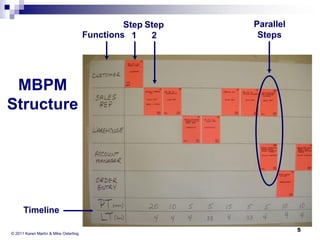
Step Step
Functions 1
2

Parallel
Steps

MBPM
Structure

Timeline
© 2011 Karen Martin & Mike Osterling

5
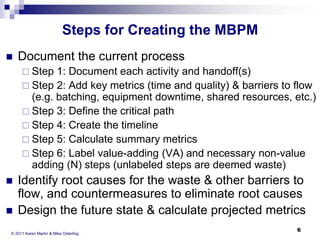
Steps for Creating the MBPM


Document the current process
 Step

1: Document each activity and handoff(s)
 Step 2: Add key metrics (time and quality) & barriers to flow
(e.g. batching, equipment downtime, shared resources, etc.)
 Step 3: Define the critical path
 Step 4: Create the timeline
 Step 5: Calculate summary metrics
 Step 6: Label value-adding (VA) and necessary non-value
adding (N) steps (unlabeled steps are deemed waste)



Identify root causes for the waste & other barriers to
flow, and countermeasures to eliminate root causes
Design the future state & calculate projected metrics

© 2011 Karen Martin & Mike Osterling

6
Why Capture the MBPM
Electronically?
Archive the team’s work
 Distribute the maps to remote locations
 Document the new standard work for the
process




Training/retraining staff
 Monitoring process performance


Communicate the impact of Kaizen
Events and other improvement activities

© 2011 Karen Martin & Mike Osterling

7
Product Information


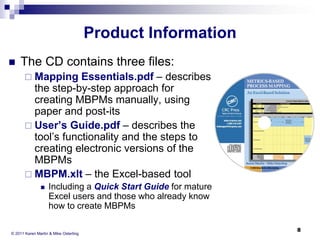
The CD contains three files:
Essentials.pdf – describes
the step-by-step approach for
creating MBPMs manually, using
paper and post-its
 User’s Guide.pdf – describes the
tool’s functionality and the steps to
creating electronic versions of the
MBPMs
 MBPM.xlt – the Excel-based tool
 Mapping



Including a Quick Start Guide for mature
Excel users and those who already know
how to create MBPMs

© 2011 Karen Martin & Mike Osterling

8
The Excel-Based Tool:
Easy to Use
Intuitive design
 Custom tool bar and pull-down menus
 Color-coded cells
 Automated metrics calculations
 Mistake-proofing audit feature
 Easily distribute electronic “read only”
versions of the process flow to nonlicensed users


© 2011 Karen Martin & Mike Osterling

9
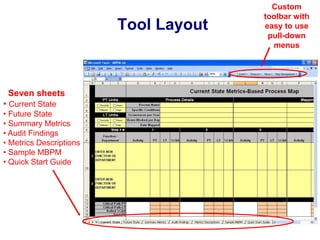
Tool Layout

Seven sheets
• Current State
• Future State
• Summary Metrics
• Audit Findings
• Metrics Descriptions
• Sample MBPM
• Quick Start Guide

Custom
toolbar with
easy to use
pull-down
menus
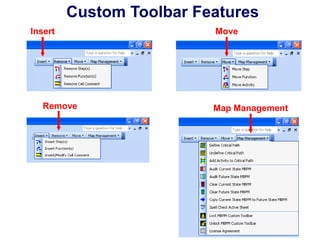
Custom Toolbar Features
Insert

Remove

Move

Map Management
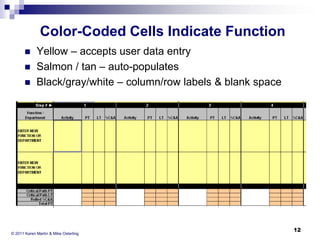
Color-Coded Cells Indicate Function




Yellow – accepts user data entry
Salmon / tan – auto-populates
Black/gray/white – column/row labels & blank space

© 2011 Karen Martin & Mike Osterling

12
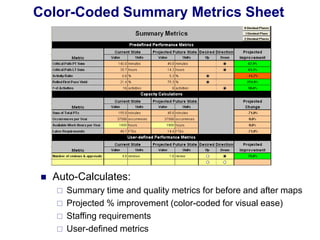
Color-Coded Summary Metrics Sheet



Auto-Calculates:





Summary time and quality metrics for before and after maps
Projected % improvement (color-coded for visual ease)
Staffing requirements
User-defined metrics
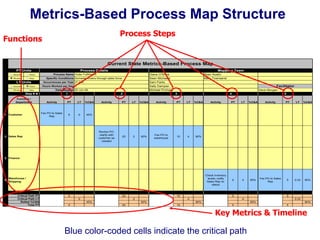
Metrics-Based Process Map Structure
Process Steps

Functions

Current State Metrics-Based Process Map

0

PT Units
1
0

Seconds

Hours

Minutes

Days

LT Units
15
6
-1
0

Seconds

Hours

Minutes

Days

Process Details
Specific Conditions Domestic orders through sales force
Occurrences per Year 37,500
Hours Worked per Day 8
Date Mapped 25-Jun-08

Step # ►
Function /
Department

1 Customer

Mapping Team
Diane O'Shea
Sean Michaels
Sam Parks
Sally Dampier
Michael Prichard

Process Name Order Fulfillment

1

2

Activity

PT

LT

%C&A

Fax PO to Sales
Rep

0

0

Ryan Austin
Mary Townsend

Facilitator
Dave Morgan
3

4

45%

PT

LT

%C&A

Activity

PT

LT

%C&A

Review PO;
clarify with
customer as
needed

20

2

90%

Fax PO to
warehouse

10

4

Activity

PT

LT

%C&A

Activity

PT

LT

%C&A

Check inventory
levels; notify
Sales Rep re:
status

2 Sales Rep

Activity

5

90%

5

4

95%

Fax PO to Sales
Rep

5

0.33

90%

5 Finance

6

Warehouse /
Shipping

Critical Path PT
Critical Path LT
Rolled %C&A
Total PT

0

20
0
45%

0

10
2
90%

20

5
4

5
4

90%
10

0.33
95%

5

90%
5

Key Metrics & Timeline

Blue color-coded cells indicate the critical path
Archiving your MPBM
5 Easy Steps
1.
2.
3.

Enter header information
Insert functions and steps
Create the current state map




4.

Enter activities & key metrics
Define the critical path
Audit the map

Create the future state map


Enter activities & key metrics
 Define the critical path
 Audit the map
5.

View the Summary Metrics Sheet

© 2011 Karen Martin & Mike Osterling

15
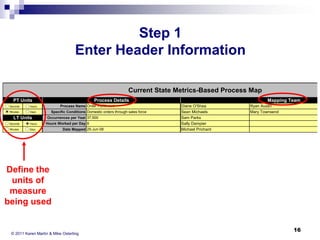
Step 1
Enter Header Information
Current State Metrics-Based Process Map
PT Units
Seconds
Minutes

Days

Process Details
Process Name Order Fulfillment

Hours

LT Units
Seconds

Hours

Minutes

Specific Conditions Domestic orders through sales force
Occurrences per Year 37,500
Hours Worked per Day 8

Days

Date Mapped 25-Jun-08

Mapping Team
Diane O'Shea
Sean Michaels
Sam Parks
Sally Dampier
Michael Prichard

Ryan Austin
Mary Townsend

D

Define the
units of
measure
being used

© 2011 Karen Martin & Mike Osterling

16
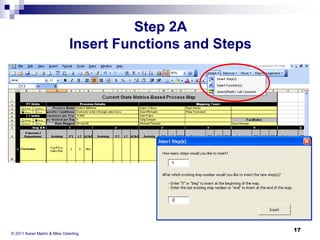
Step 2A
Insert Functions and Steps

© 2011 Karen Martin & Mike Osterling

17
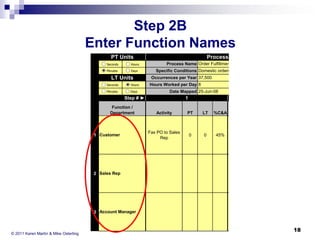
Step 2B
Enter Function Names
PT Units
1
0

Seconds

Hours

Minutes

Days

LT Units
15
6
-1
0

Seconds

Hours

Minutes

Days

Process Details
Process Name Order Fulfillment
Specific Conditions Domestic orders through sales force
Occurrences per Year 37,500
Hours Worked per Day 8
Date Mapped 25-Jun-08

Step # ►
Function /
Department

1 Customer

2 Sales Rep

1

2

Activity

PT

LT

%C&A

Fax PO to Sales
Rep

0

0

Activity

PT

LT

%C&A

45%

Review PO;
clarify with
customer as
needed

20

2

90%

3 Account Manager

© 2011 Karen Martin & Mike Osterling

18
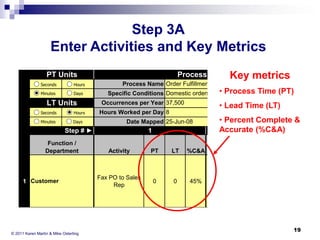
Step 3A
Enter Activities and Key Metrics
Process Details
Key

PT Units
1
0

Seconds

Hours

Minutes

Days

LT Units
15
6
-1
0

Seconds

Hours

Minutes

Days

Process Name Order Fulfillment

• Process Time
Specific Conditions Domestic orders through sales force
Occurrences per Year 37,500

1 Customer

© 2011 Karen MartinRep Osterling
2 Sales & Mike

(PT)

• Lead Time (LT)

Hours Worked per Day 8
Date Mapped 25-Jun-08

Step # ►
Function /
Department

metrics

1
Activity

PT

LT

%C&A

Fax PO to Sales
Rep

0

0

• Percent Complete &
Accurate (%C&A)
2
Activity

45%

Review PO;
clarify with
customer as

PT

LT

20

2

%C&A

19

90%
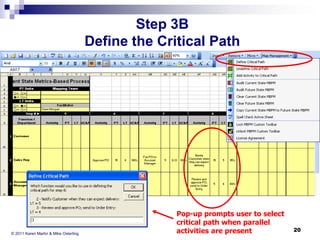
Step 3B
Define the Critical Path

© 2011 Karen Martin & Mike Osterling

Pop-up prompts user to select
critical path when parallel
activities are present

20
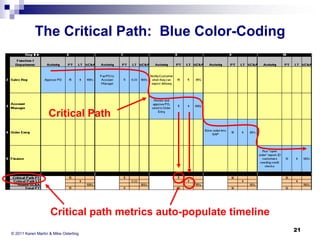
The Critical Path: Blue Color-Coding

Critical Path

Critical path metrics auto-populate timeline
© 2011 Karen Martin & Mike Osterling

21
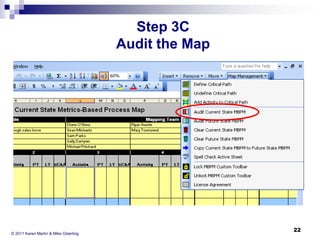
Step 3C
Audit the Map

© 2011 Karen Martin & Mike Osterling

22
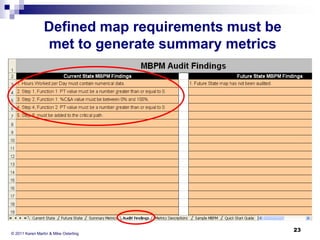
Defined map requirements must be
met to generate summary metrics

© 2011 Karen Martin & Mike Osterling

23
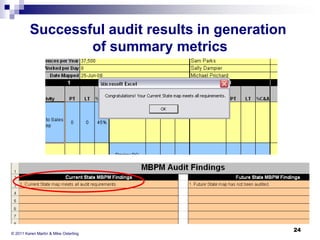
Successful audit results in generation
of summary metrics

© 2011 Karen Martin & Mike Osterling

24
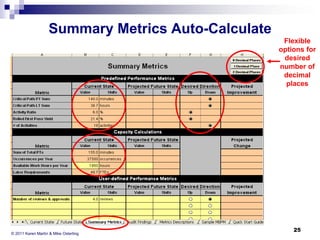
Summary Metrics Auto-Calculate
Flexible
options for
desired
number of
decimal
places

© 2011 Karen Martin & Mike Osterling

25
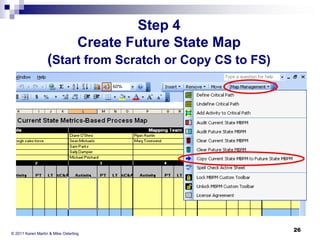
Step 4
Create Future State Map
(Start from Scratch or Copy CS to FS)

© 2011 Karen Martin & Mike Osterling

26
Step 4 (continued)
Document the Future State Map
Enter activities and key metrics
 Define the Future State Critical Path
 Audit the Future State Map


© 2011 Karen Martin & Mike Osterling

27
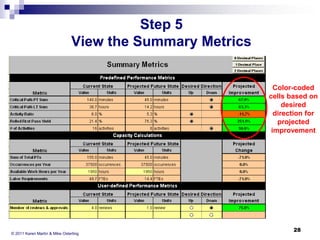
Step 5
View the Summary Metrics

Color-coded
cells based on
desired
direction for
projected
improvement

© 2011 Karen Martin & Mike Osterling

28
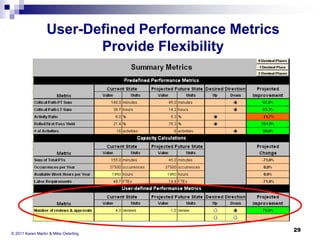
User-Defined Performance Metrics
Provide Flexibility

© 2011 Karen Martin & Mike Osterling

29
Summary








Different than VSM – Used to document the
micro-level current state for a process
Facilitates the design of an improved future state
Facilitates measuring and analyzing office,
service, and knowledge-work processes in terms
of both time and quality.
Measures the impact of improvements
Visual aid for training and monitoring process
performance
Effective tool to record key activities and calculate
the impact of Kaizen Events

© 2011 Karen Martin & Mike Osterling

30
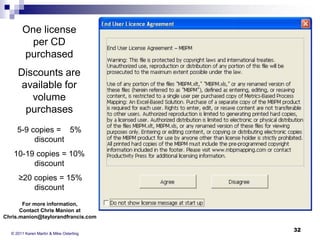
Licensing Information


Each CD provides one license only.
 Licensees

may create and/or edit maps.
 Others may view the maps but may not create
new or edit existing maps.
 The maps may be shared for viewing
purposes after using the “Lock Toolbar”
feature on the custom toolbar, which disables
much of the map’s functionality.

© 2011 Karen Martin & Mike Osterling

31
One license
per CD
purchased

Discounts are
available for
volume
purchases
5-9 copies = 5%
discount

10-19 copies = 10%
discount
≥20 copies = 15%
discount
For more information,
Contact Chris Manion at
Chris.manion@taylorandfrancis.com
© 2011 Karen Martin & Mike Osterling

32
Final Notes


Detailed information for creating metrics-based
process maps can be found in:
 Chapter

12 of The Kaizen Event Planner: Achieving
Rapid Improvements in Office, Service, and
Technical Environments, Productivity Press, October
2007.
 Mapping Essentials and User’s Guide included with
Metrics-Based Process Mapping: An Excel-Based
Solution, Productivity Press, July 2008.

© 2011 Karen Martin & Mike Osterling

33

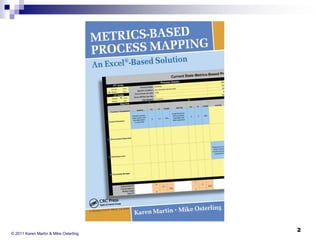
Metrics-Based Process Mapping: An Excel-Based Solution

  • 1.
    Metrics-Based Process Mapping Excel-Based Toolfor Mapping Office & Service Processes
  • 2.
    © 2011 KarenMartin & Mike Osterling 2
  • 3.
    Metrics-Based Process Mapping(MBPM): What is it? Structured method for process analysis and design, documenting standard work, and monitoring expected performance levels.  Visual methodology that integrates key time and quality metrics into conventional crossfunctional process maps.  © 2011 Karen Martin & Mike Osterling 3
  • 4.
    Metrics-Based Process Mapping(MBPM): Why use it?    An effective tool for supporting lean transformations in office, service, and knowledge work environments. Fills a void with existing process mapping techniques An easy-to-use tool that facilitates:  Gaining a deeper understanding of specific causes for the macro-level waste identified on a value stream map  Designing tactical-level improvements  Enables data-based decisions © 2011 Karen Martin & Mike Osterling 4
  • 5.
  • 6.
    Steps for Creatingthe MBPM  Document the current process  Step 1: Document each activity and handoff(s)  Step 2: Add key metrics (time and quality) & barriers to flow (e.g. batching, equipment downtime, shared resources, etc.)  Step 3: Define the critical path  Step 4: Create the timeline  Step 5: Calculate summary metrics  Step 6: Label value-adding (VA) and necessary non-value adding (N) steps (unlabeled steps are deemed waste)   Identify root causes for the waste & other barriers to flow, and countermeasures to eliminate root causes Design the future state & calculate projected metrics © 2011 Karen Martin & Mike Osterling 6
  • 7.
    Why Capture theMBPM Electronically? Archive the team’s work  Distribute the maps to remote locations  Document the new standard work for the process   Training/retraining staff  Monitoring process performance  Communicate the impact of Kaizen Events and other improvement activities © 2011 Karen Martin & Mike Osterling 7
  • 8.
    Product Information  The CDcontains three files: Essentials.pdf – describes the step-by-step approach for creating MBPMs manually, using paper and post-its  User’s Guide.pdf – describes the tool’s functionality and the steps to creating electronic versions of the MBPMs  MBPM.xlt – the Excel-based tool  Mapping  Including a Quick Start Guide for mature Excel users and those who already know how to create MBPMs © 2011 Karen Martin & Mike Osterling 8
  • 9.
    The Excel-Based Tool: Easyto Use Intuitive design  Custom tool bar and pull-down menus  Color-coded cells  Automated metrics calculations  Mistake-proofing audit feature  Easily distribute electronic “read only” versions of the process flow to nonlicensed users  © 2011 Karen Martin & Mike Osterling 9
  • 10.
    Tool Layout Seven sheets •Current State • Future State • Summary Metrics • Audit Findings • Metrics Descriptions • Sample MBPM • Quick Start Guide Custom toolbar with easy to use pull-down menus
  • 11.
  • 12.
    Color-Coded Cells IndicateFunction    Yellow – accepts user data entry Salmon / tan – auto-populates Black/gray/white – column/row labels & blank space © 2011 Karen Martin & Mike Osterling 12
  • 13.
    Color-Coded Summary MetricsSheet  Auto-Calculates:     Summary time and quality metrics for before and after maps Projected % improvement (color-coded for visual ease) Staffing requirements User-defined metrics
  • 14.
    Metrics-Based Process MapStructure Process Steps Functions Current State Metrics-Based Process Map 0 PT Units 1 0 Seconds Hours Minutes Days LT Units 15 6 -1 0 Seconds Hours Minutes Days Process Details Specific Conditions Domestic orders through sales force Occurrences per Year 37,500 Hours Worked per Day 8 Date Mapped 25-Jun-08 Step # ► Function / Department 1 Customer Mapping Team Diane O'Shea Sean Michaels Sam Parks Sally Dampier Michael Prichard Process Name Order Fulfillment 1 2 Activity PT LT %C&A Fax PO to Sales Rep 0 0 Ryan Austin Mary Townsend Facilitator Dave Morgan 3 4 45% PT LT %C&A Activity PT LT %C&A Review PO; clarify with customer as needed 20 2 90% Fax PO to warehouse 10 4 Activity PT LT %C&A Activity PT LT %C&A Check inventory levels; notify Sales Rep re: status 2 Sales Rep Activity 5 90% 5 4 95% Fax PO to Sales Rep 5 0.33 90% 5 Finance 6 Warehouse / Shipping Critical Path PT Critical Path LT Rolled %C&A Total PT 0 20 0 45% 0 10 2 90% 20 5 4 5 4 90% 10 0.33 95% 5 90% 5 Key Metrics & Timeline Blue color-coded cells indicate the critical path
  • 15.
    Archiving your MPBM 5Easy Steps 1. 2. 3. Enter header information Insert functions and steps Create the current state map    4. Enter activities & key metrics Define the critical path Audit the map Create the future state map  Enter activities & key metrics  Define the critical path  Audit the map 5. View the Summary Metrics Sheet © 2011 Karen Martin & Mike Osterling 15
  • 16.
    Step 1 Enter HeaderInformation Current State Metrics-Based Process Map PT Units Seconds Minutes Days Process Details Process Name Order Fulfillment Hours LT Units Seconds Hours Minutes Specific Conditions Domestic orders through sales force Occurrences per Year 37,500 Hours Worked per Day 8 Days Date Mapped 25-Jun-08 Mapping Team Diane O'Shea Sean Michaels Sam Parks Sally Dampier Michael Prichard Ryan Austin Mary Townsend D Define the units of measure being used © 2011 Karen Martin & Mike Osterling 16
  • 17.
    Step 2A Insert Functionsand Steps © 2011 Karen Martin & Mike Osterling 17
  • 18.
    Step 2B Enter FunctionNames PT Units 1 0 Seconds Hours Minutes Days LT Units 15 6 -1 0 Seconds Hours Minutes Days Process Details Process Name Order Fulfillment Specific Conditions Domestic orders through sales force Occurrences per Year 37,500 Hours Worked per Day 8 Date Mapped 25-Jun-08 Step # ► Function / Department 1 Customer 2 Sales Rep 1 2 Activity PT LT %C&A Fax PO to Sales Rep 0 0 Activity PT LT %C&A 45% Review PO; clarify with customer as needed 20 2 90% 3 Account Manager © 2011 Karen Martin & Mike Osterling 18
  • 19.
    Step 3A Enter Activitiesand Key Metrics Process Details Key PT Units 1 0 Seconds Hours Minutes Days LT Units 15 6 -1 0 Seconds Hours Minutes Days Process Name Order Fulfillment • Process Time Specific Conditions Domestic orders through sales force Occurrences per Year 37,500 1 Customer © 2011 Karen MartinRep Osterling 2 Sales & Mike (PT) • Lead Time (LT) Hours Worked per Day 8 Date Mapped 25-Jun-08 Step # ► Function / Department metrics 1 Activity PT LT %C&A Fax PO to Sales Rep 0 0 • Percent Complete & Accurate (%C&A) 2 Activity 45% Review PO; clarify with customer as PT LT 20 2 %C&A 19 90%
  • 20.
    Step 3B Define theCritical Path © 2011 Karen Martin & Mike Osterling Pop-up prompts user to select critical path when parallel activities are present 20
  • 21.
    The Critical Path:Blue Color-Coding Critical Path Critical path metrics auto-populate timeline © 2011 Karen Martin & Mike Osterling 21
  • 22.
    Step 3C Audit theMap © 2011 Karen Martin & Mike Osterling 22
  • 23.
    Defined map requirementsmust be met to generate summary metrics © 2011 Karen Martin & Mike Osterling 23
  • 24.
    Successful audit resultsin generation of summary metrics © 2011 Karen Martin & Mike Osterling 24
  • 25.
    Summary Metrics Auto-Calculate Flexible optionsfor desired number of decimal places © 2011 Karen Martin & Mike Osterling 25
  • 26.
    Step 4 Create FutureState Map (Start from Scratch or Copy CS to FS) © 2011 Karen Martin & Mike Osterling 26
  • 27.
    Step 4 (continued) Documentthe Future State Map Enter activities and key metrics  Define the Future State Critical Path  Audit the Future State Map  © 2011 Karen Martin & Mike Osterling 27
  • 28.
    Step 5 View theSummary Metrics Color-coded cells based on desired direction for projected improvement © 2011 Karen Martin & Mike Osterling 28
  • 29.
    User-Defined Performance Metrics ProvideFlexibility © 2011 Karen Martin & Mike Osterling 29
  • 30.
    Summary       Different than VSM– Used to document the micro-level current state for a process Facilitates the design of an improved future state Facilitates measuring and analyzing office, service, and knowledge-work processes in terms of both time and quality. Measures the impact of improvements Visual aid for training and monitoring process performance Effective tool to record key activities and calculate the impact of Kaizen Events © 2011 Karen Martin & Mike Osterling 30
  • 31.
    Licensing Information  Each CDprovides one license only.  Licensees may create and/or edit maps.  Others may view the maps but may not create new or edit existing maps.  The maps may be shared for viewing purposes after using the “Lock Toolbar” feature on the custom toolbar, which disables much of the map’s functionality. © 2011 Karen Martin & Mike Osterling 31
  • 32.
    One license per CD purchased Discountsare available for volume purchases 5-9 copies = 5% discount 10-19 copies = 10% discount ≥20 copies = 15% discount For more information, Contact Chris Manion at Chris.manion@taylorandfrancis.com © 2011 Karen Martin & Mike Osterling 32
  • 33.
    Final Notes  Detailed informationfor creating metrics-based process maps can be found in:  Chapter 12 of The Kaizen Event Planner: Achieving Rapid Improvements in Office, Service, and Technical Environments, Productivity Press, October 2007.  Mapping Essentials and User’s Guide included with Metrics-Based Process Mapping: An Excel-Based Solution, Productivity Press, July 2008. © 2011 Karen Martin & Mike Osterling 33