Search Techniques:
Twitter and the Web
       How to:
       Create effective Twitter searches
       Get more out of Google searches
To recap:
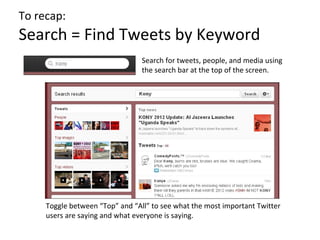
Search = Find Tweets by Keyword
                                 Search for tweets, people, and media using
                                 the search bar at the top of the screen.


     Toggle between “Top” and “All” to see what the most important Twitter
     users are saying and what everyone is saying.
To recap:
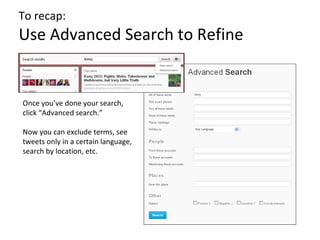
Use Advanced Search to Refine


Once you’ve done your search,
click “Advanced search.”

Now you can exclude terms, see
tweets only in a certain language,
search by location, etc.
To recap:
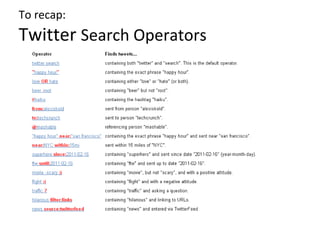
Twitter Search Operators
Refining Your Twitter Search
Are there key words you can exclude to narrow your search?
Use the - operator
Are there particular phrases that will make your search more
specific?
Use the “ ” operator
Are there multiple spellings or multiple key terms you can
include?
Use the OR operator
Are there particular hashtags in use?
Search only by hashtag, or include hashtags in your OR search
Are you getting a lot of results you can’t read?
Use a lang: search to restrict the languages
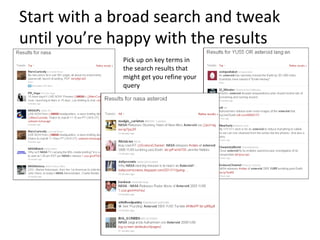
Start with a broad search and tweak
until you’re happy with the results
             Pick up on key terms in
             the search results that
             might get you refine your
             query
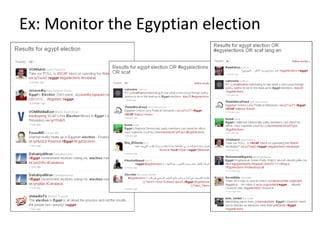
Ex: Monitor the Egyptian election
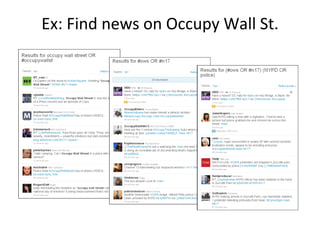
Ex: Find news on Occupy Wall St.
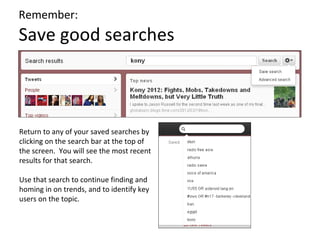
Remember:
Save good searches


Return to any of your saved searches by
clicking on the search bar at the top of
the screen. You will see the most recent
results for that search.

Use that search to continue finding and
homing in on trends, and to identify key
users on the topic.
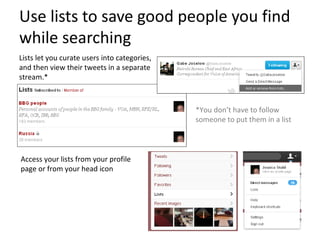
Use lists to save good people you find
while searching
Lists let you curate users into categories,
and then view their tweets in a separate
stream.*


                                              *You don’t have to follow
                                              someone to put them in a list


Access your lists from your profile
page or from your head icon
Tools to Try
Topsy.com
Search Twitter archives and sort by relevance or date. Search
includes photos, videos and links shared on Twitter, users
mentioned on Twitter and Google Plus content.

Twitterpowersearch.com
Shows searches in side-by-side streams so you can easily test search
terms against each other

Trendsmap.com
Browse regional trending topics

Sulia.com
Identifies the most influential tweeters around various topics

Addictomatic.com
See results from Twitter and many other online sources all at once
Twitter searches are often a good starting point, and one of the
best ways to track a topic over time, but don’t neglect other
avenues for finding information…


            Google is still your friend!
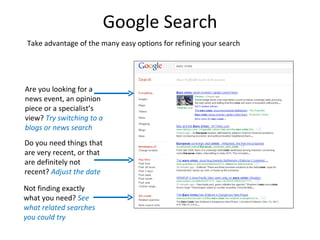
Google Search
 Take advantage of the many easy options for refining your search


Are you looking for a
news event, an opinion
piece or a specialist’s
view? Try switching to a
blogs or news search
Do you need things that
are very recent, or that
are definitely not
recent? Adjust the date

Not finding exactly
what you need? See
what related searches
you could try
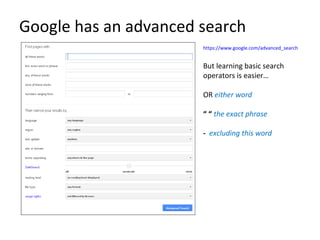
Google has an advanced search
                       https://www.google.com/advanced_search


                       But learning basic search
                       operators is easier…

                       OR either word

                       “ “ the exact phrase

                       - excluding this word
Useful operators you don’t know
*
The “wildcard” – used as a placeholder for any word.
ex) Obama voted * would find “Obama voted yes” and “Obama voted
no”

~
Includes words similar to the word you specify.
ex) ~glossary would also find dictionary

related:
Finds sites similar to the site you specify.
ex) related:voanews.com would find websites similar to VOA

site:
Searches within one specific website.
ex) Putin site:voanews.com would find mentions of the name Putin on
VOA
                                    More: http://www.googleguide.com/print/adv_op_ref.pdf
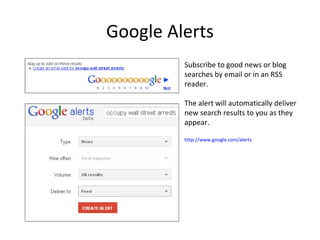
Google Alerts
         Subscribe to good news or blog
         searches by email or in an RSS
         reader.

         The alert will automatically deliver
         new search results to you as they
         appear.

         http://www.google.com/alerts
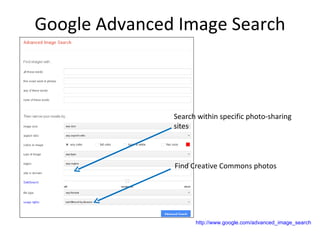
Google Advanced Image Search


               Search within specific photo-sharing
               sites


               Find Creative Commons photos


                     http://www.google.com/advanced_image_search
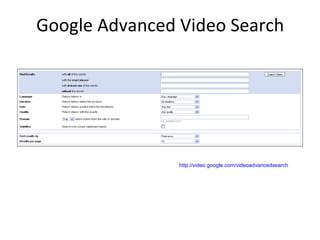
Google Advanced Video Search


                http://video.google.com/videoadvancedsearch
Tools to Try
Google Keyword Tool, Google Insights for Search
Find and compare related keywords, and see how keywords
are trending

Google Reader
Google’s RSS reader for subscribing to blogs and search
alerts you want to follow

Google Plus
Another place to see what people are sharing and saying.
Allows you to save and track web/social searches

Advanced Search Techniques

  • 1.
    Search Techniques: Twitter andthe Web How to: Create effective Twitter searches Get more out of Google searches
  • 2.
    To recap: Search =Find Tweets by Keyword Search for tweets, people, and media using the search bar at the top of the screen. Toggle between “Top” and “All” to see what the most important Twitter users are saying and what everyone is saying.
  • 3.
    To recap: Use AdvancedSearch to Refine Once you’ve done your search, click “Advanced search.” Now you can exclude terms, see tweets only in a certain language, search by location, etc.
  • 4.
  • 5.
    Refining Your TwitterSearch Are there key words you can exclude to narrow your search? Use the - operator Are there particular phrases that will make your search more specific? Use the “ ” operator Are there multiple spellings or multiple key terms you can include? Use the OR operator Are there particular hashtags in use? Search only by hashtag, or include hashtags in your OR search Are you getting a lot of results you can’t read? Use a lang: search to restrict the languages
  • 6.
    Start with abroad search and tweak until you’re happy with the results Pick up on key terms in the search results that might get you refine your query
  • 7.
    Ex: Monitor theEgyptian election
  • 8.
    Ex: Find newson Occupy Wall St.
  • 9.
    Remember: Save good searches Returnto any of your saved searches by clicking on the search bar at the top of the screen. You will see the most recent results for that search. Use that search to continue finding and homing in on trends, and to identify key users on the topic.
  • 10.
    Use lists tosave good people you find while searching Lists let you curate users into categories, and then view their tweets in a separate stream.* *You don’t have to follow someone to put them in a list Access your lists from your profile page or from your head icon
  • 11.
    Tools to Try Topsy.com SearchTwitter archives and sort by relevance or date. Search includes photos, videos and links shared on Twitter, users mentioned on Twitter and Google Plus content. Twitterpowersearch.com Shows searches in side-by-side streams so you can easily test search terms against each other Trendsmap.com Browse regional trending topics Sulia.com Identifies the most influential tweeters around various topics Addictomatic.com See results from Twitter and many other online sources all at once
  • 12.
    Twitter searches areoften a good starting point, and one of the best ways to track a topic over time, but don’t neglect other avenues for finding information… Google is still your friend!
  • 13.
    Google Search Takeadvantage of the many easy options for refining your search Are you looking for a news event, an opinion piece or a specialist’s view? Try switching to a blogs or news search Do you need things that are very recent, or that are definitely not recent? Adjust the date Not finding exactly what you need? See what related searches you could try
  • 14.
    Google has anadvanced search https://www.google.com/advanced_search But learning basic search operators is easier… OR either word “ “ the exact phrase - excluding this word
  • 15.
    Useful operators youdon’t know * The “wildcard” – used as a placeholder for any word. ex) Obama voted * would find “Obama voted yes” and “Obama voted no” ~ Includes words similar to the word you specify. ex) ~glossary would also find dictionary related: Finds sites similar to the site you specify. ex) related:voanews.com would find websites similar to VOA site: Searches within one specific website. ex) Putin site:voanews.com would find mentions of the name Putin on VOA More: http://www.googleguide.com/print/adv_op_ref.pdf
  • 16.
    Google Alerts Subscribe to good news or blog searches by email or in an RSS reader. The alert will automatically deliver new search results to you as they appear. http://www.google.com/alerts
  • 17.
    Google Advanced ImageSearch Search within specific photo-sharing sites Find Creative Commons photos http://www.google.com/advanced_image_search
  • 18.
    Google Advanced VideoSearch http://video.google.com/videoadvancedsearch
  • 19.
    Tools to Try GoogleKeyword Tool, Google Insights for Search Find and compare related keywords, and see how keywords are trending Google Reader Google’s RSS reader for subscribing to blogs and search alerts you want to follow Google Plus Another place to see what people are sharing and saying. Allows you to save and track web/social searches