Lightning Customization
Roadmap
Making Lightning Experience great without code!
March 28, 2018
Eric Jacobson
VP, Product Management
Lightning Customization
@esjacob
Joe Ryan
VP, Product Management
Lightning Experience
Statement under the Private Securities Litigation Reform Act of 1995:
This presentation may contain forward-looking statements that involve risks, uncertainties, and assumptions. If any such uncertainties materialize
or if any of the assumptions proves incorrect, the results of salesforce.com, inc. could differ materially from the results expressed or implied by the
forward-looking statements we make. All statements other than statements of historical fact could be deemed forward-looking, including any

projections of product or service availability, subscriber growth, earnings, revenues, or other financial items and any statements regarding
strategies or plans of management for future operations, statements of belief, any statements concerning new, planned, or upgraded services or
technology developments and customer contracts or use of our services.

The risks and uncertainties referred to above include – but are not limited to – risks associated with developing and delivering new functionality for
our service, new products and services, our new business model, our past operating losses, possible fluctuations in our operating results and rate
of growth, interruptions or delays in our Web hosting, breach of our security measures, the outcome of any litigation, risks associated with
completed and any possible mergers and acquisitions, the immature market in which we operate, our relatively limited operating history, our
ability to expand, retain, and motivate our employees and manage our growth, new releases of our service and successful customer deployment,
our limited history reselling non-salesforce.com products, and utilization and selling to larger enterprise customers. Further information on
potential factors that could affect the financial results of salesforce.com, inc. is included in our annual report on Form 10-K for the most recent
fiscal year and in our quarterly report on Form 10-Q for the most recent fiscal quarter. These documents and others containing important
disclosures are available on the SEC Filings section of the Investor Information section of our Web site.
Any unreleased services or features referenced in this or other presentations, press releases or public statements are not currently available and
may not be delivered on time or at all. Customers who purchase our services should make the purchase decisions based upon features that are
currently available. Salesforce.com, inc. assumes no obligation and does not intend to update these forward-looking statements.
Forward-Looking Statement
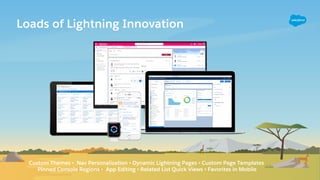
Loads of Lightning Innovation
Custom Themes • Nav Personalization • Dynamic Lightning Pages • Custom Page Templates
Pinned Console Regions • App Editing • Related List Quick Views • Favorites in Mobile
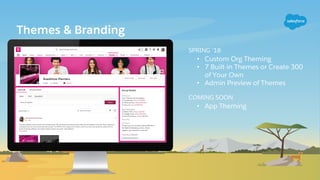
Themes & Branding
SPRING ‘18
• Custom Org Theming
• 7 Built-in Themes or Create 300
of Your Own
• Admin Preview of Themes
COMING SOON
• App Theming
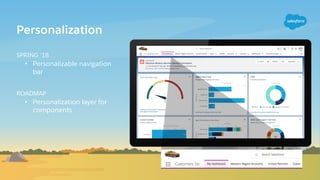
Personalization
SPRING ‘18
• Personalizable navigation
bar
ROADMAP
• Personalization layer for
components
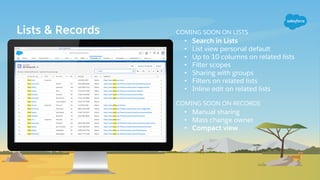
Lists & Records COMING SOON ON LISTS
• Search in Lists
• List view personal default
• Up to 10 columns on related lists
• Filter scopes
• Sharing with groups
• Filters on related lists
• Inline edit on related lists
COMING SOON ON RECORDS
• Manual sharing
• Mass change owner
• Compact view
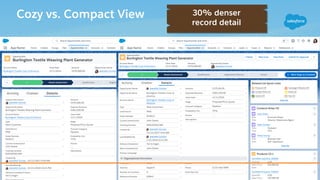
Cozy vs. Compact View 30% denser
record detail
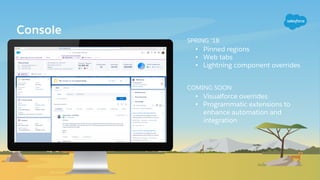
Console
SPRING ‘18
• Pinned regions
• Web tabs
• Lightning component overrides
COMING SOON
• Visualforce overrides
• Programmatic extensions to
enhance automation and
integration
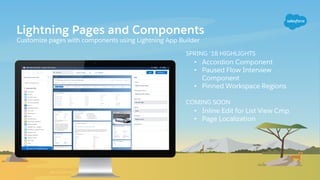
Lightning Pages and Components
Customize pages with components using Lightning App Builder
SPRING ‘18 HIGHLIGHTS
• Accordion Component
• Paused Flow Interview
Component
• Pinned Workspace Regions
COMING SOON
• Inline Edit for List View Cmp
• Page Localization
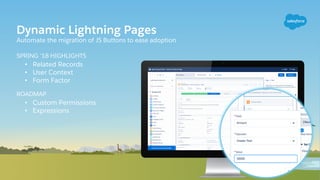
Dynamic Lightning Pages
Automate the migration of JS Buttons to ease adoption
SPRING ‘18 HIGHLIGHTS
• Related Records
• User Context
• Form Factor
ROADMAP
• Custom Permissions
• Expressions
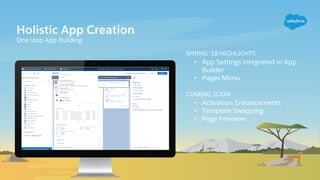
Holistic App Creation
One stop App Building
SPRING ‘18 HIGHLIGHTS
• App Settings integrated in App
Builder
• Pages Menu
COMING SOON
• Activation Enhancements
• Template Swapping
• Page Previews
DEMO
UP NEXT
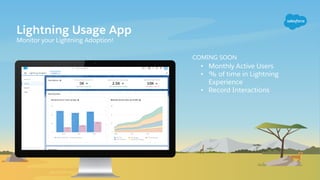
Lightning Usage App
Monitor your Lightning Adoption!
COMING SOON
• Monthly Active Users
• % of time in Lightning
Experience
• Record Interactions
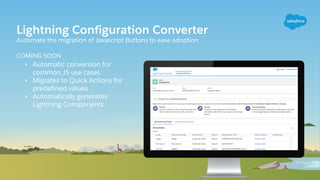
Lightning Configuration Converter
Automate the migration of Javascript Buttons to ease adoption
COMING SOON
• Automatic conversion for
common JS use cases
• Migrates to Quick Actions for
predefined values
• Automatically generates
Lightning Components
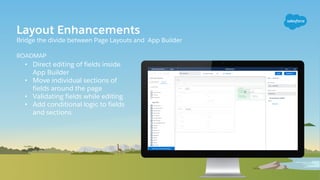
Layout Enhancements
Bridge the divide between Page Layouts and App Builder
ROADMAP
• Direct editing of fields inside
App Builder
• Move individual sections of
fields around the page
• Validating fields while editing
• Add conditional logic to fields
and sections
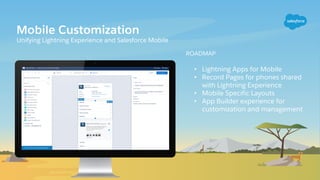
Mobile Customization
Unifying Lightning Experience and Salesforce Mobile
ROADMAP
• Lightning Apps for Mobile
• Record Pages for phones shared
with Lightning Experience
• Mobile Specific Layouts
• App Builder experience for
customization and management
Q&A
Platform - Medium - Left
This layout push animates seamlessly to next layout
Platform - Medium - Right
This layout push animates seamlessly from next layout
Platform - High - Left
This layout push animates seamlessly to next layout
Platform - High - Right
This layout push animates seamlessly to next layout
Sky - Push Transition
This layout push animates seamlessly to and from next layout
Sky - Stand Alone - Normal
Subtitle text
Sky - Stand Alone - Light
Subtitle text
Tiny Landscape - Normal
Tiny Landscape - Light
No Background
Speaker Name
Speaker Title
@placeholder
Speaker Name
Speaker Title
@placeholder
Speaker Title
@placeholder
Speaker Name
Speaker Title
@placeholder
Speaker Name
Speaker
Name
Speaker Title
@placeholder
Speaker Title
@placeholder
Speaker
Name
Speaker Title
@placeholder
Speaker
Name
Speaker Title
@placeholder
Speaker
Name
Speaker Title
@placeholder
Speaker
Name
Speaker Name
Speaker Title
@placeholder
Speaker Title
@placeholder
Speaker Name
Name
Company
Panel Host
Insert
photo
here
Insert
photo
here
Insert
photo
here
Speaker
Name
Speaker Title
@placeholder
Speaker Title
@placeholder
Speaker
Name
Speaker Title
@placeholder
Speaker
Name
Speaker Title
@placeholder
Speaker
Name
Name
Company
Panel Host
Insert
photo
here
Insert
photo
here
Insert
photo
here
Presentation Chapter Outline
Chapter 1 title Chapter 2 title Chapter 3 title
Quote
Author
Segue
Subtitle
DEMO
UP NEXT
LOGO HERE
Banner and Callouts
Place white text over these to create infographic and callouts Editable in Slide
Name of Trailblazer
Title, Name of Company
Sign Posts
Place white text over these to create callouts
TrailheaDX Characters
TrailheaDX styled characters
TrailheaDX Iconography
Learn Connect
Have
Fun
Give Back
Healthcare
Reward
s
Money &
Finance
Organization
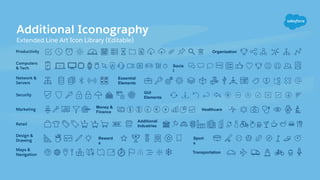
Additional Iconography
Extended Line Art Icon Library (Editable)
Essential
Elements
Socia
l
Additional
Industries
Sport
s
Transportation
GUI
Elements
Maps &
Navigation
Design &
Drawing
Productivity
Network &
Servers
Computers
& Tech
Marketing
Retail
Security
iPadAir Vertical 2
iPhone7
iPadAir Horizontal 2
Galaxy 7
Tablets, Phones, and Watches
Devices are to scale in relationship to one another, use this slide as a reference
Apple
Watch
Place device screen
Place device screen Place
device
screen
Place
device
screen
Place
device
screen
Place device screen Place device screen
Computers
Macbook Pro Retina
Display
(Browser bar is removable)
Thunderbolt Monitor for Desktop
(Browser bar is removable)
Dell Laptop Dell Monitor
Place device screen Place device screen
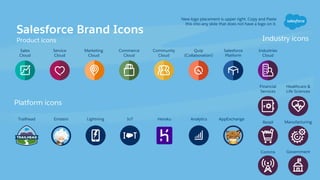
Salesforce Brand Icons
Product icons
Quip
(Collaboration)
Industries
Cloud
Service
Cloud
Sales
Cloud
Commerce
Cloud
Trailhead Lightning Analytics AppExchangeHerokuIoTEinstein
Salesforce
Platform
Financial
Services
Retail
Healthcare &
Life Sciences
New logo placement is upper right. Copy and Paste
this into any slide that does not have a logo on it.
Marketing
Cloud
Community
Cloud
Manufacturing
Comms Government
Platform icons
Industry icons

Salesforce Lightning Customization Roadmap (TDX18)

  • 2.
    Lightning Customization Roadmap Making LightningExperience great without code! March 28, 2018
  • 3.
    Eric Jacobson VP, ProductManagement Lightning Customization @esjacob Joe Ryan VP, Product Management Lightning Experience
  • 4.
    Statement under thePrivate Securities Litigation Reform Act of 1995: This presentation may contain forward-looking statements that involve risks, uncertainties, and assumptions. If any such uncertainties materialize or if any of the assumptions proves incorrect, the results of salesforce.com, inc. could differ materially from the results expressed or implied by the forward-looking statements we make. All statements other than statements of historical fact could be deemed forward-looking, including any projections of product or service availability, subscriber growth, earnings, revenues, or other financial items and any statements regarding strategies or plans of management for future operations, statements of belief, any statements concerning new, planned, or upgraded services or technology developments and customer contracts or use of our services. The risks and uncertainties referred to above include – but are not limited to – risks associated with developing and delivering new functionality for our service, new products and services, our new business model, our past operating losses, possible fluctuations in our operating results and rate of growth, interruptions or delays in our Web hosting, breach of our security measures, the outcome of any litigation, risks associated with completed and any possible mergers and acquisitions, the immature market in which we operate, our relatively limited operating history, our ability to expand, retain, and motivate our employees and manage our growth, new releases of our service and successful customer deployment, our limited history reselling non-salesforce.com products, and utilization and selling to larger enterprise customers. Further information on potential factors that could affect the financial results of salesforce.com, inc. is included in our annual report on Form 10-K for the most recent fiscal year and in our quarterly report on Form 10-Q for the most recent fiscal quarter. These documents and others containing important disclosures are available on the SEC Filings section of the Investor Information section of our Web site. Any unreleased services or features referenced in this or other presentations, press releases or public statements are not currently available and may not be delivered on time or at all. Customers who purchase our services should make the purchase decisions based upon features that are currently available. Salesforce.com, inc. assumes no obligation and does not intend to update these forward-looking statements. Forward-Looking Statement
  • 5.
    Loads of LightningInnovation Custom Themes • Nav Personalization • Dynamic Lightning Pages • Custom Page Templates Pinned Console Regions • App Editing • Related List Quick Views • Favorites in Mobile
  • 6.
    Themes & Branding SPRING‘18 • Custom Org Theming • 7 Built-in Themes or Create 300 of Your Own • Admin Preview of Themes COMING SOON • App Theming
  • 7.
    Personalization SPRING ‘18 • Personalizablenavigation bar ROADMAP • Personalization layer for components
  • 8.
    Lists & RecordsCOMING SOON ON LISTS • Search in Lists • List view personal default • Up to 10 columns on related lists • Filter scopes • Sharing with groups • Filters on related lists • Inline edit on related lists COMING SOON ON RECORDS • Manual sharing • Mass change owner • Compact view
  • 9.
    Cozy vs. CompactView 30% denser record detail
  • 10.
    Console SPRING ‘18 • Pinnedregions • Web tabs • Lightning component overrides COMING SOON • Visualforce overrides • Programmatic extensions to enhance automation and integration
  • 11.
    Lightning Pages andComponents Customize pages with components using Lightning App Builder SPRING ‘18 HIGHLIGHTS • Accordion Component • Paused Flow Interview Component • Pinned Workspace Regions COMING SOON • Inline Edit for List View Cmp • Page Localization
  • 12.
    Dynamic Lightning Pages Automatethe migration of JS Buttons to ease adoption SPRING ‘18 HIGHLIGHTS • Related Records • User Context • Form Factor ROADMAP • Custom Permissions • Expressions
  • 13.
    Holistic App Creation Onestop App Building SPRING ‘18 HIGHLIGHTS • App Settings integrated in App Builder • Pages Menu COMING SOON • Activation Enhancements • Template Swapping • Page Previews
  • 14.
  • 15.
    Lightning Usage App Monitoryour Lightning Adoption! COMING SOON • Monthly Active Users • % of time in Lightning Experience • Record Interactions
  • 16.
    Lightning Configuration Converter Automatethe migration of Javascript Buttons to ease adoption COMING SOON • Automatic conversion for common JS use cases • Migrates to Quick Actions for predefined values • Automatically generates Lightning Components
  • 17.
    Layout Enhancements Bridge thedivide between Page Layouts and App Builder ROADMAP • Direct editing of fields inside App Builder • Move individual sections of fields around the page • Validating fields while editing • Add conditional logic to fields and sections
  • 18.
    Mobile Customization Unifying LightningExperience and Salesforce Mobile ROADMAP • Lightning Apps for Mobile • Record Pages for phones shared with Lightning Experience • Mobile Specific Layouts • App Builder experience for customization and management
  • 19.
  • 21.
    Platform - Medium- Left This layout push animates seamlessly to next layout
  • 22.
    Platform - Medium- Right This layout push animates seamlessly from next layout
  • 23.
    Platform - High- Left This layout push animates seamlessly to next layout
  • 24.
    Platform - High- Right This layout push animates seamlessly to next layout
  • 25.
    Sky - PushTransition This layout push animates seamlessly to and from next layout
  • 26.
    Sky - StandAlone - Normal Subtitle text
  • 27.
    Sky - StandAlone - Light Subtitle text
  • 28.
  • 29.
  • 30.
  • 31.
  • 32.
    Speaker Name Speaker Title @placeholder SpeakerTitle @placeholder Speaker Name Speaker Title @placeholder Speaker Name
  • 33.
    Speaker Name Speaker Title @placeholder Speaker Title @placeholder Speaker Name SpeakerTitle @placeholder Speaker Name Speaker Title @placeholder Speaker Name Speaker Title @placeholder Speaker Name
  • 34.
    Speaker Name Speaker Title @placeholder SpeakerTitle @placeholder Speaker Name Name Company Panel Host Insert photo here Insert photo here Insert photo here
  • 35.
    Speaker Name Speaker Title @placeholder Speaker Title @placeholder Speaker Name SpeakerTitle @placeholder Speaker Name Speaker Title @placeholder Speaker Name Name Company Panel Host Insert photo here Insert photo here Insert photo here
  • 36.
    Presentation Chapter Outline Chapter1 title Chapter 2 title Chapter 3 title
  • 37.
  • 38.
  • 39.
  • 40.
    Banner and Callouts Placewhite text over these to create infographic and callouts Editable in Slide Name of Trailblazer Title, Name of Company
  • 41.
    Sign Posts Place whitetext over these to create callouts
  • 42.
  • 43.
  • 44.
    Healthcare Reward s Money & Finance Organization Additional Iconography ExtendedLine Art Icon Library (Editable) Essential Elements Socia l Additional Industries Sport s Transportation GUI Elements Maps & Navigation Design & Drawing Productivity Network & Servers Computers & Tech Marketing Retail Security
  • 45.
    iPadAir Vertical 2 iPhone7 iPadAirHorizontal 2 Galaxy 7 Tablets, Phones, and Watches Devices are to scale in relationship to one another, use this slide as a reference Apple Watch Place device screen Place device screen Place device screen Place device screen Place device screen
  • 46.
    Place device screenPlace device screen Computers Macbook Pro Retina Display (Browser bar is removable) Thunderbolt Monitor for Desktop (Browser bar is removable) Dell Laptop Dell Monitor Place device screen Place device screen
  • 47.
    Salesforce Brand Icons Producticons Quip (Collaboration) Industries Cloud Service Cloud Sales Cloud Commerce Cloud Trailhead Lightning Analytics AppExchangeHerokuIoTEinstein Salesforce Platform Financial Services Retail Healthcare & Life Sciences New logo placement is upper right. Copy and Paste this into any slide that does not have a logo on it. Marketing Cloud Community Cloud Manufacturing Comms Government Platform icons Industry icons