


Flexibility and
Standardization Using
Dynamic IO
Addressing and
Option Handling
David Berno, DMC Inc
usa.siemens.com/summitUnrestricted © Siemens 2019
Unrestricted © Siemens Industry, Inc. 2019
Page 2
2019 Automation Summit
• Title:Flexibility and Standardization Using Dynamic IO Addressing and Option Handling
• Track: PE
• Presenter: David Berno
• Company: DMC
• Session # (for your survey): 11.2
DMC Overview
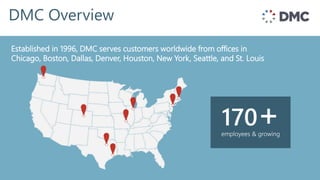
Established in 1996, offices in Chicago, Boston, &
Denver and customers throughout the world
Established in 1996, DMC serves customers worldwide from offices in
Chicago, Boston, Dallas, Denver, Houston, New York, Seattle, and St. Louis
employees & growing
170+
DMC has the highest number of S7 certified engineers in the US.
Siemens Expertise
35+
DMC Customers
Industries Served
Energy & Utilities
Printing
Automotive
Food & Beverage
Semiconductor
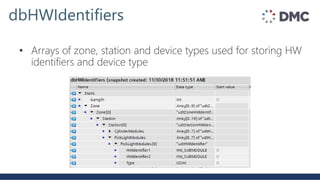
Chemical
Oil & Gas
Engineering
Specialty Machinery
Consumer Goods
Packaging Machinery
Programming
Telecommunications
Defense Contracting
Pharmaceutical
Test & Measurement
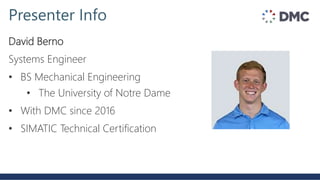
David Berno
Systems Engineer
• BS Mechanical Engineering
• The University of Notre Dame
• With DMC since 2016
• SIMATIC Technical Certification
Presenter Info
1. Option Control
2. Dynamic IO Addressing
3. Case Study
4. Comparison
5. Questions
Pain points for managing IO:
• Managing slightly different hardware configurations
• Managing a large volume of IO
• What tools as a programmer do you have for dealing with
complexity and scale?
IO Management
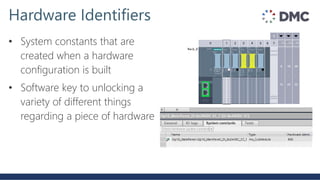
• System constants that are
created when a hardware
configuration is built
• Software key to unlocking a
variety of different things
regarding a piece of hardware
Hardware Identifiers
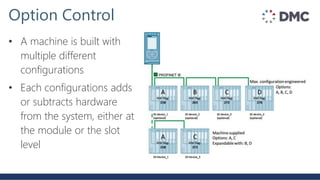
• A machine is built with
multiple different
configurations
• Each configurations adds
or subtracts hardware
from the system, either at
the module or the slot
level
Option Control
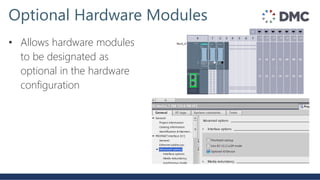
• Allows hardware modules
to be designated as
optional in the hardware
configuration
Optional Hardware Modules
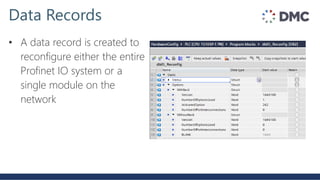
• A data record is created to
reconfigure either the entire
Profinet IO system or a
single module on the
network
Data Records
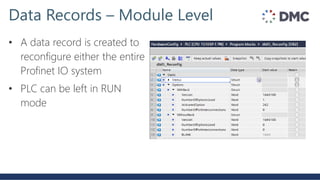
• A data record is created to
reconfigure either the entire
Profinet IO system
• PLC can be left in RUN
mode
Data Records – Module Level
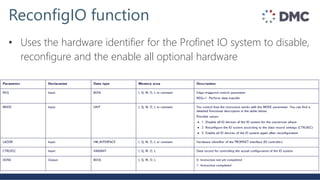
• Uses the hardware identifier for the Profinet IO system to disable,
reconfigure and the enable all optional hardware
ReconfigIO function
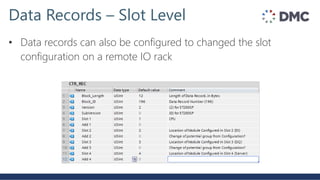
• Data records can also be configured to changed the slot
configuration on a remote IO rack
Data Records – Slot Level
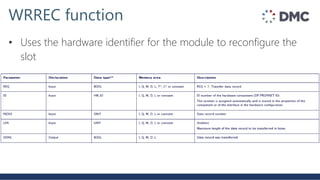
• Uses the hardware identifier for the module to reconfigure the
slot
WRREC function
• Tiered control system offerings at volume
• Future potential expansion to existing control system
• No programmer needed to change hardware configuration
When should I use option control?
• Standard approach - create PLC tags that are linked to I & Q
addresses that correspond to an IO rack or device
• IO tags are manually named, linked and used throughout the
code
Large Volume of IO
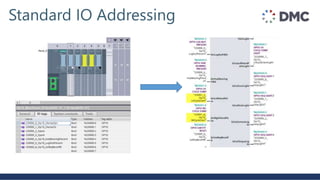
Standard IO Addressing
• Tedious, time consuming process especially when dealing with a
large number of IO points
• Why not skip the middleman of PLC tags and have the function
block look up the I&Q addresses it should be using?
Standard IO Addressing
Dynamic IO Addressing
Hardware identifiers and extended instructions:
1. RD_ADDR
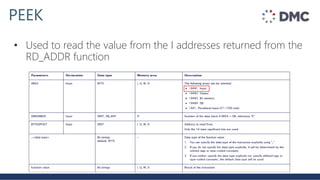
2. PEEK
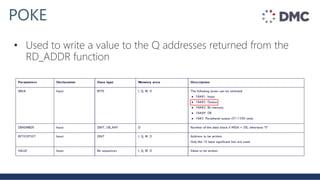
3. POKE
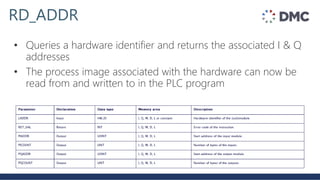
RD_ADDR
• Queries a hardware identifier and returns the associated I & Q
addresses
• The process image associated with the hardware can now be
read from and written to in the PLC program
PEEK
• Used to read the value from the I addresses returned from the
RD_ADDR function
POKE
• Used to write a value to the Q addresses returned from the
RD_ADDR function
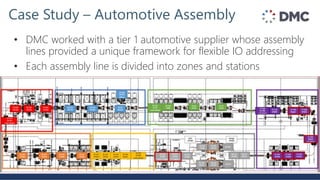
Case Study – Automotive Assembly
• DMC worked with a tier 1 automotive supplier whose assembly
lines provided a unique framework for flexible IO addressing
• Each assembly line is divided into zones and stations
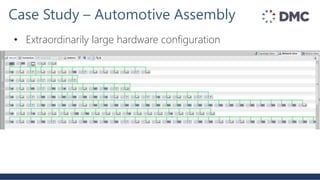
Case Study – Automotive Assembly
• Extraordinarily large hardware configuration
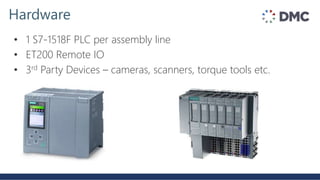
Hardware
• 1 S7-1518F PLC per assembly line
• ET200 Remote IO
• 3rd Party Devices – cameras, scanners, torque tools etc.
Case Study – Automotive Assembly
• Each station has the option to contain the following devices:
• Pick to lights
• Camera
• Scanner
• Torque Tool
• Digital Inputs
• Digital Outputs
• And many more
Maximizing Indirect Addressing
• Each device FB is assigned a zone, station and number
• These three items create a unique identifier that each function
block can use to look up a different hardware address
• Each function block is able to be reused across all zones and
stations and even assembly lines without changing the code
• Standard wiring scheme is defined and followed for each device
without exception
Case Study – Automotive Assembly
• Customer Benefits
• Reduced IO check time significantly
• Reduced programming errors with mislinked IO
• Provided easier field wiring for electricians
• Creates an easily expandable framework for making
hardware additions to the line
• Allows reuse of device logic across assembly lines
dbHWIdentifiers
• Arrays of zone, station and device types used for storing HW
identifiers and device type
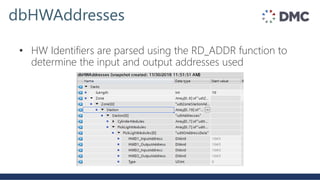
dbHWAddresses
• HW Identifiers are parsed using the RD_ADDR function to
determine the input and output addresses used
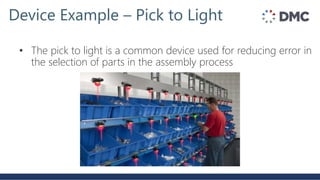
Device Example – Pick to Light
• The pick to light is a common device used for reducing error in
the selection of parts in the assembly process
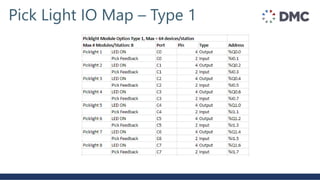
Pick Light IO Map – Type 1
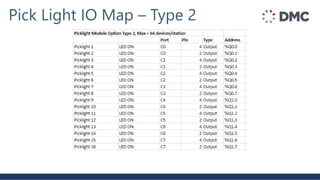
Pick Light IO Map – Type 2
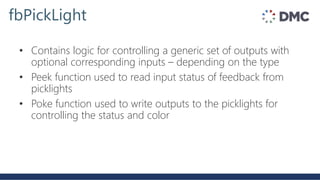
fbPickLight
• Contains logic for controlling a generic set of outputs with
optional corresponding inputs – depending on the type
• Peek function used to read input status of feedback from
picklights
• Poke function used to write outputs to the picklights for
controlling the status and color
When should I use indirect addressing for my IO?
• Large amount of IO
• Standard wiring schemes
• 3rd party devices with standard interfaces
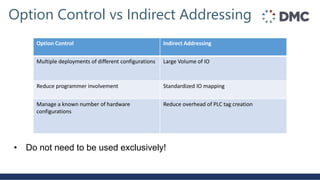
Option Control vs Indirect Addressing
Option Control Indirect Addressing
Multiple deployments of different configurations Large Volume of IO
Reduce programmer involvement Standardized IO mapping
Manage a known number of hardware
configurations
Reduce overhead of PLC tag creation
• Do not need to be used exclusively!
Takeaway
• Before you begin your next project, think outside the box when
it comes to how you interact with your IO
• Consider option handling for any hardware that may be added
or subtracted in the future
• Consider indirectly addressing your IO where possible to reduce
the number of PLC tags that must be created and linked
Questions?

Flexibility and standardization using dynamic IO addressing and option handling

  • 1.
    Flexibility and Standardization Using DynamicIO Addressing and Option Handling David Berno, DMC Inc usa.siemens.com/summitUnrestricted © Siemens 2019
  • 2.
    Unrestricted © SiemensIndustry, Inc. 2019 Page 2 2019 Automation Summit • Title:Flexibility and Standardization Using Dynamic IO Addressing and Option Handling • Track: PE • Presenter: David Berno • Company: DMC • Session # (for your survey): 11.2
  • 3.
    DMC Overview Established in1996, offices in Chicago, Boston, & Denver and customers throughout the world Established in 1996, DMC serves customers worldwide from offices in Chicago, Boston, Dallas, Denver, Houston, New York, Seattle, and St. Louis employees & growing 170+
  • 4.
    DMC has thehighest number of S7 certified engineers in the US. Siemens Expertise 35+
  • 5.
  • 6.
    Industries Served Energy &Utilities Printing Automotive Food & Beverage Semiconductor Chemical Oil & Gas Engineering Specialty Machinery Consumer Goods Packaging Machinery Programming Telecommunications Defense Contracting Pharmaceutical Test & Measurement
  • 7.
    David Berno Systems Engineer •BS Mechanical Engineering • The University of Notre Dame • With DMC since 2016 • SIMATIC Technical Certification Presenter Info
  • 8.
    1. Option Control 2.Dynamic IO Addressing 3. Case Study 4. Comparison 5. Questions
  • 9.
    Pain points formanaging IO: • Managing slightly different hardware configurations • Managing a large volume of IO • What tools as a programmer do you have for dealing with complexity and scale? IO Management
  • 10.
    • System constantsthat are created when a hardware configuration is built • Software key to unlocking a variety of different things regarding a piece of hardware Hardware Identifiers
  • 11.
    • A machineis built with multiple different configurations • Each configurations adds or subtracts hardware from the system, either at the module or the slot level Option Control
  • 12.
    • Allows hardwaremodules to be designated as optional in the hardware configuration Optional Hardware Modules
  • 13.
    • A datarecord is created to reconfigure either the entire Profinet IO system or a single module on the network Data Records
  • 14.
    • A datarecord is created to reconfigure either the entire Profinet IO system • PLC can be left in RUN mode Data Records – Module Level
  • 15.
    • Uses thehardware identifier for the Profinet IO system to disable, reconfigure and the enable all optional hardware ReconfigIO function
  • 16.
    • Data recordscan also be configured to changed the slot configuration on a remote IO rack Data Records – Slot Level
  • 17.
    • Uses thehardware identifier for the module to reconfigure the slot WRREC function
  • 18.
    • Tiered controlsystem offerings at volume • Future potential expansion to existing control system • No programmer needed to change hardware configuration When should I use option control?
  • 19.
    • Standard approach- create PLC tags that are linked to I & Q addresses that correspond to an IO rack or device • IO tags are manually named, linked and used throughout the code Large Volume of IO
  • 20.
  • 21.
    • Tedious, timeconsuming process especially when dealing with a large number of IO points • Why not skip the middleman of PLC tags and have the function block look up the I&Q addresses it should be using? Standard IO Addressing
  • 22.
    Dynamic IO Addressing Hardwareidentifiers and extended instructions: 1. RD_ADDR 2. PEEK 3. POKE
  • 23.
    RD_ADDR • Queries ahardware identifier and returns the associated I & Q addresses • The process image associated with the hardware can now be read from and written to in the PLC program
  • 24.
    PEEK • Used toread the value from the I addresses returned from the RD_ADDR function
  • 25.
    POKE • Used towrite a value to the Q addresses returned from the RD_ADDR function
  • 26.
    Case Study –Automotive Assembly • DMC worked with a tier 1 automotive supplier whose assembly lines provided a unique framework for flexible IO addressing • Each assembly line is divided into zones and stations
  • 27.
    Case Study –Automotive Assembly • Extraordinarily large hardware configuration
  • 28.
    Hardware • 1 S7-1518FPLC per assembly line • ET200 Remote IO • 3rd Party Devices – cameras, scanners, torque tools etc.
  • 29.
    Case Study –Automotive Assembly • Each station has the option to contain the following devices: • Pick to lights • Camera • Scanner • Torque Tool • Digital Inputs • Digital Outputs • And many more
  • 30.
    Maximizing Indirect Addressing •Each device FB is assigned a zone, station and number • These three items create a unique identifier that each function block can use to look up a different hardware address • Each function block is able to be reused across all zones and stations and even assembly lines without changing the code • Standard wiring scheme is defined and followed for each device without exception
  • 31.
    Case Study –Automotive Assembly • Customer Benefits • Reduced IO check time significantly • Reduced programming errors with mislinked IO • Provided easier field wiring for electricians • Creates an easily expandable framework for making hardware additions to the line • Allows reuse of device logic across assembly lines
  • 32.
    dbHWIdentifiers • Arrays ofzone, station and device types used for storing HW identifiers and device type
  • 33.
    dbHWAddresses • HW Identifiersare parsed using the RD_ADDR function to determine the input and output addresses used
  • 34.
    Device Example –Pick to Light • The pick to light is a common device used for reducing error in the selection of parts in the assembly process
  • 35.
    Pick Light IOMap – Type 1
  • 36.
    Pick Light IOMap – Type 2
  • 37.
    fbPickLight • Contains logicfor controlling a generic set of outputs with optional corresponding inputs – depending on the type • Peek function used to read input status of feedback from picklights • Poke function used to write outputs to the picklights for controlling the status and color
  • 38.
    When should Iuse indirect addressing for my IO? • Large amount of IO • Standard wiring schemes • 3rd party devices with standard interfaces
  • 39.
    Option Control vsIndirect Addressing Option Control Indirect Addressing Multiple deployments of different configurations Large Volume of IO Reduce programmer involvement Standardized IO mapping Manage a known number of hardware configurations Reduce overhead of PLC tag creation • Do not need to be used exclusively!
  • 40.
    Takeaway • Before youbegin your next project, think outside the box when it comes to how you interact with your IO • Consider option handling for any hardware that may be added or subtracted in the future • Consider indirectly addressing your IO where possible to reduce the number of PLC tags that must be created and linked
  • 41.

Editor's Notes

  • #3  Session # will be provided with the June scheduling email.
  • #6 Here are some of DMC’s 1,200 customers
  • #7 Our diverse experience in technology, industry and processes allows us to bring best practices from many areas.  We deliver solutions not available from singularly focused organizations. Our experience is broad and deep.  We have a proven track record in a wide range of industries.
  • #9 Dynamic IO Addressing – what does that even mean? At runtime Automotive case study
  • #10 Who has done a project that doesn’t involve IO? No one Basic building block for every project Managing complexity and volume
  • #11 Set the stage with the hardware identifier Each rack, slot and even profinet network has a hw identifier
  • #12 Deals with complexity Optional pieces of your hardware configuration
  • #14 Won’t dive too technical into the structure, but
  • #16 Link the HWID for the profinet network, the data record and mode 1,2,3 PLC does not need to be stopped to reconfigure modules
  • #17 PLC set to stop mode
  • #19 Programmers are not needed in order to change the hardware configuration anymore! Probably not worth the programming effort for a one off machine – but at volume it starts to make sense
  • #20 Switching gears to dealing with a large volume of tags
  • #21 PLC tags are defined in the HW configuration and then linked to a device function block. All done manually. Error prone
  • #22 Program some intelligence into your function blocks regarding what IO they should be acting on
  • #23 Dynamic/indirect addressing Want to show how I used these three functions to build function blocks for devices that can look up their IO addresses
  • #28 In the hundreds of devices
  • #31 ZS# creates a unique key
  • #32 IO check in the code and in the wiring All the scanners work the same, all the torque tools work the same etc.
  • #33 Provides a single view to translate the hardware configuration
  • #34 Error checking based on the expected number of inputs/outputs are
  • #35 Error checking based on the expected number of inputs/outputs are
  • #36 Pick with Feedback Remake this table for a DI/DO module
  • #37 Pick without feedback
  • #38 Contains logic for managing which picklights are turned on
  • #39 To recap:
  • #40 Next steps for the customer in our case study is to begin mixing option control to allow them to add hardware without a programmer