Special Characters
Special Characters in XHTML:
   Some common characters cannot be written directly into
    our code as the XHTML processor (browser) would
    confuse them for our markup (code).
   Sometimes we need to show a character that is not on
    the typical keyboard, such as a copyright symbol or a
    character from a foreign language.
   Another issue is that XHTML ignores multiple spaces,
    but there are occasions in which we want to display
    multiple consecutive spaces.
   We solve all these issues by using special characters.
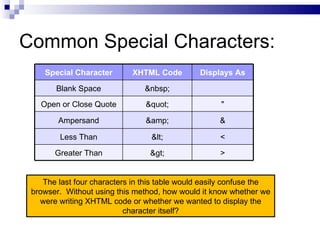
Common Special Characters:
    Special Character       XHTML Code         Displays As

       Blank Space               
   Open or Close Quote          "               "

        Ampersand               &                &

         Less Than                &lt;               <

       Greater Than              &gt;                >


    The last four characters in this table would easily confuse the
 browser. Without using this method, how would it know whether we
   were writing XHTML code or whether we wanted to display the
                           character itself?
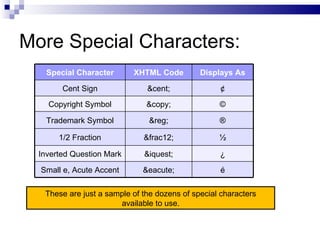
More Special Characters:
    Special Character      XHTML Code         Displays As

        Cent Sign              &cent;               ¢
    Copyright Symbol           &copy;              ©

    Trademark Symbol            &reg;              ®

       1/2 Fraction           &frac12;             ½

  Inverted Question Mark      &iquest;             ¿

  Small e, Acute Accent       &eacute;              é

   These are just a sample of the dozens of special characters
                       available to use.
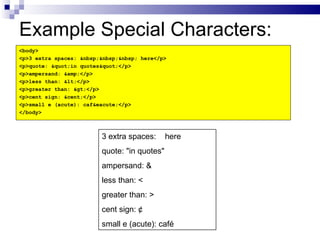
Example Special Characters:
<body>
<p>3 extra spaces: &nbsp;&nbsp;&nbsp; here</p>
<p>quote: &quot;in quotes&quot;</p>
<p>ampersand: &amp;</p>
<p>less than: &lt;</p>
<p>greater than: &gt;</p>
<p>cent sign: &cent;</p>
<p>small e (acute): caf&eacute;</p>
</body>


                         3 extra spaces:      here
                         quote: "in quotes"
                         ampersand: &
                         less than: <
                         greater than: >
                         cent sign: ¢
                         small e (acute): café

6.1 special characters

  • 1.
  • 2.
    Special Characters inXHTML:  Some common characters cannot be written directly into our code as the XHTML processor (browser) would confuse them for our markup (code).  Sometimes we need to show a character that is not on the typical keyboard, such as a copyright symbol or a character from a foreign language.  Another issue is that XHTML ignores multiple spaces, but there are occasions in which we want to display multiple consecutive spaces.  We solve all these issues by using special characters.
  • 3.
    Common Special Characters: Special Character XHTML Code Displays As Blank Space &nbsp; Open or Close Quote &quot; " Ampersand &amp; & Less Than &lt; < Greater Than &gt; > The last four characters in this table would easily confuse the browser. Without using this method, how would it know whether we were writing XHTML code or whether we wanted to display the character itself?
  • 4.
    More Special Characters: Special Character XHTML Code Displays As Cent Sign &cent; ¢ Copyright Symbol &copy; © Trademark Symbol &reg; ® 1/2 Fraction &frac12; ½ Inverted Question Mark &iquest; ¿ Small e, Acute Accent &eacute; é These are just a sample of the dozens of special characters available to use.
  • 5.
    Example Special Characters: <body> <p>3extra spaces: &nbsp;&nbsp;&nbsp; here</p> <p>quote: &quot;in quotes&quot;</p> <p>ampersand: &amp;</p> <p>less than: &lt;</p> <p>greater than: &gt;</p> <p>cent sign: &cent;</p> <p>small e (acute): caf&eacute;</p> </body> 3 extra spaces: here quote: "in quotes" ampersand: & less than: < greater than: > cent sign: ¢ small e (acute): café