User Interface Design,Principles &
process
PRESENTED BY :
ABD - UR REHMAN SAQIB
Introduction
Key Terms
 Types of Interfaces
 User Interfaces - how the system will interact with
external entities.
 System Interfaces - how systems exchange
information with other systems.
Fundamental parts of a User Interface
 Navigation mechanism –
provides the way for users to tell the system what to do.
 Input mechanism –
defines the way the system captures
information.
 Output mechanism –
defines the way the system provides information to
users or other systems.
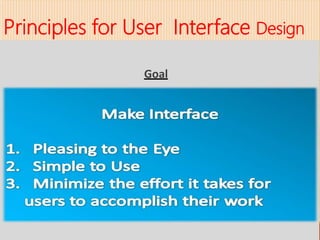
Principles for User Interface Design
Goal
Layout
Content awareness
Aesthetics
User experience
Consistency
Minimize user effort
Principles for User Interface Design
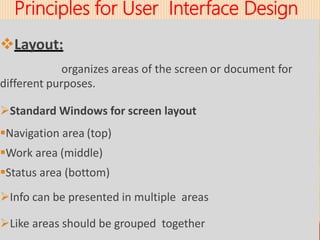
Layout:
organizes areas of the screen or document for
different purposes.
Standard Windows for screen layout
Navigation area (top)
Work area (middle)
Status area (bottom)
Info can be presented in multiple areas
Like areas should be grouped together
Principles for User Interface Design
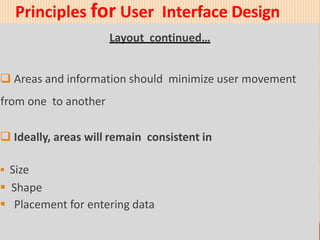
Layout continued…
 Areas and information should minimize user movement
from one to another
 Ideally, areas will remain consistent in
 Size
 Shape
 Placement for entering data
Principles for User Interface Design
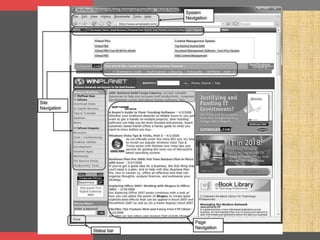
 Content Awareness:
Users should always be aware of where they are in
the system and what is being displayed.
All interfaces should have titles
Menus should show
1. where you are
2. where you came from to get there
 It should be clear what info is within each area
Example
Principles for User Interface Design
 Aesthetics:
Designing interfaces that are pleasing
to the eye.
Interfaces need to be functional and inviting to use
Avoid squeezing in too much, particularly for novice users
Design text carefully
 Be aware of font and size
 Avoid using all capital letters
Principles for User Interface Design
 User Experience:
Designing the user interface
with the users’ level of computer experience in mind.
How easy is the program to learn?
 Usually a concern for Novice Users
How easy is the program to use?
 Usually a concern for Expert Users
Principles for User Interface Design
 Consistency:
Enables users to predict what will happen next.
 Probably the single most important
factor in making a system easy to use
 Considers items within an application
and across applications
Principles for User Interface Design
 Minimize User Effort :
The interface should be simple and minimize the
number of clicks or keystrokes to move from one part of the
system to another.
 “Three click rule”
 Commonly used by interface designers
 Users should be able to go from the start or main menu of
a system to the information or action they want in no
more than three mouse clicks or three keystrokes
 Overview:
 Four step process
 Whole Process is repeated until no improvements
are found.
•e.g. Prepare design >> Design >> Evaluation
 4 steps
 Use scenario development
 Structure design
 Standards design
 Evaluation
User Interface Design Process
 Use Scenario Development:
 Scenario planning is a means for managers to visualize the
future and assess how they will respond in different
situations.
 Simple narrative description
 Describes ONLY the common use of system
User Interface Design Process
 Use Scenario Development:
User Interface Design Process
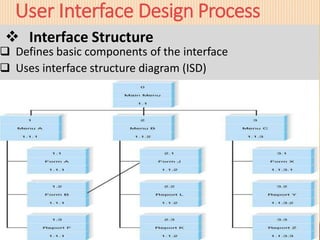
 Interface Structure
 Defines basic components of the interface
 Uses interface structure diagram (ISD)
User Interface Design Process
Interface Standards
•Basic design elements that are common across individual
screens, forms, and reports
•Ensures consistency of interface across the system
•5 elements
User Interface Design Process
Interface Standard
1. Interface Metaphor
 Set of user interface visuals, actions, and procedures
from real world that is used as a model for the computer
system.
e.g. File and folder representation of operating system, Desktop
representation
2. Interface Template
 Defines general appearance of all screens
Defines standard placement and order for common interface
action
User Interface Design Process
3. Interface Objects
Fundamental building blocks of the system such as entities
and data stores
e.g. Shopping Cart
4. Interface Actions
Actions within interface objects
e.g. add item, delete item, modify amount, etc
5. Interface Icons
User Interface Design Process
 Interface Evaluation
 Evaluation should be performed before the system is build
 Identifying design problem saves time and money
 Most evaluation involves 5 to 10 users
 4 common approaches
User Interface Design Process
 Heuristic Evaluation
•No involvements of users
•At least three members of project team check to ensure that
the interface satisfies design principal
 Walk-though Evaluation
•Evaluated by operators of the system
•Project team member walk through the interface with the
user
 Interactive Evaluation
•One-on-one evaluation by a user and a member of project
team
 Formal Usability Testing
•Usually done for commercial software or product developed
for large organization
•Uses only language prototype
•User test a system without any assistance
User Interface Design Process
Thanks All of You
ANY QUESTIONS?

User Interface Design,Principles & process

  • 1.
    User Interface Design,Principles& process PRESENTED BY : ABD - UR REHMAN SAQIB
  • 2.
    Introduction Key Terms  Typesof Interfaces  User Interfaces - how the system will interact with external entities.  System Interfaces - how systems exchange information with other systems.
  • 3.
    Fundamental parts ofa User Interface  Navigation mechanism – provides the way for users to tell the system what to do.  Input mechanism – defines the way the system captures information.  Output mechanism – defines the way the system provides information to users or other systems.
  • 4.
    Principles for UserInterface Design Goal
  • 5.
  • 6.
    Principles for UserInterface Design Layout: organizes areas of the screen or document for different purposes. Standard Windows for screen layout Navigation area (top) Work area (middle) Status area (bottom) Info can be presented in multiple areas Like areas should be grouped together
  • 7.
    Principles for UserInterface Design Layout continued…  Areas and information should minimize user movement from one to another  Ideally, areas will remain consistent in  Size  Shape  Placement for entering data
  • 9.
    Principles for UserInterface Design  Content Awareness: Users should always be aware of where they are in the system and what is being displayed. All interfaces should have titles Menus should show 1. where you are 2. where you came from to get there  It should be clear what info is within each area
  • 10.
  • 11.
    Principles for UserInterface Design  Aesthetics: Designing interfaces that are pleasing to the eye. Interfaces need to be functional and inviting to use Avoid squeezing in too much, particularly for novice users Design text carefully  Be aware of font and size  Avoid using all capital letters
  • 12.
    Principles for UserInterface Design  User Experience: Designing the user interface with the users’ level of computer experience in mind. How easy is the program to learn?  Usually a concern for Novice Users How easy is the program to use?  Usually a concern for Expert Users
  • 13.
    Principles for UserInterface Design  Consistency: Enables users to predict what will happen next.  Probably the single most important factor in making a system easy to use  Considers items within an application and across applications
  • 14.
    Principles for UserInterface Design  Minimize User Effort : The interface should be simple and minimize the number of clicks or keystrokes to move from one part of the system to another.  “Three click rule”  Commonly used by interface designers  Users should be able to go from the start or main menu of a system to the information or action they want in no more than three mouse clicks or three keystrokes
  • 15.
     Overview:  Fourstep process  Whole Process is repeated until no improvements are found. •e.g. Prepare design >> Design >> Evaluation  4 steps  Use scenario development  Structure design  Standards design  Evaluation User Interface Design Process
  • 16.
     Use ScenarioDevelopment:  Scenario planning is a means for managers to visualize the future and assess how they will respond in different situations.  Simple narrative description  Describes ONLY the common use of system User Interface Design Process
  • 17.
     Use ScenarioDevelopment: User Interface Design Process
  • 18.
     Interface Structure Defines basic components of the interface  Uses interface structure diagram (ISD) User Interface Design Process
  • 19.
    User Interface DesignProcess Interface Standards •Basic design elements that are common across individual screens, forms, and reports •Ensures consistency of interface across the system •5 elements
  • 20.
    User Interface DesignProcess Interface Standard 1. Interface Metaphor  Set of user interface visuals, actions, and procedures from real world that is used as a model for the computer system. e.g. File and folder representation of operating system, Desktop representation 2. Interface Template  Defines general appearance of all screens Defines standard placement and order for common interface action
  • 21.
    User Interface DesignProcess 3. Interface Objects Fundamental building blocks of the system such as entities and data stores e.g. Shopping Cart 4. Interface Actions Actions within interface objects e.g. add item, delete item, modify amount, etc 5. Interface Icons
  • 22.
    User Interface DesignProcess  Interface Evaluation  Evaluation should be performed before the system is build  Identifying design problem saves time and money  Most evaluation involves 5 to 10 users  4 common approaches
  • 23.
    User Interface DesignProcess  Heuristic Evaluation •No involvements of users •At least three members of project team check to ensure that the interface satisfies design principal  Walk-though Evaluation •Evaluated by operators of the system •Project team member walk through the interface with the user
  • 24.
     Interactive Evaluation •One-on-oneevaluation by a user and a member of project team  Formal Usability Testing •Usually done for commercial software or product developed for large organization •Uses only language prototype •User test a system without any assistance User Interface Design Process
  • 25.
    Thanks All ofYou ANY QUESTIONS?