Release 009
ZABBIX Manual v1.4
Review and Approval
Name Signature Date
For ZABBIX SIA:
No part of this document may be reproduced or transmitted in any form or by any means, electronic or mechanical, for any purpose, without the express written
permission of ZABBIX SIA
Copyright 2006 ZABBIX SIA, REGISTERED IN LATVIA NO: LV40003738045
ZABBIX Manual v1.4
Table of Contents
ABOUT THIS MANUAL........................................................................................... 10
INTRODUCTION...................................................................................................... 11
Purpose of this Document ................................................................................................. 11
What you should already know ......................................................................................... 11
Who Should Use this Document ....................................................................................... 11
Contacts............................................................................................................................... 12
GLOSSARY .............................................................................................................13
REFERENCES......................................................................................................... 17
Internal documents............................................................................................................. 17
External References ........................................................................................................... 17
1. ABOUT ............................................................................................................... 18
1.1. Revision History...................................................................................................... 18
1.2. Conventions ............................................................................................................ 18
1.3. Distribution list........................................................................................................ 18
1.4. Overview of ZABBIX ............................................................................................... 19
1.4.1. What is ZABBIX?........................................................................................ 19
1.4.2. What does ZABBIX offer? .......................................................................... 19
1.4.3. Why use ZABBIX?...................................................................................... 20
1.4.4. Users of ZABBIX ........................................................................................ 20
1.5. Goals and Principles............................................................................................... 20
1.5.1. Main Goals and Principles of ZABBIX Development.................................. 20
1.5.2. Main principles of ZABBIX development .................................................... 20
1.6. Use of ZABBIX ......................................................................................................... 21
1.6.1. Distributed monitoring................................................................................. 21
1.6.2. Auto-discovery............................................................................................ 21
1.6.3. Pro-active monitoring.................................................................................. 21
1.6.4. Monitoring of WEB applications.................................................................. 21
Copyright 2006 ZABBIX SIA Page 2 of 195
ZABBIX Manual v1.4
1.6.5. Performance monitoring ............................................................................. 21
1.6.6. Alerting users.............................................................................................. 21
1.6.7. Monitoring of log files.................................................................................. 21
1.6.8. Integrity Checking....................................................................................... 22
1.6.9. Logging services......................................................................................... 22
1.6.10. Capacity planning ....................................................................................... 22
1.6.11. Assuring and monitoring of SLA ................................................................. 22
1.6.12. High level view of IT resources and services ............................................. 22
1.6.13. Other........................................................................................................... 23
2. ZABBIX 1.4 ........................................................................................................ 24
2.1. What’s new in 1.4 .................................................................................................... 24
2.1.1. Auto-discovery............................................................................................ 24
2.1.2. Distributed monitoring................................................................................. 24
2.1.3. WEB monitoring.......................................................................................... 24
2.1.4. Installation Wizard ...................................................................................... 24
2.1.5. Support of new database engines .............................................................. 24
2.1.6. WEB interface improvements ..................................................................... 24
2.1.7. New notification methods ........................................................................... 25
2.1.8. Many-to-many template linkage ................................................................. 25
2.1.9. Database watchdog.................................................................................... 25
2.1.10. XML data import/export .............................................................................. 25
2.1.11. Windows Vista Support .............................................................................. 25
2.1.12. More flexible actions................................................................................... 25
2.1.13. Server-side external checks ....................................................................... 25
2.1.14. New user permission schema .................................................................... 25
2.1.15. Hysteresis support...................................................................................... 25
2.1.16. Slide show support ..................................................................................... 25
2.1.17. ZABBIX server can spread the workload across several servers............... 26
2.1.18. Other improvements ................................................................................... 26
2.2. What’s no longer supported .................................................................................. 27
2.3. Installation and Upgrade Notes ............................................................................. 28
2.3.1. Installation .................................................................................................. 28
2.3.2. Version compatibility................................................................................... 28
2.3.3. Upgrade procedure..................................................................................... 28
Copyright 2006 ZABBIX SIA Page 3 of 195
ZABBIX Manual v1.4
5.13.1. Simple user parameters ........................................................................... 107
5.13.2. Flexible user parameters .......................................................................... 108
5.14. Triggers.................................................................................................................. 109
5.14.1. Expression for triggers.............................................................................. 110
5.14.2. Trigger dependencies............................................................................... 117
5.14.3. Trigger severity......................................................................................... 117
5.14.4. Hysteresis................................................................................................. 118
5.15. Screens and Slide Shows..................................................................................... 118
5.16. IT Services ............................................................................................................. 120
5.17. User permissions .................................................................................................. 121
5.17.1. Overview................................................................................................... 121
5.17.2. User types ................................................................................................ 122
5.18. Utilities ................................................................................................................... 122
5.18.1. Start-up scripts ......................................................................................... 122
5.18.2. snmptrap.sh.............................................................................................. 122
6. QUICK START GUIDE ..................................................................................... 124
6.1. Login ...................................................................................................................... 124
6.2. Add user................................................................................................................. 125
6.3. Email settings........................................................................................................ 130
6.4. Add agent-enabled host ....................................................................................... 131
6.5. Setup notifications................................................................................................ 137
7. XML IMPORT AND EXPORT ........................................................................... 140
7.1. Goals ...................................................................................................................... 140
7.2. Overview ................................................................................................................ 140
7.3. Data export ............................................................................................................ 140
7.4. Data import ............................................................................................................ 142
8. TUTORIALS ..................................................................................................... 144
8.1. Extending ZABBIX Agent ..................................................................................... 144
8.2. Monitoring of log files........................................................................................... 145
8.3. Remote actions ..................................................................................................... 145
8.4. Monitoring of Windows services ......................................................................... 147
Copyright 2006 ZABBIX SIA Page 6 of 195
ZABBIX Manual v1.4
9. WEB MONITORING ......................................................................................... 148
9.1. Overview ................................................................................................................ 148
9.2. Scenario ................................................................................................................. 148
10. LOG FILE MONITORING ................................................................................. 149
10.1. Overview ................................................................................................................ 149
10.2. How it works .......................................................................................................... 149
11. AUTO-DISCOVERY ......................................................................................... 150
11.1. Goals ...................................................................................................................... 150
11.2. Overview ................................................................................................................ 150
11.3. How it works .......................................................................................................... 151
11.3.1. Discovery.................................................................................................. 151
11.3.2. Actions...................................................................................................... 151
11.4. Auto-discovery rule............................................................................................... 151
11.5. Real life scenario................................................................................................... 152
12. DISTRIBUTED MONITORING.......................................................................... 157
12.1. Goals ...................................................................................................................... 157
12.2. Overview ................................................................................................................ 157
12.3. Configuration......................................................................................................... 157
12.3.1. Configuration of Nodes............................................................................. 157
12.3.2. Simple configuration ................................................................................. 159
12.3.3. More complex setup ................................................................................. 164
12.4. Platform independence ........................................................................................ 165
12.5. Configuration of a single Node ............................................................................ 165
12.6. Switching between nodes .................................................................................... 166
12.7. Data flow ................................................................................................................ 166
12.7.1. Child to Master ......................................................................................... 166
12.7.2. Master to Child ......................................................................................... 166
12.7.3. Firewall settings........................................................................................ 167
12.8. Performance considerations................................................................................ 167
13. WEB INTERFACE ............................................................................................ 168
Copyright 2006 ZABBIX SIA Page 7 of 195
ZABBIX Manual v1.4
14. PERFORMANCE TUNING ............................................................................... 169
14.1. Real world configuration ...................................................................................... 169
14.2. Performance tuning .............................................................................................. 169
14.2.1. Hardware .................................................................................................. 169
14.2.2. Operating System..................................................................................... 169
14.2.3. Database Engine ...................................................................................... 170
14.2.4. General advices........................................................................................ 170
15. TROUBLESHOOTING ..................................................................................... 172
15.1. General advices..................................................................................................... 172
16. COOKBOOK .................................................................................................... 173
16.1. GENERAL RECIPES .............................................................................................. 173
16.1.1. Monitoring of server's availability.............................................................. 173
16.1.2. Sending alerts via WinPopUps ................................................................. 173
16.2. MONITORING OF SPECIFIC APPLICATIONS...................................................... 173
16.2.1. AS/400...................................................................................................... 173
16.2.2. MySQL...................................................................................................... 173
16.2.3. Mikrotik routers ......................................................................................... 175
16.2.4. WIN32....................................................................................................... 175
16.2.5. Novell........................................................................................................ 175
16.2.6. Tuxedo...................................................................................................... 176
16.2.7. Informix..................................................................................................... 176
16.2.8. JMX .......................................................................................................... 176
16.3. INTEGRATION........................................................................................................ 179
16.3.1. HP OpenView ........................................................................................... 179
17. LICENCE .......................................................................................................... 181
18. CONTRIBUTE .................................................................................................. 188
19. CREDITS .......................................................................................................... 190
19.1. Developers of ZABBIX .......................................................................................... 190
19.2. Contributors to ZABBIX........................................................................................ 190
Copyright 2006 ZABBIX SIA Page 8 of 195
ZABBIX Manual v1.4
Copyright 2006 ZABBIX SIA Page 9 of 195
ZABBIX Manual v1.4
About this Manual
This manual is distributed in the hope that it will be useful, but WITHOUT ANY
WARRANTY; without even the implied warranty of MERCHANTABILITY or
FITNESS FOR A PARTICULAR PURPOSE. This manual is part of ZABBIX
software. The latest version of the manual is available at
http://www.zabbix.com.
The ZABBIX Reference Manual IS NOT distributed under a GPL-style license.
Use of the manual is subject to the following terms:
Translation and conversion to other formats is allowed, but the actual content
may not be altered or edited in any way.
You may create a printed copy for your own personal use.
For all other uses, such as selling printed copies or using (parts of) the
manual in another publication (either printed or electronical), prior written
agreement from ZABBIX Company is required.
Please send an e-mail to sales@zabbix.com for more information.
Copyright 2006 ZABBIX SIA Page 10 of 195
ZABBIX Manual v1.4
Introduction
Purpose of this Document
The purpose of this document is to provide a comprehensive introduction and
overview of ZABBIX, its architecture, the features it offers and their functions.
This document contains all information necessary for the successful
administration of ZABBIX.
What you should already know
No deep technical knowledge is required, although an understanding of UNIX is
essential.
Who Should Use this Document
Anyone involved in installation and administration of ZABBIX, and anyone else
wishing to get an insight into how it works.
Copyright 2006 ZABBIX SIA Page 11 of 195
ZABBIX Manual v1.4
Contacts
ZABBIX SIA
Location: Neretas 2/1-109, LV-1004, Riga, Latvia
Tel: +371 7743943
Fax: +371 7743944
Email: sales@zabbix.com
ZABBIX SIA, Product Manager, Director
Alexei Vladishev
Tel: +371 7743943
Fax: +371 7743944
Email: alexei.vladishev@zabbix.com
ZABBIX SIA, Sales Department
Email: sales@zabbix.com
ZABBIX SIA, Customer Support Department
Email: support@zabbix.com
Copyright 2006 ZABBIX SIA Page 12 of 195
ZABBIX Manual v1.4
Glossary
TERM DESCRIPTION
Active refers to a mode that the ZABBIX Agent can run in.
Active
When running actively, the agent keeps track of what items to
send to the server and at what intervals. The agent can poll
the server at set intervals in order to keep track of what items
it should be sending.
Active checker gather operational information from the system
Active checker
where ZABBIX Agent is running, and report this data to the
ZABBIX for further processing.
An action is a response taken when a Trigger has been
Action
triggered. Actions can be configured to send messages to
specific user groups as defined in ZABBIX, based on their
Media Type settings, or execute remote commands.
Agent refers to the program that is run on hosts that want to
Agent
be monitored. It is run as a service and can process both
active and passive checks simultaneously.
Alerter is a server process which is responsible for execution
Alerter
of actions (emails, jabber, SMS, scripts).
Auto-registration refers to a feature of ZABBIX that allows
Auto-registration
Hosts to automatically register themselves with the ZABBIX
server. This is configured via the web interface by an
administrator that defines a particular Hostname patter such
as ‘*-Linux’ and define Items for that host based on a
Template of items.
ZABBIX auto-discovery module is a module which performs
Auto-discovery
automated discovery of hosts and services and generating
events for further processing.
An event is when a trigger is triggered.
Event
Graphs can refer to the simple graphs that are available for
Graphs
each numerical Item that is monitored, or it can refer to
custom graphs which can be used to show several numerical
Items in one graph.
Host refers to the machine that is being monitored.
Host
Housekeeper refers to the service within the ZABBIX server
Housekeeper
that cleans the ZABBIX database of old actions, events,
history, and trend data as defined by the user. Housekeeping
of Actions and Events is defined in General settings. History
and trend data is defined per item.
Copyright 2006 ZABBIX SIA Page 13 of 195
ZABBIX Manual v1.4
IT Services refers to a feature within ZABBIX that allows users
IT Services
to define an SLA and have ZABBIX keep track of the expected
SLA and actual SLA. IT Services are defined as groups of
triggers and can be configured to calculate the minimum of a
group or maximum of a group.
Item refers to an individual item that is monitored on a host,
Item
such as load average or response time. Item can refer to an
item obtained via the ZABBIX agent, SNMP, or other means.
Items can be configured as float, 64-bit integers, character
strings, or log values.
Location Environment monitored by a single Node.
Map refers to a feature of ZABBIX that allows users to create
Map
customized graphics via the web interface to create network
maps and define links between Hosts on the map. Links can
be configured to change color or style based on Triggers.
Master or Master Node Master Node. Master Node may have one or several Childs.
Master Node can control configuration of the Childs.
Media Types are used to notify ZABBIX users when an Action
Media Type
has occurred. Media types can be via email or custom scripts.
Media Types are configured globally to be made available to
all Users, and then specified per User to allow certain Users to
be notified via one media type, and other users to be notified
via another media type.
Node ZABBIX Server in distributed setup monitoring number of
hosts.
Node ID is a unique number which identifies Node. Each
Node ID
Node must have its own unique Node ID.
Node Watcher ZABBIX Server process which takes care of inter-node
communications.
Queue refers to the internal queue of items the ZABBIX server
Queue
is monitoring. Based on the specified intervals of items the
ZABBIX server maintains a queue to keep track of the items
and when it should poll them.
Passive refers to a mode that the ZABBIX Agent can run in.
Passive
When running passively, the agent waits for requests for items
from the server and sends them back as requested. It should
be noted that typically the agent runs in both modes, and the
modes are defined by the Item when it is configured.
ZABBIX Server process which processes ICMP pings.
Pinger
ZABBIX Server process which is responsible for retrieval of
Poller
data from ZABBIX and SNMP agents and processing remote
(simple) checks.
Return on Investment.
ROI
Copyright 2006 ZABBIX SIA Page 14 of 195
ZABBIX Manual v1.4
Screen refers to another customizable feature of ZABBIX
Screen
which allows users to create custom pages within ZABBIX for
displaying information. A screen can consist of graphs
(custom), simple graphs, maps, or plain text such as the last 5
values of a particular item.
Sender ZABBIX utility which sends data to ZABBIX Server for further
processing. It usually used in user scripts.
Server Server refers to the program that is run on a centralized
machine that has been deemed the “monitoring station”. The
server is run as a service and is in charge of keeping track of
all the configured hosts, items, actions, alerts, etc.
SLA refers to Service Level Agreement. These are typically
SLA
used in contracts between companies and clients in order to
define a certain level of service such as 99.5% availability of a
particular Host.
Child Node is linked to a Master Node. Child Nodes reports to
Child or Child Node
Master Node.
A Template is a Host that has a defined set of Items, Triggers,
Template
etc. which Hosts can be linked to. This allows easier
configuration of hosts and changes to hosts without having to
change each individual host. Host Templates are no different
from other hosts except that their status is set to ‘Template’
during configuration and as such no Host is actually
monitored.
ZABBIX Server process responsible for processing of date
Timer
and time related functions of trigger expressions.
ZABBIX Server process responsible for processing of ZABBIX
Trapper
Agent (active) checks, log files and data sent by sender.
A trigger is used to define constraints on items and provide
Trigger
notifications when these constraints are exceeded. For
example, you could be monitoring load average on a specific
host and want to know when load average exceeds 1.0.
Triggers are very flexible and can allow for multiple
constraints.
The ZABBIX web front-end can be configured to allow access
User
to multiple users at varying levels of access. Users can be
allowed anonymous access via the guest account and be
allowed to view all available data but not modify any changes,
or users can be given access to only view or modify specific
sections of ZABBIX.
User Parameter (UserParameter) refers to custom scripts
User parameter
defined in an agent’s configuration file. User parameters are
defined by a key and command. The key refers to the item
defined in the web interface and can be configured to accept
arguments as sent by the server.
Copyright 2006 ZABBIX SIA Page 15 of 195
ZABBIX Manual v1.4
ZABBIX Software
ZABBIX
Latvian company that develops and provides support for
ZABBIX SIA
ZABBIX.
Copyright 2006 ZABBIX SIA Page 16 of 195
ZABBIX Manual v1.4
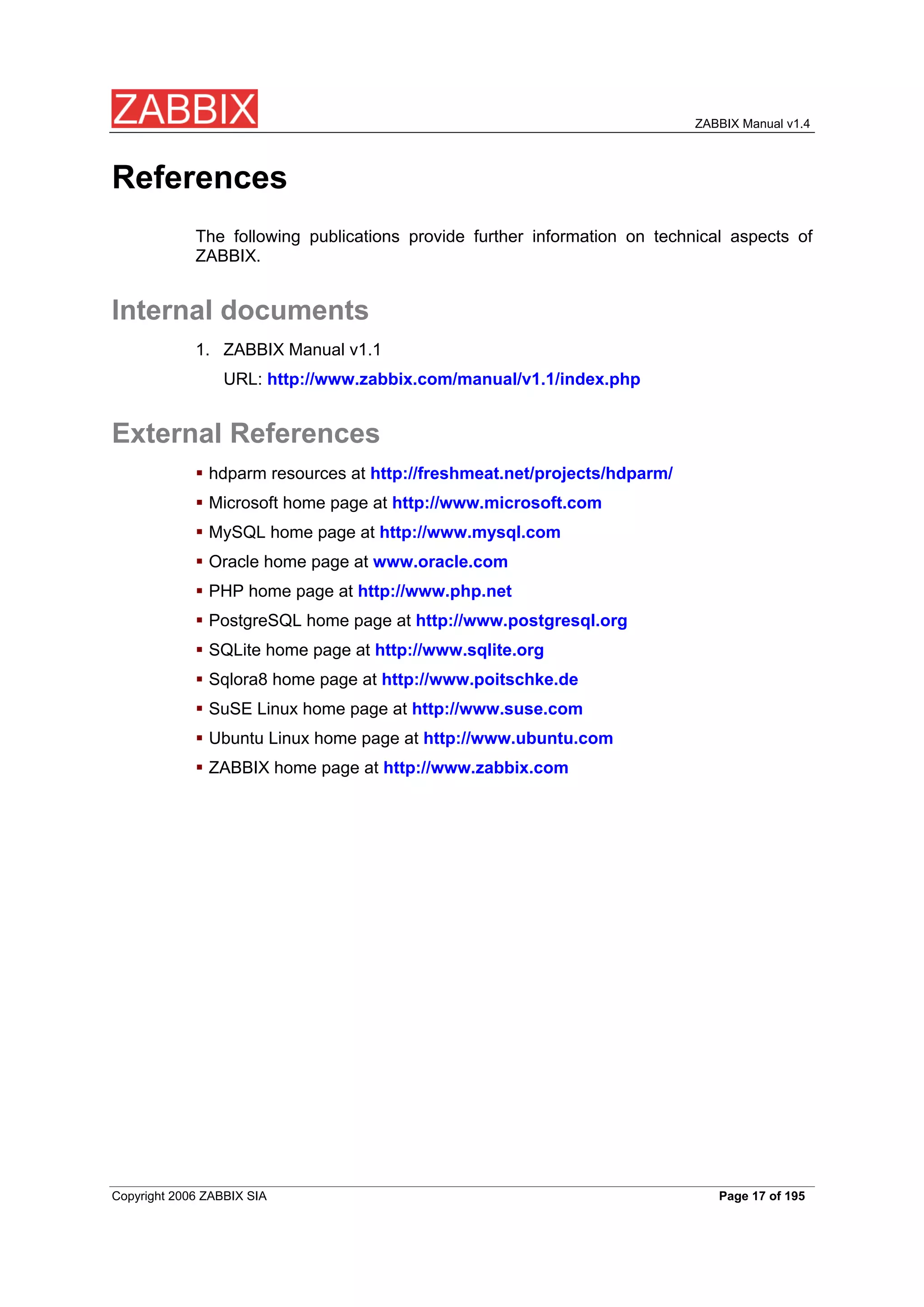
References
The following publications provide further information on technical aspects of
ZABBIX.
Internal documents
1. ZABBIX Manual v1.1
URL: http://www.zabbix.com/manual/v1.1/index.php
External References
hdparm resources at http://freshmeat.net/projects/hdparm/
Microsoft home page at http://www.microsoft.com
MySQL home page at http://www.mysql.com
Oracle home page at www.oracle.com
PHP home page at http://www.php.net
PostgreSQL home page at http://www.postgresql.org
SQLite home page at http://www.sqlite.org
Sqlora8 home page at http://www.poitschke.de
SuSE Linux home page at http://www.suse.com
Ubuntu Linux home page at http://www.ubuntu.com
ZABBIX home page at http://www.zabbix.com
Copyright 2006 ZABBIX SIA Page 17 of 195
ZABBIX Manual v1.4
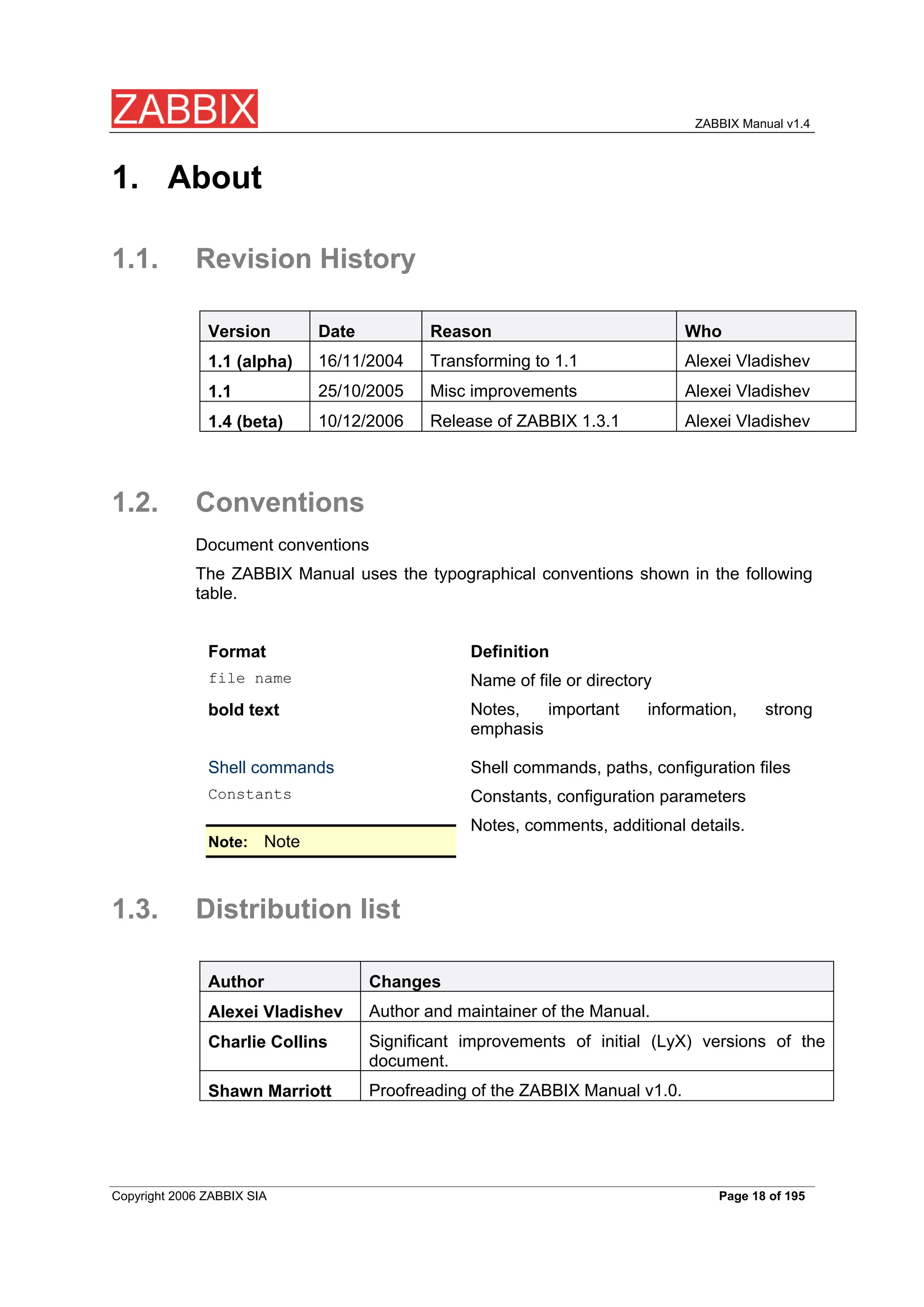
1. About
1.1. Revision History
Version Date Reason Who
16/11/2004 Transforming to 1.1 Alexei Vladishev
1.1 (alpha)
25/10/2005 Misc improvements Alexei Vladishev
1.1
10/12/2006 Release of ZABBIX 1.3.1 Alexei Vladishev
1.4 (beta)
1.2. Conventions
Document conventions
The ZABBIX Manual uses the typographical conventions shown in the following
table.
Format Definition
file name Name of file or directory
Notes, important information, strong
bold text
emphasis
Shell commands Shell commands, paths, configuration files
Constants Constants, configuration parameters
Notes, comments, additional details.
Note
Note:
1.3. Distribution list
Author Changes
Author and maintainer of the Manual.
Alexei Vladishev
Significant improvements of initial (LyX) versions of the
Charlie Collins
document.
Proofreading of the ZABBIX Manual v1.0.
Shawn Marriott
Copyright 2006 ZABBIX SIA Page 18 of 195
ZABBIX Manual v1.4
1.4. Overview of ZABBIX
1.4.1. What is ZABBIX?
ZABBIX was created by Alexei Vladishev, and currently is actively developed and
supported by ZABBIX SIA.
ZABBIX is an enterprise-class open source distributed monitoring solution.
ZABBIX is software that monitors numerous parameters of a network and the
health and integrity of servers. ZABBIX uses a flexible notification mechanism
that allows users to configure e-mail based alerts for virtually any event. This
allows a fast reaction to server problems. ZABBIX offers excellent reporting and
data visualisation features based on the stored data. This makes ZABBIX ideal
for capacity planning.
ZABBIX supports both polling and trapping. All ZABBIX reports and statistics, as
well as configuration parameters are accessed through a web-based front end. A
web-based front end ensures that the status of your network and the health of
your servers can be assessed from any location. Properly configured, ZABBIX
can play an important role in monitoring IT infrastructure. This is equally true for
small organisations with a few servers and for large companies with a multitude
of servers.
ZABBIX is free of cost. ZABBIX is written and distributed under the GPL General
Public License version 2. It means that its source code is freely distributed and
available for the general public. Both free and commercial support is available
and provided by ZABBIX Company.
1.4.2. What does ZABBIX offer?
ZABBIX offers:
auto-discovery of servers and network devices
distributed monitoring with centralised WEB administration
support for both polling and trapping mechanisms
server software for Linux, Solaris, HP-UX, AIX, Free BSD, Open BSD, OS X
native high performance agents (client software for Linux ,Solaris, HP-UX, AIX,
Free BSD, Open BSD, OS X, Tru64/OSF1, Windows NT4.0, Windows 2000,
Windows 2003, Windows XP, Windows Vista)
agent-less monitoring
secure user authentication
flexible user permissions
web-based interface
flexible e-mail notification of predefined events
high-level (business) view of monitored resources
audit log
Copyright 2006 ZABBIX SIA Page 19 of 195
ZABBIX Manual v1.4
1.4.3. Why use ZABBIX?
Open Source solution
highly efficient agents for UNIX and WIN32 based platforms
low learning curve
high ROI. Downtimes are very expensive.
low cost of ownership
very simple configuration
Centralised monitoring system. All information (configuration, performance
data) is stored in relational database
high-level service tree
very easy setup
support for SNMP (v1,v2). Both trapping and polling.
visualisation capabilities
built-in housekeeping procedure
1.4.4. Users of ZABBIX
Many organisations of different size around the World rely on ZABBIX as primary
monitoring platform.
1.5. Goals and Principles
1.5.1. Main Goals and Principles of ZABBIX
Development
There are several goals ZABBIX is trying to achieve:
become recognized Open Source monitoring tool
create ZABBIX user group, which helps making the software even better
provide high-quality commercial support
1.5.2. Main principles of ZABBIX development
be user friendly
keep things simple
use as few processing resources as possible
react fast
document every aspect of the software
Copyright 2006 ZABBIX SIA Page 20 of 195
ZABBIX Manual v1.4
1.6. Use of ZABBIX
1.6.1. Distributed monitoring
1.6.2. Auto-discovery
1.6.3. Pro-active monitoring
1.6.4. Monitoring of WEB applications
ZABBIX provides very efficient scenarios-based way of monitoring WEB
applications. Both HTTP and HTTPS are supported.
1.6.5. Performance monitoring
One of most important uses of ZABBIX is performance monitoring. Processor
load, number of running processes, number of processes, disk activity, status of
swap space, and memory availability are some of the numerous system
parameters ZABBIX is able to monitor.
ZABBIX provides a system administrator with timely information about
performance of a server. In addition, ZABBIX can produce trend graphs to help
identify bottlenecks in system performance.
1.6.6. Alerting users
Having performance monitoring is good, but it is almost useless without a
powerful notification mechanism. With ZABBIX, an administrator can define
virtually any possible condition for a trigger, using flexible expressions. Any time
these expressions become true (or false), an alert will be emailed to any address
defined by the administrator.
External programs can be used for user-defined notification methods such as
SMS, phone notifications, etc.
ZABBIX can predict future behavior of monitored parameters using Least Square
Algorithm. This allows user to be notified even before system state achieves
critical level. Note: This functionality will be completed in future versions of
ZABBIX
1.6.7. Monitoring of log files
ZABBIX can be used for centralized monitoring of log files. Note: This
functionality will be completed in future versions of ZABBIX
Copyright 2006 ZABBIX SIA Page 21 of 195
ZABBIX Manual v1.4
1.6.8. Integrity Checking
ZABBIX is capable of server integrity monitoring. All critical configuration files,
binaries, kernel, scripts, and web server HTML pages can be monitored by
ZABBIX so that the administrator can be alerted to modifications made to these
files.
1.6.9. Logging services
All values of monitored parameters are stored in a database. The collected data
can be used later for any purposes.
1.6.10. Capacity planning
Viewing trends of process load, disk usage, database activity, or other important
metrics allows a system administrator to clearly see when the next hardware
upgrade should be made.
1.6.11. Assuring and monitoring of SLA
ZABBIX is able to monitor Service Level Agreements (SLA). It also keeps SLA-
related historical data that helps to identify and improve weak areas of an IT
infrastructure.
1.6.12. High level view of IT resources and services
A High level service tree allows the creation of dependencies between various IT
resources. Such representation enables the following questions to be answered:
What IT services depends on availability of resource X?
Example: If processor load is too high on server A, then these IT services will be
affected: Oracle server, WEB banking, online transaction processing, etc.
What resources specific IT service depends on?
Example: WEB portal may depend on the following resources:
processor load on server A
connection to ISP provider
disk space on volume /data on server A
availability of Oracle DB engine on server B
speed of execution of user requests
availability of Apache server on server C
etc etc
Such a dependency tree helps identify weak points in IT infrastructure.
Example: If several critical services offered by IT department depends on, for
example, availability of disk space on some server, then it is time to think about
Copyright 2006 ZABBIX SIA Page 22 of 195
ZABBIX Manual v1.4
distribution of the volume across different servers or disk arrays to eliminate
possible risks.
1.6.13. Other
availability analysis
graphical representation of collected information
Network maps
custom screens
Copyright 2006 ZABBIX SIA Page 23 of 195
ZABBIX Manual v1.4
2. ZABBIX 1.4
ZABBIX 1.4 is the next generation of the open source distributed monitoring
system from ZABBIX SIA.
These Release Notes cover what’s new, installation and upgrade notes for
ZABBIX 1.4.
2.1. What’s new in 1.4
2.1.1. Auto-discovery
ZABBIX distributed monitoring module allows to deploy ZABBIX systems easily.
The discovery supports IP ranges, service checks, agent and SNMP checks for
efficient auto-discovery.
2.1.2. Distributed monitoring
ZABBIX distributed monitoring is made for complex environments consisting of
different locations.
ZABBIX supports monitoring of an unlimited number of nodes. Centralized
configuration allows easy all the nodes to be configured from a single location
easily.
2.1.3. WEB monitoring
WEB monitoring module enables flexible and easy monitoring of availability and
performance of WEB sites and WEB-based applications. It supports passing of
GET and POST variables.
2.1.4. Installation Wizard
Installation Wizard automatically checks pre-requisites, database connectivity
and generates a configuration file for WEB front end.
2.1.5. Support of new database engines
SQLite support has been implemented. It allows to use ZABBIX in embedded
environments.
2.1.6. WEB interface improvements
WEB interface speed and usability have been improved greatly.
Copyright 2006 ZABBIX SIA Page 24 of 195
ZABBIX Manual v1.4
2.1.7. New notification methods
Native support of Jabber messaging has been introduced.
2.1.8. Many-to-many template linkage
More flexible host-template linkage saves time and makes the configuration of
hosts more flexible and straight forward.
2.1.9. Database watchdog
ZABBIX server will automatically warns the group of users if the database is
down and continues normal operations when the database is back. Implemented
for MySQL only.
2.1.10. XML data import/export
New XML data import and export functionality is an excellent way of sharing
templates, hosts configuration and items/triggers related information.
2.1.11. Windows Vista Support
ZABBIX Windows agent supports Windows Vista, both 32 and 64 bit versions.
2.1.12. More flexible actions
Multiple operations (notifications, script execution) per action are supported. The
choice of action calculation algorithm was introduced.
2.1.13. Server-side external checks
The server-side external checks can be used to introduce custom checks
executed on ZABBIX server side.
2.1.14. New user permission schema
The old user permission schema is no longer supported. It was replaced by a
new more efficient, yet simple, schema working on the level of user groups and
host groups.
2.1.15. Hysteresis support
ZABBIX supports the use of different trigger expressions for going to ON and
OFF states.
2.1.16. Slide show support
Copyright 2006 ZABBIX SIA Page 25 of 195
ZABBIX Manual v1.4
Several screens can be grouped into a slide show for better presentation.
2.1.17. ZABBIX server can spread the workload
across several servers
Groups of server side processes (discoverer, poller, HTTP poller, trapper, etc)
can be located on different physical servers for better performance and
availability.
2.1.18. Other improvements
2.1.18.1. The same code for UNIX and Windows agents
Sharing of agent code means better testing and stability.
2.1.18.2. New communication protocol
New communication protocol, compatible with 1.0 and 1.1.x, was developed.
2.1.18.3. Increased maximum size of background images
Maximum size of background images for maps was increased to 1.5-2MB,
depending on configuration settings in php.ini.
2.1.18.4. New default templates
Built-in template got new naming, several new templates were introduced.
2.1.18.5. Flexible refresh intervals
ZABBIX support different refresh intervals for items for different days of week and
time.
2.1.18.6. Stacked graphs
Stacked graphs are supported.
2.1.18.7. More flexible log rotation
New parameter, LogFileSize, controls parameters of log rotation for ZABBIX
server and agents.
2.1.18.8. Support of static linkage
Static linkage of server and agent binaries was fixed.
Copyright 2006 ZABBIX SIA Page 26 of 195
ZABBIX Manual v1.4
2.1.18.9. Colour selection for graphs
Graphs support moredefaul colors and selection of RGB style color.
2.1.18.10. Log filtering on agent side
Log filtering by Posix style regular expression was implemented for more efficient
monitoring of log files.
2.1.18.11. Improved configuration script
2.1.18.12. ZABBIX sender to read configuration parameter from
agent’s configuration file
ZABBIX sender (zabbix_sender) can read server related parameters from agent’s
configuration file.
2.1.18.13. Support of macros in remote commands
Standard macros can be also used in remote commands.
2.1.18.14. New configuration parameters
Several server-side configuration parameters were introduced.
2.1.18.15. avg() will support integer type
Function avg() can be used for integer items.
2.1.18.16. An icon can be assigned to hosts having ‘unknown’
status
An icon for hosts in ‘unknown’ status can be defined for use in maps.
2.2. What’s no longer supported
2.2.1.1. Repeated actions and notifications
Repeated actions and notification, poorly working in 1.1.x, are no longer
supported. This functionality will be replaced by new escalation module in future
releases of ZABBIX.
2.2.1.2. Bulk loader was replaces by XML Data Import/Export
Plain text bulk loader was replaced by more flexible XML Data Import/Export
module.
Copyright 2006 ZABBIX SIA Page 27 of 195
ZABBIX Manual v1.4
2.2.1.3. User permissions on per-element level
User permissions of per-element level are no longer supported. It has been
replaced by new user permission schema.
2.3. Installation and Upgrade Notes
2.3.1. Installation
See the INSTALLATION section for full details.
2.3.2. Version compatibility
Agents from ZABBIX 1.0 and ZABBIX 1.1.x can be used with ZABBIX 1.4. No
modification required.
ZABBIX 1.4 agents can be used with earlier versions of ZABBIX. Note that the
newest agents do not support old keys of ZABBIX 1.0.
2.3.3. Upgrade procedure
The following steps have to be performed for successful upgrade from ZABBIX
1.1.x to 1.4.
The whole upgrade procedure may take several hours depending on size of
ZABBIX database.
2.3.3.1. Stop ZABBIX server
Stop ZABBIX server to make sure that no new data are coming to database.
2.3.3.2. Backup existing ZABBIX database
This is very important step. Make sure that you have backup of your database. It
will help if upgrade procedure fails (lack of disk space, power off, any unexpected
problem).
2.3.3.3. Backup configuration files, PHP files and ZABBIX
binaries
Make a backup copy of ZABBIX binaries, configuration files and PHP files.
2.3.3.4. Install new server binaries
You may use pre-compiled binaries or compile your own.
2.3.3.5. Review Server configuration parameters
Copyright 2006 ZABBIX SIA Page 28 of 195
ZABBIX Manual v1.4
Some parameters of zabbix_server.conf were changed in 1.4, new parameters
added. You may want to review them.
2.3.3.6. Upgrade database
Database upgrade scripts are located in directory upgrade/dbpatches/1.4/<db
engine>:
MySQL: upgrade/dbpatches/1.4/mysql/patch.sql
Oracle: upgrade/dbpatches/1.4/oracle/patch.sql
PostgreSQL: upgrade/dbpatches/1.4/postgresql/patch.sql
Database upgrade may take quite significant time, several hours or more.
Note:
It is recommended to test the upgrade in test environment.
Make sure that you have enough permissions (create table, drop table, create
index, drop index). Also make sure that you have enough free disk space.
Normally you should have at least 2x more disk space than size of existing
database.
These scripts are for upgrade from ZABBIX 1.1.x to 1.4 only!
Note:
2.3.3.7. Install new ZABBIX GUI
Follow Installation Instructions.
2.3.3.8. Start new ZABBIX binaries
Start new binaries. Check log files to see if the binaries are started successfully.
2.4. Commercial support
ZABBIX SIA offers a full range of support options to meet your specific needs.
ZABBIX Support Services provide direct access to our expert Support Engineers
who are ready to assist you in the development, deployment, and management of
ZABBIX.
Visit http://www.zabbix.com/services.php or contact sales@zabbix.com for
more details.
Copyright 2006 ZABBIX SIA Page 29 of 195
ZABBIX Manual v1.4
3. Installation
3.1. How to Get ZABBIX
Check the ZABBIX Home Page at http://www.zabbix.com for information about
the current version and for downloading instructions.
3.2. Requirements
3.2.1. Hardware Requirements
3.2.1.1. Memory Requirements
ZABBIX requires both physical and disk memory. 128 MB of physical memory
and 256 MB of free disk space could be a good starting point. However, the
amount of required disk memory obviously depends on the number of hosts and
parameters that are being monitored. If you're planning to keep a long history of
monitored parameters, you should be thinking of at least a couple of gigabytes to
have enough space to store the history in the database.
Each ZABBIX daemon process requires several connections to a database
server. Amount of memory allocated for the connection depends on configuration
of the database engine.
The more physical memory you have, the faster the database (and
Note:
therefore ZABBIX) works!
3.2.1.2. CPU Requirements
ZABBIX and especially ZABBIX database may require significant CPU resources
depending on number of monitored parameters and chosen database engine.
3.2.1.3. Other hardware
A serial communication port and a serial GSM Modem required for using SMS
notifications built-in ZABBIX.
3.2.1.4. Examples of hardware configuration
The table provides several hardware configurations:
Name Platform CPU/Memory Database Monitored
Copyright 2006 ZABBIX SIA Page 30 of 195
ZABBIX Manual v1.4
hosts
Ubuntu P2 350MHz MySQL MyISAM 20
Small
Linux
256MB
Ubuntu AMD Athlon MySQL InnoDB 500
Medium
Linux 64 bit 3200+
2GB
Ubuntu Intel Dual MySQL InnoDB >1000
Large
Linux 64 bit Core 6400
or
4GB
PostgreSQL
RAID
RedHat Intel Xeon MySQL InnoDB >10000
Very large
Enterprise
2 CPU or
8GB PostgreSQL
RAID
Actual configuration depends on number of active items and refresh rates
Note:
very much. It is recommended to keep database engine on a separate
box for large installations.
3.2.2. Supported Platforms
Due to security requirements and mission-critical nature of monitoring server,
UNIX is the only operating system that can consistently deliver the necessary
performance, fault tolerance and resilience. ZABBIX operates on market leading
versions.
ZABBIX is tested on the following platforms:
AIX
FreeBSD
HP-UX
Linux
Mac OS/X
OpenBSD
SCO Open Server
Solaris
Copyright 2006 ZABBIX SIA Page 31 of 195
ZABBIX Manual v1.4
ZABBIX may work on other Unix-like operating systems as well.
Note:
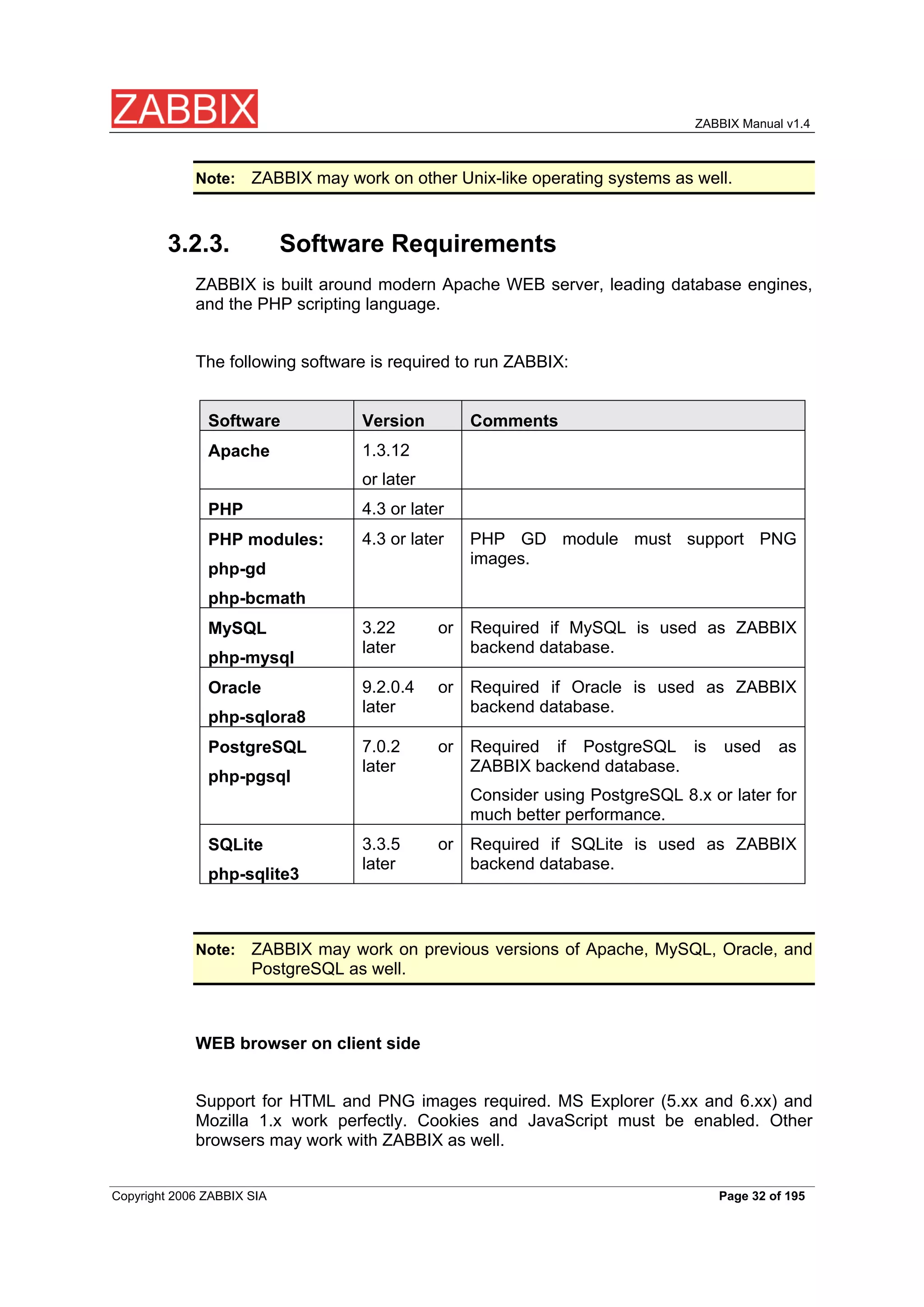
3.2.3. Software Requirements
ZABBIX is built around modern Apache WEB server, leading database engines,
and the PHP scripting language.
The following software is required to run ZABBIX:
Software Version Comments
1.3.12
Apache
or later
4.3 or later
PHP
4.3 or later PHP GD module must support PNG
PHP modules:
images.
php-gd
php-bcmath
3.22 or Required if MySQL is used as ZABBIX
MySQL
later backend database.
php-mysql
9.2.0.4 or Required if Oracle is used as ZABBIX
Oracle
later backend database.
php-sqlora8
7.0.2 or Required if PostgreSQL is used as
PostgreSQL
later ZABBIX backend database.
php-pgsql
Consider using PostgreSQL 8.x or later for
much better performance.
3.3.5 or Required if SQLite is used as ZABBIX
SQLite
later backend database.
php-sqlite3
ZABBIX may work on previous versions of Apache, MySQL, Oracle, and
Note:
PostgreSQL as well.
WEB browser on client side
Support for HTML and PNG images required. MS Explorer (5.xx and 6.xx) and
Mozilla 1.x work perfectly. Cookies and JavaScript must be enabled. Other
browsers may work with ZABBIX as well.
Copyright 2006 ZABBIX SIA Page 32 of 195
ZABBIX Manual v1.4
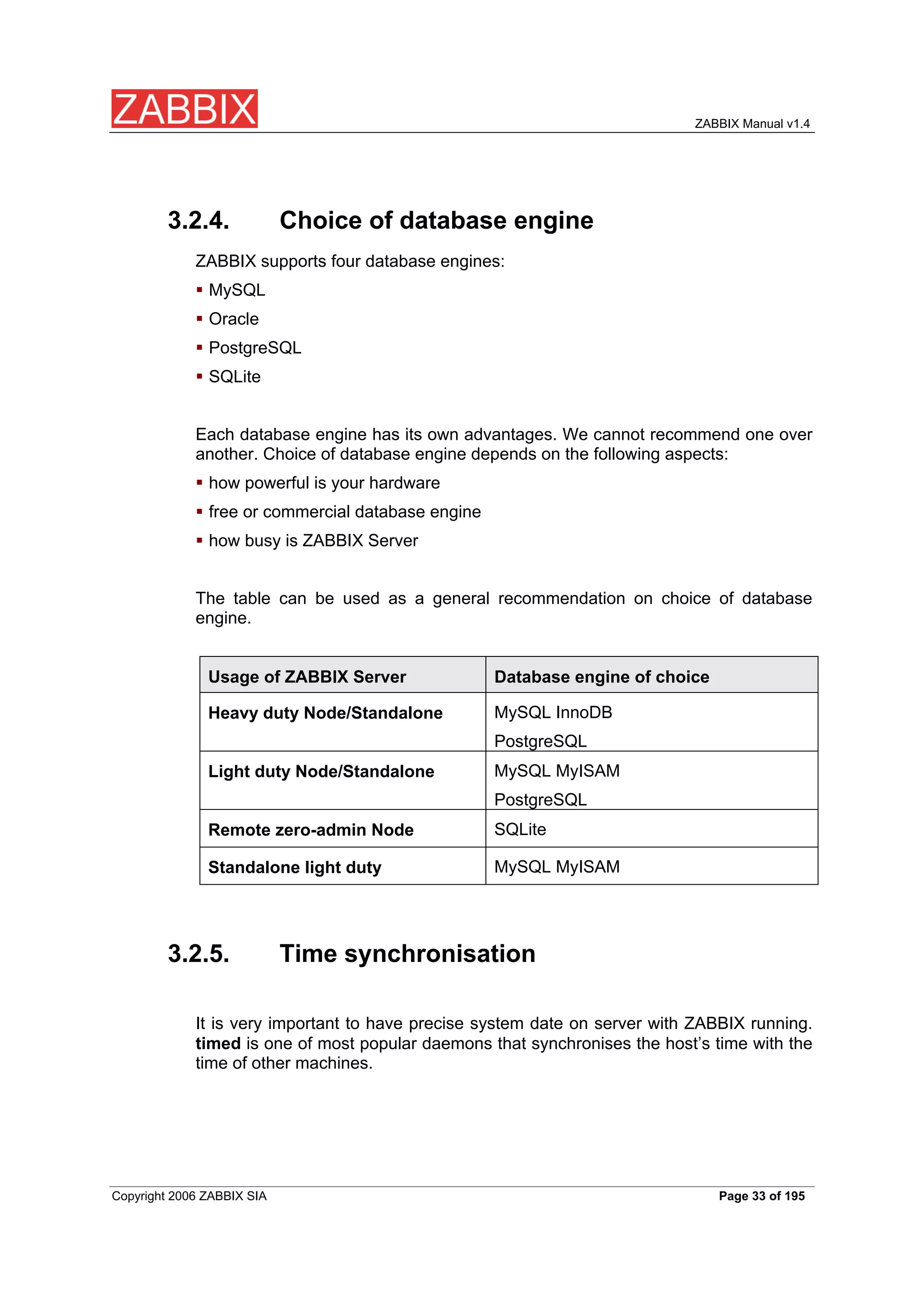
3.2.4. Choice of database engine
ZABBIX supports four database engines:
MySQL
Oracle
PostgreSQL
SQLite
Each database engine has its own advantages. We cannot recommend one over
another. Choice of database engine depends on the following aspects:
how powerful is your hardware
free or commercial database engine
how busy is ZABBIX Server
The table can be used as a general recommendation on choice of database
engine.
Usage of ZABBIX Server Database engine of choice
MySQL InnoDB
Heavy duty Node/Standalone
PostgreSQL
MySQL MyISAM
Light duty Node/Standalone
PostgreSQL
SQLite
Remote zero-admin Node
MySQL MyISAM
Standalone light duty
3.2.5. Time synchronisation
It is very important to have precise system date on server with ZABBIX running.
timed is one of most popular daemons that synchronises the host’s time with the
time of other machines.
Copyright 2006 ZABBIX SIA Page 33 of 195
ZABBIX Manual v1.4
3.3. Components
3.3.1. ZABBIX Components
ZABBIX consists of several major software components, the responsibilities of
which are outlined below.
3.3.2. ZABBIX Server
This is the centre of the ZABBIX software. The Server can remotely check
networked services (such as web servers and mail servers) using simple service
checks, but it is also the central component to which the Agents will report
availability and integrity information and statistics. The Server is the central
repository in which all configuration, statistical and operational data are stored,
and it is the entity in the ZABBIX software that will actively alert administrators
when problems arise in any of the monitored systems.
ZABBIX can also perform agent-less monitoring and also monitor network
devices using SNMP agents.
3.3.3. ZABBIX Agent
In order to actively monitor local resources and applications (such as harddrives,
memory, processor statistics etc.) on networked systems, those systems must
run the ZABBIX Agent. The Agent will gather operational information from the
system on which it is running, and report these data to the ZABBIX for further
processing. In case of failures (such as a harddisk running full, or a crashed
service process), the ZABBIX Server can actively alert the administrators of the
particular machine that reported the failure.
The ZABBIX Agents are extremely efficient because of use of native system calls
for gathering statistical information.
3.3.4. The WEB Interface
In order to allow easy access to the monitoring data and then configuration of
ZABBIX from anywhere and from any platform, the Web-based Interface is
provided. The Interface is a part of the ZABBIX Server, and is usually (but not
Copyright 2006 ZABBIX SIA Page 34 of 195
ZABBIX Manual v1.4
necessarily) run on the same physical machine as the one running the ZABBIX
Server.
ZABBIX front-end must run on the same physical machine of SQLite is
Note:
used.
3.4. Installation from Source
3.4.1. Software requirements
Building of ZABBIX server or agents from sources requires additional software.
The following software is required to compile ZABBIX:
One of the following database engines:
MySQL Headers and Libraries
Version 3.22 or later required.
Oracle Headers and Libraries
Sqlora8 headers and libraries are required.
PostgreSQL Headers and Libraries
Version 7.0.2 or later required. Consider using PostgreSQL 8.x for much better
performance.
SQLite Headers and Libraries
Version 3.3.5 or later required.
Usually provided as part of mysql-dev, postgresql-dev, sqlite3-dev
Note:
packages.
Copyright 2006 ZABBIX SIA Page 35 of 195
ZABBIX Manual v1.4
NET-SNMP (or UCD-SNMP) library and header files
Required for SNMP support. Optional.
Iksemel library and header files
Required to enable Jabber messaging. Optional.
Libcurl library and header files
Version 7.13.1 or higher required for WEB monitoring module. Optional.
C Compiler
C compiler is required. GNU C compiler is the best choice for open platforms.
Other (HP, IBM) C compilers may be used as well.
GNU Make
GNU make is required to process ZABBIX Makefiles.
3.4.2. Structure of ZABBIX distribution
docs
The directory contains this Manual in PDF format
src
The directory contains sources for all ZABBIX processes except frontends.
src/zabbix_server
The directory contains Makefile and sources for zabbix_server.
src/zabbix_agent
The directory contains Makefile and sources for zabbix_agent and
zabbix_agentd.
src/zabbix_get
The directory contains Makefile and sources for zabbix_get.
src/zabbix_sender
The directory contains Makefile and sources for zabbix_sender.
Copyright 2006 ZABBIX SIA Page 36 of 195
ZABBIX Manual v1.4
include
The directory contains include ZABBIX files.
misc
misc/init.d
The directory contains start-up scripts for different platforms.
frontends
frontends/php
The directory contains files of PHP frontend.
create
The directory contains SQL script for initial database creation.
create/schema
Database creation schemas.
create/data
Data for initial database creation.
upgrades
The directory contains upgrade procedures for different versions of ZABBIX.
3.4.3. ZABBIX Server
Server side
Create the ZABBIX superuser account
Step 1
This is the user the server will run as. For production use you should create a
dedicated unprivileged account ('zabbix' is commonly used). Running ZABBIX as
'root','bin', or any other account with special rights is a security risk. Do not do it!
ZABBIX server process (zabbix_server) is protected from being run under
Note:
root account.
Untar ZABBIX sources
Step 2
shell> gunzip zabbix-1.4.tar.gz && tar -xvf zabbix-1.4.tar
Create the ZABBIX database
Step 3
Copyright 2006 ZABBIX SIA Page 37 of 195
ZABBIX Manual v1.4
ZABBIX comes with SQL scripts used to create the required database schema
and also to insert a default configuration. There are separate scripts for MySQL,
Oracle, PostgreSQL and SQLite.
For MySQL:
shell> mysql -u<username> -p<password>
mysql> create database zabbix;
mysql> quit;
shell> cd create/schema
shell> cat mysql.sql | mysql -u<username> -p<password> zabbix
shell> cd ../data
shell> cat data.sql | mysql -u<username> -p<password> zabbix
shell> cat images_mysql.sql | mysql -u<username> -p<password> zabbix
For Oracle (we assume that user ‘zabbix’ with password ‘password’ exists and
has permissions to create database objects):
shell> cd create/schema
shell> cat oracle.sql | sqlplus zabbix/password >out.log
Check file out.log for any error messages.
Note:
shell> cd ../data
shell> cat data.sql | sqlplus zabbix/password >out.log
shell> cat images_oracle.sql | sqlplus zabbix/password >>out.log
For PostgreSQL:
shell> psql -U <username>
psql> create database zabbix;
psql> \\q
shell> cd create/schema
shell> cat postgresql.sql | psql -U <username> zabbix
shell> cd ../data
shell> cat data.sql | psql -U <username> zabbix
shell> cat images_pgsql.sql | psql -U <username> zabbix
Copyright 2006 ZABBIX SIA Page 38 of 195
ZABBIX Manual v1.4
For SQLite:
shell> cd create/schema
shell> cat sqlite.sql | sqlite3 /var/lib/sqlite/zabbix.db
shell> cd ../data
shell> cat data.sql | sqlite3 /var/lib/sqlite/zabbix.db
shell> cat images_sqlite3.sql | sqlite3 /var/lib/sqlite/zabbix.db
The database will be automatically created if not exists.
Note:
Configure and compile the source code for your system
Step 4
The sources must be compiled for both the server (monitoring machine) as well
as the clients (monitored machines). To configure the source for the server, you
must specify which database will be used.
shell> ./configure --enable-server --with-mysql --with-net-snmp –with-jabber –
with-libcurl # for MySQL + Jabber + WEB monitoring
or
shell> ./configure --enable-server --with-pgsql --with-net-snmp –with-jabber –with-
libcurl # for PostgreSQL + Jabber + WEB monitoring
or
shell> ./configure --enable-server --with-oracle=/home/zabbix/sqlora8 --with-net-
snmp –with-jabber –with-libcurl # for Oracle + Jabber + WEB monitoring
Use flag --with-oracle to specify location of sqlora8 library. The libary is
Note:
required for Oracle support. The library can be found at libsqlora8
homepage
Use flag --enable-static to statically link libraries. If you plan to distribute
Note:
compiled binaries among different servers, you must use this flag to make
Copyright 2006 ZABBIX SIA Page 39 of 195
ZABBIX Manual v1.4
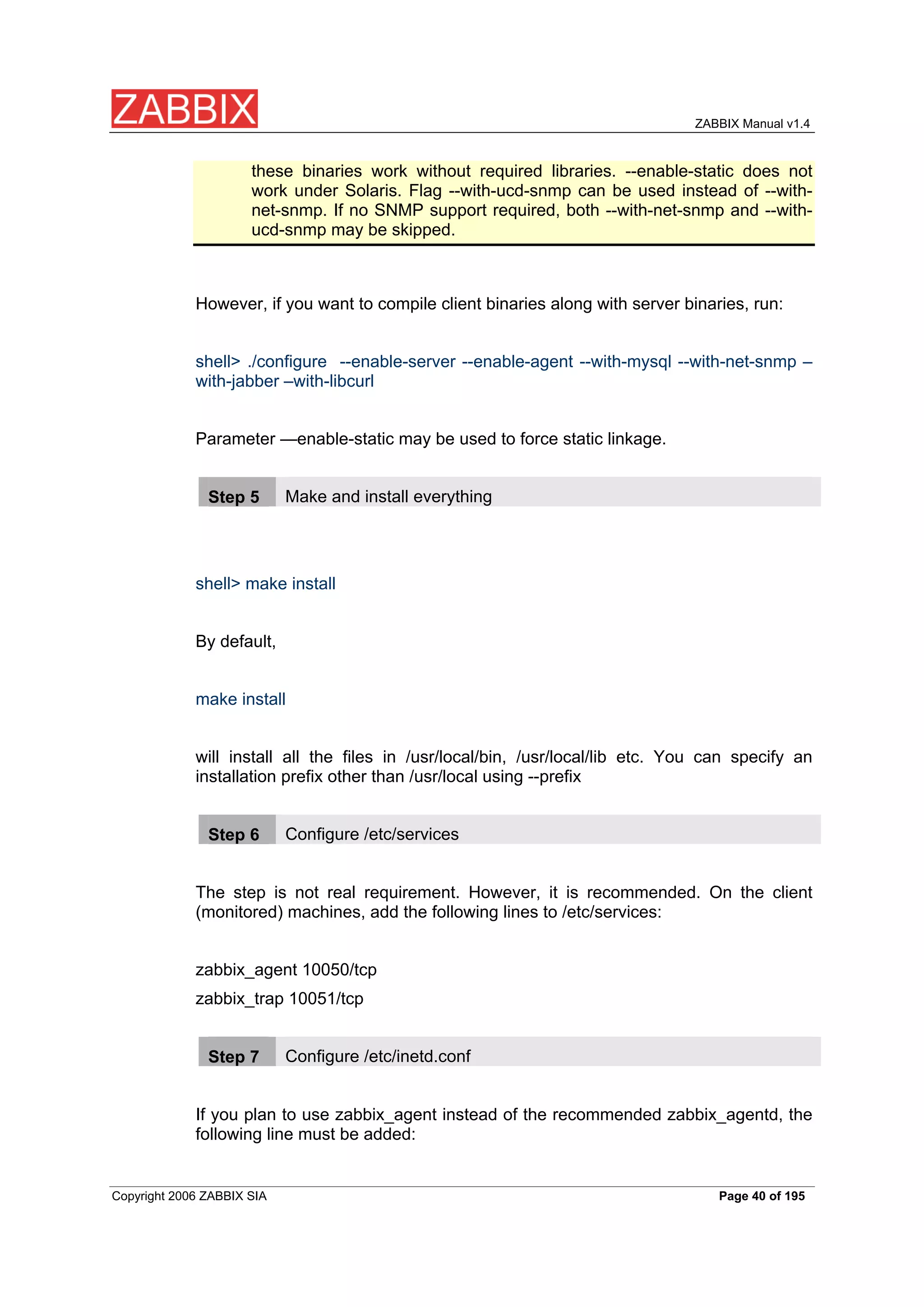
these binaries work without required libraries. --enable-static does not
work under Solaris. Flag --with-ucd-snmp can be used instead of --with-
net-snmp. If no SNMP support required, both --with-net-snmp and --with-
ucd-snmp may be skipped.
However, if you want to compile client binaries along with server binaries, run:
shell> ./configure --enable-server --enable-agent --with-mysql --with-net-snmp –
with-jabber –with-libcurl
Parameter —enable-static may be used to force static linkage.
Make and install everything
Step 5
shell> make install
By default,
make install
will install all the files in /usr/local/bin, /usr/local/lib etc. You can specify an
installation prefix other than /usr/local using --prefix
Configure /etc/services
Step 6
The step is not real requirement. However, it is recommended. On the client
(monitored) machines, add the following lines to /etc/services:
zabbix_agent 10050/tcp
zabbix_trap 10051/tcp
Configure /etc/inetd.conf
Step 7
If you plan to use zabbix_agent instead of the recommended zabbix_agentd, the
following line must be added:
Copyright 2006 ZABBIX SIA Page 40 of 195
ZABBIX Manual v1.4
zabbix_agent stream tcp nowait.3600 zabbix /opt/zabbix/bin/zabbix_agent
Restart inetd
shell> killall -HUP inetd
Modify default settings in configuration files
Configure /etc/zabbix/zabbix_agent.conf
Step 8
You need to configure this file for every host having zabbix_agent installed. The
file should contain IP address of ZABBIX server. Connections from other hosts
will be denied. You may take misc/conf/zabbix_agent.conf as example.
Configure /etc/zabbix/zabbix_agentd.conf
Step 9
You need to configure this file for every host with zabbix_agentd installed. The
file should contain the IP address of the ZABBIX server. Connectionsfrom other
hosts will be denied. You may take misc/conf/zabbix_agentd.conf as example.
Configure /etc/zabbix/zabbix_server.conf
Step
10
For small installations (up to ten monitored hosts), default parameters are
sufficient. However, you should change default parameters to maximize
performance from ZABBIX. See section [Performance tuning] for more details.
You may take misc/conf/zabbix_server.conf as example.
Run server processes
Step
11
Run zabbix_server on server side.
shell> cd bin
shell> ./zabbix_server
Copyright 2006 ZABBIX SIA Page 41 of 195
ZABBIX Manual v1.4
Run agents
Step
12
Run zabbix_agentd where necessary.
shell> cd bin
shell> ./zabbix_agentd
3.4.4. ZABBIX Agent
Client side
Create the ZABBIX account
Step 1
This is the user the agent will run as. For production use you should create a
dedicated unprivileged account (“zabbix” is commonly used). ZABBIX agents
have protection against running under root account.
Untar ZABBIX sources
Step 2
shell> gunzip zabbix-1.4.tar.gz && tar xvf zabbix-1.4.tar
Configure and compile the source code for your system
Step 3
The sources must be compiled for the client only.
To configure the source for the client:
shell> ./configure --enable-agent
Use flag --enable-static to statically link libraries. If you plan to distribute
Note:
compiled binaries among different servers, you must use this flag to make
these binaries work without required libraries.
Build agent
Step 4
Copyright 2006 ZABBIX SIA Page 42 of 195
ZABBIX Manual v1.4
shell> make
Copy created binaries from bin/ to /opt/zabbix/bin or any other directory Other
common directories are /usr/local/bin or /usr/local/zabbix/bin.
Configure /etc/services
Step 5
The step is not real requirement. However, it is recommended.
On the client (monitored) machines, add the following lines to /etc/services:
zabbix_agent 10050/tcp
zabbix_trap 10051/tcp
Configure /etc/inetd.conf
Step 6
If you plan to use zabbix_agent instead of the recommended zabbix_agentd, the
following line must be added:
zabbix_agent stream tcp nowait.3600 zabbix /opt/zabbix/bin/zabbix_agent
Restart inetd
shell> killall -HUP inetd
Configure /etc/zabbix/zabbix_agent.conf
Step 7
You need to configure this file for every host having zabbix_agent installed. The
file should contain IP address of ZABBIX server. Connections from other hosts
will be denied. Note, that no end of line character should present in the file.
You may take misc/conf/zabbix_agent.conf as example.
Configure /etc/zabbix/zabbix_agentd.conf
Step 8
Copyright 2006 ZABBIX SIA Page 43 of 195
ZABBIX Manual v1.4
You need to configure this file for every host with zabbix_agentd installed. The
file should contain IP address of ZABBIX server. Connections from other hosts
will be denied. You may take misc/conf/zabbix_agentd.conf as example.
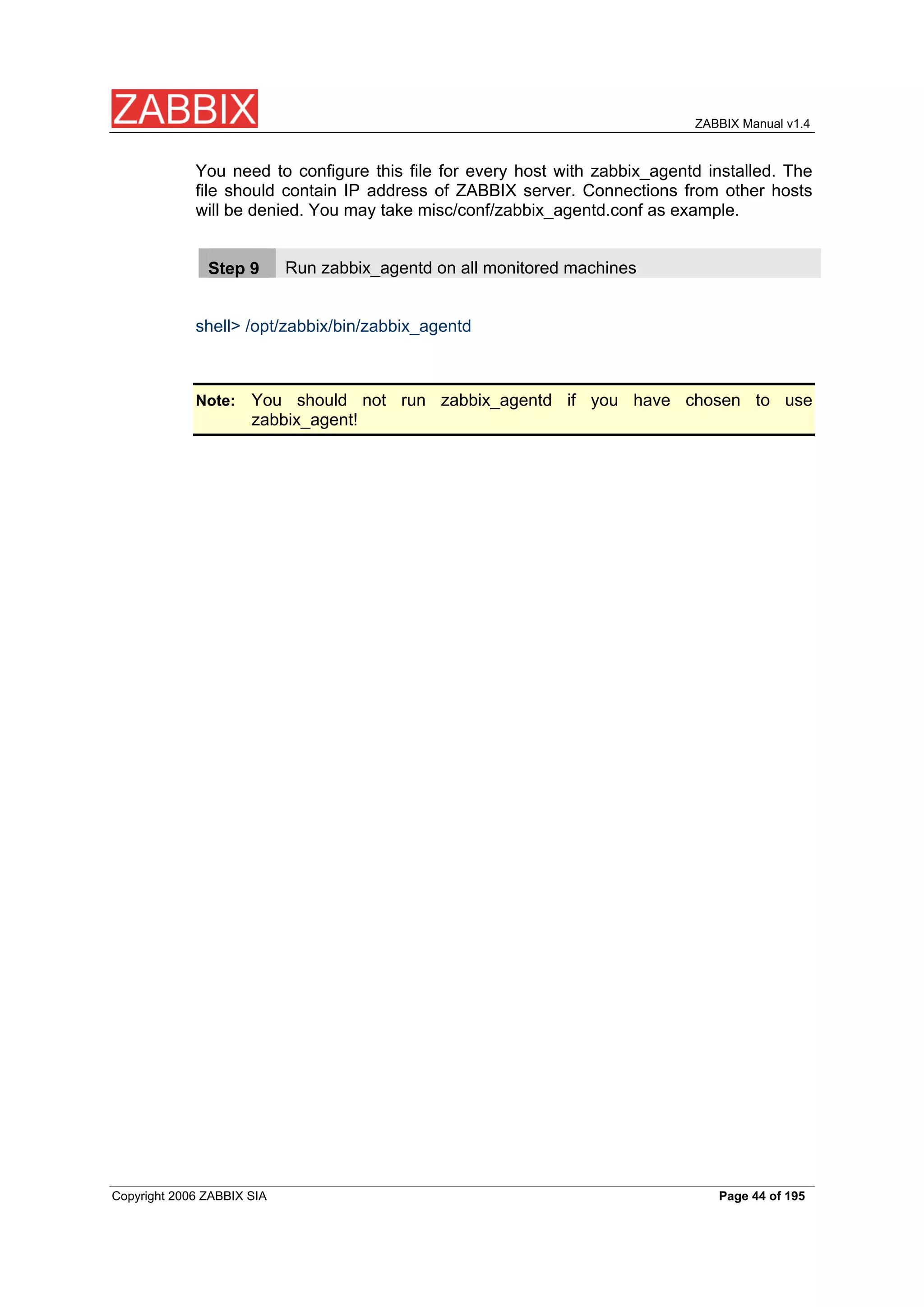
Run zabbix_agentd on all monitored machines
Step 9
shell> /opt/zabbix/bin/zabbix_agentd
You should not run zabbix_agentd if you have chosen to use
Note:
zabbix_agent!
Copyright 2006 ZABBIX SIA Page 44 of 195
ZABBIX Manual v1.4
3.4.5. ZABBIX WEB Interface
Point your browser to ZABBIX URL.
Step 1
Copyright 2006 ZABBIX SIA Page 45 of 195
ZABBIX Manual v1.4
Read and accept GPL v2.
Step 2
Copyright 2006 ZABBIX SIA Page 46 of 195
ZABBIX Manual v1.4
Make sure that all software pre-requisites are met.
Step 3
Pre-requisite Minimum value Description
4.3.0
PHP version
Memory 8MB In php.ini:
PHP
limit memory_limit = 128M
PHP post max 8MB In php.ini:
size post_max_size = 8M
max 300 seconds In php.ini:
PHP
execution time max_execution_time = 300
database One of: MySQL, One of the following modules
PHP
Oracle, must be installed:
support
PostgreSQL,
php-mysql, php-sqlora8, php-
SQLite
pgsql, php-sqlite3
Any Compiled in PHP5.
PHP BC math
2.0 or higher Module php-gd.
GD Version
At least PNG Module php-gd.
Image formats
Copyright 2006 ZABBIX SIA Page 47 of 195
ZABBIX Manual v1.4
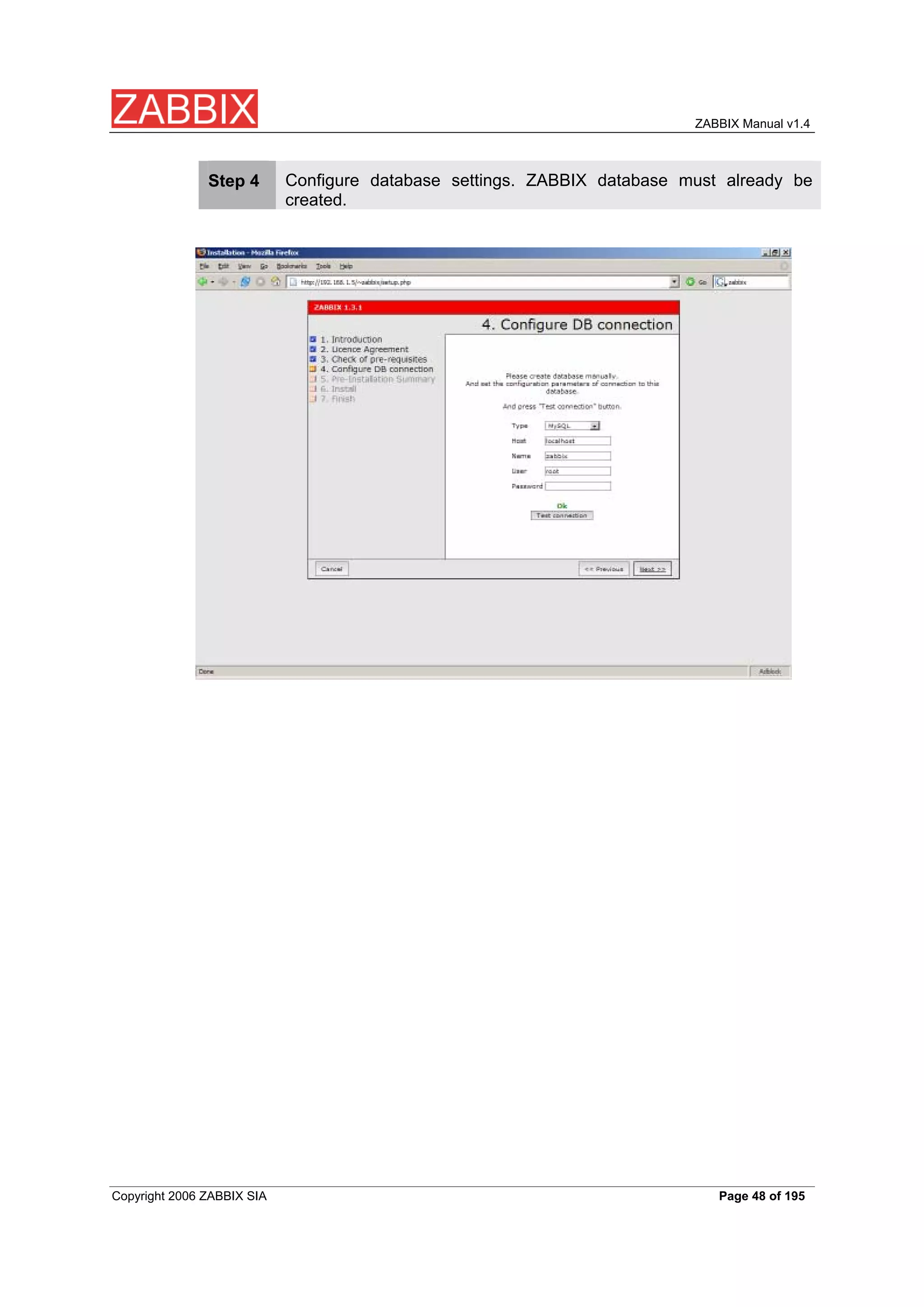
Configure database settings. ZABBIX database must already be
Step 4
created.
Copyright 2006 ZABBIX SIA Page 48 of 195
ZABBIX Manual v1.4
See summary of settings.
Step 5
Copyright 2006 ZABBIX SIA Page 49 of 195
ZABBIX Manual v1.4
Download configuration file and place it under conf/.
Step 6
Copyright 2006 ZABBIX SIA Page 50 of 195
ZABBIX Manual v1.4
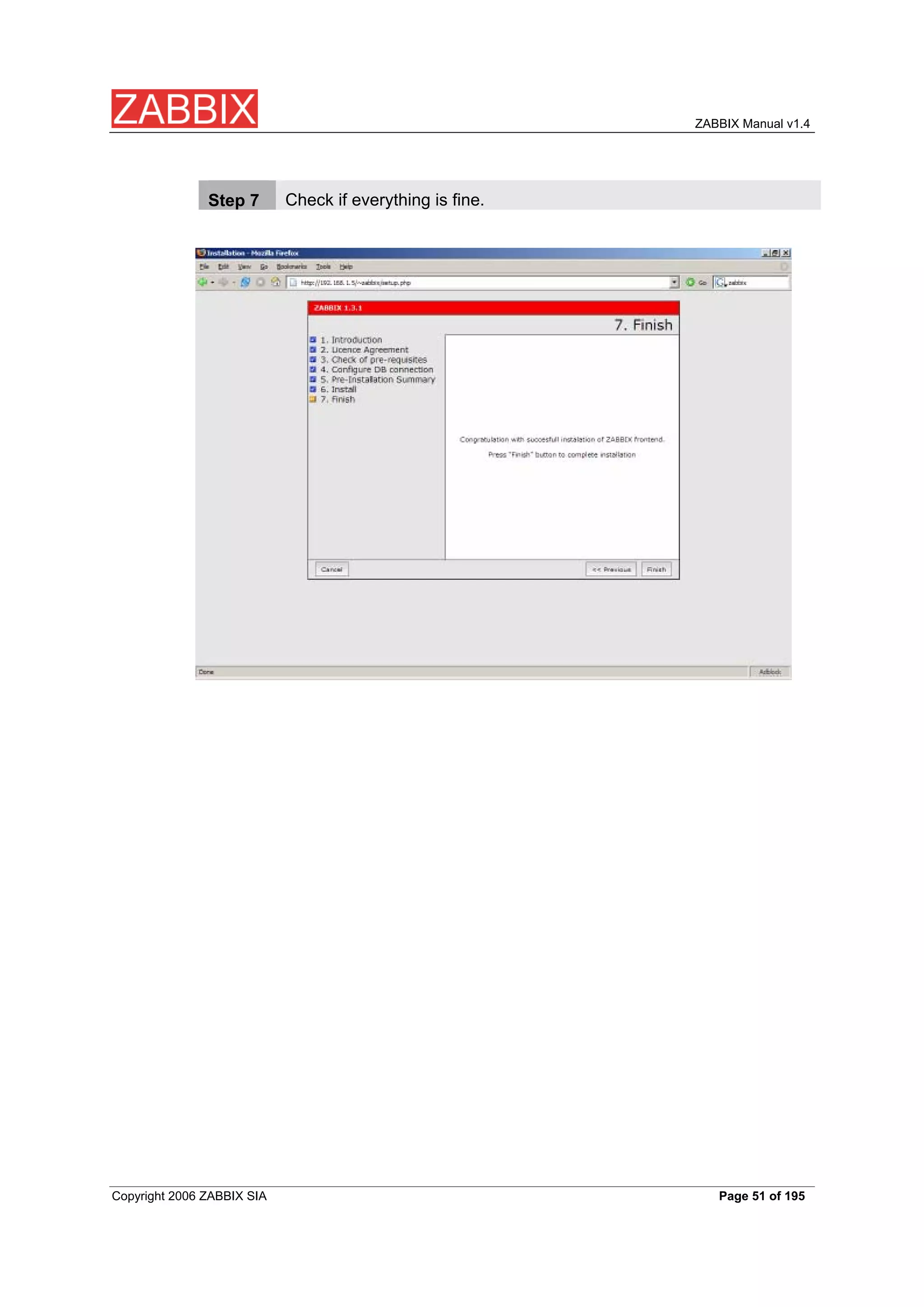
Check if everything is fine.
Step 7
Copyright 2006 ZABBIX SIA Page 51 of 195
ZABBIX Manual v1.4
For distributed monitoring only!
Step 9
If used in a distributed environment you have to run:
shell> ./zabbix_server –n <nodeid>
where Node ID is an unique Node identificator. For example:
shell> ./zabbix_server –n 1
This will convert database data for use with Node ID ‘1’ and also adds a local
node.
Copyright 2006 ZABBIX SIA Page 52 of 195
ZABBIX Manual v1.4
ZABBIX frontend is ready! Default username is ‘Admin’ with no
Step
password.
10
Copyright 2006 ZABBIX SIA Page 53 of 195
ZABBIX Manual v1.4
3.5. Upgrading
The upgrade procedure is quite simple. New binaries and frontend should be
installed according to latest installation instructions. In order to update database
structure, the following steps should be performed.
The upgrade process can take from 0 seconds (if no patches required) to several
hours. Note that before applying database patches, all ZABBIX processes must
be stopped.
Database upgrade is usually required for upgrade from one major stable release
to another. For example, from 1.1.x to 1.4.x.
For production installations a database backup is required!
3.5.1. Database upgrade
Go to the upgrades/dbpatches directory. In this directory are subdirectories
named according to a version upgrade (e.g. 1.0beta3_to_1.0beta4). Enter the
directory corresponding to your upgrade (if you are upgrading through multiple
versions, you will need to apply the upgrades one at a time). Depending on which
database you use:
shell> cd mysql; cat patch.sql |mysql zabbix -u<username> -p<password>
or
shell> cd postgresql; cat patch.sql|psql -U <username> zabbix
Do not forget to upgrade PHP front-end files.
Finally, read version specific notes below for any extra procedures and useful
information.
Copyright 2006 ZABBIX SIA Page 54 of 195
ZABBIX Manual v1.4
4. ZABBIX Processes
4.1. ZABBIX Server
ZABBIX Server is a central process of ZABBIX software. ZABBIX Server can be
started by executing:
shell> cd bin
shell> ./zabbix_server
ZABBIX Server runs as a daemon process.
ZABBIX Server accepts the following command line parameters:
-c --config <file> specify configuration file, default is
/etc/zabbix/zabbix_server.conf
-h --help give this help
-v --version display version number
In order to get this help run:
shell> zabbix_server -h
Example of command line parameters:
shell> zabbix_server –c /usr/local/etc/zabbix_server.conf
shell> zabbix_server --help
shell> zabbix_server -v
The configuration file contains parameters for zabbix_server. The file must exist
and it should have read permissions for user ‘zabbix’. Supported parameters:
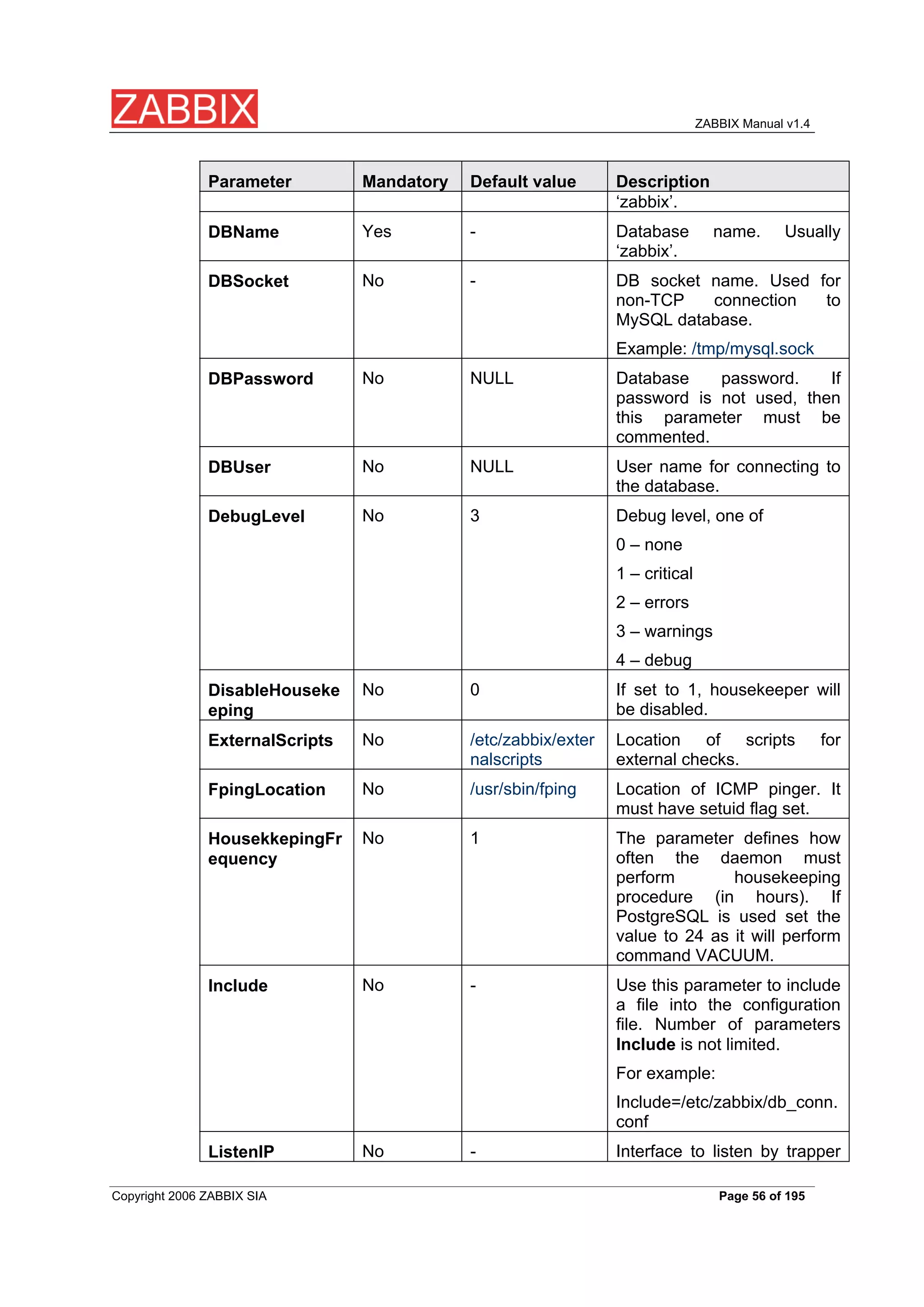
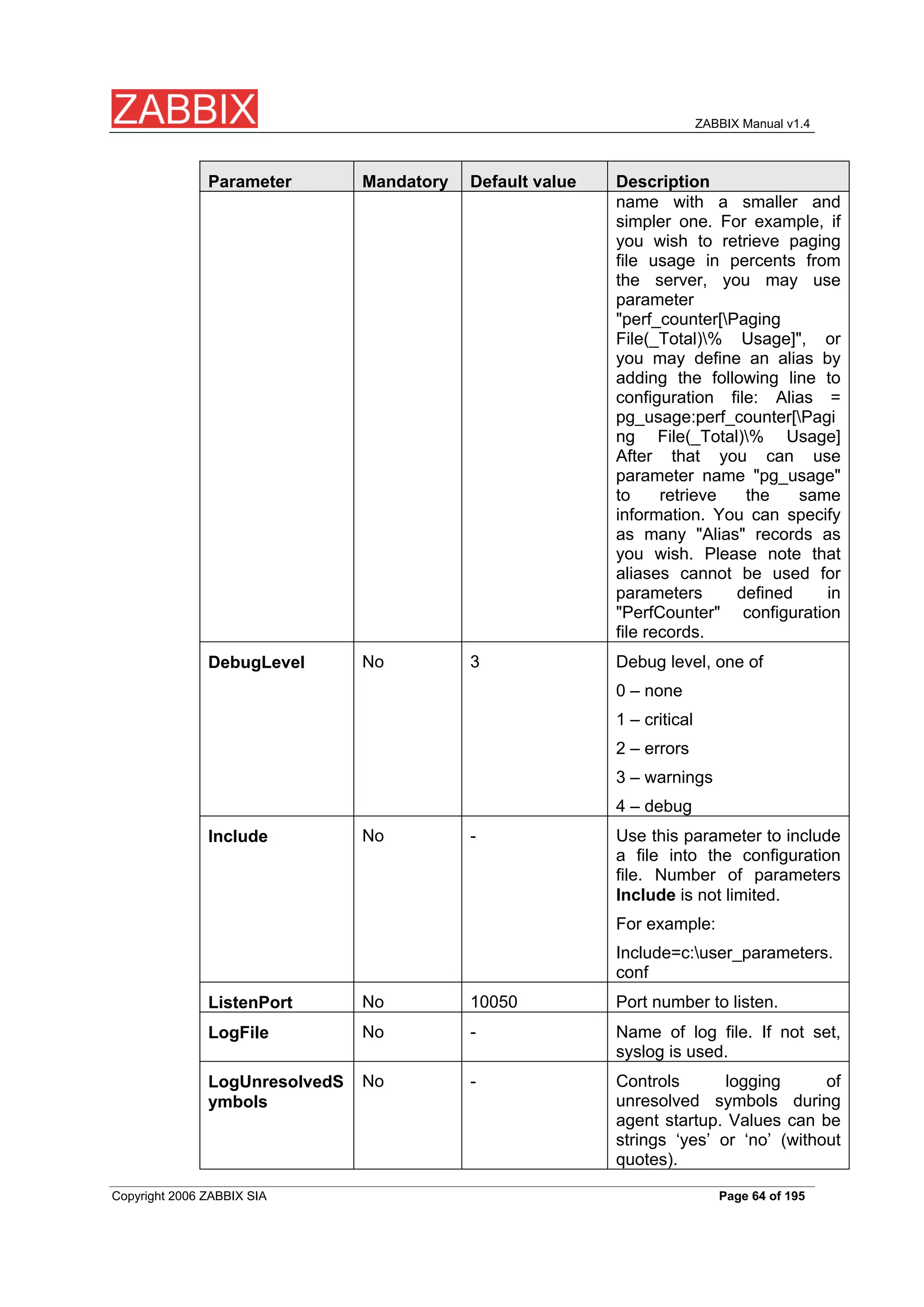
Parameter Mandatory Default value Description
No /home/zabbix/bin Location of scripts for user-
AlertScriptsPath
defined media types.
Yes - Database name. Usually
DBHost
Copyright 2006 ZABBIX SIA Page 55 of 195
ZABBIX Manual v1.4
Parameter Mandatory Default value Description
‘zabbix’.
Yes - Database name. Usually
DBName
‘zabbix’.
No - DB socket name. Used for
DBSocket
non-TCP connection to
MySQL database.
Example: /tmp/mysql.sock
No NULL Database password. If
DBPassword
password is not used, then
this parameter must be
commented.
No NULL User name for connecting to
DBUser
the database.
No 3 Debug level, one of
DebugLevel
0 – none
1 – critical
2 – errors
3 – warnings
4 – debug
No 0 If set to 1, housekeeper will
DisableHouseke
be disabled.
eping
No /etc/zabbix/exter Location of scripts for
ExternalScripts
nalscripts external checks.
No /usr/sbin/fping Location of ICMP pinger. It
FpingLocation
must have setuid flag set.
No 1 The parameter defines how
HousekkepingFr
often the daemon must
equency
perform housekeeping
procedure (in hours). If
PostgreSQL is used set the
value to 24 as it will perform
command VACUUM.
No - Use this parameter to include
Include
a file into the configuration
file. Number of parameters
Include is not limited.
For example:
Include=/etc/zabbix/db_conn.
conf
No - Interface to listen by trapper
ListenIP
Copyright 2006 ZABBIX SIA Page 56 of 195
ZABBIX Manual v1.4
Parameter Mandatory Default value Description
processes. Trapper will listen
to all interfaces if this
parameter is not set.
No 10051 Port number to listen by
ListenPort
trapper processes.
No - Name of log file. If not set,
LogFile
syslog is used.
No 1 This parameter controls log
LogFileSize
rotation setting for LogFile.
By default, ZABBIX
automatically roatates log file
when it reaches 1MB.
This parameter is in MB.
If set to 0, no log rotation will
be performed.
No 0 Unique NodeID (0-999). Must
NodeID
be ‘0’ or missing for
standalone ZABBIX Server.
No 0 If set to ‘1’ local events won’t
NodeNoEvents
be sent to master node.
No 0 If set to ‘1’ local history won’t
NodeNoHistory
be sent to master node.
No /tmp/zabbix_serv Name of file to store PID
PidFile
er.pid
No 30 ZABBIX server ping servers
PingerFrequenc
once per PingerFrequency
y
seconds (1-3600).
No 30 The parameter defines how
SenderFrequenc
often the daemon must try to
y
send alerts (in seconds)
No 1 Number of discoverers to
StartDiscoverers
start (0-255).
No 5 Number of HTTP pollers to
StartHTTPPoller
start (0-255).
s
No 5 Number of pollers to start (0-
StartPollers
255).
No 1 Number of pollers for
StartPollersUnre
unreachable hosts to start (0-
achable
255).
No 5 Number of trappers to start
StartTrappers
(0-255)
Copyright 2006 ZABBIX SIA Page 57 of 195
ZABBIX Manual v1.4
Parameter Mandatory Default value Description
No 5 Do not spend more than
Timeout
Timeout seconds on
retrieving requested value (1-
255) Note: Example of the
configuration file can be
found at
misc/conf/zabbix_server.conf
No 5 Do not spend more than
TrapperTimeout
Timeout seconds on
processing of traps (1-255)
No 60 How ofter try to connect to
UnavailableDela
unavailable host
y
No 15 How often try to connect to
UnreachableDel
unreachable host
ay
No 45 If a host was unreachable for
UnreachablePeri
more than
od
UnreachablePeriod seconds,
change host status to
Unavailable
4.2. ZABBIX Agent (UNIX, standalone daemon)
ZABBIX UNIX Agent runs on a host being monitored. The agent provides host's
performance and availability information for ZABBIX Server.
ZABBIX Agent processes items of type ‘ZABBIX Agent’ or ‘ZABBIX Agent
(active)’.
ZABBIX Agent can be started by executing:
shell> cd bin
shell> ./zabbix_agentd
ZABBIX Agent runs as a daemon process.
ZABBIX Agent accepts the following command line parameters:
-c --config <file> specify configuration file, default is
/etc/zabbix/zabbix_agentd.conf
Copyright 2006 ZABBIX SIA Page 58 of 195
ZABBIX Manual v1.4
-h --help give this help
-v --version display version number
-p --print print supported metrics and exit
-t --test <metric> test specified metric and exit
In order to get this help run:
shell> zabbix_agentd –h
Example of command line parameters:
shell> zabbix_agentd –c /usr/local/etc/zabbix_agentd.conf
shell> zabbix_agentd –help
shell> zabbix_agentd –print
shell> zabbix_agentd –t “system.cpu.load[all,avg1]”
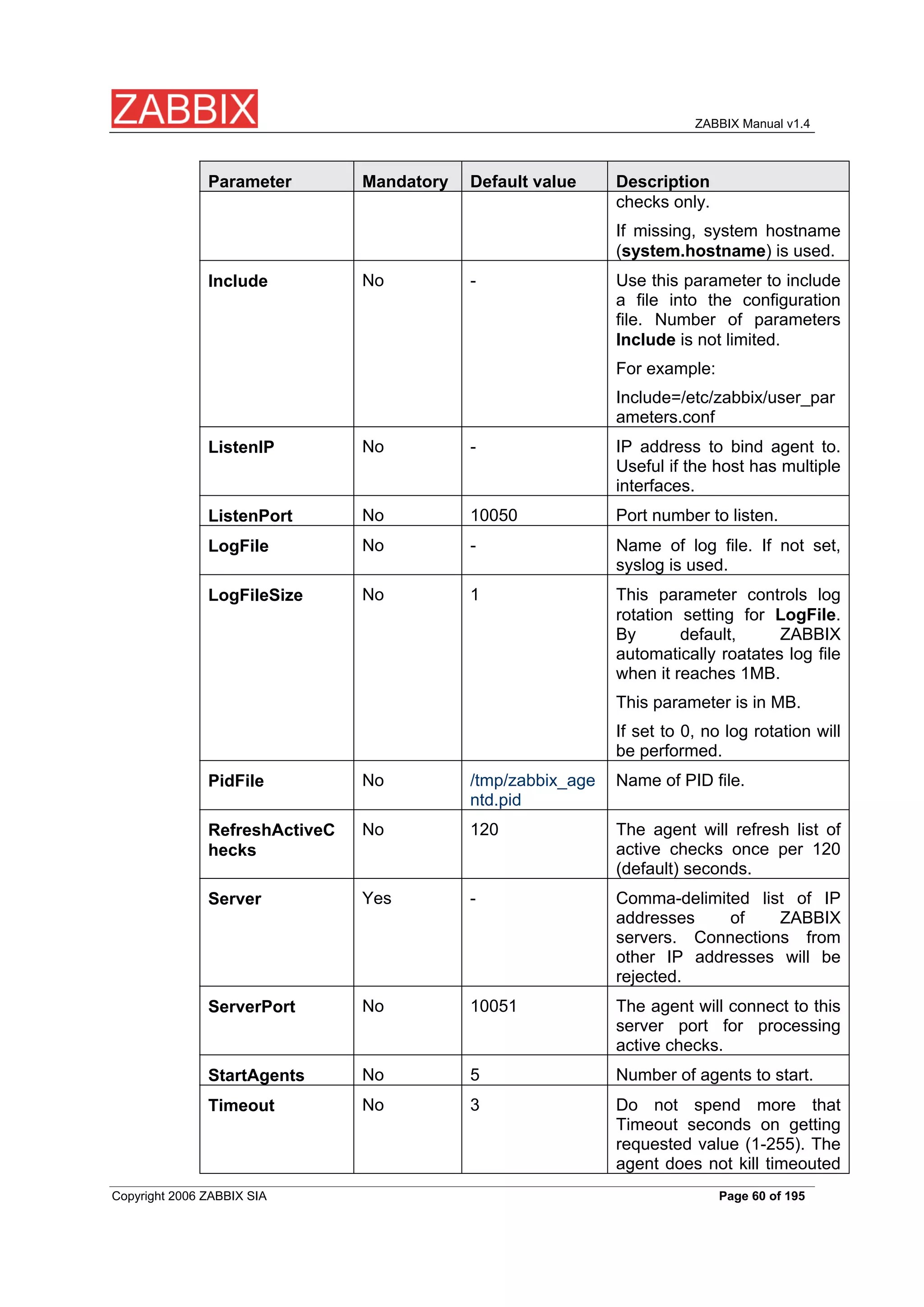
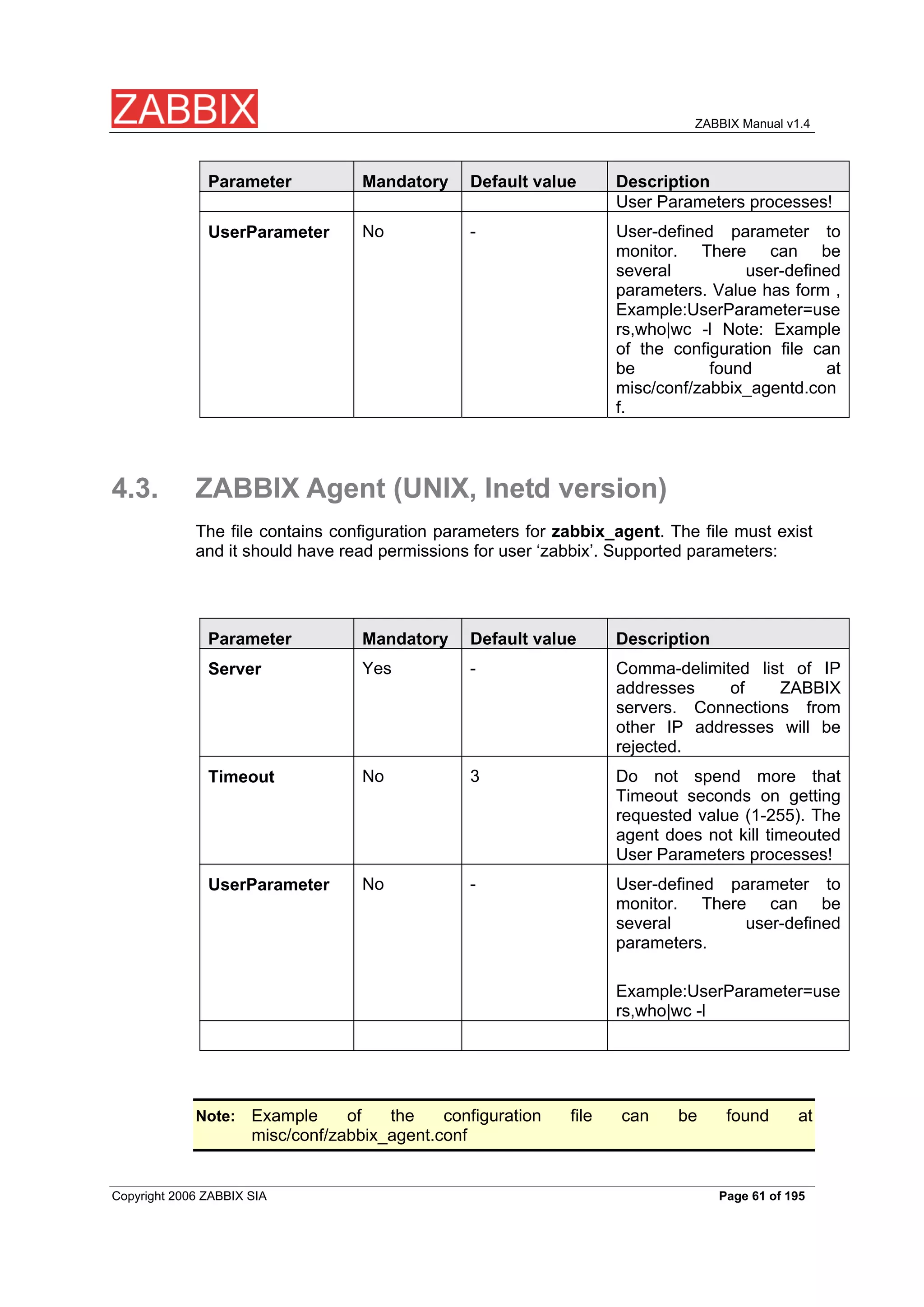
The configuration file contains configuration parameters for zabbix_agentd. The
file must exist and it should have read permissions for user ‘zabbix’. Supported
parameters:
Parameter Mandatory Default value Description
No 3 Debug level:
DebugLevel
0 – none
1 – critical
2 – errors
3 – warnings
4 – debug
No 0 Disable processing of active
DisableActive
checks. The agent will not
connect to ZABBIX server to
get list of active items.
No 0 Enable remote commands.
EnableRemoteC
ZABBIX server will be able to
ommands
send commands for
execution by the agent.
No System Unique host name. The
Hostname
hostname. hostname is used for active
Copyright 2006 ZABBIX SIA Page 59 of 195
ZABBIX Manual v1.4
Parameter Mandatory Default value Description
checks only.
If missing, system hostname
(system.hostname) is used.
No - Use this parameter to include
Include
a file into the configuration
file. Number of parameters
Include is not limited.
For example:
Include=/etc/zabbix/user_par
ameters.conf
No - IP address to bind agent to.
ListenIP
Useful if the host has multiple
interfaces.
No 10050 Port number to listen.
ListenPort
No - Name of log file. If not set,
LogFile
syslog is used.
No 1 This parameter controls log
LogFileSize
rotation setting for LogFile.
By default, ZABBIX
automatically roatates log file
when it reaches 1MB.
This parameter is in MB.
If set to 0, no log rotation will
be performed.
No /tmp/zabbix_age Name of PID file.
PidFile
ntd.pid
No 120 The agent will refresh list of
RefreshActiveC
active checks once per 120
hecks
(default) seconds.
Yes - Comma-delimited list of IP
Server
addresses of ZABBIX
servers. Connections from
other IP addresses will be
rejected.
No 10051 The agent will connect to this
ServerPort
server port for processing
active checks.
No 5 Number of agents to start.
StartAgents
No 3 Do not spend more that
Timeout
Timeout seconds on getting
requested value (1-255). The
agent does not kill timeouted
Copyright 2006 ZABBIX SIA Page 60 of 195
ZABBIX Manual v1.4
Parameter Mandatory Default value Description
User Parameters processes!
No - User-defined parameter to
UserParameter
monitor. There can be
several user-defined
parameters. Value has form ,
Example:UserParameter=use
rs,who|wc -l Note: Example
of the configuration file can
be found at
misc/conf/zabbix_agentd.con
f.
4.3. ZABBIX Agent (UNIX, Inetd version)
The file contains configuration parameters for zabbix_agent. The file must exist
and it should have read permissions for user ‘zabbix’. Supported parameters:
Parameter Mandatory Default value Description
Yes - Comma-delimited list of IP
Server
addresses of ZABBIX
servers. Connections from
other IP addresses will be
rejected.
No 3 Do not spend more that
Timeout
Timeout seconds on getting
requested value (1-255). The
agent does not kill timeouted
User Parameters processes!
No - User-defined parameter to
UserParameter
monitor. There can be
several user-defined
parameters.
Example:UserParameter=use
rs,who|wc -l
Example of the configuration file can be found at
Note:
misc/conf/zabbix_agent.conf
Copyright 2006 ZABBIX SIA Page 61 of 195
ZABBIX Manual v1.4
4.4. ZABBIX Agent (Windows)
Zabbix_agentd is ZABBIX agent for Win32/64 systems. It will work on Windows
NT 4.0, Windows 2000, Windows XP, and Windows Vista.
4.4.1. Installation
Installation is very simple and includes 3 steps:
Create configuration file.
Step 1
Create configuration file c:/zabbix_agentd.conf (it has the same syntax as UNIX
agent).
Install agent as a Windows service.
Step 2
zabbix_agentd.exe --install
If you wish to use configuration file other that c:\\zabbix_agentd.conf, you should
use the following command for service installation:
zabbix_agentd.exe --config <your_configuration_file> install
Full path to configuration file should be specified.
Run agent.
Step 2
Now you can use Control Panel to start agent's service or run:
zabbix_agentd.exe --start
Windows NT 4.0 note. Zabbix_agentd.exe uses PDH (Performance Data
Note:
Helper) API to gather various system information, so PDH.DLL is needed.
This DLL is not supplied with Windows NT 4.0, so you need to download
and install it by yourself. Microsoft Knowledge Base article number
284996 describes this in detail and contains a download link. You can find
Copyright 2006 ZABBIX SIA Page 62 of 195
ZABBIX Manual v1.4
this article at http://support.microsoft.com/default.aspx?scid=kb;en-
us;284996
4.4.2. Usage
Command line syntax:
zabbix_agentd.exe [-Vhp] [-idsx] [-c <file>] [-t <metric>]
ZABBIX Windows Agent accepts the following command line parameters:
Options:
-c –config <file> Specify alternate configuration file (default is
c:\\zabbix_agentd.conf).
-h --help Display help information.
-V --version Display version number.
-p --print Print list of supported checks (metrics) and
exit.
-t –test <metric> Test single check (metric) and exit.
Functions:
-I --install Install ZABBIX agent as a service.
-d --uninstall Uninstall ZABBIX agent service.
-s --start Start ZABBIX agent service.
-x --stop Stop ZABBIX agent service.
The file contains configuration parameters for Zabbix_agentd.exe. Supported
parameters:
Parameter Mandatory Default value Description
No - Sets the alias for parameter.
Alias
It can be useful to substitute
long and complex parameter
Copyright 2006 ZABBIX SIA Page 63 of 195
ZABBIX Manual v1.4
Parameter Mandatory Default value Description
name with a smaller and
simpler one. For example, if
you wish to retrieve paging
file usage in percents from
the server, you may use
parameter
\"perf_counter[\\Paging
File(_Total)\\% Usage]\", or
you may define an alias by
adding the following line to
configuration file: Alias =
pg_usage:perf_counter[\\Pagi
ng File(_Total)\\% Usage]
After that you can use
parameter name \"pg_usage\"
to retrieve the same
information. You can specify
as many \"Alias\" records as
you wish. Please note that
aliases cannot be used for
parameters defined in
\"PerfCounter\" configuration
file records.
No 3 Debug level, one of
DebugLevel
0 – none
1 – critical
2 – errors
3 – warnings
4 – debug
No - Use this parameter to include
Include
a file into the configuration
file. Number of parameters
Include is not limited.
For example:
Include=c:\\user_parameters.
conf
No 10050 Port number to listen.
ListenPort
No - Name of log file. If not set,
LogFile
syslog is used.
No - Controls logging of
LogUnresolvedS
unresolved symbols during
ymbols
agent startup. Values can be
strings ‘yes’ or ‘no’ (without
quotes).
Copyright 2006 ZABBIX SIA Page 64 of 195
ZABBIX Manual v1.4
Parameter Mandatory Default value Description
No 100 Sets maximum acceptable
MaxCollectorPro
processing time of one data
cessingTime
sample by collector thread (in
milliseconds). If processing
time will exceed specified
value, warning message will
be written to the log file.
No - The parameter has no effect.
NoTimeWait
No - <parameter_name>,\"<perf_c
PerfCounter
ounter_path>\",<period>
Defines new parameter
<parameter_name> which is
an average value for system
performance counter
<perf_counter_path> for the
specified time period
<period> (in seconds).
For example, if you wish to
receive average number of
processor interrupts per
second for last minute, you
can define new parameter
\"interrupts\" as following:
PerfCounter =
interrupts,\"\\Processor(0)\\Inter
rupts/sec\",60
Please note double quotes
around performance counter
path. Samples for calculating
average value will be taken
every second.
No - The parameter has no effect.
PidFile
Yes - Comma-delimited list of IP
Server
addresses of ZABBIX
servers. Connections from
other IP addresses will be
rejected.
No - The parameter has no effect.
StartAgents
No - User-defined parameter to
UserParameter
monitor. There can be
Copyright 2006 ZABBIX SIA Page 65 of 195
ZABBIX Manual v1.4
Parameter Mandatory Default value Description
several user-defined
parameters. Value has form
<key>,<shell command>. Do
not use spaces around pipe
('|') characters!
Example:UserParameter=test
,echo 1
4.5. ZABBIX Sender (UNIX)
ZABBIX UNIX Sender is a command line utility which may be used to send
performance data to ZABBIX Server for processing.
The utility is usually used in long running user scripts for periodical sending of
availability and performance data.
ZABBIX Sender can be started by executing:
shell> cd bin
shell> ./zabbix_sender –z zabbix –p 10051 –s LinuxDB3 –k db.connections –o 43
ZABBIX Sender accepts the following command line parameters:
-z –zabbix-server Hostname or IP address of ZABBIX Server.
<zabbix server>
-p --port <zabbix Specify port number of server trapper
server port> running on the server. Default is 10051.
-s –host <host Specify host name. Host IP address and
name or IP> DNS name will not work.
-k –key <key of Specify metric name (key) we want to send.
metric>
-o –value <value> Specify value of the key.
-i –input-file Load values from input file.
<input file>
-h –help Give this help.
-v –version Display version number.
In order to get this help run:
shell> zabbix_sender -h
Copyright 2006 ZABBIX SIA Page 66 of 195
ZABBIX Manual v1.4
4.6. ZABBIX Get (UNIX)
ZABBIX UNIX Get is a process which communicates with ZABBIX Agent and
retrieves required information.
The utility is usually used for troubleshooting of ZABBIX Agents.
ZABBIX Get can be started by executing:
shell> cd bin
shell> ./zabbix_get -s127.0.0.1 -p10050 -k\"system.cpu.load[all,avg1]\"
ZABBIX Get accepts the following command line parameters:
-p --port <port Specify port number of agent running on the
number> host. Default is 10050.
-s –host <host Specify host name or IP address of a host.
name or IP>
-k –key <key of Specify metric name (key) we want to
metric> retrieve.
-h --help Give this help.
-v --version Display version number.
In order to get this help run:
shell> zabbix_get -h
Copyright 2006 ZABBIX SIA Page 67 of 195
ZABBIX Manual v1.4
5. Configuration
5.1. Development Environment
Ubuntu Linux is used as a primary development platform for ZABBIX.
Four servers are used for test purposes:
Debain Linux 2.1, Intel PII/350Mhz, 192MB, IDE
SuSe 8.1, Intel P4/1.6Mhz, 512MB, IDE
Ubuntu 6.06, AMD Athlon 64 3200+, 2GB, SATA
Ubuintu 6.10, Intel Core2 6400 2.13 GHz, 2GB, SATA
If you have difficulties choosing between Linux and other OS, go for the following
Linux distributions, you will get better support:
Debian Linux
RedHat Linux
SuSE Linux
Ubuntu Linux
5.2. General Configuration
5.2.1. Housekeeper
The Housekeeper is a periodical process which is executed by ZABBIX Server.
The process removes outdated information and information deleted by user.
Configuration parameters:
Parameter Description
Do not keep actions This parameter defines how many days of executed
actions (emails, jabber, SMS, etc) history ZABBIX will
older than (in days)
keep in the database. Older actions will be removed.
Do not keep events This parameter defines how many days of events
history ZABBIX will keep in the database. Older events
older than (in days)
Copyright 2006 ZABBIX SIA Page 68 of 195
ZABBIX Manual v1.4
Parameter Description
will be removed.
5.2.2. Images
ZABBIX images are stored in the database. There are two types of images:
Icon
Background
Icons are used in for displaying System Map elements.
Backgrounds are used as background images of System Maps.
Image attributes:
Parameter Description
Unique name of an image.
Name
Type Either Icon or Background
Name of local file (PNG, JPEG) to be uploaded to
Upload
ZABBIX
Note that you may upload image of any size, however images bigger than 1.5MB
may not be displayed in maps. Increase value of max_memory_size in php.ini if
you have this problem.
5.2.3. Value mapping
Value maps are used to create a mapping between numeric values and string
representations.
For example, an item which has value ‘0’ or ‘1’ can use value mapping to
represent the values in a human readable form:
‘0’ => ‘Not Available’
‘1’ => ‘Available’
Value mapping can be used only for items having type ‘Unsigned integer’.
Note:
Value mappings are used for representation of data in both ZABBIX front-end
and information sent by email/jabber/SMS/whatever.
Parameters of a value mapping:
Copyright 2006 ZABBIX SIA Page 69 of 195
ZABBIX Manual v1.4
Parameter Description
Unique name of set of value mappings.
Name
Set of mappings.
Mapping
Single mapping for addition.
New mapping
5.2.4. Working time
Working time is system-wide parameter which defines working time.
This is used for graphs. Working time is displayed as a white background, while
non-working time is displayed as grey.
Working time has the following format:
dd-dd,hh:mm-hh:mm;dd-dd,hh:mm-hh:mm,…
FORMAT DESCRIPTION
dd Day of week: 1 – Monday, 2 – Tuesday ,… , 7 –
Sunday
hh Hours: 00-24
mm Minutes: 00-59
Empty format is equal to 01-07,00:00-23:59
For example:
1-5,09:00-18:00
1-5,09:00-18:00;6-7,10:00-16:00
5.2.5. Refresh unsupported items
Some items may become unsupported due to errors in User Parameters or
possible an item is not supported by an agent.
ZABBIX can be configured to periodically make unsupported items active.
Parameter Description
Refresh unsupported ZABBIX will activate unsupported item every N
seconds. If set to 0, the activation will be disabled.
items (in sec)
Copyright 2006 ZABBIX SIA Page 70 of 195
ZABBIX Manual v1.4
5.2.6. Database watchdog
Availability of ZABBIX server depends on availability of back-end database very
much. It cannot work without a database.
Database watchdog, a special ZABBIX server process, is created in order to
alarm ZABBIX administrators in case of disaster.
The watchdog will send notifications to a user group in case if the database is
down. ZABBIX server will not stop; it will wait until the database is back again to
continue processing.
Parameter Description
for User group for sending alarm message or ‘None’.
User group
database down
message
This functionality is supported for MySQL only!
Note:
5.3. Actions
ZABBIX reacts to events by executing set of operations. An action can be defined
for any event or set of events generated by ZABBIX.
Action attributes:
Parameter Description
Action type Type of action: Send message, Execute command
Source of event. Currently two sources are supported:
Event Source
Triggers – events generated by trigger status changes
Discovery – events generated by auto-discovery
module
Rule for calculation of conditions:
Type of calculation
AND – actions are executed if an event matches all
conditions
OR – actions are executed if an event matches at least
one condition
AND/OR - action is executed if an events matches all
conditions having different types. If an action contains
several conditions of the same type, at least one
condition with this type must be true.
List of conditions for activation of the action.
Conditions
Copyright 2006 ZABBIX SIA Page 71 of 195
ZABBIX Manual v1.4
Parameter Description
Send message to Send message either to User group or Single user.
User group. The message will be sent to all users of
Group
this group.
The message will be sent to this user.
User
Subject of the message. The subject may contain
Subject
macros as well.
The message itself. The message may contain macros.
Message
Send repeat messages. ZABBIX stops sending
Repeat
repeated messages if the trigger changes its status.
Number of repeated messages to send.
Number of repeats
Delay (in seconds) before sending next repeat
Delay between repeats
message.
Status Action status: Enabled, Disabled.
5.3.1. Action conditions
An action is executed only in case if an event matches defined set of conditions.
The following conditions can be defined for Trigger based events:
Condition type Supported Description
operators
Compare against Host Group having a
Host group =, <>
trigger which generated event.
= - event came from this Host Group
<> - event did not come from this Host
Group
Compare against Host having a trigger
Host =, <>
which generated event.
= - event came from this Host
<> - event did not come from this Host
Compare against Trigger which
Trigger =, <>
generated event.
= - event generated by this Trigger
<> - event generated by other Trigger
Compare against Trigger Name which
Trigger name like, not like
Copyright 2006 ZABBIX SIA Page 72 of 195
ZABBIX Manual v1.4
Condition type Supported Description
operators
generated event.
like – String can be found in Trigger
Name. Case sensitive.
not like – String cannot be found in
Trigger Name. Case sensitive.
Compare about Trigger Severity.
Trigger severity =, <>, >=, <=
= - equal to trigger severity
<> - not equal to trigger severity
>= - more or equal to trigger severity
<= - less or equal to trigger severity
Compare against Trigger Value.
Trigger value =
= - equal to trigger value (ON or OFF)
Even is in time period.
Time period in in
in – event time matches the time
period
Time period is given in format:
dd-dd,hh:mm-hh:mm;dd-
dd,hh:mm:hh:mm;…
Trigger value:
Trigger changes status from FALSE to TRUE (trigger value is TRUE)
Trigger changes status from TRUE to FALSE (trigger value is FALSE)
Status change FALSE->UNKNOWN->TRUE is treated as FALSE->TRUE,
Note:
and TRUE->UNKNOWN->FALSE as TRUE->FALSE.
The following conditions can be defined for Discovery based events:
Condition type Supported Description
operators
Check if IP address of a discovered
Host IP =, <>
Host is or is not in the range of IP
addresses.
= - Host IP is in the range
Copyright 2006 ZABBIX SIA Page 73 of 195
ZABBIX Manual v1.4
Condition type Supported Description
operators
<> - Host IP is out of the range
Check of a discovered service.
Service type =, <>
= - matches discovered service
<> - event came from a different
service
Check if TCP port number of a
Service port =, <>
discovered service is or is not in the
range of ports.
= - service port is in the range
<> - service port is out of the range
Discovery status = Up – matches Host Up and Service
Up events
Down – matches Host Down and
Service Down events
Downtime for Host Down and Service
Uptime/Downtime >=, <=
Down events.
Uptime for Host Up and Service Up
events.
>= - uptime/downtime is more or equal
<= - uptime/downtime is less or equal
Parameter is given in seconds.
Compare with value received from an
Received value =
agent (ZABBIX, SNMP). String
<>
comparison.
>=
= - equal to the value
<=
<> - not equal to the value
like
>= - more or equal to the value
not like
<= - less or equal to the value
like – has a substring
not like – does not have a substring
Parameter is given as a string.
For example this set of conditions (caltulation type: AND/OR):
Host group = Oracle servers
Copyright 2006 ZABBIX SIA Page 74 of 195
ZABBIX Manual v1.4
Host group = MySQL servers
Trigger name like ‘Database is down’
Trigger name like ‘Database is anavailable’
is evaluated as
(Host group = Oracle servers or
Host group = MySQL servers) and
(Trigger name like ‘Database is down’ or
Trigger name like ‘Database is unavailable’)
5.3.2. Operations
Operation or a set of operations is executed when event matches conditions.
ZABBIX supports the following operations:
Send message
Remote command(s)
Additional operations available for discovery events:
Add host
Remove host
Add to group
Delete from group
Link to template
Unlink from template
5.3.3. Macros for messages and remote commands
The macros can be used for more efficient reporting.
Subject: {TRIGGER.NAME}: {TRIGGER.STATUS}
Example 1
Message subject will be replaced by something like:
‘Processor load is too high on server zabbix.zabbix.com: ON’
Copyright 2006 ZABBIX SIA Page 75 of 195
ZABBIX Manual v1.4
Message: Processor load is:
Example 2
{zabbix.zabbix.com:system.cpu.load[,avg1].last(0)}
The message will be replaced by something like:
‘Processor load is: 1.45’
5.4. Macros
ZABBIX supports number of macros which may be used in various situations.
Effective use of macros allows to save time and make ZABBIX configuration
more transparent.
5.4.1. List of supported macros
The table contains complete list of macros supported by ZABBIX.
MACRO Can be DESCRIPTION
used for
Notifications
expressions
Trigger
Current date in yyyy.mm.dd. format.
{DATE} X
Numeric event ID which triggered this action.
{EVENT.ID} X
Hostname of first item of the trigger which caused a
{HOSTNAME} X
notification.
IP address of first item of the trigger which caused a
{IPADDRESS} X
notification.
Contact from host profile.
{PROFILE.CONTACT} X
Device type from of host profile.
{PROFILE.DEVICETYP X
E}
Hardware from host profile.
{PROFILE.HARDWARE X
}
Name from host profile.
{PROFILE.NAME} X
Location from host profile.
{PROFILE.LOCATION} X
Mac Address from host profile.
{PROFILE.MACADDRE X
SS}
Notes from host profile.
{PROFILE.NOTES} X
Copyright 2006 ZABBIX SIA Page 76 of 195
ZABBIX Manual v1.4
Can be
used for
OS from host profile.
{PROFILE.OS} X
Serial No from host profile.
{PROFILE.SERIALNO} X
Software from host profile.
{PROFILE.SOFTWARE} X
Tag from host profile.
{PROFILE.TAG} X
Alias for {TRIGGER.STATUS}.
{STATUS} X
Current time in hh:mm.ss.
{TIME} X
Numeric trigger ID which triggered this action.
{TRIGGER.ID} X
Key of first item of the trigger which caused a
{TRIGGER.KEY} X
notification.
{TRIGGER.NAME} X Name (description) of the trigger.
{TRIGGER.SEVERITY} X Trigger severity. For example, ‘Disaster’.
Trigger state. ON - if trigger is in TRUE state, OFF - if
{TRIGGER.STATUS} X
trigger is in FALSE state.
Current trigger value:
{TRIGGER.VALUE} X X
0 - trigger is in OFF state
1 – trigger is in ON state
2 – trigger UNKNOWN
This macro can also be used in trigger expressions.
Simple macros as used in trigger expressions.
{host:key.func(param)} X
5.5. Applications
Application is asset of host items. For example, application ‘MySQL Server’ may
contain all items which are related to the MySQL server: availability of MySQL,
disk space, processor load, transactions per second, number of slow queries, etc.
An item may be linked with one or more applications.
Applications are used in ZABBIX front-end to group items.
5.6. Graphs
User-defined graphs allow the creation of complex graphs. These graphs can be
easily accessed via the menu item “Graphs”.
5.7. Medias
Media is a delivery channel for ZABBIX alerts. None, one or more media types
can be assigned to user.
Copyright 2006 ZABBIX SIA Page 77 of 195
ZABBIX Manual v1.4
5.7.1. EMAIL
Email notification
5.7.2. JABBER
Notifications using Jabber messaging.
5.7.3. SCRIPT
Custom script. ZABBIX passes three command line parameters to the script:
Recipient, Subject and Message.
5.7.4. GSM Modem
ZABBIX supports sending of SMS messages using Serial GSM Modem
connected to ZABBIX Server’s serial port.
Make sure that:
Speed of a serial device (normally /dev/ttyS0 under Linux) matches GSM
Modem
GSM Modem has PIN entered and it preserves it after power reset
PIN can be entered by issuing command AT+CPIN=”NNNN” (NNNN is your PIN
number, the quotes must present) in a terminal software.
ZABBIX has been tested with the following models:
Siemens MC35
Teltonika ModemCOM/G10
5.8. Hosts
Host attributes:
Parameter Description
Unique host name. The name must be unique within
Name
ZABBIX Node.
Copyright 2006 ZABBIX SIA Page 78 of 195
ZABBIX Manual v1.4
Parameter Description
List of host groups the host belongs to.
Groups
Assign new host group.
New group
DNS name of the host. The name is used as a DNS
DNS
name for accessing host ZABBIX or SNMP agent or
performing Simple Checks.
IP address.
IP address
Connect to DNS name – use DNS name for connections to the
host
IP address – use IP address for connections to the
host (recommended)
Port number of ZABBIX Agent running on this host. If
Port
no ZABBIX agent is used, the port is ignored.
Use standard ZABBIX port number 10050.
Status Monitored – the host is monitored
Not monitored – the host is not monitored
Link host with one or many templates.
Link with templates
Use host profile.
Use profile
5.9. Host templates
Use of templates is an excellent way of making maintenance of ZABBIX much
easier.
A template can be linked to a number of hosts. Item, triggers and graphs of the
template will be automatically added to the linked hosts. Change definition of a
template item (trigger, graphs) and the change will be automatically applied to the
hosts.
Host template attributes:
Parameter Description
Unique template (host) name. The name must be
Name
unique within ZABBIX Node.
List of host groups the template belongs to.
Groups
Assign new host group to the template.
New group
Used to create hierarchical templates.
Link with template
Copyright 2006 ZABBIX SIA Page 79 of 195
ZABBIX Manual v1.4
5.10. Host groups
Host group may have zero, one or more hosts.
Host group attributes:
Parameter Description
Unique host group name. The name must be unique
Group name
within ZABBIX Node.
List of hosts of this group.
Hosts
5.11. Host and trigger dependencies
ZABBIX does not support host dependencies. Host dependencies can be defined
using more flexible option, i.e. trigger dependencies.
How it works?
A trigger may have list of one or more triggers it depends on. It means that the
trigger will still change its status regardless of state of the triggers in the list, yet
the trigger won’t generate notifications and actions in case if one of the trigger in
the list has state TRUE.
Host dependency
Example 1
Suppose you have two hosts: a router and a server. The server is behind the
router. So, we want to receive only one notification if the route is down:
“The router is down”
instead of:
“The router is down” and “The host is down”
In order to achieve this, we create a trigger dependency:
“The host is down” depends on “The router is down”
In case if both the server and the server is down, ZABBIX will not execute actions
for trigger “The host is down”.
5.12. Items
Item is a single performance or availability check.
Item attributes:
Copyright 2006 ZABBIX SIA Page 80 of 195
ZABBIX Manual v1.4
Parameter Description
Item description. It may contain macros:
Description
$1 – first parameter of item key
$2 – second parameter
$N - Nth parameter
For example: Free disk space on $1
If item key is “vfs.fs.size[/,free]”, the description will be
automatically changed to “Free disk space on /”
Item type. See sections below for detailed description of
Type
each type.
Item key. The key must be unique within a single host.
Key
For The key value must be supported by an agent or
ZABBIX server, if key type is ZABBIX Agent, ZABBIX
Agent (active), Simple check, or ZABBIX aggregate.
Type of received data.
Type of information
Numeric (integer 64bit) – 64bit unsigned integer
Numeric (float) – floating point number
Character – character (string) data limited to 255 bytes
Log – log file. Must be set for keys log[].
Text – text of unlimited size
If set, ZABBIX will add prefix K,M or G if required and
Units
the unit postfix to all received values (1024 is 1K).
For example, if units set to ‘B’, ZABBIX will display:
1 as 1B
1024 as 1KB
1536 as 1.5KB
Some units have special processing:
b, bps - 1000 is 1K, special processing for bits.
unixtime – translated to “yyyy.mm.dd hh:mm:ss”
uptime – translated to “hh:mm:ss” or “N days,
hh:mm:dd”, parameter is treated as number of seconds
since 01/01/1970.
s – translated to “yyymmmdddhhhmmm”, parameter is
treated as number of seconds since 01/01/1970. For
example, 2y10m14d3h54m1s
Pre-process received values.
Use multiplier
Copyright 2006 ZABBIX SIA Page 81 of 195
ZABBIX Manual v1.4
Parameter Description
Do not use - do not pre-process received values
Custom multiplier – multiply received values by value
defined in Custom multiplier
Use this option to convert values received in KB, MBps,
etc into B, Bps. Otherwise ZABBIX cannot correctly set
prefixes (K, M and G).
Multiply all received value by this integer or floating pint
Custom multiplier
value.
Refresh this item every N seconds.
Update interval (in sec)
Flexible intervals List of exceptions for Update Interval. For example:
10 sec, 1-5,09:00-18:00 – refresh set to 10 seconds for
working hours. Otherwise default update interval will be
used.
Period format:
dd-dd,hh:mm-hh:mm;dd-dd,hh:mm-hh-mm
For example, 1-5,09:00-18:00;6-7,10:00-12:00
1- Monday, …,7 - Sunday
Keep detailed history N days in the database. Older
Keep history (in days)
data will be removed by Housekeeper.
Keep aggregated (hourly min,max,avg,count) etailed
Keep trends (in days)
history N days in the database. Older data will be
removed by Housekeeper.
Status Active - active (normal) status. ZABBIX will process
this item.
Disabled – item is disabled. This item will not be
processed.
Not supported – item is not supported by ZABBIX or
SNMP agent. This item will not be processed, however
ZABBIX may try to periodically set status of such items
to Active if configured.
Store value As is – no pre-processing
Delta (speed per second) – evaluate value as (val-
prev_value)/(time-prev_time), where
value – current value
value_prev – previously received value
time – current timestamp
prev_time – timestamp of previous value
This setting is extremely useful to get speed per second
Copyright 2006 ZABBIX SIA Page 82 of 195
ZABBIX Manual v1.4
Parameter Description
based on constantly growing value.
Delta (simple change) – evaluate as (value-
prev_value), where
value – current value
value_prev – previously received value
Apply value mapping to this item. Value mapping does
Show value
not change received values, it is for displaying data
only.
It works with integer items only.
For example, “Windows service states”.
Link item to one or more applications.
Applications
5.12.1. Item key
Flexible and non-flexible parameters
Flexible parameter is parameter which accepts argument. For example,
vfs.fs.free[*] is flexible parameter. * is any string that will be passed as argument
of the parameter. vfs.fs.free[/], vfs.fs.free[/opt] - correct definitions.
Allowed characters
The following characters are allowed:
0-9a-zA-Z_.,:-$<space>
Use of the ‘,’ and ‘:’ is not recommended and can be dropped in future
Note:
releases. Support of Novell parameters will be maintained.
5.12.2. Supported by Platform
Please consult ZABBIX Manual for Windows parameters. The table is valid for
ZABBIX 1.1beta3 and higher.
Copyright 2006 ZABBIX SIA Page 83 of 195
ZABBIX Manual v1.4
Parameter system
Mac OS/X
Linux 2.4
Linux 2.6
Windows
FreeBSD
HP-UX
Solaris
Tru64
AIX
X X X X X X X X X
agent.ping
X X X X X X X X X
agent.varsion
- X X X - - - - -
kernel.maxfiles
- - - X X - - - -
kernel.maxproc
- X X X X - - - -
net.if.collisions[if]
- X X - X - - - -
net.if.in[if<,mode>]
- X X - X - - - -
bytes
- X X - X - - - -
packets
mode
- X X - X - - - -
errors
- X X - - - - - -
dropped
- X X - X - - - -
net.if.out[if<,mode>]
- X X - X - - - -
bytes
- X X - X - - - -
packets
mode
- X X - X - - - -
errors
- X X - - - - - -
dropped
- X X X X X X X -
net.tcp.dns[ip,zone]
- - - X X - - - -
net.tcp.listen[port]
X X X X X X X X X
net.tcp.port[<ip,>port]
- X X X X X X X -
net.tcp.service.perf[service<,ip>
<,port>
Copyright 2006 ZABBIX SIA Page 84 of 195
ZABBIX Manual v1.4
Parameter system
Mac OS/X
Linux 2.4
Linux 2.6
Windows
FreeBSD
HP-UX
Solaris
Tru64
AIX
- X X X X X X X -
net.tcp.servic
es[service<,ip><,port>]
- X X - X - X X -
proc.mem[<name><,user>
<,mode><,cmdline>]
- X X - X - X X -
sum
- X X - X - X X -
avg
mode
- X X - X - X X -
max
- X X - X - X X -
min
- X X - X - X X -
proc.num[<name><,user>
<,state>]
- X X - X - X X -
all
- X X - X - X X -
sleep
state
- X X - X - X X -
zomb
- X X - X - X X -
run
- X X - - - - - -
system.boottime
- X X X X - - - -
system.cpu.intr
X X X - X X - - -
system.cpu.load[<cpu> <,mode>]
- X X - X X - - -
avg1
mode - X X - X X - - -
avg5
- X X - X X - - -
avg15
X X X - X X - - -
system.cpu.num
- - - X X - - - -
system.cpu.switches
X - X X X - - - -
system.cpu.util[<cpu><,type>
<,mode>]
Copyright 2006 ZABBIX SIA Page 85 of 195
ZABBIX Manual v1.4
Parameter system
Mac OS/X
Linux 2.4
Linux 2.6
Windows
FreeBSD
HP-UX
Solaris
Tru64
AIX
- - X X X X - - -
user
- - X X - X - - -
nice
- - X X X X - - -
idle
type
- - X X - X - - -
system
- - - - X X - - -
kernel
- - - - X X - - -
wait
- X X - - X - - -
avg1
mode - X X - - X - - -
avg5
- X X - - X - - -
avg15
X X X X X X X X X
system.run[command<,mode>]
X X X X X X X X X
wait
mode
X X X X X X X X X
nowait
X X X X X X X X X
system.hostname
X X X - X X X X X
system.localtime
- - X - X - - - -
system.swap.in[<swap><,type>]
- - - - X - - - -
count
type
- - - - X - - - -
pages
- - X - X - - - -
system.swap.out[<swap><,type>]
- - - - X - - - -
count
type
- - - - X - - - -
pages
system.swap.size[<swap><,type>] X X X X X - - X -
- X X X X - - X -
free
mode
- X X X X - - X -
total
Copyright 2006 ZABBIX SIA Page 86 of 195
ZABBIX Manual v1.4
Parameter system
Mac OS/X
Linux 2.4
Linux 2.6
Windows
FreeBSD
HP-UX
Solaris
Tru64
AIX
X X X X X X X X -
system.uname
- X X - X - - - -
system.uptime
- X X - X X X X -
system.users.num
- X X X X - - - -
vfs.dev.read[device<,type>
<,mode>]
sectors - X X - - - - - -
operations - X X - X - - - -
type - - - - X - - - -
bytes
ops - - - X - - - - -
- - - X - - - - -
bps
- - - X - - - - -
avg1
mode - - - X - - - - -
avg5
- - - X - - - - -
avg15
- X X X X - - - -
vfs.dev.write[device<,type>
<,mode>]
sectors - X X - - - - - -
operations - X X - X - - - -
type - - - - X - - - -
bytes
ops - - - X - - - - -
- - - X - - - - -
bps
- - - X - - - - -
mode avg1
- - - X - - - - -
avg5
Copyright 2006 ZABBIX SIA Page 87 of 195
ZABBIX Manual v1.4
Parameter system
Mac OS/X
Linux 2.4
Linux 2.6
Windows
FreeBSD
HP-UX
Solaris
Tru64
AIX
- - - X - - - - -
avg15
X X X X X X X X -
vfs.file.cksum[file]
X X X X X X X X X
vfs.file.exists[file]
X X X X X X X X -
vfs.file.md5sum[file]
- X X - X X X X -
vfs.file.regexp[file, user]
- X X - X X X X -
vfs.file.regmatch[file, user]
X X X - X X X X -
vfs.file.size[file]
- X X X X X X X -
vfs.file.time[file,<,mode>]
- X X X X X X X -
modify
mode - X X X X X X X -
access
- X X X X X X X -
change
- X X X X X X X -
vfs.file.inode[fs,<,mode>]
- X X X X X X X -
total
- X X X X X X X -
free
mode - X X X X X X X -
used
- X X X X X X X -
pfree
- X X X X X X X -
pused
- X X X X X X X -
vfs.file.size[fs,<,mode>]
- X X X X X X X -
total
- X X X X X X X -
free
mode - X X X X X X X -
used
- X X X X X X X -
pfree
- X X X X X X X -
pused
Copyright 2006 ZABBIX SIA Page 88 of 195
ZABBIX Manual v1.4
Parameter system
Mac OS/X
Linux 2.4
Linux 2.6
Windows
FreeBSD
HP-UX
Solaris
Tru64
AIX
X X X X X X X - -
vm.memory.size[fs,<,mode>]
- X X X X X X X -
total
- X X X X X X X -
free
mode - X X X - X X - -
shared
- X X X - X X - -
buffers
- X X X - X X - -
cached
5.12.3. ZABBIX Agent
Flexible and non-flexible parameters
Flexible parameter is parameter which accepts argument. For example,
vfs.fs.free[*] is flexible parameter. * is any string that will be passed as
argument of the parameter. vfs.fs.free[/], vfs.fs.free[/opt] - correct
definitions.
String between [] may contain the following characters:
0-9a-zA-Z.:,()_/[space]
List of supported parameters
ZABBIX AGENT
Key Description Return value Parameters Comments
Check the Always return - Can be used as a
agent.ping
agent usability. ‘1’. TCP ping.
Version of String - Example of returned
agent.version
ZABBIX value: 1.3.2
Agent.
Copyright 2006 ZABBIX SIA Page 89 of 195
ZABBIX Manual v1.4
Key Description Return value Parameters Comments
Maximum Number of files.
kernel.maxfiles
number of Integer.
opened file
supported by
OS.
Maximum Number of
kernel.maxproc
number of processes.
processes
Integer.
supported by
OS.
Monitoring of Log. Must be Active
log[file<,regexp file – full file name
log file. Check.
>]
regexp – regual
expression
Out-of-window Number of if - interface
net.if.collisions[
collision. collisions.
if]
Integer.
Network Integer.
net.if.in[if if - interface
interface
<,mode>]
mode –
incoming
statistic. bytes number of
bytes (default)
packets number of
packets
errors number of
errors
dropped number of
dropped packets
Network Integer. Examples:
net.if.out[if if - interface
interface
<,mode>] net.if.out[eth0,errors]
mode –
outgoing
of net.if.out[eth0]
statistic. bytes number
bytes (default)
packets number of You may use this key
packets with Delta (speed per
errors number of second) in order to
get bytes per second
errors
statistics.
dropped number of
dropped packets
Checks if DNS 0 - DNS is down ip - IP address of Example:
net.tcp.dns[ip,
service is up. DNS server
zone] 1 - DNS is up net.tcp.dns[127.0.0.1,
zone - zone to test zabbix.com]
Copyright 2006 ZABBIX SIA Page 90 of 195
ZABBIX Manual v1.4
Key Description Return value Parameters Comments
the DNS
Checks if this 0 - it is not port - port number Example:
net.tcp.listen[p
port is in
ort] 1 - it is in net.tcp.listen[80]
LISTEN state.
LISTEN state
Check, if it is 0 - cannot ip - IP Example:
net.tcp.port[<ip
possible to connect address(default is
>, port] net.tcp.port[,80] can
make TCP 127.0.0.1)
1 - can connect be used to test
connection to
availability of WEB
port - port number
port number
server running on
port.
port 80.
Old naming:
check_port[*]
net.tcp.service[ Check if 0 - service is service - one of ssh, Example:
<,ip> service is down service.ntp, ldap,
service net.tcp.service[ftp,,45
running and smtp, ftp, http, pop,
<,port>] 1 - service is ] can be used to test
accepting TCP nntp, imap, tcp
running availability of FTP
connections.
server on TCP port
ip - IP address
2 - timeout
45.
(default is 127.0.0.1)
connecting to
the service port - port number (by
default standard
Old naming:
service port number
check_service[*]
is used)
Check 0 - service is service - one of ssh,
net.tcp.service. Example:
performance down service.ntp, ldap,
perf[service net.tcp.service.p
of service smtp, ftp, http, pop, can be
<,ip> <,port>] erf[ssh]
sec - number of
nntp, imap, tcp used to test speed of
seconds spent
initial response from
while ip - IP address
SSH server.
connecting to (default is 127.0.0.1)
the service
port - port number (by
Old naming:
default standard
check_service[*]
service port number
is used)
Memory used Memory used name - process name Example:
proc.mem[<na
by process by process.
me> <,user> user - user name proc.mem[,root] -
name running
<,mode><,cmdli (default is all users) memory used by all
under user
ne>] processes running
mode - one of avg,
user
under user \"root\".
max, min, sum
(default) proc.mem[zabbix_ser
ver,zabbix] - memory
cmdline - filter by
Copyright 2006 ZABBIX SIA Page 91 of 195
ZABBIX Manual v1.4
Key Description Return value Parameters Comments
command line used by all processes
zabbix_server
running under user
zabbix
proc.mem[,oracle,ma
x,oracleZABBIX] -
memory used by
most memory hungry
process running
under oracle having
oracleZABBIX in its
command line
Number of Number of name - process name Example:
proc.num[<nam
processes processes.
e> <,user> user - user name proc.num[,mysql] -
name having
<,state><,cmdli (default is all users) number of processes
state running
ne>] running under user
state - one of all
under user
mysql
(default), run, sleep,
user
zomb proc.num[apache2,w
ww-data] - number of
cmdline - filter by
apache2 running
command line
under user www-data
proc.num[,oracle,slee
p,oracleZABBIX] -
number of processes
in sleep state running
under oracle having
oracleZABBIX in its
command line
Device Integer.
system.cpu.intr
interrupts.
Timestamp of Integer. Time is seconds.
system.boottim
system boot.
e
CPU(s) load. Processor load. cpu - CPU number Example:
system.cpu.loa
(default is all CPUs)
d[<cpu> Float. system.cpu.load[]
<,mode>] mode - one of avg1
(default),avg5
(average within 5
minutes), avg15 Note that returned
value is not
percentage.
Old naming:
Copyright 2006 ZABBIX SIA Page 92 of 195
ZABBIX Manual v1.4
Key Description Return value Parameters Comments
system.cpu.loadX
Number of Number of Example:
system.cpu.nu
CPUs. available
m system.cpu.num
proccessors.
Context Switches count. Old naming:
system.cpu.swi
switches. system[switches]
tches
system.cpu.util[ CPU(s) Processor load cpu - CPU number Old naming:
<cpu> <,type> utilisation. in percents (default is all CPUs) system.cpu.idleX,
system.cpu.niceX,
<,mode>] type - one of idle,
system.cpu.systemX,
nice, user (default),
system.cpu.userX
system
Example:
mode - one of avg1
(default),avg5 syste.cpu.util[0,user,a
(average within 5 vg5]
minutes), avg15
system.run[com Run specified Text result of command - command Example:
command on the command for execution
mand<,mode>] system.run[ls -l /] -
the host.
mode - one of wait detailed file list of root
(default, wait end of directory.
execution), nowait
(do no wait)
Note:
To enable this
functionality, agent
configuration file
must have
EnableRemoteComm
ands=1 option.
Return host String value Example of returned
system.hostna
name. value
me
www.zabbix.com
System local Time in
system.localtim
time. seconds.
e
Swap in. Swap statistics device - swap device Example:
system.swap.in
(default is all), type -
[<device> system.swap.in[,byte
one of count (default,
<,type>] s]
number of swapins),
pages (pages
swapped in)
Copyright 2006 ZABBIX SIA Page 93 of 195
ZABBIX Manual v1.4
Key Description Return value Parameters Comments
Old naming:
swap[in]
Swap in. Swap statistics device - swap device Example:
system.swap.o
(default is all), type - system.swap.out[,pag
ut[<device>
one of count (default, es]
<,type>]
number of swapouts),
pages (pages Old naming:
swapped out) swap[out]
Swap space. Number of bytes device - swap device Example:
system.swap.si
or percentage (default is all), type - system.swap.size[,pfr
ze[<device>
one of free (default, ee] - percentage of
<,mode>]
free swap space), free swap space
total (total swap
space), pfree (free Old naming:
swap space, system.swap.free,
percentage), pused system.swap.total
(used swap space,
percentage)
Returns String value Example of returned
system.uname
detailed host value:
information. FreeBSD localhost
4.4-RELEASE
FreeBSD 4.4-
RELEASE #0: Tue
Sep 18 11:57:08 PDT
2001
murray@builder.Free
BSD.org:
/usr/src/sys/compile/
GENERIC i386
System's Number of Use Units s or uptime
system.uptime
uptime in seconds to get readable
seconds. values.
Number of Number of Command who is
system.users.n
users users used on agent side.
um
connected.
Disk read Numeric value device - disk device Example:
vfs.dev.read[de
statistics. (default is all), type - vfs.dev.read[,operatio
vice <,type>]
one of sectors ns]
(default), operations
Old naming: io[*]
Disk write Numeric value device - disk device Example:
vfs.dev.write[de
statistics. (default is all), type - vfs.dev.write[,operati
vice <,type>]
one of sectors ons]
(default), operations
Old naming: io[*]
Copyright 2006 ZABBIX SIA Page 94 of 195
ZABBIX Manual v1.4
Key Description Return value Parameters Comments
Calculate file File check sum file - full path to file Example of returned
vfs.file.cksum[fi
check sum calculated by value:
le]
algorithm used 1938292000
by UNIX cksum.
Example:
vfs.file.cksum[/etc/pa
sswd]
Check if file 0 - file does not file - full path to file Example:
vfs.file.exists[fil
exists exist vfs.file.exists[/tmp/ap
e]
1 - file exists plication.pid]
File's MD5 MD5 hash of the Example of returned
vfs.file.md5sum
check sum file. Can be value:
[file]
used only for b5052decb577e0fffd6
22d6ddc017e82
files less than
64MB,
Example:
unsupported
vfs.file.md5sum[/etc/z
otherwise.
abbix/zabbix_agentd.
conf]
Find string in a Matched string file - full path to file, Example:
vfs.file.regexp[fi
file regexp - GNU regular vfs.file.regexp[/etc/pa
le, regexp]
expression sswd,zabbix]
Find string in a 0 - expression file - full path to file, Example:
vfs.file.regmatc
file not found regexp - GNU regular vfs.file.regexp[/var/lo
h[file, regexp]
1 - found expression g/app.log,error]
File size Size in bytes. file - full path to file File must have read
vfs.file.size[file]
permissions for user
zabbix
Example:
vfs.file.size[/var/log/s
yslog]
File time Number of file - full path to file Example:
vfs.file.time[file
information. seconds. mode - one of modify vfs.file.time[/etc/pass
<, mode>]
(default, modification wd,modify]
time), access - last
access time, change
- last change time
Number of Numeric value fs - filesystem, mode Example:
vfs.fs.inode[fs
inodes - one of total vfs.fs.inode[/,pfree]
<,mode>]
(default), free, used,
pfree (free, Old naming:
percentage), pused vfs.fs.inode.free[*],
(used, percentage) vfs.fs.inode.pfree[*],
vfs.fs.inode.total[*]
Disk space Disk space in fs - filesystem, mode In case of a mounted
vfs.fs.size[fs
KB - one of total volume, disk space
<,mode>]
(default), free, used, for local file system is
pfree (free, returned.
Copyright 2006 ZABBIX SIA Page 95 of 195
ZABBIX Manual v1.4
Key Description Return value Parameters Comments
percentage), pused
(used, percentage) Example:
vfs.fs.size[/tmp,free]
Old naming:
vfs.fs.free[*],
vfs.fs.total[*],
vfs.fs.used[*],
vfs.fs.pfree[*],
vfs.fs.pused[*]
Memory size Memory size in mode - one of total Old naming:
vm.memory.siz
bytes (default), shared, vm.memory.buffers,
e[<mode>]
free, buffers, cached vm.memory.cached,
vm.memory.free,
vm.memory.shared,
vm.memory.total
Get content of host - WEB page source as Returns EOF on fail.
web.page.get[h
WEB page hostname, path text
ost,<path>,<por
- path to HTML Example:
t>]
document web.page.get[www.z
(default is /), abbix.com,index.php,
port - port 80]
number (default
is 80)
Get timing of Time in seconds host - hostname, path Example:
web.page.perf[h
loading full - path to HTML web.page.perf[www.z
ost,<path>,<por
WEB page document (default is abbix.com,index.php,
t>]
/), port - port number 80]
(default is 80)
Get first Matched string host - hostname, path Returns EOF on fail.
web.page.regex
occurence of - path to HTML
p[host, <path>,
regexp in WEB document (default is Example:
<port>,
page /), port - port number web.page.get[www.z
<regexp>,
(default is 80), regexp abbix.com,
<length>,]
- GNU regular index.php, 80, OK, 2]
expression, length -
number of characters
to return
Linux-specific note. ZABBIX agent must have read-onle access to filesystem
/proc. Kernel patches from www.grsecurity.org limit access rights of non-
privileged users.
WIN32-SPECIFIC PARAMETERS
This section contains description of parameter supported by ZABBIX WIN32
agent only.
Copyright 2006 ZABBIX SIA Page 96 of 195
ZABBIX Manual v1.4
Key Description Return value Comments
Average time
spent by
collector
Time in
agent[avg_colle
thread on
milliseconds
ctor_time]
each sample
processing for
last minute.
Maximum time
spent by
collector
Time in
agent[max_coll
thread on
milliseconds
ector_time]
each sample
processing for
last minute.
Total number
of requests
Number of
agent[accepted
accepted by
requests
_requests]
agent for
processing.
Total number
of requests
Number of
agent[rejected_
rejected by
requests
requests]
agent for
processing.
Total number
of requests Number of
agent[timed_ou
timed out in requests
t_requests]
processing.
Total number
of accept() Number of
agent[accept_e
system call system calls
rrors]
errors.
Total number
of requests
Number of
agent[processe
successfully
requests
d_requests]
processed by
agent.
Total number
of requests Number of These requests generated ZBX_ERROR
agent[failed_re
with errors in requests return code
quests]
processing.
Total number
of requests for Number of These requests generated
agent[unsuppo
unsupported requests ZBX_UNSUPPORTED return code
rted_requests]
parameters.
Copyright 2006 ZABBIX SIA Page 97 of 195
ZABBIX Manual v1.4
Key Description Return value Comments
Value of any Performance Monitor can be used to obtain
performance list of available counters. Note that this
counter, parameter will return correct value only for
Value of the
where counters that require just one sample (like
perf_counter[*]
counter
parameter is \\System\\Threads). It will not work as
the counter expected for counters that require more that
path. one sample - like CPU utilisation.
0 – running
1 – paused
2 - start
pending
3 - pause
State of pending
Parameter must be real service name as it
service.
4 - continue seen in service properties under \"Name:\" or
service_state[*]
Parameter is
pending name of EXE file.
service name.
5 - stop pending
6 – stopped
7 - unknown
255 – no such
service
The following attributes are currenty
supported: vmsize - Size of process virtual
memory in Kbytes wkset - Size of process
working set (amount of physical memory
used by process) in Kbytes pf - Number of
page faults ktime - Process kernel time in
milliseconds utime - Process user time in
milliseconds io_read_b - Number of bytes
read by process during I/O operations
<process> -
io_read_op - Number of read operation
process name
performed by process io_write_b - Number
(same as in
Different
proc_info[<pro of bytes written by process during I/O
proc_cnt[]
information
operations io_write_op - Number of write
parameter)
cess>,<attribut
about specific
operation performed by process io_other_b -
<attribute> -
e>,<type>]
process(es).
Number of bytes transferred by process
requested
during operations other than read and write
process
operations io_other_op - Number of I/O
attribute.
operations performed by process, other than
read and write operations gdiobj - Number of
GDI objects used by process userobj -
Number of USER objects used by process
<type> - representation type (meaningful
when more than one process with the same
name exists). Valid values are: min - minimal
value among all processes named
Copyright 2006 ZABBIX SIA Page 98 of 195
ZABBIX Manual v1.4
Key Description Return value Comments
<process> max - maximal value among all
processes named <process> avg - average
value for all processes named <process>
sum - sum of values for all processes named
<process> Examples: 1. In order to get the
amount of physical memory taken by all
Internet Explorer processes, use the
following parameter:
proc_info[iexplore.exe,wkset,sum] 2. In order
to get the average number of page faults for
Internet Explorer processes, use the
following parameter:
proc_info[iexplore.exe,pf,avg] Note: All
io_xxx,gdiobj and userobj attributes available
only on Windows 2000 and later versions of
Windows, not on Windows NT 4.0.
5.12.4. SNMP Agent
ZABBIX must be configured with SNMP support in order to be able to retrieve
data provided by SNMP agents.
The following steps have to be performed in order to add monitoring of SNMP
parameters:
Create a host for the SNMP device.
Step 1
Enter an IP address and a port of 161. Set the host Status to NOT MONITORED.
You can use the host.SNMP template which would automatically add set of
items. However, the template may not be compatible with the host.
Find out the SNMP string of the item you want to monitor.
Step 2
After creating the host, use 'snmpwalk' (part of ucd-snmp/net-snmp software
which you should have installed as part of the ZABBIX installation) or equivalent
tool:
shell> snmpwalk <host or host IP> public
This will give you a list of SNMP strings and their last value. If it doesn't then it is
possible that the SNMP 'community' is different to the standard public in which
case you will need to find out what it is. You would then go through the list until
you find the string you want to monitor, e.g. you wanted to monitor the bytes
coming in to your switch on port 3 you would use:
Copyright 2006 ZABBIX SIA Page 99 of 195
ZABBIX Manual v1.4
interfaces.ifTable.ifEntry.ifOctetsIn.3 = Counter 32: 614794138
You should now use the snmpget command to find the OID for
interfaces.ifTable.ifEntry.ifInOctets.3:
shell> snmpget -On 10.62.1.22 interfaces.ifTable.ifEntry.ifOctetsIn.3
where the last number in the string is the port number you are looking to monitor.
This should give you something like the following:
.1.3.6.1.2.1.2.2.1.10.3 = Counter32: 614794138
again the last number in the OID is the port number.
3COM seem to use port numbers in the hundreds, e.g. port 1=port 101, port
3=port 103, but Cisco use regular numbers, e.g. port 3=3
Create an item for monitoring.
Step 3
So, now go back to ZABBIX and click on Items, selecting the SNMP host you
created earlier. Depending on whether you used a template or not when creating
your host you will have either a list of SNMP items associated with your host or
just a new item box. We will work on the assumption that you are going to create
the item yourself using the information you have just gathered using snmpwalk
and snmpget, so enter a plain English description in the 'Description' field of the
new item box. Make sure the 'Host' field has your switch/router in it and change
the 'Type' field to \"SNMPv1 agent\" (I had difficulty with SNMPv2 agent so I don't
use it). Enter the community (usually public) and enter the numeric OID that you
retrieved earlier in to the 'SNMP OID' field being sure to include the leading dot,
i.e. .1.3.6.1.2.1.2.2.1.10.3
Enter the 'SNMP port' as 161 and the 'Key' as something meaningful, e.g. SNMP-
InOctets-Bps. Choose the Multiplier if you want one and enter an 'update interval'
and 'keep history' if you want it to be different from the default. Set the 'Status' to
MONITORED, the 'Type of information' to NUMERIC and the 'Store value' to
DELTA (important otherwise you will get cumulative values from the SNMP
device instead of the latest change).
Copyright 2006 ZABBIX SIA Page 100 of 195
ZABBIX Manual v1.4
Now ADD the item and go back to the hosts area of ZABBIX. From here set the
SNMP device to be MONITORED and check in LATEST VALUES for your SNMP
data!
General example
Example 1
Parameter Description
public
Community
1.2.3.45.6.7.8.0 (or .1.2.3.45.6.7.8.0)
Oid
<Unique string to be used as reference to triggers>
Key
For example, ‘my_param’.
Note that OID can be given in either numeric or string form. However, in some
cases, string OID must be converted to numeric representation. Utility snmpget
may be used for this purpose:
shell> snmpget -On localhost public
enterprises.ucdavis.memory.memTotalSwap.0
Monitoring of SNMP parameters is possible if either -with-net-snmp or -with-ucd-
snmp flag was specified while configuring ZABBIX sources.
Monitoring of Uptime
Example 2
Parameter Description
public
Community
MIB::sysUpTime.0
Oid
router.uptime
Key
Float
Value type
uptime
Units
0.01
Multiplier
5.12.5. Simple checks
Simple checks
Simple checks are normally used for agent-less monitoring or for remote checks
of services. Note that ZABBIX Agent is not needed for simple checks. ZABBIX
Copyright 2006 ZABBIX SIA Page 101 of 195
ZABBIX Manual v1.4
Server is responsible for processing of simple checks (making external
connections, etc).
All simple check accepts two optional parameters:
ip - IP address. Dafult value is 127.0.0.1
port - Port number. If missing, standard default service port is used.
Examples of using simple checks:
ftp,127.0.0.1,155
http,11.22.33.44
http_perf,11.22.33.44,8080
List of supported simple checks:
Key Description Return value
Checks if server 0 – ICMP ping fails
icmpping
is accessible by
1 – ICMP ping successful
ICMP ping
Return ICMP Number of seconds
icmppingsec
ping response
time
Checks if FTP 0 – FTP server is down
ftp,<ip>,<port>
server is
1 – FTP server is running
running and
2 – timeout
accepting
connections
Checks if HTTP 0 – HTTP server is down
http,<ip>,<port>
server is
1 – HTTP server is running
running and
2 – timeout
accepting
connections
Checks if IMAP 0 – IMAP server is down
imap,<ip>,<port>
server is
1 – IMAP server is running
running and
2 – timeout
accepting
connections
Checks if NNTP 0 – NNTP server is down
nntp,<ip>,<port>
server is
1 – NNTP server is running
running and
2 – timeout
accepting
connections
Checks if POP 0 – POP server is down
pop,<ip>,<port>
server is
1 – POP server is running
running and
2 – timeout
accepting
connections
Checks if SMTP 0 – SMTP server is down
smtp,<ip>,<port>
Copyright 2006 ZABBIX SIA Page 102 of 195
ZABBIX Manual v1.4
Key Description Return value
server is
1 – SMTP server is running
running and
2 – timeout
accepting
connections
Checks if SSH 0 – SSH server is down
ssh,<ip>,<port>
server is
1 – SSH server is running
running and
2 – timeout
accepting
connections
Checks if TCP 0 – TCP service is down
tcp,<ip>,<port>
service is
1 – TCP service is running
running and
2 – timeout
accepting
connections
Checks if FTP 0 – FTP server is down
ftp_perf,<ip>,<port>
server is
Otherwise number of millisecond spent
running and
connecting to FTP server.
accepting
connections
Checks if HTTP 0 – HTTP (WEB) server is down
http_perf,<ip>,<port>
(WEB) server is
Otherwise number of millisecond spent
running and
connecting to HTTP server.
accepting
connections
Checks if IMAP 0 – IMAP server is down
imap_perf,<ip>,<port
server is
> Otherwise number of millisecond spent
running and
connecting to IMAP server.
accepting
connections
Checks if NNTP 0 – NNTP server is down
nntp_perf,<ip>,<port
server is
> Otherwise number of millisecond spent
running and
connecting to NNTP server.
accepting
connections
Checks if POP 0 – POP server is down
pop_perf,<ip>,<port>
server is
Otherwise number of millisecond spent
running and
connecting to POP server.
accepting
connections
Checks if SMTP 0 – SMTP server is down
smtp_perf,<ip>,<port
server is
> Otherwise number of millisecond spent
running and
connecting to SMTP server.
accepting
connections
Checks if SSH 0 – SSH server is down
ssh_perf,<ip>,<port>
Copyright 2006 ZABBIX SIA Page 103 of 195
ZABBIX Manual v1.4
Key Description Return value
server is
Otherwise number of millisecond spent
running and
connecting to SSH server.
accepting
connections
5.12.5.1. Timeout processing
ZABBIX will not process a simple check longer than Timeout seconds defined in
ZABBIX Server configuration file.
In case if Timeout time succeeded, ‘2’ is returned.
5.12.5.2. ICMP pings
ZABBIX uses external utility fping for processing of ICMP pings. The utility is not
part of ZABBIX distribution and has to be additionally installed. If the utility is
missing, has wrong permissions or its location does not match FpingLocation
defined in configuration file, ICPM pings (icmpping and icmppingsec) will not be
processed.
Run these commands as user ‘root’ in order to setup correct permissions:
shell> chown root:zabbix /usr/sbin/fping
shell> chmod 710 /usr/sbin/fping
shell> chmod ug+s /usr/sbin/fping
5.12.6. Internal Checks
Internal checks allow monitoring of internals of ZABBIX. Internal checks are
calculated by ZABBIX Server.
Key Description Comments
Number of Do not use if MySQL InnoDB, Oracle or
zabbix[history]
values stored in PostgreSQL is used!
table HISTORY
Number of Do not use if MySQL InnoDB, Oracle or
zabbix[history_str]
values stored in PostgreSQL is used!
table
HISTORY_STR
Number of
zabbix[items]
items in ZABBIX
database
Number of
zabbix[items_unsup
Copyright 2006 ZABBIX SIA Page 104 of 195
ZABBIX Manual v1.4
Key Description Comments
unsupported
ported]
items in ZABBIX
database
Stores warning Character. Add item with this key to have
zabbix[log]
and error ZABBIX internal messages stored.
messages
generated by
ZABBIX server.
Number of
zabbix[queue]
items in the
Queue.
Number of Do not use if MySQL InnoDB, Oracle or
zabbix[trends]
values stored in PostgreSQL is used!
table TRENDS
Number of
zabbix[triggers]
triggers in
ZABBIX
database
5.12.7. Aggregated checks
Aggregate checks do not require any agent running on a host being monitored.
ZABBIX server collects aggregate information by doing direct database queries.
Syntax of aggregate item's key
groupfunc[“Host group”,”Item key”,”item func”,”parameter”]
Supported group functions:
GROUP FUNCTION DESCRIPTION
Average value
grpavg
Maximum value
grpmax
Minimum value
grpmin
Sum of values
grpsum
Supported item functions:
ITEM FUNCTION DESCRIPTION
Average value
avg
Number of values
count
Copyright 2006 ZABBIX SIA Page 105 of 195
ZABBIX Manual v1.4
Last value
last
Maximum value
max
Minimum value
min
Sum of values
sum
Examples of keys for aggregate items:
Total disk space of host group 'MySQL Servers'.
Example 1
grpsum[“MySQL Servers”,”vfs.fs.size[/,total]”,”last”,”0”]
Average processor load of host group 'MySQL Servers'.
Example 2
grpavg[“MySQL Servers”,”system.cpu.load[,avg1]”,”last”,”0”]
Average (5min) number of queries per second for host group
Example 3
'MySQL Servers'
grpavg[“MySQL Servers”,”mysql.qps”,”avg”,”300”]
5.12.8. External checks
External check is a check executed by ZABBIX Server by running a shell script or
a binary.
External checks do not require any agent running on a host being monitored.
Syntax of item’s key:
script[parameters]
script – name of the script.
parameters – list of command line parameters.
ZABBIX server will find and executed the script in directory defined in
configuration parameter ExternalScripts. First command line parameter is host
name, other parameters are substituted by parameters.
Do not overuse external checks! It can decrease performance for ZABBIX
Note:
system very much.
Execute script check_oracle.sh with parameters “-h 192.168.1.4”.
Example 1
Host name ‘www1.company.com’.
Copyright 2006 ZABBIX SIA Page 106 of 195
ZABBIX Manual v1.4
check_oracle.sh[-h 192.168.1.4]
ZABBIX will execute:
check_oracle.sh www1.company.com -h 192.168.1.4.
5.13. User Parameters
Functionality of ZABBIX agents can be enhanced by defining user parameters
(UserParameter) in agent’s configuration file.
5.13.1. Simple user parameters
In order to define a new parameter for monitoring, one line has to be added to
configuration file of ZABBIX agent and the agent must be restarted.
User parameter has the following syntax:
UserParameter=key,command
Parameter Description
Unique item key.
Key
Command to be executed to evaluate value of the Key.
Command
Simple command
Example 1
UserParameter=ping,echo 1
The agent will always return ‘1’ for item with key ‘ping’.
More complex example
Example 2
UserParameter=mysql.ping,mysqladmin -uroot ping|grep alive|wc –l
The agent will return ‘1’, if MySQL server is alive, ‘0’ – otherwise.
Copyright 2006 ZABBIX SIA Page 107 of 195
ZABBIX Manual v1.4
5.13.2. Flexible user parameters
Flexible user parameters can be used for more control and flexibility.
For flexible user parameters,
UserParameter=key[*],command
Parameter Description
Unique item key. The [*] defines that this key accepts
Key
parameters.
Command to be executed to evaluate value of the Key.
Command
ZABBIX parses content of [] and substitutes $1,…,$10
in the command.
Something very simple
Example 1
UserParameter=ping[*],echo $1
We may define unlimited number of items for monitoring all having format
ping[something].
ping[0] – will always return ‘0’
ping[aaa] – will always return ‘aaa’
Let’s add more sense!
Example 2
UserParameter=mysql.ping[*],mysqladmin –u$1 –p$2 ping|grep alive|wc –l
This parameter can be used for monitoring availability of MySQL database. We
can pass user name and password:
mysql.ping[zabbix,our_password]
How many lines matching a regular expression in a file?
Example 3
UserParameter=wc[*],grep “$2” $1|wc -l
Copyright 2006 ZABBIX SIA Page 108 of 195
ZABBIX Manual v1.4
This parameter can be used to calculate number of lines in a file.
wc[/etc/passwd,root]
wc[/etc/services|zabbix]]
5.14. Triggers
Trigger is defined as a logical expression and represents system state.
Trigger attributes:
Parameter Description
Trigger name. The name may contain macros.
Name
Logical expression used for calculation of trigger state.
Expression
List of triggers the trigger depends on.
The trigger depends on
Add new dependency.
New dependency
Trigger severity.
Severity
Text field used to provide more information about this
Comments
trigger. May contain instructions for fixing specific
problem, contact detail of responsible staff, etc.
If not empty, the URL is used in the screen ‘Status of
URL
Triggers’.
Trigger can be disable if required.
Disabled
Expression is recalculated every time ZABBIX server receives new value, if this
value is part of this expression. The expression may have the following values:
VALUE DESCRIPTION
Normally means that something happened. For
TRUE
example, processor load is too high.
This is normal trigger state.
FALSE
Copyright 2006 ZABBIX SIA Page 109 of 195
ZABBIX Manual v1.4
In this case, ZABBIX cannot evaluate trigger
UNKNOWN
expression. This may happen because of several
reasons:
server is unreachanble
trigger expression cannot be
evaluated
trigger expression has been recently
changed
5.14.1. Expression for triggers
The expressions used in triggers are very flexible. You can use them to create
complex logical tests regarding monitored statistics.
The following operators are supported for triggers (sorted by priority of
execution):
PRIORITY OPERATOR DEFINITION
Division
1 /
Multiplication
2 *
Arithmetical minus
3 -
Arithmetical plus
4 +
Less than
5 <
More than
6 >
Not equal. The operator is defined as:
7 #
A=B (A<B-0.000001) | (A>B+0.000001)
Is equal. The operator is defined as:
8 =
A=B (A>B-0.000001) & (A<B+0.000001)
Logical AND
9 &
Logical OR
10 |
The following functions are supported:
Copyright 2006 ZABBIX SIA Page 110 of 195
ZABBIX Manual v1.4
FUNCTION ARGUM SUPPORTED DEFINITION
ENT VALUE
TYPES
ignored float, int, str, Returns absolute difference between
abschang
text last and previous values.
e
For strings:
0 – values are equal
1 – values differ
sec or float, int Average value for period of time.
avg
#num Parameter defines length of the
period in seconds.
sec or float, int Same as max()-min()
delta
#num
ignored float, int, str, Returns difference between last and
change
text previous values.
For strings:
0 – values are equal
1 – values differ
Copyright 2006 ZABBIX SIA Page 111 of 195
ZABBIX Manual v1.4
FUNCTION ARGUM SUPPORTED DEFINITION
ENT VALUE
TYPES
sec float, int, log, Number of successfully retrieved
count
str values for period of time in seconds.
The function accepts second
optional parameter pattern and thirs
parameter operation.
For example,
count(600,12) will return exact
number of values equal to ‘12’ stored
in the history.
Integer items: exact match
Float items: match within 0.00001
String and log items: matches if
contains pattern
For example,
count(600,12,”gt”) will return exact
number of values which are more
than ‘12’ stored in the history.
Third parameter works for integer
and float values only.
Supported operators:
eq – equal
ne – not equal
gt – greater
ge – greater or equal
lt – less
le – less or equal
ignored any Returns current date in YYYYMMDD
date
format.
For example: 20031025
ignored any Returns day of week in range of 1 to
dayofweek
7. Mon – 1, Sun – 7.
ignored float, int, str, Returns:
diff
text
1 – last and previous values differ
0 – otherwise
Copyright 2006 ZABBIX SIA Page 112 of 195
ZABBIX Manual v1.4
FUNCTION ARGUM SUPPORTED DEFINITION
ENT VALUE
TYPES
sec float, int Returns 1 if timestamp (item value)
fuzzytime
does not differ from ZABBIX server
time for more than N seconds, 0 –
otherwise.
Usually used with system.localtime
to check that local time is in sync
with local time of ZABBIX server.
string str, log Check if last value matches regular
iregexp
expression. Parameter defines
regular expression, Posix style.
This function is not case-sensitive.
Returns:
1 – found
0 - otherwise
ignored float, int, str, Last (most recent) value. Parameter
last
text is ignored.
ignored log Returns log severity of the last log
logseverit
entry. Parameter is ignored.
y
0 – default severity
N – severity (integer, useful for
Windows event logs). ZABBIX
takes log severity from field
Information of Windows event log.
string log Check if log source of the last log
logsource
entry matches parameter.
0 – does not match
1 – matches
Normally used for Windows event
logs. For example,
logsource(“VMWare Server”)
sec, float, int Maximal value for period of time.
max
#num Parameter defines length of the
period in seconds.
sec, float, int Minimal value for period of time.
min
#num Parameter defines length of the
period in seconds.
Copyright 2006 ZABBIX SIA Page 113 of 195
ZABBIX Manual v1.4
FUNCTION ARGUM SUPPORTED DEFINITION
ENT VALUE
TYPES
sec any Returns:
nodata
1 – if no data received during
period of time in seconds. The
period should not be less than 30
seconds.
0 - otherwise
ignored any Returns number of seconds since
now
the Epoch (00:00:00 UTC, January
1, 1970).
ignored float, int, str, Returns previous value. Parameter is
prev
text ignored.
string str, log Check if last value matches regular
regexp
expression. Parameter defines
regular expression, Posix style.
This function is case-sensitive.
Returns:
1 – found
0 - otherwise
string str, log Find string in last (most recent)
str
value. Parameter defines string to
find. Case sensitive!
Returns:
1 – found
0 – otherwise
sec, float, int Sum of values for period of time.
sum
#num Parameter defines length of the
period in seconds.
ignored any Returns current time in HHMMSS
time
format. Example: 123055
Note that all above functions (except diff and str) cannot be used for non-
Note:
numeric parameters!
Most of numeric functions accept number of seconds as an argument. You may
also use prefix # to specify that argument has a different meaning:
Copyright 2006 ZABBIX SIA Page 114 of 195
ZABBIX Manual v1.4
ARGUMENT DEFINITION
Sum of all values within 600 seconds
sum(600)
Sum of last 600 values
sum(#600)
The following constants are supported for triggers:
CONSTANT DEFINITION
Positive float number.
<number>
Examples: 0, 1, 0.15, 123.55
K – 1024*N
<number><K|M|G>
M – 1024*1024*N
G – 1024*1024*1024*N
Examples: 2K, 4G, 0.5M
A simple useful expression might look like:
{<server>:<key>.<function>(<parameter>)}<operator><const>
Parameter must be given even for those functions, which ignore it. Example:
last(0)
Processor load is too high on www.zabbix.com
Example 1
{www.zabbix.com: system.cpu.load[all,avg1].last(0)}>5)
‘www.zabbix.com: system.cpu.load[all,avg1]’ gives a short name of the
monitored parameter. It specifies that the server is ‘www.zabbix.com’ and the key
being monitored is ‘system.cpu.load[all,avg1]’. By using the function ‘last()’, we
are referring to the most recent value. Finally, ‘>5’ means that the trigger is true
whenever the most recent processor load measurement from www.zabbix.com is
greater than 5.
www.zabbix.com is overloaded
Example 2
({www.zabbix.com:
system.cpu.load[all,avg1].last(0)}>5)|({www.zabbix.com:
system.cpu.load[all,avg1].min(600)}>2)
The expression is true when either the current processor load is more than 5 or
the processor load was more than 2 during last 10 minutes.
/etc/passwd has been changed
Example 3
Copyright 2006 ZABBIX SIA Page 115 of 195
ZABBIX Manual v1.4
Use of function diff:
({www.zabbix.com: vfs.file.cksum[/etc/passwd].diff(0)})>0
The expression is true when the previous value of checksum of /etc/passwd
differs from the most recent one.
Similar expressions could be useful to monitor changes in important files, such as
/etc/passwd, /etc/inetd.conf, /kernel, etc.
Someone downloads a big file for the internet
Example 4
Use of function min:
({www.zabbix.com: net.if.in[eth0,bytes].min(300)})>100K
The expression is true when number of received bytes on eth0 is more than 100
KB within last 5 minutes.
Both nodes of clustered SMTP server are down
Example 5
Note use of two different hosts in one expression:
({smtp1.zabbix.com:net.tcp.service[smtp].last(0)}=0)&({smtp2.zabbi
x.com:net.tcp.service[smtp].last(0)}=0)
The expression is true when both SMTP servers are down on both
smtp1.zabbix.com and smtp2.zabbix.com.
ZABBIX agent needs to be upgraded
Example 6
Use of function str():
{zabbix.zabbix.com:agent.version.str(beta8)}=0
The expression is true if ZABBIX agent has version beta8 (presumably 1.0beta8).
Server is unreachable
Example 7
{zabbix.zabbix.com:status.last(0)}=2
The ‘status’ is a special parameter which is calculated if and only if
Note:
corresponding host has at least one parameter for monitoring. See
description of ‘status’ for more details.
No heart beats within last 3 minutes
Example 8
Copyright 2006 ZABBIX SIA Page 116 of 195
ZABBIX Manual v1.4
Use of function nodata():
{zabbix.zabbix.com:tick.nodata(180)}=1
‘tick’ must have type ‘ZABBIX trapper’’. In order to make this trigger work, item
‘tick’ must be defined. The host should periodically send data for this parameter
using zabbix_sender. If no data is received within 180 seconds, the trigger value
becomes TRUE.
CPU activity at night time
Example 9
Use of function time():
({zabbix: system.cpu.load[all,avg1].nodata(180)}=1)&({zabbix:
system.cpu.load[all,avg1].time(0)}>000000)& ({zabbix:
system.cpu.load[all,avg1].time(0)}<060000)
The trigger may change its status to true, only at night (00:00-06:00) time.
5.14.2. Trigger dependencies
Trigger dependencies can be used to limit number of messages sent in case if an
event belongs to several resources.
For example, a host ‘Host’ is behind router ‘Router’. If the Router is down, then
obviously the Host is unreachable as well. One does not want to receive
notifications about both the Host and the Router. This is when Trigger
dependencies may be handy.
In this case, we define that trigger ‘Host is down’ depends on trigger ‘Router is
down’. Before applying actions for event ‘Host is down’, ZABBIX will check if
there are corresponding dependencies defined. If so, and one of the triggers is in
TRUE state, then actions will not be executed and notifications will not be sent.
5.14.3. Trigger severity
Trigger severity defines how important is a trigger. ZABBIX supports following
trigger severities:
SEVERITY DEFINITION COLOR
Unknown severity. Gray.
Not
classified
For information purposes. Light greed.
Information
Be warned. Light yellow.
Warning
Average problem. Dark red.
Average
Copyright 2006 ZABBIX SIA Page 117 of 195
ZABBIX Manual v1.4
SEVERITY DEFINITION COLOR
Something important has Red.
High
happened.
Disaster. Financial losses, etc. Bright red.
Disaster
The severities are used to:
visual representation of triggers. Different colors for different severities.
audio alarms in Status of Triggers screen. Different audio for different
severities.
user medias. Different media (notification channel) for different severities. For
example, SMS – high severity, email – other.
5.14.4. Hysteresis
Sometimes a trigger must have different conditions for different states. For
example, we would like to define a trigger which would become TRUE when
server room temperature is higher than 20C while it should stay in the state until
temperature will not become lower than 15C.
In order to do this, we define the following trigger:
Temperature in server room is too high
Example 1
({TRIGGER.VALUE}=0&{server:temp.last(0)}>20)|
({TRIGGER.VALUE}=1&{server:temp.last(0)}>15)
Note use of macro {TRIGGER.VALUE}. The macro returns current value of the
trigger itself.
5.15. Screens and Slide Shows
ZABBIX screens allow grouping of various information for quick access and
display on one screen. Easy-to-use screen builder makes creation of the screens
easy and intuitive.
Screen is a table which may contain the following elements in each cell:
simple graphs
user-defined graphs
maps
Copyright 2006 ZABBIX SIA Page 118 of 195
ZABBIX Manual v1.4
other screens
plain text information
server information (overview)
trigger information (overview)
data overview
clock
history of events
history of actions
URL (data taken from other location)
Number of elements in each screen is unlimited.
Slide Show is a set of screens which be automatically rotated according to
configured update intervals.
PARAMETER Description
Name of slide show.
Name
This parameter defines default interval between
Update interval (in sec)
screen rotations in seconds.
List of individual slides (screens):
Slides
Screen Screen name
Delay How long the screen will be displayed, in
seconds. If set to 0, Update Interval of the slide
show will be used.
Copyright 2006 ZABBIX SIA Page 119 of 195
ZABBIX Manual v1.4
Slide show “ZABBIX administrators”
Example 1
The slide show consists of two screens which will be displayed in the follwing
order:
ZABBIX Server Pause 60 seconds ZABBIX Server2 Pause 30 seconds
ZABBIX Server Pause 60 seconds ZABBIX Server2 ...
5.16. IT Services
IT Services are intended for those who want to get a high-level (business) view of
monitored infrastructure. In many cases, we are not interested in low-level
details, like lack of disk space, high processor load, etc. What we are interested
is availability of service provided by our IT department. We can also be interested
in identifying weak places of IT infrastructure, SLA of various IT services,
structure of existing IT infrastructure, and many other information of higher level.
ZABBIX IT Services provides answers to all mentioned questions.
IT Services is hierarchy representation of monitored data.
A very simple IT Service structure may look like:
Copyright 2006 ZABBIX SIA Page 120 of 195
ZABBIX Manual v1.4
IT Service
|
|-Workstations
||
| |-Workstation1
||
| |-Workstation2
|
|-Servers
Each node of the structure has attribute status. The status is calculated and
propagated to upper levels according to selected algorithm. Triggers create
lowest level of the IT Services. [To be finished...]
User permissions
All ZABBIX users access the ZABBIX application through the Web-based front
end. Each ZABBIX user is assigned a unique user identity and a password. All
user passwords are encrypted and stored on the ZABBIX database. Users can
not use their user id and password to log directly into the UNIX server unless they
have also been set up accordingly to UNIX. Communication between the Web
Server and the user’s browser can be protected using SSL.
Access permissions on screen within the menu may be set for each user. By
default, no permissions are granted on a screen when user is registered to the
ZABBIX.
Note that the user is automatically disconnected after 30 minutes of inactivity.
[To be finished...]
5.17. User permissions
5.17.1. Overview
ZABBIX has a flexible user permission schema which can be efficiently used to
manage user permission within one ZABBIX installation or in a distributed
environment.
Permissions are granted to user groups on a host group level.
ZABBIX has also several types of users. The type controls what administrative
functions a user has permission to.
Copyright 2006 ZABBIX SIA Page 121 of 195
ZABBIX Manual v1.4
5.17.2. User types
User types are used to define access to administrative functions and to specify
default permissions.
USER TYPE Description
ZABBIX User The user has access to Monitoring menu. The
user has no access to any resources by default.
Permissions to host groups must be explicitly
given.
ZABBIX Admin The user has access to Monitoring and
Configuration. The user has Read-Write access
to all host groups by default. Permissions can be
revoked by denying access to specific host
groups.
ZABBIX Super Admin The user has access to Monitoring,
Configuration and Administration. The user
has Read-Write access to all host groups by
default. Permissions can be revoked by denying
access to specific host groups.
5.18. Utilities
5.18.1. Start-up scripts
The scripts are used to automatically start/stop ZABBIX processes during
system’s start-up/shutdown.
The scripts are located under directory misc/init.d.
5.18.2. snmptrap.sh
The script is used to receive SNMP traps. The script must be used in combination
with snmptrapd, which is part of package net-snmp.
Configuration guide:
Install snmptrapd (part of net-snmp or ucd-snmp)
Edit snmptrapd.conf.
Add this line:
traphandle default /bin/bash /home/zabbix/bin/snmptrap.sh
Copy misc/snmptrap/snmptrap.sh to ~zabbix/bin
Edit snmptrap.sh to configure some basic parameters
Copyright 2006 ZABBIX SIA Page 122 of 195
ZABBIX Manual v1.4
Add special host and trapper (type \"string\") item to ZABBIX. See snmptrap.sh
for the item's key.
Run snmptrapd
Copyright 2006 ZABBIX SIA Page 123 of 195
ZABBIX Manual v1.4
6. Quick Start Guide
6.1. Login
This is Welcome ZABBIX screen. When installed use user name \"Admin\" with no
password to connect as ZABBIX superuser.
When logged in, you will see \"Connected as Admin\" and access to
\"Configuration\" area will be granted:
Copyright 2006 ZABBIX SIA Page 124 of 195
ZABBIX Manual v1.4
6.2. Add user
After initital installation, ZABBIX has only two users defined. User \"Admin\" is
ZABBIX superuser. User \"Admin\" has all permissions. User \"guest\" is a special
default user. If an user does not log in, the user will be granted with \"guest\"
permissions. By default, \"guest\" has only read-only permissions.
Copyright 2006 ZABBIX SIA Page 125 of 195
ZABBIX Manual v1.4
In order to add new user, press \"Create user\".
By default, new user has no permissions. Grant user rights.
Copyright 2006 ZABBIX SIA Page 126 of 195
ZABBIX Manual v1.4
The user is added.
Select \"user groups\" from drop-down to edit user group membership.
Copyright 2006 ZABBIX SIA Page 127 of 195
ZABBIX Manual v1.4
Click on a group to change membership of the group.
Assign notification methods (medias) to the user. No medias assigned yet.
Copyright 2006 ZABBIX SIA Page 128 of 195
ZABBIX Manual v1.4
Configure email address, list of severities for which the media will be active.
Done! You may try to log in.
Copyright 2006 ZABBIX SIA Page 129 of 195
ZABBIX Manual v1.4
6.3. Email settings
Initially, ZABBIX has only one notification delivery method (media type) defined,
Email. Email configuration can be found under Menu->Configuration->Media
types.
Select \"Email\" from the list of all available media types.
Copyright 2006 ZABBIX SIA Page 130 of 195
ZABBIX Manual v1.4
Set correct SMTP server, SMTP helo and SMTP email values. Press \"Save\"
when ready.
Now you have media type \"Email\" defined. A media type must be linked with
users, otherwise it will not be used.
6.4. Add agent-enabled host
The section provides details about monitoring a host which has ZABBIX agent
running. You must have the agent installed and configured properly.
No hosts defined yet.
Copyright 2006 ZABBIX SIA Page 131 of 195
ZABBIX Manual v1.4
We have ZABBIX agent running on our ZABBIX server and we want to monitor
this server.
Click on \"Create host\". Enter all required details. We will use standard template
Unix_t in order to simplify configuration.
If a template is not used, we should manually add Items and Triggers to the host
afterwards.
Copyright 2006 ZABBIX SIA Page 132 of 195
ZABBIX Manual v1.4
The host is created and it has exactly the same items and triggers as Unix_t has.
Back to the list of hosts. We see our host in the list.
Copyright 2006 ZABBIX SIA Page 133 of 195
ZABBIX Manual v1.4
Let check if ithis host has any items to monitor. Menu->Configuration->Items:
Yes! What about triggers? Menu->Configuration->Triggers:
Copyright 2006 ZABBIX SIA Page 134 of 195
ZABBIX Manual v1.4
Good. It is time to see what information is available. Go to Menu->Latest data:
It is time to see some graphs. Click on Graph.
Copyright 2006 ZABBIX SIA Page 135 of 195
ZABBIX Manual v1.4
.. and finally triggers. Menu->Status of triggers:
All right, the host is under ZABBIX control. After the host is added, we may be
interested in:
Modifying list of monitored items
Copyright 2006 ZABBIX SIA Page 136 of 195
ZABBIX Manual v1.4
Modifying list of triggers items
Adjusting refresh rate for items
Adding user notificationules
6.5. Setup notifications
We have a host or several hosts monitored. We see graphs and status of the
hosts. Now it is time to configure basic email notification. Menu->Configuration-
>Actions
No actions defined yet. Press \"Create Action\":
Copyright 2006 ZABBIX SIA Page 137 of 195
ZABBIX Manual v1.4
If you do not specify any conditions the action will be triggerred if any trigger
change its status.
Macro {TRIGGER.NAME} will be substituted by a trigger name. Macro {STATUS}
is either ON or OFF depending on current status of the trigger.
The action will be applied to all medias linked to the selected user or user group.
Copyright 2006 ZABBIX SIA Page 138 of 195
ZABBIX Manual v1.4
This is very basic setup of notifications. We may be interested in:
Use conditions to define advanced filters for sending notification
Repeat notifications
Execution of remote commands
Copyright 2006 ZABBIX SIA Page 139 of 195
ZABBIX Manual v1.4
7. XML Import and Export
7.1. Goals
ZABBIX Import/Export functionality is created to make possible effective
exchange of templates, hosts, items, triggers and graphs configuration
parameters.
Exported data has XML format which is easy to read and modify.
Sharing of templates
ZABBIX users may share configuration parameters.
Integration with third-party tools
Universal XML format make possible integration and data import/export with
third party tools and applications.
7.2. Overview
ZABBIX Import/Export processes the following data:
Hosts
Applications
Items
Triggers
Custom graphs
Value mappings
7.3. Data export
Menu->Configuration->Export/Import
Select elements for export
Step 1
Copyright 2006 ZABBIX SIA Page 140 of 195
ZABBIX Manual v1.4
We selected host “Template_Linux” all its items and triggers.
Press button “Preview” to see list of elements to be exported:
Export data
Step 2
Press button “Export” to export selected elements to a local XML file with default
name zabbix_export.xml.
Copyright 2006 ZABBIX SIA Page 141 of 195
ZABBIX Manual v1.4
The file has the following format (one element of each type is shown):
<?xml version=\"1.0\"?>
<zabbix_export version=\"1.0\" date=\"11.05.07\" time=\"11.11\">
<hosts>
<host name=\"ZABBIX Server\">
<useip>1</useip>
<ip>127.0.0.1</ip>
<port>10050</port>
<status>1</status>
<groups>
</groups>
<items>
<item type=\"0\" key=\"agent.ping\" value_type=\"3\">
<description>Ping to the server (TCP)</description>
<delay>30</delay>
<history>7</history>
<trends>365</trends>
<snmp_port>161</snmp_port>
<valuemap>Service state</valuemap>
<applications>
<application>General</application>
</applications>
</item>
....
</items>
<triggers>
<trigger>
<description>Version of zabbix_agent(d) was changed on
{HOSTNAME}</description>
<expression>{{HOSTNAME}:agent.version.diff(0)}>0</expression>
<priority>3</priority>
</trigger>
....
<graphs>
<graph name=\"CPU Loads\" width=\"900\" height=\"200\">
<show_work_period>1</show_work_period>
<show_triggers>1</show_triggers>
<yaxismin>0.0000</yaxismin>
<yaxismax>100.0000</yaxismax>
<graph_elements>
<graph_element item=\"{HOSTNAME}:system.cpu.load[,avg15]\">
<color>990000</color>
<yaxisside>1</yaxisside>
<calc_fnc>2</calc_fnc>
<periods_cnt>5</periods_cnt>
</graph_element>
<graph_element item=\"{HOSTNAME}:system.cpu.load[,avg1]\">
<color>009900</color>
<yaxisside>1</yaxisside>
<calc_fnc>2</calc_fnc>
<periods_cnt>5</periods_cnt>
</graph_element>
<graph_element item=\"{HOSTNAME}:system.cpu.load[,avg5]\">
<color>999900</color>
<yaxisside>1</yaxisside>
<calc_fnc>2</calc_fnc>
<periods_cnt>5</periods_cnt>
</graph_element>
</graph_elements>
</graph>
....
</graphs>
</host>
....
</hosts>
</zabbix_export>
7.4. Data import
Copyright 2006 ZABBIX SIA Page 142 of 195
ZABBIX Manual v1.4
Menu->Configuration->Export/Import
Configure settings for data import and press “Import”.
Step 1
Pay attention to the following parameters of the item:
PARAMETER Description
File name of XML file.
Import file
Rules Element defines element of XML file.
If parameter Update is set for Existing element,
then the import will update it with data taken from
the file. Otherwise it will not update it.
If parameter Add is set for Missing element, then
the import will add new element with data taken
from the file. Otherwise it will not add it.
Copyright 2006 ZABBIX SIA Page 143 of 195
ZABBIX Manual v1.4
8. Tutorials
The section contains step-by-step instructions for most common tasks.
8.1. Extending ZABBIX Agent
This tutorial provides step-by-step instructions how to extend functionality of
ZABBIX agent.
Write a script or command line to retrieve required parameter.
Step 1
For example, we may write the following command in order to get total number of
queries executed by a MySQL server:
mysqladmin -uroot status|cut -f4 -d\":\"|cut -f1 -d\"S\"
When executed, the command returns total number of SQL queries.
Add this command to agent's configuration file.
Step 2
Add the command to zabbix_agentd.conf:
UserParameter=mysql.questions,mysqladmin -uroot status|cut -f4 -d\":\"|cut -f1 -
d\"S\"
mysql.questions is an unique identifier. It can be any string, for example, queries.
Test this parameter by executing:
zabbix_agentd -t mysql.questions
Restart ZABBIX agent.
Step 3
Agent will reload configuration file.
Add new item for monitoring.
Step 4
Copyright 2006 ZABBIX SIA Page 144 of 195
ZABBIX Manual v1.4
Add new item with Key=mysql.questions to the monitored host. Type of the item
must be either ZABBIX Agent or ZABBIX Agent (active).
Be aware that type of returned values must be set correctly on ZABBIX server.
Otherwise ZABBIX won't accept them.
8.2. Monitoring of log files
This tutorial provides step-by-step instructions how to setup monitoring of log
files. It is assumed that a host is configured already in ZABBIX frontend.
Configure ZABBIX agent.
Step 1
Follow standard instructions in order to install and configure agent on monitored
host. Make sure that parameter Hostname matches host name of the host
configured in ZABBIX frontend.
Also make sure that parameter is not set in
DisableActive
zabbix_agentd.conf
Add a new item for monitoring of a log file.
Step 2
Pay attention to the following parameters of the item:
PARAMETER Description
Must be set to ‘ZABBIX Agent (active)’.
Type
Must be set to ‘log[file<,regexp>]’.
Key
For example: log[/var/log/syslog],
log[/var/log/syslog,error]
Make sure that the file has read permissions for
user ‘zabbix’ otherwise the item status will be set
to ‘unsupported’.
ZABBIX agent will filter entries of log file by the
regexp if present.
Must be set to ‘log’.
Type of information
The parameter defines how often ZABBIX Agent
Update interval (in sec)
will check for any changes in the log file. Normally
must be set to 1 second in order to get new
records as soon as possible.
8.3. Remote actions
Copyright 2006 ZABBIX SIA Page 145 of 195
ZABBIX Manual v1.4
This tutorial provides step-by-step instructions how to setup remote execution of
pre-defined commands in case on an event. It is assumed that ZABBIX is
configured and operational.
Configure new action.
Step 1
Follow standard instructions in order to configure actions. and configure agent on
monitored host.
Pay attention to the following parameters of the action:
PARAMETER Description
Must be set to ‘Remote command’.
Action type
Each line must contain an command for remote
Remote command
execution.
For example: host:/etc/init.d/apache restart
Make sure that corresponding agent has
EnableRemoteCommands set to 1 in
zabbix_agentd.conf.
Remote command can contain macros!
Syntax of remote commands:
REMOTE COMMAND Description
Command ‘command’ will be executed on hist
<host>:<command>
‘host’.
Command ‘command’ will be executed on all
<group>#<command>
hosts of host group ‘group’.
Important notes
Make sure that user 'zabbix' has execute permissions for configured commands.
One may be interested in using sudo to give access to priviledged commands.
ZABBIX agent executes commands in background
ZABBIX does not check if a command has been executed successfully
Restart of Windows on certain condition.
Example 1
Copyright 2006 ZABBIX SIA Page 146 of 195
ZABBIX Manual v1.4
In order to automatically restart Windows in case of a problem detected by
ZABBIX, define the following actions:
PARAMETER Description
‘Remote command’
Action type
host:c:\\windows\\system32\\shutdown.exe –r –f
Remote command
Replace ‘host’ with ZABBIX hostname of
Windows server.
8.4. Monitoring of Windows services
This tutorial provides step-by-step instructions how to setup monitoring of
Windows services. It is assumed that ZABBIX server and ZABBIX agent are
configured and operational.
Get service name
Step 1
You can get that name by going to the services mmc and bring up the properties
of the service you want to monitor it's up/down status. In the General tab you
should see a field called Service name. The value that follows that you put in the
brackets above. For example, if I wanted to monitor the \"workstation\" service then
my service would be lanmanworkstation.
Add item for monitoring of the service
Step 2
Add item with a key service_state[lanmanworkstation], value type Integer,
value mapping Windows service state.
Copyright 2006 ZABBIX SIA Page 147 of 195
ZABBIX Manual v1.4
9. WEB Monitoring
9.1. Overview
ZABBIX offers advanced functionality for monitoring of WEB sites.
9.2. Scenario
Scenario is set of HTTP requests which will be executed by ZABBIX server.
Normally a scenario is defined for one particular part of functionality of our WEB
site. Scenarios are very convenient way of monitoring user experience.
Copyright 2006 ZABBIX SIA Page 148 of 195
ZABBIX Manual v1.4
10. Log File Monitoring
10.1. Overview
ZABBIX can be used for cetralised monitoring and analysis of log files.
Notifications can be used to warn users when a log file contains certain strings or
string patterns.
10.2. How it works
Monitoring of log files requires ZABBIX Agent running on a host. An item used for
monitoring of a log files must have type ZABBIX Agent (Active), its value type
must be Log and key set to log[path to log file<,pattern>].
Important notes:
The server and agent keep a trace of the monitored log's size in a counter.
The agent starts reading the log file from the point it stopped the previous time.
The number of bytes already analyzed (the counter) is stored in the ZABBIX
database and is sent to the agent, to make sure it starts reading the log file
from this point.
Whenever the log file become smaller than the log counter known by the agent,
the counter is reset to zero and the agent starts reading the log file from the
beginning.
ZABBIX Agent processes new records of a log file once per Refresh period
seconds.
.ZABBIX Agent won’t send more than 10 lines of a log file per second. The limit
prevents overloading of network and CPU resources.
Copyright 2006 ZABBIX SIA Page 149 of 195
ZABBIX Manual v1.4
11. Auto-discovery
11.1. Goals
There are several goals of ZABBIX auto-discovery module:
Simplify deployment
Auto-discovery can be used to significantly simplify and speed up ZABBIX
deployment. It also makes possible creation of user friendly appliances.
Simplify administration
Properly configured auto-discovery can simplify administration of ZABBIX
system very much.
Support of changing environments
Auto-discovery makes possible use of ZABBIX in rapidly changing
environments with no excessive administration.
11.2. Overview
ZABBIX provides effective and very flexible auto-discovery functionality. ZABBIX
auto-discovery is based on the following information:
IP ranges
Availability of external services (FTP, SSH, WEB, PO3, IMAP, TCP, etc)
Information received from ZABBIX agent
Information received from SNMP agent
It does NOT provide:
Discovery of network topology
Every service and host (IP) checked by ZABBIX auto-discovery module
generates events which may be used to create rules for the following actions:
Generating user notifications
Adding and removing hosts
Adding hosts to a template
Removing hosts from a template
Linking hosts to a template
Unlinking hosts from a template
Executing remote scripts
Copyright 2006 ZABBIX SIA Page 150 of 195
ZABBIX Manual v1.4
The actions can be configured to respect host or service uptime and downtime.
11.3. How it works
Auto-discovery basically consists of two phases: Discovery and Actions.
First, we discover a host or a service, and generate discovery events.
Then we process the events and apply certain actions depending of type of
discovered device, IP, its status, up/down time, etc.
11.3.1. Discovery
ZABBIX periodically scans IP ranges defined in auto-discovery rules. Frequency
of the check is configurable for each rule individually.
Each rule defines set of service checks to be performed for IP range.
ZABBIX tries to perform a service check:
if OK, it generated Service UP and Host UP events
if FAIL, it generates Service Down event
If all service checks failed for a single IP, ZABBIX generates Host Down event.
Events generated by auto-discovery module have Event Source “Discovery”.
11.3.2. Actions
For a description of all conditions available for auto-discovery based events see
Action conditions.
For a description of all operations available for auto-discovery based events see
Operations.
11.4. Auto-discovery rule
Auto-discovery rule is a rule used by ZABBIX to discover hosts and services.
Parameters of auto-discovery rule:
Parameter Description
Name of the rule. For example, “Local network”.
Name
Range of IP addresses for discovery. It may have the
IP range
following formats:
Single IP: 192.168.1.33
Copyright 2006 ZABBIX SIA Page 151 of 195
ZABBIX Manual v1.4
Parameter Description
Range of IP addresses: 192.168.1.1-255
List: 192.168.1.1-255,192.168.2.1-100,192.168.2.200
This parameter defines how often ZABBIX should
Delay (in sec)
execute this rule.
ZABBIX will use this list of check for discovery of hosts
Checks
and services.
List of supported checks: SSH, LDAP, SMTP, FTP,
HTTP, POP, NNTP, IMAP, TCP, ZABBIX Agent,
SNMPv1 Agent, SNMPv2 Agent
Parameter Ports may be one of following:
Single port: 22
Range of ports: 22-45
List: 22-45,55,60-70
Active – the rule is active and will be execute by
Status
ZABBIX server
Disable – the rule is not active. It won’t be executed.
11.5. Real life scenario
Suppose we would like to setup auto-discovery for local network having IP range
of 192.168.1.1-192.168.1.255. In our scenario we want to:
discover only hosts having ZABBIX Agent running
run discovery every 10 minutes
add host for monitoring if host uptime is more than 1 hour
remove hosts if host downtime is more than 24 hours
use Template_Windows for Windows hosts
use Template_Linux for Linux hosts
add Linux hosts to group “Linux servers”
add Windows hosts to group “Windows servers”
Define auto-discovery rule for our IP range.
Step 1
Copyright 2006 ZABBIX SIA Page 152 of 195
ZABBIX Manual v1.4
ZABBIX will try to discover hosts in IP range of 192.168.1.1-192.168.1.255 by
connecting to ZABBIX Agents and getting system.uname. A value received from
an agent can be used to apply different actions for different operating systems.
For example, link Windows boxes to Windows_Template, Linux boxes to
Linux_Template.
The rule will be executed every 10 minutes (600 seconds).
When the rule is added, ZABBIX will automatically start discovery and generation
of Discovery based events for further processing.
Define an action for adding newly discovered Linux servers.
Step 2
Copyright 2006 ZABBIX SIA Page 153 of 195
ZABBIX Manual v1.4
The action will be activated if:
service “ZABBIX Agent” is Up
value of system.uname (ZABBIX Agent’s key we used in rule definition)
contains “Linux”
Uptime is more than 1 hour (3600 seconds)
The action will execute the following operations:
adds newly discovered host to group “Linux servers” (also adds host if wasn’t
added previously)
links host to template “Template_Linux”. ZABBIX will automatically start
monitoring of the host using items and triggers from “Template_Linux”.
Define an action for adding newly discovered Windows servers.
Step 3
Copyright 2006 ZABBIX SIA Page 154 of 195
ZABBIX Manual v1.4
Define an action for removing lost servers.
Step 4
Copyright 2006 ZABBIX SIA Page 155 of 195
ZABBIX Manual v1.4
A server will be removed if service “ZABBIX Agent” is Down for more than 24
hours (86400 seconds).
Copyright 2006 ZABBIX SIA Page 156 of 195
ZABBIX Manual v1.4
12. Distributed Monitoring
ZABBIX can be configured to support hierarchical distributed monitoring.
12.1. Goals
There are several goals of the distributed monitoring:
Get control of whole monitoring from a single or several locations
ZABBIX administrator may control configuration of all Nodes from a single
ZABBIX WEB front-end.
Hierarchical monitoring
This is for monitoring of complex multi-level environments.
Monitor large complex environments
This is especially useful when monitoring several geographical locations.
Offload the overhead from busy ZABBIX server
Monitoring thousands of hosts using single ZABBIX server? This may be for
you!
12.2. Overview
ZABBIX provides effective and reliable way of monitoring distributed IT
infrastructure. Configuration of the whole distributed setup can be done from a
single location via common WEB interface.
ZABBIX supports up-to 1000 (one thousand) Nodes in a distributed setup. Each
Node is responsible for monitoring of its own Location. Node can be configured
either locally or by its Master node which has a copy of configuration data of all
Child Nodes. Configuration of Child Nodes can be done in offline mode, i.e. when
there are no connectivity between Master and Child Node.
Hierarchical distributed monitoring allows having tree-like structure of Nodes.
Each Node reports to its Master Node only.
All Nodes may work even in case of communication problems. Historical
information and event are stored locally. When communication is back, Child
Nodes will optionally send the data to Master Node.
New Nodes can be attached to and detached from the ZABBIX distributed setup
without any loss of functionality of the setup. No restart of any Node required.
Each Node has its own configuration and works as a normal ZABBIX Server.
12.3. Configuration
12.3.1. Configuration of Nodes
Copyright 2006 ZABBIX SIA Page 157 of 195
ZABBIX Manual v1.4
Parameters of a Node:
Parameter Description
Unique node name.
Name
Unique Node ID.
Id
Type Local – Local node
Remote – Remote node
Time zone of the Node. ZABBIX automatically converts
Time zone
time stamps to local timezone when transferring time
related data across nodes.
Node IP address. ZABBIX trapper must be listening on
IP
this IP address.
Node Port number. ZABBIX trapper must be listening
Port
on this port number. Default is 10051.
Do not keep history For non local historical data only. ZABBIX won’t keep
history of the node longer than N seconds.
older than (in sec)
Do not keep trends For non local trend data only. ZABBIX won’t keep
trends of the node longer than N seconds.
older than (in sec)
Copyright 2006 ZABBIX SIA Page 158 of 195
ZABBIX Manual v1.4
12.3.2. Simple configuration
Our simple configuration consists of a Central Node and a Child One.
Central Node will have total control over configuration of Child Node. ChildNode
will report to central node events, history and trends.
Central Node will have NodeID=1, while Child Node’s NodeID=2.
Central Node IP: 192.168.3.2, Port: 10051
Child Node IP: 192.168.3.5, Port: 15052
For Central Node:
Install ZABBIX.
Step 1
Follow standard installation instructions to create database, install ZABBIX
frontend and binaries.
Setup NodeID in server configuration file.
Step 2
In file zabbix_server.conf:
NodeID=1
Convert database data.
Step 3
ZABBIX server has to be executed to covert unique IDs for use by first node.
cd bin
./zabbix_server -n 1 -c /etc/zabbix/zabbix_server.conf
Converting tables .................................................................. done.
Conversion completed.
Configure Node parameters.
Step 4
Copyright 2006 ZABBIX SIA Page 159 of 195
ZABBIX Manual v1.4
Add child node.
Step 5
Copyright 2006 ZABBIX SIA Page 160 of 195
ZABBIX Manual v1.4
Start Master Node.
Step 6
We should see NodeID in stratup messages of server log file:
31754:20070629:150342 server #16 started [Node watcher. Node ID:1]
For Child Node:
Install ZABBIX.
Step 1
Follow standard installation instructions to create database, install ZABBIX
frontend and binaries.
Setup NodeID in server configuration file.
Step 2
In file zabbix_server.conf:
NodeID=2
Convert database data.
Step 3
ZABBIX server has to be executed to covert unique IDs for use by first node.
cd bin
./zabbix_server -n 2 -c /etc/zabbix/zabbix_server.conf
Converting tables .................................................................. done.
Conversion completed.
Configure Node parameters.
Step 4
Copyright 2006 ZABBIX SIA Page 161 of 195
ZABBIX Manual v1.4
Add master node.
Step 5
Copyright 2006 ZABBIX SIA Page 162 of 195
ZABBIX Manual v1.4
Start Child Node.
Step 6
We should see NodeID in stratup messages of server log file:
27524:20070629:150622 server #9 started [Node watcher. Node ID:2]
Does it work?
Selection of active nodes will appear automatically after nodes are defined:
Add host for monitoring for Child Node node and see events coming to Master
Node:
Copyright 2006 ZABBIX SIA Page 163 of 195
ZABBIX Manual v1.4
12.3.3. More complex setup
The setup consists of seven Nodes. Each Node may be configured either locally
(using local WEB interface) or from one of its Master Nodes.
Copyright 2006 ZABBIX SIA Page 164 of 195
ZABBIX Manual v1.4
In this example, Riga (node 4) will collect events from all child nodes. It may also
optionally collect historical information as well.
12.4. Platform independence
A node may use its own platform (OS, hardware) and database engine
independently of other nodes. Also child nodes can be installed without ZABBIX
frontend.
It may be practical to use less powerful hardware with ZABBIX Server running
SQLite or MySQL MyISAM while nodes of higher levels may use combination of a
better hardware with MySQL InnoDB, Oracle or PostgreSQL backend.
12.5. Configuration of a single Node
Every Node in distributed environment must be properly configured to have a
unique Node ID.
Additional steps
Follow standard installation procedure.
Step 1
Follow standard installation procedure but do not start ZABBIX Server. ZABBIX
front end must be installed and configured. ZABBIX database must be created
and populated with data from data.sql.
Configure zabbix_server.conf.
Step 2
Add NodeID to ZABBIX Server configuration file. NodeID must be a unique Node
ID.
Configure Master and Child Nodes.
Step 3
Use ZABBIX Frontend to configure details of Nodes having direct communication
with the Node. Make sure that all IP addresses and port numbers are correct.
Start ZABBIX Node.
Step 4
Start ZABBIX Server:
shell> ./zabbix_server
Copyright 2006 ZABBIX SIA Page 165 of 195
ZABBIX Manual v1.4
If everything was configured properly, ZABBIX node will automatically start
configuration and data exchange with all nodes in distributed setup. You may see
the following messages in server log file:
...
11656:20061129:171614 NODE 2: Sending data of node 2 to node 1
datalen 3522738
11656:20061129:171614 NODE 2: Sending data of node 2 to node 1
datalen 20624
...
12.6. Switching between nodes
When connecting to a node in distributed setup, a list of available child nodes is
accessible in right-upper corner of the GUI. It displays current node.
All information available in the GUI belongs to the selected node.
12.7. Data flow
12.7.1. Child to Master
Each Child Node periodically sends configuration changes, historical data and
events to its Master Node.
Data Frequency
Every 120 seconds.
Configuration changes
Every 10 seconds.
Events
Every 10 seconds.
History
Child Node will resend data in case of communication problems.
Trend are calculated locally based on received historical data.
ZABBIX does not send operational data across the nodes. For example, item-
related information (last check, last value, etc) exists only locally.
Sending of Events and History can be controlled by configuration
Note:
parameters NodeNoEvents and NodeNoHistory.
12.7.2. Master to Child
Copyright 2006 ZABBIX SIA Page 166 of 195
ZABBIX Manual v1.4
Each Master Node (a node with at least one child) periodically sends
configuration changes to Child Nodes either directly or via other Child Nodes
directly connected to the Master Node.
Data Frequency
Every 120 seconds.
Configuration changes
ZABBIX does not send configuration of a Master Node to Childs.
12.7.3. Firewall settings
Inter-node communications use TCP protocol only.
Data flow Source port Destination port
to Any 10051
Child
Master
to Any 10051
Master
Child
This is default port used by ZABBIX trapper process.
12.8. Performance considerations
Any node requires more processing resources in a distributed setup. Master
Node must be powerful enough to process and store not only local data but also
data received from its all Child Nodes. Network communications must be also
fast enough for timely transfer of new data.
Copyright 2006 ZABBIX SIA Page 167 of 195
ZABBIX Manual v1.4
13. WEB Interface
Copyright 2006 ZABBIX SIA Page 168 of 195
ZABBIX Manual v1.4
14. Performance Tuning
14.1. Real world configuration
Server with ZABBIX 1.0 installed (RedHat Linux 8.0, kernel 2.4.18-14,
MySQL/MyISAM 3.23.54a-4, Pentium IV 1.5Ghz, 256Mb, IDE) is able to collect
more than 200 parameters per second from servers being monitored (assuming
no network delays).
How many servers can be monitored by ZABBIX on the hardware, one may ask?
It depends on number of monitored parameters and how often ZABBIX should
acquire these parameters. Suppose, each server you monitor has ten parameters
to watch for. You want to update these parameters once in 30 seconds. Doing
simple calculation, we see that ZABBIX is able to handle 600 servers (or 6000
checks). In case if these parameters need to be updated once in a minute, the
hardware configuration will be able to handle 600x2=1200 servers. These
calculations made in assumption that all monitored values are retrieved as soon
as required (latency is 0). If this is not a requirement, then number of monitored
servers can be increased even up to 5x-10x times.
14.2. Performance tuning
14.2.1. Hardware
General advices on hardware:
Use fastest processor available
SCSI or SAT is better than IDE (performance of IDE disks may be significantly
improved by using utility hdparm) and SATA
15K RPM is better than 10K RPM which is better than 7200 RPM
User fast RAID storage
Use fast Ethernet adapter
Having more memory is always better
14.2.2. Operating System
Use latest (stable!) version of OS
Exclude unnecessary functionality from kernel
Tune kernel parameters
ZABBIX configuration parameters
Many parameters may be tuned to get optimal performance.
zabbix_server
Copyright 2006 ZABBIX SIA Page 169 of 195
ZABBIX Manual v1.4
StartPollers
General rule - keep value of this parameter as low as possible. Every additional
instance of zabbix_server adds known overhead, in the same time, parallelism is
increased. Optimal number of instances is achieved when queue, on average,
contains minimum number of parameters (ideally, 0 at any given moment). This
value can be monitored by using internal check zabbix[queue].
DebugLevel
Optimal value is 3.
DBSocket
MySQL only. It is recommended to use DBSocket for connection to the database.
That is the fastest and the most secure way.
14.2.3. Database Engine
This is probably most important part of ZABBIX tuning. ZABBIX heavily depends
on availability and performance of database engine.
use fastest database engine, i.e. MySQL
use stable release of a database engine
rebuild MySQL or PostgreSQL from sources to get maximum performance
follow performance tuning instructions taken from MySQL or PostgreSQL
documentation
for MySQL, use InnoDB table structure
ZABBIX works at least 1.5 times faster (comparing to MyISAM) if InnoDB is
used. This is because of increased parallelism. However, InnoDB requires more
CPU power.
keep database tables on differend hard disks
'history', 'history_str, 'items' 'functions', triggers', and 'trends' are most heavily
used tables.
14.2.4. General advices
monitor required parameters only
tune ‘Update interval’ for all items. Keeping small update interval may be good
for nice graphs, however, this may over load ZABBIX
tune parameters for default templates
tune housekeeping parameters
do not monitor parameters wich return same information.
Example: why use system[procload],system[procload5] andsystem[procload15] if
system[procload] contains all.
avoid use of triggers with long period given as function argument. For example,
max(3600) will be calculated significantly slower than max(60).
Copyright 2006 ZABBIX SIA Page 170 of 195
ZABBIX Manual v1.4
Copyright 2006 ZABBIX SIA Page 171 of 195
ZABBIX Manual v1.4
15. Troubleshooting
15.1. General advices
Copyright 2006 ZABBIX SIA Page 172 of 195
ZABBIX Manual v1.4
16. Cookbook
16.1. GENERAL RECIPES
16.1.1. Monitoring of server's availability
At least three methods (or combination of both methods) may be used in order to
monitor availability of a server.
ICMP ping (Key \"icmpping\")
Key \"status\"
Trigger function nodata() for monitoring availability of hosts using only active
checks
16.1.2. Sending alerts via WinPopUps
WinPopUps maybe very useful if you're running Windows OS and want to get
quick notification from ZABBIX. It could be good addition for email-based alert
messages. Details about enabling of WinPopUps can be found at
https://sourceforge.net/forum/message.php?msg_id=2721722.
16.2. MONITORING OF SPECIFIC APPLICATIONS
16.2.1. AS/400
IBM AS/400 platform can be monitored using SNMP. More information is
available at http://publib-
b.boulder.ibm.com/Redbooks.nsf/RedbookAbstracts/sg244504.html?Open.
16.2.2. MySQL
Copyright 2006 ZABBIX SIA Page 173 of 195
ZABBIX Manual v1.4
Configuration file misc/conf/zabbix_agentd.conf contains list of parameters that
can be used for monitoring of MySQL.
### Set of parameter for monitoring MySQL server (v3.23.42 and later)
### Change -u and add -p if required
#UserParameter=mysql[ping],mysqladmin -uroot ping|grep alive|wc -l
#UserParameter=mysql[uptime],mysqladmin -uroot status|cut f2 -d”:”|cut -f1 -d”T”
#UserParameter=mysql[threads],mysqladmin -uroot status|cut f3 -d”:”|cut -f1 -
d”Q”
#UserParameter=mysql[questions],mysqladmin -uroot status|cut f4 -d”:”|cut -f1 -
d”S”
#UserParameter=mysql[slowqueries],mysqladmin -uroot status|cut f5 -d”:”|cut -f1
-d”O”
#UserParameter=mysql[qps],mysqladmin -uroot status|cut -f9 d”:”
#UserParameter=version[mysql],mysql -V
mysql[ping]
Check, if MySQL is alive
Result: 0 - not started 1 - alive
* mysql[uptime]
Number of seconds MySQL is running
* mysql[threads]
Number of MySQL threads
* mysql[questions]
Number of processed queries
* mysql[slowqueries]
Number of slow queries
* mysql[qps]
Queries per second
Copyright 2006 ZABBIX SIA Page 174 of 195
ZABBIX Manual v1.4
* mysql[version]
Version of MySQL
Example: mysql Ver 11.16 Distrib 3.23.49, for pc-linux-gnu (i686)
16.2.3. Mikrotik routers
Use SNMP agent provided by Mikrotik. See http://www.mikrotik.com for more
information.
16.2.4. WIN32
Use ZABBIX W32 agent included (pre-compiled) into ZABBIX distribution.
16.2.5. Novell
Use MRTG Extension Program for NetWare Server (MRTGEXT.NLM) agent for
Novell. The agent is compatible with protocol used by ZABBIX. It is available from
http://forge.novell.com/modules/xfmod/project/?mrtgext.
Items have to be configured of type ZABBIX Agent and must have keys according
to the MRTGEXT documentation.
For example:
* UTIL1
1 minute average CPU utilization
* CONNMAX
Max licensed connections used
* VFKSys
Copyright 2006 ZABBIX SIA Page 175 of 195
ZABBIX Manual v1.4
bytes free on volume Sys:
Full list of parameter supported by the agent can be found in readme.txt, which is
part of the software.
16.2.6. Tuxedo
Tuxedo command line utilities tmadmin and qmadmin can be used in definition of
a UserParameter in order to return per server/service/queue performance
counters and availability of Tuxedo resources.
16.2.7. Informix
Standard Informix utility onstat can be used for monitoring of virtually every
aspect of Informix database. Also, ZABBIX can retrieve information provided by
Informix SNMP agent.
16.2.8. JMX
First of all, you need to configure your jvm to allow jmx monitoring. How do you
know if you can do this? You can use the sun jconsole utility that comes with the
jdk and point it at your machine running the jvm. If you can connect, you are
good.
In my tomcat environment, I enable it by setting the following options for the jvm:
-Dcom.sun.management.jmxremote \\
-Dcom.sun.management.jmxremote.port=xxxxx \\
-Dcom.sun.management.jmxremote.ssl=false \\
-Dcom.sun.management.jmxremote.authenticate=true \\
-
Dcom.sun.management.jmxremote.password.file=/path/java/jre/lib/management/j
mxremote. password\"
Copyright 2006 ZABBIX SIA Page 176 of 195
ZABBIX Manual v1.4
This tells the jmx server to run on port XXXXX, to use password authentication,
and to refer to the passwords stored in the jmxremote.password file. See the sun
docs on jconsole for details. (You might consider enabling ssl to make the
connection more secure.)
Once that is done, I can then run jconsole and see everything that is currently
exposed (and to verify that I can connect properly). jconsole will also provide you
the information you need to query specific jmx attributes from the information tab.
Now, since I use Tomcat, there are two ways that I can grab the jmx attribute
values (or effect a jmx operation). The first way is I can use the servlet provided
by Tomcat. (Don't know what jboss has). The second way is I can send well
formatted requests via a jmx command line tool.
Let's say I am interested in peak threads used by the system. I browse down
through the jmx objects via jconsole, find it under java.lang, Threading. After
selecting Threading, I click on the info tab, and I can see the name of the mbean
is \"java.lang:type=Threading\"
With tomcat, I can do the following:
curl -s -u<jmxusername>:<jmxpassword>
'http://<tomcat_hostname>/manager/jmxproxy/?qry=java.lang:type=Threading'
where the jmx username and password are the ones defined in the file defined in
the jvm options above, the qry string is the one obtained from jconsole.
The output from this will be all the metrics from this jmx key. Parse the output and
grab the number of your choice.
If you don't have a servlet that will allow you to make a http request to the jmx
interface, you can use the command line tool like this
Copyright 2006 ZABBIX SIA Page 177 of 195
ZABBIX Manual v1.4
/<pathTo>/java -jar /<pathTo>/cmdline-jmxclient.jar
<jmxusername>:<jmxpassword> <jvmhostname>:<jmxport>
java.lang:type=Threading PeakThreadCount
The difference with the command line client is you need to specify the attribute
you are interested in specifically. Leaving it out will give you a list of all the
attributes available under Threading.
Again, parse the output for the data of your choice.
Once you can reliably grab the data you are interested in, you can then turn that
command into a zabbix userparm.
e.g.
UserParameter=jvm.maxthreads, /usr/bin/curl -s -
u<jmxusername>:<jmxpassword>
'http://<tomcat_hostname>/manager/jmxproxy/?qry=java.lang:type=Threading' |
/bin/awk '/^PeakThreadCount\\:/ { gsub( /[^0123456789]/, \"\" ); print $1 }'
or
UserParameter=jvm.maxthreads, /<pathTo>/java -jar /<pathTo>/cmdline-
jmxclient.jar <jmxusername>:<jmxhostname> <jvmhostname>:<jmxport>
java.lang:type=Threading PeakThreadCount | <some filter to grab just the
number you need - left as an exercise to the reader>
That's it.
I prefer getting my stats from the servlet via http rather than using the java
command line client as it is much \"lighter\" to start up and grab the information.
Need a command line jmx client? I use the one from here:
http://crawler.archive.org/cmdline-jmxclient/
Copyright 2006 ZABBIX SIA Page 178 of 195
ZABBIX Manual v1.4
Information on setting up jmx monitoring for your jvms
http://java.sun.com/j2se/1.5.0/docs...ment/agent.html
General Information on JMX
http://java.sun.com/j2se/1.5.0/docs...verviewTOC.html
PS: apparently the 1.5 jvm also supports snmp which provides another option.
16.3. INTEGRATION
16.3.1. HP OpenView
ZABBIX can be configured to send messages to OpenView server. The following
steps must be performed:
Define new media.
Step 1
The media will execute a script which will send required information to OpenView.
Define new user.
Step 2
The user has to be linked with the media.
Configure actions.
Step 3
Configure actions to send all (or selected) trigger status changes to the user.
Write media script.
Step 4
The script will have the following logic. If trigger is ON, then execute OpenView
command opcmsg -id application=<application> msg_grp=<msg_grp>
object=<object> msg_text=<text>. The command will return unique message ID
Copyright 2006 ZABBIX SIA Page 179 of 195
ZABBIX Manual v1.4
which has to be stored somewhere, preferrably in a new table of ZABBIX
database. If trigger is OFF then opcmack <message id> has to be executed with
message ID retrieved from the database.
Refer to OpenView official documentation for more details about opcmsg and
opcmack. The media script is not given here.
Copyright 2006 ZABBIX SIA Page 180 of 195
ZABBIX Manual v1.4
17. Licence
GNU GENERAL PUBLIC LICENSE
Version 2, June 1991
Copyright (C) 1989, 1991 Free Software Foundation, Inc.
59 Temple Place - Suite 330, Boston, MA 02111-1307, USA
Everyone is permitted to copy and distribute verbatim copies
of this license document, but changing it is not allowed.
Preamble
The licenses for most software are designed to take away
your freedom to share and change it. By contrast, the GNU
General Public License is intended to guarantee your freedom
to share and change free software--to make sure the software
is free for all its users. This General Public License
applies to most of the Free Software Foundation's software
and to any other program whose authors commit to using it.
(Some other Free Software Foundation software is covered by
the GNU Library General Public License instead.) You can
apply it to your programs, too.
When we speak of free software, we are referring to freedom,
not price. Our General Public Licenses are designed to make
sure that you have the freedom to distribute copies of free
software (and charge for this service if you wish), that you
receive source code or can get it if you want it, that you
can change the software or use pieces of it in new free
programs; and that you know you can do these things.
To protect your rights, we need to make restrictions that
forbid anyone to deny you these rights or to ask you to
surrender the rights. These restrictions translate to
certain responsibilities for you if you distribute copies of
the software, or if you modify it.
For example, if you distribute copies of such a program,
whether gratis or for a fee, you must give the recipients
all the rights that you have. You must make sure that they,
too, receive or can get the source code. And you must show
them these terms so they know their rights.
Copyright 2006 ZABBIX SIA Page 181 of 195
ZABBIX Manual v1.4
We protect your rights with two steps: (1) copyright the
software, and (2) offer you this license which gives you
legal permission to copy, distribute and/or modify the
software.
Also, for each author's protection and ours, we want to make
certain that everyone understands that there is no warranty
for this free software. If the software is modified by
someone else and passed on, we want its recipients to know
that what they have is not the original, so that any
problems introduced by others will not reflect on the
original authors' reputations.
Finally, any free program is threatened constantly by
software patents. We wish to avoid the danger that
redistributors of a free program will individually obtain
patent licenses, in effect making the program proprietary.
To prevent this, we have made it clear that any patent must
be licensed for everyone's free use or not licensed at all.
The precise terms and conditions for copying, distribution
and modification follow.
TERMS AND CONDITIONS FOR COPYING, DISTRIBUTION AND
MODIFICATION
0. This License applies to any program or other work which
contains a notice placed by the copyright holder saying it
may be distributed under the terms of this General Public
License. The \"Program\", below, refers to any such program or
work, and a \"work based on the Program\" means either the
Program or any derivative work under copyright law: that is
to say, a work containing the Program or a portion of it,
either verbatim or with modifications and/or translated into
another language. (Hereinafter, translation is included
without limitation in the term \"modification\".) Each
licensee is addressed as \"you\".
Activities other than copying, distribution and modification
are not covered by this License; they are outside its scope.
The act of running the Program is not restricted, and the
output from the Program is covered only if its contents
constitute a work based on the Program (independent of
having been made by running the Program). Whether that is
true depends on what the Program does.
1. You may copy and distribute verbatim copies of the
Program's source code as you receive it, in any medium,
provided that you conspicuously and appropriately publish on
each copy an appropriate copyright notice and disclaimer of
warranty; keep intact all the notices that refer to this
License and to the absence of any warranty; and give any
Copyright 2006 ZABBIX SIA Page 182 of 195
ZABBIX Manual v1.4
other recipients of the Program a copy of this License along
with the Program.
You may charge a fee for the physical act of transferring a
copy, and you may at your option offer warranty protection
in exchange for a fee.
2. You may modify your copy or copies of the Program or any
portion of it, thus forming a work based on the Program, and
copy and distribute such modifications or work under the
terms of Section 1 above, provided that you also meet all of
these conditions:
* a) You must cause the modified files to carry
prominent notices stating that you changed the files and the
date of any change.
* b) You must cause any work that you distribute or
publish, that in whole or in part contains or is derived
from the Program or any part thereof, to be licensed as a
whole at no charge to all third parties under the terms of
this License.
* c) If the modified program normally reads commands
interactively when run, you must cause it, when started
running for such interactive use in the most ordinary way,
to print or display an announcement including an appropriate
copyright notice and a notice that there is no warranty (or
else, saying that you provide a warranty) and that users may
redistribute the program under these conditions, and telling
the user how to view a copy of this License. (Exception: if
the Program itself is interactive but does not normally
print such an announcement, your work based on the Program
is not required to print an announcement.)
These requirements apply to the modified work as a whole. If
identifiable sections of that work are not derived from the
Program, and can be reasonably considered independent and
separate works in themselves, then this License, and its
terms, do not apply to those sections when you distribute
them as separate works. But when you distribute the same
sections as part of a whole which is a work based on the
Program, the distribution of the whole must be on the terms
of this License, whose permissions for other licensees
extend to the entire whole, and thus to each and every part
regardless of who wrote it.
Thus, it is not the intent of this section to claim rights
or contest your rights to work written entirely by you;
rather, the intent is to exercise the right to control the
Copyright 2006 ZABBIX SIA Page 183 of 195
ZABBIX Manual v1.4
distribution of derivative or collective works based on the
Program.
In addition, mere aggregation of another work not based on
the Program with the Program (or with a work based on the
Program) on a volume of a storage or distribution medium
does not bring the other work under the scope of this
License.
3. You may copy and distribute the Program (or a work based
on it, under Section 2) in object code or executable form
under the terms of Sections 1 and 2 above provided that you
also do one of the following:
* a) Accompany it with the complete corresponding
machine-readable source code, which must be distributed
under the terms of Sections 1 and 2 above on a medium
customarily used for software interchange; or,
* b) Accompany it with a written offer, valid for at
least three years, to give any third party, for a charge no
more than your cost of physically performing source
distribution, a complete machine-readable copy of the
corresponding source code, to be distributed under the terms
of Sections 1 and 2 above on a medium customarily used for
software interchange; or,
* c) Accompany it with the information you received as
to the offer to distribute corresponding source code. (This
alternative is allowed only for noncommercial distribution
and only if you received the program in object code or
executable form with such an offer, in accord with
Subsection b above.)
The source code for a work means the preferred form of the
work for making modifications to it. For an executable work,
complete source code means all the source code for all
modules it contains, plus any associated interface
definition files, plus the scripts used to control
compilation and installation of the executable. However, as
a special exception, the source code distributed need not
include anything that is normally distributed (in either
source or binary form) with the major components (compiler,
kernel, and so on) of the operating system on which the
executable runs, unless that component itself accompanies
the executable.
If distribution of executable or object code is made by
offering access to copy from a designated place, then
offering equivalent access to copy the source code from the
same place counts as distribution of the source code, even
Copyright 2006 ZABBIX SIA Page 184 of 195
ZABBIX Manual v1.4
though third parties are not compelled to copy the source
along with the object code.
4. You may not copy, modify, sublicense, or distribute the
Program except as expressly provided under this License. Any
attempt otherwise to copy, modify, sublicense or distribute
the Program is void, and will automatically terminate your
rights under this License. However, parties who have
received copies, or rights, from you under this License will
not have their licenses terminated so long as such parties
remain in full compliance.
5. You are not required to accept this License, since you
have not signed it. However, nothing else grants you
permission to modify or distribute the Program or its
derivative works. These actions are prohibited by law if you
do not accept this License. Therefore, by modifying or
distributing the Program (or any work based on the Program),
you indicate your acceptance of this License to do so, and
all its terms and conditions for copying, distributing or
modifying the Program or works based on it.
6. Each time you redistribute the Program (or any work based
on the Program), the recipient automatically receives a
license from the original licensor to copy, distribute or
modify the Program subject to these terms and conditions.
You may not impose any further restrictions on the
recipients' exercise of the rights granted herein. You are
not responsible for enforcing compliance by third parties to
this License.
7. If, as a consequence of a court judgment or allegation of
patent infringement or for any other reason (not limited to
patent issues), conditions are imposed on you (whether by
court order, agreement or otherwise) that contradict the
conditions of this License, they do not excuse you from the
conditions of this License. If you cannot distribute so as
to satisfy simultaneously your obligations under this
License and any other pertinent obligations, then as a
consequence you may not distribute the Program at all. For
example, if a patent license would not permit royalty-free
redistribution of the Program by all those who receive
copies directly or indirectly through you, then the only way
you could satisfy both it and this License would be to
refrain entirely from distribution of the Program.
If any portion of this section is held invalid or
unenforceable under any particular circumstance, the balance
of the section is intended to apply and the section as a
whole is intended to apply in other circumstances.
It is not the purpose of this section to induce you to
infringe any patents or other property right claims or to
Copyright 2006 ZABBIX SIA Page 185 of 195
ZABBIX Manual v1.4
contest validity of any such claims; this section has the
sole purpose of protecting the integrity of the free
software distribution system, which is implemented by public
license practices. Many people have made generous
contributions to the wide range of software distributed
through that system in reliance on consistent application of
that system; it is up to the author/donor to decide if he or
she is willing to distribute software through any other
system and a licensee cannot impose that choice.
This section is intended to make thoroughly clear what is
believed to be a consequence of the rest of this License.
8. If the distribution and/or use of the Program is
restricted in certain countries either by patents or by
copyrighted interfaces, the original copyright holder who
places the Program under this License may add an explicit
geographical distribution limitation excluding those
countries, so that distribution is permitted only in or
among countries not thus excluded. In such case, this
License incorporates the limitation as if written in the
body of this License.
9. The Free Software Foundation may publish revised and/or
new versions of the General Public License from time to
time. Such new versions will be similar in spirit to the
present version, but may differ in detail to address new
problems or concerns.
Each version is given a distinguishing version number. If
the Program specifies a version number of this License which
applies to it and \"any later version\", you have the option
of following the terms and conditions either of that version
or of any later version published by the Free Software
Foundation. If the Program does not specify a version number
of this License, you may choose any version ever published
by the Free Software Foundation.
10. If you wish to incorporate parts of the Program into
other free programs whose distribution conditions are
different, write to the author to ask for permission. For
software which is copyrighted by the Free Software
Foundation, write to the Free Software Foundation; we
sometimes make exceptions for this. Our decision will be
guided by the two goals of preserving the free status of all
derivatives of our free software and of promoting the
sharing and reuse of software generally.
NO WARRANTY
Copyright 2006 ZABBIX SIA Page 186 of 195
ZABBIX Manual v1.4
11. BECAUSE THE PROGRAM IS LICENSED FREE OF CHARGE, THERE IS
NO WARRANTY FOR THE PROGRAM, TO THE EXTENT PERMITTED BY
APPLICABLE LAW. EXCEPT WHEN OTHERWISE STATED IN WRITING THE
COPYRIGHT HOLDERS AND/OR OTHER PARTIES PROVIDE THE PROGRAM
\"AS IS\" WITHOUT WARRANTY OF ANY KIND, EITHER EXPRESSED OR
IMPLIED, INCLUDING, BUT NOT LIMITED TO, THE IMPLIED
WARRANTIES OF MERCHANTABILITY AND FITNESS FOR A PARTICULAR
PURPOSE. THE ENTIRE RISK AS TO THE QUALITY AND PERFORMANCE
OF THE PROGRAM IS WITH YOU. SHOULD THE PROGRAM PROVE
DEFECTIVE, YOU ASSUME THE COST OF ALL NECESSARY SERVICING,
REPAIR OR CORRECTION.
12. IN NO EVENT UNLESS REQUIRED BY APPLICABLE LAW OR AGREED
TO IN WRITING WILL ANY COPYRIGHT HOLDER, OR ANY OTHER PARTY
WHO MAY MODIFY AND/OR REDISTRIBUTE THE PROGRAM AS PERMITTED
ABOVE, BE LIABLE TO YOU FOR DAMAGES, INCLUDING ANY GENERAL,
SPECIAL, INCIDENTAL OR CONSEQUENTIAL DAMAGES ARISING OUT OF
THE USE OR INABILITY TO USE THE PROGRAM (INCLUDING BUT NOT
LIMITED TO LOSS OF DATA OR DATA BEING RENDERED INACCURATE OR
LOSSES SUSTAINED BY YOU OR THIRD PARTIES OR A FAILURE OF THE
PROGRAM TO OPERATE WITH ANY OTHER PROGRAMS), EVEN IF SUCH
HOLDER OR OTHER PARTY HAS BEEN ADVISED OF THE POSSIBILITY OF
SUCH DAMAGES.
END OF TERMS AND CONDITIONS
Copyright 2006 ZABBIX SIA Page 187 of 195
ZABBIX Manual v1.4
18. Contribute
There are several ways to contribute to the project:
Share your experience
We are extremely interested in your experience of using ZABBIX. It gives very
useful information that allows us make the software better. It also helps justify
priorities for the feature requests.
Write review
ZABBIX is relatively new software and many people are not aware of its
existence. It would be very beneficial for the project to be mentioned in popular
tech media. Comparison to existing Open Source and commercial competitive
products is especially welcome. My assistance is guaranteed!
Report bugs
Please, report any bugs or inefficiencies of the software. It is not necessary to
send patches or workarounds.
Write code
Before sending a patch or a piece of code, please, make sure that:
new code is in sync with ZABBIX coding conventions
new code is tested and works under all supported platforms. Report any
compatibility issues.
new functionality is clearly described
no copyright issues associated with your work
Please, consider discussing your ideas with ZABBIX developers before writing
actual code.
I believe this policy guarantees high quality of the software and makes support
more efficient.
Copyright 2006 ZABBIX SIA Page 188 of 195
ZABBIX Manual v1.4
My wish list at Amazon.com
If ZABBIX just saved you from a disaster or if you want to be nice to me, you can
purchase something from my wish list at Amazon.com available at
http://www.amazon.com/exec/obidos/wishlist/2MXT84ZA4ZNNA
Thanks to all who sent me something from Amazon!
Charlie Collins, USA
Henrik Huhtinen, Finland
Jaroslaw Pioro, Poland
Julian Pawlowski, Virtual-Planet Group GmbH, Germany
Ken Smith, USA
Plushosting B.V., Netherlands
Abdourahmane SECK, Senegal
Contributors
Please, see ZABBIX Manual for a complete list of contributors.
WEB Hosting
WEB Hosting is freely provided by Clearcut Networks. Check it out if you want an
affordable hosting in Netherlands.
Copyright 2006 ZABBIX SIA Page 189 of 195
ZABBIX Manual v1.4
19. Credits
ZABBIX team wants to thank the guys from http://sourceforge.net for providing
hosting for the project. Our team also wants to thank all the ZABBIX users who
have sent corrections and suggestions. This sort of feedback helps us make the
software better.
19.1. Developers of ZABBIX
ALEXEI VLADISHEV
Author of ZABBIX, has written most of ZABBIX code including PHP front-end.
EUGENY GRIGORJEV
Many significant improvements mostly related to PHP front-end and ZABBIX
agents.
19.2. Contributors to ZABBIX
I am sorry for not mentioning all who contributed to ZABBIX/
In alphabetical order:
ALEXANDER KALIMULIN
Help with various issues related to C, C functions, etc
ALEXANDER KIRHENSTEIN
Suggested fixes to make ZABBIX work under SCO.
ARTURS ABOLTINS
Copyright 2006 ZABBIX SIA Page 190 of 195
ZABBIX Manual v1.4
Patch to allow connection to MySQL using UNIX socket. Support for graceful
shutdown in case MySQL server goes down (not implemented yet). Idea and
initial code for ZABBIX screens.
CHARLIE COLLINS
Start-up scripts. Significant improvements of the Manual. Thanks Charlie!
DENIS USTIMENKO
Support for querying SNMP parameters by IP address.
DANIEL ESTER
Support for SNMP values of type timetick.
DANIEL HIGGINS
Improvements for email sending routines. Other changes.
ERIK CARLSEEN
Many excellent ideas.
EUGENY BACULA
Many suggestions for improvements.
FRANKY VAN LIEDEKERKE
Support of system[uptime] under Solaris. Fixes and suggestions.
HARALD HOLZER
RPMs and zabbix.spec.
Copyright 2006 ZABBIX SIA Page 191 of 195
ZABBIX Manual v1.4
IGOR MICKO
Plenty of interesting ideas based on real use of ZABBIX in large monitoring
environment.
JAEN-BAPTISTE MARIOTTE
Help with testing
JEFF REDDING
Support for non-GCC compilers
JOHN CRUNK
Start-up scripts for RedHat 8.0
JOSH KONKOL
Help with testing
JÜRGEN SCHMITZ
Idea and implementation of check_service_perf[*]
KASPARS CIKMACS
Lots of new ideas based on real experience of using ZABBIX.
LAURIS STIGLICS
Select criteria in for “Status of Triggers”
LUKAS MACURA
Copyright 2006 ZABBIX SIA Page 192 of 195
ZABBIX Manual v1.4
Many ideas.
MARC LEDENT
Original implementation of proc_cnt[*] for Solaris.
MARIUSZ ...
Support for system[procload] on Solaris 2.6. Improvements for graphs.
Improvements for system maps.
MICHAL SUSZYCKI
Help with autoconf and automake issues.
MIKE HOOLEHAN
Help with making the ZABBIX Manual correct and understandable.
OLIVER SIEGMAR
Fixes in SQL statements of WEB frontend.
RICKARD PLARS
Help with fixing coredump for zabbix_suckerd.
SEBASTIEN “SLIX” LIENARD
Fixed selection of hosts and icons in sysmap.php. Other fixes.
SHAWN MARRIOTT
Proofreading of the Manual.
Copyright 2006 ZABBIX SIA Page 193 of 195
ZABBIX Manual v1.4
VICTOR KIRHENSTEIN
Native ZABBIX agent for WIN32 platforms.
Copyright 2006 ZABBIX SIA Page 194 of 195
0 comments
Post a comment