DTracing the Cloud

                        Brendan Gregg
                        Lead Performance Engineer

                        brendan@joyent.com
                        @brendangregg               October, 2012


Monday, October 1, 12
DTracing the Cloud


Monday, October 1, 12
whoami

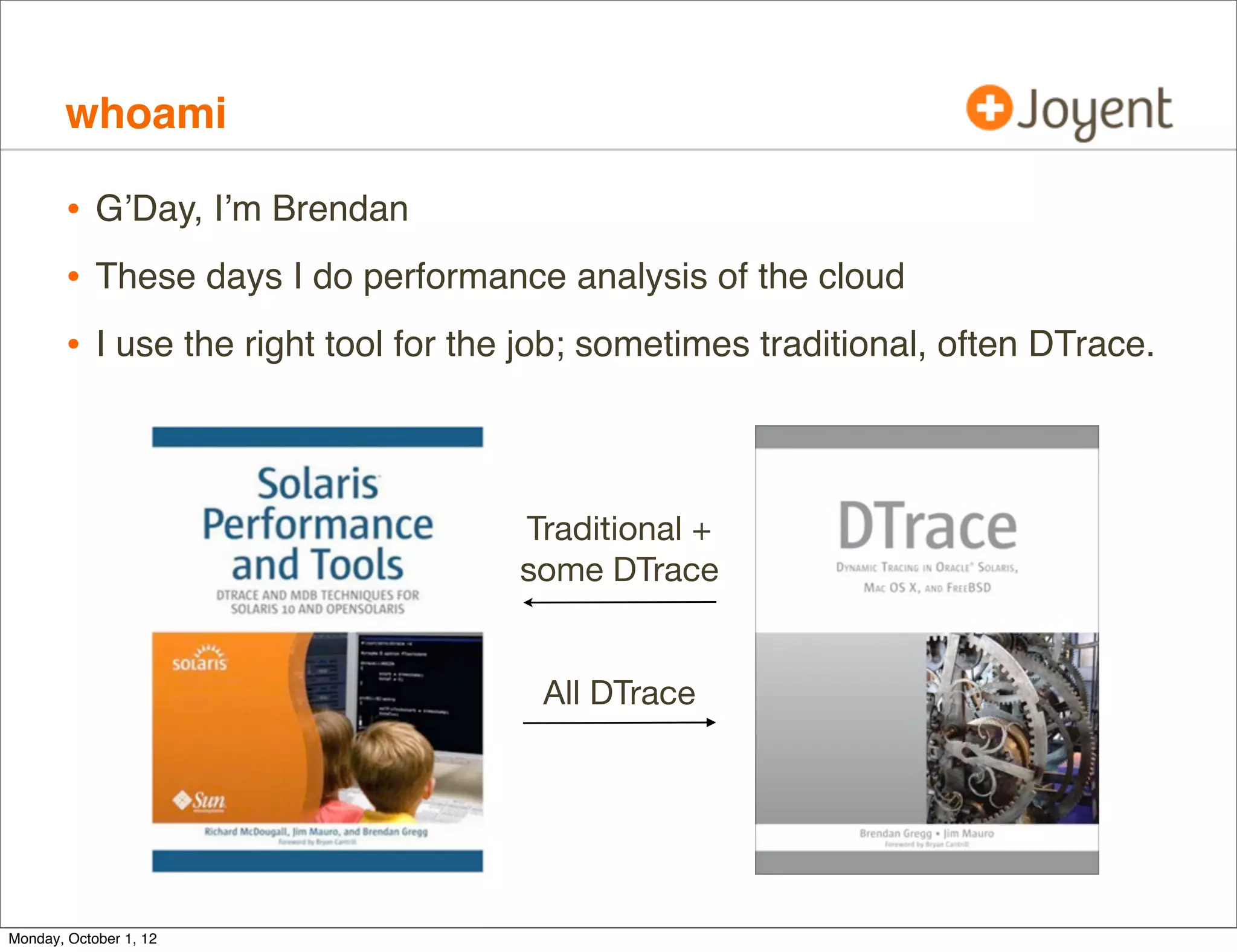
        • G’Day, I’m Brendan
        • These days I do performance analysis of the cloud
        • I use the right tool for the job; sometimes traditional, often DTrace.


                                      Traditional +
                                      some DTrace


                                       All DTrace


Monday, October 1, 12
DTrace

        • DTrace is a magician
            that conjures up
            rainbows, ponies
            and unicorns —
            and does it all
            entirely safely
            and in production!


Monday, October 1, 12
DTrace

        • Or, the version with fewer ponies:
        • DTrace is a performance analysis and troubleshooting tool
                • Instruments all software, kernel and user-land.
                • Production safe. Designed for minimum overhead.
                • Default in SmartOS, Oracle Solaris, Mac OS X and FreeBSD.
                    Two Linux ports are in development.

        • There’s a couple of awesome books about it.


Monday, October 1, 12
illumos

        • Joyent’s SmartOS uses (and contributes to) the illumos kernel.
             • illumos is the most DTrace-featured kernel
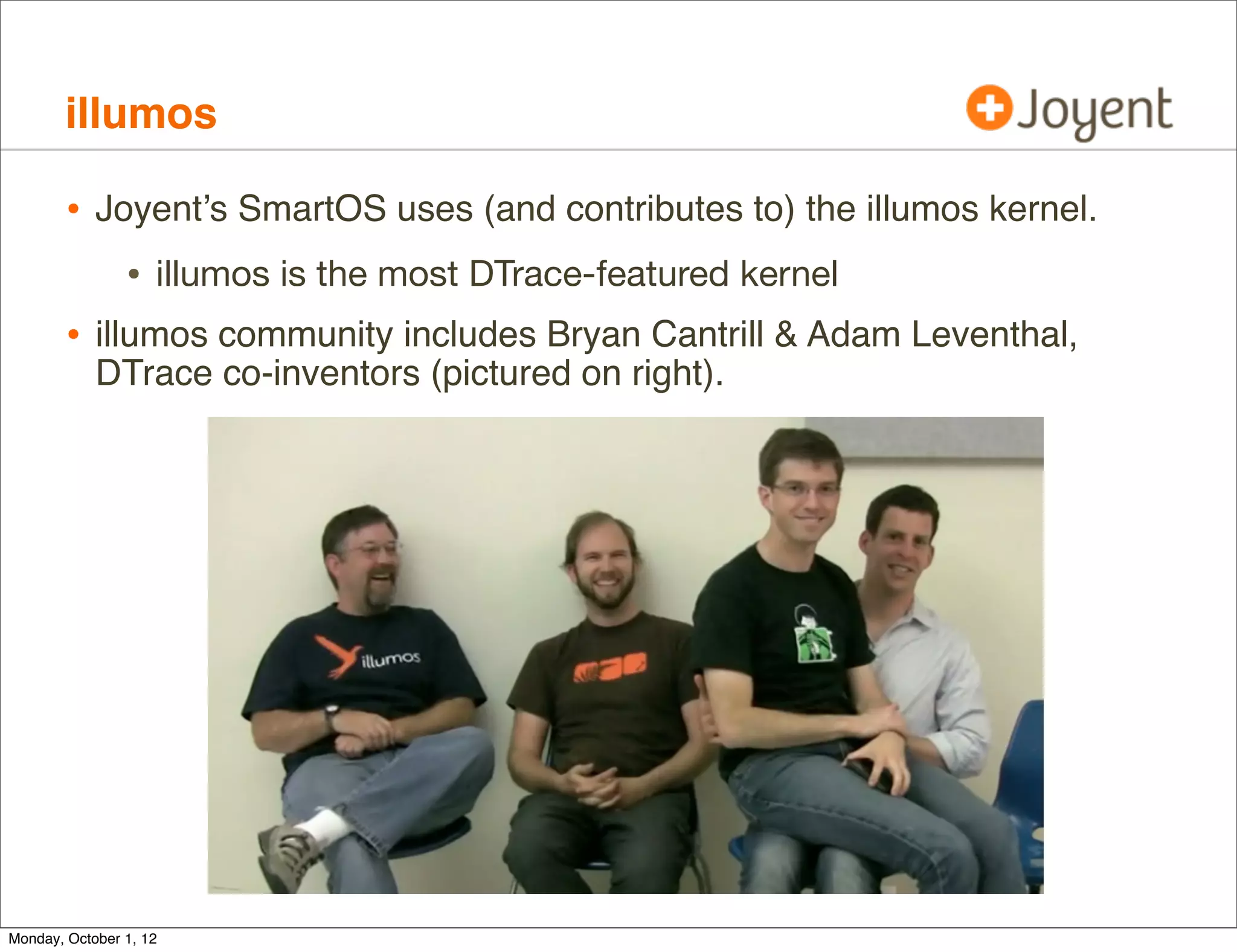
        • illumos community includes Bryan Cantrill & Adam Leventhal,
            DTrace co-inventors (pictured on right).


Monday, October 1, 12
Agenda

        • Theory
           • Cloud types and DTrace visibility
        • Reality
           • DTrace and Zones
           • DTrace Wins
        • Tools
            • DTrace Cloud Tools
            • Cloud Analytics
        • Case Studies


Monday, October 1, 12
Theory


Monday, October 1, 12
Cloud Types

        • We deploy two types of virtualization on SmartOS/illumos:
                • Hardware Virtualization: KVM
                • OS-Virtualization: Zones


Monday, October 1, 12
Cloud Types, cont.

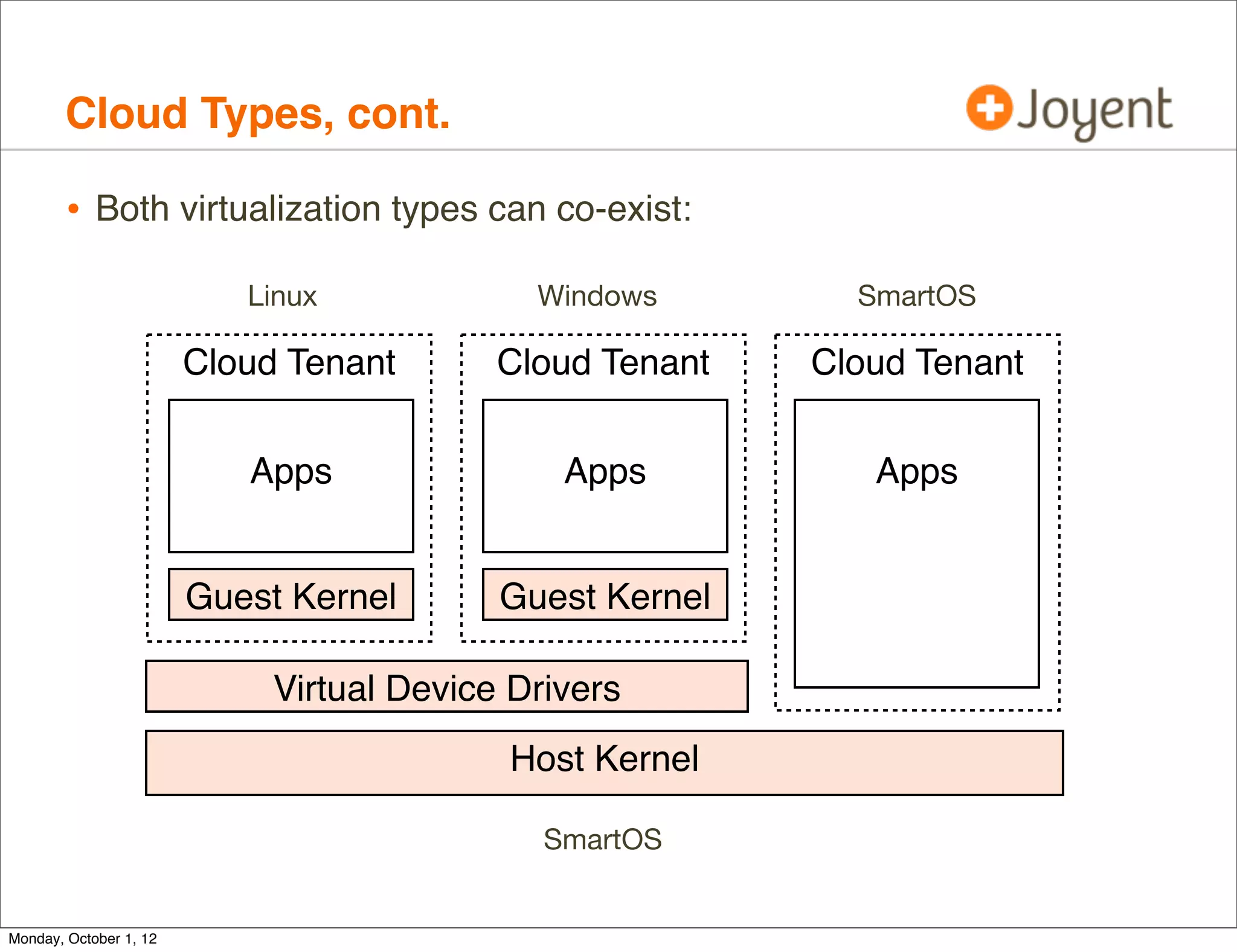
        • Both virtualization types can co-exist:
                           Linux             Windows        SmartOS

                        Cloud Tenant       Cloud Tenant   Cloud Tenant


                           Apps                Apps          Apps


                        Guest Kernel       Guest Kernel

                             Virtual Device Drivers
                                           Host Kernel

                                              SmartOS


Monday, October 1, 12
Cloud Types, cont.

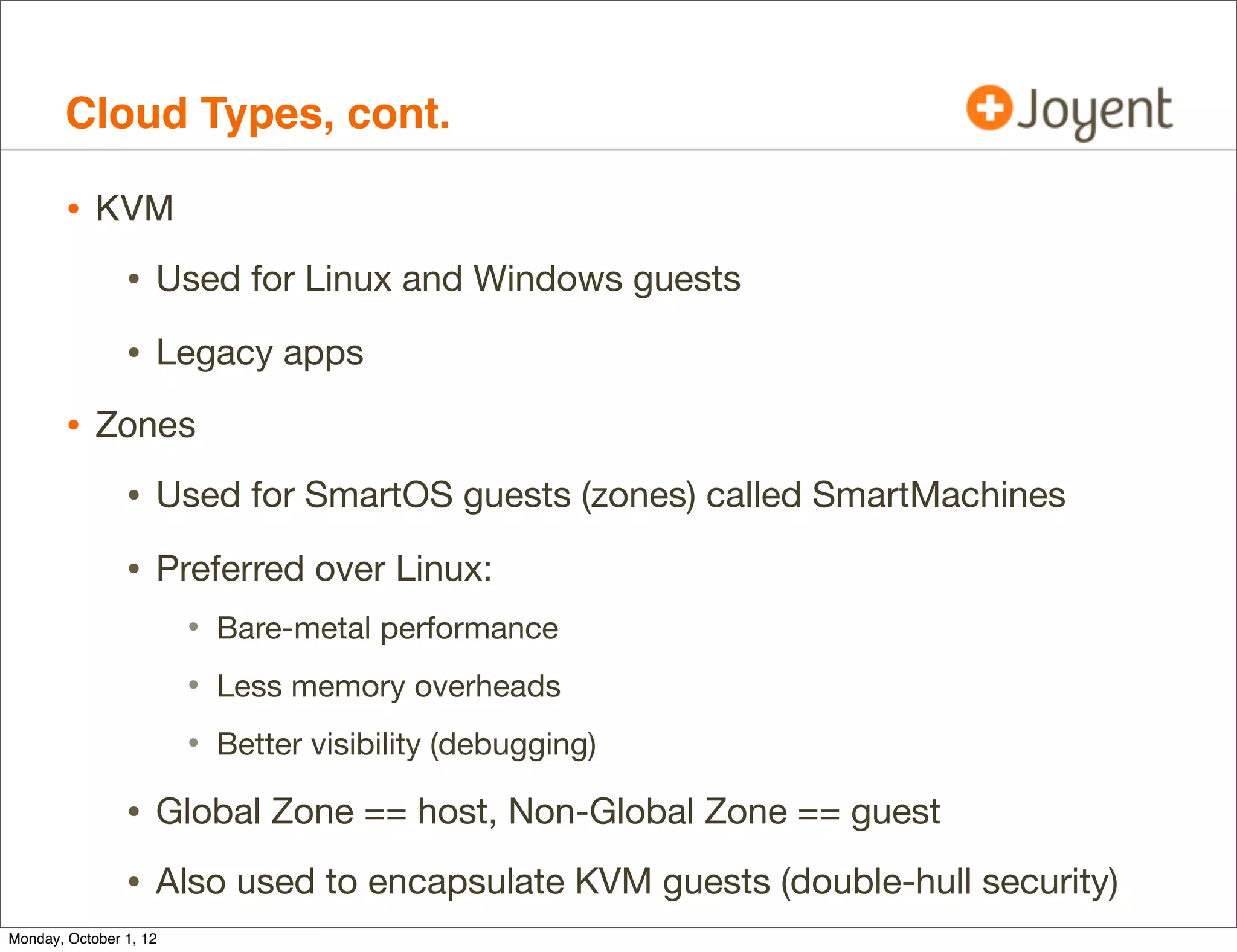
        • KVM
                • Used for Linux and Windows guests
                • Legacy apps
        • Zones
                • Used for SmartOS guests (zones) called SmartMachines
                • Preferred over Linux:
                        • Bare-metal performance
                        • Less memory overheads
                        • Better visibility (debugging)
                • Global Zone == host, Non-Global Zone == guest
                • Also used to encapsulate KVM guests (double-hull security)
Monday, October 1, 12
Cloud Types, cont.

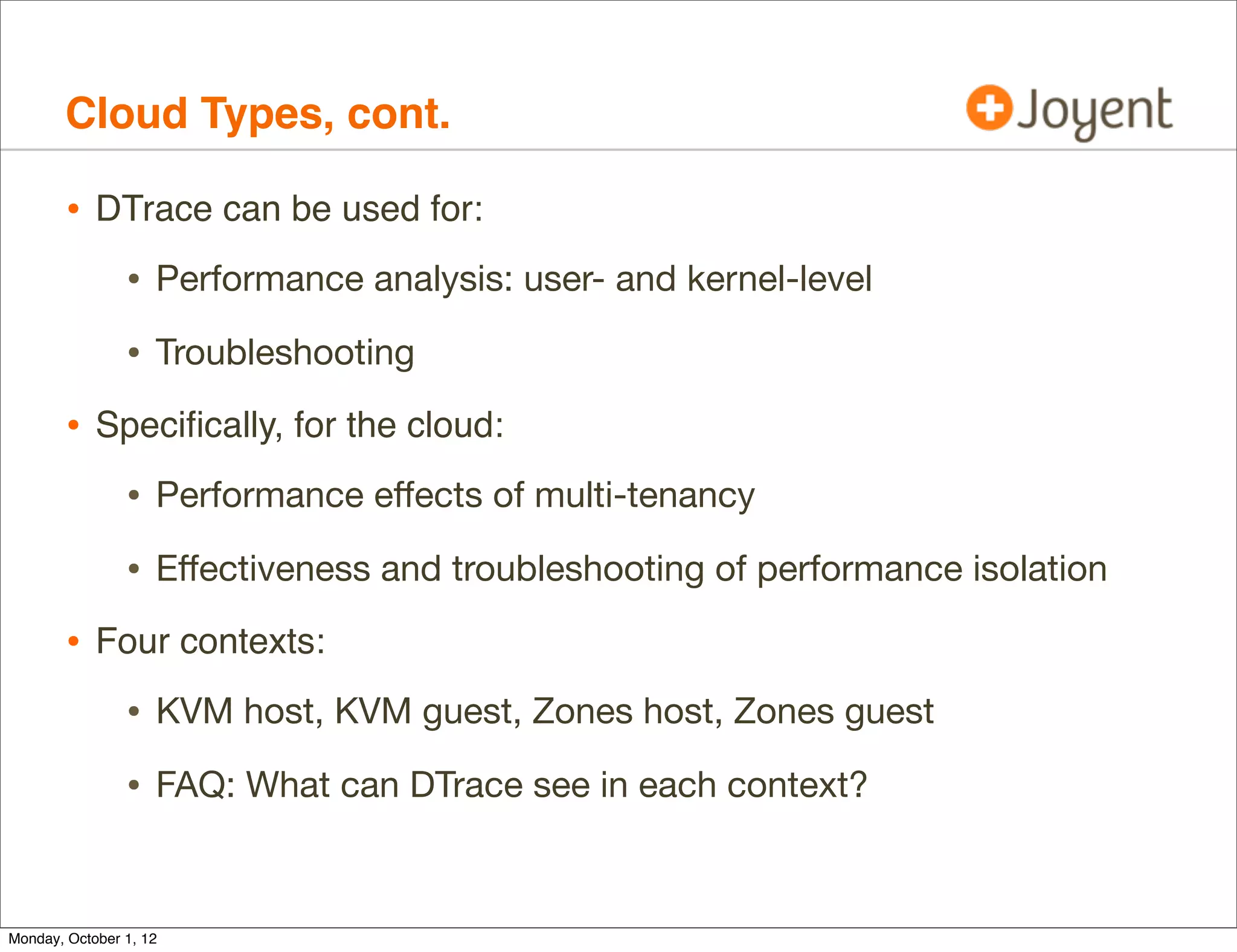
        • DTrace can be used for:
                • Performance analysis: user- and kernel-level
                • Troubleshooting
        • Specifically, for the cloud:
                • Performance effects of multi-tenancy
                • Effectiveness and troubleshooting of performance isolation
        • Four contexts:
                • KVM host, KVM guest, Zones host, Zones guest
                • FAQ: What can DTrace see in each context?


Monday, October 1, 12
Hardware Virtualization: DTrace Visibility

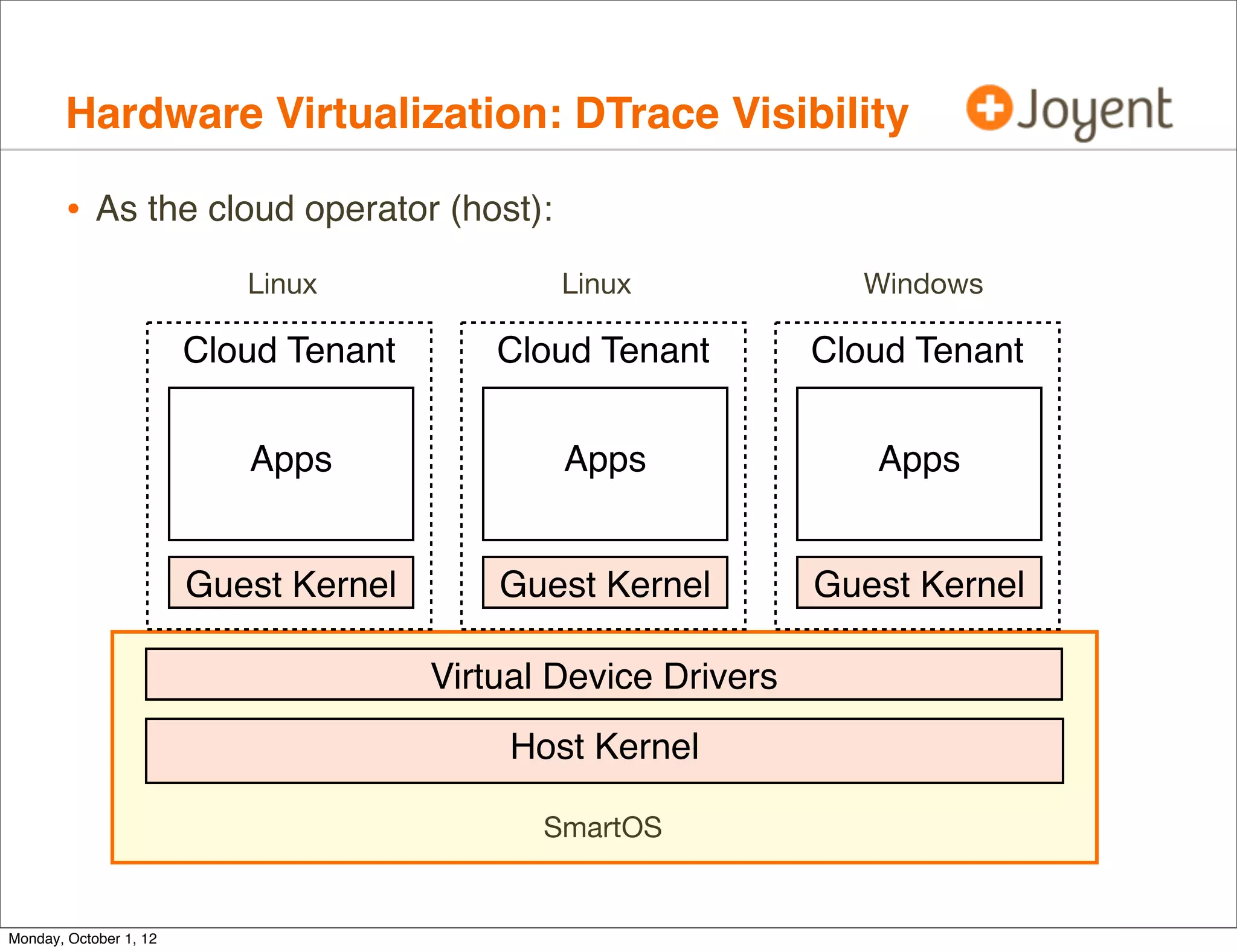
        • As the cloud operator (host):
                           Linux               Linux              Windows

                        Cloud Tenant       Cloud Tenant         Cloud Tenant


                           Apps                Apps                Apps


                        Guest Kernel       Guest Kernel         Guest Kernel

                                       Virtual Device Drivers
                                            Host Kernel

                                              SmartOS


Monday, October 1, 12
Hardware Virtualization: DTrace Visibility

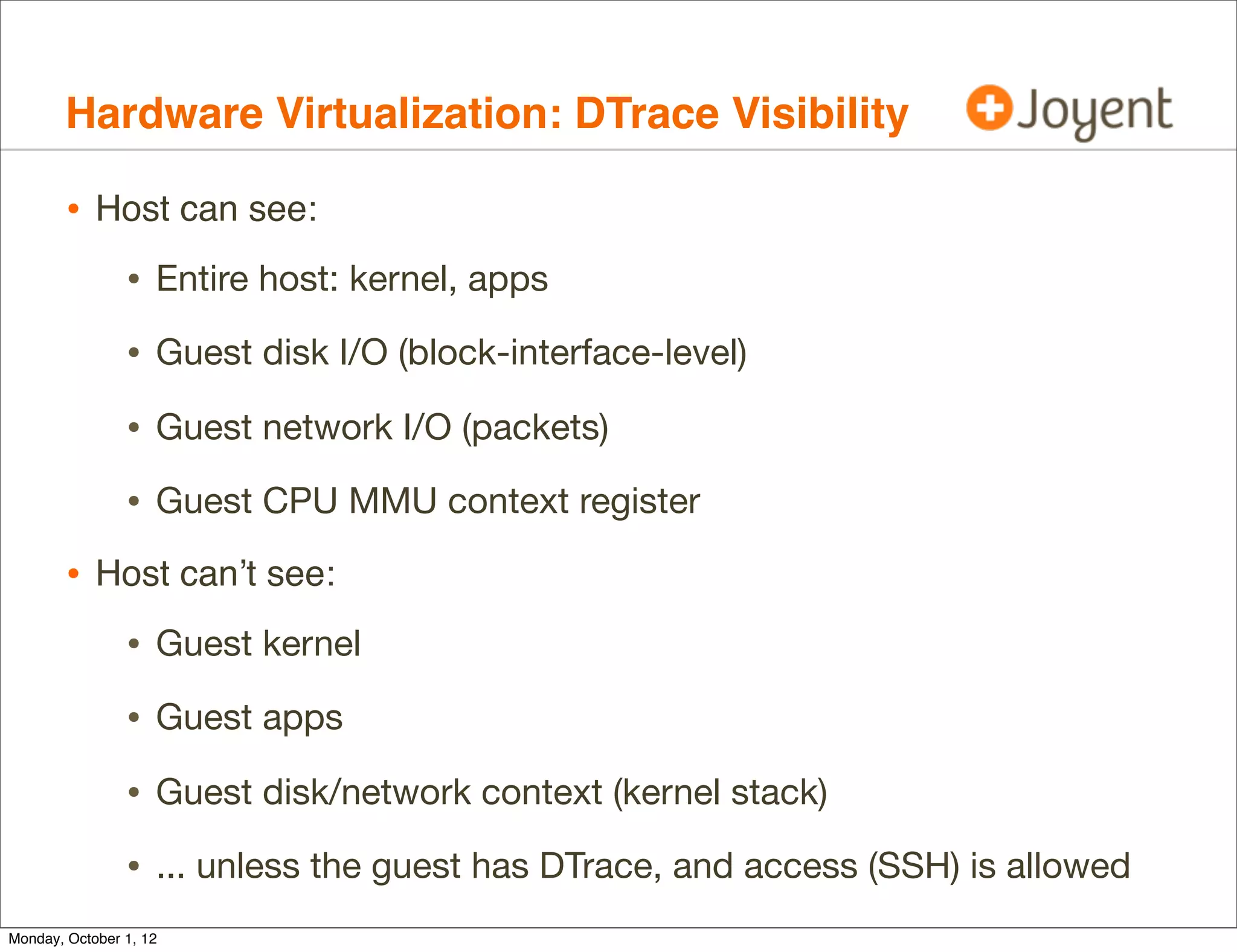
        • Host can see:
                • Entire host: kernel, apps
                • Guest disk I/O (block-interface-level)
                • Guest network I/O (packets)
                • Guest CPU MMU context register
        • Host can’t see:
                • Guest kernel
                • Guest apps
                • Guest disk/network context (kernel stack)
                • ... unless the guest has DTrace, and access (SSH) is allowed
Monday, October 1, 12
Hardware Virtualization: DTrace Visibility

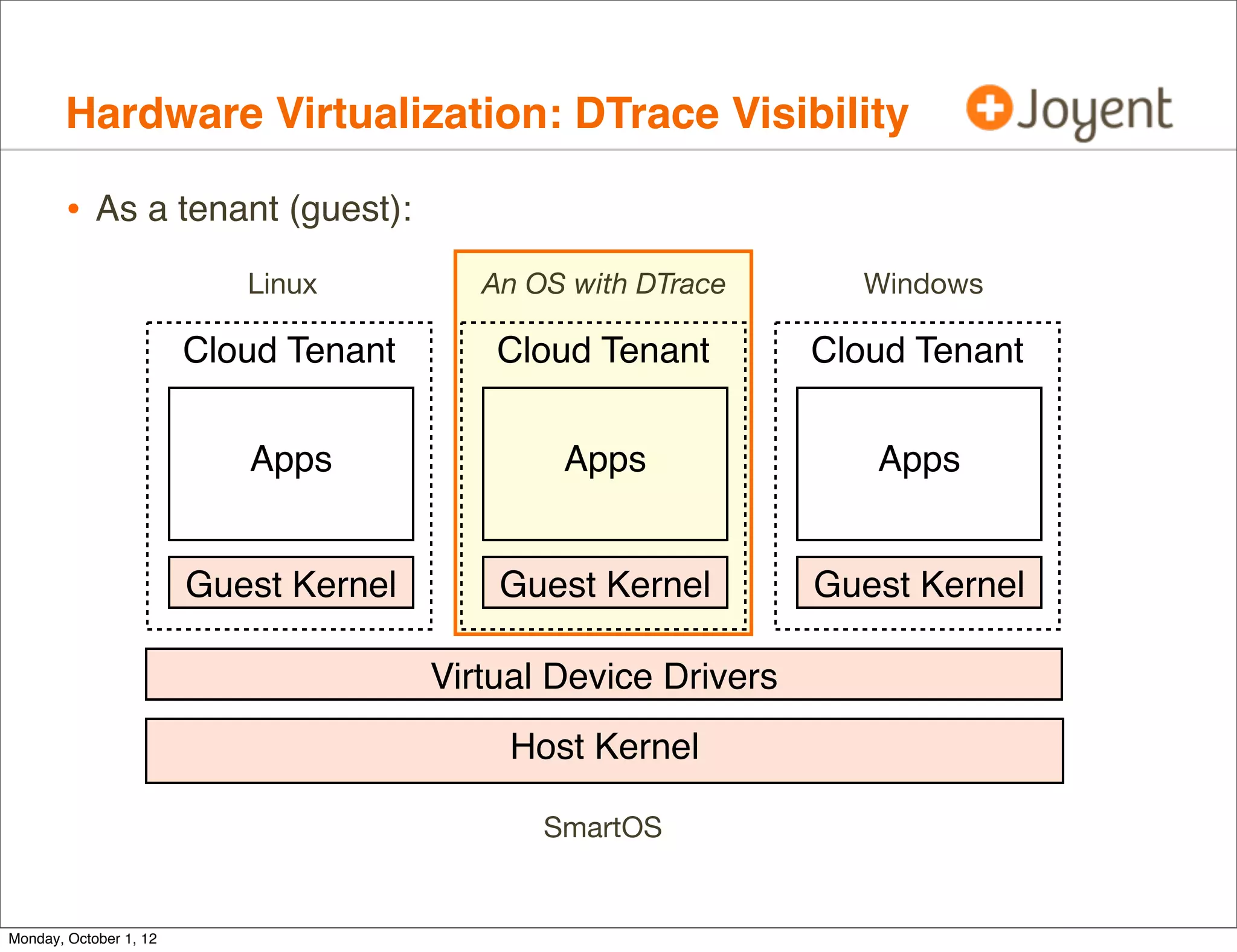
        • As a tenant (guest):
                           Linux          An OS with DTrace       Windows

                        Cloud Tenant       Cloud Tenant         Cloud Tenant


                           Apps                Apps                Apps


                        Guest Kernel       Guest Kernel         Guest Kernel

                                       Virtual Device Drivers
                                            Host Kernel

                                              SmartOS


Monday, October 1, 12
Hardware Virtualization: DTrace Visibility

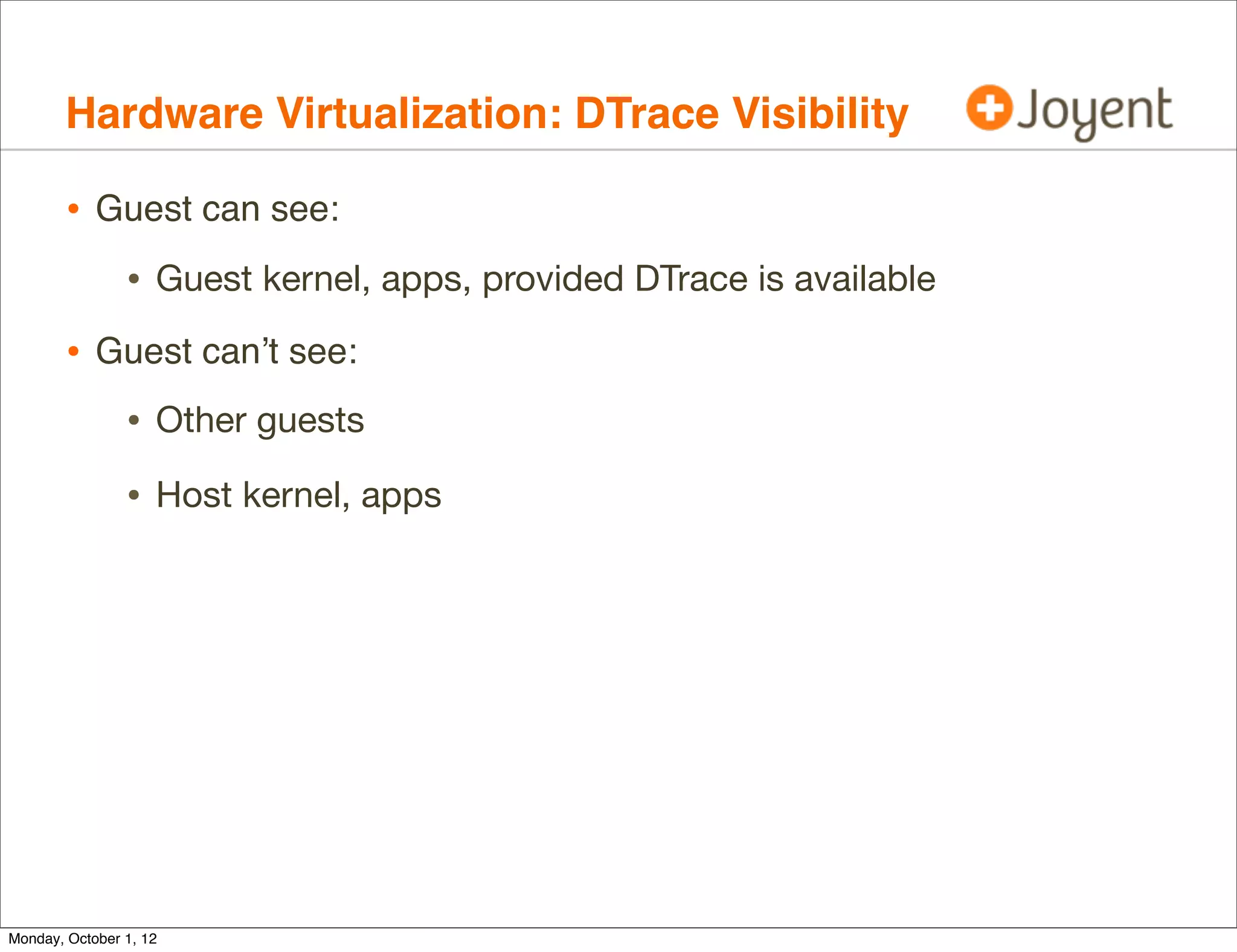
        • Guest can see:
                • Guest kernel, apps, provided DTrace is available
        • Guest can’t see:
                • Other guests
                • Host kernel, apps


Monday, October 1, 12
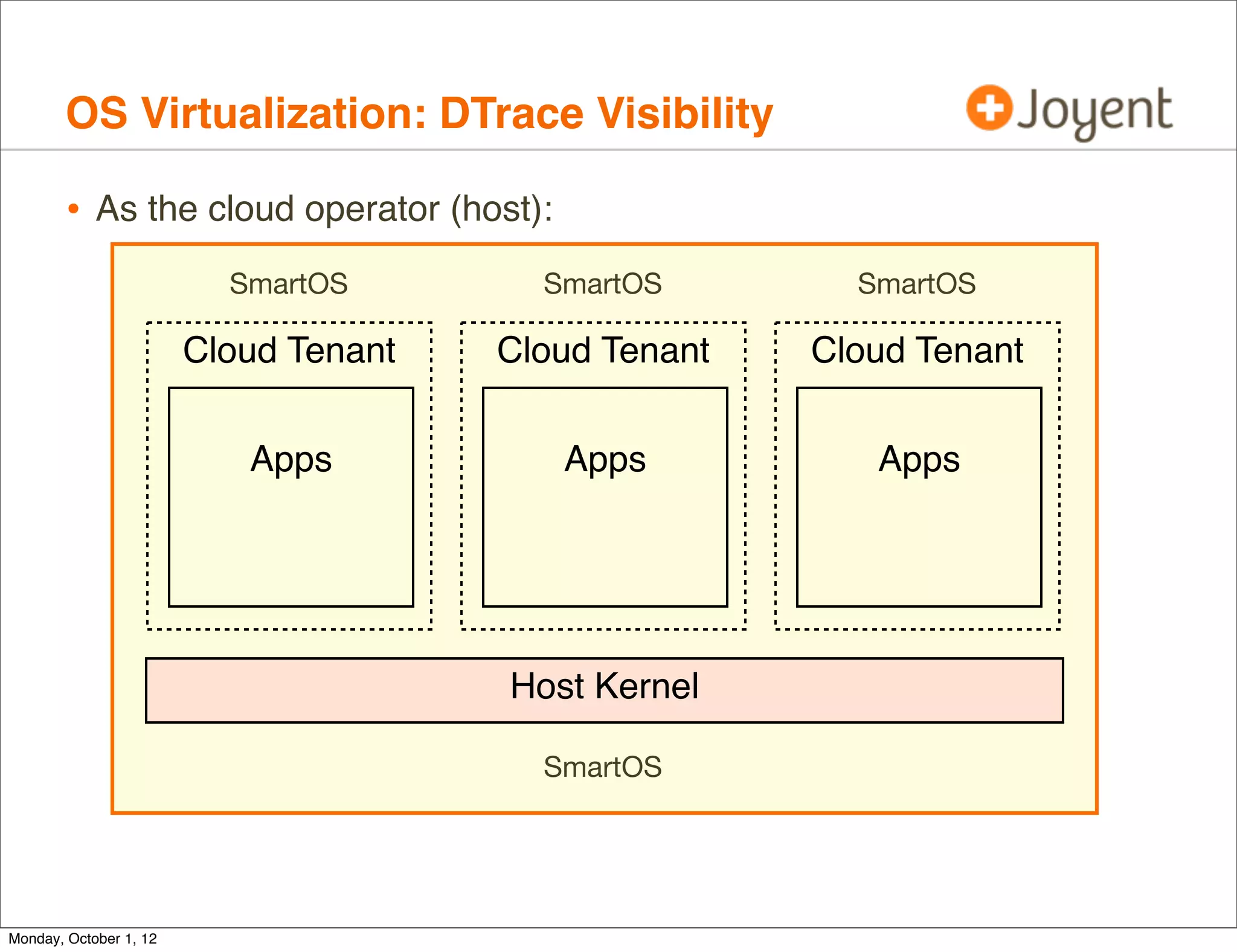
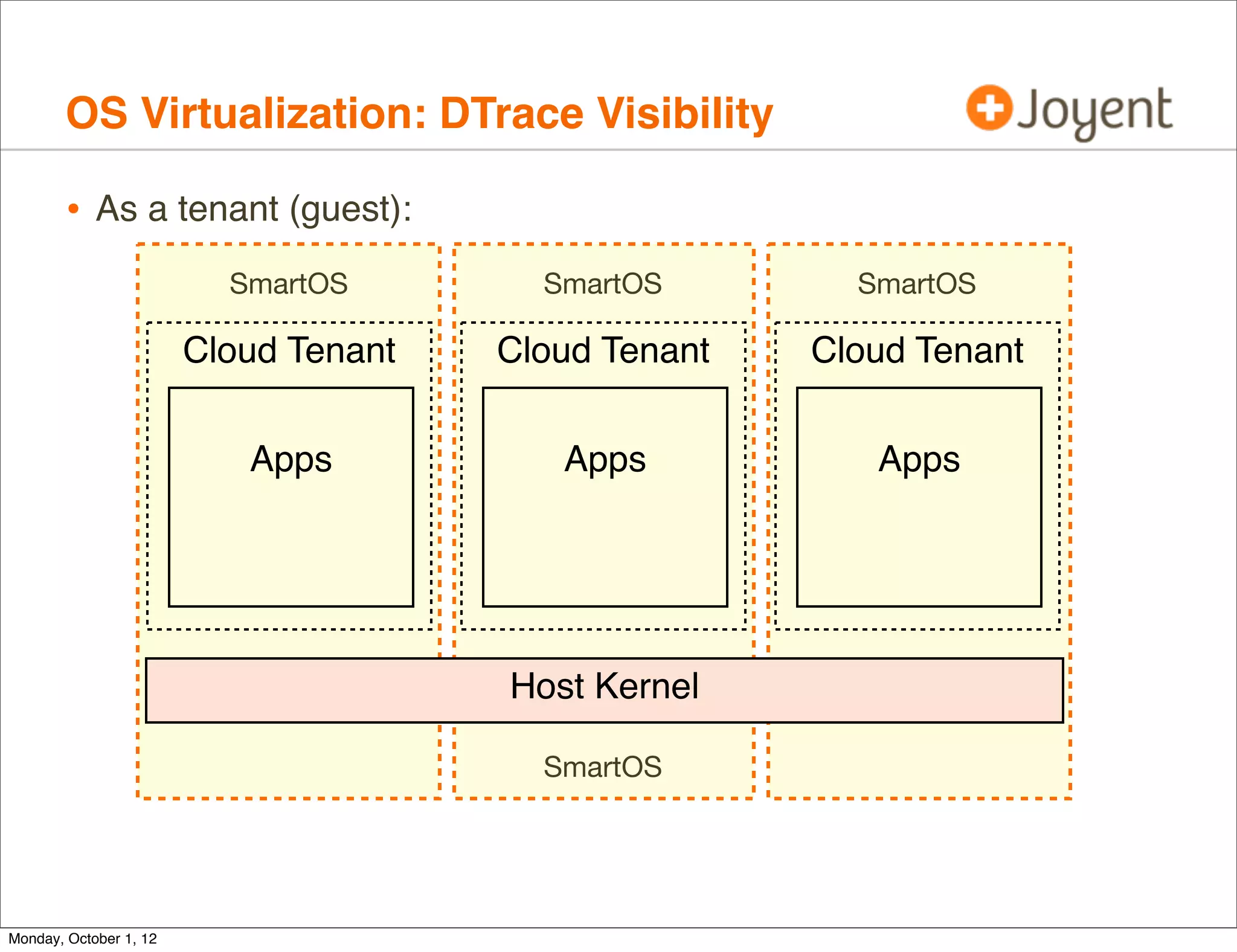
OS Virtualization: DTrace Visibility

        • As the cloud operator (host):
                          SmartOS        SmartOS        SmartOS

                        Cloud Tenant   Cloud Tenant   Cloud Tenant


                           Apps           Apps           Apps


                                       Host Kernel

                                         SmartOS


Monday, October 1, 12
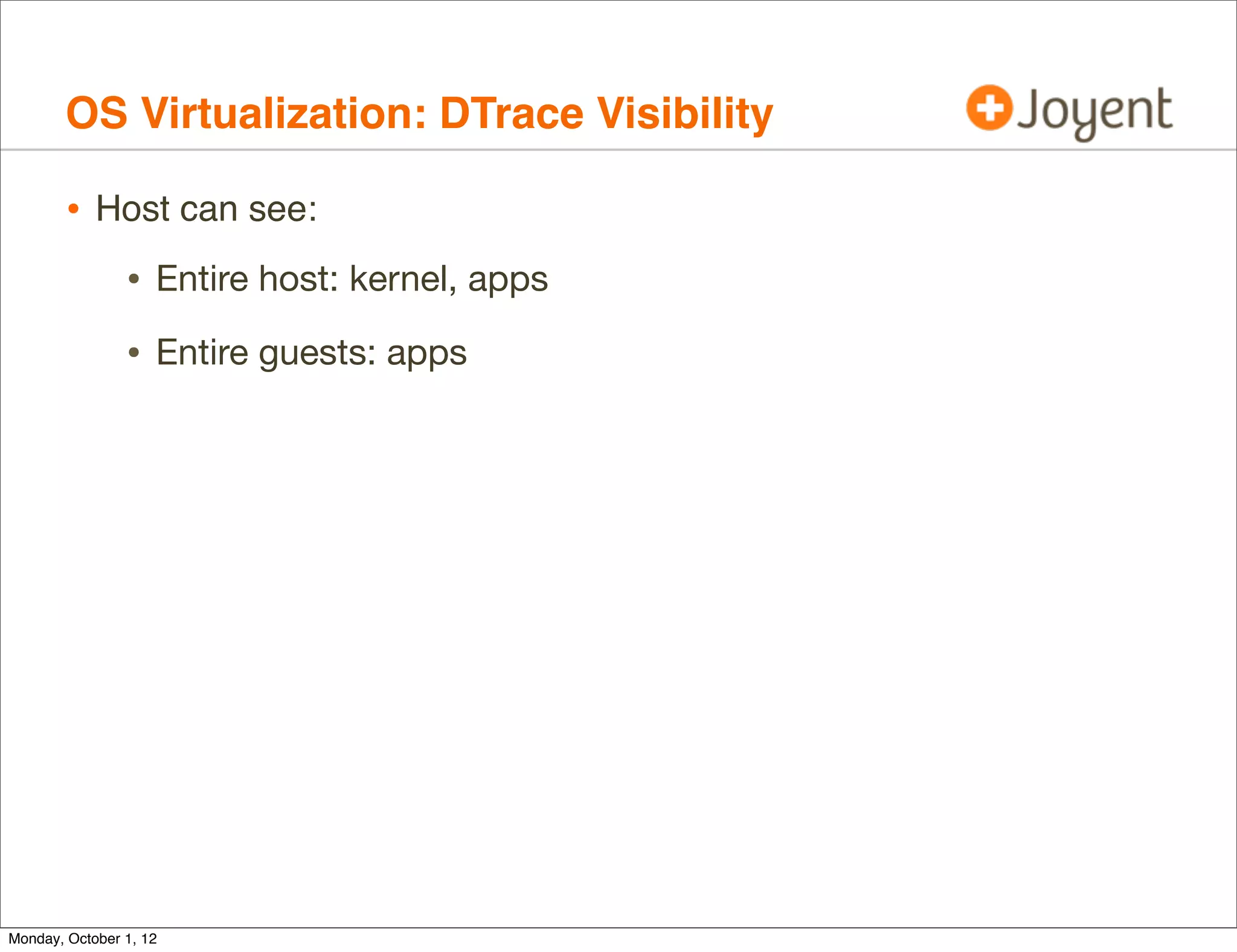
OS Virtualization: DTrace Visibility

        • Host can see:
                • Entire host: kernel, apps
                • Entire guests: apps


Monday, October 1, 12
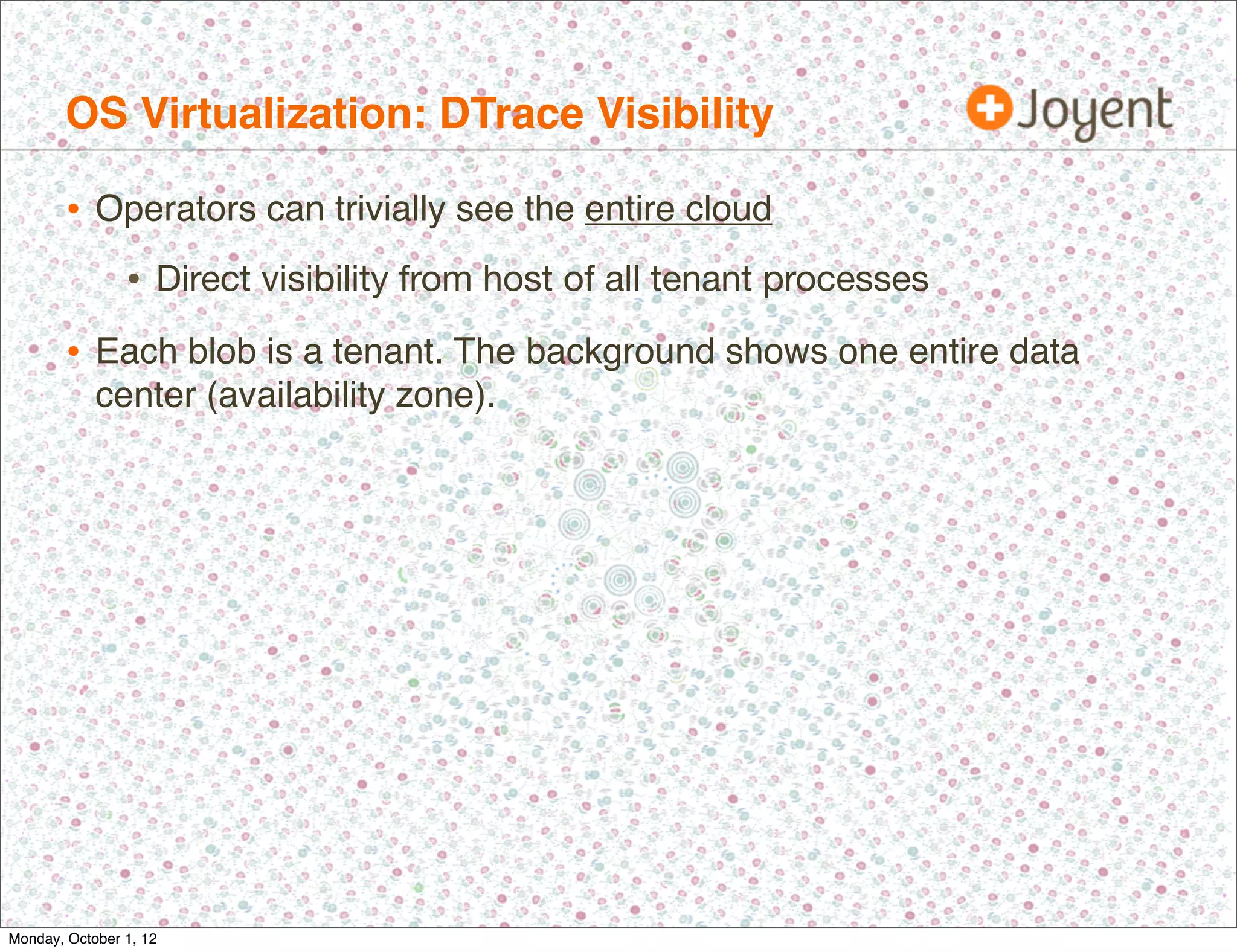
OS Virtualization: DTrace Visibility

        • Operators can trivially see the entire cloud
                • Direct visibility from host of all tenant processes
        • Each blob is a tenant. The background shows one entire data
            center (availability zone).


Monday, October 1, 12
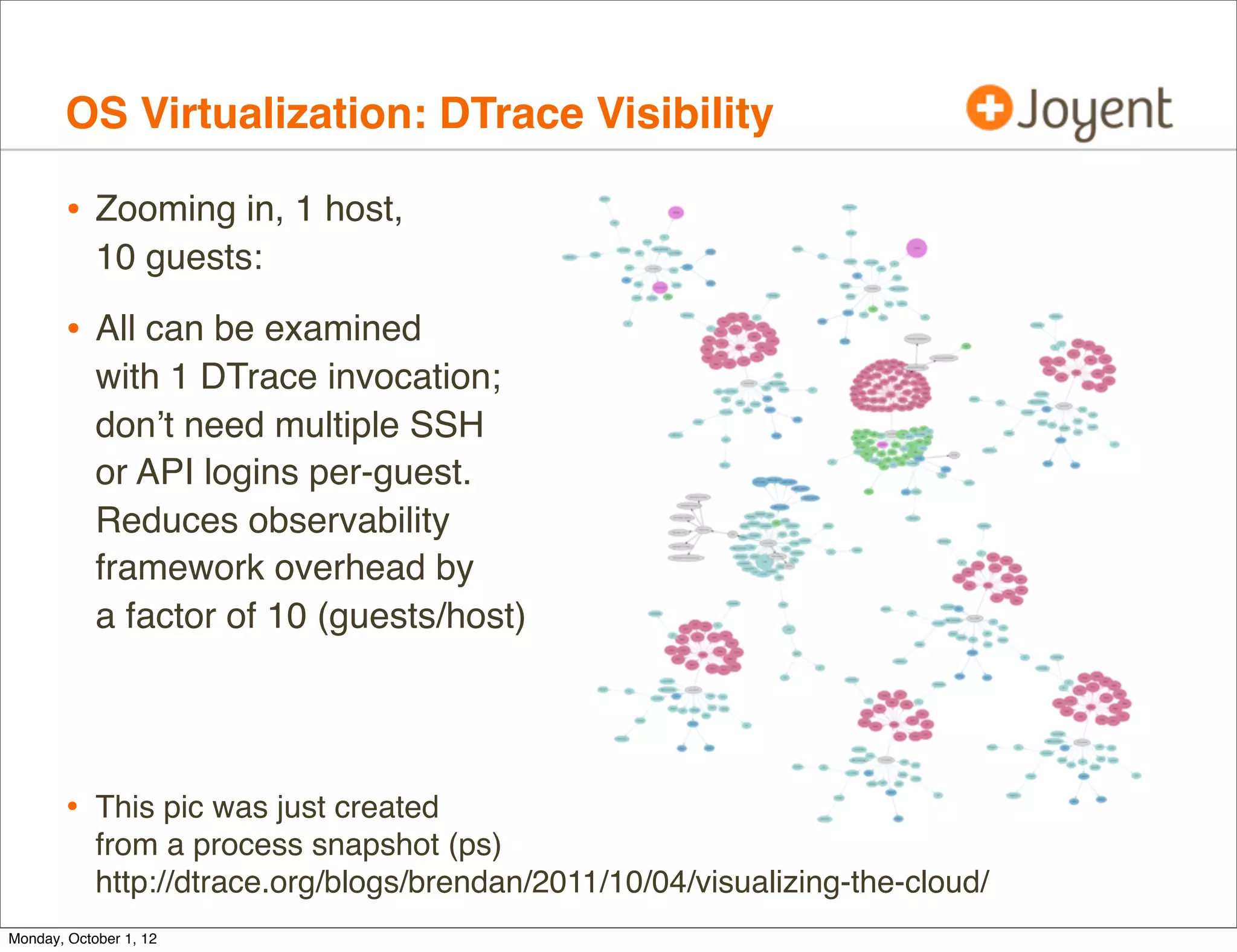
OS Virtualization: DTrace Visibility

        • Zooming in, 1 host,
            10 guests:

        • All can be examined
            with 1 DTrace invocation;
            don’t need multiple SSH
            or API logins per-guest.
            Reduces observability
            framework overhead by
            a factor of 10 (guests/host)


        • This pic was just created
            from a process snapshot (ps)
            http://dtrace.org/blogs/brendan/2011/10/04/visualizing-the-cloud/
Monday, October 1, 12
OS Virtualization: DTrace Visibility

        • As a tenant (guest):
                          SmartOS        SmartOS        SmartOS

                        Cloud Tenant   Cloud Tenant   Cloud Tenant


                           Apps           Apps           Apps


                                       Host Kernel

                                         SmartOS


Monday, October 1, 12
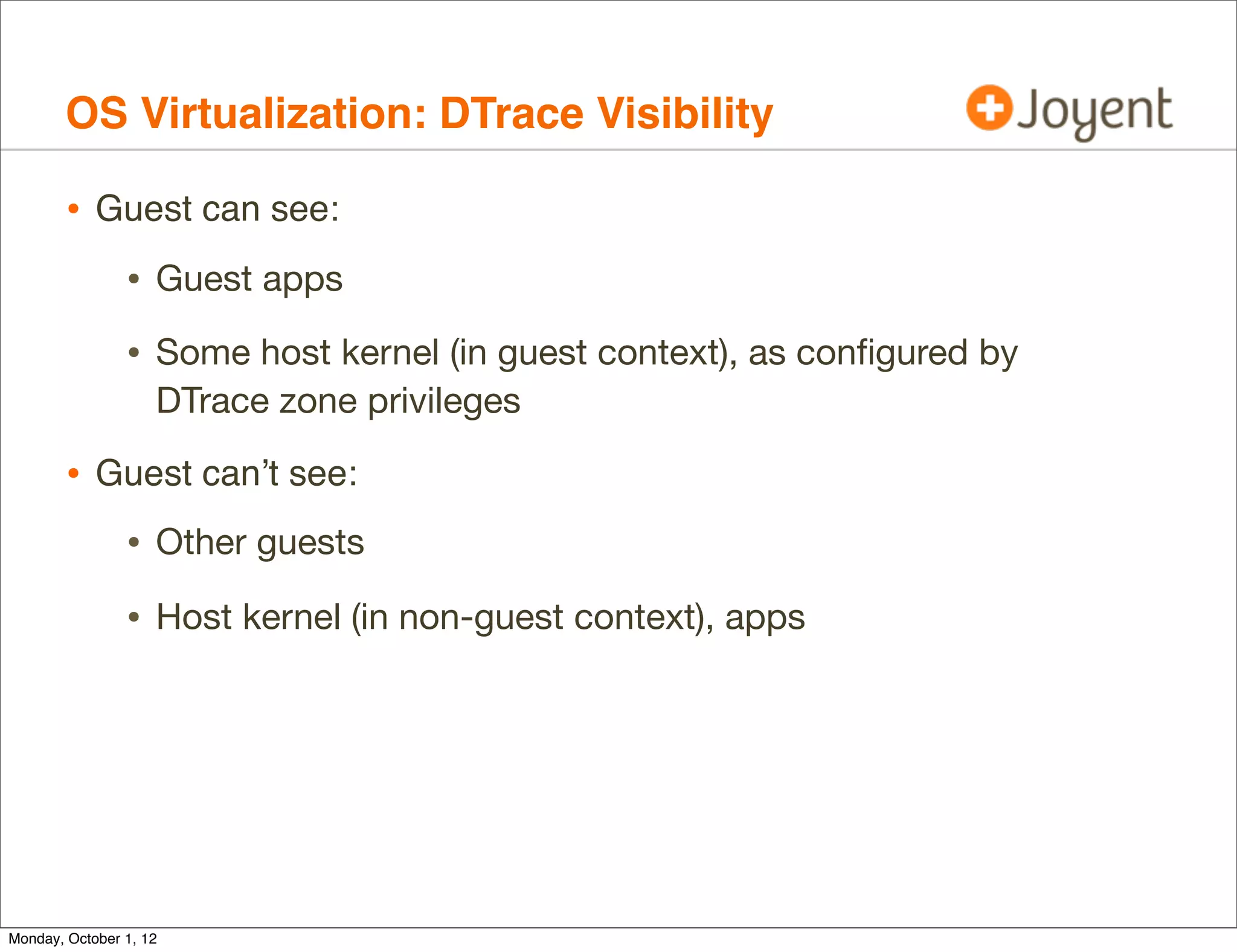
OS Virtualization: DTrace Visibility

        • Guest can see:
                • Guest apps
                • Some host kernel (in guest context), as configured by
                    DTrace zone privileges

        • Guest can’t see:
                • Other guests
                • Host kernel (in non-guest context), apps


Monday, October 1, 12
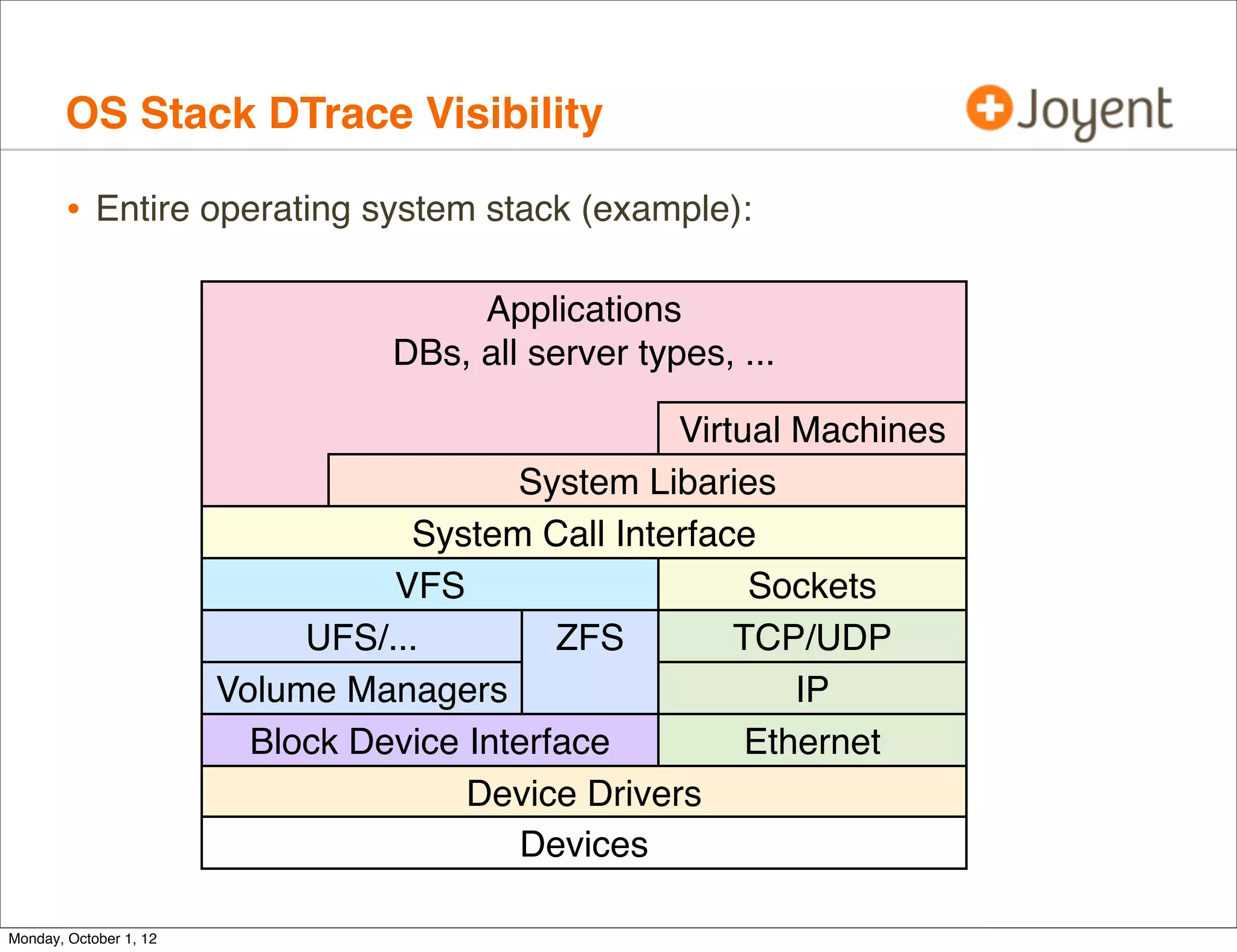
OS Stack DTrace Visibility

        • Entire operating system stack (example):

                                       Applications
                                  DBs, all server types, ...

                                                    Virtual Machines
                                          System Libaries
                                   System Call Interface
                                  VFS                    Sockets
                             UFS/...         ZFS        TCP/UDP
                        Volume Managers                     IP
                          Block Device Interface         Ethernet
                                       Device Drivers
                                          Devices

Monday, October 1, 12
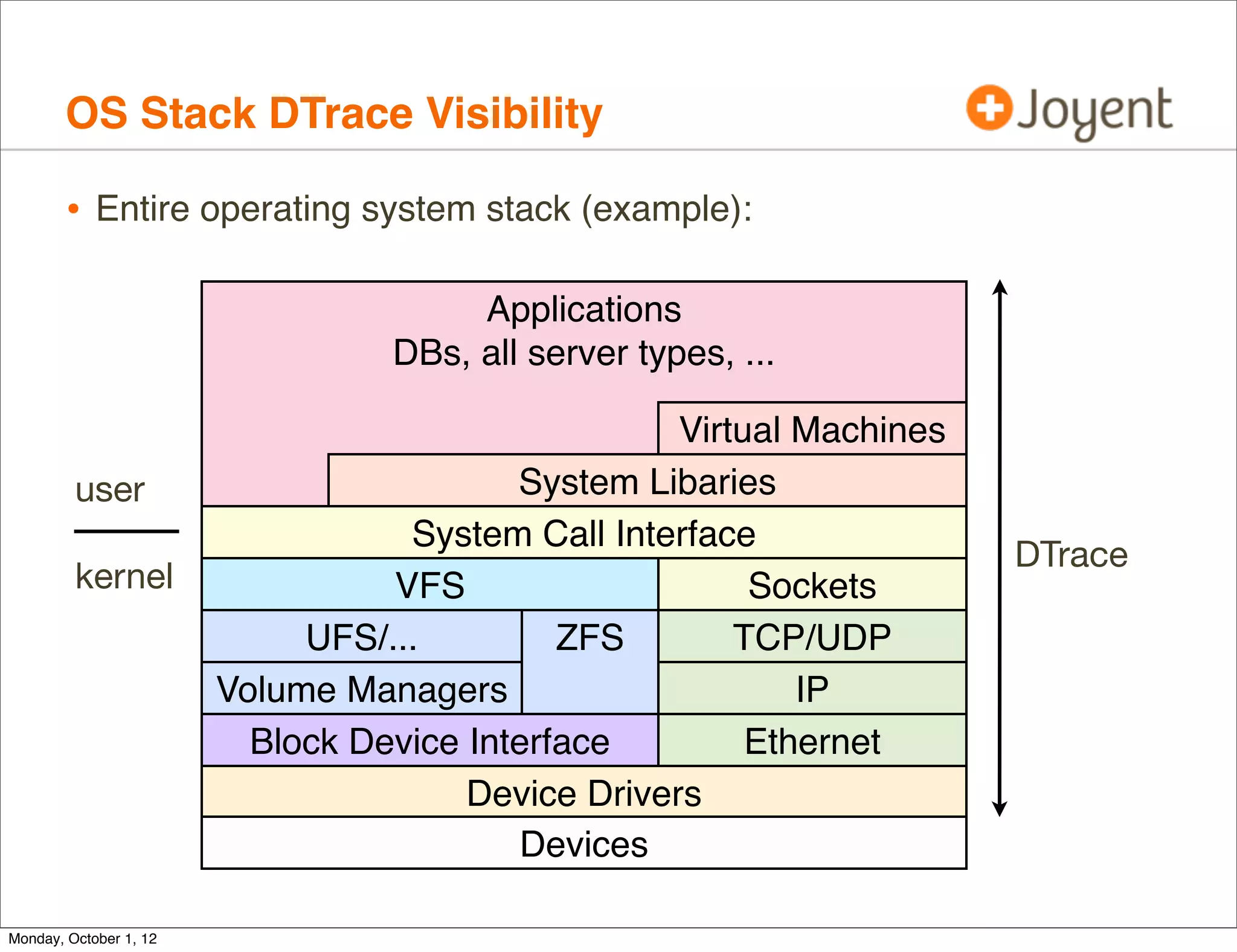
OS Stack DTrace Visibility

        • Entire operating system stack (example):

                                       Applications
                                  DBs, all server types, ...

                                                    Virtual Machines
         user                             System Libaries
                                   System Call Interface
                                                                       DTrace
         kernel                   VFS                    Sockets
                             UFS/...         ZFS        TCP/UDP
                        Volume Managers                     IP
                          Block Device Interface         Ethernet
                                       Device Drivers
                                          Devices

Monday, October 1, 12
Reality


Monday, October 1, 12
DTrace and Zones

        • DTrace and Zones were developed in parallel for Solaris 10, and
            then integrated.
        • DTrace functionality for the Global Zone (GZ) was added first.
                • This is the host context, and allows operators to use DTrace to
                    inspect all tenants.

        • DTrace functionality for the Non-Global Zone (NGZ) was harder,
            and some capabilities added later (2006):

                • Providers: syscall, pid, profile
                • This is the guest context, and allows customers to use DTrace
                    to inspect themselves only (can’t see neighbors).


Monday, October 1, 12
DTrace and Zones, cont.


Monday, October 1, 12
DTrace and Zones, cont.

        • GZ DTrace works well.
        • We found many issues in practice with NGZ DTrace:
                • Can’t read fds[] to translate file descriptors. Makes using the
                    syscall provider more difficult.
             # dtrace -n 'syscall::read:entry /fds[arg0].fi_fs == "zfs"/ { @ =
             quantize(arg2); }'
             dtrace: description 'syscall::read:entry ' matched 1 probe
             dtrace: error on enabled probe ID 1 (ID 4: syscall::read:entry): invalid
             kernel access in predicate at DIF offset 64
             dtrace: error on enabled probe ID 1 (ID 4: syscall::read:entry): invalid
             kernel access in predicate at DIF offset 64
             dtrace: error on enabled probe ID 1 (ID 4: syscall::read:entry): invalid
             kernel access in predicate at DIF offset 64
             dtrace: error on enabled probe ID 1 (ID 4: syscall::read:entry): invalid
             kernel access in predicate at DIF offset 64
             [...]


Monday, October 1, 12
DTrace and Zones, cont.

                • Can’t read curpsinfo, curlwpsinfo, which breaks many scripts
                    (eg, curpsinfo->pr_psargs, or curpsinfo->pr_dmodel)
           # dtrace -n 'syscall::exec*:return { trace(curpsinfo->pr_psargs); }'
           dtrace: description 'syscall::exec*:return ' matched 1 probe
           dtrace: error on enabled probe ID 1 (ID 103: syscall::exece:return):   invalid
           kernel access in action #1 at DIF offset 0
           dtrace: error on enabled probe ID 1 (ID 103: syscall::exece:return):   invalid
           kernel access in action #1 at DIF offset 0
           dtrace: error on enabled probe ID 1 (ID 103: syscall::exece:return):   invalid
           kernel access in action #1 at DIF offset 0
           dtrace: error on enabled probe ID 1 (ID 103: syscall::exece:return):   invalid
           kernel access in action #1 at DIF offset 0
           [...]

                • Missing proc provider. Breaks this common one-liner:
           # dtrace -n 'proc:::exec-success { trace(execname); }'
           dtrace: invalid probe specifier proc:::exec-success { trace(execname); }:
           probe description proc:::exec-success does not match any probes
           [...]


Monday, October 1, 12
DTrace and Zones, cont.

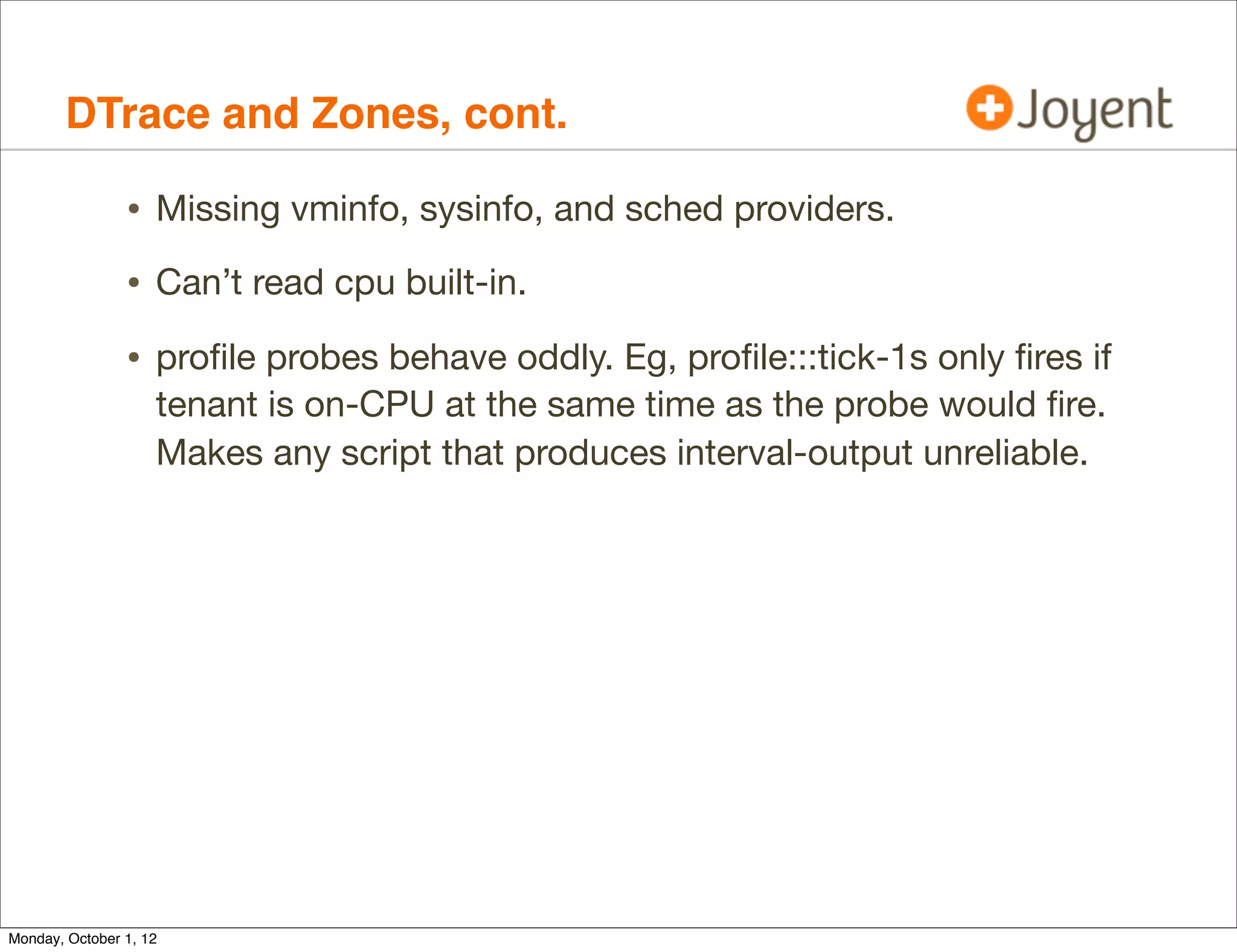
                • Missing vminfo, sysinfo, and sched providers.
                • Can’t read cpu built-in.
                • profile probes behave oddly. Eg, profile:::tick-1s only fires if
                    tenant is on-CPU at the same time as the probe would fire.
                    Makes any script that produces interval-output unreliable.


Monday, October 1, 12
DTrace and Zones, cont.

        • These and other bugs have since been fixed for SmartOS/illumos
            (thanks Bryan Cantrill!)
        • Now, from a SmartOS Zone:
           # dtrace -n 'proc:::exec-success { @[curpsinfo->pr_psargs] = count(); }
           profile:::tick-5s { exit(0); }'
           dtrace: description 'proc:::exec-success ' matched 2 probes
           CPU     ID                    FUNCTION:NAME
            13 71762                          :tick-5s

               -bash                                                           1
               /bin/cat -s /etc/motd                                           1
               /bin/mail -E                                                    1
               /usr/bin/hostname                                               1
               /usr/sbin/quota                                                 1
               /usr/bin/locale -a                                              2
               ls -l                                                           3
               sh -c /usr/bin/locale -a                                        4


        • Trivial DTrace one-liner, but represents much needed functionality.

Monday, October 1, 12
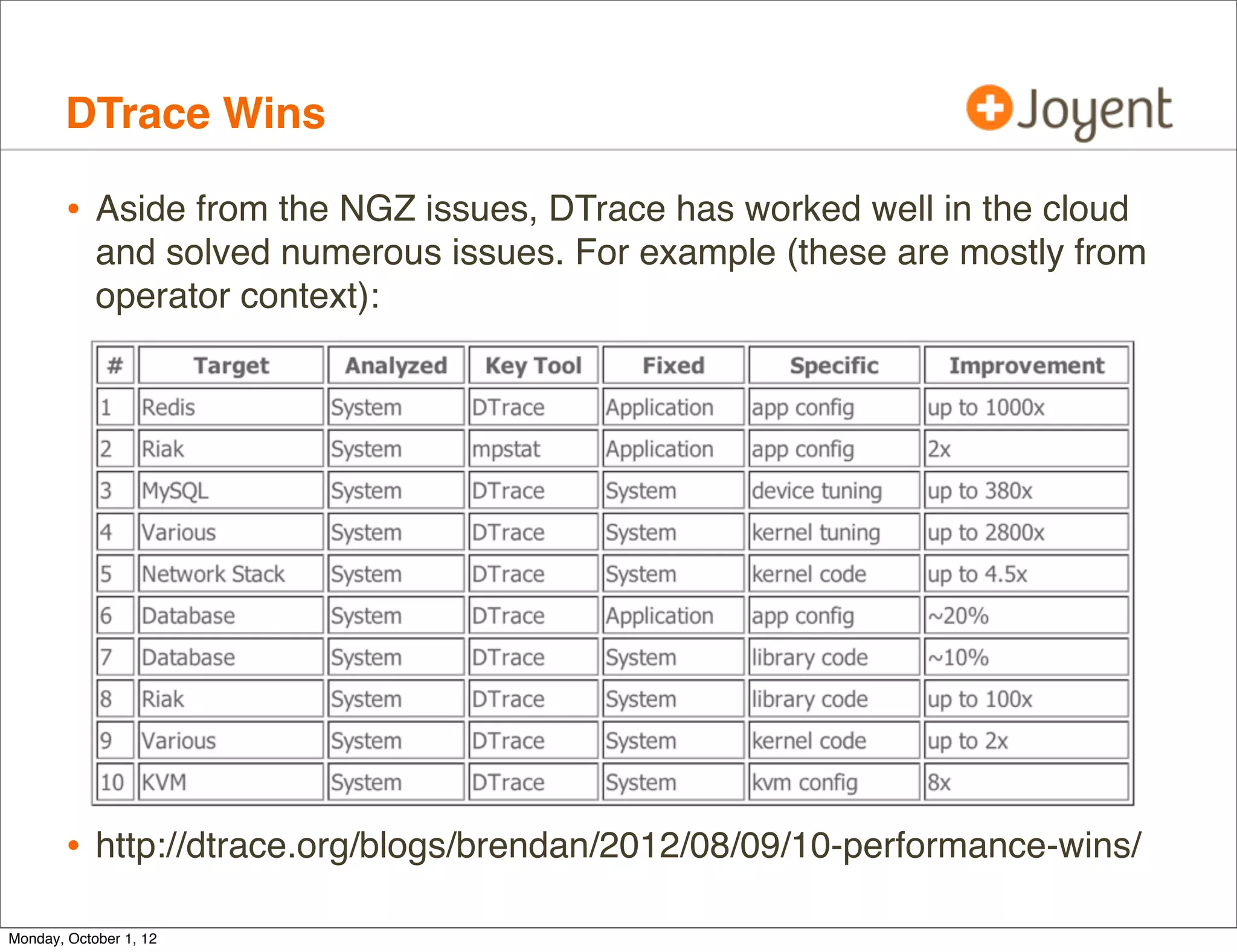
DTrace Wins

        • Aside from the NGZ issues, DTrace has worked well in the cloud
            and solved numerous issues. For example (these are mostly from
            operator context):


        • http://dtrace.org/blogs/brendan/2012/08/09/10-performance-wins/
Monday, October 1, 12
DTrace Wins, cont.

        • Not surprising given DTrace’s visibility...


Monday, October 1, 12
DTrace Wins, cont.

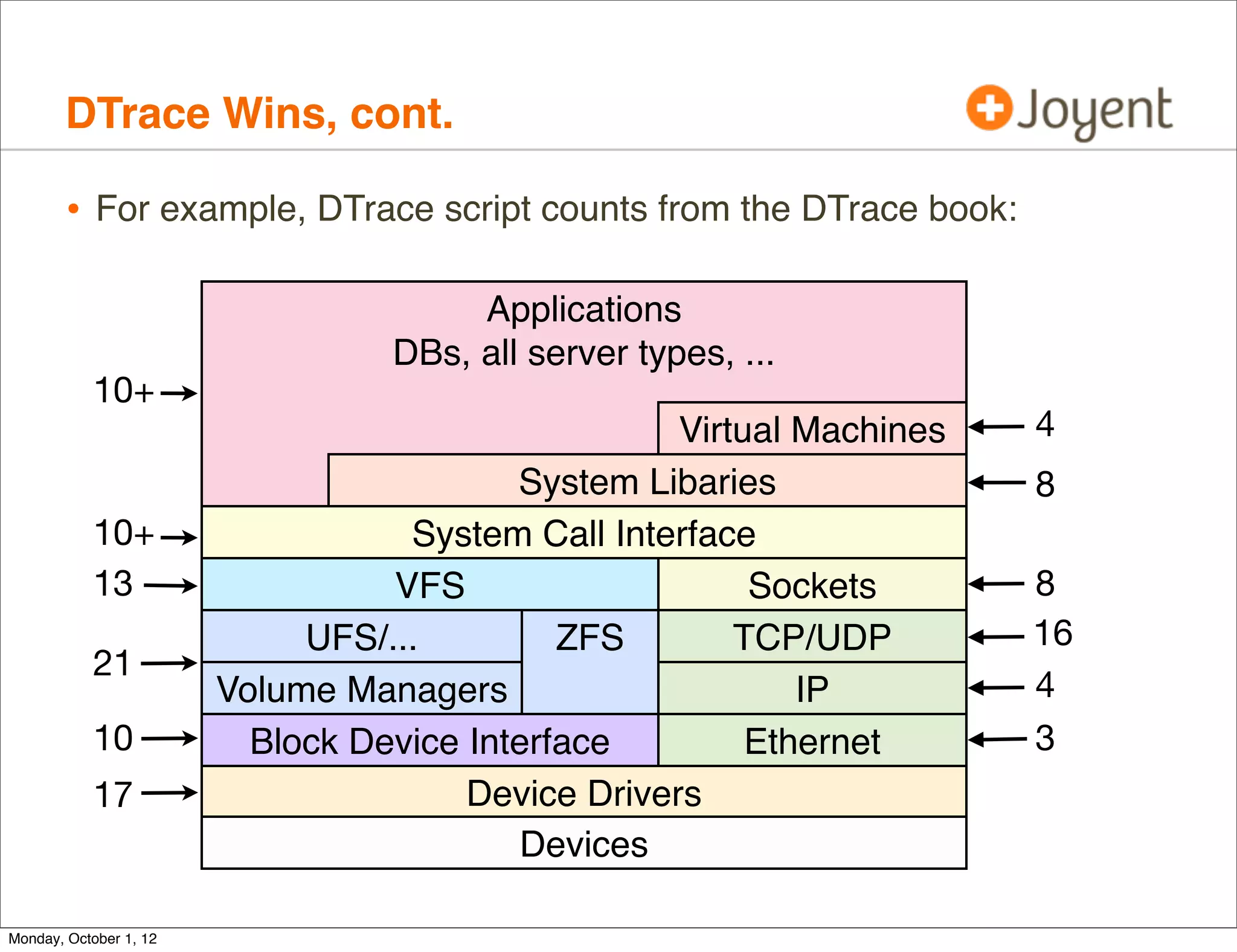
        • For example, DTrace script counts from the DTrace book:

                                       Applications
                                  DBs, all server types, ...
           10+
                                                    Virtual Machines   4
                                          System Libaries              8
           10+                     System Call Interface
           13                     VFS                    Sockets       8
                             UFS/...         ZFS        TCP/UDP        16
           21
                        Volume Managers                     IP         4
           10             Block Device Interface         Ethernet      3
           17                          Device Drivers
                                          Devices

Monday, October 1, 12
Tools


Monday, October 1, 12
Ad-hoc

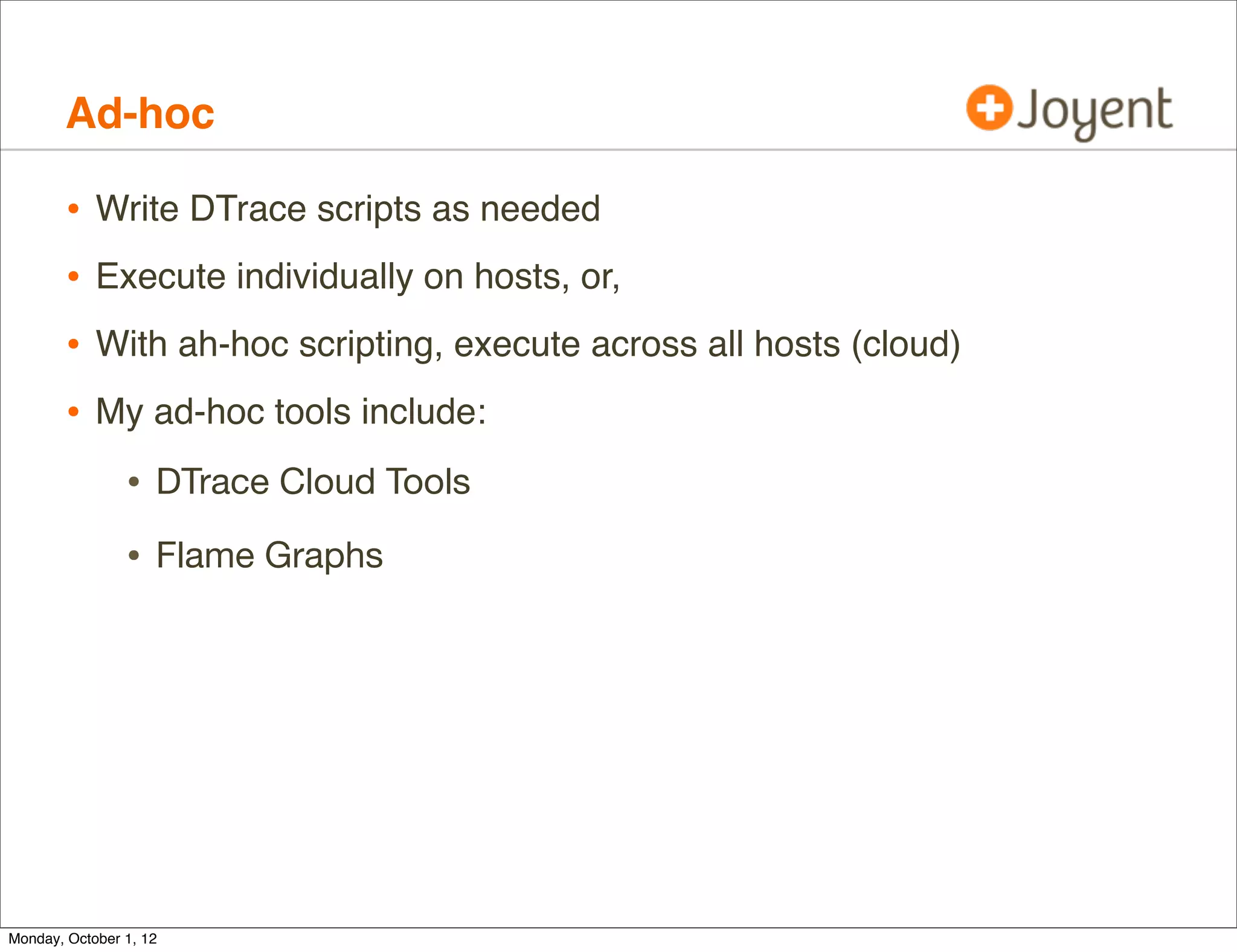
        •   Write DTrace scripts as needed
        •   Execute individually on hosts, or,
        •   With ah-hoc scripting, execute across all hosts (cloud)
        •   My ad-hoc tools include:

                • DTrace Cloud Tools
                • Flame Graphs


Monday, October 1, 12
Ad-hoc: DTrace Cloud Tools

        • Contains around 70 ad-hoc DTrace tools written by myself for
            operators and cloud customers.
             ./fs/metaslab_free.d                  ./net/dnsconnect.d
             ./fs/spasync.d                        ./net/tcp-fbt-accept_sdc5.d
             ./fs/zfsdist.d                        ./net/tcp-fbt-accept_sdc6.d
             ./fs/zfsslower.d                      ./net/tcpconnreqmaxq-pid_sdc5.d
             ./fs/zfsslowzone.d                    ./net/tcpconnreqmaxq-pid_sdc6.d
             ./fs/zfswhozone.d                     ./net/tcpconnreqmaxq_sdc5.d
             ./fs/ziowait.d                        ./net/tcpconnreqmaxq_sdc6.d
             ./mysql/innodb_pid_iolatency.d        ./net/tcplistendrop_sdc5.d
             ./mysql/innodb_pid_ioslow.d           ./net/tcplistendrop_sdc6.d
             ./mysql/innodb_thread_concurrency.d   ./net/tcpretranshosts.d
             ./mysql/libmysql_pid_connect.d        ./net/tcpretransport.d
             ./mysql/libmysql_pid_qtime.d          ./net/tcpretranssnoop_sdc5.d
             ./mysql/libmysql_pid_snoop.d          ./net/tcpretranssnoop_sdc6.d
             ./mysql/mysqld_latency.d              ./net/tcpretransstate.d
             ./mysql/mysqld_pid_avg.d              ./net/tcptimewait.d
             ./mysql/mysqld_pid_filesort.d         ./net/tcptimewaited.d
             ./mysql/mysqld_pid_fslatency.d        ./net/tcptimretransdropsnoop_sdc6.d
             [...]                                 [...]


        • Customer scripts are linked from the “smartmachine” directory
        • https://github.com/brendangregg/dtrace-cloud-tools
Monday, October 1, 12
Ad-hoc: DTrace Cloud Tools, cont.

        • For example, tcplistendrop.d traces each kernel-dropped SYN due
            to TCP backlog overflow (saturation):

             # ./tcplistendrop.d
             TIME                   SRC-IP          PORT         DST-IP            PORT
             2012 Jan 19 01:22:49   10.17.210.103   25691   ->   192.192.240.212     80
             2012 Jan 19 01:22:49   10.17.210.108   18423   ->   192.192.240.212     80
             2012 Jan 19 01:22:49   10.17.210.116   38883   ->   192.192.240.212     80
             2012 Jan 19 01:22:49   10.17.210.117   10739   ->   192.192.240.212     80
             2012 Jan 19 01:22:49   10.17.210.112   27988   ->   192.192.240.212     80
             2012 Jan 19 01:22:49   10.17.210.106   28824   ->   192.192.240.212     80
             2012 Jan 19 01:22:49   10.12.143.16    65070   ->   192.192.240.212     80
             2012 Jan 19 01:22:49   10.17.210.100   56392   ->   192.192.240.212     80
             2012 Jan 19 01:22:49   10.17.210.99    24628   ->   192.192.240.212     80
             [...]


        • Can explain multi-second client connect latency.


Monday, October 1, 12
Ad-hoc: DTrace Cloud Tools, cont.

        • tcplistendrop.d processes IP and TCP headers from the in-kernel
            packet buffer:
             fbt::tcp_input_listener:entry { self->mp = args[1]; }
             fbt::tcp_input_listener:return { self->mp = 0; }

             mib:::tcpListenDrop
             /self->mp/
             {
                     this->iph = (ipha_t *)self->mp->b_rptr;
                     this->tcph = (tcph_t *)(self->mp->b_rptr + 20);
                     printf("%-20Y %-18s %-5d -> %-18s %-5dn", walltimestamp,
                         inet_ntoa(&this->iph->ipha_src),
                         ntohs(*(uint16_t *)this->tcph->th_lport),
                         inet_ntoa(&this->iph->ipha_dst),
                         ntohs(*(uint16_t *)this->tcph->th_fport));
             }


        • Since this traces the fbt provider (kernel), it is operator only.

Monday, October 1, 12
Ad-hoc: DTrace Cloud Tools, cont.

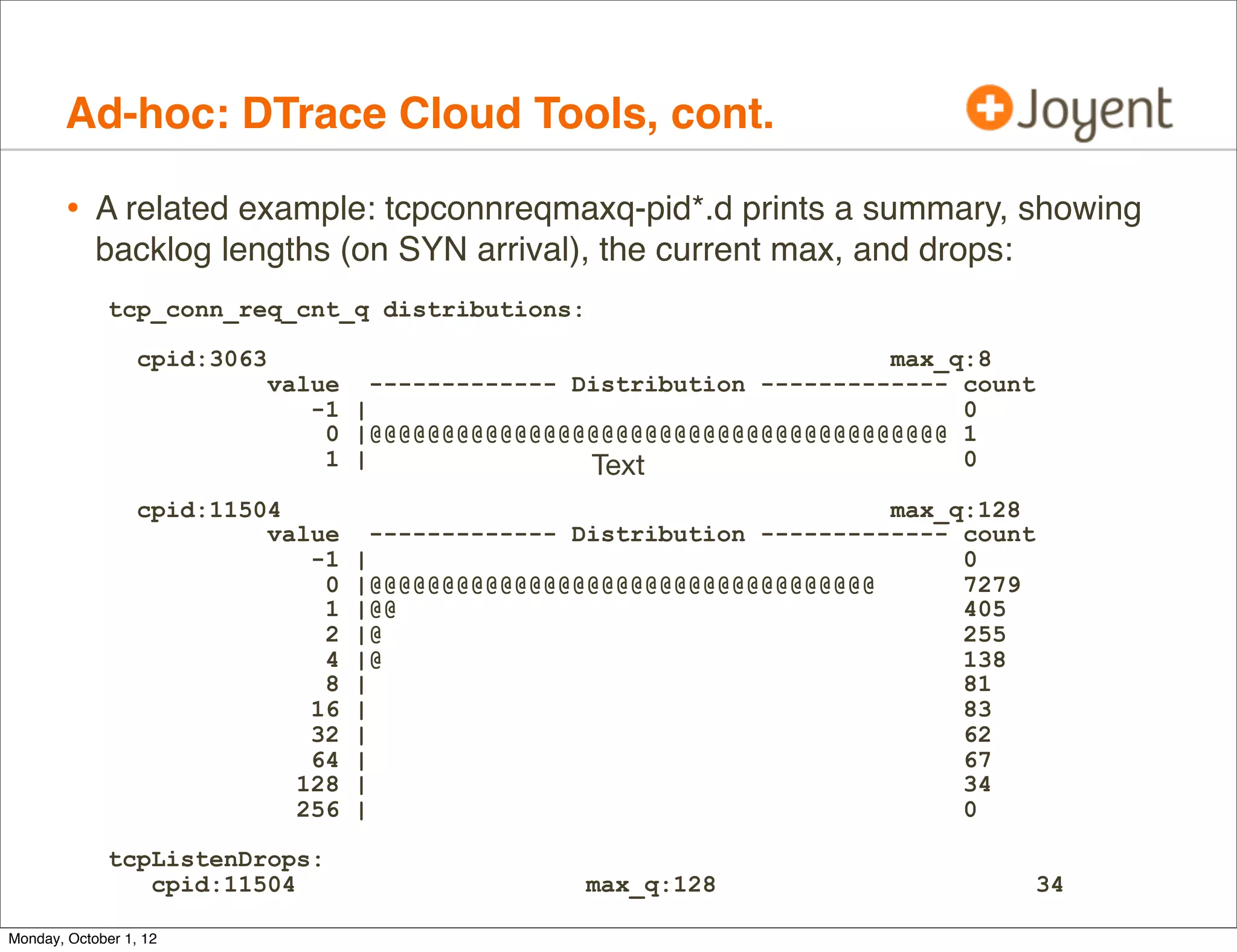
        • A related example: tcpconnreqmaxq-pid*.d prints a summary, showing
            backlog lengths (on SYN arrival), the current max, and drops:
              tcp_conn_req_cnt_q distributions:

                  cpid:3063                                                 max_q:8
                              value     ------------- Distribution ------------- count
                                 -1   |                                          0
                                  0   |@@@@@@@@@@@@@@@@@@@@@@@@@@@@@@@@@@@@@@@@ 1
                                  1   |                Text                      0

                  cpid:11504                                                max_q:128
                           value        ------------- Distribution ------------- count
                              -1      |                                          0
                               0      |@@@@@@@@@@@@@@@@@@@@@@@@@@@@@@@@@@@       7279
                               1      |@@                                        405
                               2      |@                                         255
                               4      |@                                         138
                               8      |                                          81
                              16      |                                          83
                              32      |                                          62
                              64      |                                          67
                             128      |                                          34
                             256      |                                          0

              tcpListenDrops:
                 cpid:11504                           max_q:128                          34

Monday, October 1, 12
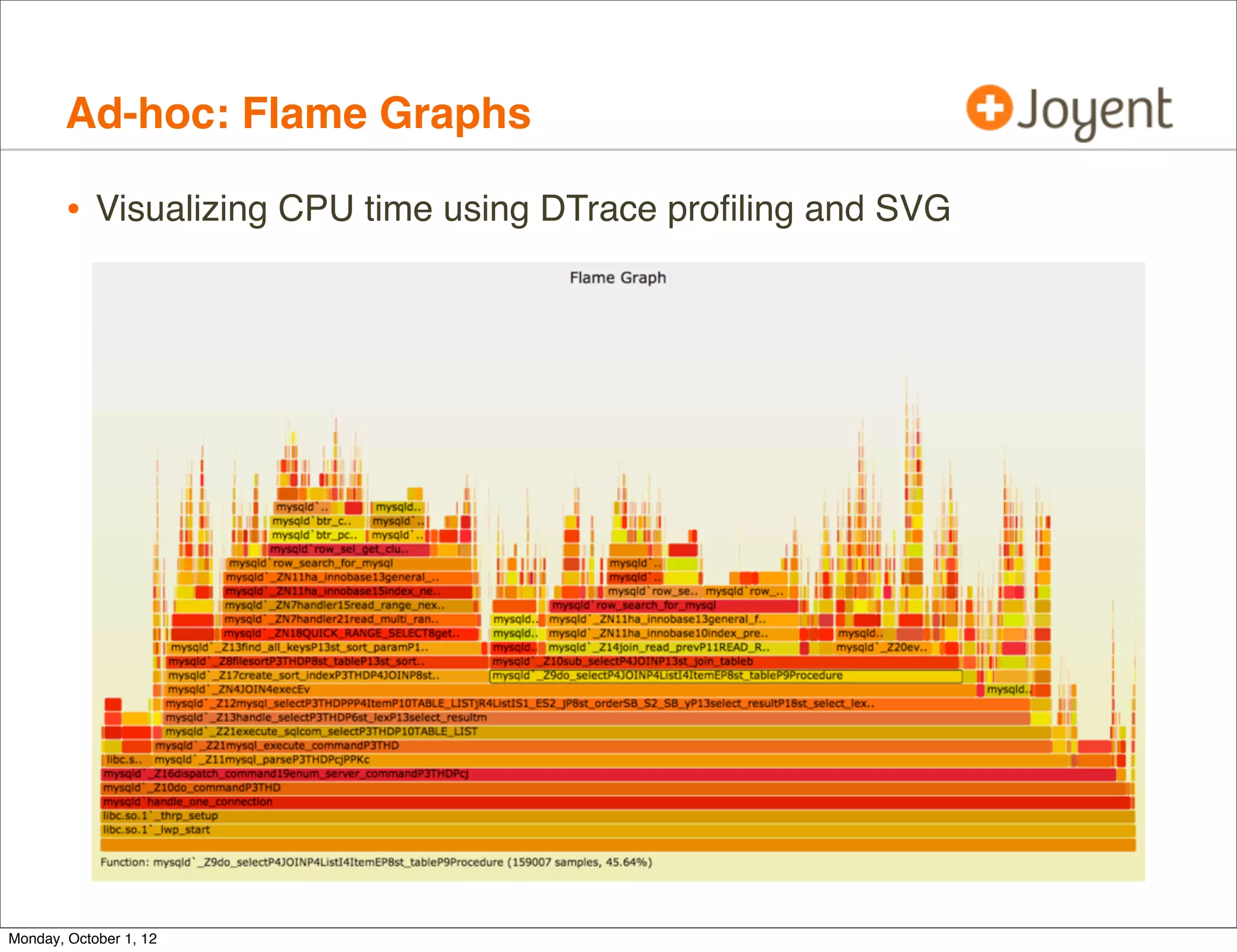
Ad-hoc: Flame Graphs

        • Visualizing CPU time using DTrace profiling and SVG


Monday, October 1, 12
Product

        • Cloud observability products including DTrace:
                • Joyent’s Cloud Analytics


Monday, October 1, 12
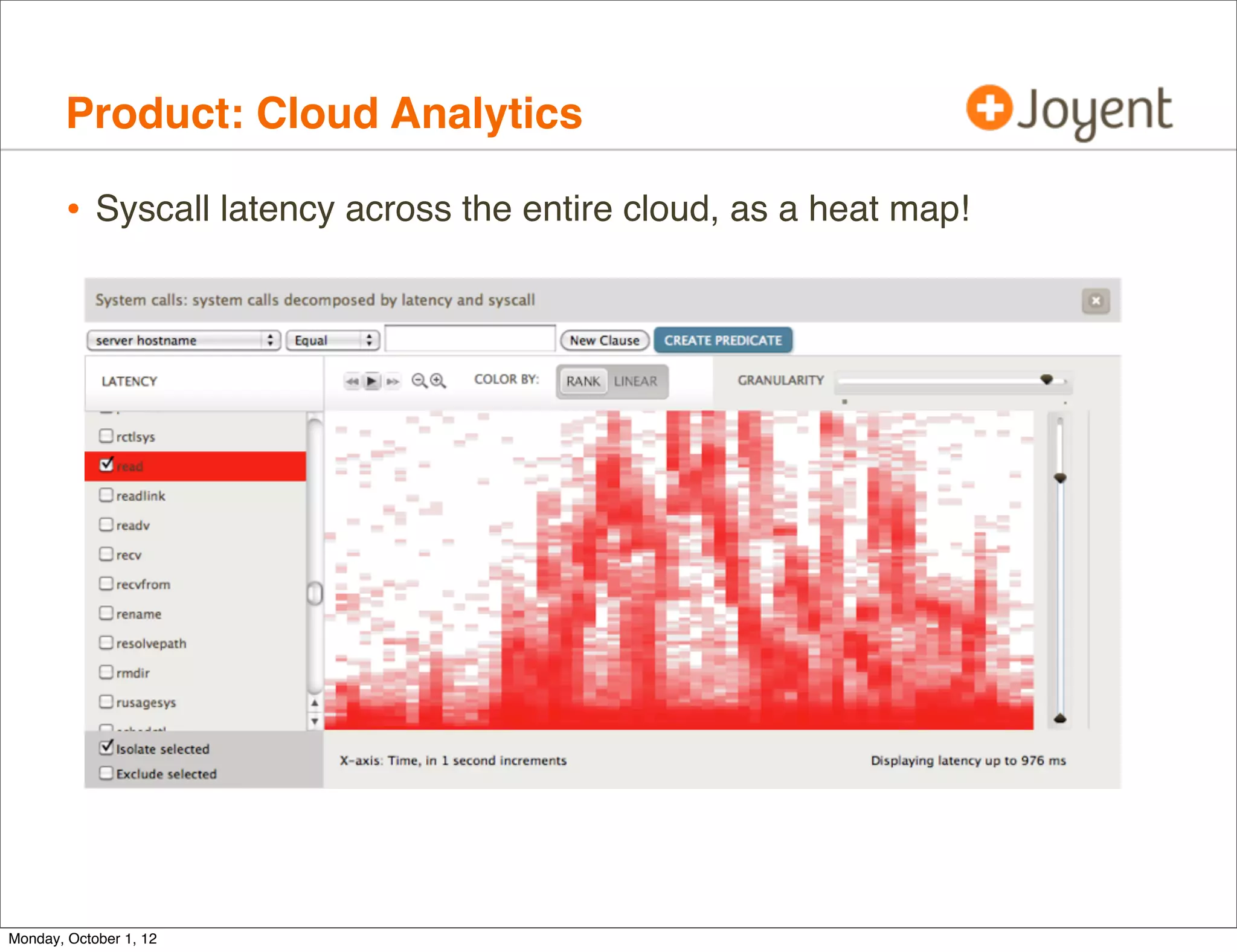
Product: Cloud Analytics

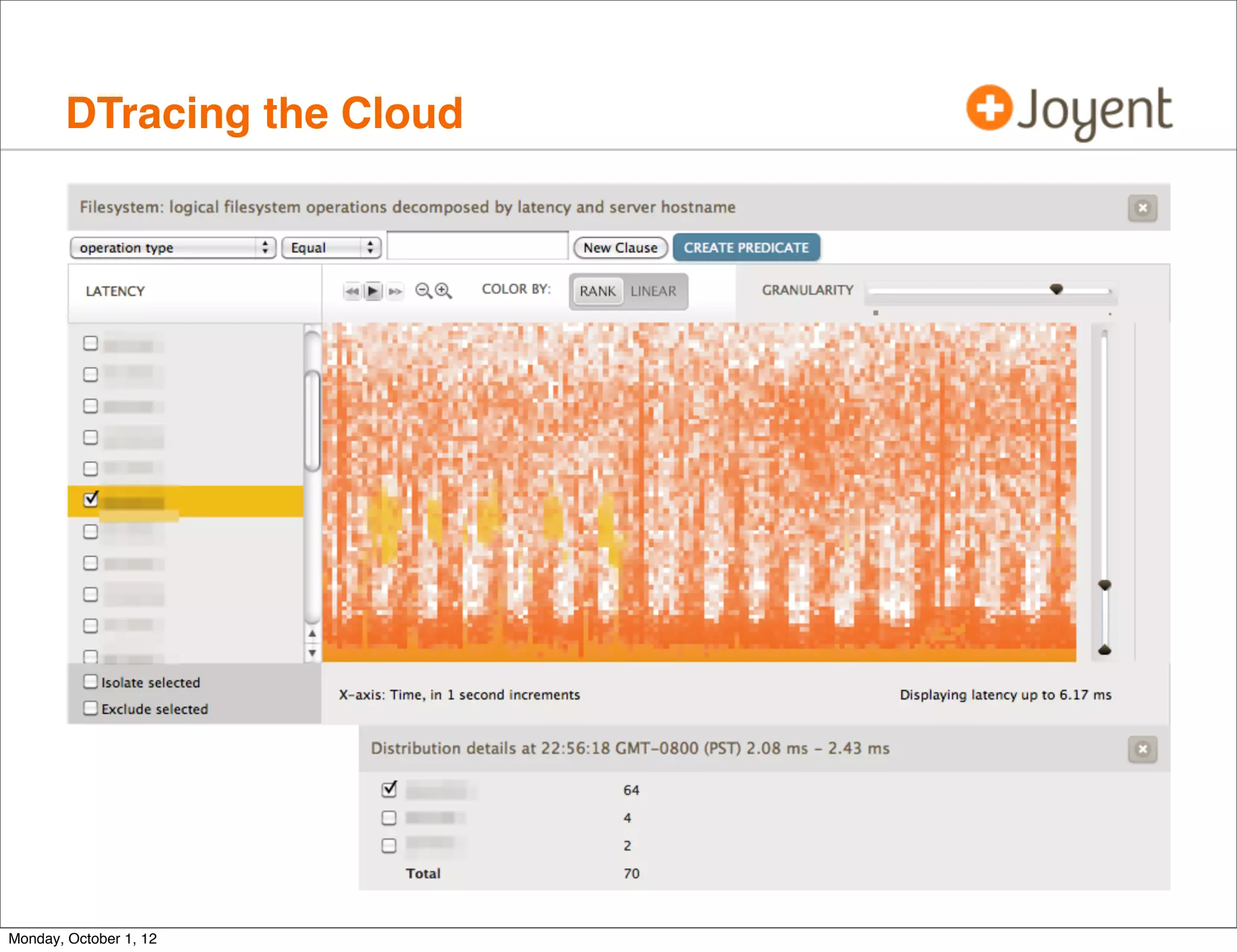
        • Syscall latency across the entire cloud, as a heat map!


Monday, October 1, 12
Product: Cloud Analytics, cont.

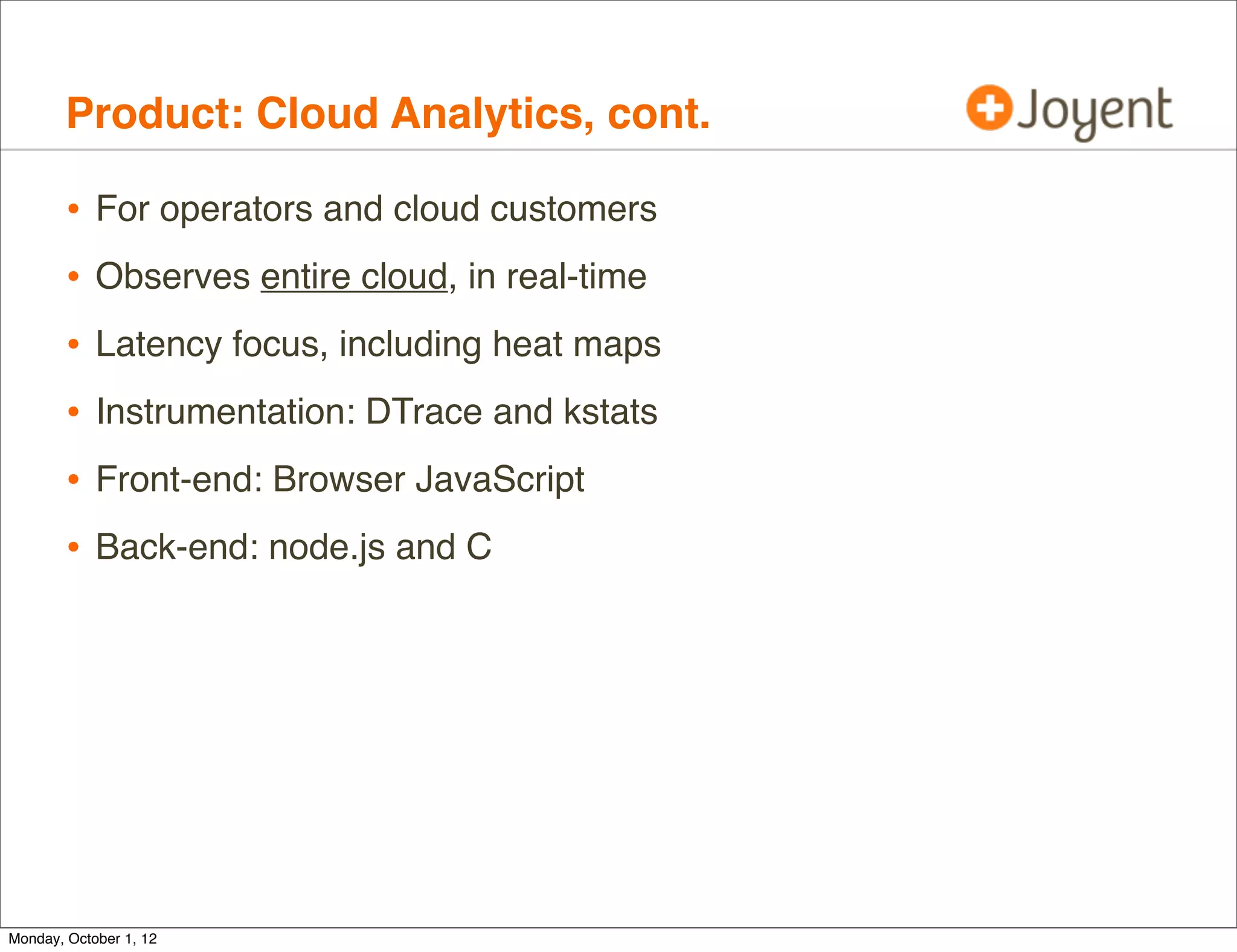
        •   For operators and cloud customers
        •   Observes entire cloud, in real-time
        •   Latency focus, including heat maps
        •   Instrumentation: DTrace and kstats
        •   Front-end: Browser JavaScript
        •   Back-end: node.js and C


Monday, October 1, 12
Product: Cloud Analytics, cont.

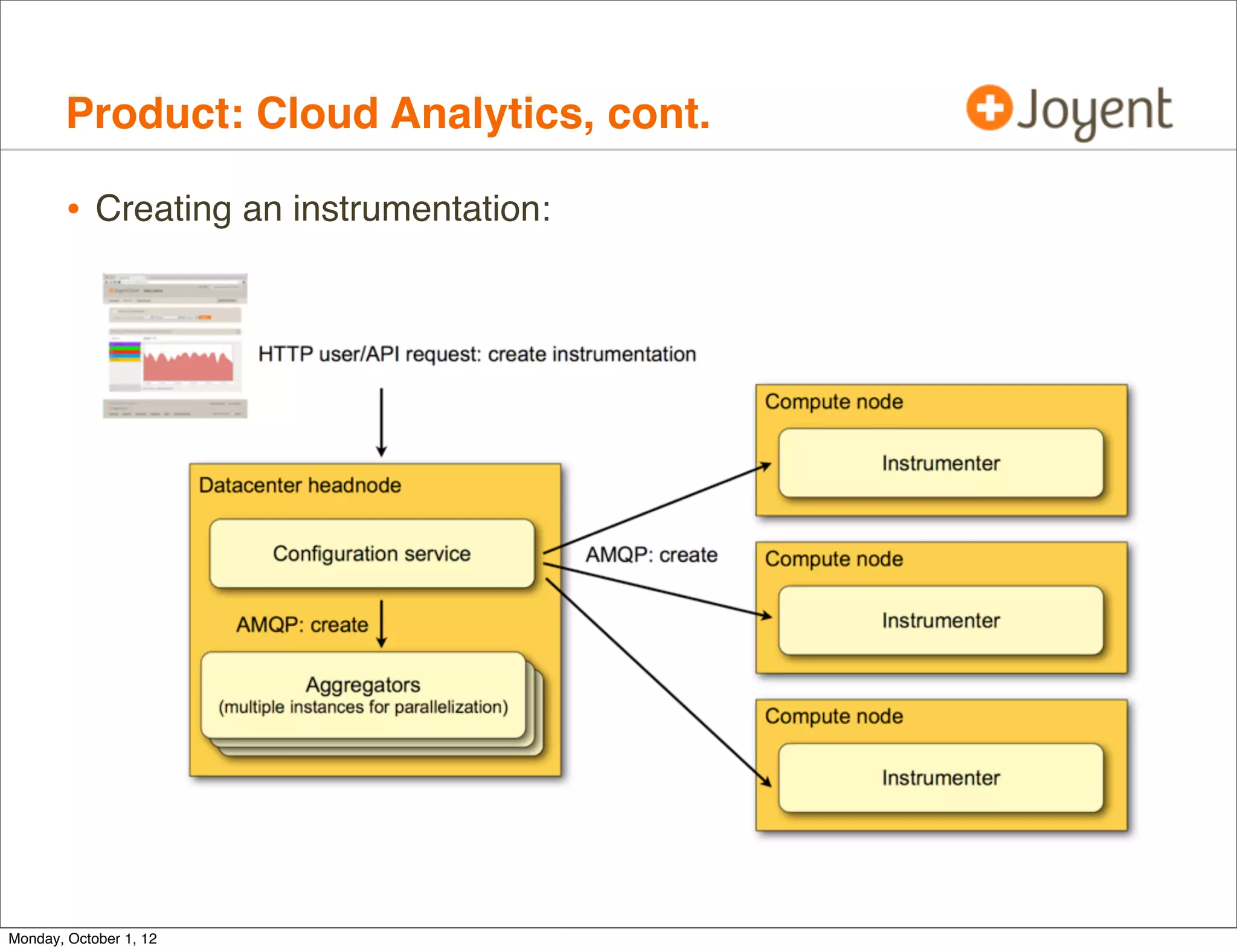
        • Creating an instrumentation:


Monday, October 1, 12
Product: Cloud Analytics, cont.

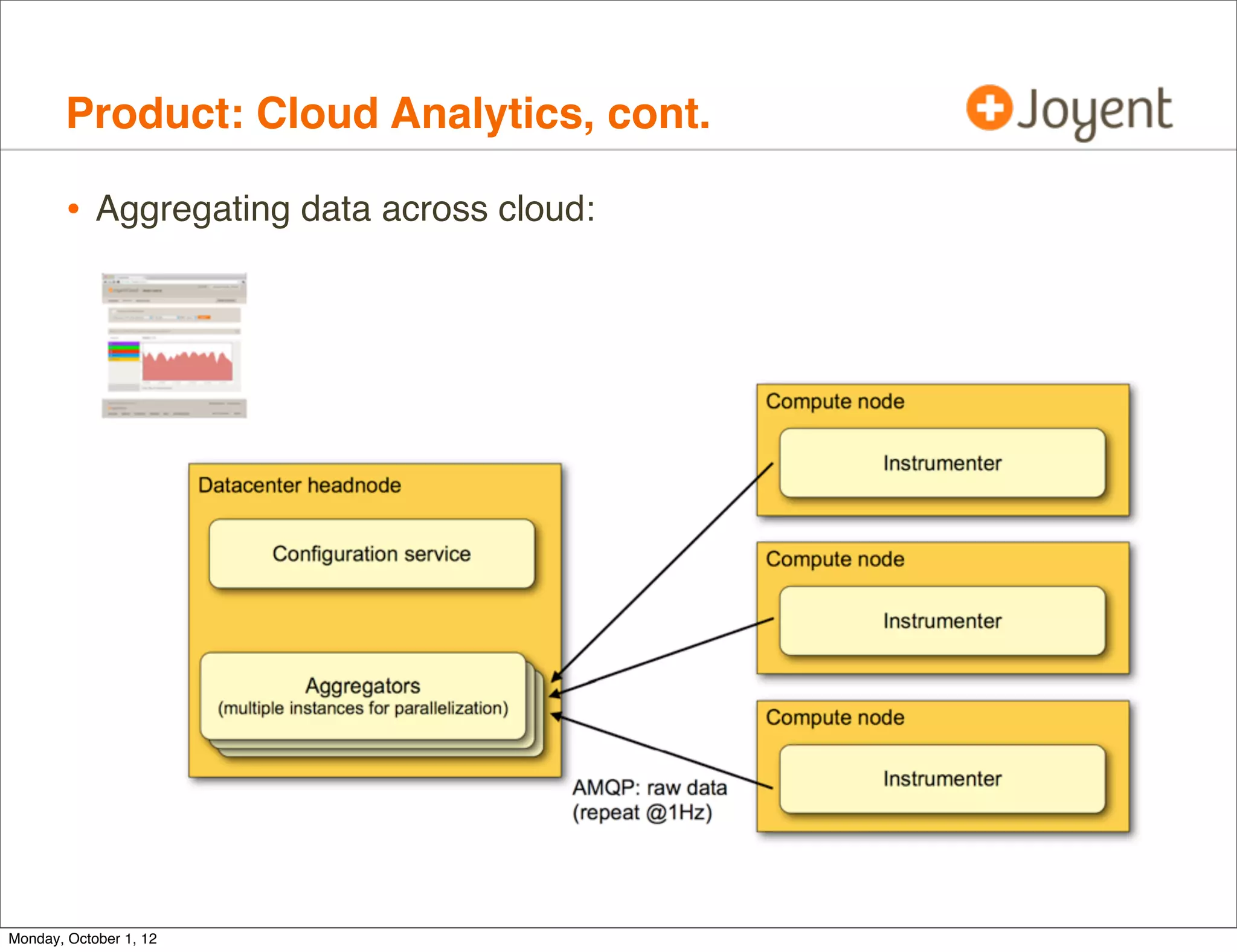
        • Aggregating data across cloud:


Monday, October 1, 12
Product: Cloud Analytics, cont.

        • Visualizing data:


Monday, October 1, 12
Product: Cloud Analytics, cont.
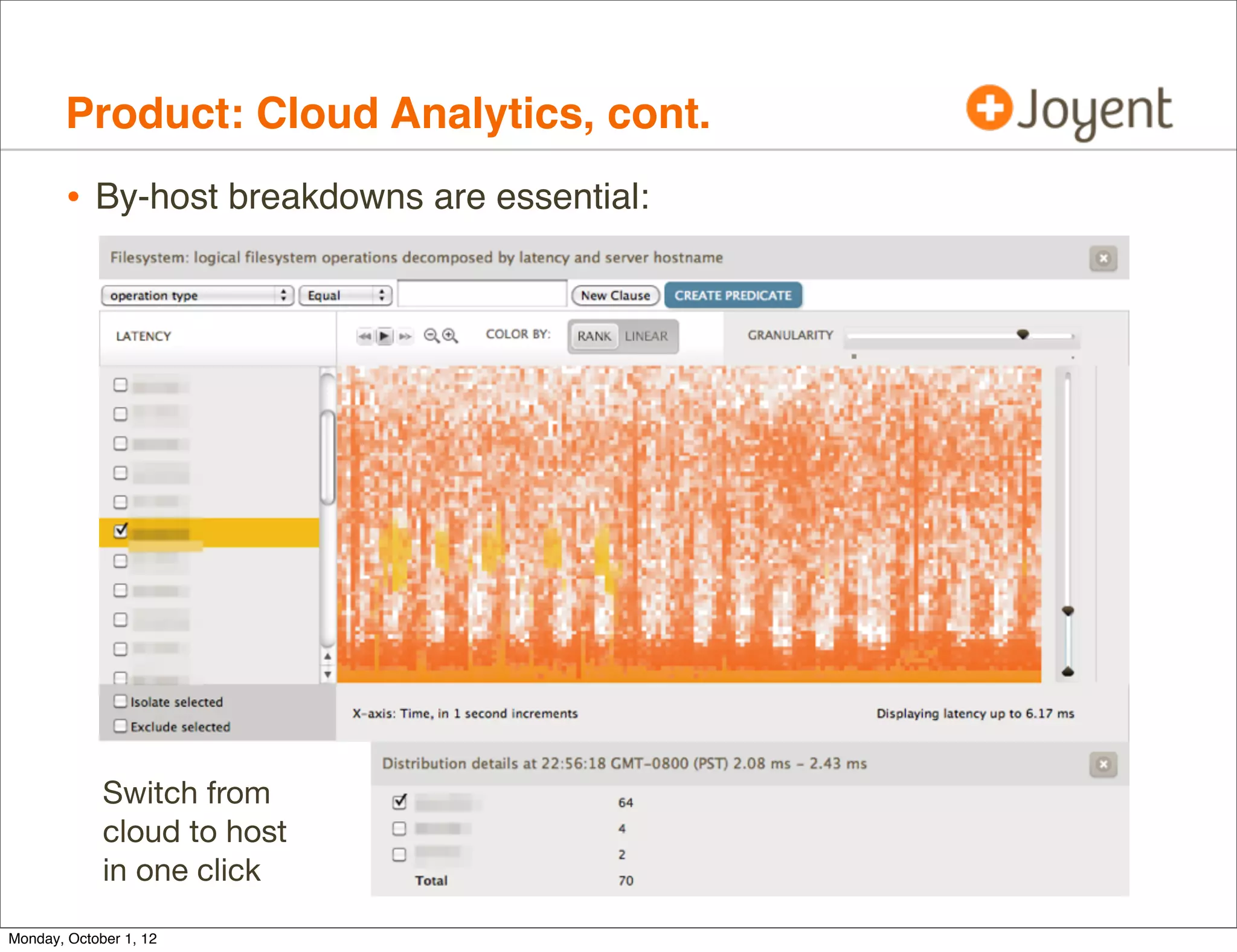
        • By-host breakdowns are essential:


             Switch from
             cloud to host
             in one click

Monday, October 1, 12
Case Studies


Monday, October 1, 12
Case Studies

        • Slow disks
        • Scheduler


Monday, October 1, 12
Slow disks

        • Customer complains of poor MySQL performance.
                • Noticed disks are busy via iostat-based monitoring software,
                    and have blamed noisy neighbors causing disk I/O contention.

        • Multi-tenancy and performance isolation are common cloud issues


Monday, October 1, 12
Slow disks, cont.

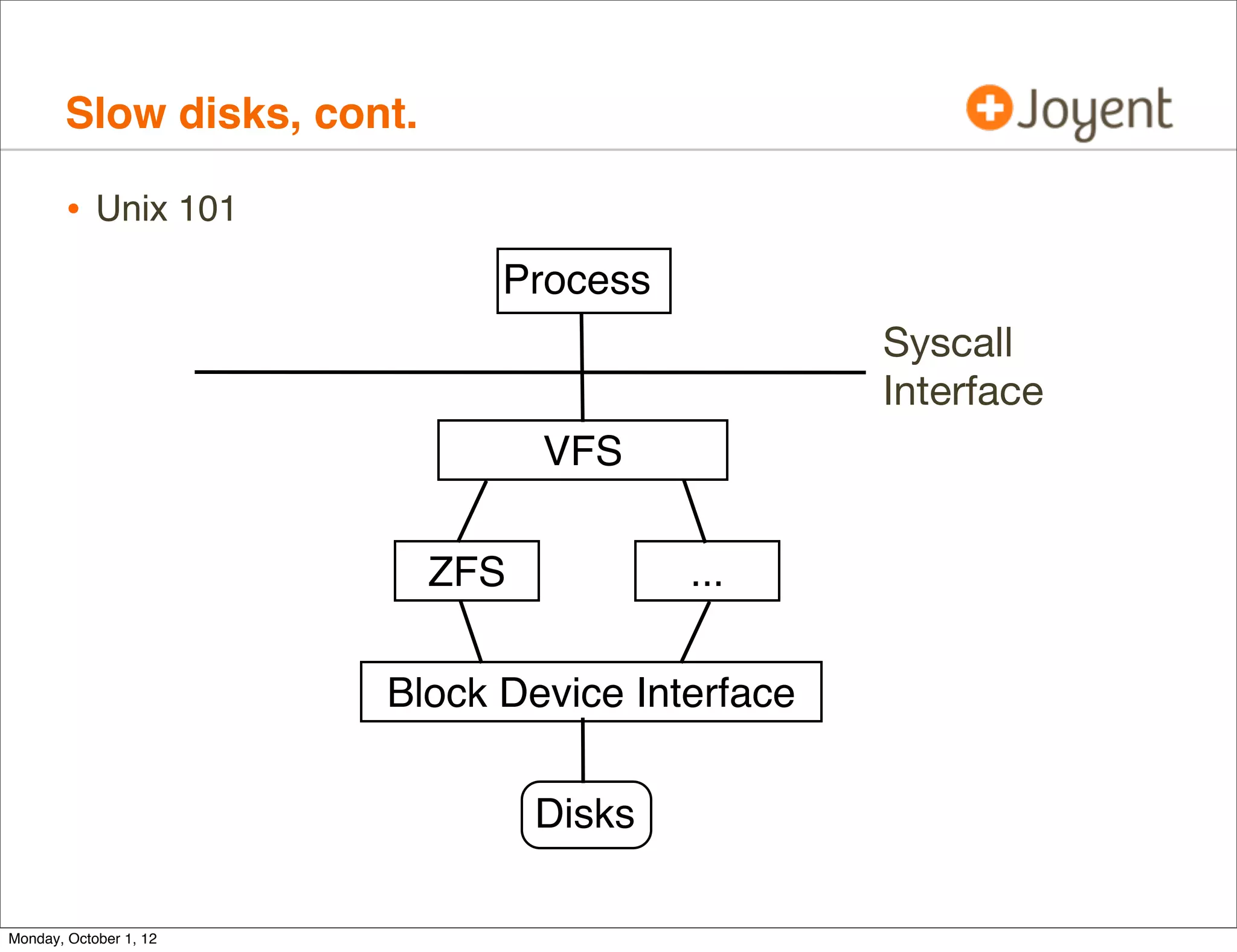
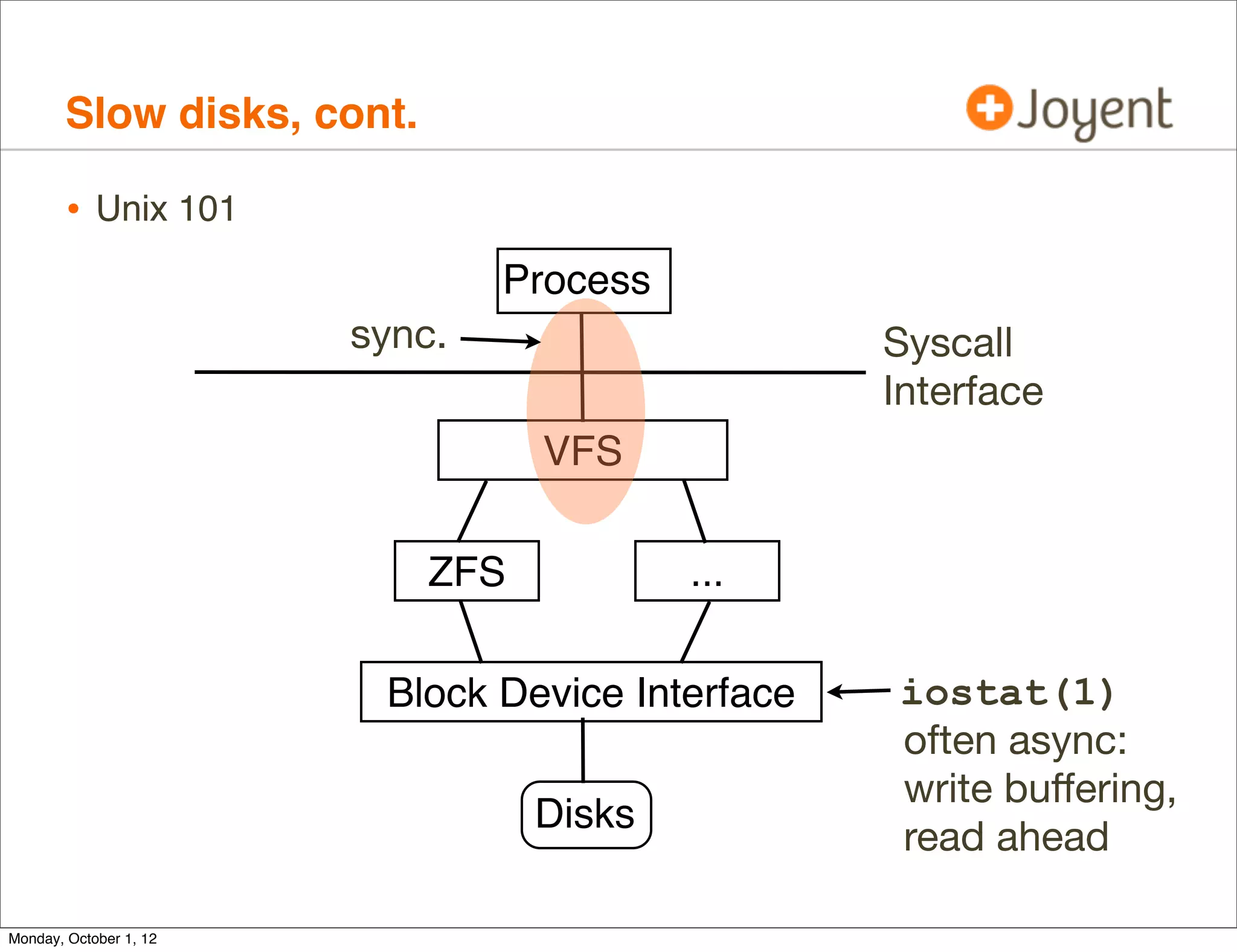
        • Unix 101
                              Process
                                                 Syscall
                                                 Interface
                                  VFS

                            ZFS           ...

                        Block Device Interface

                                  Disks

Monday, October 1, 12
Slow disks, cont.

        • Unix 101
                                Process
                        sync.                     Syscall
                                                  Interface
                                  VFS

                            ZFS           ...

                         Block Device Interface   iostat(1)
                                                  often async:
                                                  write buffering,
                                  Disks
                                                  read ahead

Monday, October 1, 12
Slow disks, cont.
        • By measuring FS latency in application-synchronous context we
            can either confirm or rule-out FS/disk origin latency.

                • Including expressing FS latency during MySQL query, so that
                    the issue can be quantified, and speedup calculated.

        • Ideally, this would be possible from within the SmartMachine, so
            both customer and operator can run the DTrace script. This is
            possible using:

                • pid provider: trace and time MySQL FS functions
                • syscall provider: trace and time read/write syscalls for FS file
                    descriptors (hence needing fds[].fi_fs; otherwise cache open())


Monday, October 1, 12
Slow disks, cont.
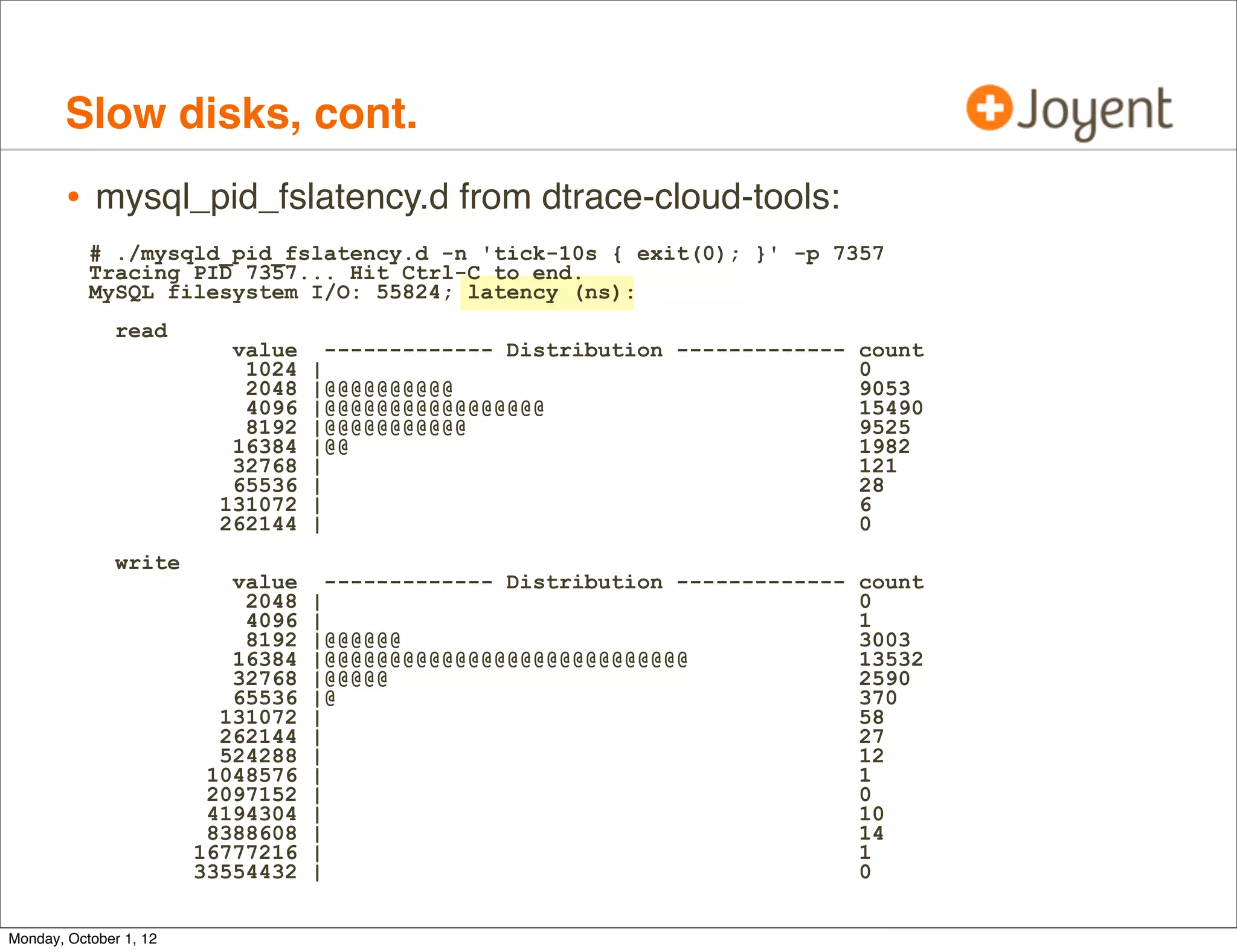
        • mysql_pid_fslatency.d from dtrace-cloud-tools:
           # ./mysqld_pid_fslatency.d -n 'tick-10s { exit(0); }' -p 7357
           Tracing PID 7357... Hit Ctrl-C to end.
           MySQL filesystem I/O: 55824; latency (ns):
               read
                           value     ------------- Distribution ------------- count
                            1024   |                                          0
                            2048   |@@@@@@@@@@                                9053
                            4096   |@@@@@@@@@@@@@@@@@                         15490
                            8192   |@@@@@@@@@@@                               9525
                           16384   |@@                                        1982
                           32768   |                                          121
                           65536   |                                          28
                          131072   |                                          6
                          262144   |                                          0
               write
                           value     ------------- Distribution ------------- count
                            2048   |                                          0
                            4096   |                                          1
                            8192   |@@@@@@                                    3003
                           16384   |@@@@@@@@@@@@@@@@@@@@@@@@@@@@              13532
                           32768   |@@@@@                                     2590
                           65536   |@                                         370
                          131072   |                                          58
                          262144   |                                          27
                          524288   |                                          12
                         1048576   |                                          1
                         2097152   |                                          0
                         4194304   |                                          10
                         8388608   |                                          14
                        16777216   |                                          1
                        33554432   |                                          0


Monday, October 1, 12
Slow disks, cont.
        • mysql_pid_fslatency.d from dtrace-cloud-tools:
           # ./mysqld_pid_fslatency.d -n 'tick-10s { exit(0); }' -p 7357
           Tracing PID 7357... Hit Ctrl-C to end.
           MySQL filesystem I/O: 55824; latency (ns):
               read
                           value     ------------- Distribution ------------- count
                            1024   |                                          0
                            2048   |@@@@@@@@@@                                9053
                            4096   |@@@@@@@@@@@@@@@@@                         15490
                            8192   |@@@@@@@@@@@                               9525
                           16384   |@@                                        1982
                           32768   |                                          121
                           65536   |                                          28
                          131072   |                                          6
                          262144   |                                          0
               write
                           value     ------------- Distribution ------------- count
                            2048   |                                          0
                            4096   |                                          1
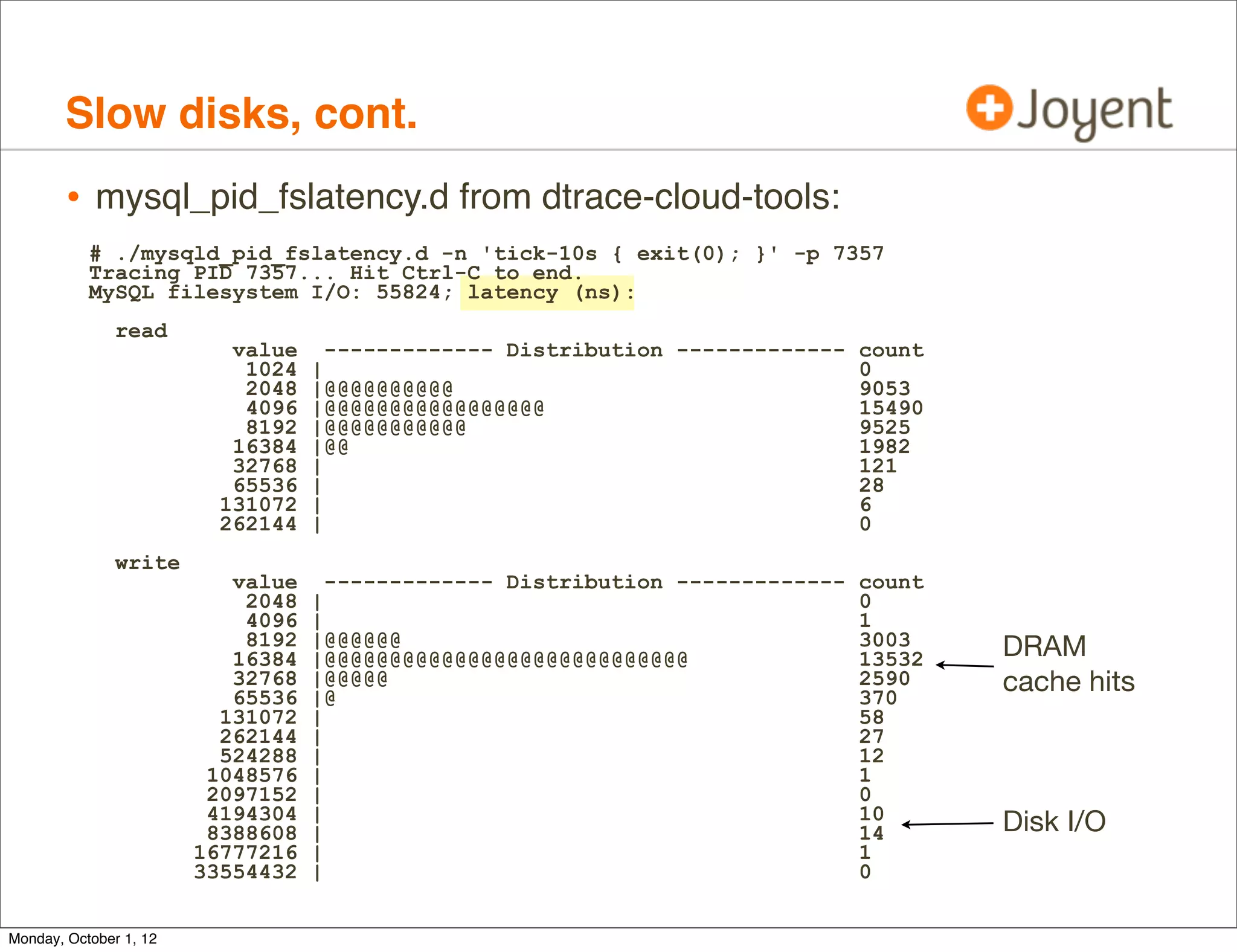
                            8192   |@@@@@@                                    3003    DRAM
                           16384   |@@@@@@@@@@@@@@@@@@@@@@@@@@@@              13532
                           32768
                           65536
                                   |@@@@@
                                   |@
                                                                              2590
                                                                              370
                                                                                      cache hits
                          131072   |                                          58
                          262144   |                                          27
                          524288   |                                          12
                         1048576   |                                          1
                         2097152   |                                          0
                         4194304   |                                          10
                         8388608   |                                          14      Disk I/O
                        16777216   |                                          1
                        33554432   |                                          0


Monday, October 1, 12
Slow disks, cont.
        • mysql_pid_fslatency.d is about 30 lines of DTrace:
           pid$target::os_file_read:entry,
           pid$target::os_file_write:entry,
           pid$target::my_read:entry,
           pid$target::my_write:entry
           {
               self->start = timestamp;
           }
           pid$target::os_file_read:return    {   this->dir   =   "read"; }
           pid$target::os_file_write:return   {   this->dir   =   "write"; }
           pid$target::my_read:return         {   this->dir   =   "read"; }
           pid$target::my_write:return        {   this->dir   =   "write"; }
           pid$target::os_file_read:return,
           pid$target::os_file_write:return,
           pid$target::my_read:return,
           pid$target::my_write:return
           /self->start/
           {
               @time[this->dir] = quantize(timestamp - self->start);
               @num = count();
               self->start = 0;
           }
           dtrace:::END
           {
               printa("MySQL filesystem I/O: %@d; latency (ns):n", @num);
               printa(@time);
               clear(@time); clear(@num);
           }

Monday, October 1, 12
Slow disks, cont.
        • mysql_pid_fslatency.d is about 30 lines of DTrace:
           pid$target::os_file_read:entry,
           pid$target::os_file_write:entry,
           pid$target::my_read:entry,                   Thank you MySQL!
           pid$target::my_write:entry
           {                                            If not that easy,
               self->start = timestamp;
           }                                            try syscall with fds[]
           pid$target::os_file_read:return    {   this->dir   =   "read"; }
           pid$target::os_file_write:return   {   this->dir   =   "write"; }
           pid$target::my_read:return         {   this->dir   =   "read"; }
           pid$target::my_write:return        {   this->dir   =   "write"; }
           pid$target::os_file_read:return,
           pid$target::os_file_write:return,
           pid$target::my_read:return,
           pid$target::my_write:return
           /self->start/
           {
               @time[this->dir] = quantize(timestamp - self->start);
               @num = count();
               self->start = 0;
           }
           dtrace:::END
           {
               printa("MySQL filesystem I/O: %@d; latency (ns):n", @num);
               printa(@time);
               clear(@time); clear(@num);
           }

Monday, October 1, 12
Slow disks, cont.

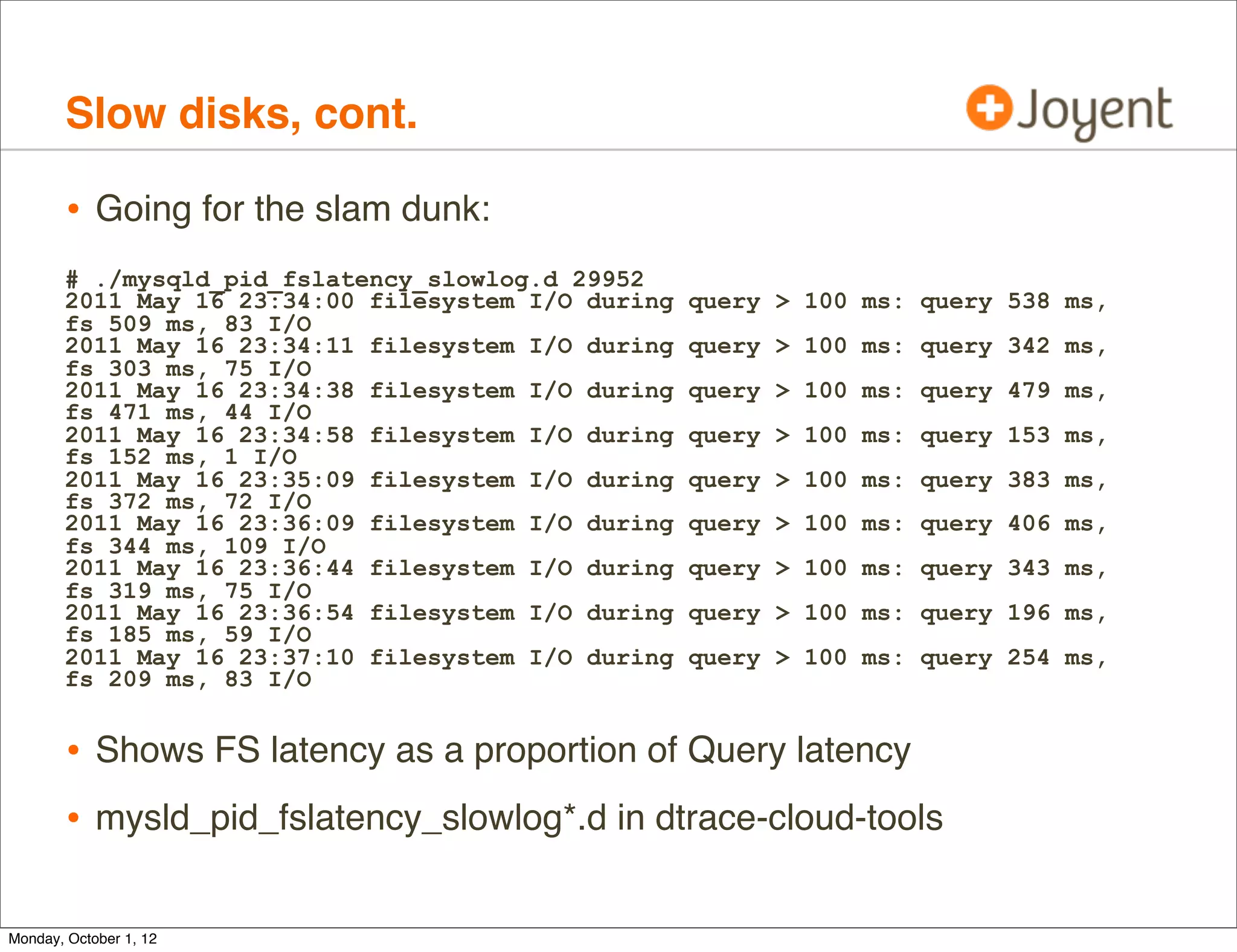
        • Going for the slam dunk:
       # ./mysqld_pid_fslatency_slowlog.d 29952
       2011 May 16 23:34:00 filesystem I/O during   query > 100 ms: query 538 ms,
       fs 509 ms, 83 I/O
       2011 May 16 23:34:11 filesystem I/O during   query > 100 ms: query 342 ms,
       fs 303 ms, 75 I/O
       2011 May 16 23:34:38 filesystem I/O during   query > 100 ms: query 479 ms,
       fs 471 ms, 44 I/O
       2011 May 16 23:34:58 filesystem I/O during   query > 100 ms: query 153 ms,
       fs 152 ms, 1 I/O
       2011 May 16 23:35:09 filesystem I/O during   query > 100 ms: query 383 ms,
       fs 372 ms, 72 I/O
       2011 May 16 23:36:09 filesystem I/O during   query > 100 ms: query 406 ms,
       fs 344 ms, 109 I/O
       2011 May 16 23:36:44 filesystem I/O during   query > 100 ms: query 343 ms,
       fs 319 ms, 75 I/O
       2011 May 16 23:36:54 filesystem I/O during   query > 100 ms: query 196 ms,
       fs 185 ms, 59 I/O
       2011 May 16 23:37:10 filesystem I/O during   query > 100 ms: query 254 ms,
       fs 209 ms, 83 I/O


        • Shows FS latency as a proportion of Query latency
        • mysld_pid_fslatency_slowlog*.d in dtrace-cloud-tools

Monday, October 1, 12
Slow disks, cont.

        • The cloud operator can trace kernel internals. Eg, the VFS->ZFS
            interface using zfsslower.d:
    # ./zfsslower.d 10
    TIME                    PROCESS   D      KB   ms   FILE
    2012 Sep 27 13:45:33    zlogin    W       0   11   /zones/b8b2464c/var/adm/wtmpx
    2012 Sep 27 13:45:36    bash      R       0   14   /zones/b8b2464c/opt/local/bin/zsh
    2012 Sep 27 13:45:58    mysqld    R    1024   19   /zones/b8b2464c/var/mysql/ibdata1
    2012 Sep 27 13:45:58    mysqld    R    1024   22   /zones/b8b2464c/var/mysql/ibdata1
    2012 Sep 27 13:46:14    master    R       1   6    /zones/b8b2464c/root/opt/local/
    libexec/postfix/qmgr
    2012 Sep 27 13:46:14    master    R       4   5    /zones/b8b2464c/root/opt/local/etc/
    postfix/master.cf
    [...]

        • My go-to tool (does all apps). This example showed if there were
            VFS-level I/O > 10ms? (arg == 10)
        • Stupidly easy to do


Monday, October 1, 12
Slow disks, cont.

        • zfs_read() entry -> return; same for zfs_write().
        [...]
        fbt::zfs_read:entry,
        fbt::zfs_write:entry
        {
            self->path = args[0]->v_path;
            self->kb = args[1]->uio_resid / 1024;
            self->start = timestamp;
        }

        fbt::zfs_read:return,
        fbt::zfs_write:return
        /self->start && (timestamp - self->start) >= min_ns/
        {
            this->iotime = (timestamp - self->start) / 1000000;
            this->dir = probefunc == "zfs_read" ? "R" : "W";
            printf("%-20Y %-16s %1s %4d %6d %sn", walltimestamp,
                execname, this->dir, self->kb, this->iotime,
                self->path != NULL ? stringof(self->path) : "<null>");
        }
        [...]


        • zfsslower.d originated from the DTrace book
Monday, October 1, 12
Slow disks, cont.
        • The operator can use deeper tools as needed. Anywhere in ZFS.
            # dtrace -n 'io:::start { @[stack()] = count(); }'
            dtrace: description 'io:::start ' matched 6 probes
            ^C
                          genunix`ldi_strategy+0x53
                          zfs`vdev_disk_io_start+0xcc
                          zfs`zio_vdev_io_start+0xab
                          zfs`zio_execute+0x88
                          zfs`zio_nowait+0x21
                          zfs`vdev_mirror_io_start+0xcd
                          zfs`zio_vdev_io_start+0x250
                          zfs`zio_execute+0x88
                          zfs`zio_nowait+0x21
                          zfs`arc_read_nolock+0x4f9
                          zfs`arc_read+0x96
                          zfs`dsl_read+0x44
                          zfs`dbuf_read_impl+0x166
                          zfs`dbuf_read+0xab
                          zfs`dmu_buf_hold_array_by_dnode+0x189
                          zfs`dmu_buf_hold_array+0x78
                          zfs`dmu_read_uio+0x5c
                          zfs`zfs_read+0x1a3
                          genunix`fop_read+0x8b
                          genunix`read+0x2a7
                          143
Monday, October 1, 12
Slow disks, cont.

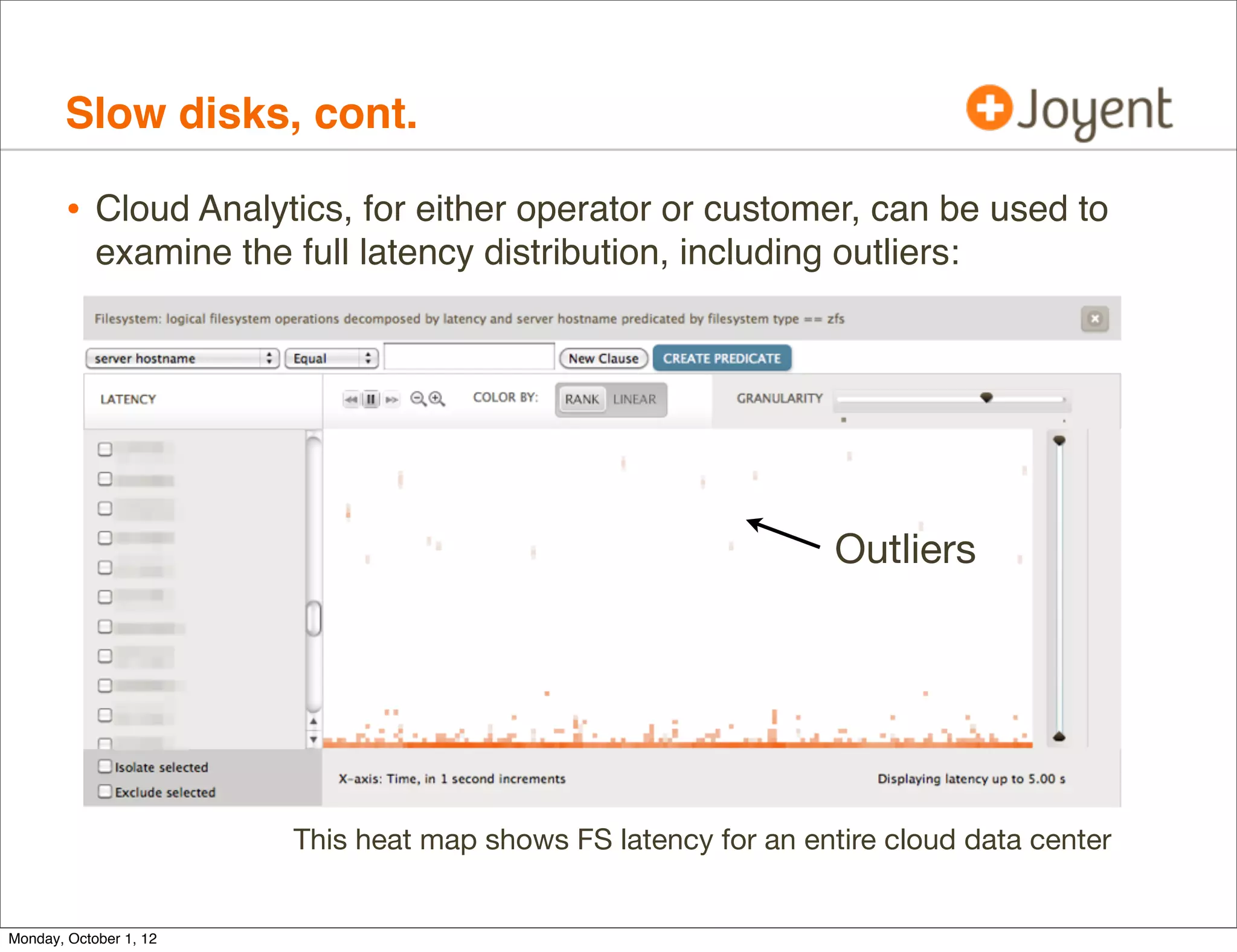
        • Cloud Analytics, for either operator or customer, can be used to
            examine the full latency distribution, including outliers:


                                                                  Outliers


                         This heat map shows FS latency for an entire cloud data center


Monday, October 1, 12
Slow disks, cont.

        • Found that the customer problem was not disks or FS (99% of the
            time), but was CPU usage during table joins.
        • On Joyent’s IaaS architecture, it’s usually not the disks or
            filesystem; useful to rule that out quickly.
        • Some of the time it is, due to:
                • Bad disks (1000+ms I/O)
                • Controller issues (PERC)
                • Big I/O (how quick is a 40 Mbyte read from cache?)
                • Other tenants (benchmarking!). Much less for us now with ZFS
                    I/O throttling (thanks Bill Pijewski), used for disk performance
                    isolation in the SmartOS cloud.


Monday, October 1, 12
Slow disks, cont.

        • Customer resolved real issue
        • Prior to DTrace analysis, had spent months of poor performance
            believing disks were to blame


Monday, October 1, 12
Kernel scheduler

        • Customer problem: occasional latency outliers
        • Analysis: no smoking gun. No slow I/O or locks, etc. Some random
            dispatcher queue latency, but with CPU headroom.


     $ prstat -mLc 1
        PID USERNAME USR SYS TRP TFL DFL LCK SLP LAT   VCX ICX SCL SIG PROCESS/LWPID
      17930 103       21 7.6 0.0 0.0 0.0 53 16 9.1     57K   1 73K   0 beam.smp/265
      17930 103       20 7.0 0.0 0.0 0.0 57 16 0.4     57K   2 70K   0 beam.smp/264
      17930 103       20 7.4 0.0 0.0 0.0 53 18 1.7     63K   0 78K   0 beam.smp/263
      17930 103       19 6.7 0.0 0.0 0.0 60 14 0.4     52K   0 65K   0 beam.smp/266
      17930 103      2.0 0.7 0.0 0.0 0.0 96 1.6 0.0     6K   0 8K    0 beam.smp/267
      17930 103      1.0 0.9 0.0 0.0 0.0 97 0.9 0.0      4   0 47    0 beam.smp/280
     [...]


Monday, October 1, 12
Kernel scheduler, cont.

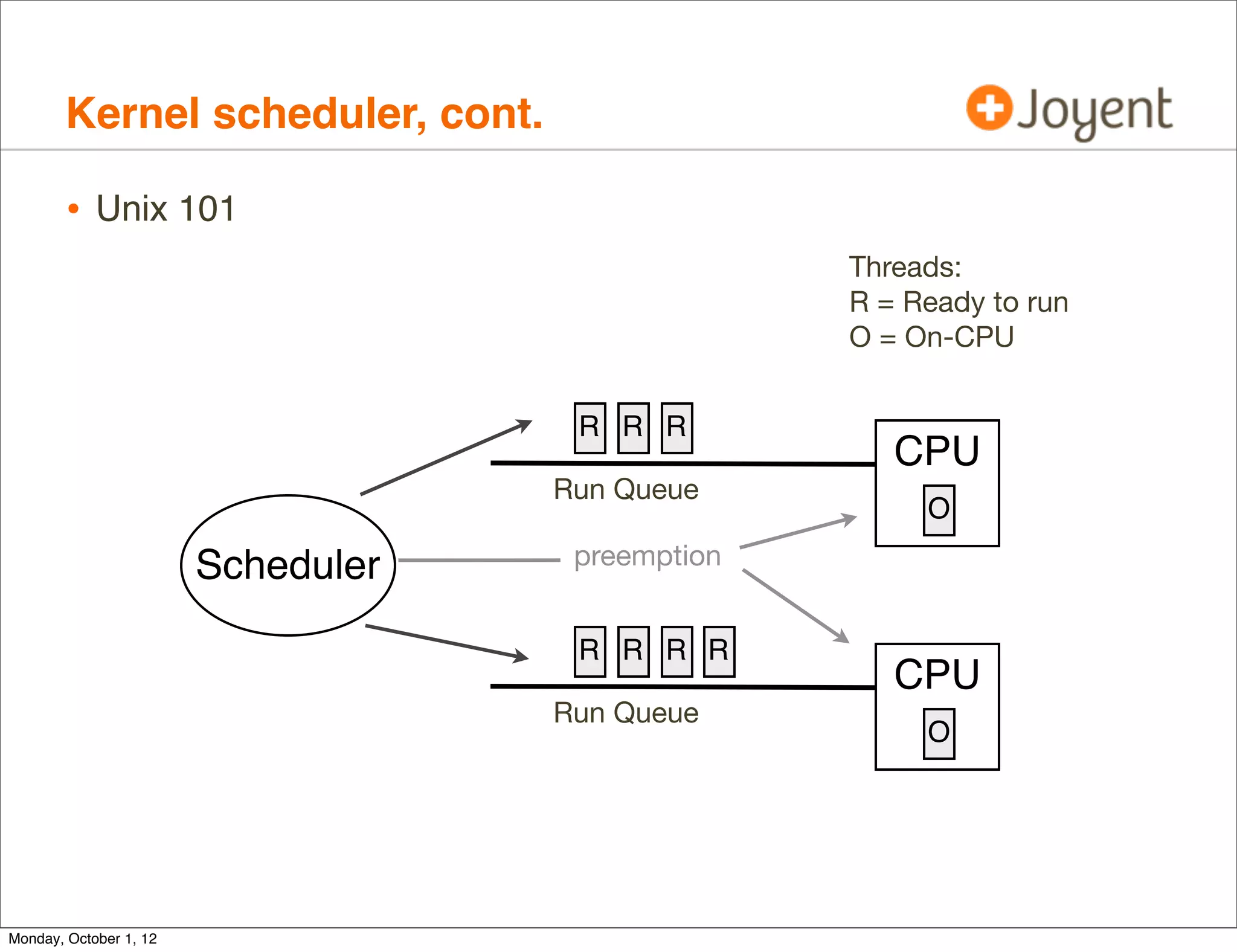
        • Unix 101
                                                  Threads:
                                                  R = Ready to run
                                                  O = On-CPU


                                     R R R
                                                     CPU
                                    Run Queue
                                                       O

                        Scheduler    preemption


                                     R R R R
                                                     CPU
                                    Run Queue
                                                       O


Monday, October 1, 12
Kernel scheduler, cont.

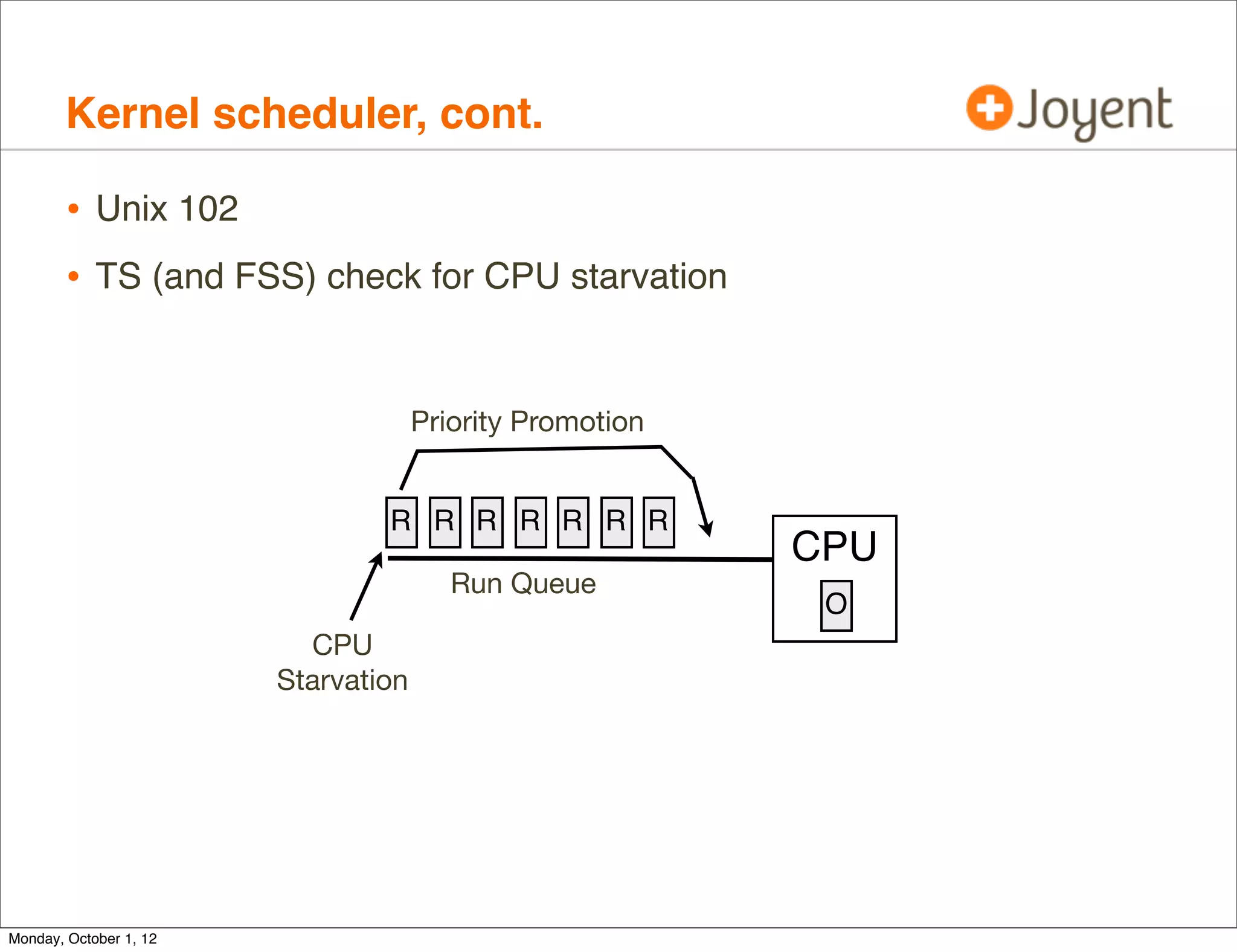
        • Unix 102
        • TS (and FSS) check for CPU starvation


                                     Priority Promotion


                                R R R R R R R
                                                          CPU
                                        Run Queue
                                                           O
                          CPU
                        Starvation


Monday, October 1, 12
Kernel scheduler, cont.

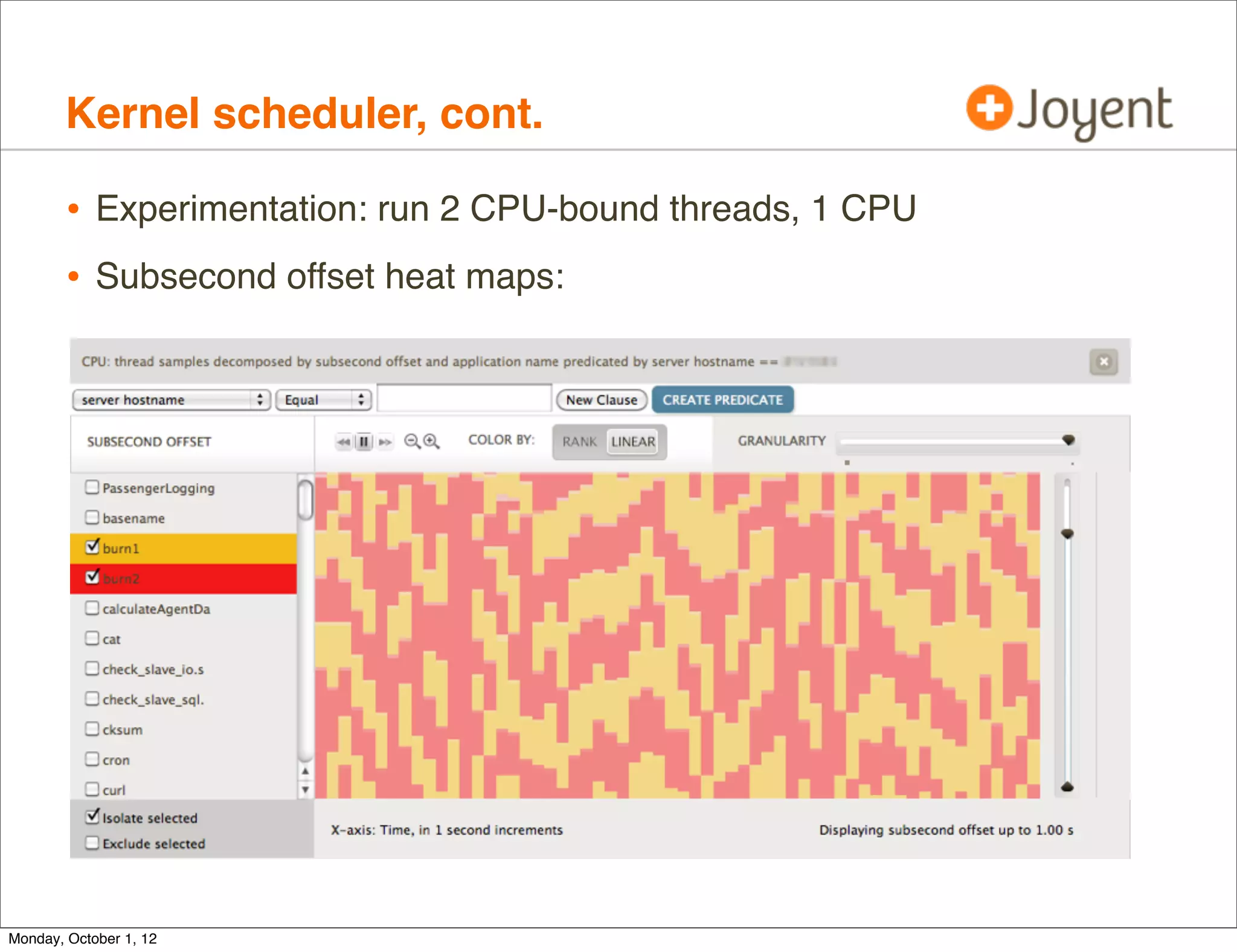
        • Experimentation: run 2 CPU-bound threads, 1 CPU
        • Subsecond offset heat maps:


Monday, October 1, 12
Kernel scheduler, cont.

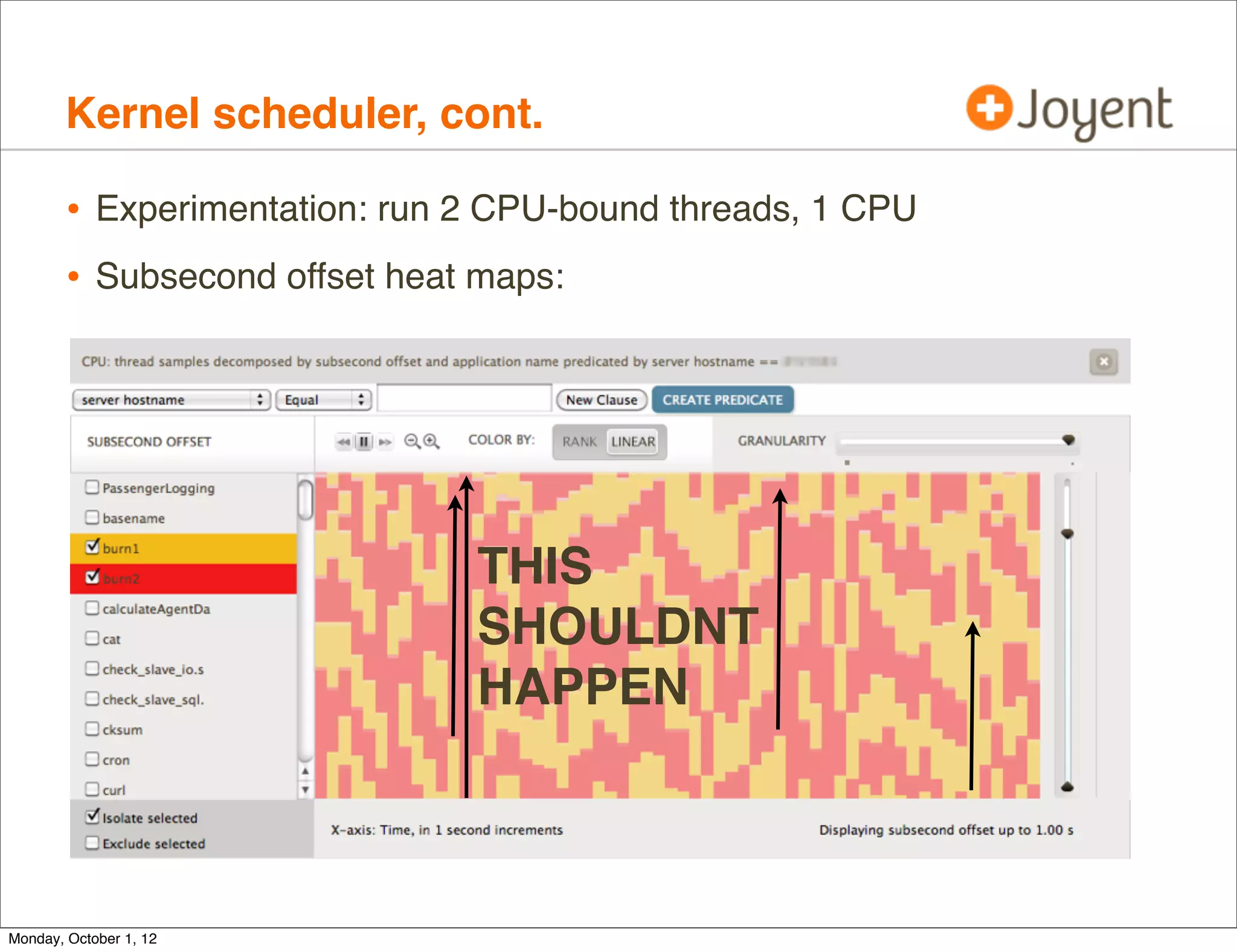
        • Experimentation: run 2 CPU-bound threads, 1 CPU
        • Subsecond offset heat maps:


                               THIS
                               SHOULDNT
                               HAPPEN


Monday, October 1, 12
Kernel scheduler, cont.

        • Worst case (4 threads 1 CPU), 44 sec dispq latency
     # dtrace -n 'sched:::off-cpu /execname == "burn1"/ { self->s = timestamp; }
      sched:::on-cpu /self->s/ { @["off-cpu (ms)"] =
      lquantize((timestamp - self->s) / 1000000, 0, 100000, 1000); self->s = 0; }'

       off-cpu (ms)
                value     ------------- Distribution ------------- count
                  < 0   |                                          0
                    0   |@@@@@@@@@@@@@@@@@@@@@@@@@@@@@@@@@@@@@@@ 387184
                 1000   |                                          2256
                 2000   |                                          1078
                 3000   |              Expected                    862
                 4000   |                                          1070
                 5000   |              Bad                         637

     [...]
                 6000   |
                                       Inconceivable               535

                41000   |                                           3
                42000   |                                           2
                43000   |                                           2
                44000   |                                           1
                45000   |                                           0

                             ts_maxwait @pri 59 = 32s, FSS uses ?
Monday, October 1, 12
Kernel scheduler, cont.

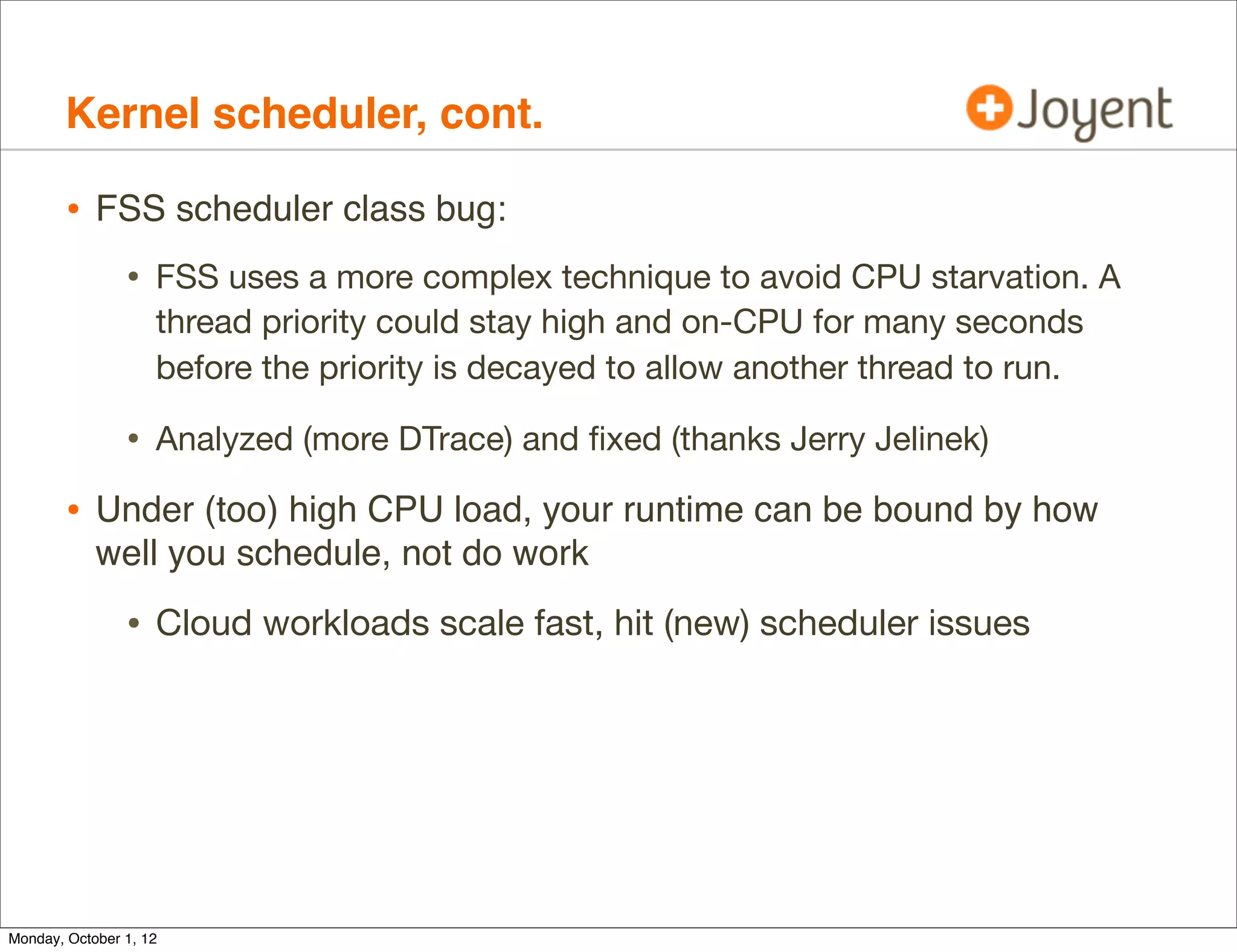
        • FSS scheduler class bug:
                • FSS uses a more complex technique to avoid CPU starvation. A
                    thread priority could stay high and on-CPU for many seconds
                    before the priority is decayed to allow another thread to run.

                • Analyzed (more DTrace) and fixed (thanks Jerry Jelinek)
        • Under (too) high CPU load, your runtime can be bound by how
            well you schedule, not do work

                • Cloud workloads scale fast, hit (new) scheduler issues


Monday, October 1, 12
Kernel scheduler, cont.

        • Required the operator of the cloud to debug
                • Even if the customer doesn’t have kernel-DTrace access in the
                    zone, they still benefit from the cloud provider having access

                • Ask your cloud provider to trace scheduler internals, in case
                    you have something similar

        • On Hardware Virtualization, scheduler issues can be terrifying


Monday, October 1, 12
Kernel scheduler, cont.

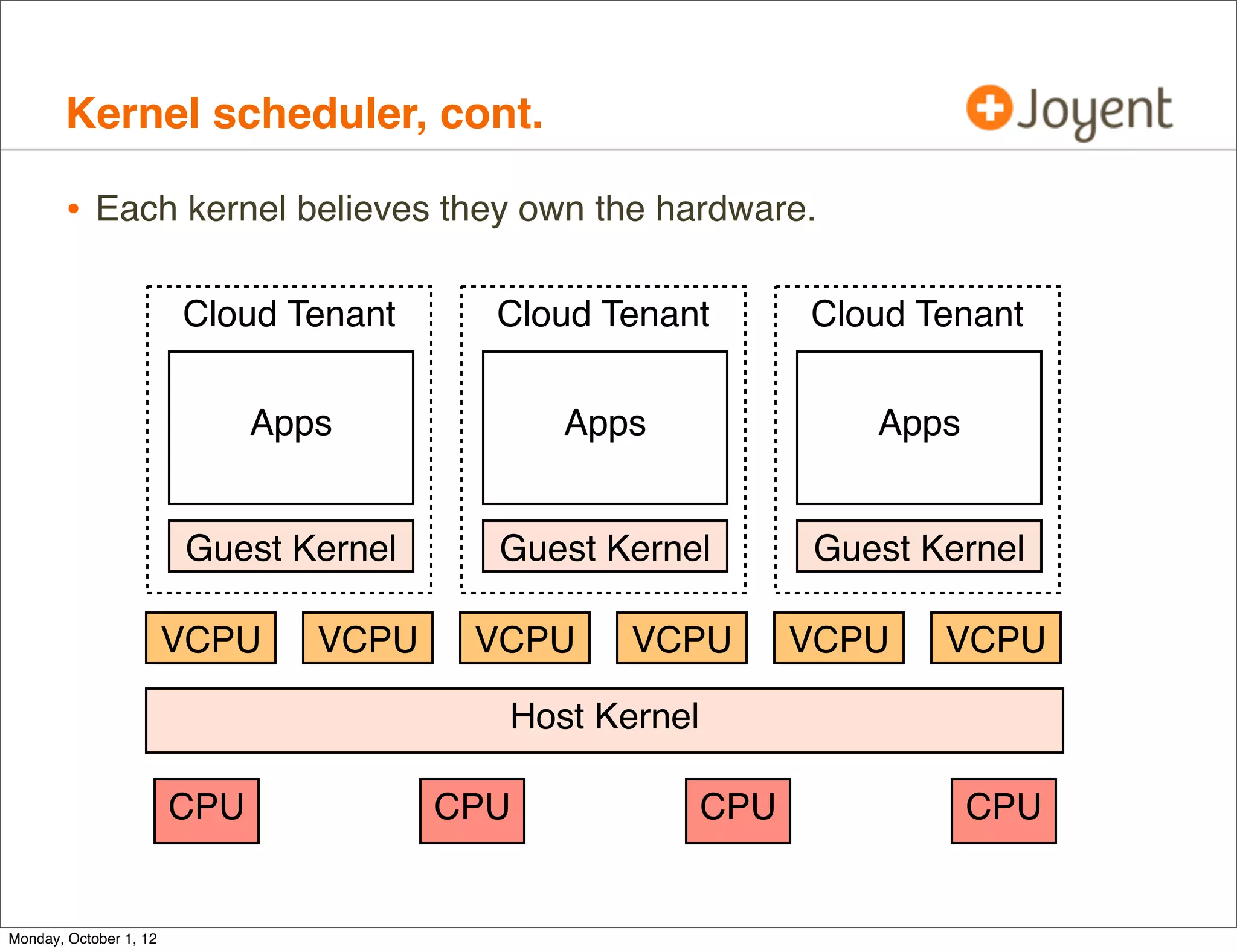
        • Each kernel believes they own the hardware.

                        Cloud Tenant      Cloud Tenant        Cloud Tenant


                              Apps            Apps               Apps


                        Guest Kernel      Guest Kernel        Guest Kernel

                        VCPU     VCPU    VCPU    VCPU         VCPU   VCPU

                                          Host Kernel

                        CPU             CPU             CPU             CPU


Monday, October 1, 12
Kernel scheduler, cont.

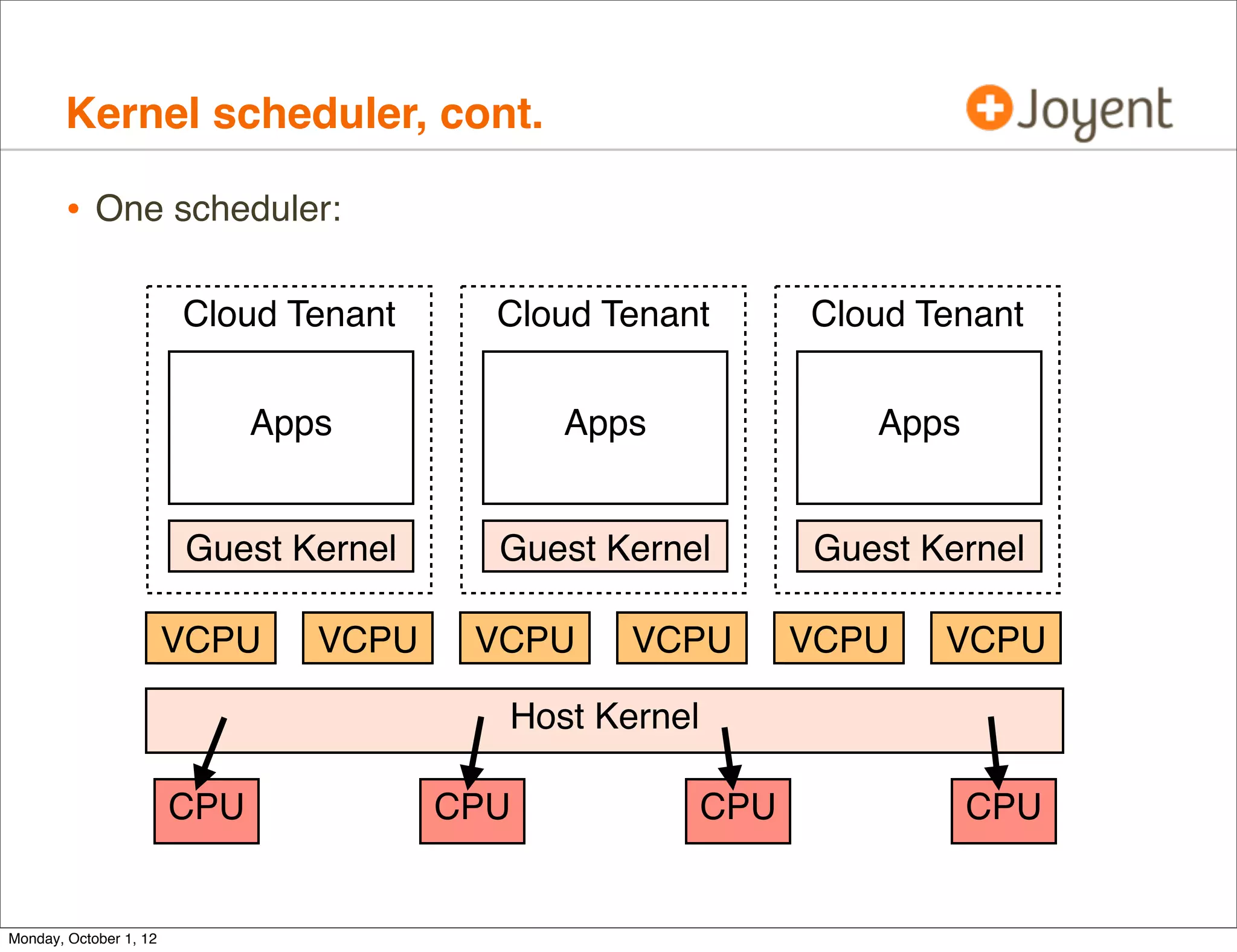
        • One scheduler:

                        Cloud Tenant      Cloud Tenant        Cloud Tenant


                              Apps            Apps               Apps


                        Guest Kernel      Guest Kernel        Guest Kernel

                        VCPU     VCPU    VCPU    VCPU         VCPU   VCPU

                                          Host Kernel

                        CPU             CPU             CPU             CPU


Monday, October 1, 12
Kernel scheduler, cont.

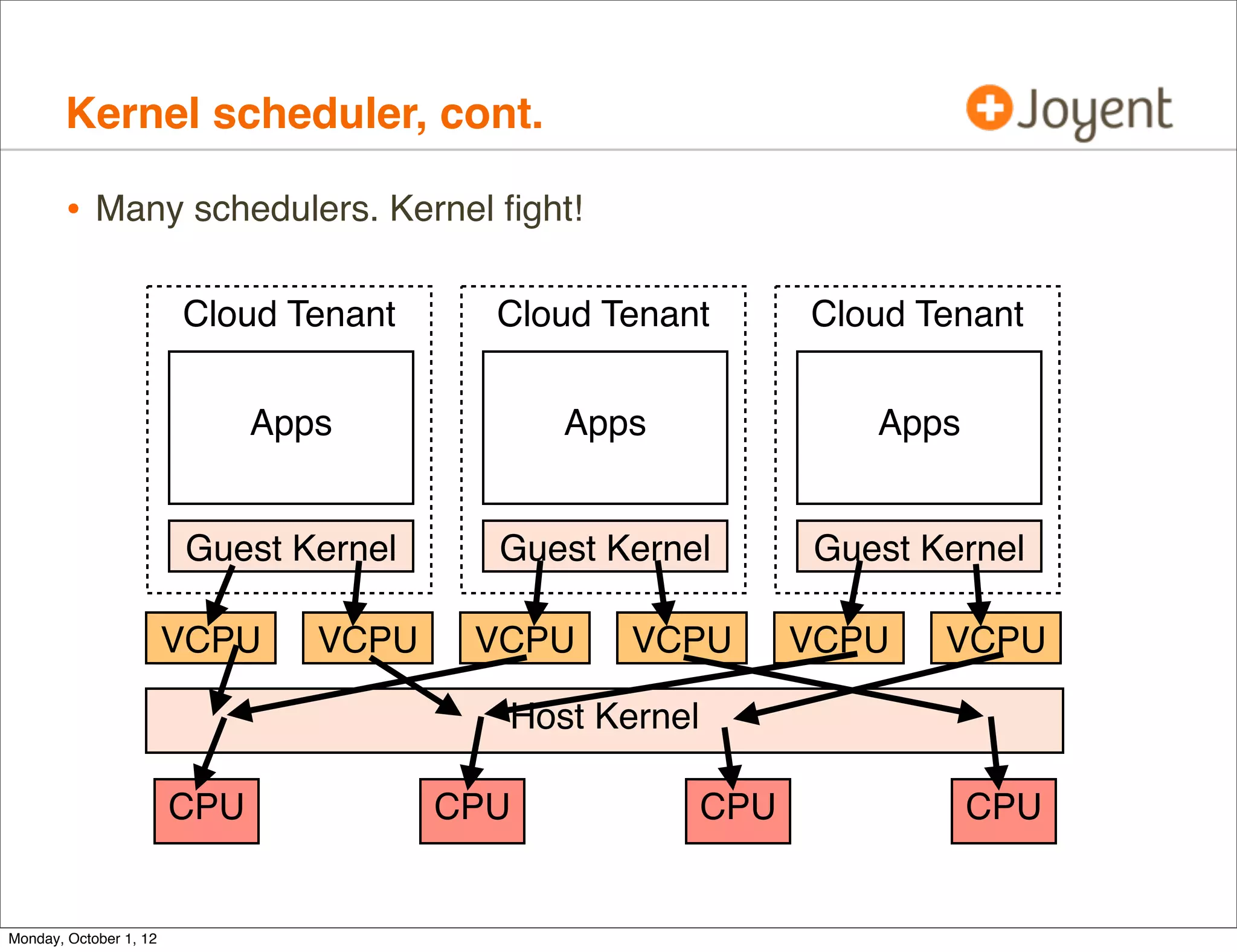
        • Many schedulers. Kernel fight!

                        Cloud Tenant      Cloud Tenant        Cloud Tenant


                              Apps            Apps               Apps


                        Guest Kernel      Guest Kernel        Guest Kernel

                        VCPU     VCPU    VCPU    VCPU         VCPU   VCPU

                                          Host Kernel

                        CPU             CPU             CPU             CPU


Monday, October 1, 12
Kernel scheduler, cont.

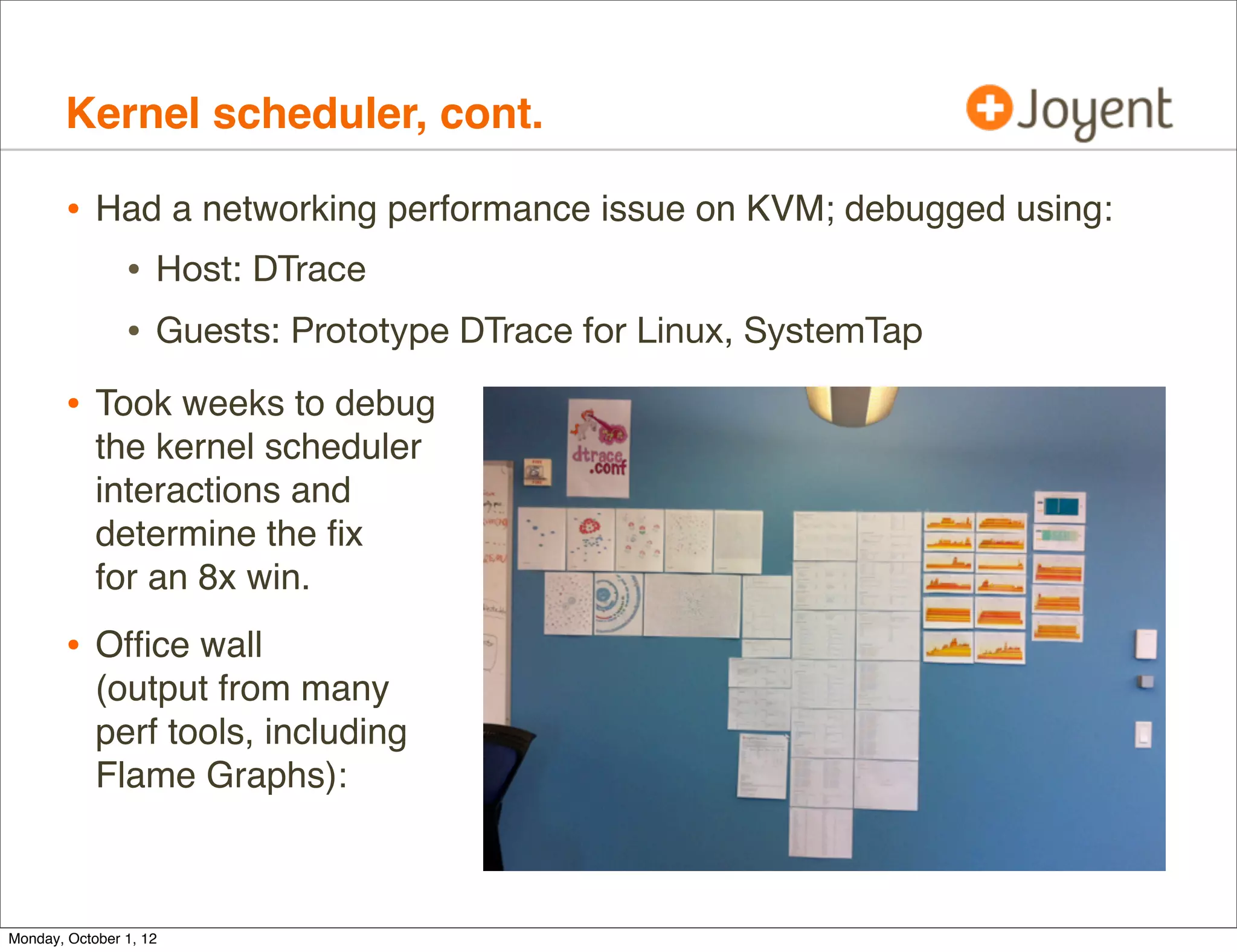
        • Had a networking performance issue on KVM; debugged using:
           • Host: DTrace
           • Guests: Prototype DTrace for Linux, SystemTap
        • Took weeks to debug
            the kernel scheduler
            interactions and
            determine the fix
            for an 8x win.
        • Office wall
            (output from many
            perf tools, including
            Flame Graphs):


Monday, October 1, 12
Thank you!

        •   http://dtrace.org/blogs/brendan
        •   email brendan@joyent.com
        •   twitter @brendangregg
        •   Resources:
                •   http://www.slideshare.net/bcantrill/dtrace-in-the-nonglobal-zone
                •   http://dtrace.org/blogs/dap/2011/07/27/oscon-slides/
                •   https://github.com/brendangregg/dtrace-cloud-tools
                •   http://dtrace.org/blogs/brendan/2011/12/16/flame-graphs/
                •   http://dtrace.org/blogs/brendan/2012/08/09/10-performance-wins/
                •   http://dtrace.org/blogs/brendan/2011/10/04/visualizing-the-cloud/

        • Thanks @dapsays and team for Cloud Analytics, Bryan Cantrill for DTrace
            fixes, @rmustacc for KVM perf war, and @DeirdreS for another great event.

Monday, October 1, 12

DTraceCloud2012

  • 1.
    DTracing the Cloud Brendan Gregg Lead Performance Engineer brendan@joyent.com @brendangregg October, 2012 Monday, October 1, 12
  • 2.
  • 3.
    whoami • G’Day, I’m Brendan • These days I do performance analysis of the cloud • I use the right tool for the job; sometimes traditional, often DTrace. Traditional + some DTrace All DTrace Monday, October 1, 12
  • 4.
    DTrace • DTrace is a magician that conjures up rainbows, ponies and unicorns — and does it all entirely safely and in production! Monday, October 1, 12
  • 5.
    DTrace • Or, the version with fewer ponies: • DTrace is a performance analysis and troubleshooting tool • Instruments all software, kernel and user-land. • Production safe. Designed for minimum overhead. • Default in SmartOS, Oracle Solaris, Mac OS X and FreeBSD. Two Linux ports are in development. • There’s a couple of awesome books about it. Monday, October 1, 12
  • 6.
    illumos • Joyent’s SmartOS uses (and contributes to) the illumos kernel. • illumos is the most DTrace-featured kernel • illumos community includes Bryan Cantrill & Adam Leventhal, DTrace co-inventors (pictured on right). Monday, October 1, 12
  • 7.
    Agenda • Theory • Cloud types and DTrace visibility • Reality • DTrace and Zones • DTrace Wins • Tools • DTrace Cloud Tools • Cloud Analytics • Case Studies Monday, October 1, 12
  • 8.
  • 9.
    Cloud Types • We deploy two types of virtualization on SmartOS/illumos: • Hardware Virtualization: KVM • OS-Virtualization: Zones Monday, October 1, 12
  • 10.
    Cloud Types, cont. • Both virtualization types can co-exist: Linux Windows SmartOS Cloud Tenant Cloud Tenant Cloud Tenant Apps Apps Apps Guest Kernel Guest Kernel Virtual Device Drivers Host Kernel SmartOS Monday, October 1, 12
  • 11.
    Cloud Types, cont. • KVM • Used for Linux and Windows guests • Legacy apps • Zones • Used for SmartOS guests (zones) called SmartMachines • Preferred over Linux: • Bare-metal performance • Less memory overheads • Better visibility (debugging) • Global Zone == host, Non-Global Zone == guest • Also used to encapsulate KVM guests (double-hull security) Monday, October 1, 12
  • 12.
    Cloud Types, cont. • DTrace can be used for: • Performance analysis: user- and kernel-level • Troubleshooting • Specifically, for the cloud: • Performance effects of multi-tenancy • Effectiveness and troubleshooting of performance isolation • Four contexts: • KVM host, KVM guest, Zones host, Zones guest • FAQ: What can DTrace see in each context? Monday, October 1, 12
  • 13.
    Hardware Virtualization: DTraceVisibility • As the cloud operator (host): Linux Linux Windows Cloud Tenant Cloud Tenant Cloud Tenant Apps Apps Apps Guest Kernel Guest Kernel Guest Kernel Virtual Device Drivers Host Kernel SmartOS Monday, October 1, 12
  • 14.
    Hardware Virtualization: DTraceVisibility • Host can see: • Entire host: kernel, apps • Guest disk I/O (block-interface-level) • Guest network I/O (packets) • Guest CPU MMU context register • Host can’t see: • Guest kernel • Guest apps • Guest disk/network context (kernel stack) • ... unless the guest has DTrace, and access (SSH) is allowed Monday, October 1, 12
  • 15.
    Hardware Virtualization: DTraceVisibility • As a tenant (guest): Linux An OS with DTrace Windows Cloud Tenant Cloud Tenant Cloud Tenant Apps Apps Apps Guest Kernel Guest Kernel Guest Kernel Virtual Device Drivers Host Kernel SmartOS Monday, October 1, 12
  • 16.
    Hardware Virtualization: DTraceVisibility • Guest can see: • Guest kernel, apps, provided DTrace is available • Guest can’t see: • Other guests • Host kernel, apps Monday, October 1, 12
  • 17.
    OS Virtualization: DTraceVisibility • As the cloud operator (host): SmartOS SmartOS SmartOS Cloud Tenant Cloud Tenant Cloud Tenant Apps Apps Apps Host Kernel SmartOS Monday, October 1, 12
  • 18.
    OS Virtualization: DTraceVisibility • Host can see: • Entire host: kernel, apps • Entire guests: apps Monday, October 1, 12
  • 19.
    OS Virtualization: DTraceVisibility • Operators can trivially see the entire cloud • Direct visibility from host of all tenant processes • Each blob is a tenant. The background shows one entire data center (availability zone). Monday, October 1, 12
  • 20.
    OS Virtualization: DTraceVisibility • Zooming in, 1 host, 10 guests: • All can be examined with 1 DTrace invocation; don’t need multiple SSH or API logins per-guest. Reduces observability framework overhead by a factor of 10 (guests/host) • This pic was just created from a process snapshot (ps) http://dtrace.org/blogs/brendan/2011/10/04/visualizing-the-cloud/ Monday, October 1, 12
  • 21.
    OS Virtualization: DTraceVisibility • As a tenant (guest): SmartOS SmartOS SmartOS Cloud Tenant Cloud Tenant Cloud Tenant Apps Apps Apps Host Kernel SmartOS Monday, October 1, 12
  • 22.
    OS Virtualization: DTraceVisibility • Guest can see: • Guest apps • Some host kernel (in guest context), as configured by DTrace zone privileges • Guest can’t see: • Other guests • Host kernel (in non-guest context), apps Monday, October 1, 12
  • 23.
    OS Stack DTraceVisibility • Entire operating system stack (example): Applications DBs, all server types, ... Virtual Machines System Libaries System Call Interface VFS Sockets UFS/... ZFS TCP/UDP Volume Managers IP Block Device Interface Ethernet Device Drivers Devices Monday, October 1, 12
  • 24.
    OS Stack DTraceVisibility • Entire operating system stack (example): Applications DBs, all server types, ... Virtual Machines user System Libaries System Call Interface DTrace kernel VFS Sockets UFS/... ZFS TCP/UDP Volume Managers IP Block Device Interface Ethernet Device Drivers Devices Monday, October 1, 12
  • 25.
  • 26.
    DTrace and Zones • DTrace and Zones were developed in parallel for Solaris 10, and then integrated. • DTrace functionality for the Global Zone (GZ) was added first. • This is the host context, and allows operators to use DTrace to inspect all tenants. • DTrace functionality for the Non-Global Zone (NGZ) was harder, and some capabilities added later (2006): • Providers: syscall, pid, profile • This is the guest context, and allows customers to use DTrace to inspect themselves only (can’t see neighbors). Monday, October 1, 12
  • 27.
    DTrace and Zones,cont. Monday, October 1, 12
  • 28.
    DTrace and Zones,cont. • GZ DTrace works well. • We found many issues in practice with NGZ DTrace: • Can’t read fds[] to translate file descriptors. Makes using the syscall provider more difficult. # dtrace -n 'syscall::read:entry /fds[arg0].fi_fs == "zfs"/ { @ = quantize(arg2); }' dtrace: description 'syscall::read:entry ' matched 1 probe dtrace: error on enabled probe ID 1 (ID 4: syscall::read:entry): invalid kernel access in predicate at DIF offset 64 dtrace: error on enabled probe ID 1 (ID 4: syscall::read:entry): invalid kernel access in predicate at DIF offset 64 dtrace: error on enabled probe ID 1 (ID 4: syscall::read:entry): invalid kernel access in predicate at DIF offset 64 dtrace: error on enabled probe ID 1 (ID 4: syscall::read:entry): invalid kernel access in predicate at DIF offset 64 [...] Monday, October 1, 12
  • 29.
    DTrace and Zones,cont. • Can’t read curpsinfo, curlwpsinfo, which breaks many scripts (eg, curpsinfo->pr_psargs, or curpsinfo->pr_dmodel) # dtrace -n 'syscall::exec*:return { trace(curpsinfo->pr_psargs); }' dtrace: description 'syscall::exec*:return ' matched 1 probe dtrace: error on enabled probe ID 1 (ID 103: syscall::exece:return): invalid kernel access in action #1 at DIF offset 0 dtrace: error on enabled probe ID 1 (ID 103: syscall::exece:return): invalid kernel access in action #1 at DIF offset 0 dtrace: error on enabled probe ID 1 (ID 103: syscall::exece:return): invalid kernel access in action #1 at DIF offset 0 dtrace: error on enabled probe ID 1 (ID 103: syscall::exece:return): invalid kernel access in action #1 at DIF offset 0 [...] • Missing proc provider. Breaks this common one-liner: # dtrace -n 'proc:::exec-success { trace(execname); }' dtrace: invalid probe specifier proc:::exec-success { trace(execname); }: probe description proc:::exec-success does not match any probes [...] Monday, October 1, 12
  • 30.
    DTrace and Zones,cont. • Missing vminfo, sysinfo, and sched providers. • Can’t read cpu built-in. • profile probes behave oddly. Eg, profile:::tick-1s only fires if tenant is on-CPU at the same time as the probe would fire. Makes any script that produces interval-output unreliable. Monday, October 1, 12
  • 31.
    DTrace and Zones,cont. • These and other bugs have since been fixed for SmartOS/illumos (thanks Bryan Cantrill!) • Now, from a SmartOS Zone: # dtrace -n 'proc:::exec-success { @[curpsinfo->pr_psargs] = count(); } profile:::tick-5s { exit(0); }' dtrace: description 'proc:::exec-success ' matched 2 probes CPU ID FUNCTION:NAME 13 71762 :tick-5s -bash 1 /bin/cat -s /etc/motd 1 /bin/mail -E 1 /usr/bin/hostname 1 /usr/sbin/quota 1 /usr/bin/locale -a 2 ls -l 3 sh -c /usr/bin/locale -a 4 • Trivial DTrace one-liner, but represents much needed functionality. Monday, October 1, 12
  • 32.
    DTrace Wins • Aside from the NGZ issues, DTrace has worked well in the cloud and solved numerous issues. For example (these are mostly from operator context): • http://dtrace.org/blogs/brendan/2012/08/09/10-performance-wins/ Monday, October 1, 12
  • 33.
    DTrace Wins, cont. • Not surprising given DTrace’s visibility... Monday, October 1, 12
  • 34.
    DTrace Wins, cont. • For example, DTrace script counts from the DTrace book: Applications DBs, all server types, ... 10+ Virtual Machines 4 System Libaries 8 10+ System Call Interface 13 VFS Sockets 8 UFS/... ZFS TCP/UDP 16 21 Volume Managers IP 4 10 Block Device Interface Ethernet 3 17 Device Drivers Devices Monday, October 1, 12
  • 35.
  • 36.
    Ad-hoc • Write DTrace scripts as needed • Execute individually on hosts, or, • With ah-hoc scripting, execute across all hosts (cloud) • My ad-hoc tools include: • DTrace Cloud Tools • Flame Graphs Monday, October 1, 12
  • 37.
    Ad-hoc: DTrace CloudTools • Contains around 70 ad-hoc DTrace tools written by myself for operators and cloud customers. ./fs/metaslab_free.d ./net/dnsconnect.d ./fs/spasync.d ./net/tcp-fbt-accept_sdc5.d ./fs/zfsdist.d ./net/tcp-fbt-accept_sdc6.d ./fs/zfsslower.d ./net/tcpconnreqmaxq-pid_sdc5.d ./fs/zfsslowzone.d ./net/tcpconnreqmaxq-pid_sdc6.d ./fs/zfswhozone.d ./net/tcpconnreqmaxq_sdc5.d ./fs/ziowait.d ./net/tcpconnreqmaxq_sdc6.d ./mysql/innodb_pid_iolatency.d ./net/tcplistendrop_sdc5.d ./mysql/innodb_pid_ioslow.d ./net/tcplistendrop_sdc6.d ./mysql/innodb_thread_concurrency.d ./net/tcpretranshosts.d ./mysql/libmysql_pid_connect.d ./net/tcpretransport.d ./mysql/libmysql_pid_qtime.d ./net/tcpretranssnoop_sdc5.d ./mysql/libmysql_pid_snoop.d ./net/tcpretranssnoop_sdc6.d ./mysql/mysqld_latency.d ./net/tcpretransstate.d ./mysql/mysqld_pid_avg.d ./net/tcptimewait.d ./mysql/mysqld_pid_filesort.d ./net/tcptimewaited.d ./mysql/mysqld_pid_fslatency.d ./net/tcptimretransdropsnoop_sdc6.d [...] [...] • Customer scripts are linked from the “smartmachine” directory • https://github.com/brendangregg/dtrace-cloud-tools Monday, October 1, 12
  • 38.
    Ad-hoc: DTrace CloudTools, cont. • For example, tcplistendrop.d traces each kernel-dropped SYN due to TCP backlog overflow (saturation): # ./tcplistendrop.d TIME SRC-IP PORT DST-IP PORT 2012 Jan 19 01:22:49 10.17.210.103 25691 -> 192.192.240.212 80 2012 Jan 19 01:22:49 10.17.210.108 18423 -> 192.192.240.212 80 2012 Jan 19 01:22:49 10.17.210.116 38883 -> 192.192.240.212 80 2012 Jan 19 01:22:49 10.17.210.117 10739 -> 192.192.240.212 80 2012 Jan 19 01:22:49 10.17.210.112 27988 -> 192.192.240.212 80 2012 Jan 19 01:22:49 10.17.210.106 28824 -> 192.192.240.212 80 2012 Jan 19 01:22:49 10.12.143.16 65070 -> 192.192.240.212 80 2012 Jan 19 01:22:49 10.17.210.100 56392 -> 192.192.240.212 80 2012 Jan 19 01:22:49 10.17.210.99 24628 -> 192.192.240.212 80 [...] • Can explain multi-second client connect latency. Monday, October 1, 12
  • 39.
    Ad-hoc: DTrace CloudTools, cont. • tcplistendrop.d processes IP and TCP headers from the in-kernel packet buffer: fbt::tcp_input_listener:entry { self->mp = args[1]; } fbt::tcp_input_listener:return { self->mp = 0; } mib:::tcpListenDrop /self->mp/ { this->iph = (ipha_t *)self->mp->b_rptr; this->tcph = (tcph_t *)(self->mp->b_rptr + 20); printf("%-20Y %-18s %-5d -> %-18s %-5dn", walltimestamp, inet_ntoa(&this->iph->ipha_src), ntohs(*(uint16_t *)this->tcph->th_lport), inet_ntoa(&this->iph->ipha_dst), ntohs(*(uint16_t *)this->tcph->th_fport)); } • Since this traces the fbt provider (kernel), it is operator only. Monday, October 1, 12
  • 40.
    Ad-hoc: DTrace CloudTools, cont. • A related example: tcpconnreqmaxq-pid*.d prints a summary, showing backlog lengths (on SYN arrival), the current max, and drops: tcp_conn_req_cnt_q distributions: cpid:3063 max_q:8 value ------------- Distribution ------------- count -1 | 0 0 |@@@@@@@@@@@@@@@@@@@@@@@@@@@@@@@@@@@@@@@@ 1 1 | Text 0 cpid:11504 max_q:128 value ------------- Distribution ------------- count -1 | 0 0 |@@@@@@@@@@@@@@@@@@@@@@@@@@@@@@@@@@@ 7279 1 |@@ 405 2 |@ 255 4 |@ 138 8 | 81 16 | 83 32 | 62 64 | 67 128 | 34 256 | 0 tcpListenDrops: cpid:11504 max_q:128 34 Monday, October 1, 12
  • 41.
    Ad-hoc: Flame Graphs • Visualizing CPU time using DTrace profiling and SVG Monday, October 1, 12
  • 42.
    Product • Cloud observability products including DTrace: • Joyent’s Cloud Analytics Monday, October 1, 12
  • 43.
    Product: Cloud Analytics • Syscall latency across the entire cloud, as a heat map! Monday, October 1, 12
  • 44.
    Product: Cloud Analytics,cont. • For operators and cloud customers • Observes entire cloud, in real-time • Latency focus, including heat maps • Instrumentation: DTrace and kstats • Front-end: Browser JavaScript • Back-end: node.js and C Monday, October 1, 12
  • 45.
    Product: Cloud Analytics,cont. • Creating an instrumentation: Monday, October 1, 12
  • 46.
    Product: Cloud Analytics,cont. • Aggregating data across cloud: Monday, October 1, 12
  • 47.
    Product: Cloud Analytics,cont. • Visualizing data: Monday, October 1, 12
  • 48.
    Product: Cloud Analytics,cont. • By-host breakdowns are essential: Switch from cloud to host in one click Monday, October 1, 12
  • 49.
  • 50.
    Case Studies • Slow disks • Scheduler Monday, October 1, 12
  • 51.
    Slow disks • Customer complains of poor MySQL performance. • Noticed disks are busy via iostat-based monitoring software, and have blamed noisy neighbors causing disk I/O contention. • Multi-tenancy and performance isolation are common cloud issues Monday, October 1, 12
  • 52.
    Slow disks, cont. • Unix 101 Process Syscall Interface VFS ZFS ... Block Device Interface Disks Monday, October 1, 12
  • 53.
    Slow disks, cont. • Unix 101 Process sync. Syscall Interface VFS ZFS ... Block Device Interface iostat(1) often async: write buffering, Disks read ahead Monday, October 1, 12
  • 54.
    Slow disks, cont. • By measuring FS latency in application-synchronous context we can either confirm or rule-out FS/disk origin latency. • Including expressing FS latency during MySQL query, so that the issue can be quantified, and speedup calculated. • Ideally, this would be possible from within the SmartMachine, so both customer and operator can run the DTrace script. This is possible using: • pid provider: trace and time MySQL FS functions • syscall provider: trace and time read/write syscalls for FS file descriptors (hence needing fds[].fi_fs; otherwise cache open()) Monday, October 1, 12
  • 55.
    Slow disks, cont. • mysql_pid_fslatency.d from dtrace-cloud-tools: # ./mysqld_pid_fslatency.d -n 'tick-10s { exit(0); }' -p 7357 Tracing PID 7357... Hit Ctrl-C to end. MySQL filesystem I/O: 55824; latency (ns): read value ------------- Distribution ------------- count 1024 | 0 2048 |@@@@@@@@@@ 9053 4096 |@@@@@@@@@@@@@@@@@ 15490 8192 |@@@@@@@@@@@ 9525 16384 |@@ 1982 32768 | 121 65536 | 28 131072 | 6 262144 | 0 write value ------------- Distribution ------------- count 2048 | 0 4096 | 1 8192 |@@@@@@ 3003 16384 |@@@@@@@@@@@@@@@@@@@@@@@@@@@@ 13532 32768 |@@@@@ 2590 65536 |@ 370 131072 | 58 262144 | 27 524288 | 12 1048576 | 1 2097152 | 0 4194304 | 10 8388608 | 14 16777216 | 1 33554432 | 0 Monday, October 1, 12
  • 56.
    Slow disks, cont. • mysql_pid_fslatency.d from dtrace-cloud-tools: # ./mysqld_pid_fslatency.d -n 'tick-10s { exit(0); }' -p 7357 Tracing PID 7357... Hit Ctrl-C to end. MySQL filesystem I/O: 55824; latency (ns): read value ------------- Distribution ------------- count 1024 | 0 2048 |@@@@@@@@@@ 9053 4096 |@@@@@@@@@@@@@@@@@ 15490 8192 |@@@@@@@@@@@ 9525 16384 |@@ 1982 32768 | 121 65536 | 28 131072 | 6 262144 | 0 write value ------------- Distribution ------------- count 2048 | 0 4096 | 1 8192 |@@@@@@ 3003 DRAM 16384 |@@@@@@@@@@@@@@@@@@@@@@@@@@@@ 13532 32768 65536 |@@@@@ |@ 2590 370 cache hits 131072 | 58 262144 | 27 524288 | 12 1048576 | 1 2097152 | 0 4194304 | 10 8388608 | 14 Disk I/O 16777216 | 1 33554432 | 0 Monday, October 1, 12
  • 57.
    Slow disks, cont. • mysql_pid_fslatency.d is about 30 lines of DTrace: pid$target::os_file_read:entry, pid$target::os_file_write:entry, pid$target::my_read:entry, pid$target::my_write:entry { self->start = timestamp; } pid$target::os_file_read:return { this->dir = "read"; } pid$target::os_file_write:return { this->dir = "write"; } pid$target::my_read:return { this->dir = "read"; } pid$target::my_write:return { this->dir = "write"; } pid$target::os_file_read:return, pid$target::os_file_write:return, pid$target::my_read:return, pid$target::my_write:return /self->start/ { @time[this->dir] = quantize(timestamp - self->start); @num = count(); self->start = 0; } dtrace:::END { printa("MySQL filesystem I/O: %@d; latency (ns):n", @num); printa(@time); clear(@time); clear(@num); } Monday, October 1, 12
  • 58.
    Slow disks, cont. • mysql_pid_fslatency.d is about 30 lines of DTrace: pid$target::os_file_read:entry, pid$target::os_file_write:entry, pid$target::my_read:entry, Thank you MySQL! pid$target::my_write:entry { If not that easy, self->start = timestamp; } try syscall with fds[] pid$target::os_file_read:return { this->dir = "read"; } pid$target::os_file_write:return { this->dir = "write"; } pid$target::my_read:return { this->dir = "read"; } pid$target::my_write:return { this->dir = "write"; } pid$target::os_file_read:return, pid$target::os_file_write:return, pid$target::my_read:return, pid$target::my_write:return /self->start/ { @time[this->dir] = quantize(timestamp - self->start); @num = count(); self->start = 0; } dtrace:::END { printa("MySQL filesystem I/O: %@d; latency (ns):n", @num); printa(@time); clear(@time); clear(@num); } Monday, October 1, 12
  • 59.
    Slow disks, cont. • Going for the slam dunk: # ./mysqld_pid_fslatency_slowlog.d 29952 2011 May 16 23:34:00 filesystem I/O during query > 100 ms: query 538 ms, fs 509 ms, 83 I/O 2011 May 16 23:34:11 filesystem I/O during query > 100 ms: query 342 ms, fs 303 ms, 75 I/O 2011 May 16 23:34:38 filesystem I/O during query > 100 ms: query 479 ms, fs 471 ms, 44 I/O 2011 May 16 23:34:58 filesystem I/O during query > 100 ms: query 153 ms, fs 152 ms, 1 I/O 2011 May 16 23:35:09 filesystem I/O during query > 100 ms: query 383 ms, fs 372 ms, 72 I/O 2011 May 16 23:36:09 filesystem I/O during query > 100 ms: query 406 ms, fs 344 ms, 109 I/O 2011 May 16 23:36:44 filesystem I/O during query > 100 ms: query 343 ms, fs 319 ms, 75 I/O 2011 May 16 23:36:54 filesystem I/O during query > 100 ms: query 196 ms, fs 185 ms, 59 I/O 2011 May 16 23:37:10 filesystem I/O during query > 100 ms: query 254 ms, fs 209 ms, 83 I/O • Shows FS latency as a proportion of Query latency • mysld_pid_fslatency_slowlog*.d in dtrace-cloud-tools Monday, October 1, 12
  • 60.
    Slow disks, cont. • The cloud operator can trace kernel internals. Eg, the VFS->ZFS interface using zfsslower.d: # ./zfsslower.d 10 TIME PROCESS D KB ms FILE 2012 Sep 27 13:45:33 zlogin W 0 11 /zones/b8b2464c/var/adm/wtmpx 2012 Sep 27 13:45:36 bash R 0 14 /zones/b8b2464c/opt/local/bin/zsh 2012 Sep 27 13:45:58 mysqld R 1024 19 /zones/b8b2464c/var/mysql/ibdata1 2012 Sep 27 13:45:58 mysqld R 1024 22 /zones/b8b2464c/var/mysql/ibdata1 2012 Sep 27 13:46:14 master R 1 6 /zones/b8b2464c/root/opt/local/ libexec/postfix/qmgr 2012 Sep 27 13:46:14 master R 4 5 /zones/b8b2464c/root/opt/local/etc/ postfix/master.cf [...] • My go-to tool (does all apps). This example showed if there were VFS-level I/O > 10ms? (arg == 10) • Stupidly easy to do Monday, October 1, 12
  • 61.
    Slow disks, cont. • zfs_read() entry -> return; same for zfs_write(). [...] fbt::zfs_read:entry, fbt::zfs_write:entry { self->path = args[0]->v_path; self->kb = args[1]->uio_resid / 1024; self->start = timestamp; } fbt::zfs_read:return, fbt::zfs_write:return /self->start && (timestamp - self->start) >= min_ns/ { this->iotime = (timestamp - self->start) / 1000000; this->dir = probefunc == "zfs_read" ? "R" : "W"; printf("%-20Y %-16s %1s %4d %6d %sn", walltimestamp, execname, this->dir, self->kb, this->iotime, self->path != NULL ? stringof(self->path) : "<null>"); } [...] • zfsslower.d originated from the DTrace book Monday, October 1, 12
  • 62.
    Slow disks, cont. • The operator can use deeper tools as needed. Anywhere in ZFS. # dtrace -n 'io:::start { @[stack()] = count(); }' dtrace: description 'io:::start ' matched 6 probes ^C genunix`ldi_strategy+0x53 zfs`vdev_disk_io_start+0xcc zfs`zio_vdev_io_start+0xab zfs`zio_execute+0x88 zfs`zio_nowait+0x21 zfs`vdev_mirror_io_start+0xcd zfs`zio_vdev_io_start+0x250 zfs`zio_execute+0x88 zfs`zio_nowait+0x21 zfs`arc_read_nolock+0x4f9 zfs`arc_read+0x96 zfs`dsl_read+0x44 zfs`dbuf_read_impl+0x166 zfs`dbuf_read+0xab zfs`dmu_buf_hold_array_by_dnode+0x189 zfs`dmu_buf_hold_array+0x78 zfs`dmu_read_uio+0x5c zfs`zfs_read+0x1a3 genunix`fop_read+0x8b genunix`read+0x2a7 143 Monday, October 1, 12
  • 63.
    Slow disks, cont. • Cloud Analytics, for either operator or customer, can be used to examine the full latency distribution, including outliers: Outliers This heat map shows FS latency for an entire cloud data center Monday, October 1, 12
  • 64.
    Slow disks, cont. • Found that the customer problem was not disks or FS (99% of the time), but was CPU usage during table joins. • On Joyent’s IaaS architecture, it’s usually not the disks or filesystem; useful to rule that out quickly. • Some of the time it is, due to: • Bad disks (1000+ms I/O) • Controller issues (PERC) • Big I/O (how quick is a 40 Mbyte read from cache?) • Other tenants (benchmarking!). Much less for us now with ZFS I/O throttling (thanks Bill Pijewski), used for disk performance isolation in the SmartOS cloud. Monday, October 1, 12
  • 65.
    Slow disks, cont. • Customer resolved real issue • Prior to DTrace analysis, had spent months of poor performance believing disks were to blame Monday, October 1, 12
  • 66.
    Kernel scheduler • Customer problem: occasional latency outliers • Analysis: no smoking gun. No slow I/O or locks, etc. Some random dispatcher queue latency, but with CPU headroom. $ prstat -mLc 1 PID USERNAME USR SYS TRP TFL DFL LCK SLP LAT VCX ICX SCL SIG PROCESS/LWPID 17930 103 21 7.6 0.0 0.0 0.0 53 16 9.1 57K 1 73K 0 beam.smp/265 17930 103 20 7.0 0.0 0.0 0.0 57 16 0.4 57K 2 70K 0 beam.smp/264 17930 103 20 7.4 0.0 0.0 0.0 53 18 1.7 63K 0 78K 0 beam.smp/263 17930 103 19 6.7 0.0 0.0 0.0 60 14 0.4 52K 0 65K 0 beam.smp/266 17930 103 2.0 0.7 0.0 0.0 0.0 96 1.6 0.0 6K 0 8K 0 beam.smp/267 17930 103 1.0 0.9 0.0 0.0 0.0 97 0.9 0.0 4 0 47 0 beam.smp/280 [...] Monday, October 1, 12
  • 67.
    Kernel scheduler, cont. • Unix 101 Threads: R = Ready to run O = On-CPU R R R CPU Run Queue O Scheduler preemption R R R R CPU Run Queue O Monday, October 1, 12
  • 68.
    Kernel scheduler, cont. • Unix 102 • TS (and FSS) check for CPU starvation Priority Promotion R R R R R R R CPU Run Queue O CPU Starvation Monday, October 1, 12
  • 69.
    Kernel scheduler, cont. • Experimentation: run 2 CPU-bound threads, 1 CPU • Subsecond offset heat maps: Monday, October 1, 12
  • 70.
    Kernel scheduler, cont. • Experimentation: run 2 CPU-bound threads, 1 CPU • Subsecond offset heat maps: THIS SHOULDNT HAPPEN Monday, October 1, 12
  • 71.
    Kernel scheduler, cont. • Worst case (4 threads 1 CPU), 44 sec dispq latency # dtrace -n 'sched:::off-cpu /execname == "burn1"/ { self->s = timestamp; } sched:::on-cpu /self->s/ { @["off-cpu (ms)"] = lquantize((timestamp - self->s) / 1000000, 0, 100000, 1000); self->s = 0; }' off-cpu (ms) value ------------- Distribution ------------- count < 0 | 0 0 |@@@@@@@@@@@@@@@@@@@@@@@@@@@@@@@@@@@@@@@ 387184 1000 | 2256 2000 | 1078 3000 | Expected 862 4000 | 1070 5000 | Bad 637 [...] 6000 | Inconceivable 535 41000 | 3 42000 | 2 43000 | 2 44000 | 1 45000 | 0 ts_maxwait @pri 59 = 32s, FSS uses ? Monday, October 1, 12
  • 72.
    Kernel scheduler, cont. • FSS scheduler class bug: • FSS uses a more complex technique to avoid CPU starvation. A thread priority could stay high and on-CPU for many seconds before the priority is decayed to allow another thread to run. • Analyzed (more DTrace) and fixed (thanks Jerry Jelinek) • Under (too) high CPU load, your runtime can be bound by how well you schedule, not do work • Cloud workloads scale fast, hit (new) scheduler issues Monday, October 1, 12
  • 73.
    Kernel scheduler, cont. • Required the operator of the cloud to debug • Even if the customer doesn’t have kernel-DTrace access in the zone, they still benefit from the cloud provider having access • Ask your cloud provider to trace scheduler internals, in case you have something similar • On Hardware Virtualization, scheduler issues can be terrifying Monday, October 1, 12
  • 74.
    Kernel scheduler, cont. • Each kernel believes they own the hardware. Cloud Tenant Cloud Tenant Cloud Tenant Apps Apps Apps Guest Kernel Guest Kernel Guest Kernel VCPU VCPU VCPU VCPU VCPU VCPU Host Kernel CPU CPU CPU CPU Monday, October 1, 12
  • 75.
    Kernel scheduler, cont. • One scheduler: Cloud Tenant Cloud Tenant Cloud Tenant Apps Apps Apps Guest Kernel Guest Kernel Guest Kernel VCPU VCPU VCPU VCPU VCPU VCPU Host Kernel CPU CPU CPU CPU Monday, October 1, 12
  • 76.
    Kernel scheduler, cont. • Many schedulers. Kernel fight! Cloud Tenant Cloud Tenant Cloud Tenant Apps Apps Apps Guest Kernel Guest Kernel Guest Kernel VCPU VCPU VCPU VCPU VCPU VCPU Host Kernel CPU CPU CPU CPU Monday, October 1, 12
  • 77.
    Kernel scheduler, cont. • Had a networking performance issue on KVM; debugged using: • Host: DTrace • Guests: Prototype DTrace for Linux, SystemTap • Took weeks to debug the kernel scheduler interactions and determine the fix for an 8x win. • Office wall (output from many perf tools, including Flame Graphs): Monday, October 1, 12
  • 78.
    Thank you! • http://dtrace.org/blogs/brendan • email brendan@joyent.com • twitter @brendangregg • Resources: • http://www.slideshare.net/bcantrill/dtrace-in-the-nonglobal-zone • http://dtrace.org/blogs/dap/2011/07/27/oscon-slides/ • https://github.com/brendangregg/dtrace-cloud-tools • http://dtrace.org/blogs/brendan/2011/12/16/flame-graphs/ • http://dtrace.org/blogs/brendan/2012/08/09/10-performance-wins/ • http://dtrace.org/blogs/brendan/2011/10/04/visualizing-the-cloud/ • Thanks @dapsays and team for Cloud Analytics, Bryan Cantrill for DTrace fixes, @rmustacc for KVM perf war, and @DeirdreS for another great event. Monday, October 1, 12