SREENIDHI INSTITUTE OF SCIENCE AND TECHNOLOGY
(Autonomous Institution, approved by UGC and Accredited by NAAC with ‘A’ Grade)
TECHNICAL SEMINAR
Presented by…
Mrinmoy Dalal
CSE A (13311A0506)
Can a “small” operating system simulate the
hardware of some machine so that:
• Another operating system can run in that
simulated hardware?
• More than one instance of that operating
system run on the same hardware at the
same time?
• More than one different operating system can
share the same hardware at the same time?
Question
VIRTUAL
MACHINES
VIRTUALIZATION
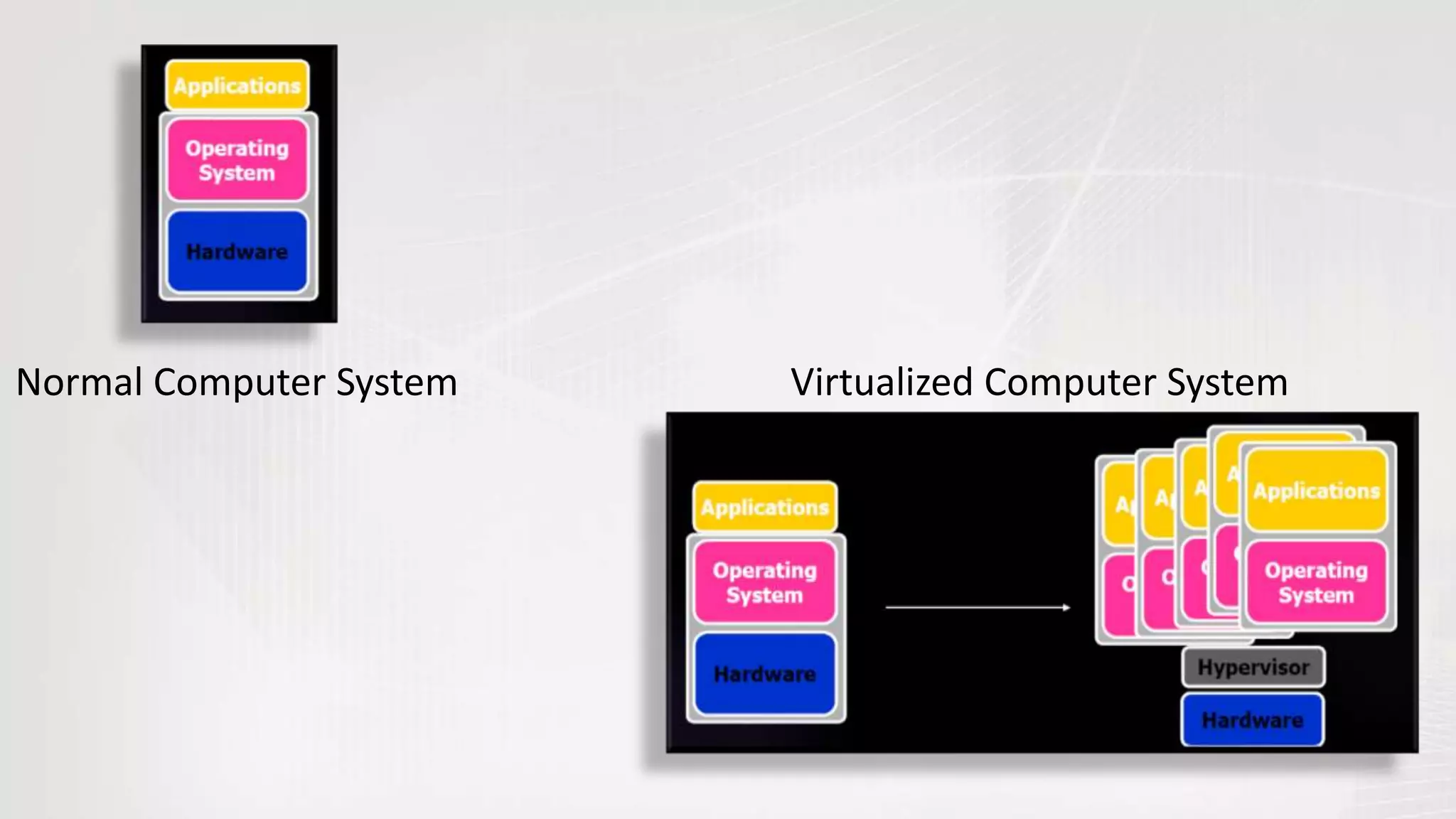
• Virtualization is an abstraction layer that decouples the physical
hardware from the operating system to deliver greater IT resource
utilization and flexibility.
• It allows multiple virtual machines, with heterogeneous operating
systems to run in isolation, side-by-side on the same physical
machine.
• Virtualization hides the physical characteristics of computing
resources from their users, be they applications, or end users.
Normal Computer System Virtualized Computer System
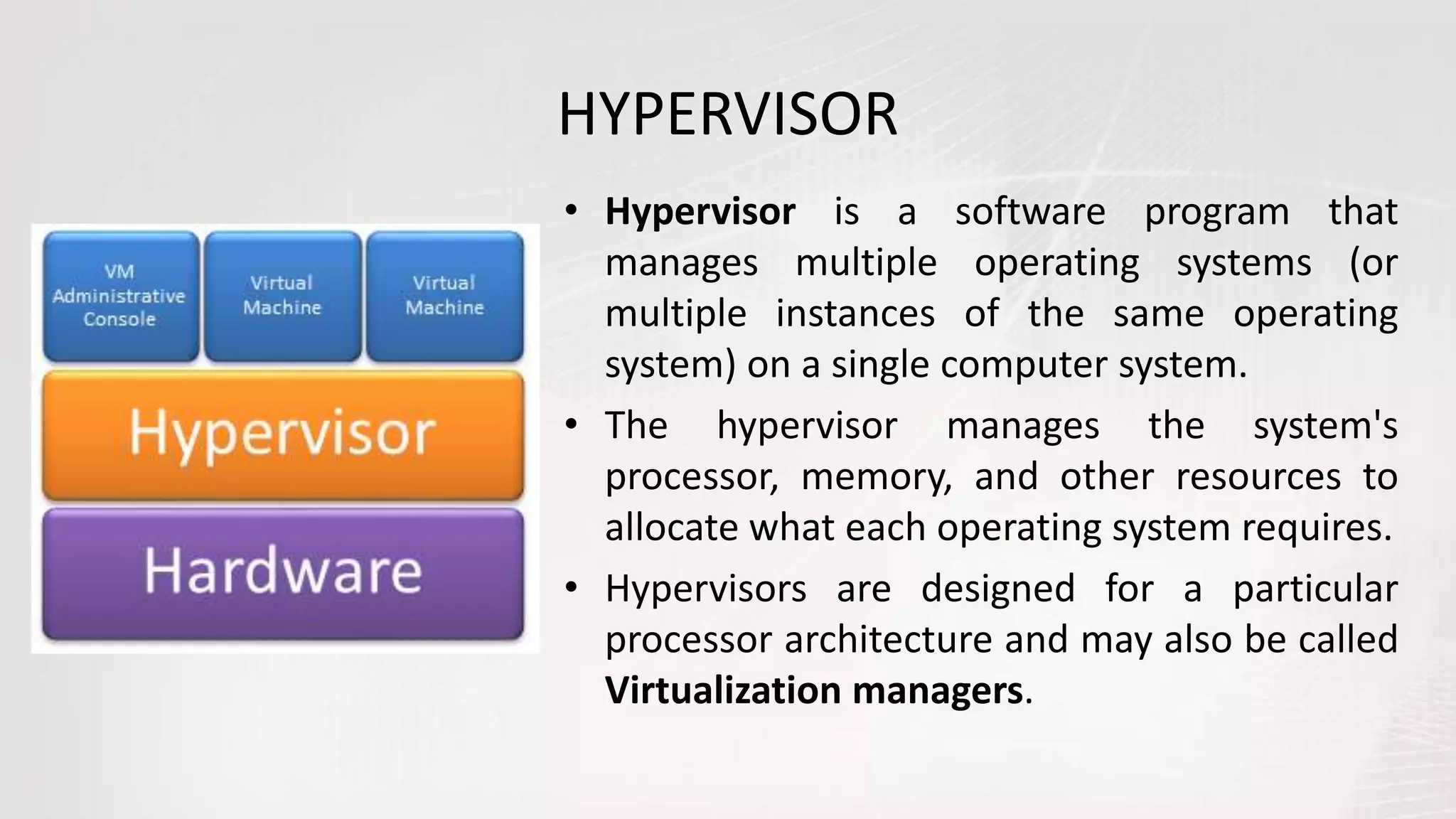
HYPERVISOR
• Hypervisor is a software program that
manages multiple operating systems (or
multiple instances of the same operating
system) on a single computer system.
• The hypervisor manages the system's
processor, memory, and other resources to
allocate what each operating system requires.
• Hypervisors are designed for a particular
processor architecture and may also be called
Virtualization managers.
WHAT
is a Virtual Machine?
„A machine is a
tool that consists
of one or more
parts, and uses
energy to achieve
a particular goal.“
-WIKIPEDIA
„A virtual machine (VM) is a
simulation of a machine (abstract
or real) that is usually different
from the target machine (where it
is being simulated on).“
-WIKIPEDIA
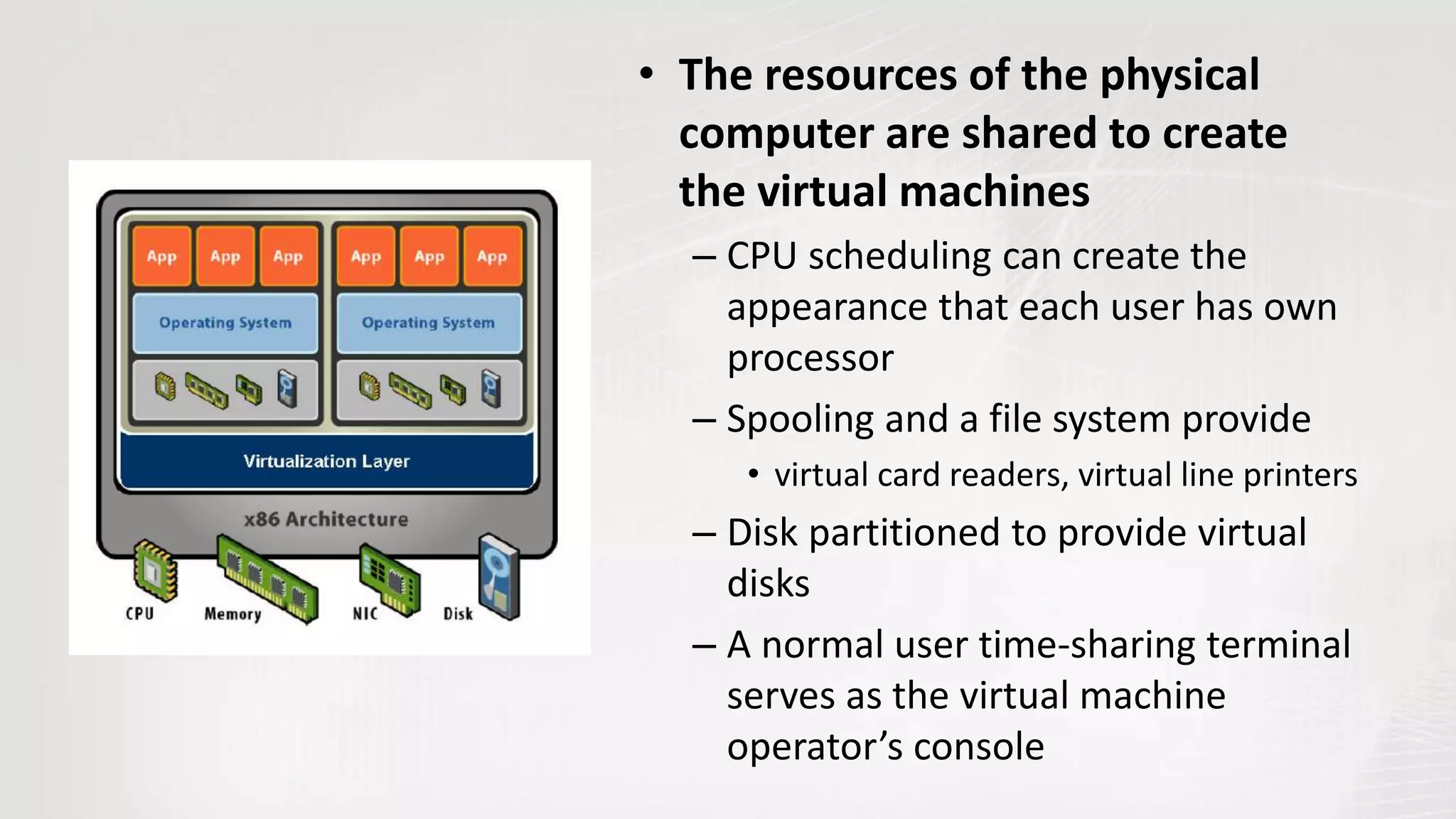
• The resources of the physical
computer are shared to create
the virtual machines
– CPU scheduling can create the
appearance that each user has own
processor
– Spooling and a file system provide
• virtual card readers, virtual line printers
– Disk partitioned to provide virtual
disks
– A normal user time-sharing terminal
serves as the virtual machine
operator’s console
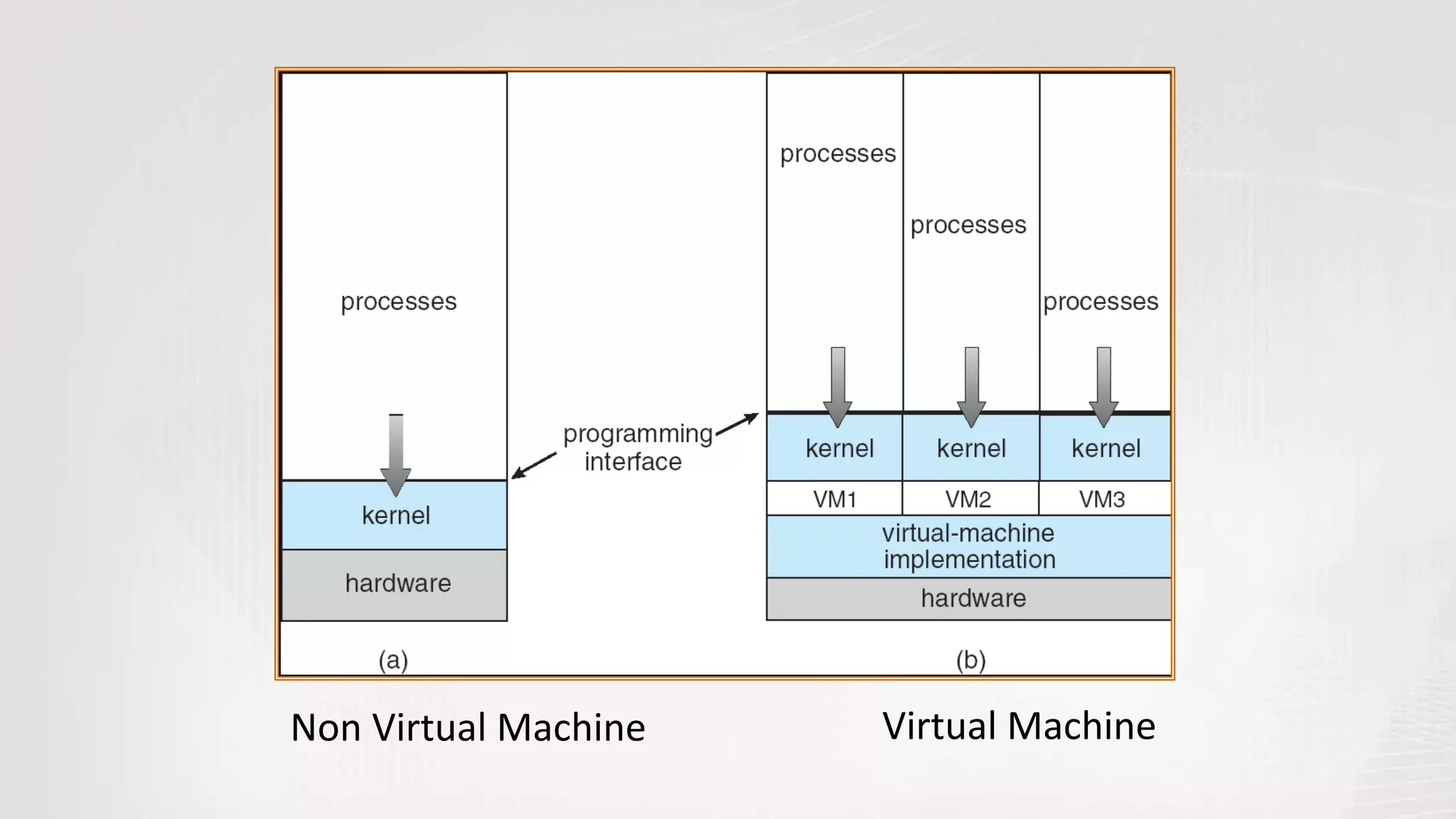
Non Virtual Machine Virtual Machine
• Virtual-machine concept provides complete protection of
system resources
– Each virtual machine is isolated from all other virtual machines.
– However, no direct sharing of resources
• Virtual-machine system is a good vehicle for operating-
systems research and development.
– System development is done on the virtual machine does not
disrupt normal operation
– Multiple concurrent developers can work at same time
• The virtual machine concept is difficult to implement due
to the effort required to provide an exact duplicate to the
simulated machine
VM COMPATIBILITY
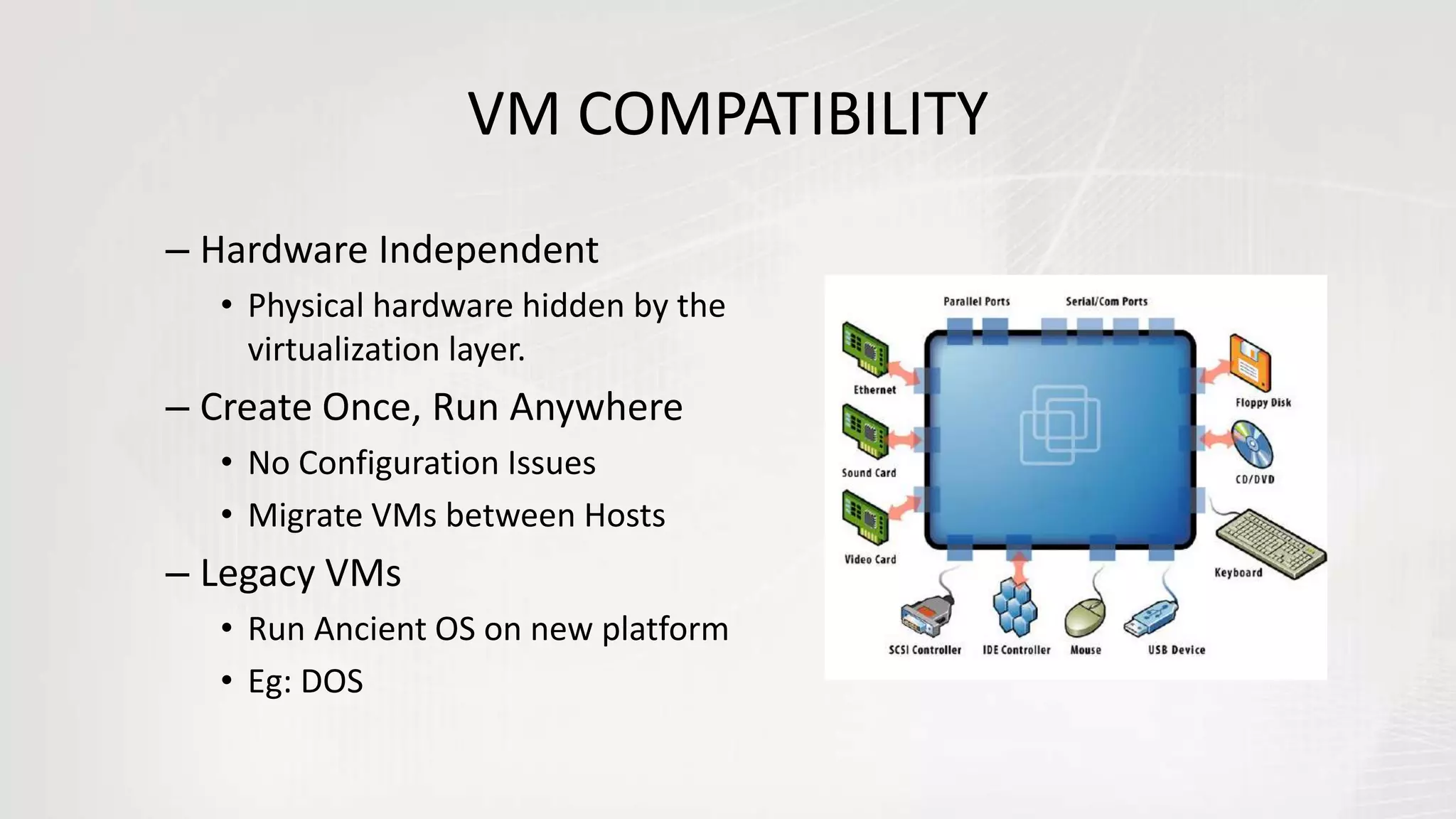
– Hardware Independent
• Physical hardware hidden by the
virtualization layer.
– Create Once, Run Anywhere
• No Configuration Issues
• Migrate VMs between Hosts
– Legacy VMs
• Run Ancient OS on new platform
• Eg: DOS
EXAMPLE – PAGE TABLES
• Suppose guest OS has its own page tables Then virtualization layer
must
– Copy those tables to its own
– Trap every reference or update to tables and simulate it
• During page fault
– Virtualization layer must decide whether fault belongs to guest OS or self
– If guest OS, must simulate a page fault
• Likewise, virtualization layer must trap and simulate every privileged
instruction in machine!
• Some hardware architectures or features are impossible to
virtualize
– Certain registers or state not exposed
– Unusual devices and device control
– Clocks, time, and real-time behavior
VIRTUAL MACHINE MONITOR
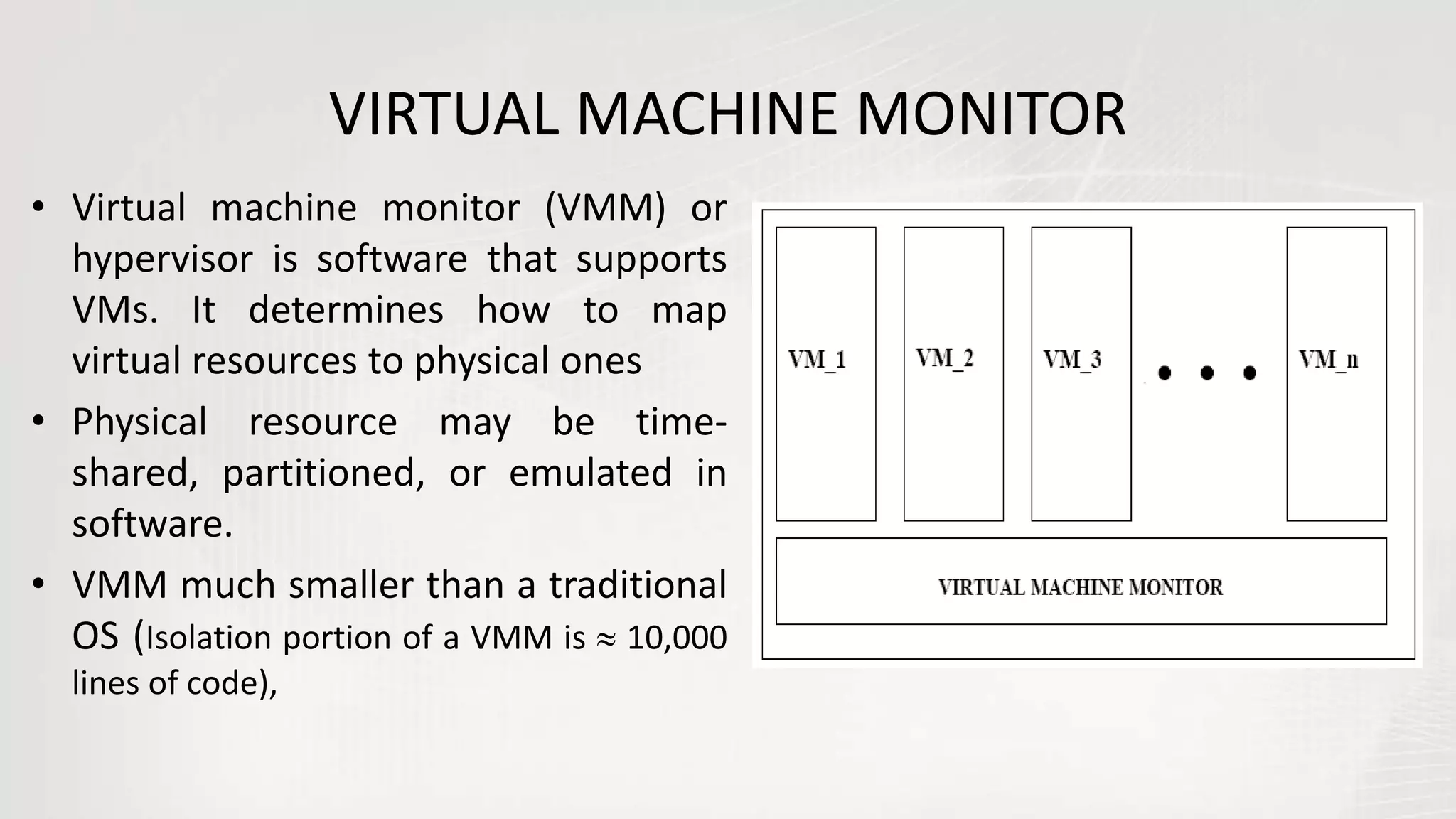
• Virtual machine monitor (VMM) or
hypervisor is software that supports
VMs. It determines how to map
virtual resources to physical ones
• Physical resource may be time-
shared, partitioned, or emulated in
software.
• VMM much smaller than a traditional
OS (Isolation portion of a VMM is  10,000
lines of code),
MAIN CONCERN OF VMM
• Biggest problem faced by the VMM is to present the
hardware to the VM in a “safe, transparent and efficient
way”
• Safe: whatever the VM does, it should not be able to affect
other VM’s or the VMM
• Maintain illusion by tricking the software into thinking it has
the hardware to itself and by hiding the true state of the
hardware
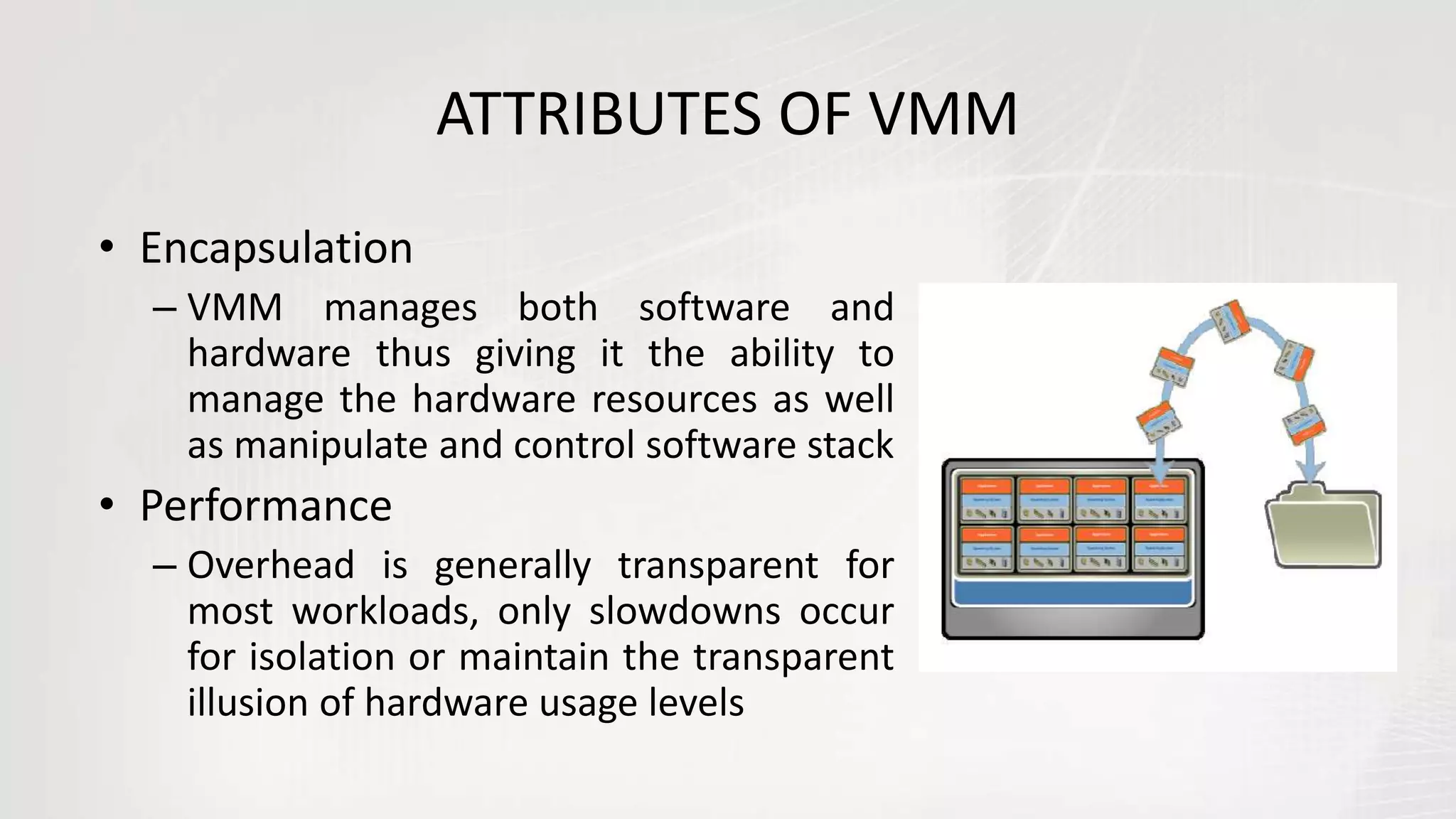
ATTRIBUTES OF VMM
• Encapsulation
– VMM manages both software and
hardware thus giving it the ability to
manage the hardware resources as well
as manipulate and control software stack
• Performance
– Overhead is generally transparent for
most workloads, only slowdowns occur
for isolation or maintain the transparent
illusion of hardware usage levels
Programmers really love to
make it complicated ...
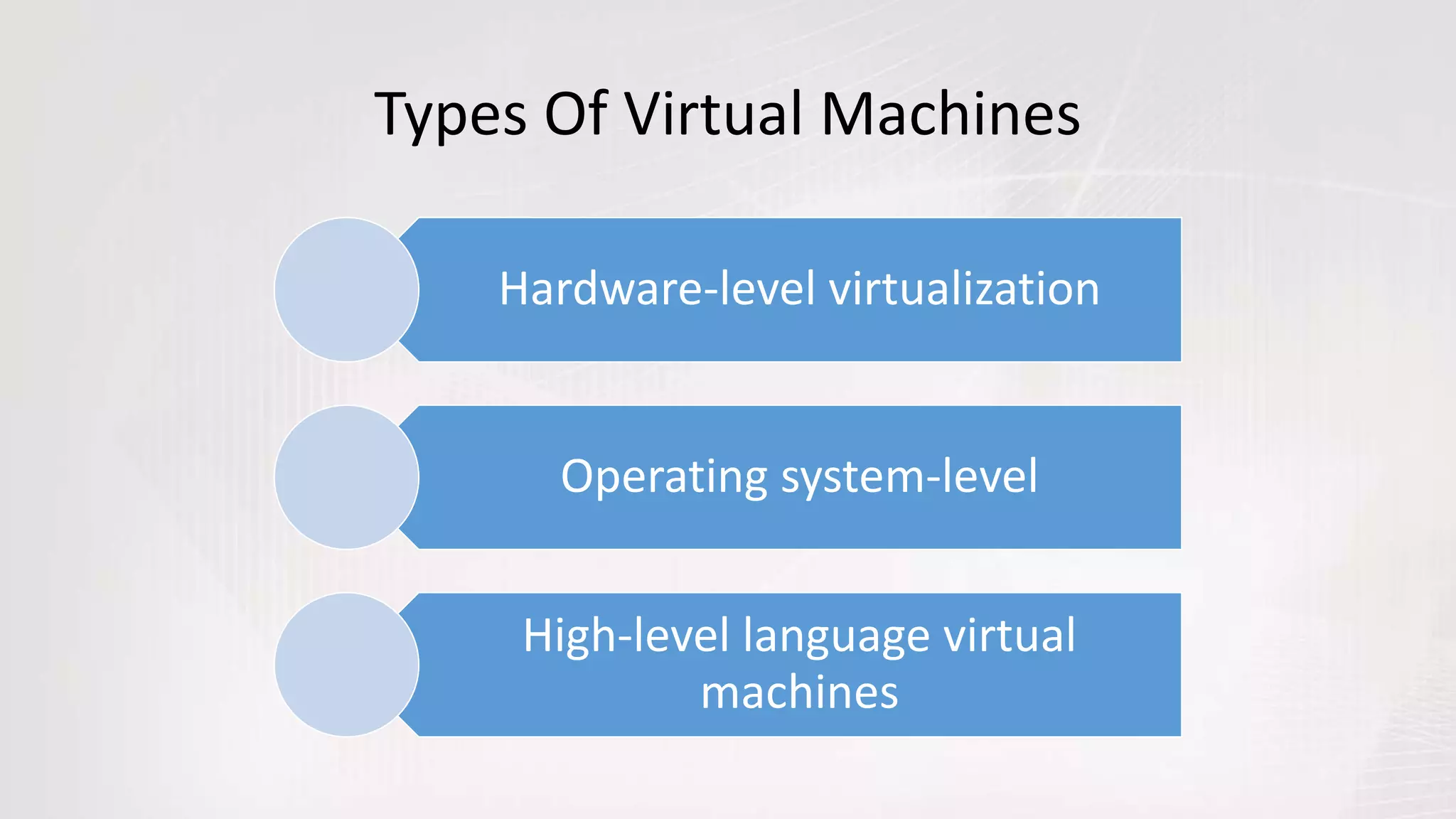
Types Of Virtual Machines
Hardware-level virtualization
Operating system-level
High-level language virtual
machines
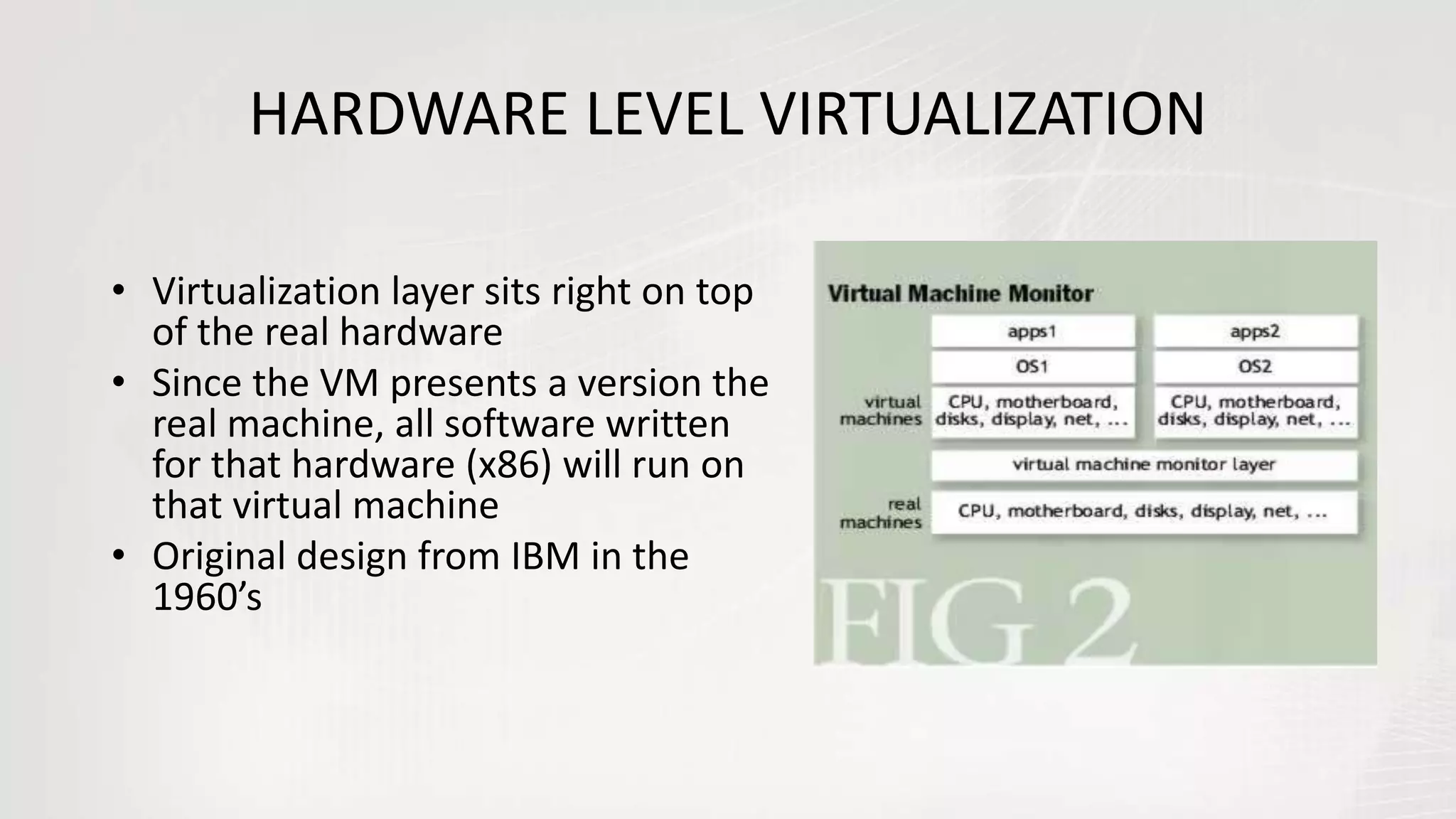
HARDWARE LEVEL VIRTUALIZATION
• Virtualization layer sits right on top
of the real hardware
• Since the VM presents a version the
real machine, all software written
for that hardware (x86) will run on
that virtual machine
• Original design from IBM in the
1960’s
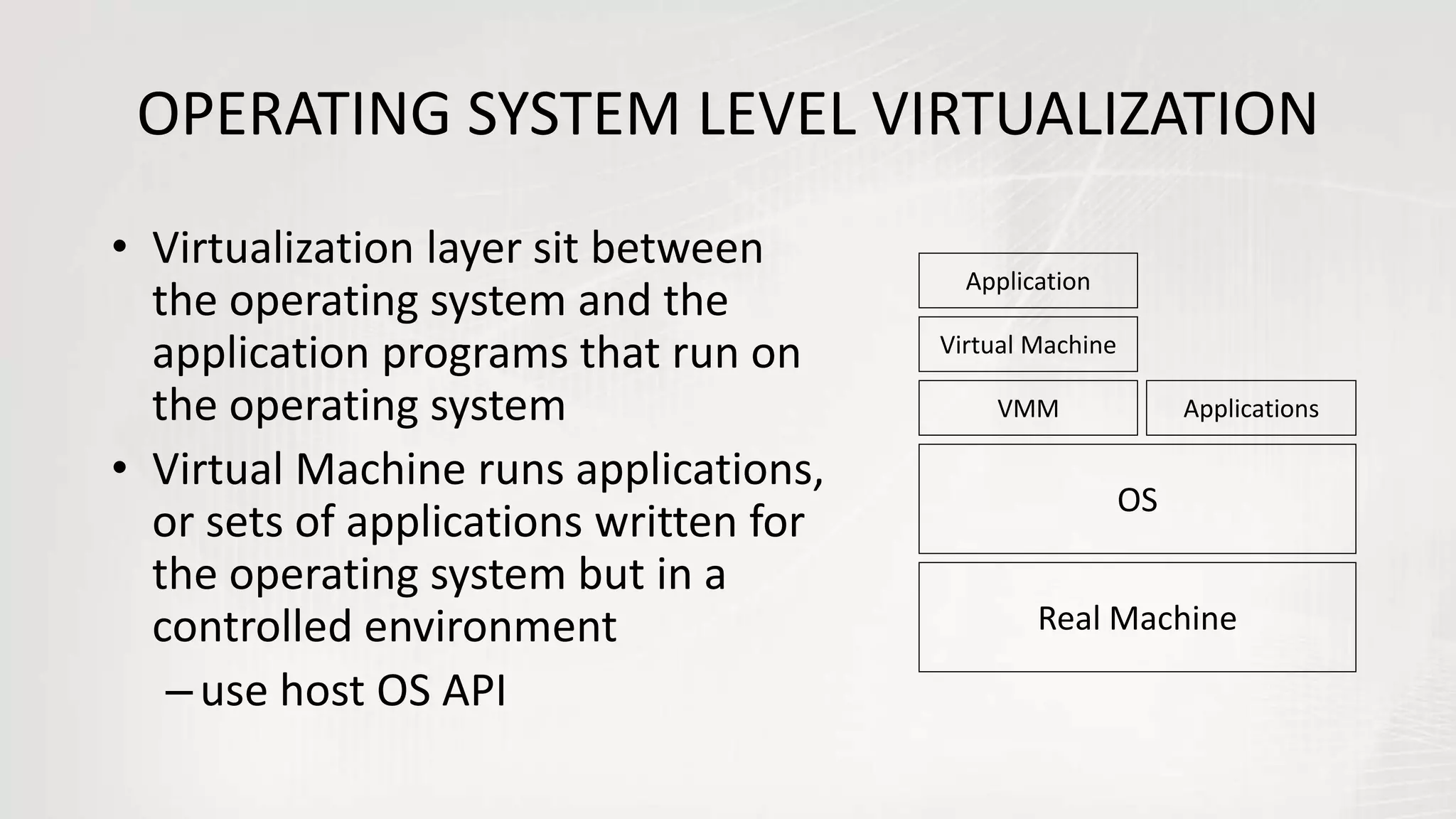
OPERATING SYSTEM LEVEL VIRTUALIZATION
• Virtualization layer sit between
the operating system and the
application programs that run on
the operating system
• Virtual Machine runs applications,
or sets of applications written for
the operating system but in a
controlled environment
–use host OS API
Real Machine
OS
VMM
Virtual Machine
Application
Applications
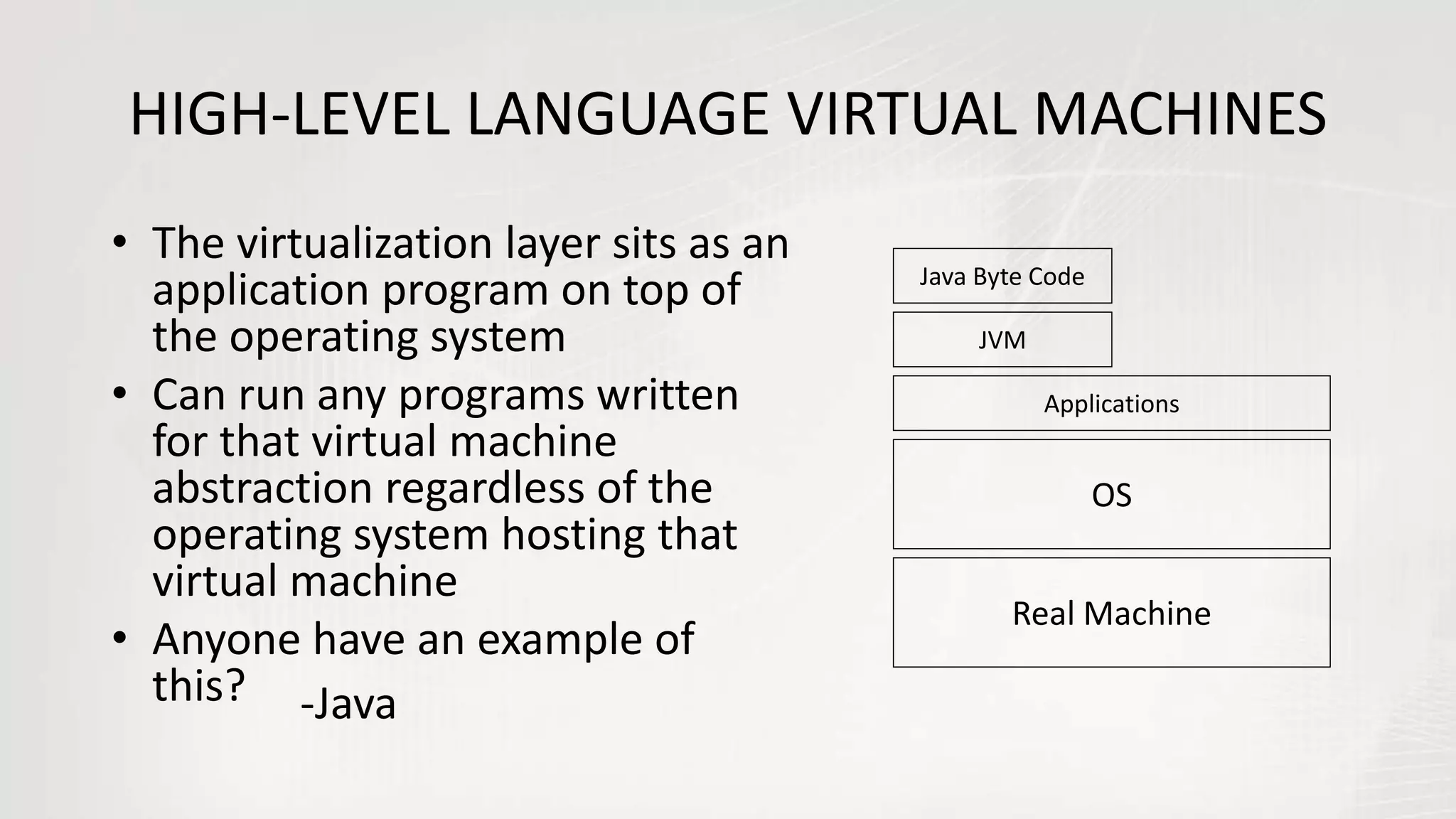
HIGH-LEVEL LANGUAGE VIRTUAL MACHINES
• The virtualization layer sits as an
application program on top of
the operating system
• Can run any programs written
for that virtual machine
abstraction regardless of the
operating system hosting that
virtual machine
• Anyone have an example of
this?
Real Machine
OS
JVM
Java Byte Code
Applications
-Java
WITH GREAT
POWER COMES
GREAT EXPLOITS
ATTRIBUTES OF ALL VIRTUAL MACHINES (1)
• Software Compatibility
– VM provides compatible abstraction so all software written for the
machine that VM is virtualizing will run on it
– Java: “write once, run anywhere”
• Isolation
– All software running on the virtual machine is contained within it
and can’t affect other VM’s or processes
ATTRIBUTES OF ALL VIRTUAL MACHINES (2)
• Encapsulation
– Virtual machines provide a level of indirection. Any software running within
them can be controlled and manipulated.
– Can act like putting a filter on a print service to monitor content or perform
additional book keeping.
• Java VM for example can perform run time error checking and garbage collection that
C++ compiled code can’t do running directly on the hardware
• Performance
– Any new software layer adds overhead to system
IMPORTANT USES OF VMs (1)
1. Multiple OSes
• No more dual boot!
• Can even transfer data (e.g., cut-and-paste) between VMs
2. Protection
• Crash or intrusion in one OS doesn’t affect others
• Easy to replace failed OS with fresh, clean one
IMPORTANT USES OF VMs (2)
3. Software Management
• VMs can run complete SW stack, even old OSes like DOS
• Run legacy OS, stable current, test release on same HW
4. Hardware Management
• Independent SW stacks can share HW
• Run application on own OS (helps dependability)
• Migrate running VM to different computer
• To balance load or to evacuate from failing HW
To Sum Up…
• Virtual machines are a number of discrete identical
execution environments on a single computer, each of which
runs an operating system. This can allow applications
written for one OS to be executed on a machine which runs
a different OS which provide a greater level of isolation
between processes than is achieved when running multiple
processes on the same instance of an OS.
Virtual machines and their architecture

Virtual machines and their architecture

  • 1.
    SREENIDHI INSTITUTE OFSCIENCE AND TECHNOLOGY (Autonomous Institution, approved by UGC and Accredited by NAAC with ‘A’ Grade) TECHNICAL SEMINAR Presented by… Mrinmoy Dalal CSE A (13311A0506)
  • 2.
    Can a “small”operating system simulate the hardware of some machine so that: • Another operating system can run in that simulated hardware? • More than one instance of that operating system run on the same hardware at the same time? • More than one different operating system can share the same hardware at the same time? Question
  • 3.
  • 4.
    VIRTUALIZATION • Virtualization isan abstraction layer that decouples the physical hardware from the operating system to deliver greater IT resource utilization and flexibility. • It allows multiple virtual machines, with heterogeneous operating systems to run in isolation, side-by-side on the same physical machine. • Virtualization hides the physical characteristics of computing resources from their users, be they applications, or end users.
  • 5.
    Normal Computer SystemVirtualized Computer System
  • 6.
    HYPERVISOR • Hypervisor isa software program that manages multiple operating systems (or multiple instances of the same operating system) on a single computer system. • The hypervisor manages the system's processor, memory, and other resources to allocate what each operating system requires. • Hypervisors are designed for a particular processor architecture and may also be called Virtualization managers.
  • 7.
  • 8.
    „A machine isa tool that consists of one or more parts, and uses energy to achieve a particular goal.“ -WIKIPEDIA
  • 9.
    „A virtual machine(VM) is a simulation of a machine (abstract or real) that is usually different from the target machine (where it is being simulated on).“ -WIKIPEDIA
  • 10.
    • The resourcesof the physical computer are shared to create the virtual machines – CPU scheduling can create the appearance that each user has own processor – Spooling and a file system provide • virtual card readers, virtual line printers – Disk partitioned to provide virtual disks – A normal user time-sharing terminal serves as the virtual machine operator’s console
  • 11.
    Non Virtual MachineVirtual Machine
  • 12.
    • Virtual-machine conceptprovides complete protection of system resources – Each virtual machine is isolated from all other virtual machines. – However, no direct sharing of resources • Virtual-machine system is a good vehicle for operating- systems research and development. – System development is done on the virtual machine does not disrupt normal operation – Multiple concurrent developers can work at same time • The virtual machine concept is difficult to implement due to the effort required to provide an exact duplicate to the simulated machine
  • 13.
    VM COMPATIBILITY – HardwareIndependent • Physical hardware hidden by the virtualization layer. – Create Once, Run Anywhere • No Configuration Issues • Migrate VMs between Hosts – Legacy VMs • Run Ancient OS on new platform • Eg: DOS
  • 14.
    EXAMPLE – PAGETABLES • Suppose guest OS has its own page tables Then virtualization layer must – Copy those tables to its own – Trap every reference or update to tables and simulate it • During page fault – Virtualization layer must decide whether fault belongs to guest OS or self – If guest OS, must simulate a page fault • Likewise, virtualization layer must trap and simulate every privileged instruction in machine!
  • 15.
    • Some hardwarearchitectures or features are impossible to virtualize – Certain registers or state not exposed – Unusual devices and device control – Clocks, time, and real-time behavior
  • 16.
    VIRTUAL MACHINE MONITOR •Virtual machine monitor (VMM) or hypervisor is software that supports VMs. It determines how to map virtual resources to physical ones • Physical resource may be time- shared, partitioned, or emulated in software. • VMM much smaller than a traditional OS (Isolation portion of a VMM is  10,000 lines of code),
  • 17.
    MAIN CONCERN OFVMM • Biggest problem faced by the VMM is to present the hardware to the VM in a “safe, transparent and efficient way” • Safe: whatever the VM does, it should not be able to affect other VM’s or the VMM • Maintain illusion by tricking the software into thinking it has the hardware to itself and by hiding the true state of the hardware
  • 18.
    ATTRIBUTES OF VMM •Encapsulation – VMM manages both software and hardware thus giving it the ability to manage the hardware resources as well as manipulate and control software stack • Performance – Overhead is generally transparent for most workloads, only slowdowns occur for isolation or maintain the transparent illusion of hardware usage levels
  • 19.
    Programmers really loveto make it complicated ...
  • 20.
    Types Of VirtualMachines Hardware-level virtualization Operating system-level High-level language virtual machines
  • 21.
    HARDWARE LEVEL VIRTUALIZATION •Virtualization layer sits right on top of the real hardware • Since the VM presents a version the real machine, all software written for that hardware (x86) will run on that virtual machine • Original design from IBM in the 1960’s
  • 22.
    OPERATING SYSTEM LEVELVIRTUALIZATION • Virtualization layer sit between the operating system and the application programs that run on the operating system • Virtual Machine runs applications, or sets of applications written for the operating system but in a controlled environment –use host OS API Real Machine OS VMM Virtual Machine Application Applications
  • 23.
    HIGH-LEVEL LANGUAGE VIRTUALMACHINES • The virtualization layer sits as an application program on top of the operating system • Can run any programs written for that virtual machine abstraction regardless of the operating system hosting that virtual machine • Anyone have an example of this? Real Machine OS JVM Java Byte Code Applications -Java
  • 24.
  • 25.
    ATTRIBUTES OF ALLVIRTUAL MACHINES (1) • Software Compatibility – VM provides compatible abstraction so all software written for the machine that VM is virtualizing will run on it – Java: “write once, run anywhere” • Isolation – All software running on the virtual machine is contained within it and can’t affect other VM’s or processes
  • 26.
    ATTRIBUTES OF ALLVIRTUAL MACHINES (2) • Encapsulation – Virtual machines provide a level of indirection. Any software running within them can be controlled and manipulated. – Can act like putting a filter on a print service to monitor content or perform additional book keeping. • Java VM for example can perform run time error checking and garbage collection that C++ compiled code can’t do running directly on the hardware • Performance – Any new software layer adds overhead to system
  • 27.
    IMPORTANT USES OFVMs (1) 1. Multiple OSes • No more dual boot! • Can even transfer data (e.g., cut-and-paste) between VMs 2. Protection • Crash or intrusion in one OS doesn’t affect others • Easy to replace failed OS with fresh, clean one
  • 28.
    IMPORTANT USES OFVMs (2) 3. Software Management • VMs can run complete SW stack, even old OSes like DOS • Run legacy OS, stable current, test release on same HW 4. Hardware Management • Independent SW stacks can share HW • Run application on own OS (helps dependability) • Migrate running VM to different computer • To balance load or to evacuate from failing HW
  • 33.
    To Sum Up… •Virtual machines are a number of discrete identical execution environments on a single computer, each of which runs an operating system. This can allow applications written for one OS to be executed on a machine which runs a different OS which provide a greater level of isolation between processes than is achieved when running multiple processes on the same instance of an OS.