FOUNDATIONS OF INFORMATION SYSTEMS
- Lesson 1 -
Angelina Njeguš, PhD
Associate Professor at Singidunum University
Belgrade - Serbia, 2013
Prof. dr Angelina Njeguš
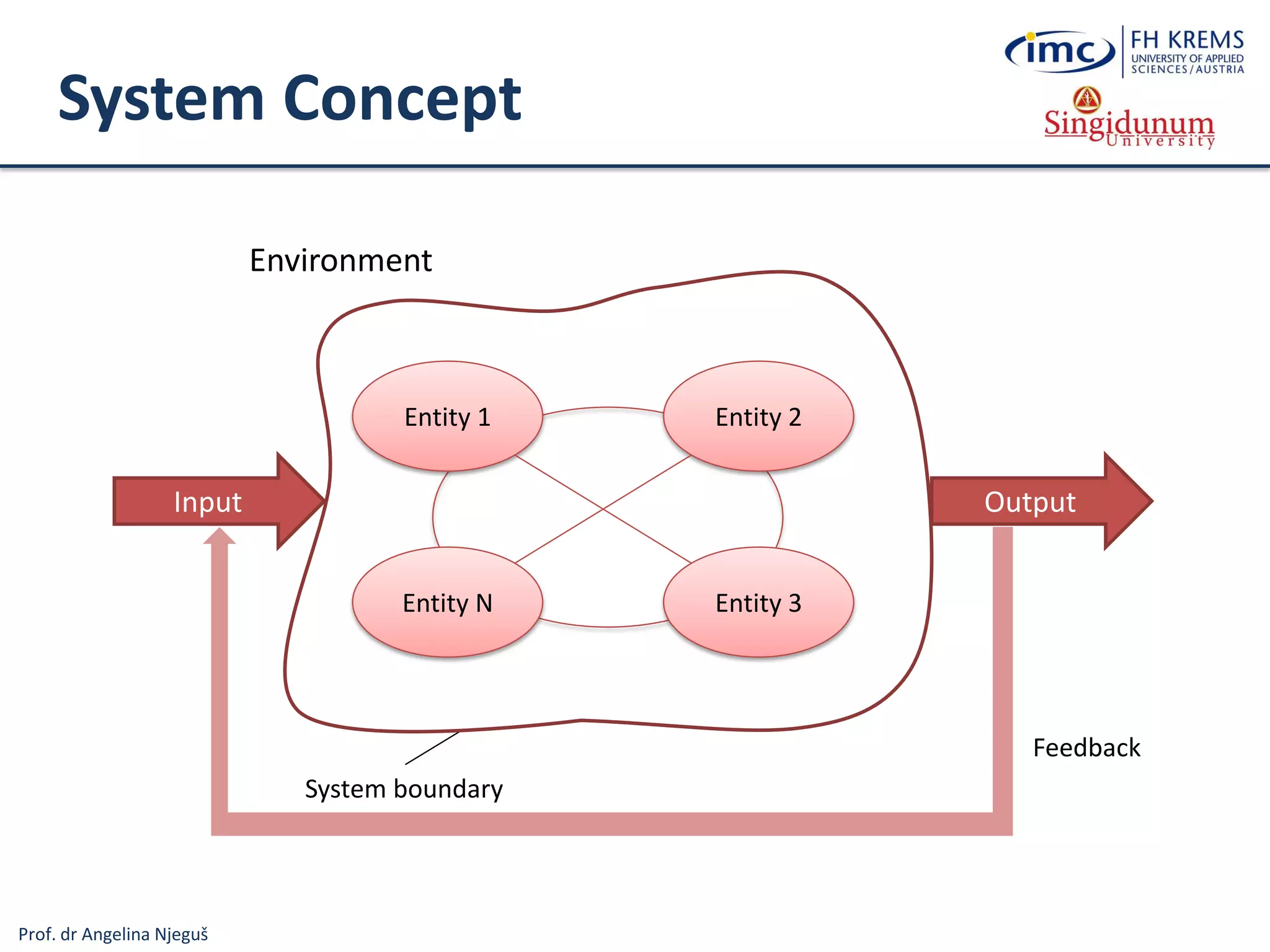
System Concept
Entity 1 Entity 2
Entity N Entity 3
System boundary
Environment
Input Output
Feedback
Prof. dr Angelina Njeguš
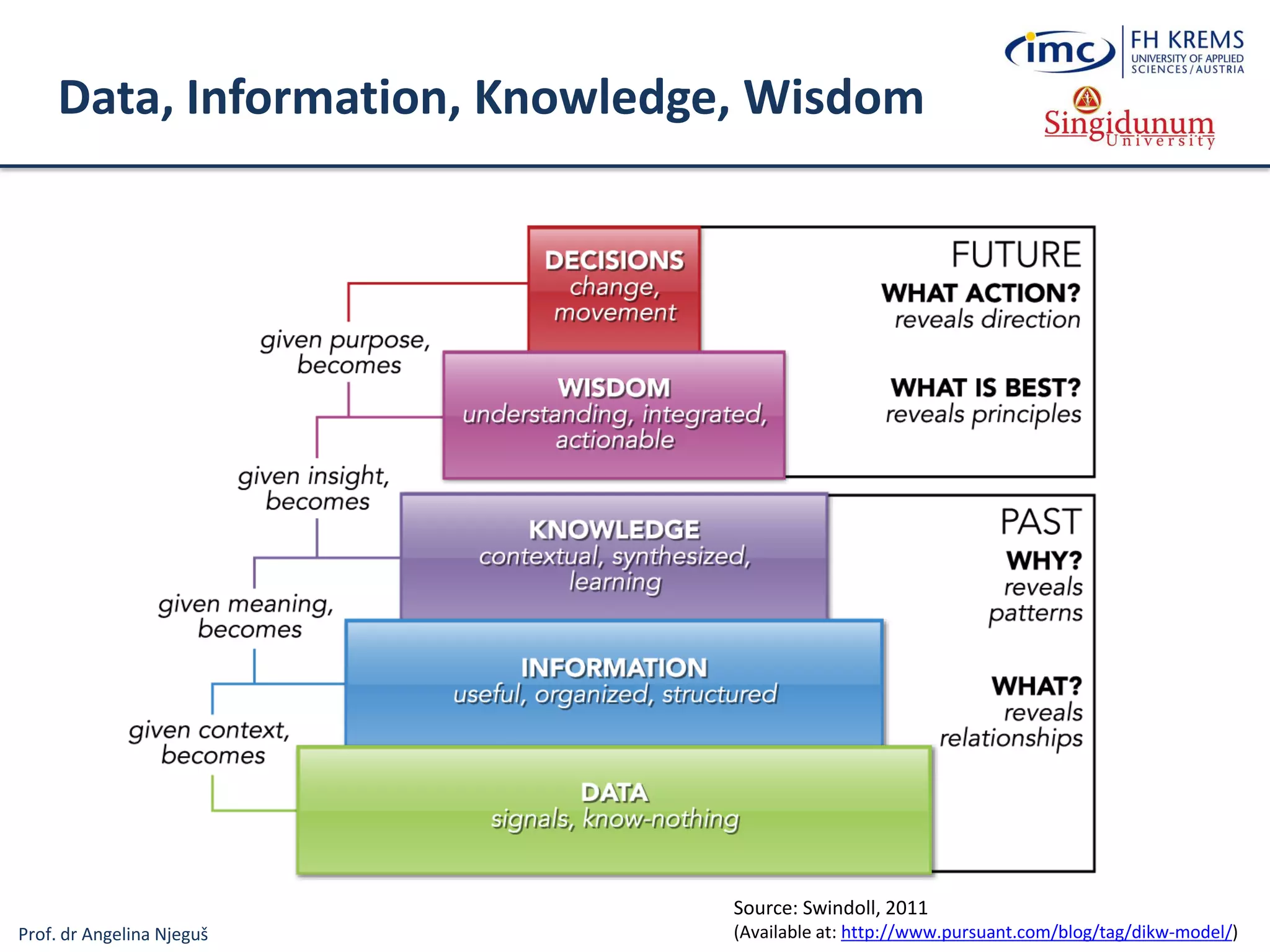
Data, Information, Knowledge, Wisdom
Source: Swindoll, 2011
(Available at: http://www.pursuant.com/blog/tag/dikw-model/)
Prof. dr Angelina Njeguš
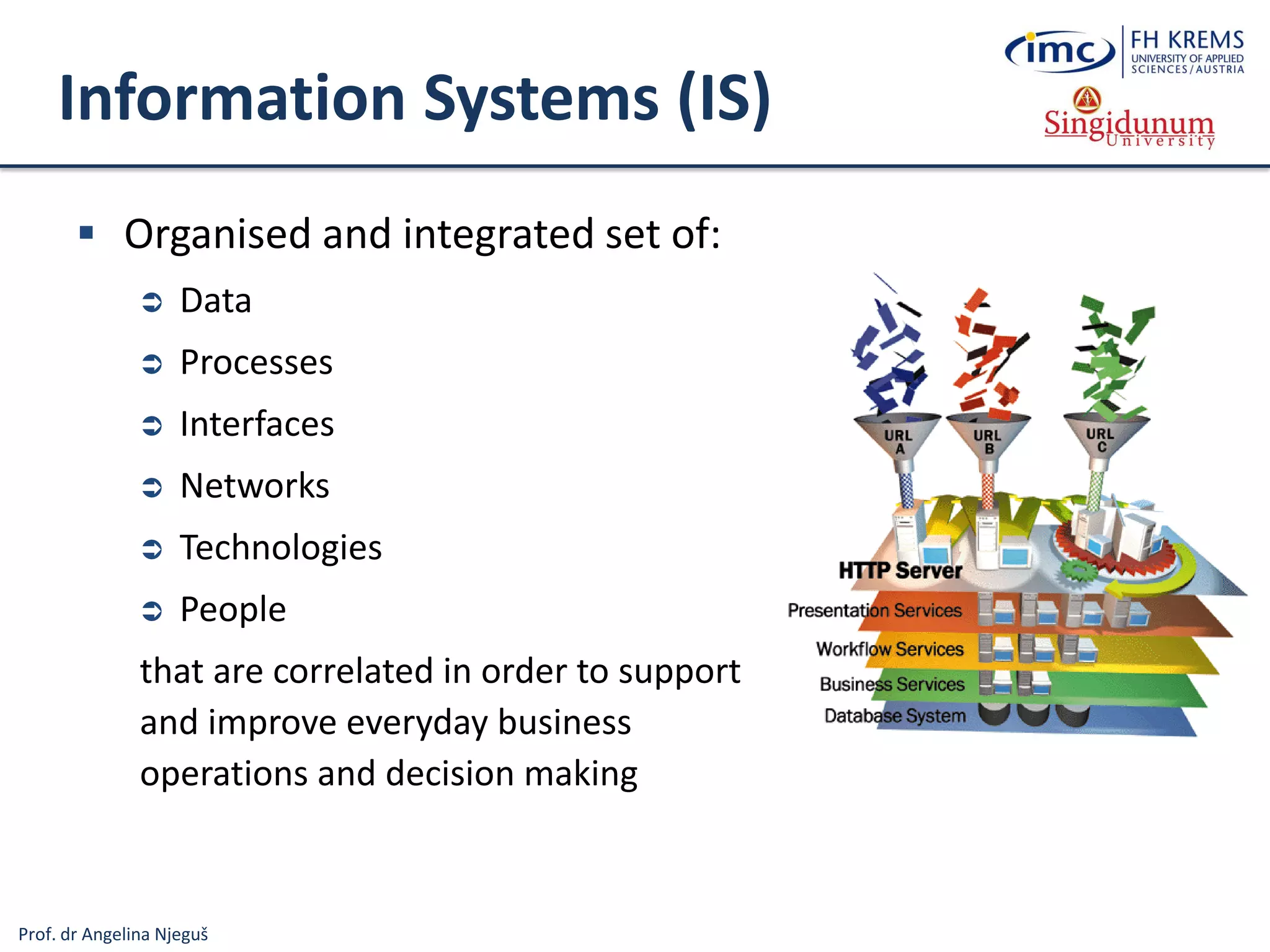
Information Systems (IS)
 Organised and integrated set of:
 Data
 Processes
 Interfaces
 Networks
 Technologies
 People
that are correlated in order to support
and improve everyday business
operations and decision making
Prof. dr Angelina Njeguš
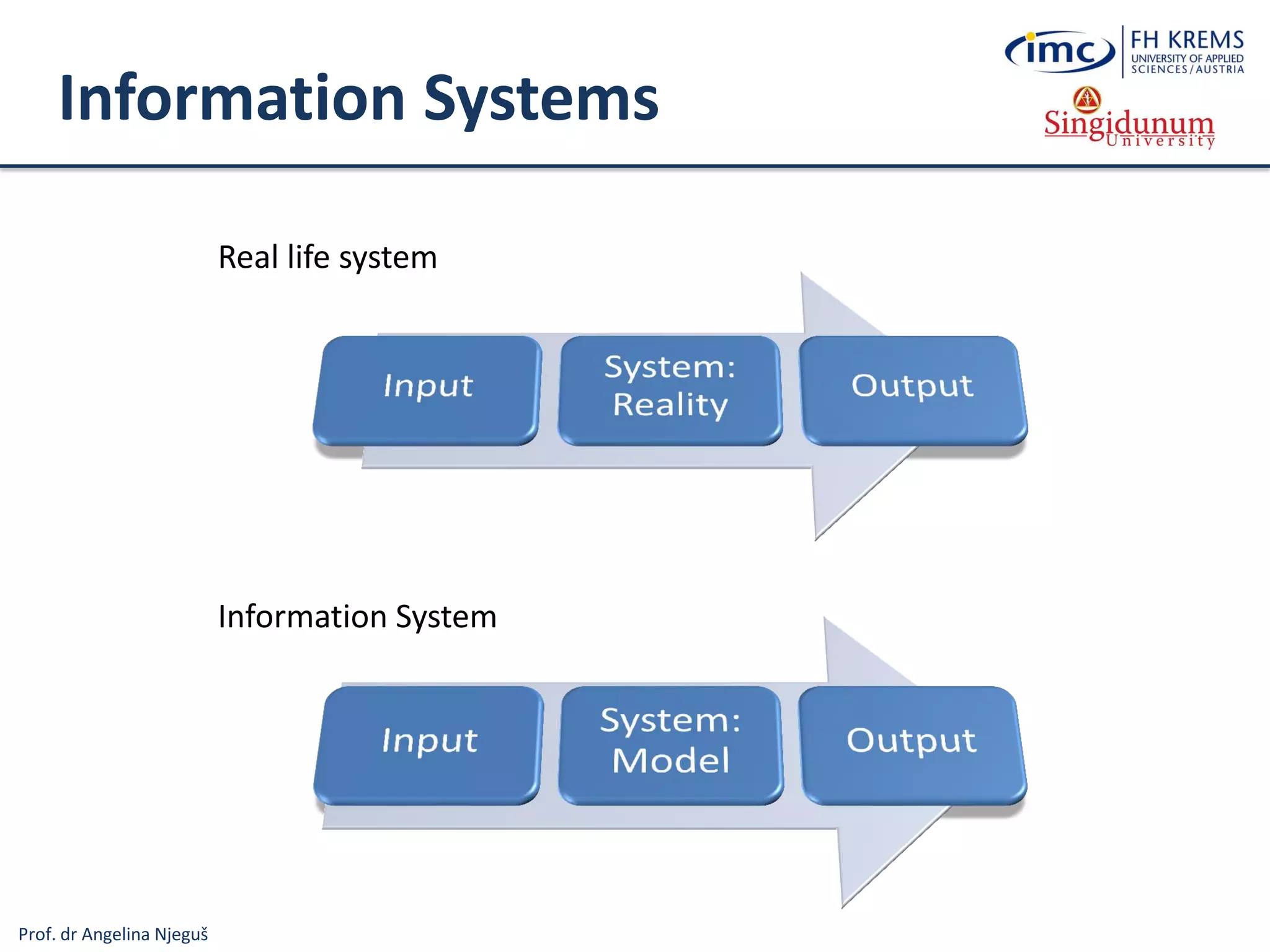
Information Systems
Real life system
Information System
Prof. dr Angelina Njeguš
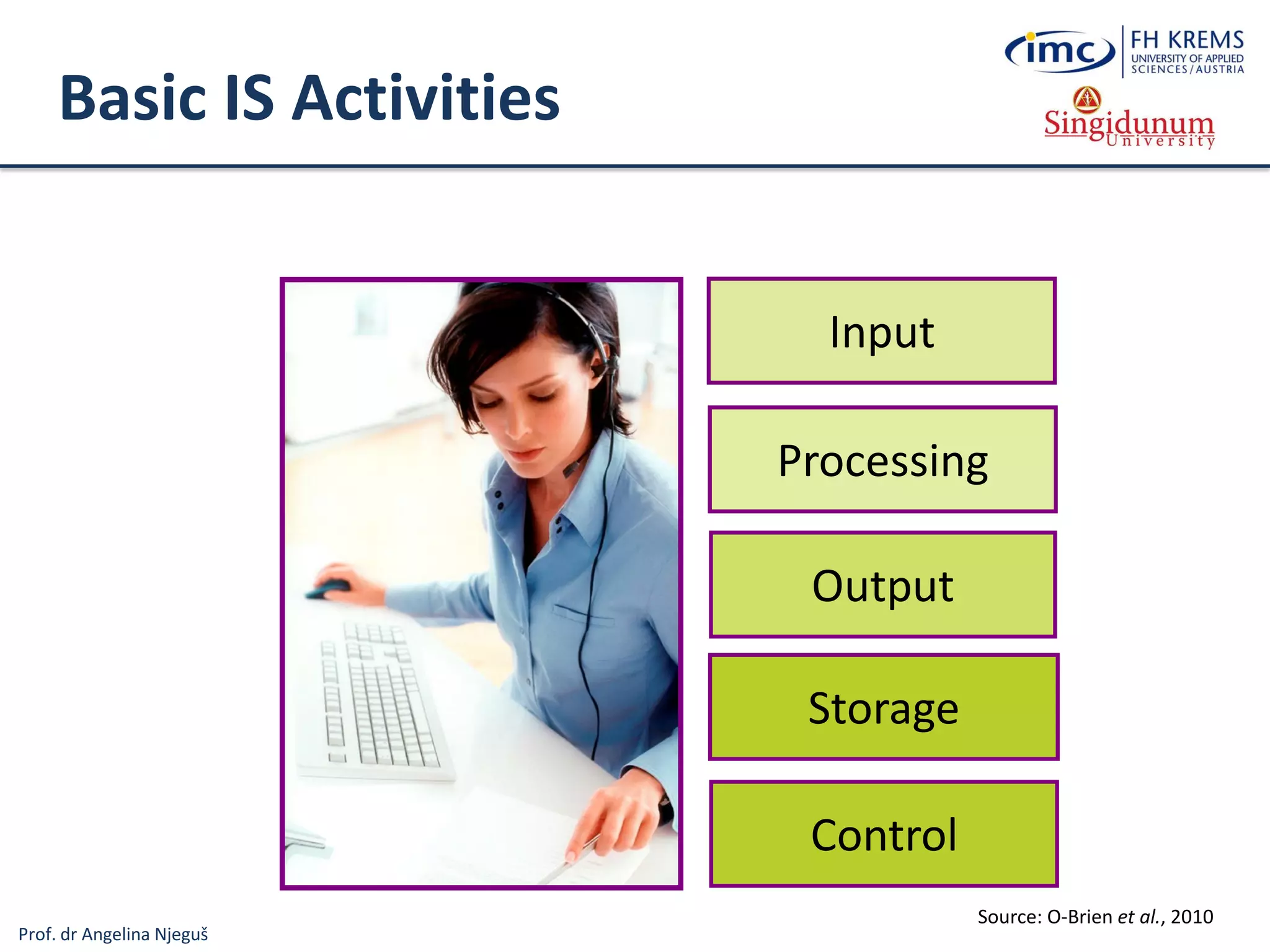
Basic IS Activities
Output
Input
Processing
Storage
Control
Source: O-Brien et al., 2010
Prof. dr Angelina Njeguš
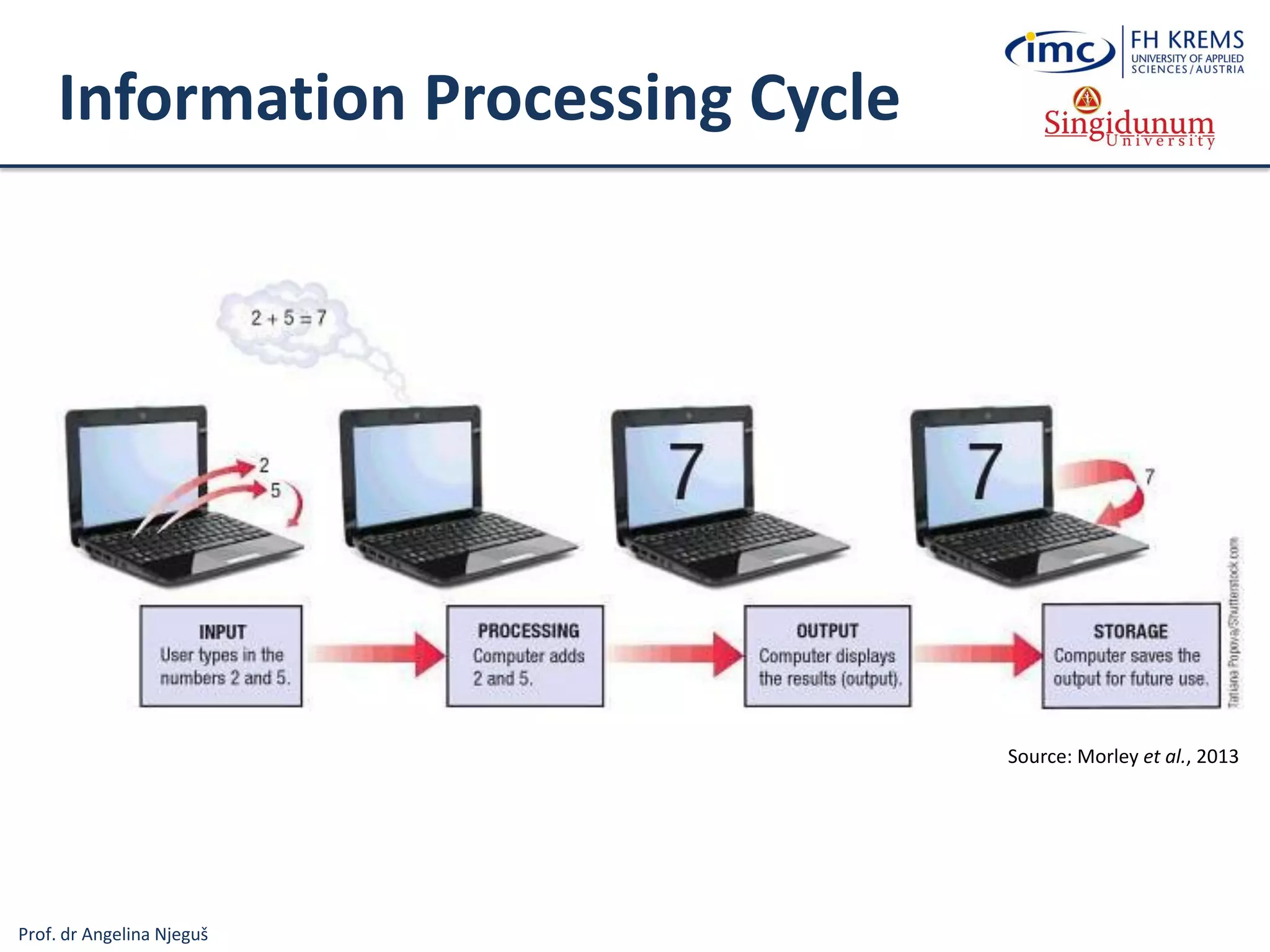
Information Processing Cycle
Source: Morley et al., 2013
Prof. dr Angelina Njeguš
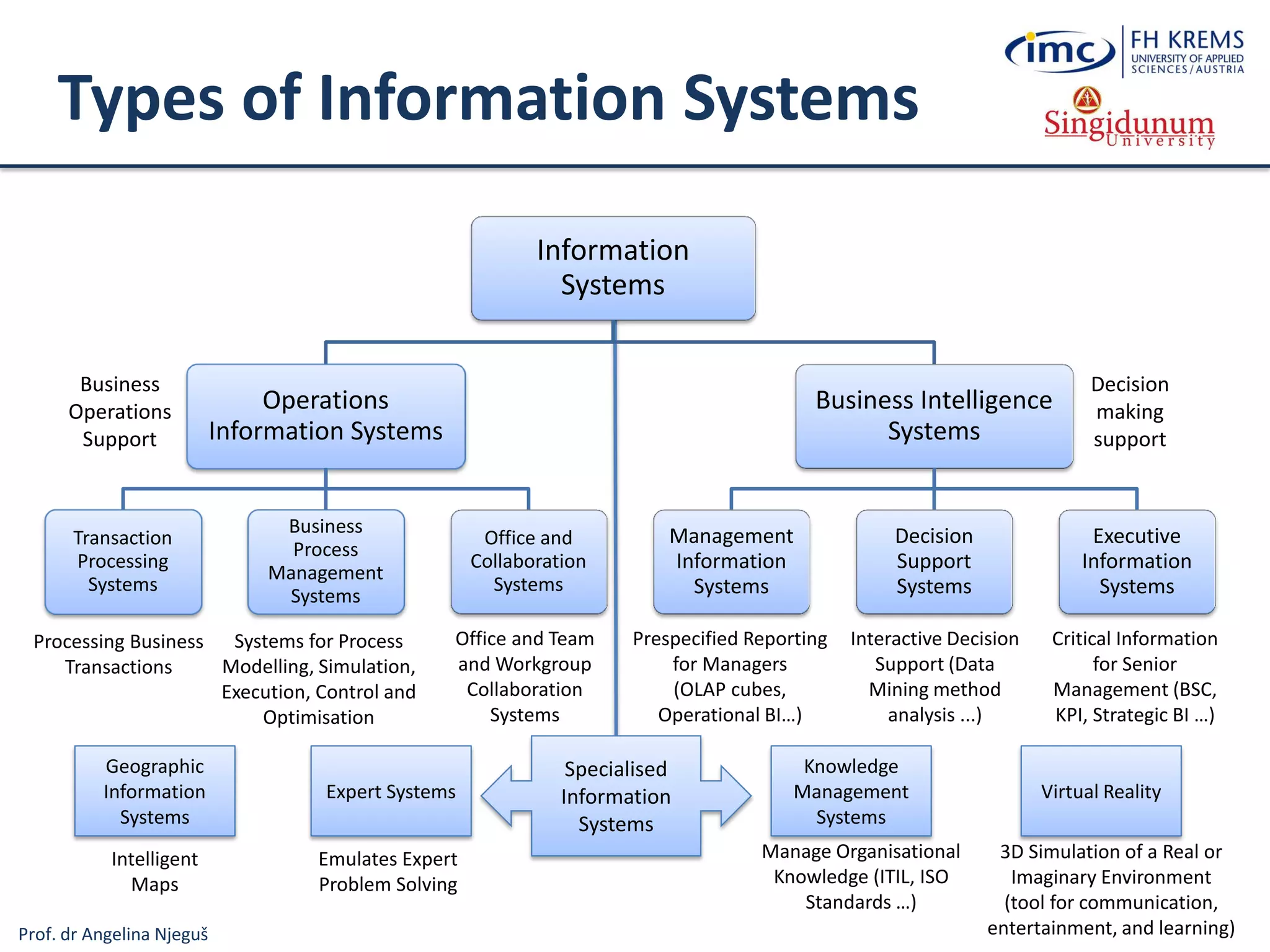
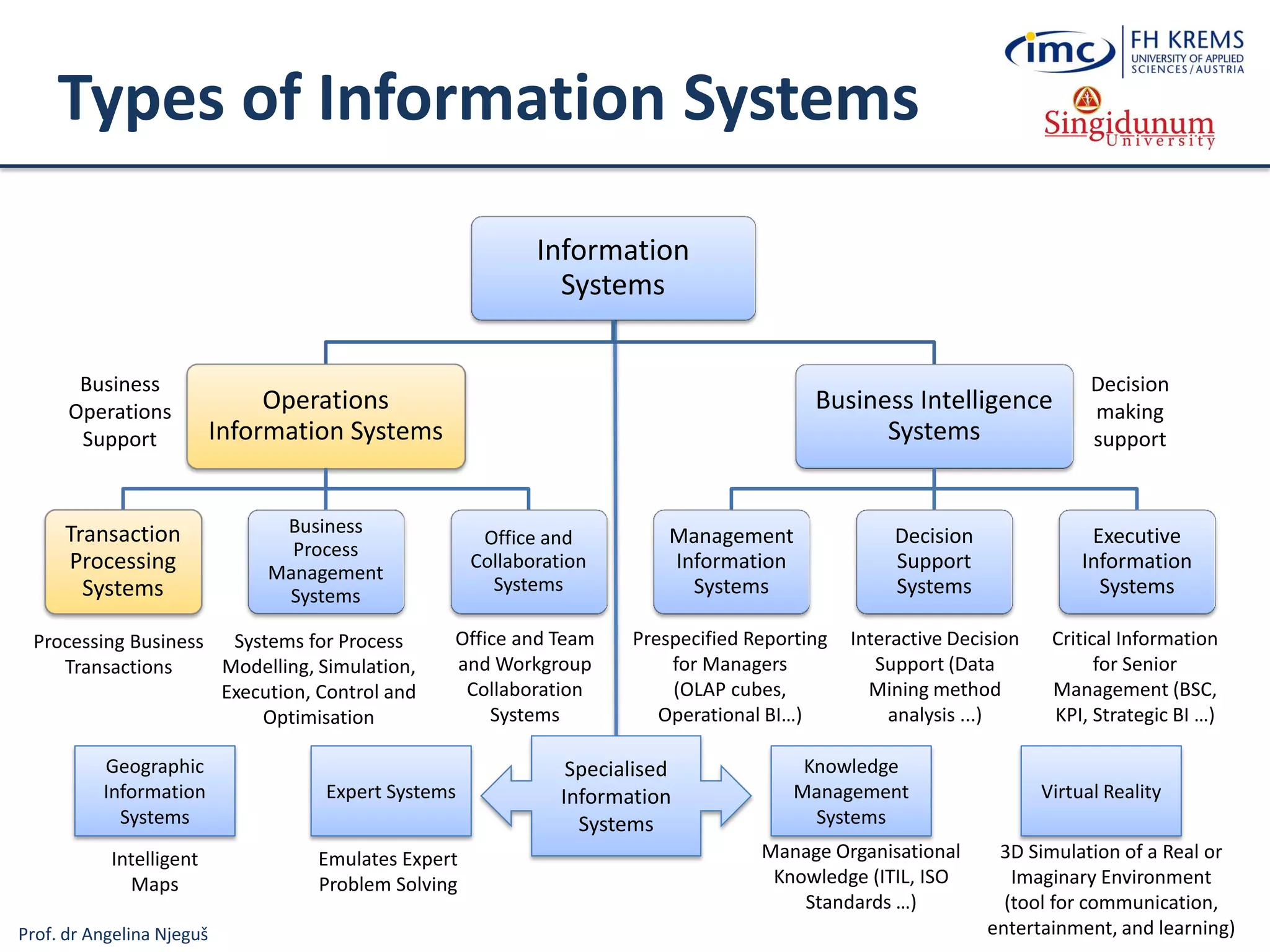
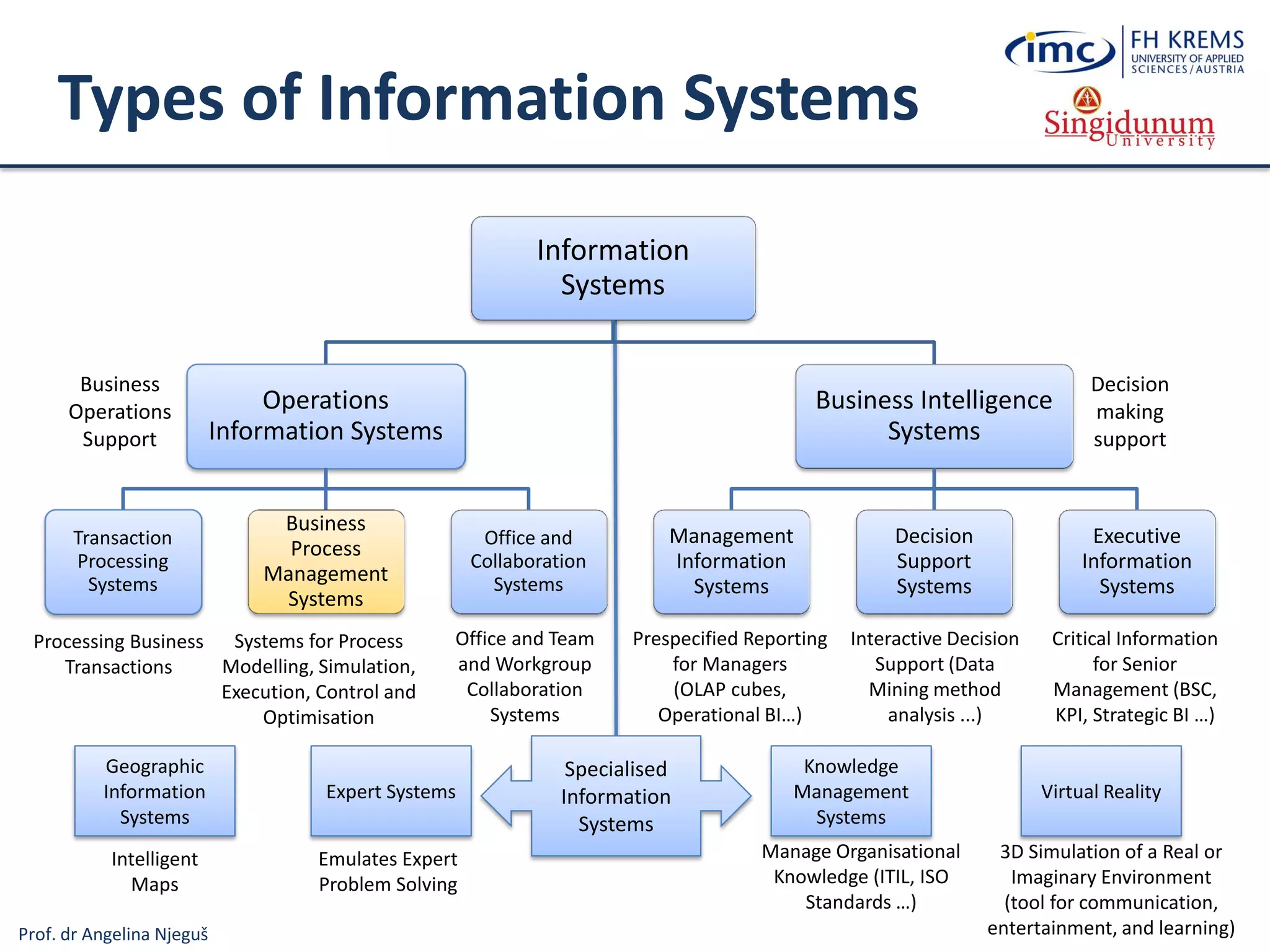
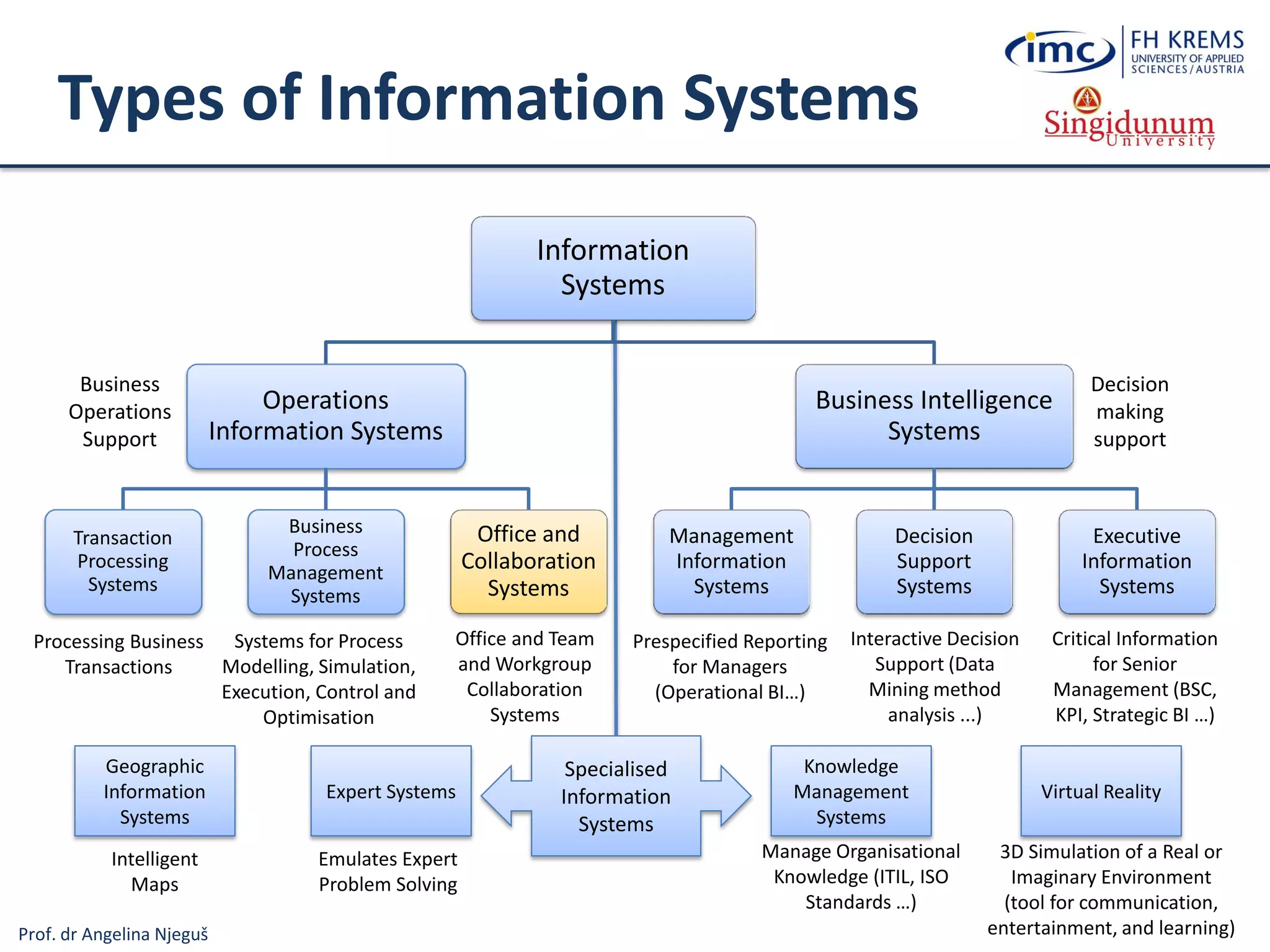
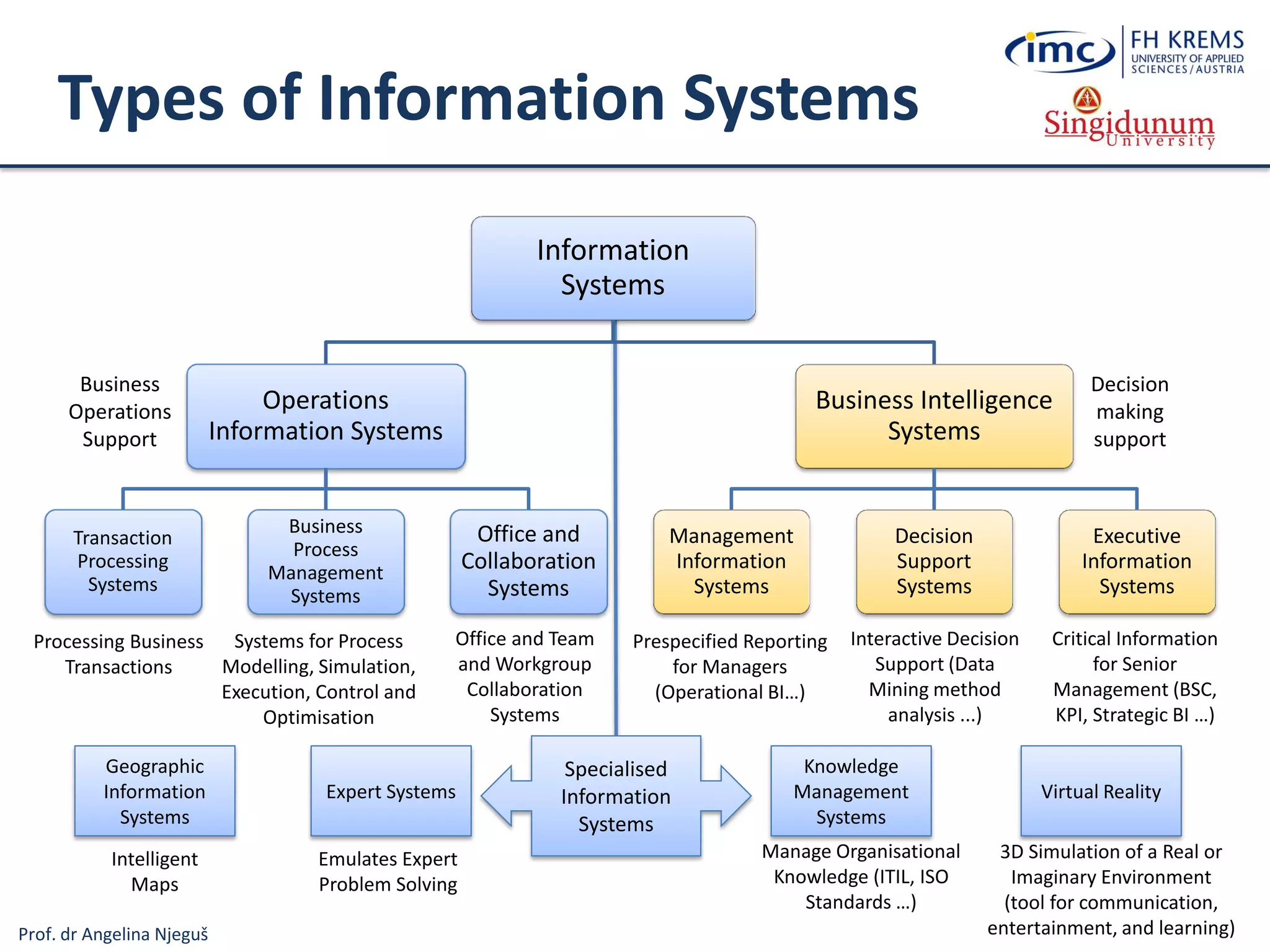
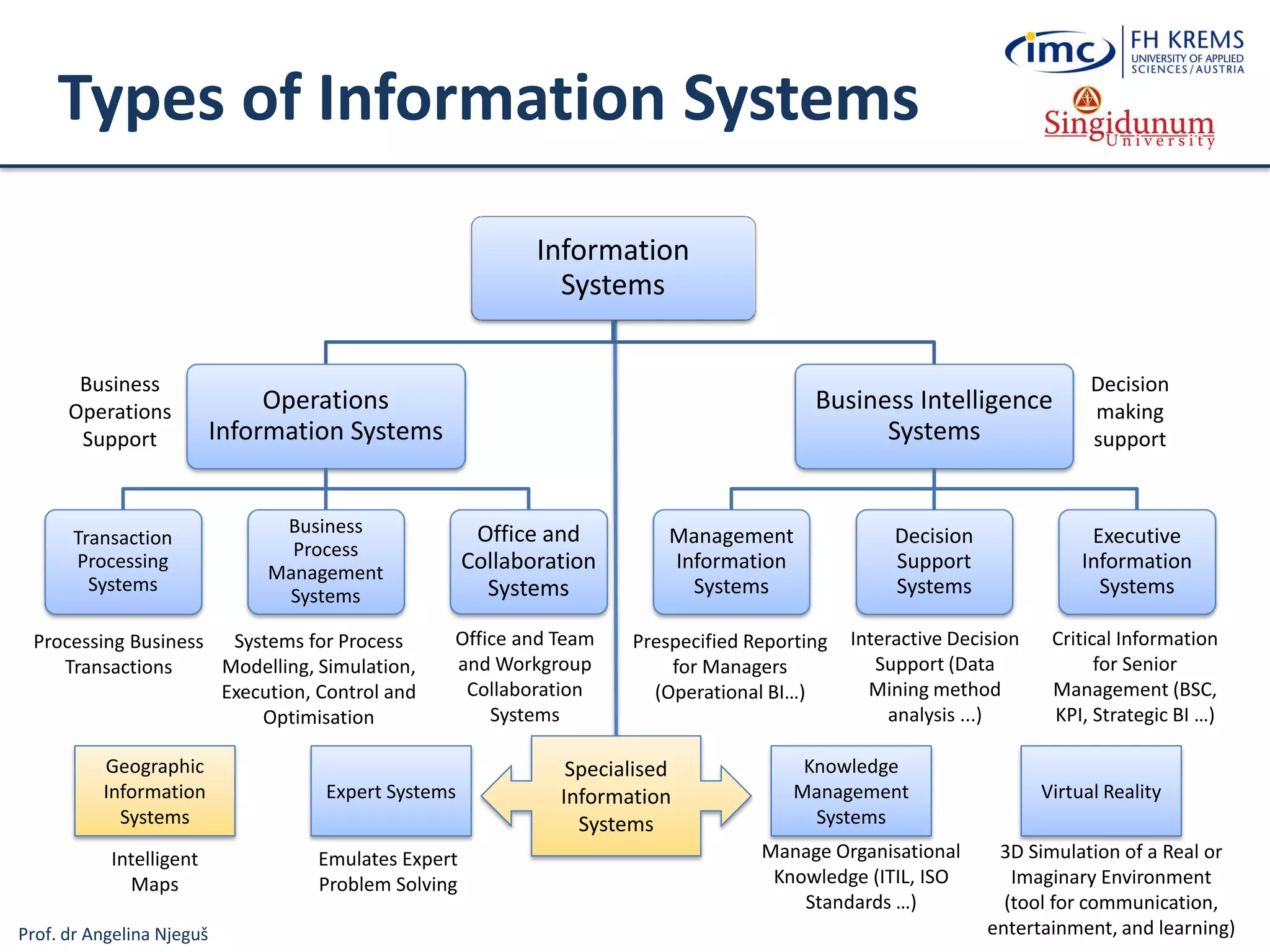
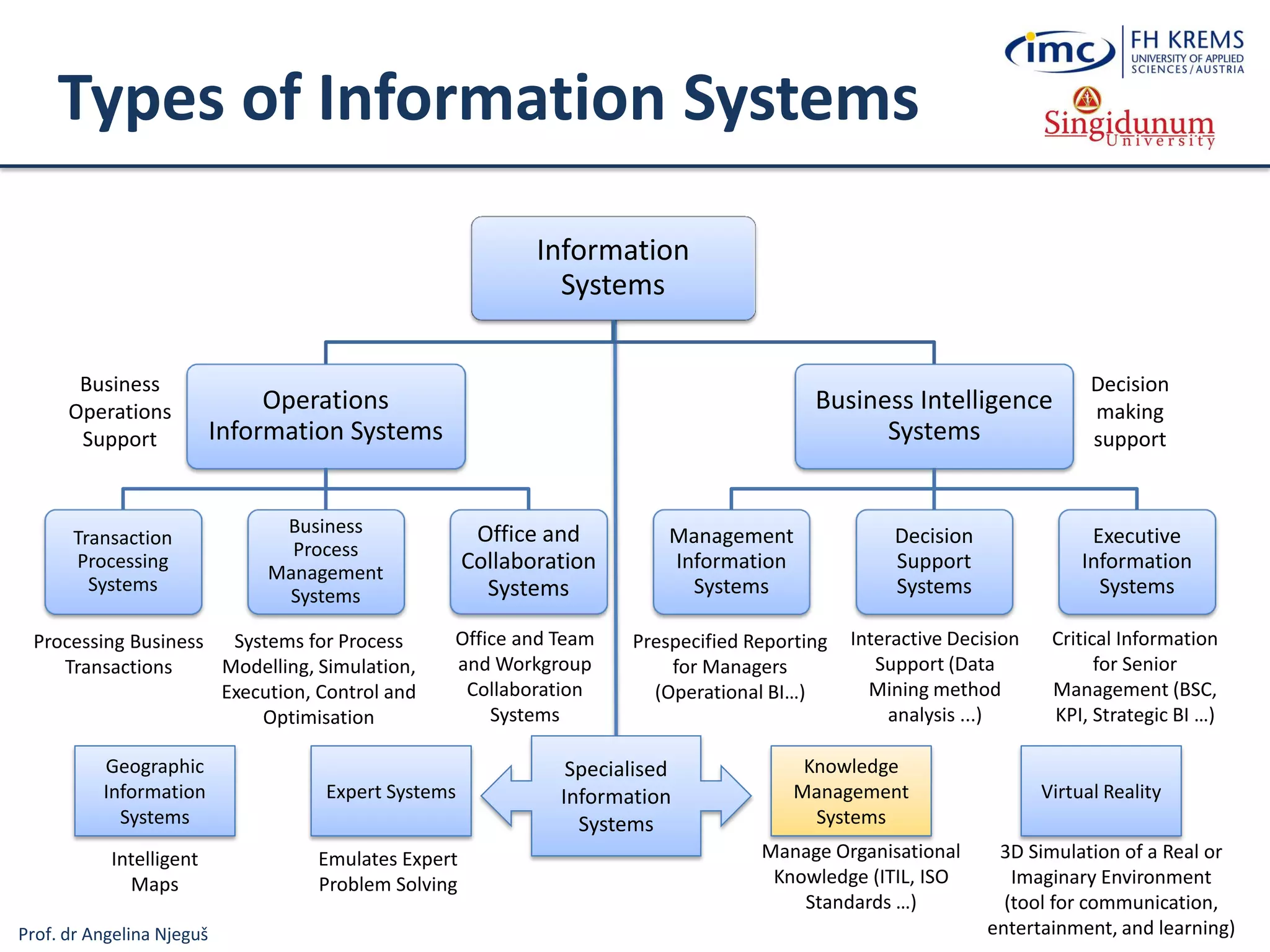
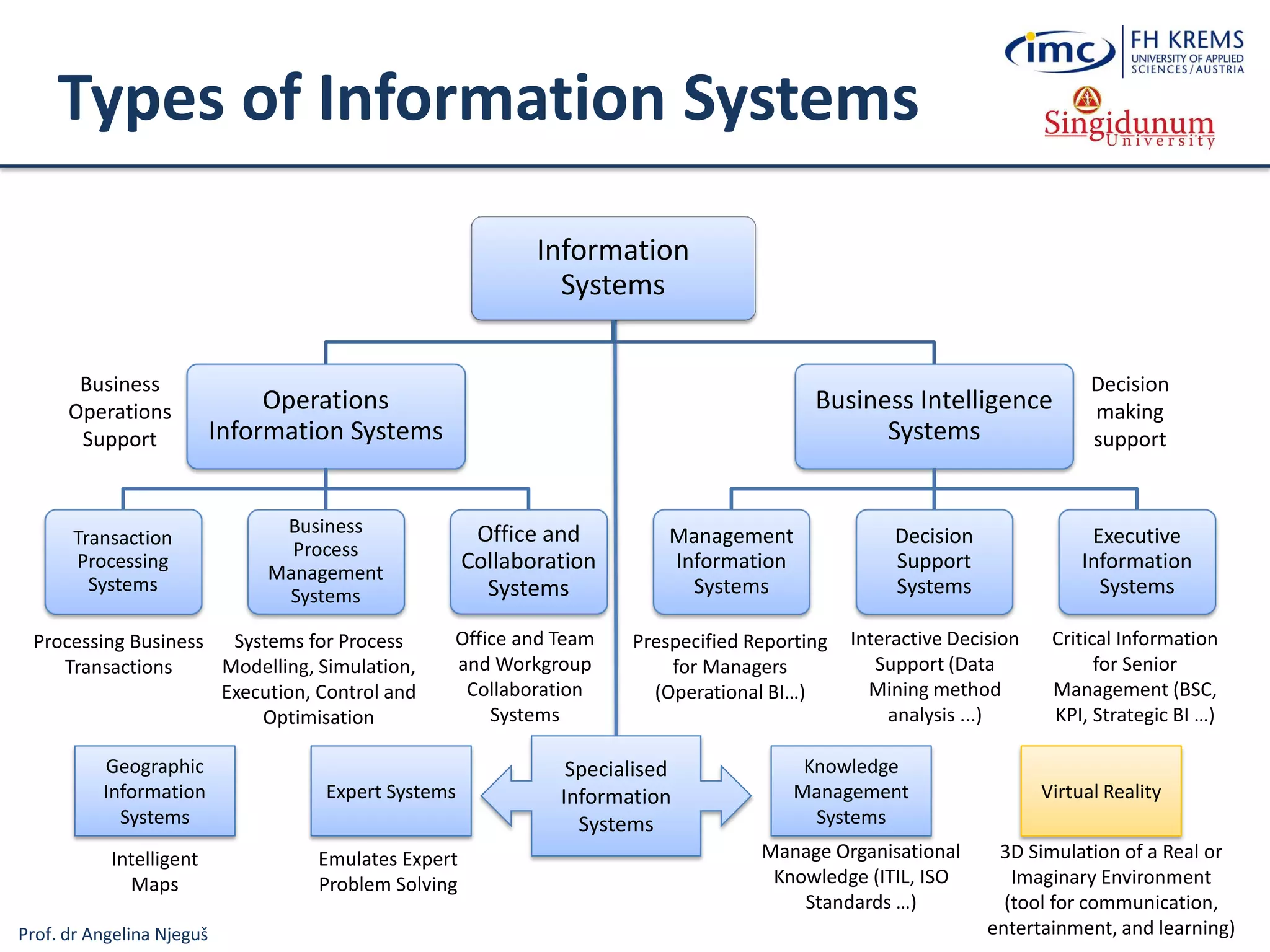
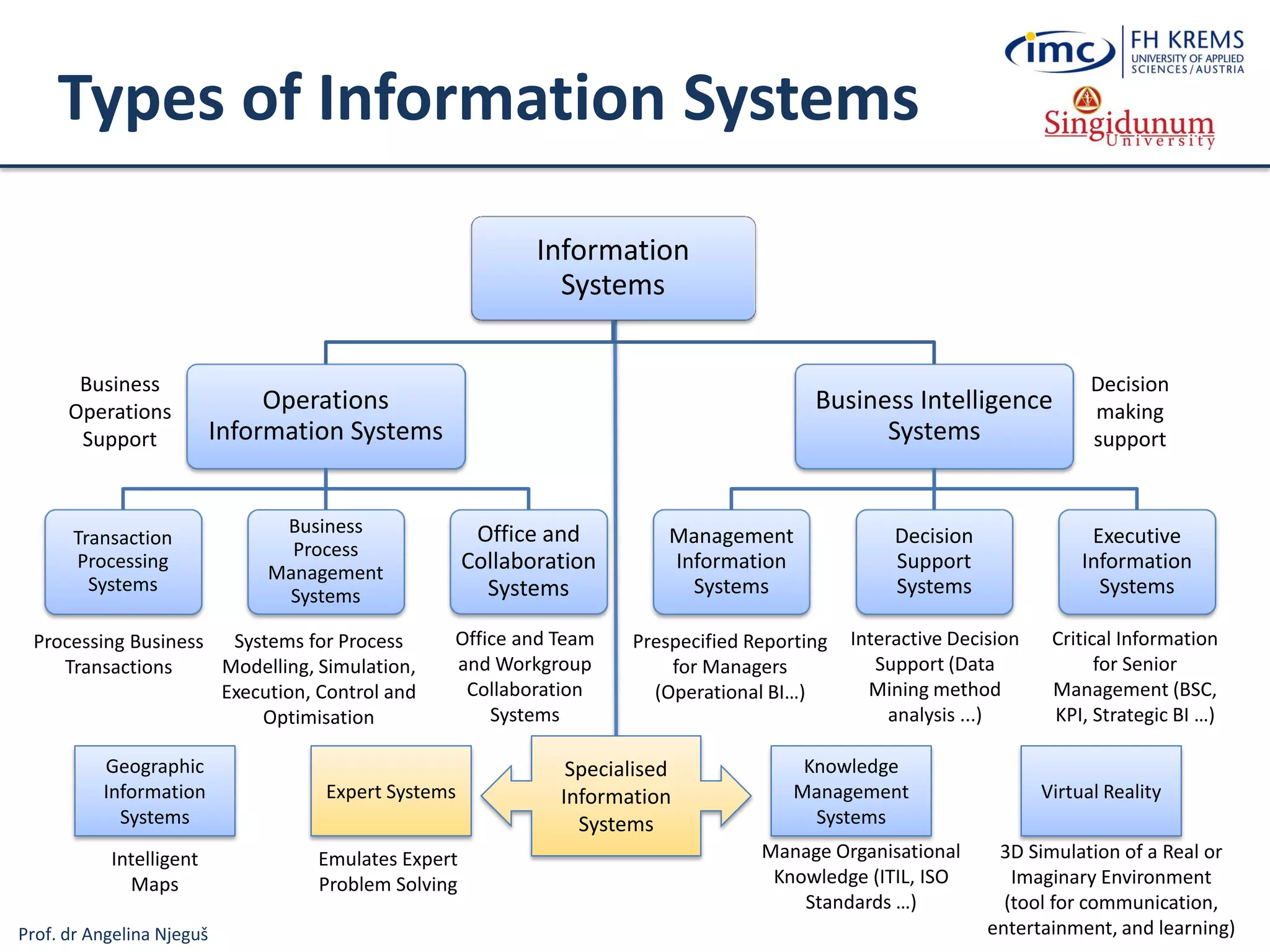
Types of Information Systems
Information
Systems
Operations
Information Systems
Transaction
Processing
Systems
Business
Process
Management
Systems
Office and
Collaboration
Systems
Business Intelligence
Systems
Management
Information
Systems
Decision
Support
Systems
Executive
Information
Systems
Business
Operations
Support
Decision
making
support
Systems for Process
Modelling, Simulation,
Execution, Control and
Optimisation
Processing Business
Transactions
Prespecified Reporting
for Managers
(OLAP cubes,
Operational BI…)
Interactive Decision
Support (Data
Mining method
analysis ...)
Critical Information
for Senior
Management (BSC,
KPI, Strategic BI …)
Expert Systems
Knowledge
Management
Systems
Manage Organisational
Knowledge (ITIL, ISO
Standards …)
Office and Team
and Workgroup
Collaboration
Systems
Specialised
Information
Systems
Virtual Reality
3D Simulation of a Real or
Imaginary Environment
(tool for communication,
entertainment, and learning)
Emulates Expert
Problem Solving
Geographic
Information
Systems
Intelligent
Maps
Prof. dr Angelina Njeguš
Types of Information Systems
Information
Systems
Operations
Information Systems
Transaction
Processing
Systems
Business
Process
Management
Systems
Office and
Collaboration
Systems
Business Intelligence
Systems
Management
Information
Systems
Decision
Support
Systems
Executive
Information
Systems
Business
Operations
Support
Decision
making
support
Systems for Process
Modelling, Simulation,
Execution, Control and
Optimisation
Processing Business
Transactions
Prespecified Reporting
for Managers
(OLAP cubes,
Operational BI…)
Interactive Decision
Support (Data
Mining method
analysis ...)
Critical Information
for Senior
Management (BSC,
KPI, Strategic BI …)
Expert Systems
Knowledge
Management
Systems
Manage Organisational
Knowledge (ITIL, ISO
Standards …)
Office and Team
and Workgroup
Collaboration
Systems
Specialised
Information
Systems
Virtual Reality
3D Simulation of a Real or
Imaginary Environment
(tool for communication,
entertainment, and learning)
Emulates Expert
Problem Solving
Geographic
Information
Systems
Intelligent
Maps
Prof. dr Angelina Njeguš
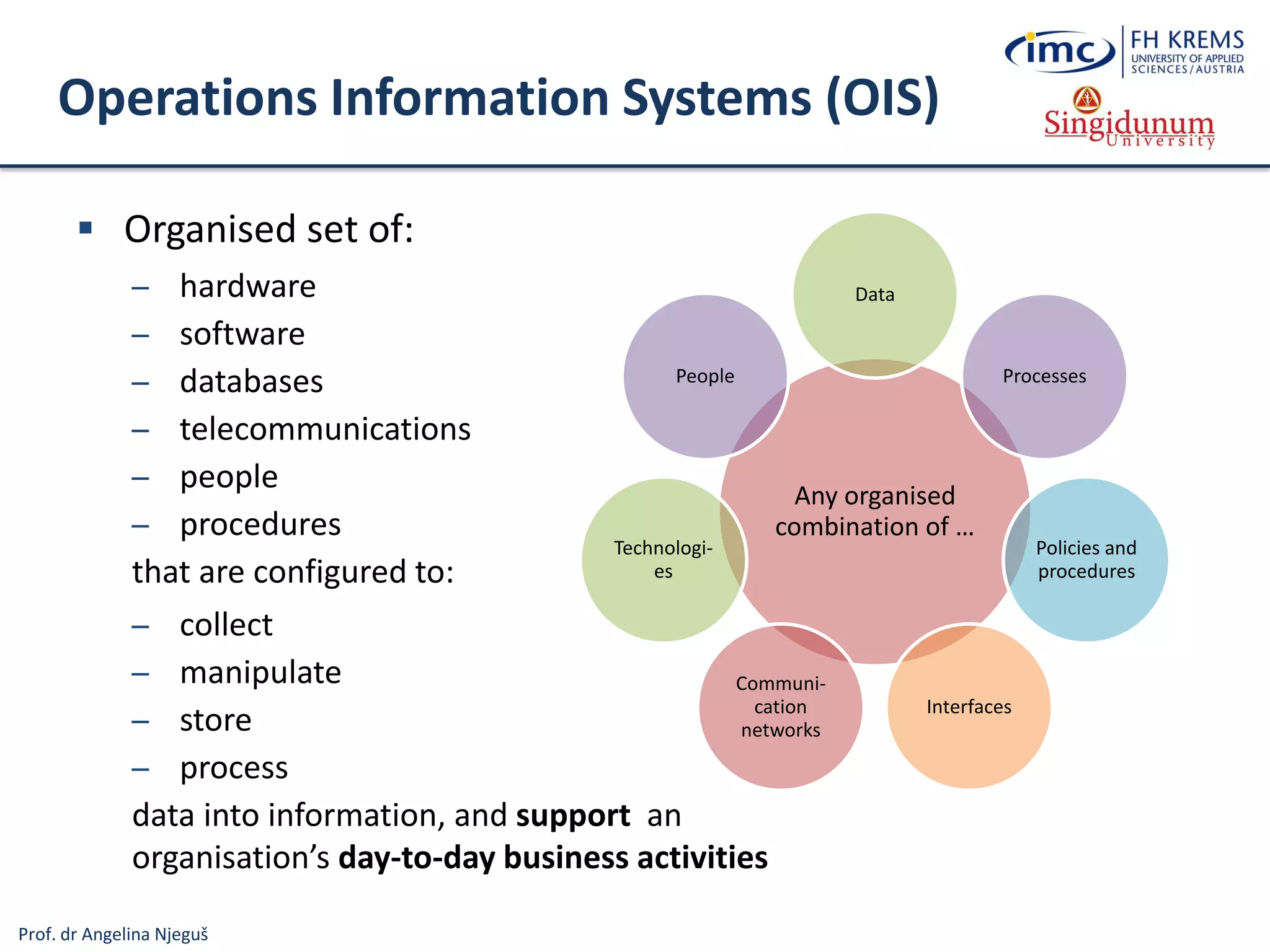
Operations Information Systems (OIS)
 Organised set of:
─ hardware
─ software
─ databases
─ telecommunications
─ people
─ procedures
that are configured to:
─ collect
─ manipulate
─ store
─ process
data into information, and support an
organisation’s day-to-day business activities
Any organised
combination of …
Data
Processes
Policies and
procedures
Interfaces
Communi-
cation
networks
Technologi-
es
People
Prof. dr Angelina Njeguš
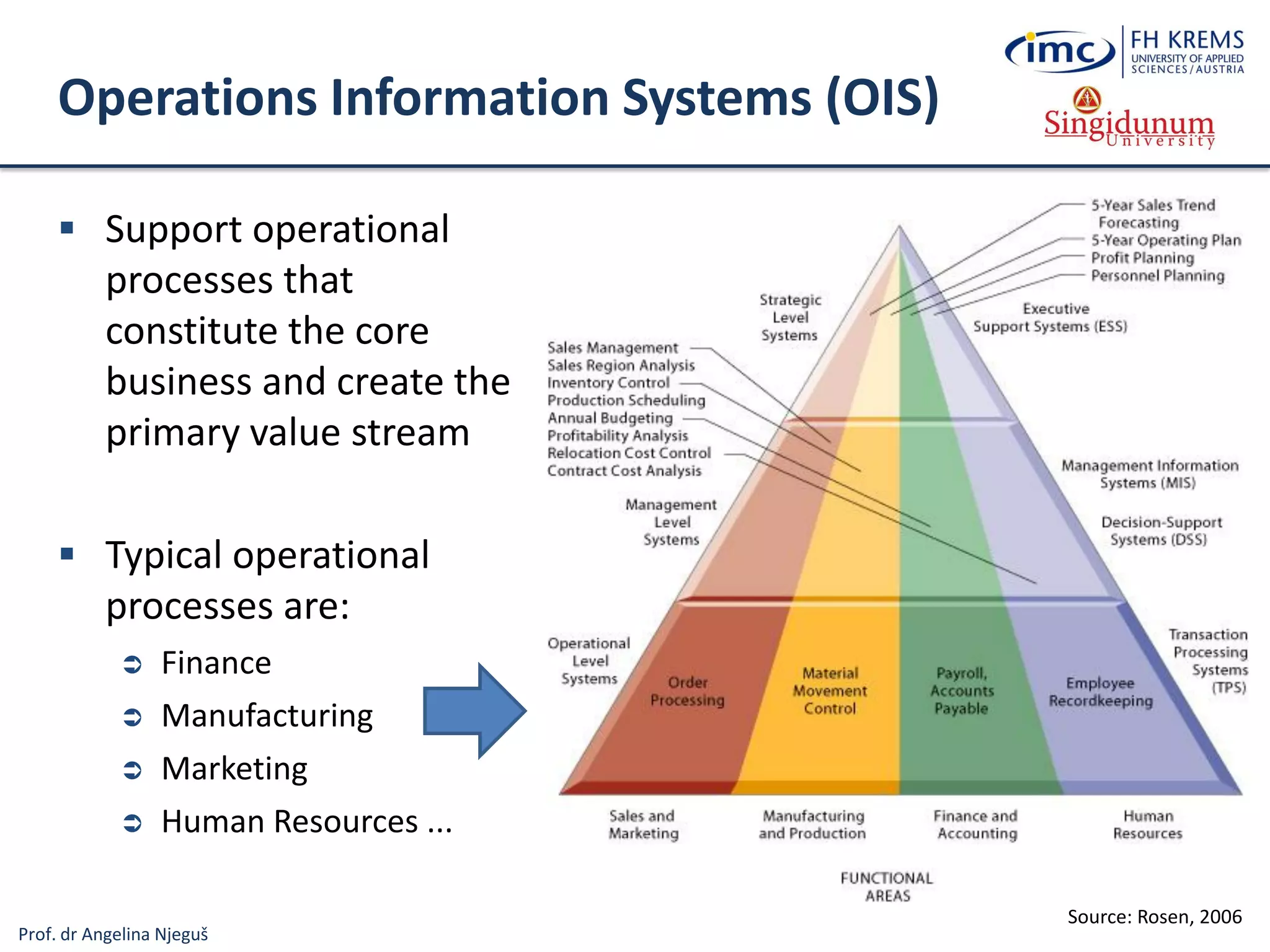
Operations Information Systems (OIS)
 Support operational
processes that
constitute the core
business and create the
primary value stream
 Typical operational
processes are:
 Finance
 Manufacturing
 Marketing
 Human Resources ...
Source: Rosen, 2006
Prof. dr Angelina Njeguš
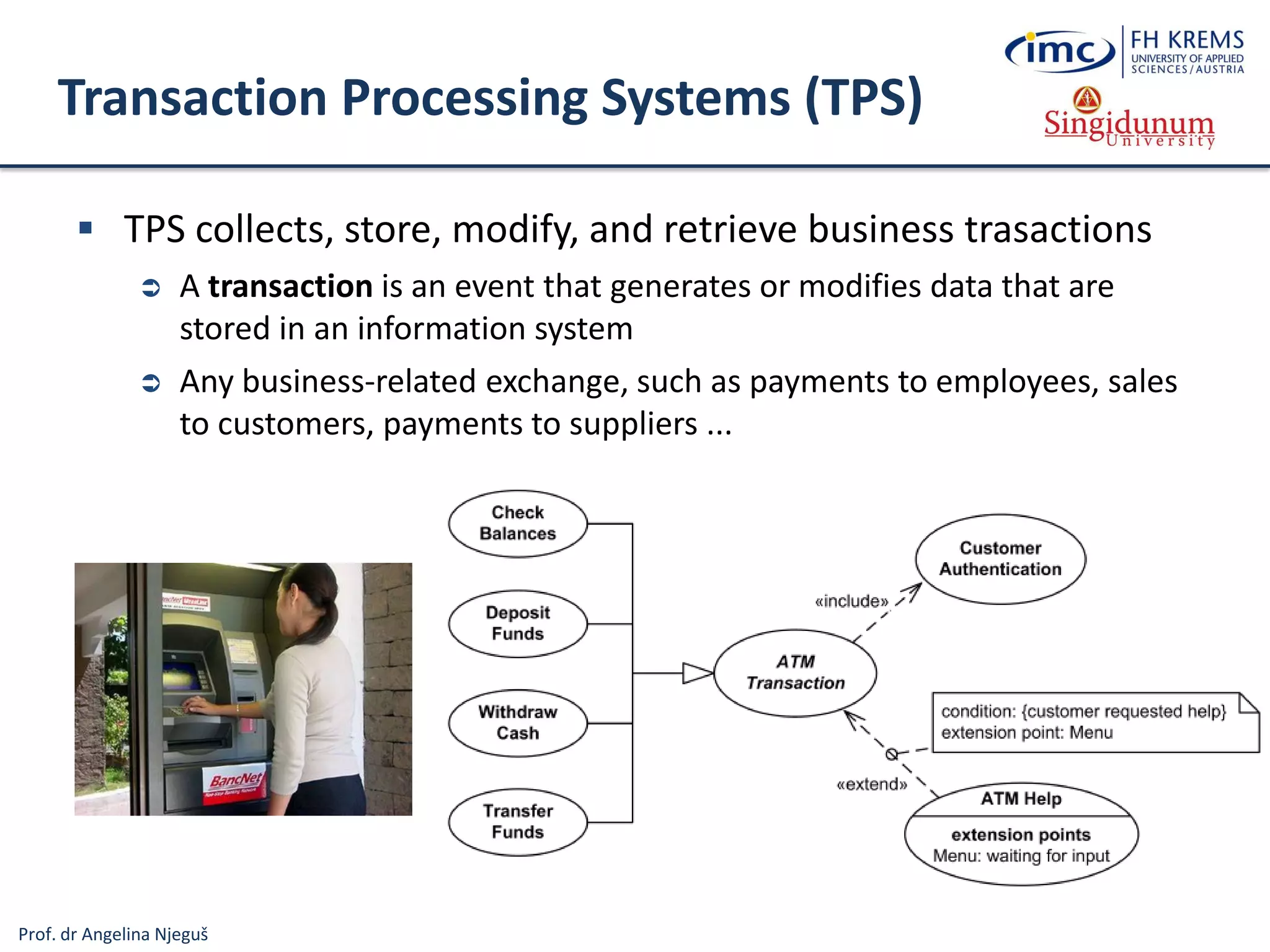
Transaction Processing Systems (TPS)
 TPS collects, store, modify, and retrieve business trasactions
 A transaction is an event that generates or modifies data that are
stored in an information system
 Any business-related exchange, such as payments to employees, sales
to customers, payments to suppliers ...
Prof. dr Angelina Njeguš
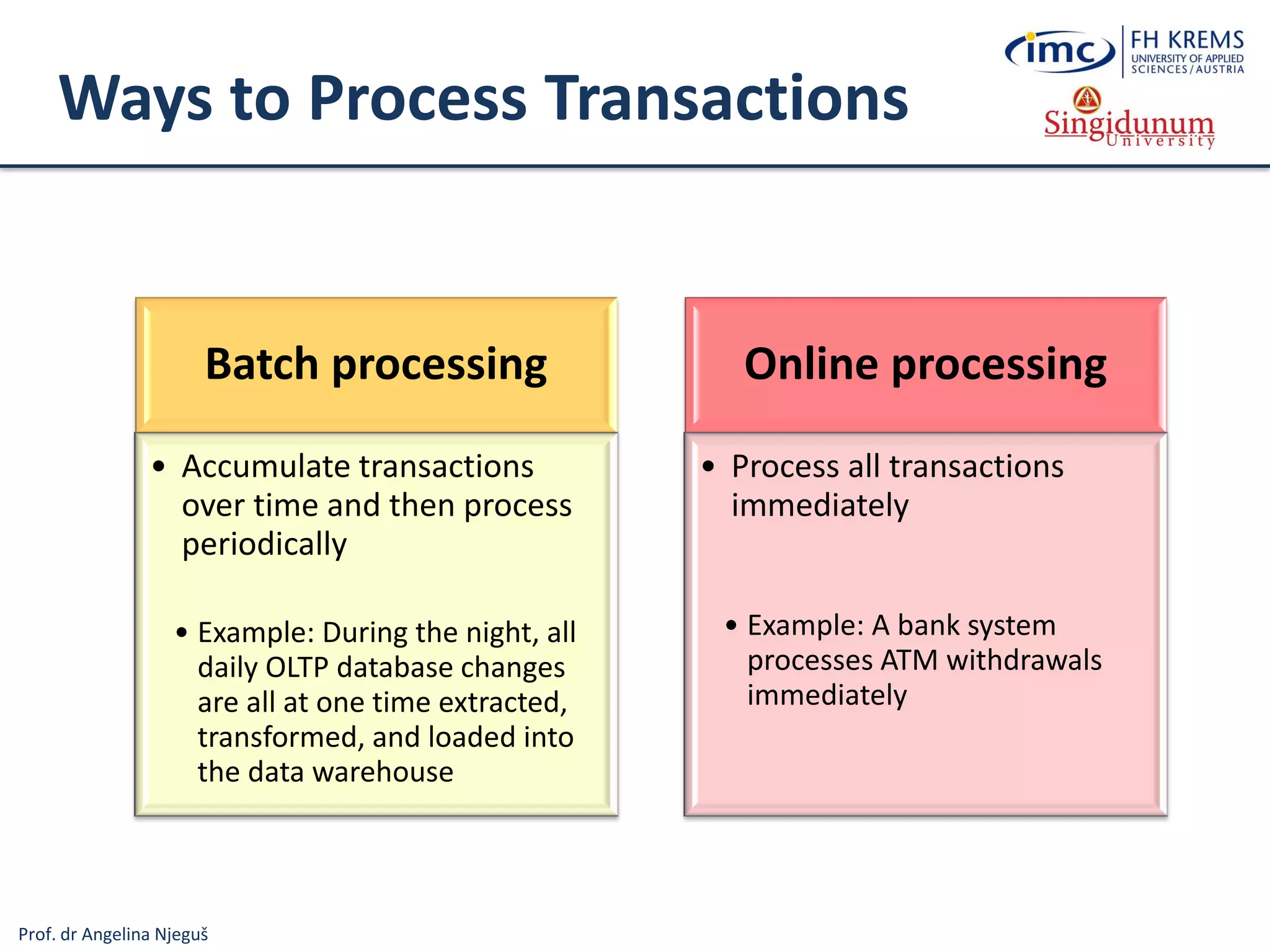
Ways to Process Transactions
Batch processing
• Accumulate transactions
over time and then process
periodically
• Example: During the night, all
daily OLTP database changes
are all at one time extracted,
transformed, and loaded into
the data warehouse
Online processing
• Process all transactions
immediately
• Example: A bank system
processes ATM withdrawals
immediately
Prof. dr Angelina Njeguš
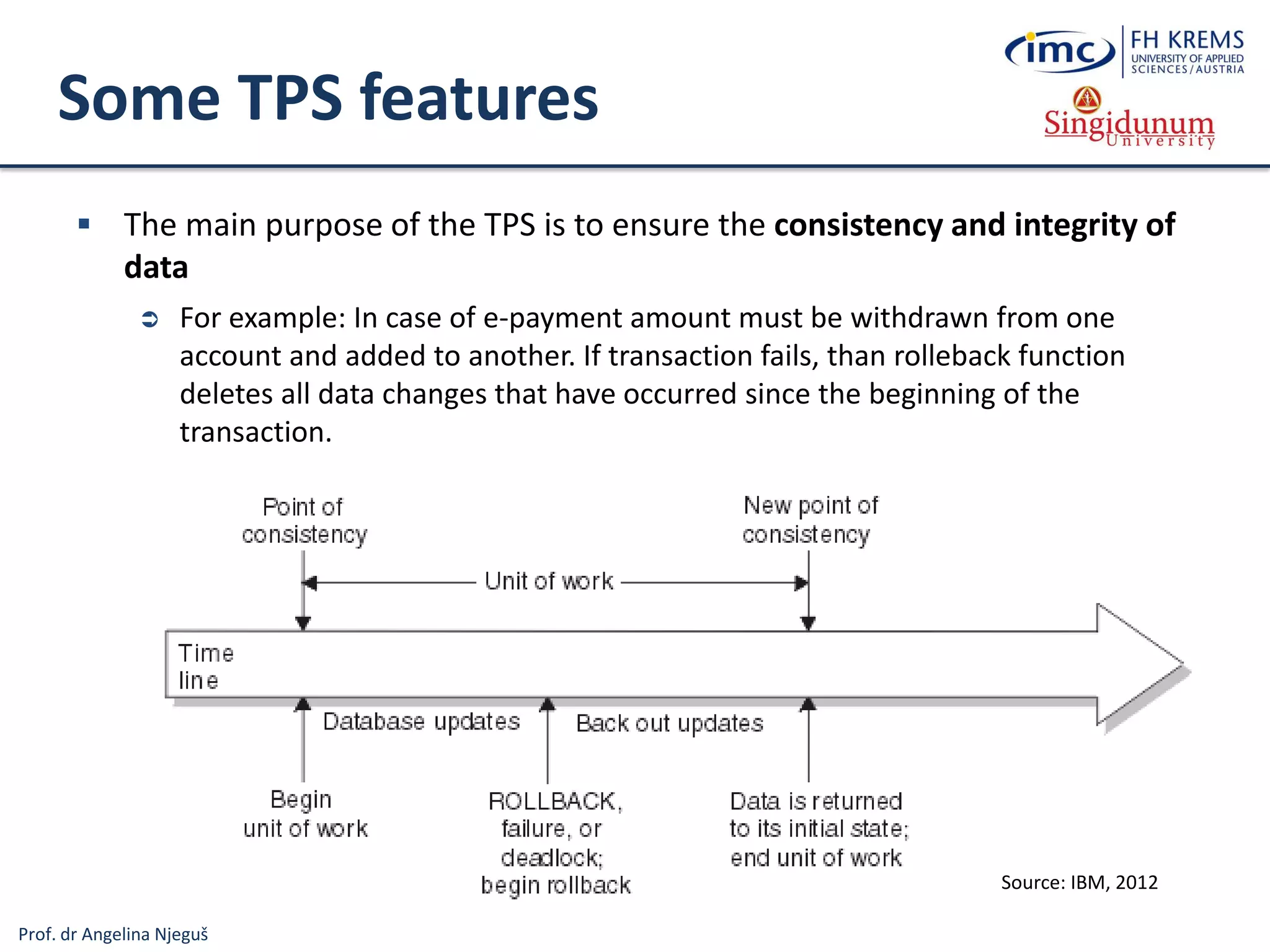
Some TPS features
 The main purpose of the TPS is to ensure the consistency and integrity of
data
 For example: In case of e-payment amount must be withdrawn from one
account and added to another. If transaction fails, than rolleback function
deletes all data changes that have occurred since the beginning of the
transaction.
Source: IBM, 2012
Prof. dr Angelina Njeguš
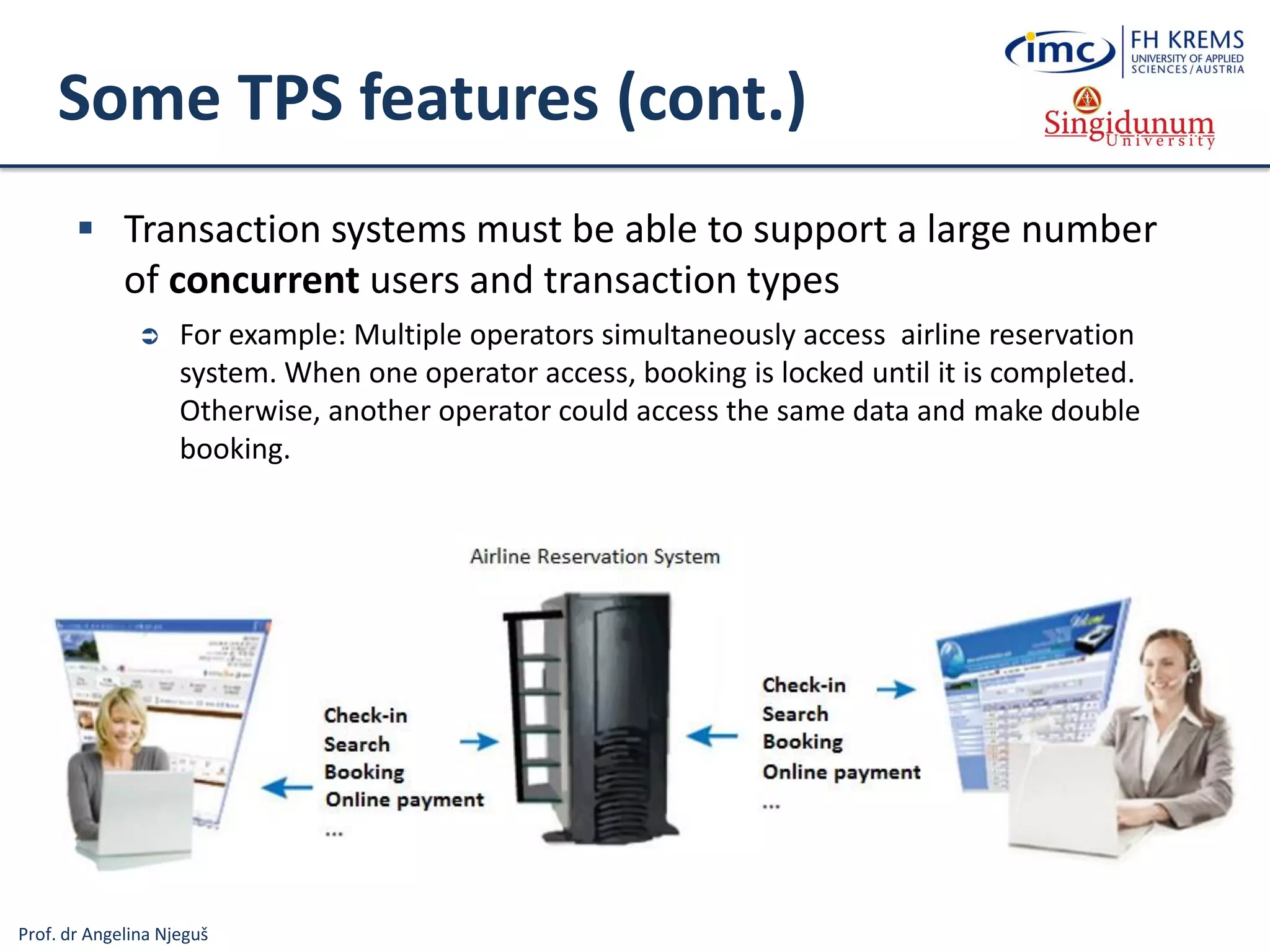
Some TPS features (cont.)
 Transaction systems must be able to support a large number
of concurrent users and transaction types
 For example: Multiple operators simultaneously access airline reservation
system. When one operator access, booking is locked until it is completed.
Otherwise, another operator could access the same data and make double
booking.
Prof. dr Angelina Njeguš
Types of Information Systems
Information
Systems
Operations
Information Systems
Transaction
Processing
Systems
Business
Process
Management
Systems
Office and
Collaboration
Systems
Business Intelligence
Systems
Management
Information
Systems
Decision
Support
Systems
Executive
Information
Systems
Business
Operations
Support
Decision
making
support
Systems for Process
Modelling, Simulation,
Execution, Control and
Optimisation
Processing Business
Transactions
Prespecified Reporting
for Managers
(OLAP cubes,
Operational BI…)
Interactive Decision
Support (Data
Mining method
analysis ...)
Critical Information
for Senior
Management (BSC,
KPI, Strategic BI …)
Expert Systems
Knowledge
Management
Systems
Manage Organisational
Knowledge (ITIL, ISO
Standards …)
Office and Team
and Workgroup
Collaboration
Systems
Specialised
Information
Systems
Virtual Reality
3D Simulation of a Real or
Imaginary Environment
(tool for communication,
entertainment, and learning)
Emulates Expert
Problem Solving
Geographic
Information
Systems
Intelligent
Maps
Prof. dr Angelina Njeguš
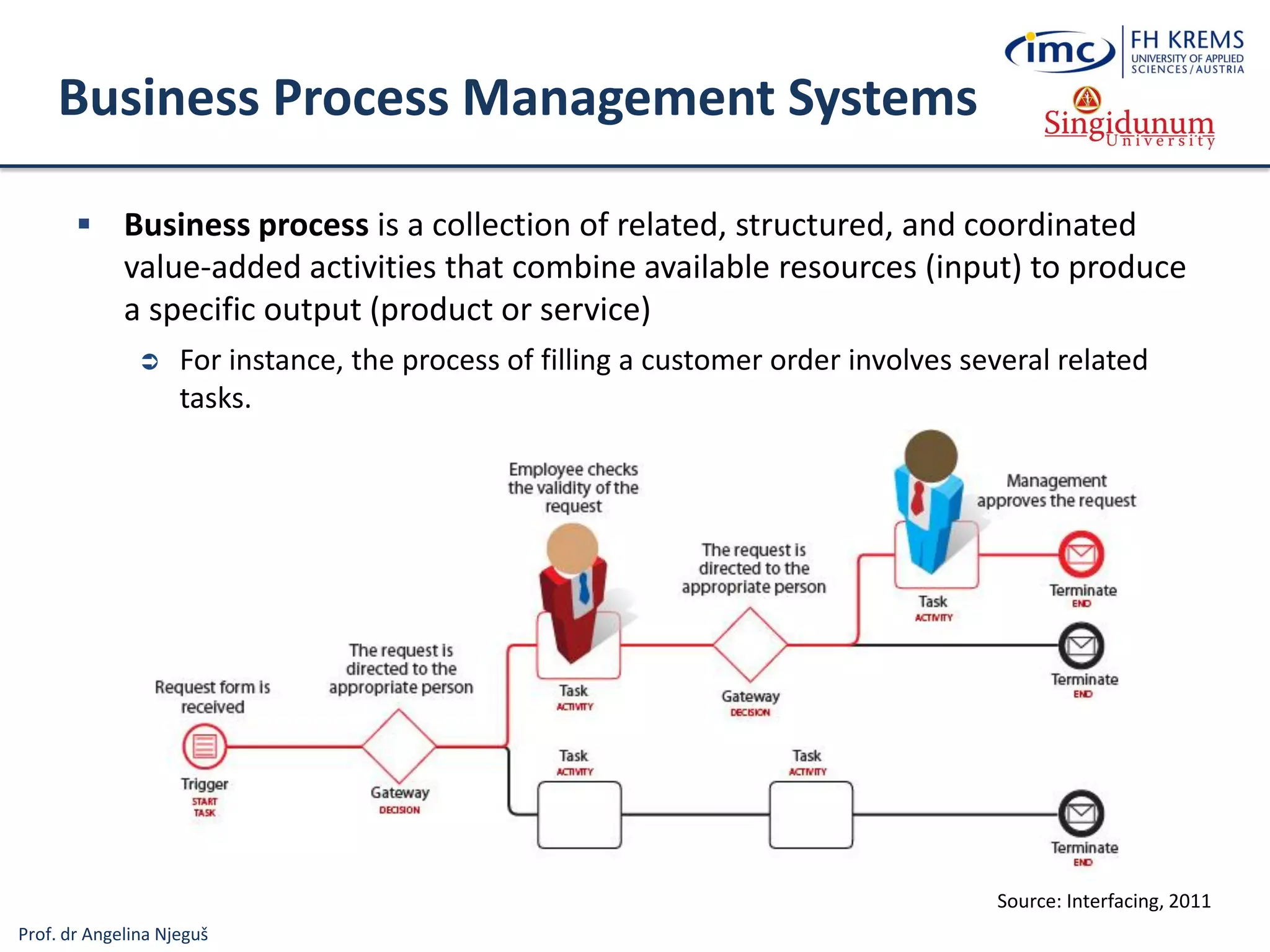
Business Process Management Systems
 Business process is a collection of related, structured, and coordinated
value-added activities that combine available resources (input) to produce
a specific output (product or service)
 For instance, the process of filling a customer order involves several related
tasks.
Source: Interfacing, 2011
Prof. dr Angelina Njeguš
Business Process
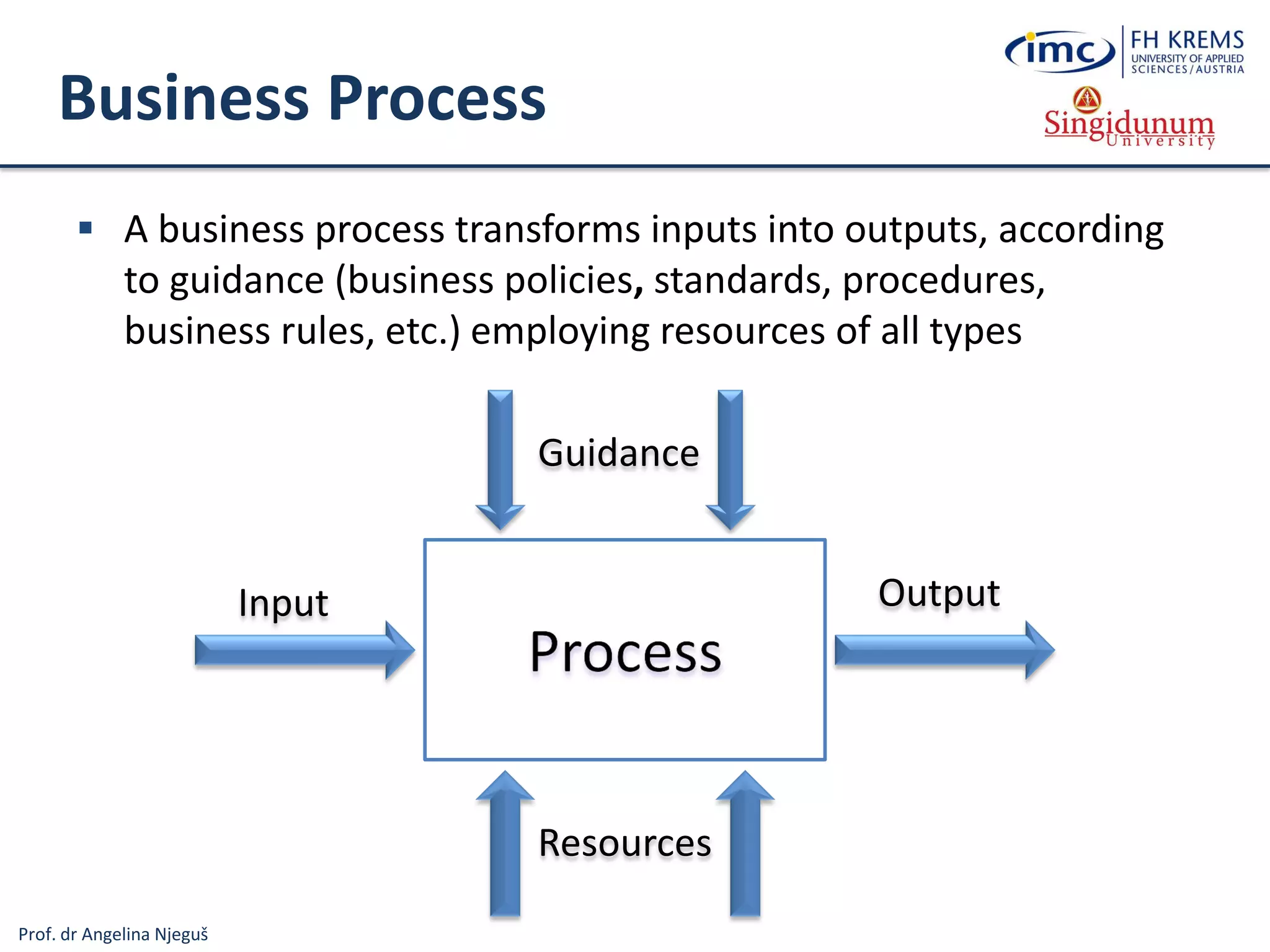
 A business process transforms inputs into outputs, according
to guidance (business policies, standards, procedures,
business rules, etc.) employing resources of all types
Input Output
Guidance
Resources
Prof. dr Angelina Njeguš
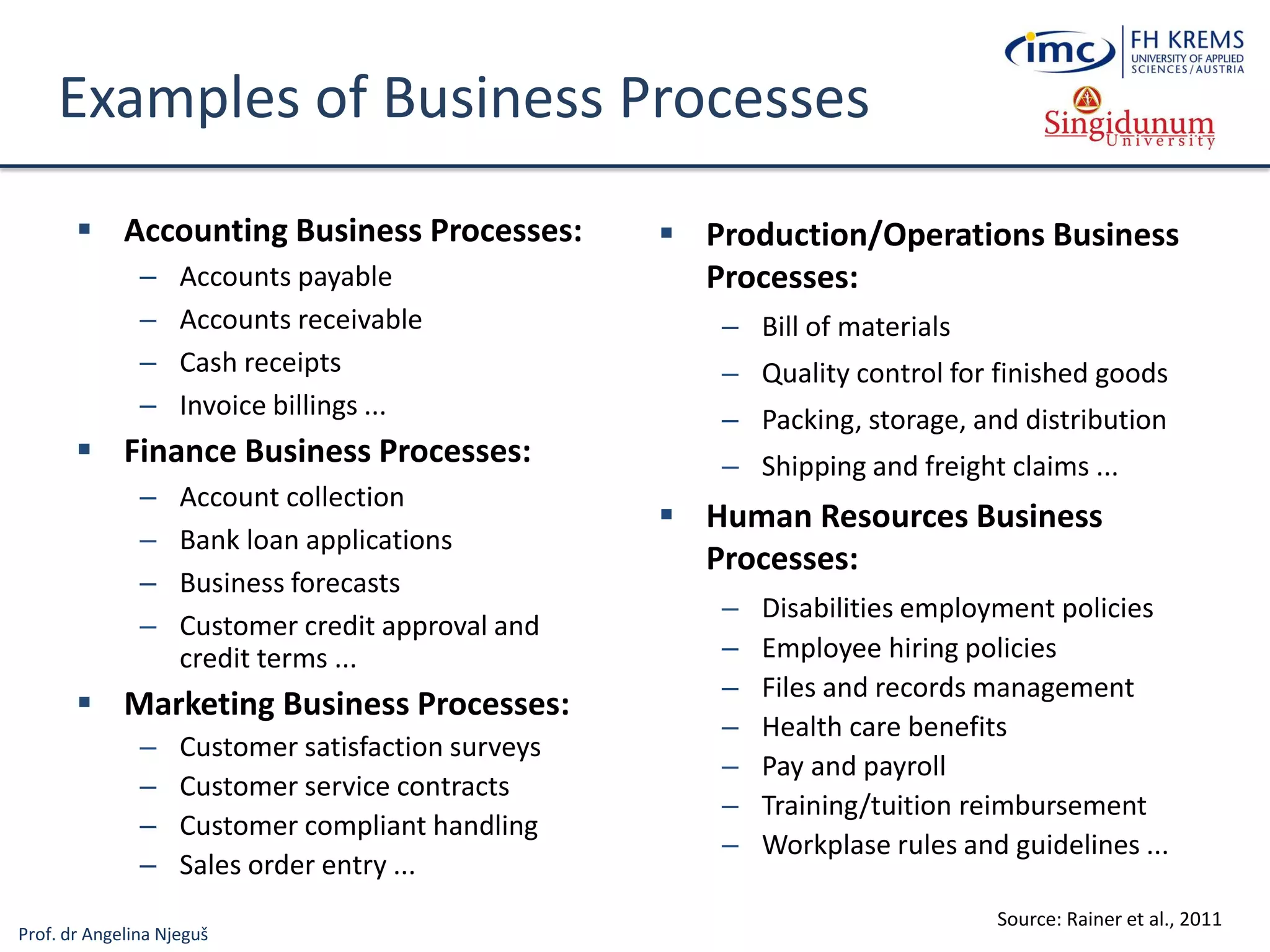
Examples of Business Processes
 Accounting Business Processes:
– Accounts payable
– Accounts receivable
– Cash receipts
– Invoice billings ...
 Finance Business Processes:
– Account collection
– Bank loan applications
– Business forecasts
– Customer credit approval and
credit terms ...
 Marketing Business Processes:
– Customer satisfaction surveys
– Customer service contracts
– Customer compliant handling
– Sales order entry ...
 Production/Operations Business
Processes:
– Bill of materials
– Quality control for finished goods
– Packing, storage, and distribution
– Shipping and freight claims ...
 Human Resources Business
Processes:
– Disabilities employment policies
– Employee hiring policies
– Files and records management
– Health care benefits
– Pay and payroll
– Training/tuition reimbursement
– Workplase rules and guidelines ...
Source: Rainer et al., 2011
Prof. dr Angelina Njeguš
Why are BPM systems important?
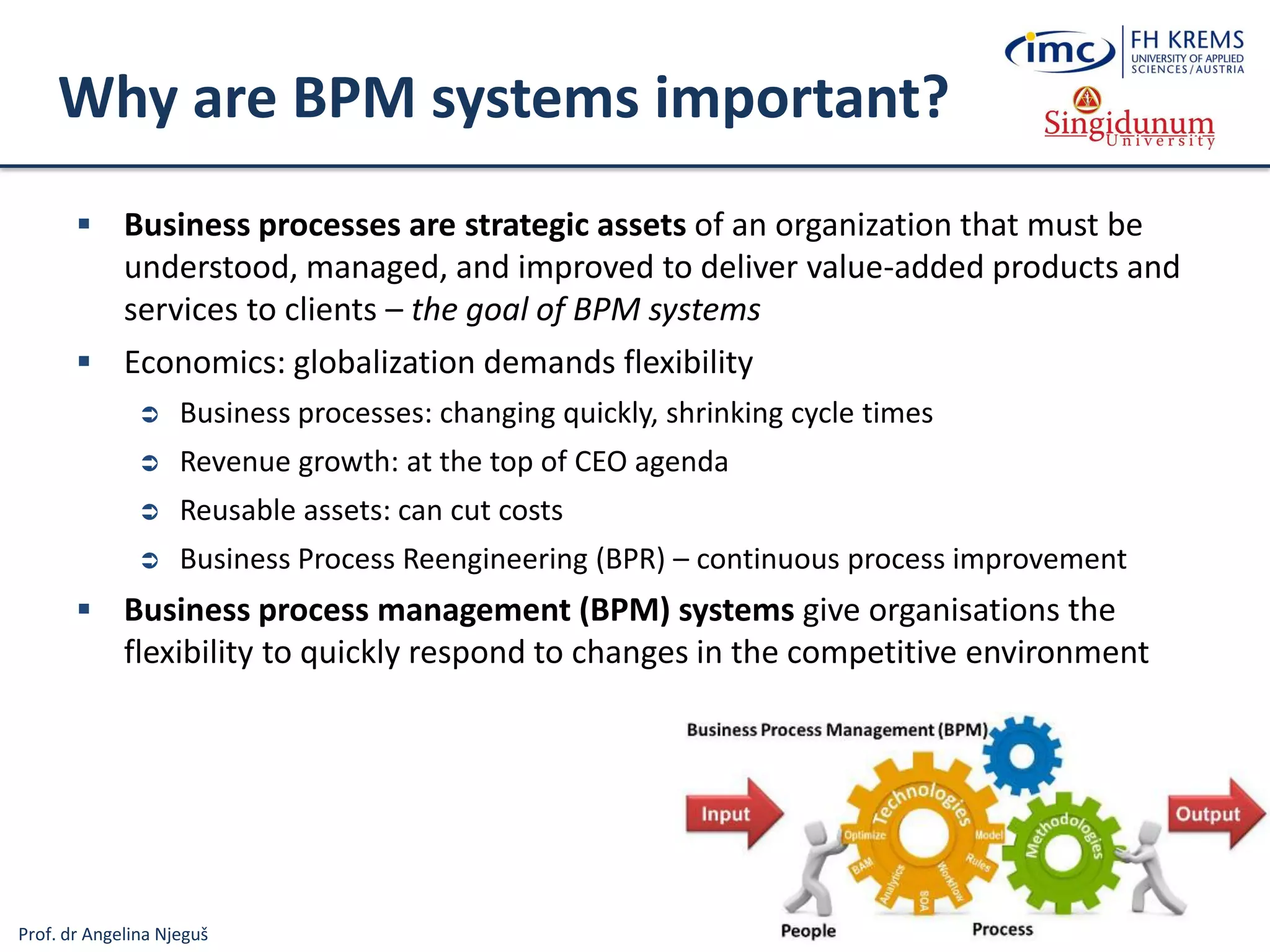
 Business processes are strategic assets of an organization that must be
understood, managed, and improved to deliver value-added products and
services to clients – the goal of BPM systems
 Economics: globalization demands flexibility
 Business processes: changing quickly, shrinking cycle times
 Revenue growth: at the top of CEO agenda
 Reusable assets: can cut costs
 Business Process Reengineering (BPR) – continuous process improvement
 Business process management (BPM) systems give organisations the
flexibility to quickly respond to changes in the competitive environment
Prof. dr Angelina Njeguš
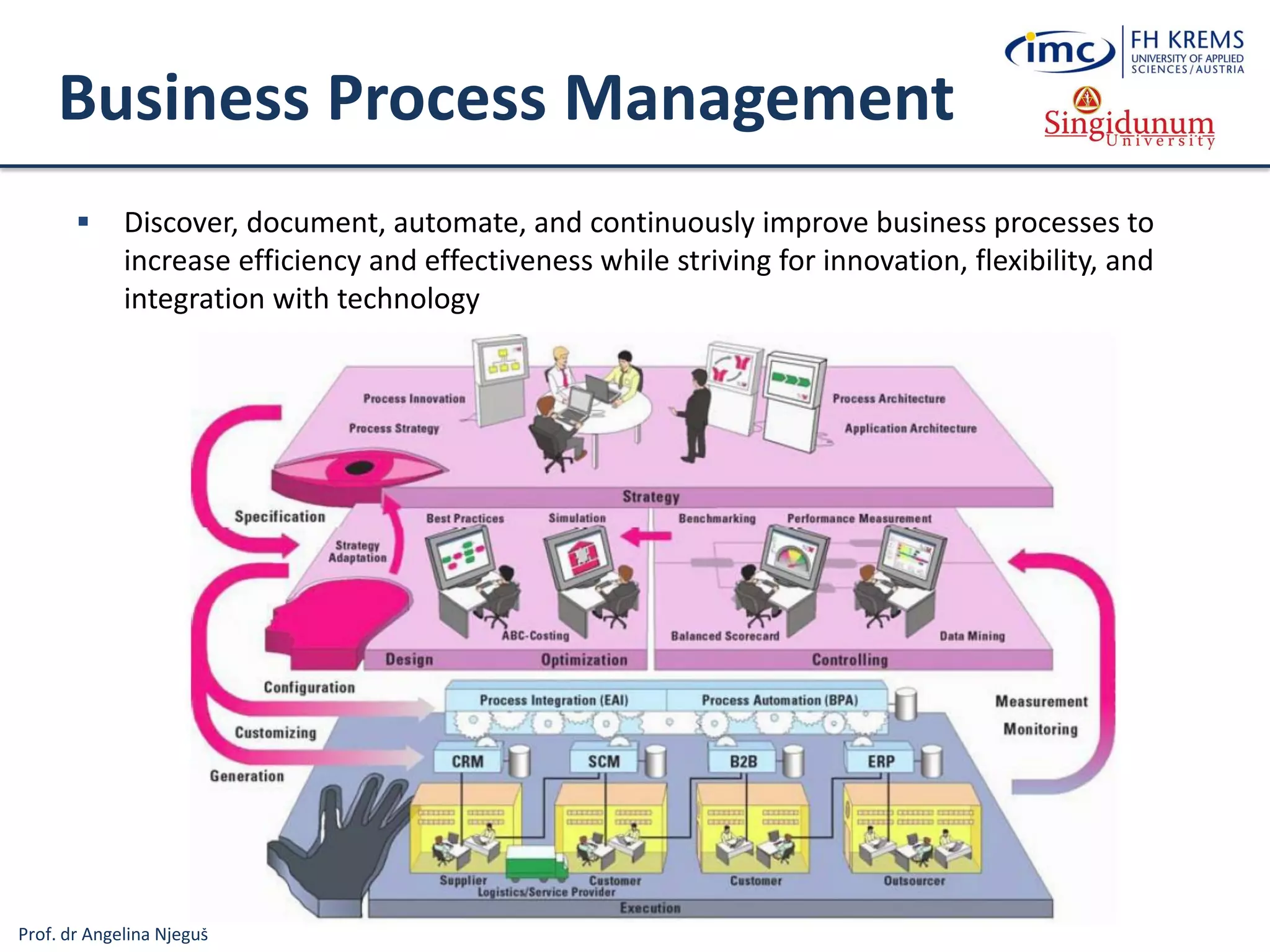
Business Process Management
 Discover, document, automate, and continuously improve business processes to
increase efficiency and effectiveness while striving for innovation, flexibility, and
integration with technology
Prof. dr Angelina Njeguš
Types of Information Systems
Information
Systems
Operations
Information Systems
Transaction
Processing
Systems
Business
Process
Management
Systems
Office and
Collaboration
Systems
Business Intelligence
Systems
Management
Information
Systems
Decision
Support
Systems
Executive
Information
Systems
Business
Operations
Support
Decision
making
support
Systems for Process
Modelling, Simulation,
Execution, Control and
Optimisation
Processing Business
Transactions
Prespecified Reporting
for Managers
(Operational BI…)
Interactive Decision
Support (Data
Mining method
analysis ...)
Critical Information
for Senior
Management (BSC,
KPI, Strategic BI …)
Expert Systems
Knowledge
Management
Systems
Manage Organisational
Knowledge (ITIL, ISO
Standards …)
Office and Team
and Workgroup
Collaboration
Systems
Specialised
Information
Systems
Virtual Reality
3D Simulation of a Real or
Imaginary Environment
(tool for communication,
entertainment, and learning)
Emulates Expert
Problem Solving
Geographic
Information
Systems
Intelligent
Maps
Prof. dr Angelina Njeguš
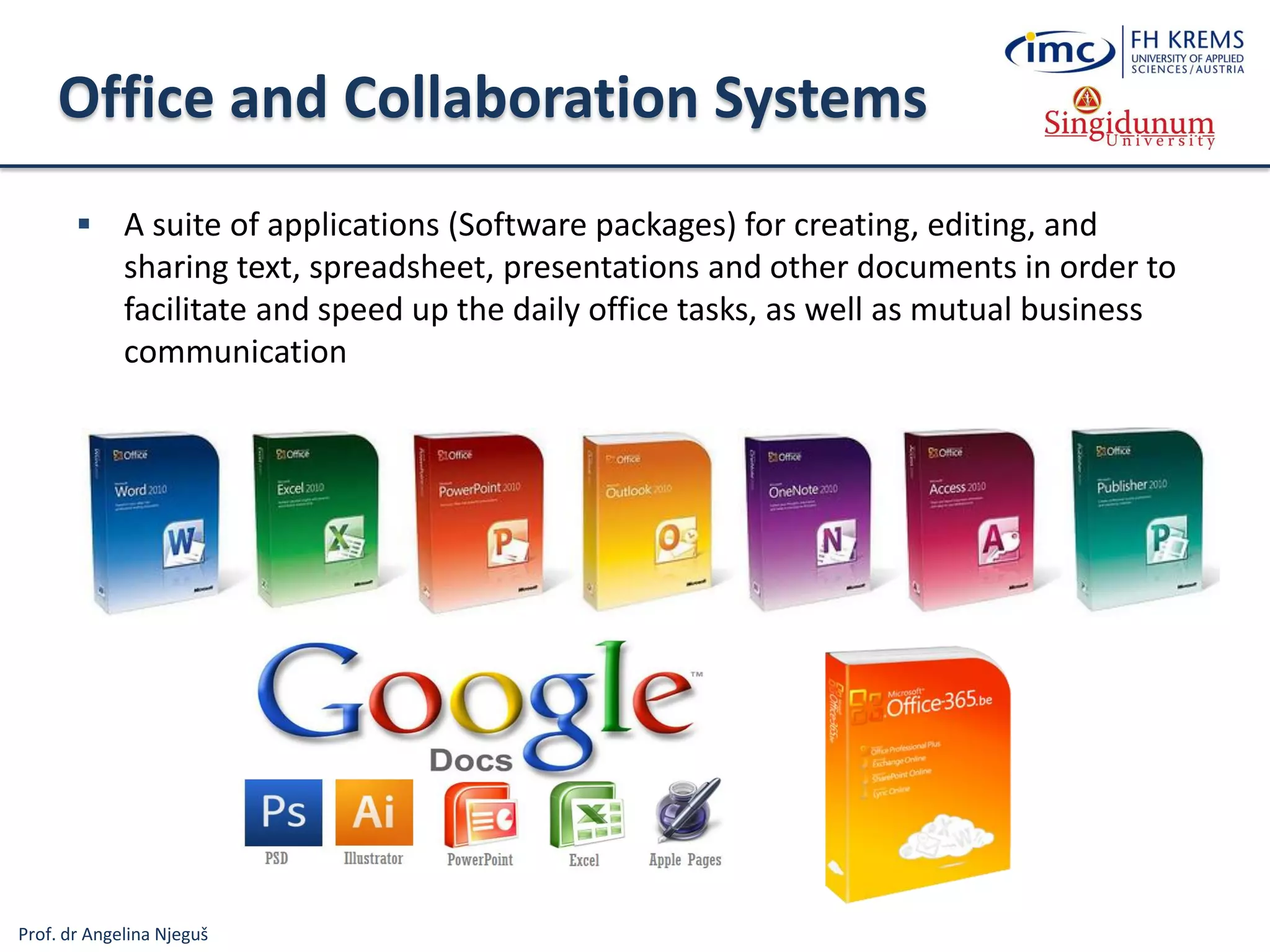
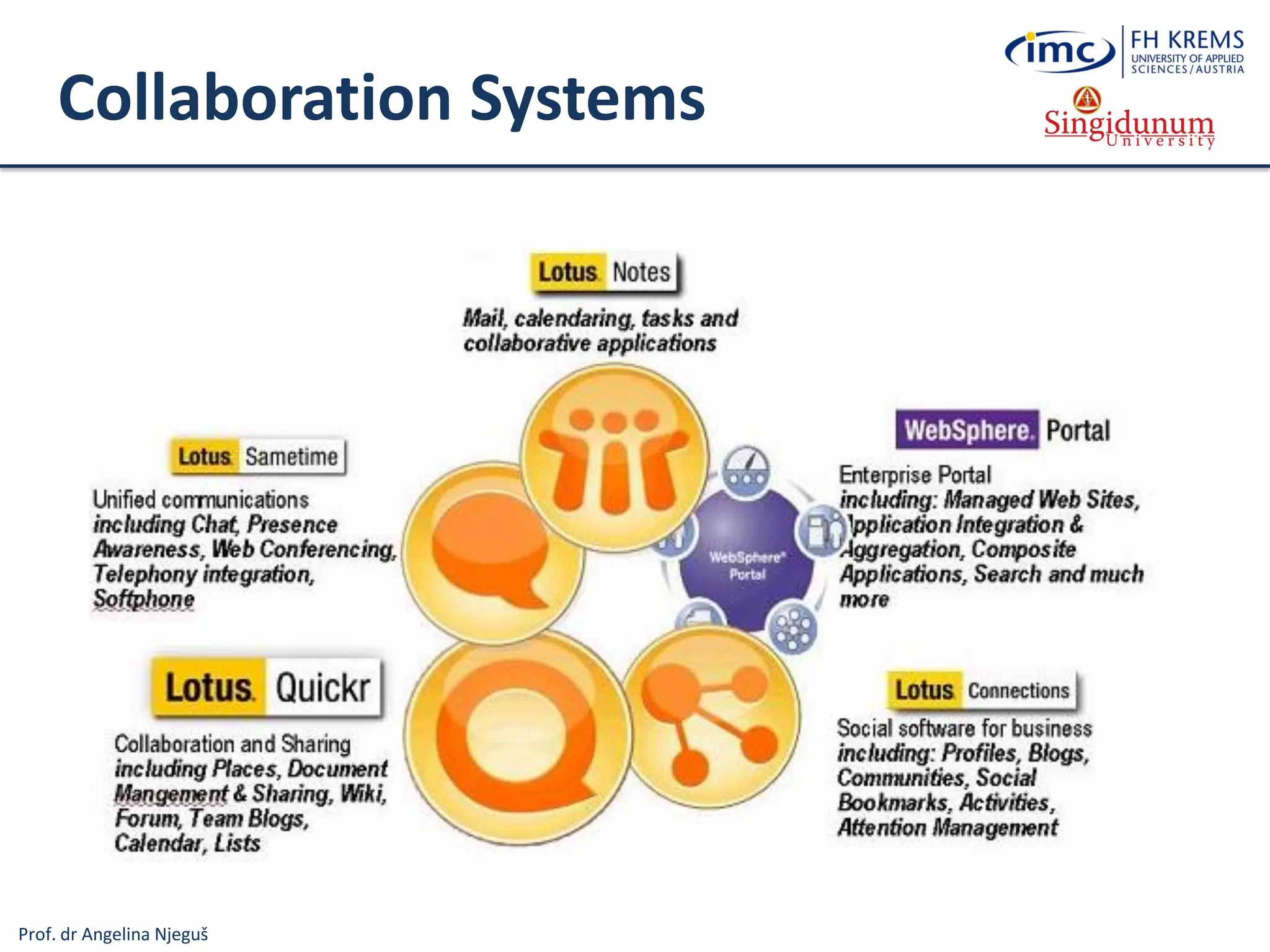
Office and Collaboration Systems
 A suite of applications (Software packages) for creating, editing, and
sharing text, spreadsheet, presentations and other documents in order to
facilitate and speed up the daily office tasks, as well as mutual business
communication
Prof. dr Angelina Njeguš
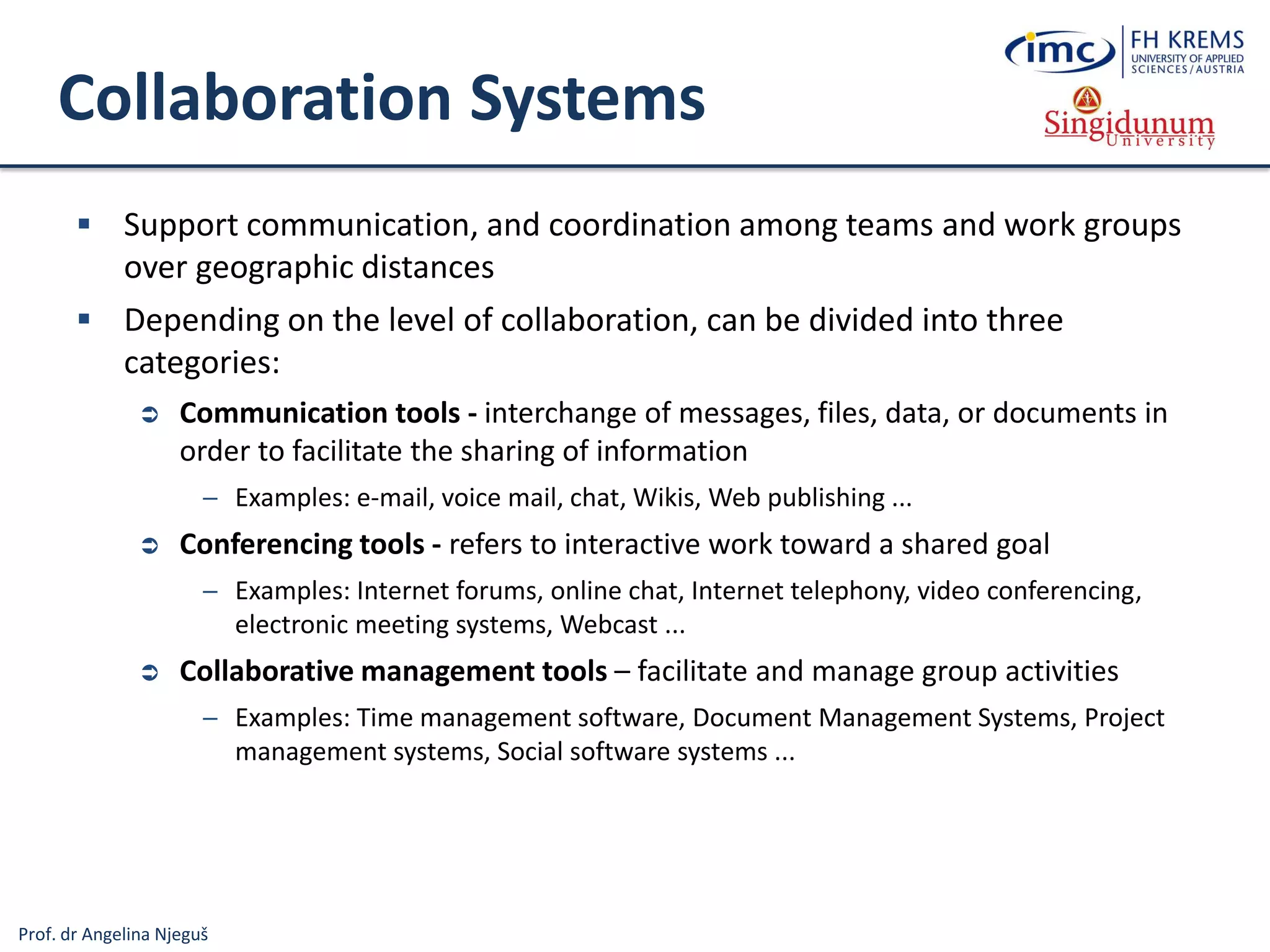
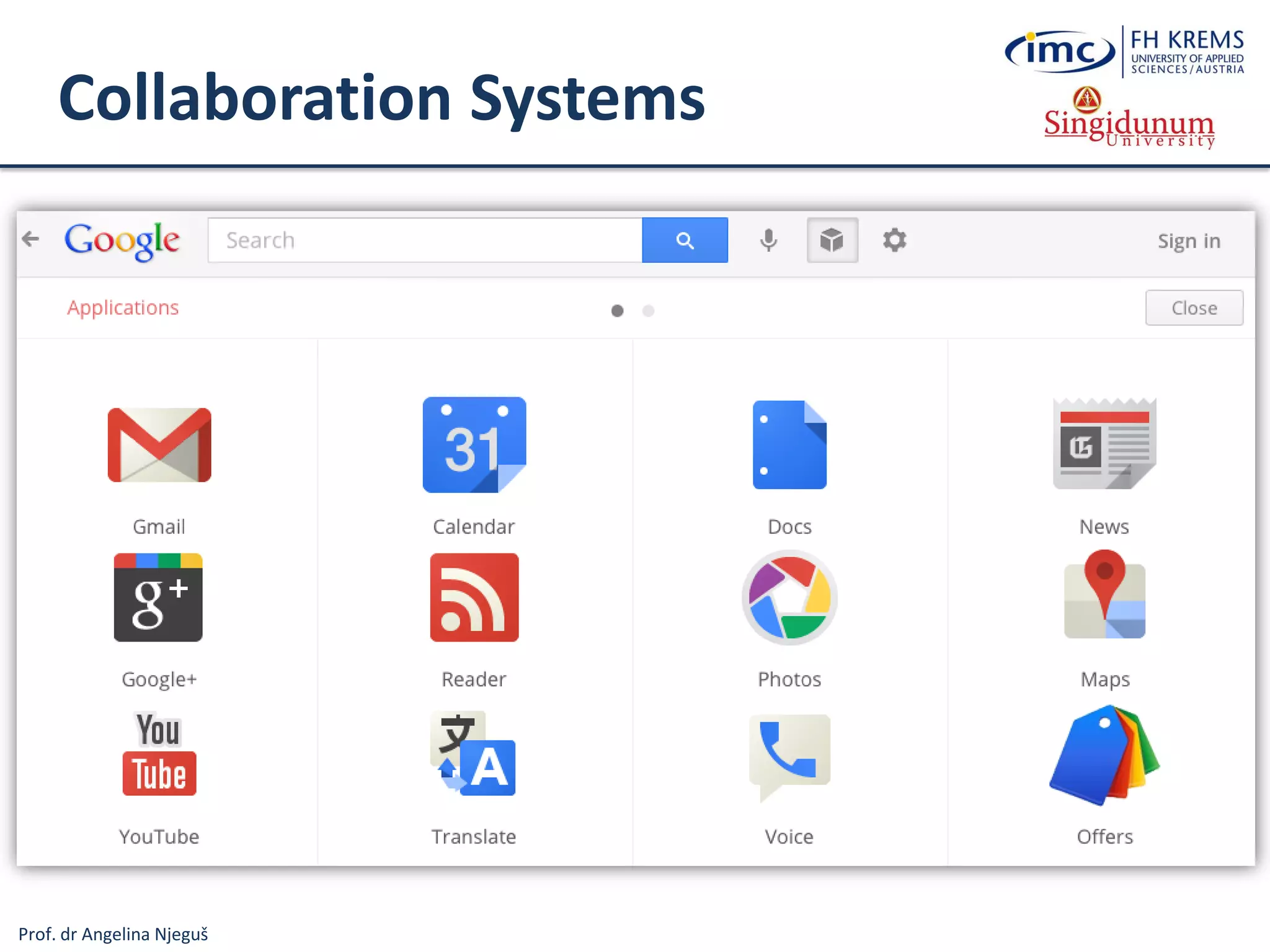
Collaboration Systems
 Support communication, and coordination among teams and work groups
over geographic distances
 Depending on the level of collaboration, can be divided into three
categories:
 Communication tools - interchange of messages, files, data, or documents in
order to facilitate the sharing of information
─ Examples: e-mail, voice mail, chat, Wikis, Web publishing ...
 Conferencing tools - refers to interactive work toward a shared goal
─ Examples: Internet forums, online chat, Internet telephony, video conferencing,
electronic meeting systems, Webcast ...
 Collaborative management tools – facilitate and manage group activities
─ Examples: Time management software, Document Management Systems, Project
management systems, Social software systems ...
Prof. dr Angelina Njeguš
Collaboration Systems
Prof. dr Angelina Njeguš
Collaboration Systems
Prof. dr Angelina Njeguš
Types of Information Systems
Information
Systems
Operations
Information Systems
Transaction
Processing
Systems
Business
Process
Management
Systems
Office and
Collaboration
Systems
Business Intelligence
Systems
Management
Information
Systems
Decision
Support
Systems
Executive
Information
Systems
Business
Operations
Support
Decision
making
support
Systems for Process
Modelling, Simulation,
Execution, Control and
Optimisation
Processing Business
Transactions
Prespecified Reporting
for Managers
(Operational BI…)
Interactive Decision
Support (Data
Mining method
analysis ...)
Critical Information
for Senior
Management (BSC,
KPI, Strategic BI …)
Expert Systems
Knowledge
Management
Systems
Manage Organisational
Knowledge (ITIL, ISO
Standards …)
Office and Team
and Workgroup
Collaboration
Systems
Specialised
Information
Systems
Virtual Reality
3D Simulation of a Real or
Imaginary Environment
(tool for communication,
entertainment, and learning)
Emulates Expert
Problem Solving
Geographic
Information
Systems
Intelligent
Maps
Prof. dr Angelina Njeguš
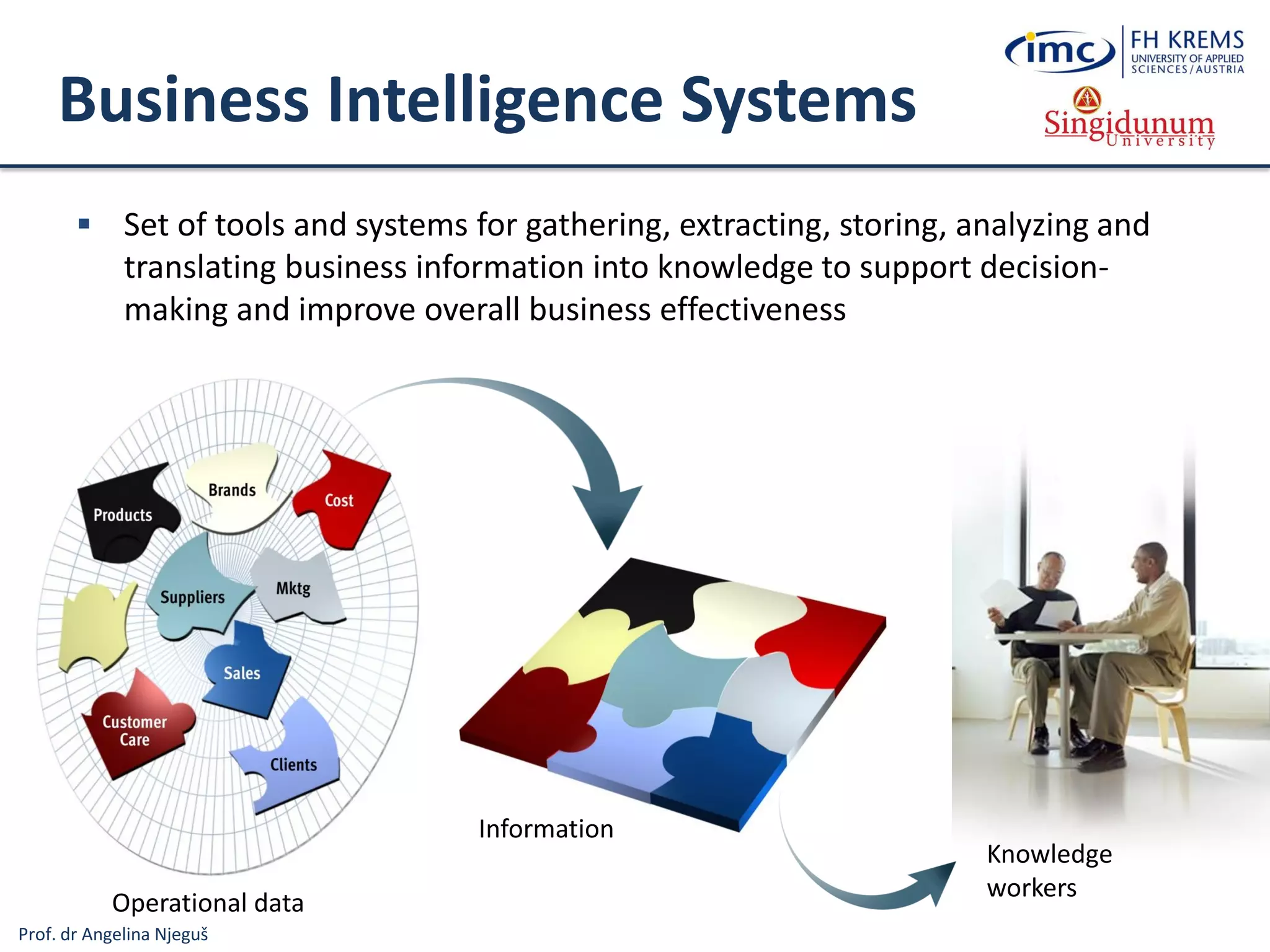
Operational data
Information
Business Intelligence Systems
 Set of tools and systems for gathering, extracting, storing, analyzing and
translating business information into knowledge to support decision-
making and improve overall business effectiveness
Knowledge
workers
Prof. dr Angelina Njeguš
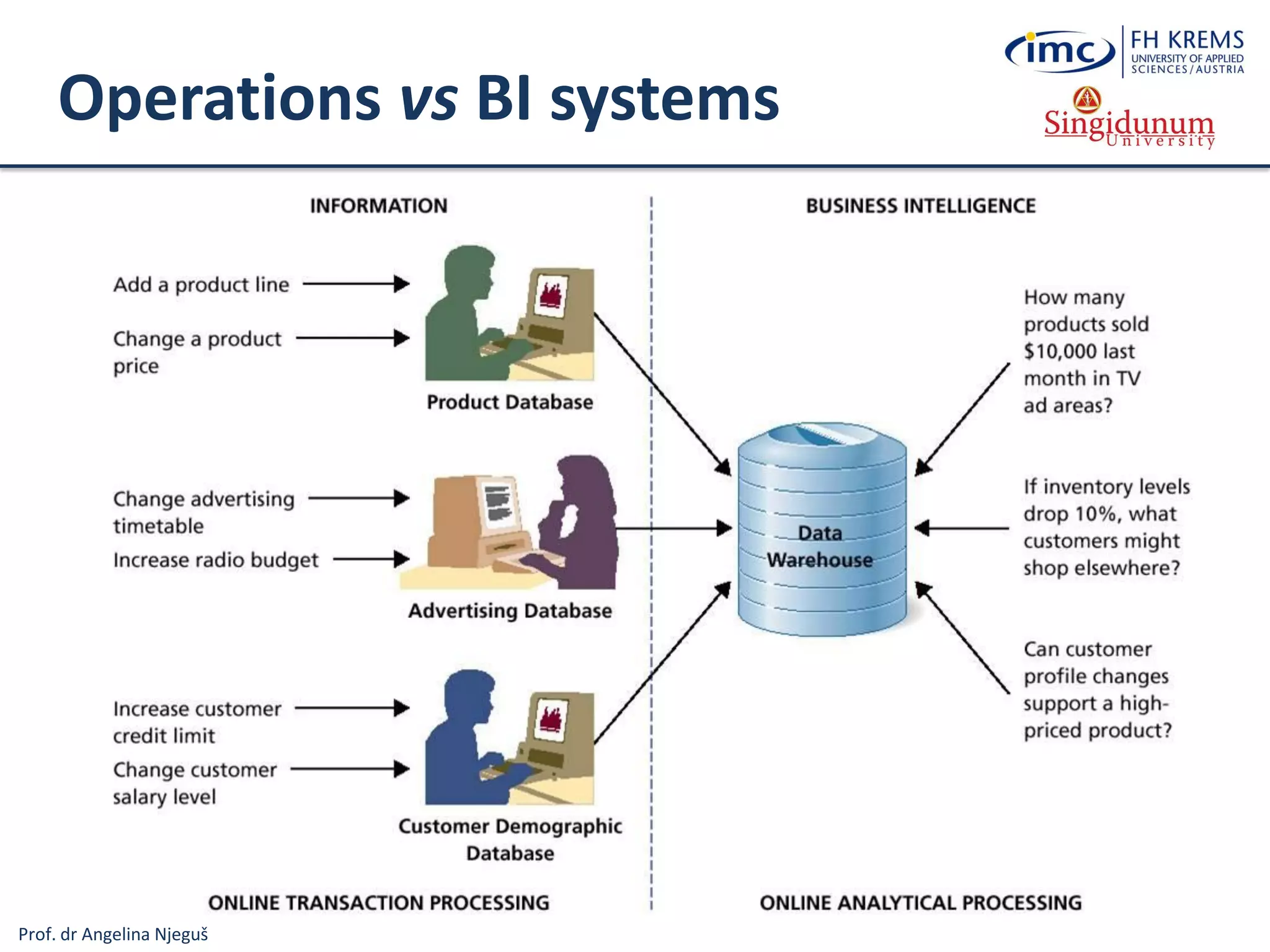
Operations vs BI systems
Prof. dr Angelina Njeguš
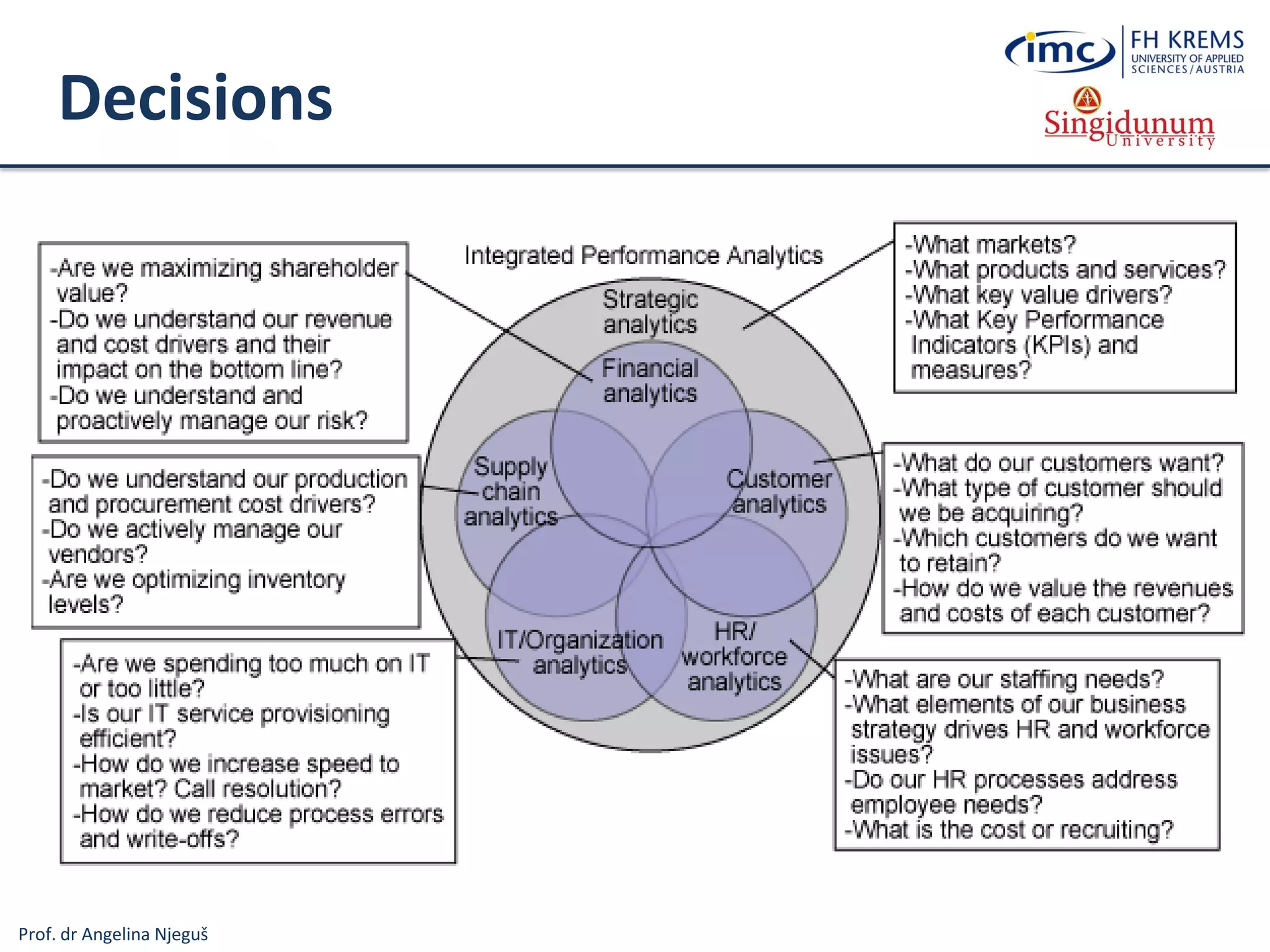
Decisions
Prof. dr Angelina Njeguš
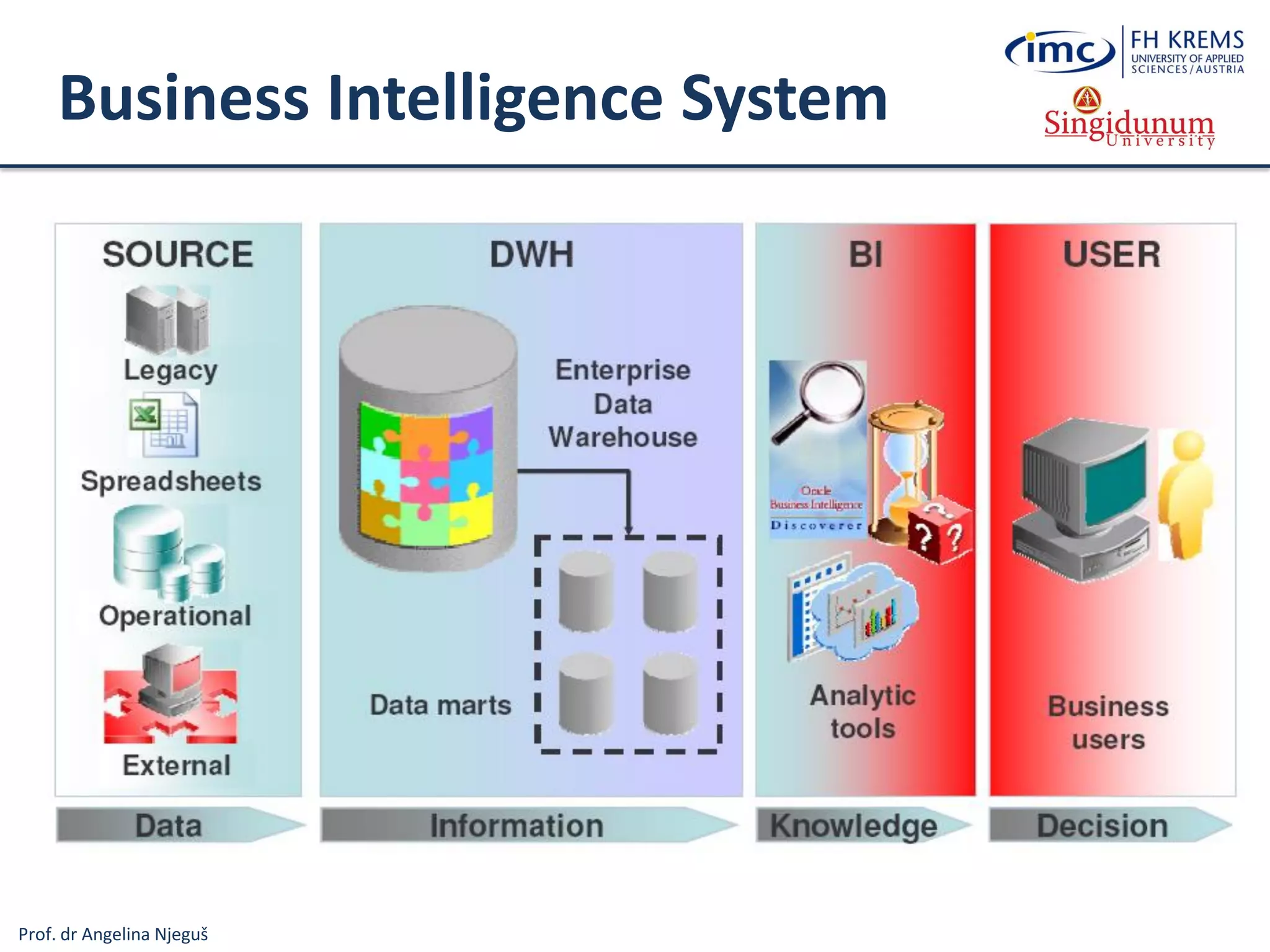
Business Intelligence System
Prof. dr Angelina Njeguš
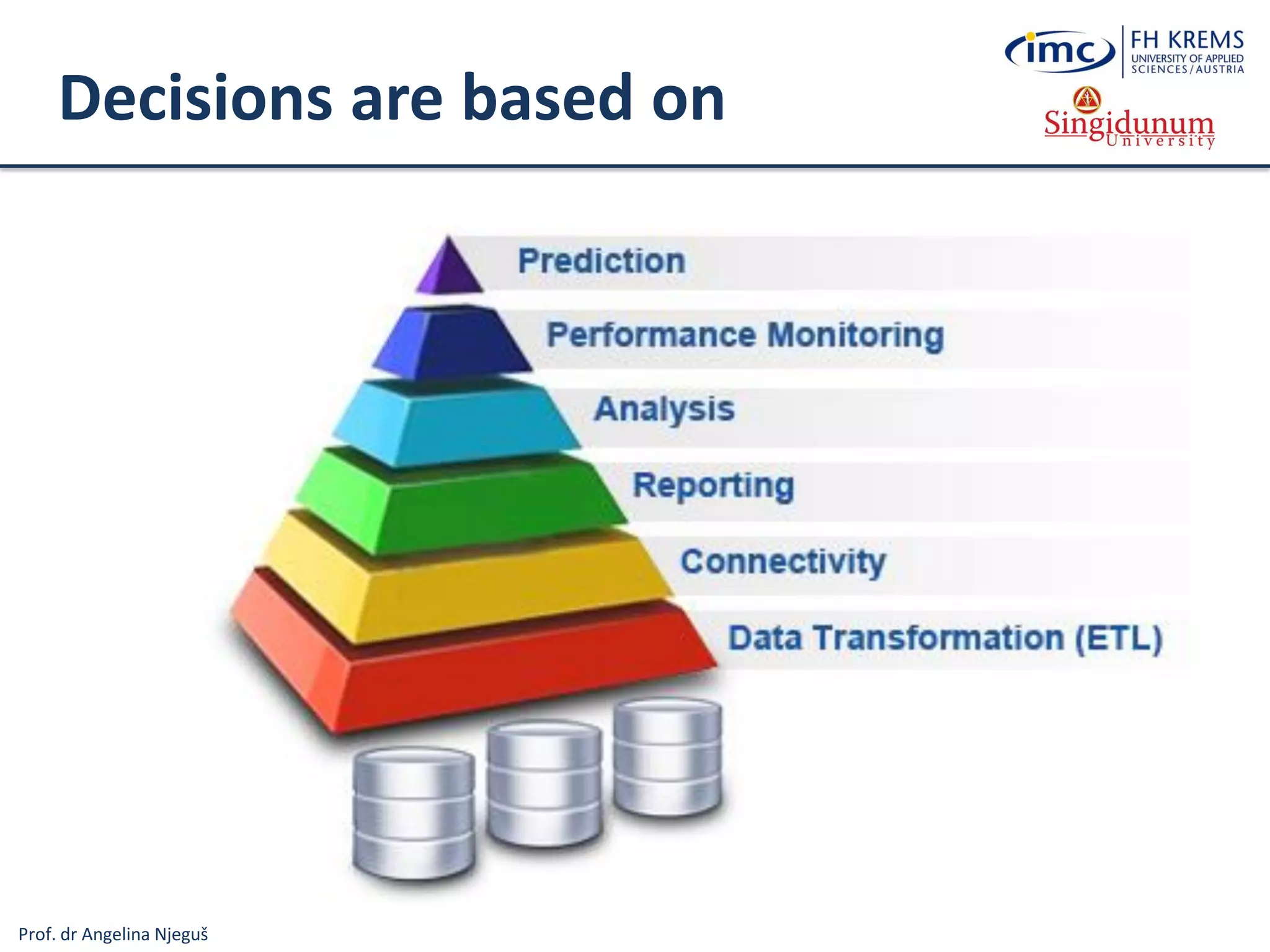
Decisions are based on
Prof. dr Angelina Njeguš
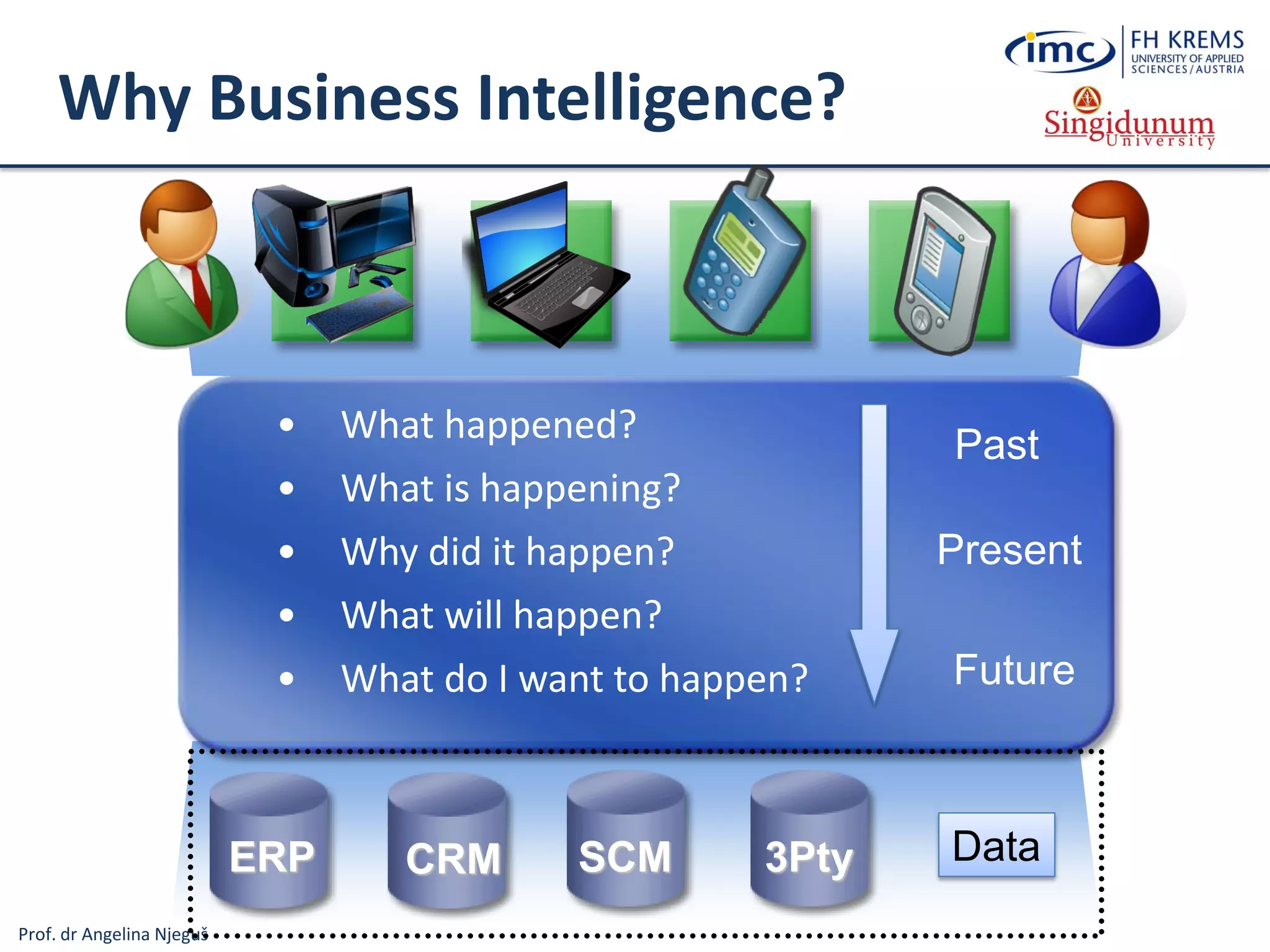
Why Business Intelligence?
• What happened?
• What is happening?
• Why did it happen?
• What will happen?
• What do I want to happen?
ERP CRM 3PtySCM
Past
Present
Future
Data
Prof. dr Angelina Njeguš
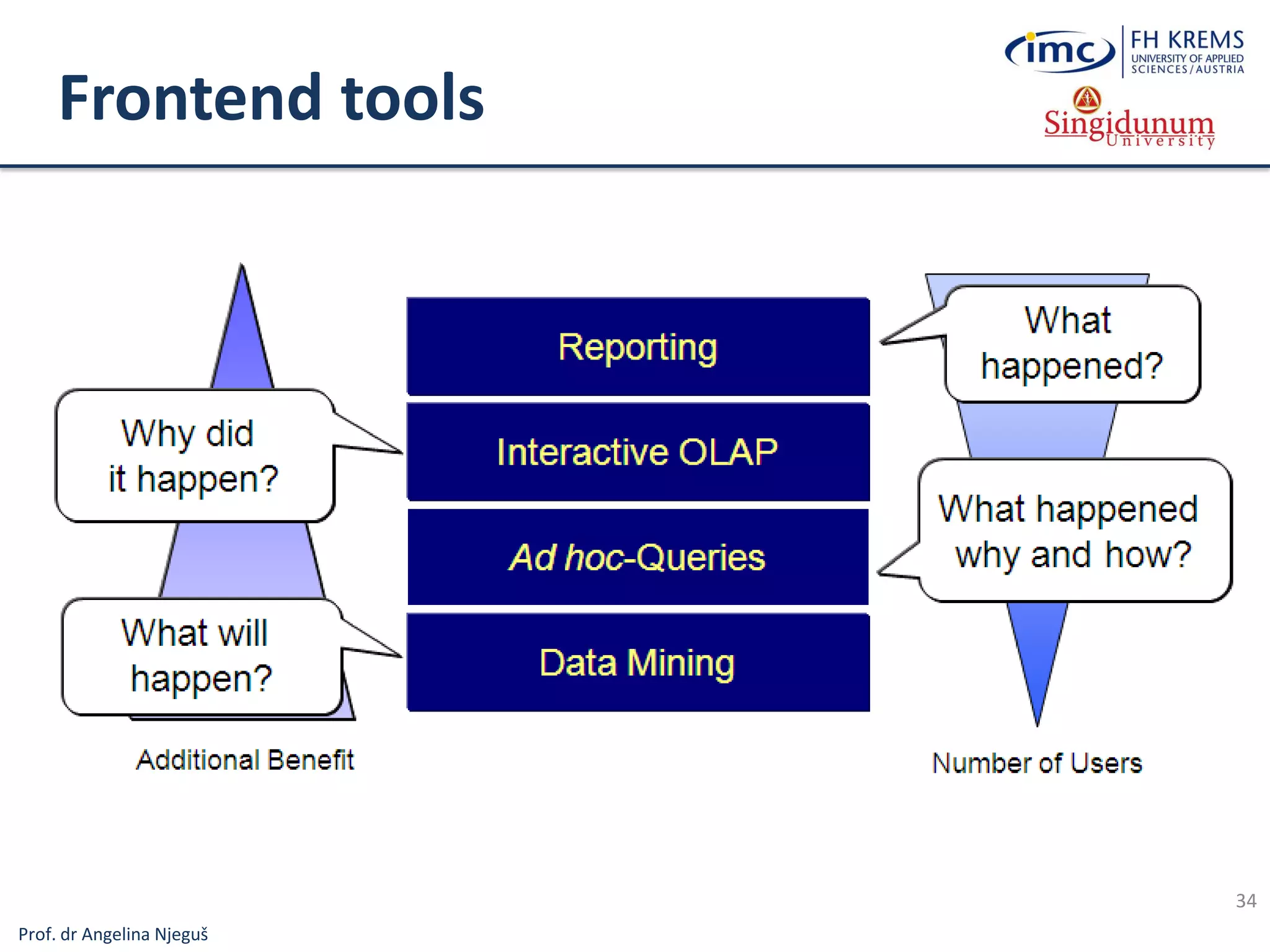
Frontend tools
34
Prof. dr Angelina Njeguš
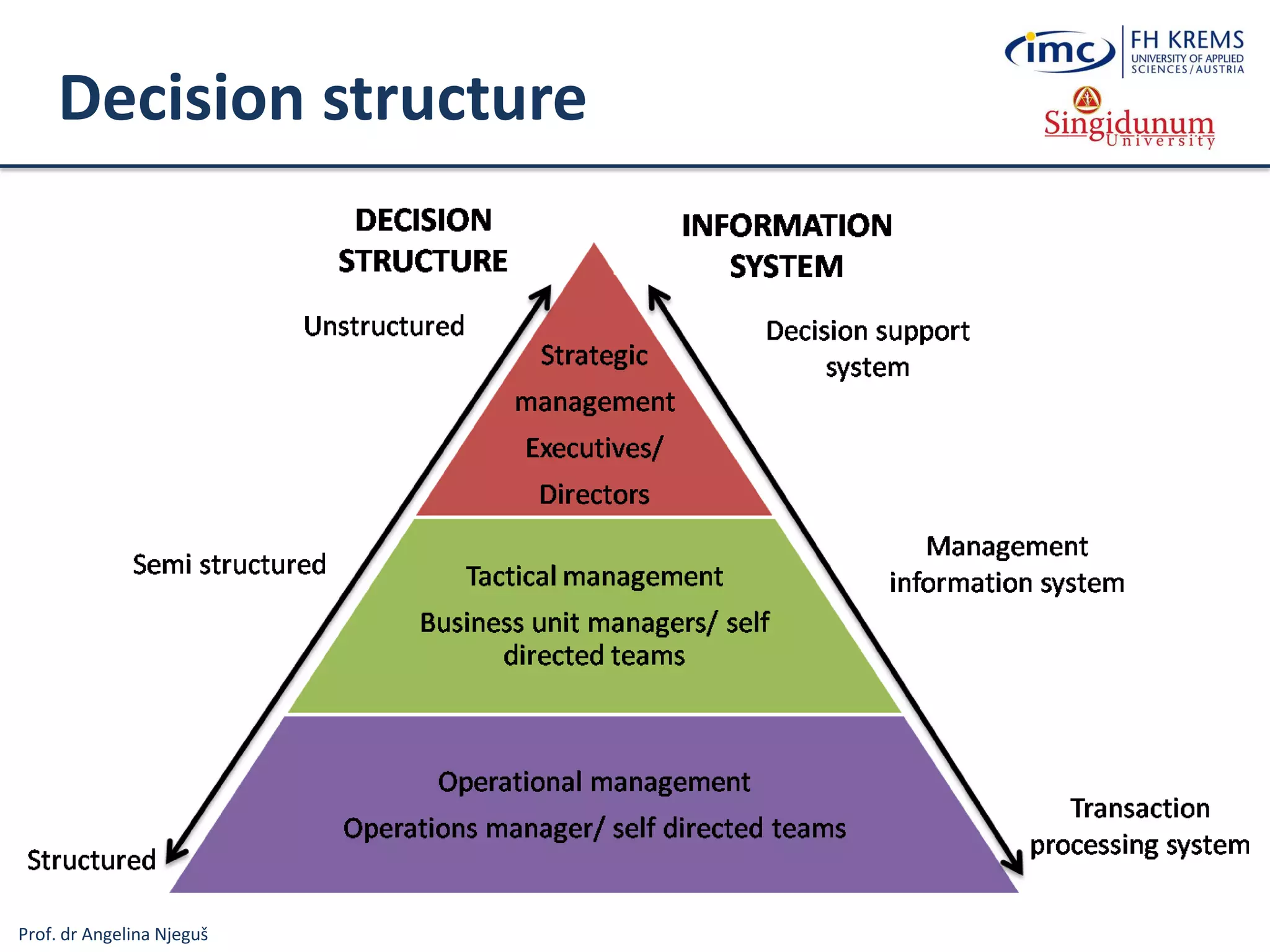
Decision structure
Prof. dr Angelina Njeguš
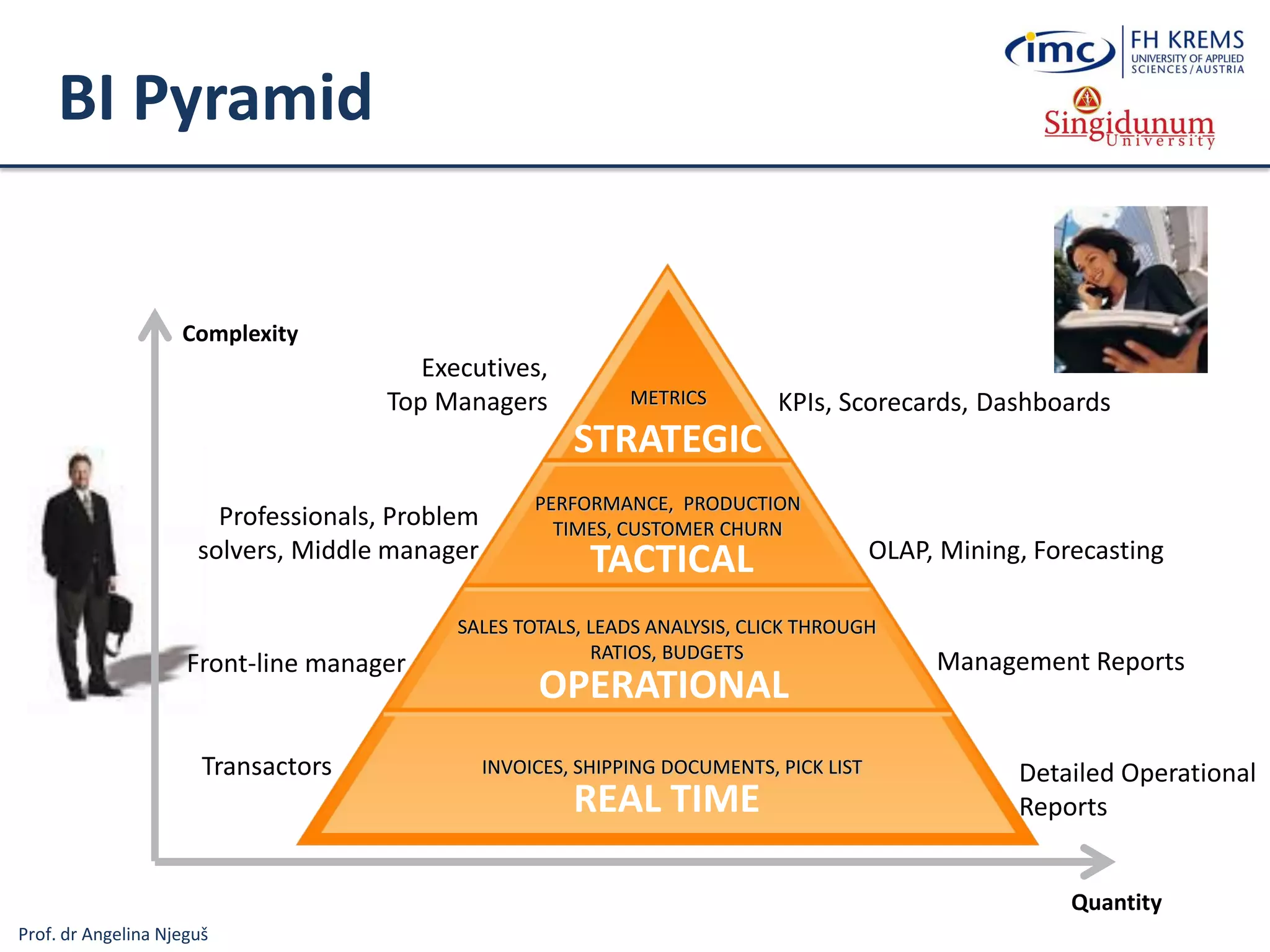
BI Pyramid
KPIs, Scorecards, Dashboards
OLAP, Mining, Forecasting
Management Reports
Detailed Operational
Reports
INVOICES, SHIPPING DOCUMENTS, PICK LIST
SALES TOTALS, LEADS ANALYSIS, CLICK THROUGH
RATIOS, BUDGETS
PERFORMANCE, PRODUCTION
TIMES, CUSTOMER CHURN
METRICS
Complexity
Quantity
Executives,
Top Managers
Professionals, Problem
solvers, Middle manager
Front-line manager
Transactors
OPERATIONAL
TACTICAL
STRATEGIC
REAL TIME
Prof. dr Angelina Njeguš
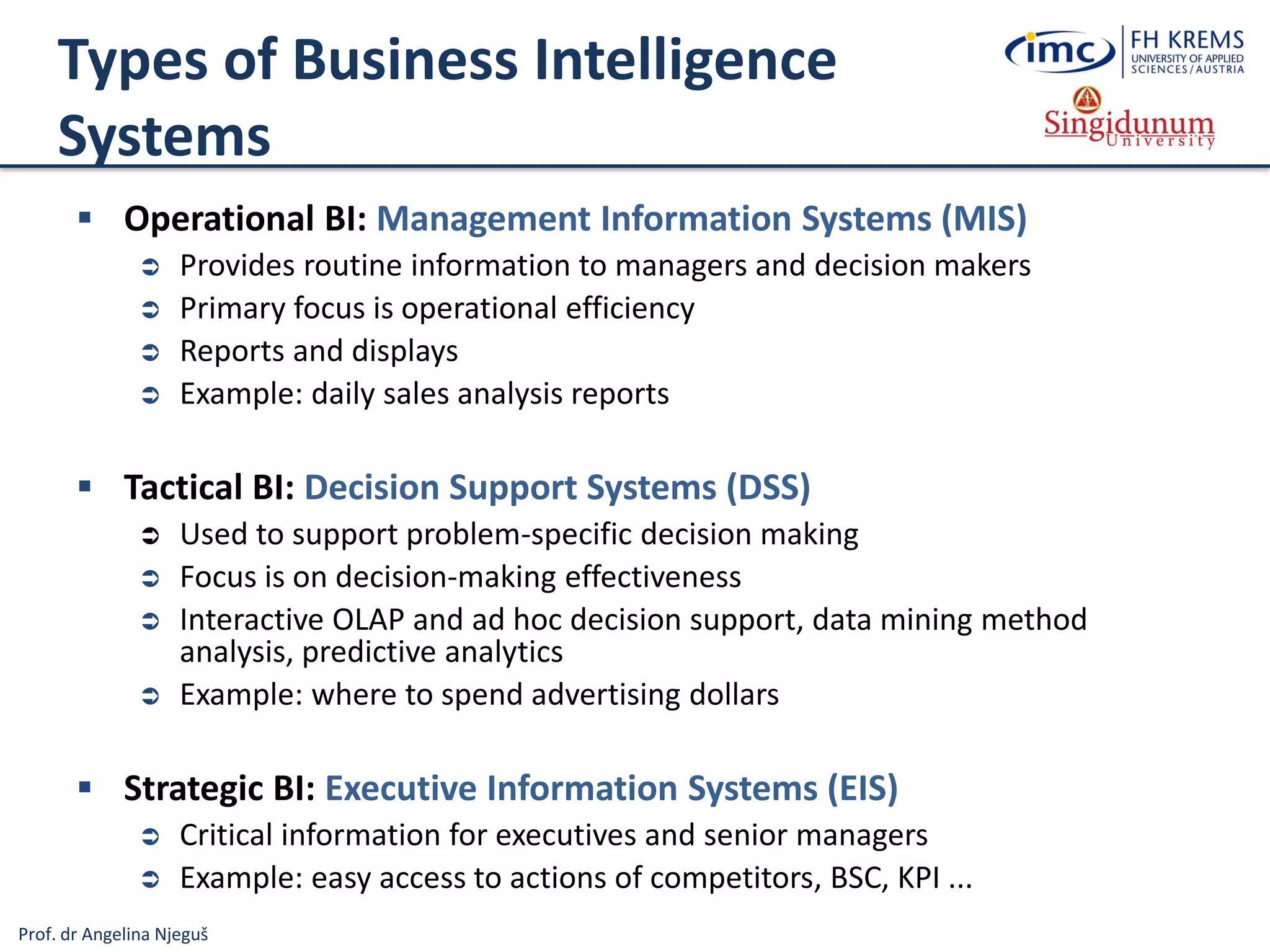
Types of Business Intelligence
Systems
 Operational BI: Management Information Systems (MIS)
 Provides routine information to managers and decision makers
 Primary focus is operational efficiency
 Reports and displays
 Example: daily sales analysis reports
 Tactical BI: Decision Support Systems (DSS)
 Used to support problem-specific decision making
 Focus is on decision-making effectiveness
 Interactive OLAP and ad hoc decision support, data mining method
analysis, predictive analytics
 Example: where to spend advertising dollars
 Strategic BI: Executive Information Systems (EIS)
 Critical information for executives and senior managers
 Example: easy access to actions of competitors, BSC, KPI ...
Prof. dr Angelina Njeguš
Types of Information Systems
Information
Systems
Operations
Information Systems
Transaction
Processing
Systems
Business
Process
Management
Systems
Office and
Collaboration
Systems
Business Intelligence
Systems
Management
Information
Systems
Decision
Support
Systems
Executive
Information
Systems
Business
Operations
Support
Decision
making
support
Systems for Process
Modelling, Simulation,
Execution, Control and
Optimisation
Processing Business
Transactions
Prespecified Reporting
for Managers
(Operational BI…)
Interactive Decision
Support (Data
Mining method
analysis ...)
Critical Information
for Senior
Management (BSC,
KPI, Strategic BI …)
Expert Systems
Knowledge
Management
Systems
Manage Organisational
Knowledge (ITIL, ISO
Standards …)
Office and Team
and Workgroup
Collaboration
Systems
Specialised
Information
Systems
Virtual Reality
3D Simulation of a Real or
Imaginary Environment
(tool for communication,
entertainment, and learning)
Emulates Expert
Problem Solving
Geographic
Information
Systems
Intelligent
Maps
Prof. dr Angelina Njeguš
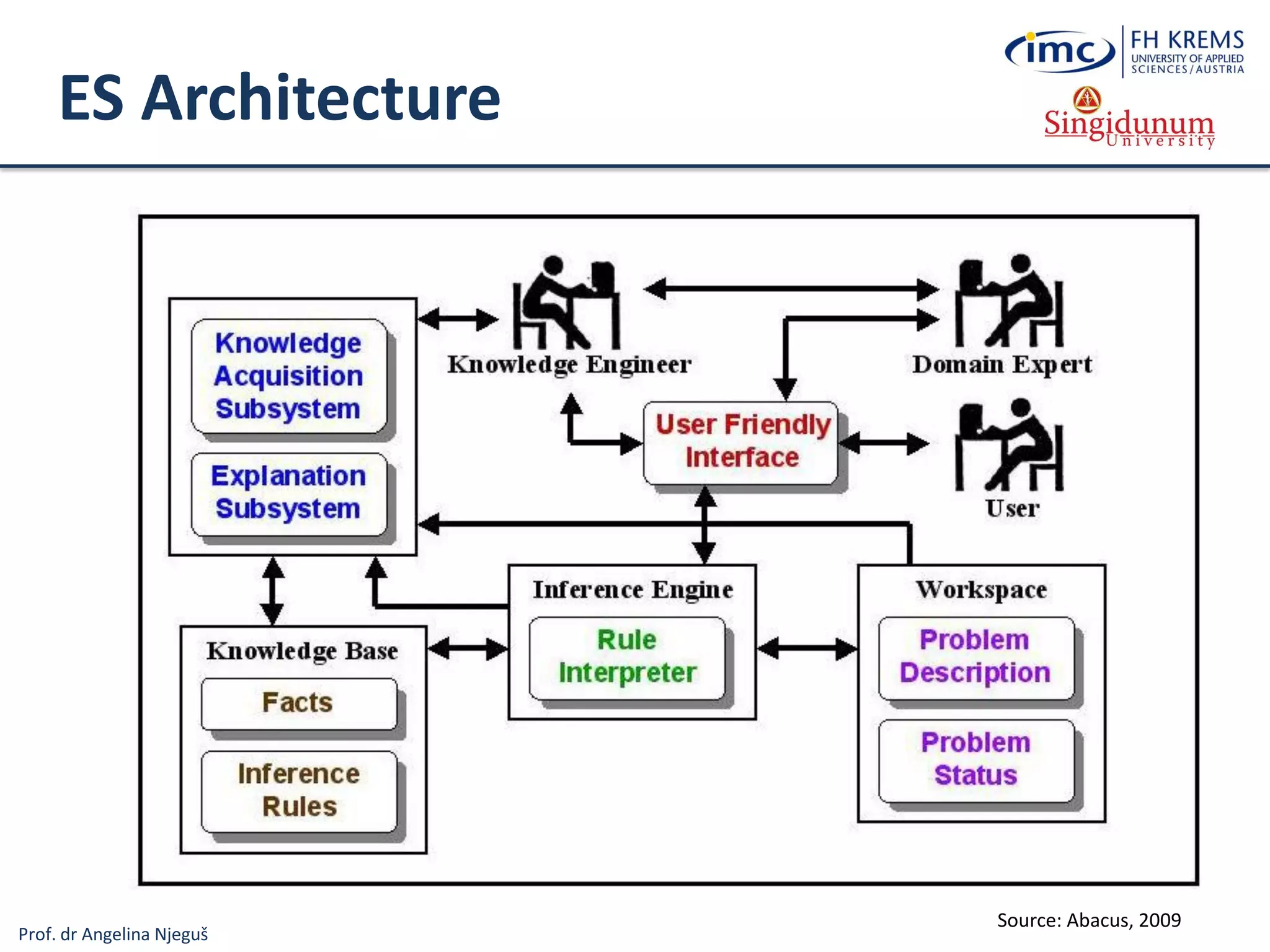
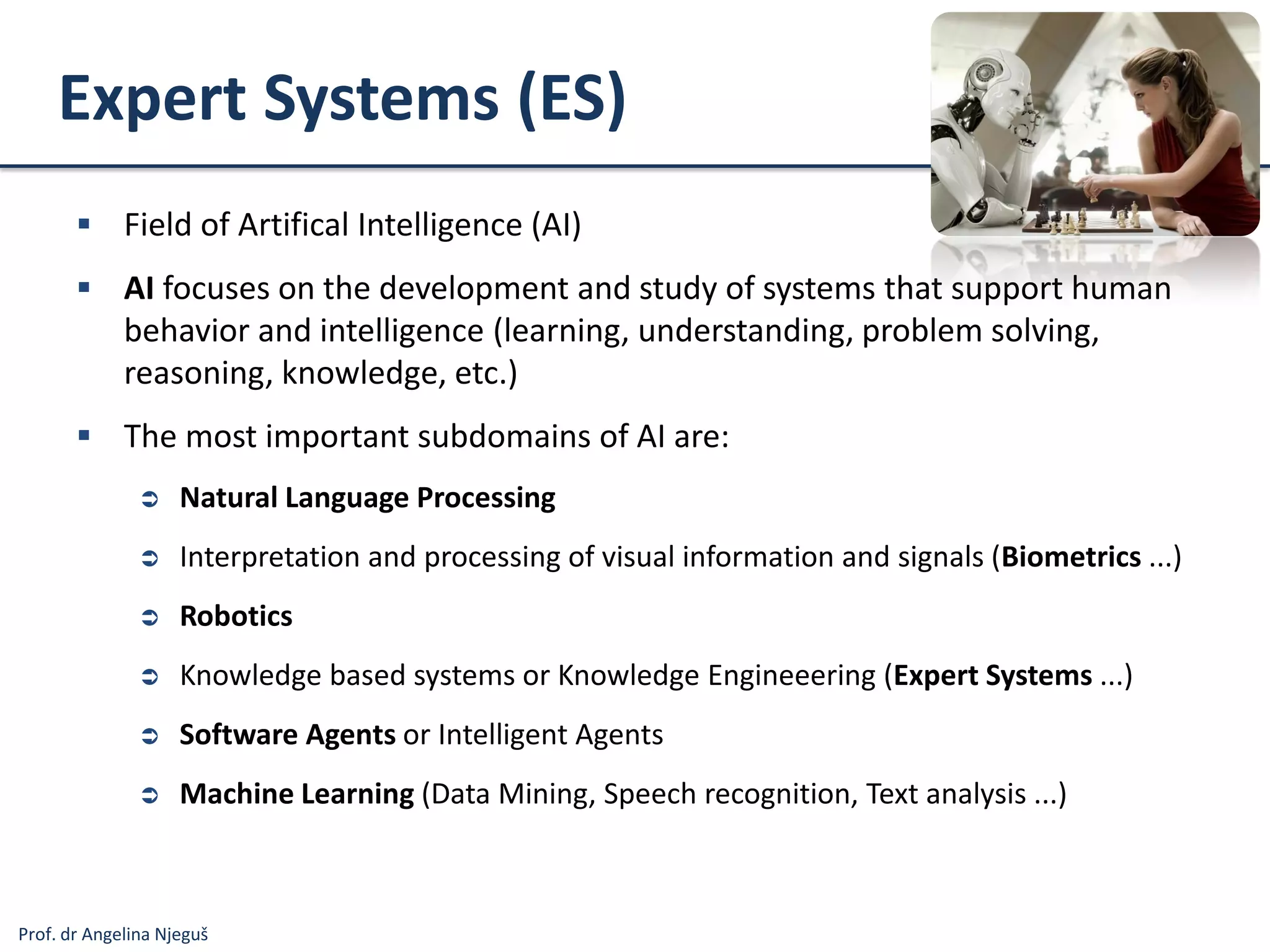
Expert Systems (ES)
 Field of Artifical Intelligence (AI)
 AI focuses on the development and study of systems that support human
behavior and intelligence (learning, understanding, problem solving,
reasoning, knowledge, etc.)
 The most important subdomains of AI are:
 Natural Language Processing
 Interpretation and processing of visual information and signals (Biometrics ...)
 Robotics
 Knowledge based systems or Knowledge Engineeering (Expert Systems ...)
 Software Agents or Intelligent Agents
 Machine Learning (Data Mining, Speech recognition, Text analysis ...)
Prof. dr Angelina Njeguš
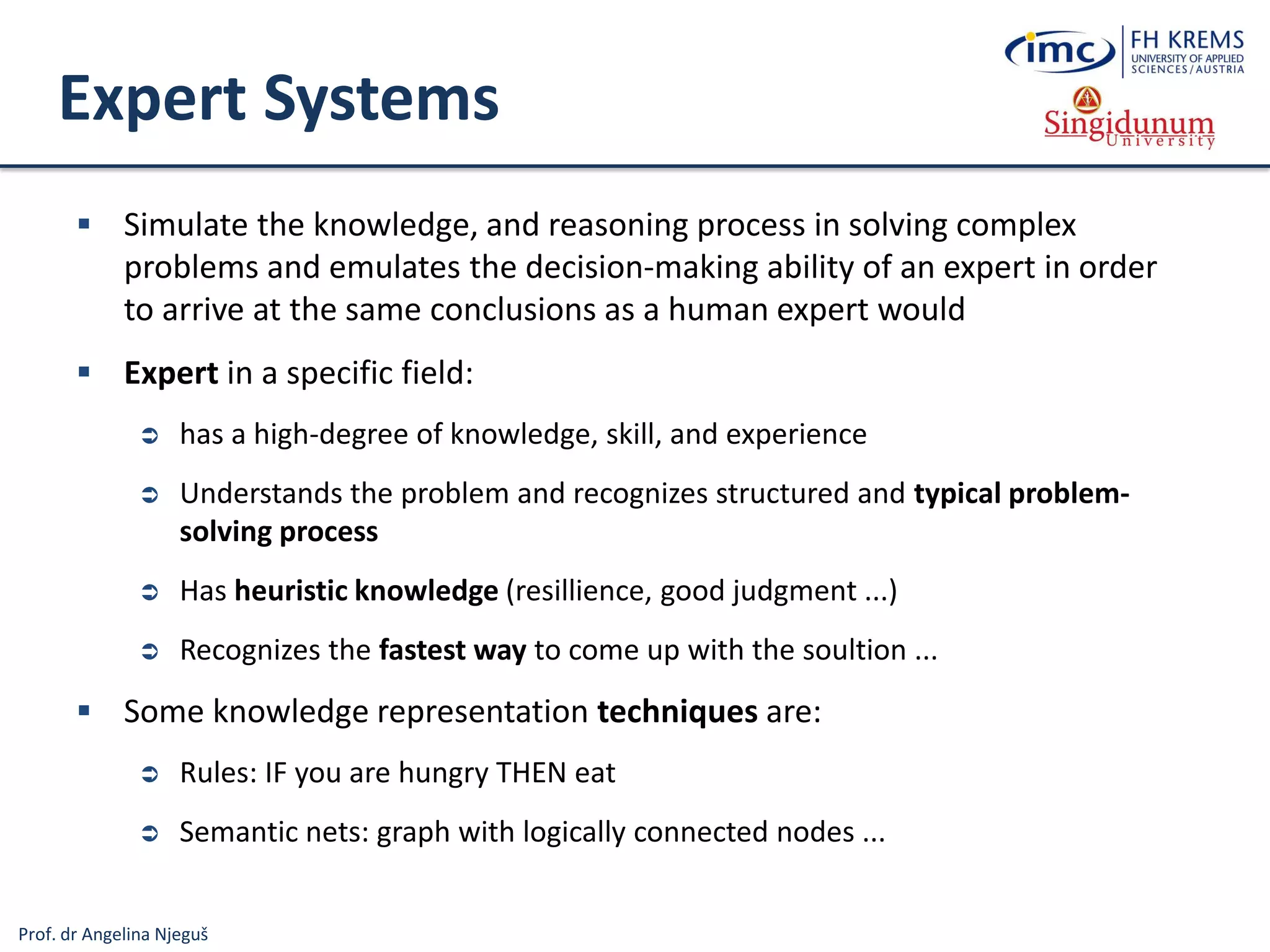
Expert Systems
 Simulate the knowledge, and reasoning process in solving complex
problems and emulates the decision-making ability of an expert in order
to arrive at the same conclusions as a human expert would
 Expert in a specific field:
 has a high-degree of knowledge, skill, and experience
 Understands the problem and recognizes structured and typical problem-
solving process
 Has heuristic knowledge (resillience, good judgment ...)
 Recognizes the fastest way to come up with the soultion ...
 Some knowledge representation techniques are:
 Rules: IF you are hungry THEN eat
 Semantic nets: graph with logically connected nodes ...
Prof. dr Angelina Njeguš
ES Architecture
Source: Abacus, 2009
Prof. dr Angelina Njeguš
Types of Information Systems
Information
Systems
Operations
Information Systems
Transaction
Processing
Systems
Business
Process
Management
Systems
Office and
Collaboration
Systems
Business Intelligence
Systems
Management
Information
Systems
Decision
Support
Systems
Executive
Information
Systems
Business
Operations
Support
Decision
making
support
Systems for Process
Modelling, Simulation,
Execution, Control and
Optimisation
Processing Business
Transactions
Prespecified Reporting
for Managers
(Operational BI…)
Interactive Decision
Support (Data
Mining method
analysis ...)
Critical Information
for Senior
Management (BSC,
KPI, Strategic BI …)
Expert Systems
Knowledge
Management
Systems
Manage Organisational
Knowledge (ITIL, ISO
Standards …)
Office and Team
and Workgroup
Collaboration
Systems
Specialised
Information
Systems
Virtual Reality
3D Simulation of a Real or
Imaginary Environment
(tool for communication,
entertainment, and learning)
Emulates Expert
Problem Solving
Geographic
Information
Systems
Intelligent
Maps
Prof. dr Angelina Njeguš
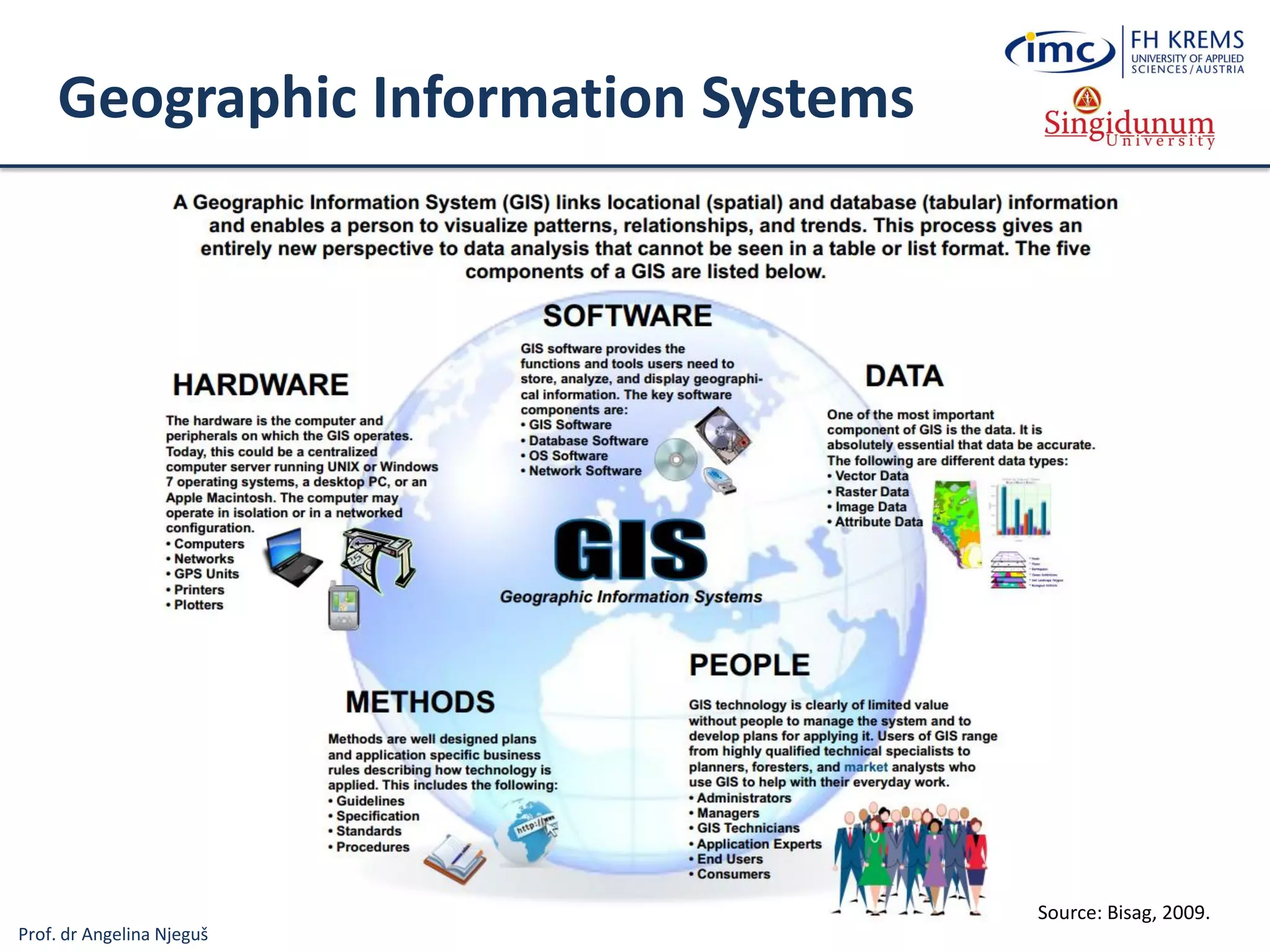
Geographic Information Systems
Source: Bisag, 2009.
Prof. dr Angelina Njeguš
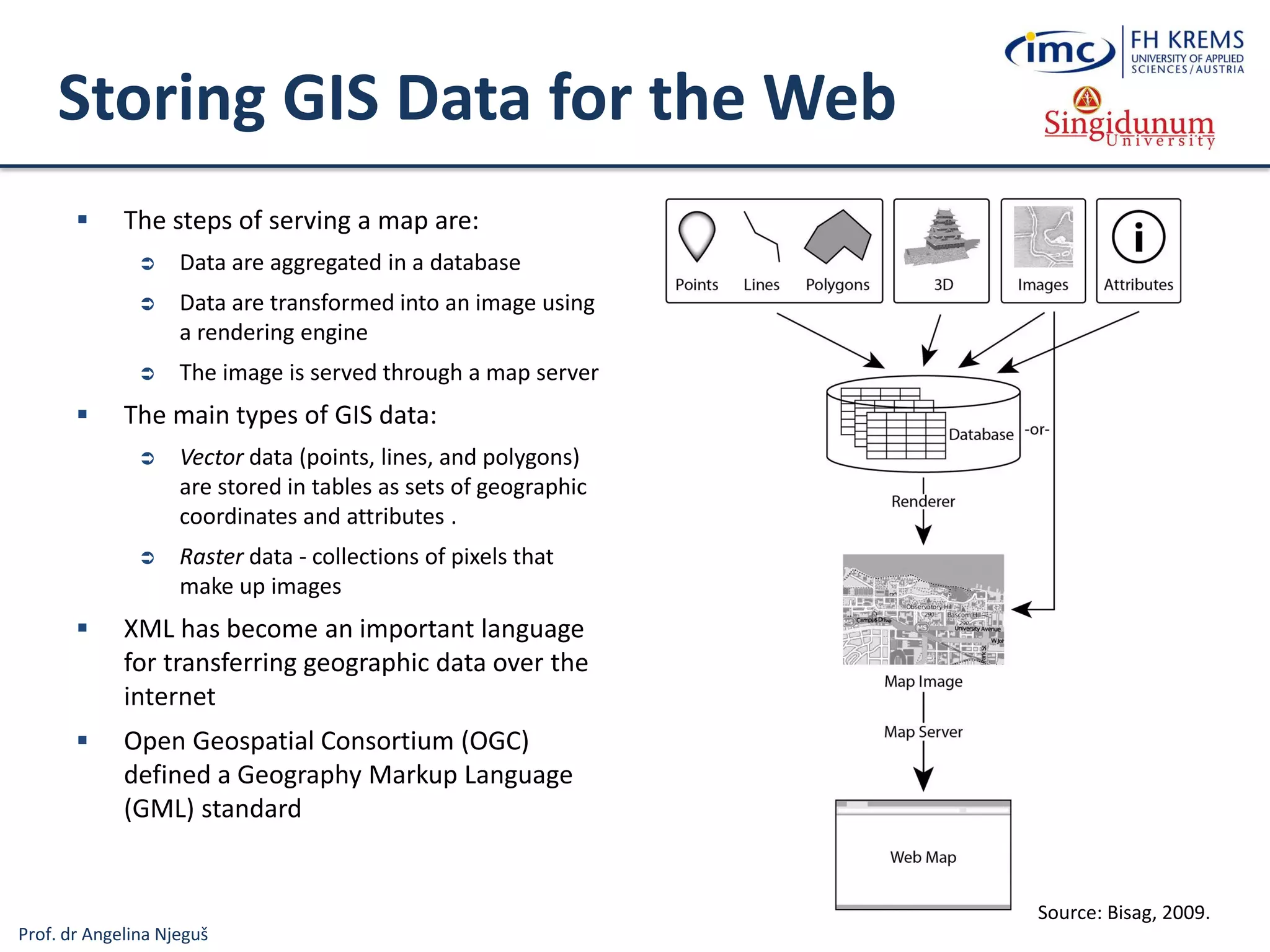
Storing GIS Data for the Web
 The steps of serving a map are:
 Data are aggregated in a database
 Data are transformed into an image using
a rendering engine
 The image is served through a map server
 The main types of GIS data:
 Vector data (points, lines, and polygons)
are stored in tables as sets of geographic
coordinates and attributes .
 Raster data - collections of pixels that
make up images
 XML has become an important language
for transferring geographic data over the
internet
 Open Geospatial Consortium (OGC)
defined a Geography Markup Language
(GML) standard
Source: Bisag, 2009.
Prof. dr Angelina Njeguš
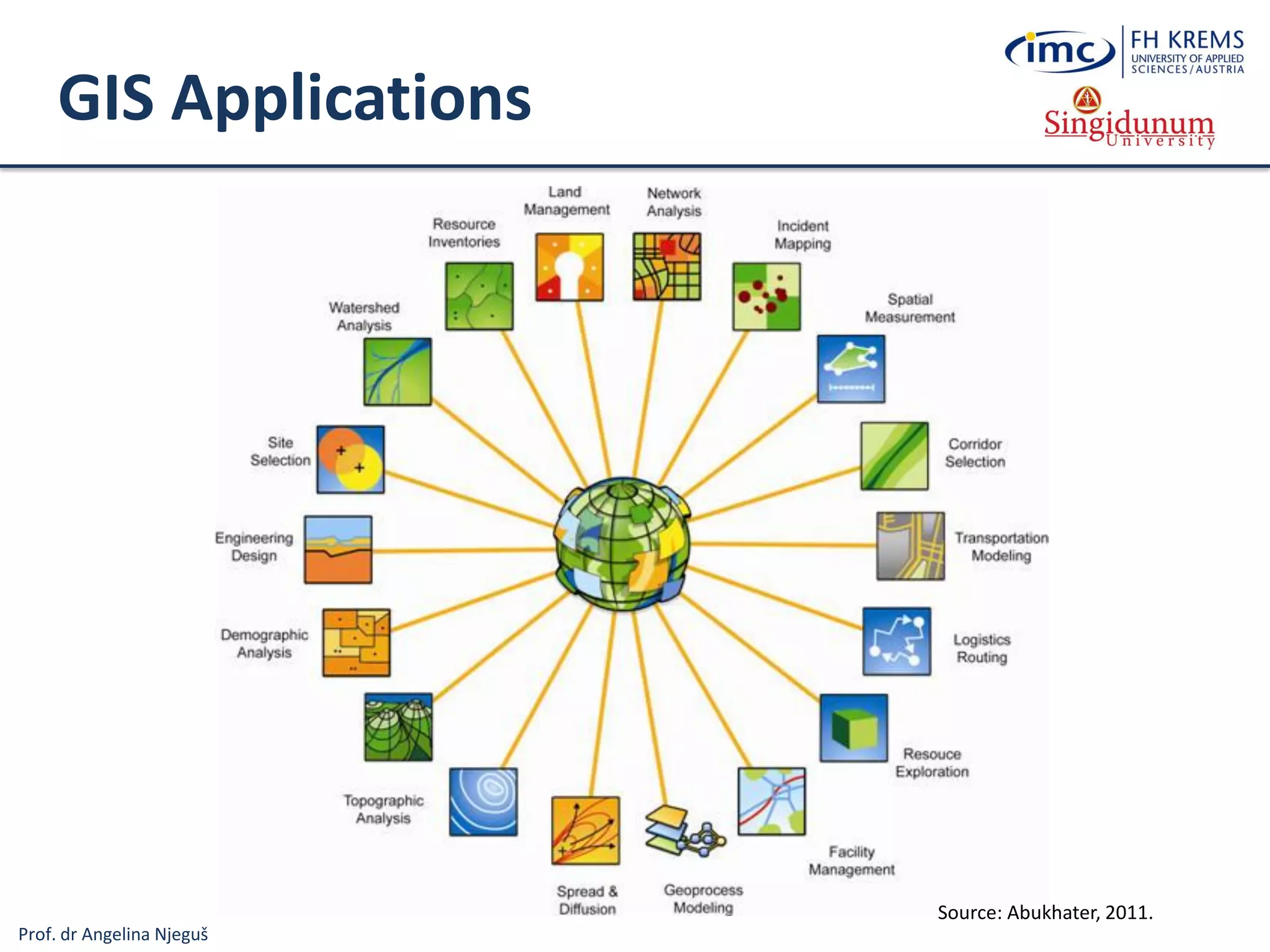
GIS Applications
Source: Abukhater, 2011.
Prof. dr Angelina Njeguš
Types of Information Systems
Information
Systems
Operations
Information Systems
Transaction
Processing
Systems
Business
Process
Management
Systems
Office and
Collaboration
Systems
Business Intelligence
Systems
Management
Information
Systems
Decision
Support
Systems
Executive
Information
Systems
Business
Operations
Support
Decision
making
support
Systems for Process
Modelling, Simulation,
Execution, Control and
Optimisation
Processing Business
Transactions
Prespecified Reporting
for Managers
(Operational BI…)
Interactive Decision
Support (Data
Mining method
analysis ...)
Critical Information
for Senior
Management (BSC,
KPI, Strategic BI …)
Expert Systems
Knowledge
Management
Systems
Manage Organisational
Knowledge (ITIL, ISO
Standards …)
Office and Team
and Workgroup
Collaboration
Systems
Specialised
Information
Systems
Virtual Reality
3D Simulation of a Real or
Imaginary Environment
(tool for communication,
entertainment, and learning)
Emulates Expert
Problem Solving
Geographic
Information
Systems
Intelligent
Maps
Prof. dr Angelina Njeguš
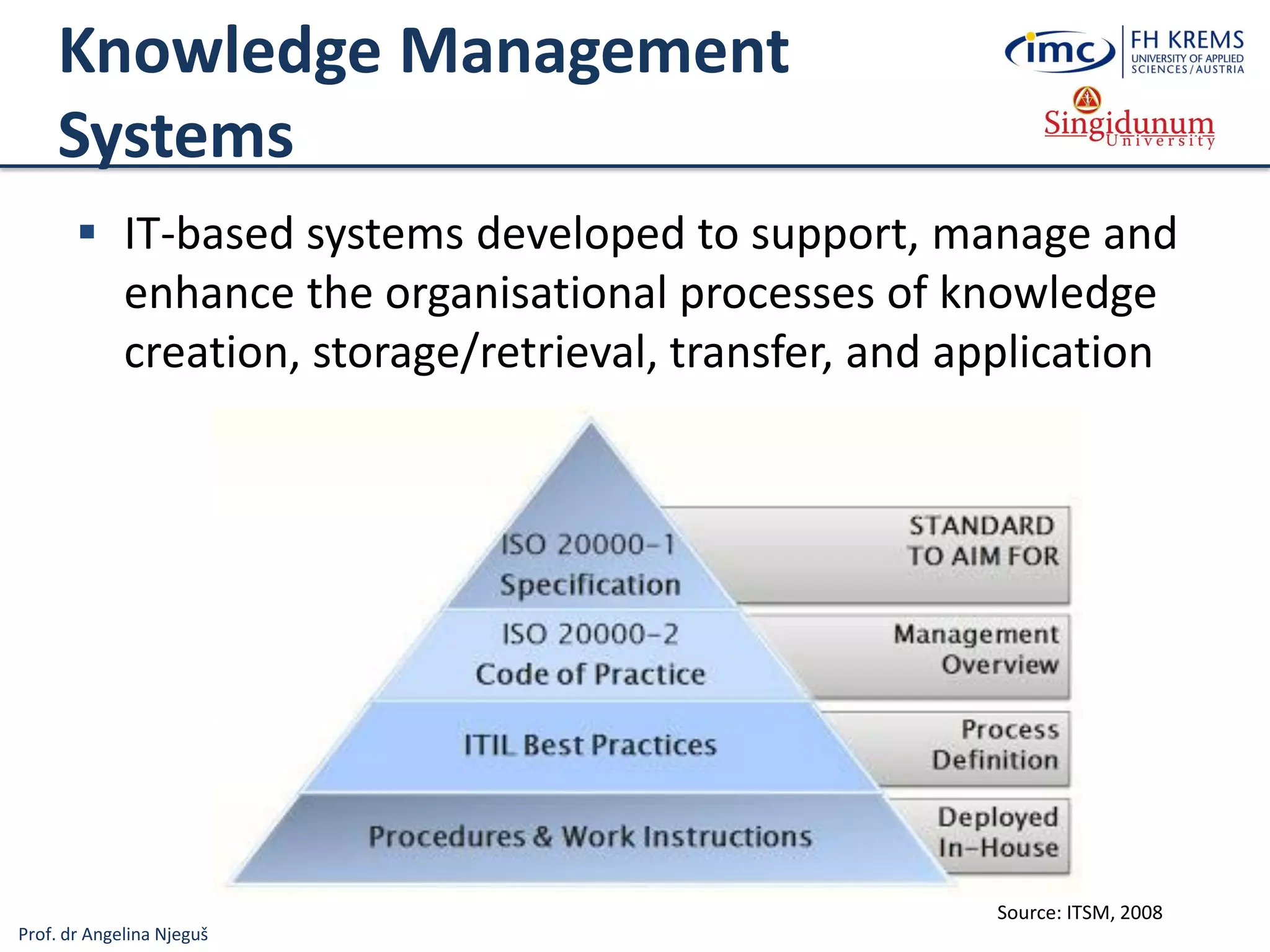
Knowledge Management
Systems
 IT-based systems developed to support, manage and
enhance the organisational processes of knowledge
creation, storage/retrieval, transfer, and application
Source: ITSM, 2008
Prof. dr Angelina Njeguš
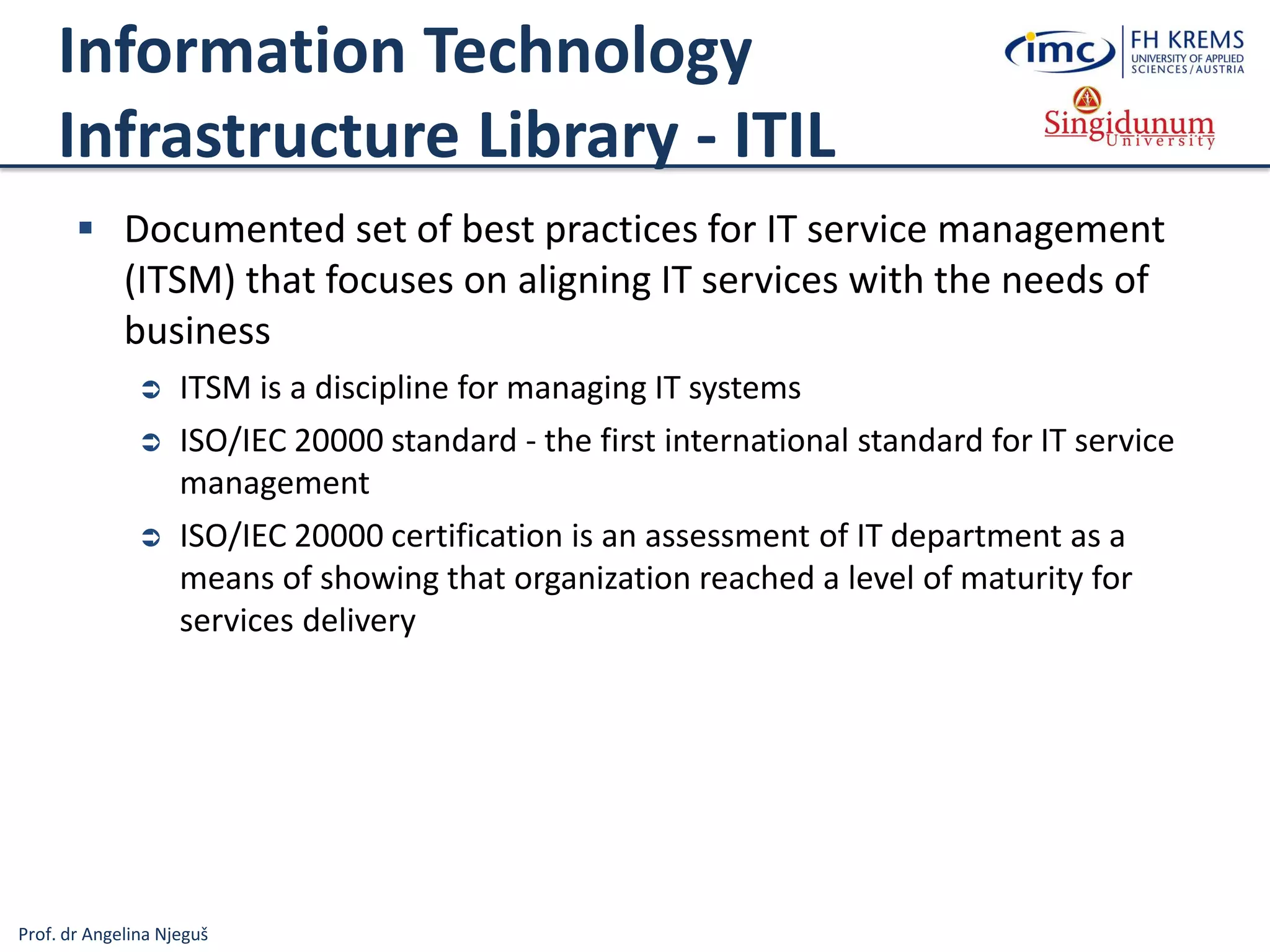
Information Technology
Infrastructure Library - ITIL
 Documented set of best practices for IT service management
(ITSM) that focuses on aligning IT services with the needs of
business
 ITSM is a discipline for managing IT systems
 ISO/IEC 20000 standard - the first international standard for IT service
management
 ISO/IEC 20000 certification is an assessment of IT department as a
means of showing that organization reached a level of maturity for
services delivery
Prof. dr Angelina Njeguš
Best practises
Prof. dr Angelina Njeguš
Types of Information Systems
Information
Systems
Operations
Information Systems
Transaction
Processing
Systems
Business
Process
Management
Systems
Office and
Collaboration
Systems
Business Intelligence
Systems
Management
Information
Systems
Decision
Support
Systems
Executive
Information
Systems
Business
Operations
Support
Decision
making
support
Systems for Process
Modelling, Simulation,
Execution, Control and
Optimisation
Processing Business
Transactions
Prespecified Reporting
for Managers
(Operational BI…)
Interactive Decision
Support (Data
Mining method
analysis ...)
Critical Information
for Senior
Management (BSC,
KPI, Strategic BI …)
Expert Systems
Knowledge
Management
Systems
Manage Organisational
Knowledge (ITIL, ISO
Standards …)
Office and Team
and Workgroup
Collaboration
Systems
Specialised
Information
Systems
Virtual Reality
3D Simulation of a Real or
Imaginary Environment
(tool for communication,
entertainment, and learning)
Emulates Expert
Problem Solving
Geographic
Information
Systems
Intelligent
Maps
Prof. dr Angelina Njeguš
Virtual Reality
 3D simulation of a real or imaginary environment
 Tool for communication, entertainment, and learning
 Virtual Reality in Tourism can be used:
 to recreate historic sites and events
 to provide a means of protecting the fragile state of some heritage
 to create virtual experiences (virtual tours) for tourists
 to create virtual guides
 for marketing, planning and management, entertainment, education,
accessibility ...
Prof. dr Angelina Njeguš
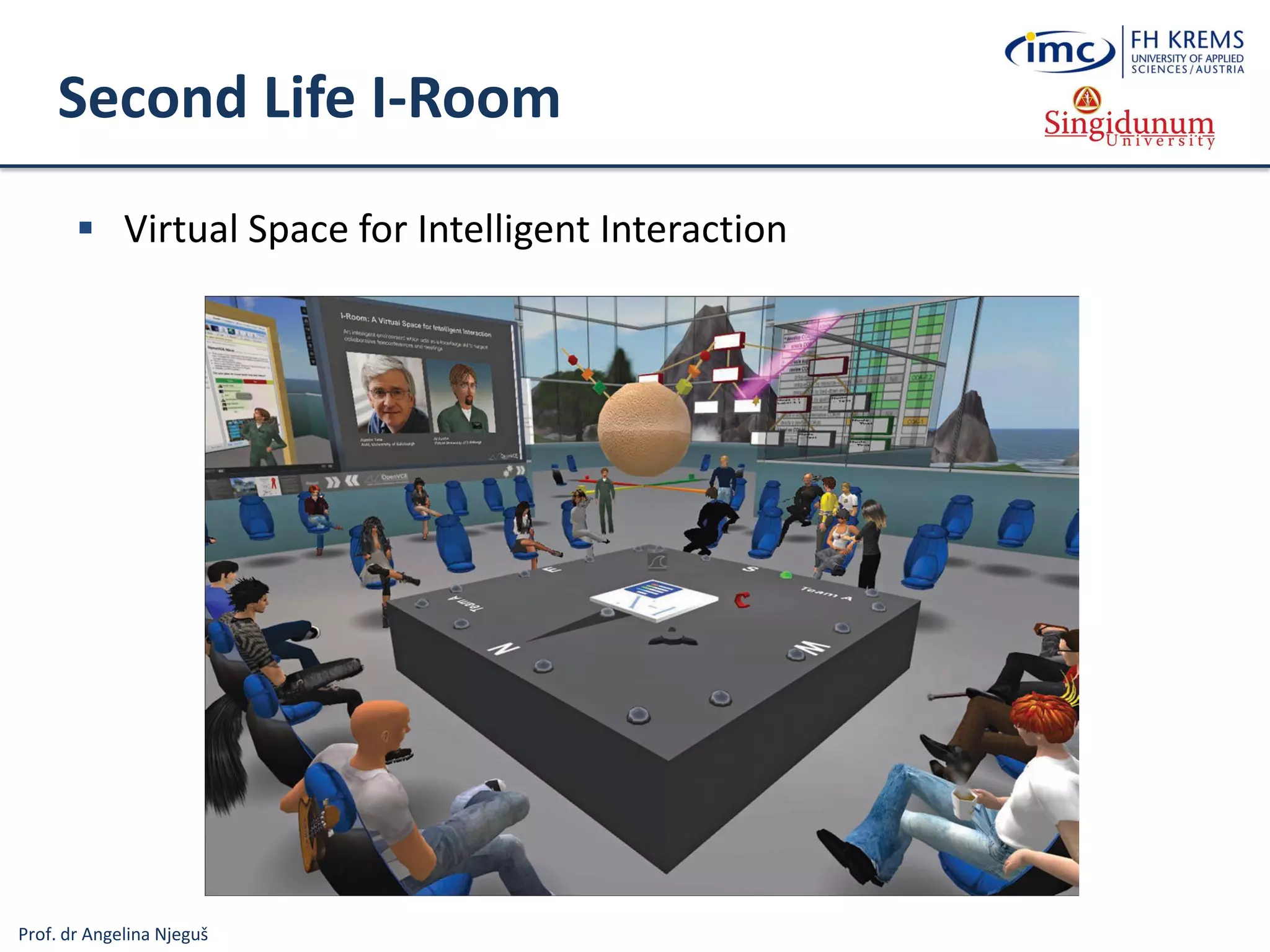
Second Life I-Room
 Virtual Space for Intelligent Interaction
Prof. dr Angelina Njeguš
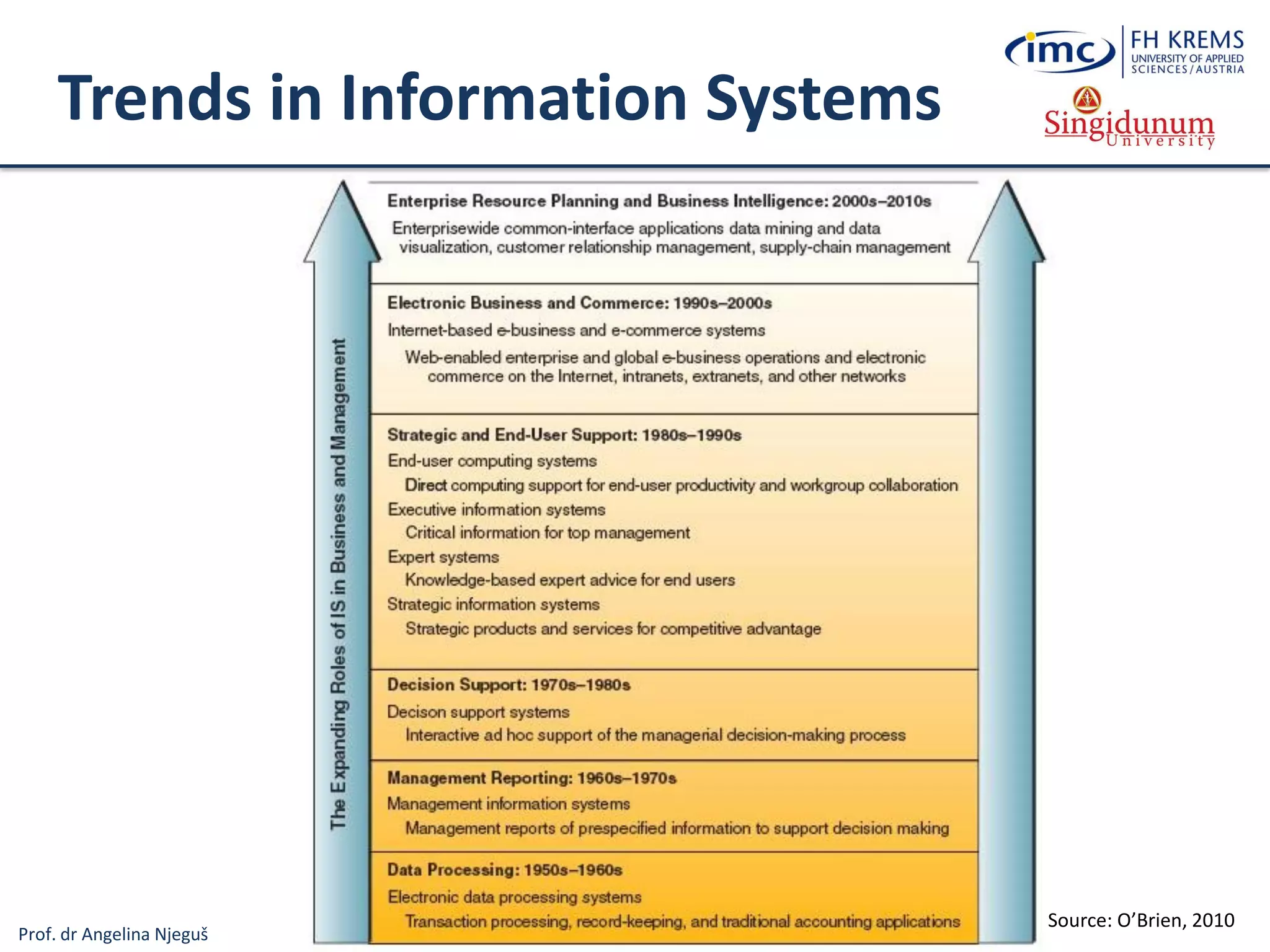
Trends in Information Systems
Source: O’Brien, 2010
Prof. dr Angelina Njeguš
References
1. Swindoll, C. (2011) „Redefining Fundraising – Data“, Pursuant [Online]. Available at: http://www.pursuant.com/blog/tag/dikw-model/
(accessed: 1.11.2012)
2. O’Brien, J.A., Marakas, G.M. (2010) Introduction to Information Systems, McGraw-Hill Companies, Inc.
3. Rosen, S. (2006) „Information Systems in the Enterprise“, Santa Rosa Junior College [Online]. Available
at:http://www.santarosa.edu/~srosen/CIS66/ch2notes.htm (accessed 2.11.2012)
4. IBM (2012) „Rolling back work“, IBM [Online]. Available at:
http://publib.boulder.ibm.com/infocenter/dzichelp/v2r2/index.jsp?topic=%2Fcom.ibm.db2z10.doc.intro%2Fsrc%2Ftpc%2Fdb2z_rollbackwork.
htm (Accessed, 2.11.2012)
5. Interfacing Technologies Corporation (2011) „What is Business Process Management (BPM)?“, ODESIA Co. [Online]. Available at:
http://www.interfacing.com/Literature/what-is-bpm (accessed: 2.11.2012)
6. Rainer, R. K., Cegielski, C.G. (2011) Introducing to Information Systems: Enabling and Transforming Business, 3rd edition, Wiley & Sons, Inc.
7. Kaur, E.B, Kaur, E.S. (2012) „Overview of Intelligent Systems“, International Journal of Computing & Business Research.
8. Abacus (2009) „Artificial Intelligence Systems“, Abacus Programming Corporation. Available at:
http://www.abacuscorp.com/artificial_intelligence_systems.htm (accessed: 7.11.2012)
9. IT Service Management (2008) „ITIL Service Management“. Available at: http://itservicemngmt.blogspot.com/2008/03/iso-20000-
rediscovered.html (accessed 7.11.2012)
10. Morley, D., Parker, C. (2013) Understanding Computers: Today and Tomorrow, 14th Edition, Course Technology Cengage Learning, Boston, MA,
USA.
11. Bisag (2009). Thrust Areas for Geo-informatics Applications. Bhaskaracharya Institute For Space Applications and Geo-Informatics. Available at:
http://www.bisag.gujarat.gov.in/research.htm (accessed 16.07.2013)
12. Abukhater, A. (2011). GIS for Planning and Community Development: Solving Global Challenges. Directions Magazine. Available at:
http://www.directionsmag.com/articles/gis-for-planning-and-community-development-solving-global-challenges/149245 (accessed
16.07.2013)
13. GISC (2013). Storing GIS Data for the Web. Available at: http://giscollective.org/tutorials/web-mapping/wmsfive/ (accessed 16.07.2013)

Lesson 1: Foundations of Information Systems

  • 1.
    FOUNDATIONS OF INFORMATIONSYSTEMS - Lesson 1 - Angelina Njeguš, PhD Associate Professor at Singidunum University Belgrade - Serbia, 2013
  • 2.
    Prof. dr AngelinaNjeguš System Concept Entity 1 Entity 2 Entity N Entity 3 System boundary Environment Input Output Feedback
  • 3.
    Prof. dr AngelinaNjeguš Data, Information, Knowledge, Wisdom Source: Swindoll, 2011 (Available at: http://www.pursuant.com/blog/tag/dikw-model/)
  • 4.
    Prof. dr AngelinaNjeguš Information Systems (IS)  Organised and integrated set of:  Data  Processes  Interfaces  Networks  Technologies  People that are correlated in order to support and improve everyday business operations and decision making
  • 5.
    Prof. dr AngelinaNjeguš Information Systems Real life system Information System
  • 6.
    Prof. dr AngelinaNjeguš Basic IS Activities Output Input Processing Storage Control Source: O-Brien et al., 2010
  • 7.
    Prof. dr AngelinaNjeguš Information Processing Cycle Source: Morley et al., 2013
  • 8.
    Prof. dr AngelinaNjeguš Types of Information Systems Information Systems Operations Information Systems Transaction Processing Systems Business Process Management Systems Office and Collaboration Systems Business Intelligence Systems Management Information Systems Decision Support Systems Executive Information Systems Business Operations Support Decision making support Systems for Process Modelling, Simulation, Execution, Control and Optimisation Processing Business Transactions Prespecified Reporting for Managers (OLAP cubes, Operational BI…) Interactive Decision Support (Data Mining method analysis ...) Critical Information for Senior Management (BSC, KPI, Strategic BI …) Expert Systems Knowledge Management Systems Manage Organisational Knowledge (ITIL, ISO Standards …) Office and Team and Workgroup Collaboration Systems Specialised Information Systems Virtual Reality 3D Simulation of a Real or Imaginary Environment (tool for communication, entertainment, and learning) Emulates Expert Problem Solving Geographic Information Systems Intelligent Maps
  • 9.
    Prof. dr AngelinaNjeguš Types of Information Systems Information Systems Operations Information Systems Transaction Processing Systems Business Process Management Systems Office and Collaboration Systems Business Intelligence Systems Management Information Systems Decision Support Systems Executive Information Systems Business Operations Support Decision making support Systems for Process Modelling, Simulation, Execution, Control and Optimisation Processing Business Transactions Prespecified Reporting for Managers (OLAP cubes, Operational BI…) Interactive Decision Support (Data Mining method analysis ...) Critical Information for Senior Management (BSC, KPI, Strategic BI …) Expert Systems Knowledge Management Systems Manage Organisational Knowledge (ITIL, ISO Standards …) Office and Team and Workgroup Collaboration Systems Specialised Information Systems Virtual Reality 3D Simulation of a Real or Imaginary Environment (tool for communication, entertainment, and learning) Emulates Expert Problem Solving Geographic Information Systems Intelligent Maps
  • 10.
    Prof. dr AngelinaNjeguš Operations Information Systems (OIS)  Organised set of: ─ hardware ─ software ─ databases ─ telecommunications ─ people ─ procedures that are configured to: ─ collect ─ manipulate ─ store ─ process data into information, and support an organisation’s day-to-day business activities Any organised combination of … Data Processes Policies and procedures Interfaces Communi- cation networks Technologi- es People
  • 11.
    Prof. dr AngelinaNjeguš Operations Information Systems (OIS)  Support operational processes that constitute the core business and create the primary value stream  Typical operational processes are:  Finance  Manufacturing  Marketing  Human Resources ... Source: Rosen, 2006
  • 12.
    Prof. dr AngelinaNjeguš Transaction Processing Systems (TPS)  TPS collects, store, modify, and retrieve business trasactions  A transaction is an event that generates or modifies data that are stored in an information system  Any business-related exchange, such as payments to employees, sales to customers, payments to suppliers ...
  • 13.
    Prof. dr AngelinaNjeguš Ways to Process Transactions Batch processing • Accumulate transactions over time and then process periodically • Example: During the night, all daily OLTP database changes are all at one time extracted, transformed, and loaded into the data warehouse Online processing • Process all transactions immediately • Example: A bank system processes ATM withdrawals immediately
  • 14.
    Prof. dr AngelinaNjeguš Some TPS features  The main purpose of the TPS is to ensure the consistency and integrity of data  For example: In case of e-payment amount must be withdrawn from one account and added to another. If transaction fails, than rolleback function deletes all data changes that have occurred since the beginning of the transaction. Source: IBM, 2012
  • 15.
    Prof. dr AngelinaNjeguš Some TPS features (cont.)  Transaction systems must be able to support a large number of concurrent users and transaction types  For example: Multiple operators simultaneously access airline reservation system. When one operator access, booking is locked until it is completed. Otherwise, another operator could access the same data and make double booking.
  • 16.
    Prof. dr AngelinaNjeguš Types of Information Systems Information Systems Operations Information Systems Transaction Processing Systems Business Process Management Systems Office and Collaboration Systems Business Intelligence Systems Management Information Systems Decision Support Systems Executive Information Systems Business Operations Support Decision making support Systems for Process Modelling, Simulation, Execution, Control and Optimisation Processing Business Transactions Prespecified Reporting for Managers (OLAP cubes, Operational BI…) Interactive Decision Support (Data Mining method analysis ...) Critical Information for Senior Management (BSC, KPI, Strategic BI …) Expert Systems Knowledge Management Systems Manage Organisational Knowledge (ITIL, ISO Standards …) Office and Team and Workgroup Collaboration Systems Specialised Information Systems Virtual Reality 3D Simulation of a Real or Imaginary Environment (tool for communication, entertainment, and learning) Emulates Expert Problem Solving Geographic Information Systems Intelligent Maps
  • 17.
    Prof. dr AngelinaNjeguš Business Process Management Systems  Business process is a collection of related, structured, and coordinated value-added activities that combine available resources (input) to produce a specific output (product or service)  For instance, the process of filling a customer order involves several related tasks. Source: Interfacing, 2011
  • 18.
    Prof. dr AngelinaNjeguš Business Process  A business process transforms inputs into outputs, according to guidance (business policies, standards, procedures, business rules, etc.) employing resources of all types Input Output Guidance Resources
  • 19.
    Prof. dr AngelinaNjeguš Examples of Business Processes  Accounting Business Processes: – Accounts payable – Accounts receivable – Cash receipts – Invoice billings ...  Finance Business Processes: – Account collection – Bank loan applications – Business forecasts – Customer credit approval and credit terms ...  Marketing Business Processes: – Customer satisfaction surveys – Customer service contracts – Customer compliant handling – Sales order entry ...  Production/Operations Business Processes: – Bill of materials – Quality control for finished goods – Packing, storage, and distribution – Shipping and freight claims ...  Human Resources Business Processes: – Disabilities employment policies – Employee hiring policies – Files and records management – Health care benefits – Pay and payroll – Training/tuition reimbursement – Workplase rules and guidelines ... Source: Rainer et al., 2011
  • 20.
    Prof. dr AngelinaNjeguš Why are BPM systems important?  Business processes are strategic assets of an organization that must be understood, managed, and improved to deliver value-added products and services to clients – the goal of BPM systems  Economics: globalization demands flexibility  Business processes: changing quickly, shrinking cycle times  Revenue growth: at the top of CEO agenda  Reusable assets: can cut costs  Business Process Reengineering (BPR) – continuous process improvement  Business process management (BPM) systems give organisations the flexibility to quickly respond to changes in the competitive environment
  • 21.
    Prof. dr AngelinaNjeguš Business Process Management  Discover, document, automate, and continuously improve business processes to increase efficiency and effectiveness while striving for innovation, flexibility, and integration with technology
  • 22.
    Prof. dr AngelinaNjeguš Types of Information Systems Information Systems Operations Information Systems Transaction Processing Systems Business Process Management Systems Office and Collaboration Systems Business Intelligence Systems Management Information Systems Decision Support Systems Executive Information Systems Business Operations Support Decision making support Systems for Process Modelling, Simulation, Execution, Control and Optimisation Processing Business Transactions Prespecified Reporting for Managers (Operational BI…) Interactive Decision Support (Data Mining method analysis ...) Critical Information for Senior Management (BSC, KPI, Strategic BI …) Expert Systems Knowledge Management Systems Manage Organisational Knowledge (ITIL, ISO Standards …) Office and Team and Workgroup Collaboration Systems Specialised Information Systems Virtual Reality 3D Simulation of a Real or Imaginary Environment (tool for communication, entertainment, and learning) Emulates Expert Problem Solving Geographic Information Systems Intelligent Maps
  • 23.
    Prof. dr AngelinaNjeguš Office and Collaboration Systems  A suite of applications (Software packages) for creating, editing, and sharing text, spreadsheet, presentations and other documents in order to facilitate and speed up the daily office tasks, as well as mutual business communication
  • 24.
    Prof. dr AngelinaNjeguš Collaboration Systems  Support communication, and coordination among teams and work groups over geographic distances  Depending on the level of collaboration, can be divided into three categories:  Communication tools - interchange of messages, files, data, or documents in order to facilitate the sharing of information ─ Examples: e-mail, voice mail, chat, Wikis, Web publishing ...  Conferencing tools - refers to interactive work toward a shared goal ─ Examples: Internet forums, online chat, Internet telephony, video conferencing, electronic meeting systems, Webcast ...  Collaborative management tools – facilitate and manage group activities ─ Examples: Time management software, Document Management Systems, Project management systems, Social software systems ...
  • 25.
    Prof. dr AngelinaNjeguš Collaboration Systems
  • 26.
    Prof. dr AngelinaNjeguš Collaboration Systems
  • 27.
    Prof. dr AngelinaNjeguš Types of Information Systems Information Systems Operations Information Systems Transaction Processing Systems Business Process Management Systems Office and Collaboration Systems Business Intelligence Systems Management Information Systems Decision Support Systems Executive Information Systems Business Operations Support Decision making support Systems for Process Modelling, Simulation, Execution, Control and Optimisation Processing Business Transactions Prespecified Reporting for Managers (Operational BI…) Interactive Decision Support (Data Mining method analysis ...) Critical Information for Senior Management (BSC, KPI, Strategic BI …) Expert Systems Knowledge Management Systems Manage Organisational Knowledge (ITIL, ISO Standards …) Office and Team and Workgroup Collaboration Systems Specialised Information Systems Virtual Reality 3D Simulation of a Real or Imaginary Environment (tool for communication, entertainment, and learning) Emulates Expert Problem Solving Geographic Information Systems Intelligent Maps
  • 28.
    Prof. dr AngelinaNjeguš Operational data Information Business Intelligence Systems  Set of tools and systems for gathering, extracting, storing, analyzing and translating business information into knowledge to support decision- making and improve overall business effectiveness Knowledge workers
  • 29.
    Prof. dr AngelinaNjeguš Operations vs BI systems
  • 30.
    Prof. dr AngelinaNjeguš Decisions
  • 31.
    Prof. dr AngelinaNjeguš Business Intelligence System
  • 32.
    Prof. dr AngelinaNjeguš Decisions are based on
  • 33.
    Prof. dr AngelinaNjeguš Why Business Intelligence? • What happened? • What is happening? • Why did it happen? • What will happen? • What do I want to happen? ERP CRM 3PtySCM Past Present Future Data
  • 34.
    Prof. dr AngelinaNjeguš Frontend tools 34
  • 35.
    Prof. dr AngelinaNjeguš Decision structure
  • 36.
    Prof. dr AngelinaNjeguš BI Pyramid KPIs, Scorecards, Dashboards OLAP, Mining, Forecasting Management Reports Detailed Operational Reports INVOICES, SHIPPING DOCUMENTS, PICK LIST SALES TOTALS, LEADS ANALYSIS, CLICK THROUGH RATIOS, BUDGETS PERFORMANCE, PRODUCTION TIMES, CUSTOMER CHURN METRICS Complexity Quantity Executives, Top Managers Professionals, Problem solvers, Middle manager Front-line manager Transactors OPERATIONAL TACTICAL STRATEGIC REAL TIME
  • 37.
    Prof. dr AngelinaNjeguš Types of Business Intelligence Systems  Operational BI: Management Information Systems (MIS)  Provides routine information to managers and decision makers  Primary focus is operational efficiency  Reports and displays  Example: daily sales analysis reports  Tactical BI: Decision Support Systems (DSS)  Used to support problem-specific decision making  Focus is on decision-making effectiveness  Interactive OLAP and ad hoc decision support, data mining method analysis, predictive analytics  Example: where to spend advertising dollars  Strategic BI: Executive Information Systems (EIS)  Critical information for executives and senior managers  Example: easy access to actions of competitors, BSC, KPI ...
  • 38.
    Prof. dr AngelinaNjeguš Types of Information Systems Information Systems Operations Information Systems Transaction Processing Systems Business Process Management Systems Office and Collaboration Systems Business Intelligence Systems Management Information Systems Decision Support Systems Executive Information Systems Business Operations Support Decision making support Systems for Process Modelling, Simulation, Execution, Control and Optimisation Processing Business Transactions Prespecified Reporting for Managers (Operational BI…) Interactive Decision Support (Data Mining method analysis ...) Critical Information for Senior Management (BSC, KPI, Strategic BI …) Expert Systems Knowledge Management Systems Manage Organisational Knowledge (ITIL, ISO Standards …) Office and Team and Workgroup Collaboration Systems Specialised Information Systems Virtual Reality 3D Simulation of a Real or Imaginary Environment (tool for communication, entertainment, and learning) Emulates Expert Problem Solving Geographic Information Systems Intelligent Maps
  • 39.
    Prof. dr AngelinaNjeguš Expert Systems (ES)  Field of Artifical Intelligence (AI)  AI focuses on the development and study of systems that support human behavior and intelligence (learning, understanding, problem solving, reasoning, knowledge, etc.)  The most important subdomains of AI are:  Natural Language Processing  Interpretation and processing of visual information and signals (Biometrics ...)  Robotics  Knowledge based systems or Knowledge Engineeering (Expert Systems ...)  Software Agents or Intelligent Agents  Machine Learning (Data Mining, Speech recognition, Text analysis ...)
  • 40.
    Prof. dr AngelinaNjeguš Expert Systems  Simulate the knowledge, and reasoning process in solving complex problems and emulates the decision-making ability of an expert in order to arrive at the same conclusions as a human expert would  Expert in a specific field:  has a high-degree of knowledge, skill, and experience  Understands the problem and recognizes structured and typical problem- solving process  Has heuristic knowledge (resillience, good judgment ...)  Recognizes the fastest way to come up with the soultion ...  Some knowledge representation techniques are:  Rules: IF you are hungry THEN eat  Semantic nets: graph with logically connected nodes ...
  • 41.
    Prof. dr AngelinaNjeguš ES Architecture Source: Abacus, 2009
  • 42.
    Prof. dr AngelinaNjeguš Types of Information Systems Information Systems Operations Information Systems Transaction Processing Systems Business Process Management Systems Office and Collaboration Systems Business Intelligence Systems Management Information Systems Decision Support Systems Executive Information Systems Business Operations Support Decision making support Systems for Process Modelling, Simulation, Execution, Control and Optimisation Processing Business Transactions Prespecified Reporting for Managers (Operational BI…) Interactive Decision Support (Data Mining method analysis ...) Critical Information for Senior Management (BSC, KPI, Strategic BI …) Expert Systems Knowledge Management Systems Manage Organisational Knowledge (ITIL, ISO Standards …) Office and Team and Workgroup Collaboration Systems Specialised Information Systems Virtual Reality 3D Simulation of a Real or Imaginary Environment (tool for communication, entertainment, and learning) Emulates Expert Problem Solving Geographic Information Systems Intelligent Maps
  • 43.
    Prof. dr AngelinaNjeguš Geographic Information Systems Source: Bisag, 2009.
  • 44.
    Prof. dr AngelinaNjeguš Storing GIS Data for the Web  The steps of serving a map are:  Data are aggregated in a database  Data are transformed into an image using a rendering engine  The image is served through a map server  The main types of GIS data:  Vector data (points, lines, and polygons) are stored in tables as sets of geographic coordinates and attributes .  Raster data - collections of pixels that make up images  XML has become an important language for transferring geographic data over the internet  Open Geospatial Consortium (OGC) defined a Geography Markup Language (GML) standard Source: Bisag, 2009.
  • 45.
    Prof. dr AngelinaNjeguš GIS Applications Source: Abukhater, 2011.
  • 46.
    Prof. dr AngelinaNjeguš Types of Information Systems Information Systems Operations Information Systems Transaction Processing Systems Business Process Management Systems Office and Collaboration Systems Business Intelligence Systems Management Information Systems Decision Support Systems Executive Information Systems Business Operations Support Decision making support Systems for Process Modelling, Simulation, Execution, Control and Optimisation Processing Business Transactions Prespecified Reporting for Managers (Operational BI…) Interactive Decision Support (Data Mining method analysis ...) Critical Information for Senior Management (BSC, KPI, Strategic BI …) Expert Systems Knowledge Management Systems Manage Organisational Knowledge (ITIL, ISO Standards …) Office and Team and Workgroup Collaboration Systems Specialised Information Systems Virtual Reality 3D Simulation of a Real or Imaginary Environment (tool for communication, entertainment, and learning) Emulates Expert Problem Solving Geographic Information Systems Intelligent Maps
  • 47.
    Prof. dr AngelinaNjeguš Knowledge Management Systems  IT-based systems developed to support, manage and enhance the organisational processes of knowledge creation, storage/retrieval, transfer, and application Source: ITSM, 2008
  • 48.
    Prof. dr AngelinaNjeguš Information Technology Infrastructure Library - ITIL  Documented set of best practices for IT service management (ITSM) that focuses on aligning IT services with the needs of business  ITSM is a discipline for managing IT systems  ISO/IEC 20000 standard - the first international standard for IT service management  ISO/IEC 20000 certification is an assessment of IT department as a means of showing that organization reached a level of maturity for services delivery
  • 49.
    Prof. dr AngelinaNjeguš Best practises
  • 50.
    Prof. dr AngelinaNjeguš Types of Information Systems Information Systems Operations Information Systems Transaction Processing Systems Business Process Management Systems Office and Collaboration Systems Business Intelligence Systems Management Information Systems Decision Support Systems Executive Information Systems Business Operations Support Decision making support Systems for Process Modelling, Simulation, Execution, Control and Optimisation Processing Business Transactions Prespecified Reporting for Managers (Operational BI…) Interactive Decision Support (Data Mining method analysis ...) Critical Information for Senior Management (BSC, KPI, Strategic BI …) Expert Systems Knowledge Management Systems Manage Organisational Knowledge (ITIL, ISO Standards …) Office and Team and Workgroup Collaboration Systems Specialised Information Systems Virtual Reality 3D Simulation of a Real or Imaginary Environment (tool for communication, entertainment, and learning) Emulates Expert Problem Solving Geographic Information Systems Intelligent Maps
  • 51.
    Prof. dr AngelinaNjeguš Virtual Reality  3D simulation of a real or imaginary environment  Tool for communication, entertainment, and learning  Virtual Reality in Tourism can be used:  to recreate historic sites and events  to provide a means of protecting the fragile state of some heritage  to create virtual experiences (virtual tours) for tourists  to create virtual guides  for marketing, planning and management, entertainment, education, accessibility ...
  • 52.
    Prof. dr AngelinaNjeguš Second Life I-Room  Virtual Space for Intelligent Interaction
  • 53.
    Prof. dr AngelinaNjeguš Trends in Information Systems Source: O’Brien, 2010
  • 54.
    Prof. dr AngelinaNjeguš References 1. Swindoll, C. (2011) „Redefining Fundraising – Data“, Pursuant [Online]. Available at: http://www.pursuant.com/blog/tag/dikw-model/ (accessed: 1.11.2012) 2. O’Brien, J.A., Marakas, G.M. (2010) Introduction to Information Systems, McGraw-Hill Companies, Inc. 3. Rosen, S. (2006) „Information Systems in the Enterprise“, Santa Rosa Junior College [Online]. Available at:http://www.santarosa.edu/~srosen/CIS66/ch2notes.htm (accessed 2.11.2012) 4. IBM (2012) „Rolling back work“, IBM [Online]. Available at: http://publib.boulder.ibm.com/infocenter/dzichelp/v2r2/index.jsp?topic=%2Fcom.ibm.db2z10.doc.intro%2Fsrc%2Ftpc%2Fdb2z_rollbackwork. htm (Accessed, 2.11.2012) 5. Interfacing Technologies Corporation (2011) „What is Business Process Management (BPM)?“, ODESIA Co. [Online]. Available at: http://www.interfacing.com/Literature/what-is-bpm (accessed: 2.11.2012) 6. Rainer, R. K., Cegielski, C.G. (2011) Introducing to Information Systems: Enabling and Transforming Business, 3rd edition, Wiley & Sons, Inc. 7. Kaur, E.B, Kaur, E.S. (2012) „Overview of Intelligent Systems“, International Journal of Computing & Business Research. 8. Abacus (2009) „Artificial Intelligence Systems“, Abacus Programming Corporation. Available at: http://www.abacuscorp.com/artificial_intelligence_systems.htm (accessed: 7.11.2012) 9. IT Service Management (2008) „ITIL Service Management“. Available at: http://itservicemngmt.blogspot.com/2008/03/iso-20000- rediscovered.html (accessed 7.11.2012) 10. Morley, D., Parker, C. (2013) Understanding Computers: Today and Tomorrow, 14th Edition, Course Technology Cengage Learning, Boston, MA, USA. 11. Bisag (2009). Thrust Areas for Geo-informatics Applications. Bhaskaracharya Institute For Space Applications and Geo-Informatics. Available at: http://www.bisag.gujarat.gov.in/research.htm (accessed 16.07.2013) 12. Abukhater, A. (2011). GIS for Planning and Community Development: Solving Global Challenges. Directions Magazine. Available at: http://www.directionsmag.com/articles/gis-for-planning-and-community-development-solving-global-challenges/149245 (accessed 16.07.2013) 13. GISC (2013). Storing GIS Data for the Web. Available at: http://giscollective.org/tutorials/web-mapping/wmsfive/ (accessed 16.07.2013)