Computer LanguagesComputer Languages
Different Languages
• Just as there are different human
languages there are also different
computer languages.
• These include:
– Pascal (named after its inventor)
– Ada (named after Countess Lovelace)
– Logo (Greek for thought)
– FORTRAN (short for FORmula TRANslation)
Types of Language
• All of these are used to carry out
different tasks
• But the all have one thing in common; they
are all High Level Languages.
• There is another type of computer
language:
Low Level Language
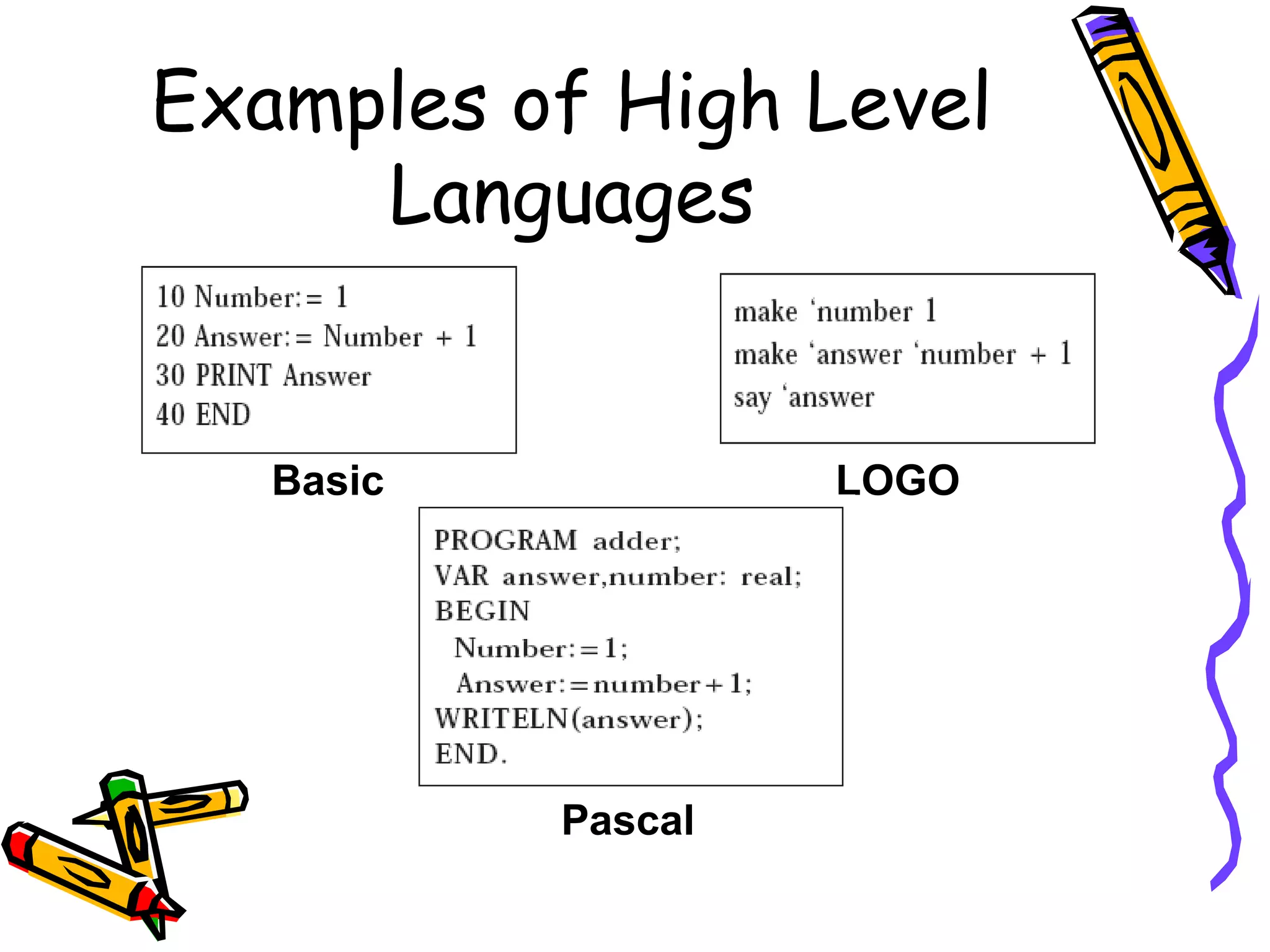
Examples of High Level
Languages
Basic LOGO
Pascal
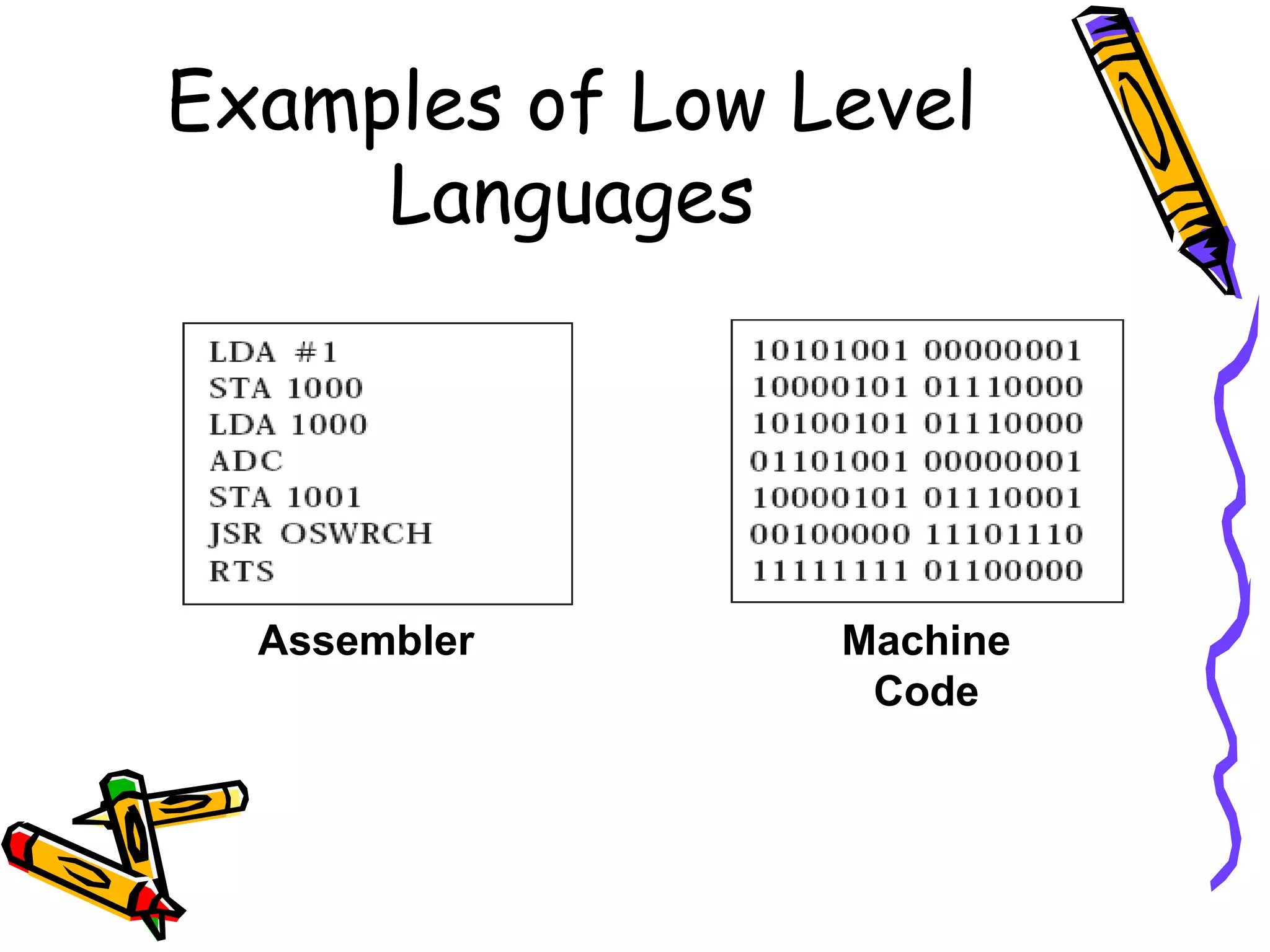
Examples of Low Level
Languages
Assembler Machine
Code
Differences Between High
& Low Level Languages
High Level
1. All used to solve
problems
2. Easily understood by
humans
3. Uses English like words
4. Easy to locate and
identify errors
5. Must be translated
before the computer can
understand it
Low Level
1. Understood by
computers without the
need for translation
2. Difficult for humans to
read and understand
3. Take up a lot of space to
write down
4. Its difficult to spot
errors in the code
Translating
• To change a program we write in a high
level language into a low level language we
use a program called a translator
• There are 2 types of translator program
we can use:
– Interpreters
– Compilers
Interpreters
• A computer interpreter works much like a
human interpreter:
1. It translates a single line of the program at a
time.
2. Each line is then run by the computer as it is
translated.
3. This is done every time the program is run.
4. This allows errors to be located quickly when
making a program but can be slow when
running a finished program.
Compilers
1. These work by translating the whole program at
once (the object code) and saving the compiled
low level version (the source code).
2. This can be slow to use when creating programs
as even if an error is found the whole program is
translated.
3. Once a completed program is translated it can be
run over and over again without the need to
retranslate.
Compilers
1. These work by translating the whole program at
once (the object code) and saving the compiled
low level version (the source code).
2. This can be slow to use when creating programs
as even if an error is found the whole program is
translated.
3. Once a completed program is translated it can be
run over and over again without the need to
retranslate.

Computer languages

  • 1.
  • 2.
    Different Languages • Justas there are different human languages there are also different computer languages. • These include: – Pascal (named after its inventor) – Ada (named after Countess Lovelace) – Logo (Greek for thought) – FORTRAN (short for FORmula TRANslation)
  • 3.
    Types of Language •All of these are used to carry out different tasks • But the all have one thing in common; they are all High Level Languages. • There is another type of computer language: Low Level Language
  • 4.
    Examples of HighLevel Languages Basic LOGO Pascal
  • 5.
    Examples of LowLevel Languages Assembler Machine Code
  • 6.
    Differences Between High &Low Level Languages High Level 1. All used to solve problems 2. Easily understood by humans 3. Uses English like words 4. Easy to locate and identify errors 5. Must be translated before the computer can understand it Low Level 1. Understood by computers without the need for translation 2. Difficult for humans to read and understand 3. Take up a lot of space to write down 4. Its difficult to spot errors in the code
  • 7.
    Translating • To changea program we write in a high level language into a low level language we use a program called a translator • There are 2 types of translator program we can use: – Interpreters – Compilers
  • 8.
    Interpreters • A computerinterpreter works much like a human interpreter: 1. It translates a single line of the program at a time. 2. Each line is then run by the computer as it is translated. 3. This is done every time the program is run. 4. This allows errors to be located quickly when making a program but can be slow when running a finished program.
  • 9.
    Compilers 1. These workby translating the whole program at once (the object code) and saving the compiled low level version (the source code). 2. This can be slow to use when creating programs as even if an error is found the whole program is translated. 3. Once a completed program is translated it can be run over and over again without the need to retranslate.
  • 10.
    Compilers 1. These workby translating the whole program at once (the object code) and saving the compiled low level version (the source code). 2. This can be slow to use when creating programs as even if an error is found the whole program is translated. 3. Once a completed program is translated it can be run over and over again without the need to retranslate.