Matt Ramirez
                              Andy Land


Augmented reality in the Library – a joint project
Tuesday 17th April 2012
Presentation Overview
»   Project Overview
»   What is AR?
»   Implementation of AR with Special Collections
»   Evaluation
»   Next steps
Project Overview
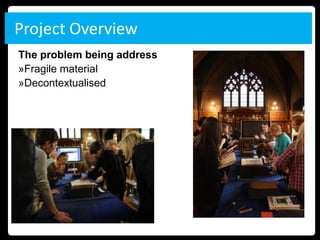
The problem being address
»Fragile material
»Decontextualised
Project Overview
Aims
»Use AR to add value to the learner experience.
»Produce a methodology that other Special Collections
libraries can follow, making these resources accessible for
research, teaching and learning.

Considerations
»How does the use of AR enhance Learning & Teaching?
»What application does AR have to the wider audience?
The wider context
» Tuition Fees increased in most UK universities to
  £9000 per year.
» Students require more demonstrative input and
  contact time from academics.
» E-learning materials offer flexibility to support
  traditional form of study.
» Engaging students with innovative use of
  technologies will help universities to be seen as
  cutting edge.
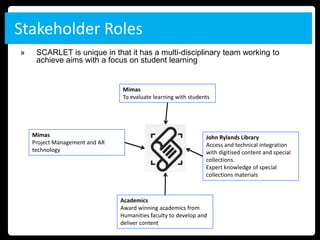
Stakeholder Roles
»    SCARLET is unique in that it has a multi-disciplinary team working to
     achieve aims with a focus on student learning


                                Mimas
                                To evaluate learning with students


    Mimas                                                       John Rylands Library
    Project Management and AR                                   Access and technical integration
    technology                                                  with digitised content and special
                                                                collections.
                                                                Expert knowledge of special
                                                                collections materials


                                Academics
                                Award winning academics from
                                Humanities faculty to develop and
                                deliver content
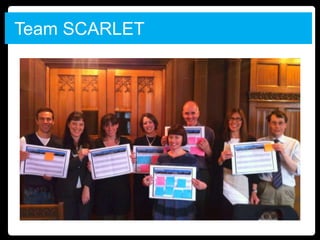
Team SCARLET
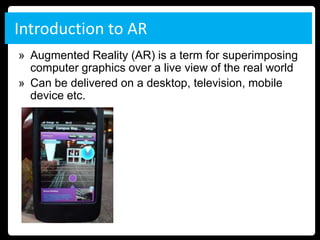
Introduction to AR
» Augmented Reality (AR) is a term for superimposing
  computer graphics over a live view of the real world
» Can be delivered on a desktop, television, mobile
  device etc.
Examples of AR
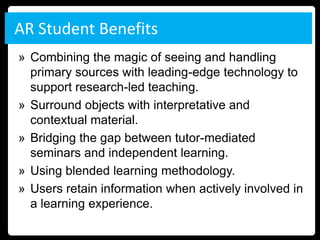
» In televised sporting events real-time analytical
  information is displayed offering insight into a
  player, time left, league tables etc.
AR Student Benefits
» Combining the magic of seeing and handling
  primary sources with leading-edge technology to
  support research-led teaching.
» Surround objects with interpretative and
  contextual material.
» Bridging the gap between tutor-mediated
  seminars and independent learning.
» Using blended learning methodology.
» Users retain information when actively involved in
  a learning experience.
Mobile Usage
» Morgan Stanley forecast that by 2014 mobile
  internet usage will overtake user access through
  traditional desktop means.
» “The way children use media through the day is
  also changing… suggesting a push-button, on-
  demand culture, which is moving away from
  scheduled television programmes.” – Childwise
  survey, children 7-16
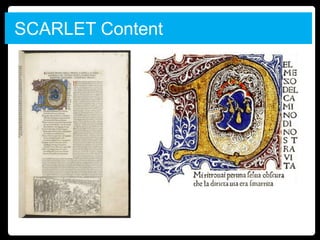
SCARLET Content
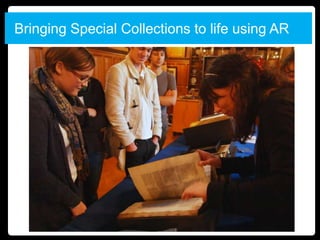
Bringing Special Collections to life using AR
Software/Platform
» Use Junaio AR browser to display content
» Different channels for subject areas
» Browser available as a FREE app through Apple
  and Android App stores (Symbian coming soon)
» Works through handheld device phone or tablet
» Open source SDK for education and wealth of
  online support
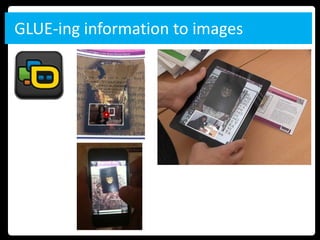
» At the start of the project Junaio was only AR
  browser to have GLUE functionality to link physical
  images, augmenting it with text, videos, images.
GLUE-ing information to images
Storyboarding – Phase 1 development

» The GLUE object or visual reference should be kept
  with the Edition, in this case Dante’s Landino but can
  also be copied for student to take away.
» User journey should be self contained to browser app.


  GLUE Object        Landing page       Webpage
Content Acquisition
Landing Page
»Title
»Short Description
»Audio (Optional)
»Video Walkthrough (Optional)
»Email (Optional)
Web page
»Links to associated resources
»Short piece of text to accompany links
»Images (Optional)
»RSS Feeds - Twitter, blog, news etc. (Optional)
»Learning/Research Activities
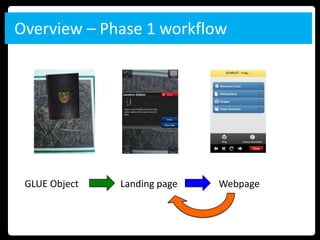
Overview – Phase 1 workflow


 GLUE Object   Landing page   Webpage
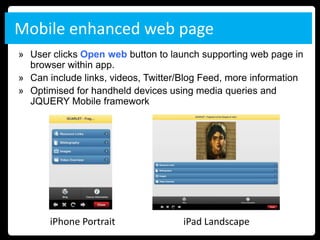
Mobile enhanced web page
» User clicks Open web button to launch supporting web page in
  browser within app.
» Can include links, videos, Twitter/Blog Feed, more information
» Optimised for handheld devices using media queries and
  JQUERY Mobile framework


       iPhone Portrait               iPad Landscape
Initial Evaluation objectives
» How effective was the SCARLET application in
  enhancing the student experience.
» How can feedback be used to inform the next
  development phase?
» Does AR add value to students study and assist
  with learning outcomes?
» Is AR more appropriate/beneficial for specific
  student demographics?
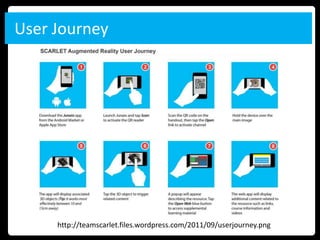
User Journey


     http://teamscarlet.files.wordpress.com/2011/09/userjourney.png
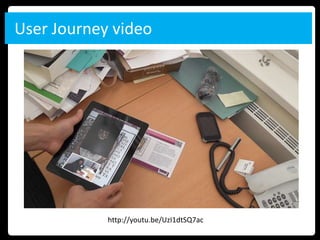
User Journey video


            http://youtu.be/UzI1dtSQ7ac
Feedback - Positive

» Technology was easy to use.
» Provided a central reference to library systems and
  external resources.
» Beneficial for initial planning of essays and basic
  knowledge acquisition.
» Video introductions related to specific objects were most
  valuable asset in the delivery.
» “Makes learning fun”
» Enjoyed using the iPads working with peers.
» Offer a fresh perspective? Student-led, i.e., using more
  initiative about how to research/study
» Give a more realistic perspective – puts you “in” the
  situation. Makes learning more exciting and interactive
Feedback - Negative

» Resources were already available online
  (Blackboard)
» Students felt divorced from physical object; linking
  to web app diluted the experience
» Activity was prescribed and not aligned with some
  users research methods consulting physical
  secondary texts.
Feedback – Student Quotes

» “Makes learning fun”
» “Offer a fresh perspective. Student-led, i.e., using
  more initiative about how to research/study
» “Give a more realistic perspective – puts you “in”
  the situation. Makes learning more exciting and
  interactive”
» “It can make you feel like you’re not studying,
  almost fun and I think information goes in more
  like that.”
Feedback – Lessons Learned
» Use of AR should be more contextual and linked
  to the object.
» Best used in short byte size learning chunks
» Must deliver unique learning values different from
  online support (e.g.VLE).
» User should become less conscious of the
  technology and more engaged with the text.
» Users learn in different ways and AR may not be
  appropriate to all students.
» Evaluation needed from other user groups and
  course areas.
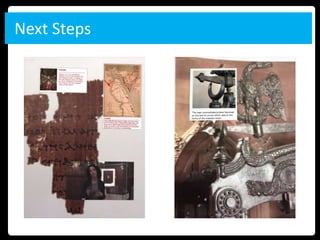
Next Steps
Next Steps

» Develop materials overlaid on the physical
  resource for other courses (Milton, Ancient
  Egyptian papyri).
» Work with library to promote public engagement.
» Investigate funding opportunities in other subject
  areas (e.g. Medical) and services (Landmap –
  visual spatial representations).
» Disseminate tool kit at project end.
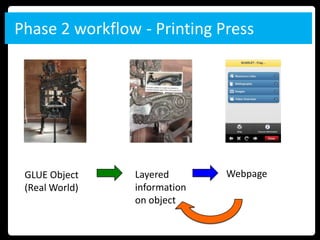
Phase 2 workflow - Printing Press


 GLUE Object    Layered       Webpage
 (Real World)   information
                on object
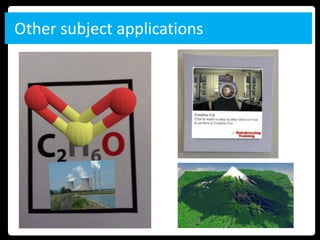
Other subject applications
Project Communication

» Project blog at http://teamscarlet.wordpress.com/
  where all members of project contribute on all aspects
  (academic, technology, pedagogy, special collections.
» Twitter @team_scarlet
» Email: matthew.ramirez@manchester.ac.uk;
  andy.land@manchester.ac.uk
» Upcoming presentations
   » Elag 2012 15-18th May 2012 – Palma, Spain
» Publications
   » CILIP Update magazine (February 2012)
   » SCONUL Focus (February 2012)
Questions?

SCARLET IS forum

  • 1.
    Matt Ramirez Andy Land Augmented reality in the Library – a joint project Tuesday 17th April 2012
  • 2.
    Presentation Overview » Project Overview » What is AR? » Implementation of AR with Special Collections » Evaluation » Next steps
  • 3.
    Project Overview The problembeing address »Fragile material »Decontextualised
  • 4.
    Project Overview Aims »Use ARto add value to the learner experience. »Produce a methodology that other Special Collections libraries can follow, making these resources accessible for research, teaching and learning. Considerations »How does the use of AR enhance Learning & Teaching? »What application does AR have to the wider audience?
  • 5.
    The wider context »Tuition Fees increased in most UK universities to £9000 per year. » Students require more demonstrative input and contact time from academics. » E-learning materials offer flexibility to support traditional form of study. » Engaging students with innovative use of technologies will help universities to be seen as cutting edge.
  • 6.
    Stakeholder Roles » SCARLET is unique in that it has a multi-disciplinary team working to achieve aims with a focus on student learning Mimas To evaluate learning with students Mimas John Rylands Library Project Management and AR Access and technical integration technology with digitised content and special collections. Expert knowledge of special collections materials Academics Award winning academics from Humanities faculty to develop and deliver content
  • 7.
  • 8.
    Introduction to AR »Augmented Reality (AR) is a term for superimposing computer graphics over a live view of the real world » Can be delivered on a desktop, television, mobile device etc.
  • 9.
    Examples of AR »In televised sporting events real-time analytical information is displayed offering insight into a player, time left, league tables etc.
  • 10.
    AR Student Benefits »Combining the magic of seeing and handling primary sources with leading-edge technology to support research-led teaching. » Surround objects with interpretative and contextual material. » Bridging the gap between tutor-mediated seminars and independent learning. » Using blended learning methodology. » Users retain information when actively involved in a learning experience.
  • 11.
    Mobile Usage » MorganStanley forecast that by 2014 mobile internet usage will overtake user access through traditional desktop means. » “The way children use media through the day is also changing… suggesting a push-button, on- demand culture, which is moving away from scheduled television programmes.” – Childwise survey, children 7-16
  • 12.
  • 13.
  • 14.
    Software/Platform » Use JunaioAR browser to display content » Different channels for subject areas » Browser available as a FREE app through Apple and Android App stores (Symbian coming soon) » Works through handheld device phone or tablet » Open source SDK for education and wealth of online support » At the start of the project Junaio was only AR browser to have GLUE functionality to link physical images, augmenting it with text, videos, images.
  • 15.
  • 16.
    Storyboarding – Phase1 development » The GLUE object or visual reference should be kept with the Edition, in this case Dante’s Landino but can also be copied for student to take away. » User journey should be self contained to browser app. GLUE Object Landing page Webpage
  • 17.
    Content Acquisition Landing Page »Title »ShortDescription »Audio (Optional) »Video Walkthrough (Optional) »Email (Optional) Web page »Links to associated resources »Short piece of text to accompany links »Images (Optional) »RSS Feeds - Twitter, blog, news etc. (Optional) »Learning/Research Activities
  • 18.
    Overview – Phase1 workflow GLUE Object Landing page Webpage
  • 19.
    Mobile enhanced webpage » User clicks Open web button to launch supporting web page in browser within app. » Can include links, videos, Twitter/Blog Feed, more information » Optimised for handheld devices using media queries and JQUERY Mobile framework iPhone Portrait iPad Landscape
  • 20.
    Initial Evaluation objectives »How effective was the SCARLET application in enhancing the student experience. » How can feedback be used to inform the next development phase? » Does AR add value to students study and assist with learning outcomes? » Is AR more appropriate/beneficial for specific student demographics?
  • 21.
    User Journey http://teamscarlet.files.wordpress.com/2011/09/userjourney.png
  • 22.
    User Journey video http://youtu.be/UzI1dtSQ7ac
  • 23.
    Feedback - Positive »Technology was easy to use. » Provided a central reference to library systems and external resources. » Beneficial for initial planning of essays and basic knowledge acquisition. » Video introductions related to specific objects were most valuable asset in the delivery. » “Makes learning fun” » Enjoyed using the iPads working with peers. » Offer a fresh perspective? Student-led, i.e., using more initiative about how to research/study » Give a more realistic perspective – puts you “in” the situation. Makes learning more exciting and interactive
  • 24.
    Feedback - Negative »Resources were already available online (Blackboard) » Students felt divorced from physical object; linking to web app diluted the experience » Activity was prescribed and not aligned with some users research methods consulting physical secondary texts.
  • 25.
    Feedback – StudentQuotes » “Makes learning fun” » “Offer a fresh perspective. Student-led, i.e., using more initiative about how to research/study » “Give a more realistic perspective – puts you “in” the situation. Makes learning more exciting and interactive” » “It can make you feel like you’re not studying, almost fun and I think information goes in more like that.”
  • 26.
    Feedback – LessonsLearned » Use of AR should be more contextual and linked to the object. » Best used in short byte size learning chunks » Must deliver unique learning values different from online support (e.g.VLE). » User should become less conscious of the technology and more engaged with the text. » Users learn in different ways and AR may not be appropriate to all students. » Evaluation needed from other user groups and course areas.
  • 27.
  • 28.
    Next Steps » Developmaterials overlaid on the physical resource for other courses (Milton, Ancient Egyptian papyri). » Work with library to promote public engagement. » Investigate funding opportunities in other subject areas (e.g. Medical) and services (Landmap – visual spatial representations). » Disseminate tool kit at project end.
  • 29.
    Phase 2 workflow- Printing Press GLUE Object Layered Webpage (Real World) information on object
  • 30.
  • 31.
    Project Communication » Projectblog at http://teamscarlet.wordpress.com/ where all members of project contribute on all aspects (academic, technology, pedagogy, special collections. » Twitter @team_scarlet » Email: matthew.ramirez@manchester.ac.uk; andy.land@manchester.ac.uk » Upcoming presentations » Elag 2012 15-18th May 2012 – Palma, Spain » Publications » CILIP Update magazine (February 2012) » SCONUL Focus (February 2012)
  • 32.

Editor's Notes

  • #3 The JISC Observatory report, ‘Augmented Reality for Smartphones‘ was paramount in selecting the AR browser the SCARLET project would use to deliver content. At the time(April 2011), there was a proliferation of Augmented Reality browsers available with development API’s such as Layar, Wikitude, Sekai, Google Goggles and Junaio. Students expect increased differentiation in learning styles in contrast to traditional didactic approach.Universities have to offer more supported e-learning materials supplementing contact time.Differentiation and blended learning (Jo to write)
  • #4 The JISC Observatory report, ‘Augmented Reality for Smartphones‘ was paramount in selecting the AR browser the SCARLET project would use to deliver content. At the time(April 2011), there was a proliferation of Augmented Reality browsers available with development API’s such as Layar, Wikitude, Sekai, Google Goggles and Junaio.
  • #5 The JISC Observatory report, ‘Augmented Reality for Smartphones‘ was paramount in selecting the AR browser the SCARLET project would use to deliver content. At the time(April 2011), there was a proliferation of Augmented Reality browsers available with development API’s such as Layar, Wikitude, Sekai, Google Goggles and Junaio.
  • #6 The JISC Observatory report, ‘Augmented Reality for Smartphones‘ was paramount in selecting the AR browser the SCARLET project would use to deliver content. At the time(April 2011), there was a proliferation of Augmented Reality browsers available with development API’s such as Layar, Wikitude, Sekai, Google Goggles and Junaio. Students expect increased differentiation in learning styles in contrast to traditional didactic approach.Universities have to offer more supported e-learning materials supplementing contact time.Differentiation and blended learning (Jo to write)
  • #10 Users can see and touch real manuscripts/editions while having the security of  interactive guided support, allowing users to work at their own pace.Being able to interact with a core medieval text while referencing supplemental materials via visual triggers (e.g. augmented 3D models that overlay the physical image and require user touch gestures to proceed) can spark enthusiasm, confronting the materiality of objects,  and preparing them for solo research.AR promotes ‘active’ teaching, maximizing the opportunity for interaction, encouraging critical response and the adoption of new perspectives and positions. This is in opposition to traditional didactic methods that are predominantly teacher led.Users retain a very small amount of the information that is delivered, and a slightly larger percentage of what is shown to them, but when we become actively involved in an experience, learners will remember and retain the majority of the information presented to them.AR can harness both asynchronous (emailing tutor questions) and synchronous (discussion with peers) e-learning methods.Abstract concepts or ideas that might otherwise be difficult for students to comprehend can be presented through an enhanced learning environment offering access to source historical artifacts and online research in situ.The learning curve for new users engaging with mobile AR through browsers is relatively quick enabling the learning/pedagogy to be the driver, not the technology.
  • #11 “The way children use media through the day is also changing, says the research, suggesting a push-button, on-demand culture, which is moving away from scheduled television programmes.” – Childwise survey, children 7-16John Herlihy, Google’s VP stated in 2010, the …”desktop has about three years before phones replace it.”
  • #12 For the SCARLET project, I narrowed this down to 10 key ‘objects’, that is, 10 editions of the poem which are particularly important in terms of the publishing and or/intellectual history of the poem, all published between 1472 and 1555.
  • #13 My hope is that the SCARLET app will not only provide a usable way of delivering teaching material, but will actually become part of the wider discussion of text technologies and their effects which is central to the module.
  • #14 Due to the environmental constraints of the technology being used inside the John Rylands library, the traditional format of augmented delivery – POI’s (Points of Interest) mapped to GPS co-ordinates was problematic. Mobile devices would struggle to detect accurate location-based data with their inbuilt GPS, or in some cases would not work at all due to compass interference.At the time, Junaio was the only AR browser to harness optical tracking functionality, linking 3D models, videos and information to images in the form of “GLUE” based channels. This coupled with an open API and compatibility on Android, iOS and Nokia devices would prove decisive  in the final reckoning. Subsequently, other AR browsers such as Aurasma and Layar have launched similar image recognition, but in Junaio the technology is far more mature having been available to developers for over a year.‘Review of available Augmented Reality packages and evaluation of their potential use in an educational context‘ produced from Exeter University, it was clear that the smartphone market was dramatically growing in the UK (Doubling in two years from 2008) and that in an Eduserv survey over 49% of students at University of Edinburgh owned one.
  • #20 8 Third year students on “Beyond the Book” module led by Guyda ArmstrongStudents had access to iPad2s to use when researching physical editions (Dante) in reading room for two weeks.Focus group was facilitated by member of team recording student reaction and feedback.
  • #21 It was my hope that the images would provide an overview of the process  with minimal text to reinforce the user journey. The help document will be employed in the initial user testing and amended (if required) to reflect any feedback that is received.
  • #22 It was my hope that the images would provide an overview of the process  with minimal text to reinforce the user journey. The help document will be employed in the initial user testing and amended (if required) to reflect any feedback that is received.