Life Form of
Plants
HOME MATERIAL REFERENCES PROFILE QUIT
epiphyte
-grows on host plant at all
life stages
hemiepiphyte
-starts in the tree,
sends roots to the
ground
-this part is a root
secondary
hemiepiphyte
-starts on the grounds
(terrestrial stage), grows up
trunk (liana stage), loses its
connection with soil as base of
stem deteriorates (epiphytic
stage); finally sends roots back
to ground (hemiepiphytic stage)
-e.g. Philodendron, Monstera
Liana
-woody climber
-starts on the
ground, grows
upward
tree
-a single trunk
vine
= herbaceous
climber
shrub
many stems, these
normally much
smaller in diameter
HOME MATERIAL REFERENCES PROFILE QUIT
epiphyte
-grows on host plant at all
life stages
hemiepiphyte
-starts in the tree,
sends roots to the
ground
-this part is a root
secondary
hemiepiphyte
-starts on the grounds
(terrestrial stage), grows up
trunk (liana stage), loses its
connection with soil as base of
stem deteriorates (epiphytic
stage); finally sends roots back
to ground (hemiepiphytic stage)
-e.g. Philodendron, Monstera
Liana
-woody climber
-starts on the
ground, grows
upward
tree
-a single trunk
vine
= herbaceous
climber
shrub
many stems, these
normally much
smaller in diameter
HOME MATERIAL
Long life PlantsOrganoleptic Stems Form of Plant Life The Place and Way
REFERENCES PROFILE QUIT
HOME MATERIAL
BASED ON ORGANOLEPTIC OF STEM
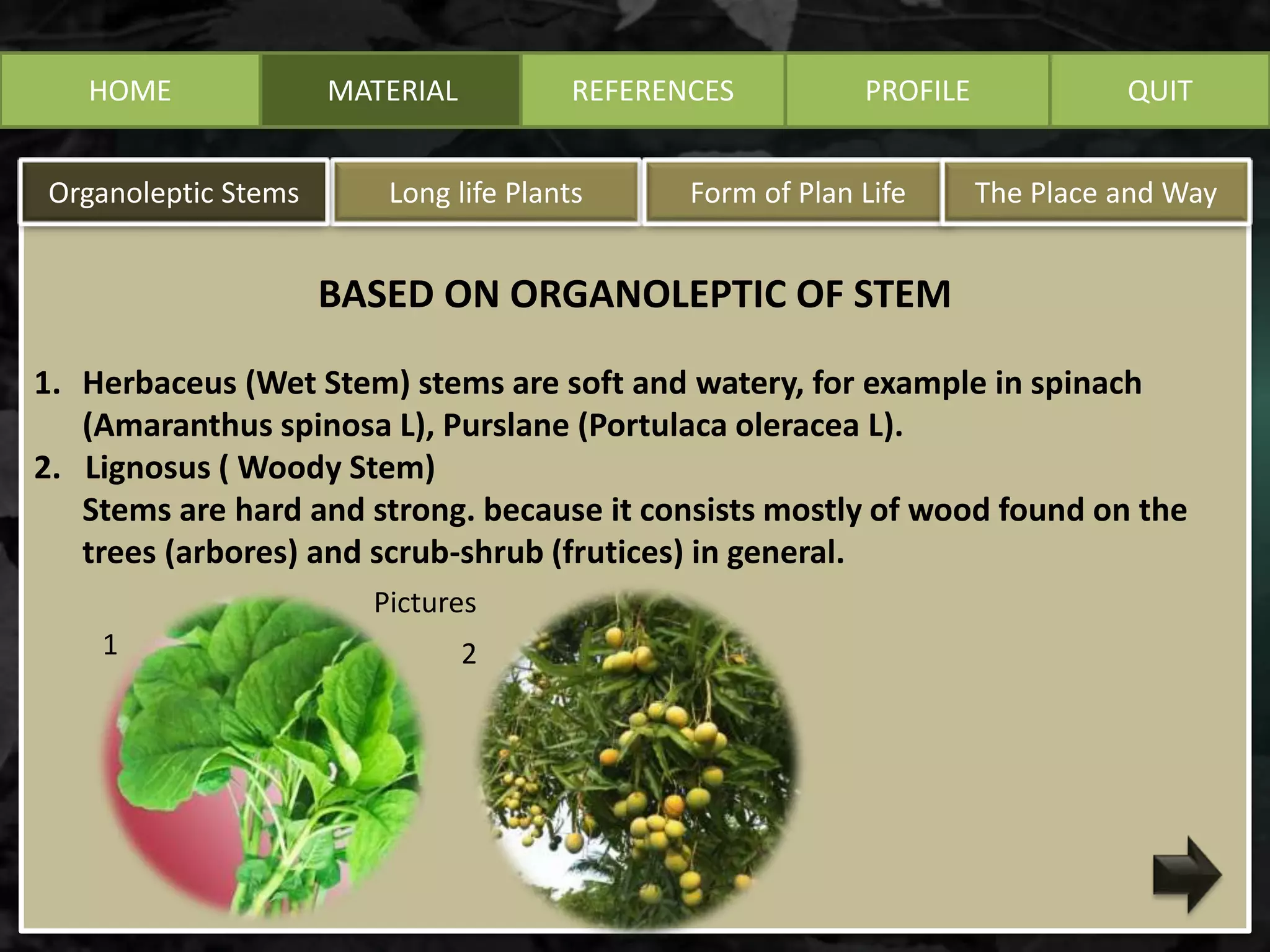
1. Herbaceus (Wet Stem) stems are soft and watery, for example in spinach
(Amaranthus spinosa L), Purslane (Portulaca oleracea L).
2. Lignosus ( Woody Stem)
Stems are hard and strong. because it consists mostly of wood found on the
trees (arbores) and scrub-shrub (frutices) in general.
Long life PlantsOrganoleptic Stems Form of Plan Life The Place and Way
REFERENCES PROFILE QUIT
Pictures
1 2
HOME MATERIAL
Longlive PlantsOrganoleptic Stems Form of Plan Life The Place and Way
REFERENCES PROFILE QUIT
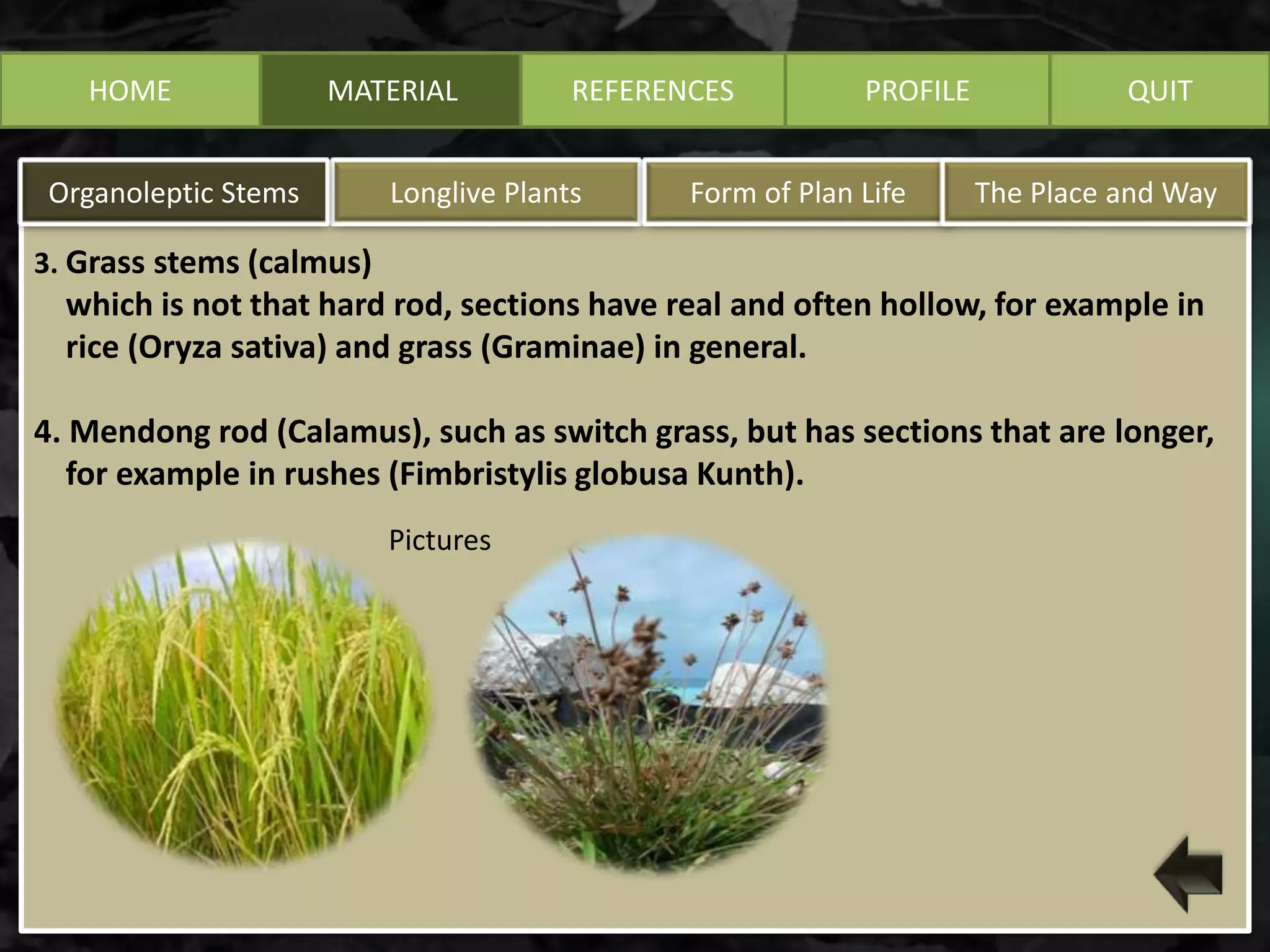
3. Grass stems (calmus)
which is not that hard rod, sections have real and often hollow, for example in
rice (Oryza sativa) and grass (Graminae) in general.
4. Mendong rod (Calamus), such as switch grass, but has sections that are longer,
for example in rushes (Fimbristylis globusa Kunth).
Pictures
HOME MATERIAL
BASED ON LONG LIFE PLANTS
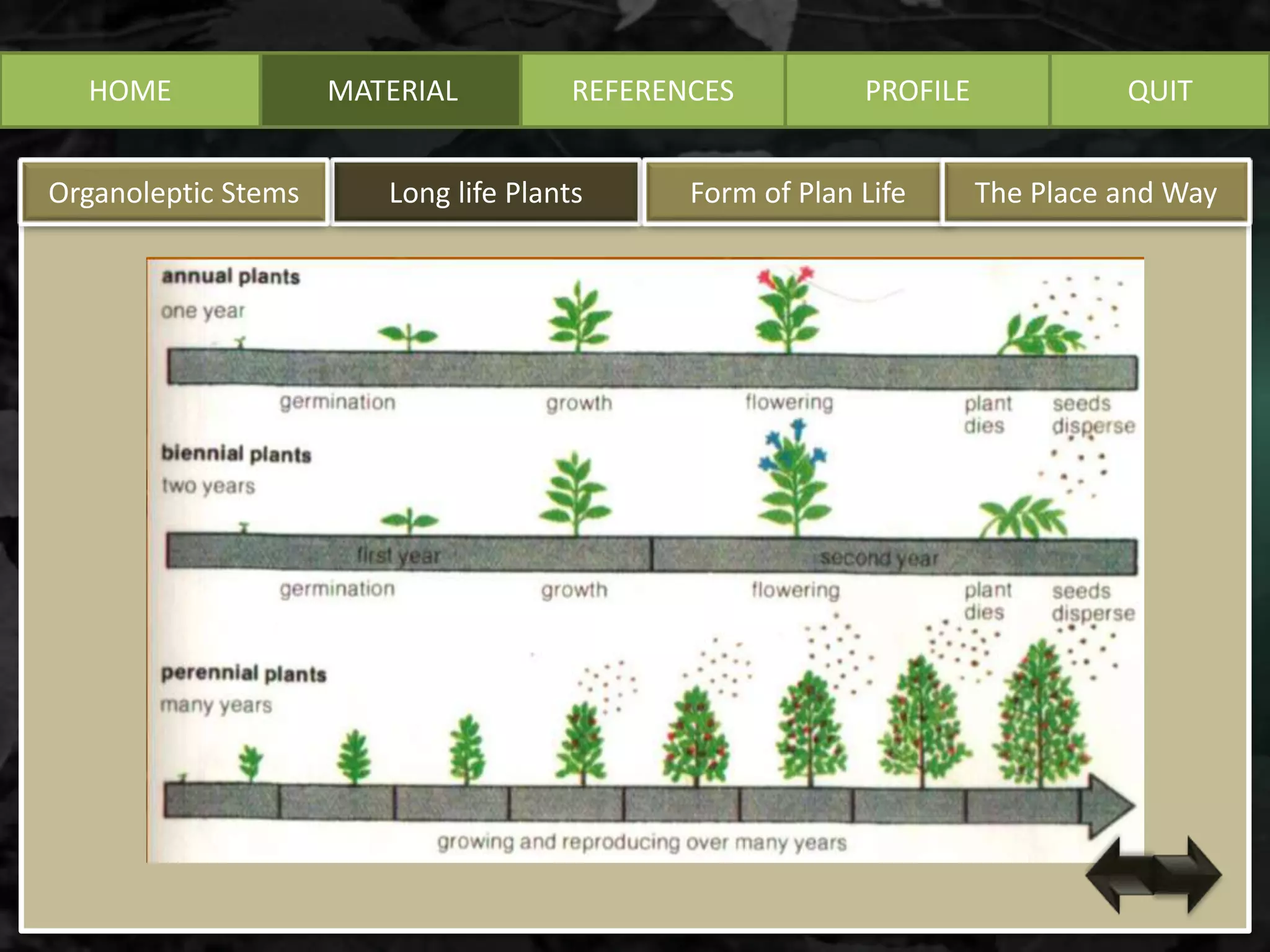
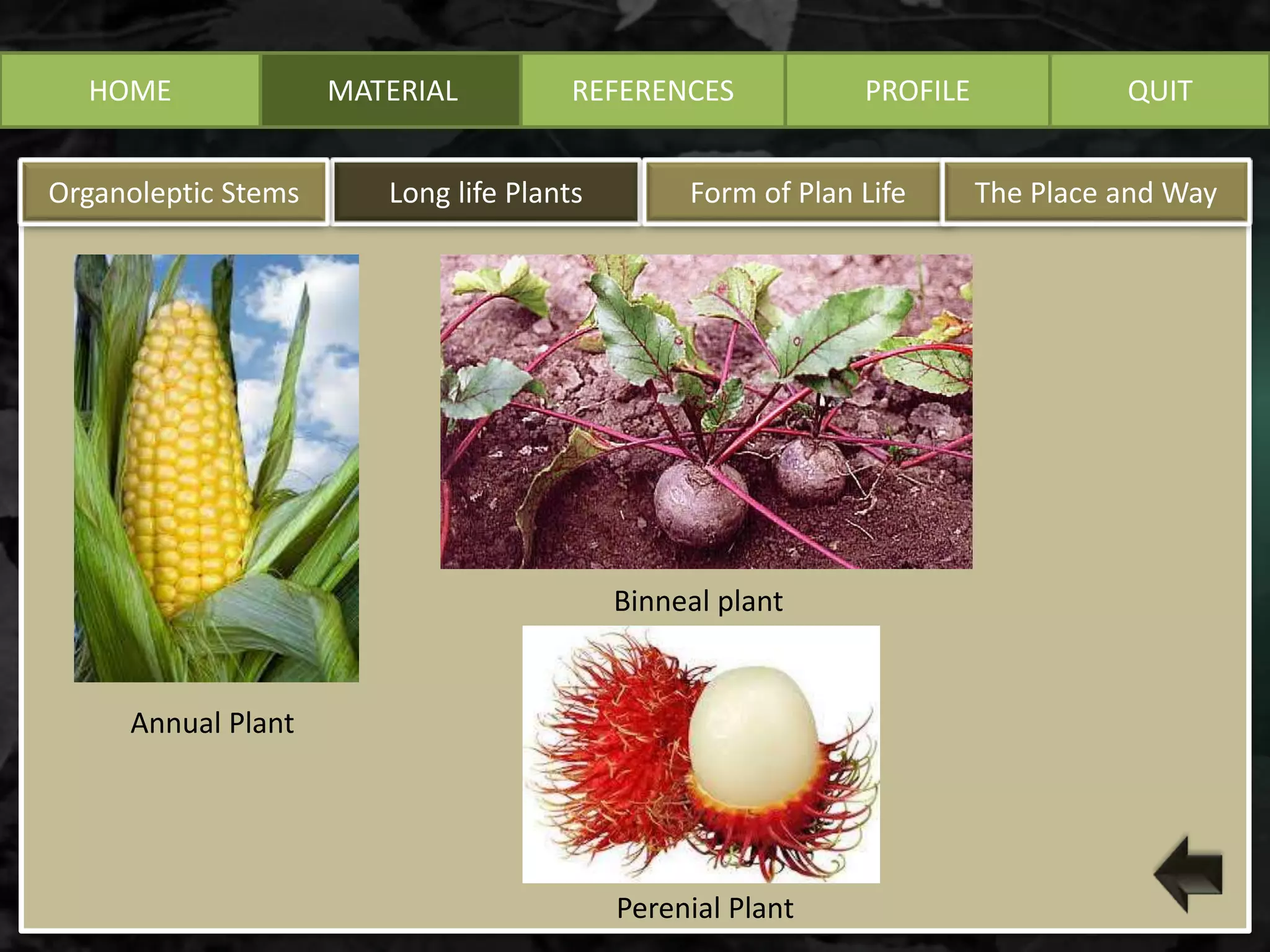
 Annual, or less if the plant life reaches a maximum of one year. Such plants,
generally flowering only once, then die after the fruit is ripe. example: corn,
soybeans, tomatoes, peanuts.
 Biennial (2-year plants), which completes the circle of plants ranged from more
than one year to two years. generally only bloom one time during the
vegetative period has completed more than one year. Eg type of shrub sidaguri
(Sida rhombifolia; Malvaceae)
 Parennial, the plants which life in the long times. Example : Metroxylon sagu,
Corypha umbraculifera
Long life PlantsOrganoleptic Stems Form of Plan Life The Place and Way
REFERENCES PROFILE QUIT
HOME MATERIAL
Long life PlantsOrganoleptic Stems Form of Plan Life The Place and Way
REFERENCES PROFILE QUIT
HOME MATERIAL
Long life PlantsOrganoleptic Stems Form of Plan Life The Place and Way
REFERENCES PROFILE QUIT
Annual Plant
Binneal plant
Perenial Plant
HOME MATERIAL
Form of Plants Life
Long Life PlantsOrganoleptic Stems Form of Plants Life The Place and Way
REFERENCES PROFILE QUIT
Phaneropytes
Chamaephytes
Hemicryptophyt
Cryptophytes
Therophytes
Form of Plants Life
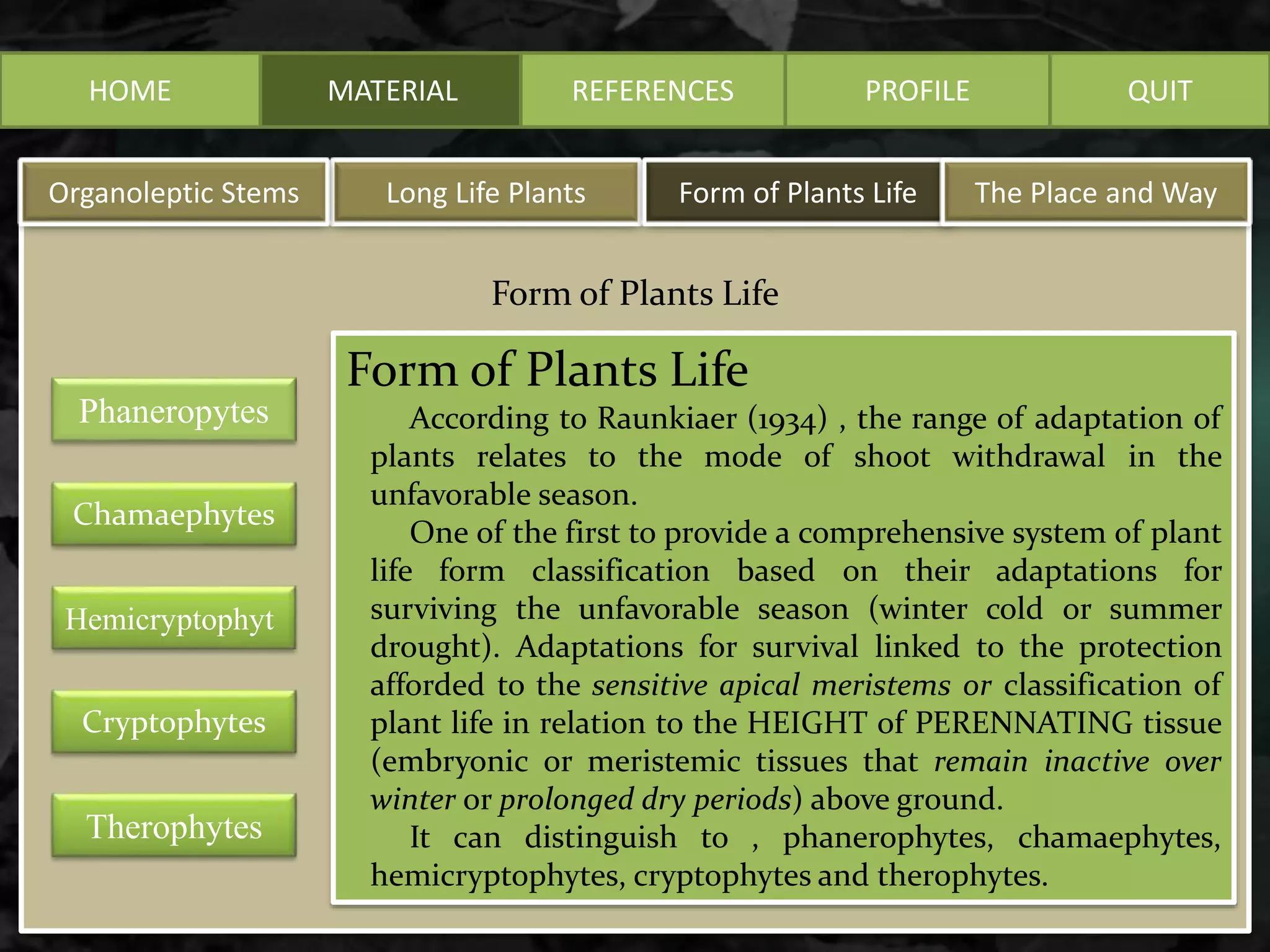
According to Raunkiaer (1934) , the range of adaptation of
plants relates to the mode of shoot withdrawal in the
unfavorable season.
One of the first to provide a comprehensive system of plant
life form classification based on their adaptations for
surviving the unfavorable season (winter cold or summer
drought). Adaptations for survival linked to the protection
afforded to the sensitive apical meristems or classification of
plant life in relation to the HEIGHT of PERENNATING tissue
(embryonic or meristemic tissues that remain inactive over
winter or prolonged dry periods) above ground.
It can distinguish to , phanerophytes, chamaephytes,
hemicryptophytes, cryptophytes and therophytes.
HOME MATERIAL
Form of Plants Life
REFERENCES PROFILE QUIT
Phaneropytes
Chamaephytes
Hemicryptophyt
Cryptophytes
Therophytes
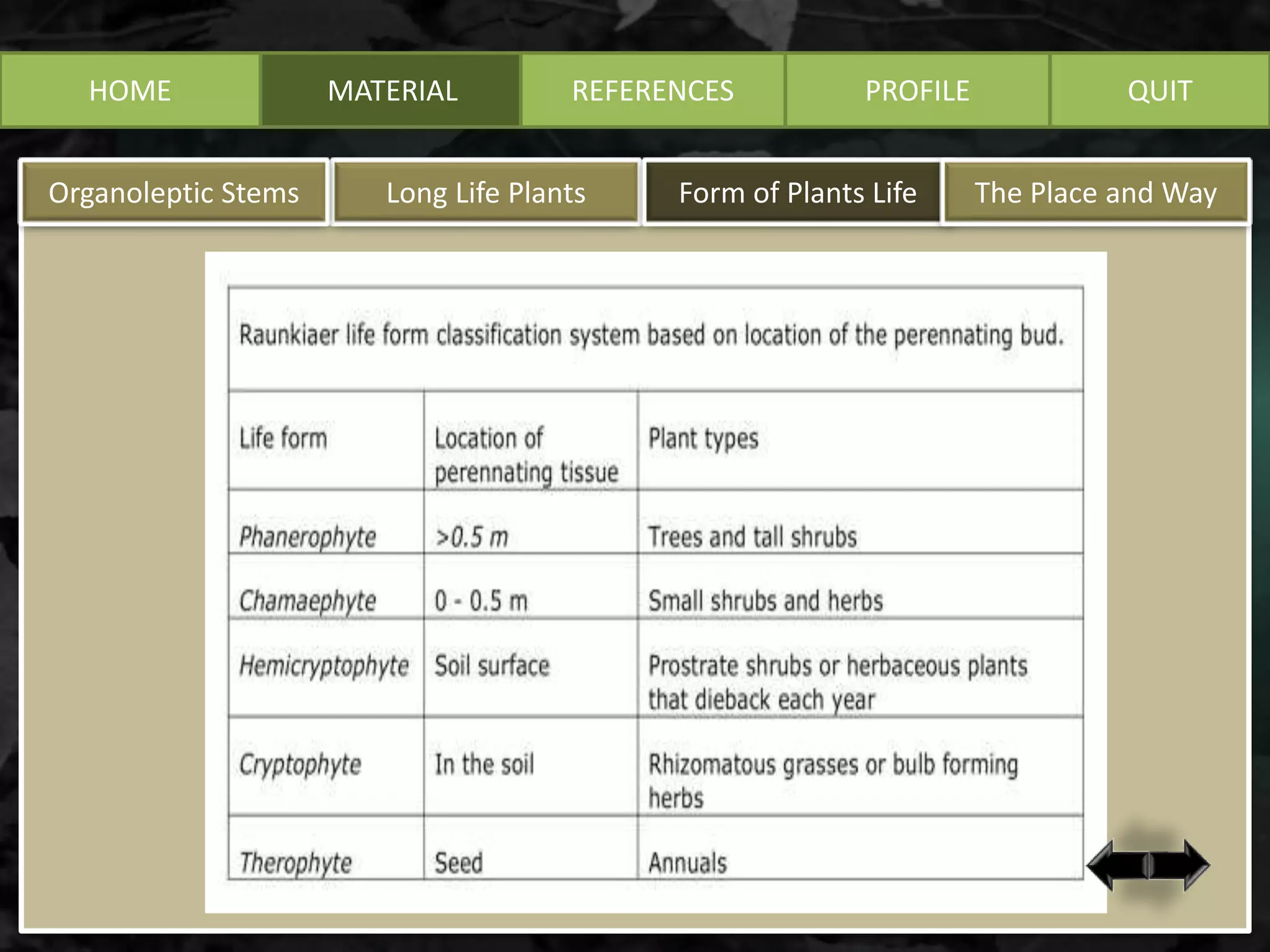
Phanerophytes (phanero = visible)
Trees and shrubs greater than 25 cm in height that have their
leaf-producing buds elevated above ground on stems.
Long Life PlantsOrganoleptic Stems Form of Plants Life The Place and Way
HOME MATERIAL
Form of Plants Life
REFERENCES PROFILE QUIT
Phaneropytes
Chamaephytes
Hemicryptophyt
Cryptophytes
Therophytes
Chamaephytes (chamae = dwarf)
Perennial shoots or buds are on the
SURFACE of the ground to about 25 cm
ABOVE the surface.
1. Subfructicosa chamaephytes,
the buds are protected by the
ingredients.
2. Passive chamaephytes, stem
extends above the ground.
3. Active chamaephytes, buds
above ground.
4. Cushion chamaephytes,
transition Chamaephytes and
Hemicryptophytes.
Long Life PlantsOrganoleptic Stems Form of Plants Life The Place and Way
HOME MATERIAL
Form of Plants Life
REFERENCES PROFILE QUIT
Phaneropytes
Chamaephytes
Hemicryptophyt
Cryptophytes
Therophytes
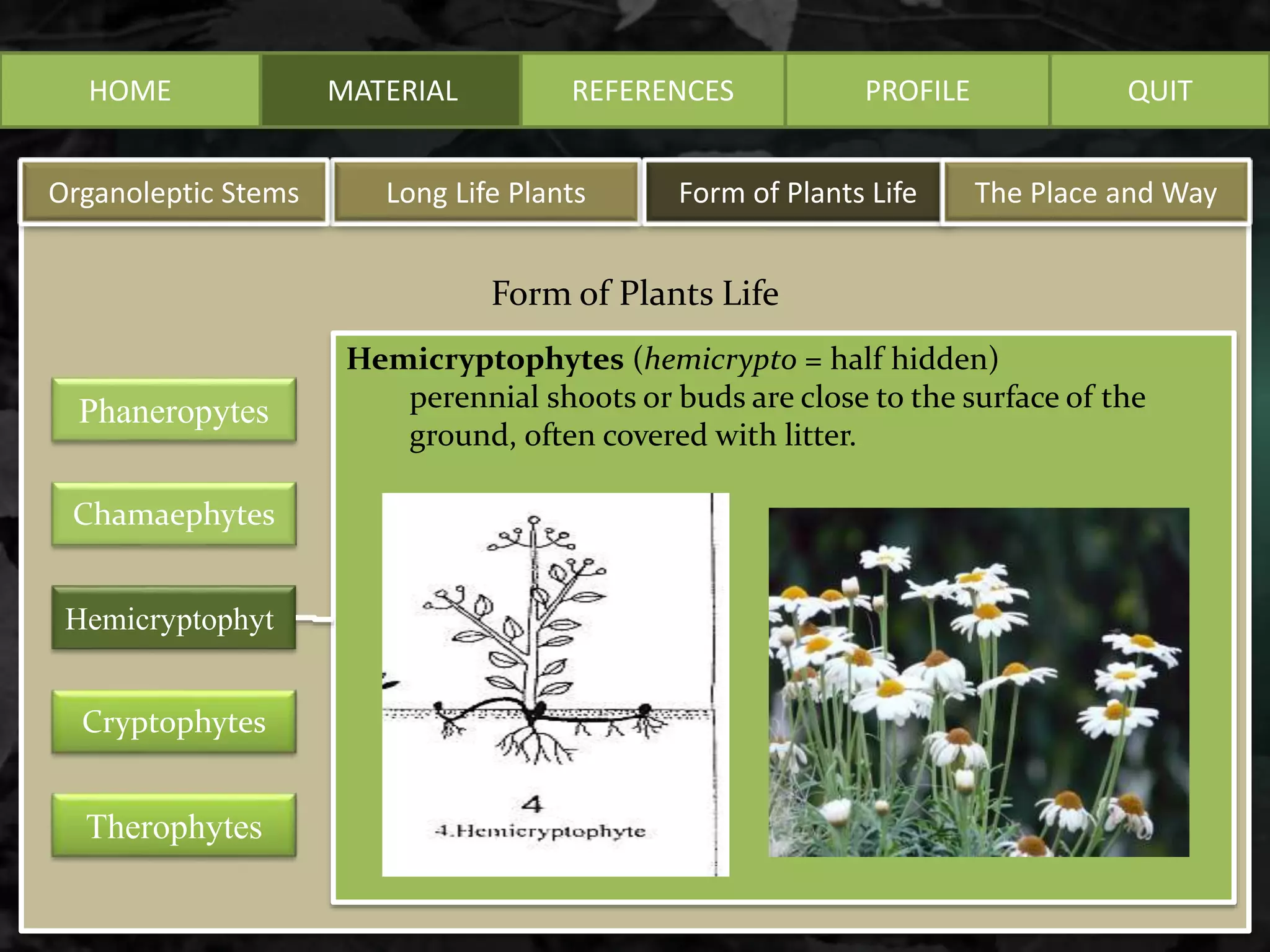
Hemicryptophytes (hemicrypto = half hidden)
perennial shoots or buds are close to the surface of the
ground, often covered with litter.
Long Life PlantsOrganoleptic Stems Form of Plants Life The Place and Way
HOME MATERIAL
Form of Plants Life
REFERENCES PROFILE QUIT
Phaneropytes
Chamaephytes
Hemicryptophyt
Cryptophytes
Therophytes
Cryptophytes (crypto = hidden)
grasses which have above-ground tissues that die back in winter
or during prolonged dry periods and survive unfavorable
periods as buds buried in the ground on a bulb or rhizome.
Long Life PlantsOrganoleptic Stems Form of Plants Life The Place and Way
HOME MATERIAL
Form of Plants Life
REFERENCES PROFILE QUIT
Phaneropytes
Chamaephytes
Hemicryptophyt
Cryptophytes
Therophytes
Therophytes (thero = summer)
Annuals that survive unfavorable periods as seeds and
complete their life cycle from seed to seed in one season.
Long Life PlantsOrganoleptic Stems Form of Plants Life The Place and Way
HOME MATERIAL REFERENCES PROFILE QUIT
Long Life PlantsOrganoleptic Stems Form of Plants Life The Place and Way
HOME MATERIAL REFERENCES PROFILE QUIT
Long Life PlantsOrganoleptic Stems Form of Plants Life The Place and Way
HOME MATERIAL
In nature based on where and how to plant life can be
observed in the presences
 Epiphytes (Epiphyte) ie plants that ride on other
plant parts. For example orchid and Pterydophyta.
 Epifil, stature aboard on the leaves of other plants
 Liana is a climbing plant to another plant (can be
with the help of pembelit leaves, roots sticker, thorn
hooks, pembelit branches, leaves pembelit, etc.)
which is essentially to compete gets sunlight.
 Parasitic plant that is riding and sucking food from
their host plants such as mistletoe (Dendroptheo
pentandra; Loranthaceae) .
REFERENCES PROFILE QUIT
Long Life PlantsOrganoleptic Stems Form of Plants Life The Place and Way
HOME MATERIAL
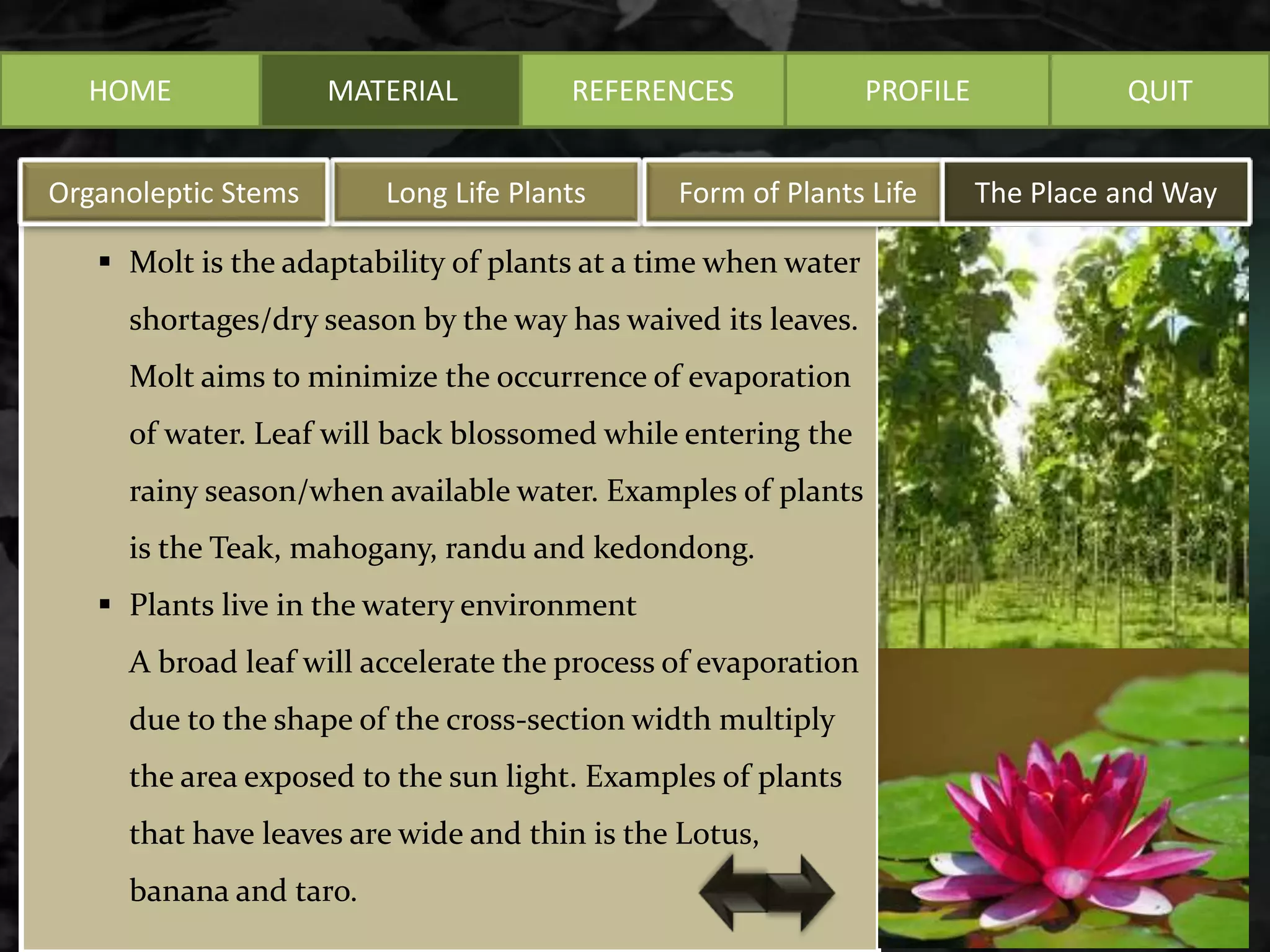
 Molt is the adaptability of plants at a time when water
shortages/dry season by the way has waived its leaves.
Molt aims to minimize the occurrence of evaporation
of water. Leaf will back blossomed while entering the
rainy season/when available water. Examples of plants
is the Teak, mahogany, randu and kedondong.
 Plants live in the watery environment
A broad leaf will accelerate the process of evaporation
due to the shape of the cross-section width multiply
the area exposed to the sun light. Examples of plants
that have leaves are wide and thin is the Lotus,
banana and taro.
REFERENCES PROFILE QUIT
Long Life PlantsOrganoleptic Stems Form of Plants Life The Place and Way
HOME MATERIAL
 Plant eaters of insects aims to fullfill needs nutrient
substances/nitrogen which is not retrieved from the
ground. An example of this is the Nepenthes plants
and venus.
 Plants are sensitive to stimulation, it will close the
leaves when in touch.
REFERENCES PROFILE QUIT
Long Life PlantsOrganoleptic Stems Form of Plants Life The Place and Way
HOME MATERIAL REFERENCES PROFILE QUIT
1. http://id.wikipedia.org/wiki/Morfologi_tumbuhan
2. http://www.expertsmind.com/questions/chamaephytes-classes-of-life-form-
30128836.aspx
3. http://www.vcbio.science.ru.nl/en/virtuallessons/landscape/raunkiaer/
HOME MATERIAL REFERENCES PROFILE QUIT
Group 1st
Group Members :
Rio Rasdian Saputra
Risa Andriani
Romita
Tari Rezky Ayunda

Life form of plants

  • 1.
  • 2.
    HOME MATERIAL REFERENCESPROFILE QUIT epiphyte -grows on host plant at all life stages hemiepiphyte -starts in the tree, sends roots to the ground -this part is a root secondary hemiepiphyte -starts on the grounds (terrestrial stage), grows up trunk (liana stage), loses its connection with soil as base of stem deteriorates (epiphytic stage); finally sends roots back to ground (hemiepiphytic stage) -e.g. Philodendron, Monstera Liana -woody climber -starts on the ground, grows upward tree -a single trunk vine = herbaceous climber shrub many stems, these normally much smaller in diameter
  • 3.
    HOME MATERIAL REFERENCESPROFILE QUIT epiphyte -grows on host plant at all life stages hemiepiphyte -starts in the tree, sends roots to the ground -this part is a root secondary hemiepiphyte -starts on the grounds (terrestrial stage), grows up trunk (liana stage), loses its connection with soil as base of stem deteriorates (epiphytic stage); finally sends roots back to ground (hemiepiphytic stage) -e.g. Philodendron, Monstera Liana -woody climber -starts on the ground, grows upward tree -a single trunk vine = herbaceous climber shrub many stems, these normally much smaller in diameter
  • 4.
    HOME MATERIAL Long lifePlantsOrganoleptic Stems Form of Plant Life The Place and Way REFERENCES PROFILE QUIT
  • 5.
    HOME MATERIAL BASED ONORGANOLEPTIC OF STEM 1. Herbaceus (Wet Stem) stems are soft and watery, for example in spinach (Amaranthus spinosa L), Purslane (Portulaca oleracea L). 2. Lignosus ( Woody Stem) Stems are hard and strong. because it consists mostly of wood found on the trees (arbores) and scrub-shrub (frutices) in general. Long life PlantsOrganoleptic Stems Form of Plan Life The Place and Way REFERENCES PROFILE QUIT Pictures 1 2
  • 6.
    HOME MATERIAL Longlive PlantsOrganolepticStems Form of Plan Life The Place and Way REFERENCES PROFILE QUIT 3. Grass stems (calmus) which is not that hard rod, sections have real and often hollow, for example in rice (Oryza sativa) and grass (Graminae) in general. 4. Mendong rod (Calamus), such as switch grass, but has sections that are longer, for example in rushes (Fimbristylis globusa Kunth). Pictures
  • 7.
    HOME MATERIAL BASED ONLONG LIFE PLANTS  Annual, or less if the plant life reaches a maximum of one year. Such plants, generally flowering only once, then die after the fruit is ripe. example: corn, soybeans, tomatoes, peanuts.  Biennial (2-year plants), which completes the circle of plants ranged from more than one year to two years. generally only bloom one time during the vegetative period has completed more than one year. Eg type of shrub sidaguri (Sida rhombifolia; Malvaceae)  Parennial, the plants which life in the long times. Example : Metroxylon sagu, Corypha umbraculifera Long life PlantsOrganoleptic Stems Form of Plan Life The Place and Way REFERENCES PROFILE QUIT
  • 8.
    HOME MATERIAL Long lifePlantsOrganoleptic Stems Form of Plan Life The Place and Way REFERENCES PROFILE QUIT
  • 9.
    HOME MATERIAL Long lifePlantsOrganoleptic Stems Form of Plan Life The Place and Way REFERENCES PROFILE QUIT Annual Plant Binneal plant Perenial Plant
  • 10.
    HOME MATERIAL Form ofPlants Life Long Life PlantsOrganoleptic Stems Form of Plants Life The Place and Way REFERENCES PROFILE QUIT Phaneropytes Chamaephytes Hemicryptophyt Cryptophytes Therophytes Form of Plants Life According to Raunkiaer (1934) , the range of adaptation of plants relates to the mode of shoot withdrawal in the unfavorable season. One of the first to provide a comprehensive system of plant life form classification based on their adaptations for surviving the unfavorable season (winter cold or summer drought). Adaptations for survival linked to the protection afforded to the sensitive apical meristems or classification of plant life in relation to the HEIGHT of PERENNATING tissue (embryonic or meristemic tissues that remain inactive over winter or prolonged dry periods) above ground. It can distinguish to , phanerophytes, chamaephytes, hemicryptophytes, cryptophytes and therophytes.
  • 11.
    HOME MATERIAL Form ofPlants Life REFERENCES PROFILE QUIT Phaneropytes Chamaephytes Hemicryptophyt Cryptophytes Therophytes Phanerophytes (phanero = visible) Trees and shrubs greater than 25 cm in height that have their leaf-producing buds elevated above ground on stems. Long Life PlantsOrganoleptic Stems Form of Plants Life The Place and Way
  • 12.
    HOME MATERIAL Form ofPlants Life REFERENCES PROFILE QUIT Phaneropytes Chamaephytes Hemicryptophyt Cryptophytes Therophytes Chamaephytes (chamae = dwarf) Perennial shoots or buds are on the SURFACE of the ground to about 25 cm ABOVE the surface. 1. Subfructicosa chamaephytes, the buds are protected by the ingredients. 2. Passive chamaephytes, stem extends above the ground. 3. Active chamaephytes, buds above ground. 4. Cushion chamaephytes, transition Chamaephytes and Hemicryptophytes. Long Life PlantsOrganoleptic Stems Form of Plants Life The Place and Way
  • 13.
    HOME MATERIAL Form ofPlants Life REFERENCES PROFILE QUIT Phaneropytes Chamaephytes Hemicryptophyt Cryptophytes Therophytes Hemicryptophytes (hemicrypto = half hidden) perennial shoots or buds are close to the surface of the ground, often covered with litter. Long Life PlantsOrganoleptic Stems Form of Plants Life The Place and Way
  • 14.
    HOME MATERIAL Form ofPlants Life REFERENCES PROFILE QUIT Phaneropytes Chamaephytes Hemicryptophyt Cryptophytes Therophytes Cryptophytes (crypto = hidden) grasses which have above-ground tissues that die back in winter or during prolonged dry periods and survive unfavorable periods as buds buried in the ground on a bulb or rhizome. Long Life PlantsOrganoleptic Stems Form of Plants Life The Place and Way
  • 15.
    HOME MATERIAL Form ofPlants Life REFERENCES PROFILE QUIT Phaneropytes Chamaephytes Hemicryptophyt Cryptophytes Therophytes Therophytes (thero = summer) Annuals that survive unfavorable periods as seeds and complete their life cycle from seed to seed in one season. Long Life PlantsOrganoleptic Stems Form of Plants Life The Place and Way
  • 16.
    HOME MATERIAL REFERENCESPROFILE QUIT Long Life PlantsOrganoleptic Stems Form of Plants Life The Place and Way
  • 17.
    HOME MATERIAL REFERENCESPROFILE QUIT Long Life PlantsOrganoleptic Stems Form of Plants Life The Place and Way
  • 18.
    HOME MATERIAL In naturebased on where and how to plant life can be observed in the presences  Epiphytes (Epiphyte) ie plants that ride on other plant parts. For example orchid and Pterydophyta.  Epifil, stature aboard on the leaves of other plants  Liana is a climbing plant to another plant (can be with the help of pembelit leaves, roots sticker, thorn hooks, pembelit branches, leaves pembelit, etc.) which is essentially to compete gets sunlight.  Parasitic plant that is riding and sucking food from their host plants such as mistletoe (Dendroptheo pentandra; Loranthaceae) . REFERENCES PROFILE QUIT Long Life PlantsOrganoleptic Stems Form of Plants Life The Place and Way
  • 19.
    HOME MATERIAL  Moltis the adaptability of plants at a time when water shortages/dry season by the way has waived its leaves. Molt aims to minimize the occurrence of evaporation of water. Leaf will back blossomed while entering the rainy season/when available water. Examples of plants is the Teak, mahogany, randu and kedondong.  Plants live in the watery environment A broad leaf will accelerate the process of evaporation due to the shape of the cross-section width multiply the area exposed to the sun light. Examples of plants that have leaves are wide and thin is the Lotus, banana and taro. REFERENCES PROFILE QUIT Long Life PlantsOrganoleptic Stems Form of Plants Life The Place and Way
  • 20.
    HOME MATERIAL  Planteaters of insects aims to fullfill needs nutrient substances/nitrogen which is not retrieved from the ground. An example of this is the Nepenthes plants and venus.  Plants are sensitive to stimulation, it will close the leaves when in touch. REFERENCES PROFILE QUIT Long Life PlantsOrganoleptic Stems Form of Plants Life The Place and Way
  • 21.
    HOME MATERIAL REFERENCESPROFILE QUIT 1. http://id.wikipedia.org/wiki/Morfologi_tumbuhan 2. http://www.expertsmind.com/questions/chamaephytes-classes-of-life-form- 30128836.aspx 3. http://www.vcbio.science.ru.nl/en/virtuallessons/landscape/raunkiaer/
  • 22.
    HOME MATERIAL REFERENCESPROFILE QUIT Group 1st Group Members : Rio Rasdian Saputra Risa Andriani Romita Tari Rezky Ayunda

Editor's Notes

  • #2 Picture with background removed (Intermediate) To reproduce the picture effects on this slide, do the following: On the Home tab, in the Slides group, click Layout, and then click Blank. On the Insert tab, in the Images group, click Picture. In the Insert Picture dialog box, select a picture and then click Insert. Select the picture. Under Picture Tools, on the Format tab, in the Size group, click the Size and Position dialog box launcher. In the Format Picture dialog box, resize or crop the image so that the height is set to 7.5” and the width is set to 10”. To crop the picture, click Crop in the left pane, and in the right pane, under Crop position, enter values into the Height, Width, Left, and Top boxes. To resize the picture, click Size in the left pane, and in the right pane, under Size and rotate, enter values into the Height and Width boxes. Also under Picture Tools, on the Format tab, in the Adjust group, click Color, and then under Recolor click Grayscale. Also in the Adjust group, click Corrections, and then under Brightness and Contrast, click Brightness: -40% Contrast: +20%. On the Home tab, in the Clipboard group, click the arrow to the right of Copy, and then click Duplicate. Select the second picture. On the Home tab, in the Drawing group, click Arrange, point to Align, and then do the following: Click Align to Slide. Click Align Middle. Click Align Center. Under Picture Tools, on the Format tab, in the Adjust group, click Reset Picture. Also under Picture Tools, on the Format tab, in the Size group, click the Size and Position dialog box launcher.. In the Format Picture dialog box, resize or crop the image to focus on the main subject in the picture. (Example picture is set to 3.54” height and 3.24” width). To crop the picture, click Crop in the left pane, and in the right pane, under Crop position, enter values into the Height, Width, Left, and Top boxes. To resize the picture, click Size in the left pane, and in the right pane, under Size and rotate, enter values into the Height and Width boxes. Also under Picture Tools, on the Format tab, in the Adjust group, click Remove Background, and then do the following: To remove additional background areas from the picture, on the Background Removal tab, in the Refine group, click Mark Areas to Remove. Select all of the additional areas to be removed. To keep additional areas of the picture that have been removed, on the Background Removal tab, in the Refine group, click Mark Areas to Keep. Select all of the additional areas to be kept. Click Keep Changes in the Close group when finished. To reproduce the shape effects on this slide, do the following: On the Home tab, in the Drawing group, select Rectangle. On the slide, drag to draw a rectangle. Select the rectangle. Also on the Home tab, in the Drawing group, click the Format Shape dialog box launcher. In the Format Shape dialog box, in the Size tab, enter 7.5” into the Height box and enter 4” into the Width box. Also in the Format Shape dialog box, in the Fill tab, select Gradient fill, and then do the following: In the Type list, select Linear. In the Angle box, enter 90°. Under Gradient stops, click Add gradient stops or Remove gradient stops until three stops appear in the slider. Also under Gradient stops, customize the gradient stops as follows: Select the first stop from the left in the slider, and then do the following: In the Position box, enter 0%. Click the button next to Color, and then under Theme Colors click Black, Text 1 (first row, second option from the left). In the Transparency box, enter 100%. Select the second stop from the left in the slider, and then do the following: In the Position box, enter 40%. Click the button next to Color, click More Colors, and then in the Colors dialog box, on the Custom tab, enter values for Red: 47, Green: 91, and Blue: 77. In the Transparency box, enter 0%. Select the third stop from the left in the slider, and then do the following: In the Position box, enter 100%. Click the button next to Color, and then under Theme Colors click Black, Text 1 (first row, second option from the left). In the Transparency box, enter 90%. Also in the Format Shape dialog box, in the Line Color tab, select No Line. Select the second picture. On the Home tab, in the Drawing group, click Arrange, and then click Bring to Front. To reproduce the text effects on this slide, do the following: On the Insert tab, in the Text group, click Text Box, and then on the slide drag to draw your text box. Enter text in the text box, and then select the text. On the Home tab, in the Font group, do the following: In the Font list, click Calisto MT. In the Font Size list, click 36 pt. Click Font Color, and then under Theme Colors click White, Background 1 (first row, first option from the left). Position text over the least transparent part of the gradient.
  • #3 Picture with background removed (Intermediate) To reproduce the picture effects on this slide, do the following: On the Home tab, in the Slides group, click Layout, and then click Blank. On the Insert tab, in the Images group, click Picture. In the Insert Picture dialog box, select a picture and then click Insert. Select the picture. Under Picture Tools, on the Format tab, in the Size group, click the Size and Position dialog box launcher. In the Format Picture dialog box, resize or crop the image so that the height is set to 7.5” and the width is set to 10”. To crop the picture, click Crop in the left pane, and in the right pane, under Crop position, enter values into the Height, Width, Left, and Top boxes. To resize the picture, click Size in the left pane, and in the right pane, under Size and rotate, enter values into the Height and Width boxes. Also under Picture Tools, on the Format tab, in the Adjust group, click Color, and then under Recolor click Grayscale. Also in the Adjust group, click Corrections, and then under Brightness and Contrast, click Brightness: -40% Contrast: +20%. On the Home tab, in the Clipboard group, click the arrow to the right of Copy, and then click Duplicate. Select the second picture. On the Home tab, in the Drawing group, click Arrange, point to Align, and then do the following: Click Align to Slide. Click Align Middle. Click Align Center. Under Picture Tools, on the Format tab, in the Adjust group, click Reset Picture. Also under Picture Tools, on the Format tab, in the Size group, click the Size and Position dialog box launcher.. In the Format Picture dialog box, resize or crop the image to focus on the main subject in the picture. (Example picture is set to 3.54” height and 3.24” width). To crop the picture, click Crop in the left pane, and in the right pane, under Crop position, enter values into the Height, Width, Left, and Top boxes. To resize the picture, click Size in the left pane, and in the right pane, under Size and rotate, enter values into the Height and Width boxes. Also under Picture Tools, on the Format tab, in the Adjust group, click Remove Background, and then do the following: To remove additional background areas from the picture, on the Background Removal tab, in the Refine group, click Mark Areas to Remove. Select all of the additional areas to be removed. To keep additional areas of the picture that have been removed, on the Background Removal tab, in the Refine group, click Mark Areas to Keep. Select all of the additional areas to be kept. Click Keep Changes in the Close group when finished. To reproduce the shape effects on this slide, do the following: On the Home tab, in the Drawing group, select Rectangle. On the slide, drag to draw a rectangle. Select the rectangle. Also on the Home tab, in the Drawing group, click the Format Shape dialog box launcher. In the Format Shape dialog box, in the Size tab, enter 7.5” into the Height box and enter 4” into the Width box. Also in the Format Shape dialog box, in the Fill tab, select Gradient fill, and then do the following: In the Type list, select Linear. In the Angle box, enter 90°. Under Gradient stops, click Add gradient stops or Remove gradient stops until three stops appear in the slider. Also under Gradient stops, customize the gradient stops as follows: Select the first stop from the left in the slider, and then do the following: In the Position box, enter 0%. Click the button next to Color, and then under Theme Colors click Black, Text 1 (first row, second option from the left). In the Transparency box, enter 100%. Select the second stop from the left in the slider, and then do the following: In the Position box, enter 40%. Click the button next to Color, click More Colors, and then in the Colors dialog box, on the Custom tab, enter values for Red: 47, Green: 91, and Blue: 77. In the Transparency box, enter 0%. Select the third stop from the left in the slider, and then do the following: In the Position box, enter 100%. Click the button next to Color, and then under Theme Colors click Black, Text 1 (first row, second option from the left). In the Transparency box, enter 90%. Also in the Format Shape dialog box, in the Line Color tab, select No Line. Select the second picture. On the Home tab, in the Drawing group, click Arrange, and then click Bring to Front. To reproduce the text effects on this slide, do the following: On the Insert tab, in the Text group, click Text Box, and then on the slide drag to draw your text box. Enter text in the text box, and then select the text. On the Home tab, in the Font group, do the following: In the Font list, click Calisto MT. In the Font Size list, click 36 pt. Click Font Color, and then under Theme Colors click White, Background 1 (first row, first option from the left). Position text over the least transparent part of the gradient.