https://drait.edu.in 1
Cloud Computing –Kai Hwang
Unit 3
Cloud computing and Service models
Dr. AMBEDKAR INSTITUTE OF TECHNOLOGY
OUTER RING ROAD,MALLATHALLI,BENGALURU
DEPARTMENT OF COMPUTER SCIECNE AND ENGINEERING
Cloud Computing and Service Models: Public, Private, and Hybrid Clouds, Cloud Ecosystem
and Enabling Technologies, Infrastructure-as-a-Service (IaaS), Platform-as-a-Service (PaaS)
and Software-as-a-Service (SaaS), Data-Center Design and Interconnection Networks:
Warehouse-Scale Data-Center Design, Data-Center Interconnection Networks, Modular
Data Center in Shipping Containers, Interconnection of Modular Data Centers, Data-
Center Management Issues, Architectural Design of Compute and Storage Clouds: A
Generic Cloud Architecture Design, Layered Cloud Architectural Development,
Virtualization Support and Disaster Recovery, Architectural Design Challenges, Public
Cloud Platforms: GAE, AWS, AND AZURE: Public Clouds and Service Offerings, Google App
Engine (GAE), Amazon Web Services (AWS), Microsoft Windows Azure, Inter-Cloud
Resource Management: Extended Cloud Computing Services, Resource Provisioning and
Platform Deployment, , Virtual Machine Creation and Management, Global Exchange of
Cloud Resources, Cloud Security and Trust Management: Cloud Security Defense
Strategies, Distributed Intrusion/Anomaly Detection, Data and Software Protection
Techniques.
Cloud Computing and Service Models
Public, Private, and Hybrid Clouds
Cloud Computing and Service Models :
share access to resources from anywhere at any
time through their connected devices.
avoids large data movement: Better network bandwidth
utilization.
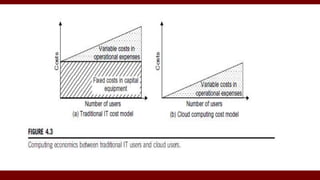
 Machine virtualization : reduced the total cost.
 Significant benefit to IT companies by freeing them from the
low-level task of setting up the hardware (servers) and
managing the system software.
Centralized versus Distributed Computing
Commercial cloud providers Amazon, Google,
and Microsoft created their platforms to be
distributed geographically.
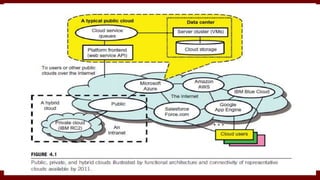
Public Clouds
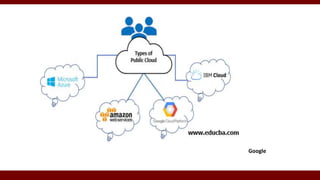
1.Built over the Internet and can be accessed by any
user who has paid for the service.
2.Public clouds are owned by service providers and are
accessible through a subscription.
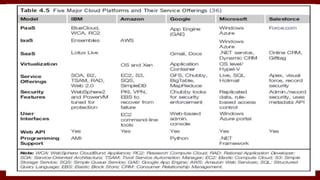
3.Google App Engine (GAE), Amazon Web Services
(AWS), Microsoft Azure,IBM Blue Cloud, and
Salesforce.com’s Force.com.
4.Can share the same hardware, storage and network devices with other
organizations or cloud “tenants,”
5. Can access services and manage your account using a web browser.
Public Clouds
4.The providers offers services through remote
interface for creating and managing VM instances
within their proprietary infrastructure.
5.A public cloud delivers a selected set of business
processes.
6. The application and infrastructure services are offered
on a flexible price-per-use basis.
Google
Private Clouds
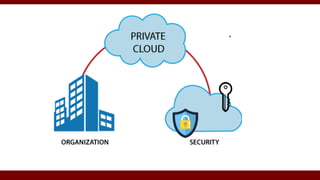
Is built within the domain of an intranet owned by a
single organization.
It is client owned and managed, and its access is limited
to the owning clients and their partners.
Was not meant to sell capacity over the Internet
through publicly accessible interfaces.
Private Clouds
flexible and agile private infrastructure to run
service workloads within their administrative
domains.
A private cloud is supposed to deliver more efficient
and convenient cloud services.
Retains standardization, while retaining greater
customization and organizational control.
Hybrid Clouds
Private clouds support a hybrid cloud model by
supplementing local infrastructure with computing
capacity from an external public cloud.
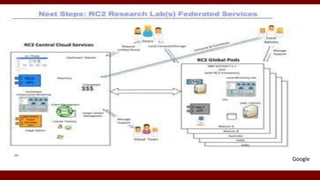
Ex: Research Compute Cloud (RC2).
Provides access to clients, the partner network, and
third parties.
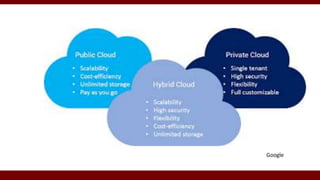
summary
public clouds promote standardization, preserve capital
investment, and offer application flexibility.
Private clouds attempt to achieve customization and offer
higher efficiency, resiliency, security, and privacy.
Hybrid clouds operate in the middle, with many compromises
in terms of resource sharing
Google
Google
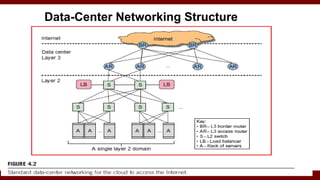
Data-Center Networking Structure
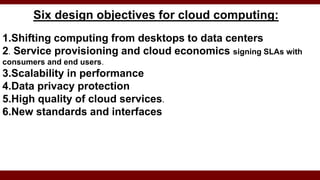
Six design objectives for cloud computing:
1.Shifting computing from desktops to data centers
2. Service provisioning and cloud economics signing SLAs with
consumers and end users.
3.Scalability in performance
4.Data privacy protection
5.High quality of cloud services.
6.New standards and interfaces
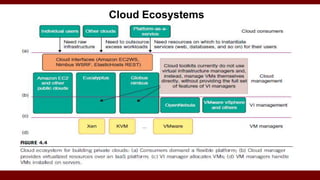
Cloud Ecosystems
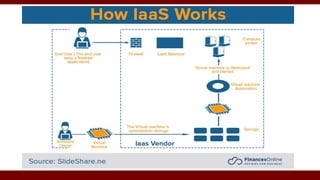
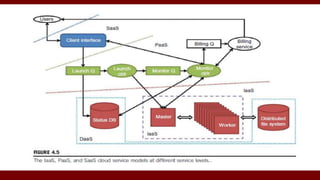
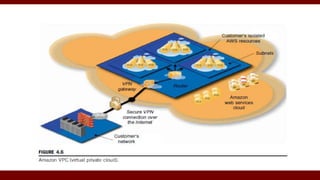
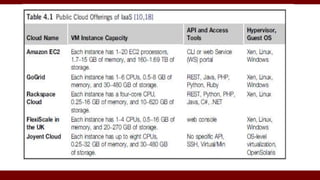
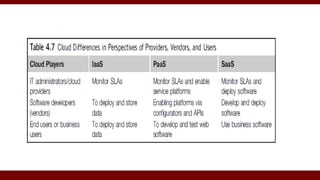
Infrastructure-as-a-Service (IaaS)
Delivers infrastructure, platform, and software (application) as
services.
SLA for cloud computing is addressed in terms of service availability,
performance, and data protection and security.
GoGrid, FlexiScale, and Aneka are good examples.
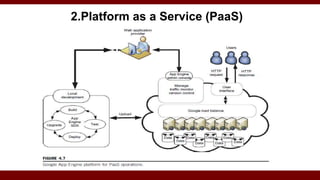
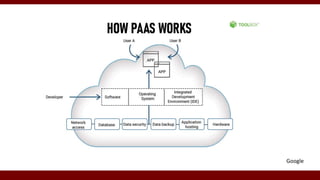
2.Platform as a Service (PaaS)
Google
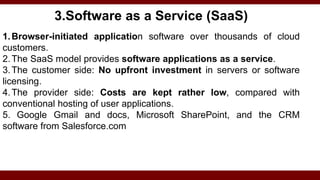
3.Software as a Service (SaaS)
1.Browser-initiated application software over thousands of cloud
customers.
2.The SaaS model provides software applications as a service.
3.The customer side: No upfront investment in servers or software
licensing.
4.The provider side: Costs are kept rather low, compared with
conventional hosting of user applications.
5. Google Gmail and docs, Microsoft SharePoint, and the CRM
software from Salesforce.com
DATA-CENTER DESIGN AND INTERCONNECTION NETWORKS
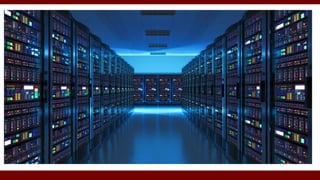
A data center is often built with a large number of servers through a huge interconnection network.
Warehouse-Scale Data-Center Design
The cloud is built on massive datacenters.
 large as a shopping mall (11 times the size of a
football field) under one roof.
4,00,000 to 1 million servers.
 A small data center have 1,000 servers.
DATA-CENTER DESIGN AND INTERCONNECTION NETWORKS
A data center is often built with a large number of servers through a huge interconnection network.
Warehouse-Scale Data-Center Design
larger the data center, lower the operational cost.
Month cost for huge 400-server data center
 network cost $13/Mbps;
 storage cost $0.4/GB;
 administration costs.
Data-Center Construction Requirements
Multicore CPU and its internal cache hierarchy, local shared
and coherent DRAM, and a number of directly attached disk
drives.
 DRAM and disk resources within the rack are accessible
through first-level rack switches.
Consider a data center built with 2,000 servers, each with 8
GB of DRAM and four 1 TB disk drives.
Each group of 40 servers is connected through a 1 Gbps link
to a rack-level switch with additional eight 1 Gbps ports to the
cluster-level switch
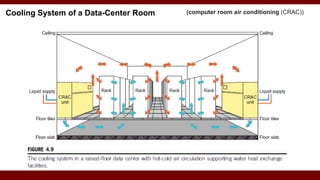
Cooling System of a Data-Center Room (computer room air conditioning (CRAC))
Data-Center Interconnection Networks
Basic requirements:
1. Low latency,
2. High bandwidth
3. Low cost
4. Message-passing interface (MPI) communication support,
5. Fault tolerance.
Specific design considerations Data-Center Interconnection
1.Application Traffic Support
2.Network Expandability
3.Fault Tolerance and Graceful Degradation
4.Switch-centric Data-Center Design
1.Application Traffic Support
1.The network topology should support all MPI
communication patterns.
2.Both point-to-point and collective MPI
communications must be supported.
3.The network should have high bisection bandwidth to
meet this requirement.
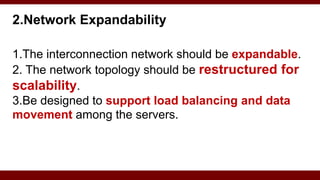
2.Network Expandability
1.The interconnection network should be expandable.
2. The network topology should be restructured for
scalability.
3.Be designed to support load balancing and data
movement among the servers.
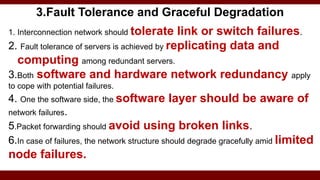
3.Fault Tolerance and Graceful Degradation
1. Interconnection network should tolerate link or switch failures.
2. Fault tolerance of servers is achieved by replicating data and
computing among redundant servers.
3.Both software and hardware network redundancy apply
to cope with potential failures.
4. One the software side, the software layer should be aware of
network failures.
5.Packet forwarding should avoid using broken links.
6.In case of failures, the network structure should degrade gracefully amid limited
node failures.
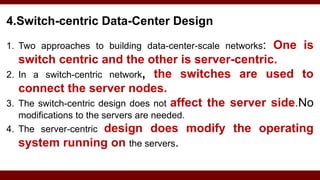
4.Switch-centric Data-Center Design
1. Two approaches to building data-center-scale networks: One is
switch centric and the other is server-centric.
2. In a switch-centric network, the switches are used to
connect the server nodes.
3. The switch-centric design does not affect the server side.No
modifications to the servers are needed.
4. The server-centric design does modify the operating
system running on the servers.
Modular Data Center in Shipping Containers
Housed in truck-towed containers.
Big shipping yard of container trucks.
Demand for lower power consumption, higher
computer density, and mobility to relocate data
centers
Sophisticated cooling
Both chilled air circulation and cold water are flowing
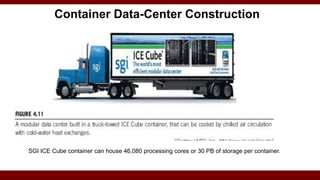
SGI ICE Cube container can house 46,080 processing cores or 30 PB of storage per container.
Container Data-Center Construction
Building a rack of 40 servers may take half a day.
Extending with multiple racks for 1,000 servers need
layout of the floor space with power, networking, cooling,
and complete testing.
 The container must be designed to be weatherproof and
easy to transport.
Data-Center Management Issues
Making common users happy
Controlled information flow
Multiuser manageability
Scalability to prepare for database growth
Reliability in virtualized infrastructure
 Low cost to both users and providers.
 Security enforcement and data protection
 Green information technology.
ARCHITECTURAL DESIGN OF COMPUTE AND STORAGE CLOUDS
1.Cloud Platform Design Goals
Scalability, virtualization, efficiency, and
reliability
support Web 2.0 applications.
The cloud management software needs to support
both physical and virtual machines.
Security
ARCHITECTURAL DESIGN OF COMPUTE AND STORAGE CLOUDS
2. Enabling Technologies for Clouds
1.Fast Platform Deployment :
2.Virtual Clusters on Demand
3.Multitenant Techniques
4.Massive data processing
5.Web Scale Communication
6.Distributed Storage
7.Licensing and Billing Services
ARCHITECTURAL DESIGN OF COMPUTE AND STORAGE CLOUDS
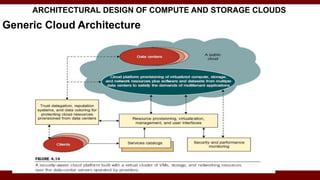
Generic Cloud Architecture
ARCHITECTURAL DESIGN OF COMPUTE AND STORAGE CLOUDS
3.Layered Cloud Architectural Development
Virtualization Support and Disaster Recovery
ARCHITECTURAL DESIGN OF COMPUTE AND STORAGE
CLOUDS
Architectural Design Challenges
Challenge 1—Service Availability and Data Lock-in Problem
Challenge 2—Data Privacy and Security Concerns
Challenge 3—Unpredictable Performance and Bottlenecks
Challenge 4—Distributed Storage and Widespread Software Bugs
Challenge 5—Cloud Scalability, Interoperability, and
Standardization
Challenge 6—Software Licensing and Reputation Sharing
PUBLIC CLOUD PLATFORMS: GAE, AWS, AND AZURE
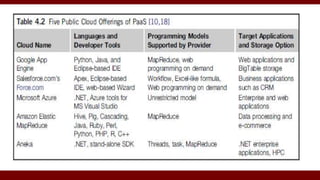
Public Clouds and Service Offerings
PUBLIC CLOUD PLATFORMS: GAE, AWS, AND AZURE
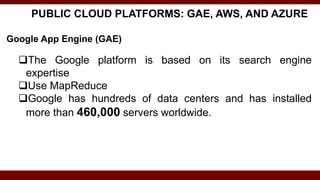
Google App Engine (GAE)
The Google platform is based on its search engine
expertise
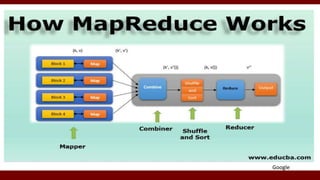
Use MapReduce
Google has hundreds of data centers and has installed
more than 460,000 servers worldwide.
Google App Engine (GAE)
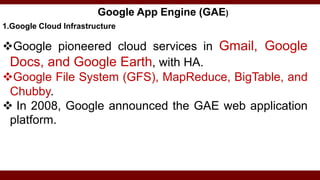
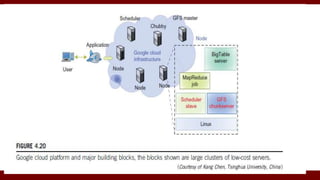
1.Google Cloud Infrastructure
Google pioneered cloud services in Gmail, Google
Docs, and Google Earth, with HA.
Google File System (GFS), MapReduce, BigTable, and
Chubby.
 In 2008, Google announced the GAE web application
platform.
Google App Engine (GAE)
2. GAE Architecture.
 GFS => storing large amounts of data.
 MapReduce => application program development.
 Chubby=> distributed application lock services.
 BigTable => storage service for accessing structured data.
 Interaction => Users can interact with Google applications via
web interface.
 Third-party application providers can use GAE to build cloud
applications for providing services.
 The applications all run in data centers under tight management
by Google engineers.
Google
Google App Engine (GAE)
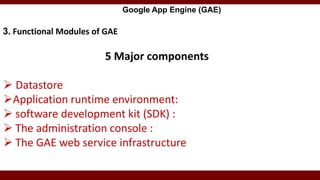
3. Functional Modules of GAE
5 Major components
 Datastore
Application runtime environment:
 software development kit (SDK) :
 The administration console :
 The GAE web service infrastructure
GAE Applications
Google Search Engine, Google Docs, Google Earth, G-mail.
 To store application-specific data in the Google infrastructure.
 Facility for queries, sorting, and even transactions similar to
traditional database systems.
Gmail account service: applications can use the Gmail account
directly.
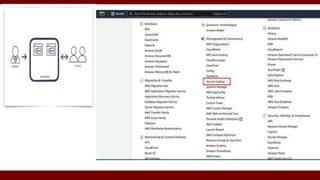
Amazon Web Services (AWS)
A leader in providing public cloud services
(http://aws.amazon.com/).
Amazon applies the IaaS model in providing its
services.
Amazon Web Services (AWS)
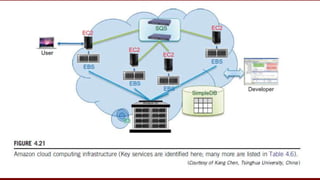
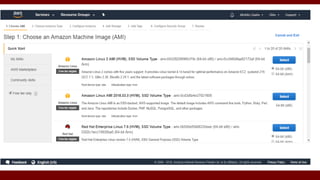
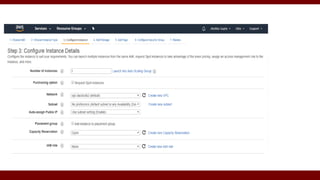
EC2=>Provides virtualized platforms to the host
VMs where the cloud application can run.
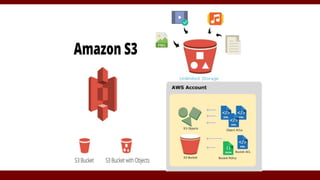
S3 (Simple Storage Service):object-oriented storage
service for users. Data is stored as objects within resources
called “buckets”, and a single object can be up to 5 terabytes
in size.
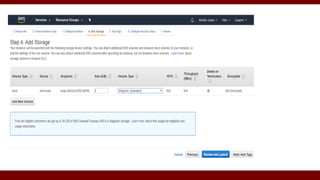
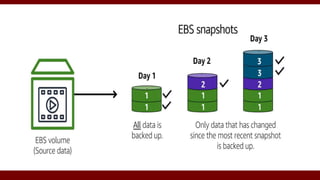
 EBS (Elastic Block Service) :block storage interface
used to support traditional applications.
Amazon Web Services (AWS)
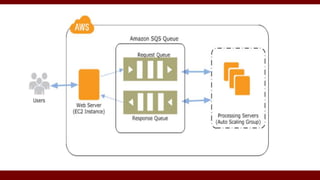
SQS (Simple Queue Service):reliable message service
between two processes.
The message can be kept reliably even when the
receiver processes are not running.
 Users can access their objects through SOAP with
either browsers
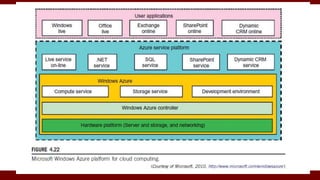
Microsoft Windows Azure
In 2008, Microsoft launched a Windows Azure
 The platform is divided into three major component
platforms.
Azure manages all servers, storage, and network resources
of the data center.
Azure services
I. Live service
II. .NET service
III. SQL Azure
IV. SharePoint service
V. Dynamic CRM service.
platform applies the standard web communication protocols SOAP and REST.
Microsoft SharePoint
Google
Extended Cloud Computing Services
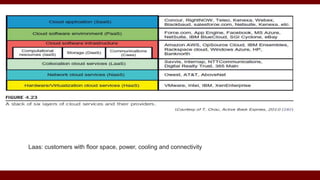
Hardware as a Service (HaaS).
Network as a Service (NaaS). - Virtual LANs (Cloudflare.com)
Location as a Service (LaaS),
Security as a Service (“SaaS”).
Data as a Service (DaaS) and Communication as a
Service (CaaS)
Laas: customers with floor space, power, cooling and connectivity
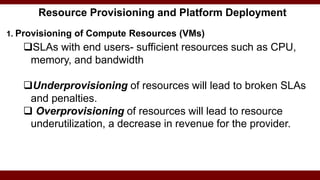
Resource Provisioning and Platform Deployment
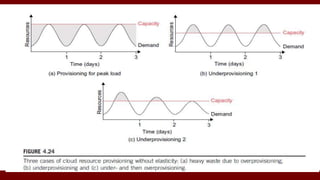
1. Provisioning of Compute Resources (VMs)
SLAs with end users- sufficient resources such as CPU,
memory, and bandwidth
Underprovisioning of resources will lead to broken SLAs
and penalties.
 Overprovisioning of resources will lead to resource
underutilization, a decrease in revenue for the provider.
Resource Provisioning and Platform Deployment
2. Resource Provisioning Methods
Three resource-provisioning methods
Demand-driven
Event driven
Popularity-driven
CLOUD SECURITY AND TRUST MANAGEMENT
Cloud Security Defense Strategies
A healthy cloud ecosystem is desired to free users from
abuses, violence, cheating, hacking, viruses, rumors, spam,
and privacy and copyright violations.
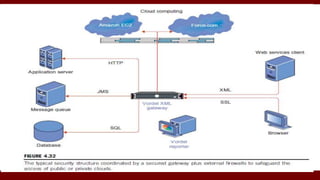
Basic Cloud Security
On-site security year round.
 Biometric readers, CCTV (close-circuit TV), motion
detection, and man traps.
Firewalls, intrusion detection systems (IDSes), and third-
party vulnerability assessment.
 SSL and data decryption, strict password policies, and system
trust certification.
1 Cloud Security Defense Strategies
CLOUD SECURITY AND TRUST MANAGEMENT
Basic cloud security
cloud components that demand special security protection:
• Protection of servers from malicious software attacks:worms,
viruses, and malware
• Protection of hypervisors or VMM:software-based attacks
and vulnerabilities
• Protection of VMs and VMM:service disruption and DoS
attacks.
• Protection of data and information:theft, corruption, and
natural disasters
• Providing authenticated and authorized access:critical data
and services
Security Challenges in VMs
hypervisor malware, guest hopping and
hijacking, or VM rootkits.
Man-in-the-middle attack for VM migrations.
Passive attacks => Sensitive data or passwords.
Active attacks => manipulate kernel data structures
which will cause major damage to cloud servers.
Rootkits operate as malware that executes as a hypervisor controlling one or many virtual machines (VMs)
Security Challenges in VMs
An IDS can be a NIDS or a HIDS.
Defense technologies include using the RIO(Reference
Identifier Object)dynamic optimization infrastructure, or
VMware’s vSafe and vShield tools, security
compliance for hypervisors, and Intel vPro technology.
hardened OS environment or use isolated execution.
Defense with Virtualization
VM is decoupled from the physical hardware.
 VM can be saved, cloned, encrypted, moved, or
restored with ease.
 Distributed intrusion detection systems (DIDSes) and
Multiple IDS .
Security policy conflicts must be resolved periodically.
Privacy and Copyright Protection
With shared files and data sets, privacy, security, and
copyright data could be compromised in a cloud
computing environment.
Google’s : in-house software(IAM) .
 Amazon EC2: HMAC and X.509 certificates in securing
resources.
Hash-Based Message Authentication Code
Dynamic web services with full support from secure web
technologies
Established trust between users and providers through
SLAs and reputation systems
Effective user identity management (IAM) and data-access
management
Privacy and Copyright Protection
Single sign-on and single sign-off
Auditing and copyright compliance
Shifting of control of data operations from the client
environment to cloud providers
Protection of sensitive and regulated information in a shared
environment
Privacy and Copyright Protection
2. Distributed Intrusion/Anomaly Detection
A DDoS defense
DDoS attacks come with widespread worms.
The flooding traffic is large enough to crash the victim server by
buffer overflow, disk exhaustion, or connection saturation.
CLOUD SECURITY AND TRUST MANAGEMENT
Distributed Intrusion/Anomaly Detection
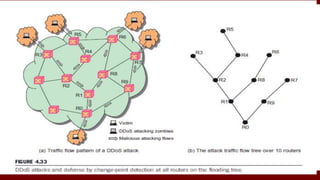
Distributed Defense against DDoS Flooding Attacks
 Hidden attack from many zombies toward a victim server at the bottom router R0.
 The flooding traffic flows: a tree pattern.
 Solution : Anomaly pattern detected detects a DDoS attack
before the victim is overwhelmed
3.Data and Software Protection Techniques
1. Data Integrity and Privacy Protection
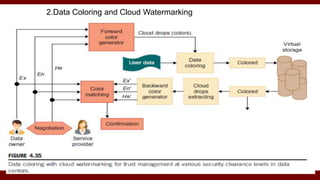
2.Data Coloring and Cloud Watermarking
3.Data Lock-in Problem and Proactive Solutions
CLOUD SECURITY AND TRUST MANAGEMENT
1. Data Integrity and Privacy Protection
Application software for MapReduce, BigTable, EC2, 3S, Hadoop, AWS, GAE, and WebSphere2, users need some security and
privacy protection software for using the cloud. Such software should offer the following features:
• Special APIs for authenticating users and sending e-mail using
commercial accounts
• Fine-grained access control to protect data integrity and deter
intruders or hackers
• Shared data sets protected from malicious alteration, deletion, or
copyright violation.
• Ability to secure the ISP or cloud service provider from invading
users’ privacy
Data and Software Protection Techniques
1.Data Integrity and Privacy Protection
• Personal firewalls at user ends to keep shared data sets from Java,
JavaScript, and ActiveX applets.
• A privacy policy consistent with the cloud service provider’s policy, to
protect against identity theft, spyware, and web bugs
• VPN channels between resource sites to secure transmission of critical data
objects.
3. Data Lock-in Problem and Proactive Solutions
• Both the computation and the data to the server clusters.
• Once the data is moved into the cloud, users cannot easily extract
their data and programs from cloud servers to run on another
platform: Data Lock-in
 lack of interoperability: proprietary API limits users
to extract data once submitted;
 lack of application compatibility: clouds expect
users to write new applications from scratch, when they
switch cloud platforms
Solution :
solution to data lock-in is the use of standardized cloud APIs.
OVF(Open Virtualization Format): platform-independent, efficient,
extensible, and open format for VMs.
2.Data Coloring and Cloud Watermarking
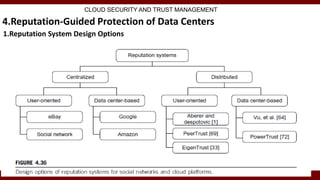
4.Reputation-Guided Protection of Data Centers
1.Reputation System Design Options
CLOUD SECURITY AND TRUST MANAGEMENT
4.Reputation-Guided Protection of Data Centers
2 Reputation Systems for Clouds
Data consistency is checked across multiple databases.
Copyright protection secures wide-area content distributions.
4.Reputation-Guided Protection of Data Centers
3. Trust Overlay Networks
CLOUD SECURITY AND TRUST MANAGEMENT
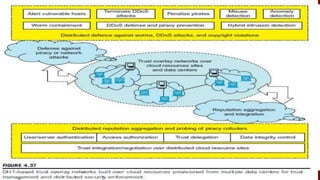
Reputation: collective evaluation by users and resource
owners.
Trust overlay network to model trust relationships among
data-center modules.
 Distributed hash table (DHT) to achieve fast aggregation of
global reputations from a large number of local reputation
scores
Unit -3-Cloud.pptx

Unit -3-Cloud.pptx

  • 1.
    https://drait.edu.in 1 Cloud Computing–Kai Hwang Unit 3 Cloud computing and Service models Dr. AMBEDKAR INSTITUTE OF TECHNOLOGY OUTER RING ROAD,MALLATHALLI,BENGALURU DEPARTMENT OF COMPUTER SCIECNE AND ENGINEERING
  • 2.
    Cloud Computing andService Models: Public, Private, and Hybrid Clouds, Cloud Ecosystem and Enabling Technologies, Infrastructure-as-a-Service (IaaS), Platform-as-a-Service (PaaS) and Software-as-a-Service (SaaS), Data-Center Design and Interconnection Networks: Warehouse-Scale Data-Center Design, Data-Center Interconnection Networks, Modular Data Center in Shipping Containers, Interconnection of Modular Data Centers, Data- Center Management Issues, Architectural Design of Compute and Storage Clouds: A Generic Cloud Architecture Design, Layered Cloud Architectural Development, Virtualization Support and Disaster Recovery, Architectural Design Challenges, Public Cloud Platforms: GAE, AWS, AND AZURE: Public Clouds and Service Offerings, Google App Engine (GAE), Amazon Web Services (AWS), Microsoft Windows Azure, Inter-Cloud Resource Management: Extended Cloud Computing Services, Resource Provisioning and Platform Deployment, , Virtual Machine Creation and Management, Global Exchange of Cloud Resources, Cloud Security and Trust Management: Cloud Security Defense Strategies, Distributed Intrusion/Anomaly Detection, Data and Software Protection Techniques.
  • 3.
    Cloud Computing andService Models Public, Private, and Hybrid Clouds
  • 4.
    Cloud Computing andService Models : share access to resources from anywhere at any time through their connected devices. avoids large data movement: Better network bandwidth utilization.  Machine virtualization : reduced the total cost.  Significant benefit to IT companies by freeing them from the low-level task of setting up the hardware (servers) and managing the system software.
  • 5.
    Centralized versus DistributedComputing Commercial cloud providers Amazon, Google, and Microsoft created their platforms to be distributed geographically.
  • 6.
    Public Clouds 1.Built overthe Internet and can be accessed by any user who has paid for the service. 2.Public clouds are owned by service providers and are accessible through a subscription. 3.Google App Engine (GAE), Amazon Web Services (AWS), Microsoft Azure,IBM Blue Cloud, and Salesforce.com’s Force.com. 4.Can share the same hardware, storage and network devices with other organizations or cloud “tenants,” 5. Can access services and manage your account using a web browser.
  • 7.
    Public Clouds 4.The providersoffers services through remote interface for creating and managing VM instances within their proprietary infrastructure. 5.A public cloud delivers a selected set of business processes. 6. The application and infrastructure services are offered on a flexible price-per-use basis.
  • 8.
  • 9.
    Private Clouds Is builtwithin the domain of an intranet owned by a single organization. It is client owned and managed, and its access is limited to the owning clients and their partners. Was not meant to sell capacity over the Internet through publicly accessible interfaces.
  • 10.
    Private Clouds flexible andagile private infrastructure to run service workloads within their administrative domains. A private cloud is supposed to deliver more efficient and convenient cloud services. Retains standardization, while retaining greater customization and organizational control.
  • 13.
    Hybrid Clouds Private cloudssupport a hybrid cloud model by supplementing local infrastructure with computing capacity from an external public cloud. Ex: Research Compute Cloud (RC2). Provides access to clients, the partner network, and third parties.
  • 14.
    summary public clouds promotestandardization, preserve capital investment, and offer application flexibility. Private clouds attempt to achieve customization and offer higher efficiency, resiliency, security, and privacy. Hybrid clouds operate in the middle, with many compromises in terms of resource sharing
  • 15.
  • 16.
  • 17.
  • 19.
    Six design objectivesfor cloud computing: 1.Shifting computing from desktops to data centers 2. Service provisioning and cloud economics signing SLAs with consumers and end users. 3.Scalability in performance 4.Data privacy protection 5.High quality of cloud services. 6.New standards and interfaces
  • 21.
  • 22.
    Infrastructure-as-a-Service (IaaS) Delivers infrastructure,platform, and software (application) as services. SLA for cloud computing is addressed in terms of service availability, performance, and data protection and security. GoGrid, FlexiScale, and Aneka are good examples.
  • 27.
    2.Platform as aService (PaaS)
  • 28.
  • 31.
    3.Software as aService (SaaS) 1.Browser-initiated application software over thousands of cloud customers. 2.The SaaS model provides software applications as a service. 3.The customer side: No upfront investment in servers or software licensing. 4.The provider side: Costs are kept rather low, compared with conventional hosting of user applications. 5. Google Gmail and docs, Microsoft SharePoint, and the CRM software from Salesforce.com
  • 32.
    DATA-CENTER DESIGN ANDINTERCONNECTION NETWORKS A data center is often built with a large number of servers through a huge interconnection network. Warehouse-Scale Data-Center Design The cloud is built on massive datacenters.  large as a shopping mall (11 times the size of a football field) under one roof. 4,00,000 to 1 million servers.  A small data center have 1,000 servers.
  • 33.
    DATA-CENTER DESIGN ANDINTERCONNECTION NETWORKS A data center is often built with a large number of servers through a huge interconnection network. Warehouse-Scale Data-Center Design larger the data center, lower the operational cost. Month cost for huge 400-server data center  network cost $13/Mbps;  storage cost $0.4/GB;  administration costs.
  • 36.
    Data-Center Construction Requirements MulticoreCPU and its internal cache hierarchy, local shared and coherent DRAM, and a number of directly attached disk drives.  DRAM and disk resources within the rack are accessible through first-level rack switches. Consider a data center built with 2,000 servers, each with 8 GB of DRAM and four 1 TB disk drives. Each group of 40 servers is connected through a 1 Gbps link to a rack-level switch with additional eight 1 Gbps ports to the cluster-level switch
  • 37.
    Cooling System ofa Data-Center Room (computer room air conditioning (CRAC))
  • 38.
    Data-Center Interconnection Networks Basicrequirements: 1. Low latency, 2. High bandwidth 3. Low cost 4. Message-passing interface (MPI) communication support, 5. Fault tolerance.
  • 39.
    Specific design considerationsData-Center Interconnection 1.Application Traffic Support 2.Network Expandability 3.Fault Tolerance and Graceful Degradation 4.Switch-centric Data-Center Design
  • 40.
    1.Application Traffic Support 1.Thenetwork topology should support all MPI communication patterns. 2.Both point-to-point and collective MPI communications must be supported. 3.The network should have high bisection bandwidth to meet this requirement.
  • 41.
    2.Network Expandability 1.The interconnectionnetwork should be expandable. 2. The network topology should be restructured for scalability. 3.Be designed to support load balancing and data movement among the servers.
  • 42.
    3.Fault Tolerance andGraceful Degradation 1. Interconnection network should tolerate link or switch failures. 2. Fault tolerance of servers is achieved by replicating data and computing among redundant servers. 3.Both software and hardware network redundancy apply to cope with potential failures. 4. One the software side, the software layer should be aware of network failures. 5.Packet forwarding should avoid using broken links. 6.In case of failures, the network structure should degrade gracefully amid limited node failures.
  • 43.
    4.Switch-centric Data-Center Design 1.Two approaches to building data-center-scale networks: One is switch centric and the other is server-centric. 2. In a switch-centric network, the switches are used to connect the server nodes. 3. The switch-centric design does not affect the server side.No modifications to the servers are needed. 4. The server-centric design does modify the operating system running on the servers.
  • 44.
    Modular Data Centerin Shipping Containers Housed in truck-towed containers. Big shipping yard of container trucks. Demand for lower power consumption, higher computer density, and mobility to relocate data centers Sophisticated cooling Both chilled air circulation and cold water are flowing
  • 45.
    SGI ICE Cubecontainer can house 46,080 processing cores or 30 PB of storage per container. Container Data-Center Construction
  • 46.
    Building a rackof 40 servers may take half a day. Extending with multiple racks for 1,000 servers need layout of the floor space with power, networking, cooling, and complete testing.  The container must be designed to be weatherproof and easy to transport.
  • 47.
    Data-Center Management Issues Makingcommon users happy Controlled information flow Multiuser manageability Scalability to prepare for database growth Reliability in virtualized infrastructure  Low cost to both users and providers.  Security enforcement and data protection  Green information technology.
  • 48.
    ARCHITECTURAL DESIGN OFCOMPUTE AND STORAGE CLOUDS 1.Cloud Platform Design Goals Scalability, virtualization, efficiency, and reliability support Web 2.0 applications. The cloud management software needs to support both physical and virtual machines. Security
  • 49.
    ARCHITECTURAL DESIGN OFCOMPUTE AND STORAGE CLOUDS 2. Enabling Technologies for Clouds 1.Fast Platform Deployment : 2.Virtual Clusters on Demand 3.Multitenant Techniques 4.Massive data processing 5.Web Scale Communication 6.Distributed Storage 7.Licensing and Billing Services
  • 50.
    ARCHITECTURAL DESIGN OFCOMPUTE AND STORAGE CLOUDS Generic Cloud Architecture
  • 52.
    ARCHITECTURAL DESIGN OFCOMPUTE AND STORAGE CLOUDS 3.Layered Cloud Architectural Development
  • 53.
    Virtualization Support andDisaster Recovery
  • 54.
    ARCHITECTURAL DESIGN OFCOMPUTE AND STORAGE CLOUDS Architectural Design Challenges Challenge 1—Service Availability and Data Lock-in Problem Challenge 2—Data Privacy and Security Concerns Challenge 3—Unpredictable Performance and Bottlenecks Challenge 4—Distributed Storage and Widespread Software Bugs Challenge 5—Cloud Scalability, Interoperability, and Standardization Challenge 6—Software Licensing and Reputation Sharing
  • 55.
    PUBLIC CLOUD PLATFORMS:GAE, AWS, AND AZURE Public Clouds and Service Offerings
  • 58.
    PUBLIC CLOUD PLATFORMS:GAE, AWS, AND AZURE Google App Engine (GAE) The Google platform is based on its search engine expertise Use MapReduce Google has hundreds of data centers and has installed more than 460,000 servers worldwide.
  • 59.
    Google App Engine(GAE) 1.Google Cloud Infrastructure Google pioneered cloud services in Gmail, Google Docs, and Google Earth, with HA. Google File System (GFS), MapReduce, BigTable, and Chubby.  In 2008, Google announced the GAE web application platform.
  • 60.
    Google App Engine(GAE) 2. GAE Architecture.  GFS => storing large amounts of data.  MapReduce => application program development.  Chubby=> distributed application lock services.  BigTable => storage service for accessing structured data.  Interaction => Users can interact with Google applications via web interface.  Third-party application providers can use GAE to build cloud applications for providing services.  The applications all run in data centers under tight management by Google engineers.
  • 61.
  • 63.
    Google App Engine(GAE) 3. Functional Modules of GAE 5 Major components  Datastore Application runtime environment:  software development kit (SDK) :  The administration console :  The GAE web service infrastructure
  • 64.
    GAE Applications Google SearchEngine, Google Docs, Google Earth, G-mail.  To store application-specific data in the Google infrastructure.  Facility for queries, sorting, and even transactions similar to traditional database systems. Gmail account service: applications can use the Gmail account directly.
  • 65.
    Amazon Web Services(AWS) A leader in providing public cloud services (http://aws.amazon.com/). Amazon applies the IaaS model in providing its services.
  • 67.
    Amazon Web Services(AWS) EC2=>Provides virtualized platforms to the host VMs where the cloud application can run. S3 (Simple Storage Service):object-oriented storage service for users. Data is stored as objects within resources called “buckets”, and a single object can be up to 5 terabytes in size.  EBS (Elastic Block Service) :block storage interface used to support traditional applications.
  • 78.
    Amazon Web Services(AWS) SQS (Simple Queue Service):reliable message service between two processes. The message can be kept reliably even when the receiver processes are not running.  Users can access their objects through SOAP with either browsers
  • 81.
    Microsoft Windows Azure In2008, Microsoft launched a Windows Azure  The platform is divided into three major component platforms. Azure manages all servers, storage, and network resources of the data center.
  • 82.
    Azure services I. Liveservice II. .NET service III. SQL Azure IV. SharePoint service V. Dynamic CRM service. platform applies the standard web communication protocols SOAP and REST.
  • 85.
  • 86.
  • 87.
    Extended Cloud ComputingServices Hardware as a Service (HaaS). Network as a Service (NaaS). - Virtual LANs (Cloudflare.com) Location as a Service (LaaS), Security as a Service (“SaaS”). Data as a Service (DaaS) and Communication as a Service (CaaS)
  • 89.
    Laas: customers withfloor space, power, cooling and connectivity
  • 91.
    Resource Provisioning andPlatform Deployment 1. Provisioning of Compute Resources (VMs) SLAs with end users- sufficient resources such as CPU, memory, and bandwidth Underprovisioning of resources will lead to broken SLAs and penalties.  Overprovisioning of resources will lead to resource underutilization, a decrease in revenue for the provider.
  • 93.
    Resource Provisioning andPlatform Deployment 2. Resource Provisioning Methods Three resource-provisioning methods Demand-driven Event driven Popularity-driven
  • 94.
    CLOUD SECURITY ANDTRUST MANAGEMENT Cloud Security Defense Strategies A healthy cloud ecosystem is desired to free users from abuses, violence, cheating, hacking, viruses, rumors, spam, and privacy and copyright violations.
  • 95.
    Basic Cloud Security On-sitesecurity year round.  Biometric readers, CCTV (close-circuit TV), motion detection, and man traps. Firewalls, intrusion detection systems (IDSes), and third- party vulnerability assessment.  SSL and data decryption, strict password policies, and system trust certification. 1 Cloud Security Defense Strategies CLOUD SECURITY AND TRUST MANAGEMENT
  • 96.
  • 97.
    cloud components thatdemand special security protection: • Protection of servers from malicious software attacks:worms, viruses, and malware • Protection of hypervisors or VMM:software-based attacks and vulnerabilities • Protection of VMs and VMM:service disruption and DoS attacks. • Protection of data and information:theft, corruption, and natural disasters • Providing authenticated and authorized access:critical data and services
  • 98.
    Security Challenges inVMs hypervisor malware, guest hopping and hijacking, or VM rootkits. Man-in-the-middle attack for VM migrations. Passive attacks => Sensitive data or passwords. Active attacks => manipulate kernel data structures which will cause major damage to cloud servers. Rootkits operate as malware that executes as a hypervisor controlling one or many virtual machines (VMs)
  • 99.
    Security Challenges inVMs An IDS can be a NIDS or a HIDS. Defense technologies include using the RIO(Reference Identifier Object)dynamic optimization infrastructure, or VMware’s vSafe and vShield tools, security compliance for hypervisors, and Intel vPro technology. hardened OS environment or use isolated execution.
  • 100.
    Defense with Virtualization VMis decoupled from the physical hardware.  VM can be saved, cloned, encrypted, moved, or restored with ease.  Distributed intrusion detection systems (DIDSes) and Multiple IDS . Security policy conflicts must be resolved periodically.
  • 101.
    Privacy and CopyrightProtection With shared files and data sets, privacy, security, and copyright data could be compromised in a cloud computing environment. Google’s : in-house software(IAM) .  Amazon EC2: HMAC and X.509 certificates in securing resources. Hash-Based Message Authentication Code
  • 102.
    Dynamic web serviceswith full support from secure web technologies Established trust between users and providers through SLAs and reputation systems Effective user identity management (IAM) and data-access management Privacy and Copyright Protection
  • 103.
    Single sign-on andsingle sign-off Auditing and copyright compliance Shifting of control of data operations from the client environment to cloud providers Protection of sensitive and regulated information in a shared environment Privacy and Copyright Protection
  • 105.
    2. Distributed Intrusion/AnomalyDetection A DDoS defense DDoS attacks come with widespread worms. The flooding traffic is large enough to crash the victim server by buffer overflow, disk exhaustion, or connection saturation. CLOUD SECURITY AND TRUST MANAGEMENT
  • 106.
    Distributed Intrusion/Anomaly Detection DistributedDefense against DDoS Flooding Attacks  Hidden attack from many zombies toward a victim server at the bottom router R0.  The flooding traffic flows: a tree pattern.  Solution : Anomaly pattern detected detects a DDoS attack before the victim is overwhelmed
  • 108.
    3.Data and SoftwareProtection Techniques 1. Data Integrity and Privacy Protection 2.Data Coloring and Cloud Watermarking 3.Data Lock-in Problem and Proactive Solutions CLOUD SECURITY AND TRUST MANAGEMENT
  • 109.
    1. Data Integrityand Privacy Protection Application software for MapReduce, BigTable, EC2, 3S, Hadoop, AWS, GAE, and WebSphere2, users need some security and privacy protection software for using the cloud. Such software should offer the following features: • Special APIs for authenticating users and sending e-mail using commercial accounts • Fine-grained access control to protect data integrity and deter intruders or hackers • Shared data sets protected from malicious alteration, deletion, or copyright violation. • Ability to secure the ISP or cloud service provider from invading users’ privacy
  • 110.
    Data and SoftwareProtection Techniques 1.Data Integrity and Privacy Protection • Personal firewalls at user ends to keep shared data sets from Java, JavaScript, and ActiveX applets. • A privacy policy consistent with the cloud service provider’s policy, to protect against identity theft, spyware, and web bugs • VPN channels between resource sites to secure transmission of critical data objects.
  • 111.
    3. Data Lock-inProblem and Proactive Solutions • Both the computation and the data to the server clusters. • Once the data is moved into the cloud, users cannot easily extract their data and programs from cloud servers to run on another platform: Data Lock-in  lack of interoperability: proprietary API limits users to extract data once submitted;  lack of application compatibility: clouds expect users to write new applications from scratch, when they switch cloud platforms
  • 112.
    Solution : solution todata lock-in is the use of standardized cloud APIs. OVF(Open Virtualization Format): platform-independent, efficient, extensible, and open format for VMs.
  • 113.
    2.Data Coloring andCloud Watermarking
  • 114.
    4.Reputation-Guided Protection ofData Centers 1.Reputation System Design Options CLOUD SECURITY AND TRUST MANAGEMENT
  • 115.
    4.Reputation-Guided Protection ofData Centers 2 Reputation Systems for Clouds Data consistency is checked across multiple databases. Copyright protection secures wide-area content distributions.
  • 116.
    4.Reputation-Guided Protection ofData Centers 3. Trust Overlay Networks CLOUD SECURITY AND TRUST MANAGEMENT Reputation: collective evaluation by users and resource owners. Trust overlay network to model trust relationships among data-center modules.  Distributed hash table (DHT) to achieve fast aggregation of global reputations from a large number of local reputation scores