Title: Cloud Computing and its
Applications
Course Code: 17CS742
Lecture Hours/week:3 Credits : 3
Type of Course: Lecture Total Contact Hours: 40 Hrs
Faculty Name John Prakash Veigas
CE Marks:40 Marks Sem end Exam Marks : 60
COURSE OBJECTIVES
This course will enable students to
 Explain the technology and principles involved
in building a cloud environment.
 Contrast various programming models used in
cloud computing
 Choose appropriate cloud model for a given
application
2
Dept. of ISE,AJIET
COURSE OUTCOMES
After studying this course, students will be able to:
3
Dept. of ISE,AJIET
CO Description
CO 1 To explain the concepts and terminologies of
cloud computing
CO 2 To Demonstrate cloud frameworks and
technologies
CO 3 To understand data intensive computing
CO 4 To use appropriate cloud model for a given
applications
SYLLABUS MODULE – 1 :
 Introduction, Cloud Computing at a Glance, The
Vision of Cloud Computing, Defining a Cloud, A
Closer Look, Cloud Computing Reference Model,
Characteristics and Benefits, Challenges Ahead,
Historical Developments, Distributed Systems,
Virtualization, Web 2.0, Service-Oriented
Computing, Utility-Oriented Computing, Building
Cloud Computing Environments, Application
Development, Infrastructure and System
Development, Computing, Platforms and
Technologies, Amazon Web Services (AWS),
Google AppEngine, Microsoft Azure, Hadoop,
Force.com and Salesforce.com, Manjrasoft Aneka
4
Dept. of ISE,AJIET
SYLLABUS MODULE – 1 :
 Virtualization, Introduction, Characteristics of
Virtualized, Environments, Taxonomy of
Virtualization Techniques, Execution Virtualization,
Other Types, of Virtualization, Virtualization and
Cloud Computing, Pros and Cons of Virtualization
Technology
5
Dept. of ISE,AJIET
Text Book
 Rajkumar Buyya, Christian Vecchiola, and Thamarai
Selvi Mastering Cloud Computing McGraw Hill
Education.
6
Dept. of ISE,AJIET
WHAT IS CLOUD COMPUTING?
According to the official NIST definition,
"cloud computing is a model for enabling ubiquitous,
convenient, on-demand network access to a shared
pool of configurable computing resources (e.g.,
networks, servers, storage, applications and
services) that can be rapidly provisioned and
released with minimal management effort”
7
Dept. of ISE,AJIET
ESSENTIAL CHARACTERISTICS OF CLOUD
COMPUTING
 On-demand self-service: A consumer can unilaterally
provision computing capabilities as needed automatically
without requiring human interaction with each service
provider
 Broad network access: Capabilities are available over the
network and accessed through standard mechanisms that
promote use by heterogeneous thin or thick client platforms
 Resource pooling: The provider's computing resources are
pooled to serve multiple consumers
 Rapid elasticity: Capabilities can be elastically provisioned
and released on demand
 Measured service: Resource usage can be monitored,
controlled and reported, providing transparency for the
provider and consumer.
8
Dept. of ISE,AJIET
CLOUD COMPUTING AT A GLANCE
 Computing is being transformed into a model consisting of services that
are commoditized and delivered in a manner similar to utilities such as
water, electricity, gas, and telephony.
 In such a model, users access services based on their requirements,
regardless of where the services are hosted.
 Consumers no longer need to invest heavily or encounter difficulties in
building and maintaining complex IT infrastructure
 In 1969, Leonard Kleinrock, chief scientist-ARPANET said
9
Dept. of ISE,AJIET
“As of now, computer networks are still in their infancy, but as
they grow up and become sophisticated, we will probably see
the spread of ‘computer utilities’ which, like present electric
and telephone utilities, will service individual homes and
offices across the country.”
 Cloud computing allows renting infrastructure, runtime
environments, and services on a pay-per use basis
 Different people have different points of view about cloud
computing
 Chief information and technology officers of large enterprises
see opportunities for scaling their infrastructure on demand and
sizing it according to their business needs.
 End users leveraging cloud computing services can access their
documents and data anytime, anywhere, and from any device
connected to the Internet
10
Dept. of ISE,AJIET
“I don’t care where my servers are, who manages
them, where my documents are stored, or where my
applications are hosted. I just want them always
available and access them from any device connected
through Internet. And I am willing to pay for this
service for as a long as I need it.”
THE VISION OF CLOUD COMPUTING
 Cloud computing allows anyone with a credit card to
provision virtual hardware, runtime environments, and
services.
 These are used for as long as needed, with no up-front
commitments required.
 The entire stack of a computing system is transformed
into a collection of utilities, which can be provisioned and
composed together to deploy systems in hours rather
than days and with virtually no maintenance costs
 The long-term vision of cloud computing is that IT
services are traded as utilities in an open market, without
technological and legal barriers – No vender lockin
11
Dept. of ISE,AJIET
THE VISION OF CLOUD COMPUTING (CONTD…)
 To provide a scalable runtime for applications for
application and system developers that do not have
infrastructure or cannot afford any further expansion of
existing infrastructure.
 Provide automation of the discovery of various services
and its integration into existing software system – No
human intervention
 To provide opportunities for optimizing datacenter
facilities and fully utilizing their capabilities to serve
multiple users
 To reduce the waste of energy and carbon emissions,
thus contributing to a greener IT on one end and
increasing revenue 12
Dept. of ISE,AJIET
13
Dept. of ISE,AJIET
DEFINING A CLOUD
14
Dept. of ISE,AJIET
DEFINING A CLOUD
 The term cloud has historically been used in the
telecommunications industry as an abstraction of
the network in system diagrams.
 It then became the symbol of the most popular
computer network- the Internet. This meaning also
applies to cloud computing, which refers to an
Internet-centric way of computing.
15
Dept. of ISE,AJIET
Definition given by Armbrust et al.:
“Cloud computing refers to both the applications
delivered as services over the Internet and the
hardware and system software in the datacenters that
provide those services.”
DEFINING A CLOUD
16
Dept. of ISE,AJIET
Definition proposed by the U.S. National Institute of Standards and
Technology (NIST):
“Cloud computing is a model for enabling ubiquitous, convenient,
on-demand network access to a shared pool of configurable
computing resources (e.g., networks, servers, storage,
applications, and services) that can be rapidly provisioned and
released with minimal management effort or service provider
interaction.”
According to Reese, three criteria to discriminate whether a
service is delivered in the cloud computing style:
1. The service is accessible via a Web browser
(nonproprietary) or a Web services application
programming interface (API).
2. Zero capital expenditure is necessary to get started.
3. You pay only for what you use as you use it.
 The utility-oriented nature of cloud computing is
expressed by Buyya et al
“A cloud is a type of parallel and distributed system
consisting of a collection of interconnected and
virtualized computers that are dynamically
provisioned and presented as one or more unified
computing resources based on service-level
agreements established through negotiation
between the service provider and consumers. “
17
Dept. of ISE,AJIET
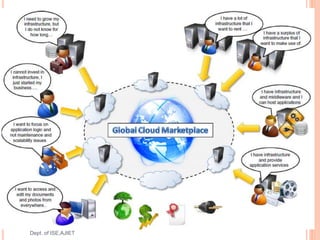
PRACTICAL EXAMPLES OF CLOUD ACROSS
ALL MARKET SEGMENTS
 Large enterprises can offload some of their
activities to cloud-based systems.
 Small enterprises and start-ups can afford to
translate their ideas into business results more
quickly, without excessive up-front costs.
 System developers can concentrate on the
business logic rather than dealing with the
complexity of infrastructure management and
scalability.
 End users can have their documents accessible
from everywhere and any device.
18
Dept. of ISE,AJIET
CLOUD COMPUTING REFERENCE MODEL
19
Dept. of ISE,AJIET
CLOUD COMPUTING REFERENCE
MODEL(CONTD…)
 Cloud computing services offerings are classified
into three major categories:
 Infrastructure-as-a-Service (IaaS)
 Platform-as-a-Service (PaaS)
 Software-asa-Service (SaaS)
20
Dept. of ISE,AJIET
Infrastructure-as-a-Service (IaaS)
 At the base of the stack, Infrastructure-as-a-Service
solutions deliver infrastructure on demand in the form of
virtual hardware, storage, and networking.
 Virtual hardware is utilized to provide compute on demand
in the form of virtual machine instances.
 These are created at users’ request on the provider’s
infrastructure
 users are given tools and interfaces to configure the
software stack installed in the virtual machine.
 Virtual storage is delivered in the form of raw disk space or
object store
 Virtual networking identifies the collection of services that
manage the networking among virtual instances and their
connectivity to the Internet or private networks 21
Dept. of ISE,AJIET
PLATFORM-AS-A-SERVICE
 Platform-as-a-Service solutions are the next step in the
stack.
 They deliver scalable and elastic runtime environments
on demand and host the execution of applications.
 These services are backed by a core middleware
platform that is responsible for creating the abstract
environment where applications are deployed and
executed.
 It is the responsibility of the service provider to provide
scalability and to manage fault tolerance
 users are requested to focus on the logic of the
application developed by leveraging the provider’s APIs
and libraries 22
Dept. of ISE,AJIET
SOFTWARE-AS-A-SERVICE
 At the top of the stack, Software-as-a-Service solutions
provide applications and services on demand.
 Most of the common functionalities of desktop applications.
 Each layer provides a different service to users.
 IaaS solutions are sought by users who want to leverage
cloud computing from building dynamically scalable
computing systems requiring a specific software stack
 SaaS solutions target mostly end users who want to benefit
from the elastic scalability of the cloud without doing any
software development, installation, configuration, and
maintenance
23
Dept. of ISE,AJIET
CHARACTERISTICS AND BENEFITS OF CLOUD
 characteristics that bring benefits to both cloud
service consumers (CSCs) and cloud service
providers (CSPs) are
 No up-front commitments
 On-demand access
 Nice pricing
 Simplified application acceleration and scalability
 Efficient resource allocation
 Energy efficiency
 Seamless creation and use of third-party services
24
Dept. of ISE,AJIET
CHALLENGES
 New, interesting problems and challenges are regularly being
posed to the cloud community, including IT practitioners,
managers, governments, and regulators’
 challenges concerning the dynamic provisioning of cloud
computing services and resources arises
 Technical challenges arise for cloud service providers for the
management of large computing infrastructures and the use
of virtualization technologies on top of them
 Virtualization allows capturing almost transparently the
memory pages of an instance, these data could easily be
obtained by a malicious provider
 Issues and challenges concerning the integration of real and
virtual infrastructure need to be taken into account from
different perspectives, such as security and legislation.
25
Dept. of ISE,AJIET
CHALLENGES
 Security in terms of confidentiality, secrecy, and
protection of data in a cloud environment
 Different legislation about privacy in different countries
may potentially create disputes as to the rights that third
parties (including government agencies) have to your
data
 U.S. legislation is known to give extreme powers to
government agencies to acquire confidential data when
there is the suspicion of operations leading to a threat
to national security.
 European countries are more restrictive and protect the
right of privacy. 26
Dept. of ISE,AJIET
HISTORICAL DEVELOPMENTS
27
Dept. of ISE,AJIET
 Five core technologies that played an important role
in the realization of cloud computing
 Distributed systems
 Virtualization
 Web 2.0
 service orientation
 utility computing
28
Dept. of ISE, AJIET
DISTRIBUTED SYSTEMS
“A distributed system is a collection of independent
computers that appears to its users as a single
coherent system”
 The primary purpose of distributed systems is to
share resources and utilize them better.
 Heterogeneity
 Openness
 Scalability
 Transparency
 Concurrency
 Continuous availability
 Independent failures. 29
Dept. of ISE,AJIET
Three major milestones have led to cloud computing:
 mainframe computing
 cluster computing
 grid computing.
30
Dept. of ISE,AJIET
MAINFRAMES
 Mainframes were powerful, highly reliable computers
specialized for large data movement and massive
input/output (I/O) operations.
 Mostly used by large organizations for bulk data
processing tasks such as online transactions, enterprise
resource planning, and other operations involving the
processing of significant amounts of data
 Highly reliable computers that were “always on” and
capable of tolerating failures transparently.
 No system shutdown was required to replace failed
components, and the system could work without
interruption.
31
Dept. of ISE,AJIET
CLUSTERS
 started as a low-cost alternative to the use of
mainframes and supercomputers.
 These machines could then be connected by a high-
bandwidth network and controlled by specific software
tools that manage them as a single system.
 Built by commodity machines, they were cheaper than
mainframes and made high-performance computing
available to a large number of groups, including
universities and small research labs.
 Some frameworks for distributed computing, including
Condor, Parallel Virtual Machine (PVM), and Message
Passing Interface (MPI). 32
Dept. of ISE,AJIET
GRIDS
 grid computing proposed a new approach to access large
computational power, huge storage facilities, and a variety of
services
 Users can “consume” resources in the same way as they use
other utilities such as power, gas, and water.
 A computing grid was a dynamic aggregation of
heterogeneous computing nodes, and its scale was
nationwide or even worldwide
 Why Computing Grids:
 clusters became quite common resources
 They were often underutilized
 new problems were requiring computational power that went
beyond the capability of single clusters
 the improvements in networking and the diffusion of the Internet
made possible long-distance, high-bandwidth connectivity. 33
Dept. of ISE,AJIET
VIRTUALIZATION
 Virtualization is the creation of a virtual (rather than actual)
version of something, such as an operating system, a
server, a storage device or network resources
 It is the process of converting a physical IT resource into a
virtual IT resource
 It encompasses a collection of solutions allowing the
abstraction of some of the fundamental elements for
computing, such as hardware, runtime environments,
storage, and networking
 Virtualization is essentially a technology that allows
creation of different computing environments.
 These environments are called virtual because they
simulate the interface that is expected by a guest. 34
Dept. of ISE,AJIET
 hardware virtualization-is a technology allows
simulating/Emulation the hardware interface expected by an
operating system
 Hardware virtualization allows the coexistence of different
software stacks on top of the same hardware.
 These stacks are contained inside virtual machine instances,
which operate in complete isolation from each other.
 High-performance servers can host several virtual machine
instances, thus creating the opportunity to have a customized
software stack on demand.
 This is the base technology that enables cloud computing
solutions to deliver virtual servers on demand, such as
Amazon EC2, RightScale, Vmware vCloud and others
together with hardware virtualization, storage and network
virtualization complete the range of technologies for the
emulation of IT infrastructure
35
Dept. of ISE,AJIET
 Virtualization technologies are also used to
replicate runtime environments for programs
 Applications in the case of process virtual machines
instead of being executed by the operating system
are run by a specific program called a virtual
machine.
 Process virtual machines offer a higher level of
abstraction with respect to hardware virtualization,
since the guest is only constituted by an application
rather than a complete software stack
 Eg:Google AppEngine and Windows Azure
36
Dept. of ISE,AJIET
WEB 2.0
 The Web is the primary interface through which cloud
computing delivers its services.
 At present, the Web encompasses a set of
technologies and services that facilitate interactive
information sharing, collaboration, user-centered
design, and application composition. This evolution has
transformed the Web into a rich platform for application
development and is known as Web 2.0.
 Web 2.0 brings interactivity and flexibility into Web
pages, providing enhanced user experience by gaining
Web-based access to all the functions that are
normally found in desktop applications.
 These capabilities are obtained by integrating a
collection of standards and technologies such as XML,
Asynchronous JavaScript and XML (AJAX), Web
Services, and others. 37
Dept. of ISE,AJIET
SERVICE-ORIENTED COMPUTING
 adopts the concept of services as the main building
blocks of application and system development.
 Service-oriented computing (SOC) supports the
development of rapid, low-cost, flexible, interoperable,
and evolvable applications and systems
 A service is an abstraction representing a self-
describing and platform-agnostic component that can
perform any function—anything from a simple function
to a complex business process.
 A service is supposed to be loosely coupled, reusable,
programming language independent, and location
transparent. 38
Dept. of ISE,AJIET
SERVICE-ORIENTED COMPUTING
 Service-oriented computing introduces two concepts,
fundamental to cloud computing: quality of service (QoS) and
Software-as-a-Service (SaaS).
 Quality of service (QoS) identifies a set of functional and
nonfunctional attributes that can be used to evaluate the
behavior of a service from different perspectives- response
time, or security attributes, transactional integrity, reliability,
scalability, and availability.
 Software-as-a-Service is a new delivery model for
applications. The term has been inherited from the world of
application service providers (ASPs), which deliver software
services-based solutions across the wide area network from
a central datacenter and make them available on a
subscription or rental basis. 39
Dept. of ISE,AJIET
UTILITY-ORIENTED COMPUTING
 Utility computing is a vision of computing that defines a
service-provisioning model for compute services in which
resources such as storage, compute power, applications, and
infrastructure are packaged and offered on a pay-per-use
basis.
 The idea of providing computing as a utility like natural gas,
water, power, and telephone connection
 Early days mainframe providers offered mainframe power to
organizations such as banks and government agencies
throughout their datacenters.
 service-oriented architectures(SOAs) introduced the idea of
leveraging external services for performing a specific task
within a software system
 Cluster computing and Computing grids brought the concept
of utility computing to a new level: market orientation
40
Dept. of ISE,AJIET
COMPUTING PLATFORMS AND TECHNOLOGIES
1 Amazon web services (AWS)
2 Google AppEngine
3 Microsoft Azure
4 Hadoop
5 Force.com and Salesforce.com
6 Manjrasoft Aneka
41
Dept. of ISE,AJIET
AMAZON WEB SERVICES (AWS)
 AWS offers comprehensive cloud IaaS services ranging from
virtual compute, storage, and networking to complete
computing stacks.
 AWS is mostly known for its compute and storage-on demand
services, namely Elastic Compute Cloud (EC2) and Simple
Storage Service (S3).
 EC2 provides users with customizable virtual hardware that
can be used as the base infrastructure for deploying
computing systems on the cloud.
 EC2 also provides the capability to save a specific running
instance as an image, thus allowing users to create their own
templates for deploying systems.
 These templates are stored into S3 that delivers persistent
storage on demand.
 S3 is organized into buckets; these are containers of objects
that are stored in binary form and can be enriched with
attributes. Users can store objects of any size, from simple
files to entire disk images, and have them accessible from
everywhere.
42
Dept. of ISE,AJIET
GOOGLE APPENGINE
 Google AppEngine is a scalable runtime environment
mostly devoted to executing Web applications.
 These take advantage of the large computing
infrastructure of Google to dynamically scale as the
demand varies over time.
 AppEngine provides both a secure execution
environment and a collection of services that simplify the
development of scalable and high-performance Web
applications. These services include in-memory caching,
scalable data store, job queues, messaging,
 Developers can build and test applications on their own
machines using the AppEngine software development
kit (SDK).
 Once development is complete, developers can easily
migrate their application to AppEngine –
 Java, PHP, Node.js, Python, C#, .Net, Ruby and Go
43
Dept. of ISE,AJIET
MICROSOFT AZURE
 Microsoft Azure is a cloud operating system and a
platform for developing applications in the cloud.
 Applications in Azure are organized around the concept
of roles, which identify a distribution unit for applications
and embody the application’s logic.
 Currently, there are three types of role: Web role, worker
role, and virtual machine role.
 The Web role is designed to host a Web application,
 worker role is a more generic container of applications
and can be used to perform workload processing,
 virtual machine role provides a virtual environment in
which the computing stack can be fully customized,
including the operating systems.
44
Dept. of ISE,AJIET
HADOOP
 Apache Hadoop is an open-source framework that is suited
for processing large data sets on commodity hardware.
 Hadoop is an implementation of MapReduce, an application
programming model developed by Google, which provides
two fundamental operations for data processing: map and
reduce
 The former transforms and synthesizes the input data
provided by the user; the latter aggregates the output
obtained by the map operations.
 Hadoop provides the runtime environment, and developers
need only provide the input data and specify the map and
reduce functions that need to be executed.
45
Dept. of ISE,AJIET
FORCE.COM AND SALESFORCE.COM
 Force.com is a cloud computing platform for developing
social enterprise applications.
 The platform is the basis for SalesForce.com, a
Software-as-a-Service solution for customer
relationship management.
 Force.com allows developers to create applications by
composing ready-to-use blocks; a complete set of
components supporting all the activities of an enterprise
are available.
 The platform provides complete support for developing
applications, from the design of the data layout to the
definition of business rules and workflows and the
definition of the user interface. 46
Dept. of ISE,AJIET
MANJRASOFT ANEKA
 Manjrasoft Aneka is a cloud application platform for
rapid creation of scalable applications and their
deployment on various types of clouds in a seamless
and elastic manner.
 It supports a collection of programming abstractions for
developing applications and a distributed runtime
environment that can be deployed on heterogeneous
hardware (clusters, networked desktop computers, and
cloud resources).
 Developers can choose different abstractions to design
their application: tasks, distributed threads, and map-
reduce.
 These applications are then executed on the distributed
service-oriented runtime environment, which can
dynamically integrate additional resource on demand 47
Dept. of ISE,AJIET
WHY VIRTUALIZATION TECHNOLOGIES HAVE
GAINED RENEWED INTEREST?
 Increased performance and computing capacity
 high-end side of the PC market, supercomputers can
provide immense compute power for hundreds or
thousands of virtual machines
 Underutilized hardware and software resources
 Increased performance and computing capacity
 The effect of limited or sporadic use of resources
 Lack of space
 most cases enterprises cannot afford to build another data
center to accommodate additional resource capacity
 Greening initiatives.
 Rise of administrative costs 48
Dept. of ISE,AJIET
VIRTUALIZED ENVIRONMENTS
 Virtualization is a broad concept that refers to the
creation of a virtual version of something, whether
hardware, a software environment, storage, or a network
 Three major components: guest, host, and virtualization
layer
 The guest represents the system component that interacts
with the virtualization layer
 The host represents the original environment where the guest
is supposed to be managed.
 The virtualization layer is responsible for recreating the same
or a different environment where the guest will operate
49
Dept. of ISE,AJIET
THE VIRTUALIZATION REFERENCE MODEL
50
Dept. of ISE,AJIET
CHARACTERISTICS VIRTUALIZED ENVIRONMENTS
 Increased security
 Managed execution
 Portability
51
Dept. of ISE,AJIET
INCREASED SECURITY:
 The virtual machine represents an emulated environment in
which the guest is executed.
 All the operations of the guest are generally performed
against the virtual machine, which then translates and applies
them to the host.
 This level of indirection allows the virtual machine manager to
control and filter the activity of the guest, thus preventing some
harmful operations from being performed.
 For example, applets downloaded from the Internet run in a
sandboxed 3 version of the Java Virtual Machine (JVM), which
provides them with limited access to the hosting operating
system resources.
 Both the JVM and the .NET runtime provide extensive security
policies for customizing the execution environment of
applications. 52
Dept. of ISE,AJIET
MANAGED EXECUTION
Functions enabled by Managed Execution of virtualization
environment - sharing, aggregation, emulation, and
isolation
 Sharing:
 Virtualization allows the creation of a separate computing
environments within the same host.
 fully exploit the capabilities otherwise it is underutilized.
 reduce the number of active servers and limit power
consumption.
 Aggregation
 opposite process of sharing physical resource among several
guests
 A group of separate hosts can be tied together and
represented to guests as a single virtual host.
53
Dept. of ISE,AJIET
54
Dept. of ISE,AJIET
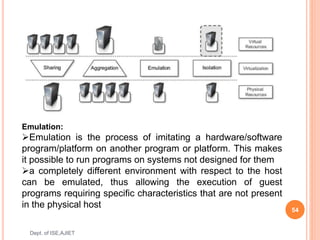
Emulation:
Emulation is the process of imitating a hardware/software
program/platform on another program or platform. This makes
it possible to run programs on systems not designed for them
a completely different environment with respect to the host
can be emulated, thus allowing the execution of guest
programs requiring specific characteristics that are not present
in the physical host
 Isolation:
 Virtualization allows providing guests—whether they are
operating systems, applications, or other entities—with a
completely separate environment, in which they are
executed.
 The guest program performs its activity by interacting with
an abstraction layer, which provides access to the
underlying resources
3. Portability
 In hardware virtualization solution, the guest is packaged
into a virtual image that, in most cases, can be safely
moved and executed on top of different virtual machines.
 In programming-level virtualization, as implemented by the
JVM or the .NET runtime, the binary code representing
application components (jars or assemblies) can be run
without any recompilation on any implementation of the
corresponding virtual machine
 Run application on different platforms with no changes. 55
Dept. of ISE,AJIET
TAXONOMY OF VIRTUALIZATION TECHNIQUES
56
Dept. of ISE,AJIET
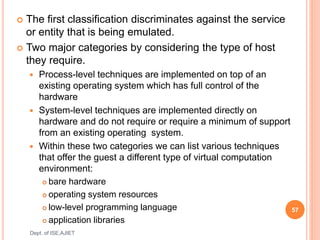
 The first classification discriminates against the service
or entity that is being emulated.
 Two major categories by considering the type of host
they require.
 Process-level techniques are implemented on top of an
existing operating system which has full control of the
hardware
 System-level techniques are implemented directly on
hardware and do not require or require a minimum of support
from an existing operating system.
 Within these two categories we can list various techniques
that offer the guest a different type of virtual computation
environment:
 bare hardware
 operating system resources
 low-level programming language
 application libraries
57
Dept. of ISE,AJIET
MACHINE REFERENCE
MODEL
58
Dept. of ISE,AJIET
 Virtualizing an execution environment at different levels of the
computing stack requires a reference model that defines the interfaces
between the levels of abstractions, which hide implementation details
 hardware is expressed in terms of the Instruction Set Architecture
(ISA), which defines the instruction set for the processor
registers,memory, and interrupt management.
 ISA is the interface between hardware and software, and it is
important to the operating system(OS) developer(System ISA) and
developers of applications that directly manage the underlying
hardware (User ISA).
 The application binary interface(ABI) separates the
operating system layer from the applications and
libraries, which are managed by the OS.
 ABI covers details such as low-level data types,
alignment, and call conventions and defines a format for
executable programs. System calls are defined at this
level
 The highest level of abstraction is represented by the
application programming interface (API), which interfaces
applications to libraries and/or the underlying operating
system
 The instruction set exposed by the hardware has been
divided into different security classes
 privileged instructions
 nonprivileged instructions
59
Dept. of ISE,AJIET
 Nonprivileged instructions are those instructions that
can be used without interfering with other tasks because
they do not access shared resources.
 Ex: all the floating, fixed-point, and arithmetic instructions
 Privileged instructions are those that are executed
under specific restrictions and are mostly used for
sensitive operations, which expose (behavior-sensitive) or
modify (control-sensitive) the privileged state.
 Ex: behavior-sensitive instructions are those that operate
on the I/O, whereas control-sensitive instructions alter the
state of the CPU registers
60
Dept. of ISE,AJIET
SECURITY RINGS AND PRIVILEGE MODES
61
Dept. of ISE,AJIET
Ring0-> OS kernel
Rings1 and 2->OS level services
Ring3->user
 supervisor mode(master mode or kernel mode ):
execution mode in which all the instructions (privileged
and nonprivileged) can be executed without any
restriction
 User mode: there are restrictions to control the
machine-level resources
 If code running in user mode invokes the privileged
instructions, hardware interrupts occur and trap the
potentially harmful execution of the instruction.
 Role of the hypervisor: hypervisor(VMM) runs above the
supervisor mode
62
Dept. of ISE,AJIET
HARDWARE-LEVEL VIRTUALIZATION
 Hardware-level virtualization is a virtualization
technique that provides an abstract execution
environment in terms of computer hardware on top of
which a guest operating system can be run.
o In this model,
 The guest is represented by the operating system
 The host by the physical computer hardware
 The virtual machine by its emulation
 The virtual machine manager by the hypervisor
o Hardware-level virtualization is also called system
virtualization, since it provides ISA to virtual
machines, which is the representation of the hardware
interface of a system 63
Dept. of ISE,AJIET
Hardware-level virtualization reference model
64
Dept. of ISE,AJIET
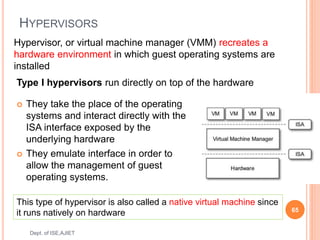
HYPERVISORS
 They take the place of the operating
systems and interact directly with the
ISA interface exposed by the
underlying hardware
 They emulate interface in order to
allow the management of guest
operating systems.
65
Dept. of ISE,AJIET
Hypervisor, or virtual machine manager (VMM) recreates a
hardware environment in which guest operating systems are
installed
Type I hypervisors run directly on top of the hardware
This type of hypervisor is also called a native virtual machine since
it runs natively on hardware
 Type II hypervisors require the support of an operating
system to provide virtualization services.
66
Dept. of ISE,AJIET
 They are programs
managed by the operating
system, which interact with it
through the ABI and emulate
the ISA of virtual hardware
for guest operating systems.
This type of hypervisor is also called a hosted virtual
machine since it is hosted within an operating system
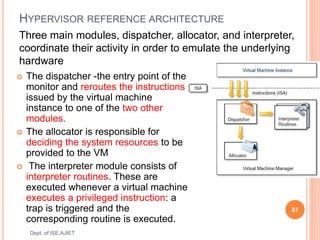
HYPERVISOR REFERENCE ARCHITECTURE
 The dispatcher -the entry point of the
monitor and reroutes the instructions
issued by the virtual machine
instance to one of the two other
modules.
 The allocator is responsible for
deciding the system resources to be
provided to the VM
 The interpreter module consists of
interpreter routines. These are
executed whenever a virtual machine
executes a privileged instruction: a
trap is triggered and the
corresponding routine is executed.
67
Dept. of ISE,AJIET
Three main modules, dispatcher, allocator, and interpreter,
coordinate their activity in order to emulate the underlying
hardware
According to Goldberg and Popek[1974] -virtual machine
manager - Three properties have to be satisfied:
 Equivalence: A guest running under the control of a
virtual machine manager should exhibit the same
behavior as when it is executed directly on the physical
host.
 Resource control: The virtual machine manager should
be in complete control of virtualized resources.
 Efficiency: A statistically dominant fraction of the
machine instructions should be executed without
intervention from the virtual machine manager.
68
Dept. of ISE,AJIET
 Popek and Goldberg provided a classification of the
instruction set and proposed three theorems that define
the properties that hardware instructions need to satisfy
support virtualization.
69
Dept. of ISE,AJIET
THEOREM 3.1 : For any conventional third-generation
computer, a VMM may be constructed if the set of
sensitive instructions for that computer is a subset of the
set of privileged instructions.
THEOREM3.2: A conventional third-generation
computer is recursively virtualizable if:
• It is virtualizable and
• A VMM without any timing dependencies can be
constructed for it.
 THEOREM 3.3: A hybrid VMM may be constructed
for any conventional third-generation machine in
which the set of user-sensitive instructions are a
subset of the set of privileged instructions.
70
Dept. of ISE,AJIET
HARDWARE VIRTUALIZATION TECHNIQUES
 Hardware-assisted virtualization
 Full virtualization
 Paravirtualization
 Partial virtualization
71
Dept. of ISE,AJIET
HARDWARE VIRTUALIZATION TECHNIQUES
Hardware-assisted virtualization
 A scenario in which the hardware provides
architectural support for building a virtual machine
manager able to run a guest operating system in
complete isolation.
 Eg: Extensions to the x86-64 bit architecture
introduced with Intel VT and AMD V
 Software emulation of x86 hardware was
significantly costly from the performance point of
view
 Kernel-based Virtual Machine (KVM), VirtualBox,
Xen, VMware, Hyper-V, Sun xVM, Parallels, and
others 72
Dept. of ISE,AJIET
FULL VIRTUALIZATION:
 Full virtualization refers to the ability to run a program,
most likely an operating system, directly on top of a
virtual machine and without any modification, as
though it were run on the raw hardware.
 To make this possible, virtual machine managers are
required to provide a complete emulation of the entire
underlying hardware.
 The principal advantage of full virtualization is
complete isolation, which leads to enhanced security,
ease of emulation of different architectures, and
coexistence of different systems on the same
platform.
 Ex: Kernel-based Virtual Machine (KVM), VirtualBox,
VMware 73
Dept. of ISE,AJIET
PARAVIRTUALIZATION:
 This is a not-transparent virtualization solution that allows
implementing thin virtual machine managers.
 Paravirtualization techniques expose a software interface to
the virtual machine that is slightly modified from the host and,
as a consequence, guests need to be modified.
 guest OS is recompiled prior to installation inside a virtual
machine
 The aim of paravirtualization is to provide the capability to
demand the execution of performance critical operations
directly on the host, thus preventing performance losses that
would otherwise be experienced in managed execution.
 Example: Xen
74
Dept. of ISE,AJIET
 Partial virtualization: Partial virtualization provides a
partial emulation of the underlying hardware, thus not
allowing the complete execution of the guest operating
system in complete isolation.
 Partial virtualization allows many applications to run
transparently, but not all the features of the operating
system can be supported.
 An example of partial virtualization is address space
virtualization used in time-sharing systems; this allows
multiple applications and users to run concurrently in a
separate memory space, but they still share the same
hardware resources (disk, processor, and network).
 Ex IBM M44/44x
75
Dept. of ISE,AJIET
OPERATING SYSTEM-LEVEL VIRTUALIZATION
 Operating system-level virtualization offers the
opportunity to create different and separated execution
environments for applications that are managed
concurrently.
 There is no virtual machine manager or hypervisor, and
the virtualization is done within a single operating
system, where the OS kernel allows for multiple
isolated user space instances.
 The kernel is also responsible for sharing the system
resources among instances and for limiting the impact
of instances on each other
 Examples: FreeBSD Jails, IBM Logical Partition
(LPAR), SolarisZones and Containers, Parallels
Virtuozzo Containers, OpenVZ, iCore Virtual Accounts,
Free Virtual Private Server (FreeVPS). 76
Dept. of ISE,AJIET
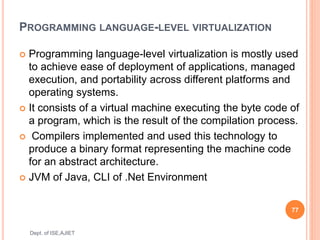
PROGRAMMING LANGUAGE-LEVEL VIRTUALIZATION
 Programming language-level virtualization is mostly used
to achieve ease of deployment of applications, managed
execution, and portability across different platforms and
operating systems.
 It consists of a virtual machine executing the byte code of
a program, which is the result of the compilation process.
 Compilers implemented and used this technology to
produce a binary format representing the machine code
for an abstract architecture.
 JVM of Java, CLI of .Net Environment
77
Dept. of ISE,AJIET
APPLICATION-LEVEL VIRTUALIZATION
 Application-level virtualization is a technique allowing applications
to be run in runtime environments that do not natively support all
the features required by such applications.
 Emulation is used to execute program binaries compiled for
different hardware architectures.
 strategies can be implemented:
 Interpretation: In this technique every source instruction is
interpreted by an emulator for executing native ISA instructions,
leading to poor performance. Interpretation has a minimal startup
cost but a huge overhead, since each instruction is emulated.
 Binary translation: In this technique every source instruction is
converted to native instructions with equivalent functions. After a
block of instructions is translated, it is cached and reused. Binary
translation has a large initial overhead cost, but over time it is
subject to better performance, since previously translated
instruction blocks are directly executed
78
Dept. of ISE,AJIET
OTHER TYPES OF VIRTUALIZATION
 Storage virtualization: Storage virtualization is a
system administration practice that allows decoupling
the physical organization of the hardware from its logical
representation.
 Network virtualization: Network virtualization combines
hardware appliances and specific software for the
creation and management of a virtual network. Network
virtualization can aggregate different physical networks
into a single logical network (external network
virtualization) or provide network-like functionality to an
operating system partition (internal network
virtualization)
79
Dept. of ISE,AJIET
Desktop virtualization:
 Desktop virtualization abstracts the desktop environment
available on a personal computer in order to provide access
to it using a client/server approach.
 desktop virtualization makes accessible a different system as
though it were natively installed on the host, but this system is
remotely stored on a different host and accessed through a
network connection.
 desktop virtualization addresses the problem of making the
same desktop environment accessible from everywhere.
Application server virtualization
 Application server virtualization abstracts a collection of
application servers that provide the same services as a single
virtual application server by using load-balancing strategies
and providing a high-availability infrastructure for the services
hosted in the application server.
 This is a particular form of virtualization and serves the same
purpose of storage virtualization: providing a better quality of
service 80
Dept. of ISE,AJIET
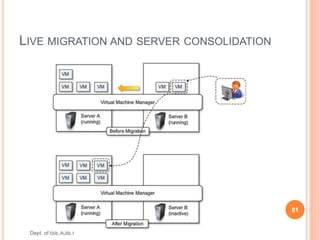
LIVE MIGRATION AND SERVER CONSOLIDATION
81
Dept. of ISE,AJIET
PROS AND CONS OF VIRTUALIZATION
Advantages of virtualization
 Managed execution and isolation Avoid harmful
operations
 Portability
 self-containment reduce the costs of maintenance
 efficient use of resources
Disadvantages
 Performance degradation
 Inefficiency and degraded user experience
 Security holes and new threats
82
Dept. of ISE,AJIET
83
Dept. of ISE,AJIET
END OF MODULE

Cloud Module 1.pptx

  • 1.
    Title: Cloud Computingand its Applications Course Code: 17CS742 Lecture Hours/week:3 Credits : 3 Type of Course: Lecture Total Contact Hours: 40 Hrs Faculty Name John Prakash Veigas CE Marks:40 Marks Sem end Exam Marks : 60
  • 2.
    COURSE OBJECTIVES This coursewill enable students to  Explain the technology and principles involved in building a cloud environment.  Contrast various programming models used in cloud computing  Choose appropriate cloud model for a given application 2 Dept. of ISE,AJIET
  • 3.
    COURSE OUTCOMES After studyingthis course, students will be able to: 3 Dept. of ISE,AJIET CO Description CO 1 To explain the concepts and terminologies of cloud computing CO 2 To Demonstrate cloud frameworks and technologies CO 3 To understand data intensive computing CO 4 To use appropriate cloud model for a given applications
  • 4.
    SYLLABUS MODULE –1 :  Introduction, Cloud Computing at a Glance, The Vision of Cloud Computing, Defining a Cloud, A Closer Look, Cloud Computing Reference Model, Characteristics and Benefits, Challenges Ahead, Historical Developments, Distributed Systems, Virtualization, Web 2.0, Service-Oriented Computing, Utility-Oriented Computing, Building Cloud Computing Environments, Application Development, Infrastructure and System Development, Computing, Platforms and Technologies, Amazon Web Services (AWS), Google AppEngine, Microsoft Azure, Hadoop, Force.com and Salesforce.com, Manjrasoft Aneka 4 Dept. of ISE,AJIET
  • 5.
    SYLLABUS MODULE –1 :  Virtualization, Introduction, Characteristics of Virtualized, Environments, Taxonomy of Virtualization Techniques, Execution Virtualization, Other Types, of Virtualization, Virtualization and Cloud Computing, Pros and Cons of Virtualization Technology 5 Dept. of ISE,AJIET
  • 6.
    Text Book  RajkumarBuyya, Christian Vecchiola, and Thamarai Selvi Mastering Cloud Computing McGraw Hill Education. 6 Dept. of ISE,AJIET
  • 7.
    WHAT IS CLOUDCOMPUTING? According to the official NIST definition, "cloud computing is a model for enabling ubiquitous, convenient, on-demand network access to a shared pool of configurable computing resources (e.g., networks, servers, storage, applications and services) that can be rapidly provisioned and released with minimal management effort” 7 Dept. of ISE,AJIET
  • 8.
    ESSENTIAL CHARACTERISTICS OFCLOUD COMPUTING  On-demand self-service: A consumer can unilaterally provision computing capabilities as needed automatically without requiring human interaction with each service provider  Broad network access: Capabilities are available over the network and accessed through standard mechanisms that promote use by heterogeneous thin or thick client platforms  Resource pooling: The provider's computing resources are pooled to serve multiple consumers  Rapid elasticity: Capabilities can be elastically provisioned and released on demand  Measured service: Resource usage can be monitored, controlled and reported, providing transparency for the provider and consumer. 8 Dept. of ISE,AJIET
  • 9.
    CLOUD COMPUTING ATA GLANCE  Computing is being transformed into a model consisting of services that are commoditized and delivered in a manner similar to utilities such as water, electricity, gas, and telephony.  In such a model, users access services based on their requirements, regardless of where the services are hosted.  Consumers no longer need to invest heavily or encounter difficulties in building and maintaining complex IT infrastructure  In 1969, Leonard Kleinrock, chief scientist-ARPANET said 9 Dept. of ISE,AJIET “As of now, computer networks are still in their infancy, but as they grow up and become sophisticated, we will probably see the spread of ‘computer utilities’ which, like present electric and telephone utilities, will service individual homes and offices across the country.”
  • 10.
     Cloud computingallows renting infrastructure, runtime environments, and services on a pay-per use basis  Different people have different points of view about cloud computing  Chief information and technology officers of large enterprises see opportunities for scaling their infrastructure on demand and sizing it according to their business needs.  End users leveraging cloud computing services can access their documents and data anytime, anywhere, and from any device connected to the Internet 10 Dept. of ISE,AJIET “I don’t care where my servers are, who manages them, where my documents are stored, or where my applications are hosted. I just want them always available and access them from any device connected through Internet. And I am willing to pay for this service for as a long as I need it.”
  • 11.
    THE VISION OFCLOUD COMPUTING  Cloud computing allows anyone with a credit card to provision virtual hardware, runtime environments, and services.  These are used for as long as needed, with no up-front commitments required.  The entire stack of a computing system is transformed into a collection of utilities, which can be provisioned and composed together to deploy systems in hours rather than days and with virtually no maintenance costs  The long-term vision of cloud computing is that IT services are traded as utilities in an open market, without technological and legal barriers – No vender lockin 11 Dept. of ISE,AJIET
  • 12.
    THE VISION OFCLOUD COMPUTING (CONTD…)  To provide a scalable runtime for applications for application and system developers that do not have infrastructure or cannot afford any further expansion of existing infrastructure.  Provide automation of the discovery of various services and its integration into existing software system – No human intervention  To provide opportunities for optimizing datacenter facilities and fully utilizing their capabilities to serve multiple users  To reduce the waste of energy and carbon emissions, thus contributing to a greener IT on one end and increasing revenue 12 Dept. of ISE,AJIET
  • 13.
  • 14.
  • 15.
    DEFINING A CLOUD The term cloud has historically been used in the telecommunications industry as an abstraction of the network in system diagrams.  It then became the symbol of the most popular computer network- the Internet. This meaning also applies to cloud computing, which refers to an Internet-centric way of computing. 15 Dept. of ISE,AJIET Definition given by Armbrust et al.: “Cloud computing refers to both the applications delivered as services over the Internet and the hardware and system software in the datacenters that provide those services.”
  • 16.
    DEFINING A CLOUD 16 Dept.of ISE,AJIET Definition proposed by the U.S. National Institute of Standards and Technology (NIST): “Cloud computing is a model for enabling ubiquitous, convenient, on-demand network access to a shared pool of configurable computing resources (e.g., networks, servers, storage, applications, and services) that can be rapidly provisioned and released with minimal management effort or service provider interaction.” According to Reese, three criteria to discriminate whether a service is delivered in the cloud computing style: 1. The service is accessible via a Web browser (nonproprietary) or a Web services application programming interface (API). 2. Zero capital expenditure is necessary to get started. 3. You pay only for what you use as you use it.
  • 17.
     The utility-orientednature of cloud computing is expressed by Buyya et al “A cloud is a type of parallel and distributed system consisting of a collection of interconnected and virtualized computers that are dynamically provisioned and presented as one or more unified computing resources based on service-level agreements established through negotiation between the service provider and consumers. “ 17 Dept. of ISE,AJIET
  • 18.
    PRACTICAL EXAMPLES OFCLOUD ACROSS ALL MARKET SEGMENTS  Large enterprises can offload some of their activities to cloud-based systems.  Small enterprises and start-ups can afford to translate their ideas into business results more quickly, without excessive up-front costs.  System developers can concentrate on the business logic rather than dealing with the complexity of infrastructure management and scalability.  End users can have their documents accessible from everywhere and any device. 18 Dept. of ISE,AJIET
  • 19.
    CLOUD COMPUTING REFERENCEMODEL 19 Dept. of ISE,AJIET
  • 20.
    CLOUD COMPUTING REFERENCE MODEL(CONTD…) Cloud computing services offerings are classified into three major categories:  Infrastructure-as-a-Service (IaaS)  Platform-as-a-Service (PaaS)  Software-asa-Service (SaaS) 20 Dept. of ISE,AJIET
  • 21.
    Infrastructure-as-a-Service (IaaS)  Atthe base of the stack, Infrastructure-as-a-Service solutions deliver infrastructure on demand in the form of virtual hardware, storage, and networking.  Virtual hardware is utilized to provide compute on demand in the form of virtual machine instances.  These are created at users’ request on the provider’s infrastructure  users are given tools and interfaces to configure the software stack installed in the virtual machine.  Virtual storage is delivered in the form of raw disk space or object store  Virtual networking identifies the collection of services that manage the networking among virtual instances and their connectivity to the Internet or private networks 21 Dept. of ISE,AJIET
  • 22.
    PLATFORM-AS-A-SERVICE  Platform-as-a-Service solutionsare the next step in the stack.  They deliver scalable and elastic runtime environments on demand and host the execution of applications.  These services are backed by a core middleware platform that is responsible for creating the abstract environment where applications are deployed and executed.  It is the responsibility of the service provider to provide scalability and to manage fault tolerance  users are requested to focus on the logic of the application developed by leveraging the provider’s APIs and libraries 22 Dept. of ISE,AJIET
  • 23.
    SOFTWARE-AS-A-SERVICE  At thetop of the stack, Software-as-a-Service solutions provide applications and services on demand.  Most of the common functionalities of desktop applications.  Each layer provides a different service to users.  IaaS solutions are sought by users who want to leverage cloud computing from building dynamically scalable computing systems requiring a specific software stack  SaaS solutions target mostly end users who want to benefit from the elastic scalability of the cloud without doing any software development, installation, configuration, and maintenance 23 Dept. of ISE,AJIET
  • 24.
    CHARACTERISTICS AND BENEFITSOF CLOUD  characteristics that bring benefits to both cloud service consumers (CSCs) and cloud service providers (CSPs) are  No up-front commitments  On-demand access  Nice pricing  Simplified application acceleration and scalability  Efficient resource allocation  Energy efficiency  Seamless creation and use of third-party services 24 Dept. of ISE,AJIET
  • 25.
    CHALLENGES  New, interestingproblems and challenges are regularly being posed to the cloud community, including IT practitioners, managers, governments, and regulators’  challenges concerning the dynamic provisioning of cloud computing services and resources arises  Technical challenges arise for cloud service providers for the management of large computing infrastructures and the use of virtualization technologies on top of them  Virtualization allows capturing almost transparently the memory pages of an instance, these data could easily be obtained by a malicious provider  Issues and challenges concerning the integration of real and virtual infrastructure need to be taken into account from different perspectives, such as security and legislation. 25 Dept. of ISE,AJIET
  • 26.
    CHALLENGES  Security interms of confidentiality, secrecy, and protection of data in a cloud environment  Different legislation about privacy in different countries may potentially create disputes as to the rights that third parties (including government agencies) have to your data  U.S. legislation is known to give extreme powers to government agencies to acquire confidential data when there is the suspicion of operations leading to a threat to national security.  European countries are more restrictive and protect the right of privacy. 26 Dept. of ISE,AJIET
  • 27.
  • 28.
     Five coretechnologies that played an important role in the realization of cloud computing  Distributed systems  Virtualization  Web 2.0  service orientation  utility computing 28 Dept. of ISE, AJIET
  • 29.
    DISTRIBUTED SYSTEMS “A distributedsystem is a collection of independent computers that appears to its users as a single coherent system”  The primary purpose of distributed systems is to share resources and utilize them better.  Heterogeneity  Openness  Scalability  Transparency  Concurrency  Continuous availability  Independent failures. 29 Dept. of ISE,AJIET
  • 30.
    Three major milestoneshave led to cloud computing:  mainframe computing  cluster computing  grid computing. 30 Dept. of ISE,AJIET
  • 31.
    MAINFRAMES  Mainframes werepowerful, highly reliable computers specialized for large data movement and massive input/output (I/O) operations.  Mostly used by large organizations for bulk data processing tasks such as online transactions, enterprise resource planning, and other operations involving the processing of significant amounts of data  Highly reliable computers that were “always on” and capable of tolerating failures transparently.  No system shutdown was required to replace failed components, and the system could work without interruption. 31 Dept. of ISE,AJIET
  • 32.
    CLUSTERS  started asa low-cost alternative to the use of mainframes and supercomputers.  These machines could then be connected by a high- bandwidth network and controlled by specific software tools that manage them as a single system.  Built by commodity machines, they were cheaper than mainframes and made high-performance computing available to a large number of groups, including universities and small research labs.  Some frameworks for distributed computing, including Condor, Parallel Virtual Machine (PVM), and Message Passing Interface (MPI). 32 Dept. of ISE,AJIET
  • 33.
    GRIDS  grid computingproposed a new approach to access large computational power, huge storage facilities, and a variety of services  Users can “consume” resources in the same way as they use other utilities such as power, gas, and water.  A computing grid was a dynamic aggregation of heterogeneous computing nodes, and its scale was nationwide or even worldwide  Why Computing Grids:  clusters became quite common resources  They were often underutilized  new problems were requiring computational power that went beyond the capability of single clusters  the improvements in networking and the diffusion of the Internet made possible long-distance, high-bandwidth connectivity. 33 Dept. of ISE,AJIET
  • 34.
    VIRTUALIZATION  Virtualization isthe creation of a virtual (rather than actual) version of something, such as an operating system, a server, a storage device or network resources  It is the process of converting a physical IT resource into a virtual IT resource  It encompasses a collection of solutions allowing the abstraction of some of the fundamental elements for computing, such as hardware, runtime environments, storage, and networking  Virtualization is essentially a technology that allows creation of different computing environments.  These environments are called virtual because they simulate the interface that is expected by a guest. 34 Dept. of ISE,AJIET
  • 35.
     hardware virtualization-isa technology allows simulating/Emulation the hardware interface expected by an operating system  Hardware virtualization allows the coexistence of different software stacks on top of the same hardware.  These stacks are contained inside virtual machine instances, which operate in complete isolation from each other.  High-performance servers can host several virtual machine instances, thus creating the opportunity to have a customized software stack on demand.  This is the base technology that enables cloud computing solutions to deliver virtual servers on demand, such as Amazon EC2, RightScale, Vmware vCloud and others together with hardware virtualization, storage and network virtualization complete the range of technologies for the emulation of IT infrastructure 35 Dept. of ISE,AJIET
  • 36.
     Virtualization technologiesare also used to replicate runtime environments for programs  Applications in the case of process virtual machines instead of being executed by the operating system are run by a specific program called a virtual machine.  Process virtual machines offer a higher level of abstraction with respect to hardware virtualization, since the guest is only constituted by an application rather than a complete software stack  Eg:Google AppEngine and Windows Azure 36 Dept. of ISE,AJIET
  • 37.
    WEB 2.0  TheWeb is the primary interface through which cloud computing delivers its services.  At present, the Web encompasses a set of technologies and services that facilitate interactive information sharing, collaboration, user-centered design, and application composition. This evolution has transformed the Web into a rich platform for application development and is known as Web 2.0.  Web 2.0 brings interactivity and flexibility into Web pages, providing enhanced user experience by gaining Web-based access to all the functions that are normally found in desktop applications.  These capabilities are obtained by integrating a collection of standards and technologies such as XML, Asynchronous JavaScript and XML (AJAX), Web Services, and others. 37 Dept. of ISE,AJIET
  • 38.
    SERVICE-ORIENTED COMPUTING  adoptsthe concept of services as the main building blocks of application and system development.  Service-oriented computing (SOC) supports the development of rapid, low-cost, flexible, interoperable, and evolvable applications and systems  A service is an abstraction representing a self- describing and platform-agnostic component that can perform any function—anything from a simple function to a complex business process.  A service is supposed to be loosely coupled, reusable, programming language independent, and location transparent. 38 Dept. of ISE,AJIET
  • 39.
    SERVICE-ORIENTED COMPUTING  Service-orientedcomputing introduces two concepts, fundamental to cloud computing: quality of service (QoS) and Software-as-a-Service (SaaS).  Quality of service (QoS) identifies a set of functional and nonfunctional attributes that can be used to evaluate the behavior of a service from different perspectives- response time, or security attributes, transactional integrity, reliability, scalability, and availability.  Software-as-a-Service is a new delivery model for applications. The term has been inherited from the world of application service providers (ASPs), which deliver software services-based solutions across the wide area network from a central datacenter and make them available on a subscription or rental basis. 39 Dept. of ISE,AJIET
  • 40.
    UTILITY-ORIENTED COMPUTING  Utilitycomputing is a vision of computing that defines a service-provisioning model for compute services in which resources such as storage, compute power, applications, and infrastructure are packaged and offered on a pay-per-use basis.  The idea of providing computing as a utility like natural gas, water, power, and telephone connection  Early days mainframe providers offered mainframe power to organizations such as banks and government agencies throughout their datacenters.  service-oriented architectures(SOAs) introduced the idea of leveraging external services for performing a specific task within a software system  Cluster computing and Computing grids brought the concept of utility computing to a new level: market orientation 40 Dept. of ISE,AJIET
  • 41.
    COMPUTING PLATFORMS ANDTECHNOLOGIES 1 Amazon web services (AWS) 2 Google AppEngine 3 Microsoft Azure 4 Hadoop 5 Force.com and Salesforce.com 6 Manjrasoft Aneka 41 Dept. of ISE,AJIET
  • 42.
    AMAZON WEB SERVICES(AWS)  AWS offers comprehensive cloud IaaS services ranging from virtual compute, storage, and networking to complete computing stacks.  AWS is mostly known for its compute and storage-on demand services, namely Elastic Compute Cloud (EC2) and Simple Storage Service (S3).  EC2 provides users with customizable virtual hardware that can be used as the base infrastructure for deploying computing systems on the cloud.  EC2 also provides the capability to save a specific running instance as an image, thus allowing users to create their own templates for deploying systems.  These templates are stored into S3 that delivers persistent storage on demand.  S3 is organized into buckets; these are containers of objects that are stored in binary form and can be enriched with attributes. Users can store objects of any size, from simple files to entire disk images, and have them accessible from everywhere. 42 Dept. of ISE,AJIET
  • 43.
    GOOGLE APPENGINE  GoogleAppEngine is a scalable runtime environment mostly devoted to executing Web applications.  These take advantage of the large computing infrastructure of Google to dynamically scale as the demand varies over time.  AppEngine provides both a secure execution environment and a collection of services that simplify the development of scalable and high-performance Web applications. These services include in-memory caching, scalable data store, job queues, messaging,  Developers can build and test applications on their own machines using the AppEngine software development kit (SDK).  Once development is complete, developers can easily migrate their application to AppEngine –  Java, PHP, Node.js, Python, C#, .Net, Ruby and Go 43 Dept. of ISE,AJIET
  • 44.
    MICROSOFT AZURE  MicrosoftAzure is a cloud operating system and a platform for developing applications in the cloud.  Applications in Azure are organized around the concept of roles, which identify a distribution unit for applications and embody the application’s logic.  Currently, there are three types of role: Web role, worker role, and virtual machine role.  The Web role is designed to host a Web application,  worker role is a more generic container of applications and can be used to perform workload processing,  virtual machine role provides a virtual environment in which the computing stack can be fully customized, including the operating systems. 44 Dept. of ISE,AJIET
  • 45.
    HADOOP  Apache Hadoopis an open-source framework that is suited for processing large data sets on commodity hardware.  Hadoop is an implementation of MapReduce, an application programming model developed by Google, which provides two fundamental operations for data processing: map and reduce  The former transforms and synthesizes the input data provided by the user; the latter aggregates the output obtained by the map operations.  Hadoop provides the runtime environment, and developers need only provide the input data and specify the map and reduce functions that need to be executed. 45 Dept. of ISE,AJIET
  • 46.
    FORCE.COM AND SALESFORCE.COM Force.com is a cloud computing platform for developing social enterprise applications.  The platform is the basis for SalesForce.com, a Software-as-a-Service solution for customer relationship management.  Force.com allows developers to create applications by composing ready-to-use blocks; a complete set of components supporting all the activities of an enterprise are available.  The platform provides complete support for developing applications, from the design of the data layout to the definition of business rules and workflows and the definition of the user interface. 46 Dept. of ISE,AJIET
  • 47.
    MANJRASOFT ANEKA  ManjrasoftAneka is a cloud application platform for rapid creation of scalable applications and their deployment on various types of clouds in a seamless and elastic manner.  It supports a collection of programming abstractions for developing applications and a distributed runtime environment that can be deployed on heterogeneous hardware (clusters, networked desktop computers, and cloud resources).  Developers can choose different abstractions to design their application: tasks, distributed threads, and map- reduce.  These applications are then executed on the distributed service-oriented runtime environment, which can dynamically integrate additional resource on demand 47 Dept. of ISE,AJIET
  • 48.
    WHY VIRTUALIZATION TECHNOLOGIESHAVE GAINED RENEWED INTEREST?  Increased performance and computing capacity  high-end side of the PC market, supercomputers can provide immense compute power for hundreds or thousands of virtual machines  Underutilized hardware and software resources  Increased performance and computing capacity  The effect of limited or sporadic use of resources  Lack of space  most cases enterprises cannot afford to build another data center to accommodate additional resource capacity  Greening initiatives.  Rise of administrative costs 48 Dept. of ISE,AJIET
  • 49.
    VIRTUALIZED ENVIRONMENTS  Virtualizationis a broad concept that refers to the creation of a virtual version of something, whether hardware, a software environment, storage, or a network  Three major components: guest, host, and virtualization layer  The guest represents the system component that interacts with the virtualization layer  The host represents the original environment where the guest is supposed to be managed.  The virtualization layer is responsible for recreating the same or a different environment where the guest will operate 49 Dept. of ISE,AJIET
  • 50.
    THE VIRTUALIZATION REFERENCEMODEL 50 Dept. of ISE,AJIET
  • 51.
    CHARACTERISTICS VIRTUALIZED ENVIRONMENTS Increased security  Managed execution  Portability 51 Dept. of ISE,AJIET
  • 52.
    INCREASED SECURITY:  Thevirtual machine represents an emulated environment in which the guest is executed.  All the operations of the guest are generally performed against the virtual machine, which then translates and applies them to the host.  This level of indirection allows the virtual machine manager to control and filter the activity of the guest, thus preventing some harmful operations from being performed.  For example, applets downloaded from the Internet run in a sandboxed 3 version of the Java Virtual Machine (JVM), which provides them with limited access to the hosting operating system resources.  Both the JVM and the .NET runtime provide extensive security policies for customizing the execution environment of applications. 52 Dept. of ISE,AJIET
  • 53.
    MANAGED EXECUTION Functions enabledby Managed Execution of virtualization environment - sharing, aggregation, emulation, and isolation  Sharing:  Virtualization allows the creation of a separate computing environments within the same host.  fully exploit the capabilities otherwise it is underutilized.  reduce the number of active servers and limit power consumption.  Aggregation  opposite process of sharing physical resource among several guests  A group of separate hosts can be tied together and represented to guests as a single virtual host. 53 Dept. of ISE,AJIET
  • 54.
    54 Dept. of ISE,AJIET Emulation: Emulationis the process of imitating a hardware/software program/platform on another program or platform. This makes it possible to run programs on systems not designed for them a completely different environment with respect to the host can be emulated, thus allowing the execution of guest programs requiring specific characteristics that are not present in the physical host
  • 55.
     Isolation:  Virtualizationallows providing guests—whether they are operating systems, applications, or other entities—with a completely separate environment, in which they are executed.  The guest program performs its activity by interacting with an abstraction layer, which provides access to the underlying resources 3. Portability  In hardware virtualization solution, the guest is packaged into a virtual image that, in most cases, can be safely moved and executed on top of different virtual machines.  In programming-level virtualization, as implemented by the JVM or the .NET runtime, the binary code representing application components (jars or assemblies) can be run without any recompilation on any implementation of the corresponding virtual machine  Run application on different platforms with no changes. 55 Dept. of ISE,AJIET
  • 56.
    TAXONOMY OF VIRTUALIZATIONTECHNIQUES 56 Dept. of ISE,AJIET
  • 57.
     The firstclassification discriminates against the service or entity that is being emulated.  Two major categories by considering the type of host they require.  Process-level techniques are implemented on top of an existing operating system which has full control of the hardware  System-level techniques are implemented directly on hardware and do not require or require a minimum of support from an existing operating system.  Within these two categories we can list various techniques that offer the guest a different type of virtual computation environment:  bare hardware  operating system resources  low-level programming language  application libraries 57 Dept. of ISE,AJIET
  • 58.
    MACHINE REFERENCE MODEL 58 Dept. ofISE,AJIET  Virtualizing an execution environment at different levels of the computing stack requires a reference model that defines the interfaces between the levels of abstractions, which hide implementation details  hardware is expressed in terms of the Instruction Set Architecture (ISA), which defines the instruction set for the processor registers,memory, and interrupt management.  ISA is the interface between hardware and software, and it is important to the operating system(OS) developer(System ISA) and developers of applications that directly manage the underlying hardware (User ISA).
  • 59.
     The applicationbinary interface(ABI) separates the operating system layer from the applications and libraries, which are managed by the OS.  ABI covers details such as low-level data types, alignment, and call conventions and defines a format for executable programs. System calls are defined at this level  The highest level of abstraction is represented by the application programming interface (API), which interfaces applications to libraries and/or the underlying operating system  The instruction set exposed by the hardware has been divided into different security classes  privileged instructions  nonprivileged instructions 59 Dept. of ISE,AJIET
  • 60.
     Nonprivileged instructionsare those instructions that can be used without interfering with other tasks because they do not access shared resources.  Ex: all the floating, fixed-point, and arithmetic instructions  Privileged instructions are those that are executed under specific restrictions and are mostly used for sensitive operations, which expose (behavior-sensitive) or modify (control-sensitive) the privileged state.  Ex: behavior-sensitive instructions are those that operate on the I/O, whereas control-sensitive instructions alter the state of the CPU registers 60 Dept. of ISE,AJIET
  • 61.
    SECURITY RINGS ANDPRIVILEGE MODES 61 Dept. of ISE,AJIET Ring0-> OS kernel Rings1 and 2->OS level services Ring3->user
  • 62.
     supervisor mode(mastermode or kernel mode ): execution mode in which all the instructions (privileged and nonprivileged) can be executed without any restriction  User mode: there are restrictions to control the machine-level resources  If code running in user mode invokes the privileged instructions, hardware interrupts occur and trap the potentially harmful execution of the instruction.  Role of the hypervisor: hypervisor(VMM) runs above the supervisor mode 62 Dept. of ISE,AJIET
  • 63.
    HARDWARE-LEVEL VIRTUALIZATION  Hardware-levelvirtualization is a virtualization technique that provides an abstract execution environment in terms of computer hardware on top of which a guest operating system can be run. o In this model,  The guest is represented by the operating system  The host by the physical computer hardware  The virtual machine by its emulation  The virtual machine manager by the hypervisor o Hardware-level virtualization is also called system virtualization, since it provides ISA to virtual machines, which is the representation of the hardware interface of a system 63 Dept. of ISE,AJIET
  • 64.
    Hardware-level virtualization referencemodel 64 Dept. of ISE,AJIET
  • 65.
    HYPERVISORS  They takethe place of the operating systems and interact directly with the ISA interface exposed by the underlying hardware  They emulate interface in order to allow the management of guest operating systems. 65 Dept. of ISE,AJIET Hypervisor, or virtual machine manager (VMM) recreates a hardware environment in which guest operating systems are installed Type I hypervisors run directly on top of the hardware This type of hypervisor is also called a native virtual machine since it runs natively on hardware
  • 66.
     Type IIhypervisors require the support of an operating system to provide virtualization services. 66 Dept. of ISE,AJIET  They are programs managed by the operating system, which interact with it through the ABI and emulate the ISA of virtual hardware for guest operating systems. This type of hypervisor is also called a hosted virtual machine since it is hosted within an operating system
  • 67.
    HYPERVISOR REFERENCE ARCHITECTURE The dispatcher -the entry point of the monitor and reroutes the instructions issued by the virtual machine instance to one of the two other modules.  The allocator is responsible for deciding the system resources to be provided to the VM  The interpreter module consists of interpreter routines. These are executed whenever a virtual machine executes a privileged instruction: a trap is triggered and the corresponding routine is executed. 67 Dept. of ISE,AJIET Three main modules, dispatcher, allocator, and interpreter, coordinate their activity in order to emulate the underlying hardware
  • 68.
    According to Goldbergand Popek[1974] -virtual machine manager - Three properties have to be satisfied:  Equivalence: A guest running under the control of a virtual machine manager should exhibit the same behavior as when it is executed directly on the physical host.  Resource control: The virtual machine manager should be in complete control of virtualized resources.  Efficiency: A statistically dominant fraction of the machine instructions should be executed without intervention from the virtual machine manager. 68 Dept. of ISE,AJIET
  • 69.
     Popek andGoldberg provided a classification of the instruction set and proposed three theorems that define the properties that hardware instructions need to satisfy support virtualization. 69 Dept. of ISE,AJIET THEOREM 3.1 : For any conventional third-generation computer, a VMM may be constructed if the set of sensitive instructions for that computer is a subset of the set of privileged instructions. THEOREM3.2: A conventional third-generation computer is recursively virtualizable if: • It is virtualizable and • A VMM without any timing dependencies can be constructed for it.
  • 70.
     THEOREM 3.3:A hybrid VMM may be constructed for any conventional third-generation machine in which the set of user-sensitive instructions are a subset of the set of privileged instructions. 70 Dept. of ISE,AJIET
  • 71.
    HARDWARE VIRTUALIZATION TECHNIQUES Hardware-assisted virtualization  Full virtualization  Paravirtualization  Partial virtualization 71 Dept. of ISE,AJIET
  • 72.
    HARDWARE VIRTUALIZATION TECHNIQUES Hardware-assistedvirtualization  A scenario in which the hardware provides architectural support for building a virtual machine manager able to run a guest operating system in complete isolation.  Eg: Extensions to the x86-64 bit architecture introduced with Intel VT and AMD V  Software emulation of x86 hardware was significantly costly from the performance point of view  Kernel-based Virtual Machine (KVM), VirtualBox, Xen, VMware, Hyper-V, Sun xVM, Parallels, and others 72 Dept. of ISE,AJIET
  • 73.
    FULL VIRTUALIZATION:  Fullvirtualization refers to the ability to run a program, most likely an operating system, directly on top of a virtual machine and without any modification, as though it were run on the raw hardware.  To make this possible, virtual machine managers are required to provide a complete emulation of the entire underlying hardware.  The principal advantage of full virtualization is complete isolation, which leads to enhanced security, ease of emulation of different architectures, and coexistence of different systems on the same platform.  Ex: Kernel-based Virtual Machine (KVM), VirtualBox, VMware 73 Dept. of ISE,AJIET
  • 74.
    PARAVIRTUALIZATION:  This isa not-transparent virtualization solution that allows implementing thin virtual machine managers.  Paravirtualization techniques expose a software interface to the virtual machine that is slightly modified from the host and, as a consequence, guests need to be modified.  guest OS is recompiled prior to installation inside a virtual machine  The aim of paravirtualization is to provide the capability to demand the execution of performance critical operations directly on the host, thus preventing performance losses that would otherwise be experienced in managed execution.  Example: Xen 74 Dept. of ISE,AJIET
  • 75.
     Partial virtualization:Partial virtualization provides a partial emulation of the underlying hardware, thus not allowing the complete execution of the guest operating system in complete isolation.  Partial virtualization allows many applications to run transparently, but not all the features of the operating system can be supported.  An example of partial virtualization is address space virtualization used in time-sharing systems; this allows multiple applications and users to run concurrently in a separate memory space, but they still share the same hardware resources (disk, processor, and network).  Ex IBM M44/44x 75 Dept. of ISE,AJIET
  • 76.
    OPERATING SYSTEM-LEVEL VIRTUALIZATION Operating system-level virtualization offers the opportunity to create different and separated execution environments for applications that are managed concurrently.  There is no virtual machine manager or hypervisor, and the virtualization is done within a single operating system, where the OS kernel allows for multiple isolated user space instances.  The kernel is also responsible for sharing the system resources among instances and for limiting the impact of instances on each other  Examples: FreeBSD Jails, IBM Logical Partition (LPAR), SolarisZones and Containers, Parallels Virtuozzo Containers, OpenVZ, iCore Virtual Accounts, Free Virtual Private Server (FreeVPS). 76 Dept. of ISE,AJIET
  • 77.
    PROGRAMMING LANGUAGE-LEVEL VIRTUALIZATION Programming language-level virtualization is mostly used to achieve ease of deployment of applications, managed execution, and portability across different platforms and operating systems.  It consists of a virtual machine executing the byte code of a program, which is the result of the compilation process.  Compilers implemented and used this technology to produce a binary format representing the machine code for an abstract architecture.  JVM of Java, CLI of .Net Environment 77 Dept. of ISE,AJIET
  • 78.
    APPLICATION-LEVEL VIRTUALIZATION  Application-levelvirtualization is a technique allowing applications to be run in runtime environments that do not natively support all the features required by such applications.  Emulation is used to execute program binaries compiled for different hardware architectures.  strategies can be implemented:  Interpretation: In this technique every source instruction is interpreted by an emulator for executing native ISA instructions, leading to poor performance. Interpretation has a minimal startup cost but a huge overhead, since each instruction is emulated.  Binary translation: In this technique every source instruction is converted to native instructions with equivalent functions. After a block of instructions is translated, it is cached and reused. Binary translation has a large initial overhead cost, but over time it is subject to better performance, since previously translated instruction blocks are directly executed 78 Dept. of ISE,AJIET
  • 79.
    OTHER TYPES OFVIRTUALIZATION  Storage virtualization: Storage virtualization is a system administration practice that allows decoupling the physical organization of the hardware from its logical representation.  Network virtualization: Network virtualization combines hardware appliances and specific software for the creation and management of a virtual network. Network virtualization can aggregate different physical networks into a single logical network (external network virtualization) or provide network-like functionality to an operating system partition (internal network virtualization) 79 Dept. of ISE,AJIET
  • 80.
    Desktop virtualization:  Desktopvirtualization abstracts the desktop environment available on a personal computer in order to provide access to it using a client/server approach.  desktop virtualization makes accessible a different system as though it were natively installed on the host, but this system is remotely stored on a different host and accessed through a network connection.  desktop virtualization addresses the problem of making the same desktop environment accessible from everywhere. Application server virtualization  Application server virtualization abstracts a collection of application servers that provide the same services as a single virtual application server by using load-balancing strategies and providing a high-availability infrastructure for the services hosted in the application server.  This is a particular form of virtualization and serves the same purpose of storage virtualization: providing a better quality of service 80 Dept. of ISE,AJIET
  • 81.
    LIVE MIGRATION ANDSERVER CONSOLIDATION 81 Dept. of ISE,AJIET
  • 82.
    PROS AND CONSOF VIRTUALIZATION Advantages of virtualization  Managed execution and isolation Avoid harmful operations  Portability  self-containment reduce the costs of maintenance  efficient use of resources Disadvantages  Performance degradation  Inefficiency and degraded user experience  Security holes and new threats 82 Dept. of ISE,AJIET
  • 83.