WS Partner v1.6 - Access API
WS Partner v1.6 Access API

   ● repository/properties
   ● repository/list
   ● repository/copy
   ● repository/replace
   ● repository/download
   ● repository/rename
   ● repository/delete
   ● repository/createfolder
   ● repository/move
   ● repository/search
All WS Partner v1.6 APIs

   ● WS Partner v1.6    -   Access API
   ● WS Partner v1.6    -   Auth API
   ● WS Partner v1.6    -   File Upload API
   ● WS Partner v1.6    -   Mailer API
   ● WS Partner v1.6    -   Preview API
   ● WS Partner v1.6    -   Publisher API
   ● WS Partner v1.6    -   Server Configuration
   ● WS Partner v1.6    -   Service API
back to summary


repository/properties

Returns properties of a file or folder in the repository.

Signature

POST http://<servername>/repository/properties
Accept-Language header
<en-US>
Accept header
application/json
Authorization header
OAuth <oauth parameters>
Using a file or folder id:
body


{

    "id" : "myDocumentOrFolderId",

  "account_access":"QWERTYFVB45678DFGHvbnDFGHJrtyuCVBertgBB
NFGHJ"

}

    ● id : A file or folder id.
    ● account_access : The account access string given during
      service authorization.
Using an account id to get properties on the root folder:

body


{

 "service_id":"serviceId",

 "account_id":"accountId",

 "account_access":"QWERTYFVB45678DFGHvbnDFGHJrtyuCVBertgBBN
FGHJ"

}

    ●service_id : The repository service identifier.
    ●account_id : The account identifier.
    ●account_access : The account access string given during
     service authorization.
repository/properties call successful

HTTP Status Code
200 OK
body
{

    "id" : "folderOrFileId",

  "type" :
"application/directory",

    "size" : ...

}


List of attributes which can be found in a response.
Note that only the id and type attributes are non-optional

    ●   id : The reference to the file/folder required
    ●   type : The mime type of the attachment required. See
        Mimetypes for list of possible values
    ●   created : The date and time when file/folder was created
        optional
    ●   modified : The date and time when file/folder was modified
        optional
    ●   comment : Description or note associated to the file/folder
        optional
    ●   name : The name of the file/folder optional
    ●   parents : List of parent IDs optional
    ●   owner : The file/folder owner or author optional
    ●   size : The size of the attachment (in bytes) optional
    ●   favorite : 'true' or 'false' optional
    ●   hidden : 'true' or 'false' optional
    ●   viewed : 'true' or 'false' optional
    ●   draft : 'true' or 'false' optional
    ●   privacy : 'public' or 'private' optional. Note that future version
        may support more possible values.
    ●   tags : A json formated array of text strings optional.
    ●   restrictions : List of restrictions. Possible values are
        'no_delete', 'no_write', 'no_rename', 'no_read', 'write_locked',
        'no_trash', 'no_move', 'no_copy' optional
           ○ no_read : file can't be downloaded (nor moved/copied),
              list can't be returned for a folder.
           ○ no_delete : file or folder can't be deleted (nor moved)
           ○ no_write : file can't be overwritten, folder can't have
              items added
           ○ no_rename : item can't be renamed
○   write_locked : file can't be overwritten, folder can't have
             items added but only temporarily, the file/folder might
             become available for write soon.
          ○ no_addfolder : can't add subfolder to current folder.
          ○ no_trash : file or folder can't be trashed.
          ○ no_move : folder can't be moved to current folder.
          ○ no_copy : folder can't be copied to current folder. If
             no_move or no_copy restrictions are not present, it
             doesn't mean that a folder can be copied from the
             repository to another repository. When available,
             copy/move are only within the same repository.
    ● icon : Contains a url entry to an absolute path to the icon (for
      example http://host/res/icon/idisk). To download the icon, the
      client can simply call a GET on the URL. The call supports "if-
      modified-since" and "last-modified" header for optimization. See
      w3c specs optional
If an attribute is indicated as optional, it means that the entry may not
appear and you can consider its value to be nil or the entry may
appear but its value might be empty.
Date are formatted in Iso8601.

repository/list

Listing a folder

Returns the content of a folder.

signature
POST http://<servername>/repository/list
Accept-Language header
<en-US>
Accept header
application/json
Authorization header
OAuth <oauth parameters>
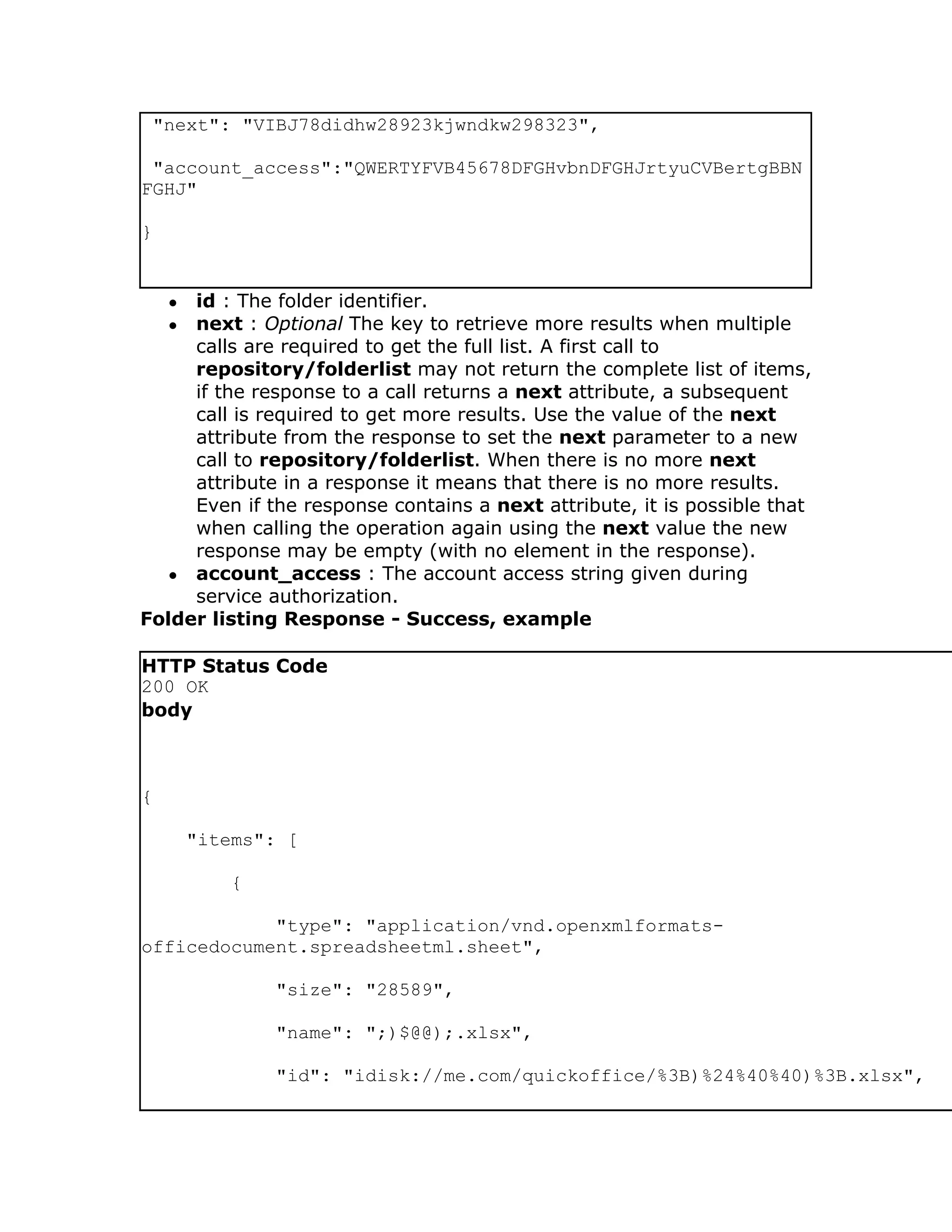
body


{

 "id":"folderId",
"next": "VIBJ78didhw28923kjwndkw298323",

 "account_access":"QWERTYFVB45678DFGHvbnDFGHJrtyuCVBertgBBN
FGHJ"

}


    ●id : The folder identifier.
    ●next : Optional The key to retrieve more results when multiple
     calls are required to get the full list. A first call to
     repository/folderlist may not return the complete list of items,
     if the response to a call returns a next attribute, a subsequent
     call is required to get more results. Use the value of the next
     attribute from the response to set the next parameter to a new
     call to repository/folderlist. When there is no more next
     attribute in a response it means that there is no more results.
     Even if the response contains a next attribute, it is possible that
     when calling the operation again using the next value the new
     response may be empty (with no element in the response).
  ● account_access : The account access string given during
     service authorization.
Folder listing Response - Success, example

HTTP Status Code
200 OK
body


{

        "items": [

            {

            "type": "application/vnd.openxmlformats-
officedocument.spreadsheetml.sheet",

                "size": "28589",

                "name": ";)$@@);.xlsx",

                "id": "idisk://me.com/quickoffice/%3B)%24%40%40)%3B.xlsx",
"lastmodified": "2010-01-25T09:16:42Z"

        },

        {

            "type": "application/vnd.openxmlformats-
officedocument.wordprocessingml.document",

             "size": "24988",

             "name": ";)$@@);2.docx",

             "id": "idisk://me.com/quickoffice/%3B)%24%40%40)%3B2.docx",

             "lastmodified": "2009-12-28T14:29:39Z"

        },

        {

             "type": "application/directory",

             "name": "SOMEONE",

             "id": "idisk://me.com/quickoffice/SOMEONE",

             "lastmodified": "2009-12-10T16:50:53Z"

        },

        {

             "type": "application/directory",

             "name": "About Stack.pdf",

             "id": "idisk://me.com/quickoffice/About%20Stack.pdf",

             "lastmodified": "2010-02-17T10:52:03Z"

        },

        {
"type": "application/directory",

             "name": "Where do folders come from.txt",

             "id": "idisk://me.com/quickoffice/Where%20do%20folders%20come

             "lastmodified": "2009-12-02T14:55:58Z"

        },

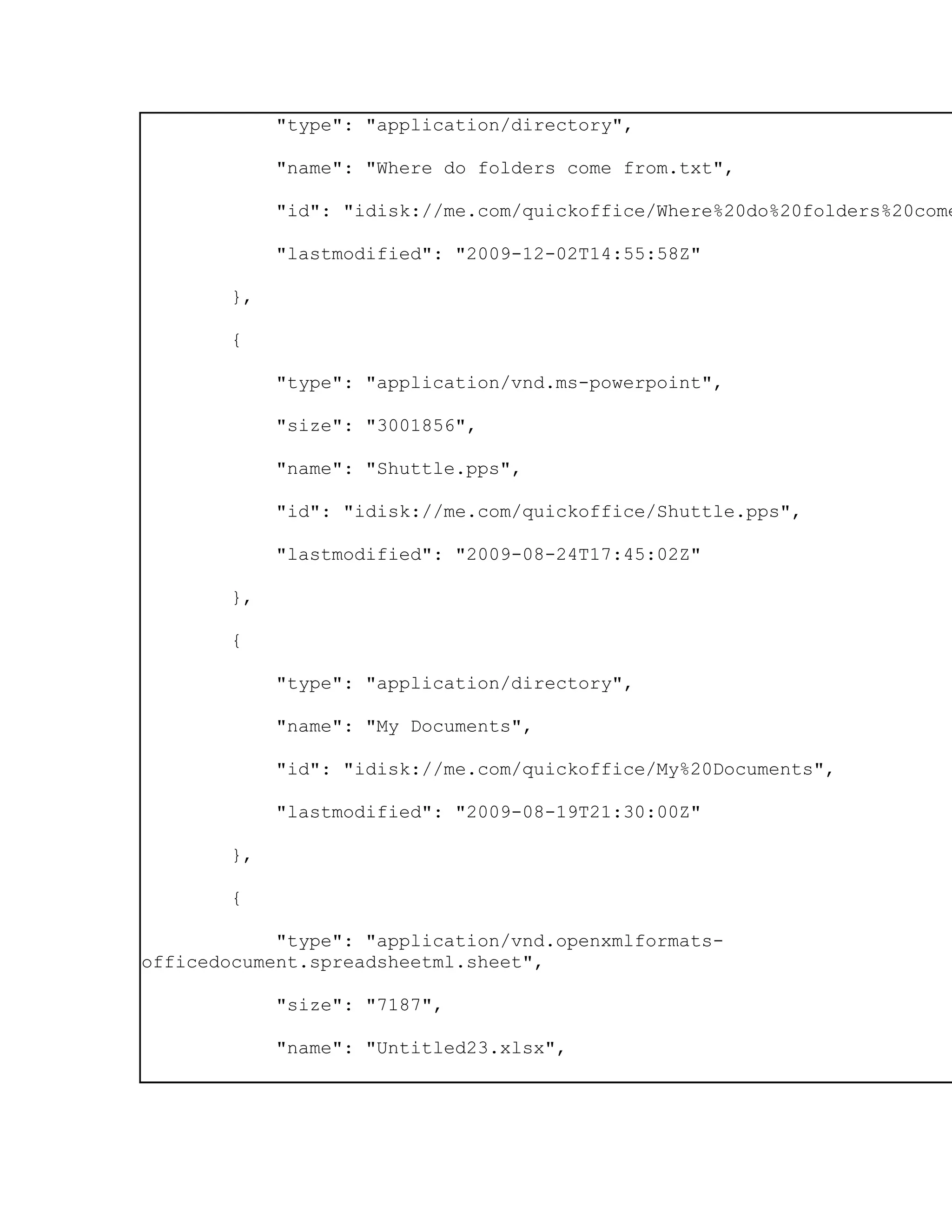
        {

             "type": "application/vnd.ms-powerpoint",

             "size": "3001856",

             "name": "Shuttle.pps",

             "id": "idisk://me.com/quickoffice/Shuttle.pps",

             "lastmodified": "2009-08-24T17:45:02Z"

        },

        {

             "type": "application/directory",

             "name": "My Documents",

             "id": "idisk://me.com/quickoffice/My%20Documents",

             "lastmodified": "2009-08-19T21:30:00Z"

        },

        {

            "type": "application/vnd.openxmlformats-
officedocument.spreadsheetml.sheet",

             "size": "7187",

             "name": "Untitled23.xlsx",
"id": "idisk://me.com/quickoffice/Untitled23.xlsx",

               "lastmodified": "2009-12-11T10:58:36Z"

           }

      ],

 "next":"aHR0cDovL2RvY3MuZ29vZ2xlLmNvbS9mZWVkcy9kZWlDd242ZTY5MnpBQUFBQ0FH
U"

     }


See repository/properties for details on the response attributes of
each item in the list.

repository/copy

Adding/copying item to repository

signature
POST http://<servername>/repository/copy
Accept-Language header
<en-US>
Accept header
application/json
Authorization header
OAuth <oauth parameters>
body


{

 "source": {

     "id" : "fileOrFolderId",

    "account_access":"QWERTYFVB45678DFGHvbnDFGHJrtyuCVBertg
BBNFGHJ"

 }
"destination":{

         "id" : "folderId",

    "account_access":"QWERTYFVB45678DFGHvbnDFGHJrtyuCVBertg
BBNFGHJ"

 }

}


     ●source : The source file or folder. required
     ●destination : The destination folder. required
See repository/properties for details on a successful response.
Before copying the folder check if there's no_copy restriction returned
with the repository/properties operation.

HTTP Status code CONFLICT - 409 is returned if the destination folder
already contains an item with the same name.
HTTP Status code NOT_FOUND - 404 is returned if the destination
folder or the source file/folder is not found.

repository/replace

Replaces the content of an existing file. Properties from the source file
won't be copied to the destination file. The destination file size and
modified date will be changed. Depending on the repository where the
destination file is stored, the creation date of the destination file might
be changed.

signature
POST http://<servername>/repository/replace
Accept-Language header
<en-US>
Accept header
application/json
Authorization header
OAuth <oauth parameters>
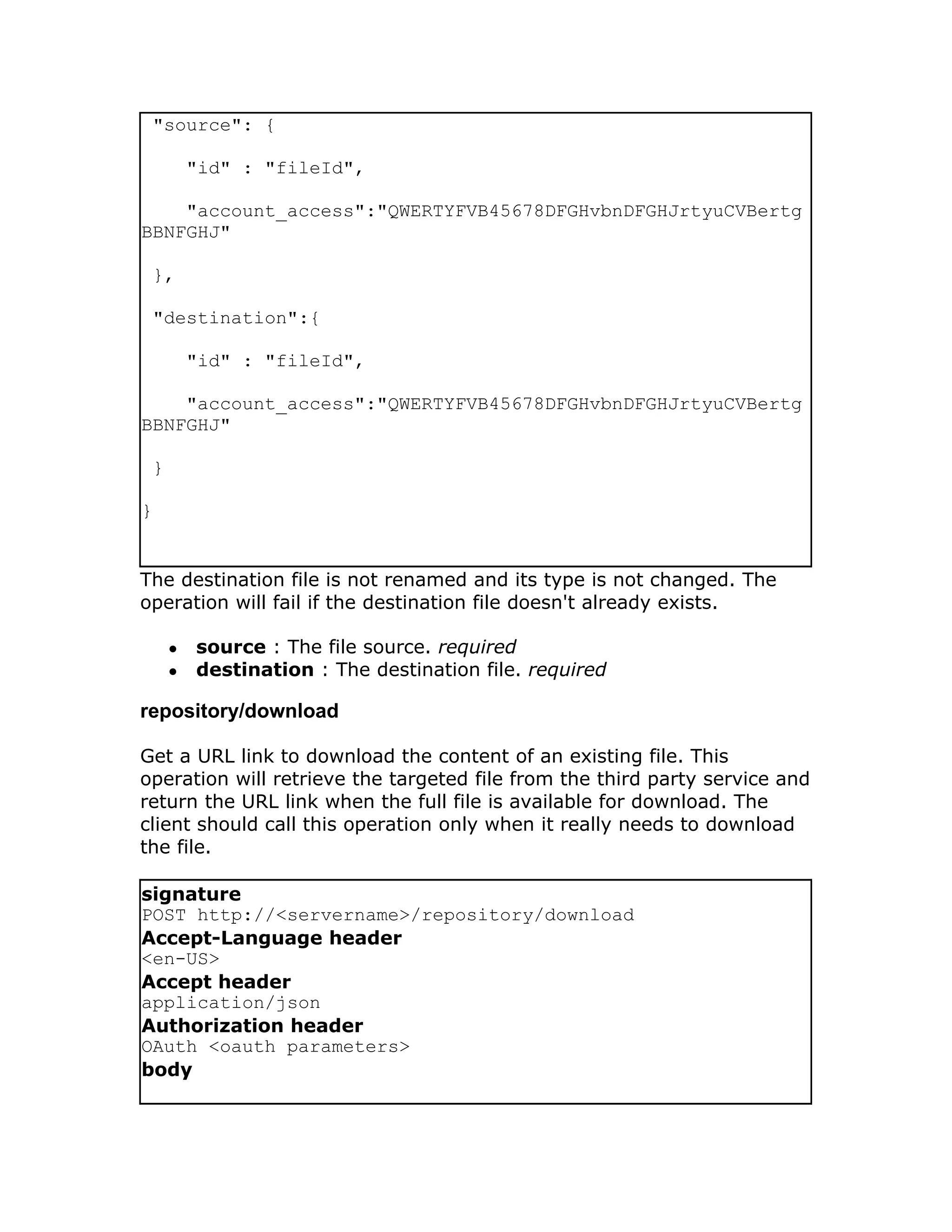
body


{
"source": {

         "id" : "fileId",

    "account_access":"QWERTYFVB45678DFGHvbnDFGHJrtyuCVBertg
BBNFGHJ"

 },

 "destination":{

         "id" : "fileId",

    "account_access":"QWERTYFVB45678DFGHvbnDFGHJrtyuCVBertg
BBNFGHJ"

 }

}


The destination file is not renamed and its type is not changed. The
operation will fail if the destination file doesn't already exists.

     ●   source : The file source. required
     ●   destination : The destination file. required

repository/download

Get a URL link to download the content of an existing file. This
operation will retrieve the targeted file from the third party service and
return the URL link when the full file is available for download. The
client should call this operation only when it really needs to download
the file.

signature
POST http://<servername>/repository/download
Accept-Language header
<en-US>
Accept header
application/json
Authorization header
OAuth <oauth parameters>
body
{

 "id":"fileId",

 "account_access":"QWERTYFVB45678DFGHvbnDFGHJrtyuCVBertgBBN
FGHJ"

}


id : File to get download link from

On success, the operation returns a link from which the file binary can
be downloaded from a simple HTTP GET call.

repository/download call successful

HTTP Status Code
200 OK
body


{

    "download_url": "https://us-qo-dev-ws-partner-download-files.s3.amazo
Expires=1308260896&AWSAccessKeyId=AKIAJ7OO5X77CJ45KFKA&Signature=ZRiYkPFy

        "expires": "2011-06-16T21:48:16Z",

    "id": "qostorage://us-qo-dev-ws-partner-download-files.s3.amazonaws.c
H4sIAAAAAAAAAB2MQQ6DMAzAftNbijakjUsfE2jQKtqkI2FlvH6Mg0+2PKdMjIXCmPH1x9tur

        "account_access": "ec83e621-3562-4a20-a944-7b85f4d0e611"

}


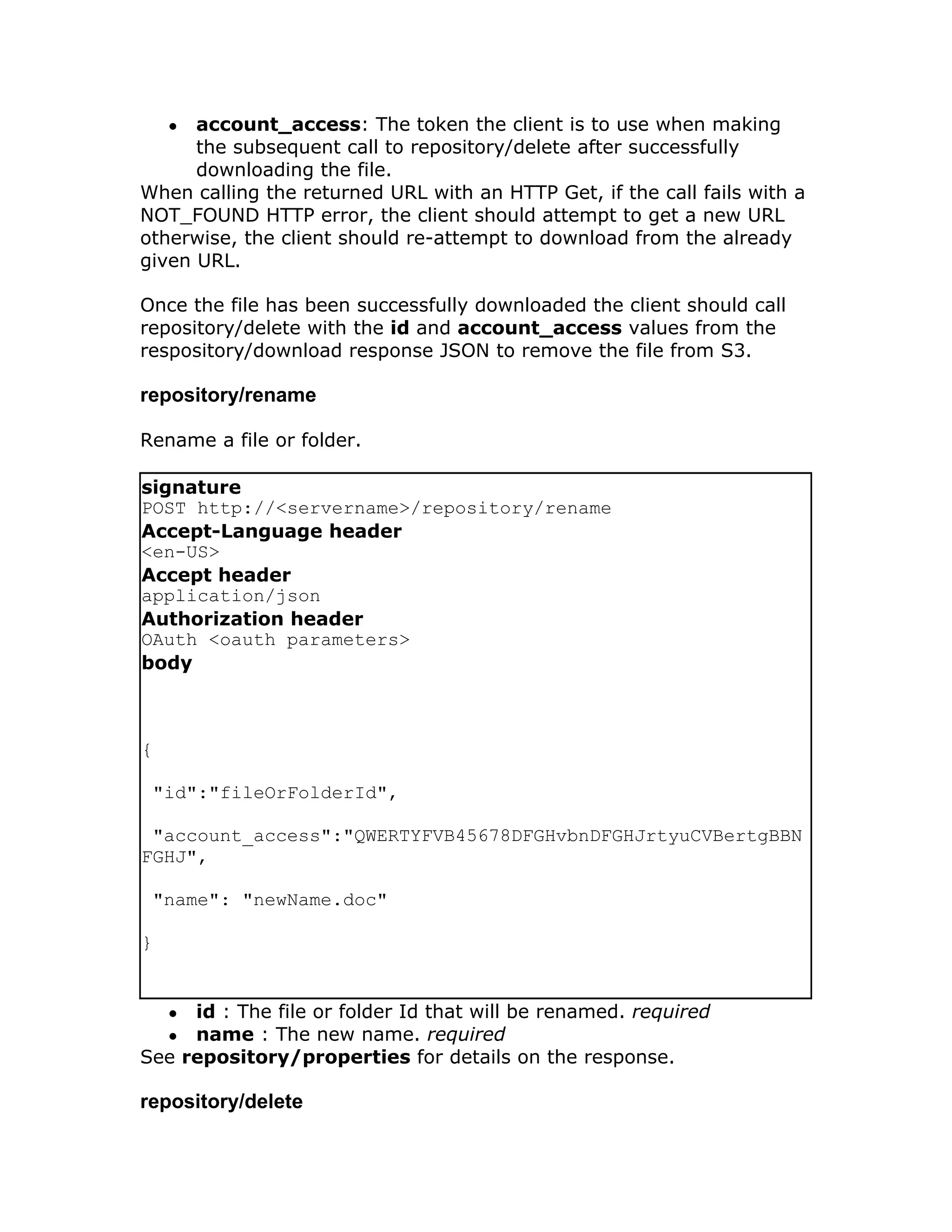
    ● download_url: Pre-signed S3 URL the client can use to obtain
      the file.
    ● expires: The date/time the pre-signed S3 URL will expire.
    ● id: The MX server's unique identifier of the resource in S3.
● account_access: The token the client is to use when making
      the subsequent call to repository/delete after successfully
      downloading the file.
When calling the returned URL with an HTTP Get, if the call fails with a
NOT_FOUND HTTP error, the client should attempt to get a new URL
otherwise, the client should re-attempt to download from the already
given URL.

Once the file has been successfully downloaded the client should call
repository/delete with the id and account_access values from the
respository/download response JSON to remove the file from S3.

repository/rename

Rename a file or folder.

signature
POST http://<servername>/repository/rename
Accept-Language header
<en-US>
Accept header
application/json
Authorization header
OAuth <oauth parameters>
body


{

 "id":"fileOrFolderId",

 "account_access":"QWERTYFVB45678DFGHvbnDFGHJrtyuCVBertgBBN
FGHJ",

 "name": "newName.doc"

}


    ●id : The file or folder Id that will be renamed. required
    ●name : The new name. required
See repository/properties for details on the response.

repository/delete
signature
POST http://<servername>/repository/delete
Accept-Language header
<en-US>
Accept header
application/json
Authorization header
OAuth <oauth parameters>
body


{

 "id":"<fileOrFolderId>",

 "account_access":"QWERTYFVB45678DFGHvbnDFGHJrtyuCVBertgBBN
FGHJ",

 "trash":"<trueOrFalse>"

}


    ● id : The file or folder id that will be deleted from the repository.
      required
    ● trash : 'true' or 'false', default is 'false'. May be set to 'true' only
      if the file or folder supports a trash. See if there's
      no_trash restriction returned with the
      repository/properties operation. optional

repository/createfolder

signature
POST http://<servername>/repository/createfolder
Accept-Language header
<en-US>
Accept header
application/json
Authorization header
OAuth <oauth parameters>
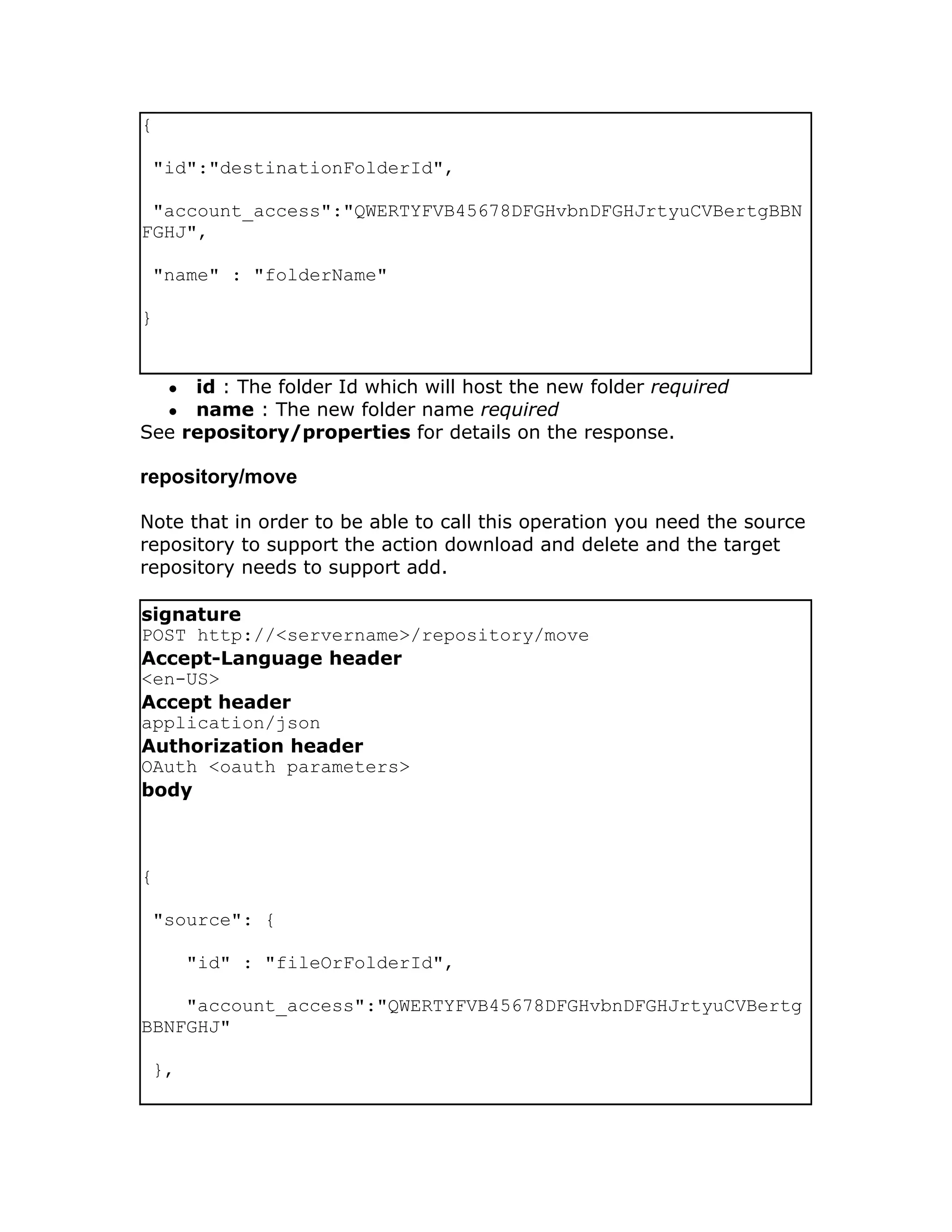
body
{

 "id":"destinationFolderId",

 "account_access":"QWERTYFVB45678DFGHvbnDFGHJrtyuCVBertgBBN
FGHJ",

 "name" : "folderName"

}


    ●id : The folder Id which will host the new folder required
    ●name : The new folder name required
See repository/properties for details on the response.

repository/move

Note that in order to be able to call this operation you need the source
repository to support the action download and delete and the target
repository needs to support add.

signature
POST http://<servername>/repository/move
Accept-Language header
<en-US>
Accept header
application/json
Authorization header
OAuth <oauth parameters>
body


{

 "source": {

        "id" : "fileOrFolderId",

    "account_access":"QWERTYFVB45678DFGHvbnDFGHJrtyuCVBertg
BBNFGHJ"

 },
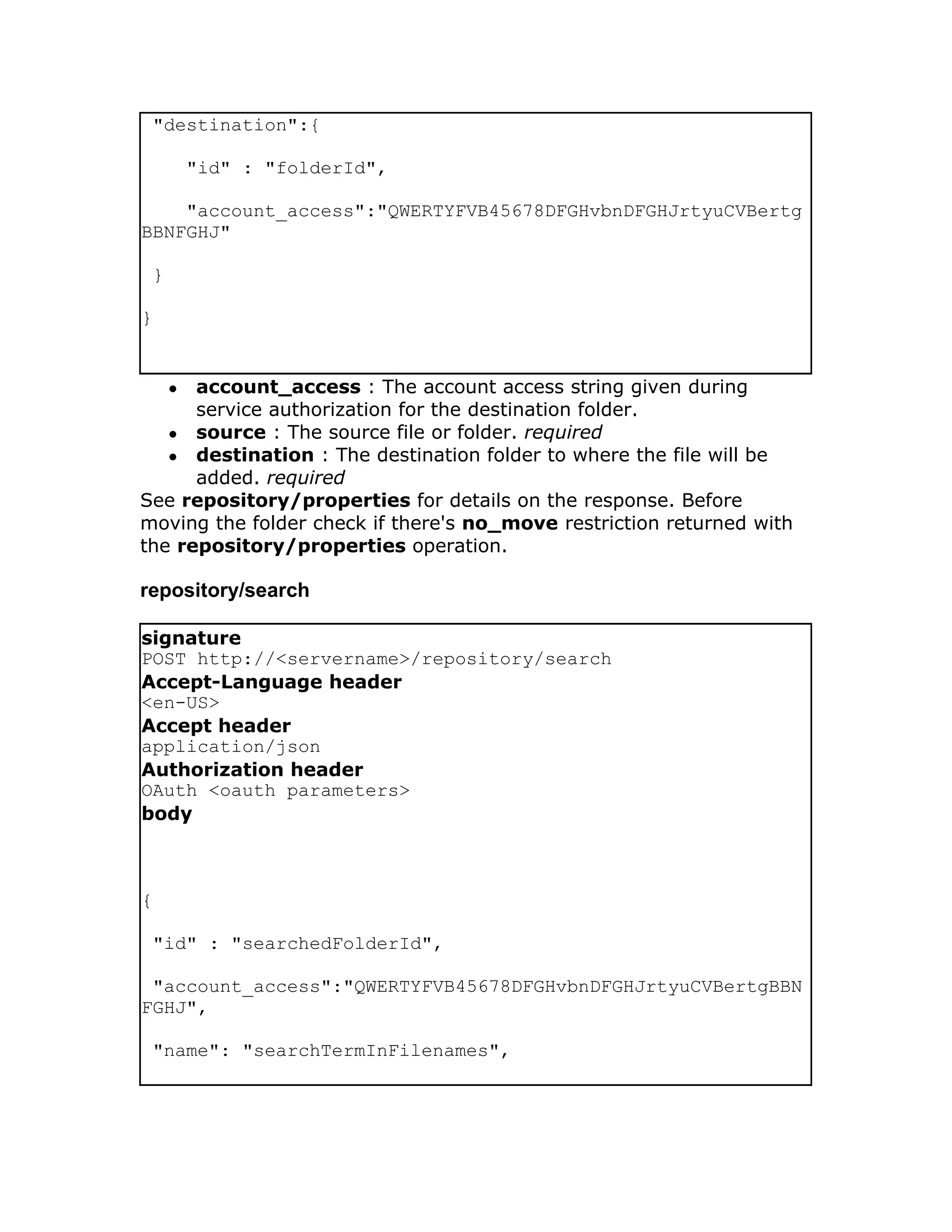
"destination":{

         "id" : "folderId",

    "account_access":"QWERTYFVB45678DFGHvbnDFGHJrtyuCVBertg
BBNFGHJ"

 }

}


     ●account_access : The account access string given during
      service authorization for the destination folder.
   ● source : The source file or folder. required
   ● destination : The destination folder to where the file will be
      added. required
See repository/properties for details on the response. Before
moving the folder check if there's no_move restriction returned with
the repository/properties operation.

repository/search

signature
POST http://<servername>/repository/search
Accept-Language header
<en-US>
Accept header
application/json
Authorization header
OAuth <oauth parameters>
body


{

 "id" : "searchedFolderId",

 "account_access":"QWERTYFVB45678DFGHvbnDFGHJrtyuCVBertgBBN
FGHJ",

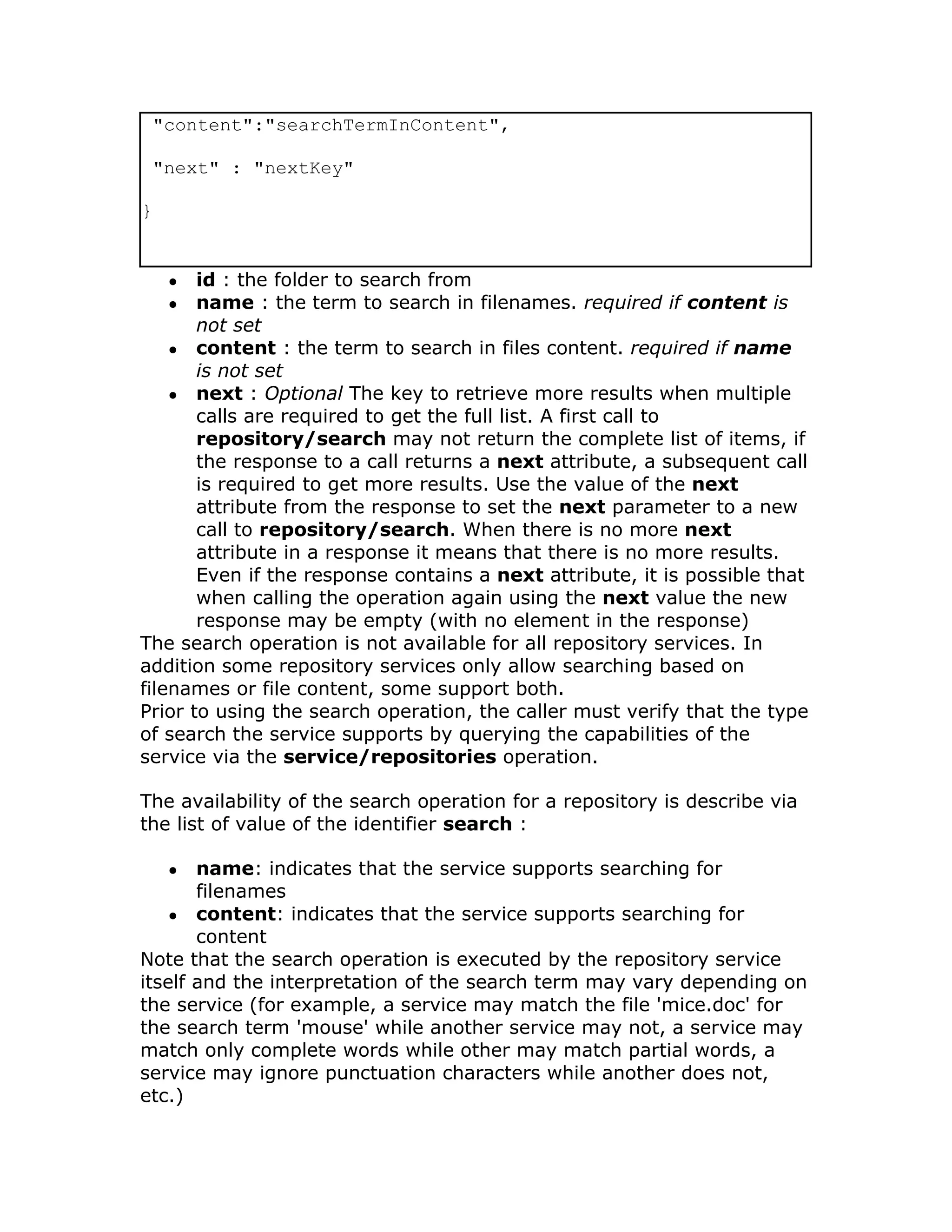
 "name": "searchTermInFilenames",
"content":"searchTermInContent",

 "next" : "nextKey"

}


    ●  id : the folder to search from
    ●  name : the term to search in filenames. required if content is
       not set
    ● content : the term to search in files content. required if name
       is not set
    ● next : Optional The key to retrieve more results when multiple
       calls are required to get the full list. A first call to
       repository/search may not return the complete list of items, if
       the response to a call returns a next attribute, a subsequent call
       is required to get more results. Use the value of the next
       attribute from the response to set the next parameter to a new
       call to repository/search. When there is no more next
       attribute in a response it means that there is no more results.
       Even if the response contains a next attribute, it is possible that
       when calling the operation again using the next value the new
       response may be empty (with no element in the response)
The search operation is not available for all repository services. In
addition some repository services only allow searching based on
filenames or file content, some support both.
Prior to using the search operation, the caller must verify that the type
of search the service supports by querying the capabilities of the
service via the service/repositories operation.

The availability of the search operation for a repository is describe via
the list of value of the identifier search :

    ●  name: indicates that the service supports searching for
       filenames
    ● content: indicates that the service supports searching for
       content
Note that the search operation is executed by the repository service
itself and the interpretation of the search term may vary depending on
the service (for example, a service may match the file 'mice.doc' for
the search term 'mouse' while another service may not, a service may
match only complete words while other may match partial words, a
service may ignore punctuation characters while another does not,
etc.)
See repository/list for details on the response.

ZH爱丽丝梦游仙境

  • 1.
    WS Partner v1.6- Access API WS Partner v1.6 Access API ● repository/properties ● repository/list ● repository/copy ● repository/replace ● repository/download ● repository/rename ● repository/delete ● repository/createfolder ● repository/move ● repository/search All WS Partner v1.6 APIs ● WS Partner v1.6 - Access API ● WS Partner v1.6 - Auth API ● WS Partner v1.6 - File Upload API ● WS Partner v1.6 - Mailer API ● WS Partner v1.6 - Preview API ● WS Partner v1.6 - Publisher API ● WS Partner v1.6 - Server Configuration ● WS Partner v1.6 - Service API back to summary repository/properties Returns properties of a file or folder in the repository. Signature POST http://<servername>/repository/properties Accept-Language header <en-US> Accept header application/json Authorization header OAuth <oauth parameters> Using a file or folder id:
  • 2.
    body { "id" : "myDocumentOrFolderId", "account_access":"QWERTYFVB45678DFGHvbnDFGHJrtyuCVBertgBB NFGHJ" } ● id : A file or folder id. ● account_access : The account access string given during service authorization. Using an account id to get properties on the root folder: body { "service_id":"serviceId", "account_id":"accountId", "account_access":"QWERTYFVB45678DFGHvbnDFGHJrtyuCVBertgBBN FGHJ" } ●service_id : The repository service identifier. ●account_id : The account identifier. ●account_access : The account access string given during service authorization. repository/properties call successful HTTP Status Code 200 OK body
  • 3.
    { "id" : "folderOrFileId", "type" : "application/directory", "size" : ... } List of attributes which can be found in a response. Note that only the id and type attributes are non-optional ● id : The reference to the file/folder required ● type : The mime type of the attachment required. See Mimetypes for list of possible values ● created : The date and time when file/folder was created optional ● modified : The date and time when file/folder was modified optional ● comment : Description or note associated to the file/folder optional ● name : The name of the file/folder optional ● parents : List of parent IDs optional ● owner : The file/folder owner or author optional ● size : The size of the attachment (in bytes) optional ● favorite : 'true' or 'false' optional ● hidden : 'true' or 'false' optional ● viewed : 'true' or 'false' optional ● draft : 'true' or 'false' optional ● privacy : 'public' or 'private' optional. Note that future version may support more possible values. ● tags : A json formated array of text strings optional. ● restrictions : List of restrictions. Possible values are 'no_delete', 'no_write', 'no_rename', 'no_read', 'write_locked', 'no_trash', 'no_move', 'no_copy' optional ○ no_read : file can't be downloaded (nor moved/copied), list can't be returned for a folder. ○ no_delete : file or folder can't be deleted (nor moved) ○ no_write : file can't be overwritten, folder can't have items added ○ no_rename : item can't be renamed
  • 4.
    write_locked : file can't be overwritten, folder can't have items added but only temporarily, the file/folder might become available for write soon. ○ no_addfolder : can't add subfolder to current folder. ○ no_trash : file or folder can't be trashed. ○ no_move : folder can't be moved to current folder. ○ no_copy : folder can't be copied to current folder. If no_move or no_copy restrictions are not present, it doesn't mean that a folder can be copied from the repository to another repository. When available, copy/move are only within the same repository. ● icon : Contains a url entry to an absolute path to the icon (for example http://host/res/icon/idisk). To download the icon, the client can simply call a GET on the URL. The call supports "if- modified-since" and "last-modified" header for optimization. See w3c specs optional If an attribute is indicated as optional, it means that the entry may not appear and you can consider its value to be nil or the entry may appear but its value might be empty. Date are formatted in Iso8601. repository/list Listing a folder Returns the content of a folder. signature POST http://<servername>/repository/list Accept-Language header <en-US> Accept header application/json Authorization header OAuth <oauth parameters> body { "id":"folderId",
  • 5.
    "next": "VIBJ78didhw28923kjwndkw298323", "account_access":"QWERTYFVB45678DFGHvbnDFGHJrtyuCVBertgBBN FGHJ" } ●id : The folder identifier. ●next : Optional The key to retrieve more results when multiple calls are required to get the full list. A first call to repository/folderlist may not return the complete list of items, if the response to a call returns a next attribute, a subsequent call is required to get more results. Use the value of the next attribute from the response to set the next parameter to a new call to repository/folderlist. When there is no more next attribute in a response it means that there is no more results. Even if the response contains a next attribute, it is possible that when calling the operation again using the next value the new response may be empty (with no element in the response). ● account_access : The account access string given during service authorization. Folder listing Response - Success, example HTTP Status Code 200 OK body { "items": [ { "type": "application/vnd.openxmlformats- officedocument.spreadsheetml.sheet", "size": "28589", "name": ";)$@@);.xlsx", "id": "idisk://me.com/quickoffice/%3B)%24%40%40)%3B.xlsx",
  • 6.
    "lastmodified": "2010-01-25T09:16:42Z" }, { "type": "application/vnd.openxmlformats- officedocument.wordprocessingml.document", "size": "24988", "name": ";)$@@);2.docx", "id": "idisk://me.com/quickoffice/%3B)%24%40%40)%3B2.docx", "lastmodified": "2009-12-28T14:29:39Z" }, { "type": "application/directory", "name": "SOMEONE", "id": "idisk://me.com/quickoffice/SOMEONE", "lastmodified": "2009-12-10T16:50:53Z" }, { "type": "application/directory", "name": "About Stack.pdf", "id": "idisk://me.com/quickoffice/About%20Stack.pdf", "lastmodified": "2010-02-17T10:52:03Z" }, {
  • 7.
    "type": "application/directory", "name": "Where do folders come from.txt", "id": "idisk://me.com/quickoffice/Where%20do%20folders%20come "lastmodified": "2009-12-02T14:55:58Z" }, { "type": "application/vnd.ms-powerpoint", "size": "3001856", "name": "Shuttle.pps", "id": "idisk://me.com/quickoffice/Shuttle.pps", "lastmodified": "2009-08-24T17:45:02Z" }, { "type": "application/directory", "name": "My Documents", "id": "idisk://me.com/quickoffice/My%20Documents", "lastmodified": "2009-08-19T21:30:00Z" }, { "type": "application/vnd.openxmlformats- officedocument.spreadsheetml.sheet", "size": "7187", "name": "Untitled23.xlsx",
  • 8.
    "id": "idisk://me.com/quickoffice/Untitled23.xlsx", "lastmodified": "2009-12-11T10:58:36Z" } ], "next":"aHR0cDovL2RvY3MuZ29vZ2xlLmNvbS9mZWVkcy9kZWlDd242ZTY5MnpBQUFBQ0FH U" } See repository/properties for details on the response attributes of each item in the list. repository/copy Adding/copying item to repository signature POST http://<servername>/repository/copy Accept-Language header <en-US> Accept header application/json Authorization header OAuth <oauth parameters> body { "source": { "id" : "fileOrFolderId", "account_access":"QWERTYFVB45678DFGHvbnDFGHJrtyuCVBertg BBNFGHJ" }
  • 9.
    "destination":{ "id" : "folderId", "account_access":"QWERTYFVB45678DFGHvbnDFGHJrtyuCVBertg BBNFGHJ" } } ●source : The source file or folder. required ●destination : The destination folder. required See repository/properties for details on a successful response. Before copying the folder check if there's no_copy restriction returned with the repository/properties operation. HTTP Status code CONFLICT - 409 is returned if the destination folder already contains an item with the same name. HTTP Status code NOT_FOUND - 404 is returned if the destination folder or the source file/folder is not found. repository/replace Replaces the content of an existing file. Properties from the source file won't be copied to the destination file. The destination file size and modified date will be changed. Depending on the repository where the destination file is stored, the creation date of the destination file might be changed. signature POST http://<servername>/repository/replace Accept-Language header <en-US> Accept header application/json Authorization header OAuth <oauth parameters> body {
  • 10.
    "source": { "id" : "fileId", "account_access":"QWERTYFVB45678DFGHvbnDFGHJrtyuCVBertg BBNFGHJ" }, "destination":{ "id" : "fileId", "account_access":"QWERTYFVB45678DFGHvbnDFGHJrtyuCVBertg BBNFGHJ" } } The destination file is not renamed and its type is not changed. The operation will fail if the destination file doesn't already exists. ● source : The file source. required ● destination : The destination file. required repository/download Get a URL link to download the content of an existing file. This operation will retrieve the targeted file from the third party service and return the URL link when the full file is available for download. The client should call this operation only when it really needs to download the file. signature POST http://<servername>/repository/download Accept-Language header <en-US> Accept header application/json Authorization header OAuth <oauth parameters> body
  • 11.
    { "id":"fileId", "account_access":"QWERTYFVB45678DFGHvbnDFGHJrtyuCVBertgBBN FGHJ" } id: File to get download link from On success, the operation returns a link from which the file binary can be downloaded from a simple HTTP GET call. repository/download call successful HTTP Status Code 200 OK body { "download_url": "https://us-qo-dev-ws-partner-download-files.s3.amazo Expires=1308260896&AWSAccessKeyId=AKIAJ7OO5X77CJ45KFKA&Signature=ZRiYkPFy "expires": "2011-06-16T21:48:16Z", "id": "qostorage://us-qo-dev-ws-partner-download-files.s3.amazonaws.c H4sIAAAAAAAAAB2MQQ6DMAzAftNbijakjUsfE2jQKtqkI2FlvH6Mg0+2PKdMjIXCmPH1x9tur "account_access": "ec83e621-3562-4a20-a944-7b85f4d0e611" } ● download_url: Pre-signed S3 URL the client can use to obtain the file. ● expires: The date/time the pre-signed S3 URL will expire. ● id: The MX server's unique identifier of the resource in S3.
  • 12.
    ● account_access: Thetoken the client is to use when making the subsequent call to repository/delete after successfully downloading the file. When calling the returned URL with an HTTP Get, if the call fails with a NOT_FOUND HTTP error, the client should attempt to get a new URL otherwise, the client should re-attempt to download from the already given URL. Once the file has been successfully downloaded the client should call repository/delete with the id and account_access values from the respository/download response JSON to remove the file from S3. repository/rename Rename a file or folder. signature POST http://<servername>/repository/rename Accept-Language header <en-US> Accept header application/json Authorization header OAuth <oauth parameters> body { "id":"fileOrFolderId", "account_access":"QWERTYFVB45678DFGHvbnDFGHJrtyuCVBertgBBN FGHJ", "name": "newName.doc" } ●id : The file or folder Id that will be renamed. required ●name : The new name. required See repository/properties for details on the response. repository/delete
  • 13.
    signature POST http://<servername>/repository/delete Accept-Language header <en-US> Acceptheader application/json Authorization header OAuth <oauth parameters> body { "id":"<fileOrFolderId>", "account_access":"QWERTYFVB45678DFGHvbnDFGHJrtyuCVBertgBBN FGHJ", "trash":"<trueOrFalse>" } ● id : The file or folder id that will be deleted from the repository. required ● trash : 'true' or 'false', default is 'false'. May be set to 'true' only if the file or folder supports a trash. See if there's no_trash restriction returned with the repository/properties operation. optional repository/createfolder signature POST http://<servername>/repository/createfolder Accept-Language header <en-US> Accept header application/json Authorization header OAuth <oauth parameters> body
  • 14.
    { "id":"destinationFolderId", "account_access":"QWERTYFVB45678DFGHvbnDFGHJrtyuCVBertgBBN FGHJ", "name" : "folderName" } ●id : The folder Id which will host the new folder required ●name : The new folder name required See repository/properties for details on the response. repository/move Note that in order to be able to call this operation you need the source repository to support the action download and delete and the target repository needs to support add. signature POST http://<servername>/repository/move Accept-Language header <en-US> Accept header application/json Authorization header OAuth <oauth parameters> body { "source": { "id" : "fileOrFolderId", "account_access":"QWERTYFVB45678DFGHvbnDFGHJrtyuCVBertg BBNFGHJ" },
  • 15.
    "destination":{ "id" : "folderId", "account_access":"QWERTYFVB45678DFGHvbnDFGHJrtyuCVBertg BBNFGHJ" } } ●account_access : The account access string given during service authorization for the destination folder. ● source : The source file or folder. required ● destination : The destination folder to where the file will be added. required See repository/properties for details on the response. Before moving the folder check if there's no_move restriction returned with the repository/properties operation. repository/search signature POST http://<servername>/repository/search Accept-Language header <en-US> Accept header application/json Authorization header OAuth <oauth parameters> body { "id" : "searchedFolderId", "account_access":"QWERTYFVB45678DFGHvbnDFGHJrtyuCVBertgBBN FGHJ", "name": "searchTermInFilenames",
  • 16.
    "content":"searchTermInContent", "next" :"nextKey" } ● id : the folder to search from ● name : the term to search in filenames. required if content is not set ● content : the term to search in files content. required if name is not set ● next : Optional The key to retrieve more results when multiple calls are required to get the full list. A first call to repository/search may not return the complete list of items, if the response to a call returns a next attribute, a subsequent call is required to get more results. Use the value of the next attribute from the response to set the next parameter to a new call to repository/search. When there is no more next attribute in a response it means that there is no more results. Even if the response contains a next attribute, it is possible that when calling the operation again using the next value the new response may be empty (with no element in the response) The search operation is not available for all repository services. In addition some repository services only allow searching based on filenames or file content, some support both. Prior to using the search operation, the caller must verify that the type of search the service supports by querying the capabilities of the service via the service/repositories operation. The availability of the search operation for a repository is describe via the list of value of the identifier search : ● name: indicates that the service supports searching for filenames ● content: indicates that the service supports searching for content Note that the search operation is executed by the repository service itself and the interpretation of the search term may vary depending on the service (for example, a service may match the file 'mice.doc' for the search term 'mouse' while another service may not, a service may match only complete words while other may match partial words, a service may ignore punctuation characters while another does not, etc.)
  • 17.
    See repository/list fordetails on the response.