‫الرحیم‬‫الرحمن‬‫هللا‬ ‫بسم‬
1
Name Zabihullah
Semester 5
Instructor Master Mujibrahman
Csid 01018
2
History of linux and unix os
UNIX was developed in 1969 at AT&T Bell Lab
Many variants since then: BSD, Solaris, Mac
OS X, Linux ...
● The Linux kernel was first developed in 1991 by
Linus Torvalds, a student at the University of
Helsinki
● Linux has been widely adopted for servers and
HPC systems.
● All CCMST servers run Linux.
3
4
In the same year (1985), a professor by name Andy
Tanenbaum wrote a Unix like Operating system from
scratch for the Intel i386 platform.
He named it Minix.
5
In 1990, A finnish student by name Linus Torvalds studying
in the University of Helsinki came into contact with Andy
Tanenbaum's OS, Minix.
Linus wanted to upgrade Minix by putting in more
features and improvements.
But he was prohibited by Tanenbaum to do so.
Then Linus decided to write his own kernel and released it
under GPL.
This kernel is now popularly known as Linux
UNIX Feature
6
The Unix OS is a multi-user OS allowing more that more
person to directly communicate with the computer.
Although the OS can only work on one task at a time, a
small piece of time (time slice) is dedicated to each task or
user - this is referred to as “time-sharing”.
Time sharing gives the illusion that the CPU is giving all
the users its full attention
The Linux Operating System
7
● The Kernel is the core of Linux.
● Boot code
● Device drivers
● Memory and file management
● The Development Environment
● Compilers, assembler, linker
● System libraries
● Other tools: object archive manager, debugger ...
Cont…
8
● The User Interface handles interactions
between user and system
● Command line interface aka the shell (bash, tcsh)
● Graphical desktop (Gnome, KDE)
● Communication software (ftp, ssh)
● The Documentation
● Man pages
● Linux is multi-user and multi-tasking.
Commands to Navigate the
Directory Tree
9
Commands to Navigate the
Directory Tree
● ls lists the contents of a directory
● long listing: ls -l
● list hidden files: ls -a
● pwd prints the working directory
● cd changes the working directory
● absolute paths start with a '/'
● . and .. are special directories
● ~ is an alias to the user home directory
● mkdir creates a directory
Commands to Manipulate Files
10
Commands to Manipulate Files
● cp makes a copy of a file
● cp file1 file2 creates a copy of file1 and names it
file2
● mv renames a file
● mv file1 file2
● operates on files or directories
● rm removes a file
● rm -i asks for confirmation
● in UNIX there is no simple undelete command
● rmdir removes an empty directory
Cont…11
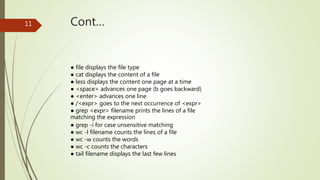
● file displays the file type
● cat displays the content of a file
● less displays the content one page at a time
● <space> advances one page (b goes backward)
● <enter> advances one line
● /<expr> goes to the next occurrence of <expr>
● grep <expr> filename prints the lines of a file
matching the expression
● grep -i for case unsensitive matching
● wc -l filename counts the lines of a file
● wc -w counts the words
● wc -c counts the characters
● tail filename displays the last few lines
Input/Output redirection
12
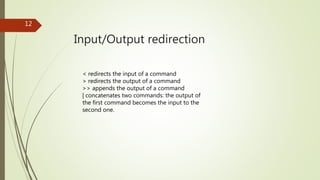
< redirects the input of a command
> redirects the output of a command
>> appends the output of a command
| concatenates two commands: the output of
the first command becomes the input to the
second one.
THANK YOU FOR YOUR ATTENTION
13

Zabi

  • 1.
  • 2.
    Name Zabihullah Semester 5 InstructorMaster Mujibrahman Csid 01018 2
  • 3.
    History of linuxand unix os UNIX was developed in 1969 at AT&T Bell Lab Many variants since then: BSD, Solaris, Mac OS X, Linux ... ● The Linux kernel was first developed in 1991 by Linus Torvalds, a student at the University of Helsinki ● Linux has been widely adopted for servers and HPC systems. ● All CCMST servers run Linux. 3
  • 4.
    4 In the sameyear (1985), a professor by name Andy Tanenbaum wrote a Unix like Operating system from scratch for the Intel i386 platform. He named it Minix.
  • 5.
    5 In 1990, Afinnish student by name Linus Torvalds studying in the University of Helsinki came into contact with Andy Tanenbaum's OS, Minix. Linus wanted to upgrade Minix by putting in more features and improvements. But he was prohibited by Tanenbaum to do so. Then Linus decided to write his own kernel and released it under GPL. This kernel is now popularly known as Linux
  • 6.
    UNIX Feature 6 The UnixOS is a multi-user OS allowing more that more person to directly communicate with the computer. Although the OS can only work on one task at a time, a small piece of time (time slice) is dedicated to each task or user - this is referred to as “time-sharing”. Time sharing gives the illusion that the CPU is giving all the users its full attention
  • 7.
    The Linux OperatingSystem 7 ● The Kernel is the core of Linux. ● Boot code ● Device drivers ● Memory and file management ● The Development Environment ● Compilers, assembler, linker ● System libraries ● Other tools: object archive manager, debugger ...
  • 8.
    Cont… 8 ● The UserInterface handles interactions between user and system ● Command line interface aka the shell (bash, tcsh) ● Graphical desktop (Gnome, KDE) ● Communication software (ftp, ssh) ● The Documentation ● Man pages ● Linux is multi-user and multi-tasking.
  • 9.
    Commands to Navigatethe Directory Tree 9 Commands to Navigate the Directory Tree ● ls lists the contents of a directory ● long listing: ls -l ● list hidden files: ls -a ● pwd prints the working directory ● cd changes the working directory ● absolute paths start with a '/' ● . and .. are special directories ● ~ is an alias to the user home directory ● mkdir creates a directory
  • 10.
    Commands to ManipulateFiles 10 Commands to Manipulate Files ● cp makes a copy of a file ● cp file1 file2 creates a copy of file1 and names it file2 ● mv renames a file ● mv file1 file2 ● operates on files or directories ● rm removes a file ● rm -i asks for confirmation ● in UNIX there is no simple undelete command ● rmdir removes an empty directory
  • 11.
    Cont…11 ● file displaysthe file type ● cat displays the content of a file ● less displays the content one page at a time ● <space> advances one page (b goes backward) ● <enter> advances one line ● /<expr> goes to the next occurrence of <expr> ● grep <expr> filename prints the lines of a file matching the expression ● grep -i for case unsensitive matching ● wc -l filename counts the lines of a file ● wc -w counts the words ● wc -c counts the characters ● tail filename displays the last few lines
  • 12.
    Input/Output redirection 12 < redirectsthe input of a command > redirects the output of a command >> appends the output of a command | concatenates two commands: the output of the first command becomes the input to the second one.
  • 13.
    THANK YOU FORYOUR ATTENTION 13