Linux
Operating
system &
Features
An operating system is an interface between the
user of a computer and the computer hardware.
It is a collection of software that manages
computer hardware resources and offers common
services for programs of the computer.
The main purpose of an OS is to afford an
environment in which a user can execute a
program in an efficient or convenient manner.
► Operating systems are categorized into six types based on the types
of computers they control such as
► single user single task operating systems
► real time operating systems
► single user
► multitasking operating systems
► multiuser operating systems
► distributed operating system
► embedded operating systems
► The typical services that an operating system provides include:
► a task scheduler
► memory manager
► disk manager
► network manager
► Other I/O services and Security manager.
► In 1987, MINIX, a Unix-like system intended for academic use, was
released by Andrew S. Tanenbaum to exemplify the principles
conveyed in his textbook, Operating Systems: Design and
Implementation.
History Of Linux – How Did Linux Start And Who Created Linux?
History Of Linux – How Did Linux Start And
Who Created Linux?
• Linux, a freely distributable version of UNIX is developed
by Linus Torvalds. Linux is one of the most popular
operating systems to use for development by
programmers. This tutorial will take a deep dive into the
history of Linux.
The beginning of the UNIX project
• The inspiration for UNIX came
from the Multics project at the
Bell Laboratories. This project
aimed at building a multi-user
operating system with single-
level storage, dynamic linking,
and a hierarchical file system.
The project was in collaboration
with AT&T. Later, however, this
project came to an end in 1969
due to financial issues.
• Even after the discontinuation of the project, two
scientists Ken Thompson and Dennis Ritchie continued
working with the idea. They later decided to rewrite the
operating system in C language. This was named ‘UNIX‘.
• UNIX quickly gained popularity and by the 80s, major
organizations like IBM and HP were creating their own
UNIX systems. The reason for UNIX gaining popularity
was its availability and portability.
The beginning of the GNU project
• In the year 1983, Richard Stallman was working along
with the Free Software Foundation(FSF) to come up
with the first free UNIX-like operating system. This was
called the GNU project.
• During this project, Richard came up with ‘Hurd‘ which is
the GNU Kernel. GNU was later used by Linus Torvalds for
developing Linux.
• GNU’s short for “GNU’s not Unix!“. It’s a recursive
acronym, as there’s no real full-form of the word GNU.
Who developed Linux – About Linus Torvalds
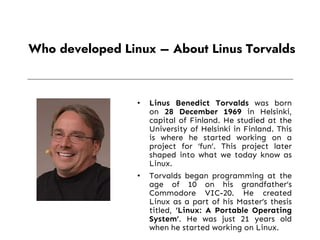
• Linus Benedict Torvalds was born
on 28 December 1969 in Helsinki,
capital of Finland. He studied at the
University of Helsinki in Finland. This
is where he started working on a
project for ‘fun’. This project later
shaped into what we today know as
Linux.
• Torvalds began programming at the
age of 10 on his grandfather’s
Commodore VIC-20. He created
Linux as a part of his Master’s thesis
titled, ‘Linux: A Portable Operating
System’. He was just 21 years old
when he started working on Linux.
• Torvalds announced Linux to the world on 25 August
1991. He wrote about Linux on a Usenet newsgroup
called “comp.os.minix”. The message he posted was:
• Torvalds only developed the Linux Kernel. The Linux
operating system is a collaboration between millions of
developers all around the world, involving the GNU
Project, the Linux kernel development team (headed by
Torvalds), and others.
• The first release of Linux
• The first prototypes of Linux were publicly released in 1991.
The first version(1.0) came out in 1994.
Mascot Design for
Linux
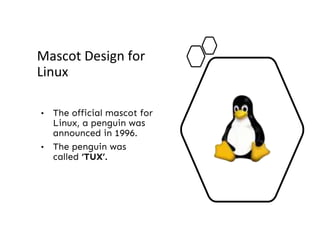
• The official mascot for
Linux, a penguin was
announced in 1996.
• The penguin was
called ‘TUX’.
Linux Distributions
• Over the years, several distributions of Linux have come
out. Some of the popular ones are
• Ubuntu
• Linux Mint
• Debian
• Fedora
• Red Hat Enterprise Linux
• CentOS.
• Story of Linux:
• https://www.youtube.com/watch?v=5ocq6_3-nEw&t=34s
• How linux built:
• https://www.youtube.com/watch?v=yVpbFMhOAwE
► In the year 1991, Linux was introduced by a Finland student Linus Torvalds.
► Hewlett Packard UniX(HP-UX) 8.0 was released.
► In the year 1992, Hewlett Packard 9.0 was released.
► In the year 1993, NetBSD 0.8 and FreeBSD 1.0 released.
► In the year 1994, Red Hat Linux was introduced, Caldera was founded by Bryan Sparks and Ransom Love and NetBSD1.0
Released.
► In the year 1995, FreeBSD 2.0 and HP UX 10.0 was released.
► In the year 1996, K Desktop Environment was developed by Matthias Ettrich.
► In the year 1997, HP-UX 11.0 was released.
► In the year 1998, the fifth generation of SGI Unix i.e IRIX 6.5 , Sun Solaris 7 operating system and Free BSD 3.0 was released.
► In the year 2000, the agreement of Caldera Systems with SCO server software division and the professional services division
was announced.
► In the year 2001, Linus Torvalds released the Linux 2.4 version source code.
► In the year 2001, Microsoft filed a trademark suit against Lindows.com
► In the year 2004, Lindows name was changed to Linspire.
► In the year 2004, the first release of Ubuntu was released.
► In the year 2005, The project, openSUSE began a free distribution from Novell’s community.
► In the year 2006, Oracle released its own distribution of Red Hat.
► In the year 2007, Dell started distributing laptops with Ubuntu pre installed in it.
► In the year 2011, Linux kernel 3.0 version was released.
► In the year 2013, Googles Linux based Android claimed 75% of the smartphone market share, in terms of the number of
phones shipped.
► In the year 2014, Ubuntu claimed 22,000,000 users
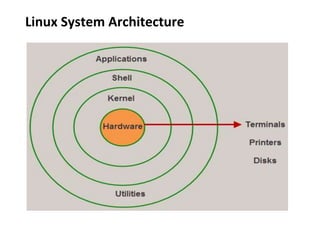
Linux System Architecture
► The types of Kernels are as follows:
► Monolithic Kernel
► Micro kernels
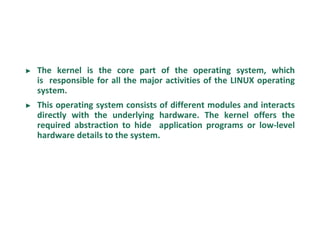
► The kernel is the core part of the operating system, which
is responsible for all the major activities of the LINUX operating
system.
► This operating system consists of different modules and interacts
directly with the underlying hardware. The kernel offers the
required abstraction to hide application programs or low-level
hardware details to the system.
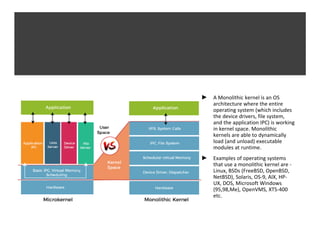
► A Monolithic kernel is an OS
architecture where the entire
operating system (which includes
the device drivers, file system,
and the application IPC) is working
in kernel space. Monolithic
kernels are able to dynamically
load (and unload) executable
modules at runtime.
► Examples of operating systems
that use a monolithic kernel are -
Linux, BSDs (FreeBSD, OpenBSD,
NetBSD), Solaris, OS-9, AIX, HP-
UX, DOS, Microsoft Windows
(95,98,Me), OpenVMS, XTS-400
etc.
► Where as in a Microkernel architecture, the core functionality is
isolated from system services and device drivers.
► Examples of operating systems that use a microkernel are - QNX,
Integrity, PikeOS, Symbian, L4Linux, Singularity, K42, Mac OS X,
HURD, Minix, and Coyotos.
► System libraries are special functions, that are used to implement
the functionality of the operating system and do not require code
access rights of kernel modules.
► System Utility programs are liable to do individual, and specialized-
level tasks.
► Hardware layer of the LINUX operating system consists of
peripheral devices such as RAM, HDD, CPU.
► The shell is an interface between the user and the kernel, and it
affords services of the kernel. It takes commands from the user and
executes kernel’s functions.
► The Shell is present in different types of operating systems, which
are classified into two types: command line shells and graphical
shells.
► The command line shells provide a command line interface, while
the graphical line shells provide a graphical user interface. Though
both shells perform operations, but the graphical user interface
shells perform slower than the command line interface shells.
Shell Types
► Sh:The Bourne shell, called "sh," is one of the original shells,
developed for Unix computers by Stephen Bourne at AT&T's Bell
Labs in 1977. Its long history of use means many software
developers are familiar with it. It offers features such as input and
output redirection, shell scripting with string and integer variables,
and condition testing and looping.
► Bash:The popularity of sh motivated programmers to develop a
shell that was compatible with it, but with several enhancements.
Linux systems still offer the sh shell, but "bash" -- the "Bourne-
again Shell," based on sh -- has become the new default standard.
One attractive feature of bash is its ability to run sh shell scripts
unchanged.
► csh and tcsh
► ksh
Features of Linux Operating System
Portable
Multi
user
Multi
programming
security
shell
Hierarchical
file system
Open
source
► Portable: Linux operating system can work on different
types of hardware as well as Linux kernel supports the
installation of any kind of hardware platform.
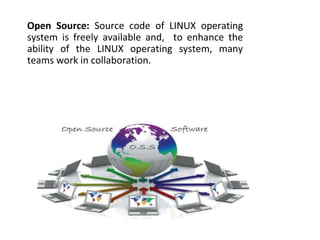
Open Source: Source code of LINUX operating
system is freely available and, to enhance the
ability of the LINUX operating system, many
teams work in collaboration.
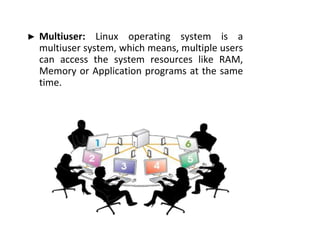
► Multiuser: Linux operating system is a
multiuser system, which means, multiple users
can access the system resources like RAM,
Memory or Application programs at the same
time.
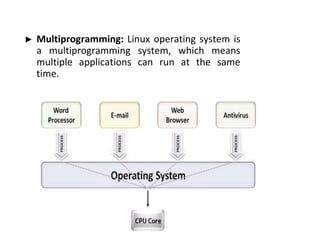
► Multiprogramming: Linux operating system is
a multiprogramming system, which means
multiple applications can run at the same
time.
► Hierarchical File System: Linux operating system affords a
standard file structure in which system files or user files
are arranged.
► Shell: Linux operating system offers a special interpreter
program, that can be used to execute commands of the
OS. It can be used to do several types of operations like call
application programs, and so on.
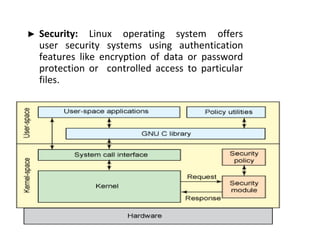
► Security: Linux operating system offers
user security systems using authentication
features like encryption of data or password
protection or controlled access to particular
files.
Applications of Linux Operating System
► Nowadays, Linux is a multi billion dollar industry. Thousands of
companies and governments around the world are using Linux OS
due to affordability, lower licensing fee and time and money. Linux
is used in a number of electronic devices, which are available for
consumers worldwide. The list of some of popular Linux based
electronic devices includes:
► Dell Inspiron Mini 9 and 12
► Garmin Nuvi 860, 880, and 5000
► Google Android Dev Phone 1
► HP Mini 1000
► Lenovo IdeaPad S9
► Motorola MotoRokr EM35 Phone
► One Laptop Per Child XO2
► Sony Bravia Television
► Sony Reader
► TiVo Digital Video Recorder
► Volvo In-Car Navigation System
► Yamaha Motif Keyboard
► Therefore, this is all about the Linux operating system, history,
architecture, features and applications of the Linux operating
system
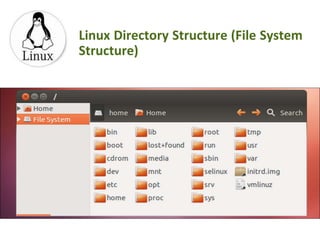
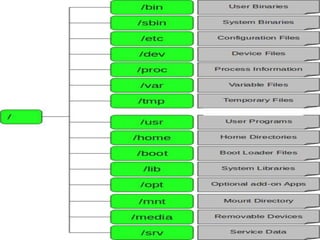
Linux Directory Structure (File System
Structure)
► / – Root
► Every single file and
directory starts from
the root directory.
► Only root user has
write privilege under
this directory.
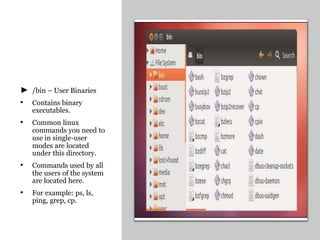
► /bin – User Binaries
• Contains binary
executables.
• Common linux
commands you need to
use in single-user
modes are located
under this directory.
• Commands used by all
the users of the system
are located here.
• For example: ps, ls,
ping, grep, cp.
► /sbin – System Binaries
• Just like /bin, /sbin also contains binary executables.
• But, the linux commands located under this directory
are used typically by system aministrator, for system
maintenance purpose.
• For example: iptables, reboot, fdisk, ifconfig, swapon
► /etc – Configuration Files
• Contains configuration files required by all programs.
• /etc/passwd
• The passwd file contains the essential information for
each user
• /etc/shadow file contains password
• This also contains startup and shutdown shell scripts
used to start/stop individual programs.
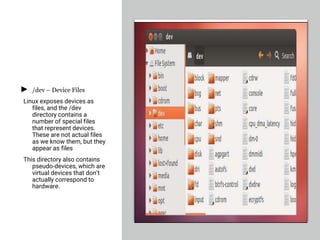
► /dev – Device Files
Linux exposes devices as
files, and the /dev
directory contains a
number of special files
that represent devices.
These are not actual files
as we know them, but they
appear as files
This directory also contains
pseudo-devices, which are
virtual devices that don’t
actually correspond to
hardware.
► /proc – Process Information
• Contains information about system process.
• This is a pseudo filesystem contains information about running
process. For example: /proc/{pid} directory contains information
about the process with that particular pid.
• This is a virtual filesystem with text information about system
resources. For example: /proc/uptime
► /var – Variable Files
• var stands for variable files.
• Content of the files that are expected to grow can be
found under this directory.
• This includes — system log files (/var/log); packages
and database files (/var/lib); emails (/var/mail); print
queues (/var/spool); lock files (/var/lock); temp files
needed across reboots (/var/tmp);
► /tmp – Temporary Files
► Directory that contains temporary files created by system
and users.
► Files under this directory are deleted when system is
rebooted.
► /usr – User Programs
► Contains binaries, libraries, documentation, and source-
code for second level programs.
► /usr/bin contains binary files for user programs. If you
can’t find a user binary under /bin, look under /usr/bin.
For example: awk, cc, less, scp
► /usr/sbin contains binary files for system
administrators. If you can’t find a system binary under
/sbin, look under /usr/sbin. For example: atd, cron,
sshd, useradd, userdel
► /usr/lib contains libraries for /usr/bin and /usr/sbin
► /usr/local contains users programs that you install from
source. For example, when you install apache from
source, it goes under /usr/local/apache2
► /home – Home Directories
• Home directories for all users to store their personal
files.
• For example: /home/john, /home/nikita
► /boot – Boot Loader Files
• Contains boot loader related files.
• Kernel initrd, vmlinux, grub files are located under
/boot
• For example: initrd.img-2.6.32-24-generic, vmlinuz-
2.6.32-24-generic
► lib – System Libraries
• Contains library files that supports the binaries
located under /bin and /sbin
► /opt – Optional add-on Applications
• opt stands for optional.
• Contains add-on applications from individual vendors.
• add-on applications should be installed under either
/opt/ or /opt/ sub-directory.
► /mnt – Mount Directory
• Temporary mount directory where sysadmins can
mount filesystems.
• Historically speaking, the /mnt directory is where system
administrators mounted temporary file systems while using
them. For example, if you’re mounting a Windows partition to
perform some file recovery operations, you might mount it at
/mnt/windows. However, you can mount other file systems
anywhere on the system.
► /media – Removable Media Devices
• Temporary mount directory for removable devices.
• For examples, /media/cdrom for CD-ROM; /media/floppy for
floppy drives; /media/cdrecorder for CD writer
► /srv – Service Data
• srv stands for service.
• The /srv directory contains “data for services provided by the system.” If you
were using the Apache HTTP server to serve a website, you’d likely store your
website’s files in a directory inside the /srv directory.

1 Intro, Linux system Architecture, Features, File system Structure and applications.pptx

  • 1.
  • 2.
    An operating systemis an interface between the user of a computer and the computer hardware. It is a collection of software that manages computer hardware resources and offers common services for programs of the computer. The main purpose of an OS is to afford an environment in which a user can execute a program in an efficient or convenient manner.
  • 3.
    ► Operating systemsare categorized into six types based on the types of computers they control such as ► single user single task operating systems ► real time operating systems ► single user ► multitasking operating systems ► multiuser operating systems ► distributed operating system ► embedded operating systems
  • 4.
    ► The typicalservices that an operating system provides include: ► a task scheduler ► memory manager ► disk manager ► network manager ► Other I/O services and Security manager.
  • 5.
    ► In 1987,MINIX, a Unix-like system intended for academic use, was released by Andrew S. Tanenbaum to exemplify the principles conveyed in his textbook, Operating Systems: Design and Implementation.
  • 6.
    History Of Linux– How Did Linux Start And Who Created Linux?
  • 7.
    History Of Linux– How Did Linux Start And Who Created Linux? • Linux, a freely distributable version of UNIX is developed by Linus Torvalds. Linux is one of the most popular operating systems to use for development by programmers. This tutorial will take a deep dive into the history of Linux.
  • 8.
    The beginning ofthe UNIX project • The inspiration for UNIX came from the Multics project at the Bell Laboratories. This project aimed at building a multi-user operating system with single- level storage, dynamic linking, and a hierarchical file system. The project was in collaboration with AT&T. Later, however, this project came to an end in 1969 due to financial issues.
  • 9.
    • Even afterthe discontinuation of the project, two scientists Ken Thompson and Dennis Ritchie continued working with the idea. They later decided to rewrite the operating system in C language. This was named ‘UNIX‘. • UNIX quickly gained popularity and by the 80s, major organizations like IBM and HP were creating their own UNIX systems. The reason for UNIX gaining popularity was its availability and portability.
  • 10.
    The beginning ofthe GNU project • In the year 1983, Richard Stallman was working along with the Free Software Foundation(FSF) to come up with the first free UNIX-like operating system. This was called the GNU project. • During this project, Richard came up with ‘Hurd‘ which is the GNU Kernel. GNU was later used by Linus Torvalds for developing Linux. • GNU’s short for “GNU’s not Unix!“. It’s a recursive acronym, as there’s no real full-form of the word GNU.
  • 11.
    Who developed Linux– About Linus Torvalds • Linus Benedict Torvalds was born on 28 December 1969 in Helsinki, capital of Finland. He studied at the University of Helsinki in Finland. This is where he started working on a project for ‘fun’. This project later shaped into what we today know as Linux. • Torvalds began programming at the age of 10 on his grandfather’s Commodore VIC-20. He created Linux as a part of his Master’s thesis titled, ‘Linux: A Portable Operating System’. He was just 21 years old when he started working on Linux.
  • 12.
    • Torvalds announcedLinux to the world on 25 August 1991. He wrote about Linux on a Usenet newsgroup called “comp.os.minix”. The message he posted was:
  • 13.
    • Torvalds onlydeveloped the Linux Kernel. The Linux operating system is a collaboration between millions of developers all around the world, involving the GNU Project, the Linux kernel development team (headed by Torvalds), and others. • The first release of Linux • The first prototypes of Linux were publicly released in 1991. The first version(1.0) came out in 1994.
  • 14.
    Mascot Design for Linux •The official mascot for Linux, a penguin was announced in 1996. • The penguin was called ‘TUX’.
  • 15.
    Linux Distributions • Overthe years, several distributions of Linux have come out. Some of the popular ones are • Ubuntu • Linux Mint • Debian • Fedora • Red Hat Enterprise Linux • CentOS.
  • 16.
    • Story ofLinux: • https://www.youtube.com/watch?v=5ocq6_3-nEw&t=34s • How linux built: • https://www.youtube.com/watch?v=yVpbFMhOAwE
  • 18.
    ► In theyear 1991, Linux was introduced by a Finland student Linus Torvalds. ► Hewlett Packard UniX(HP-UX) 8.0 was released. ► In the year 1992, Hewlett Packard 9.0 was released. ► In the year 1993, NetBSD 0.8 and FreeBSD 1.0 released. ► In the year 1994, Red Hat Linux was introduced, Caldera was founded by Bryan Sparks and Ransom Love and NetBSD1.0 Released. ► In the year 1995, FreeBSD 2.0 and HP UX 10.0 was released. ► In the year 1996, K Desktop Environment was developed by Matthias Ettrich. ► In the year 1997, HP-UX 11.0 was released. ► In the year 1998, the fifth generation of SGI Unix i.e IRIX 6.5 , Sun Solaris 7 operating system and Free BSD 3.0 was released. ► In the year 2000, the agreement of Caldera Systems with SCO server software division and the professional services division was announced. ► In the year 2001, Linus Torvalds released the Linux 2.4 version source code. ► In the year 2001, Microsoft filed a trademark suit against Lindows.com ► In the year 2004, Lindows name was changed to Linspire. ► In the year 2004, the first release of Ubuntu was released. ► In the year 2005, The project, openSUSE began a free distribution from Novell’s community. ► In the year 2006, Oracle released its own distribution of Red Hat. ► In the year 2007, Dell started distributing laptops with Ubuntu pre installed in it. ► In the year 2011, Linux kernel 3.0 version was released. ► In the year 2013, Googles Linux based Android claimed 75% of the smartphone market share, in terms of the number of phones shipped. ► In the year 2014, Ubuntu claimed 22,000,000 users
  • 19.
  • 20.
    ► The typesof Kernels are as follows: ► Monolithic Kernel ► Micro kernels
  • 21.
    ► The kernelis the core part of the operating system, which is responsible for all the major activities of the LINUX operating system. ► This operating system consists of different modules and interacts directly with the underlying hardware. The kernel offers the required abstraction to hide application programs or low-level hardware details to the system.
  • 22.
    ► A Monolithickernel is an OS architecture where the entire operating system (which includes the device drivers, file system, and the application IPC) is working in kernel space. Monolithic kernels are able to dynamically load (and unload) executable modules at runtime. ► Examples of operating systems that use a monolithic kernel are - Linux, BSDs (FreeBSD, OpenBSD, NetBSD), Solaris, OS-9, AIX, HP- UX, DOS, Microsoft Windows (95,98,Me), OpenVMS, XTS-400 etc.
  • 23.
    ► Where asin a Microkernel architecture, the core functionality is isolated from system services and device drivers. ► Examples of operating systems that use a microkernel are - QNX, Integrity, PikeOS, Symbian, L4Linux, Singularity, K42, Mac OS X, HURD, Minix, and Coyotos.
  • 24.
    ► System librariesare special functions, that are used to implement the functionality of the operating system and do not require code access rights of kernel modules. ► System Utility programs are liable to do individual, and specialized- level tasks. ► Hardware layer of the LINUX operating system consists of peripheral devices such as RAM, HDD, CPU.
  • 25.
    ► The shellis an interface between the user and the kernel, and it affords services of the kernel. It takes commands from the user and executes kernel’s functions. ► The Shell is present in different types of operating systems, which are classified into two types: command line shells and graphical shells.
  • 26.
    ► The commandline shells provide a command line interface, while the graphical line shells provide a graphical user interface. Though both shells perform operations, but the graphical user interface shells perform slower than the command line interface shells.
  • 27.
    Shell Types ► Sh:TheBourne shell, called "sh," is one of the original shells, developed for Unix computers by Stephen Bourne at AT&T's Bell Labs in 1977. Its long history of use means many software developers are familiar with it. It offers features such as input and output redirection, shell scripting with string and integer variables, and condition testing and looping.
  • 28.
    ► Bash:The popularityof sh motivated programmers to develop a shell that was compatible with it, but with several enhancements. Linux systems still offer the sh shell, but "bash" -- the "Bourne- again Shell," based on sh -- has become the new default standard. One attractive feature of bash is its ability to run sh shell scripts unchanged.
  • 29.
    ► csh andtcsh ► ksh
  • 30.
    Features of LinuxOperating System Portable Multi user Multi programming security shell Hierarchical file system Open source
  • 31.
    ► Portable: Linuxoperating system can work on different types of hardware as well as Linux kernel supports the installation of any kind of hardware platform.
  • 32.
    Open Source: Sourcecode of LINUX operating system is freely available and, to enhance the ability of the LINUX operating system, many teams work in collaboration.
  • 33.
    ► Multiuser: Linuxoperating system is a multiuser system, which means, multiple users can access the system resources like RAM, Memory or Application programs at the same time.
  • 34.
    ► Multiprogramming: Linuxoperating system is a multiprogramming system, which means multiple applications can run at the same time.
  • 35.
    ► Hierarchical FileSystem: Linux operating system affords a standard file structure in which system files or user files are arranged. ► Shell: Linux operating system offers a special interpreter program, that can be used to execute commands of the OS. It can be used to do several types of operations like call application programs, and so on.
  • 36.
    ► Security: Linuxoperating system offers user security systems using authentication features like encryption of data or password protection or controlled access to particular files.
  • 37.
    Applications of LinuxOperating System ► Nowadays, Linux is a multi billion dollar industry. Thousands of companies and governments around the world are using Linux OS due to affordability, lower licensing fee and time and money. Linux is used in a number of electronic devices, which are available for consumers worldwide. The list of some of popular Linux based electronic devices includes:
  • 38.
    ► Dell InspironMini 9 and 12 ► Garmin Nuvi 860, 880, and 5000 ► Google Android Dev Phone 1 ► HP Mini 1000 ► Lenovo IdeaPad S9 ► Motorola MotoRokr EM35 Phone ► One Laptop Per Child XO2 ► Sony Bravia Television ► Sony Reader ► TiVo Digital Video Recorder ► Volvo In-Car Navigation System ► Yamaha Motif Keyboard
  • 39.
    ► Therefore, thisis all about the Linux operating system, history, architecture, features and applications of the Linux operating system
  • 40.
    Linux Directory Structure(File System Structure)
  • 42.
    ► / –Root ► Every single file and directory starts from the root directory. ► Only root user has write privilege under this directory.
  • 43.
    ► /bin –User Binaries • Contains binary executables. • Common linux commands you need to use in single-user modes are located under this directory. • Commands used by all the users of the system are located here. • For example: ps, ls, ping, grep, cp.
  • 44.
    ► /sbin –System Binaries • Just like /bin, /sbin also contains binary executables. • But, the linux commands located under this directory are used typically by system aministrator, for system maintenance purpose. • For example: iptables, reboot, fdisk, ifconfig, swapon
  • 45.
    ► /etc –Configuration Files • Contains configuration files required by all programs. • /etc/passwd • The passwd file contains the essential information for each user • /etc/shadow file contains password • This also contains startup and shutdown shell scripts used to start/stop individual programs.
  • 47.
    ► /dev –Device Files Linux exposes devices as files, and the /dev directory contains a number of special files that represent devices. These are not actual files as we know them, but they appear as files This directory also contains pseudo-devices, which are virtual devices that don’t actually correspond to hardware.
  • 48.
    ► /proc –Process Information • Contains information about system process. • This is a pseudo filesystem contains information about running process. For example: /proc/{pid} directory contains information about the process with that particular pid. • This is a virtual filesystem with text information about system resources. For example: /proc/uptime
  • 49.
    ► /var –Variable Files • var stands for variable files. • Content of the files that are expected to grow can be found under this directory. • This includes — system log files (/var/log); packages and database files (/var/lib); emails (/var/mail); print queues (/var/spool); lock files (/var/lock); temp files needed across reboots (/var/tmp);
  • 50.
    ► /tmp –Temporary Files ► Directory that contains temporary files created by system and users. ► Files under this directory are deleted when system is rebooted.
  • 51.
    ► /usr –User Programs ► Contains binaries, libraries, documentation, and source- code for second level programs. ► /usr/bin contains binary files for user programs. If you can’t find a user binary under /bin, look under /usr/bin. For example: awk, cc, less, scp ► /usr/sbin contains binary files for system administrators. If you can’t find a system binary under /sbin, look under /usr/sbin. For example: atd, cron, sshd, useradd, userdel ► /usr/lib contains libraries for /usr/bin and /usr/sbin ► /usr/local contains users programs that you install from source. For example, when you install apache from source, it goes under /usr/local/apache2
  • 52.
    ► /home –Home Directories • Home directories for all users to store their personal files. • For example: /home/john, /home/nikita
  • 53.
    ► /boot –Boot Loader Files • Contains boot loader related files. • Kernel initrd, vmlinux, grub files are located under /boot • For example: initrd.img-2.6.32-24-generic, vmlinuz- 2.6.32-24-generic
  • 54.
    ► lib –System Libraries • Contains library files that supports the binaries located under /bin and /sbin
  • 55.
    ► /opt –Optional add-on Applications • opt stands for optional. • Contains add-on applications from individual vendors. • add-on applications should be installed under either /opt/ or /opt/ sub-directory.
  • 56.
    ► /mnt –Mount Directory • Temporary mount directory where sysadmins can mount filesystems. • Historically speaking, the /mnt directory is where system administrators mounted temporary file systems while using them. For example, if you’re mounting a Windows partition to perform some file recovery operations, you might mount it at /mnt/windows. However, you can mount other file systems anywhere on the system.
  • 57.
    ► /media –Removable Media Devices • Temporary mount directory for removable devices. • For examples, /media/cdrom for CD-ROM; /media/floppy for floppy drives; /media/cdrecorder for CD writer ► /srv – Service Data • srv stands for service. • The /srv directory contains “data for services provided by the system.” If you were using the Apache HTTP server to serve a website, you’d likely store your website’s files in a directory inside the /srv directory.