Your Own Minecraft Server
on a Linode VPS
Running Minecraft Server on a Linode Debian Instance If
you are having issues following the official minecraft wiki
then you are not alone - I found it much too generic and
could not get the 'init.d' startup script to work. Following
is a step by step guide to quickly set up your on game
server running on Debian/Ubuntu distribution.
Install Java We are going to install OpenJDK which for all
intents and purposes is equivalent to Sun java but
without licensing issues. Execute below commands
under root or using sudo.
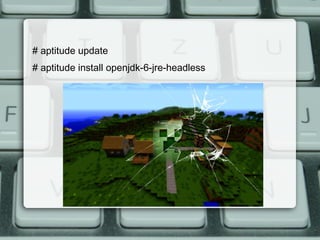
# aptitude update
# aptitude install openjdk-6-jre-headless
Download and Install Minecraft Server We are going to
download and install into '/usr/local/minecraft' as per the
Debian FilesystemHierarchyStandard.
# mkdir /usr/local/minecraft

# cd /usr/local/minecraft/

# wget ht tp://dl.bukkit.org/latest-rb/craftbukkit.jar
We are installing the bukkit minecraft version rather then the
vanilla one, it is fully comptabible with the vanilla server but
lets your run plugins to effectivley manage your server
Server Settings Create the minecraft servers .properties file. I
suggest you at least modify the 'motd', and 'level-seed' so that
your world is a little personal to you.
# cd /usr/local/minecraft/
# nano server.properties
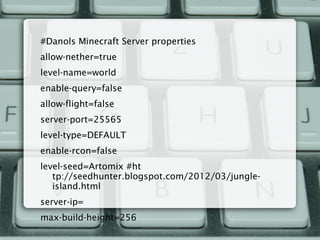
#Danols Minecraft Server properties
allow-nether=true
level-name=world
enable-query=false
allow-flight=false
server-port=25565
level-type=DEFAULT
enable-rcon=false
level-seed=Artomix #ht
tp://seedhunter.blogspot.com/2012/03/jungle-
island.html
server-ip=
max-build-height=256
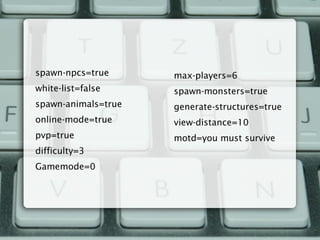
spawn-npcs=true
white-list=false
spawn-animals=true
online-mode=true
pvp=true
difficulty=3
Gamemode=0
max-players=6
spawn-monsters=true
generate-structures=true
view-distance=10
motd=you must survive
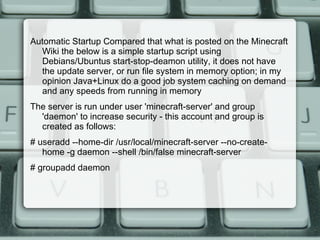
Automatic Startup Compared that what is posted on the Minecraft
Wiki the below is a simple startup script using
Debians/Ubuntus start-stop-deamon utility, it does not have
the update server, or run file system in memory option; in my
opinion Java+Linux do a good job system caching on demand
and any speeds from running in memory
The server is run under user 'minecraft-server' and group
'daemon' to increase security - this account and group is
created as follows:
# useradd --home-dir /usr/local/minecraft-server --no-create-
home -g daemon --shell /bin/false minecraft-server
# groupadd daemon
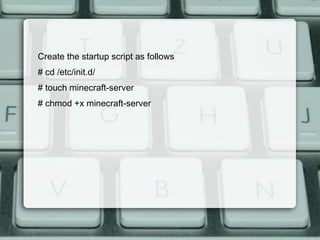
Create the startup script as follows
# cd /etc/init.d/
# touch minecraft-server
# chmod +x minecraft-server
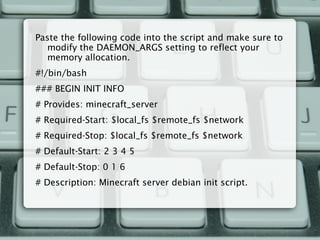
Paste the following code into the script and make sure to
modify the DAEMON_ARGS setting to reflect your
memory allocation.
#!/bin/bash
### BEGIN INIT INFO
# Provides: minecraft_server
# Required-Start: $local_fs $remote_fs $network
# Required-Stop: $local_fs $remote_fs $network
# Default-Start: 2 3 4 5
# Default-Stop: 0 1 6
# Description: Minecraft server debian init script.
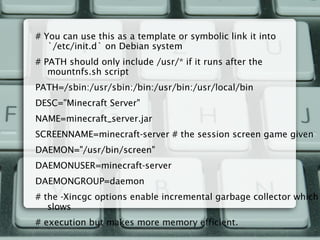
# You can use this as a template or symbolic link it into
`/etc/init.d` on Debian system
# PATH should only include /usr/* if it runs after the
mountnfs.sh script
PATH=/sbin:/usr/sbin:/bin:/usr/bin:/usr/local/bin
DESC="Minecraft Server"
NAME=minecraft_server.jar
SCREENNAME=minecraft-server # the session screen game given
DAEMON="/usr/bin/screen"
DAEMONUSER=minecraft-server
DAEMONGROUP=daemon
# the -Xincgc options enable incremental garbage collector which
slows
# execution but makes more memory efficient.
DAEMON_ARGS="-DmS $SCREENNAME java -Xincgc -Xms32M
-Xmx304M -jar /usr/local/minecraft-server/$NAME nogui"
# Lowest memory limit used was about 80M on fresh start.
# For screen we use `-DmS` instead of -dmS since -D
doesn't detach the screen so our pid
# file created by start-stop-deamon is correct.
PIDFILE=/usr/local/minecraft-server/$NAME.pid
SCRIPTNAME=/etc/init.d/$NAME
# Exit if the package is not installed
#[ -f "$DAEMON" ] || exit 0
# Read configuration variable file if it is present
[ -r /etc/default/$NAME ] &&. /etc/default/$NAME
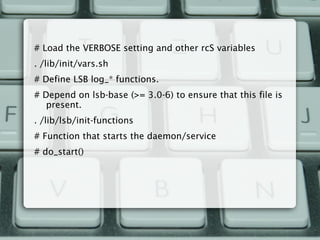
# Load the VERBOSE setting and other rcS variables
. /lib/init/vars.sh
# Define LSB log_* functions.
# Depend on lsb-base (>= 3.0-6) to ensure that this file is
present.
. /lib/lsb/init-functions
# Function that starts the daemon/service
# do_start()
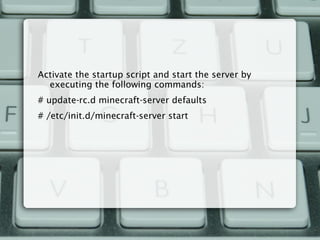
Activate the startup script and start the server by
executing the following commands:
# update-rc.d minecraft-server defaults
# /etc/init.d/minecraft-server start

Your own minecraft server on a linode vps

  • 1.
    Your Own MinecraftServer on a Linode VPS
  • 3.
    Running Minecraft Serveron a Linode Debian Instance If you are having issues following the official minecraft wiki then you are not alone - I found it much too generic and could not get the 'init.d' startup script to work. Following is a step by step guide to quickly set up your on game server running on Debian/Ubuntu distribution. Install Java We are going to install OpenJDK which for all intents and purposes is equivalent to Sun java but without licensing issues. Execute below commands under root or using sudo.
  • 4.
    # aptitude update #aptitude install openjdk-6-jre-headless
  • 5.
    Download and InstallMinecraft Server We are going to download and install into '/usr/local/minecraft' as per the Debian FilesystemHierarchyStandard. # mkdir /usr/local/minecraft  # cd /usr/local/minecraft/  # wget ht tp://dl.bukkit.org/latest-rb/craftbukkit.jar We are installing the bukkit minecraft version rather then the vanilla one, it is fully comptabible with the vanilla server but lets your run plugins to effectivley manage your server
  • 6.
    Server Settings Createthe minecraft servers .properties file. I suggest you at least modify the 'motd', and 'level-seed' so that your world is a little personal to you. # cd /usr/local/minecraft/ # nano server.properties
  • 7.
    #Danols Minecraft Serverproperties allow-nether=true level-name=world enable-query=false allow-flight=false server-port=25565 level-type=DEFAULT enable-rcon=false level-seed=Artomix #ht tp://seedhunter.blogspot.com/2012/03/jungle- island.html server-ip= max-build-height=256
  • 8.
  • 9.
    Automatic Startup Comparedthat what is posted on the Minecraft Wiki the below is a simple startup script using Debians/Ubuntus start-stop-deamon utility, it does not have the update server, or run file system in memory option; in my opinion Java+Linux do a good job system caching on demand and any speeds from running in memory The server is run under user 'minecraft-server' and group 'daemon' to increase security - this account and group is created as follows: # useradd --home-dir /usr/local/minecraft-server --no-create- home -g daemon --shell /bin/false minecraft-server # groupadd daemon
  • 10.
    Create the startupscript as follows # cd /etc/init.d/ # touch minecraft-server # chmod +x minecraft-server
  • 11.
    Paste the followingcode into the script and make sure to modify the DAEMON_ARGS setting to reflect your memory allocation. #!/bin/bash ### BEGIN INIT INFO # Provides: minecraft_server # Required-Start: $local_fs $remote_fs $network # Required-Stop: $local_fs $remote_fs $network # Default-Start: 2 3 4 5 # Default-Stop: 0 1 6 # Description: Minecraft server debian init script.
  • 12.
    # You canuse this as a template or symbolic link it into `/etc/init.d` on Debian system # PATH should only include /usr/* if it runs after the mountnfs.sh script PATH=/sbin:/usr/sbin:/bin:/usr/bin:/usr/local/bin DESC="Minecraft Server" NAME=minecraft_server.jar SCREENNAME=minecraft-server # the session screen game given DAEMON="/usr/bin/screen" DAEMONUSER=minecraft-server DAEMONGROUP=daemon # the -Xincgc options enable incremental garbage collector which slows # execution but makes more memory efficient.
  • 13.
    DAEMON_ARGS="-DmS $SCREENNAME java-Xincgc -Xms32M -Xmx304M -jar /usr/local/minecraft-server/$NAME nogui" # Lowest memory limit used was about 80M on fresh start. # For screen we use `-DmS` instead of -dmS since -D doesn't detach the screen so our pid # file created by start-stop-deamon is correct. PIDFILE=/usr/local/minecraft-server/$NAME.pid SCRIPTNAME=/etc/init.d/$NAME # Exit if the package is not installed #[ -f "$DAEMON" ] || exit 0 # Read configuration variable file if it is present [ -r /etc/default/$NAME ] &&. /etc/default/$NAME
  • 14.
    # Load theVERBOSE setting and other rcS variables . /lib/init/vars.sh # Define LSB log_* functions. # Depend on lsb-base (>= 3.0-6) to ensure that this file is present. . /lib/lsb/init-functions # Function that starts the daemon/service # do_start()
  • 15.
    Activate the startupscript and start the server by executing the following commands: # update-rc.d minecraft-server defaults # /etc/init.d/minecraft-server start