You mix and match project prompts
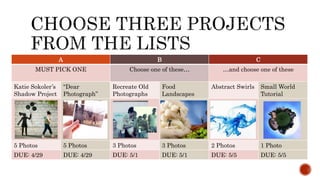
A B C
MUST PICK ONE Choose one of these… …and choose one of these
Katie Sokoler’s
Shadow Project
“Dear
Photograph”
Recreate Old
Photographs
Food
Landscapes
Abstract Swirls Small World
Tutorial
5 Photos 5 Photos 3 Photos 3 Photos 2 Photos 1 Photo
DUE: 4/29 DUE: 4/29 DUE: 5/1 DUE: 5/1 DUE: 5/5 DUE: 5/5
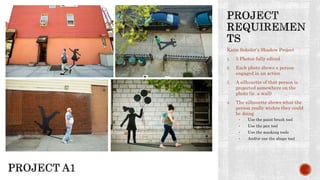
Katie Sokoler’s Shadow Project
1. 5 Photos fully edited
2. Each photo shows a person
engaged in an action
3. A silhouette of that person is
projected somewhere on the
photo (ie. a wall)
4. The silhouette shows what the
person really wishes they could
be doing
• Use the paint brush tool
• Use the pen tool
• Use the masking tools
• And/or use the shape tool
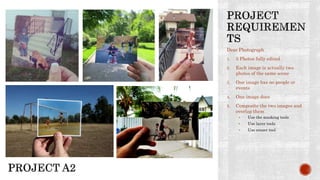
Dear Photograph
1. 5 Photos fully edited
2. Each image is actually two
photos of the same scene
3. One image has no people or
events
4. One image does
5. Composite the two images and
overlap them
• Use the masking tools
• Use layer tools
• Use eraser tool
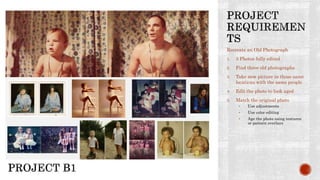
Recreate an Old Photograph
1. 3 Photos fully edited
2. Find three old photographs
3. Take new picture in those same
locations with the same people
4. Edit the photo to look aged
5. Match the original photo
• Use adjustments
• Use color editing
• Age the photo using textures
or pattern overlays
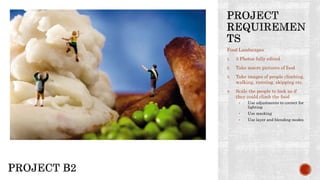
Food Landscapes
1. 3 Photos fully edited
2. Take macro pictures of food
3. Take images of people climbing,
walking, running, skipping etc.
4. Scale the people to look as if
they could climb the food
• Use adjustments to correct for
lighting
• Use masking
• Use layer and blending modes
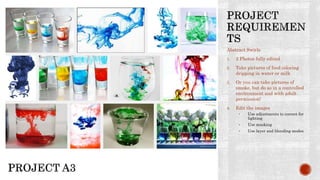
Abstract Swirls
1. 2 Photos fully edited
2. Take pictures of food coloring
dripping in water or milk
3. Or you can take pictures of
smoke, but do so in a controlled
environment and with adult
permission!
4. Edit the images
• Use adjustments to correct for
lighting
• Use masking
• Use layer and blending modes
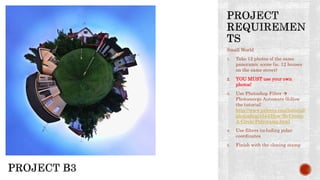
Small World
1. Take 12 photos of the same
panoramic scene (ie. 12 houses
on the same street)
2. YOU MUST use your own
photos!
3. Use Photoshop Filter 
Photomerge Automate (follow
the tutorial:
http://www.pxleyes.com/tutorial/
photoshop/1544/How-To-Create-
A-Circle-Polyorama.html
4. Use filters including polar
coordinates
5. Finish with the cloning stamp

YOU PICK THREE

  • 1.
    You mix andmatch project prompts
  • 2.
    A B C MUSTPICK ONE Choose one of these… …and choose one of these Katie Sokoler’s Shadow Project “Dear Photograph” Recreate Old Photographs Food Landscapes Abstract Swirls Small World Tutorial 5 Photos 5 Photos 3 Photos 3 Photos 2 Photos 1 Photo DUE: 4/29 DUE: 4/29 DUE: 5/1 DUE: 5/1 DUE: 5/5 DUE: 5/5
  • 3.
    Katie Sokoler’s ShadowProject 1. 5 Photos fully edited 2. Each photo shows a person engaged in an action 3. A silhouette of that person is projected somewhere on the photo (ie. a wall) 4. The silhouette shows what the person really wishes they could be doing • Use the paint brush tool • Use the pen tool • Use the masking tools • And/or use the shape tool
  • 4.
    Dear Photograph 1. 5Photos fully edited 2. Each image is actually two photos of the same scene 3. One image has no people or events 4. One image does 5. Composite the two images and overlap them • Use the masking tools • Use layer tools • Use eraser tool
  • 5.
    Recreate an OldPhotograph 1. 3 Photos fully edited 2. Find three old photographs 3. Take new picture in those same locations with the same people 4. Edit the photo to look aged 5. Match the original photo • Use adjustments • Use color editing • Age the photo using textures or pattern overlays
  • 6.
    Food Landscapes 1. 3Photos fully edited 2. Take macro pictures of food 3. Take images of people climbing, walking, running, skipping etc. 4. Scale the people to look as if they could climb the food • Use adjustments to correct for lighting • Use masking • Use layer and blending modes
  • 7.
    Abstract Swirls 1. 2Photos fully edited 2. Take pictures of food coloring dripping in water or milk 3. Or you can take pictures of smoke, but do so in a controlled environment and with adult permission! 4. Edit the images • Use adjustments to correct for lighting • Use masking • Use layer and blending modes
  • 8.
    Small World 1. Take12 photos of the same panoramic scene (ie. 12 houses on the same street) 2. YOU MUST use your own photos! 3. Use Photoshop Filter  Photomerge Automate (follow the tutorial: http://www.pxleyes.com/tutorial/ photoshop/1544/How-To-Create- A-Circle-Polyorama.html 4. Use filters including polar coordinates 5. Finish with the cloning stamp