Top 5 Timing Closure Techniques
Greg Daughtry
• Correct Timing Constraints
• Analyze Before Doing
• Implementation Strategies and Directives
• Congestion and Complexity
• Advanced Physical Optimization
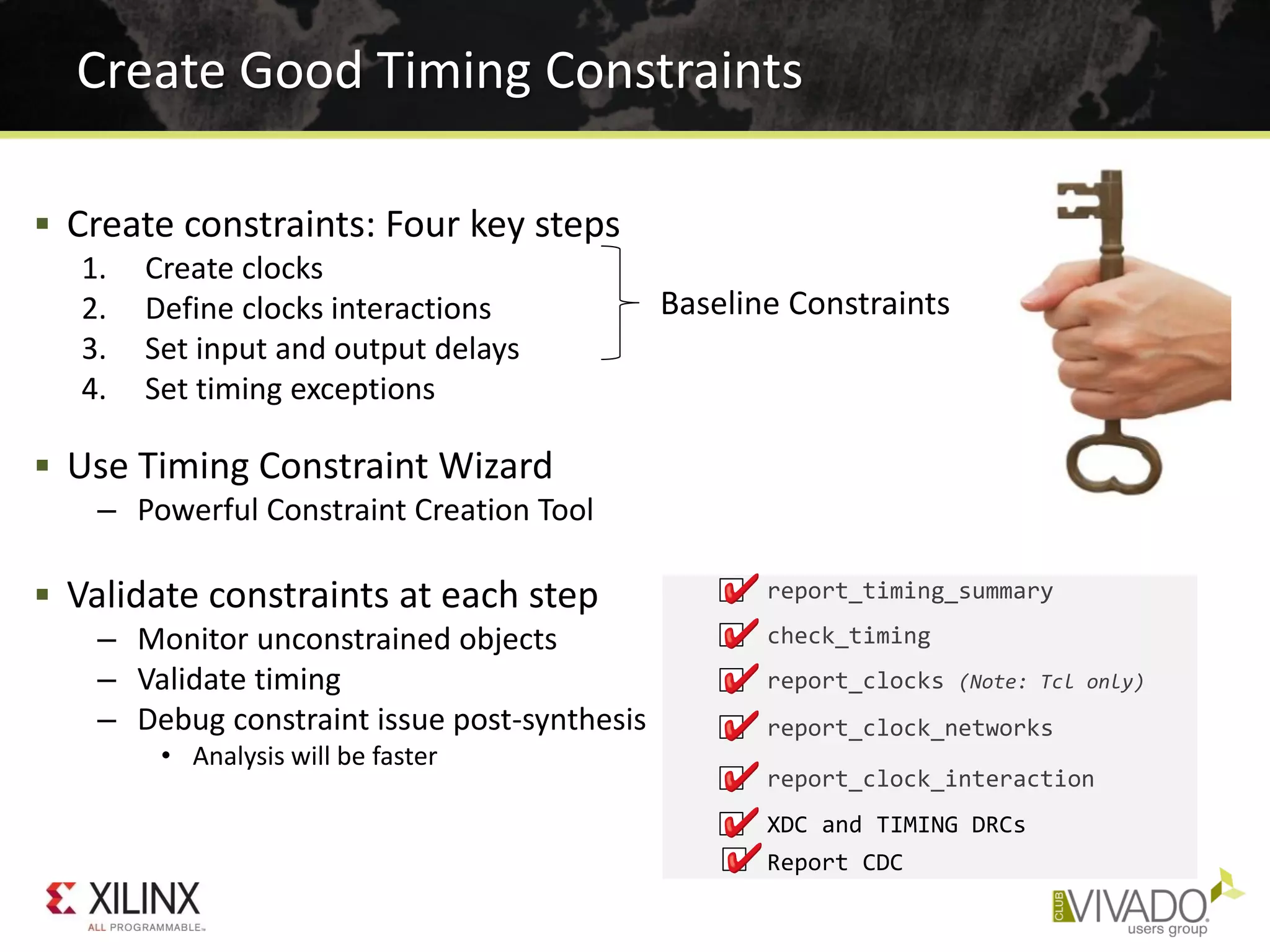
 Create constraints: Four key steps
1. Create clocks
2. Define clocks interactions
3. Set input and output delays
4. Set timing exceptions
 Use Timing Constraint Wizard
– Powerful Constraint Creation Tool
 Validate constraints at each step
– Monitor unconstrained objects
– Validate timing
– Debug constraint issue post-synthesis
• Analysis will be faster
Create Good Timing Constraints
Baseline Constraints
XDC and TIMING DRCs
report_timing_summary
check_timing
report_clocks (Note: Tcl only)
report_clock_networks
report_clock_interaction
Report CDC
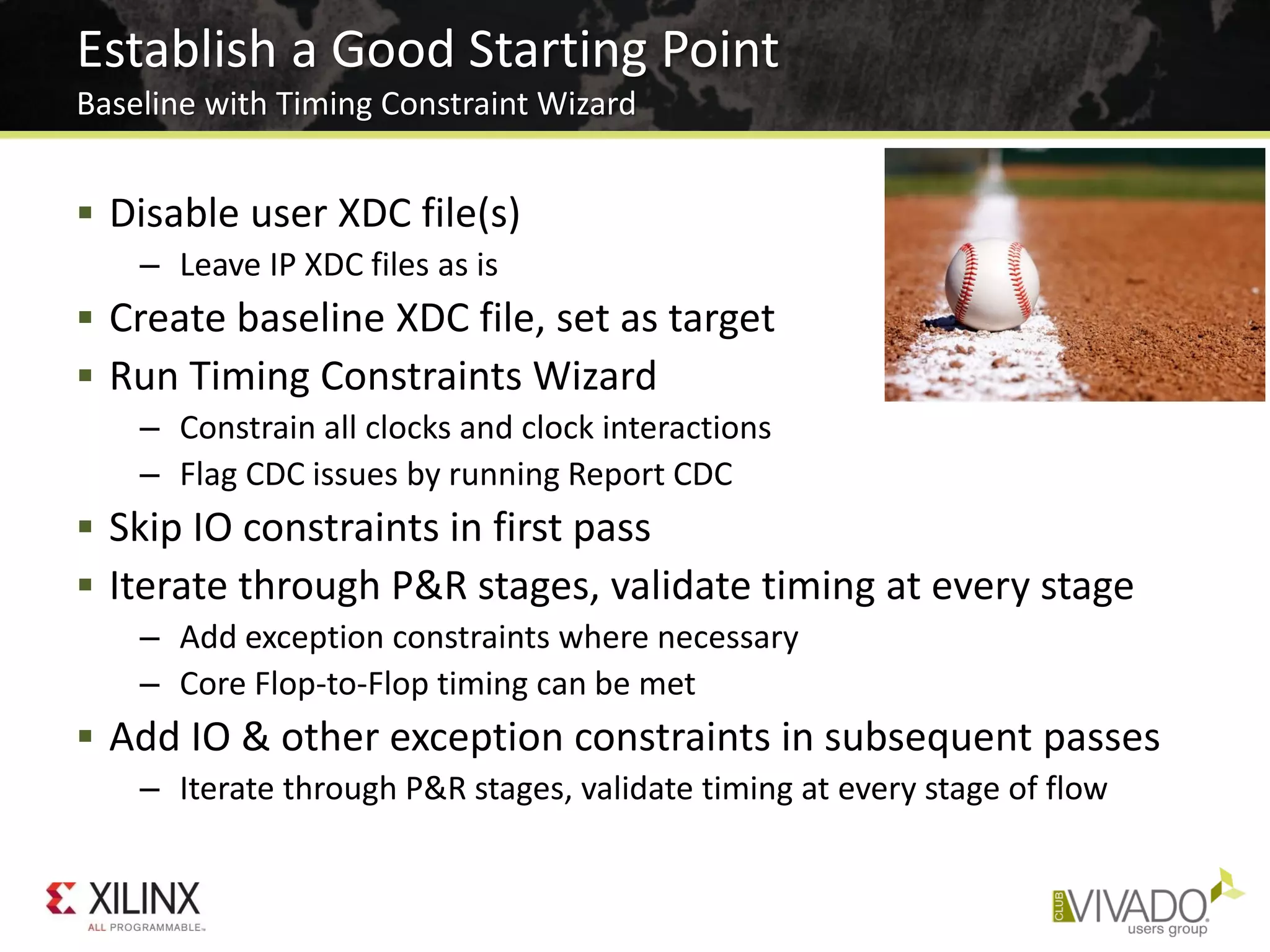
 Disable user XDC file(s)
– Leave IP XDC files as is
 Create baseline XDC file, set as target
 Run Timing Constraints Wizard
– Constrain all clocks and clock interactions
– Flag CDC issues by running Report CDC
 Skip IO constraints in first pass
 Iterate through P&R stages, validate timing at every stage
– Add exception constraints where necessary
– Core Flop-to-Flop timing can be met
 Add IO & other exception constraints in subsequent passes
– Iterate through P&R stages, validate timing at every stage of flow
Establish a Good Starting Point
Baseline with Timing Constraint Wizard
• Correct Timing Constraints
• Analyze Before Doing
• Implementation Strategies and Directives
• Congestion and Complexity
• Advanced Physical Optimization
World Class Analysis
Make Sense of Your Design Data
• 45 Reports Give Critical Design Info
– Clocks and clock interaction
– Timing Analysis and Constraints
– Design Complexity
– Utilization
– Power
• Log files have Context-sensitive Information
– Every action in order of execution
– Severity levels: Info, Warning, Critical Warning, and Errors
• Progressive Estimation Accuracy
– As stages progress from pre-synth to final route “signoff”
– Placer/Router/Optimization Status
– DRC
– Control Sets
– IP Upgrade Status
Vivado% help report_*
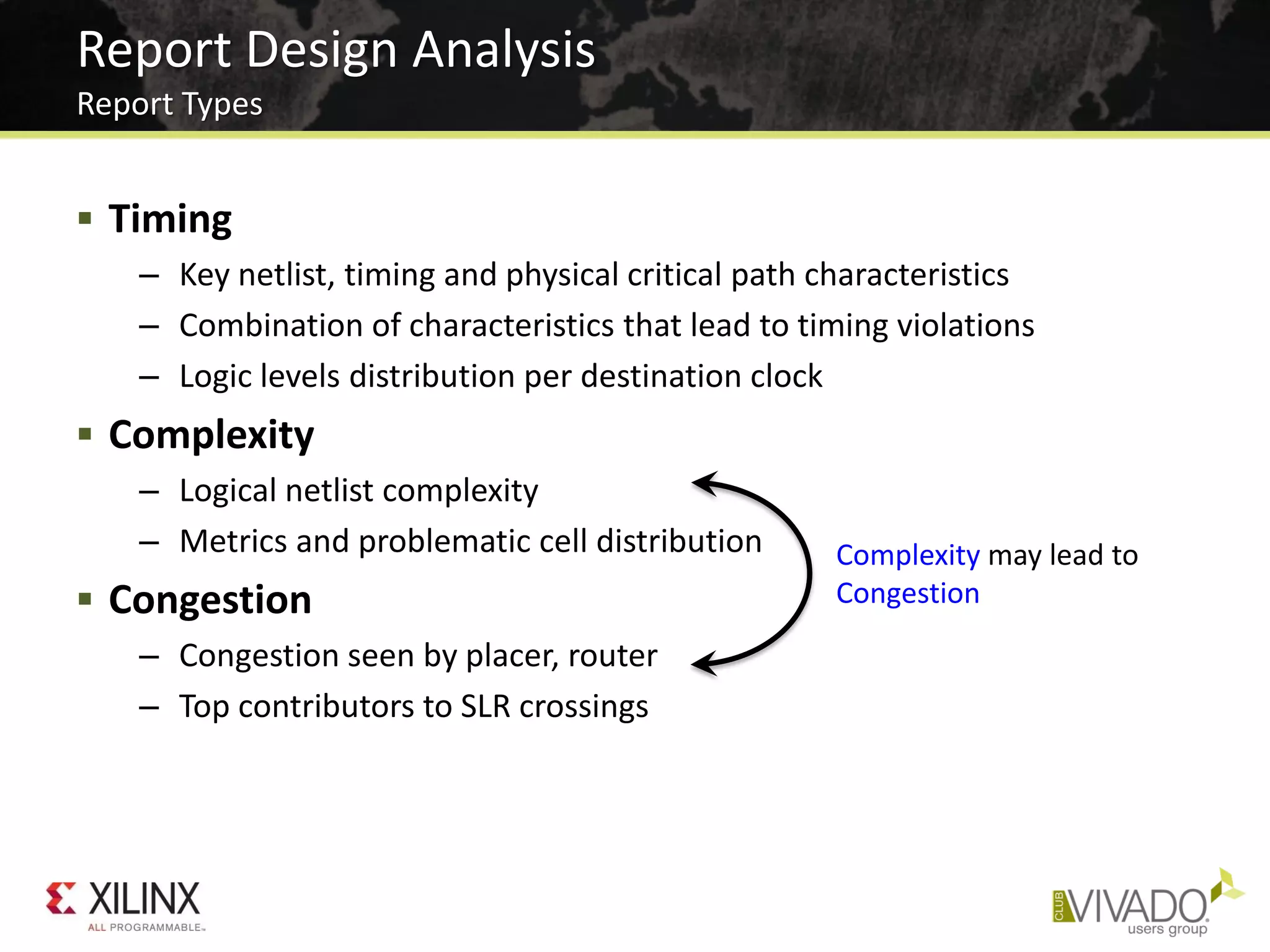
 Timing
– Key netlist, timing and physical critical path characteristics
– Combination of characteristics that lead to timing violations
– Logic levels distribution per destination clock
 Complexity
– Logical netlist complexity
– Metrics and problematic cell distribution
 Congestion
– Congestion seen by placer, router
– Top contributors to SLR crossings
Report Design Analysis
Report Types
Complexity may lead to
Congestion
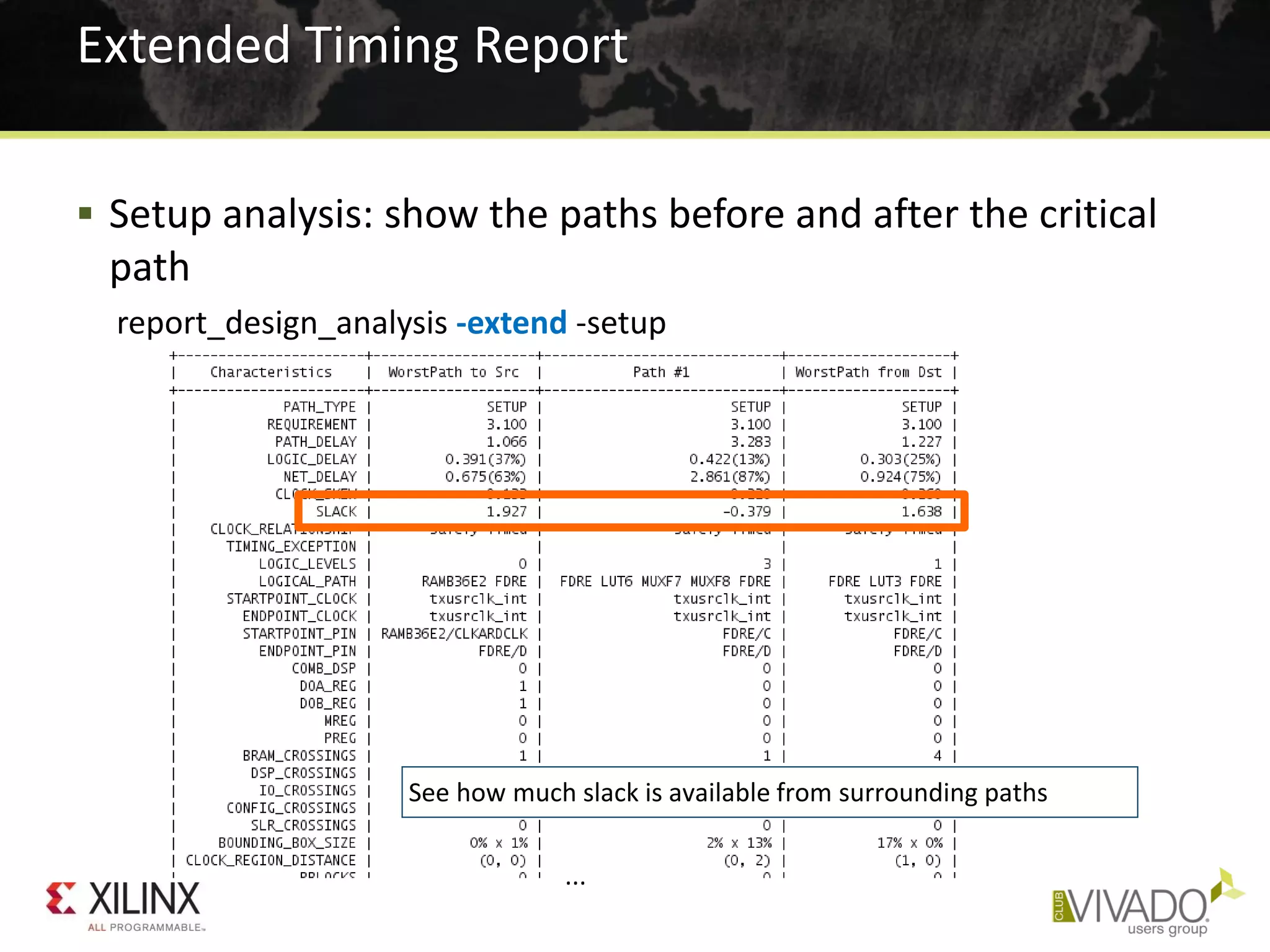
 Setup analysis: show the paths before and after the critical
path
report_design_analysis -extend -setup
Extended Timing Report
...
See how much slack is available from surrounding paths
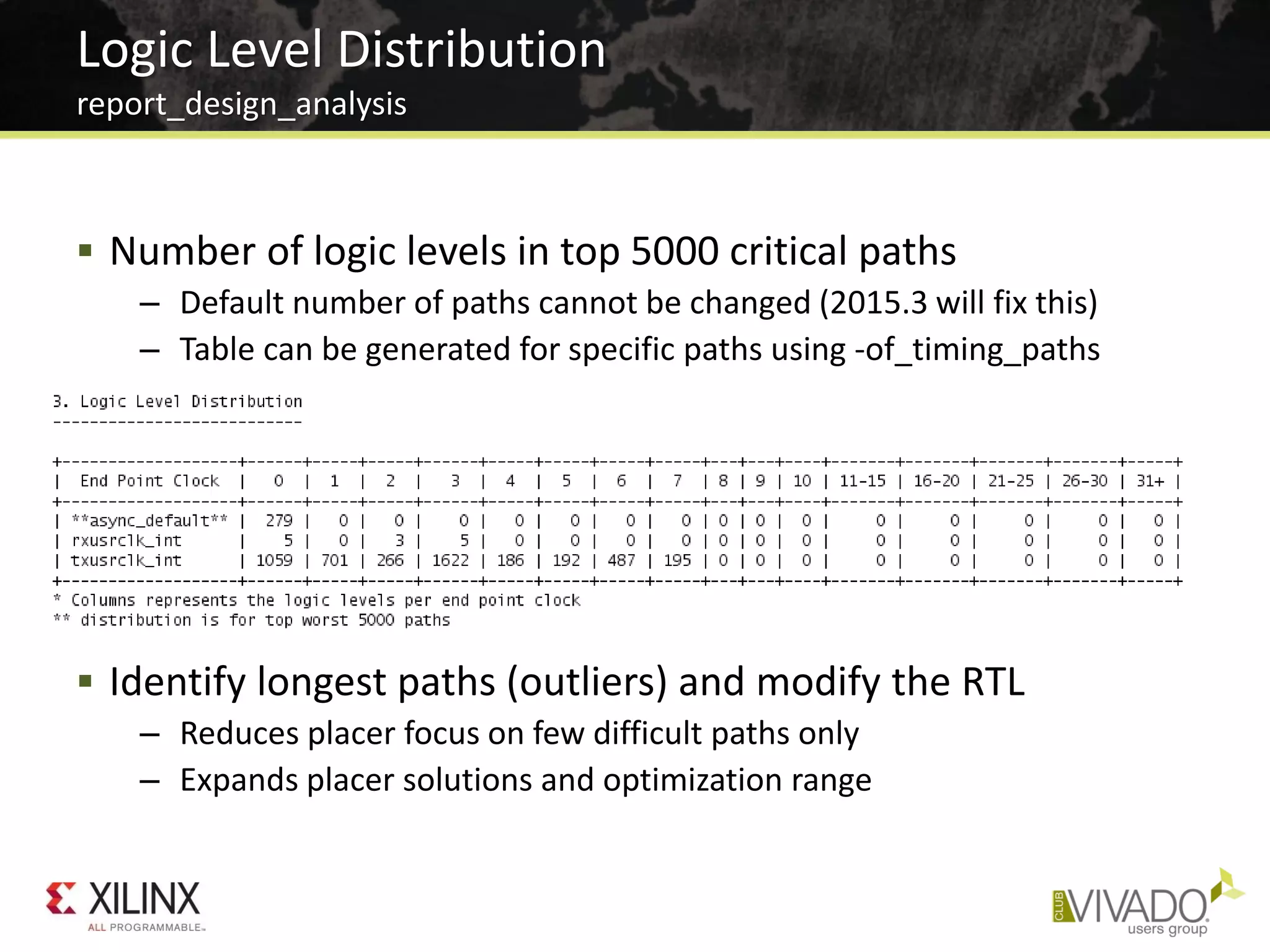
 Number of logic levels in top 5000 critical paths
– Default number of paths cannot be changed (2015.3 will fix this)
– Table can be generated for specific paths using -of_timing_paths
 Identify longest paths (outliers) and modify the RTL
– Reduces placer focus on few difficult paths only
– Expands placer solutions and optimization range
Logic Level Distribution
report_design_analysis
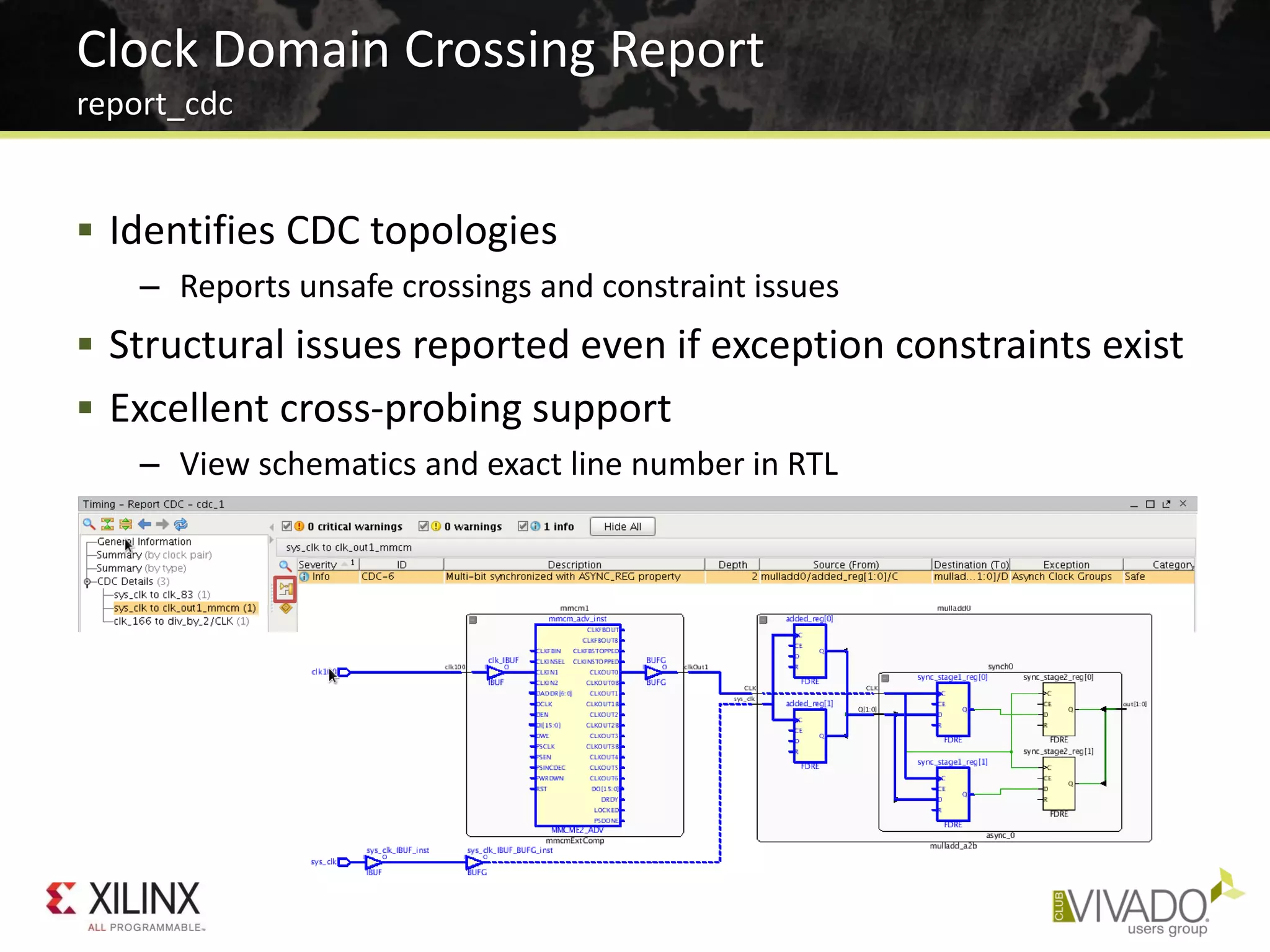
 Identifies CDC topologies
– Reports unsafe crossings and constraint issues
 Structural issues reported even if exception constraints exist
 Excellent cross-probing support
– View schematics and exact line number in RTL
Clock Domain Crossing Report
report_cdc
• Correct Timing Constraints
• Analyze Before Doing
• Implementation Strategies and Directives
• Congestion and Complexity
• Advanced Physical Optimization
 Launch a run for every strategy
– Easy To Try
– Pick the best one from design runs table
 Runs Infrastructure Supports “Grid” Computing
– Built-in parallel runs on different hosts (Linux)
– LSF and Sun Grid Engine
 Don’t Expect This Will Solve All Your Problems
Try All The Tool Options
SmartXplorer Style
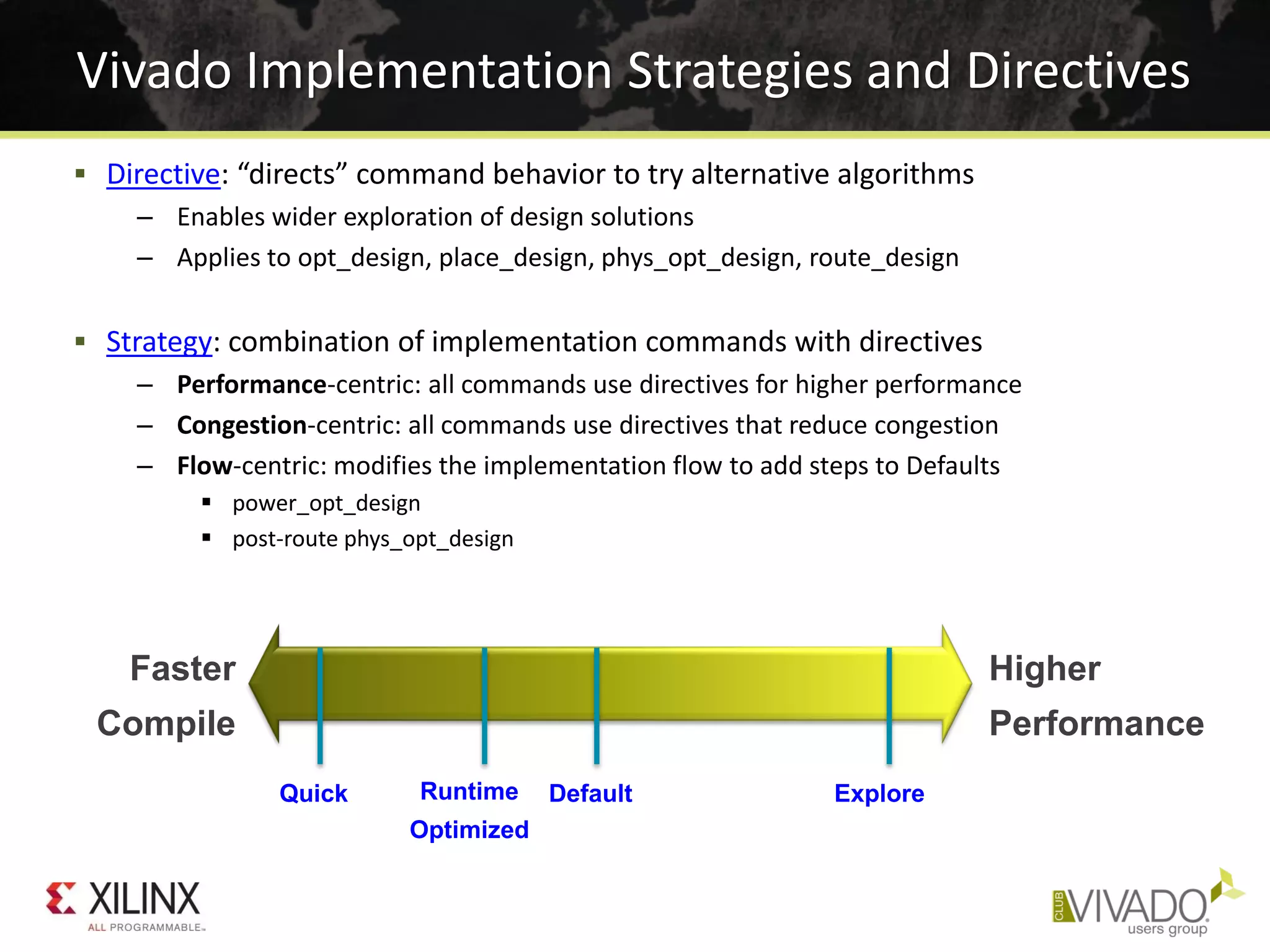
 Directive: “directs” command behavior to try alternative algorithms
– Enables wider exploration of design solutions
– Applies to opt_design, place_design, phys_opt_design, route_design
 Strategy: combination of implementation commands with directives
– Performance-centric: all commands use directives for higher performance
– Congestion-centric: all commands use directives that reduce congestion
– Flow-centric: modifies the implementation flow to add steps to Defaults
 power_opt_design
 post-route phys_opt_design
Vivado Implementation Strategies and Directives
Faster
Compile
Higher
Performance
Quick Runtime
Optimized
Default Explore
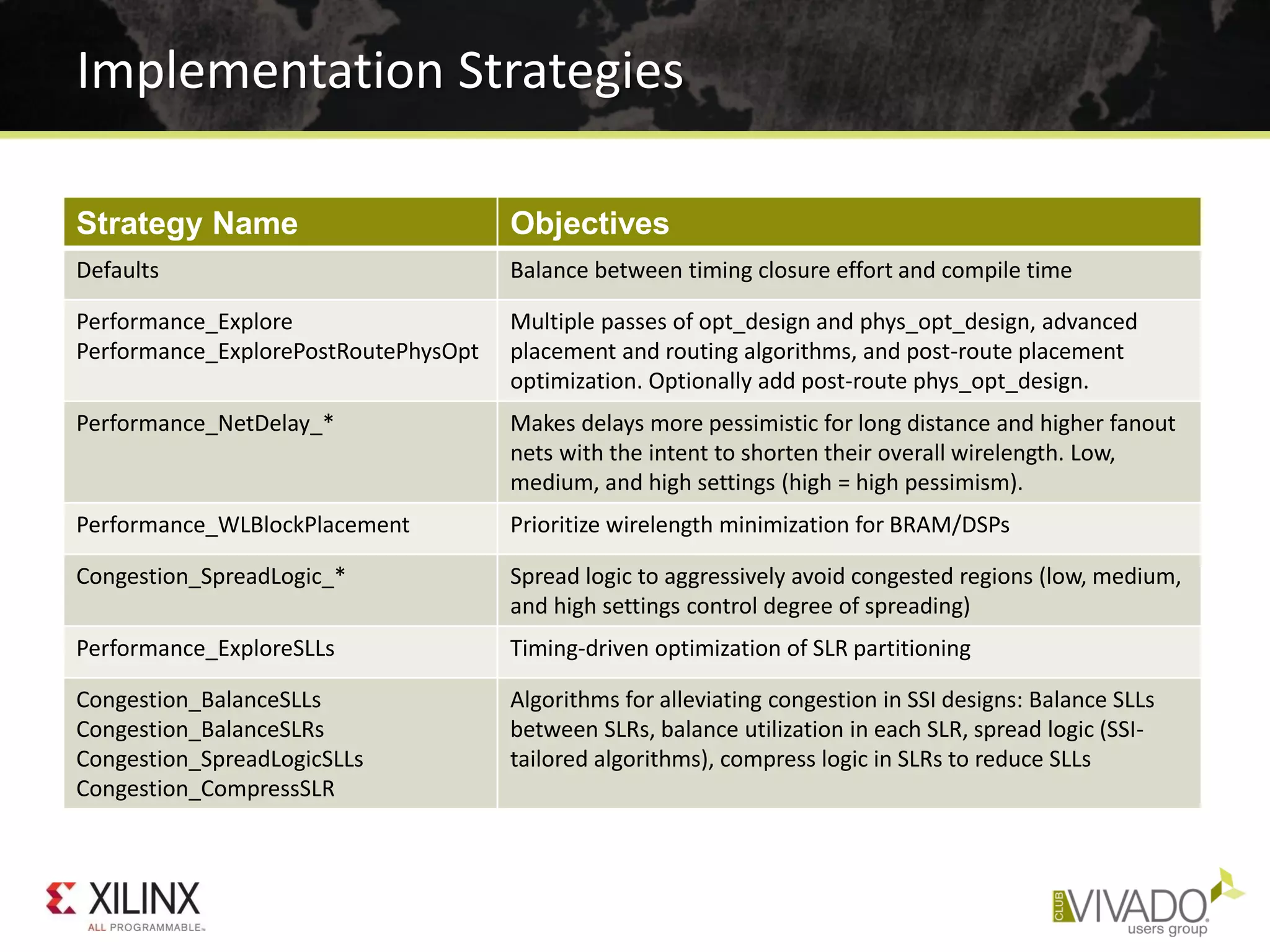
Implementation Strategies
Strategy Name Objectives
Defaults Balance between timing closure effort and compile time
Performance_Explore
Performance_ExplorePostRoutePhysOpt
Multiple passes of opt_design and phys_opt_design, advanced
placement and routing algorithms, and post-route placement
optimization. Optionally add post-route phys_opt_design.
Performance_NetDelay_* Makes delays more pessimistic for long distance and higher fanout
nets with the intent to shorten their overall wirelength. Low,
medium, and high settings (high = high pessimism).
Performance_WLBlockPlacement Prioritize wirelength minimization for BRAM/DSPs
Congestion_SpreadLogic_* Spread logic to aggressively avoid congested regions (low, medium,
and high settings control degree of spreading)
Performance_ExploreSLLs Timing-driven optimization of SLR partitioning
Congestion_BalanceSLLs
Congestion_BalanceSLRs
Congestion_SpreadLogicSLLs
Congestion_CompressSLR
Algorithms for alleviating congestion in SSI designs: Balance SLLs
between SLRs, balance utilization in each SLR, spread logic (SSI-
tailored algorithms), compress logic in SLRs to reduce SLLs
• Correct Timing Constraints
• Analyze Before Doing
• Implementation Strategies and Directives
• Congestion and Complexity
• Advanced Physical Optimization
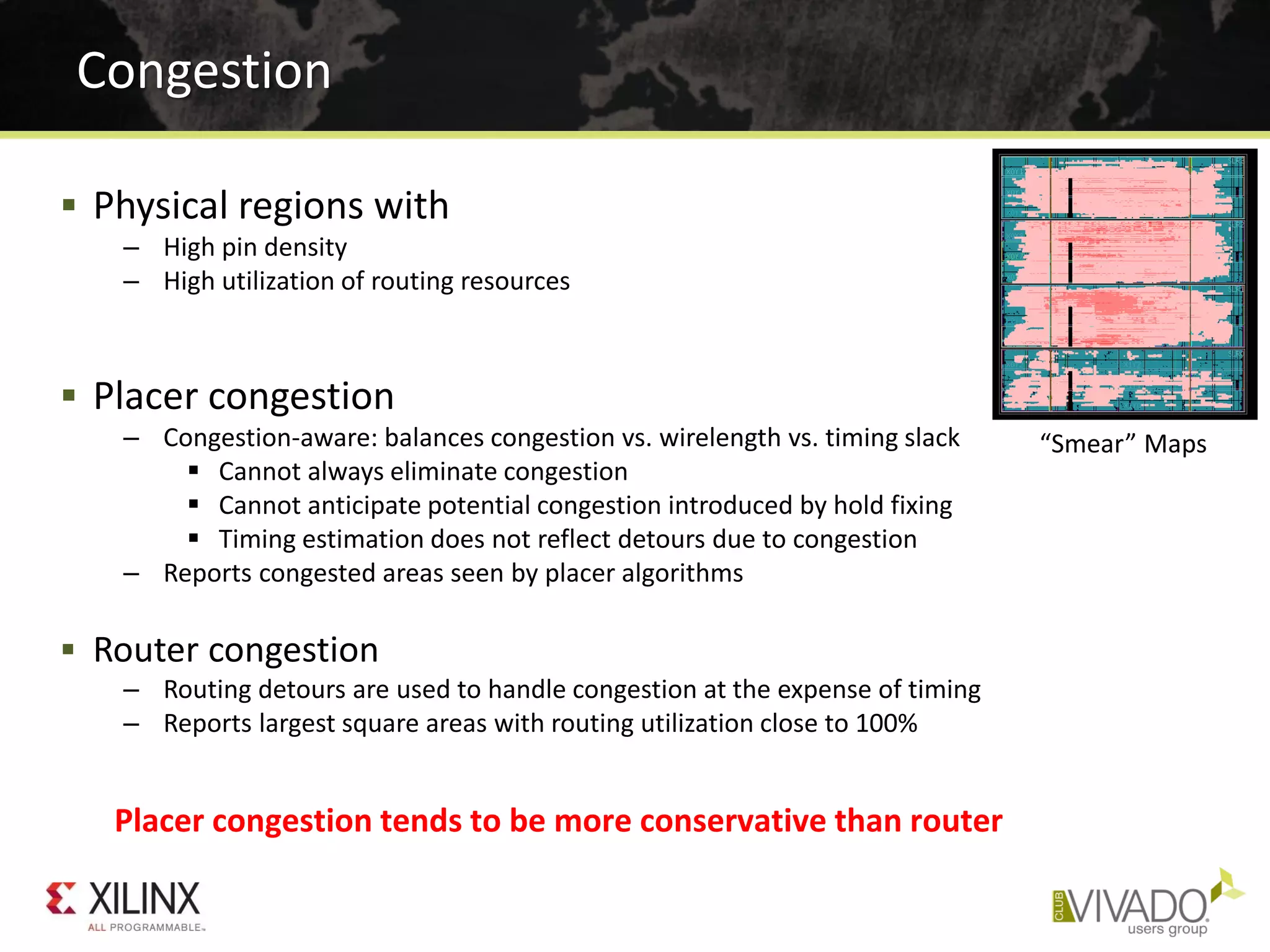
 Physical regions with
– High pin density
– High utilization of routing resources
 Placer congestion
– Congestion-aware: balances congestion vs. wirelength vs. timing slack
 Cannot always eliminate congestion
 Cannot anticipate potential congestion introduced by hold fixing
 Timing estimation does not reflect detours due to congestion
– Reports congested areas seen by placer algorithms
 Router congestion
– Routing detours are used to handle congestion at the expense of timing
– Reports largest square areas with routing utilization close to 100%
Congestion
Placer congestion tends to be more conservative than router
“Smear” Maps
 Complex modules in lower hierarchy
report_design_analysis -complexity [-hierarhcial_depth N]
Complexity Report
High Rent (β), Avg fanout on larger instances
High LUT6%, MUXF* utilization
Rent’s Rule:
𝑵 𝒑 = 𝑲 𝒑 𝑵 𝒈
𝜷
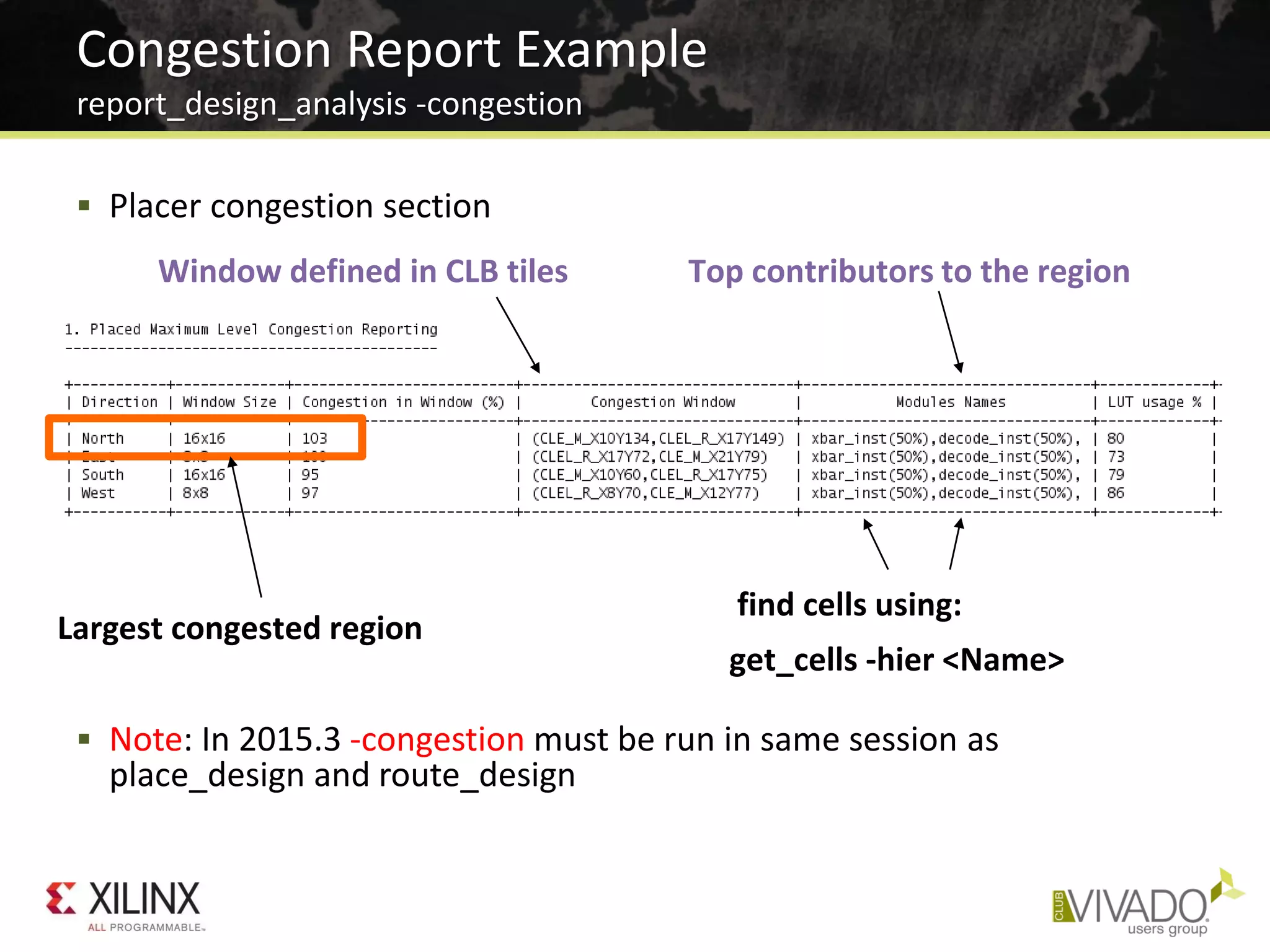
 Placer congestion section
 Note: In 2015.3 -congestion must be run in same session as
place_design and route_design
Congestion Report Example
report_design_analysis -congestion
Window defined in CLB tiles Top contributors to the region
Largest congested region
find cells using:
get_cells -hier <Name>
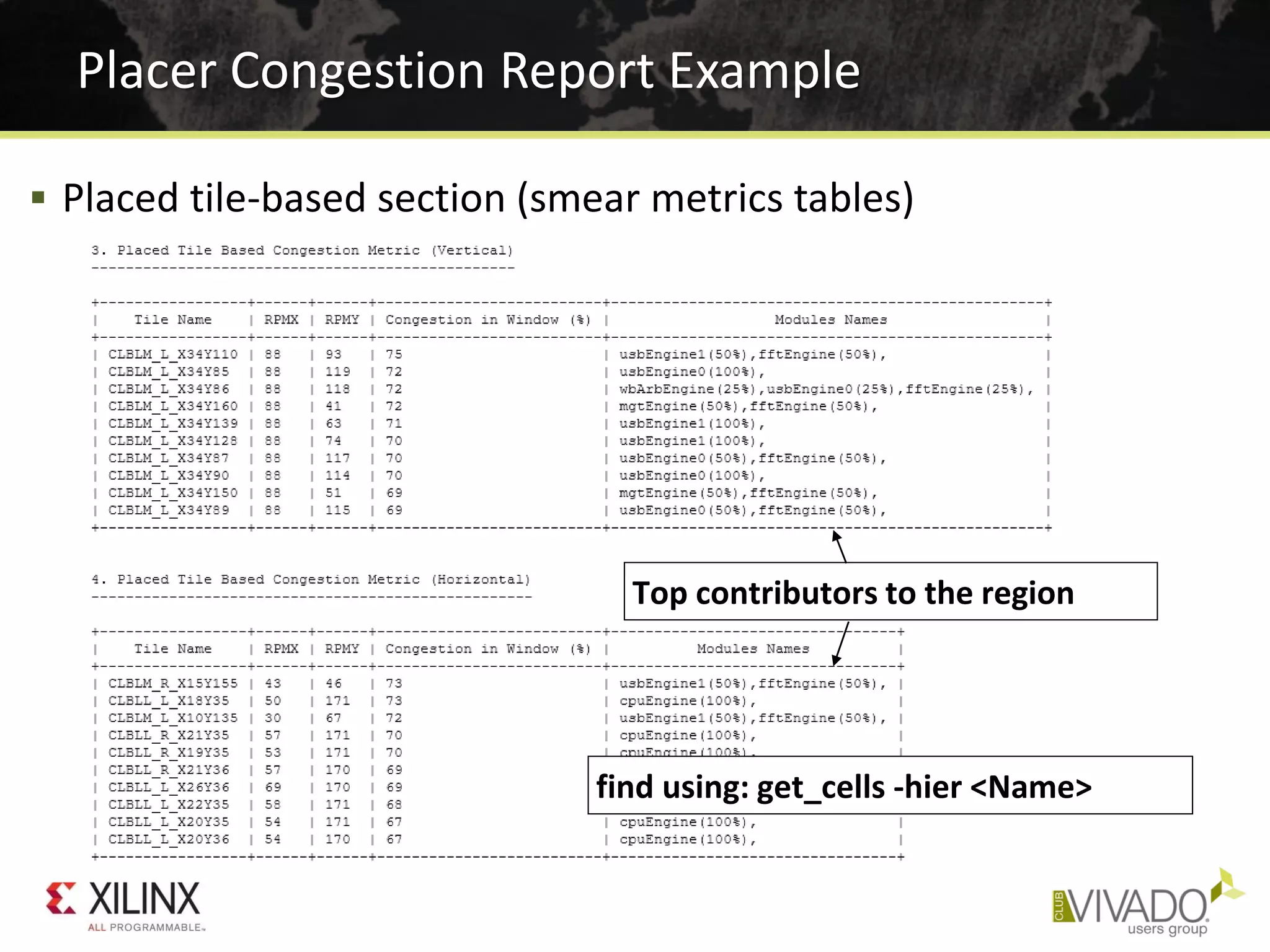
Placer Congestion Report Example
 Placed tile-based section (smear metrics tables)
Top contributors to the region
find using: get_cells -hier <Name>
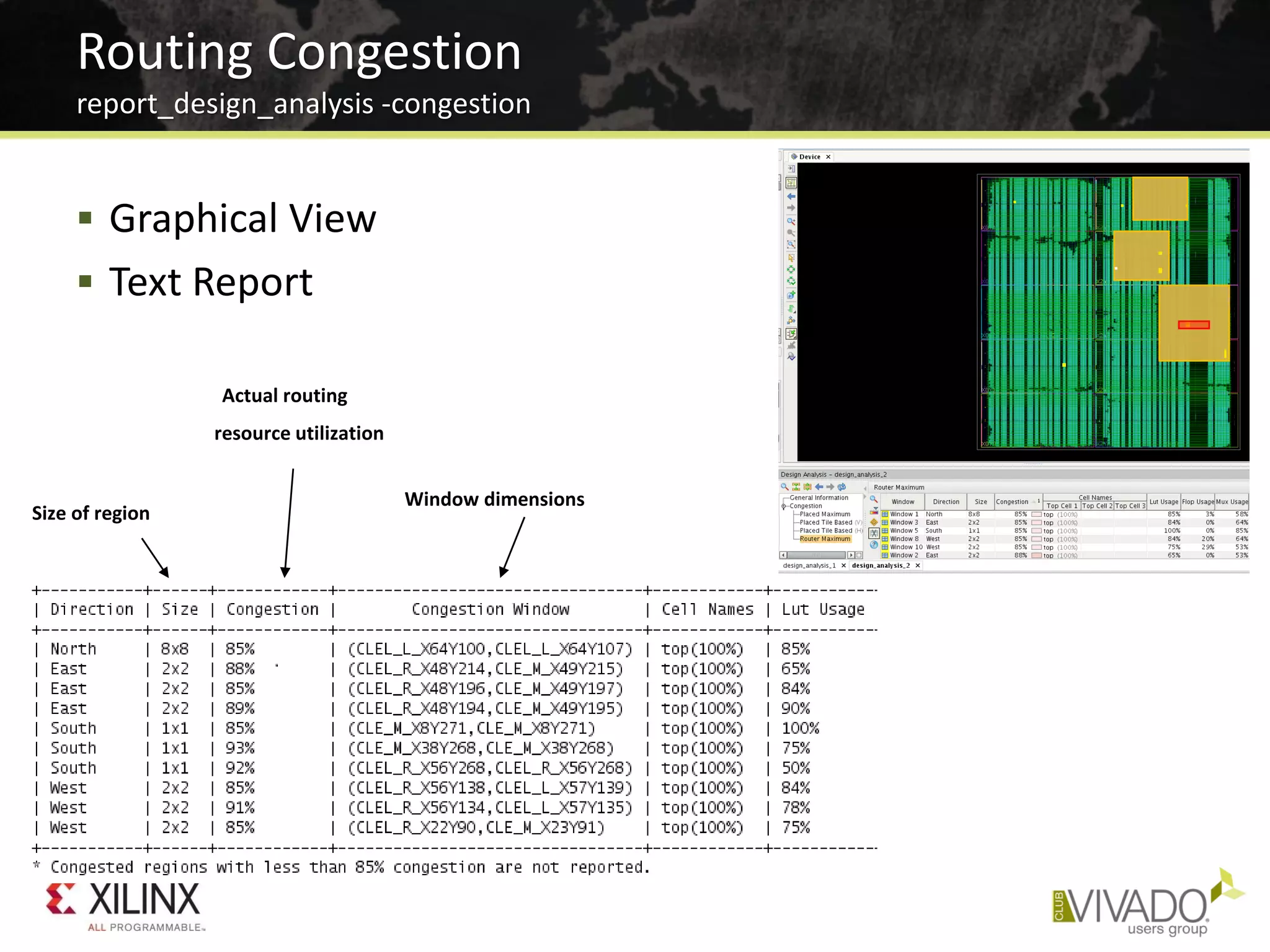
 Graphical View
 Text Report
Routing Congestion
report_design_analysis -congestion
Actual routing
resource utilization
Window dimensions
Size of region
 Reduce Logic or Pick a Bigger Device
– Look for wide bus and mux structures
 Optimize modules in congested regions
– Disable LUT combining design-wide or in congested instances
 Globally with synth_design -no_lc
 set_property SOFT_HLUTNM “” [get_cells -hier -filter {name =~ instance/*}]
– Consider OOC synthesis with different options, strategies
– Turn off cross-boundary optimizations in synthesis
 Globally with synth_design -flatten_hierarchy none
 On specific modules with KEEP_HIERARCHY in RTL
 Try several implementation strategies or placer directives
– Try congestion-oriented placer strategies and directives first
– Try other strategies and placer directives
=> Re-use some or all RAMB and DSP placement from good runs
 Try floorplanning the congested logic
– Prevent complex modules from overlapping
– Consider dataflow through device
Potential Solutions for Congestion
• Correct Timing Constraints
• Analyze Before Doing
• Implementation Strategies and Directives
• Congestion and Complexity
• Advanced Physical Optimization
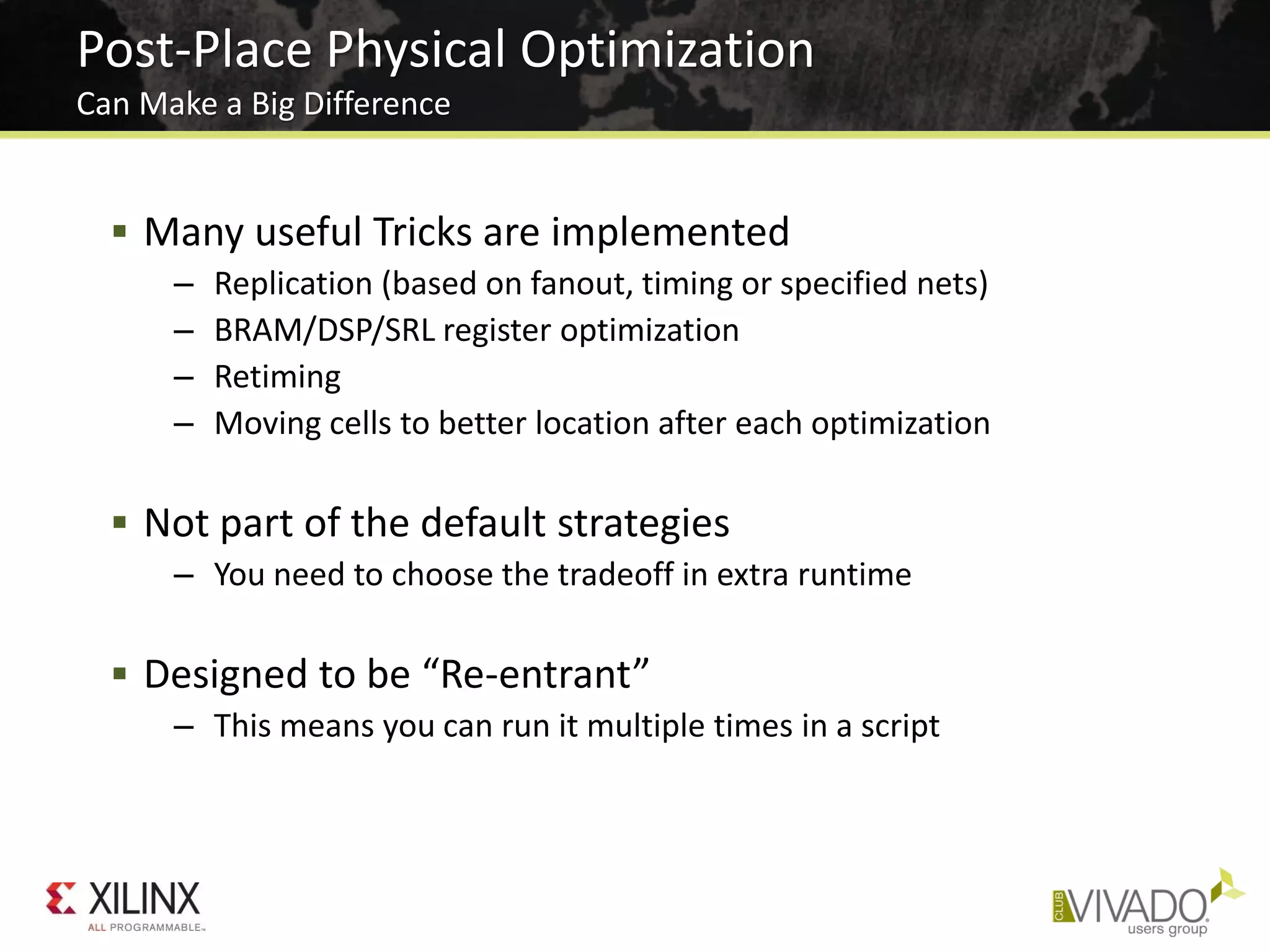
Post-Place Physical Optimization
Can Make a Big Difference
 Many useful Tricks are implemented
– Replication (based on fanout, timing or specified nets)
– BRAM/DSP/SRL register optimization
– Retiming
– Moving cells to better location after each optimization
 Not part of the default strategies
– You need to choose the tradeoff in extra runtime
 Designed to be “Re-entrant”
– This means you can run it multiple times in a script
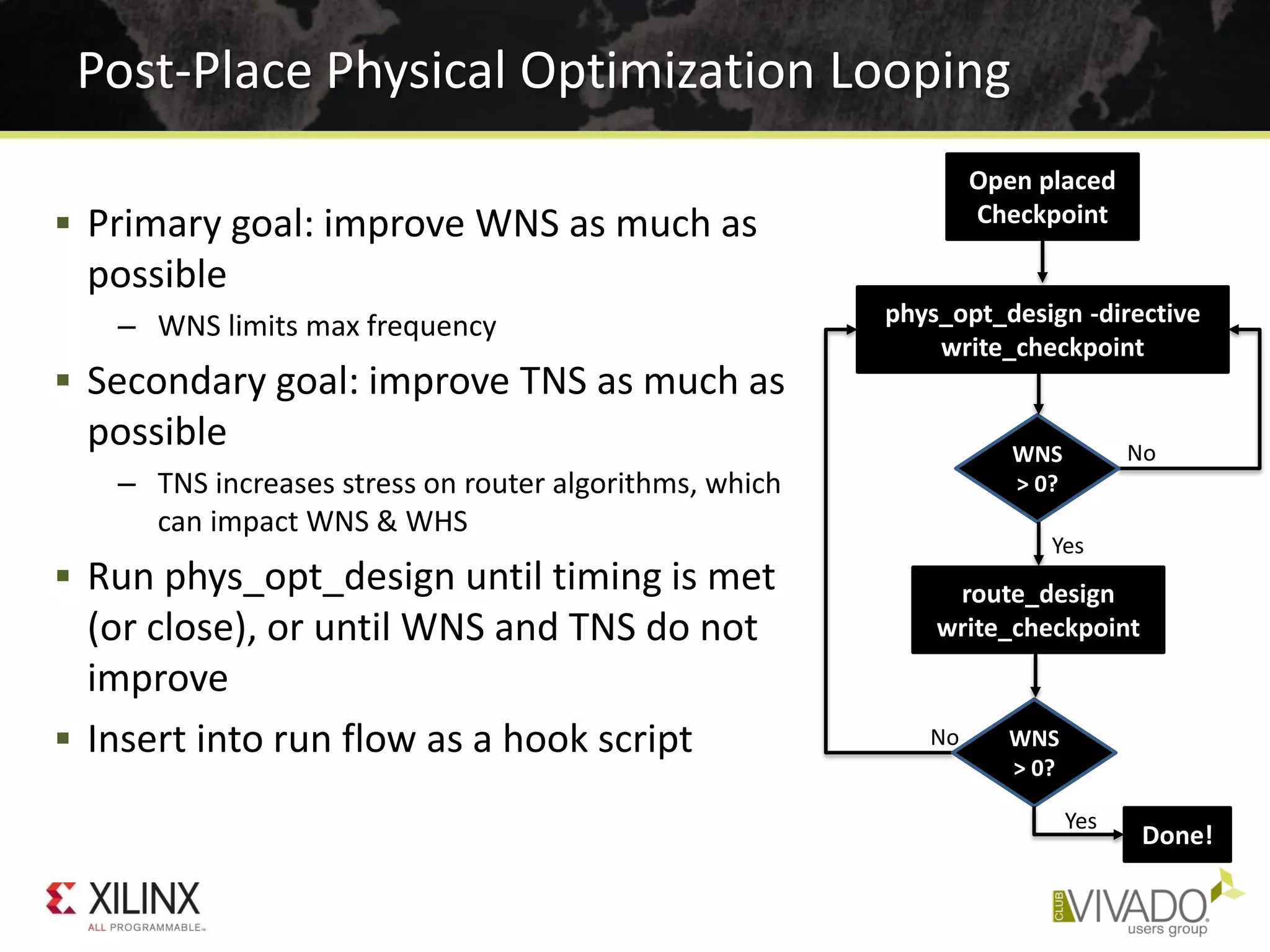
 Primary goal: improve WNS as much as
possible
– WNS limits max frequency
 Secondary goal: improve TNS as much as
possible
– TNS increases stress on router algorithms, which
can impact WNS & WHS
 Run phys_opt_design until timing is met
(or close), or until WNS and TNS do not
improve
 Insert into run flow as a hook script
Post-Place Physical Optimization Looping
Open placed
Checkpoint
phys_opt_design -directive
write_checkpoint
WNS
> 0?
route_design
write_checkpoint
WNS
> 0?
Done!
No
Yes
No
Yes
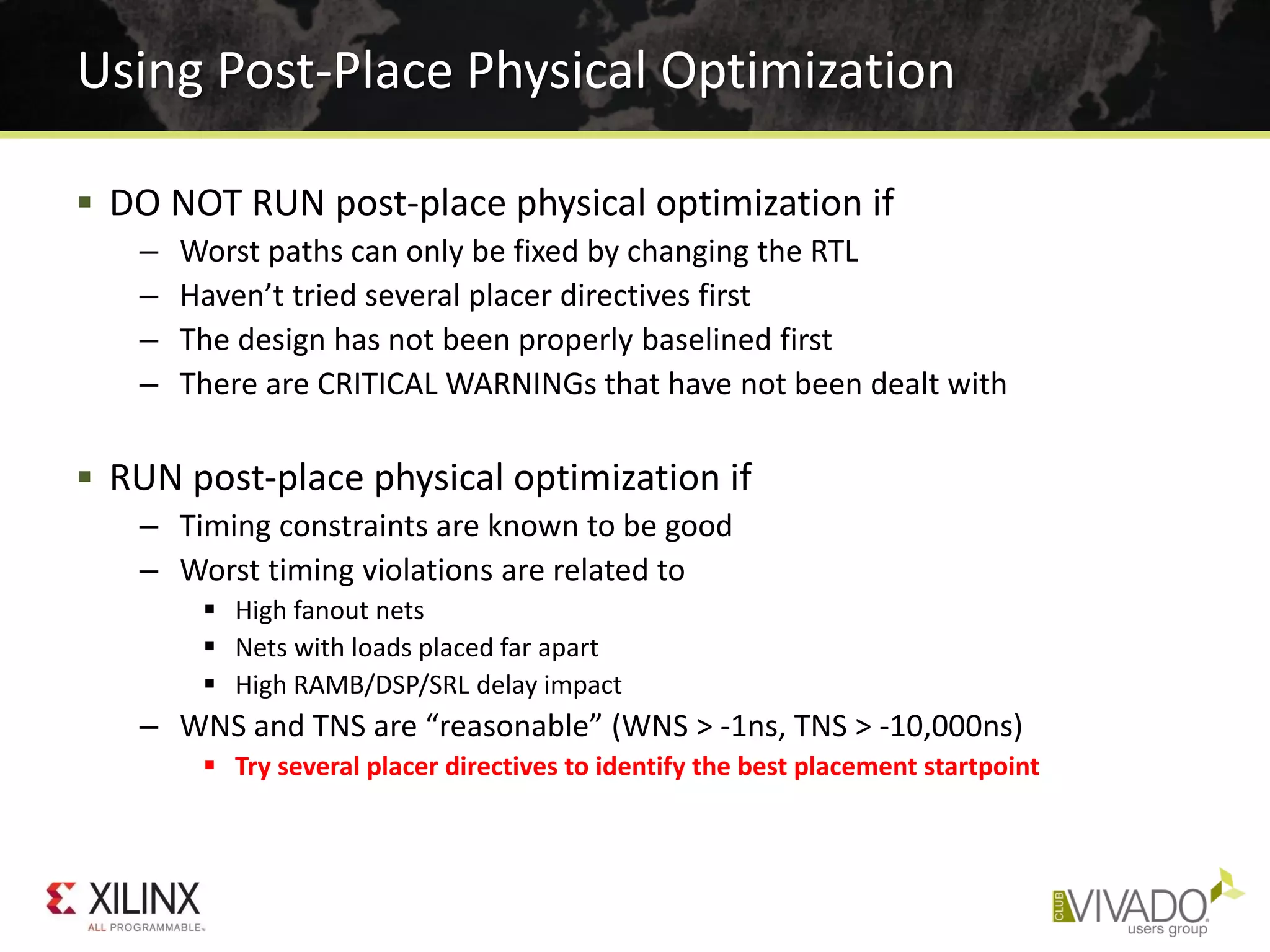
Using Post-Place Physical Optimization
 DO NOT RUN post-place physical optimization if
– Worst paths can only be fixed by changing the RTL
– Haven’t tried several placer directives first
– The design has not been properly baselined first
– There are CRITICAL WARNINGs that have not been dealt with
 RUN post-place physical optimization if
– Timing constraints are known to be good
– Worst timing violations are related to
 High fanout nets
 Nets with loads placed far apart
 High RAMB/DSP/SRL delay impact
– WNS and TNS are “reasonable” (WNS > -1ns, TNS > -10,000ns)
 Try several placer directives to identify the best placement startpoint
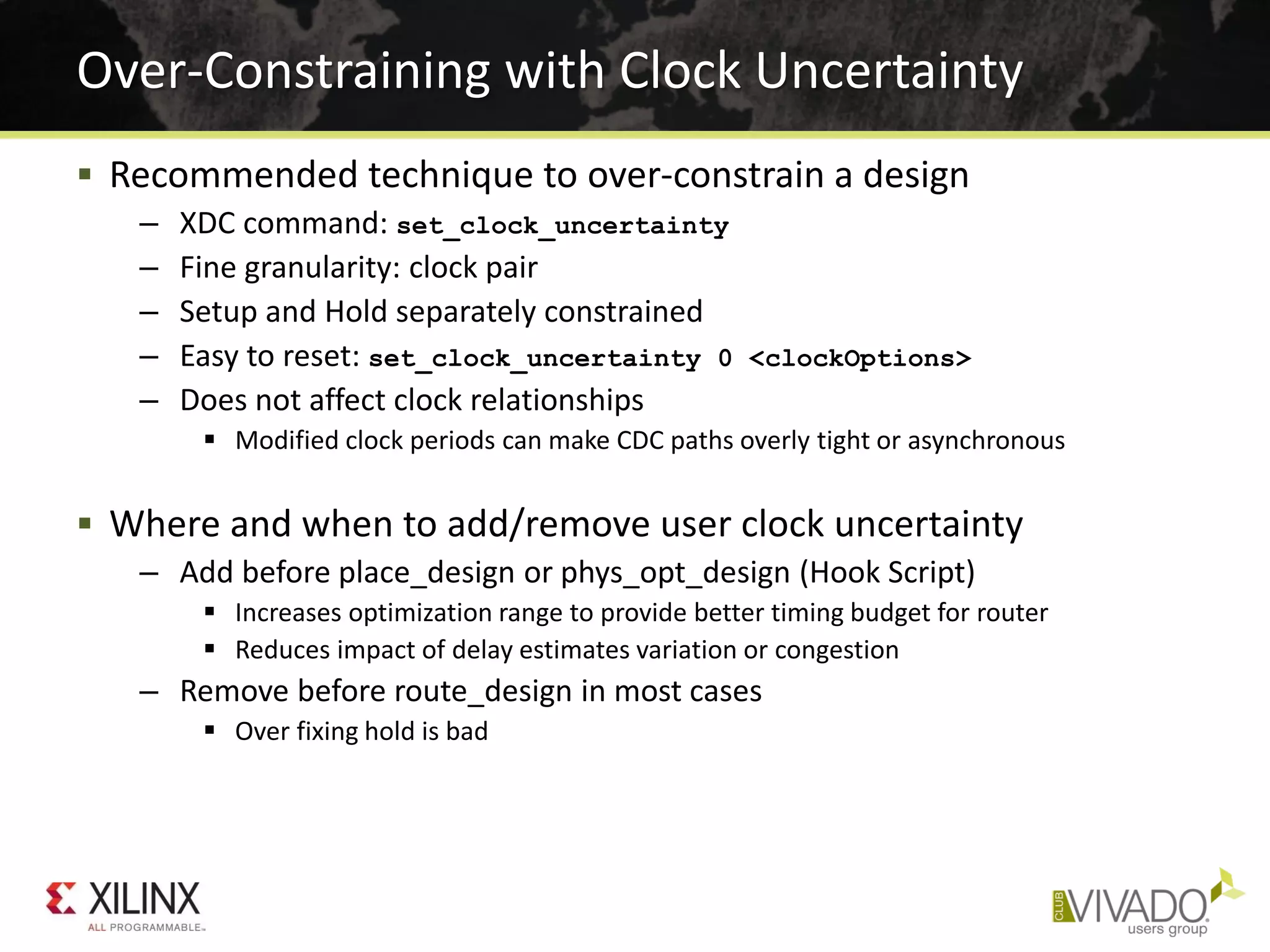
 Recommended technique to over-constrain a design
– XDC command: set_clock_uncertainty
– Fine granularity: clock pair
– Setup and Hold separately constrained
– Easy to reset: set_clock_uncertainty 0 <clockOptions>
– Does not affect clock relationships
 Modified clock periods can make CDC paths overly tight or asynchronous
 Where and when to add/remove user clock uncertainty
– Add before place_design or phys_opt_design (Hook Script)
 Increases optimization range to provide better timing budget for router
 Reduces impact of delay estimates variation or congestion
– Remove before route_design in most cases
 Over fixing hold is bad
Over-Constraining with Clock Uncertainty
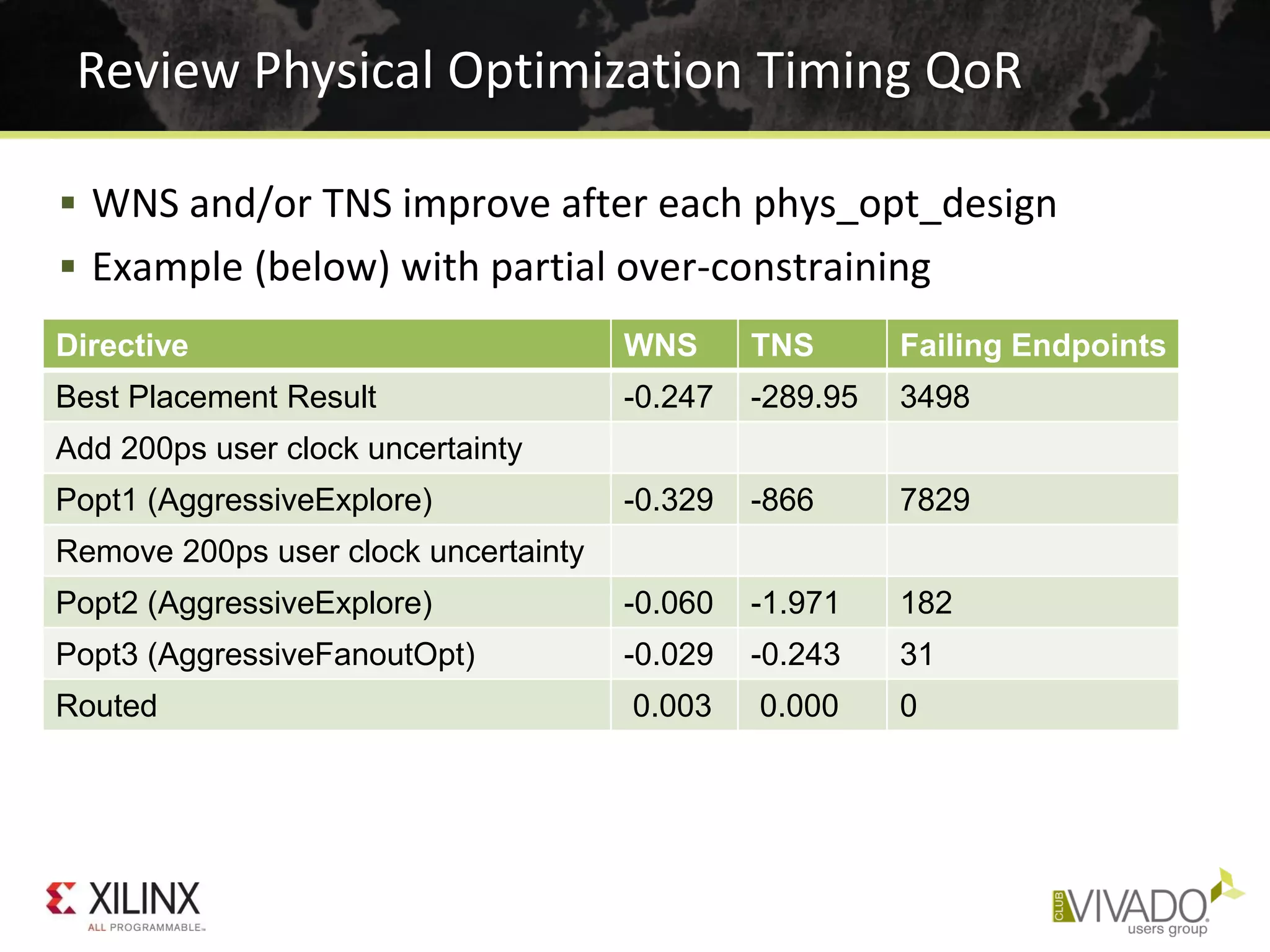
Review Physical Optimization Timing QoR
Directive WNS TNS Failing Endpoints
Best Placement Result -0.247 -289.95 3498
Add 200ps user clock uncertainty
Popt1 (AggressiveExplore) -0.329 -866 7829
Remove 200ps user clock uncertainty
Popt2 (AggressiveExplore) -0.060 -1.971 182
Popt3 (AggressiveFanoutOpt) -0.029 -0.243 31
Routed 0.003 0.000 0
 WNS and/or TNS improve after each phys_opt_design
 Example (below) with partial over-constraining
Analyze the Physical Optimizations Log
 Reviewing detailed information
– Type of optimization, object name
– Intermediate timing numbers
– Optimizations prevented by DONT_TOUCH
 Applying some of the changes to RTL
– RAMB/DSP register optimization
– Some register replication on RAMB/DSP or IO paths
 Using scripting to identify the optimizations with more
impact
– Example: grep -P '(Optimized|Estimated)‘ vivado.log
vivado.log:INFO: [Physopt 32-619] Estimated Timing Summary | WNS=-0.367 | TNS=-1139.370 |
vivado.log-INFO: [Physopt 32-29] End Pass 1. Optimized 33 nets. Created 119 new instances.
vivado.log:INFO: [Physopt 32-619] Estimated Timing Summary | WNS=-0.367 | TNS=-1071.577 |
vivado.log-INFO: [Physopt 32-661] Optimized 98 nets. Re-placed 98 instances.
vivado.log:INFO: [Physopt 32-619] Estimated Timing Summary | WNS=-0.343 | TNS=-1055.180 |
vivado.log-INFO: [Physopt 32-608] Optimized 33 nets. Swapped 36 pins.
vivado.log:INFO: [Physopt 32-619] Estimated Timing Summary | WNS=-0.329 | TNS=-865.770 |
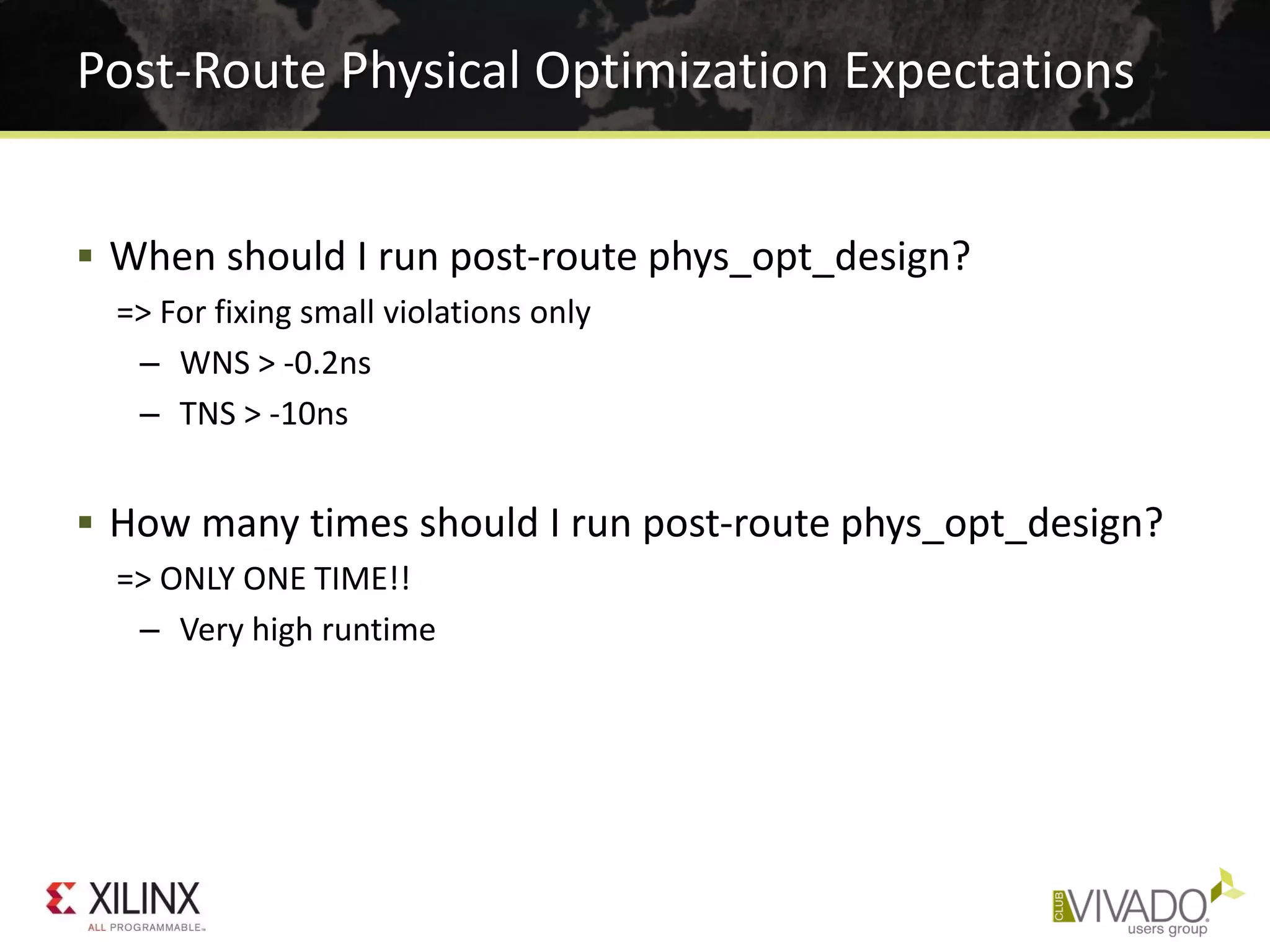
Post-Route Physical Optimization Expectations
 When should I run post-route phys_opt_design?
=> For fixing small violations only
– WNS > -0.2ns
– TNS > -10ns
 How many times should I run post-route phys_opt_design?
=> ONLY ONE TIME!!
– Very high runtime
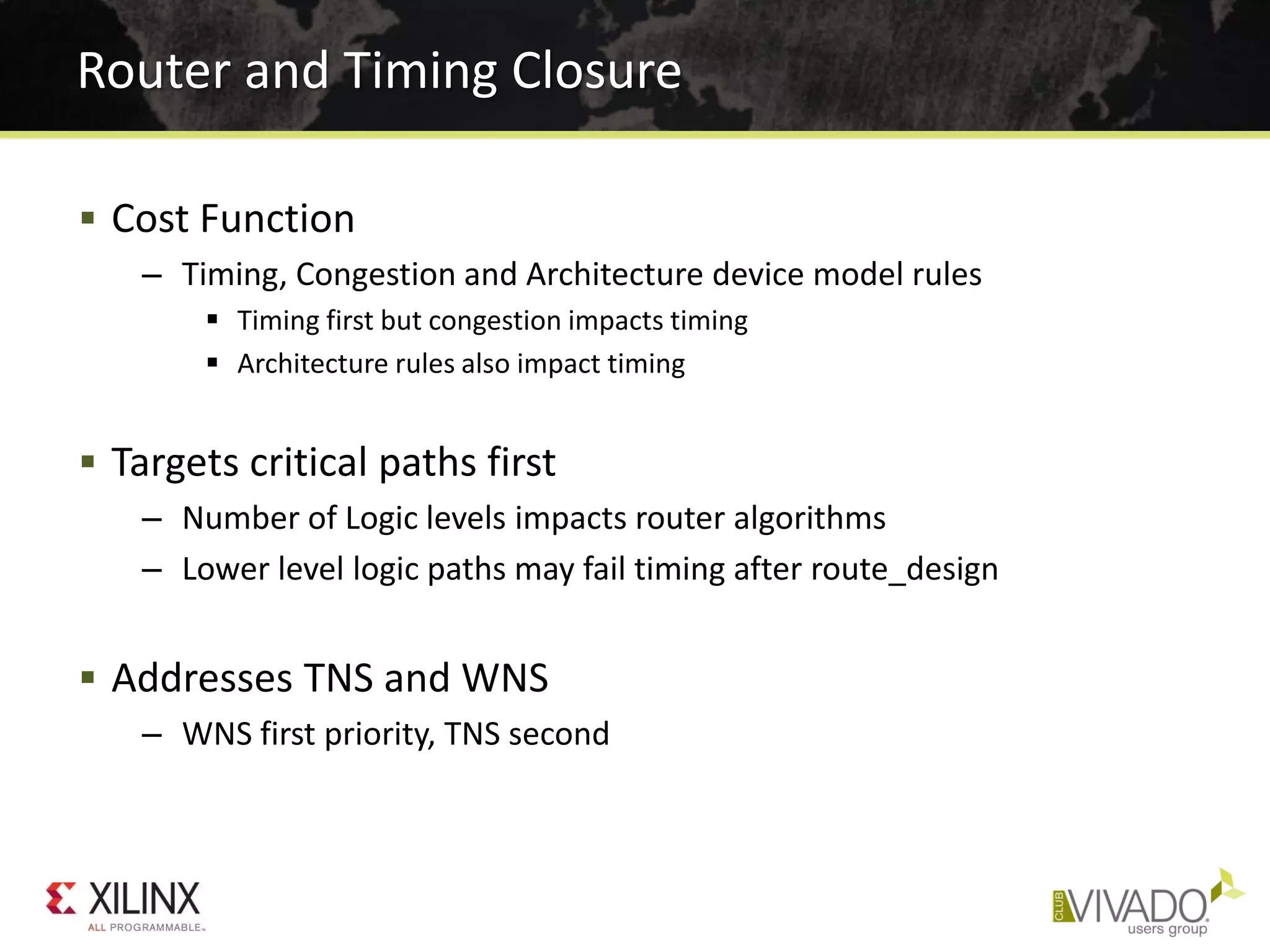
 Cost Function
– Timing, Congestion and Architecture device model rules
 Timing first but congestion impacts timing
 Architecture rules also impact timing
 Targets critical paths first
– Number of Logic levels impacts router algorithms
– Lower level logic paths may fail timing after route_design
 Addresses TNS and WNS
– WNS first priority, TNS second
Router and Timing Closure
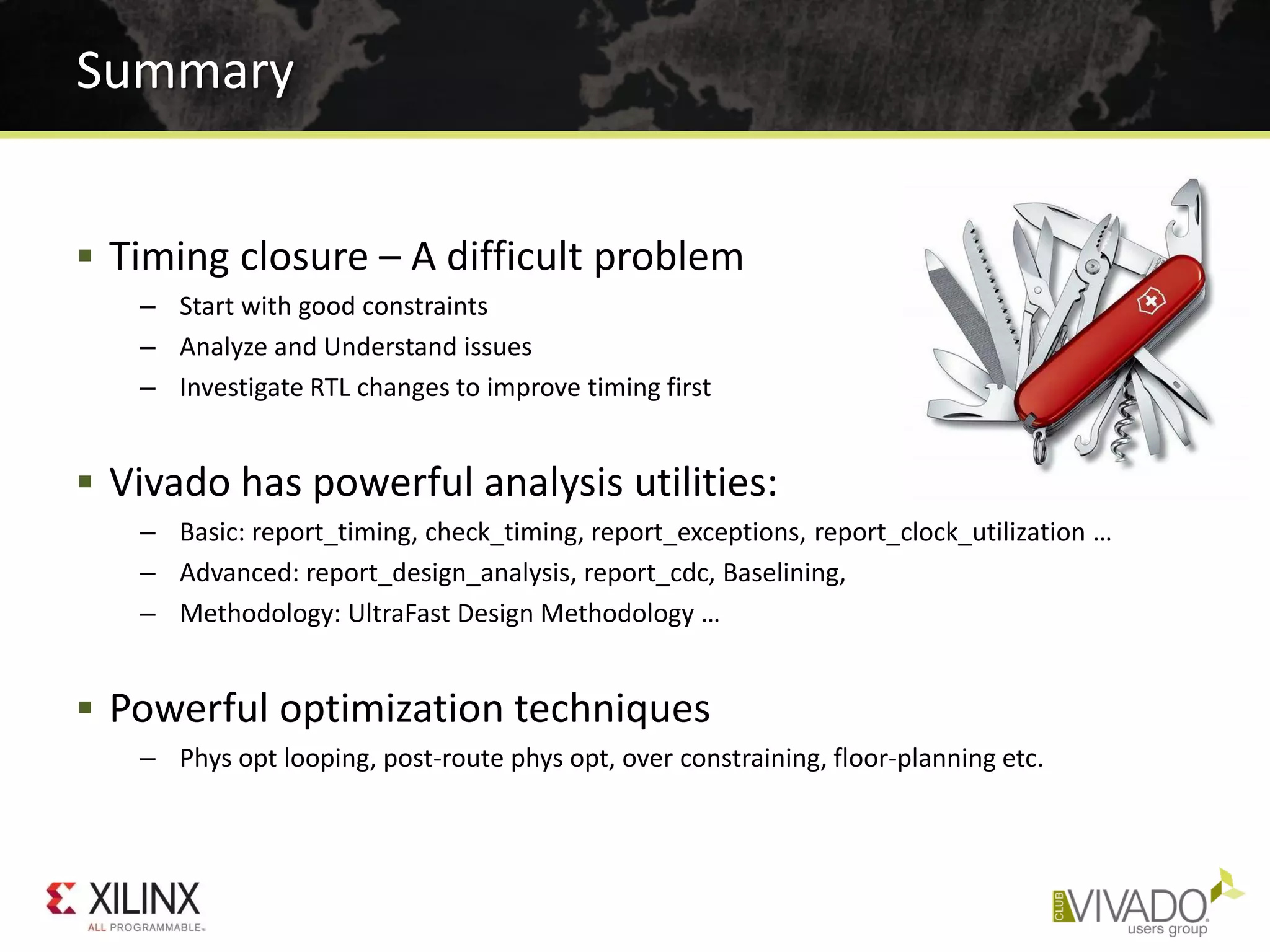
 Timing closure – A difficult problem
– Start with good constraints
– Analyze and Understand issues
– Investigate RTL changes to improve timing first
 Vivado has powerful analysis utilities:
– Basic: report_timing, check_timing, report_exceptions, report_clock_utilization …
– Advanced: report_design_analysis, report_cdc, Baselining,
– Methodology: UltraFast Design Methodology …
 Powerful optimization techniques
– Phys opt looping, post-route phys opt, over constraining, floor-planning etc.
Summary

Xilinx timing closure

  • 1.
    Top 5 TimingClosure Techniques Greg Daughtry
  • 2.
    • Correct TimingConstraints • Analyze Before Doing • Implementation Strategies and Directives • Congestion and Complexity • Advanced Physical Optimization
  • 3.
     Create constraints:Four key steps 1. Create clocks 2. Define clocks interactions 3. Set input and output delays 4. Set timing exceptions  Use Timing Constraint Wizard – Powerful Constraint Creation Tool  Validate constraints at each step – Monitor unconstrained objects – Validate timing – Debug constraint issue post-synthesis • Analysis will be faster Create Good Timing Constraints Baseline Constraints XDC and TIMING DRCs report_timing_summary check_timing report_clocks (Note: Tcl only) report_clock_networks report_clock_interaction Report CDC
  • 4.
     Disable userXDC file(s) – Leave IP XDC files as is  Create baseline XDC file, set as target  Run Timing Constraints Wizard – Constrain all clocks and clock interactions – Flag CDC issues by running Report CDC  Skip IO constraints in first pass  Iterate through P&R stages, validate timing at every stage – Add exception constraints where necessary – Core Flop-to-Flop timing can be met  Add IO & other exception constraints in subsequent passes – Iterate through P&R stages, validate timing at every stage of flow Establish a Good Starting Point Baseline with Timing Constraint Wizard
  • 5.
    • Correct TimingConstraints • Analyze Before Doing • Implementation Strategies and Directives • Congestion and Complexity • Advanced Physical Optimization
  • 6.
    World Class Analysis MakeSense of Your Design Data • 45 Reports Give Critical Design Info – Clocks and clock interaction – Timing Analysis and Constraints – Design Complexity – Utilization – Power • Log files have Context-sensitive Information – Every action in order of execution – Severity levels: Info, Warning, Critical Warning, and Errors • Progressive Estimation Accuracy – As stages progress from pre-synth to final route “signoff” – Placer/Router/Optimization Status – DRC – Control Sets – IP Upgrade Status Vivado% help report_*
  • 7.
     Timing – Keynetlist, timing and physical critical path characteristics – Combination of characteristics that lead to timing violations – Logic levels distribution per destination clock  Complexity – Logical netlist complexity – Metrics and problematic cell distribution  Congestion – Congestion seen by placer, router – Top contributors to SLR crossings Report Design Analysis Report Types Complexity may lead to Congestion
  • 8.
     Setup analysis:show the paths before and after the critical path report_design_analysis -extend -setup Extended Timing Report ... See how much slack is available from surrounding paths
  • 9.
     Number oflogic levels in top 5000 critical paths – Default number of paths cannot be changed (2015.3 will fix this) – Table can be generated for specific paths using -of_timing_paths  Identify longest paths (outliers) and modify the RTL – Reduces placer focus on few difficult paths only – Expands placer solutions and optimization range Logic Level Distribution report_design_analysis
  • 10.
     Identifies CDCtopologies – Reports unsafe crossings and constraint issues  Structural issues reported even if exception constraints exist  Excellent cross-probing support – View schematics and exact line number in RTL Clock Domain Crossing Report report_cdc
  • 11.
    • Correct TimingConstraints • Analyze Before Doing • Implementation Strategies and Directives • Congestion and Complexity • Advanced Physical Optimization
  • 12.
     Launch arun for every strategy – Easy To Try – Pick the best one from design runs table  Runs Infrastructure Supports “Grid” Computing – Built-in parallel runs on different hosts (Linux) – LSF and Sun Grid Engine  Don’t Expect This Will Solve All Your Problems Try All The Tool Options SmartXplorer Style
  • 13.
     Directive: “directs”command behavior to try alternative algorithms – Enables wider exploration of design solutions – Applies to opt_design, place_design, phys_opt_design, route_design  Strategy: combination of implementation commands with directives – Performance-centric: all commands use directives for higher performance – Congestion-centric: all commands use directives that reduce congestion – Flow-centric: modifies the implementation flow to add steps to Defaults  power_opt_design  post-route phys_opt_design Vivado Implementation Strategies and Directives Faster Compile Higher Performance Quick Runtime Optimized Default Explore
  • 14.
    Implementation Strategies Strategy NameObjectives Defaults Balance between timing closure effort and compile time Performance_Explore Performance_ExplorePostRoutePhysOpt Multiple passes of opt_design and phys_opt_design, advanced placement and routing algorithms, and post-route placement optimization. Optionally add post-route phys_opt_design. Performance_NetDelay_* Makes delays more pessimistic for long distance and higher fanout nets with the intent to shorten their overall wirelength. Low, medium, and high settings (high = high pessimism). Performance_WLBlockPlacement Prioritize wirelength minimization for BRAM/DSPs Congestion_SpreadLogic_* Spread logic to aggressively avoid congested regions (low, medium, and high settings control degree of spreading) Performance_ExploreSLLs Timing-driven optimization of SLR partitioning Congestion_BalanceSLLs Congestion_BalanceSLRs Congestion_SpreadLogicSLLs Congestion_CompressSLR Algorithms for alleviating congestion in SSI designs: Balance SLLs between SLRs, balance utilization in each SLR, spread logic (SSI- tailored algorithms), compress logic in SLRs to reduce SLLs
  • 15.
    • Correct TimingConstraints • Analyze Before Doing • Implementation Strategies and Directives • Congestion and Complexity • Advanced Physical Optimization
  • 16.
     Physical regionswith – High pin density – High utilization of routing resources  Placer congestion – Congestion-aware: balances congestion vs. wirelength vs. timing slack  Cannot always eliminate congestion  Cannot anticipate potential congestion introduced by hold fixing  Timing estimation does not reflect detours due to congestion – Reports congested areas seen by placer algorithms  Router congestion – Routing detours are used to handle congestion at the expense of timing – Reports largest square areas with routing utilization close to 100% Congestion Placer congestion tends to be more conservative than router “Smear” Maps
  • 17.
     Complex modulesin lower hierarchy report_design_analysis -complexity [-hierarhcial_depth N] Complexity Report High Rent (β), Avg fanout on larger instances High LUT6%, MUXF* utilization Rent’s Rule: 𝑵 𝒑 = 𝑲 𝒑 𝑵 𝒈 𝜷
  • 18.
     Placer congestionsection  Note: In 2015.3 -congestion must be run in same session as place_design and route_design Congestion Report Example report_design_analysis -congestion Window defined in CLB tiles Top contributors to the region Largest congested region find cells using: get_cells -hier <Name>
  • 19.
    Placer Congestion ReportExample  Placed tile-based section (smear metrics tables) Top contributors to the region find using: get_cells -hier <Name>
  • 20.
     Graphical View Text Report Routing Congestion report_design_analysis -congestion Actual routing resource utilization Window dimensions Size of region
  • 21.
     Reduce Logicor Pick a Bigger Device – Look for wide bus and mux structures  Optimize modules in congested regions – Disable LUT combining design-wide or in congested instances  Globally with synth_design -no_lc  set_property SOFT_HLUTNM “” [get_cells -hier -filter {name =~ instance/*}] – Consider OOC synthesis with different options, strategies – Turn off cross-boundary optimizations in synthesis  Globally with synth_design -flatten_hierarchy none  On specific modules with KEEP_HIERARCHY in RTL  Try several implementation strategies or placer directives – Try congestion-oriented placer strategies and directives first – Try other strategies and placer directives => Re-use some or all RAMB and DSP placement from good runs  Try floorplanning the congested logic – Prevent complex modules from overlapping – Consider dataflow through device Potential Solutions for Congestion
  • 22.
    • Correct TimingConstraints • Analyze Before Doing • Implementation Strategies and Directives • Congestion and Complexity • Advanced Physical Optimization
  • 23.
    Post-Place Physical Optimization CanMake a Big Difference  Many useful Tricks are implemented – Replication (based on fanout, timing or specified nets) – BRAM/DSP/SRL register optimization – Retiming – Moving cells to better location after each optimization  Not part of the default strategies – You need to choose the tradeoff in extra runtime  Designed to be “Re-entrant” – This means you can run it multiple times in a script
  • 24.
     Primary goal:improve WNS as much as possible – WNS limits max frequency  Secondary goal: improve TNS as much as possible – TNS increases stress on router algorithms, which can impact WNS & WHS  Run phys_opt_design until timing is met (or close), or until WNS and TNS do not improve  Insert into run flow as a hook script Post-Place Physical Optimization Looping Open placed Checkpoint phys_opt_design -directive write_checkpoint WNS > 0? route_design write_checkpoint WNS > 0? Done! No Yes No Yes
  • 25.
    Using Post-Place PhysicalOptimization  DO NOT RUN post-place physical optimization if – Worst paths can only be fixed by changing the RTL – Haven’t tried several placer directives first – The design has not been properly baselined first – There are CRITICAL WARNINGs that have not been dealt with  RUN post-place physical optimization if – Timing constraints are known to be good – Worst timing violations are related to  High fanout nets  Nets with loads placed far apart  High RAMB/DSP/SRL delay impact – WNS and TNS are “reasonable” (WNS > -1ns, TNS > -10,000ns)  Try several placer directives to identify the best placement startpoint
  • 26.
     Recommended techniqueto over-constrain a design – XDC command: set_clock_uncertainty – Fine granularity: clock pair – Setup and Hold separately constrained – Easy to reset: set_clock_uncertainty 0 <clockOptions> – Does not affect clock relationships  Modified clock periods can make CDC paths overly tight or asynchronous  Where and when to add/remove user clock uncertainty – Add before place_design or phys_opt_design (Hook Script)  Increases optimization range to provide better timing budget for router  Reduces impact of delay estimates variation or congestion – Remove before route_design in most cases  Over fixing hold is bad Over-Constraining with Clock Uncertainty
  • 27.
    Review Physical OptimizationTiming QoR Directive WNS TNS Failing Endpoints Best Placement Result -0.247 -289.95 3498 Add 200ps user clock uncertainty Popt1 (AggressiveExplore) -0.329 -866 7829 Remove 200ps user clock uncertainty Popt2 (AggressiveExplore) -0.060 -1.971 182 Popt3 (AggressiveFanoutOpt) -0.029 -0.243 31 Routed 0.003 0.000 0  WNS and/or TNS improve after each phys_opt_design  Example (below) with partial over-constraining
  • 28.
    Analyze the PhysicalOptimizations Log  Reviewing detailed information – Type of optimization, object name – Intermediate timing numbers – Optimizations prevented by DONT_TOUCH  Applying some of the changes to RTL – RAMB/DSP register optimization – Some register replication on RAMB/DSP or IO paths  Using scripting to identify the optimizations with more impact – Example: grep -P '(Optimized|Estimated)‘ vivado.log vivado.log:INFO: [Physopt 32-619] Estimated Timing Summary | WNS=-0.367 | TNS=-1139.370 | vivado.log-INFO: [Physopt 32-29] End Pass 1. Optimized 33 nets. Created 119 new instances. vivado.log:INFO: [Physopt 32-619] Estimated Timing Summary | WNS=-0.367 | TNS=-1071.577 | vivado.log-INFO: [Physopt 32-661] Optimized 98 nets. Re-placed 98 instances. vivado.log:INFO: [Physopt 32-619] Estimated Timing Summary | WNS=-0.343 | TNS=-1055.180 | vivado.log-INFO: [Physopt 32-608] Optimized 33 nets. Swapped 36 pins. vivado.log:INFO: [Physopt 32-619] Estimated Timing Summary | WNS=-0.329 | TNS=-865.770 |
  • 29.
    Post-Route Physical OptimizationExpectations  When should I run post-route phys_opt_design? => For fixing small violations only – WNS > -0.2ns – TNS > -10ns  How many times should I run post-route phys_opt_design? => ONLY ONE TIME!! – Very high runtime
  • 30.
     Cost Function –Timing, Congestion and Architecture device model rules  Timing first but congestion impacts timing  Architecture rules also impact timing  Targets critical paths first – Number of Logic levels impacts router algorithms – Lower level logic paths may fail timing after route_design  Addresses TNS and WNS – WNS first priority, TNS second Router and Timing Closure
  • 31.
     Timing closure– A difficult problem – Start with good constraints – Analyze and Understand issues – Investigate RTL changes to improve timing first  Vivado has powerful analysis utilities: – Basic: report_timing, check_timing, report_exceptions, report_clock_utilization … – Advanced: report_design_analysis, report_cdc, Baselining, – Methodology: UltraFast Design Methodology …  Powerful optimization techniques – Phys opt looping, post-route phys opt, over constraining, floor-planning etc. Summary