Xcelsius Tips and Tricks Aparna Srinivasan
Agenda About my company Introduction to Xcelsius dashboards Dashboard samples for various data sources Tips and Tricks in implementing these dashboards Questions
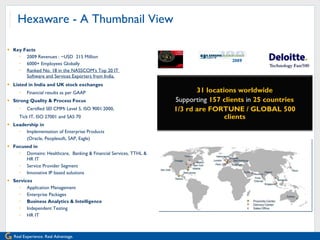
Hexaware - A Thumbnail View Key Facts 2009 Revenues : ~USD  215 Million  6000+ Employees Globally  Ranked No. 18 in the NASSCOM’s Top 20 IT  Software and Services Exporters from India. Listed in India and UK stock exchanges Financial results as per GAAP  Strong Quality & Process Focus Certified SEI CMMi Level 5, ISO 9001:2000,  Tick IT, ISO 27001 and SAS 70  Leadership in  Implementation of Enterprise Products  (Oracle, Peoplesoft, SAP, Eagle) Focused in  Domains: Healthcare,  Banking & Financial Services, TTHL & HR IT Service Provider Segment Innovative IP based solutions Services Application Management Enterprise Packages Business Analytics & Intelligence Independent Testing HR IT 31 locations worldwide Supporting  157 clients  in   25 countries 1/3 rd are FORTUNE / GLOBAL 500 clients 2009
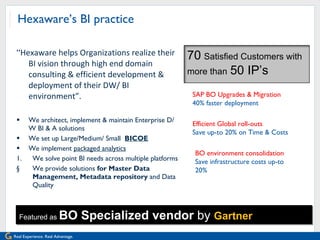
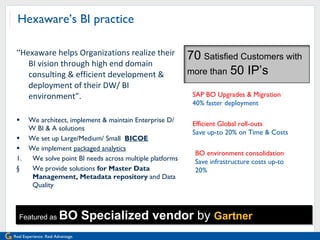
Hexaware’s BI practice “ Hexaware helps Organizations realize their BI vision through high end domain consulting & efficient development & deployment of their DW/ BI environment”. We architect, implement & maintain Enterprise D/W BI & A solutions We set up Large/Medium/ Small  BICOE We implement  packaged analytics We solve point BI needs across multiple platforms We provide solutions  for Master Data Management, Metadata repository  and Data Quality Featured as  BO Specialized vendor  by  Gartner SAP BO Upgrades & Migration  40% faster deployment Efficient Global roll-outs  Save up-to 20% on Time & Costs BO environment consolidation  Save infrastructure costs up-to 20% 70   Satisfied Customers with more than   50 IP’s
Client portfolio Client is a worldwide information technology company with approximately 23,000 employees serving commercial organizations and government agencies throughout the world Around 7,000 users use the Business Objects installation with 10,000+ reports
Introduction to Xcelsius dashboards Xcelsius provides rich visualization graphics to create dashboards right from senior management to power users and regular business users in an organization Xcelsius dashboard can implement object level security as well as data level security personalizing dashboards  Xcelsius can fetch data from various data sources that makes dashboard development easier Xcelsius dashboards can be deployed to various portals also utilizing the portal data in some cases
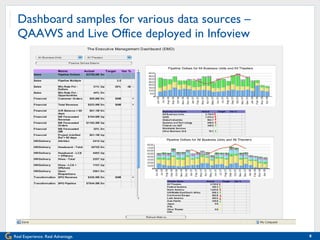
Dashboard samples for various data sources – QAAWS and Live Office deployed in Infoview
Dashboard samples for various data sources – QAAWS and Live Office deployed in Infoview Live Office integrates with Microsoft Office, embedding up-to-the-minute corporate data in Microsoft PowerPoint, Excel, and Word documents Query as a Web Service (QAAWS) lets you create custom web services for specific queries using Business Objects Web Services.
Dashboard samples for various data sources – QAAWS and Live Office deployed in Infoview The server component of QAAWS isinstalled automatically when BusinessObjects Enterprise XI Release 2 Service Pack 2 with Web Intelligence. The server component of Live Office is installed automatically with BusinessObjects Premium while keys need to be purchased for Professional edition. Client tool for QAAWS needs to be purchased as a separate license. Client components of both Live Office and QAAWS is available in the collaterals CD in the Adds-on folder.
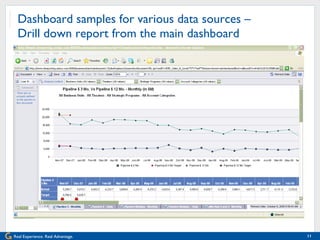
Dashboard samples for various data sources –  Drill down report from the main dashboard
Dashboard samples for various data sources –  Drill down report from the main dashboard Drill down can be provided from the main dashboard to an other Xcelsius dashboard with more details or a Web intelligence report Even PDF documents that have been generated from other tools can be viewed in the Xcelsius dashboards Flash variables can be used to receive data from the main dashboard
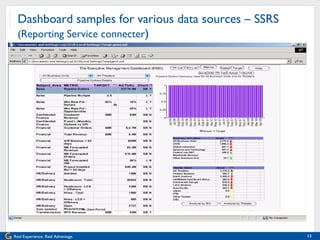
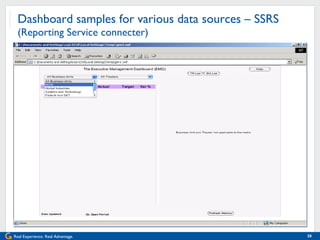
Dashboard samples for various data sources – SSRS (Reporting Service connecter )
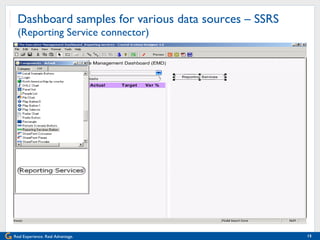
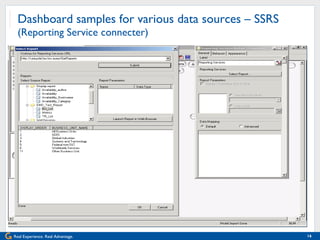
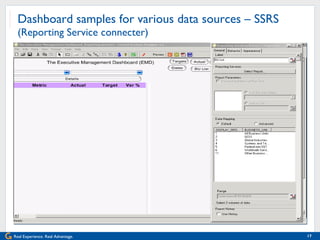
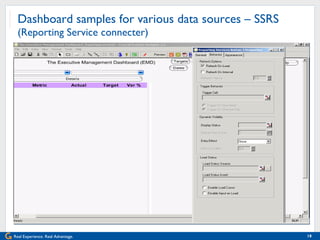
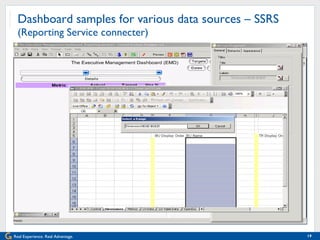
Dashboard samples for various data sources – SSRS  (Reporting Service connecter) Data from SQL Server reporting services can source the Xcelsius dashboards Xcelsius Reporting Services (XRS) gateway needs to be installed on a web server where IIS and the .NET framework are installed and configured
Dashboard samples for various data sources – SSRS  (Reporting Service connector)
Dashboard samples for various data sources – SSRS  (Reporting Service connecter)
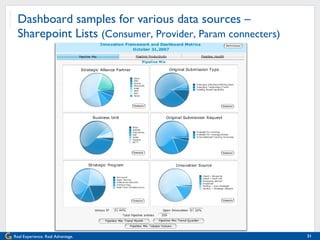
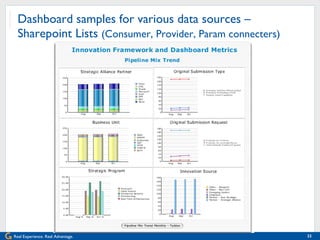
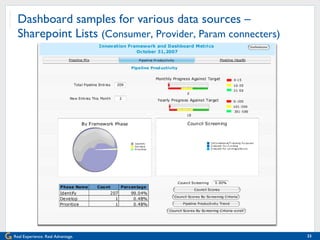
Dashboard samples for various data sources –  Sharepoint Lists  (Consumer, Provider, Param connecters)
Dashboard samples for various data sources –  Sharepoint Lists (Consumers, Providers, Params) Xcelsius for SharePoint server (XSP) installs a web part container into the SharePoint web part library.  After installation and configuration, the web part container can be added to the Web Part Gallery within SharePoint and any user with the appropriate rights can add the web part container to a page within the site. The slides in the previous dashboards depict point in time, trends and scorecard features
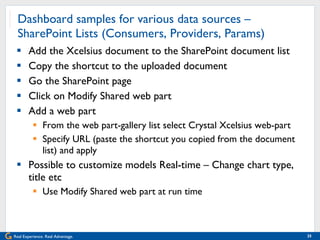
Dashboard samples for various data sources –  SharePoint Lists (Consumers, Providers, Params) Add the Xcelsius document to the SharePoint document list Copy the shortcut to the uploaded document Go the SharePoint page  Click on Modify Shared web part  Add a web part From the web part-gallery list select Crystal Xcelsius web-part  Specify URL (paste the shortcut you copied from the document list) and apply Possible to customize models Real-time – Change chart type, title etc Use Modify Shared web part at run time
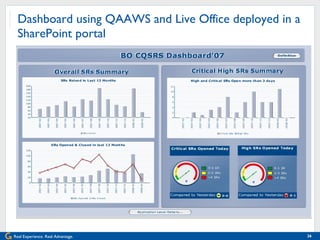
Dashboard using QAAWS and Live Office deployed in a SharePoint portal
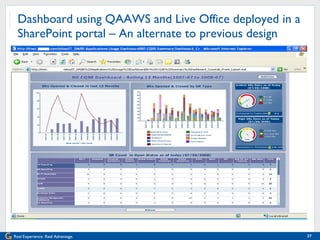
Dashboard using QAAWS and Live Office deployed in a SharePoint portal – An alternate to previous design
Dashboard using QAAWS and Live Office deployed in a SharePoint portal Xcelsius dashboards can be viewed in Infoview utilizing the Business Objects login credentials Xcelsius dashboards can be deployed to a SharePoint portal which may be the corporate information sharing portal Data from SSRS, QAAWS, LiveOffice or SharePoint lists can be used in Xcelsius dashboards deployed in the SharePoint portals
Tips and Tricks in implementing dashboards Drilling in an Xcelsius dashboard Using the same layout as the main dashboard with further dimensionality (Drill down) Using a different layout as the main dashboard with more dimensionality (Drill through) Using web intelligence reports Security in an Xcelsius dashboard Security can be implemented in an Xcelsius dashboard in a way similar to implementing security in the Web Intelligence reports The @variable(‘BOUSER’) can be used to implement security in the dashboards
Tips and Tricks in implementing dashboards Connectivity to the various data sources Xcelsius can fetch data from any database using the universe layer integrated with Live Office and Query As a Web Service Xcelsius can talk to the existing SQL Server Reporting Services and fetch data using the Reporting Services connector Xcelsius can fetch data from the SharePoint lists using consumer and update information using provider connectors Deploy to other portal and embed in other objects Xcelsius dashboards can be deployed to the Sharepoint portals  Xcelcius dashboards can be embedded in Crystal reports  Xcelsius dashboards  can be embedded in Powerpoint presentations so that data can be displayed as and when a presentation is given to the management
Tips and Tricks in implementing dashboards Creating new chart templates Charts can be overlayed over each other and parts of information can be shown and hidden by using display features When charts with different axes are overlayed over each other calculations should be made such that the axis values synchronize Performance parameters Xcelsius requires a robust data model so that summarized data can be fetched in few seconds or less Leverage parameters at the database, universe and report levels when fetching data
Tips and Tricks in implementing dashboards Relative URL for Deployments Relative URLs should be used for the QAAWS queries and drill down reports that will facilitate migration of dashboard from one environment to the other.  Sample:  /dswsbobje/qaawsservices/EMD_FinQ?WSDL ../../../../opendoc/openDocument.jsp?sType=wid&sDocName=EMD_Finance_A_Level1&sReportName=Customer Orders – Daily Dynamic table size When implementing security in the dashboard, some users will have more number of metrics than the others In the table of metrics, it is advisable to have the vertical scroll bar that will be displayed for users with metrics spanning more then the screen height
Tips and Tricks in implementing dashboards Excel Model A lot of flexibility is achieved by modeling the excel diligently The controls, dimensions, data for the charts, tables, drills, PDF documents can be placed in different tabs in an excel sheet so that the model can be easily extensible and maintainable The naming convention for the data should be standardized across all excel models so that users can find what each of the tabs refer to Coloring can specified for input, logic and dynamic visibility components, a legend describing them in a sheet VLOOKUP, HLOOKUP should be used on smaller data sets For larger data sets aggregation needs to be done in the server side
Tips and Tricks in implementing dashboards Formatting For displaying status symbols when the number of KPIs are not fixed, use the +, = and - symbols to indicate Green, Yellow and Red Running a SWF Hosted on a Web Server The content in a swf file attempting to call content files (images, XML data, etc.) using a URL file reference will not be able displayed unless the local drive has been listed as a trusted location in the Flash Player security settings When running a swf file from Infoview, a cross-domain policy file needs to be placed in the in the Web server root. If not, the swf file may not be able to connect to the Web server to get data when you run the SWF hosted on your Web server.
Questions? SAP Help portal http://help.sap.com/businessobject/product_guides/ Aparna Srinivasan [email_address] 91-91764 09949
[ ] Thank you for participating.   SESSION CODE:  513 Please remember to complete and return your  evaluation form following this session. For ongoing education on this area of focus, visit the Year-Round Community page at  www.asug.com/yrc

Xcelsius tips and tricks for your Enterprise

  • 1.
    Xcelsius Tips andTricks Aparna Srinivasan
  • 2.
    Agenda About mycompany Introduction to Xcelsius dashboards Dashboard samples for various data sources Tips and Tricks in implementing these dashboards Questions
  • 3.
    Hexaware - AThumbnail View Key Facts 2009 Revenues : ~USD 215 Million 6000+ Employees Globally Ranked No. 18 in the NASSCOM’s Top 20 IT Software and Services Exporters from India. Listed in India and UK stock exchanges Financial results as per GAAP Strong Quality & Process Focus Certified SEI CMMi Level 5, ISO 9001:2000, Tick IT, ISO 27001 and SAS 70 Leadership in Implementation of Enterprise Products (Oracle, Peoplesoft, SAP, Eagle) Focused in Domains: Healthcare, Banking & Financial Services, TTHL & HR IT Service Provider Segment Innovative IP based solutions Services Application Management Enterprise Packages Business Analytics & Intelligence Independent Testing HR IT 31 locations worldwide Supporting 157 clients in 25 countries 1/3 rd are FORTUNE / GLOBAL 500 clients 2009
  • 4.
    Hexaware’s BI practice“ Hexaware helps Organizations realize their BI vision through high end domain consulting & efficient development & deployment of their DW/ BI environment”. We architect, implement & maintain Enterprise D/W BI & A solutions We set up Large/Medium/ Small BICOE We implement packaged analytics We solve point BI needs across multiple platforms We provide solutions for Master Data Management, Metadata repository and Data Quality Featured as BO Specialized vendor by Gartner SAP BO Upgrades & Migration 40% faster deployment Efficient Global roll-outs Save up-to 20% on Time & Costs BO environment consolidation Save infrastructure costs up-to 20% 70 Satisfied Customers with more than 50 IP’s
  • 5.
    Hexaware’s BI practice“ Hexaware helps Organizations realize their BI vision through high end domain consulting & efficient development & deployment of their DW/ BI environment”. We architect, implement & maintain Enterprise D/W BI & A solutions We set up Large/Medium/ Small BICOE We implement packaged analytics We solve point BI needs across multiple platforms We provide solutions for Master Data Management, Metadata repository and Data Quality Featured as BO Specialized vendor by Gartner SAP BO Upgrades & Migration 40% faster deployment Efficient Global roll-outs Save up-to 20% on Time & Costs BO environment consolidation Save infrastructure costs up-to 20% 70 Satisfied Customers with more than 50 IP’s
  • 6.
    Client portfolio Clientis a worldwide information technology company with approximately 23,000 employees serving commercial organizations and government agencies throughout the world Around 7,000 users use the Business Objects installation with 10,000+ reports
  • 7.
    Introduction to Xcelsiusdashboards Xcelsius provides rich visualization graphics to create dashboards right from senior management to power users and regular business users in an organization Xcelsius dashboard can implement object level security as well as data level security personalizing dashboards Xcelsius can fetch data from various data sources that makes dashboard development easier Xcelsius dashboards can be deployed to various portals also utilizing the portal data in some cases
  • 8.
    Dashboard samples forvarious data sources – QAAWS and Live Office deployed in Infoview
  • 9.
    Dashboard samples forvarious data sources – QAAWS and Live Office deployed in Infoview Live Office integrates with Microsoft Office, embedding up-to-the-minute corporate data in Microsoft PowerPoint, Excel, and Word documents Query as a Web Service (QAAWS) lets you create custom web services for specific queries using Business Objects Web Services.
  • 10.
    Dashboard samples forvarious data sources – QAAWS and Live Office deployed in Infoview The server component of QAAWS isinstalled automatically when BusinessObjects Enterprise XI Release 2 Service Pack 2 with Web Intelligence. The server component of Live Office is installed automatically with BusinessObjects Premium while keys need to be purchased for Professional edition. Client tool for QAAWS needs to be purchased as a separate license. Client components of both Live Office and QAAWS is available in the collaterals CD in the Adds-on folder.
  • 11.
    Dashboard samples forvarious data sources – Drill down report from the main dashboard
  • 12.
    Dashboard samples forvarious data sources – Drill down report from the main dashboard Drill down can be provided from the main dashboard to an other Xcelsius dashboard with more details or a Web intelligence report Even PDF documents that have been generated from other tools can be viewed in the Xcelsius dashboards Flash variables can be used to receive data from the main dashboard
  • 13.
    Dashboard samples forvarious data sources – SSRS (Reporting Service connecter )
  • 14.
    Dashboard samples forvarious data sources – SSRS (Reporting Service connecter) Data from SQL Server reporting services can source the Xcelsius dashboards Xcelsius Reporting Services (XRS) gateway needs to be installed on a web server where IIS and the .NET framework are installed and configured
  • 15.
    Dashboard samples forvarious data sources – SSRS (Reporting Service connector)
  • 16.
    Dashboard samples forvarious data sources – SSRS (Reporting Service connecter)
  • 17.
    Dashboard samples forvarious data sources – SSRS (Reporting Service connecter)
  • 18.
    Dashboard samples forvarious data sources – SSRS (Reporting Service connecter)
  • 19.
    Dashboard samples forvarious data sources – SSRS (Reporting Service connecter)
  • 20.
    Dashboard samples forvarious data sources – SSRS (Reporting Service connecter)
  • 21.
    Dashboard samples forvarious data sources – Sharepoint Lists (Consumer, Provider, Param connecters)
  • 22.
    Dashboard samples forvarious data sources – Sharepoint Lists (Consumer, Provider, Param connecters)
  • 23.
    Dashboard samples forvarious data sources – Sharepoint Lists (Consumer, Provider, Param connecters)
  • 24.
    Dashboard samples forvarious data sources – Sharepoint Lists (Consumers, Providers, Params) Xcelsius for SharePoint server (XSP) installs a web part container into the SharePoint web part library. After installation and configuration, the web part container can be added to the Web Part Gallery within SharePoint and any user with the appropriate rights can add the web part container to a page within the site. The slides in the previous dashboards depict point in time, trends and scorecard features
  • 25.
    Dashboard samples forvarious data sources – SharePoint Lists (Consumers, Providers, Params) Add the Xcelsius document to the SharePoint document list Copy the shortcut to the uploaded document Go the SharePoint page Click on Modify Shared web part Add a web part From the web part-gallery list select Crystal Xcelsius web-part Specify URL (paste the shortcut you copied from the document list) and apply Possible to customize models Real-time – Change chart type, title etc Use Modify Shared web part at run time
  • 26.
    Dashboard using QAAWSand Live Office deployed in a SharePoint portal
  • 27.
    Dashboard using QAAWSand Live Office deployed in a SharePoint portal – An alternate to previous design
  • 28.
    Dashboard using QAAWSand Live Office deployed in a SharePoint portal Xcelsius dashboards can be viewed in Infoview utilizing the Business Objects login credentials Xcelsius dashboards can be deployed to a SharePoint portal which may be the corporate information sharing portal Data from SSRS, QAAWS, LiveOffice or SharePoint lists can be used in Xcelsius dashboards deployed in the SharePoint portals
  • 29.
    Tips and Tricksin implementing dashboards Drilling in an Xcelsius dashboard Using the same layout as the main dashboard with further dimensionality (Drill down) Using a different layout as the main dashboard with more dimensionality (Drill through) Using web intelligence reports Security in an Xcelsius dashboard Security can be implemented in an Xcelsius dashboard in a way similar to implementing security in the Web Intelligence reports The @variable(‘BOUSER’) can be used to implement security in the dashboards
  • 30.
    Tips and Tricksin implementing dashboards Connectivity to the various data sources Xcelsius can fetch data from any database using the universe layer integrated with Live Office and Query As a Web Service Xcelsius can talk to the existing SQL Server Reporting Services and fetch data using the Reporting Services connector Xcelsius can fetch data from the SharePoint lists using consumer and update information using provider connectors Deploy to other portal and embed in other objects Xcelsius dashboards can be deployed to the Sharepoint portals Xcelcius dashboards can be embedded in Crystal reports Xcelsius dashboards can be embedded in Powerpoint presentations so that data can be displayed as and when a presentation is given to the management
  • 31.
    Tips and Tricksin implementing dashboards Creating new chart templates Charts can be overlayed over each other and parts of information can be shown and hidden by using display features When charts with different axes are overlayed over each other calculations should be made such that the axis values synchronize Performance parameters Xcelsius requires a robust data model so that summarized data can be fetched in few seconds or less Leverage parameters at the database, universe and report levels when fetching data
  • 32.
    Tips and Tricksin implementing dashboards Relative URL for Deployments Relative URLs should be used for the QAAWS queries and drill down reports that will facilitate migration of dashboard from one environment to the other. Sample: /dswsbobje/qaawsservices/EMD_FinQ?WSDL ../../../../opendoc/openDocument.jsp?sType=wid&sDocName=EMD_Finance_A_Level1&sReportName=Customer Orders – Daily Dynamic table size When implementing security in the dashboard, some users will have more number of metrics than the others In the table of metrics, it is advisable to have the vertical scroll bar that will be displayed for users with metrics spanning more then the screen height
  • 33.
    Tips and Tricksin implementing dashboards Excel Model A lot of flexibility is achieved by modeling the excel diligently The controls, dimensions, data for the charts, tables, drills, PDF documents can be placed in different tabs in an excel sheet so that the model can be easily extensible and maintainable The naming convention for the data should be standardized across all excel models so that users can find what each of the tabs refer to Coloring can specified for input, logic and dynamic visibility components, a legend describing them in a sheet VLOOKUP, HLOOKUP should be used on smaller data sets For larger data sets aggregation needs to be done in the server side
  • 34.
    Tips and Tricksin implementing dashboards Formatting For displaying status symbols when the number of KPIs are not fixed, use the +, = and - symbols to indicate Green, Yellow and Red Running a SWF Hosted on a Web Server The content in a swf file attempting to call content files (images, XML data, etc.) using a URL file reference will not be able displayed unless the local drive has been listed as a trusted location in the Flash Player security settings When running a swf file from Infoview, a cross-domain policy file needs to be placed in the in the Web server root. If not, the swf file may not be able to connect to the Web server to get data when you run the SWF hosted on your Web server.
  • 35.
    Questions? SAP Helpportal http://help.sap.com/businessobject/product_guides/ Aparna Srinivasan [email_address] 91-91764 09949
  • 36.
    [ ] Thankyou for participating. SESSION CODE: 513 Please remember to complete and return your evaluation form following this session. For ongoing education on this area of focus, visit the Year-Round Community page at www.asug.com/yrc