Title: SQLServerReportingServicesTutorial:Download &Install
Keywords: sql serverreportingservices,sql serverreportingservicesdownload,how toinstall sql
serverreportingservices,whatissql serverreportingservices,sql serverreportingservices
requirements,sql serverreportingservicesconfiguration,sql serverreportingservicesversions,
powerbi reportserver
Description: What’s SQLServerReportingServices?Whatcan itdo? How to downloadandinstall
SQL ServerReportingServices?Findmore relatedinformationhere!
URL: https://www.minitool.com/news/sql-server-reporting-services.html
Summary: This article created by MiniTool official gives a brief introduction to Microsoft SQL
ServerReportingServices.Itcoversitsdefinition,versions,softwarerequirements,downloading,
installation,aswell asconfiguration.
What Is SQL Server Reporting Services?
SQL ServerReportingServices(SSRS) is aserver-basedreportgeneratingsoftware systemdeveloped
by Microsoft.It’spart of the suite of MicrosoftSQL ServerservicesthatcontainSQLServerAnalysis
Services(SSAS) andSQLServerIntegrationServices(SSIS).
SQL Server Reporting Services Versions
 Initial/firstversionasanadd-onto SQL Server2000 in 2004
 SecondversionwithSQLServer2005 in November2005
 Thirdversion aspart of SQL Server2008 R2 in April 2010
 Fourthversionaspart of SQL Server2012 inMarch 2012
 Fifthversionaspart of SQL Server2014 inMarch 2014
 Sixthversionaspartof SQL Server2016 inMarch 2016
 Seventhversionaspartof SQL Server2017 inOctober2017
 Eighthversionaspart of SQL Server2019 in November2019
Microsoft SQL Server Reporting Services Requirements
 Operatingsystem (OS):WindowsServer2016, WindowsServer2019, or Windows10
 Framework: .NET 4.7 or later
 Database: SQL ServerDatabase Engine 2012 SP4 or laterto save the report database
https://www.minitool.com/news/microsoft-intune.html
MS SQL Server Reporting Services Download
Where to downloadthe serverreportingservicesof SQL?Of course,on Microsoft’sofficial website.
Justgo to https://www.microsoft.com/en-us/download/details.aspx?id=100122, selectthe language
youprefer,andclickthe Downloadbutton.
DownloadMicrosoftSQLServerEvaluationEdition>>
How to Install SQL Server Reporting Services?
AfterdownloadingSSRS,youcaninstall itonyour machine followingthe below steps.
1. Findand double-clicktoopen SQLServerReportingService.exe.
2. In the pop-upwindow, clickthe Install ReportingServices tocontinue.
Alt=install MicrosoftSQLserverreportservices
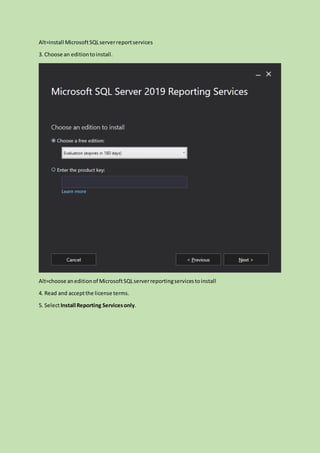
3. Choose an editiontoinstall.
Alt=choose aneditionof MicrosoftSQLserverreportingservicestoinstall
4. Read and acceptthe license terms.
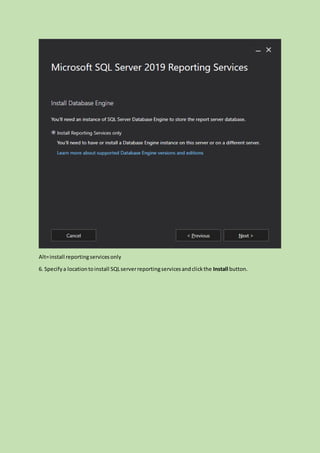
5. SelectInstall Reporting Servicesonly.
Alt=install reportingservicesonly
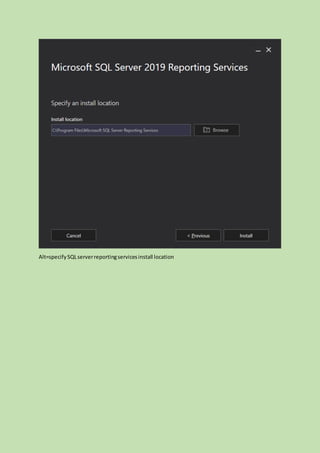
6. Specifya locationtoinstall SQLserverreportingservicesandclickthe Install button.
Alt=specifySQLserverreportingservicesinstall location
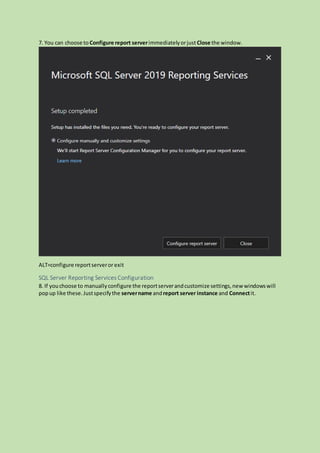
7. You can choose to Configure report serverimmediatelyorjust Close the window.
ALT=configure reportserveror exit
SQL Server Reporting Services Configuration
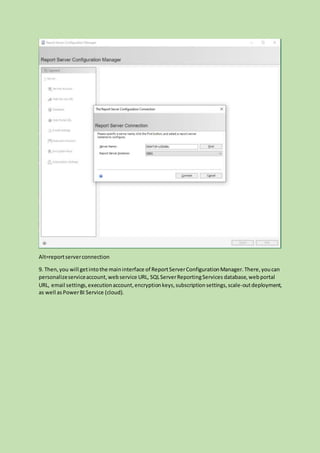
8. If youchoose to manuallyconfigure the reportserverandcustomize settings,new windowswill
popup like these.Justspecifythe servername andreport server instance and Connectit.
Alt=reportserverconnection
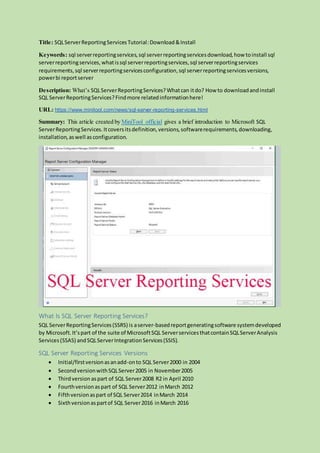
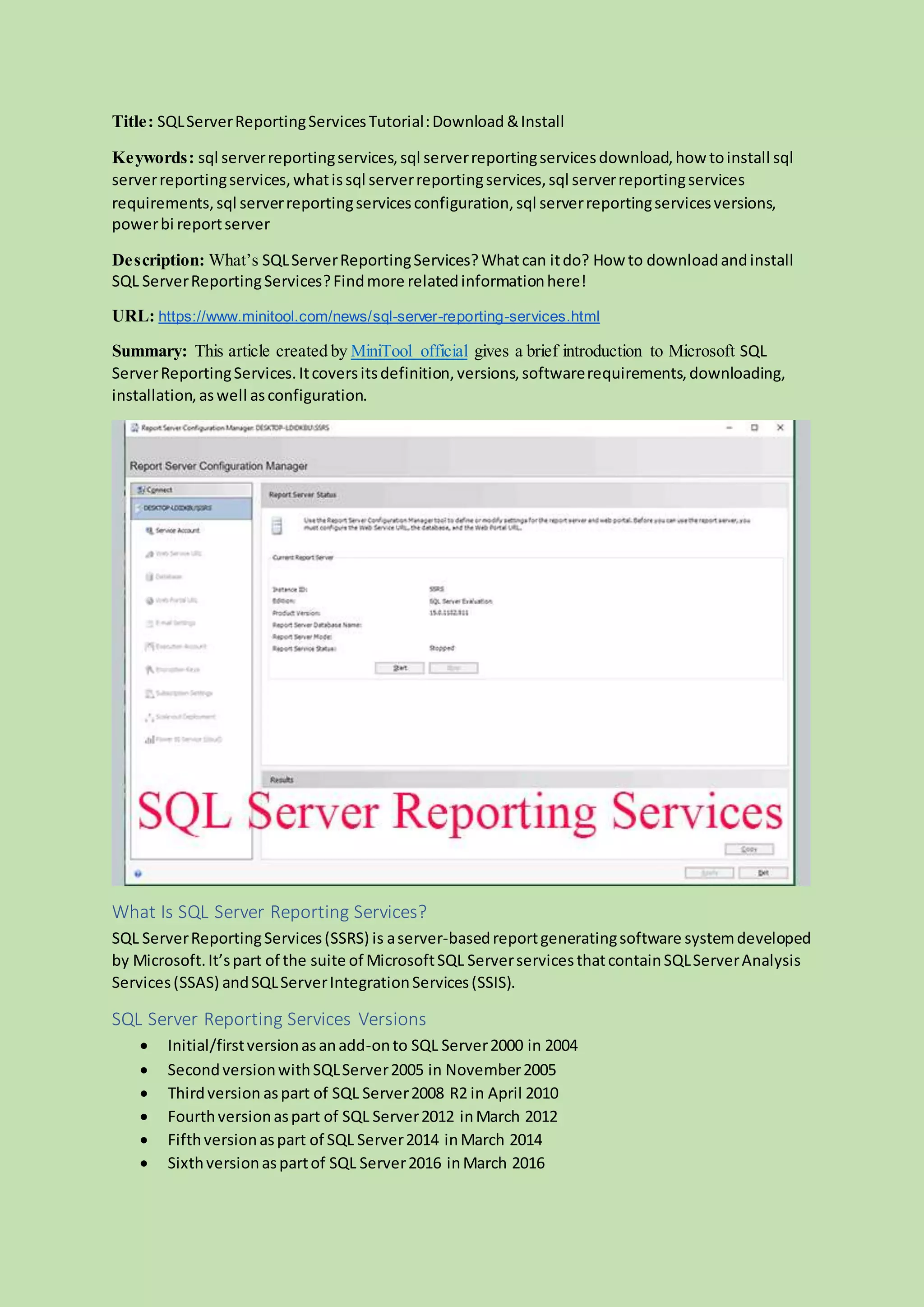
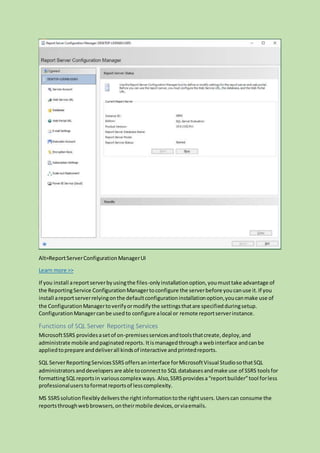
9. Then,you will getintothe maininterface of ReportServerConfigurationManager.There,youcan
personalizeserviceaccount,webservice URL, SQLServerReportingServices database,webportal
URL, email settings,executionaccount,encryptionkeys,subscriptionsettings,scale-outdeployment,
as well asPowerBI Service (cloud).
Alt=ReportServerConfigurationManagerUI
Learn more >>
If you install areportserverbyusingthe files-onlyinstallationoption,youmusttake advantage of
the ReportingService ConfigurationManagertoconfigure the serverbefore youcanuse it.If you
install areportserverrelyingonthe defaultconfigurationinstallationoption,youcanmake use of
the ConfigurationManagertoverifyormodifythe settingsthatare specifiedduringsetup.
ConfigurationManagercanbe usedto configure alocal or remote reportserverinstance.
Functions of SQL Server Reporting Services
MicrosoftSSRS providesasetof on-premisesservicesandtoolsthatcreate,deploy,and
administrate mobile andpaginatedreports. Itismanagedthrougha webinterface andcanbe
appliedtoprepare anddeliverall kindsof interactive andprintedreports.
SQL ServerReportingServicesSSRS offersaninterface forMicrosoftVisual StudiosothatSQL
administratorsanddevelopers are able toconnectto SQL databasesandmake use of SSRS toolsfor
formattingSQLreportsin variouscomplex ways. Also,SSRSprovidesa“reportbuilder”tool forless
professionaluserstoformatreportsof lesscomplexity.
MS SSRSsolutionflexiblydeliversthe rightinformationtothe rightusers.Userscan consume the
reportsthroughwebbrowsers,ontheirmobile devices,orviaemails.
Also read: [Look] SQLServerConfiguration Manager:Definition/Location/Uses
Extended Reading: Power BI Report Server
PowerBI ReportServerisan on-premisesreportserverwithawebportal inwhichyoudisplayand
manage reportsand KPIs(keyperformance indicator).Togetherwithitcome to the toolsforcreating
PowerBI reports, KPIs,mobilereports,and paginatedreports.Yourusersare able to accessthose
reportsindifferentwaysincludingbya webbrowser,mobiledevice,ore-mail.
Alt=PowerBI ReportServer

Sql server reporting services

  • 1.
    Title: SQLServerReportingServicesTutorial:Download &Install Keywords:sql serverreportingservices,sql serverreportingservicesdownload,how toinstall sql serverreportingservices,whatissql serverreportingservices,sql serverreportingservices requirements,sql serverreportingservicesconfiguration,sql serverreportingservicesversions, powerbi reportserver Description: What’s SQLServerReportingServices?Whatcan itdo? How to downloadandinstall SQL ServerReportingServices?Findmore relatedinformationhere! URL: https://www.minitool.com/news/sql-server-reporting-services.html Summary: This article created by MiniTool official gives a brief introduction to Microsoft SQL ServerReportingServices.Itcoversitsdefinition,versions,softwarerequirements,downloading, installation,aswell asconfiguration. What Is SQL Server Reporting Services? SQL ServerReportingServices(SSRS) is aserver-basedreportgeneratingsoftware systemdeveloped by Microsoft.It’spart of the suite of MicrosoftSQL ServerservicesthatcontainSQLServerAnalysis Services(SSAS) andSQLServerIntegrationServices(SSIS). SQL Server Reporting Services Versions  Initial/firstversionasanadd-onto SQL Server2000 in 2004  SecondversionwithSQLServer2005 in November2005  Thirdversion aspart of SQL Server2008 R2 in April 2010  Fourthversionaspart of SQL Server2012 inMarch 2012  Fifthversionaspart of SQL Server2014 inMarch 2014  Sixthversionaspartof SQL Server2016 inMarch 2016
  • 2.
     Seventhversionaspartof SQLServer2017 inOctober2017  Eighthversionaspart of SQL Server2019 in November2019 Microsoft SQL Server Reporting Services Requirements  Operatingsystem (OS):WindowsServer2016, WindowsServer2019, or Windows10  Framework: .NET 4.7 or later  Database: SQL ServerDatabase Engine 2012 SP4 or laterto save the report database https://www.minitool.com/news/microsoft-intune.html MS SQL Server Reporting Services Download Where to downloadthe serverreportingservicesof SQL?Of course,on Microsoft’sofficial website. Justgo to https://www.microsoft.com/en-us/download/details.aspx?id=100122, selectthe language youprefer,andclickthe Downloadbutton. DownloadMicrosoftSQLServerEvaluationEdition>> How to Install SQL Server Reporting Services? AfterdownloadingSSRS,youcaninstall itonyour machine followingthe below steps. 1. Findand double-clicktoopen SQLServerReportingService.exe. 2. In the pop-upwindow, clickthe Install ReportingServices tocontinue.
  • 3.
    Alt=install MicrosoftSQLserverreportservices 3. Choosean editiontoinstall. Alt=choose aneditionof MicrosoftSQLserverreportingservicestoinstall 4. Read and acceptthe license terms. 5. SelectInstall Reporting Servicesonly.
  • 4.
    Alt=install reportingservicesonly 6. Specifyalocationtoinstall SQLserverreportingservicesandclickthe Install button.
  • 5.
  • 6.
    7. You canchoose to Configure report serverimmediatelyorjust Close the window. ALT=configure reportserveror exit SQL Server Reporting Services Configuration 8. If youchoose to manuallyconfigure the reportserverandcustomize settings,new windowswill popup like these.Justspecifythe servername andreport server instance and Connectit.
  • 7.
    Alt=reportserverconnection 9. Then,you willgetintothe maininterface of ReportServerConfigurationManager.There,youcan personalizeserviceaccount,webservice URL, SQLServerReportingServices database,webportal URL, email settings,executionaccount,encryptionkeys,subscriptionsettings,scale-outdeployment, as well asPowerBI Service (cloud).
  • 8.
    Alt=ReportServerConfigurationManagerUI Learn more >> Ifyou install areportserverbyusingthe files-onlyinstallationoption,youmusttake advantage of the ReportingService ConfigurationManagertoconfigure the serverbefore youcanuse it.If you install areportserverrelyingonthe defaultconfigurationinstallationoption,youcanmake use of the ConfigurationManagertoverifyormodifythe settingsthatare specifiedduringsetup. ConfigurationManagercanbe usedto configure alocal or remote reportserverinstance. Functions of SQL Server Reporting Services MicrosoftSSRS providesasetof on-premisesservicesandtoolsthatcreate,deploy,and administrate mobile andpaginatedreports. Itismanagedthrougha webinterface andcanbe appliedtoprepare anddeliverall kindsof interactive andprintedreports. SQL ServerReportingServicesSSRS offersaninterface forMicrosoftVisual StudiosothatSQL administratorsanddevelopers are able toconnectto SQL databasesandmake use of SSRS toolsfor formattingSQLreportsin variouscomplex ways. Also,SSRSprovidesa“reportbuilder”tool forless professionaluserstoformatreportsof lesscomplexity. MS SSRSsolutionflexiblydeliversthe rightinformationtothe rightusers.Userscan consume the reportsthroughwebbrowsers,ontheirmobile devices,orviaemails.
  • 9.
    Also read: [Look]SQLServerConfiguration Manager:Definition/Location/Uses Extended Reading: Power BI Report Server PowerBI ReportServerisan on-premisesreportserverwithawebportal inwhichyoudisplayand manage reportsand KPIs(keyperformance indicator).Togetherwithitcome to the toolsforcreating PowerBI reports, KPIs,mobilereports,and paginatedreports.Yourusersare able to accessthose reportsindifferentwaysincludingbya webbrowser,mobiledevice,ore-mail. Alt=PowerBI ReportServer