Vsphere 5
Marco van der Hart   Sales Specialist ttec
01                               Vsphere 5
                                                                  vSphere 5.0 – What’s New


© transtec AG 2010 || HauptversammlungExtended Board March 2011
© transtec AG || Products & Solutions @                                                      24.06.2010 16.03.2011 || 2
                                                                                                        || 2
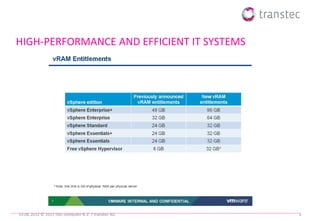
HIGH-PERFORMANCE AND EFFICIENT IT SYSTEMS


19.06.2012 © 2012 ttec computer B.V. / transtec AG   3
01                               Vsphere 5
                                                                  vSphere 5 core component


© transtec AG 2010 || HauptversammlungExtended Board March 2011
© transtec AG || Products & Solutions @                                                      24.06.2010 16.03.2011 || 4
                                                                                                        || 4
vSphere 5.0 CLI Components
   ESXi Shell
         Rebranded Tech Support Mode
         Local and remote (SSH)
   vCLI
      ‘esxcli’ Command Set
                                             ESXi Shell     vCLI
             Local and remote CLI
             New and improved in 5.0
         ‘vicfg’ Command Set
             Remote CLI Only
         Other Commands:
            vmware-cmd, vmkfstools, etc.      vMA        PowerCLI
      vCLI available for Linux and Windows
   vMA
      vCLI Appliance
   PowerCLI
         Windows CLI Tool

19.06.2012 © 2010 transtec AG                                        5
What is Auto Deploy
• New host deployment method introduced in vSphere 5.0
  • Based on PXE Boot
  • Works with Image Builder, vCenter Server, and Host Profiles
  • How it works:
     •PXE boot the server
     •ESXi image profile loaded into host memory via Auto Deploy Server
     •Configuration applied using Answer File / Host Profile
     •Host placed/connected in vCenter
  • Benefits
     •No boot disk
     •Quickly and easily deploy large numbers of ESXi hosts
     •Share a standard ESXi image across many hosts
     •Host image decoupled from the physical server
               • Recover host w/out recovering hardware or having to restore from backup

19.06.2012 © 2012 ttec computer B.V. / transtec AG                                         6
New Virtual Machine Features
vSphere 5.0 supports the industry’s most capable virtual machines
                                       Items which require HW version 8 in Italics

          VM Scalability
                                         32 virtual CPUs per            1TB RAM per VM
                                          VM                             4x previous capabilities!


                                         3D graphics
           Richer Desktop
             Experience


                                         Client-connected USB           VM BIOS boot order config API and
                                          devices                         PowerCLI interface
                                         USB 3.0 devices                EFI BIOS
                                         Smart Card Readers for
          Broader Device                  VM Console Access
             Coverage

                                         UI for multi-core virtual      Support for Mac OS X
                                          CPUs                            servers
            Other new
                                         Extended VMware Tools
             features
                                          compatibility

19.06.2012 © 2012 ttec computer B.V. / transtec AG                                                            7
vSphere HA Primary Components


Every host runs an agent
                                                                ESX 01   ESX 03
   Referred to as ‘FDM’ or Fault Domain Manger
   One of the agents within the cluster is chosen
     to assume the role of the Master
       There is only one Master per cluster during
       normal operations
   All other agents assume the role of Slaves
There is no more Primary/Secondary concept with
   vSphere HA
                                                                ESX 02   ESX 04


                                                      vCenter
 19.06.2012 © 2012 ttec computer B.V. / transtec AG                               8
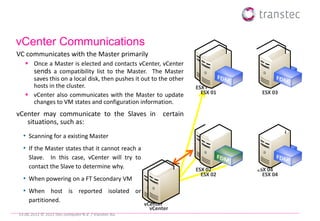
vCenter Communications
VC communicates with the Master primarily
    Once a Master is elected and contacts vCenter, vCenter
     sends a compatibility list to the Master. The Master
     saves this on a local disk, then pushes it out to the other
     hosts in the cluster.                                         ESX 01     ESX 03
    vCenter also communicates with the Master to update             ESX 01     ESX 03
     changes to VM states and configuration information.
vCenter may communicate to the Slaves in certain
   situations, such as:
  • Scanning for a existing Master
  • If the Master states that it cannot reach a
     Slave. In this case, vCenter will try to
     contact the Slave to determine why.                           ESX 02     ESX 04
                                                                     ESX 02     ESX 04
  • When powering on a FT Secondary VM
  • When host is reported isolated or
     partitioned.
                                                     vCenter
                                                       vCenter
19.06.2012 © 2012 ttec computer B.V. / transtec AG
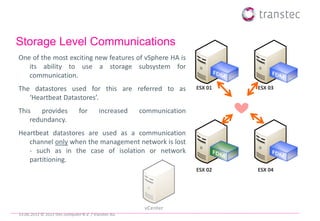
Storage Level Communications
One of the most exciting new features of vSphere HA is
   its ability to use a storage subsystem for
   communication.
The datastores used for this are referred to as                      ESX 01   ESX 03
   ‘Heartbeat Datastores’.
This    provides               for       increased   communication
    redundancy.
Heartbeat datastores are used as a communication
   channel only when the management network is lost
   - such as in the case of isolation or network
   partitioning.
                                                                     ESX 02   ESX 04


                                                      vCenter
19.06.2012 © 2012 ttec computer B.V. / transtec AG
03                               Networking Section


© transtec AG 2010 || HauptversammlungExtended Board March 2011
© transtec AG || Products & Solutions @                           24.06.2010 16.03.2011 || 11
                                                                             || 11
New Networking Features
•    Two broad categories of features
•    Network Discovery and Visibility/Monitoring features
    • LLDP
    • NetFlow
    • Port Mirror
•    IO Consolidation (10 Gig) related features
    • New traffic types
        • User Defined Network Resource Pool ( VM traffic )
        • Host Based Replication traffic
•     802.1p Tagging (QoS)
•    TCP IP stack improvement
    • Vmknics will see following improvement
            •      Higher throughput with small messages
            •      Better IOPs scaling for iSCSI traffic
19.06.2012 © 2010 transtec AG                                 12
Network I/O Control Enhancements – User-defined Network RP


19.06.2012 © 2012 ttec computer B.V. / transtec AG           13
03                               vStorage
                                                                  What’s New in vStorage


© transtec AG 2010 || HauptversammlungExtended Board March 2011
© transtec AG || Products & Solutions @                                                    24.06.2010 16.03.2011 || 14
                                                                                                      || 14
Introduction to VMFS-5
• Enhanced Scalability
   • Increase the size limits of the filesystem & support much larger single extent
     VMFS-5 volumes.
   • Support for single extent 64TB Datastores
Better Performance
   Uses VAAI locking mechanism with more tasks
Easier to manage and less overhead
   Space reclamation on thin provisioned LUNs
   Smaller sub blocks
   Unified Block size


19.06.2012 © 2012 ttec computer B.V. / transtec AG                                    15
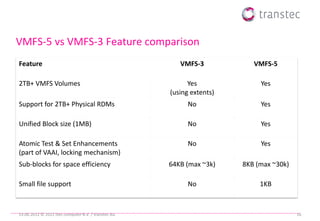
VMFS-5 vs VMFS-3 Feature comparison
Feature                                                 VMFS-3            VMFS-5

2TB+ VMFS Volumes                                          Yes              Yes
                                                     (using extents)
Support for 2TB+ Physical RDMs                             No               Yes

Unified Block size (1MB)                                   No               Yes

Atomic Test & Set Enhancements                             No               Yes
(part of VAAI, locking mechanism)
Sub-blocks for space efficiency                      64KB (max ~3k)    8KB (max ~30k)

Small file support                                         No               1KB


19.06.2012 © 2012 ttec computer B.V. / transtec AG                                      16
VMFS-3 to VMFS-5 Upgrade
• The Upgrade to VMFS-5 is clearly displayed in the vSphere Client under
  Configuration -> Storage view.
• It is also displayed in the Datastores -> Configuration view.
• Non-disruptive upgrades.


19.06.2012 © 2010 transtec AG                                              17
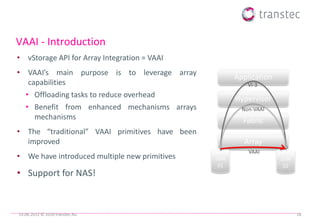
VAAI - Introduction
• vStorage API for Array Integration = VAAI
• VAAI’s main purpose is to leverage array
                                                      Application
   capabilities                                           VI-3
  • Offloading tasks to reduce overhead               Hypervisor
  • Benefit from enhanced mechanisms arrays             Non-VAAI
     mechanisms                                         Fabric
• The “traditional” VAAI primitives have been
  improved                                              Array
                                                          VAAI
• We have introduced multiple new primitives    LUN                 LUN
                                                 01                  02
• Support for NAS!


19.06.2012 © 2010 transtec AG                                             18
Storage vMotion - Introduction

In vSphere 5.0, a number of new enhancements were made to Storage
    vMotion.
    Storage vMotion will work with Virtual Machines that have snapshots,
     which means coexistence with other VMware products & features such as
     VCB, VDR & HBR.
    Storage vMotion will support the relocation of linked clones.
    Storage vMotion has a new use case – Storage DRS – which use Storage
     vMotion for Storage Maintenance Mode & Storage Load Balancing (Space
     or Performance).


19.06.2012 © 2012 ttec computer B.V. / transtec AG                           19
04                               vCenter server
                                                                  What’s New in vCenter Server


© transtec AG 2010 || HauptversammlungExtended Board March 2011
© transtec AG || Products & Solutions @                                                          24.06.2010 16.03.2011 || 20
                                                                                                            || 20
What’s New in vCenter Server
The vSphere Web Client is tailored to met the needs of VM Administrators in the
   first release. This includes:
   VM Management
        VM Provisioning
        Edit VM, VM power ops, Snapshots, Migration
        VM Resource Management
        View all vSphere objects (hosts, clusters, datastores, folders, etc)
   Basic Health Monitoring
   Viewing the VM console remotely
   Search through large, complex environments
        Save search queries, and quickly run them to find detailed information
   vApp Management
        vApp Provisioning, vApp Editing, vApp Power Operations
19.06.2012 © 2010 transtec AG                                                     21
Configuration


19.06.2012 © 2010 transtec AG B.V. / transtec AG
             2012 ttec computer                    22
Release Enhancement Summary
 Complete re-write of vSphere HA
 Provides a foundation for increased scale and functionality
   Eliminates common issues (DNS resolution)
 Multiple Communication Paths
   Can leverage storage as well as the mgmt network for communications
   Enhances the ability to detect certain types of failures and provides redundancy
 IPv6 Support
 Enhanced Error Reporting
   One log file per host eases troubleshooting efforts
 Enhanced User Interface
 Enhanced Deployment Mechanism

19.06.2012 © 2012 ttec computer B.V. / transtec AG                                     23

ttec vSphere 5

  • 1.
    Vsphere 5 Marco vander Hart Sales Specialist ttec
  • 2.
    01 Vsphere 5 vSphere 5.0 – What’s New © transtec AG 2010 || HauptversammlungExtended Board March 2011 © transtec AG || Products & Solutions @ 24.06.2010 16.03.2011 || 2 || 2
  • 3.
    HIGH-PERFORMANCE AND EFFICIENTIT SYSTEMS 19.06.2012 © 2012 ttec computer B.V. / transtec AG 3
  • 4.
    01 Vsphere 5 vSphere 5 core component © transtec AG 2010 || HauptversammlungExtended Board March 2011 © transtec AG || Products & Solutions @ 24.06.2010 16.03.2011 || 4 || 4
  • 5.
    vSphere 5.0 CLIComponents  ESXi Shell Rebranded Tech Support Mode Local and remote (SSH)  vCLI ‘esxcli’ Command Set ESXi Shell vCLI  Local and remote CLI  New and improved in 5.0 ‘vicfg’ Command Set  Remote CLI Only Other Commands:  vmware-cmd, vmkfstools, etc. vMA PowerCLI vCLI available for Linux and Windows  vMA vCLI Appliance  PowerCLI Windows CLI Tool 19.06.2012 © 2010 transtec AG 5
  • 6.
    What is AutoDeploy • New host deployment method introduced in vSphere 5.0 • Based on PXE Boot • Works with Image Builder, vCenter Server, and Host Profiles • How it works: •PXE boot the server •ESXi image profile loaded into host memory via Auto Deploy Server •Configuration applied using Answer File / Host Profile •Host placed/connected in vCenter • Benefits •No boot disk •Quickly and easily deploy large numbers of ESXi hosts •Share a standard ESXi image across many hosts •Host image decoupled from the physical server • Recover host w/out recovering hardware or having to restore from backup 19.06.2012 © 2012 ttec computer B.V. / transtec AG 6
  • 7.
    New Virtual MachineFeatures vSphere 5.0 supports the industry’s most capable virtual machines Items which require HW version 8 in Italics VM Scalability  32 virtual CPUs per  1TB RAM per VM VM  4x previous capabilities!  3D graphics Richer Desktop Experience  Client-connected USB  VM BIOS boot order config API and devices PowerCLI interface  USB 3.0 devices  EFI BIOS  Smart Card Readers for Broader Device VM Console Access Coverage  UI for multi-core virtual  Support for Mac OS X CPUs servers Other new  Extended VMware Tools features compatibility 19.06.2012 © 2012 ttec computer B.V. / transtec AG 7
  • 8.
    vSphere HA PrimaryComponents Every host runs an agent ESX 01 ESX 03  Referred to as ‘FDM’ or Fault Domain Manger  One of the agents within the cluster is chosen to assume the role of the Master There is only one Master per cluster during normal operations  All other agents assume the role of Slaves There is no more Primary/Secondary concept with vSphere HA ESX 02 ESX 04 vCenter 19.06.2012 © 2012 ttec computer B.V. / transtec AG 8
  • 9.
    vCenter Communications VC communicateswith the Master primarily  Once a Master is elected and contacts vCenter, vCenter sends a compatibility list to the Master. The Master saves this on a local disk, then pushes it out to the other hosts in the cluster. ESX 01 ESX 03  vCenter also communicates with the Master to update ESX 01 ESX 03 changes to VM states and configuration information. vCenter may communicate to the Slaves in certain situations, such as: • Scanning for a existing Master • If the Master states that it cannot reach a Slave. In this case, vCenter will try to contact the Slave to determine why. ESX 02 ESX 04 ESX 02 ESX 04 • When powering on a FT Secondary VM • When host is reported isolated or partitioned. vCenter vCenter 19.06.2012 © 2012 ttec computer B.V. / transtec AG
  • 10.
    Storage Level Communications Oneof the most exciting new features of vSphere HA is its ability to use a storage subsystem for communication. The datastores used for this are referred to as ESX 01 ESX 03 ‘Heartbeat Datastores’. This provides for increased communication redundancy. Heartbeat datastores are used as a communication channel only when the management network is lost - such as in the case of isolation or network partitioning. ESX 02 ESX 04 vCenter 19.06.2012 © 2012 ttec computer B.V. / transtec AG
  • 11.
    03 Networking Section © transtec AG 2010 || HauptversammlungExtended Board March 2011 © transtec AG || Products & Solutions @ 24.06.2010 16.03.2011 || 11 || 11
  • 12.
    New Networking Features • Two broad categories of features • Network Discovery and Visibility/Monitoring features • LLDP • NetFlow • Port Mirror • IO Consolidation (10 Gig) related features • New traffic types • User Defined Network Resource Pool ( VM traffic ) • Host Based Replication traffic • 802.1p Tagging (QoS) • TCP IP stack improvement • Vmknics will see following improvement • Higher throughput with small messages • Better IOPs scaling for iSCSI traffic 19.06.2012 © 2010 transtec AG 12
  • 13.
    Network I/O ControlEnhancements – User-defined Network RP 19.06.2012 © 2012 ttec computer B.V. / transtec AG 13
  • 14.
    03 vStorage What’s New in vStorage © transtec AG 2010 || HauptversammlungExtended Board March 2011 © transtec AG || Products & Solutions @ 24.06.2010 16.03.2011 || 14 || 14
  • 15.
    Introduction to VMFS-5 •Enhanced Scalability • Increase the size limits of the filesystem & support much larger single extent VMFS-5 volumes. • Support for single extent 64TB Datastores Better Performance  Uses VAAI locking mechanism with more tasks Easier to manage and less overhead  Space reclamation on thin provisioned LUNs  Smaller sub blocks  Unified Block size 19.06.2012 © 2012 ttec computer B.V. / transtec AG 15
  • 16.
    VMFS-5 vs VMFS-3Feature comparison Feature VMFS-3 VMFS-5 2TB+ VMFS Volumes Yes Yes (using extents) Support for 2TB+ Physical RDMs No Yes Unified Block size (1MB) No Yes Atomic Test & Set Enhancements No Yes (part of VAAI, locking mechanism) Sub-blocks for space efficiency 64KB (max ~3k) 8KB (max ~30k) Small file support No 1KB 19.06.2012 © 2012 ttec computer B.V. / transtec AG 16
  • 17.
    VMFS-3 to VMFS-5Upgrade • The Upgrade to VMFS-5 is clearly displayed in the vSphere Client under Configuration -> Storage view. • It is also displayed in the Datastores -> Configuration view. • Non-disruptive upgrades. 19.06.2012 © 2010 transtec AG 17
  • 18.
    VAAI - Introduction •vStorage API for Array Integration = VAAI • VAAI’s main purpose is to leverage array Application capabilities VI-3 • Offloading tasks to reduce overhead Hypervisor • Benefit from enhanced mechanisms arrays Non-VAAI mechanisms Fabric • The “traditional” VAAI primitives have been improved Array VAAI • We have introduced multiple new primitives LUN LUN 01 02 • Support for NAS! 19.06.2012 © 2010 transtec AG 18
  • 19.
    Storage vMotion -Introduction In vSphere 5.0, a number of new enhancements were made to Storage vMotion.  Storage vMotion will work with Virtual Machines that have snapshots, which means coexistence with other VMware products & features such as VCB, VDR & HBR.  Storage vMotion will support the relocation of linked clones.  Storage vMotion has a new use case – Storage DRS – which use Storage vMotion for Storage Maintenance Mode & Storage Load Balancing (Space or Performance). 19.06.2012 © 2012 ttec computer B.V. / transtec AG 19
  • 20.
    04 vCenter server What’s New in vCenter Server © transtec AG 2010 || HauptversammlungExtended Board March 2011 © transtec AG || Products & Solutions @ 24.06.2010 16.03.2011 || 20 || 20
  • 21.
    What’s New invCenter Server The vSphere Web Client is tailored to met the needs of VM Administrators in the first release. This includes:  VM Management VM Provisioning Edit VM, VM power ops, Snapshots, Migration VM Resource Management View all vSphere objects (hosts, clusters, datastores, folders, etc)  Basic Health Monitoring  Viewing the VM console remotely  Search through large, complex environments Save search queries, and quickly run them to find detailed information  vApp Management vApp Provisioning, vApp Editing, vApp Power Operations 19.06.2012 © 2010 transtec AG 21
  • 22.
    Configuration 19.06.2012 © 2010transtec AG B.V. / transtec AG 2012 ttec computer 22
  • 23.
    Release Enhancement Summary Complete re-write of vSphere HA  Provides a foundation for increased scale and functionality  Eliminates common issues (DNS resolution)  Multiple Communication Paths  Can leverage storage as well as the mgmt network for communications  Enhances the ability to detect certain types of failures and provides redundancy  IPv6 Support  Enhanced Error Reporting  One log file per host eases troubleshooting efforts  Enhanced User Interface  Enhanced Deployment Mechanism 19.06.2012 © 2012 ttec computer B.V. / transtec AG 23