
Certify 10.0.0
Training
By
www.ITJobZone.biz
Worksoft
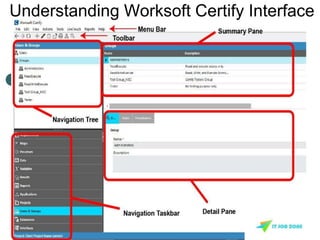
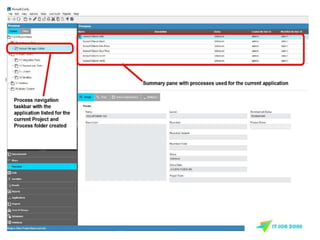
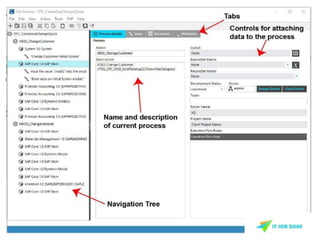
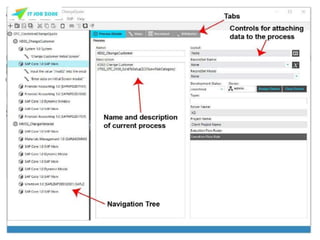
Understanding Worksoft Certify Interface
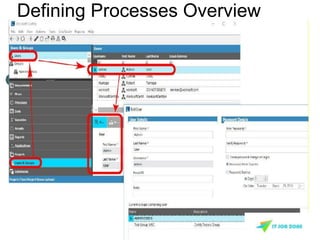
Defining Processes Overview
PROCESS AND DATA
EDITOR OVERVIEW
Join Our Worksoft Certify
Online Training
http://www.itjobzone.biz/Worksoft-certify-training-automation-testing.html
Variables Overview
A variable is a symbol or name that represents a
value.
In Certify, variables are an important component of
the Business Process Certification because they
provide a means of representing the data that you
want to use in your processes.
Variables contain a specific type of value that can be
inserted into a field, acted on, or stored for future
comparison against another value.
Join Our Worksoft Certify
Online Training
http://www.itjobzone.biz/Worksoft-certify-training-automation-testing.html
Defining Variables in Certify
In Certify, there are several types of variables:
 Project Variables — variables that are specific to the
project you are working with and are most commonly
used processes.
 System Variables — pre-defined and used as read-
only variables for data values during test execution.
 User Variables — user-defined variables that can be
used during process execution, such as other system
user IDS and passwords, test dates, test numbers,
tester ID number, etc.
Data Types
Each type of variable contains text, number, or date
values.
 Text — consists of alphanumeric and special
characters. Text variables have a system maximum
length of 65,535 characters (64K).
 Number — consists of integers, floating point
values, and exponential notations.
 Date — consists of any combination of month, day,
and year in any Certify-supported format. Date
variables default to today’s date.
Why to use variables?
Listed below are some scenarios when you might want
to use variables in your processes:
 Field value is unknown before execution.
 A value must be derived from a combination of
other variable values and/or static values.
 Process execution order varies.
 You need to work with system information.
 You need to log into other systems or applications
during execution.
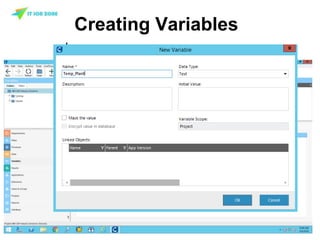
Creating Variables
On the Navigation taskbar, click Variables.
The Variables pane appears.
LAYOUTS AND
RECORDSETS
OVERVIEW
Join Our Worksoft Certify
Online Training
http://www.itjobzone.biz/Worksoft-certify-training-automation-testing.html
What are Layouts?
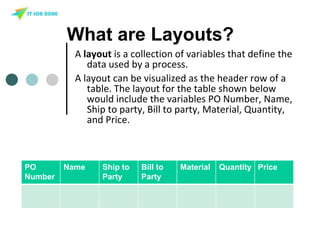
A layout is a collection of variables that define the
data used by a process.
A layout can be visualized as the header row of a
table. The layout for the table shown below
would include the variables PO Number, Name,
Ship to party, Bill to party, Material, Quantity,
and Price.
PO
Number
Name Ship to
Party
Bill to
Party
Material Quantity Price
What are Recordsets?
A recordset contains data values for the variables
defined in a layout. For example, a recordset for
creating a new Purchase Order might contain
multiple data values for PO Number, Name, Ship
to, Bill to and so forth.
Join Our Worksoft Certify
Online Training
http://www.itjobzone.biz/Worksoft-certify-training-automation-testing.html
Get More Worksoft Certify Tutorials By ITJobZone.biz
Worksoft Certify Training Demo
http://bit.ly/worksoft_certify_training_demo
Join our Facebook Page To Learn Worksoft Certify and Get Discounts
Join Our Worksoft Certify
Online Training
http://www.itjobzone.biz/Worksoft-certify-training-automation-testing.html

Worksoft certify online training basic demo tutorial

  • 1.
  • 2.
  • 3.
  • 6.
    PROCESS AND DATA EDITOROVERVIEW Join Our Worksoft Certify Online Training http://www.itjobzone.biz/Worksoft-certify-training-automation-testing.html
  • 8.
    Variables Overview A variableis a symbol or name that represents a value. In Certify, variables are an important component of the Business Process Certification because they provide a means of representing the data that you want to use in your processes. Variables contain a specific type of value that can be inserted into a field, acted on, or stored for future comparison against another value. Join Our Worksoft Certify Online Training http://www.itjobzone.biz/Worksoft-certify-training-automation-testing.html
  • 9.
    Defining Variables inCertify In Certify, there are several types of variables:  Project Variables — variables that are specific to the project you are working with and are most commonly used processes.  System Variables — pre-defined and used as read- only variables for data values during test execution.  User Variables — user-defined variables that can be used during process execution, such as other system user IDS and passwords, test dates, test numbers, tester ID number, etc.
  • 10.
    Data Types Each typeof variable contains text, number, or date values.  Text — consists of alphanumeric and special characters. Text variables have a system maximum length of 65,535 characters (64K).  Number — consists of integers, floating point values, and exponential notations.  Date — consists of any combination of month, day, and year in any Certify-supported format. Date variables default to today’s date.
  • 11.
    Why to usevariables? Listed below are some scenarios when you might want to use variables in your processes:  Field value is unknown before execution.  A value must be derived from a combination of other variable values and/or static values.  Process execution order varies.  You need to work with system information.  You need to log into other systems or applications during execution.
  • 12.
    Creating Variables On theNavigation taskbar, click Variables. The Variables pane appears.
  • 13.
    LAYOUTS AND RECORDSETS OVERVIEW Join OurWorksoft Certify Online Training http://www.itjobzone.biz/Worksoft-certify-training-automation-testing.html
  • 14.
    What are Layouts? Alayout is a collection of variables that define the data used by a process. A layout can be visualized as the header row of a table. The layout for the table shown below would include the variables PO Number, Name, Ship to party, Bill to party, Material, Quantity, and Price. PO Number Name Ship to Party Bill to Party Material Quantity Price
  • 15.
    What are Recordsets? Arecordset contains data values for the variables defined in a layout. For example, a recordset for creating a new Purchase Order might contain multiple data values for PO Number, Name, Ship to, Bill to and so forth. Join Our Worksoft Certify Online Training http://www.itjobzone.biz/Worksoft-certify-training-automation-testing.html
  • 16.
    Get More WorksoftCertify Tutorials By ITJobZone.biz Worksoft Certify Training Demo http://bit.ly/worksoft_certify_training_demo Join our Facebook Page To Learn Worksoft Certify and Get Discounts Join Our Worksoft Certify Online Training http://www.itjobzone.biz/Worksoft-certify-training-automation-testing.html