Step by Step Guide
to build Ionic Hybrid App using
Cordova/Android
By Swagat Parida
Introduction
This tip will guide in developing a basic app Hybrid Mobile App using Ionic, Cordova, Android.
Background
There is a lot of curiosity among developers regarding emerging ionic framework along
with Cordova. Ionic library is built by considering AngularJS as its base. This framework provides mobile-
optimized HTML components to create highly interactive hybrid apps.
Reference: Ionic site for more details.
The below steps/code will help in developing a basic Ionic-Cordova app and showcase a simple grouped list
view.
Environment Setup and App Creation
NodeJS
Before we start on any development, NodeJS installation is important. Click here to download NodeJS.
Ionic & Cordova
The below command should install all related modules and dependencies for ionic and Cordova.
$ C:Program Files (x86)nodejs>npm install -g cordova ionic
Verify ionic by typing the below command:
$ C:Program Files (x86)nodejs>ionic
and the result should show:
Create An App
Use the below command to create an ionic cordova app:
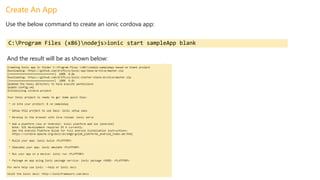
C:Program Files (x86)nodejs>ionic start sampleApp blank
And the result will be as shown below:
Generate Android Code for the Above Ionic App
After creating blank ionic app, it is necessary to generate the required platform [Android/iOS/Windows]. And it
generates respective app code directories.
Generate Android app as below:
C:Program Files (x86)nodejs>cd sampleApp
C:Program Files (x86)nodejssampleApp>ionic platform add android
And the result should be as below:
And, app creation is done!!
Import Into Android Studio
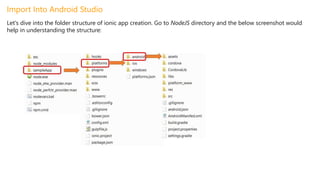
Let's dive into the folder structure of ionic app creation. Go to NodeJS directory and the below screenshot would
help in understanding the structure:
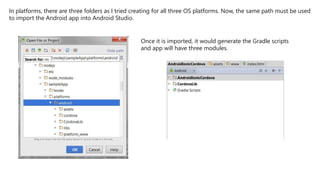
In platforms, there are three folders as I tried creating for all three OS platforms. Now, the same path must be used
to import the Android app into Android Studio.
Once it is imported, it would generate the Gradle scripts
and app will have three modules.
Create a Sample Ionic List View
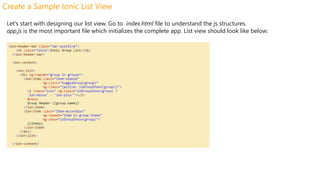
Let's start with designing our list view. Go to index.html file to understand the js structures.
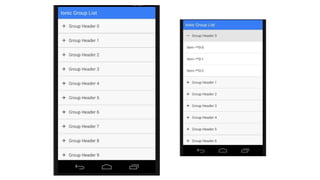
app.js is the most important file which initializes the complete app. List view should look like below:
And controller should look like:
The complete code can be downloaded from: https://github.com/swagatblog/AndroidIonicCordova.
References
https://nodejs.org/
http://ionicframework.com/docs/guide/installation.html
https://cordova.apache.org/docs/en/4.0.0/
https://github.com/swagatblog/AndroidIonicCordova
??
?
?
?
?
? ?
?
?
?
??
?
?
?
?
?
Please contact
Swagat Parida

Step by step guide to build ionic hybrid app using cordova android

  • 1.
    Step by StepGuide to build Ionic Hybrid App using Cordova/Android By Swagat Parida
  • 3.
    Introduction This tip willguide in developing a basic app Hybrid Mobile App using Ionic, Cordova, Android. Background There is a lot of curiosity among developers regarding emerging ionic framework along with Cordova. Ionic library is built by considering AngularJS as its base. This framework provides mobile- optimized HTML components to create highly interactive hybrid apps. Reference: Ionic site for more details. The below steps/code will help in developing a basic Ionic-Cordova app and showcase a simple grouped list view.
  • 4.
    Environment Setup andApp Creation NodeJS Before we start on any development, NodeJS installation is important. Click here to download NodeJS. Ionic & Cordova The below command should install all related modules and dependencies for ionic and Cordova. $ C:Program Files (x86)nodejs>npm install -g cordova ionic Verify ionic by typing the below command: $ C:Program Files (x86)nodejs>ionic and the result should show:
  • 5.
    Create An App Usethe below command to create an ionic cordova app: C:Program Files (x86)nodejs>ionic start sampleApp blank And the result will be as shown below:
  • 6.
    Generate Android Codefor the Above Ionic App After creating blank ionic app, it is necessary to generate the required platform [Android/iOS/Windows]. And it generates respective app code directories. Generate Android app as below: C:Program Files (x86)nodejs>cd sampleApp C:Program Files (x86)nodejssampleApp>ionic platform add android And the result should be as below: And, app creation is done!!
  • 7.
    Import Into AndroidStudio Let's dive into the folder structure of ionic app creation. Go to NodeJS directory and the below screenshot would help in understanding the structure:
  • 8.
    In platforms, thereare three folders as I tried creating for all three OS platforms. Now, the same path must be used to import the Android app into Android Studio. Once it is imported, it would generate the Gradle scripts and app will have three modules.
  • 9.
    Create a SampleIonic List View Let's start with designing our list view. Go to index.html file to understand the js structures. app.js is the most important file which initializes the complete app. List view should look like below:
  • 10.
    And controller shouldlook like: The complete code can be downloaded from: https://github.com/swagatblog/AndroidIonicCordova. References https://nodejs.org/ http://ionicframework.com/docs/guide/installation.html https://cordova.apache.org/docs/en/4.0.0/ https://github.com/swagatblog/AndroidIonicCordova
  • 11.