DOCKER FOR DSPACE – LOWERING THE BARRIER OF
ENTRY FOR NEW CONTRIBUTORS
OR 2019
Terry Brady, Georgetown University Library
Pascal Becker, The Library Code
Please complete the Pre-work (Docker Install), if you
have not already done so.
http://bit.ly/dspace-docker
WHO WE ARE
TERRY BRADY
So ware Developer, Georgetown University Library
DSpace Committer
https://github.com/terrywbrady/info
PASCAL BECKER
CEO and founder of The Library Code GmbH
DSpace Committer
Member of DSpace's Leadership and Steering
Groups
https://www.the-library-code.de/
ABOUT THIS WORKSHOP
BACKGROUND
2018 the DSpace for Docker was created
Start any version of DSpace from your desktop
(Windows 10, MacOS, Linux)
Helps newcomers to get a test system running
quickly
Helps developers to easily spin up development
environments
WHO YOU ARE (WE THINK)
People who want to ...
get a sneak peak on DSpace 7
get started with Docker
know if Docker can help them with their
development environment
learn how they can get started with DSpace
become more involved in the DSpace project
WORKSHOP OBJECTIVES
Understand basics of Docker (Images, Containers,
Volumes, ...)
What Docker images have been published for
DSpace
How to install Docker
How to launch DSpace 6 and DSpace 7 using Docker
How to participate in DSpace testing using Docker
Exchanging tips and ideas about DSpace and Docker
MOTIVATION
IMAGINE YOU COULD...
...create a DSpace installation with one single
command
...install and start a new instance of any version of
DSpace in under 3 minutes
...wouldn't need to have to think about database
versions, operating systems, ordering virtual hosts,
and further more.
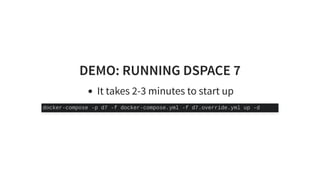
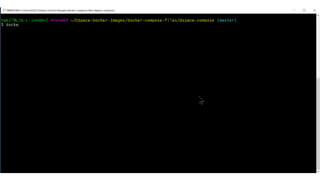
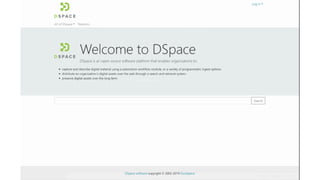
DEMO: RUNNING DSPACE 7
It takes 2-3 minutes to start up
docker-compose -p d7 -f docker-compose.yml -f d7.override.yml up -d
WHAT IS POSSIBLE WITH DSPACE AND
DOCKER?
Try out a DSpace feature without impacting your
existing instance
Preview an enhancement or new version
Give input on the implementation
Verify a bug fix before it is released
Onboard new developers and repository managers
to the project
and so much more...
DSPACE DOCKER IMAGES
DSpace 7x, DSpace 6x, DSpace 5x, DSpace 4x
Install content from DSpace AIP files on creation
DSpace Database
DSpace Angular UI
Published to
See
https://hub.docker.com/u/dspace
DSpace Docker Tutorial Overview
CAN I USE YOUR IMAGES IN
PRODUCTION?
Not yet!
Current images focus on testing and development
We want to gain more experience on our own
Do you want to help to create images for
production? Contact us on slack!
INSTALL INSTRUCTIONS (RECAP)
Most attendees will have completed this step already
Install Docker Desktop
Install a terminal for running docker (Windows only)
Download DSpace Docker Compose files
INSTALLATION INSTRUCTIONS
Windows 10 Setup
MacOS Setup
Linux Desktop Setup
EXERCISE 1: VERIFY INSTALLATION
Exercise 1: Verify Installation
DOCKER CONCEPTS
Basic idea of Docker
Docker Images
Docker Containers
Docker vs. virtualization
Docker Volumes
WHY DOCKER?
Imagine you could pack an application's complete
environment into one package easily.
WHY DOCKER?
One script to start up your service / application
All necessary services are started at once
(database, web server)
Runs identically on any desktop or server that
supports Docker
Windows, MacOS or Linux!
Replicable process
Destroy and recreate your service easily
DOCKER IMAGES
 An image is an executable package
that includes everything needed to run
an application - the code, a runtime,
libraries, environment variables, and
configuration files.
- Docker Documentation, Get started with Docker, Part 1
Orientation
DOCKER IMAGES (CONTINUED)
An Image is
A snapshot of an application and its complete
environment
Can be shared and downloaded
Can be published
Online on
Or in a private repository
docker hub
DOCKER CONTAINERS
A running version of a docker image
Like a small server running within your desktop
Containing a complete environment
Containing an application or service
Started and stopped by Docker
Runs independently of other applications
A CONTAINER'S LIFETIME
Images package a complete environment
Start a new container from an image is very easy
A Container is just like a running version of an image
Delete containers when they stop
Create a new container everytime a service starts
DOCKER VOLUMES
If you delete a container when it stops, how do you
persist data?
Volumes can be (re-)used when a container starts
Volumes outlive the containers that uses them
Like a really small disk drive or network drive
Data you wish to save must be stored in a volume
EXERCISE 2: DOCKER IMAGES AND
CONTAINERS
Exercise 2: Docker Images and Containers
DOCKER-COMPOSE
DOCKER COMPOSE
An image defines a service and its environment
Today's applications are composed out of multiple
services
We need information about how to run an
application
Is it composed out of multiple services?
How do they depend on each other?
Which ports are used?
How to start and stop it all together?
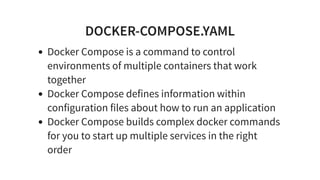
DOCKER-COMPOSE.YAML
Docker Compose is a command to control
environments of multiple containers that work
together
Docker Compose defines information within
configuration files about how to run an application
Docker Compose builds complex docker commands
for you to start up multiple services in the right
order
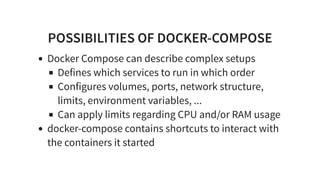
POSSIBILITIES OF DOCKER-COMPOSE
Docker Compose can describe complex setups
Defines which services to run in which order
Configures volumes, ports, network structure,
limits, environment variables, ...
Can apply limits regarding CPU and/or RAM usage
docker-compose contains shortcuts to interact with
the containers it started
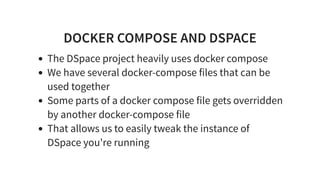
DOCKER COMPOSE AND DSPACE
The DSpace project heavily uses docker compose
We have several docker-compose files that can be
used together
Some parts of a docker compose file gets overridden
by another docker-compose file
That allows us to easily tweak the instance of
DSpace you're running
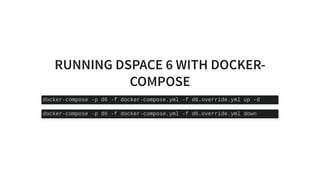
RUNNING DSPACE 6 WITH DOCKER-
COMPOSE
docker-compose -p d6 -f docker-compose.yml -f d6.override.yml up -d
docker-compose -p d6 -f docker-compose.yml -f d6.override.yml down
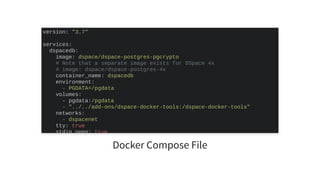
Docker Compose File
version: "3.7"
services:
dspacedb:
image: dspace/dspace-postgres-pgcrypto
# Note that a separate image exists for DSpace 4x
# image: dspace/dspace-postgres-4x
container_name: dspacedb
environment:
- PGDATA=/pgdata
volumes:
- pgdata:/pgdata
- "../../add-ons/dspace-docker-tools:/dspace-docker-tools"
networks:
- dspacenet
tty: true
stdin open: true
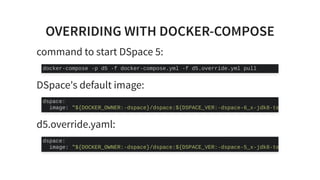
OVERRIDING WITH DOCKER-COMPOSE
command to start DSpace 5:
DSpace's default image:
d5.override.yaml:
docker-compose -p d5 -f docker-compose.yml -f d5.override.yml pull
dspace:
image: "${DOCKER_OWNER:-dspace}/dspace:${DSPACE_VER:-dspace-6_x-jdk8-te
dspace:
image: "${DOCKER_OWNER:-dspace}/dspace:${DSPACE_VER:-dspace-5_x-jdk8-te
EXERCISE 3A: UNDERSTANDING DOCKER
COMPOSE
Exercise 3A: Understanding Docker Compose
EXERCISE 3B: RUNNING DSPACE 6 WITH
DOCKER-COMPOSE
Exercise 3B: Running DSpace 6 with Docker-
Compose
EXERCISE 4: RUNNING DSPACE 7 WITH
DOCKER-COMPOSE
Exercise 4: Running DSpace 7 with Docker-Compose
ADVANCED TOPICS
Our ideas
Building code changes with Docker Composse
Running DSpace 6 and DSpace 7 on different ports
Your ideas
Anything specific you would like us to cover?
EXERCISE 5: ADVANCED TOPICS
Exercise 5: Advanced Topics
WE NEED YOUR HELP
Try it yourself, give us feedback on the
documentation
Join the #dspace-docker Slack Channel
Help us assemble assets to distribute in AIP files
WHAT WE NEED
Curating and Assembling
Public domain / restriction free
Real repository content (but not very large)
Small PDFs
Small image
Realistic metadata
AIP Resources
DISCUSSION
Could you imagine using this capability?
What would be needed to make this compelling for
the repository manager community?
FEEDBACK/QUESTIONS?
What ideas do you have?
What questions do you have?
REFERENCE LINKS
Join the Slack Channel
DSpace Docker Tutorial Overview
Docker Documentation
Docker Compose Documentation
#dspace-docker
THANK YOU
Terry Brady, Georgetown University Library
Pascal Becker, The Library Code
http://bit.ly/dspace-docker

Workshop Docker for DSpace

  • 1.
    DOCKER FOR DSPACE– LOWERING THE BARRIER OF ENTRY FOR NEW CONTRIBUTORS OR 2019 Terry Brady, Georgetown University Library Pascal Becker, The Library Code Please complete the Pre-work (Docker Install), if you have not already done so. http://bit.ly/dspace-docker
  • 2.
  • 3.
    TERRY BRADY So wareDeveloper, Georgetown University Library DSpace Committer https://github.com/terrywbrady/info
  • 4.
    PASCAL BECKER CEO andfounder of The Library Code GmbH DSpace Committer Member of DSpace's Leadership and Steering Groups https://www.the-library-code.de/
  • 5.
  • 6.
    BACKGROUND 2018 the DSpacefor Docker was created Start any version of DSpace from your desktop (Windows 10, MacOS, Linux) Helps newcomers to get a test system running quickly Helps developers to easily spin up development environments
  • 7.
    WHO YOU ARE(WE THINK) People who want to ... get a sneak peak on DSpace 7 get started with Docker know if Docker can help them with their development environment learn how they can get started with DSpace become more involved in the DSpace project
  • 8.
    WORKSHOP OBJECTIVES Understand basicsof Docker (Images, Containers, Volumes, ...) What Docker images have been published for DSpace How to install Docker How to launch DSpace 6 and DSpace 7 using Docker How to participate in DSpace testing using Docker Exchanging tips and ideas about DSpace and Docker
  • 9.
  • 10.
    IMAGINE YOU COULD... ...createa DSpace installation with one single command ...install and start a new instance of any version of DSpace in under 3 minutes ...wouldn't need to have to think about database versions, operating systems, ordering virtual hosts, and further more.
  • 11.
    DEMO: RUNNING DSPACE7 It takes 2-3 minutes to start up docker-compose -p d7 -f docker-compose.yml -f d7.override.yml up -d
  • 15.
    WHAT IS POSSIBLEWITH DSPACE AND DOCKER? Try out a DSpace feature without impacting your existing instance Preview an enhancement or new version Give input on the implementation Verify a bug fix before it is released Onboard new developers and repository managers to the project and so much more...
  • 16.
    DSPACE DOCKER IMAGES DSpace7x, DSpace 6x, DSpace 5x, DSpace 4x Install content from DSpace AIP files on creation DSpace Database DSpace Angular UI Published to See https://hub.docker.com/u/dspace DSpace Docker Tutorial Overview
  • 17.
    CAN I USEYOUR IMAGES IN PRODUCTION? Not yet! Current images focus on testing and development We want to gain more experience on our own Do you want to help to create images for production? Contact us on slack!
  • 18.
    INSTALL INSTRUCTIONS (RECAP) Mostattendees will have completed this step already Install Docker Desktop Install a terminal for running docker (Windows only) Download DSpace Docker Compose files
  • 19.
    INSTALLATION INSTRUCTIONS Windows 10Setup MacOS Setup Linux Desktop Setup
  • 20.
    EXERCISE 1: VERIFYINSTALLATION Exercise 1: Verify Installation
  • 21.
    DOCKER CONCEPTS Basic ideaof Docker Docker Images Docker Containers Docker vs. virtualization Docker Volumes
  • 22.
    WHY DOCKER? Imagine youcould pack an application's complete environment into one package easily.
  • 23.
    WHY DOCKER? One scriptto start up your service / application All necessary services are started at once (database, web server) Runs identically on any desktop or server that supports Docker Windows, MacOS or Linux! Replicable process Destroy and recreate your service easily
  • 24.
    DOCKER IMAGES  Animage is an executable package that includes everything needed to run an application - the code, a runtime, libraries, environment variables, and configuration files. - Docker Documentation, Get started with Docker, Part 1 Orientation
  • 25.
    DOCKER IMAGES (CONTINUED) AnImage is A snapshot of an application and its complete environment Can be shared and downloaded Can be published Online on Or in a private repository docker hub
  • 26.
    DOCKER CONTAINERS A runningversion of a docker image Like a small server running within your desktop Containing a complete environment Containing an application or service Started and stopped by Docker Runs independently of other applications
  • 27.
    A CONTAINER'S LIFETIME Imagespackage a complete environment Start a new container from an image is very easy A Container is just like a running version of an image Delete containers when they stop Create a new container everytime a service starts
  • 28.
    DOCKER VOLUMES If youdelete a container when it stops, how do you persist data? Volumes can be (re-)used when a container starts Volumes outlive the containers that uses them Like a really small disk drive or network drive Data you wish to save must be stored in a volume
  • 29.
    EXERCISE 2: DOCKERIMAGES AND CONTAINERS Exercise 2: Docker Images and Containers
  • 30.
  • 31.
    DOCKER COMPOSE An imagedefines a service and its environment Today's applications are composed out of multiple services We need information about how to run an application Is it composed out of multiple services? How do they depend on each other? Which ports are used? How to start and stop it all together?
  • 32.
    DOCKER-COMPOSE.YAML Docker Compose isa command to control environments of multiple containers that work together Docker Compose defines information within configuration files about how to run an application Docker Compose builds complex docker commands for you to start up multiple services in the right order
  • 33.
    POSSIBILITIES OF DOCKER-COMPOSE DockerCompose can describe complex setups Defines which services to run in which order Configures volumes, ports, network structure, limits, environment variables, ... Can apply limits regarding CPU and/or RAM usage docker-compose contains shortcuts to interact with the containers it started
  • 34.
    DOCKER COMPOSE ANDDSPACE The DSpace project heavily uses docker compose We have several docker-compose files that can be used together Some parts of a docker compose file gets overridden by another docker-compose file That allows us to easily tweak the instance of DSpace you're running
  • 35.
    RUNNING DSPACE 6WITH DOCKER- COMPOSE docker-compose -p d6 -f docker-compose.yml -f d6.override.yml up -d docker-compose -p d6 -f docker-compose.yml -f d6.override.yml down
  • 36.
    Docker Compose File version:"3.7" services: dspacedb: image: dspace/dspace-postgres-pgcrypto # Note that a separate image exists for DSpace 4x # image: dspace/dspace-postgres-4x container_name: dspacedb environment: - PGDATA=/pgdata volumes: - pgdata:/pgdata - "../../add-ons/dspace-docker-tools:/dspace-docker-tools" networks: - dspacenet tty: true stdin open: true
  • 37.
    OVERRIDING WITH DOCKER-COMPOSE commandto start DSpace 5: DSpace's default image: d5.override.yaml: docker-compose -p d5 -f docker-compose.yml -f d5.override.yml pull dspace: image: "${DOCKER_OWNER:-dspace}/dspace:${DSPACE_VER:-dspace-6_x-jdk8-te dspace: image: "${DOCKER_OWNER:-dspace}/dspace:${DSPACE_VER:-dspace-5_x-jdk8-te
  • 38.
    EXERCISE 3A: UNDERSTANDINGDOCKER COMPOSE Exercise 3A: Understanding Docker Compose
  • 39.
    EXERCISE 3B: RUNNINGDSPACE 6 WITH DOCKER-COMPOSE Exercise 3B: Running DSpace 6 with Docker- Compose
  • 40.
    EXERCISE 4: RUNNINGDSPACE 7 WITH DOCKER-COMPOSE Exercise 4: Running DSpace 7 with Docker-Compose
  • 41.
    ADVANCED TOPICS Our ideas Buildingcode changes with Docker Composse Running DSpace 6 and DSpace 7 on different ports Your ideas Anything specific you would like us to cover?
  • 42.
    EXERCISE 5: ADVANCEDTOPICS Exercise 5: Advanced Topics
  • 43.
    WE NEED YOURHELP Try it yourself, give us feedback on the documentation Join the #dspace-docker Slack Channel Help us assemble assets to distribute in AIP files
  • 44.
    WHAT WE NEED Curatingand Assembling Public domain / restriction free Real repository content (but not very large) Small PDFs Small image Realistic metadata AIP Resources
  • 45.
    DISCUSSION Could you imagineusing this capability? What would be needed to make this compelling for the repository manager community?
  • 46.
    FEEDBACK/QUESTIONS? What ideas doyou have? What questions do you have?
  • 47.
    REFERENCE LINKS Join theSlack Channel DSpace Docker Tutorial Overview Docker Documentation Docker Compose Documentation #dspace-docker
  • 48.
    THANK YOU Terry Brady,Georgetown University Library Pascal Becker, The Library Code http://bit.ly/dspace-docker