Adding multi-screen support to Android* Applicationsusing the Presentation API 
Xavier Hallade, Developer Evangelist, Intel Corporation 
ph0b.com -@ph0b
2 
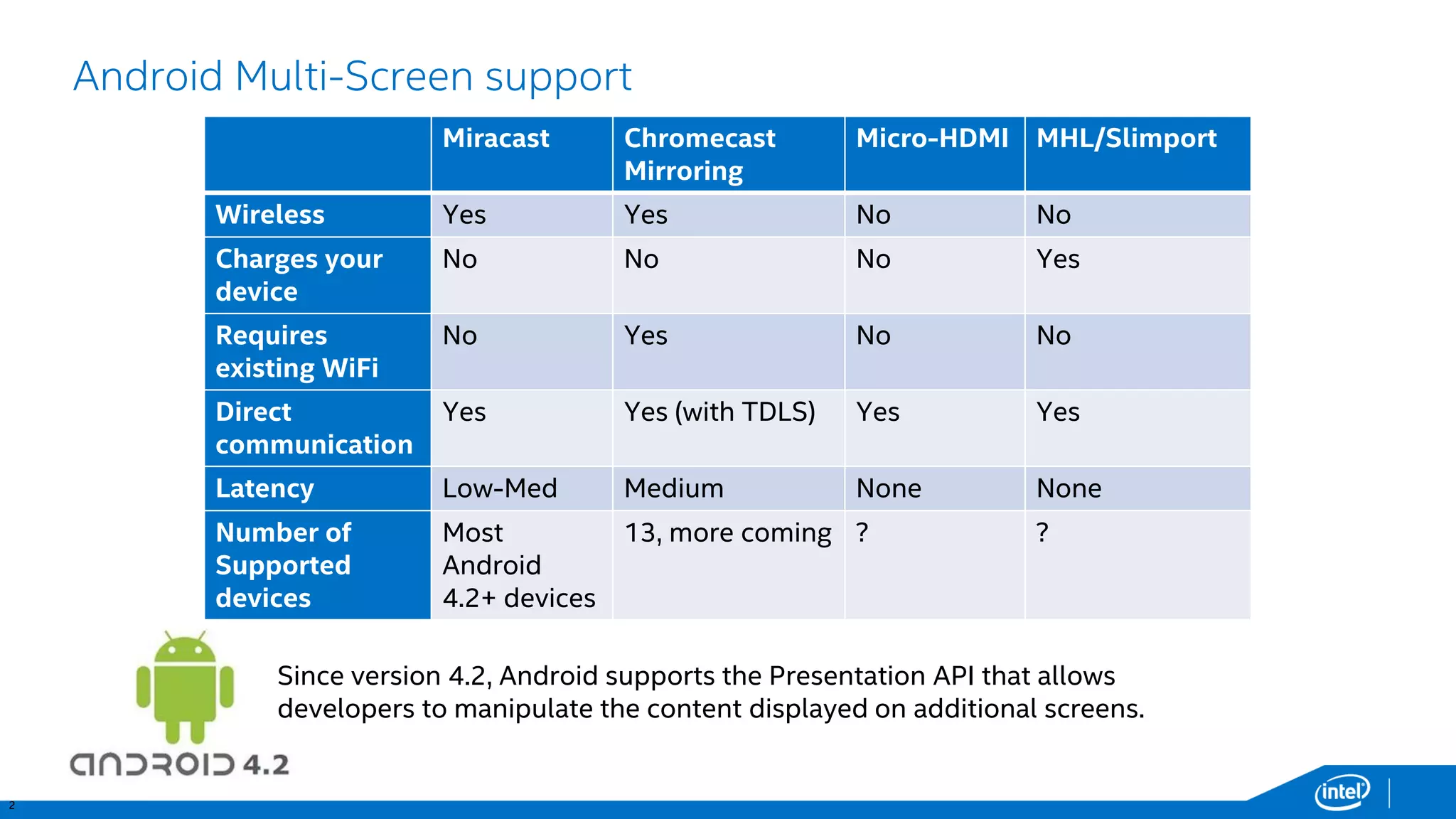
Android Multi-Screen support 
Miracast 
ChromecastMirroring 
Micro-HDMI 
MHL/Slimport 
Wireless 
Yes 
Yes 
No 
No 
Charges your device 
No 
No 
No 
Yes 
Requiresexisting WiFi 
No 
Yes 
No 
No 
Directcommunication 
Yes 
Yes (withTDLS) 
Yes 
Yes 
Latency 
Low-Med 
Medium 
None 
None 
Number of Supported devices 
Most Android4.2+ devices 
13, more coming 
? 
? 
Since version 4.2, Android supports the Presentation API that allows developers to manipulate the content displayed on additional screens.
3 
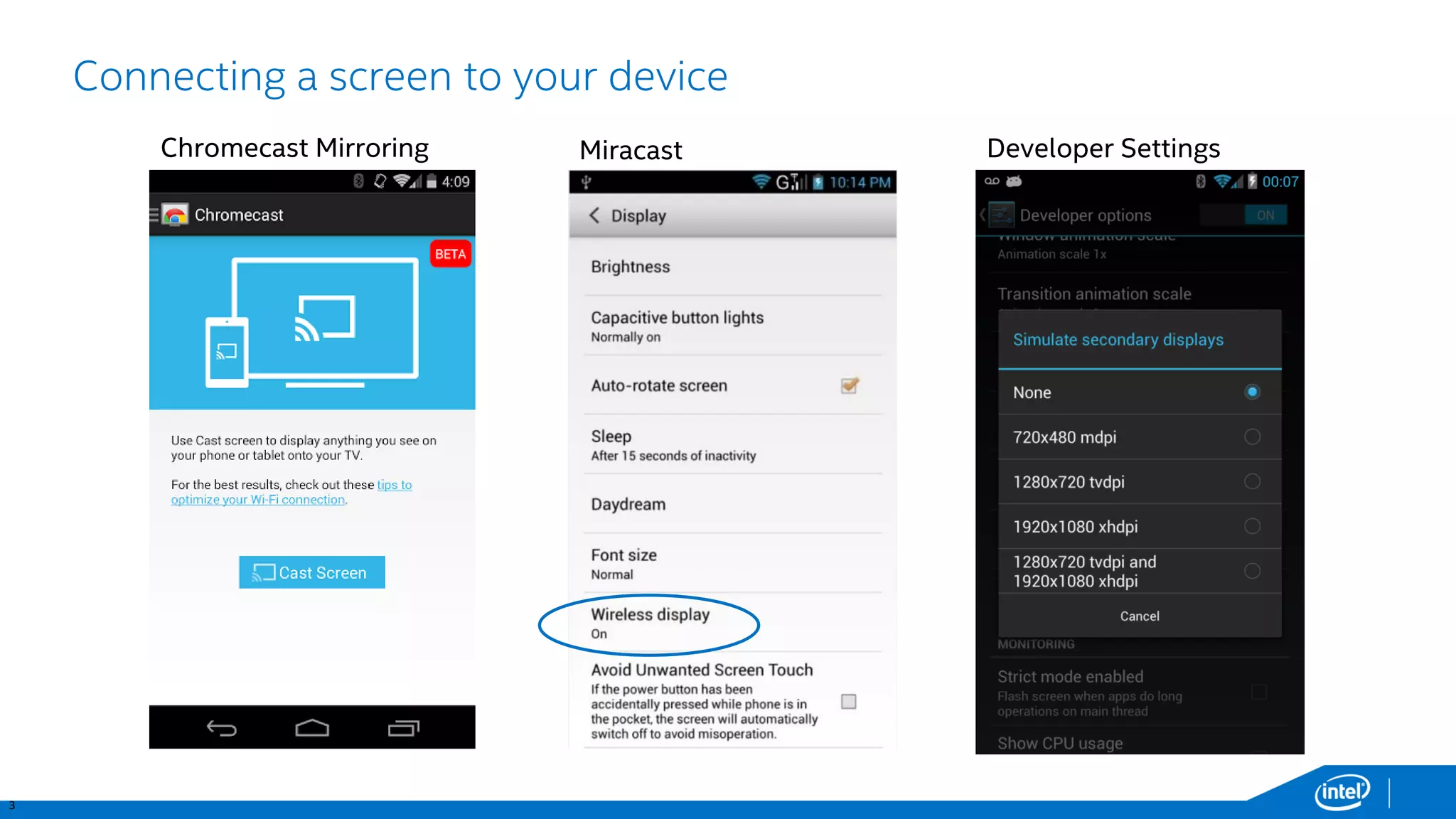
Connecting a screen to your device 
Chromecast Mirroring 
Miracast 
Developer Settings
4 
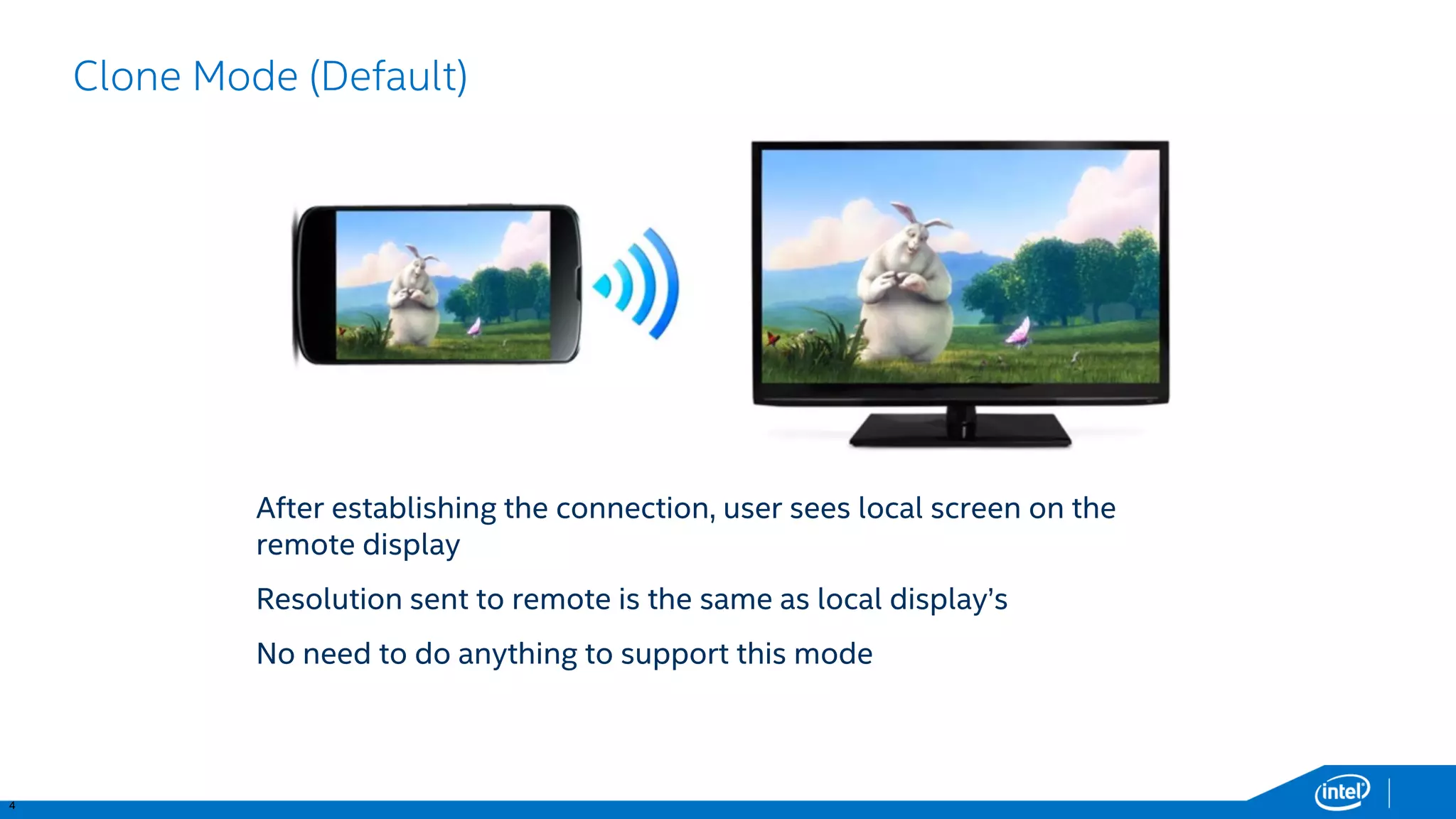
Clone Mode (Default) 
After establishing the connection, user sees local screen on the remote display 
Resolution sent to remote is the same as local display’s 
No need to do anything to support this mode
5 
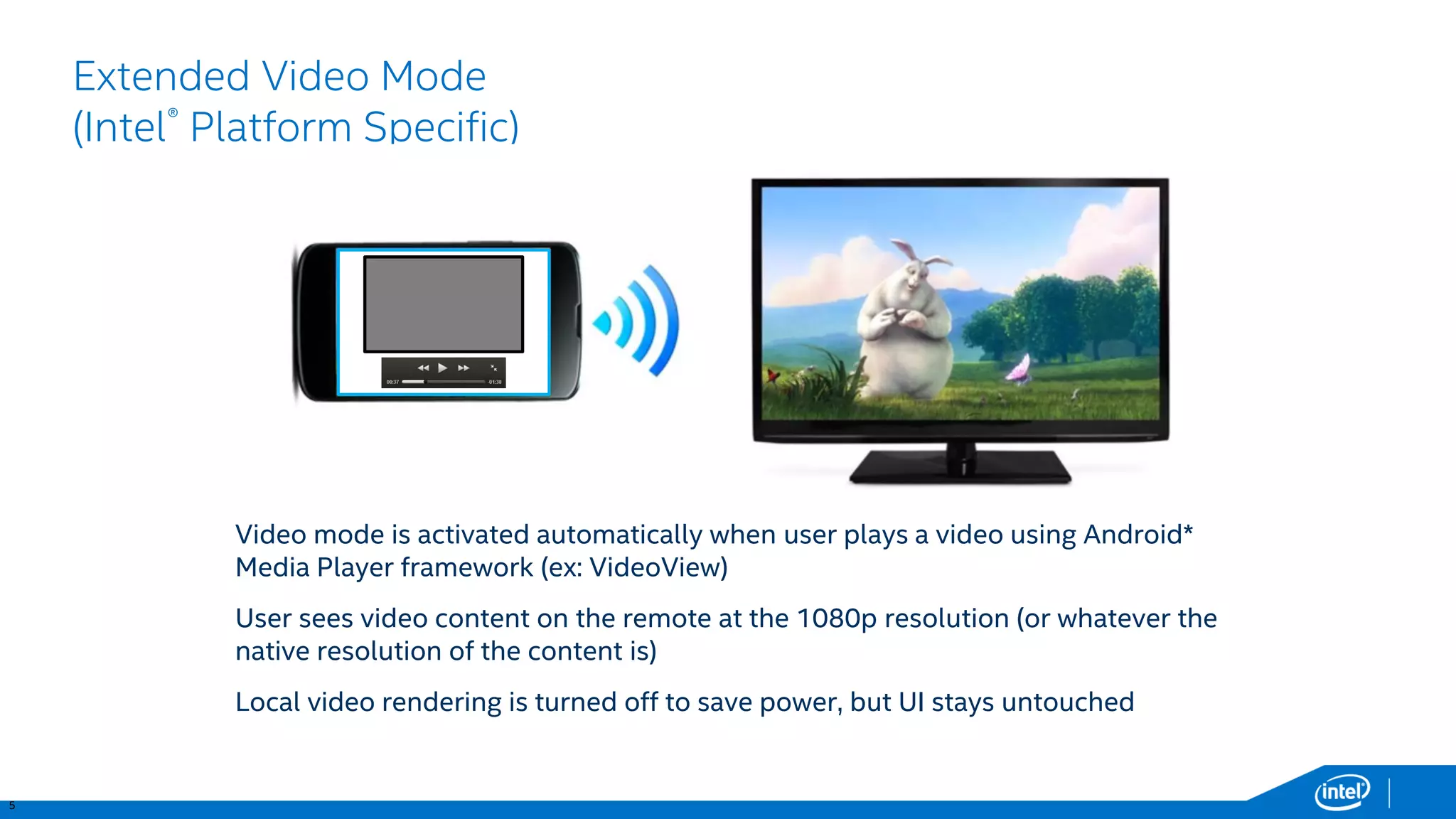
Extended Video Mode(Intel®Platform Specific) 
Video mode is activated automatically when user plays a video using Android* Media Player framework (ex: VideoView) 
User sees video content on the remote at the 1080p resolution (or whatever the native resolution of the content is) 
Local video rendering is turned off to save power, but UI stays untouched
6 
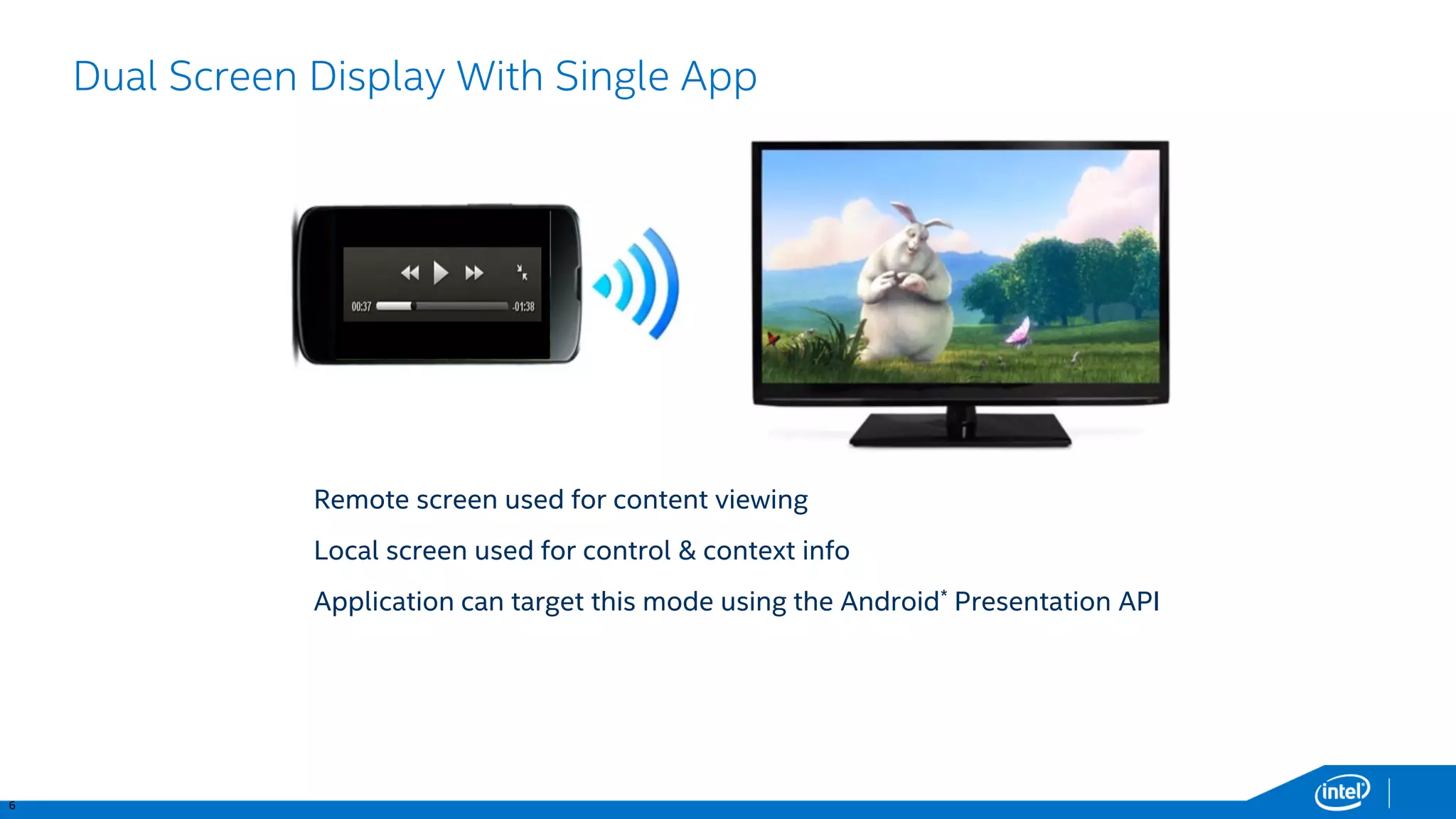
Dual Screen Display With Single App 
Remote screen used for content viewing 
Local screen used for control & context info 
Application can target this mode using the Android*Presentation API
7 
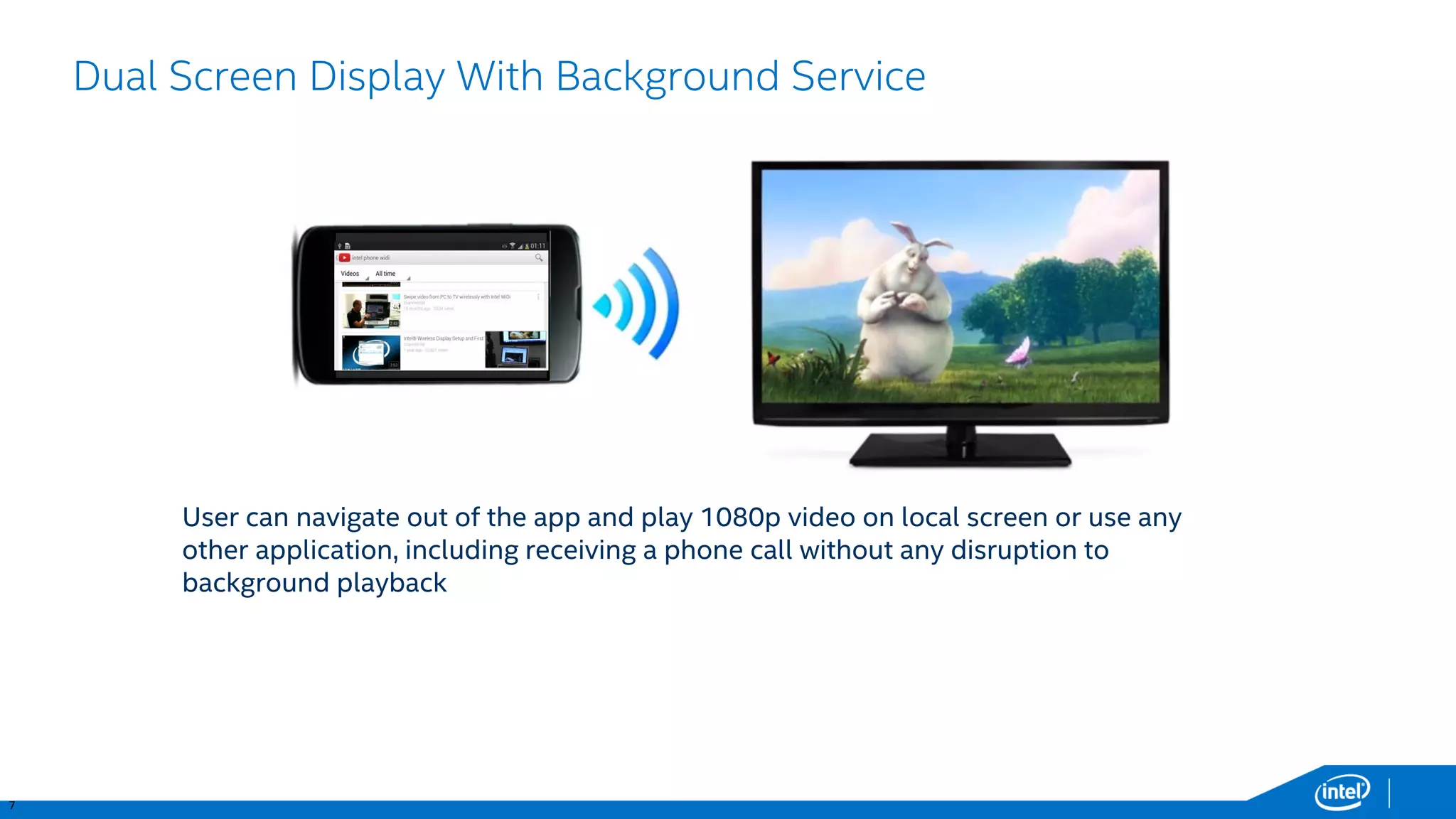
Dual Screen Display With Background Service 
User can navigate out of the app and play 1080p video on local screen or use any other application, including receiving a phone call without any disruption to background playback
8 
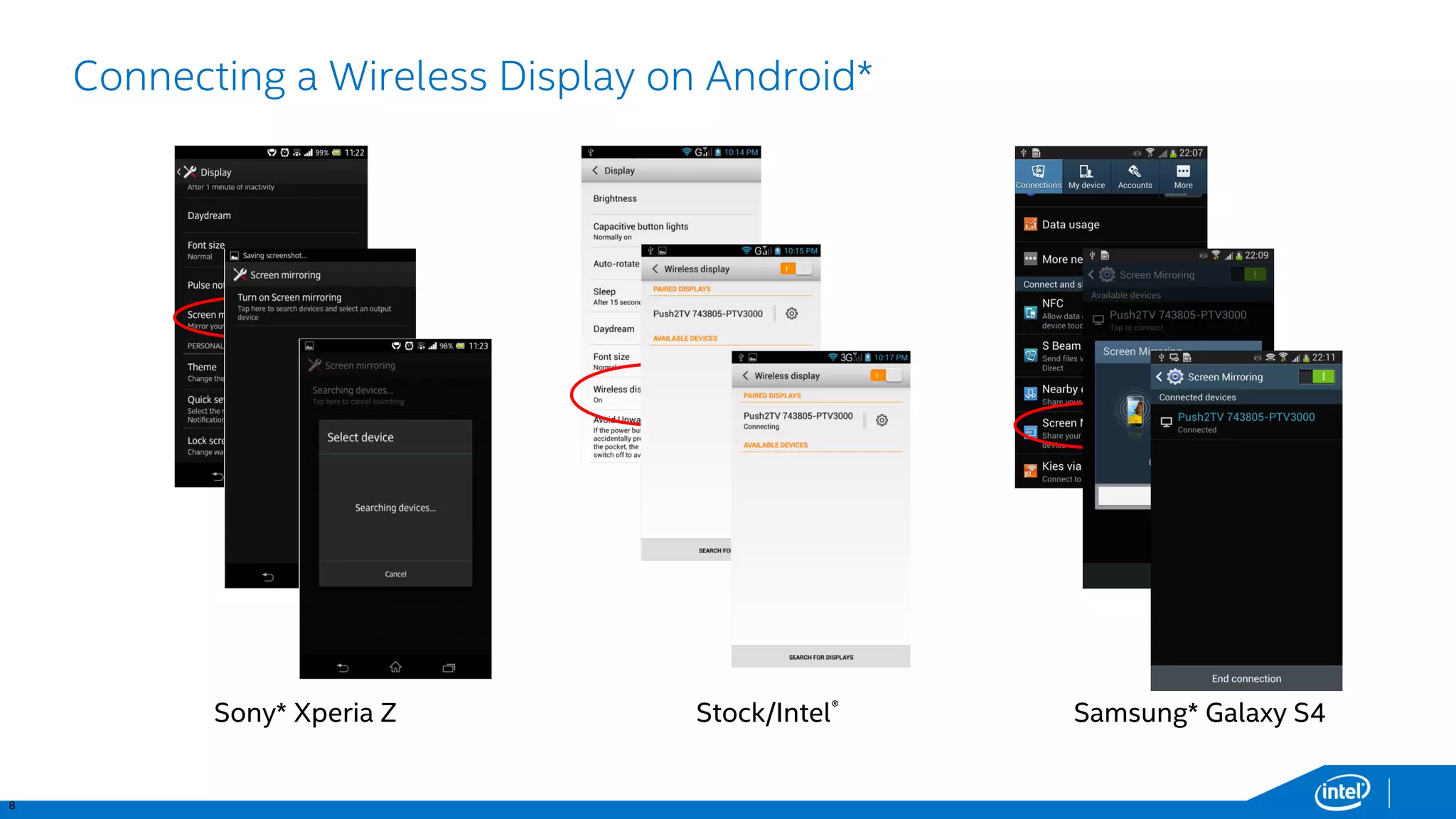
Connecting a Wireless Display on Android* 
Sony* XperiaZ 
Stock/Intel® 
Samsung* Galaxy S4
9 
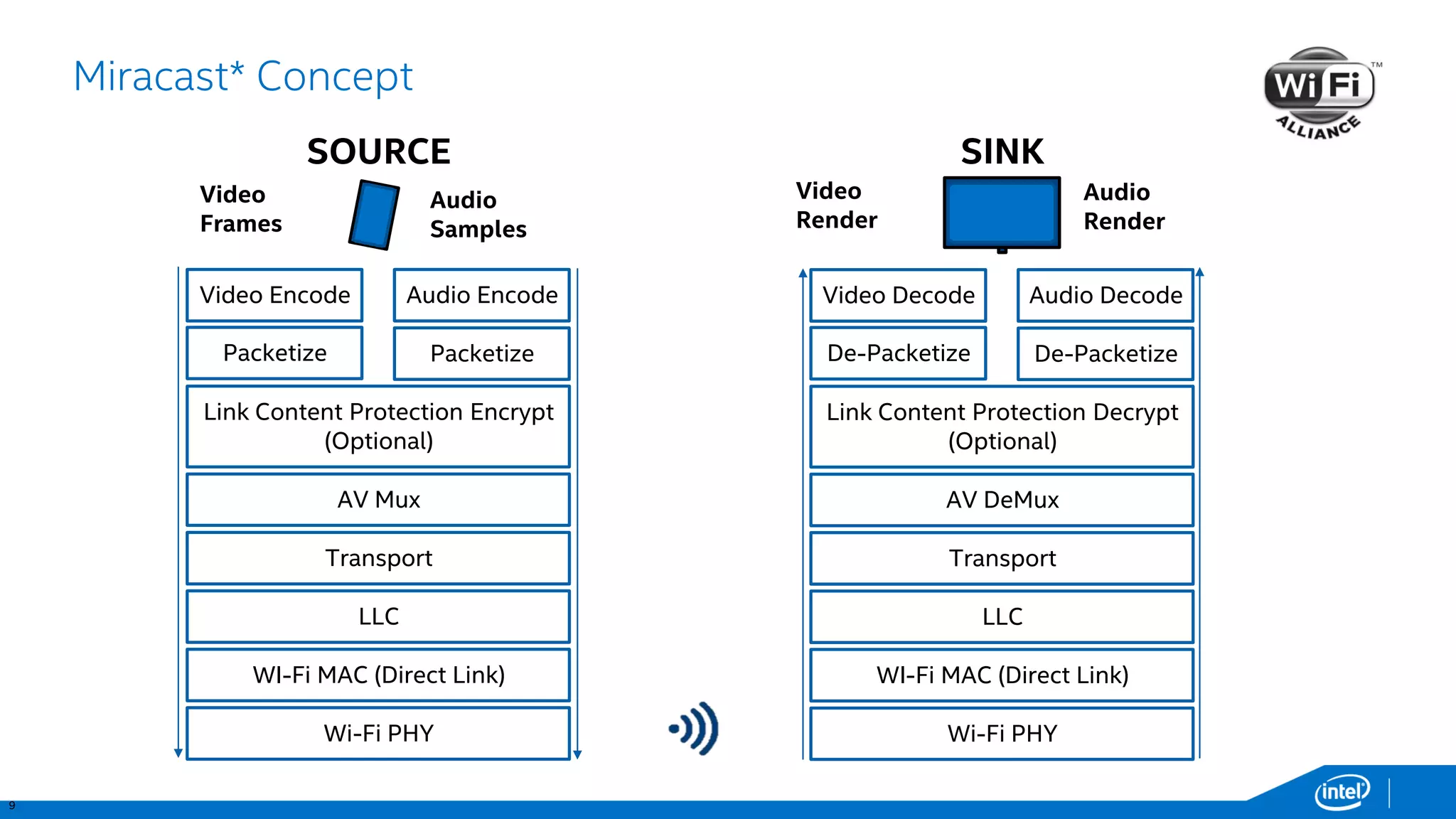
Miracast* Concept 
Video Render 
Audio Render 
VideoDecode 
AudioDecode 
De-Packetize 
De-Packetize 
Link Content Protection Decrypt (Optional) 
AV DeMux 
Transport 
LLC 
WI-FiMAC (Direct Link) 
Wi-Fi PHY 
SINK 
VideoEncode 
AudioEncode 
Packetize 
Packetize 
Link Content Protection Encrypt (Optional) 
AV Mux 
Transport 
LLC 
WI-FiMAC (Direct Link) 
Wi-Fi PHY 
Video Frames 
Audio Samples 
SOURCE
10 
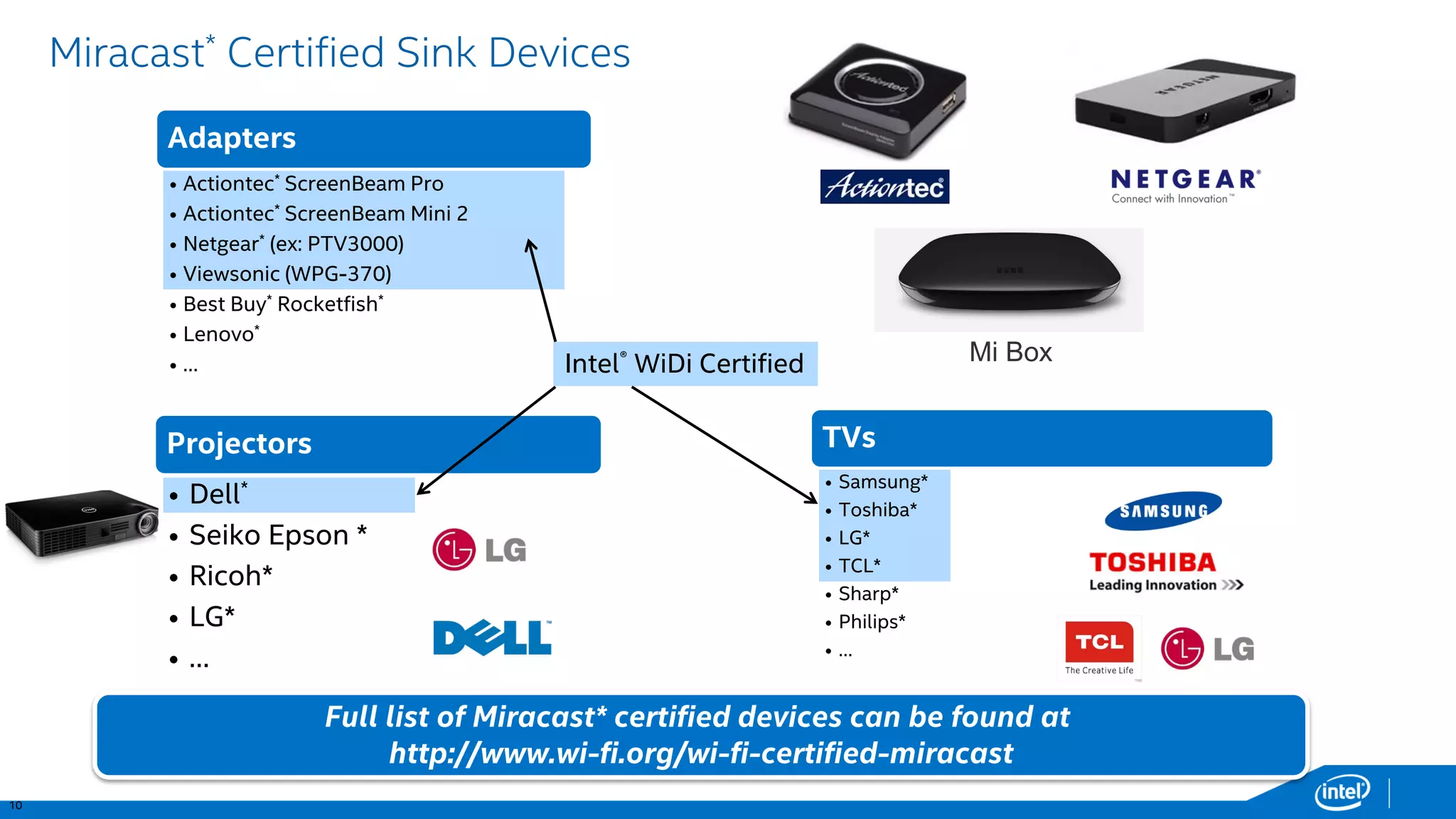
Adapters 
•Actiontec*ScreenBeamPro 
•Actiontec*ScreenBeamMini 2 
•Netgear*(ex: PTV3000) 
•Viewsonic(WPG-370) 
•Best Buy*Rocketfish* 
•Lenovo* 
•… 
Projectors 
•Dell* 
•Seiko Epson * 
•Ricoh* 
•LG* 
•… 
TVs 
•Samsung* 
•Toshiba* 
•LG* 
•TCL* 
•Sharp* 
•Philips* 
•… 
Miracast*Certified Sink Devices 
Full list of Miracast* certified devices can be found at 
http://www.wi-fi.org/wi-fi-certified-miracast 
Intel®WiDi Certified 
MiBox
11 
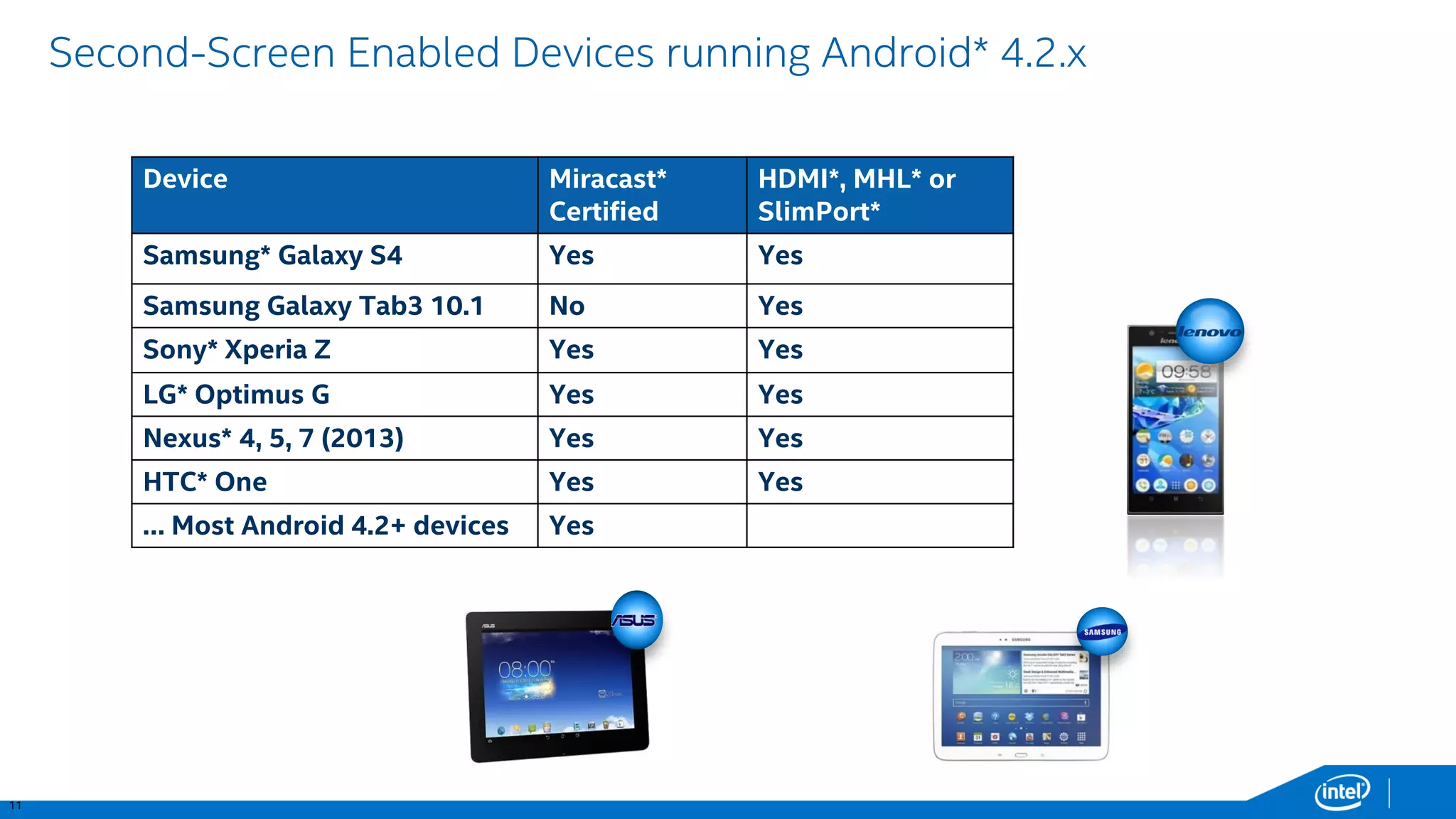
Second-Screen Enabled Devices running Android* 4.2.x 
Device 
Miracast* Certified 
HDMI*, MHL* or SlimPort* 
Samsung* Galaxy S4 
Yes 
Yes 
Samsung Galaxy Tab3 10.1 
No 
Yes 
Sony* XperiaZ 
Yes 
Yes 
LG* OptimusG 
Yes 
Yes 
Nexus* 4, 5, 7 (2013) 
Yes 
Yes 
HTC* One 
Yes 
Yes 
… Most Android 4.2+ devices 
Yes
12 
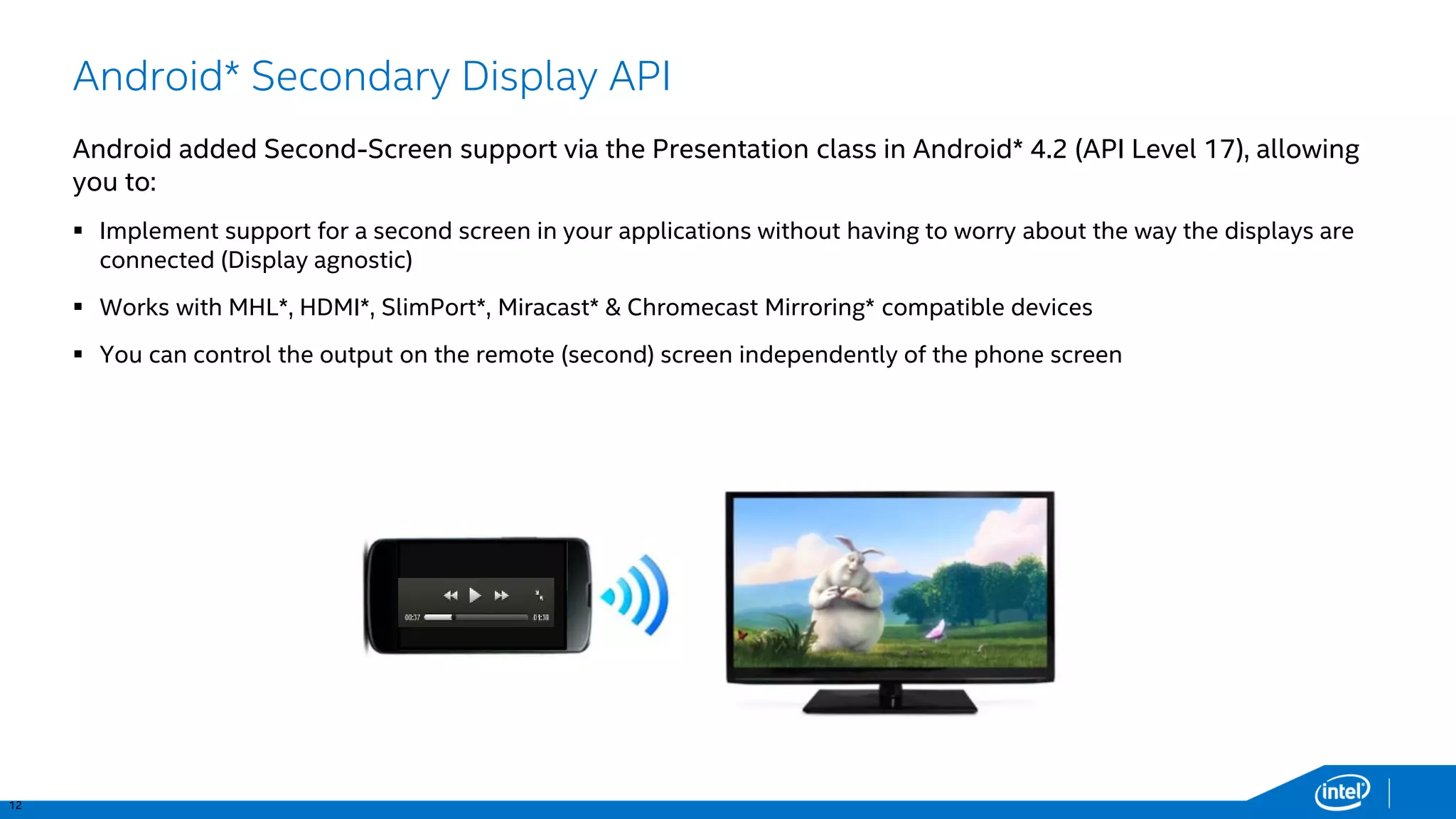
Android* Secondary Display API 
Android added Second-Screen support via the Presentation class in Android* 4.2 (API Level 17), allowing you to: 
Implement support for a second screen in your applications without having to worry about the way the displays are connected (Display agnostic) 
Works with MHL*, HDMI*, SlimPort*, Miracast* & Chromecast Mirroring* compatible devices 
You can control the output on the remote (second) screen independently of the phone screen
13 
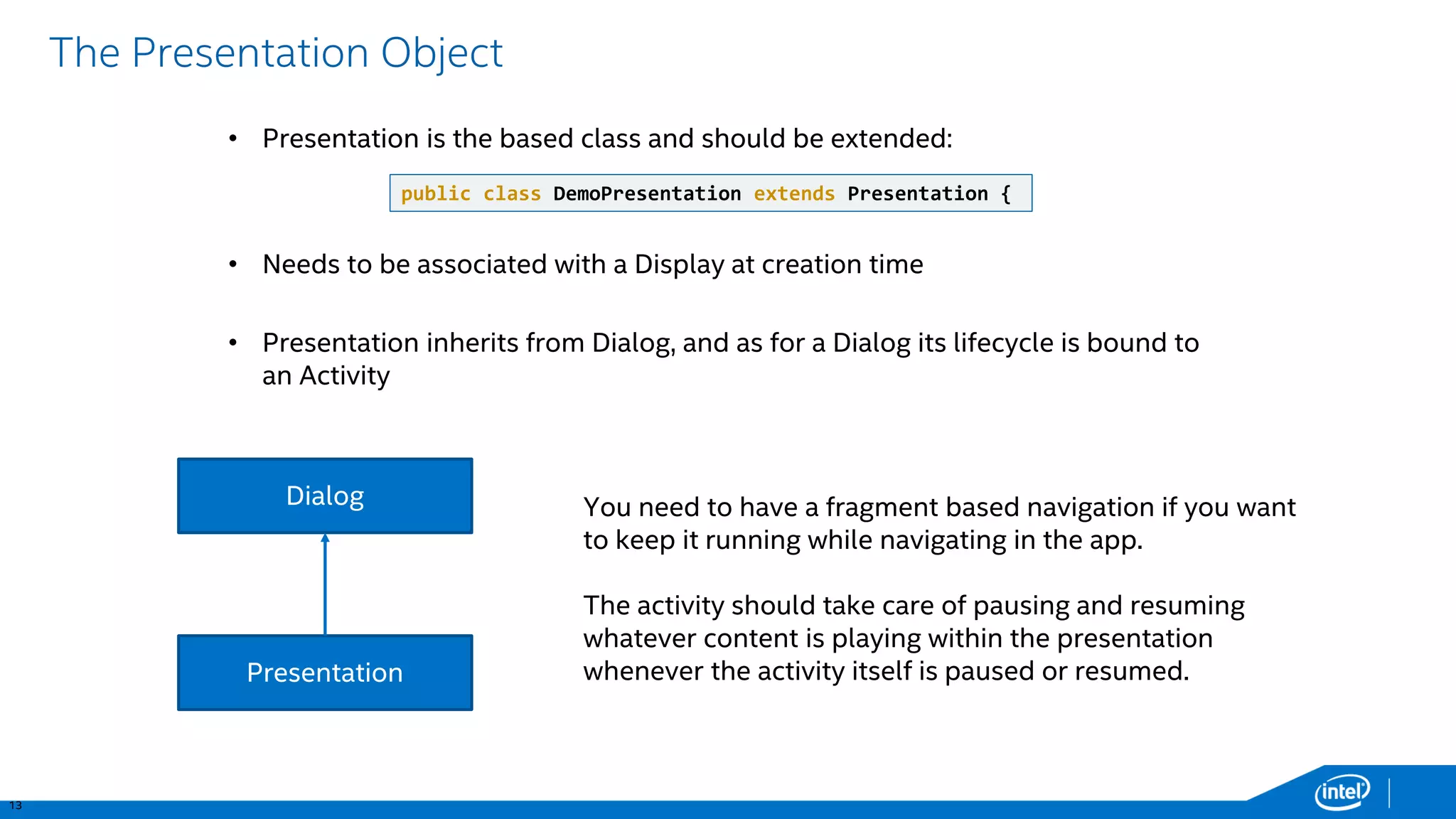
The Presentation Object 
Dialog 
Presentation 
You need to have a fragment based navigation if you want to keep it running while navigating in the app. 
The activity should take care of pausing and resuming whatever content is playing within the presentation whenever the activity itself is paused or resumed. 
•Presentation is the based class and should be extended: 
•Presentation inherits from Dialog, and as for a Dialog its lifecycle is bound to an Activity 
public class DemoPresentation extendsPresentation { 
•Needs to be associated with a Display at creation time
14 
Using the Presentation API 
Before showing a Presentation you need to select a Display, this can be done in 2 ways: 
1.MediaRouterAPI (in API 16): system will decide the best display for you! 
also available in the Support Library v7* 
2.Display Manager API (in API 17): Enumeration of displays 
// Get the MediaRouterservice 
MediaRouter mMediaRouter= (MediaRouter)getSystemService(Context.MEDIA_ROUTER_SERVICE); 
// Care only about routes that have full video support. 
MediaRouter.RouteInfomRouteInfo = mMediaRouter.getSelectedRoute(MediaRouter.ROUTE_TYPE_LIVE_VIDEO); 
Display presentationDisplay= mRouteInfo.getPresentationDisplay(); 
// Get the DisplayManagerservice. 
DisplayManagermDisplayManager= (DisplayManager)getSystemService(Context.DISPLAY_SERVICE); 
// enumerate the displays 
Display[] presentationDisplays= mDisplayManager.getDisplays(DisplayManager.DISPLAY_CATEGORY_PRESENTATION);
15 
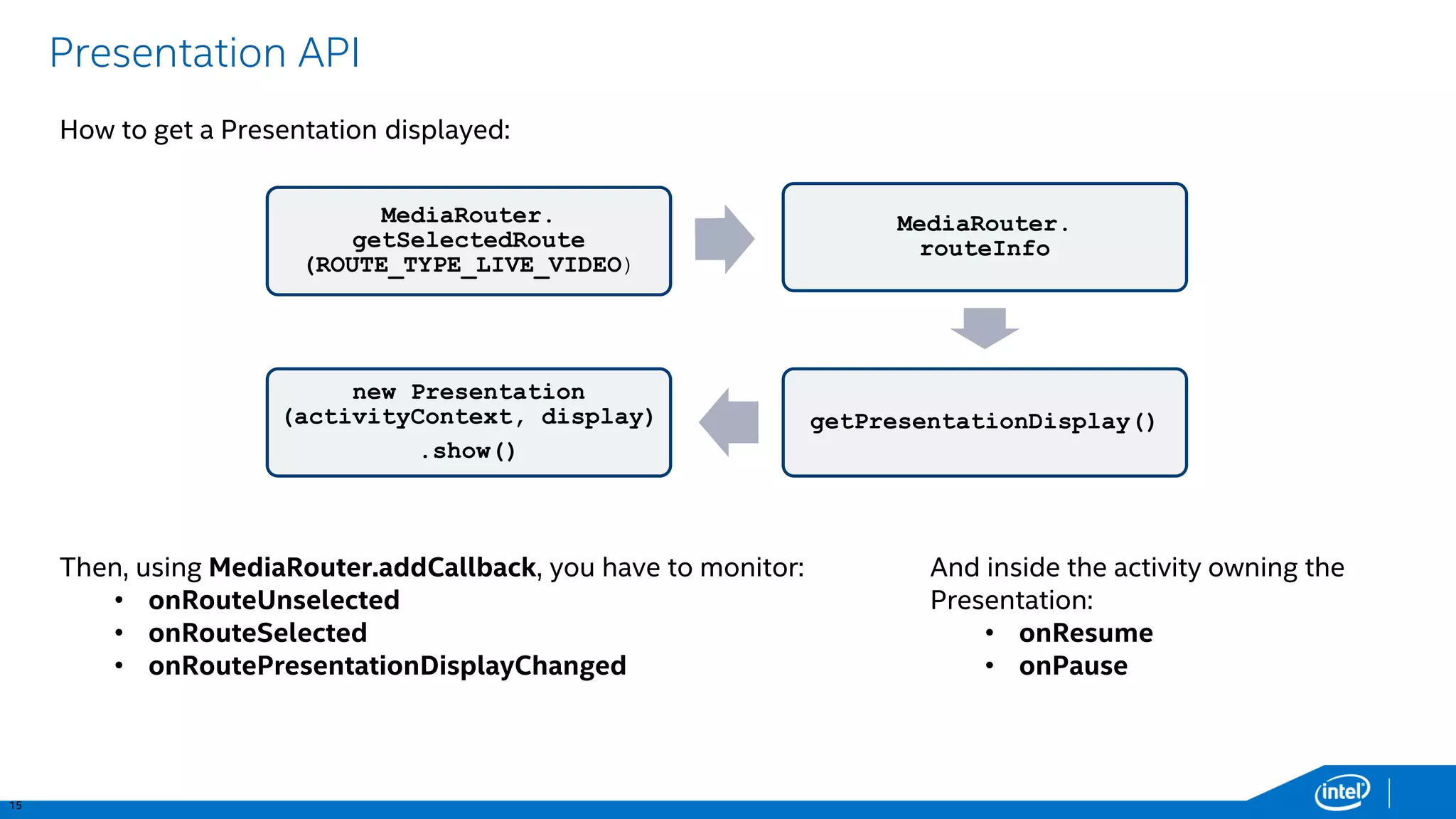
Presentation API 
MediaRouter. getSelectedRoute(ROUTE_TYPE_LIVE_VIDEO) 
MediaRouter. routeInfo 
getPresentationDisplay() 
new Presentation(activityContext, display) 
.show() 
Then, using MediaRouter.addCallback, you have to monitor: 
•onRouteUnselected 
•onRouteSelected 
•onRoutePresentationDisplayChanged 
How to get a Presentation displayed: 
And inside the activity owning the Presentation: 
•onResume 
•onPause
16 
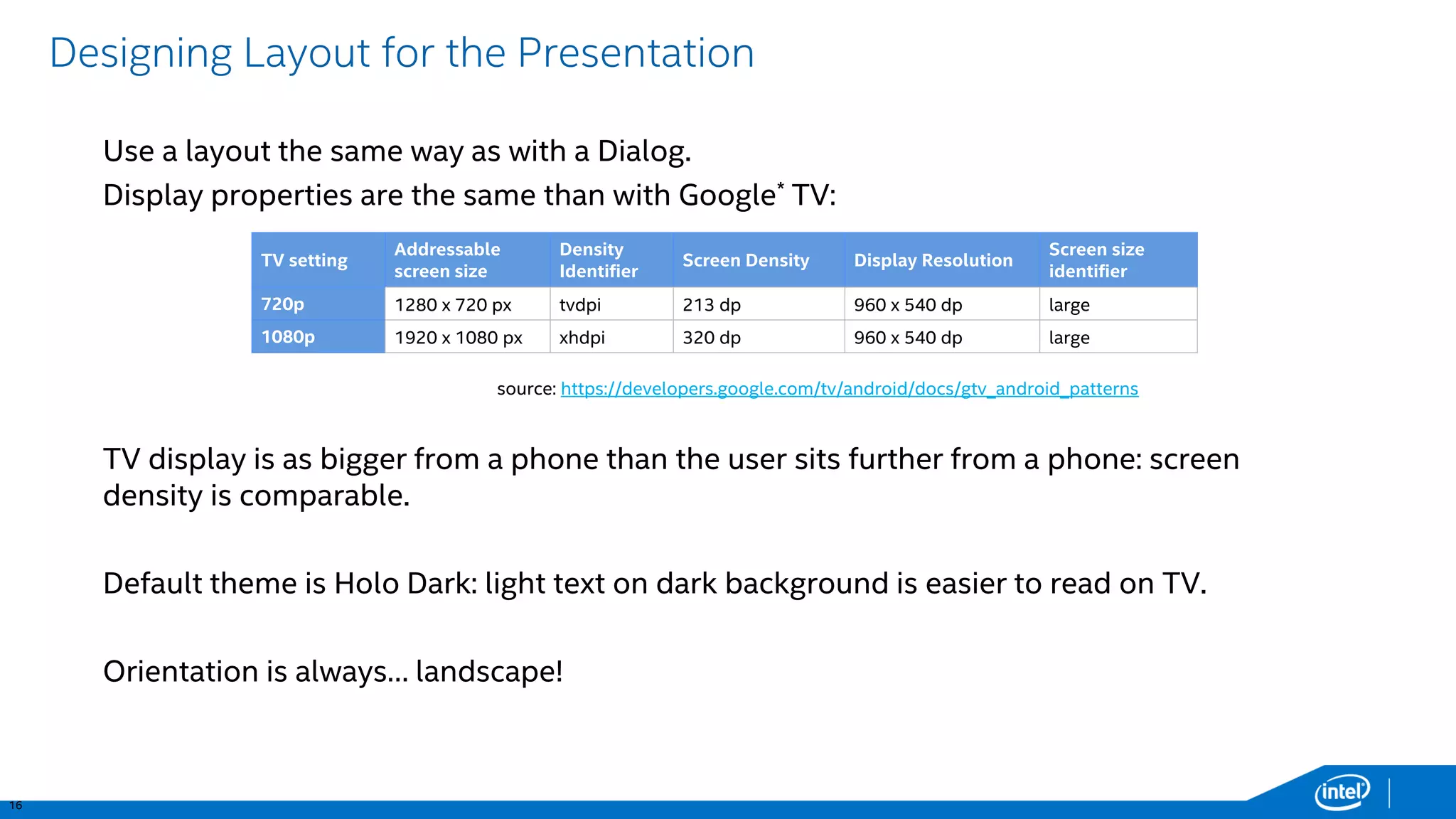
Designing Layout for the Presentation 
Use a layout the same way as with a Dialog. 
Display properties are the same than with Google*TV: 
TV display is as bigger from a phone than the user sits further from a phone: screen density is comparable. 
Default theme is HoloDark: light text on dark background is easier to read on TV. 
Orientation is always… landscape! 
TV setting 
Addressable screen size 
Density Identifier 
Screen Density 
Display Resolution 
Screen size identifier 
720p 
1280 x 720 px 
tvdpi 
213 dp 
960 x 540 dp 
large 
1080p 
1920 x 1080 px 
xhdpi 
320 dp 
960 x 540 dp 
large 
source: https://developers.google.com/tv/android/docs/gtv_android_patterns
17 
Second-ScreenDemo
18 
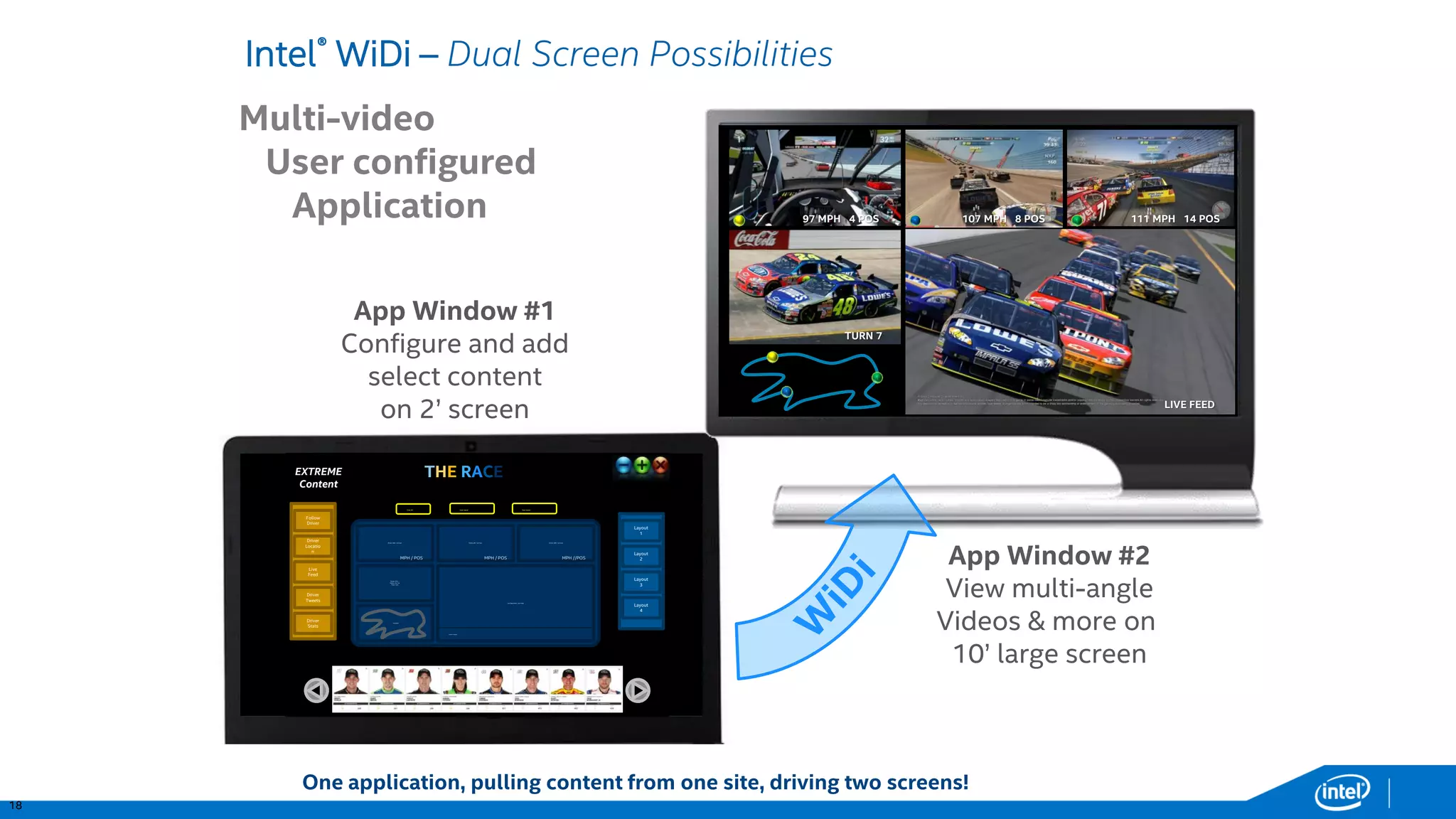
Intel®WiDi –Dual Screen Possibilities 97 MPH 4 POS107 MPH 8 POS111 MPH 14 POSLIVE FEEDTURN 7 
App Window #1 
Configure and add select content 
on 2’ screen 
App Window #2 
View multi-angle 
Videos & more on 
10’ large screen 
Multi-video 
User configured 
Application 
EXTREME 
Content 
Driver #48-Car Cam 
Driver #10 – 
Fol ow the Car 
Track Cam 
Location 
Car Race Main Live Feed 
Driver#8-Car Cam 
Driver#99-Car Cam 
Tweet Feeds…. 
Layout 1 
Layout 4 
Layout 3 
Layout 2 
MPH / POS 
MPH / POS 
MPH //POS 
Clear All 
Follow Driver 
Driver 
Tweets 
Driver Stats 
Live Feed 
Driver 
Location 
Load Layout 
Save Layout 
THERACE 
One application, pulling content from one site, driving two screens!
19 
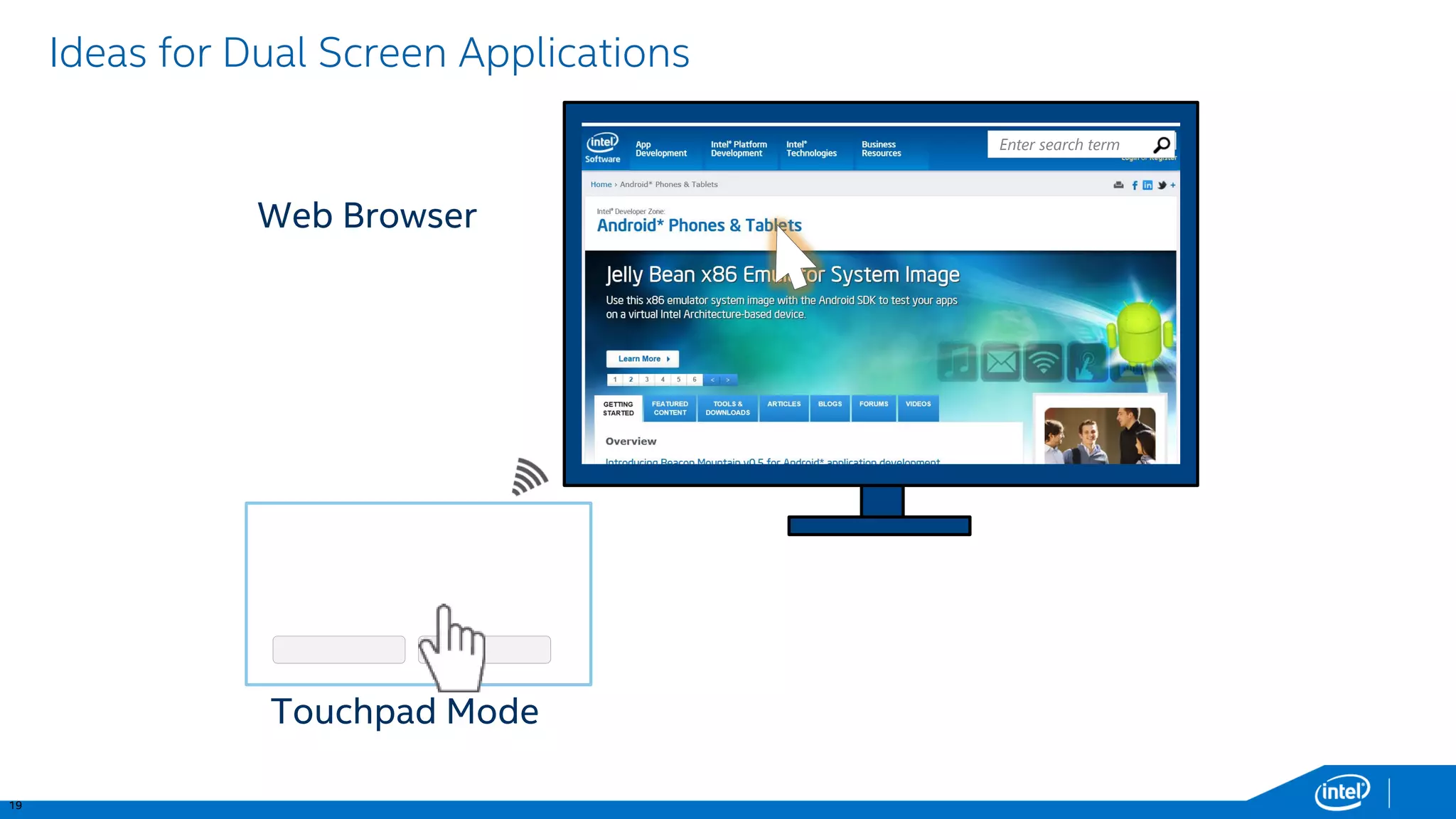
Ideas for Dual Screen Applications 
Enter search term 
Touchpad Mode 
Web Browser
20 
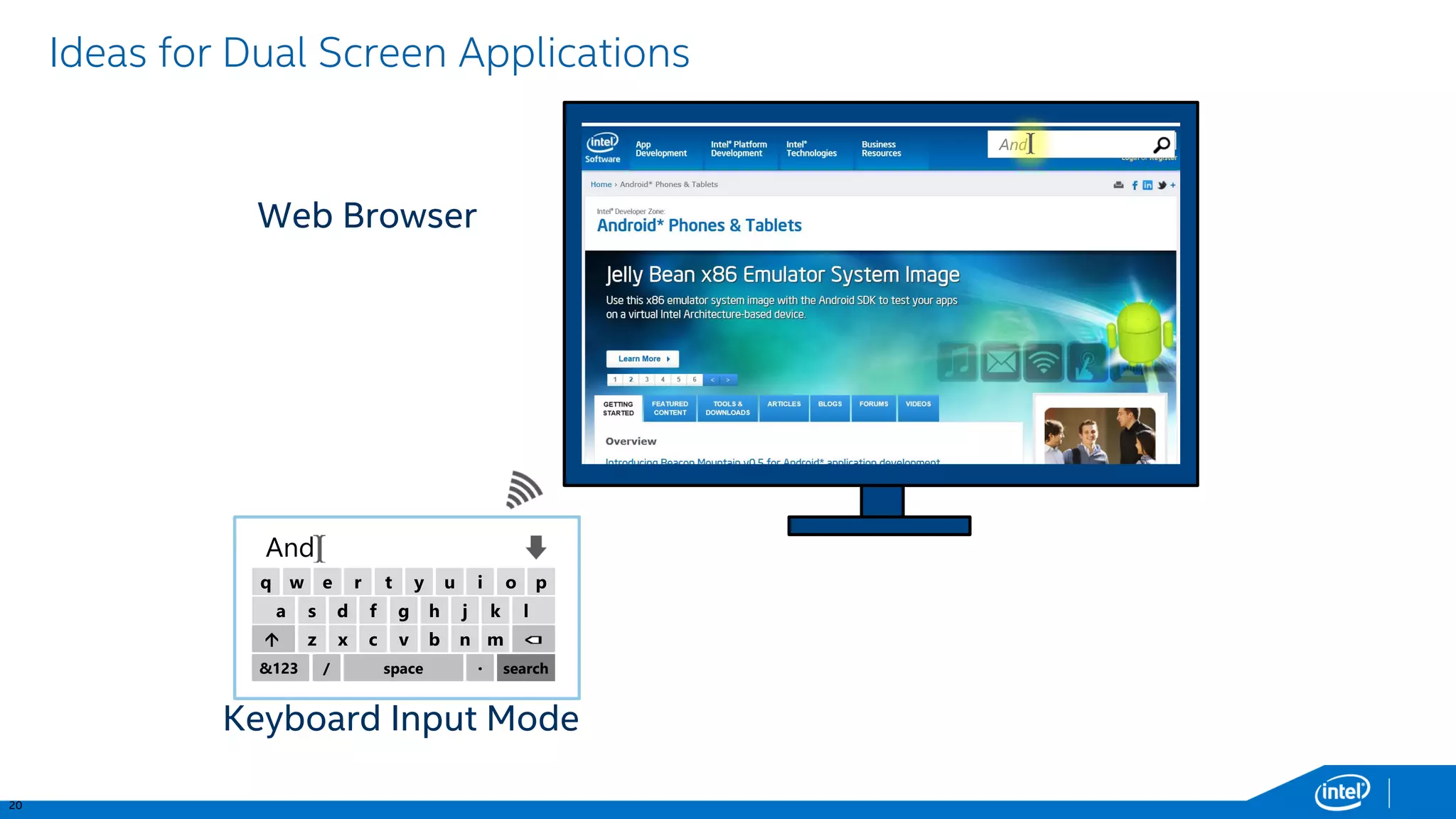
Ideas for Dual Screen Applications 
And 
Keyboard Input Mode 
w 
q 
e 
r 
t 
y 
u 
i 
o 
p 
s 
a 
d 
f 
g 
h 
j 
k 
l 
z 
 
x 
c 
v 
b 
n 
m 
&123 
/ 
space 
· 
search 
And 
Web Browser
21 
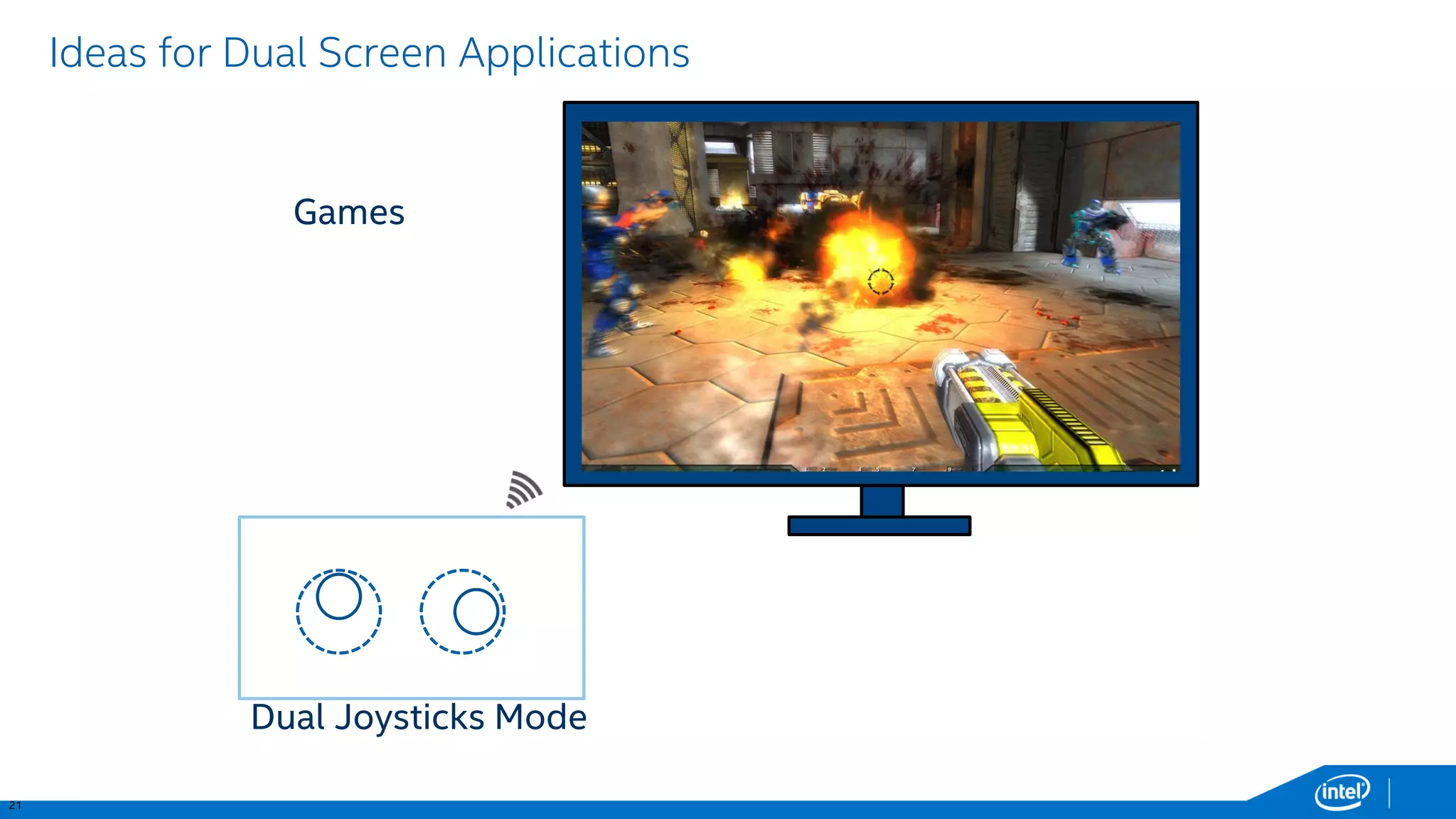
Ideas for Dual Screen Applications 
Games 
Dual Joysticks Mode
22 
Ideas for Dual Screen Applications 
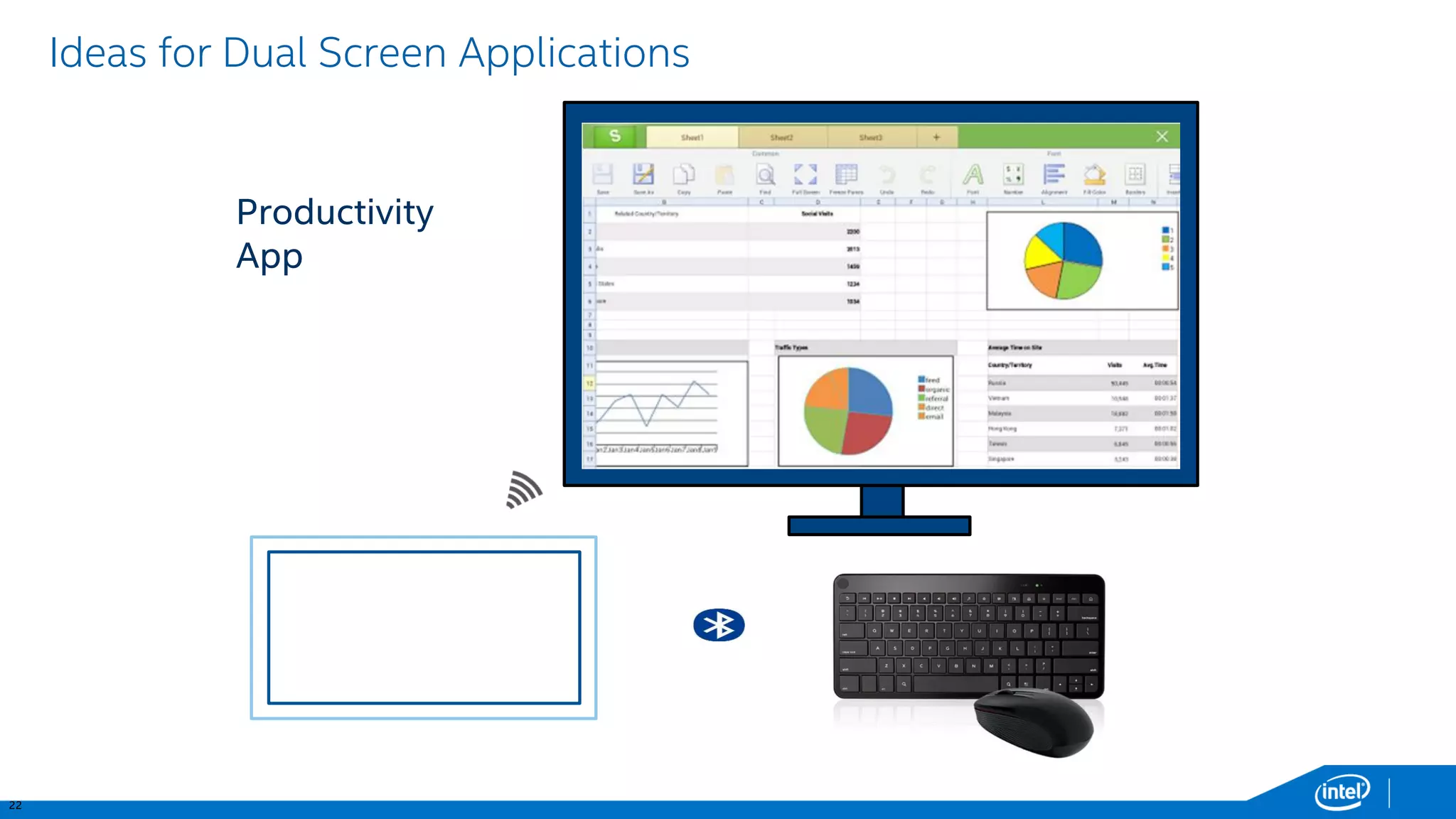
Productivity App
23 
Ideas for Dual Screen Applications 
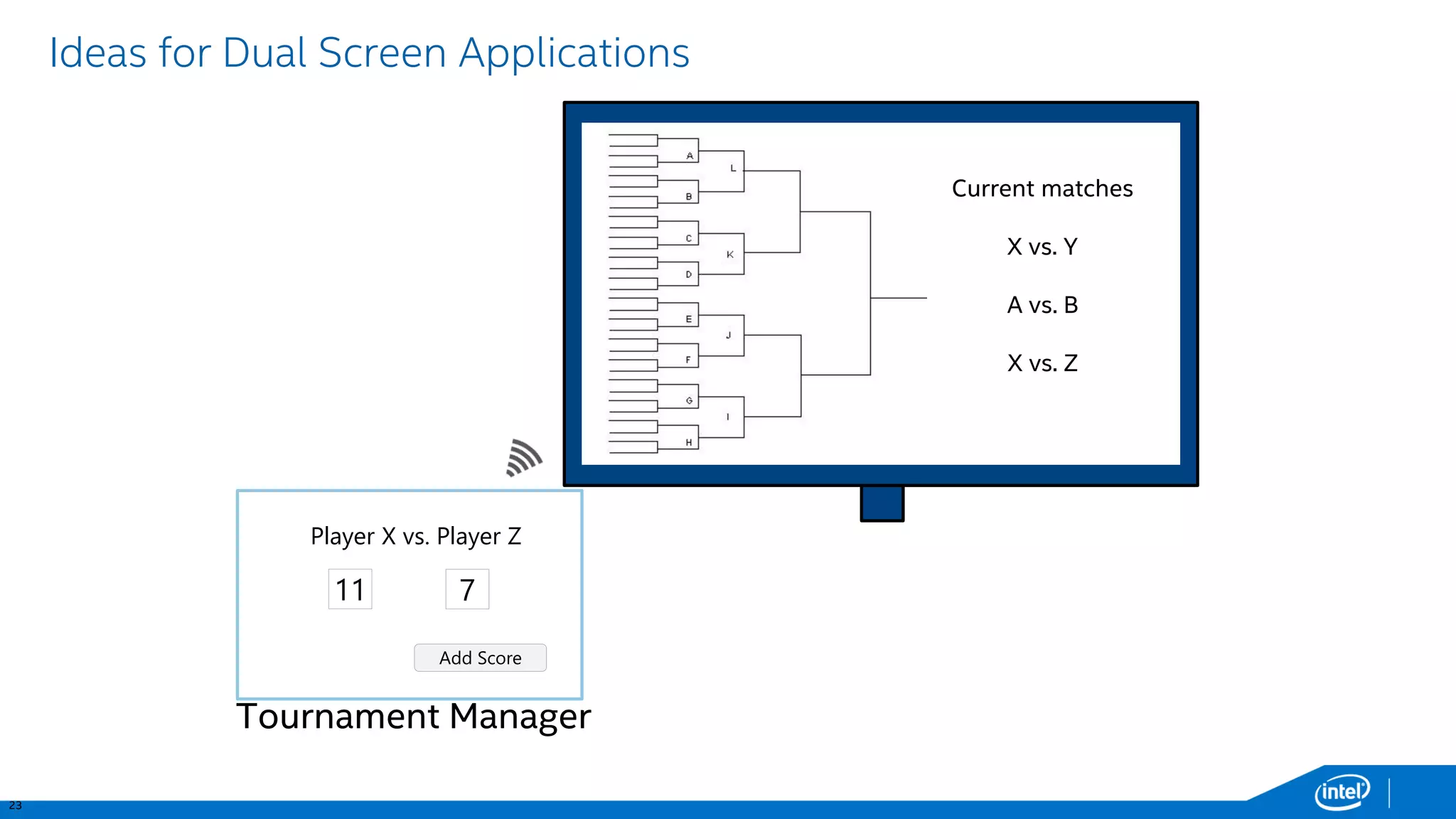
Current matches 
X vs. Y 
A vs. B 
X vs. Z 
Add Score 
11 
Player X vs. Player Z 
7 
Tournament Manager
25 
Wifi Display APIs -Android* 4.2/4.3 
All of the below APIs are internal as of Android* 4.2/4.3 
They are part of AOSP and publicly exposed, but not part of the framework so are not guaranteed to work 
android.hardware.display.DisplayManager 
… 
String ACTION_WIFI_DISPLAY_STATUS_CHANGED 
WifiDisplayStatusgetWifiDisplayStatus() 
void scanWifiDisplays() 
void connectWifiDisplay(StringdeviceAdress)¹ 
void disconnectWifiDisplay()² 
void forgetWifiDisplay(Stringaddress)² 
void renameWifiDisplay(String address,Stringalias)² 
android.hardware.display. 
WifiDisplayStatus 
intgetFeatureState() 
intgetScanState() 
intgetActiveDisplayState() 
WifiDisplaygetActiveDisplay() 
WifiDisplay[] getAvailableDisplays() 
WifiDisplay[] getRememberedDisplays() 
android.hardware.display.WifiDisplay 
StringgetDeviceAddress() 
String getDeviceName() 
String getDeviceAlias() 
String getFriendlyDisplayName() 
android.provider.Settings 
… 
String ACTION_WIFI_DISPLAY_SETTINGS 
String getDeviceAlias() 
String getFriendlyDisplayName() 
¹android.permission.CONFIGURE_WIFI_DISPLAY required for unknown devices 
²android.permission.CONFIGURE_WIFI_DISPLAY always required
26 
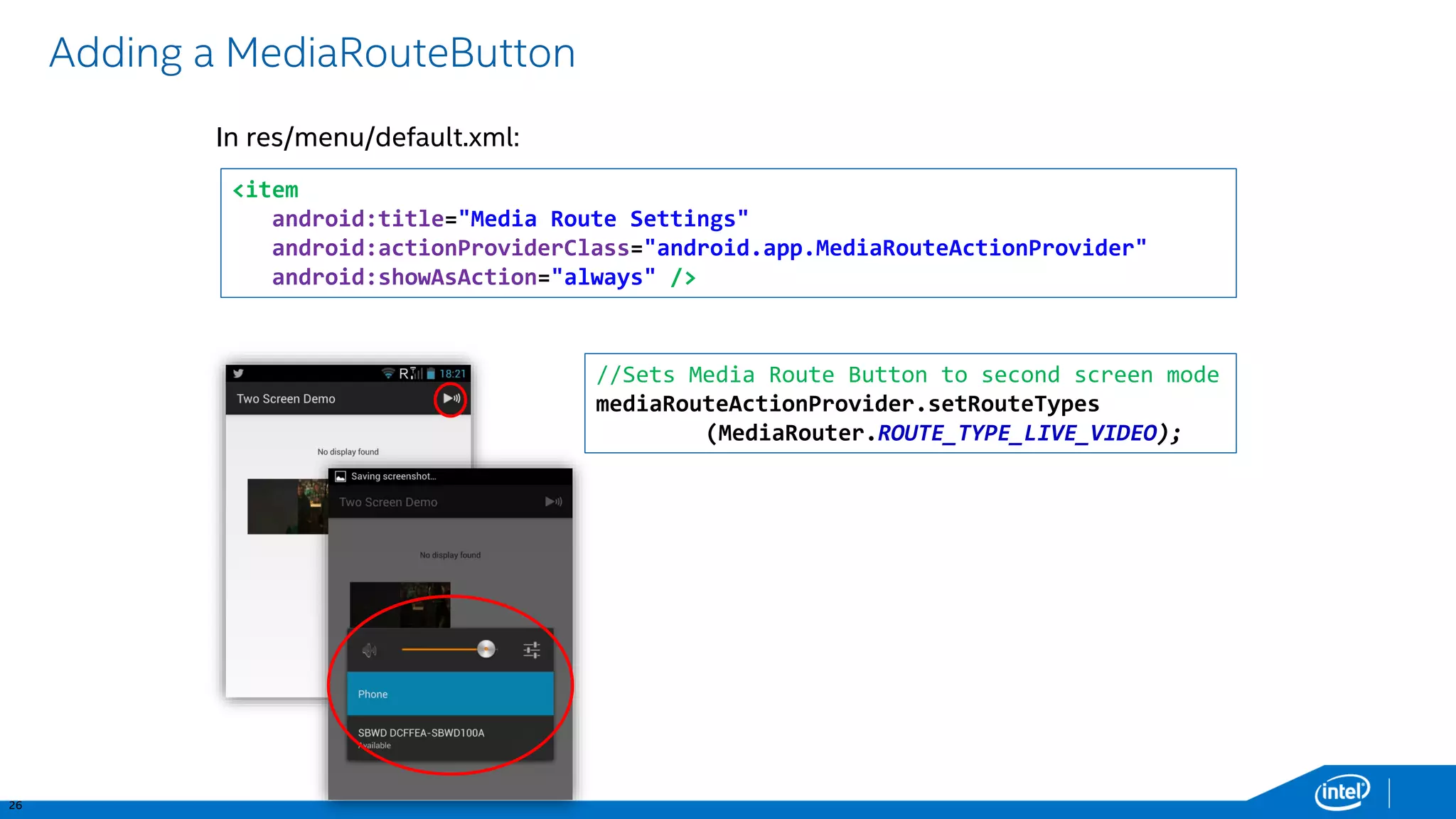
Adding a MediaRouteButton 
In res/menu/default.xml: <item android:title="Media Route Settings" android:actionProviderClass="android.app.MediaRouteActionProvider" android:showAsAction="always" /> //Sets Media Route Button to second screen mode 
mediaRouteActionProvider.setRouteTypes(MediaRouter.ROUTE_TYPE_LIVE_VIDEO);
27 
Some last comments 
Presentation from background service: 
•“Draw over apps” permission (SYSTEM_ALERT_WINDOW) 
•TYPE_SYSTEM_ALERTLayoutParam. 
USB Input Back Channel 
HTML5 : 
•standard: http://webscreens.github.io/presentation-api/ 
•Demo implementation in HexGLbuilt with crosswalk: https://github.com/hmin/HexGL 
•documentation: https://github.com/crosswalk-project/crosswalk- website/wiki/presentation-api-manual
Q&A

Using the Presentation API and external screens on Android

  • 1.
    Adding multi-screen supportto Android* Applicationsusing the Presentation API Xavier Hallade, Developer Evangelist, Intel Corporation ph0b.com -@ph0b
  • 2.
    2 Android Multi-Screensupport Miracast ChromecastMirroring Micro-HDMI MHL/Slimport Wireless Yes Yes No No Charges your device No No No Yes Requiresexisting WiFi No Yes No No Directcommunication Yes Yes (withTDLS) Yes Yes Latency Low-Med Medium None None Number of Supported devices Most Android4.2+ devices 13, more coming ? ? Since version 4.2, Android supports the Presentation API that allows developers to manipulate the content displayed on additional screens.
  • 3.
    3 Connecting ascreen to your device Chromecast Mirroring Miracast Developer Settings
  • 4.
    4 Clone Mode(Default) After establishing the connection, user sees local screen on the remote display Resolution sent to remote is the same as local display’s No need to do anything to support this mode
  • 5.
    5 Extended VideoMode(Intel®Platform Specific) Video mode is activated automatically when user plays a video using Android* Media Player framework (ex: VideoView) User sees video content on the remote at the 1080p resolution (or whatever the native resolution of the content is) Local video rendering is turned off to save power, but UI stays untouched
  • 6.
    6 Dual ScreenDisplay With Single App Remote screen used for content viewing Local screen used for control & context info Application can target this mode using the Android*Presentation API
  • 7.
    7 Dual ScreenDisplay With Background Service User can navigate out of the app and play 1080p video on local screen or use any other application, including receiving a phone call without any disruption to background playback
  • 8.
    8 Connecting aWireless Display on Android* Sony* XperiaZ Stock/Intel® Samsung* Galaxy S4
  • 9.
    9 Miracast* Concept Video Render Audio Render VideoDecode AudioDecode De-Packetize De-Packetize Link Content Protection Decrypt (Optional) AV DeMux Transport LLC WI-FiMAC (Direct Link) Wi-Fi PHY SINK VideoEncode AudioEncode Packetize Packetize Link Content Protection Encrypt (Optional) AV Mux Transport LLC WI-FiMAC (Direct Link) Wi-Fi PHY Video Frames Audio Samples SOURCE
  • 10.
    10 Adapters •Actiontec*ScreenBeamPro •Actiontec*ScreenBeamMini 2 •Netgear*(ex: PTV3000) •Viewsonic(WPG-370) •Best Buy*Rocketfish* •Lenovo* •… Projectors •Dell* •Seiko Epson * •Ricoh* •LG* •… TVs •Samsung* •Toshiba* •LG* •TCL* •Sharp* •Philips* •… Miracast*Certified Sink Devices Full list of Miracast* certified devices can be found at http://www.wi-fi.org/wi-fi-certified-miracast Intel®WiDi Certified MiBox
  • 11.
    11 Second-Screen EnabledDevices running Android* 4.2.x Device Miracast* Certified HDMI*, MHL* or SlimPort* Samsung* Galaxy S4 Yes Yes Samsung Galaxy Tab3 10.1 No Yes Sony* XperiaZ Yes Yes LG* OptimusG Yes Yes Nexus* 4, 5, 7 (2013) Yes Yes HTC* One Yes Yes … Most Android 4.2+ devices Yes
  • 12.
    12 Android* SecondaryDisplay API Android added Second-Screen support via the Presentation class in Android* 4.2 (API Level 17), allowing you to: Implement support for a second screen in your applications without having to worry about the way the displays are connected (Display agnostic) Works with MHL*, HDMI*, SlimPort*, Miracast* & Chromecast Mirroring* compatible devices You can control the output on the remote (second) screen independently of the phone screen
  • 13.
    13 The PresentationObject Dialog Presentation You need to have a fragment based navigation if you want to keep it running while navigating in the app. The activity should take care of pausing and resuming whatever content is playing within the presentation whenever the activity itself is paused or resumed. •Presentation is the based class and should be extended: •Presentation inherits from Dialog, and as for a Dialog its lifecycle is bound to an Activity public class DemoPresentation extendsPresentation { •Needs to be associated with a Display at creation time
  • 14.
    14 Using thePresentation API Before showing a Presentation you need to select a Display, this can be done in 2 ways: 1.MediaRouterAPI (in API 16): system will decide the best display for you! also available in the Support Library v7* 2.Display Manager API (in API 17): Enumeration of displays // Get the MediaRouterservice MediaRouter mMediaRouter= (MediaRouter)getSystemService(Context.MEDIA_ROUTER_SERVICE); // Care only about routes that have full video support. MediaRouter.RouteInfomRouteInfo = mMediaRouter.getSelectedRoute(MediaRouter.ROUTE_TYPE_LIVE_VIDEO); Display presentationDisplay= mRouteInfo.getPresentationDisplay(); // Get the DisplayManagerservice. DisplayManagermDisplayManager= (DisplayManager)getSystemService(Context.DISPLAY_SERVICE); // enumerate the displays Display[] presentationDisplays= mDisplayManager.getDisplays(DisplayManager.DISPLAY_CATEGORY_PRESENTATION);
  • 15.
    15 Presentation API MediaRouter. getSelectedRoute(ROUTE_TYPE_LIVE_VIDEO) MediaRouter. routeInfo getPresentationDisplay() new Presentation(activityContext, display) .show() Then, using MediaRouter.addCallback, you have to monitor: •onRouteUnselected •onRouteSelected •onRoutePresentationDisplayChanged How to get a Presentation displayed: And inside the activity owning the Presentation: •onResume •onPause
  • 16.
    16 Designing Layoutfor the Presentation Use a layout the same way as with a Dialog. Display properties are the same than with Google*TV: TV display is as bigger from a phone than the user sits further from a phone: screen density is comparable. Default theme is HoloDark: light text on dark background is easier to read on TV. Orientation is always… landscape! TV setting Addressable screen size Density Identifier Screen Density Display Resolution Screen size identifier 720p 1280 x 720 px tvdpi 213 dp 960 x 540 dp large 1080p 1920 x 1080 px xhdpi 320 dp 960 x 540 dp large source: https://developers.google.com/tv/android/docs/gtv_android_patterns
  • 17.
  • 18.
    18 Intel®WiDi –DualScreen Possibilities 97 MPH 4 POS107 MPH 8 POS111 MPH 14 POSLIVE FEEDTURN 7 App Window #1 Configure and add select content on 2’ screen App Window #2 View multi-angle Videos & more on 10’ large screen Multi-video User configured Application EXTREME Content Driver #48-Car Cam Driver #10 – Fol ow the Car Track Cam Location Car Race Main Live Feed Driver#8-Car Cam Driver#99-Car Cam Tweet Feeds…. Layout 1 Layout 4 Layout 3 Layout 2 MPH / POS MPH / POS MPH //POS Clear All Follow Driver Driver Tweets Driver Stats Live Feed Driver Location Load Layout Save Layout THERACE One application, pulling content from one site, driving two screens!
  • 19.
    19 Ideas forDual Screen Applications Enter search term Touchpad Mode Web Browser
  • 20.
    20 Ideas forDual Screen Applications And Keyboard Input Mode w q e r t y u i o p s a d f g h j k l z  x c v b n m &123 / space · search And Web Browser
  • 21.
    21 Ideas forDual Screen Applications Games Dual Joysticks Mode
  • 22.
    22 Ideas forDual Screen Applications Productivity App
  • 23.
    23 Ideas forDual Screen Applications Current matches X vs. Y A vs. B X vs. Z Add Score 11 Player X vs. Player Z 7 Tournament Manager
  • 24.
    25 Wifi DisplayAPIs -Android* 4.2/4.3 All of the below APIs are internal as of Android* 4.2/4.3 They are part of AOSP and publicly exposed, but not part of the framework so are not guaranteed to work android.hardware.display.DisplayManager … String ACTION_WIFI_DISPLAY_STATUS_CHANGED WifiDisplayStatusgetWifiDisplayStatus() void scanWifiDisplays() void connectWifiDisplay(StringdeviceAdress)¹ void disconnectWifiDisplay()² void forgetWifiDisplay(Stringaddress)² void renameWifiDisplay(String address,Stringalias)² android.hardware.display. WifiDisplayStatus intgetFeatureState() intgetScanState() intgetActiveDisplayState() WifiDisplaygetActiveDisplay() WifiDisplay[] getAvailableDisplays() WifiDisplay[] getRememberedDisplays() android.hardware.display.WifiDisplay StringgetDeviceAddress() String getDeviceName() String getDeviceAlias() String getFriendlyDisplayName() android.provider.Settings … String ACTION_WIFI_DISPLAY_SETTINGS String getDeviceAlias() String getFriendlyDisplayName() ¹android.permission.CONFIGURE_WIFI_DISPLAY required for unknown devices ²android.permission.CONFIGURE_WIFI_DISPLAY always required
  • 25.
    26 Adding aMediaRouteButton In res/menu/default.xml: <item android:title="Media Route Settings" android:actionProviderClass="android.app.MediaRouteActionProvider" android:showAsAction="always" /> //Sets Media Route Button to second screen mode mediaRouteActionProvider.setRouteTypes(MediaRouter.ROUTE_TYPE_LIVE_VIDEO);
  • 26.
    27 Some lastcomments Presentation from background service: •“Draw over apps” permission (SYSTEM_ALERT_WINDOW) •TYPE_SYSTEM_ALERTLayoutParam. USB Input Back Channel HTML5 : •standard: http://webscreens.github.io/presentation-api/ •Demo implementation in HexGLbuilt with crosswalk: https://github.com/hmin/HexGL •documentation: https://github.com/crosswalk-project/crosswalk- website/wiki/presentation-api-manual
  • 27.