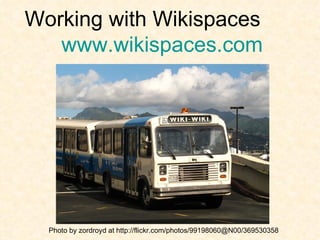
Working with Wikispaces  www.wikispaces.com Photo by zordroyd at http://flickr.com/photos/99198060@N00/369530358
What is a Wiki? n. 1. Short form of the  Hawaiian wiki-wiki which  means quick or fast  2. a website that allows  multiple users to create,  modify and organize web  page content in a  collaborative manner.  Wiki Wiki bus in Honolulu, HI Photo by zordroyd at  http://flickr.com/photos/99198060@N00/369530358
Wikis in Plain English By Lee LeFever, The Common Craft Show http://www.youtube.com/watch?v=-dnL00TdmLY
“ A Web Page with an Edit Button” A wiki is a website that people can edit, add to, and change.  Limits can be put in place so that only certain people can view or be allowed to change a wiki.   Click for an example from a 9 th  grade history class:  http://brokenworld.wikispaces.com/A+Broken+World Click for an example from a 5 th  grade history class: http://msharboursclass.wikispaces.com/ Click for an example from a 7 th  grade Global Studies class: http:// geopost.wiki.lovett.org /
Educational Uses of Wikis Collaborative Textbook Presentation Resource Share Share Student Work Book/Movie Reviews Class Dictionary or Encyclopedia Study Guide/Class Notes Student Portfolios Timeline Question of the Week Online Journaling & Discussion Run Class Polls Poetry or Literature Anthology Literature Circles Progressive Story Class Newspaper Debate Course Topics and Readings Project Planning and Creation Support Service Learning Projects Virtual Field Trips WebQuests Brainstorming
Why Wiki? Easily accessible web-based technology, free and simple to use. Grounded in content and skills. Interactive and student-centered. There’s a chronological history for every page.  Includes a discussion forum:  members can remark on changes they make. Teacher can monitor the wiki for any changes.
Other Benefits and Possibilities Democratic process of knowledge creation. See evidence of thought process and development (history & discussion tabs). Ownership and pride of public authorship. Could incorporate student, faculty, community, and parent input.
Key Questions to Consider How do you envision using the wiki?  Who will be able to see the wiki?  Who will be able to edit the wiki?  Who will be able to join the wiki?  What parts of the wiki will you  “protect” (lock from changes)?  Who will moderate the wiki for appropriateness, etc?  Who will have the ability to reset changes? Will you, as the teacher, be notified of all changes?  Will the wiki have individual or global memberships?
Possible Concerns Monitoring wiki contributions. Determining who can access and contribute to the site. Deciding whether your site is public or private. Group authorship and public writing. No spell check / some editing issues.
Go back to  www.workingwithwikis.wikispaces.com   to get started

Working with Wikispaces Introduction

  • 1.
    Working with Wikispaces www.wikispaces.com Photo by zordroyd at http://flickr.com/photos/99198060@N00/369530358
  • 2.
    What is aWiki? n. 1. Short form of the Hawaiian wiki-wiki which means quick or fast 2. a website that allows multiple users to create, modify and organize web page content in a collaborative manner. Wiki Wiki bus in Honolulu, HI Photo by zordroyd at http://flickr.com/photos/99198060@N00/369530358
  • 3.
    Wikis in PlainEnglish By Lee LeFever, The Common Craft Show http://www.youtube.com/watch?v=-dnL00TdmLY
  • 4.
    “ A WebPage with an Edit Button” A wiki is a website that people can edit, add to, and change. Limits can be put in place so that only certain people can view or be allowed to change a wiki. Click for an example from a 9 th grade history class: http://brokenworld.wikispaces.com/A+Broken+World Click for an example from a 5 th grade history class: http://msharboursclass.wikispaces.com/ Click for an example from a 7 th grade Global Studies class: http:// geopost.wiki.lovett.org /
  • 5.
    Educational Uses ofWikis Collaborative Textbook Presentation Resource Share Share Student Work Book/Movie Reviews Class Dictionary or Encyclopedia Study Guide/Class Notes Student Portfolios Timeline Question of the Week Online Journaling & Discussion Run Class Polls Poetry or Literature Anthology Literature Circles Progressive Story Class Newspaper Debate Course Topics and Readings Project Planning and Creation Support Service Learning Projects Virtual Field Trips WebQuests Brainstorming
  • 6.
    Why Wiki? Easilyaccessible web-based technology, free and simple to use. Grounded in content and skills. Interactive and student-centered. There’s a chronological history for every page. Includes a discussion forum: members can remark on changes they make. Teacher can monitor the wiki for any changes.
  • 7.
    Other Benefits andPossibilities Democratic process of knowledge creation. See evidence of thought process and development (history & discussion tabs). Ownership and pride of public authorship. Could incorporate student, faculty, community, and parent input.
  • 8.
    Key Questions toConsider How do you envision using the wiki? Who will be able to see the wiki? Who will be able to edit the wiki? Who will be able to join the wiki? What parts of the wiki will you  “protect” (lock from changes)? Who will moderate the wiki for appropriateness, etc? Who will have the ability to reset changes? Will you, as the teacher, be notified of all changes? Will the wiki have individual or global memberships?
  • 9.
    Possible Concerns Monitoringwiki contributions. Determining who can access and contribute to the site. Deciding whether your site is public or private. Group authorship and public writing. No spell check / some editing issues.
  • 10.
    Go back to www.workingwithwikis.wikispaces.com to get started