Working Folder
Digital Agility
Optimised Productivity
Working Folder
Cloud Solutions
Digitise Your Advantage. Technology is transforming business processes.
The demand for instant access to information and instant collaboration across
numerous devices means anything that can be digitised will be digitised.
Respond to this demand quickly, affordably and securely with the innovative
Working Folder service from Fuji Xerox Cloud Solutions.
Whether providing access to stored material, collaborating on documents
or capturing and instantly digitising inbound paper transmissions such as
faxes, Working Folder is an effective, affordable and secure way to transform
analogue paper processes into the digital era.
Working Folder
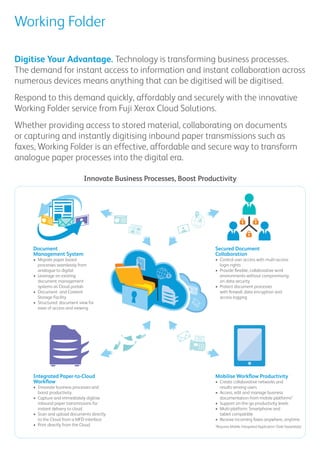
Innovate Business Processes, Boost Productivity
Document 
Management System
•	 Migrate paper based
processes seamlessly from
analogue to digital
•	 Leverage on existing
document management
systems as Cloud portals
•	 Document and Content
Storage Facility
•	 Structured document view for
ease of access and viewing
Secured Document
Collaboration
•	 Control user access with multi-access
login rights
•	 Provide flexible, collaborative work
environments without compromising
on data security
•	 Protect document processes
with firewall, data encryption and
access logging
Integrated Paper-to-Cloud
Workflow
•	 Innovate business processes and
boost productivity
•	 Capture and immediately digitise
inbound paper transmissions for
instant delivery to cloud
•	 Scan and upload documents directly
to the Cloud from a MFD interface
•	 Print directly from the Cloud
Mobilise Workflow Productivity
•	 Create collaborative networks and
results among users
•	 Access, edit and manage business
documentation from mobile platforms*
•	 Support on-the-go productivity levels
•	 Multi-platform: Smartphone and
tablet compatible
•	 Receive incoming faxes anywhere, anytime
*Requires Mobile Integrated Application (Sold Separately)
Working Folder
The way we work has shifted. Give
your business processes the agility and
flexibility they need with Working Folder
and benefit from:
Document management capability
•	 Affordable and quick entry-level
document management capability
•	 Instantly digitise and access
documents for archival and retrieval
•	 Integrate with existing mobility
workflow for enhanced productivity
Mobility
•	 Round-the-clock employee
access to updated and dynamic
company information
•	 Convert data between paper and
digital data and vice versa
•	 Boost mobile intelligence, productivity
and performance
Collaboration
•	 Connect internal and external
user collaboration
•	 Private and public folders for
individual or shared workgroup styles
•	 Share files and information
dynamically in the Cloud
Security
•	 Secure against unauthorised access
with firewall feature
•	 Protect against fraud with data
encryption
•	 Controlled access with multi-access
login rights
•	 Data backup and disaster recovery
Give users the benefit of:
•	Viewing, editing, moving and deleting documents on the go to enhance mobile productivity levels
•	Batch file upload or download from anywhere
•	Sharing large files and presentations between users without email attachments
•	Setting access read/write or read only rights for various users
•	Scan and print directly to and from the Cloud
•	Receive, automatically digitise and route inbound paper transmissions such as faxes to Working Folder for
anywhere, anytime access
Working Folder integrates with Fuji
Xerox Mobility Solutions to provide an
end-to-end document handling and
management solution, fully secured
within a cloud environment.
•	 Give users the access to documentation
they demand, the ability to choose
their collaborative working groups and
increase their mobile productivity levels,
all within a framework that meets
business compliance requirements.
•	 Scale user access up, down, and even
across to partner organisations to suit
the ever changing shape and pace of
your business.
As a managed service, Working
Folder provides high availability, on-
demand scale and encrypted security
whilst reducing the administration
and management burden on your
organisation.
No infrastructure builds or onerous
software requirements help to support
an efficient infrastructure profile and
ensures CapEx can be focused on
strategic objectives.
•	 Reduce management and
administrative overheads
•	 Consolidate dispersed file storage and
redeploy data server capacity
•	 Drive productivity and accelerate
business responsiveness
•	 Increase agility for mobile and
field workforce and speed up the
sales cycle
•	 Reduce user self-provisioning with
risky public data applications
Working Folder integrates with Fuji Xerox
digital Multifunction Devices (MFDs),
turning them into powerful cloud
gateways that connect your workforce
to documents on–demand, across
computing, mobile and MFD devices.
As simple intuitive web interface
provides user defined access from PCs,
iOSTM
and AndroidTM
devices. Documents
can also be accessed via the control
panel screen on MFDs.
•	 Deliver digital documents into a secure
cloud environment for instantaneous
sharing and collaboration via
computing, mobile (iOSTM
/AndroidTM
)
and multifunction devices
•	 Share documentation with external
parties via an email download
link to reduce file duplication and
storage pressure
•	 Create Cabinets, Drawers and Folders
to intuitively structure document
storage and allow varied levels of
collaboration individually, in small
work groups, or enterprise-wide
•	 Upgrade to incorporate Fuji Xerox
Document Management Solutions
for a cloud friendly drag-and-drop
management interface
Mobilise Your Processes. Empower Users. Control Your Standards.
Advance Your Business Processes
Accelerate Beyond Complexity
Leverage Your Infrastructure
For more information, contact your
Local Fuji Xerox Representative or visit us at:
Fuji Xerox Asia Pacific Pte Ltd
80 Anson Road, #37-01, Fuji Xerox Towers, Singapore 079907
Tel: (65) 6766 8888 Fax: (65) 6239 2804
w w w . f x a p . c o m . s g / s o l u t i o n / c l o u d
© 2012 Fuji Xerox Co., Ltd. All rights reserved. Xerox® and the sphere of connectivity design are registered trademarks of Xerox Corporation in the U.S. and/or other countries.
Working Folder
*English and Japanese versions
*1 External Access Kit is required.
*2 Supported ROM version: 1.104.x
*3 Scanner Kit is required.
*4 Extension System Memory (2GB) is required.
*5 Printer Kit and Scanner Kit are required.
Fuji Xerox understands the migration from analogue paper processes to
digital paper processes better than just about any other company. It’s what
we do. That’s why Fuji Xerox is so well positioned to help you with the next
page of the journey; migrating your paper and digital document processes
into the cloud.
Talk to us about how we can help to:
•	Plan your migration from analogue to digital documentation
•	Leverage existing storage and backup infrastructure
more effectively
•	Give your workforce the ability to rapidly collaborate on
key documentation
•	Tighten security protocols without stifling mobile productivity
•	Improve the leanness of your IT operation
Item Description
Web Browser Windows® Internet Explorer® 8, Windows® Internet Explorer® 9, Mozilla® Firefox®[ESR 10/11/12/13/14], Safari 5.1 (Mac OS)
OS* Microsoft® Windows® XP Home Edition [Service Pack 3], Microsoft® Windows® XP Professional [Service Pack 3], Microsoft® Windows Vista®
Business [Service Pack 2], Microsoft® Windows Vista® Enterprise [Service Pack 2], Microsoft® Windows® 7 Ultimate [Service Pack 1]
Microsoft® Windows® 7 Professional [Service Pack 1], Microsoft® Windows® 7 Home Premium [Service Pack 1]
Microsoft® Windows® 7 Enterprise [Service Pack 1], Mac OS X v10.7 Lion
Web Browser
Item Description
Colour MFD ApeosPort-IV C7780/C6680/C5580*1
, ApeosPort-IV C5575/C4475/C3375/C3373/C2275
ApeosPort-IV C5570/C4470/C3371/C3370/C2270*1*2
, ApeosPort-IV C4430*1
, DocuCentre-IV C5575/C4475/C3375/C3373*3
DocuCentre-IV C2265/C2263*3*4
Mono MFD ApeosPort-IV 5070/4070/3070*1
, ApeosPort-IV 7080/6080, DocuCentre-IV 7080/6080*5
Multifunction Device

Working Folder - Cloud Solutions

  • 1.
    Working Folder Digital Agility OptimisedProductivity Working Folder Cloud Solutions
  • 2.
    Digitise Your Advantage.Technology is transforming business processes. The demand for instant access to information and instant collaboration across numerous devices means anything that can be digitised will be digitised. Respond to this demand quickly, affordably and securely with the innovative Working Folder service from Fuji Xerox Cloud Solutions. Whether providing access to stored material, collaborating on documents or capturing and instantly digitising inbound paper transmissions such as faxes, Working Folder is an effective, affordable and secure way to transform analogue paper processes into the digital era. Working Folder Innovate Business Processes, Boost Productivity Document Management System • Migrate paper based processes seamlessly from analogue to digital • Leverage on existing document management systems as Cloud portals • Document and Content Storage Facility • Structured document view for ease of access and viewing Secured Document Collaboration • Control user access with multi-access login rights • Provide flexible, collaborative work environments without compromising on data security • Protect document processes with firewall, data encryption and access logging Integrated Paper-to-Cloud Workflow • Innovate business processes and boost productivity • Capture and immediately digitise inbound paper transmissions for instant delivery to cloud • Scan and upload documents directly to the Cloud from a MFD interface • Print directly from the Cloud Mobilise Workflow Productivity • Create collaborative networks and results among users • Access, edit and manage business documentation from mobile platforms* • Support on-the-go productivity levels • Multi-platform: Smartphone and tablet compatible • Receive incoming faxes anywhere, anytime *Requires Mobile Integrated Application (Sold Separately)
  • 3.
    Working Folder The waywe work has shifted. Give your business processes the agility and flexibility they need with Working Folder and benefit from: Document management capability • Affordable and quick entry-level document management capability • Instantly digitise and access documents for archival and retrieval • Integrate with existing mobility workflow for enhanced productivity Mobility • Round-the-clock employee access to updated and dynamic company information • Convert data between paper and digital data and vice versa • Boost mobile intelligence, productivity and performance Collaboration • Connect internal and external user collaboration • Private and public folders for individual or shared workgroup styles • Share files and information dynamically in the Cloud Security • Secure against unauthorised access with firewall feature • Protect against fraud with data encryption • Controlled access with multi-access login rights • Data backup and disaster recovery Give users the benefit of: • Viewing, editing, moving and deleting documents on the go to enhance mobile productivity levels • Batch file upload or download from anywhere • Sharing large files and presentations between users without email attachments • Setting access read/write or read only rights for various users • Scan and print directly to and from the Cloud • Receive, automatically digitise and route inbound paper transmissions such as faxes to Working Folder for anywhere, anytime access Working Folder integrates with Fuji Xerox Mobility Solutions to provide an end-to-end document handling and management solution, fully secured within a cloud environment. • Give users the access to documentation they demand, the ability to choose their collaborative working groups and increase their mobile productivity levels, all within a framework that meets business compliance requirements. • Scale user access up, down, and even across to partner organisations to suit the ever changing shape and pace of your business. As a managed service, Working Folder provides high availability, on- demand scale and encrypted security whilst reducing the administration and management burden on your organisation. No infrastructure builds or onerous software requirements help to support an efficient infrastructure profile and ensures CapEx can be focused on strategic objectives. • Reduce management and administrative overheads • Consolidate dispersed file storage and redeploy data server capacity • Drive productivity and accelerate business responsiveness • Increase agility for mobile and field workforce and speed up the sales cycle • Reduce user self-provisioning with risky public data applications Working Folder integrates with Fuji Xerox digital Multifunction Devices (MFDs), turning them into powerful cloud gateways that connect your workforce to documents on–demand, across computing, mobile and MFD devices. As simple intuitive web interface provides user defined access from PCs, iOSTM and AndroidTM devices. Documents can also be accessed via the control panel screen on MFDs. • Deliver digital documents into a secure cloud environment for instantaneous sharing and collaboration via computing, mobile (iOSTM /AndroidTM ) and multifunction devices • Share documentation with external parties via an email download link to reduce file duplication and storage pressure • Create Cabinets, Drawers and Folders to intuitively structure document storage and allow varied levels of collaboration individually, in small work groups, or enterprise-wide • Upgrade to incorporate Fuji Xerox Document Management Solutions for a cloud friendly drag-and-drop management interface Mobilise Your Processes. Empower Users. Control Your Standards. Advance Your Business Processes Accelerate Beyond Complexity Leverage Your Infrastructure
  • 4.
    For more information,contact your Local Fuji Xerox Representative or visit us at: Fuji Xerox Asia Pacific Pte Ltd 80 Anson Road, #37-01, Fuji Xerox Towers, Singapore 079907 Tel: (65) 6766 8888 Fax: (65) 6239 2804 w w w . f x a p . c o m . s g / s o l u t i o n / c l o u d © 2012 Fuji Xerox Co., Ltd. All rights reserved. Xerox® and the sphere of connectivity design are registered trademarks of Xerox Corporation in the U.S. and/or other countries. Working Folder *English and Japanese versions *1 External Access Kit is required. *2 Supported ROM version: 1.104.x *3 Scanner Kit is required. *4 Extension System Memory (2GB) is required. *5 Printer Kit and Scanner Kit are required. Fuji Xerox understands the migration from analogue paper processes to digital paper processes better than just about any other company. It’s what we do. That’s why Fuji Xerox is so well positioned to help you with the next page of the journey; migrating your paper and digital document processes into the cloud. Talk to us about how we can help to: • Plan your migration from analogue to digital documentation • Leverage existing storage and backup infrastructure more effectively • Give your workforce the ability to rapidly collaborate on key documentation • Tighten security protocols without stifling mobile productivity • Improve the leanness of your IT operation Item Description Web Browser Windows® Internet Explorer® 8, Windows® Internet Explorer® 9, Mozilla® Firefox®[ESR 10/11/12/13/14], Safari 5.1 (Mac OS) OS* Microsoft® Windows® XP Home Edition [Service Pack 3], Microsoft® Windows® XP Professional [Service Pack 3], Microsoft® Windows Vista® Business [Service Pack 2], Microsoft® Windows Vista® Enterprise [Service Pack 2], Microsoft® Windows® 7 Ultimate [Service Pack 1] Microsoft® Windows® 7 Professional [Service Pack 1], Microsoft® Windows® 7 Home Premium [Service Pack 1] Microsoft® Windows® 7 Enterprise [Service Pack 1], Mac OS X v10.7 Lion Web Browser Item Description Colour MFD ApeosPort-IV C7780/C6680/C5580*1 , ApeosPort-IV C5575/C4475/C3375/C3373/C2275 ApeosPort-IV C5570/C4470/C3371/C3370/C2270*1*2 , ApeosPort-IV C4430*1 , DocuCentre-IV C5575/C4475/C3375/C3373*3 DocuCentre-IV C2265/C2263*3*4 Mono MFD ApeosPort-IV 5070/4070/3070*1 , ApeosPort-IV 7080/6080, DocuCentre-IV 7080/6080*5 Multifunction Device