


SetupVisual StudioRule 18
Workflow Foundation 4
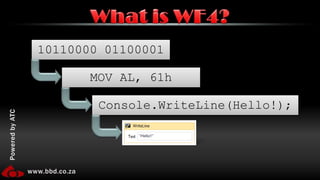
10110000 01100001What is WF4?MOV AL, 61hConsole.WriteLine(Hello!);
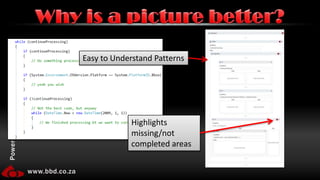
Why is a picture better?Highlights missing/not completed areasEasy to Understand Patterns
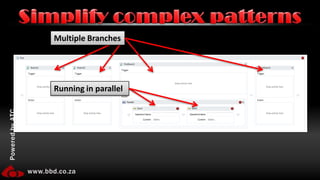
Simplify complex patternsMultiple BranchesRunning in parallel
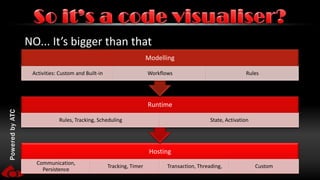
NO... It’s bigger than thatSo it’s a code visualiser?
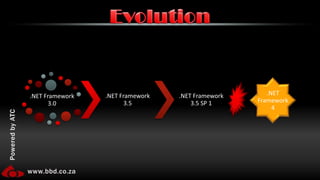
Evolution
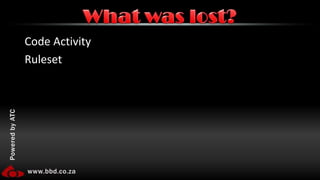
Code ActivityRulesetWhat was lost?
IsolationWorkflow instances are isolated from the host application and each other.Workflows are not aware of information in the application other than what is passed to it.ThreadedInstances are separately threaded from your main thread.Important Concepts
Workflow Foundation Demo
New Project -> .NET 4 -> Workflow Console App -> OKDrag a WriteLine on -> Set text to "Hello"Run (Ctrl+F5)single activity issue demo: Now try drag on another writelineRemove writeline, bring on a sequence and put two writelines with different messagesAdd Argument -> Name: Firstname, Direction: In, Type: stringDrag a If on (should be only thing on surface) - condition is: String.IsNullOrWhiteSpace(FirstName)Drag a writeline to true and set text to: "Hello, stranger"Drag a writeline to false and set text to: "Hello, " & FirstNameRun it - note that it runs strangerProgram.cs - explain what is happeningChange main to (Ctrl+1):   Workflow1 workflow = new Workflow1();workflow.FirstName = "Robert";WorkflowInvoker.Invoke(workflow);RunCreate new PUBLIC class Person. Add string property FirstName. BuildDelete the current workflow argumentAdd new arguement name=person, direction=in, type=PersonChange if condition to: String.IsNullOrWhiteSpace(person.FirstName) Change else writeline: "Hello, " & person.FirstNameBuildChange main to (Ctrl+2):   Person person = new Person();person.FirstName = "Robert";  Workflow1 workflow = new Workflow1();workflow.person = person;WorkflowInvoker.Invoke(workflow);Run and fail!
Change main to (Ctrl+3):  Person person = new Person();person.FirstName = "Robert";  Dictionary<string, object> parameters = new Dictionary<string, object>();parameters.Add("person", person);  Workflow1 workflow = new Workflow1();WorkflowInvoker.Invoke(workflow, parameters);Run
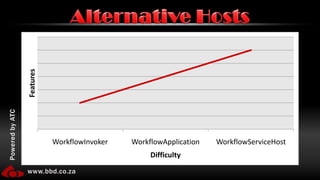
Alternative Hosts
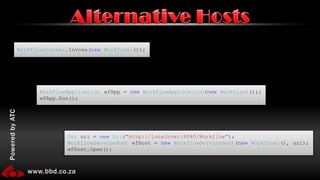
WorkflowInvoker.Invoke(new Workflow1());Alternative HostsWorkflowApplication wfApp = new WorkflowApplication(new Workflow1());wfApp.Run();Uri uri = new Uri("http://localhost:8080/Workflow");WorkflowServiceHost wfHost = new WorkflowServiceHost(new Workflow1(), uri);wfHost.Open();
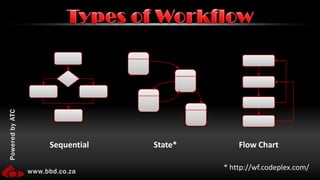
Types of WorkflowSequentialState*Flow Chart* http://wf.codeplex.com/
Flow chart
Remove everything from workflowDrag a flow chart onDrag a flow decisionLink start to decisionSet decision condition to: String.IsNullOrWhiteSpace(person.FirstName)Show tooltop and tooltip stickyDrag two writelines on and link one to true and one to falsetrue writeline text: "Hello, stranger"false writeline text: "Hello, " & person.FirstNameRunLink false writeline to true writelinerun
Custom activities
Add new item -> Code activitySet value to (Ctrl+4)public InArgument<string> FirstName { get; set; }        // If your activity returns a value, derive from CodeActivity<TResult>        // and return the value from the Execute method.        protected override void Execute(CodeActivityContext context)        {            // Obtain the runtime value of the Text input argumentConsole.WriteLine(this.FirstName.Get(context));        }BuildDrag CodeActivity onto flowchart and link it to true writelinerun
Passing DataApplicationGlobal Instance VariablesDatabase, MSMQ, File, etc…Workflow
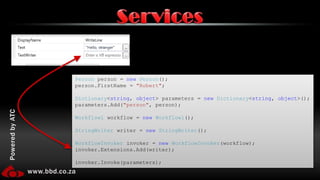
ServicesPerson person = new Person();person.FirstName = "Robert";Dictionary<string, object> parameters = new Dictionary<string, object>();parameters.Add("person", person);Workflow1 workflow = new Workflow1();StringWriter writer = new StringWriter();WorkflowInvoker invoker = new WorkflowInvoker(workflow);invoker.Extensions.Add(writer);invoker.Invoke(parameters);
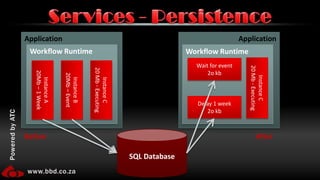
Services - PersistenceApplicationApplicationWorkflow RuntimeWorkflow RuntimeWait for event2o kbInstance C20 Mb - ExecutingInstance A20Mb – 1 WeekInstance C20 Mb - ExecutingInstance B20Mb – EventDelay 1 week2o kbSQL DatabaseBeforeAfter
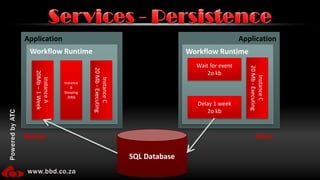
Services - PersistenceApplicationApplicationWorkflow RuntimeWorkflow RuntimeWait for event2o kbInstance BSleeping20KbInstance C20 Mb - ExecutingInstance A20Mb – 1 WeekInstance C20 Mb - ExecutingDelay 1 week2o kbSQL DatabaseBeforeAfter
When?Persist On IdlePersist On CommandNo Persist ZonesOptions?Persist OnlyPersist + UnloadWhere?SQLCustomServices - Persistence
Allows the WF Engine to share/store information on the workflows. Storage is, by default, to SQL but can be anywhere.Uses:Real time monitoringReviewing completed workflowsFor Bugs/supportingFor KPI/MetricsFor AuditingServices - Tracking
Security PackState MachineADO.NETMigration Kitwf.codeplex.com

Workflow Foundation 4