
QTP Training Session IV


 Presented By : Aisha Mazhar
        13 Aug 2012
Agenda - Intermediate
•   Output Values
•   Understanding the script
•   VBScript basics.
•   Some FUM's (Frequently Used Methods)
•   Object Identification Mechanism (Object Spy)
•   Descriptive programming.
Output Values
• Output values are used for checking the
  properties of the object. And these properties
  are stored in the specified column during run
  session in the DataTable
VB Script basics
• Declaring Variables
   – Using Dim, Public, Private
• Naming Restrictions
   – Must begin with an alphabetic character.
   – Cannot contain an embedded period.
   – Must not exceed 255 characters.
   – Must be unique in the scope in which it is declared.
   – Make sure you never create variables that have the same
     name as keywords
• Assigning Values to Variables
• Creating Constants
• Conditions & Looping
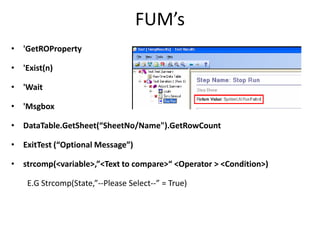
FUM’s
• 'GetROProperty

• 'Exist(n)

• 'Wait

• 'Msgbox

• DataTable.GetSheet(“SheetNo/Name").GetRowCount

• ExitTest (“Optional Message”)

• strcomp(<variable>,”<Text to compare>“ <Operator > <Condition>)

    E.G Strcomp(State,”--Please Select--” = True)
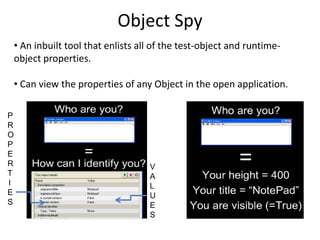
Object Spy
    • An inbuilt tool that enlists all of the test-object and runtime-
    object properties.

    • Can view the properties of any Object in the open application.

P
R
O
P
E
R                                    V
T                                    A
I                                    L
E                                    U
S                                    E
                                     S
DP
DP? What ?? Descriptive Programming.

But What?? Cool way to work w/o QTP object repository

And Why? Many Reasons

How? There are two ways

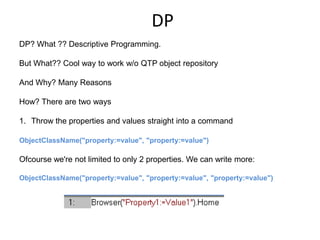
1. Throw the properties and values straight into a command

ObjectClassName("property:=value", "property:=value")

Ofcourse we're not limited to only 2 properties. We can write more:

ObjectClassName("property:=value", "property:=value", "property:=value")
DP
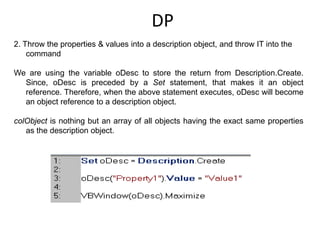
2. Throw the properties & values into a description object, and throw IT into the
    command

We are using the variable oDesc to store the return from Description.Create.
  Since, oDesc is preceded by a Set statement, that makes it an object
  reference. Therefore, when the above statement executes, oDesc will become
  an object reference to a description object.

colObject is nothing but an array of all objects having the exact same properties
   as the description object.
Thank You 

Qtp training session IV

  • 1.
    QTP Training SessionIV Presented By : Aisha Mazhar 13 Aug 2012
  • 2.
    Agenda - Intermediate • Output Values • Understanding the script • VBScript basics. • Some FUM's (Frequently Used Methods) • Object Identification Mechanism (Object Spy) • Descriptive programming.
  • 3.
    Output Values • Outputvalues are used for checking the properties of the object. And these properties are stored in the specified column during run session in the DataTable
  • 4.
    VB Script basics •Declaring Variables – Using Dim, Public, Private • Naming Restrictions – Must begin with an alphabetic character. – Cannot contain an embedded period. – Must not exceed 255 characters. – Must be unique in the scope in which it is declared. – Make sure you never create variables that have the same name as keywords • Assigning Values to Variables • Creating Constants • Conditions & Looping
  • 5.
    FUM’s • 'GetROProperty • 'Exist(n) •'Wait • 'Msgbox • DataTable.GetSheet(“SheetNo/Name").GetRowCount • ExitTest (“Optional Message”) • strcomp(<variable>,”<Text to compare>“ <Operator > <Condition>) E.G Strcomp(State,”--Please Select--” = True)
  • 6.
    Object Spy • An inbuilt tool that enlists all of the test-object and runtime- object properties. • Can view the properties of any Object in the open application. P R O P E R V T A I L E U S E S
  • 7.
    DP DP? What ??Descriptive Programming. But What?? Cool way to work w/o QTP object repository And Why? Many Reasons How? There are two ways 1. Throw the properties and values straight into a command ObjectClassName("property:=value", "property:=value") Ofcourse we're not limited to only 2 properties. We can write more: ObjectClassName("property:=value", "property:=value", "property:=value")
  • 8.
    DP 2. Throw theproperties & values into a description object, and throw IT into the command We are using the variable oDesc to store the return from Description.Create. Since, oDesc is preceded by a Set statement, that makes it an object reference. Therefore, when the above statement executes, oDesc will become an object reference to a description object. colObject is nothing but an array of all objects having the exact same properties as the description object.
  • 9.