



Putting the “DOT” in .NET
DOT = Dev, Ops and Test
Agenda
This is a tour – high level, introductions to options
What is DevOps?
Azure Virtual Machines & Web Sites
Team Rooms
Work Items
Source Control
Build & CI
Test Manager
Cloud Testing
AppInsights
Feedback Client
Release Management
Testers don’t hate me
In most orgs: testers currently sit under ops or dev
I am not ignoring you when I only mention on those two areas
Why DevOps?
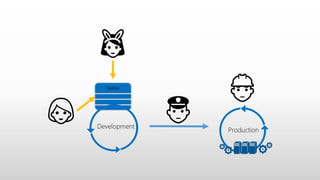
Production
Backlog
Development
👯
👱
👷
👮
Production
Backlog
Development
👯
👱
👷
👮
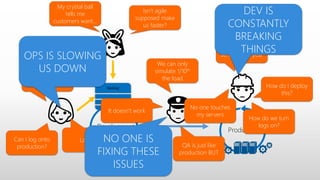
Works on my
machine
We can only
simulate 1/10th
the load
We’ll have
servers next year
How do I deploy
this?
Can I log onto
production?
How do we turn
logs on?
No one touches
my servers
Logs?!
QA is just like
production BUT
It doesn’t work
OPS IS SLOWING
US DOWN
DEV IS
CONSTANTLY
BREAKING
THINGS
NO ONE IS
FIXING THESE
ISSUES
Isn’t agile
supposed make
us faster?
My crystal ball
tells me
customers want…
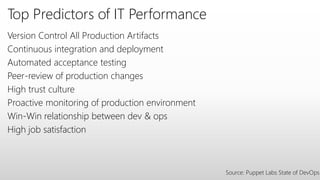
Top Predictors of IT Performance
Version Control All Production Artifacts
Continuous integration and deployment
Automated acceptance testing
Peer-review of production changes
High trust culture
Proactive monitoring of production environment
Win-Win relationship between dev & ops
High job satisfaction
Source: Puppet Labs State of DevOps
What is DevOps?
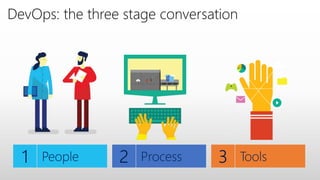
DevOps: the three stage conversation
What is DevOps?
“Second decade of agile” - Sam Guckenheimer
Requires: A shift in how we think about responsibilities, collaborations & a
single life cycle end to end & high trust culture
This is not single target – DevOps is a journey of constant build, measure,
learn
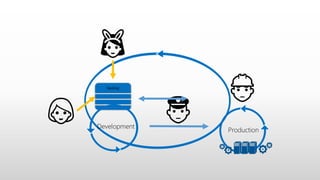
Production
Backlog
Development
👯
👱
👷
👮
Myths
This is for web only technologies & not for apps, desktop programs (.exe),
servers
Ops needs to learn to code for DevOps
Devs need to learn networks & servers
We need to hire DevOps/create a DevOps team
Our compliance (ITIL, PCI) or regulations will prevent this
Our dev is outsourced, so we can’t use it
DevOps can’t scale
DevOps means daily changes – our users will hate us
“DOT” + Azure
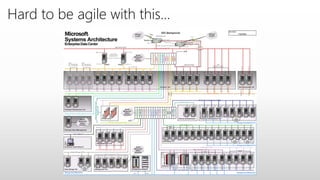
Hard to be agile with this…
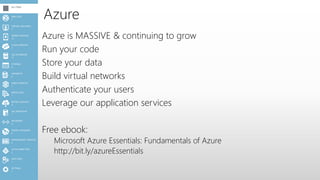
Azure
Azure is MASSIVE & continuing to grow
Run your code
Store your data
Build virtual networks
Authenticate your users
Leverage our application services
Free ebook:
Microsoft Azure Essentials: Fundamentals of Azure
http://bit.ly/azureEssentials
1
SETTINGS
1
ADD-ONS2
2
ACTIVE DIRECTORY
0
MANAGEMENT SERVICES
0
TRAFFIC MANAGER
0
NETWORKS
1
SQL REPORTING
0
BIZTALK SERVICES
1
SERVICE BUS
1
MEDIA SERVICES
0
HDINSIGHT
9
STORAGE
11
SQL DATABASES
7
CLOUD SERVICES
10
MOBILE SERVICES
2
VIRTUAL MACHINES
7
WEB SITES
ALL ITEMS
Azure VM’s & Websites
Demo
Azure VM’s & Websites
Ability to easily run your code
WebJobs let you run headless code
Easy scale – scale & time to get up and running is really important for a
healthy DevOps culture
Providing the dashboards that DevOps teams need
Providing the ability automate the process (scripting, config)
Azure Pack: Similar functionality for your data centre
“DOT” + VSO
Team Rooms
Demo
Team Rooms
Enable communication & Foster collaboration
Used by entire team: Dev + Ops + Test
Build a history specific to your needs
Work Items
Demo
Work Items
Capture your work items in your way
Kanban style boards
Single version of the truth across the business
Source Control
Demo
Source Control
TFVC (client/server) & Git (DVCS)
Can edit online – great for a quick fix
Multiple Git repos – allowing everyone to use one project
Proper Git pull request support
Supports review workflow
Continuous Integration (CI)
One button from source to prod
Deployment is hard: if it is hard, DO IT MORE.
“Can’t deploy this month, Andrew is at another client”: The risk in having an
Andrew needs to be lowered
Quicker turn around
• Flickr 10x a day
• AppFactory turn around in 30min by intern
Build & CI
Demo
Build & CI
The longer time between deployments, the greater the risk of failure
Moving from hard to predictable
Removing dependencies & lowering risk
Configuration as a form of documentation
Test Manager
Demo
Test Manager
Giving testers the tools they need
Feeding into the single version of the truth
Cloud Testing
Demo
Cloud Testing
Ability to build. Experiment & run locally
Run in the cloud for scale – great hybrid cloud scenario
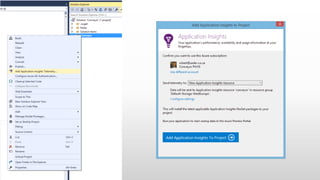
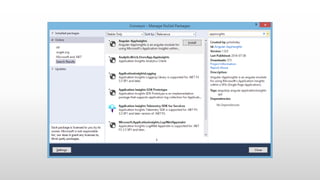
AppInsights
Demo
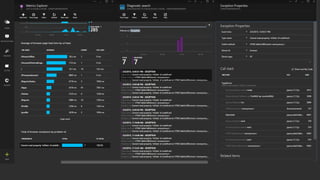
AppInsights
Enables: Build, measure, learn
AppInsights makes getting information easily
Stack traces & usage info
Role based access in portal
Works with JavaScript, ASP.NET, Java, Desktop, Store, Phone & Universal Apps
- everything
Feedback client
Demo
Feedback client
The further the distance between the person requesting the work & the
person doing the work, the greater the risk of failure.
Ensure the iterative cycle is end to end
Single version of the truth
Actionable feedback
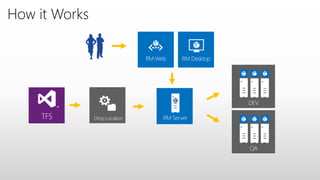
Release Management
TFS Drop Location
RM DesktopRM Web
QA
DEV
RM Server
How it Works
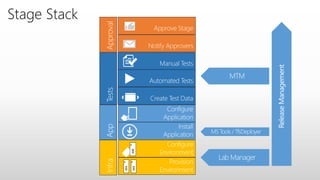
Stage Stack
Wrapping up
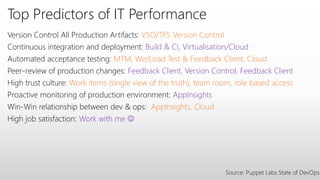
Top Predictors of IT Performance
Version Control All Production Artifacts: VSO/TFS Version Control
Continuous integration and deployment: Build & CI, Virtualisation/Cloud
Automated acceptance testing: MTM, We/Load Test & Feedback Client, Cloud
Peer-review of production changes: Feedback Client, Version Control, Feedback Client
High trust culture: Work items (single view of the truth), team room, role based access
Proactive monitoring of production environment: AppInsights
Win-Win relationship between dev & ops: AppInsights, Cloud
High job satisfaction: Work with me 
Source: Puppet Labs State of DevOps
More?
DevOps Blog: http://aka.ms/DevOpsBlog
Improving your DevOps: http://aka.ms/DevOpsCapab
Me: @rmaclean | www.sadev.co.za

Putting the DOT in .NET - Dev/Ops/Test

  • 1.
    Putting the “DOT”in .NET DOT = Dev, Ops and Test
  • 2.
    Agenda This is atour – high level, introductions to options What is DevOps? Azure Virtual Machines & Web Sites Team Rooms Work Items Source Control Build & CI Test Manager Cloud Testing AppInsights Feedback Client Release Management
  • 3.
    Testers don’t hateme In most orgs: testers currently sit under ops or dev I am not ignoring you when I only mention on those two areas
  • 4.
  • 5.
  • 6.
    Production Backlog Development 👯 👱 👷 👮 Works on my machine Wecan only simulate 1/10th the load We’ll have servers next year How do I deploy this? Can I log onto production? How do we turn logs on? No one touches my servers Logs?! QA is just like production BUT It doesn’t work OPS IS SLOWING US DOWN DEV IS CONSTANTLY BREAKING THINGS NO ONE IS FIXING THESE ISSUES Isn’t agile supposed make us faster? My crystal ball tells me customers want…
  • 7.
    Top Predictors ofIT Performance Version Control All Production Artifacts Continuous integration and deployment Automated acceptance testing Peer-review of production changes High trust culture Proactive monitoring of production environment Win-Win relationship between dev & ops High job satisfaction Source: Puppet Labs State of DevOps
  • 8.
  • 9.
    DevOps: the threestage conversation
  • 10.
    What is DevOps? “Seconddecade of agile” - Sam Guckenheimer Requires: A shift in how we think about responsibilities, collaborations & a single life cycle end to end & high trust culture This is not single target – DevOps is a journey of constant build, measure, learn
  • 11.
  • 12.
    Myths This is forweb only technologies & not for apps, desktop programs (.exe), servers Ops needs to learn to code for DevOps Devs need to learn networks & servers We need to hire DevOps/create a DevOps team Our compliance (ITIL, PCI) or regulations will prevent this Our dev is outsourced, so we can’t use it DevOps can’t scale DevOps means daily changes – our users will hate us
  • 13.
  • 14.
    Hard to beagile with this…
  • 15.
    Azure Azure is MASSIVE& continuing to grow Run your code Store your data Build virtual networks Authenticate your users Leverage our application services Free ebook: Microsoft Azure Essentials: Fundamentals of Azure http://bit.ly/azureEssentials 1 SETTINGS 1 ADD-ONS2 2 ACTIVE DIRECTORY 0 MANAGEMENT SERVICES 0 TRAFFIC MANAGER 0 NETWORKS 1 SQL REPORTING 0 BIZTALK SERVICES 1 SERVICE BUS 1 MEDIA SERVICES 0 HDINSIGHT 9 STORAGE 11 SQL DATABASES 7 CLOUD SERVICES 10 MOBILE SERVICES 2 VIRTUAL MACHINES 7 WEB SITES ALL ITEMS
  • 16.
    Azure VM’s &Websites Demo
  • 17.
    Azure VM’s &Websites Ability to easily run your code WebJobs let you run headless code Easy scale – scale & time to get up and running is really important for a healthy DevOps culture Providing the dashboards that DevOps teams need Providing the ability automate the process (scripting, config) Azure Pack: Similar functionality for your data centre
  • 18.
  • 19.
  • 20.
    Team Rooms Enable communication& Foster collaboration Used by entire team: Dev + Ops + Test Build a history specific to your needs
  • 21.
  • 22.
    Work Items Capture yourwork items in your way Kanban style boards Single version of the truth across the business
  • 23.
  • 24.
    Source Control TFVC (client/server)& Git (DVCS) Can edit online – great for a quick fix Multiple Git repos – allowing everyone to use one project Proper Git pull request support Supports review workflow
  • 25.
    Continuous Integration (CI) Onebutton from source to prod Deployment is hard: if it is hard, DO IT MORE. “Can’t deploy this month, Andrew is at another client”: The risk in having an Andrew needs to be lowered Quicker turn around • Flickr 10x a day • AppFactory turn around in 30min by intern
  • 26.
  • 27.
    Build & CI Thelonger time between deployments, the greater the risk of failure Moving from hard to predictable Removing dependencies & lowering risk Configuration as a form of documentation
  • 29.
  • 30.
    Test Manager Giving testersthe tools they need Feeding into the single version of the truth
  • 31.
  • 32.
    Cloud Testing Ability tobuild. Experiment & run locally Run in the cloud for scale – great hybrid cloud scenario
  • 33.
  • 37.
    AppInsights Enables: Build, measure,learn AppInsights makes getting information easily Stack traces & usage info Role based access in portal Works with JavaScript, ASP.NET, Java, Desktop, Store, Phone & Universal Apps - everything
  • 38.
  • 40.
    Feedback client The furtherthe distance between the person requesting the work & the person doing the work, the greater the risk of failure. Ensure the iterative cycle is end to end Single version of the truth Actionable feedback
  • 42.
  • 43.
    TFS Drop Location RMDesktopRM Web QA DEV RM Server How it Works
  • 44.
  • 45.
  • 46.
    Top Predictors ofIT Performance Version Control All Production Artifacts: VSO/TFS Version Control Continuous integration and deployment: Build & CI, Virtualisation/Cloud Automated acceptance testing: MTM, We/Load Test & Feedback Client, Cloud Peer-review of production changes: Feedback Client, Version Control, Feedback Client High trust culture: Work items (single view of the truth), team room, role based access Proactive monitoring of production environment: AppInsights Win-Win relationship between dev & ops: AppInsights, Cloud High job satisfaction: Work with me  Source: Puppet Labs State of DevOps
  • 47.
    More? DevOps Blog: http://aka.ms/DevOpsBlog Improvingyour DevOps: http://aka.ms/DevOpsCapab Me: @rmaclean | www.sadev.co.za

Editor's Notes

  • #6 What is driving DevOps? The agile methodologies are accelerating the construction process and creating a significant pressure to Operations teams to update their existing practices to make enable faster cadence, in other words changing and adopting existing process to not only be reliable but also support and agile cadence. In our internal teams and with some of our enterprise customers we noticed that once a team is able to accelerate the construction phase consistently. The next evolution process is to ensure such applications remind available and performing as expected. And when they aren’t having access to information and tools that allow both Operations and development teams to diagnostic and fix issues quickly. Then these teams become more sophisticated and mature and then they want to have access to customer usage information to use quantitative and qualitative data to help them determine the next set of investments and enable continuous learning.
  • #7 What is driving DevOps? The agile methodologies are accelerating the construction process and creating a significant pressure to Operations teams to update their existing practices to make enable faster cadence, in other words changing and adopting existing process to not only be reliable but also support and agile cadence. In our internal teams and with some of our enterprise customers we noticed that once a team is able to accelerate the construction phase consistently. The next evolution process is to ensure such applications remind available and performing as expected. And when they aren’t having access to information and tools that allow both Operations and development teams to diagnostic and fix issues quickly. Then these teams become more sophisticated and mature and then they want to have access to customer usage information to use quantitative and qualitative data to help them determine the next set of investments and enable continuous learning.
  • #10 People = Culture Fundamental attributes of successful cultures: Shared mission and incentives: infrastructure as code, apps as services, DevOps/all as teams You need to consider your hardware as a commodity, (don't give your servers names) , servers are like farm animals, it is just harder if you let theids name them Build deep instrumentation into services, push complexity up the stack Rally around agile, shared metrics, CI, service owners on call, etc. Changing the culture: any change takes time, changing culture is no exception and you can't do it alone, exploit compelling events to change culture: downtimes, cloud adoption, devops buzz PROCESS Definition and design, compliance, and continuous improvement PEOPLE Responsibilities, management, skills development, and discipline Products Tools and infrastructure
  • #12 What is driving DevOps? The agile methodologies are accelerating the construction process and creating a significant pressure to Operations teams to update their existing practices to make enable faster cadence, in other words changing and adopting existing process to not only be reliable but also support and agile cadence. In our internal teams and with some of our enterprise customers we noticed that once a team is able to accelerate the construction phase consistently. The next evolution process is to ensure such applications remind available and performing as expected. And when they aren’t having access to information and tools that allow both Operations and development teams to diagnostic and fix issues quickly. Then these teams become more sophisticated and mature and then they want to have access to customer usage information to use quantitative and qualitative data to help them determine the next set of investments and enable continuous learning.
  • #17 Virtual Machines + Puppet/chef Ops Dashboard
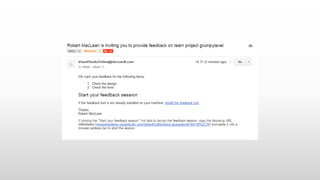
  • #40 mfbclients://awesomedemo.visualstudio.com/DefaultCollection/p:grumpylevel?rid=38%2C39
  • #44 InRelease does 4 main things: One- It automates deployments directly from TFS to all the environments, including production. Part of the deployment procedure may include things like taking back-ups, generating test data, provisioning Servers on Azure or executing your automated tests. Basically everything you need to start working on a given stage. InRelease ensures that all deployments are done the same way from the same binaries so that by the time you deploy your application to production, your deployment procedure has been tested over and over - removing a lot of those release related risks & headaches Two - InRelease automates the approval workflow through all the environments reducing delays and coordination issues to a minimum. Along the way, InRelease will provide tracking of each attempted release and provide complete traceability for diagnostic and audit purposes. You can actually set simple to complex deployment procedure in InRelease….
  • #45 Infrastructure Lab Manager InRelease – actions to trigger provisioning VMs Applications MS Tools – default behavior to publish to single environment, requires work to publish beyond that TfsDeployer – can leverage Build Quality in TFS to trigger moving parts to other environments, still requires custom scripts InRelease – can deploy applications using different approaches using built-in actions and tools Tests Microsoft Test Manager / Coded UI – helps define and execute automation of tests InRelease – can leverage existing tests for execution and can trigger test data creation via built-in actions and tools Approval InRelease – can manage governance, controls when and if deployments go into environments, notifies recipients of actions throughout the release process