Sudar Muthu | @sudarmuthu #WCMumbai
Developer Tools to
increase your Productivity
as a WordPress Developer
Sudar Muthu (@sudarmuthu)
http://sudarmuthu.com
Sudar Muthu | @sudarmuthu #WCMumbai
Me
• Programming in PHP for more than a decade and in
WordPress for about 8 years.
• Big fan of automating process and workflows.
• Contributor to a couple of open source projects
including WordPress.
• Released about 2 dozen plugins in WordPress.
• Remote worker at 10up (and yes 10up is hiring :) )
Sudar Muthu | @sudarmuthu #WCMumbai
What about you?
• Are you a developer?
• What is your experience with PHP and WordPress?
• What is your typical development environment?
• Do you prefer GUI tools or cli tools?
• What are your expectations out of this talk?
Sudar Muthu | @sudarmuthu #WCMumbai
IDE
Sudar Muthu | @sudarmuthu #WCMumbai
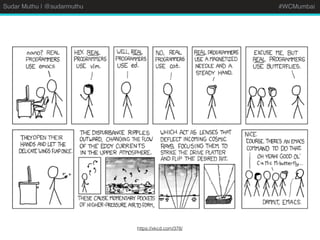
https://xkcd.com/378/
Sudar Muthu | @sudarmuthu #WCMumbai
IDE
• I have used vim extensively and recently moved to
PhpStorm (still use vim mode)
• Move away from generic text editors and prefer an IDE.
• Look for WordPress integration.
• Look for integration with other dev tools that you use
(phpcs, wp-cli etc)
• Look for xDebug support.
• Pick one that you are comfortable with.
Sudar Muthu | @sudarmuthu #WCMumbai
Demo
Sudar Muthu | @sudarmuthu #WCMumbai
Local Development
Environment
Sudar Muthu | @sudarmuthu #WCMumbai
Local Development
Environment
• I use VVV and FlyWheel
• VVV for having a local environment that resembles
production as much as possible using vv.
• I use FlyWheel to quickly create sites with different
PHP versions (especially PHP 5.2)
Sudar Muthu | @sudarmuthu #WCMumbai
Local Development
Environment
• Pick something where you can easily create new
sites.
• Ability to replicate production environment as
closely as possible will be a plus.
• Don’t ever install PHP directly on Windows.
• Other popular options include Wamp, Xamp etc.
Sudar Muthu | @sudarmuthu #WCMumbai
xDebug
Sudar Muthu | @sudarmuthu #WCMumbai
xDebug
• PHP extension that allows you to step through code
for debugging. Very powerful.
• I use it with VVV and PhpStorm.
• Helped me to debug lot of complex problems.
• Use IDE integrations to save time.
Sudar Muthu | @sudarmuthu #WCMumbai
Demo
Sudar Muthu | @sudarmuthu #WCMumbai
wp-cli
Sudar Muthu | @sudarmuthu #WCMumbai
wp-cli
• I use wp-cli extensively for normal day to day
operations. Saves me lot of time.
• wp-cli shell opens an interactive shell. Very handy
to quickly test some logic or read options/transient
etc.
• wp-cli ssh can be used to run commands on a
remote server.
Sudar Muthu | @sudarmuthu #WCMumbai
Demo
Sudar Muthu | @sudarmuthu #WCMumbai
PHP CodeSniffer
Sudar Muthu | @sudarmuthu #WCMumbai
PHP CodeSniffer
• Static code analyser that captures common code
problems.
• Use a custom phpcs standard for your project on
top of WordPress standard.
• Integrate it with your IDE or with git using pre-
commit hook.
• I use it with both PhpStorm and vim.
Sudar Muthu | @sudarmuthu #WCMumbai
Demo
Sudar Muthu | @sudarmuthu #WCMumbai
PHPUnit
Sudar Muthu | @sudarmuthu #WCMumbai
PHPUnit
• Unit testing framework used by WordPress core.
• Definitely check WordPress core unit tests.
• Set it up using wp-cli (Don’t try to set it manually)
• Refer to my talk about Unit testing for WordPress at
WordCamp Pune.
Sudar Muthu | @sudarmuthu #WCMumbai
Closing Remarks
• Use something that you are comfortable with.
• Always try to automate as much as possible.
• Have fun :)
Sudar Muthu | @sudarmuthu #WCMumbai
Thank You
@sudarmuthu
http://sudarmuthu.com
https://github.com/sudar

WordPress Developer tools

  • 1.
    Sudar Muthu |@sudarmuthu #WCMumbai Developer Tools to increase your Productivity as a WordPress Developer Sudar Muthu (@sudarmuthu) http://sudarmuthu.com
  • 2.
    Sudar Muthu |@sudarmuthu #WCMumbai Me • Programming in PHP for more than a decade and in WordPress for about 8 years. • Big fan of automating process and workflows. • Contributor to a couple of open source projects including WordPress. • Released about 2 dozen plugins in WordPress. • Remote worker at 10up (and yes 10up is hiring :) )
  • 3.
    Sudar Muthu |@sudarmuthu #WCMumbai What about you? • Are you a developer? • What is your experience with PHP and WordPress? • What is your typical development environment? • Do you prefer GUI tools or cli tools? • What are your expectations out of this talk?
  • 4.
    Sudar Muthu |@sudarmuthu #WCMumbai IDE
  • 5.
    Sudar Muthu |@sudarmuthu #WCMumbai https://xkcd.com/378/
  • 6.
    Sudar Muthu |@sudarmuthu #WCMumbai IDE • I have used vim extensively and recently moved to PhpStorm (still use vim mode) • Move away from generic text editors and prefer an IDE. • Look for WordPress integration. • Look for integration with other dev tools that you use (phpcs, wp-cli etc) • Look for xDebug support. • Pick one that you are comfortable with.
  • 7.
    Sudar Muthu |@sudarmuthu #WCMumbai Demo
  • 8.
    Sudar Muthu |@sudarmuthu #WCMumbai Local Development Environment
  • 9.
    Sudar Muthu |@sudarmuthu #WCMumbai Local Development Environment • I use VVV and FlyWheel • VVV for having a local environment that resembles production as much as possible using vv. • I use FlyWheel to quickly create sites with different PHP versions (especially PHP 5.2)
  • 10.
    Sudar Muthu |@sudarmuthu #WCMumbai Local Development Environment • Pick something where you can easily create new sites. • Ability to replicate production environment as closely as possible will be a plus. • Don’t ever install PHP directly on Windows. • Other popular options include Wamp, Xamp etc.
  • 11.
    Sudar Muthu |@sudarmuthu #WCMumbai xDebug
  • 12.
    Sudar Muthu |@sudarmuthu #WCMumbai xDebug • PHP extension that allows you to step through code for debugging. Very powerful. • I use it with VVV and PhpStorm. • Helped me to debug lot of complex problems. • Use IDE integrations to save time.
  • 13.
    Sudar Muthu |@sudarmuthu #WCMumbai Demo
  • 14.
    Sudar Muthu |@sudarmuthu #WCMumbai wp-cli
  • 15.
    Sudar Muthu |@sudarmuthu #WCMumbai wp-cli • I use wp-cli extensively for normal day to day operations. Saves me lot of time. • wp-cli shell opens an interactive shell. Very handy to quickly test some logic or read options/transient etc. • wp-cli ssh can be used to run commands on a remote server.
  • 16.
    Sudar Muthu |@sudarmuthu #WCMumbai Demo
  • 17.
    Sudar Muthu |@sudarmuthu #WCMumbai PHP CodeSniffer
  • 18.
    Sudar Muthu |@sudarmuthu #WCMumbai PHP CodeSniffer • Static code analyser that captures common code problems. • Use a custom phpcs standard for your project on top of WordPress standard. • Integrate it with your IDE or with git using pre- commit hook. • I use it with both PhpStorm and vim.
  • 19.
    Sudar Muthu |@sudarmuthu #WCMumbai Demo
  • 20.
    Sudar Muthu |@sudarmuthu #WCMumbai PHPUnit
  • 21.
    Sudar Muthu |@sudarmuthu #WCMumbai PHPUnit • Unit testing framework used by WordPress core. • Definitely check WordPress core unit tests. • Set it up using wp-cli (Don’t try to set it manually) • Refer to my talk about Unit testing for WordPress at WordCamp Pune.
  • 22.
    Sudar Muthu |@sudarmuthu #WCMumbai Closing Remarks • Use something that you are comfortable with. • Always try to automate as much as possible. • Have fun :)
  • 23.
    Sudar Muthu |@sudarmuthu #WCMumbai Thank You @sudarmuthu http://sudarmuthu.com https://github.com/sudar