

Dept. of IT, AITS 1
ANOOP S P
ROLL NO: 500389
Contents
What is an Operating System?
Windows & History
Introduction to Windows 10
Development
Features
System requirements
Conclusion
References
2
What is an Operating System?
• An Operating system is a software that manages
computer hardware and software resources and
provides common services for computer programs.
• The operating system is an essential component of the
software system.
• Examples are Linux , Windows , Android , BlackBerry 10,
OS X ,Chrome OS…….
3
Windows…
 Microsoft Windows is a metafamily of graphical
operating systems developed, marketed, and
sold by Microsoft.
 Paul Allen and Bill Gates were co-founders of
Microsoft.
 Microsoft introduced an operating environment
named Windows 1985.
 Active Windows families include Windows NT,
Windows Embedded and Windows Phone .
4
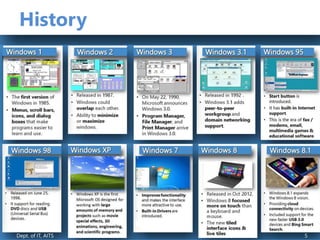
History
Dept. of IT, AITS 1
Dept. of IT, AITS 5
Introduction to
Developed by Microsoft by codenamed Threshold
scheduled to be released in late 2015
The last Operating system release from windows.
FREE upgrades to Windows 10
Goal of Windows 10 is to unify the all Windows
product families. 6
Development
 Started In December 2013
 Goals for Threshold was to create a unified application platform and
development toolkit for Windows, Windows Phone and Xbox One
(which all use a similar Windows NT kernel).
 Threshold was officially unveiled during a media event on
September 30, 2014, under the name Windows 10
 Windows 10 would be Microsoft’s "most comprehensive platform
ever," providing a single, unified platform for desktop computers,
laptops, tablets, smartphones, and all-in-one devices.
7
New Features
• Comes Back of Start Menu
• One Windows for all devices
• Cortana
• Xbox App
• Project Spartan Browser
• Improved Multitasking (Virtual Desktop)
• Snap assist
• universal apps can be windowed
• Action Center
• Continuum
8
Start Menu
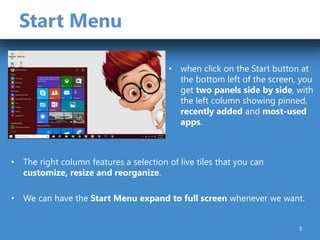
• when click on the Start button at
the bottom left of the screen, you
get two panels side by side, with
the left column showing pinned,
recently added and most-used
apps.
• The right column features a selection of live tiles that you can
customize, resize and reorganize.
• We can have the Start Menu expand to full screen whenever we want.
9
Universal Apps
• .
10
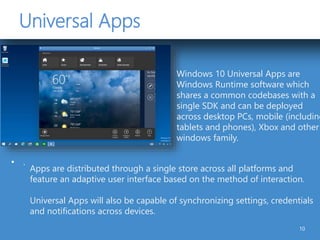
Windows 10 Universal Apps are
Windows Runtime software which
shares a common codebases with a
single SDK and can be deployed
across desktop PCs, mobile (including
tablets and phones), Xbox and other
windows family.
Apps are distributed through a single store across all platforms and
feature an adaptive user interface based on the method of interaction.
Universal Apps will also be capable of synchronizing settings, credentials
and notifications across devices.
One Window for all Devices
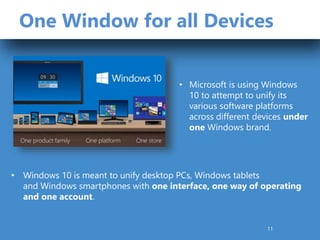
• Windows 10 is meant to unify desktop PCs, Windows tablets
and Windows smartphones with one interface, one way of operating
and one account.
• Microsoft is using Windows
10 to attempt to unify its
various software platforms
across different devices under
one Windows brand.
11
Cortana
• We will be able to search your hard drive for specific folders and files.
• Cortana is able to send emails while you’re working on a spreadsheet,
making multi-tasking much easier.
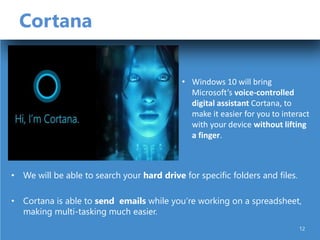
• Windows 10 will bring
Microsoft’s voice-controlled
digital assistant Cortana, to
make it easier for you to interact
with your device without lifting
a finger.
12
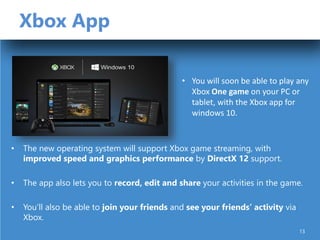
Xbox App
• The new operating system will support Xbox game streaming, with
improved speed and graphics performance by DirectX 12 support.
• The app also lets you to record, edit and share your activities in the game.
• You’ll also be able to join your friends and see your friends’ activity via
Xbox.
• You will soon be able to play any
Xbox One game on your PC or
tablet, with the Xbox app for
windows 10.
13
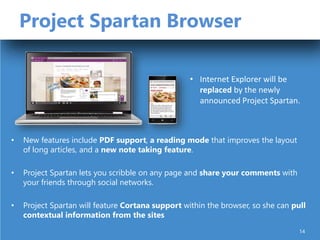
Project Spartan Browser
• New features include PDF support, a reading mode that improves the layout
of long articles, and a new note taking feature.
• Project Spartan lets you scribble on any page and share your comments with
your friends through social networks.
• Project Spartan will feature Cortana support within the browser, so she can pull
contextual information from the sites
• Internet Explorer will be
replaced by the newly
announced Project Spartan.
14
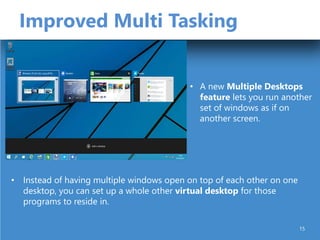
Improved Multi Tasking
• Instead of having multiple windows open on top of each other on one
desktop, you can set up a whole other virtual desktop for those
programs to reside in.
• A new Multiple Desktops
feature lets you run another
set of windows as if on
another screen.
15
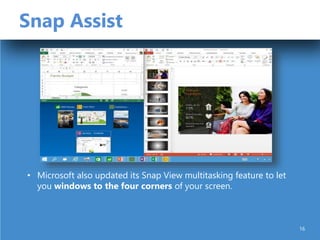
Snap Assist
• Microsoft also updated its Snap View multitasking feature to let
you windows to the four corners of your screen.
16
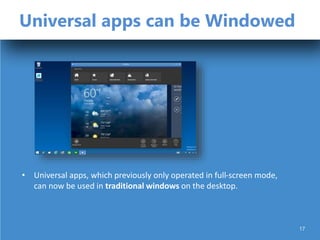
Universal apps can be Windowed
• Universal apps, which previously only operated in full-screen mode,
can now be used in traditional windows on the desktop.
17
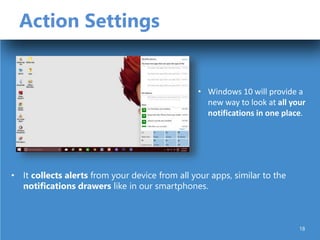
Action Settings
• It collects alerts from your device from all your apps, similar to the
notifications drawers like in our smartphones.
• Windows 10 will provide a
new way to look at all your
notifications in one place.
18
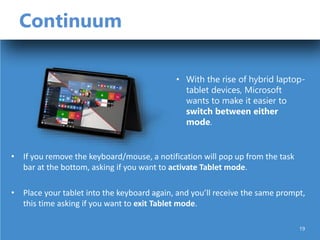
Continuum
• If you remove the keyboard/mouse, a notification will pop up from the task
bar at the bottom, asking if you want to activate Tablet mode.
• Place your tablet into the keyboard again, and you’ll receive the same prompt,
this time asking if you want to exit Tablet mode.
• With the rise of hybrid laptop-
tablet devices, Microsoft
wants to make it easier to
switch between either
mode.
19
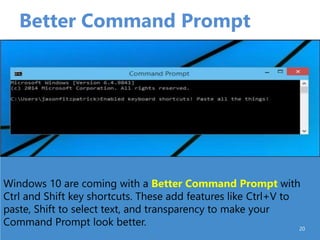
Better Command Prompt
20
Windows 10 are coming with a Better Command Prompt with
Ctrl and Shift key shortcuts. These add features like Ctrl+V to
paste, Shift to select text, and transparency to make your
Command Prompt look better.
Security
• Windows Hello &
Microsoft Passport
21
Unlock Windows 10 devices
and apps with your
finger, iris, or face..
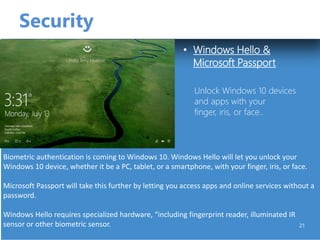
Biometric authentication is coming to Windows 10. Windows Hello will let you unlock your
Windows 10 device, whether it be a PC, tablet, or a smartphone, with your finger, iris, or face.
Microsoft Passport will take this further by letting you access apps and online services without a
password.
Windows Hello requires specialized hardware, “including fingerprint reader, illuminated IR
sensor or other biometric sensor.
22
Releases
Preview releases
A public beta version of Windows 10 branded as "Windows Technical Preview"
was released on October 1, 2014; Aimed towards enthusiasts and enterprise
users.
Public release
Windows 10 is expected to be released to manufacturing in mid-2015.
Windows 10 will be available at no-charge to users of consumer editions of
Windows 7 and Windows 8.1.
Editions..
• Windows 10 Home
• Windows 10 Pro
• Windows 10 Enterprise
• Windows 10 Mobile
23
The Last OS Upgrade..!
 After Windows 10 release,Their will be no more
Windows upgrades like Windows 11,12.
 “Windows as a Service”
Updates for security and new technology changes will provide to
users like regular updates like Android and it will be free of cost.!
24
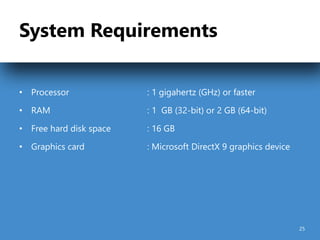
System Requirements
• Processor : 1 gigahertz (GHz) or faster
• RAM : 1 GB (32-bit) or 2 GB (64-bit)
• Free hard disk space : 16 GB
• Graphics card : Microsoft DirectX 9 graphics device
25
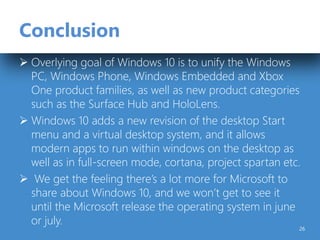
Conclusion
 Overlying goal of Windows 10 is to unify the Windows
PC, Windows Phone, Windows Embedded and Xbox
One product families, as well as new product categories
such as the Surface Hub and HoloLens.
 Windows 10 adds a new revision of the desktop Start
menu and a virtual desktop system, and it allows
modern apps to run within windows on the desktop as
well as in full-screen mode, cortana, project spartan etc.
 We get the feeling there’s a lot more for Microsoft to
share about Windows 10, and we won’t get to see it
until the Microsoft release the operating system in june
or july.
26
References
www.google.co.in
windows.microsoft.com
www.techworm.com
www.microsoftstore.com
en.Wikipedia.org
www.extremeTech.com
16
28
Windows10

Windows10

  • 1.
    Dept. of IT,AITS 1 ANOOP S P ROLL NO: 500389
  • 2.
    Contents What is anOperating System? Windows & History Introduction to Windows 10 Development Features System requirements Conclusion References 2
  • 3.
    What is anOperating System? • An Operating system is a software that manages computer hardware and software resources and provides common services for computer programs. • The operating system is an essential component of the software system. • Examples are Linux , Windows , Android , BlackBerry 10, OS X ,Chrome OS……. 3
  • 4.
    Windows…  Microsoft Windowsis a metafamily of graphical operating systems developed, marketed, and sold by Microsoft.  Paul Allen and Bill Gates were co-founders of Microsoft.  Microsoft introduced an operating environment named Windows 1985.  Active Windows families include Windows NT, Windows Embedded and Windows Phone . 4
  • 5.
    History Dept. of IT,AITS 1 Dept. of IT, AITS 5
  • 6.
    Introduction to Developed byMicrosoft by codenamed Threshold scheduled to be released in late 2015 The last Operating system release from windows. FREE upgrades to Windows 10 Goal of Windows 10 is to unify the all Windows product families. 6
  • 7.
    Development  Started InDecember 2013  Goals for Threshold was to create a unified application platform and development toolkit for Windows, Windows Phone and Xbox One (which all use a similar Windows NT kernel).  Threshold was officially unveiled during a media event on September 30, 2014, under the name Windows 10  Windows 10 would be Microsoft’s "most comprehensive platform ever," providing a single, unified platform for desktop computers, laptops, tablets, smartphones, and all-in-one devices. 7
  • 8.
    New Features • ComesBack of Start Menu • One Windows for all devices • Cortana • Xbox App • Project Spartan Browser • Improved Multitasking (Virtual Desktop) • Snap assist • universal apps can be windowed • Action Center • Continuum 8
  • 9.
    Start Menu • whenclick on the Start button at the bottom left of the screen, you get two panels side by side, with the left column showing pinned, recently added and most-used apps. • The right column features a selection of live tiles that you can customize, resize and reorganize. • We can have the Start Menu expand to full screen whenever we want. 9
  • 10.
    Universal Apps • . 10 Windows10 Universal Apps are Windows Runtime software which shares a common codebases with a single SDK and can be deployed across desktop PCs, mobile (including tablets and phones), Xbox and other windows family. Apps are distributed through a single store across all platforms and feature an adaptive user interface based on the method of interaction. Universal Apps will also be capable of synchronizing settings, credentials and notifications across devices.
  • 11.
    One Window forall Devices • Windows 10 is meant to unify desktop PCs, Windows tablets and Windows smartphones with one interface, one way of operating and one account. • Microsoft is using Windows 10 to attempt to unify its various software platforms across different devices under one Windows brand. 11
  • 12.
    Cortana • We willbe able to search your hard drive for specific folders and files. • Cortana is able to send emails while you’re working on a spreadsheet, making multi-tasking much easier. • Windows 10 will bring Microsoft’s voice-controlled digital assistant Cortana, to make it easier for you to interact with your device without lifting a finger. 12
  • 13.
    Xbox App • Thenew operating system will support Xbox game streaming, with improved speed and graphics performance by DirectX 12 support. • The app also lets you to record, edit and share your activities in the game. • You’ll also be able to join your friends and see your friends’ activity via Xbox. • You will soon be able to play any Xbox One game on your PC or tablet, with the Xbox app for windows 10. 13
  • 14.
    Project Spartan Browser •New features include PDF support, a reading mode that improves the layout of long articles, and a new note taking feature. • Project Spartan lets you scribble on any page and share your comments with your friends through social networks. • Project Spartan will feature Cortana support within the browser, so she can pull contextual information from the sites • Internet Explorer will be replaced by the newly announced Project Spartan. 14
  • 15.
    Improved Multi Tasking •Instead of having multiple windows open on top of each other on one desktop, you can set up a whole other virtual desktop for those programs to reside in. • A new Multiple Desktops feature lets you run another set of windows as if on another screen. 15
  • 16.
    Snap Assist • Microsoftalso updated its Snap View multitasking feature to let you windows to the four corners of your screen. 16
  • 17.
    Universal apps canbe Windowed • Universal apps, which previously only operated in full-screen mode, can now be used in traditional windows on the desktop. 17
  • 18.
    Action Settings • Itcollects alerts from your device from all your apps, similar to the notifications drawers like in our smartphones. • Windows 10 will provide a new way to look at all your notifications in one place. 18
  • 19.
    Continuum • If youremove the keyboard/mouse, a notification will pop up from the task bar at the bottom, asking if you want to activate Tablet mode. • Place your tablet into the keyboard again, and you’ll receive the same prompt, this time asking if you want to exit Tablet mode. • With the rise of hybrid laptop- tablet devices, Microsoft wants to make it easier to switch between either mode. 19
  • 20.
    Better Command Prompt 20 Windows10 are coming with a Better Command Prompt with Ctrl and Shift key shortcuts. These add features like Ctrl+V to paste, Shift to select text, and transparency to make your Command Prompt look better.
  • 21.
    Security • Windows Hello& Microsoft Passport 21 Unlock Windows 10 devices and apps with your finger, iris, or face.. Biometric authentication is coming to Windows 10. Windows Hello will let you unlock your Windows 10 device, whether it be a PC, tablet, or a smartphone, with your finger, iris, or face. Microsoft Passport will take this further by letting you access apps and online services without a password. Windows Hello requires specialized hardware, “including fingerprint reader, illuminated IR sensor or other biometric sensor.
  • 22.
    22 Releases Preview releases A publicbeta version of Windows 10 branded as "Windows Technical Preview" was released on October 1, 2014; Aimed towards enthusiasts and enterprise users. Public release Windows 10 is expected to be released to manufacturing in mid-2015. Windows 10 will be available at no-charge to users of consumer editions of Windows 7 and Windows 8.1.
  • 23.
    Editions.. • Windows 10Home • Windows 10 Pro • Windows 10 Enterprise • Windows 10 Mobile 23
  • 24.
    The Last OSUpgrade..!  After Windows 10 release,Their will be no more Windows upgrades like Windows 11,12.  “Windows as a Service” Updates for security and new technology changes will provide to users like regular updates like Android and it will be free of cost.! 24
  • 25.
    System Requirements • Processor: 1 gigahertz (GHz) or faster • RAM : 1 GB (32-bit) or 2 GB (64-bit) • Free hard disk space : 16 GB • Graphics card : Microsoft DirectX 9 graphics device 25
  • 26.
    Conclusion  Overlying goalof Windows 10 is to unify the Windows PC, Windows Phone, Windows Embedded and Xbox One product families, as well as new product categories such as the Surface Hub and HoloLens.  Windows 10 adds a new revision of the desktop Start menu and a virtual desktop system, and it allows modern apps to run within windows on the desktop as well as in full-screen mode, cortana, project spartan etc.  We get the feeling there’s a lot more for Microsoft to share about Windows 10, and we won’t get to see it until the Microsoft release the operating system in june or july. 26
  • 27.
  • 28.