what isa wiki?Diane Mackenzie
Place on the web where many people can come together  and share ideasCan be like an ongoing conversationContains a body of knowledge that people can share WIKI means QUICK – a place to consolidate ideas , links, videos. A PORTAL for learning
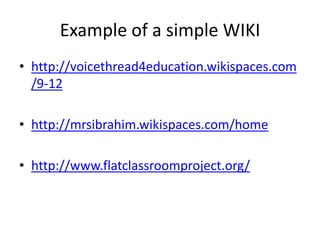
Example of a simple WIKI http://voicethread4education.wikispaces.com/9-12http://mrsibrahim.wikispaces.com/homehttp://www.flatclassroomproject.org/
How is a WIKI better than…a blog?a website?a  shared  powerpoint ?It allows COLLABORATION!
What could I use it for ?
What to consider when starting a WIKIPURPOSE short term or long term?AUDIENCEOne class, one subject, whole school ?CONTENTTeacher created, student work
What can I put on the WIKI?
Many other WIDGETS are available
contact WIKISPACES to make as many identical copies of the WIKI  as you need  ( 3 day turn around for me)
WIKI Structure
Use Templates for creating  multiple group  pages
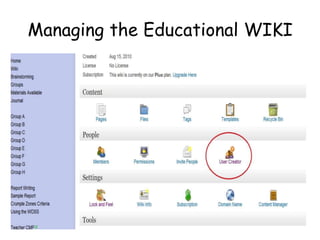
Managing the Educational WIKI
Enrolling StudentsI enter school code name as username and password and let WIKISPACES generate email address.   ( I add cvx to the username  as there are many  with same name – jbrown2cvx )
Enrolling students
FEEDBACK TO STUDENTSCritical to show the students that you are interested and are looking at what they have done From RSS Feed page you click to link to the WIKI and can write a comment in the discussion for that page
WIKI SECRETSYou can view the HISTORY of  a page Individual contributions can be tracked This doesn’t tell the whole story but is evidence for the teacher  backed up observations. Discussion pages can also be used.
HISTORY
KEEPING TRACK
www.cvxTEST.wikispaces.comI have given you a username and password You now have an account on Wikispaces on this name.Go to  your page and complete the Challenge Exercises  After this you can confidently make you own  wiki and use it with your classASK me to help you enrol the students
++++++Easy to monitor student progress in the early stages of planning View  and approve Draft proposals  in real time Provide Feedback anytime.  Record of the Feedback is always available Once the Wiki template is created  it is easy to copy and duplicateClasses were highly motivated to use the WIKI.
++++++Absent students could be aware of what was going on Students generally organised Groups well - matched ability with specific  duties or tasks
++++++Definitely less work marking  - no trees - all in one place History page provides evidence to challenge students who appear to be making no effort or contributionStudents with IT ability can shine
-------First time with class on WIKI  can be difficult Takes time to work out Criteria  that you are confident that you can assess. Some students claimed they weren't listened to in their Group and could have done better on their own  ( I agreed!) Unmotivated students could be spectators although their marks also reflect this .
The End

Wikis for everyone

  • 1.
  • 2.
    Place on theweb where many people can come together and share ideasCan be like an ongoing conversationContains a body of knowledge that people can share WIKI means QUICK – a place to consolidate ideas , links, videos. A PORTAL for learning
  • 3.
    Example of asimple WIKI http://voicethread4education.wikispaces.com/9-12http://mrsibrahim.wikispaces.com/homehttp://www.flatclassroomproject.org/
  • 5.
    How is aWIKI better than…a blog?a website?a shared powerpoint ?It allows COLLABORATION!
  • 7.
    What could Iuse it for ?
  • 8.
    What to considerwhen starting a WIKIPURPOSE short term or long term?AUDIENCEOne class, one subject, whole school ?CONTENTTeacher created, student work
  • 9.
    What can Iput on the WIKI?
  • 10.
    Many other WIDGETSare available
  • 11.
    contact WIKISPACES tomake as many identical copies of the WIKI as you need ( 3 day turn around for me)
  • 12.
  • 13.
    Use Templates forcreating multiple group pages
  • 14.
  • 15.
    Enrolling StudentsI enterschool code name as username and password and let WIKISPACES generate email address. ( I add cvx to the username as there are many with same name – jbrown2cvx )
  • 16.
  • 17.
    FEEDBACK TO STUDENTSCriticalto show the students that you are interested and are looking at what they have done From RSS Feed page you click to link to the WIKI and can write a comment in the discussion for that page
  • 18.
    WIKI SECRETSYou canview the HISTORY of a page Individual contributions can be tracked This doesn’t tell the whole story but is evidence for the teacher backed up observations. Discussion pages can also be used.
  • 19.
  • 21.
  • 22.
    www.cvxTEST.wikispaces.comI have givenyou a username and password You now have an account on Wikispaces on this name.Go to your page and complete the Challenge Exercises After this you can confidently make you own wiki and use it with your classASK me to help you enrol the students
  • 23.
    ++++++Easy to monitorstudent progress in the early stages of planning View and approve Draft proposals in real time Provide Feedback anytime. Record of the Feedback is always available Once the Wiki template is created it is easy to copy and duplicateClasses were highly motivated to use the WIKI.
  • 24.
    ++++++Absent students couldbe aware of what was going on Students generally organised Groups well - matched ability with specific duties or tasks
  • 25.
    ++++++Definitely less workmarking - no trees - all in one place History page provides evidence to challenge students who appear to be making no effort or contributionStudents with IT ability can shine
  • 26.
    -------First time withclass on WIKI can be difficult Takes time to work out Criteria that you are confident that you can assess. Some students claimed they weren't listened to in their Group and could have done better on their own ( I agreed!) Unmotivated students could be spectators although their marks also reflect this .
  • 27.

Editor's Notes

  • #5 Good afternoonI was fortunate enough to attend the ISTE 2010 Conference this year in Denver Colorado . One of the Workshops I was impressed with , used a NING and a WIKI in a Global Collaborative Project - called the Digiteacher Project – Digital Citizenship within a Project-Based Learning Environment.I thought the basic principles could be applied to any Collaborative Project so decided to try this out with my Year 10 Science classes on the Crumple Zones EEI
  • #6 Good afternoonI was fortunate enough to attend the ISTE 2010 Conference this year in Denver Colorado . One of the Workshops I was impressed with , used a NING and a WIKI in a Global Collaborative Project - called the Digiteacher Project – Digital Citizenship within a Project-Based Learning Environment.I thought the basic principles could be applied to any Collaborative Project so decided to try this out with my Year 10 Science classes on the Crumple Zones EEI