PROJECT PRESENTATION
ON
Wi-Fi AC LIGHT DIMMER
SUBMITTED BY:-
ARIJIT CHAKRABORTY
ITM UNIVERSITY, GWALIOR
ON15KS00375
CONTENTS :-
• WHAT IS Wi-Fi AC LIGHT DIMMER
• COMPONENTS REQUIRED
• COMPONENTS BRIEF DETAILS
• CIRCUIT DIAGRAM
• CODE REQUIRED
WHAT IS Wi-Fi AC LIGHT DIMMER ?
• AC LIGHT DIMMER is used to control the brightness of the light
according to our requirement. This light dimmer circuit is used to
control the voltage which gets to the light.
• Using Wi-Fi module we can control the brightness of light form our
mobile phones or PC from anywhere with the help of internet.
COMPONENTS REQUIRED :-
• 2 * 68k resistor
• 2 * 330E resistor
• 1 * 2.2k resistor
• 1 * MOC 3052 (Optocoupler)
• 1 * LTV814 (Zero Crossing Detector)
• 1 * BTB808 600BW (TRIAC)
• 1 * Arduino UNO R3
• ESP8266 module
• PCB
• Screw Terminals
• Wires
• Bulb
• Soldering Kit
COMPONENTS BRIEF DETAILS :-
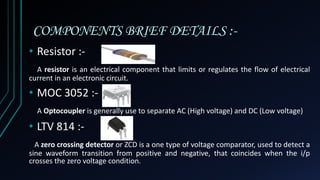
• Resistor :-
A resistor is an electrical component that limits or regulates the flow of electrical
current in an electronic circuit.
• MOC 3052 :-
A Optocoupler is generally use to separate AC (High voltage) and DC (Low voltage)
• LTV 814 :-
A zero crossing detector or ZCD is a one type of voltage comparator, used to detect a
sine waveform transition from positive and negative, that coincides when the i/p
crosses the zero voltage condition.
COMPONENTS BRIEF DETAILS :-
• BTB808 600BW :-
The TRIAC is a three terminal semiconductor device for controlling current.
• Arduino UNO R3:-
Arduino consists of both a physical programmable circuit board (often referred to as
a microcontroller) and a piece of software, or IDE (Integrated Development
Environment) that runs on your computer, used to write and upload computer code to
the physical board.
• ESP 8266:-
The ESP8266 is a low-cost Wi-Fi microchip with full TCP/IP stack and microcontroller
capability.
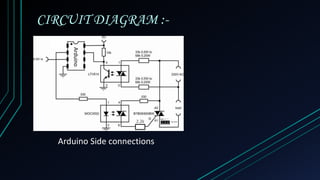
CIRCUIT DIAGRAM :-
Arduino Side connections
Arduino
2.2k
CODE REQUIRED :-
ARDUINO CODE esp8266 CODE
#include<TimerOne.h>
unsigned char channel_1=9;
unsigned char CH1;
unsigned char clock_tick;
void setup() {
pinMode (channel_1,OUTPUT);
attachInterrupt (0,zero_cross,RISING);
Timer1.initialize(100);
Timer1.attachInterrupt(dimmer);
}
void dimmer(){
clock_tick ++;
if(CH1==clock_tick){
digitalWrite(channel_1,HIGH);
delayMicroseconds(5);
digitalWrite(channel_1,LOW);
}}
void zero_cross(){
clock_tick=0;}
void loop() {
int i=analogRead(Ao);
int B=map(i,0,100,100,0)
B=CH1;}}
//ANALOG OUT code
#include "config.h"
Serial.print("Connecting to Adafruit
IO");
io.connect();
analog->onMessage(handleMessage);
while(io.status() < AIO_CONNECTED) {
Serial.print(".");
delay(500);
}
Serial.println();
Serial.println(io.statusText());
analog->get();
}
void loop() {
io.run();
}
void handleMessage(AdafruitIO_Data
*data) {
int reading = data->toInt();
Serial.print("received <- ");
Serial.println(reading);
analogWrite(LED_PIN, reading);
}
//config.h code
#define IO_USERNAME "arijit01"
#define IO_KEY
"bf44877c22d7440fa38e99a57ebb9107"
#define WIFI_SSID "vivo 1603"
#define WIFI_PASS "itm12345"
#include "AdafruitIO_WiFi.h"
AdafruitIO_WiFi io(IO_USERNAME,
IO_KEY, WIFI_SSID, WIFI_PASS);
Wifi ac light dimmer

Wifi ac light dimmer

  • 1.
    PROJECT PRESENTATION ON Wi-Fi ACLIGHT DIMMER SUBMITTED BY:- ARIJIT CHAKRABORTY ITM UNIVERSITY, GWALIOR ON15KS00375
  • 2.
    CONTENTS :- • WHATIS Wi-Fi AC LIGHT DIMMER • COMPONENTS REQUIRED • COMPONENTS BRIEF DETAILS • CIRCUIT DIAGRAM • CODE REQUIRED
  • 3.
    WHAT IS Wi-FiAC LIGHT DIMMER ? • AC LIGHT DIMMER is used to control the brightness of the light according to our requirement. This light dimmer circuit is used to control the voltage which gets to the light. • Using Wi-Fi module we can control the brightness of light form our mobile phones or PC from anywhere with the help of internet.
  • 4.
    COMPONENTS REQUIRED :- •2 * 68k resistor • 2 * 330E resistor • 1 * 2.2k resistor • 1 * MOC 3052 (Optocoupler) • 1 * LTV814 (Zero Crossing Detector) • 1 * BTB808 600BW (TRIAC) • 1 * Arduino UNO R3 • ESP8266 module • PCB • Screw Terminals • Wires • Bulb • Soldering Kit
  • 5.
    COMPONENTS BRIEF DETAILS:- • Resistor :- A resistor is an electrical component that limits or regulates the flow of electrical current in an electronic circuit. • MOC 3052 :- A Optocoupler is generally use to separate AC (High voltage) and DC (Low voltage) • LTV 814 :- A zero crossing detector or ZCD is a one type of voltage comparator, used to detect a sine waveform transition from positive and negative, that coincides when the i/p crosses the zero voltage condition.
  • 6.
    COMPONENTS BRIEF DETAILS:- • BTB808 600BW :- The TRIAC is a three terminal semiconductor device for controlling current. • Arduino UNO R3:- Arduino consists of both a physical programmable circuit board (often referred to as a microcontroller) and a piece of software, or IDE (Integrated Development Environment) that runs on your computer, used to write and upload computer code to the physical board. • ESP 8266:- The ESP8266 is a low-cost Wi-Fi microchip with full TCP/IP stack and microcontroller capability.
  • 7.
    CIRCUIT DIAGRAM :- ArduinoSide connections Arduino 2.2k
  • 8.
    CODE REQUIRED :- ARDUINOCODE esp8266 CODE #include<TimerOne.h> unsigned char channel_1=9; unsigned char CH1; unsigned char clock_tick; void setup() { pinMode (channel_1,OUTPUT); attachInterrupt (0,zero_cross,RISING); Timer1.initialize(100); Timer1.attachInterrupt(dimmer); } void dimmer(){ clock_tick ++; if(CH1==clock_tick){ digitalWrite(channel_1,HIGH); delayMicroseconds(5); digitalWrite(channel_1,LOW); }} void zero_cross(){ clock_tick=0;} void loop() { int i=analogRead(Ao); int B=map(i,0,100,100,0) B=CH1;}} //ANALOG OUT code #include "config.h" Serial.print("Connecting to Adafruit IO"); io.connect(); analog->onMessage(handleMessage); while(io.status() < AIO_CONNECTED) { Serial.print("."); delay(500); } Serial.println(); Serial.println(io.statusText()); analog->get(); } void loop() { io.run(); } void handleMessage(AdafruitIO_Data *data) { int reading = data->toInt(); Serial.print("received <- "); Serial.println(reading); analogWrite(LED_PIN, reading); } //config.h code #define IO_USERNAME "arijit01" #define IO_KEY "bf44877c22d7440fa38e99a57ebb9107" #define WIFI_SSID "vivo 1603" #define WIFI_PASS "itm12345" #include "AdafruitIO_WiFi.h" AdafruitIO_WiFi io(IO_USERNAME, IO_KEY, WIFI_SSID, WIFI_PASS);