© 2015 VMware Inc. All rights reserved.
VMware vRealize™ Orchestrator™ 6.0
Knowledge Transfer Kit
Overview
Student Guide & Internal & Confidential Update Daly
https://goo.gl/VVmVZ0
-- Release Notes http://ouo.io/aV1F9
01 vRealize Orch 6.0 Overview http://ouo.io/4JNuf
02 vRealize Orch 6.0 Architecture http://ouo.io/PGS7X
03 vRealize Orch 6.0 Workflow Dev http://ouo.io/ne6iE
04 vRealize Orch 6.0 Workflow Design http://ouo.io/tJ05IK
05 vRealize Orch 6.0 Adv Workflow Dev http://ouo.io/qgfpDu
06 vRealize Orch 6.0 vSphere API http://ouo.io/bPptF
07 vRealize Orch 6.0 Integration http://ouo.io/LEE7V
08 vRealize Orch 6.0 vRealize Auto Extensibility http://ouo.io/cATNPw
09 vRealize Orch 6.0 Workshop Delivery Tips http://ouo.io/Obz625
Agenda
• VMware vRealize™ Orchestrator™ Overview
• VMware vRealize Automation Overview
3
VMware vRealize
Orchestrator Overview
Highlights
5
Platform
Plug-InsEcosystem
Benefits
• Integrate VMware solutions into your IT
environment and processes
• Reduce IT OpEx and total cost of ownership of
VMware and third-party solutions
• Automate your cloud and accelerate transition
to IT as a Service (ITaaS) model
Key use cases are automated
• Cloud administration tasks
• Incident remediation
• General IT administration tasks
Features and Benefits
• vRealize Orchestrator
– Included with VMware vCenter Server™ and vRealize Automation to enable
automation and orchestration
– Makes IT operations faster and less error-prone by facilitating the
automation of IT processes
– Facilitates the development of workflows
– Provides a graphical integrated development environment (IDE)
– Enables workflows to be exported and imported through packages
– Provides a workflow engine
– Offers multiple ways to run workflows
6
Automation and Orchestration
• vRealize Orchestrator workflows automate IT and business processes
– Lowers IT operating expenses and cost of ownership
– Enables consistent and rapid execution of IT services
Before
SAP Delivery Manager, network,
VMware, Linux, storage, and database
Many errors
Several weeks
After
SAP Delivery Manager
No human errors
8 hours
✔
✔
✗
✗
✗
Teams Involved
Quality
Deployment Time
✔
Example – Full-Stack SAP Provisioning
7
Workflow Engine
• The vRealize Orchestrator
workflow engine
– Runs multiple workflows in
parallel
– Performs checkpointing
– Includes user interactions
8
Graphical IDE Features
• Workflow component dragging and dropping
• Variable binding for data transfer between elements
• Visual editor for complete workflow view
• Version control for workflows and other vRealize Orchestrator content
9
Workflow Development
• Reuse existing building blocks to
build
– Workflows
– Actions
– Resource elements
– Predefined “scriptable” tasks
• More than 500 ready-to-use
actions and workflows
• More workflows available using
plug-ins
10
Running Workflows
• Run workflows from
– vRealize Orchestrator client
– VMware vSphere® Web Client
– vRealize Automation
– A client that uses the vRealize Orchestrator REST API
11
Client
• vRealize Orchestrator client
– Primary tool for developing workflows
12
vSphere Web Client Integration
• vSphere Web Client
– Primary tool for administrators to execute and monitor workflows
13
REST API
• REST API local documentation at vRealize Orchestrator API
(https://vCenter_Orchestrator_host:8281/vco/api/docs)
14
Plug-In Framework
15
Plug-ins enable integration with third-party systems
Physical
Layer
Cisco
UCS and
UCS
Manager
Virtual
Infra-
structure
Layer
vSphere
and
vCenter
Server
Cloud
Resource
Manager
vRealize
Automation
Application
Provisioning,
Configuration,
and
Monitoring
Manage-
ment
Systems
Workflow Library Workflow Engine
Ecosystem
• vRealize Orchestrator plug-ins
• VMware Solution Exchange (http://solutionexchange.vmware.com)
16
vRealize
Orchestrator
Platform Interfaces
• Windows
• Mac, Linux
Designer
• REST
Web ServicesOperator
• vSphere Web
Client
High-Level Product Architecture
17
• Oracle
• MS SQL Server
• PostgreSQL
vRealize
Orchestrator
Database
Directory
Services/
VMware
vRealize
Single
Sign-On™
Workflow Library Workflow Engine
…
……
• AMQP
• SNMP
External
Notifications
vRealize
Orchestrator
Platform
vRealize
Orchestrator
Plug-Ins
Management
Systems
IT Infrastructure
Use Cases
• Orchestration of virtual infrastructure
• Extending vSphere Web Client functionality
• Integration and orchestration of third-party systems
• vRealize Automation machine lifecycle extensibility
• vRealize Automation anything as a service (XaaS)
18
vSphere Task Automation
• Automate one task on multiple objects
– Example
• Add an NFS datastore to all VMware ESXi™ hosts in a cluster
• Automate multiple tasks on one object
– Example
• Configure a new ESXi host and configure its switches
• Add an NFS datastore and connect it to a cluster
• Automate multiple tasks on multiple objects.
– Example
• Create a new cluster, connect multiple ESXi hosts to it and configure them properly
19
Extending vSphere Functionality
• Because vRealize Orchestrator provides access to the complete
vSphere API, you can create workflows that provide features that are
not available in the vSphere Client or the vSphere Web Client
• Examples
– Cloning from an old snapshot
– Creating linked clones of virtual machines
• The integration with the vSphere Web Client enables administrators to
run workflows as easily as they perform common vSphere
administration tasks
20
Orchestration of IT Services
• vRealize Orchestrator enables the automation of IT processes among
several systems and APIs
• Virtual machine provisioning example
– An end user requests a new machine from the vRealize Automation service
catalog to automate the creation of a virtual machine
– A vRealize Automation workflow deploys the virtual machine to an ESXi host
– A vRealize Orchestrator workflow enters the virtual machine in an asset
management and content management database
– A vRealize Orchestrator workflow creates documentation
– A vRealize Orchestrator workflow notifies the user that the virtual machine is
ready to use
21
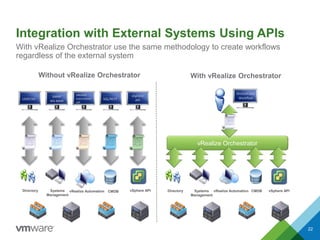
Integration with External Systems Using APIs
22
With vRealize Orchestrator use the same methodology to create workflows
regardless of the external system
Without vRealize Orchestrator
Directory Systems
Management
vRealize Automation CMDB vSphere API
With vRealize Orchestrator
vRealize Orchestrator
Directory Systems
Management
vRealize Automation CMDB vSphere API
LDAP/AD
SNMP
WS-MAN
vRealize
Automation
API
SQL/REST
vSphere
API
Orchestrator
Workflow
Customer Orchestration Examples
• Provisioning
– Driving end-user self-service
portals
– Lifecycle management
– Automatic deployment
– Disaster recovery
• Integration
– Integrating vRealize Automation
with other systems
• Operating
– Daily administration
– Update and patch automation
– Reporting
– Task consistency and quality
• Special use cases
– One-time workflows for migration
– Continuous delivery lifecycle
automation
23
VMware vRealize
Automation Overview
vRealize Automation Logical Architecture
25
vRealize Automation Components
SQL
Server
Active
Directory
vRealize
Automation
Appliance
Web Portal
Common
Services
Identity
Appliance
or
Existing
VMware
vCenter™
Single Sign-
On™
IaaS
Components
Model Manager
Manager Service
DEMs
Agents
VMware
vCloud®
Application
Director
Linux Appliance
VMware
vRealize
Business™
Standard
vRealize
Orchestrator
Physical
Linux Windows
Virtual
vSphere Hyper-V XenServer
Cloud
Cloud
Providers
vCloud
Hybrid
Service
vRealize Automation Functionality
• Unified IT service catalog
– Applications, infrastructure
– Personalized self-service experience
• Infrastructure services
– Cloud support, includes vCloud Hybrid
Service and OpenStack
– Configure VMware NSX™ network and
security services
– vSphere Integration: VMware Virtual
SAN™ and VMware vCenter Site Recovery
Manager™
• Application services
– Release automation and change rollback
– Support for DevOps automation tools
• Anything as a service (XaaS)
– Publish or automate delivery of custom IT
services
• Business management
– Automatically populate cost profiles
– Benchmark against public cloud services
Self-Service Catalog
IaaS PaaS DaaS XaaS
vRealize Automation
Multivendor, Multicloud Infrastructure
VM with OS
Middleware
Application
VM with OS
Middleware
Application
VM with OS
Middleware
Application
Development Test Production
Policy-Based Governance with Automated Delivery
26
Service Delivery
27
vRealize Automation enables users to request, provision, and manage
infrastructure services, application services, and custom services for on-demand
delivery based on defined policies
vRealize Automation
Self-Service Provisioning and Management
vRealize Automation
Policy-Based Governance with Automated Delivery
Custom ServicesInfrastructure Services Application Services
Infrastructure Services
vRealize Automation supports a multivendor, multicloud infrastructure
vRealize Automation
Policy-Based Governance with Automated Delivery
Application Services Custom Services
Self-Service
Physical
Linux Windows
Cloud
Cloud
Providers
vCloud
Hybrid
Service
Virtual
vSphere Hyper-V XenServer
Infrastructure Services
RHEV
28
vRealize Automation
Policy-Based Governance with Automated Delivery
Application Services Custom Services
Self-Service
Infrastructure Services
Multivendor, Multicloud
Application Services
vRealize Automation automates the deployment and delivery of multitier
applications
29
Custom Services with vRealize Orchestrator
You can integrate vRealize Automation with existing tools, infrastructure, and new
IT services
Cloud Service Provisioning
Policy-Based Governance with Automated Delivery
Application Services Custom Services
Self-Service
Infrastructure Services
vRealize Automation
Policy-Based Governance with Automated Delivery
Application Services Custom Services
Self-Service
Infrastructure Services
Advanced Service
Designer
Integrate with third-party management systems Add IT services and create Day 2 operations
vRealize Orchestrator
30
Advanced Service Designer
31
vRealize Automation
Self-Service
Policy-Based Governance with Automated Delivery
Infrastructure
Services
Application
Services
Advanced
Service
Designer
vRealize Orchestrator
 New-employee on-boarding
 Email/mail box setup
 Storage as a service
 Network services
 Backup and recovery
 Security and compliance
 Active Directory management tasks
 Software installation and updates
 Password management
• Customize request forms
- Prepopulate forms with
input and output from vRealize
Orchestrator workflows
- Rich customization
• XaaS blueprints
- Any vRealize Orchestrator workflow
- Custom resources
- Custom actions
- Service entitlements
• Automate delivery process
- Specify resource and action
- Define automation flow using
vRealize Orchestrator workflows
and plug-ins
BLUEPRINT
Use
Cases
Blueprint
vRealize Orchestrator Integration
Integrating vRealize Automation with vRealize Orchestrator creates an extensible
platform for business process automation
vRealize Orchestrator
Archive
Generate
work order
Run custom
script
New IT services and
custom IT operations
(XaaS)
• Storage as a service
• Backup/recovery
• Security/compliance
• AD management tasks
Third-Party integration
• CMDB
• DNS
• IPAM
• Load balancers
• Service desk
• Monitoring systems
• Databases
• Web services
Take
snapshot
Update status
CMDB
RetireManageProvisionApprovalRequest
32
Service Catalog –
Infrastructure, Applications, and XaaS
vRealize Automation provides a unified service catalog that enables users to self-
provision infrastructure services, application services, and custom services
33
Questions
34
VMware vRealize
Orchestrator 6.0
Knowledge Transfer Kit
VMware, Inc.
3401 Hillview Ave
Palo Alto, CA 94304
Tel: 1-877-486-9273 or 650-427-5000
Fax: 650-427-5001

V mware v realize orchestrator 6.0 knowledge transfer kit

  • 1.
    © 2015 VMwareInc. All rights reserved. VMware vRealize™ Orchestrator™ 6.0 Knowledge Transfer Kit Overview
  • 2.
    Student Guide &Internal & Confidential Update Daly https://goo.gl/VVmVZ0 -- Release Notes http://ouo.io/aV1F9 01 vRealize Orch 6.0 Overview http://ouo.io/4JNuf 02 vRealize Orch 6.0 Architecture http://ouo.io/PGS7X 03 vRealize Orch 6.0 Workflow Dev http://ouo.io/ne6iE 04 vRealize Orch 6.0 Workflow Design http://ouo.io/tJ05IK 05 vRealize Orch 6.0 Adv Workflow Dev http://ouo.io/qgfpDu 06 vRealize Orch 6.0 vSphere API http://ouo.io/bPptF 07 vRealize Orch 6.0 Integration http://ouo.io/LEE7V 08 vRealize Orch 6.0 vRealize Auto Extensibility http://ouo.io/cATNPw 09 vRealize Orch 6.0 Workshop Delivery Tips http://ouo.io/Obz625
  • 3.
    Agenda • VMware vRealize™Orchestrator™ Overview • VMware vRealize Automation Overview 3
  • 4.
  • 5.
    Highlights 5 Platform Plug-InsEcosystem Benefits • Integrate VMwaresolutions into your IT environment and processes • Reduce IT OpEx and total cost of ownership of VMware and third-party solutions • Automate your cloud and accelerate transition to IT as a Service (ITaaS) model Key use cases are automated • Cloud administration tasks • Incident remediation • General IT administration tasks
  • 6.
    Features and Benefits •vRealize Orchestrator – Included with VMware vCenter Server™ and vRealize Automation to enable automation and orchestration – Makes IT operations faster and less error-prone by facilitating the automation of IT processes – Facilitates the development of workflows – Provides a graphical integrated development environment (IDE) – Enables workflows to be exported and imported through packages – Provides a workflow engine – Offers multiple ways to run workflows 6
  • 7.
    Automation and Orchestration •vRealize Orchestrator workflows automate IT and business processes – Lowers IT operating expenses and cost of ownership – Enables consistent and rapid execution of IT services Before SAP Delivery Manager, network, VMware, Linux, storage, and database Many errors Several weeks After SAP Delivery Manager No human errors 8 hours ✔ ✔ ✗ ✗ ✗ Teams Involved Quality Deployment Time ✔ Example – Full-Stack SAP Provisioning 7
  • 8.
    Workflow Engine • ThevRealize Orchestrator workflow engine – Runs multiple workflows in parallel – Performs checkpointing – Includes user interactions 8
  • 9.
    Graphical IDE Features •Workflow component dragging and dropping • Variable binding for data transfer between elements • Visual editor for complete workflow view • Version control for workflows and other vRealize Orchestrator content 9
  • 10.
    Workflow Development • Reuseexisting building blocks to build – Workflows – Actions – Resource elements – Predefined “scriptable” tasks • More than 500 ready-to-use actions and workflows • More workflows available using plug-ins 10
  • 11.
    Running Workflows • Runworkflows from – vRealize Orchestrator client – VMware vSphere® Web Client – vRealize Automation – A client that uses the vRealize Orchestrator REST API 11
  • 12.
    Client • vRealize Orchestratorclient – Primary tool for developing workflows 12
  • 13.
    vSphere Web ClientIntegration • vSphere Web Client – Primary tool for administrators to execute and monitor workflows 13
  • 14.
    REST API • RESTAPI local documentation at vRealize Orchestrator API (https://vCenter_Orchestrator_host:8281/vco/api/docs) 14
  • 15.
    Plug-In Framework 15 Plug-ins enableintegration with third-party systems Physical Layer Cisco UCS and UCS Manager Virtual Infra- structure Layer vSphere and vCenter Server Cloud Resource Manager vRealize Automation Application Provisioning, Configuration, and Monitoring Manage- ment Systems Workflow Library Workflow Engine
  • 16.
    Ecosystem • vRealize Orchestratorplug-ins • VMware Solution Exchange (http://solutionexchange.vmware.com) 16
  • 17.
    vRealize Orchestrator Platform Interfaces • Windows •Mac, Linux Designer • REST Web ServicesOperator • vSphere Web Client High-Level Product Architecture 17 • Oracle • MS SQL Server • PostgreSQL vRealize Orchestrator Database Directory Services/ VMware vRealize Single Sign-On™ Workflow Library Workflow Engine … …… • AMQP • SNMP External Notifications vRealize Orchestrator Platform vRealize Orchestrator Plug-Ins Management Systems IT Infrastructure
  • 18.
    Use Cases • Orchestrationof virtual infrastructure • Extending vSphere Web Client functionality • Integration and orchestration of third-party systems • vRealize Automation machine lifecycle extensibility • vRealize Automation anything as a service (XaaS) 18
  • 19.
    vSphere Task Automation •Automate one task on multiple objects – Example • Add an NFS datastore to all VMware ESXi™ hosts in a cluster • Automate multiple tasks on one object – Example • Configure a new ESXi host and configure its switches • Add an NFS datastore and connect it to a cluster • Automate multiple tasks on multiple objects. – Example • Create a new cluster, connect multiple ESXi hosts to it and configure them properly 19
  • 20.
    Extending vSphere Functionality •Because vRealize Orchestrator provides access to the complete vSphere API, you can create workflows that provide features that are not available in the vSphere Client or the vSphere Web Client • Examples – Cloning from an old snapshot – Creating linked clones of virtual machines • The integration with the vSphere Web Client enables administrators to run workflows as easily as they perform common vSphere administration tasks 20
  • 21.
    Orchestration of ITServices • vRealize Orchestrator enables the automation of IT processes among several systems and APIs • Virtual machine provisioning example – An end user requests a new machine from the vRealize Automation service catalog to automate the creation of a virtual machine – A vRealize Automation workflow deploys the virtual machine to an ESXi host – A vRealize Orchestrator workflow enters the virtual machine in an asset management and content management database – A vRealize Orchestrator workflow creates documentation – A vRealize Orchestrator workflow notifies the user that the virtual machine is ready to use 21
  • 22.
    Integration with ExternalSystems Using APIs 22 With vRealize Orchestrator use the same methodology to create workflows regardless of the external system Without vRealize Orchestrator Directory Systems Management vRealize Automation CMDB vSphere API With vRealize Orchestrator vRealize Orchestrator Directory Systems Management vRealize Automation CMDB vSphere API LDAP/AD SNMP WS-MAN vRealize Automation API SQL/REST vSphere API Orchestrator Workflow
  • 23.
    Customer Orchestration Examples •Provisioning – Driving end-user self-service portals – Lifecycle management – Automatic deployment – Disaster recovery • Integration – Integrating vRealize Automation with other systems • Operating – Daily administration – Update and patch automation – Reporting – Task consistency and quality • Special use cases – One-time workflows for migration – Continuous delivery lifecycle automation 23
  • 24.
  • 25.
    vRealize Automation LogicalArchitecture 25 vRealize Automation Components SQL Server Active Directory vRealize Automation Appliance Web Portal Common Services Identity Appliance or Existing VMware vCenter™ Single Sign- On™ IaaS Components Model Manager Manager Service DEMs Agents VMware vCloud® Application Director Linux Appliance VMware vRealize Business™ Standard vRealize Orchestrator Physical Linux Windows Virtual vSphere Hyper-V XenServer Cloud Cloud Providers vCloud Hybrid Service
  • 26.
    vRealize Automation Functionality •Unified IT service catalog – Applications, infrastructure – Personalized self-service experience • Infrastructure services – Cloud support, includes vCloud Hybrid Service and OpenStack – Configure VMware NSX™ network and security services – vSphere Integration: VMware Virtual SAN™ and VMware vCenter Site Recovery Manager™ • Application services – Release automation and change rollback – Support for DevOps automation tools • Anything as a service (XaaS) – Publish or automate delivery of custom IT services • Business management – Automatically populate cost profiles – Benchmark against public cloud services Self-Service Catalog IaaS PaaS DaaS XaaS vRealize Automation Multivendor, Multicloud Infrastructure VM with OS Middleware Application VM with OS Middleware Application VM with OS Middleware Application Development Test Production Policy-Based Governance with Automated Delivery 26
  • 27.
    Service Delivery 27 vRealize Automationenables users to request, provision, and manage infrastructure services, application services, and custom services for on-demand delivery based on defined policies vRealize Automation Self-Service Provisioning and Management vRealize Automation Policy-Based Governance with Automated Delivery Custom ServicesInfrastructure Services Application Services
  • 28.
    Infrastructure Services vRealize Automationsupports a multivendor, multicloud infrastructure vRealize Automation Policy-Based Governance with Automated Delivery Application Services Custom Services Self-Service Physical Linux Windows Cloud Cloud Providers vCloud Hybrid Service Virtual vSphere Hyper-V XenServer Infrastructure Services RHEV 28
  • 29.
    vRealize Automation Policy-Based Governancewith Automated Delivery Application Services Custom Services Self-Service Infrastructure Services Multivendor, Multicloud Application Services vRealize Automation automates the deployment and delivery of multitier applications 29
  • 30.
    Custom Services withvRealize Orchestrator You can integrate vRealize Automation with existing tools, infrastructure, and new IT services Cloud Service Provisioning Policy-Based Governance with Automated Delivery Application Services Custom Services Self-Service Infrastructure Services vRealize Automation Policy-Based Governance with Automated Delivery Application Services Custom Services Self-Service Infrastructure Services Advanced Service Designer Integrate with third-party management systems Add IT services and create Day 2 operations vRealize Orchestrator 30
  • 31.
    Advanced Service Designer 31 vRealizeAutomation Self-Service Policy-Based Governance with Automated Delivery Infrastructure Services Application Services Advanced Service Designer vRealize Orchestrator  New-employee on-boarding  Email/mail box setup  Storage as a service  Network services  Backup and recovery  Security and compliance  Active Directory management tasks  Software installation and updates  Password management • Customize request forms - Prepopulate forms with input and output from vRealize Orchestrator workflows - Rich customization • XaaS blueprints - Any vRealize Orchestrator workflow - Custom resources - Custom actions - Service entitlements • Automate delivery process - Specify resource and action - Define automation flow using vRealize Orchestrator workflows and plug-ins BLUEPRINT Use Cases
  • 32.
    Blueprint vRealize Orchestrator Integration IntegratingvRealize Automation with vRealize Orchestrator creates an extensible platform for business process automation vRealize Orchestrator Archive Generate work order Run custom script New IT services and custom IT operations (XaaS) • Storage as a service • Backup/recovery • Security/compliance • AD management tasks Third-Party integration • CMDB • DNS • IPAM • Load balancers • Service desk • Monitoring systems • Databases • Web services Take snapshot Update status CMDB RetireManageProvisionApprovalRequest 32
  • 33.
    Service Catalog – Infrastructure,Applications, and XaaS vRealize Automation provides a unified service catalog that enables users to self- provision infrastructure services, application services, and custom services 33
  • 34.
  • 35.
    VMware vRealize Orchestrator 6.0 KnowledgeTransfer Kit VMware, Inc. 3401 Hillview Ave Palo Alto, CA 94304 Tel: 1-877-486-9273 or 650-427-5000 Fax: 650-427-5001

Editor's Notes

  • #6 Historically, vRealize Orchestrator was part of vSphere since the acquisition of Dunes, a Switzerland based startup, back in 2007. vRealize Orchestrator packaged with vSphere and vRealize Automation, available for vCenter Server license. It consists of three primary parts: vRealize Orchestrator platform – Where you assemble your vRealize Orchestrator workflows using simple drag and drop vRealize Orchestrator rich plug-in library vRealize Orchestrator ecosystem and SDK vRealize Orchestrator workflows can be leveraged through REST or SOAP API. The key use cases include: Automation of vSphere administration tasks Automated incident remediation Automation of general IT administration tasks