White Paper


EMC PERFORMANCE OPTIMIZATION FOR
MICROSOFT FAST SEARCH SERVER 2010 FOR
SHAREPOINT
EMC Symmetrix VMAX, EMC FAST VP, Microsoft Hyper-V
   • Optimize scalability and performance of FAST Search Server 2010
     for SharePoint
   • Validate virtualization of FAST Search infrastructure
   • Scale-out architecture for enterprise configurations


                   EMC Solutions Group

                   This white paper describes the architecture of an enterprise-scale SharePoint
                   collaboration farm with file share content and rich search capabilities provided
                   by Microsoft FAST Search 2010 on EMC® Symmetrix® VMAX™ storage with EMC
                   FAST VP enabled. Data protection is provided by EMC Replication Manager with
                   replication and recoverability of the SharePoint content, the file share, and the
                   FAST Search index.


                   March 2012
Copyright © 2011, 2012 EMC Corporation. All Rights Reserved.

     EMC believes the information in this publication is accurate as of its
     publication date. The information is subject to change without notice.

     The information in this publication is provided “as is.” EMC Corporation makes
     no representations or warranties of any kind with respect to the information in
     this publication, and specifically disclaims implied warranties of
     merchantability or fitness for a particular purpose.

     Use, copying, and distribution of any EMC software described in this
     publication requires an applicable software license.

     For the most up-to-date listing of EMC product names, see EMC Corporation
     Trademarks on EMC.com.

     Microsoft may have substituted components of the original environment in this
     document with hardware of a similar (or higher) specification to the original
     equipment used in the EMC Proven Solution. The content contained in this
     document originated from a validated EMC Proven Solution. The modification
     introduced by Microsoft may have caused changes in performance,
     functionality, or scalability of the original solution. Please refer to
     http://www.EMC.com/solutions for further information on validated EMC
     Proven Solutions.

     Brocade is registered trademark in the United States and/or in other countries.

     All trademarks used herein are the property of their respective owners.

     Part Number H8802.2


EMC Performance Optimization for Microsoft FAST Search Server 2010 for SharePoint      2
                                  EMC Symmetrix VMAX, EMC FAST VP, Microsoft Hyper-V
Table of contents
  Executive summary ............................................................................................................... 7
      Business case .................................................................................................................................. 7
      Solution overview ............................................................................................................................ 7
      Key results ....................................................................................................................................... 8

  Introduction .......................................................................................................................... 9
      Purpose ........................................................................................................................................... 9
      Scope .............................................................................................................................................. 9
      Audience ......................................................................................................................................... 9
      Terminology ..................................................................................................................................... 9

  Technology overview ........................................................................................................... 11
      Introduction ................................................................................................................................... 11
      Microsoft FAST Search Server 2010 for SharePoint ......................................................................... 11
      Microsoft Hyper-V .......................................................................................................................... 11
      EMC Symmetrix VMAX .................................................................................................................... 11
      EMC Symmetrix FAST VP ................................................................................................................. 11
      EMC Replication Manager .............................................................................................................. 12

  SharePoint and FAST Search server role overview ................................................................. 13
      Introduction ................................................................................................................................... 13
      SharePoint server roles .................................................................................................................. 13
         SharePoint administration server .............................................................................................. 13
         SharePoint Web front-end server ............................................................................................... 13
         Database server ........................................................................................................................ 13
         FAST Search content SSA server ................................................................................................ 14
         FAST Search query SSA server ................................................................................................... 14
      FAST Search server roles ................................................................................................................ 14
         Item processing component ...................................................................................................... 14
         Content distributor .................................................................................................................... 14
         Web link analysis (Web analyzer) .............................................................................................. 14
         Search cluster ........................................................................................................................... 15
         Indexing .................................................................................................................................... 15
         Query processing ...................................................................................................................... 15
         Content flow in a FAST Search server farm ................................................................................. 15

  Solution architectures ......................................................................................................... 17
      Solution profile .............................................................................................................................. 17
      Server architecture design overview ............................................................................................... 17
         Physical FAST Search design ..................................................................................................... 18


                             EMC Performance Optimization for Microsoft FAST Search Server 2010 for SharePoint                                                 3
                                                                                 EMC Symmetrix VMAX, EMC FAST VP, Microsoft Hyper-V
Virtualized FAST Search design.................................................................................................. 18
   Physical FAST Search server solution architecture .......................................................................... 18
   Physical FAST Search server deployment ........................................................................................ 20
   Virtualized FAST Search solution architecture ................................................................................ 21
   Virtualized FAST Search server deployment .................................................................................... 23
   Hardware resources ....................................................................................................................... 24
   Software resources ........................................................................................................................ 25

Solution design and considerations..................................................................................... 26
   Microsoft SharePoint 2010 farm design ......................................................................................... 26
      Overview ................................................................................................................................... 26
      Considerations .......................................................................................................................... 26
      Database design ....................................................................................................................... 27
   Microsoft Hyper-V cluster and virtual machine design for virtualized SharePoint 2010 ................... 27
   Physical FAST Search Server 2010 for SharePoint farm design ....................................................... 28
      FAST Search admin server role................................................................................................... 28
      FAST Search content distributor server role ............................................................................... 29
      FAST Search indexing server role ............................................................................................... 29
   Virtualized FAST Search Server 2010 for SharePoint farm design.................................................... 29
      FAST Search administration server role...................................................................................... 29
      FAST Search content distributor server role ............................................................................... 29
      FAST Search indexing server role ............................................................................................... 30
   Test methodology design and data preparation ............................................................................. 30
      Preparing random data .............................................................................................................. 30
      Configuring the SharePoint farm for FAST Search ....................................................................... 30
      Data distribution ....................................................................................................................... 30
      VSTS test client and test mechanism ......................................................................................... 31
      User load profile ........................................................................................................................ 33
      SharePoint response time requirement ..................................................................................... 33
   Storage design ............................................................................................................................... 34
      Overview ................................................................................................................................... 34
      SharePoint storage design......................................................................................................... 34
      FAST Search storage design....................................................................................................... 35
      Symmetrix auto tiering technology design ................................................................................. 37
      FAST Search virtual machine storage design .............................................................................. 37
      Replication Manager snapshot storage design .......................................................................... 37
      Replication Manager design considerations .............................................................................. 37

Testing and validation methodology .................................................................................... 40
   Overview ........................................................................................................................................ 40
   FAST Search raw I/O subsystem performance validation ................................................................ 40
     IOmeter test methodology ......................................................................................................... 40


                          EMC Performance Optimization for Microsoft FAST Search Server 2010 for SharePoint                                               4
                                                                             EMC Symmetrix VMAX, EMC FAST VP, Microsoft Hyper-V
Phase one: Validating the FAST Search server farm in the physical environment ............................ 41
      Measuring performance during a full crawl ................................................................................ 41
      Using VSTS to measure performance ......................................................................................... 41
    Phase two: Validating the FAST Search server farm in the virtualized environment ......................... 41
      Measuring performance during a full crawl ................................................................................ 41
      Using VSTS to measure the performance ................................................................................... 42
      Symmetrix auto tiering impact on SharePoint performance........................................................ 42
    EMC Replication Manager-engaged test methodology .................................................................... 42
      Replication Manager job impact on FAST Search ....................................................................... 42
      Using Replication Manager to restore FAST Search Server 2010 for SharePoint.......................... 43

Test results ......................................................................................................................... 44
    Overview ........................................................................................................................................ 44
       Crawl performance in physical and virtualized FAST Search farms ............................................. 44
    Raw I/O performance of FAST Search disk subsystem .................................................................... 46
    Performance test results for the physical FAST Search environment ............................................... 46
       Crawl test overview for the physical environment ...................................................................... 46
       Full crawl performance for SharePoint content in the physical environment ............................... 47
       Full crawl performance for the file share in the physical environment ........................................ 50
       VSTS performance test against the physical FAST Search servers .............................................. 54
    Performance test results for the virtualized environment ................................................................ 56
       Crawl test overview for the virtualized environment ................................................................... 57
       Full crawl for SharePoint content performance in the virtualized environment ........................... 57
       File share full crawl performance in the virtualized environment ................................................ 60
       VSTS performance test against the virtualized FAST Search servers ........................................... 64
       Pure (100 percent) search or query test results for the virtualized environment ......................... 66
    Auto tiering performance impact .................................................................................................... 67
    Replication Manager-engaged backup and restore for FAST Search Server 2010 for SharePoint ..... 67
       EMC Replication Manager-engaged snapshot backup................................................................ 67
       EMC Replication Manager-engaged snapshot restore and recovery ........................................... 68

Conclusion ......................................................................................................................... 69
    Summary ....................................................................................................................................... 69
       Full crawl performance .............................................................................................................. 69
       Query performance and EMC auto tiering benefit ....................................................................... 69
       Environment protection ............................................................................................................. 70
    Findings ......................................................................................................................................... 70

References .......................................................................................................................... 71
    White papers ................................................................................................................................. 71
    Reference architecture ................................................................................................................... 71
    Product documentation.................................................................................................................. 71


                           EMC Performance Optimization for Microsoft FAST Search Server 2010 for SharePoint                                                5
                                                                               EMC Symmetrix VMAX, EMC FAST VP, Microsoft Hyper-V
Other documentation ..................................................................................................................... 71

Additional information ........................................................................................................ 72
   Deployment file in the physical FAST Search server farm ................................................................ 72
   Deployment file in the virtualized FAST Search server farm ............................................................. 72
   Recommendations of FAST Search and SharePoint farm settings ................................................... 73
   Disable SCSI filtering ..................................................................................................................... 73
   Move administrative component for Search Service Application .................................................... 74


                         EMC Performance Optimization for Microsoft FAST Search Server 2010 for SharePoint                                           6
                                                                           EMC Symmetrix VMAX, EMC FAST VP, Microsoft Hyper-V
Executive summary
Business case       Microsoft FAST Search Server 2010 for SharePoint offers a new choice for large-scale
                    companies whose business relies heavily on a high- performance search engine.
                    Combining the power of FAST Search with the simplicity of SharePoint, Microsoft FAST
                    Search Server 2010 for SharePoint delivers an exceptional intranet and people-
                    search experience as well as a platform for building custom search-driven
                    applications.

                    The deployment of FAST Search Server 2010 for SharePoint requires careful planning
                    and an understanding of both SharePoint and FAST Search server workloads with
                    regard to CPU, memory, network, and disk I/O requirements. Implementing this
                    solution normally requires an extensive consulting engagement. This solution offers
                    valuable guidance to the implementation team.

                    Customers often request virtualization of a FAST Search server farm, but because of
                    the nature of search platforms, customers often assume that server virtualization on a
                    SAN is not a good fit for such a high-demand platform as FAST Search.

Solution overview   This solution demonstrates the use EMC® Symmetrix® VMAX™ with Fully Automated
                    Storage Tiering for Virtualized Pools (EMC FAST VP) technology to deploy an
                    enterprise-class Microsoft FAST Search server farm. The solution demonstrates
                    methods for moving from a physical to virtual FAST Search infrastructure.

                    This solution has two main objectives:
                      •   Deploying a FAST Search server farm on physical servers.
                      •   Virtualizing the FAST Search server farm with Windows Server 2008 R2 and
                          Hyper-V.

                    This solution differentiates EMC from other storage and infrastructure vendors by
                    providing guidance about enterprise-class storage and server requirements. This
                    solution is designed for both physical and virtualized deployments of the FAST Search
                    server environments.

                    In this solution, the EMC Symmetrix VMAX auto tiering technology provides sufficient
                    support for both the storage I/O demands of a FAST Search server and a SharePoint
                    farm. The virtualization of both the SharePoint farm and FAST Search server provides
                    all the benefits of virtualization without sacrificing the performance of either the
                    SharePoint farm or the FAST Search server.

                    Rapid local protection is achieved with EMC Symmetrix TimeFinder/Snap managed by
                    EMC Replication Manager for FAST Search file systems and databases.

                    We achieved tremendous I/O requirements of this solution through a Brocade 8G
                    Fibre Channel SAN for storage connectivity. Brocade 8G FC Host Bus Adapters (HBAs)
                    and the DCX-4S backbone provided fully provisioned 8G FC connectivity between
                    servers and the high performance EMC Symmetrix VMAX storage array.

                    “We” in this section as well as the remaining sections in this paper includes a team of
                    EMC and partner solutions engineers who designed, built, and validated the solution
                    presented in this document.


                    EMC Performance Optimization for Microsoft FAST Search Server 2010 for SharePoint         7
                                                       EMC Symmetrix VMAX, EMC FAST VP, Microsoft Hyper-V
Key results   This solution demonstrates the following results:

                •   Scalability
                       EMC built an enterprise-scale SharePoint content farm with a unique data
                        set for FAST Search indexing and searching. The farm consisted of 4 TB of
                        SharePoint corpus (content) and a 5 TB file share indexed by a Microsoft
                        Fast Search 2010 for SharePoint farm.
                       EMC Symmetrix VMAX can scale to accommodate FAST Search with low disk
                        pool utilization while providing sufficient support for a 9 TB FAST Search
                        server farm operation (crawl and mixed work load).
                       With EMC Symmetrix virtual provisioning, a Symmetrix VMAX storage
                        platform can scale to accommodate Hyper-V for FAST Search server
                        consolidation by providing on-demand storage space.
                •   Performance
                       All performance testing results for FAST Search were well within the ideal
                        latency time (less than 1 second) as described by Microsoft. The FAST farm
                        can serve 20 QPS with 0.07 seconds latency.
                       EMC auto tiering technology with Flash drives improved the query
                        performance by 20 percent.
                •   Server virtualization
                       The virtualized FAST Search server farm provided search results similar to
                        the physical FAST Search server environment while using less physical
                        servers and CPUs.
                       The full crawl rate is about 50 percent slower than that in the physical FAST
                        Search server environment because of a Hyper-V CPU constraint in the
                        virtual environment.
                •   User experience
                       The FAST Search user experience in both the physical and virtualized FAST
                        Search server farms was very similar. The search latency time was less than
                        0.5 seconds in both environments.
                •   Protection
                       EMC performed replication under a normal user load.
                       For a 4 TB SharePoint farm, replication completed in less than 15 minutes.
                       For a 5 TB file share, replication completed in about 2 minutes
                       For the entire FAST Search server farm, replication took about 8 minutes.
                       Replication for both the SharePoint and FAST Search server farms finished
                        without any interruption or visible performance degradation.
                       It took 85 minutes to restore the SharePoint farm content of 5 TB.
                       It took less than 15 minutes to restore the entire FAST Search index. The
                        search resumed after only a very short period of incremental crawl.


              EMC Performance Optimization for Microsoft FAST Search Server 2010 for SharePoint         8
                                                  EMC Symmetrix VMAX, EMC FAST VP, Microsoft Hyper-V
Introduction
Purpose        This white paper describes a large-scale solution that includes a content-centric
               environment with SharePoint managing its file shares and Microsoft FAST Search
               indexing and searching its content.

               EMC built this architecture on an EMC Symmetrix VMAX storage system with the auto
               tiering technology enabled. With a virtualized SharePoint farm, the FAST Search
               servers are first deployed on physical servers and are then moved to a virtualized
               environment.

               By focusing on scalability testing of Microsoft FAST Search, this white paper provides
               guidance for sizing and storage profiling of both the SharePoint farm and the FAST
               Search server farm and assesses the impact of FAST Search on overall SharePoint
               performance. This white paper also validates EMC Replication Manager-based
               backup of the entire SharePoint and the FAST Search server farms as well as the
               restoration of the SharePoint content and the FAST Search server farm.

Scope          This white paper:
                 •   Describes the solution architecture of FAST Search servers deployed on both
                     physical servers and a virtualized SharePoint farm with Microsoft Hyper-V
                     enabled.
                 •   Validates the architecture and methodology against the solution objectives and
                     service-level agreement (SLA) goals.
                 •   Proves that customers can virtualize FAST Search servers with acceptable crawl
                     performance and comparable query performance while reducing host servers
                     and decreasing maintenance costs and, adding server-level resiliency with a
                     Hyper-V cluster.
                 •   Demonstrates the value of the auto tiering technology, which automates the
                     storage tiering and improves search performance.
                 •   Profiles the impact of local replication by using Replication Manager and
                     TimeFinder/Snap jobs to provide protection for both SharePoint and FAST
                     Search server farms.

Audience       This white paper is intended for Microsoft SharePoint 2010 database administrators
               and storage architects involved in planning, architecting, or administering an
               environment with EMC Symmetrix VMAX as the storage platform and Brocade as the
               8G FC SAN infrastructure. The paper is also intended for individuals planning to
               implement replication solutions.

Terminology    Table 1 describes some terminology that appears in this paper.


               EMC Performance Optimization for Microsoft FAST Search Server 2010 for SharePoint        9
                                                  EMC Symmetrix VMAX, EMC FAST VP, Microsoft Hyper-V
Table 1.    Terminology
 Term                         Definition
 Microsoft SharePoint 2010    SharePoint 2010 provides a broad, central application
                              platform for common enterprise Web requirements.
                              SharePoint's multi-purpose design allows you to manage
                              and provision intranet portals, extranets, websites,
                              documents and files, collaboration spaces, social tools,
                              enterprise searches, business intelligence, process
                              integration, system integration, workflow automation, and
                              core infrastructure for third-party solutions.

 Microsoft FAST Search        A new Microsoft product based on the FAST search
 Server 2010 for SharePoint   technology. It combines the FAST high-end search
                              capabilities with the SharePoint. FAST Search can connect
                              to dozens of different systems, parse hundreds of different
                              types of files, and provide airtight security and access
                              control.

 EMC Symmetrix VMAX           EMC Symmetrix VMAX with Enginuity™ version 5875
                              incorporates a new, highly scalable Virtualized Matrix
                              Architecture™ that enables VMAX arrays to grow seamlessly
                              and cost-effectively from an entry-level configuration into
                              the world’s largest storage system.

 Microsoft Hyper-V            Microsoft Hyper-V in Windows Server 2008 and Windows
                              Server 2008 R2 enables you to create a virtualized server
                              computing environment. Hyper-V provides the software
                              infrastructure and basic management tools that you can use
                              to create and manage a virtualized server computing
                              environment.

 EMC Symmetrix FAST VP        Builds on and extends the capabilities of virtualized
                              provisioning to provide a new form of FAST for Symmetrix at
                              a sub-LUN level. EMC FAST VP can automatically plan and
                              implement non-disruptive changes to storage allocations
                              and optimize the use of a storage configuration composed
                              of different drive technologies.

 EMC Replication Manager      Manages EMC point-in-time replication through a
                              centralized management console. Replication Manager
                              coordinates the entire data replication process—from
                              discovery and configuration to the management of multiple
                              application consistent disk-based replicas.


EMC Performance Optimization for Microsoft FAST Search Server 2010 for SharePoint           10
                                    EMC Symmetrix VMAX, EMC FAST VP, Microsoft Hyper-V
Technology overview
Introduction        This solution includes the following components:
                      •   Microsoft FAST Search Server 2010 for SharePoint
                          Offers a new choice in enterprise search
                      •   Microsoft Hyper-V
                          Virtualizes server computing environment
                      •   EMC Symmetrix VMAX storage
                          Offers storage with high performance, scalability, and security
                      •   EMC Symmetrix FAST VP
                          Enables automatic storage tiering
                      •   EMC Replication Manager
                          Backs up and restores entire environment with minimal performance impact

Microsoft FAST      Microsoft FAST Search Server 2010 for SharePoint provides significant enhancements
Search Server       for enterprise search capabilities.
2010 for
SharePoint          You can use FAST Search Server 2010 for SharePoint to resolve several search
                    problems. It provides enhanced general productivity searches and also improves
                    high-value search applications. High-value search applications drive measurable
                    returns on investment (ROI) by helping a specific set of people obtain the most from a
                    specific set of information. Common examples include product support applications,
                    research portals, and customer record locators.

Microsoft Hyper-V   Microsoft Hyper-V on Windows Server 2008 R2 enables you to create a virtualized
                    server computing environment. Hyper-V provides a software infrastructure and basic
                    management tools that you can use to create and manage a virtualized server
                    computing environment. You can use this virtualized environment to address
                    business goals aimed at improving efficiency and reducing costs.

EMC Symmetrix       With the strategy of building simple, intelligent, and modular storage, EMC Symmetrix
VMAX                VMAX with Enginuity™ version 5875 incorporates a new, highly scalable Virtualized
                    Matrix Architecture™ that enables Symmetrix VMAX arrays to grow seamlessly and
                    cost-effectively from an entry-level configuration into the world’s largest storage
                    system. Symmetrix VMAX offers more efficiency, scalability, and security.

EMC Symmetrix       Fully Automated Storage Tiering for Virtualized Pools (EMC FAST VP) builds on and
FAST VP             extends the capabilities of virtualized provisioning to provide a new form of FAST for
                    Symmetrix at the sub-LUN level. It automatically implements non-disruptive changes
                    to storage allocations and optimizes the use of a storage configuration composed of
                    different drive technologies. These optimizations take full advantage of the fast
                    response time of Flash drives and provide the most cost-effective use of a mixed drive
                    type configuration while providing the best performance.


                    EMC Performance Optimization for Microsoft FAST Search Server 2010 for SharePoint        11
                                                       EMC Symmetrix VMAX, EMC FAST VP, Microsoft Hyper-V
EMC Replication     EMC Replication Manager manages point-in-time replication through a centralized
Manager             management console. Replication Manager coordinates the entire data replication
                    process—from discovery and configuration to the management of multiple
                    application-consistent, disk-based replicas. With Replication Manager, you can put
                    the right data can in the right place at the right time—on demand or based on
                    schedules and policies that you can easily define. This application-centric product
                    provides simplified replica management with application consistency.

Brocade 8G FC SAN Brocade 8G Fibre Channel Host Bus Adapters provide the highest performance
Infrastructure    storage I/O for Microsoft SharePoint and FAST Search servers. In conjunction with
                  Brocade's full 8G FC line rate performance DCX backbones, we can attained the best
                  FAST Search performance numbers.


                    EMC Performance Optimization for Microsoft FAST Search Server 2010 for SharePoint       12
                                                       EMC Symmetrix VMAX, EMC FAST VP, Microsoft Hyper-V
SharePoint and FAST Search server role overview
Introduction        FAST Search Server 2010 for SharePoint builds on SharePoint Server 2010, and
                    significantly enhances the enterprise search capabilities. The server role of the
                    SharePoint 2010 farm contains the traditional SharePoint 2010 server roles as well as
                    the new search service application server roles specifically for FAST Search
                    connectors. The FAST Search server includes many processes and components. This
                    architecture is derived from FAST Enterprise Search Platform (ESP), which provides
                    enterprise-level scalability.

SharePoint server   The SharePoint 2010 farm configuration contains the following components:
roles
                      •   SharePoint central and site administration server
                      •   SharePoint Web front-end server
                      •   SQL Server 2008 R2 database server
                      •   FAST Search Content Search Service Application (SSA) server
                      •   FAST Search Query SSA server

                    The following are the functions of these servers:

                    SharePoint administration server
                    The solution deployed the SharePoint administration server on a Windows Server
                    2008 R2 virtual machine using a Windows Server 2008 R2 Hyper-V host. The Internet
                    Information Service (IIS) had its own application pool that was separate from other
                    services.

                    SharePoint Web front-end server
                    The solution deployed Web front-end servers on a Windows Server 2008 R2 virtual
                    machine using a Windows Server 2008 R2 Hyper-V host with the following
                    specifications:
                      •   IIS provides Web content to SharePoint clients
                      •   IIS Web garden threads use the default value 1 for optional performance and
                          ease of management
                      •   IIS logging is disabled to limit the unnecessary growth of log files and to
                          optimize performance

                    Database server
                    The solution deployed the resource-intensive database servers on a Windows Server
                    2008 R2 virtual machine using a Windows Server 2008 R2 Hyper-V host with the
                    following specifications:
                      •   SQL Server 2008 R2 Enterprise application servers
                      •   Database and log LUNs attached through pass-through LUNs.


                    EMC Performance Optimization for Microsoft FAST Search Server 2010 for SharePoint        13
                                                        EMC Symmetrix VMAX, EMC FAST VP, Microsoft Hyper-V
FAST Search content SSA server
                     This solution deployed the FAST Search content SSA server on a Windows Server
                     2008 R2 virtual machine using a Windows Server 2008 R2 hyper-V host with the
                     following specifications:
                       •   The FAST content SSA enables retrieving (crawling) content for indexing from
                           content repositories
                       •   The content SSA represents the default indexing connector for the FAST Search
                           Server 2010 for the SharePoint deployment
                       •   Secure Sockets Layer (SSL) communication is enabled between the SharePoint
                           server and the FAST Search server farms
                       •   A dedicated LUN is attached as the pass-through LUN to store the content index
                           files from the crawling operation

                     FAST Search query SSA server
                     This solution deployed the FAST query SSA on a Windows Server 2008 R2 virtual
                     machine using a Windows Server 2008 R2 Hyper-V host. This server provided the
                     query-side integration between the FAST Search Server 2010 for SharePoint farm and
                     the parent SharePoint farm. It served as a gateway between a local or remote Web
                     front-end server and the FAST Search Server 2010 for SharePoint farm.
                     EMC validation team installed and deployed the FAST Search query SSA on a
                     SharePoint application server within the SharePoint server farm. The FAST Search
                     query SSA contained query and crawl components for the people search function. A
                     dedicated LUN was attached as the pass-through LUN for the query and crawl
                     components.

FAST Search server   The Microsoft FAST Search Server 2010 for SharePoint farm topology contains various
roles                components that can be scaled out on multiple servers for performance and fault-
                     tolerance purposes. The section briefly introduces the FAST Search server roles and
                     the content flow.

                     Item processing component
                     The item processing component receives items to be indexed from indexing
                     connectors and processes the items according to the given configuration. The item
                     processing component then sends the processed items to the indexing service.

                     Content distributor
                     The content distributor communicates with the indexing connectors and organizes
                     the feeding of documents from indexing connectors to the indexing service. You can
                     set up a primary and a backup content distributor for fault-tolerance.

                     Web link analysis (Web analyzer)
                     Use the Web analyzer to analyze the search click-through logs and hyperlink
                     structures. Both contribute to better-ranked search results.

                     Items that show many clicks in the search click-through log are popular and therefore
                     receive better ranking scores than less-viewed items. Items to which many other


                     EMC Performance Optimization for Microsoft FAST Search Server 2010 for SharePoint       14
                                                        EMC Symmetrix VMAX, EMC FAST VP, Microsoft Hyper-V
items are linked are also perceived to be more relevant for the user and therefore
receive better rank scores.

The Web analyzer improves search relevancy by:
  •    Analyzing the link graph
  •    Adding anchor texts and a query independent rank boost based on link
       cardinality to the items in the index

Anchor texts describe the items they refer to and can improve recall and relevancy
when a query term matches the anchor text. Items to which many links point are
ranked higher.

The Web analyzer may scale out to many nodes to reduce the total time that is
needed for the analysis. To do this, add dedicated lookup database components and
link the processing components that are used during the link analysis.

Search cluster
The search cluster provides the main topology for indexing and query matching.
These components require their own scaling models by using a matrix of servers in a
row and column configuration.

Indexing
The indexing component creates inverted indexes, based on the items that it
receives. The indexing component sends these inverted indexes to the query
matching component for later use during query evaluation.

The indexing service consists of two components, the indexing dispatcher component
and the indexing component. If the indexing service is deployed on multiple nodes,
instances of these components are also deployed on multiple nodes.

Query processing
The query processing component performs pre-processing of the queries and post-
processing of the results. Query processing includes query language parsing,
linguistic processing, and item-level security processing. Result processing includes
merging the results from multiple index columns, formatting the query hit list,
formatting the query refinement data, and removing duplicates.

Content flow in a FAST Search server farm
The content flow in the FAST Search farm is as follows:
  1.    Item processing extracts searchable content from retrieved documents and
        processes the items based on the written language.
  2.    The indexing component converts the searchable content into inverted
        indexes that are, in turn, used by the query matching.
  3.    Query processing processes user queries by performing query
        transformations, such as synonym expansion, before matching the actual
        query against the index.


EMC Performance Optimization for Microsoft FAST Search Server 2010 for SharePoint       15
                                   EMC Symmetrix VMAX, EMC FAST VP, Microsoft Hyper-V
4.    Query matching uses the search indexes to return items that match a user
        query. The items are returned in a query hit list that is sorted by the relevancy
        to the specified query.
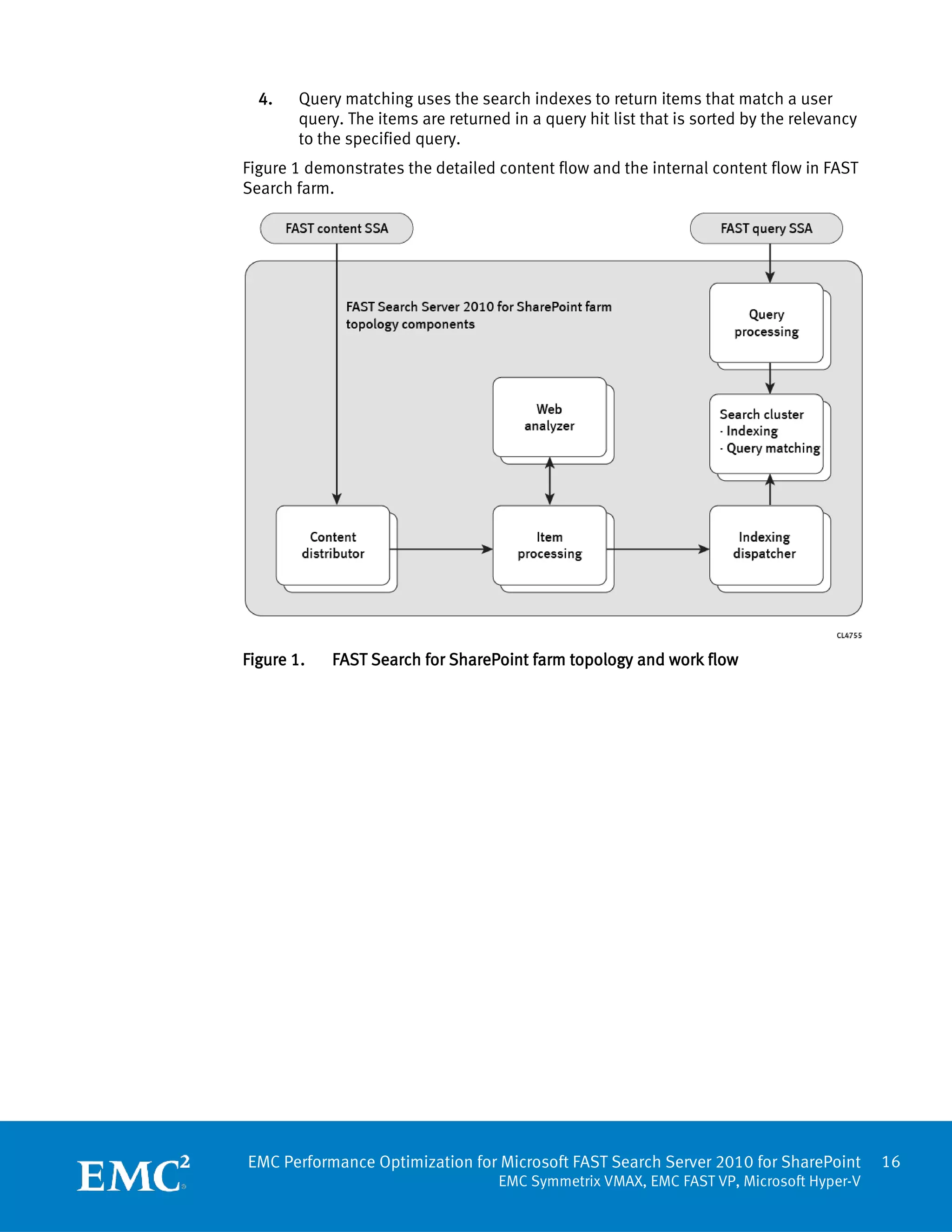
Figure 1 demonstrates the detailed content flow and the internal content flow in FAST
Search farm.


Figure 1.   FAST Search for SharePoint farm topology and work flow


EMC Performance Optimization for Microsoft FAST Search Server 2010 for SharePoint           16
                                     EMC Symmetrix VMAX, EMC FAST VP, Microsoft Hyper-V
Solution architectures
Solution profile      The validation team tested this solution reflected in the configuration profile shown
                      in Table 2.

                      The searchable content contained 4 TB of the SharePoint content. The SharePoint
                      content was stored in 20 content databases, each of which was up to 200 GB. A 5 TB
                      file share was stored on one of the SharePoint application servers.

                      Table 2.      Environment profile
                       Item                                        Value
                       Content type                                doc, docx, pdf, xls, xlsx, ppt, pptx, txt

                       Average content size                        1.65 MB

                       Total data                                  4 TB (not externalized)

                       Document size range                         20 KB - 50 MB

                       Total site count                            200

                       Content database size (each)                Up to 200 GB

                       Total site collections                      20

                       Sites for each site collection              10

                       Total user count                            22,000

                       User concurrency                            10 %

                       Total data                                  9 TB

                       Data size          SharePoint content       4 TB

                                          File Share               5 TB

                       Number of          SharePoint content       2,000,000
                       documents
                                          File share               3,000,000

                       SharePoint–usage profiles                   80/10/10
                       (percentages for browse/search/modify)      70/5/25
                                                                   50/20/30


Server architecture   The solution contains the following two architectures:
design overview
                        •   Physical FAST Search servers with virtualized SharePoint 2010 farm
                        •   Virtualized FAST Search servers with virtualized SharePoint 2010 farm

                      For purposes of clarity, EMC refers to the configuration with the physical FAST Search
                      server farm as the physical architecture and the configuration with the virtualized
                      FAST Search server farm as the virtualized architecture in this document.


                      EMC Performance Optimization for Microsoft FAST Search Server 2010 for SharePoint         17
                                                           EMC Symmetrix VMAX, EMC FAST VP, Microsoft Hyper-V
Physical FAST Search design
                The five physical FAST Search servers had the following components:
                  •   Two index and search servers
                  •   Two document processors and content distributors
                  •   One FAST Search administration server

                Virtualized FAST Search design
                The virtualized FAST Search design had the following differences in contrast with the
                physical FAST Search servers:
                  •   The virtual design used two physical servers as Hyper-V hosts to replace the
                      five physical servers
                  •   The virtual design deployed five virtualized FAST Search servers for the same
                      server performance as the physical FAST Search server farm

Physical FAST   The physical architecture of a FAST Search server farm demonstrated the typical
Search server   deployment of a FAST Search server configuration.
solution
architecture    The validated solution was a SharePoint 2010 farm using EMC Symmetrix VMAX with
                Hyper-V virtualization. The FAST Search servers were deployed on five physical hosts;
                the content SSA and query SSA were deployed on the SharePoint farm.

                The SharePoint farm consisted of the following components:
                  •   Three physical hosts with Hyper-V enabled
                  •   All SharePoint servers are virtualized on the Hyper-V hosts
                         One Admin server
                         One Application server
                         Four Web front-end servers
                         Two SQL Servers
                SharePoint native enterprise search was disabled and the content SSA and query SSA
                were deployed for feeding content and delivering queries to the FAST Search server
                farm.

                The content SSA crawled content and fed it into the back end of FAST Search Server
                2010 for SharePoint. The FAST Search query SSA provided query results from all
                content sources, which included the file share content and the SharePoint content in
                this solution.


                EMC Performance Optimization for Microsoft FAST Search Server 2010 for SharePoint       18
                                                   EMC Symmetrix VMAX, EMC FAST VP, Microsoft Hyper-V
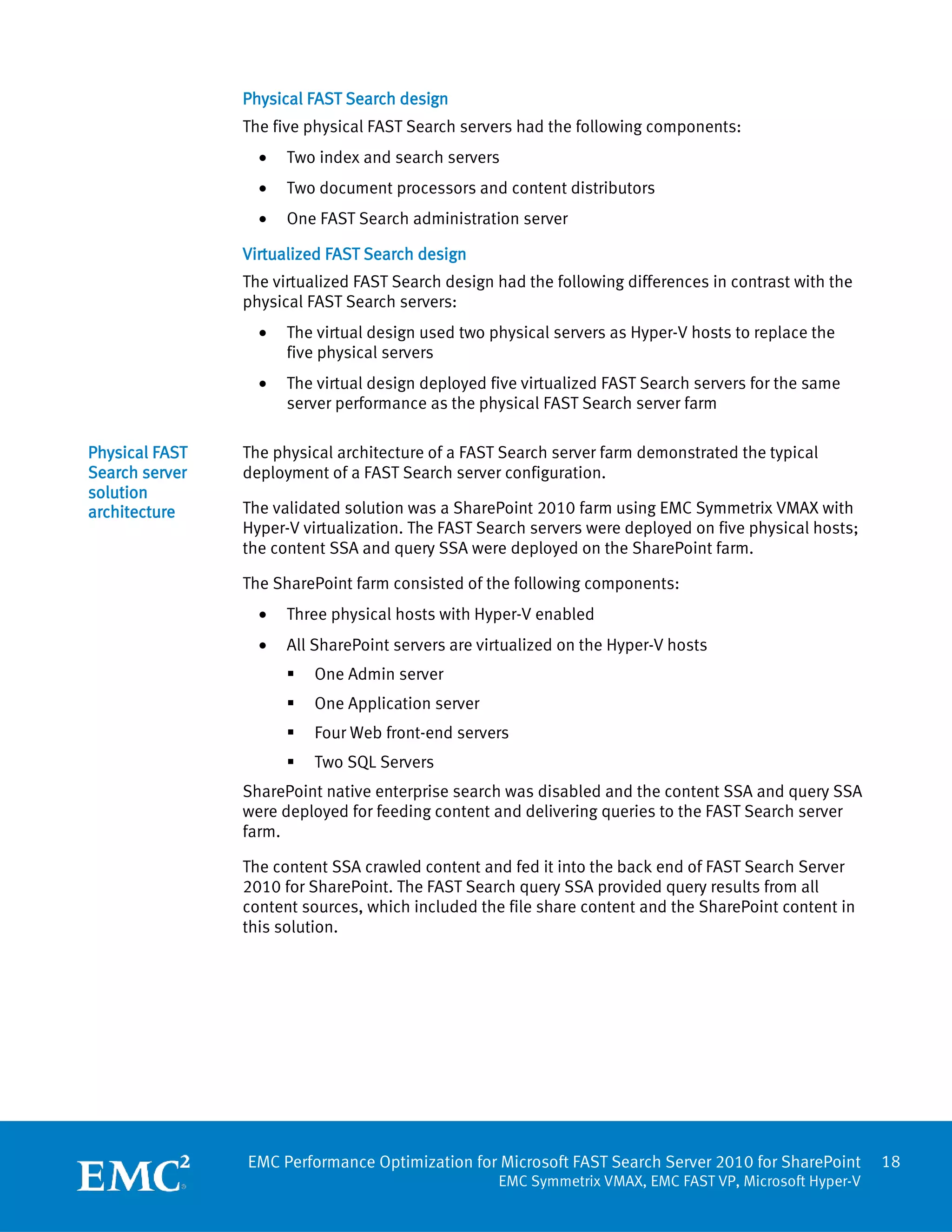
The five physical hosts for the FAST Search server farm included:
  •   Two document processing servers, each with 12 document processors. One
      document processing server (with the primary Web analyzer) serves as content
      distributor and the other (with the secondary Web analyzer) serves as indexing
      dispatcher.
  •   Two index and search servers, each with six document processors.
  •   One FAST administration server with 18 document processors.

The query SSA and content SSA servers for the FAST Search server farm deployed as
virtual machines on the SharePoint farm Hyper-V hosts.

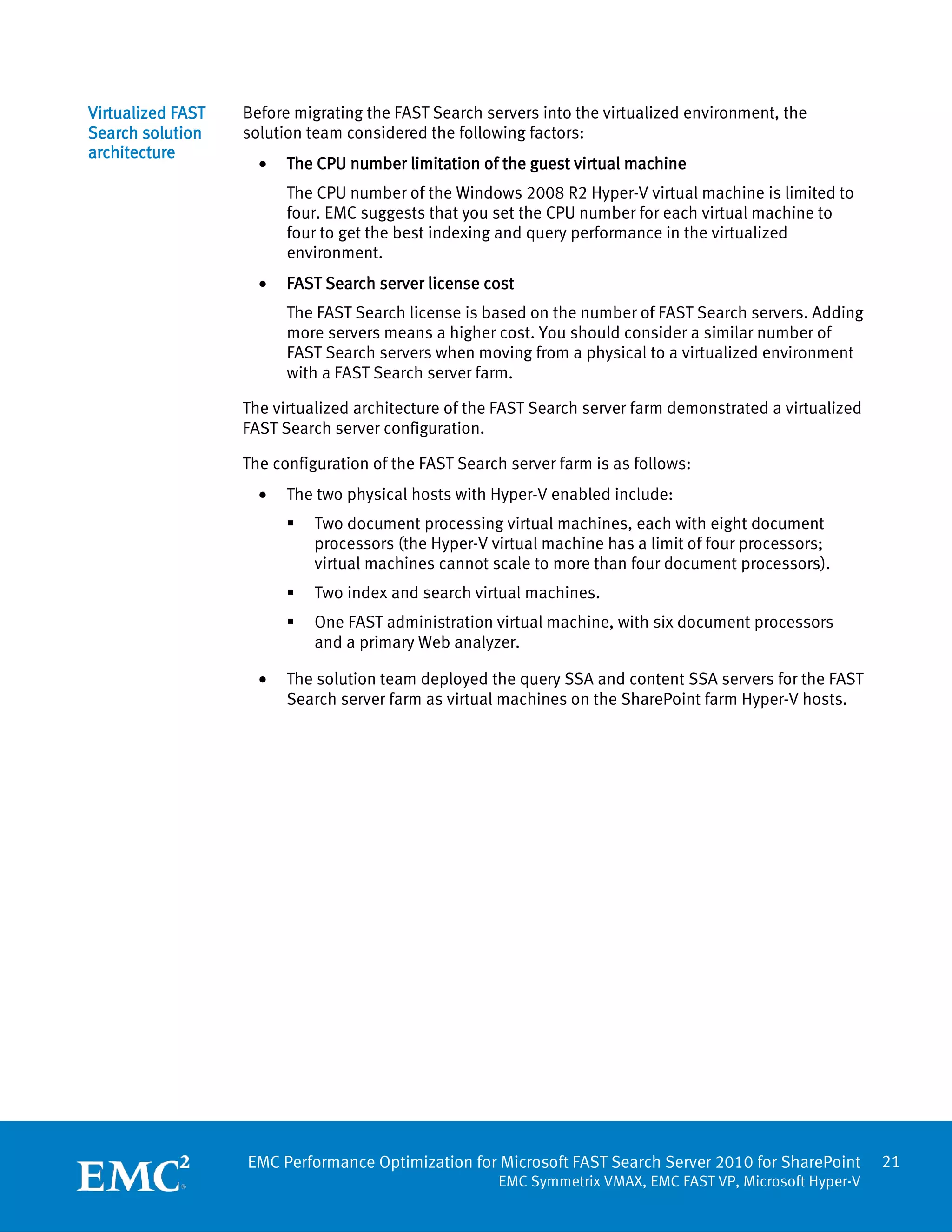
Figure 2 depicts the overall architecture of the validated solution environment for the
physical FAST Search server farm.


Figure 2.   Physical FAST Search servers with a virtualized SharePoint farm


EMC Performance Optimization for Microsoft FAST Search Server 2010 for SharePoint         19
                                    EMC Symmetrix VMAX, EMC FAST VP, Microsoft Hyper-V
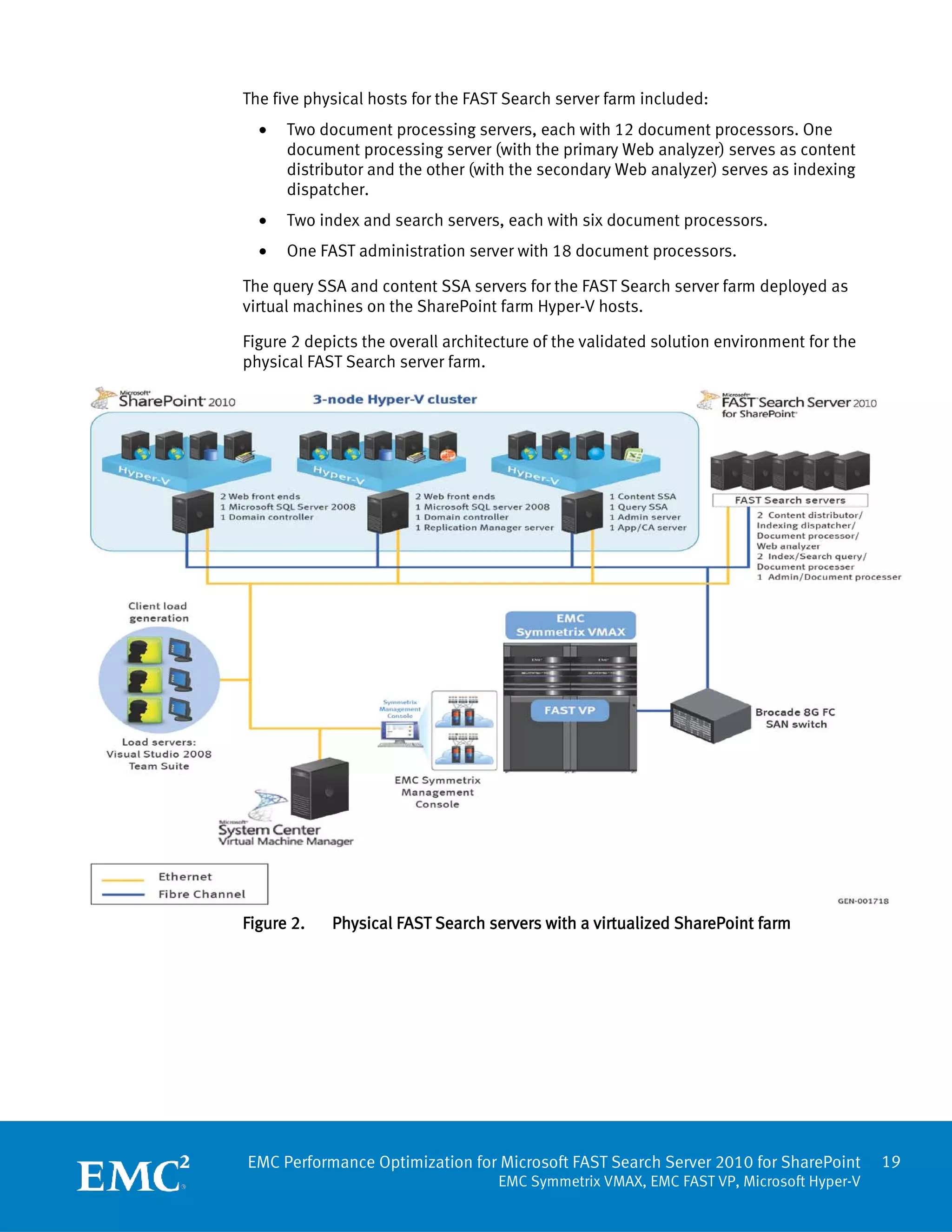
Physical FAST   Figure 3 shows the deployment architecture of a physical FAST Search server farm. For
Search server   the actual deployment.xml content, refer to the Deployment file in the physical FAST
deployment      Search farm section.


                Figure 3.   Physical FAST Search server farm configuration


                EMC Performance Optimization for Microsoft FAST Search Server 2010 for SharePoint       20
                                                   EMC Symmetrix VMAX, EMC FAST VP, Microsoft Hyper-V
Virtualized FAST   Before migrating the FAST Search servers into the virtualized environment, the
Search solution    solution team considered the following factors:
architecture
                     •   The CPU number limitation of the guest virtual machine
                         The CPU number of the Windows 2008 R2 Hyper-V virtual machine is limited to
                         four. EMC suggests that you set the CPU number for each virtual machine to
                         four to get the best indexing and query performance in the virtualized
                         environment.
                     •   FAST Search server license cost
                         The FAST Search license is based on the number of FAST Search servers. Adding
                         more servers means a higher cost. You should consider a similar number of
                         FAST Search servers when moving from a physical to a virtualized environment
                         with a FAST Search server farm.

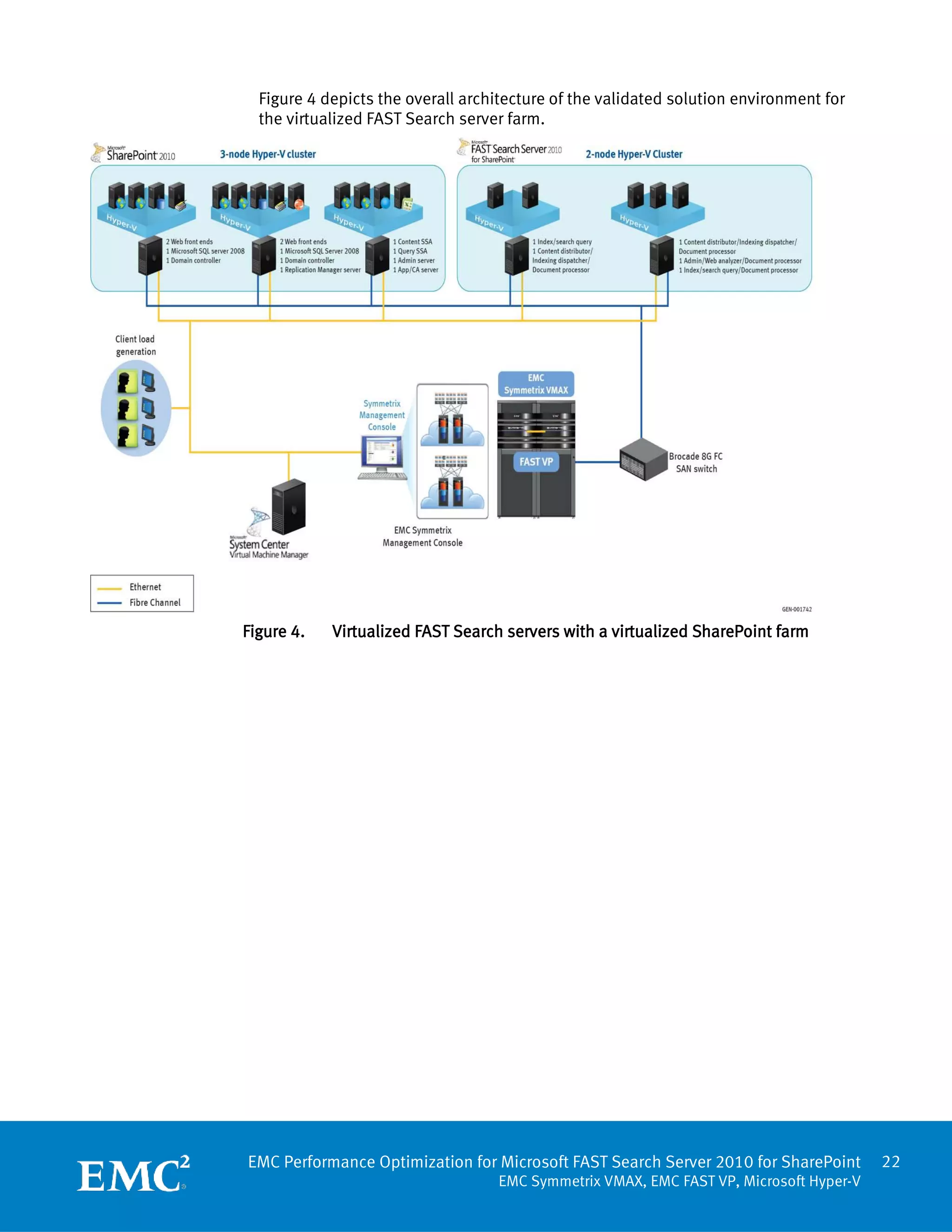
                   The virtualized architecture of the FAST Search server farm demonstrated a virtualized
                   FAST Search server configuration.

                   The configuration of the FAST Search server farm is as follows:
                     •   The two physical hosts with Hyper-V enabled include:
                            Two document processing virtual machines, each with eight document
                             processors (the Hyper-V virtual machine has a limit of four processors;
                             virtual machines cannot scale to more than four document processors).
                            Two index and search virtual machines.
                            One FAST administration virtual machine, with six document processors
                             and a primary Web analyzer.

                     •   The solution team deployed the query SSA and content SSA servers for the FAST
                         Search server farm as virtual machines on the SharePoint farm Hyper-V hosts.


                   EMC Performance Optimization for Microsoft FAST Search Server 2010 for SharePoint        21
                                                      EMC Symmetrix VMAX, EMC FAST VP, Microsoft Hyper-V
Figure 4 depicts the overall architecture of the validated solution environment for
  the virtualized FAST Search server farm.


Figure 4.   Virtualized FAST Search servers with a virtualized SharePoint farm


EMC Performance Optimization for Microsoft FAST Search Server 2010 for SharePoint       22
                                   EMC Symmetrix VMAX, EMC FAST VP, Microsoft Hyper-V
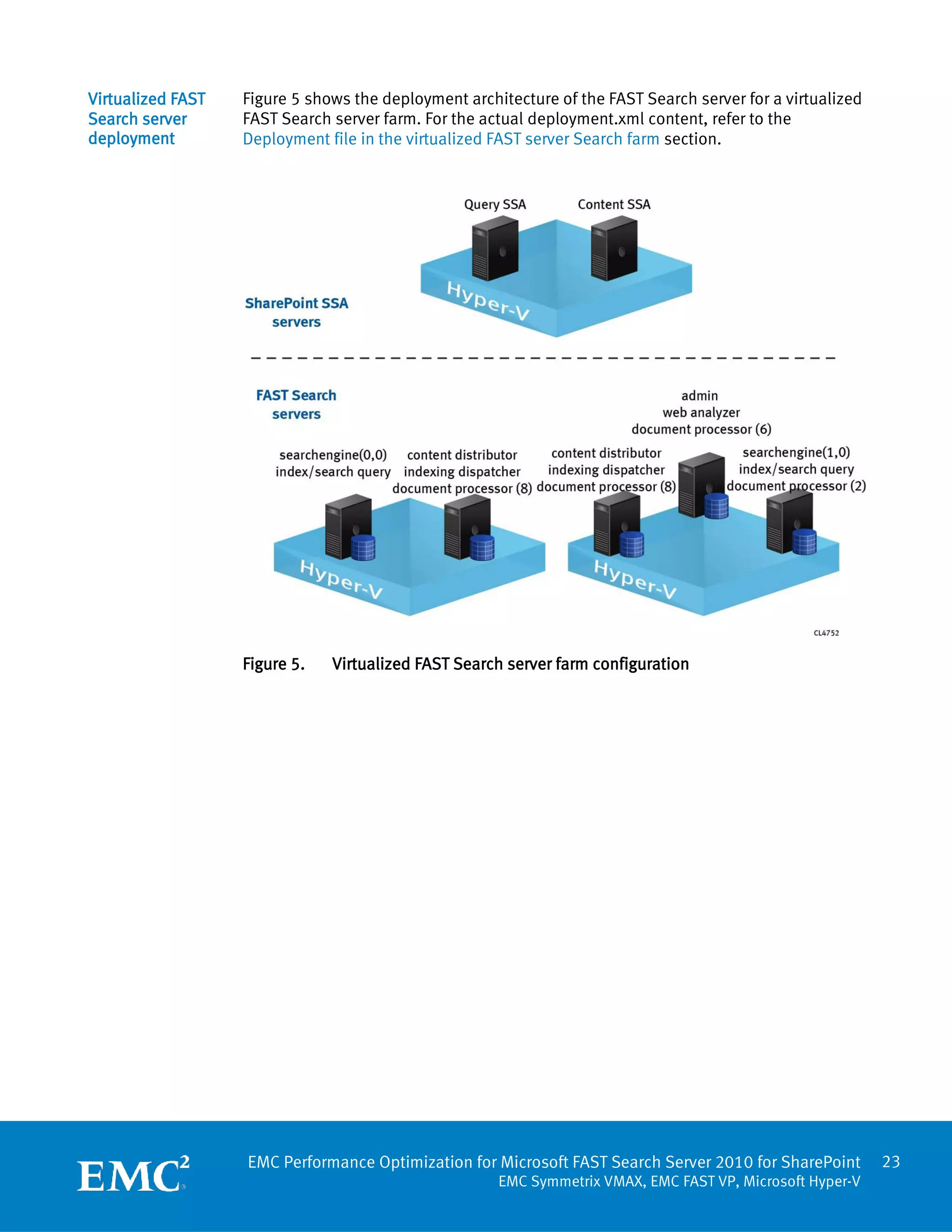
Virtualized FAST   Figure 5 shows the deployment architecture of the FAST Search server for a virtualized
Search server      FAST Search server farm. For the actual deployment.xml content, refer to the
deployment         Deployment file in the virtualized FAST server Search farm section.


                   Figure 5.   Virtualized FAST Search server farm configuration


                   EMC Performance Optimization for Microsoft FAST Search Server 2010 for SharePoint        23
                                                      EMC Symmetrix VMAX, EMC FAST VP, Microsoft Hyper-V
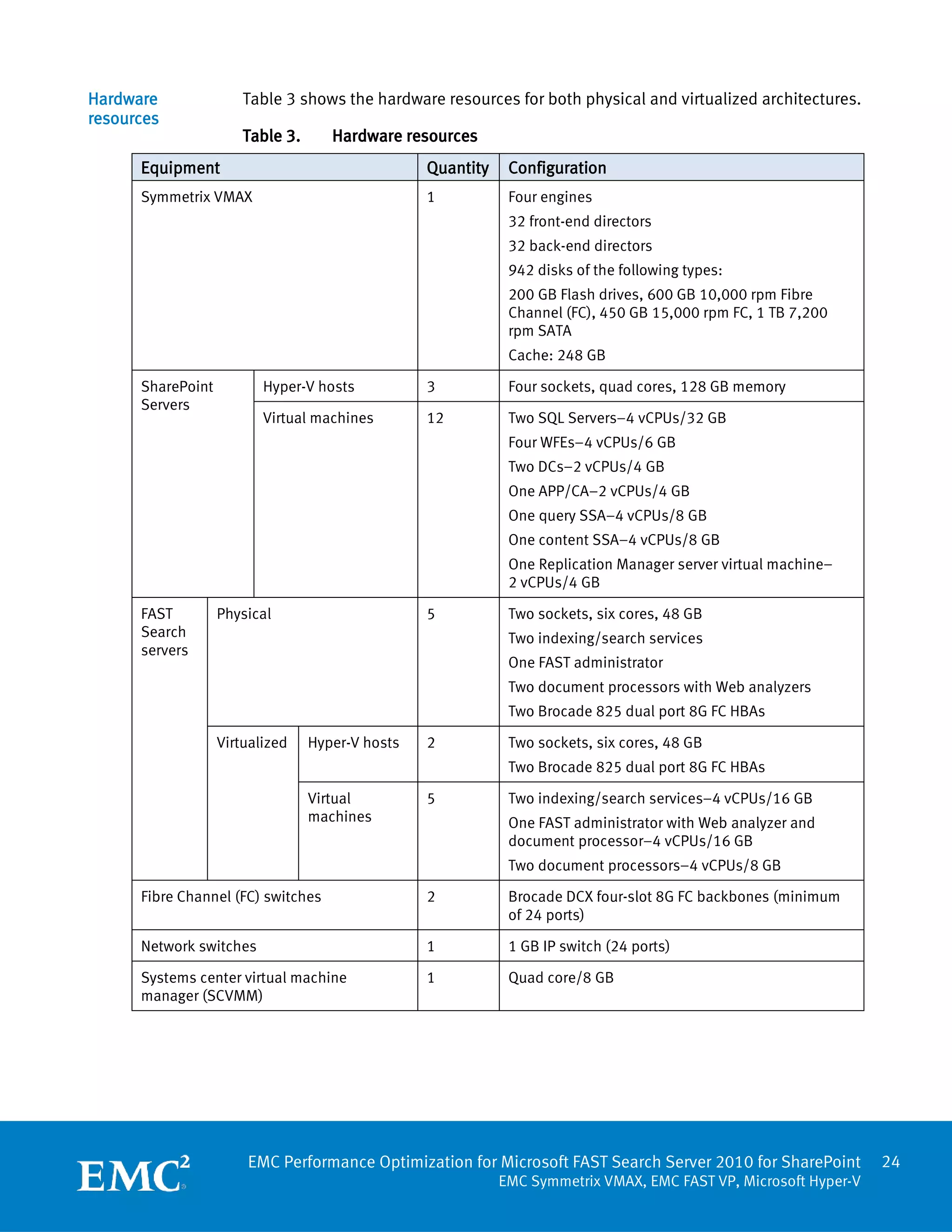
Hardware               Table 3 shows the hardware resources for both physical and virtualized architectures.
resources
                       Table 3.      Hardware resources
      Equipment                                   Quantity    Configuration
      Symmetrix VMAX                              1           Four engines
                                                              32 front-end directors
                                                              32 back-end directors
                                                              942 disks of the following types:
                                                              200 GB Flash drives, 600 GB 10,000 rpm Fibre
                                                              Channel (FC), 450 GB 15,000 rpm FC, 1 TB 7,200
                                                              rpm SATA
                                                              Cache: 248 GB

      SharePoint          Hyper-V hosts           3           Four sockets, quad cores, 128 GB memory
      Servers
                          Virtual machines        12          Two SQL Servers–4 vCPUs/32 GB
                                                              Four WFEs–4 vCPUs/6 GB
                                                              Two DCs–2 vCPUs/4 GB
                                                              One APP/CA–2 vCPUs/4 GB
                                                              One query SSA–4 vCPUs/8 GB
                                                              One content SSA–4 vCPUs/8 GB
                                                              One Replication Manager server virtual machine–
                                                              2 vCPUs/4 GB

      FAST         Physical                       5           Two sockets, six cores, 48 GB
      Search                                                  Two indexing/search services
      servers
                                                              One FAST administrator
                                                              Two document processors with Web analyzers
                                                              Two Brocade 825 dual port 8G FC HBAs

                   Virtualized    Hyper-V hosts   2           Two sockets, six cores, 48 GB
                                                              Two Brocade 825 dual port 8G FC HBAs

                                  Virtual         5           Two indexing/search services–4 vCPUs/16 GB
                                  machines                    One FAST administrator with Web analyzer and
                                                              document processor–4 vCPUs/16 GB
                                                              Two document processors–4 vCPUs/8 GB

      Fibre Channel (FC) switches                 2           Brocade DCX four-slot 8G FC backbones (minimum
                                                              of 24 ports)

      Network switches                            1           1 GB IP switch (24 ports)

      Systems center virtual machine              1           Quad core/8 GB
      manager (SCVMM)


                       EMC Performance Optimization for Microsoft FAST Search Server 2010 for SharePoint          24
                                                             EMC Symmetrix VMAX, EMC FAST VP, Microsoft Hyper-V
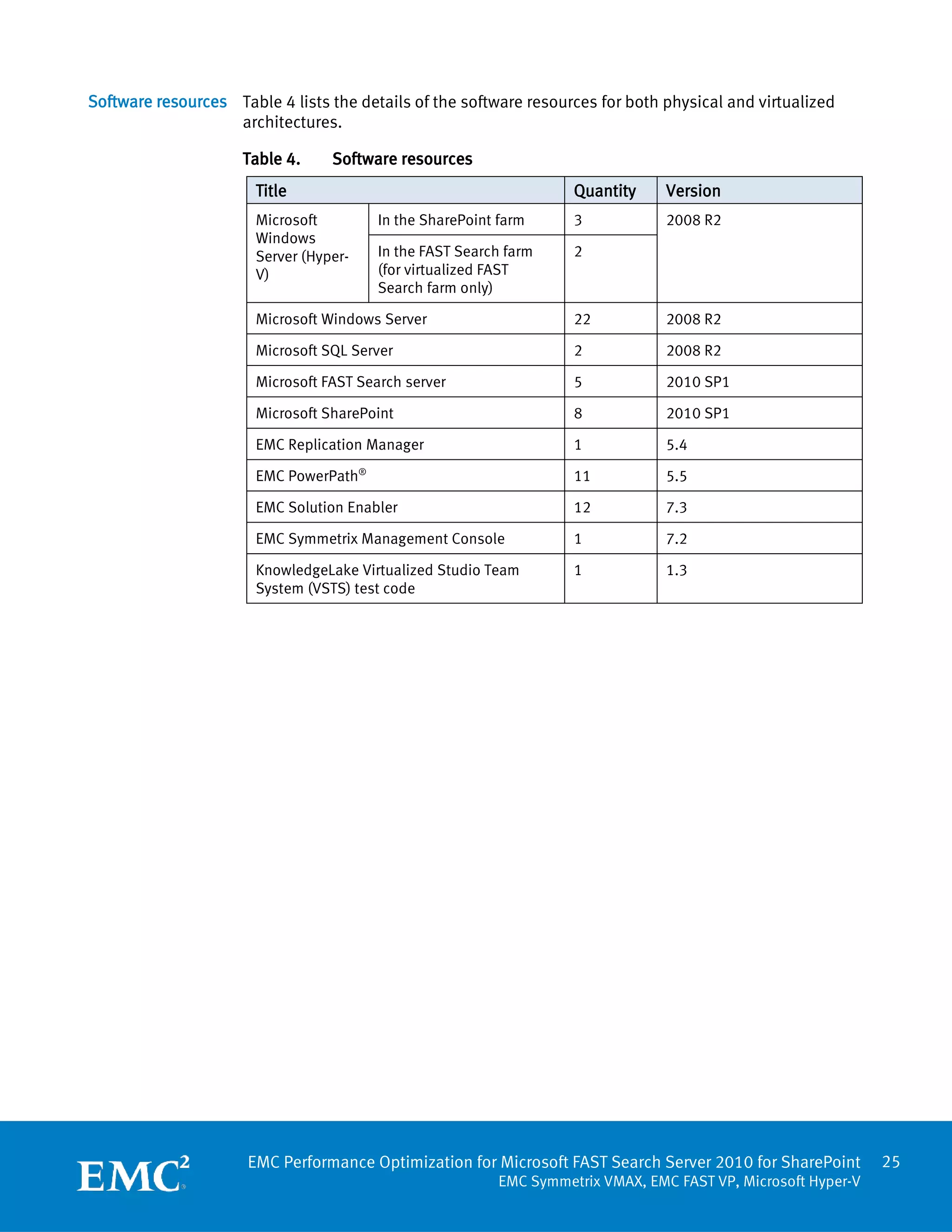
Software resources Table 4 lists the details of the software resources for both physical and virtualized
                   architectures.

                     Table 4.     Software resources
                       Title                                         Quantity     Version
                       Microsoft         In the SharePoint farm      3            2008 R2
                       Windows
                       Server (Hyper-    In the FAST Search farm     2
                       V)                (for virtualized FAST
                                         Search farm only)

                       Microsoft Windows Server                      22           2008 R2

                       Microsoft SQL Server                          2            2008 R2

                       Microsoft FAST Search server                  5            2010 SP1

                       Microsoft SharePoint                          8            2010 SP1

                       EMC Replication Manager                       1            5.4

                       EMC PowerPath®                                11           5.5

                       EMC Solution Enabler                          12           7.3

                       EMC Symmetrix Management Console              1            7.2

                       KnowledgeLake Virtualized Studio Team         1            1.3
                       System (VSTS) test code


                      EMC Performance Optimization for Microsoft FAST Search Server 2010 for SharePoint         25
                                                           EMC Symmetrix VMAX, EMC FAST VP, Microsoft Hyper-V
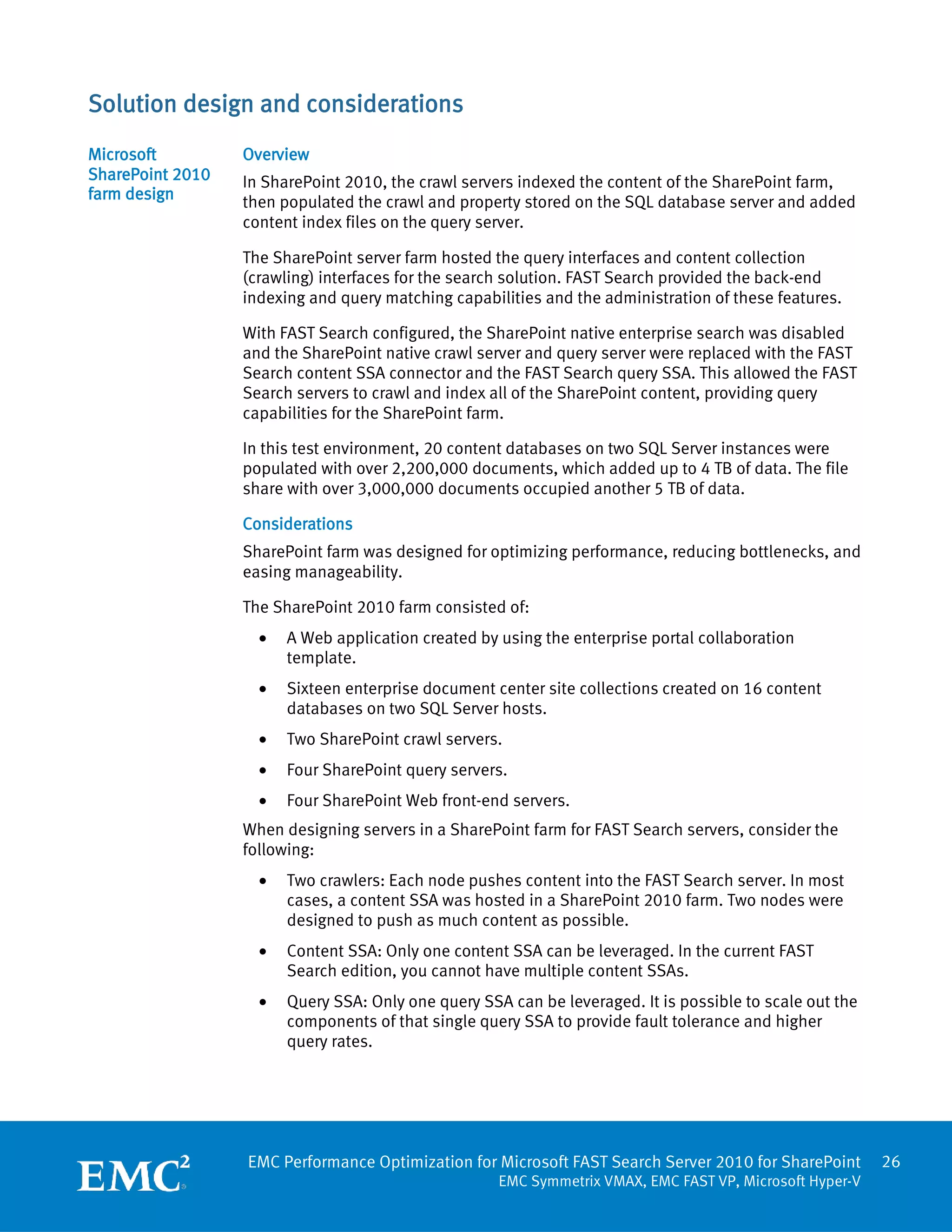
Solution design and considerations
Microsoft         Overview
SharePoint 2010   In SharePoint 2010, the crawl servers indexed the content of the SharePoint farm,
farm design       then populated the crawl and property stored on the SQL database server and added
                  content index files on the query server.

                  The SharePoint server farm hosted the query interfaces and content collection
                  (crawling) interfaces for the search solution. FAST Search provided the back-end
                  indexing and query matching capabilities and the administration of these features.

                  With FAST Search configured, the SharePoint native enterprise search was disabled
                  and the SharePoint native crawl server and query server were replaced with the FAST
                  Search content SSA connector and the FAST Search query SSA. This allowed the FAST
                  Search servers to crawl and index all of the SharePoint content, providing query
                  capabilities for the SharePoint farm.

                  In this test environment, 20 content databases on two SQL Server instances were
                  populated with over 2,200,000 documents, which added up to 4 TB of data. The file
                  share with over 3,000,000 documents occupied another 5 TB of data.

                  Considerations
                  SharePoint farm was designed for optimizing performance, reducing bottlenecks, and
                  easing manageability.

                  The SharePoint 2010 farm consisted of:
                    •   A Web application created by using the enterprise portal collaboration
                        template.
                    •   Sixteen enterprise document center site collections created on 16 content
                        databases on two SQL Server hosts.
                    •   Two SharePoint crawl servers.
                    •   Four SharePoint query servers.
                    •   Four SharePoint Web front-end servers.
                  When designing servers in a SharePoint farm for FAST Search servers, consider the
                  following:
                    •   Two crawlers: Each node pushes content into the FAST Search server. In most
                        cases, a content SSA was hosted in a SharePoint 2010 farm. Two nodes were
                        designed to push as much content as possible.
                    •   Content SSA: Only one content SSA can be leveraged. In the current FAST
                        Search edition, you cannot have multiple content SSAs.
                    •   Query SSA: Only one query SSA can be leveraged. It is possible to scale out the
                        components of that single query SSA to provide fault tolerance and higher
                        query rates.


                  EMC Performance Optimization for Microsoft FAST Search Server 2010 for SharePoint       26
                                                     EMC Symmetrix VMAX, EMC FAST VP, Microsoft Hyper-V
Database design
                      The sequence of building a SQL Server environment for SharePoint 2010 required
                      three database subsets in the following order:
                        1.    SQL system databases created during installation (master, model, msdb, and
                              tempdb)
                        2.    SharePoint databases systematically created from the deployment of
                              SharePoint farms (SharePoint administration, configdb, crawl store, Windows
                              SharePoint Services (WSS), and the content database)
                        3.    SharePoint content databases populated by adding the user content
                              documents in the SharePoint farm

                      The content database designed met the following requirements:
                        •    The solution must support a content database of up to 250 GB capacity or
                             2,000 document items
                        •    The solution must support over 2,000,000 documents, each with 4 TB data. The
                             SharePoint farm is designed to have 20 content databases for 20 sites and 200
                             sub-sites
                        •    One 250 GB pass-through LUN is configured for each content database and one
                             50 GB LUN is configured for each content database log


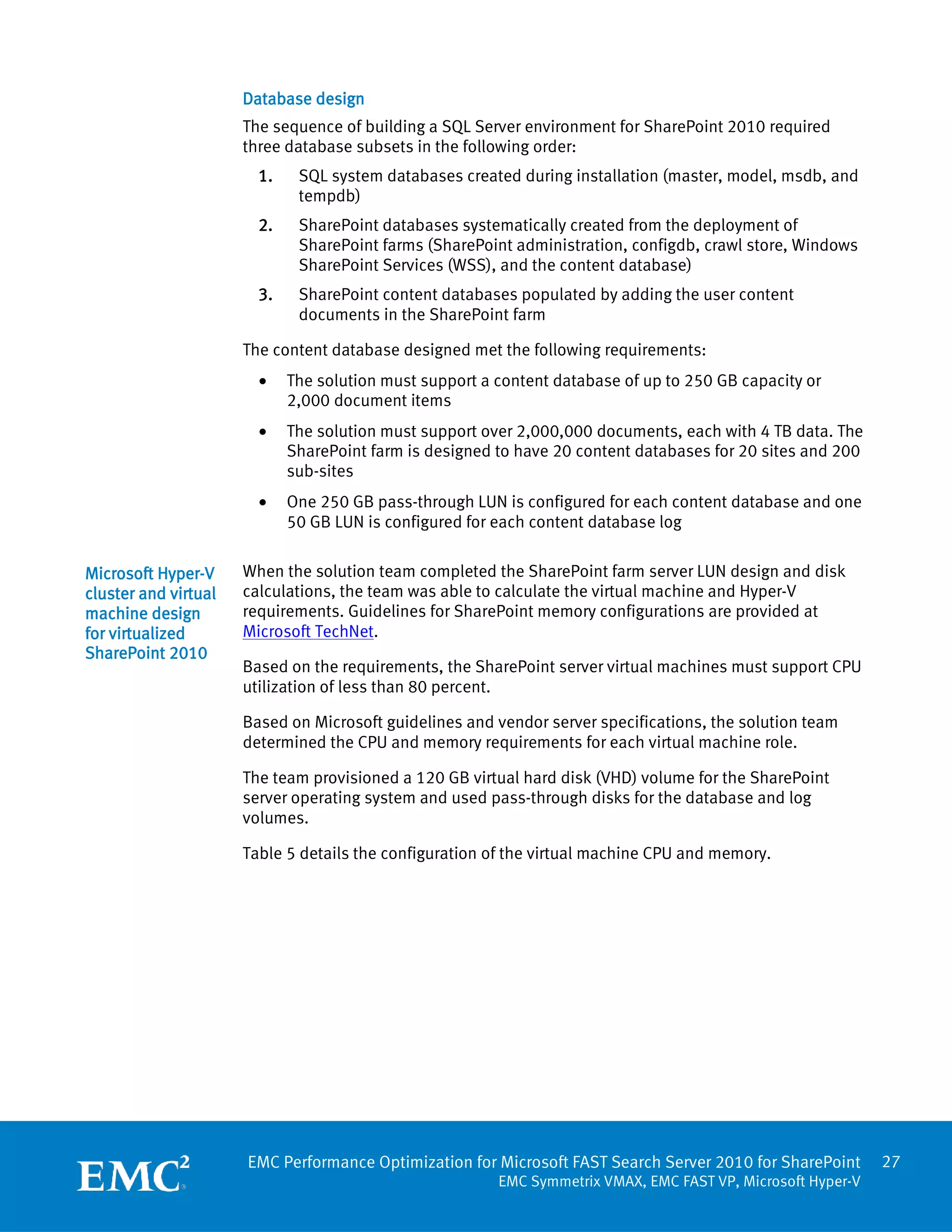
Microsoft Hyper-V     When the solution team completed the SharePoint farm server LUN design and disk
cluster and virtual   calculations, the team was able to calculate the virtual machine and Hyper-V
machine design        requirements. Guidelines for SharePoint memory configurations are provided at
for virtualized       Microsoft TechNet.
SharePoint 2010
                      Based on the requirements, the SharePoint server virtual machines must support CPU
                      utilization of less than 80 percent.

                      Based on Microsoft guidelines and vendor server specifications, the solution team
                      determined the CPU and memory requirements for each virtual machine role.

                      The team provisioned a 120 GB virtual hard disk (VHD) volume for the SharePoint
                      server operating system and used pass-through disks for the database and log
                      volumes.

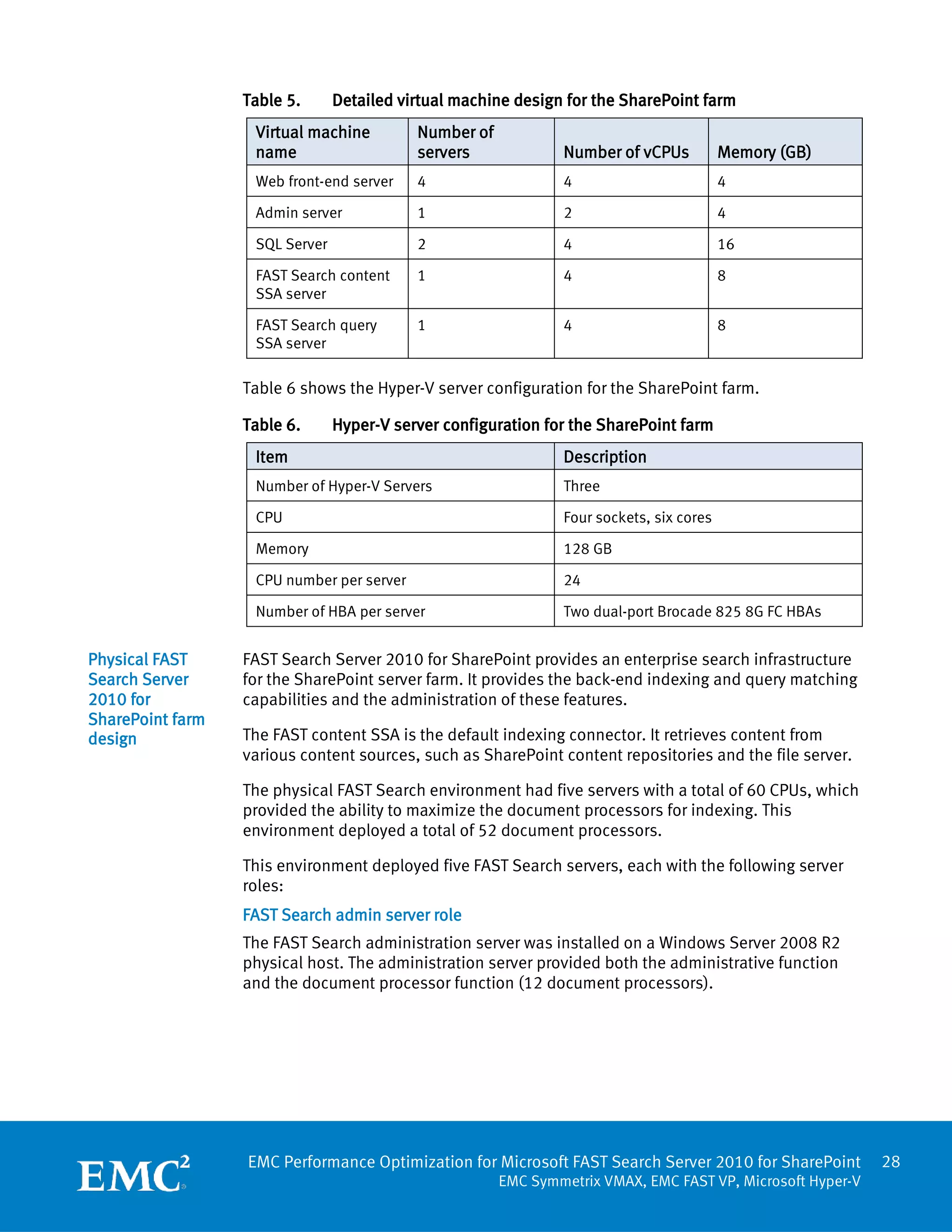
                      Table 5 details the configuration of the virtual machine CPU and memory.


                      EMC Performance Optimization for Microsoft FAST Search Server 2010 for SharePoint       27
                                                         EMC Symmetrix VMAX, EMC FAST VP, Microsoft Hyper-V
Table 5.      Detailed virtual machine design for the SharePoint farm
                   Virtual machine         Number of
                   name                    servers             Number of vCPUs           Memory (GB)
                   Web front-end server    4                   4                         4

                   Admin server            1                   2                         4

                   SQL Server              2                   4                         16

                   FAST Search content     1                   4                         8
                   SSA server

                   FAST Search query       1                   4                         8
                   SSA server

                  Table 6 shows the Hyper-V server configuration for the SharePoint farm.

                  Table 6.      Hyper-V server configuration for the SharePoint farm
                   Item                                        Description
                   Number of Hyper-V Servers                   Three

                   CPU                                         Four sockets, six cores

                   Memory                                      128 GB

                   CPU number per server                       24

                   Number of HBA per server                    Two dual-port Brocade 825 8G FC HBAs


Physical FAST     FAST Search Server 2010 for SharePoint provides an enterprise search infrastructure
Search Server     for the SharePoint server farm. It provides the back-end indexing and query matching
2010 for          capabilities and the administration of these features.
SharePoint farm
design            The FAST content SSA is the default indexing connector. It retrieves content from
                  various content sources, such as SharePoint content repositories and the file server.

                  The physical FAST Search environment had five servers with a total of 60 CPUs, which
                  provided the ability to maximize the document processors for indexing. This
                  environment deployed a total of 52 document processors.

                  This environment deployed five FAST Search servers, each with the following server
                  roles:
                  FAST Search admin server role
                  The FAST Search administration server was installed on a Windows Server 2008 R2
                  physical host. The administration server provided both the administrative function
                  and the document processor function (12 document processors).


                  EMC Performance Optimization for Microsoft FAST Search Server 2010 for SharePoint         28
                                                       EMC Symmetrix VMAX, EMC FAST VP, Microsoft Hyper-V
FAST Search content distributor server role
                   Two FAST Search content distributor servers were installed on Windows Server 2008
                   R2 physical host. These servers provided the following server roles:
                     •   Content distributor
                     •   Indexing-dispatcher
                     •   Web analyzer (one as the primary, the other as the secondary)
                     •   Document-processor (12 document processors for each server)

                   FAST Search indexing server role
                   Two FAST Search indexing servers were installed on a Windows Server 2008 R2
                   physical host. One of the indexing servers acted as the primary server and the other
                   acted as the secondary server, which made a one-column, two-row index. Each server
                   had eight document processors.

Virtualized FAST   The design for a SharePoint farm in a virtualized environment was the same as in a
Search Server      physical environment. The validation team consolidated the FAST Search server farm
2010 for           into two Hyper-V servers; but the five FAST Search servers (virtual machine) remained
SharePoint farm    the same. We reduced the number of document processors to 24 because of the CPU
design             number limitation of Hyper-V virtual machines.

                   To preserve CPU power for document processing in the virtualized environment, the
                   Web analyzer redundancy was not deployed and the server roles were also shifted
                   among servers.

                   This environment deployed five FAST Search server virtual machines, each with the
                   following server roles:

                   FAST Search administration server role
                   The FAST Search administration server was installed on the Windows Server 2008 R2
                   virtual machine of the Windows Server 2008 R2 Hyper-V host. The administration
                   server had the following server roles:
                     •   Administration
                     •   Document processor (with a number of six)
                     •   Web analyzer

                   FAST Search content distributor server role
                   Two FAST Search content distributor servers were installed on the Windows Server
                   2008 R2 virtual machine of the Windows Server 2008 R2 Hyper-V host. These servers
                   provided the following server roles:
                     •   Content distributor
                     •   Indexing dispatcher
                     •   Document processor (eight document processors for each server)


                   EMC Performance Optimization for Microsoft FAST Search Server 2010 for SharePoint       29
                                                      EMC Symmetrix VMAX, EMC FAST VP, Microsoft Hyper-V
FAST Search indexing server role
                   Two FAST Search indexing servers were installed on the Windows Server 2008 R2
                   virtual machine of the Windows Server 2008 R2 Hyper-V host. One of the indexing
                   servers acted as the primary server and the other acted as the secondary server,
                   which made a one-column, two-row index. A backup indexing server also provided
                   document-processing services (two document processors).

Test methodology   Preparing random data
design and data    The data in the content database and the file share were files downloaded from
preparation        various sources. Each document generated hundreds of unique documents by
                   inserting a keyword and timestamp into the original document. By changing the
                   document name for the generated file to include the timestamp, we ensured that the
                   documents in the test environment were unique. We used the keywords and
                   timestamps in the search test to ensure the uniqueness of the search results.

                   Configuring the SharePoint farm for FAST Search
                   Follow these steps to configure the SharePoint farm to make it suitable for the FAST
                   Search server:
                     1.    Disable SharePoint native enterprise search
                     2.    Remove the existing SharePoint SSAs if already created
                     3.    Configure the FAST Search content SSA in the SharePoint farm
                     4.    Install the FAST Search certificate on FAST Search servers
                     5.    Configure the FAST Search query SSA
                     6.    Change the default application proxy group for the SharePoint portal so that it
                           is associated only with the FAST Search query application that is created
                     7.    Install the certificate on the FAST administration server
                   Data distribution
                   In this environment, two different content sources were created: A 5 TB file share and
                   4 TB of content managed through SharePoint content databases.

                     •    File share: The 5 TB file share was created on the SharePoint application server
                          with a LUN of 5 TB.
                     •    SharePoint content: The 4 TB of content for the SharePoint server was
                          distributed across two SQL Servers, each with 10 databases. The file types were
                          typical Microsoft Office files, including .doc, docx, xls, xlsx, ppt, pptx, Adobe
                          Acrobat PDF file, and text file.

                   Table 7 presents the content load profile used during the solution validation.
                   Table 7.     Content load profile
                    Item                                 Value
                    Content type                         doc, docx, pdf, xls, xlsx, ppt, pptx, txt

                    Number of SharePoint items           2,190,954


                   EMC Performance Optimization for Microsoft FAST Search Server 2010 for SharePoint          30
                                                       EMC Symmetrix VMAX, EMC FAST VP, Microsoft Hyper-V
Item                                    Value

 Average SharePoint content size         1.82 MB

 Number of file share items              3,124,223

 Average file share content size         1.60 MB

 Average content size for all content    1.65 MB

VSTS test client and test mechanism
The validation team used Microsoft Visual Studio Team System (VSTS) to simulate the
SharePoint load and a client load emulation tool to ensure that the SharePoint farm
operates at the optimal performance level.

The validation team built the testing environment with a VSTS team test rig with one
controller and four agents.

Throughput is the number of operations (browse/search/modify) that a SharePoint
farm can perform each second. Ideally, the number of operations that SharePoint
requests per second is lower than the number targeted for a given level of
performance. If the number of operations that SharePoint requests exceeds the target
number, user actions and other operations take longer to complete.

Throughput is measured by request per second (RPS). You can convert RPS
measurements to the total number of users by using a model of typical end-user
behavior. Like many human behaviors, there is a broad range for typical behavior.
The user model for the SharePoint environment has the following two variables:
  •   Concurrency: The percentage of users that are actively using the system.
  •   Request rate: The average number of requests per hour that an active user
      generates.

Request per hour (RPH) is the average user requests in an hour to calculate how long
it takes to deliver a page back to the client. Use the following calculation to estimate

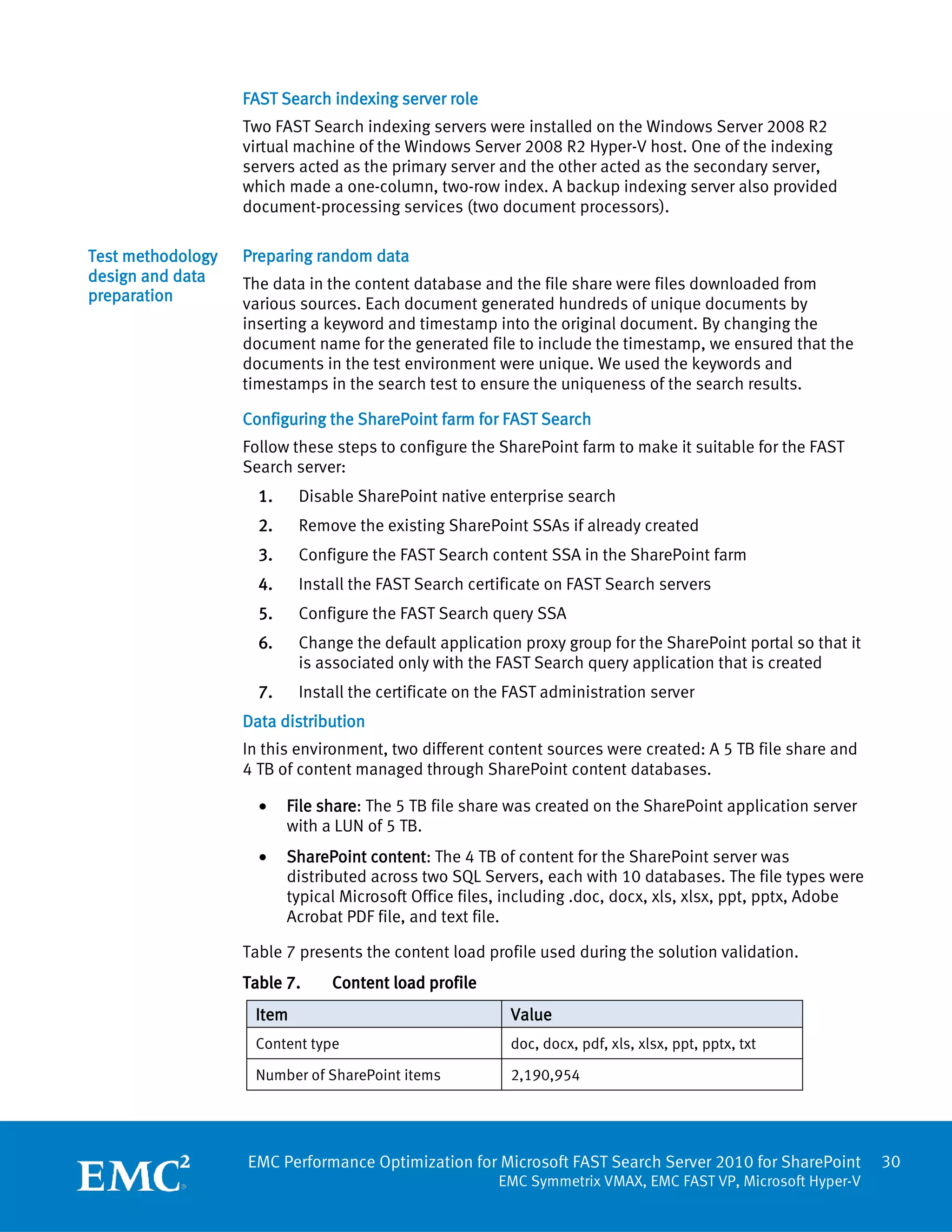
                              (number of users) × (percentage of active users)
the throughput for typical load:

         Throughput =
                                               request rate

For example, for 1,000 users, the following values result:

        Simultaneous users = 1000 × 10% = 100

Estimated requests per user per hour = 36 = 1 request per user per 100 seconds

        Throughput = simultaneous users/request rate = 100/100 = 1 RPS

Therefore, 1 RPS can support up to 1,000 users, each making 36 requests per hour.
Table 8 describes throughput targets for four levels of user load.


EMC Performance Optimization for Microsoft FAST Search Server 2010 for SharePoint            31
                                        EMC Symmetrix VMAX, EMC FAST VP, Microsoft Hyper-V
Table 8.     Throughput targets for user load
 User load       Request rate                         Supported users
 Light           20 requests per hour. An active      Each response per second of
                 user generates a request every 180   throughput supports 180
                 seconds.                             simultaneous users and 1,800 total
                                                      users.

 Typical         36 requests per hour. An active      Each response per second of
                 user generates a request every 100   throughput supports 100
                 seconds.                             simultaneous users and 1,000 total
                                                      users.

 Heavy           60 requests per hour. An active      Each response per second of
                 user generates a request every 60    throughput supports 60
                 seconds.                             simultaneous users and 600 total
                                                      users.

 Extreme         120 requests per hour. An active     Each response per second of
                 user generates a request every 30    throughput supports 30
                 seconds.                             simultaneous users and 300 total
                                                      users.

In this use case, all users adhered to a Microsoft typical user profile, which specified
36 requests per hour. In a typical user profile, the average user decision-making time
for browsing, searching, or modifying data on a SharePoint server was eliminated.
Every user request completed from start to finish without a pause, which generated a
continuous workload on the system.

The VSTS testing includes the following key scenarios:
  •   Browse: The user selected a random URL from a previously viewed page. If a
      previously viewed page did not include any links, the tool used the default top
      level URL.
  •   Search: When a user navigated to the Search page and executed a search, a
      specific URL accepted the query string parameter. This query string parameter
      was randomly picked from a data set that was in memory on the load agent
      machine.
  •   Modify: A user randomly selected a URL from a data set randomly sampled from
      the content database on the load agent machine. The code retrieved the
      document and its metadata (basically a browser-like operation where
      properties of a document were viewed). The code updated a property and saved
      it back to SharePoint (a document update operation).

On a SharePoint server, the validation team:
  •   Updated binary and metadata content in the content database on the SQL
      Server.
  •   Wrote an entry to the change log in the Search database.
  •   Synchronized the SharePoint properties with the property values stored inside
      the actual document itself. A subsequent content download or upload
      operation occurred in the content database.


EMC Performance Optimization for Microsoft FAST Search Server 2010 for SharePoint          32
                                    EMC Symmetrix VMAX, EMC FAST VP, Microsoft Hyper-V
A change log entry resulted in the asynchronous crawling of the document led to
further action against the search database as well as a download operation from the
content database.

The test client used VSTS to test FAST Search Server 2010 for SharePoint
performance. The test application simulated the operations of the SharePoint farm
access.

During validation, a Microsoft heavy user load profile determined the maximum user
count that the Microsoft SharePoint 2010 server farm could sustain while ensuring
that the average response time remained within acceptable limits. Microsoft
standards state that a heavy user performs 60 requests per hour.

Microsoft recommends that the response time from the Web front-end is categorized
in the following way:
  •   Slow (3-5 seconds): User response time is acceptable at this rate.
  •   Recommended (1-2 seconds): This is the average user response time target.
  •   Fast (less than 1 second): This is for organizations whose businesses demand
      speed.

You can find other relevant information on this topic at Microsoft TechNet.

User load profile
The validation team used a common mix of user profiles to emulate different types of
business organizations. For example, some organizations were browse intensive,
while others were search-intensive, modify-intensive, or both.

Table 9 shows the times for the browse, search, and modify operations of various
user profiles.

Table 9.    Times of browse, search, and modify operations
 User profile                  Browse/Search/Modify
 1                             80/10/10

 2                             70/20/10

 3                             50/30/20

The validation team ran all tests from a load controller host that spread the load
evenly across each of the four load agent hosts. The load controller host also
collected performance metrics for analysis from all of the load agents and hosts in
the farm.

SharePoint response time requirement
The validation team conducted the tests based on the user response time
requirement for Microsoft SharePoint 2010 for different user operations. To be
considered as a well-performing SharePoint environment, all operations
(browse/search/modify) are required to take less than 3 seconds.


EMC Performance Optimization for Microsoft FAST Search Server 2010 for SharePoint       33
                                   EMC Symmetrix VMAX, EMC FAST VP, Microsoft Hyper-V
Table 10 lists the required response time for Microsoft SharePoint 2010 user
                 operations.

                 Table 10.         Required response time
                  Test type                  Details                          Required response time
                  Browse                     User browse                      Less than 3 seconds

                  Search                     Unique value search              Less than 3 seconds

                  Modify                     Browse and metadata modify       Less than 3 seconds


Storage design   Overview
                 Storage design contains:
                       •       SharePoint storage design
                       •       FAST Search storage design
                       •       Symmetrix auto tiering (FAST VP) design
                       •       Replication Manager snapshot storage design
                 SharePoint storage design
                 The storage for the SharePoint farm typically requires middle to low IOPS on both the
                 content database and the search components. The SharePoint storage design for this
                 solution is as follows:

                   •       Disk group design
                                Sixteen 600 GB 10,000 rpm Fibre Channel (FC) disks were used for the
                                 SharePoint boot and the operating system LUN.
                                Sixteen 450 GB 15,000 rpm FC disks were used for the SQL Server
                                 tempdb/log, SharePoint property database, configuration database, and
                                 crawl database.
                                Forty 2 TB 7,200 rpm SATA disks were used for the SharePoint content
                                 database (4 TB in total) and file share (5 TB in total).
                   •       Virtualized provisioning pool design
                                The RAID type for the SATA and FC pool was RAID 1.
                                All disk groups used virtualized thin provisioning.
                                Concatenated meta devices were used.
                   •       Virtual machine disk type design

                                The virtual machine boot and operating system LUN used the VHD disk
                                 type.
                                The EMC validation team added all other devices to virtual machines by
                                 using the pass-through LUN.
                   •       LUN design


                 EMC Performance Optimization for Microsoft FAST Search Server 2010 for SharePoint               34
                                                            EMC Symmetrix VMAX, EMC FAST VP, Microsoft Hyper-V
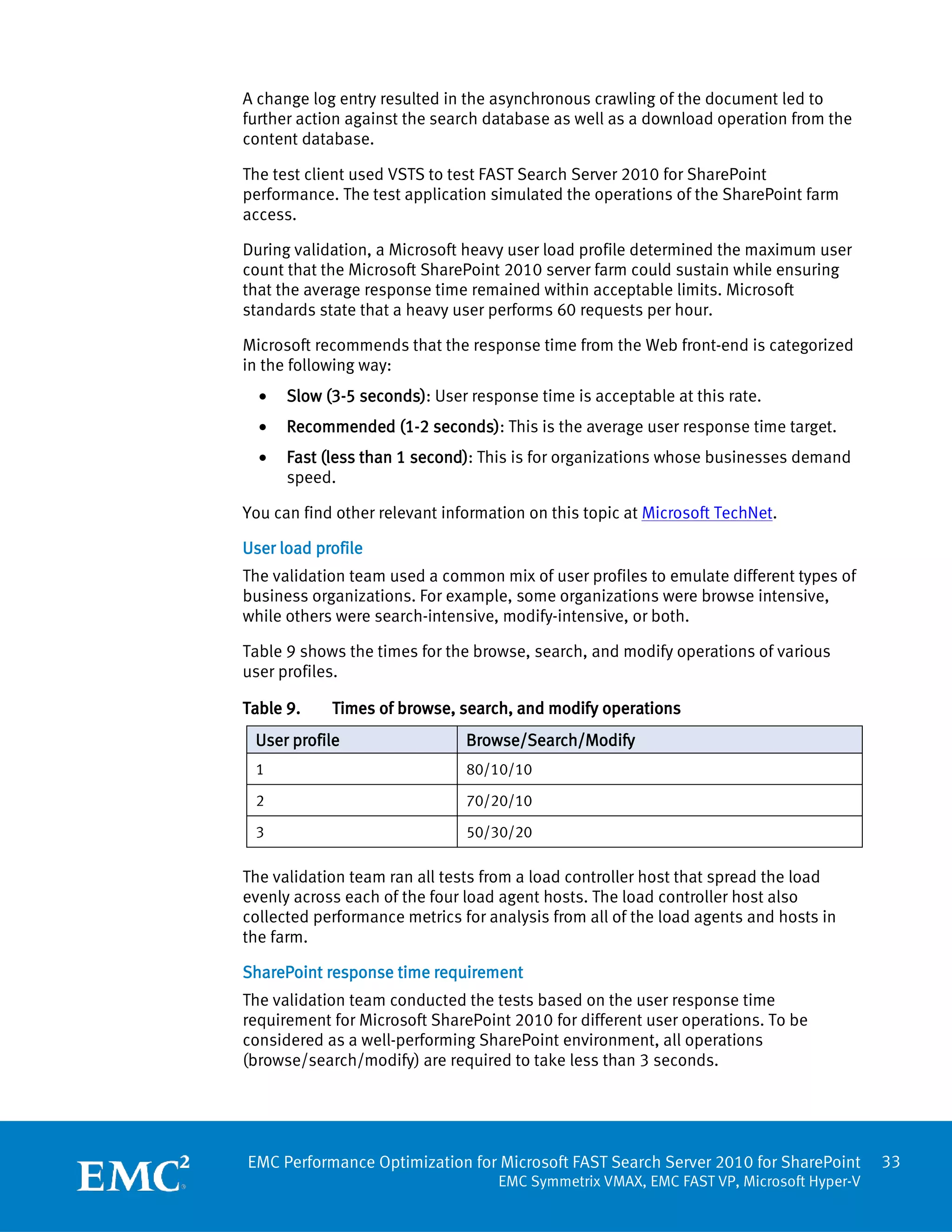
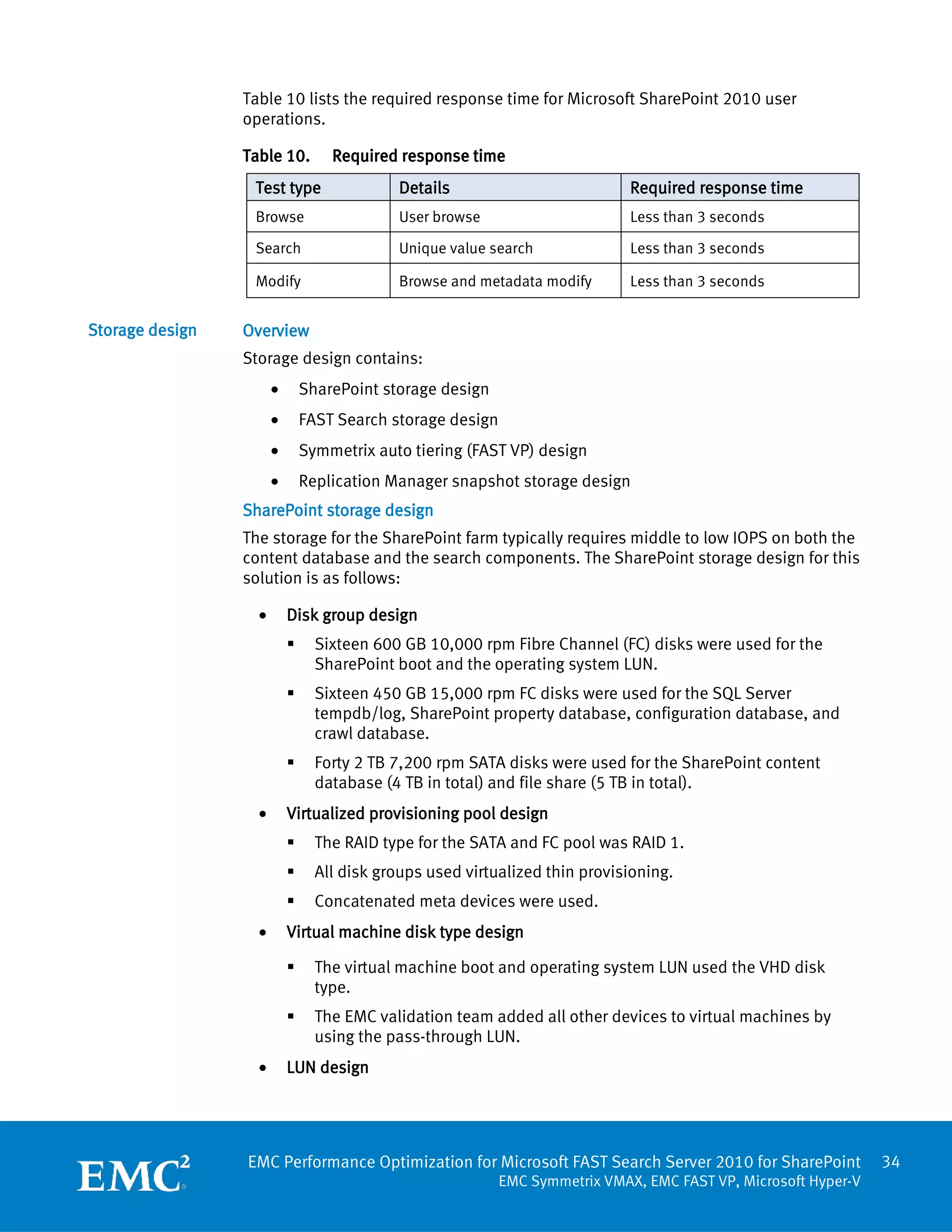
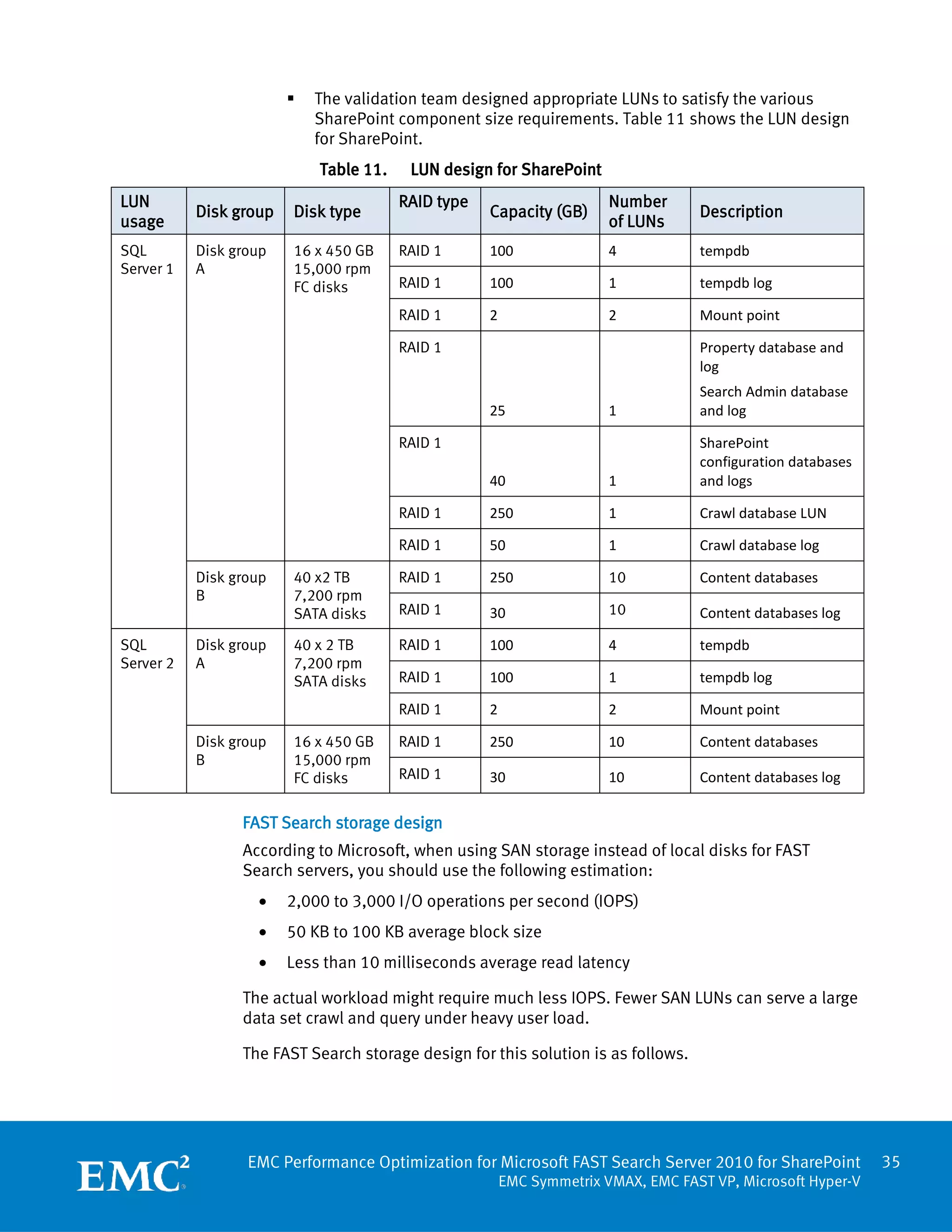
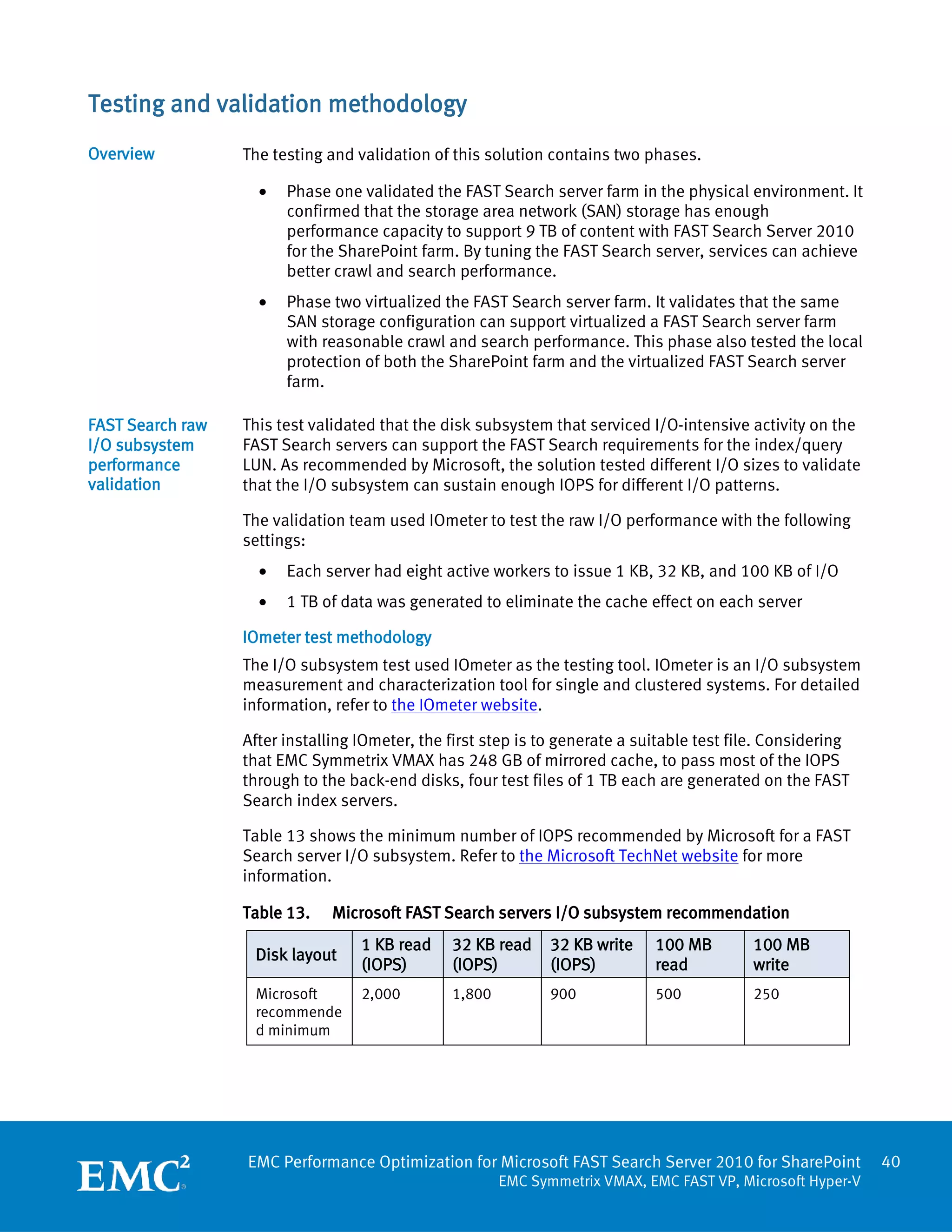
   The validation team designed appropriate LUNs to satisfy the various
                            SharePoint component size requirements. Table 11 shows the LUN design
                            for SharePoint.
                            Table 11.    LUN design for SharePoint
LUN                                     RAID type                      Number
           Disk group   Disk type                   Capacity (GB)                  Description
usage                                                                  of LUNs
SQL        Disk group   16 x 450 GB     RAID 1      100                4           tempdb
Server 1   A            15,000 rpm
                        FC disks        RAID 1      100                1           tempdb log

                                        RAID 1      2                  2           Mount point

                                        RAID 1                                     Property database and
                                                                                   log
                                                                                   Search Admin database
                                                    25                 1           and log

                                        RAID 1                                     SharePoint
                                                                                   configuration databases
                                                    40                 1           and logs

                                        RAID 1      250                1           Crawl database LUN

                                        RAID 1      50                 1           Crawl database log

           Disk group   40 x2 TB        RAID 1      250                10          Content databases
           B            7,200 rpm
                        SATA disks      RAID 1      30                 10          Content databases log

SQL        Disk group   40 x 2 TB       RAID 1      100                4           tempdb
Server 2   A            7,200 rpm
                        SATA disks      RAID 1      100                1           tempdb log

                                        RAID 1      2                  2           Mount point

           Disk group   16 x 450 GB     RAID 1      250                10          Content databases
           B            15,000 rpm
                        FC disks        RAID 1      30                 10          Content databases log

                 FAST Search storage design
                 According to Microsoft, when using SAN storage instead of local disks for FAST
                 Search servers, you should use the following estimation:
                   •    2,000 to 3,000 I/O operations per second (IOPS)
                   •    50 KB to 100 KB average block size
                   •    Less than 10 milliseconds average read latency

                 The actual workload might require much less IOPS. Fewer SAN LUNs can serve a large
                 data set crawl and query under heavy user load.

                 The FAST Search storage design for this solution is as follows.


                  EMC Performance Optimization for Microsoft FAST Search Server 2010 for SharePoint          35
                                                        EMC Symmetrix VMAX, EMC FAST VP, Microsoft Hyper-V
Disk group design
               For FAST Search storage, the validation team tested two different configurations
                 •      FC-only storage without the auto tiering technology
                           One hundred and six 450 GB 15,000 rpm FC disks were used for FAST
                            Search
                 •      Flash, FC, and SATA disks with the auto tiering technology
                           Four 200 GB Flash disks
                           Forty-eight 450 GB 15,000 rpm FC disks
                           Sixteen 2 TB 7,200 rpm SATA disks
               Virtualized thin provisioning pool design
               The virtualized thin provisioning pool design is as follows:
                 •      The RAID type for SATA and FC pool is RAID 1
                 •      All disk groups use virtualized thin provisioning
                 •      Concatenated meta devices are used

               FAST Search volume design
               The FAST Search index in this solution consisted of one column and two rows; the
               LUN size was 2 TB for each index LUN.

               LUNs were designed to satisfy the different FAST Search component size and I/O
               requirements. Table 12 shows the LUN design for FAST Search volumes.

               Table 12.      LUN design for FAST Search
                                            Disk type
                                                                            RAID     Capacity   Number
LUN usage                   Without auto
                                                  With auto tiering         type     (GB)       of LUNs
                            tiering
FAST index 01               Disk group C:         Disk group D:
(FiXML/index primary)       106 x 450 GB          48 x 450 GB 15,000        RAID 1   2000       1

FAST index 02               15,000 rpm FC disks   rpm FC disks;
(FiXML/index backup)                              Disk group E:             RAID 1   2000       1

Index                                             4 x 200 GB Flash
dispatcher/Content                                disks;
distributor                                       Disk group F:             RAID 1   500        2
                                                  16 x 2 TB 7,200 rpm
Administrator/Web
                                                  SATA disks
analyzer (in a
virtualized FAST Search
server farm)                                                                RAID 1   80         1


                EMC Performance Optimization for Microsoft FAST Search Server 2010 for SharePoint          36
                                                      EMC Symmetrix VMAX, EMC FAST VP, Microsoft Hyper-V
Symmetrix auto tiering technology design
Symmetrix auto tiering technology provides an easy way to utilize the storage service
specializations of an array configuration with a mixture of drive types. It offers a
simple and cost-effective way to provide optimal performance of a given mixed
configuration by automatically tiering storage to the changing application needs. We
chose the tiers for this solution for FAST Search volumes and set the policies to allow
data movement between the tiers to optimize performance.

The solution used the following the auto tiering policy:
  •   Flash: 20 percent
  •   Fibre Channel: 30 percent
  •   SATA: 50 percent

Refer to Table 12 for details of the LUN design.

FAST Search virtual machine storage design
In the virtualized FAST Search environment:
  •   We used Virtual hard disk (VHD) for all virtual machine boot and operating
      system LUNs.
  •   We added all other devices to virtual machines by using the pass-through LUN.

Replication Manager snapshot storage design
TimeFinder/Snaps use space-saving pointer-based snapshots called virtualized
devices (VDEVs). The Replication Manager-engaged TimeFinder/Snap storage design
for this solution is as follows:
  •   Disk group design:
         Twelve 450 GB 15,000 rpm FC disks were used for the save pool LUN
  •   Save pool design:
         Set the RAID type for the save device pool as RAID 1
         Configure TimeFinder/Snap save devices for the default save pool

Replication Manager design considerations
The following are some considerations for designing Replication Manager-enabled
snaps or clones for SharePoint farm and FAST Search volumes.
General SharePoint configuration for Replication Manager
SharePoint search indexes and search databases must be located on separate LUNs
from the content database and logs. At least one SharePoint host must have the
Windows SharePoint services VSS writer enabled. The SharePoint farm account must
have local administrative rights on the SharePoint writer host. For more information,
see the reference document EMC Replication Manager 5.4.0 Product Guide.

Allocating the same LUN size for snap/clone LUNs
This ensures that the Replication Manager-managed storage pool matches the source
production LUNs with the snap or clone LUN. Each snap or clone LUN must match the


EMC Performance Optimization for Microsoft FAST Search Server 2010 for SharePoint         37
                                    EMC Symmetrix VMAX, EMC FAST VP, Microsoft Hyper-V
size of the source LUN. If the production LUN is a meta LUN, the meta member size of
the snap or clone should also be identical to the source LUN.

Disabling SCSI filtering for parent partition in Hyper-V
To ensure that the SharePoint LUN and FAST volume can be backed up using
TimeFinder/Snap, install EMC solutions enabler on the servers as a prerequisite.
Exclude the SharePoint component and FAST Search volumes from the Replication
Manager installation binary LUN. Also, disable SCSI filtering (See Additional
information).

Installing FAST Search Server on a separate device
To separate I/O from the FAST Search operation and to make replication and restore
easier, it is recommended to install FAST Search server on a device separate from the
operating system.

Moving SharePoint component to a separate device
EMC suggests that you install SharePoint on a device separate from the operating
system.

By default, the crawler component, the administration component, the index
component, and the crawler/index database are created in the SQL Server
installation directory. Move these databases to a separate, dedicated LUN to ensure
good performance and easy replication and restore.

You can modify the index location on the SharePoint Search service application
topology modification page. You can modify the SSA administration component by
using the following PowerShell script:
Set-SPEnterpriseSearchAdministrationComponent

Refer to Move Admin component for Search service application for more information.
You can also find more details at Microsoft TechNet.

Restoring Microsoft SharePoint 2010 and FAST Search volumes
The following are some considerations for restoring SharePoint 2010:
  •    The SharePoint service VSS writer must be running
  •    Do not schedule a search crawl during the period of the restore
  •    SQL Server instances involved with the restore must be started and operational
  •    The Windows SharePoint services timers on all SharePoint hosts must be
       stopped and do not restart the service until after the restore is complete

Note    You should back up the crawl store database, FAST administration database,
        Web analyzer data should with the FAST index at the same time to ensure
        consistency. You can back up the databases only when the crawl operation is
        paused or stopped and the content SSA is paused. You should restore these
        databases to the same point in time to make sure consistency with restored
        indexes.


EMC Performance Optimization for Microsoft FAST Search Server 2010 for SharePoint         38
                                     EMC Symmetrix VMAX, EMC FAST VP, Microsoft Hyper-V
The following is the prerequisite for restoring FAST Search volumes:

  1.   Stop all FAST Search services on the FAST Search servers. You can use the
       following command to list FAST Search services:
       nctrl status

  2.   Use the following command to stop FAST Search services:
       nctrl stop servicename (ie nctrl stop indexer)


EMC Performance Optimization for Microsoft FAST Search Server 2010 for SharePoint       39
                                   EMC Symmetrix VMAX, EMC FAST VP, Microsoft Hyper-V
Testing and validation methodology
Overview          The testing and validation of this solution contains two phases.

                    •   Phase one validated the FAST Search server farm in the physical environment. It
                        confirmed that the storage area network (SAN) storage has enough
                        performance capacity to support 9 TB of content with FAST Search Server 2010
                        for the SharePoint farm. By tuning the FAST Search server, services can achieve
                        better crawl and search performance.
                    •   Phase two virtualized the FAST Search server farm. It validates that the same
                        SAN storage configuration can support virtualized a FAST Search server farm
                        with reasonable crawl and search performance. This phase also tested the local
                        protection of both the SharePoint farm and the virtualized FAST Search server
                        farm.

FAST Search raw   This test validated that the disk subsystem that serviced I/O-intensive activity on the
I/O subsystem     FAST Search servers can support the FAST Search requirements for the index/query
performance       LUN. As recommended by Microsoft, the solution tested different I/O sizes to validate
validation        that the I/O subsystem can sustain enough IOPS for different I/O patterns.

                  The validation team used IOmeter to test the raw I/O performance with the following
                  settings:
                    •   Each server had eight active workers to issue 1 KB, 32 KB, and 100 KB of I/O
                    •   1 TB of data was generated to eliminate the cache effect on each server

                  IOmeter test methodology
                  The I/O subsystem test used IOmeter as the testing tool. IOmeter is an I/O subsystem
                  measurement and characterization tool for single and clustered systems. For detailed
                  information, refer to the IOmeter website.

                  After installing IOmeter, the first step is to generate a suitable test file. Considering
                  that EMC Symmetrix VMAX has 248 GB of mirrored cache, to pass most of the IOPS
                  through to the back-end disks, four test files of 1 TB each are generated on the FAST
                  Search index servers.

                  Table 13 shows the minimum number of IOPS recommended by Microsoft for a FAST
                  Search server I/O subsystem. Refer to the Microsoft TechNet website for more
                  information.

                  Table 13.    Microsoft FAST Search servers I/O subsystem recommendation
                                   1 KB read    32 KB read     32 KB write    100 MB        100 MB
                   Disk layout
                                   (IOPS)       (IOPS)         (IOPS)         read          write
                   Microsoft       2,000        1,800          900            500           250
                   recommende
                   d minimum


                  EMC Performance Optimization for Microsoft FAST Search Server 2010 for SharePoint           40
                                                        EMC Symmetrix VMAX, EMC FAST VP, Microsoft Hyper-V
Phase one:            In the first phase, the EMC validation team built and tested the physical FAST Search
Validating the FAST   server farm using the following methods:
Search server farm
                      Measuring performance during a full crawl
in the physical
environment           This test measured the performance of FAST Search servers, SharePoint servers, and
                      EMC Symmetrix VMAX during a full crawl of a 4 TB SharePoint content database and a
                      5 TB file share. We gathered the following performance counters to measure the FAST
                      Search full crawl performance:
                        •   Full crawl rate: Items crawled per minute and crawl throughput per minute
                        •   I/O subsystem: Average IOPS, latency of the front-end hosts/virtual machines
                            of the FAST Search servers and SharePoint servers, and back-end Symmetrix
                            VMAX
                        •   CPU utilization: CPU utilization of the front-end hosts/virtual machines of the
                            FAST Search servers and SharePoint servers

                      Using VSTS to measure performance
                      This test measured the performance of FAST Search servers, SharePoint servers, and
                      Symmetrix VMAX after the environment is fully indexed. The performance of three
                      VSTS profiles (percentages for browse/search/modify) is 80/10/10, 70/20/10, and
                      50/30/20.
                      Besides the performance counters gathered in full crawl, the team gathered FAST
                      Search query server performance to measure query performance.

Phase two:            In the second phase, the validation team consolidated the physical FAST Search
Validating the FAST   server farm into a two-node Hyper-V cluster with virtual machines for FAST Search
Search server farm    servers.
in the virtualized
environment           The shift from a physical FAST Search Server for SharePoint 2010 environment to a
                      virtualized computing infrastructure made the management and deployment of FAST
                      Search servers much easier while maintaining comparable search performance. With
                      Symmetrix VMAX and auto tiering, virtualized FAST Search Server 2010 for SharePoint
                      can have the expected crawl performance and can maintain similar search
                      performance as physical FAST Search servers.

                      In this phase, the validation team built and tested virtualized FAST Search server farm
                      using the following methodologies:
                      Measuring performance during a full crawl
                      This test measured the performance of FAST Search servers, SharePoint servers, and
                      Symmetrix VMAX during a full crawl of a 4 TB SharePoint content database and a 5 TB
                      file share.
                      We gathered the following performance counters to measure the FAST Search full
                      crawl performance:
                        •   Full crawl rate: The items crawled per minute and crawl throughput per minute
                        •   I/O subsystem: Average IOPS, latency of the front-end hosts/virtual machines
                            of the FAST Search servers and SharePoint servers, and back-end Symmetrix
                            VMAX


                      EMC Performance Optimization for Microsoft FAST Search Server 2010 for SharePoint         41
                                                          EMC Symmetrix VMAX, EMC FAST VP, Microsoft Hyper-V
•   CPU utilization: Front-end hosts/virtual machines of the FAST Search servers
                         and SharePoint servers

                   Using VSTS to measure the performance
                   After fully indexing the environment, the team measured the performance against
                   three VSTS profiles including 80/10/10, 70/20/10, and 50/30/20 (percentages for
                   browse/search/modify). These performance results are comparable with those from
                   the physical environment.
                   In addition to the full crawl, the team measured the query performance for FAST
                   Search query server performance.

                   Symmetrix auto tiering impact on SharePoint performance
                   You can enable the Symmetrix auto tiering technology to improve the handling of
                   peak system load conditions. After enabling auto tiering, the validation team
                   measured the performance for FAST Search servers, SharePoint servers and Hyper-V
                   hosts, and Symmetrix VMAX storage to see the benefit of automatically tiering the
                   storage workload for the entire environment.

EMC Replication    Replication Manager job impact on FAST Search
Manager-engaged    To configure Replication Manager-engaged TimeFinder/Snap for the SharePoint and
test methodology   FAST Search server farms, you must configure the Replication Manager jobs. In the
                   solution, we configured three Replication Manager application sets. We created
                   Replication Manager jobs to replicate the file share, SharePoint, and FAST Search
                   indexes. We created Replication Manager jobs for the five FAST Search volumes, the
                   5 TB file share, and the SharePoint 2010 farm components.
                   Figure 6 shows configured application sets and jobs .


                   Figure 6.   Application sets and jobs


                   EMC Performance Optimization for Microsoft FAST Search Server 2010 for SharePoint       42
                                                      EMC Symmetrix VMAX, EMC FAST VP, Microsoft Hyper-V
The replication details of each Replication Manager job are as follows:
  •   SharePoint job:
         4 TB SharePoint content
         SharePoint farm configuration databases
         SharePoint farm components, including administrator, crawl, and index
         FAST Search administration database
  •   Database file share job:
         5 TB file share
  •   FAST Search index job
         4 TB FAST Search indexing
         FAST Search configuration LUNs

The TimeFinder snapshot job was configured to run against a normal SharePoint test
load in 80/10/10 (percentages for browse/search/modify) and the impact of the
replication job was measured.

Using Replication Manager to restore FAST Search Server 2010 for SharePoint
By leveraging EMC Symmetrix TimeFinder technology, EMC Replication Manager
managed the recovery of both the SharePoint content databases and the FAST Search
server data with recovery best practices. Because EMC Replication Manager version
5.4 supports only SharePoint content database restore, we restored the following
components to test the disaster recovery performance of the SharePoint farm and
FAST Search volumes:
  •   4 TB SharePoint content database
  •   5 TB file share
  •   5 TB FAST Search indexes, and configuration LUNs
  •   FAST Search administration database

To validate that the SharePoint and FAST Search farms are working normally after
being restored, the validation team performed the following tests in the Replication
Manager-engaged SharePoint and FAST Search server farms:
  •   Deleted one or multiple items from the SharePoint farm, restored the
      corresponding database, and then verified that the items are restored.
  •   Performed an incremental crawl after restoring the FAST Search volumes and
      validate that the incremental crawl works normally.
  •   Measured performance impact, perform a VSTS test with a user load profile of
      80/10/10 (percentages for browse/search/modify) after restoring the FAST
      Search volumes.


EMC Performance Optimization for Microsoft FAST Search Server 2010 for SharePoint        43
                                    EMC Symmetrix VMAX, EMC FAST VP, Microsoft Hyper-V
Test results
Overview       FAST Search for SharePoint provides several new features and enhancements, such
               as extreme scale search, thumbnails and previews, and extensive search platform.
               You can obtain detailed information from the Microsoft SharePoint website. This
               solution focuses on the crawl and query performance of the FAST Search Server 2010
               for SharePoint system.

               The solution proved that EMC Symmetrix VMAX storage arrays can fully support FAST
               Search Server 2010 for SharePoint in both physical and virtualized environments.
               This solution also proved that a FAST Search server farm can be virtualized while
               keeping search performance comparable with a physical FAST Search server farm. In
               addition, the solution proved that the Replication Manager-engaged TimeFinder/Snap
               feature can provide an efficient backup and restore method for the SharePoint and
               FAST Search server farms.

               Crawl performance in physical and virtualized FAST Search farms
               When compared with the physical FAST Search server farm, the crawl rate of a
               virtualized FAST Search server farm was acceptable with the Hyper-V CPU constraint.

               Table 14 shows the full crawl rate for both physical and virtualized FAST Search
               environments.

               Table 14.      Comparison of full crawl rates
                                                                               Full crawl rate
                                                                  Document     (items/minute)
                                     Physical        Configured
                   Environment                                    processor
                                     CPUs            CPUs                      SharePoint     File share
                                                                  s
                                                                               content
                   Physical FAST     60 1            60           52           1513           1667
                   Search server
                   farm

                   Virtualized       24              20           24           770            978
                   FAST Search
                   server farm

               Both physical and virtualized FAST Search Server environments had acceptable
               performance for the index full crawl on the SharePoint content and file share.

               The virtualized environment full crawl rate had the expected drop from the physical
               FAST Search environment, mostly because the Hyper-V virtual machine had a CPU
               number limitation of four. Only one-third of the CPU processing power in the physical
               environment was available in the virtualized environment. As a result, we put only
               about half of the document processors into the virtualized environment, with the
               crawl rate dropped to about 50 to 60 percent of the rate in the physical environment.
               The CPU number limitation for each core is expected to be resolved in a later Hyper-V
               release. With that, the full crawl rate is expected to improve in a virtualized Microsoft
               Hyper-V environment.

               1
                   Hyper-threading was turned off.


               EMC Performance Optimization for Microsoft FAST Search Server 2010 for SharePoint               44
                                                          EMC Symmetrix VMAX, EMC FAST VP, Microsoft Hyper-V
Table 15 shows the total number of IOPS for various server types. The total IOPS for
full crawl was less than 2,000.

Table 15.      Comparison of total IOPS
                        Average read size     Average write size     Total number of
 Server type
                        (KB)                  (KB)                   IOPS
 SQL Server             26                    24                     1,434

 FAST index             275                   605
                                                                     485
 FAST servers           13                    26

Because the Symmetrix VMAX storage design leveraged virtual provisioning
technology, the thin devices (provisioned for the hosts or the virtualized disks of the
virtual machines) were evenly spread across the disk adapters and drives. The wide
stripe technology spread the workload evenly on the back-end disks, which efficiently
handled the massive and random IO in parallel.

Table 16 shows the VSTS profile test results for both the physical and virtualized FAST
Search environments.

Table 16.      Comparison of VSTS profile test results

                   Profile     Average response time                          Total
                               (seconds)                           Queries
                   (browse/                                                   number
 Environment                                                       per
                   search/                                                    of FAST
                               Browse        Search      modify    second
                   modify)                                                    IOPS
 Physical          80/10/10     0.94         0.60        2.43      7.1        550

 Virtualized       80/10/10     0.95         0.47        2.83      8.5        550

Key results for the virtualized FAST Search environment include the following:
  •   The FAST Search crawl rate was 80 GB/hour with two Hyper-V servers, five
      virtual machines, 20 CPUs, and 24 document processors.
  •   The search response time in the virtualized environment was similar to the
      response time in the physical environment (less than 1 second).
  •   The number of physical servers was reduced by 60 percent, from five to two.
  •   The FAST Search servers remained the same as in the physical environment.
  •   The number of document processors was reduced by approximately 58 percent,
      from 52 to 22, mainly because of the Hyper-V vCPU constraint (four vCPUs for
      each virtual machine).
  •   The full crawl performance was reduced by about 40 percent because of the
      reduced number of document processors.
  •   The search test results for the virtualized FAST farm test were slightly better
      than the results in the physical environment. The modify operation was slightly
      longer. The browse operation results were the same as the results in the
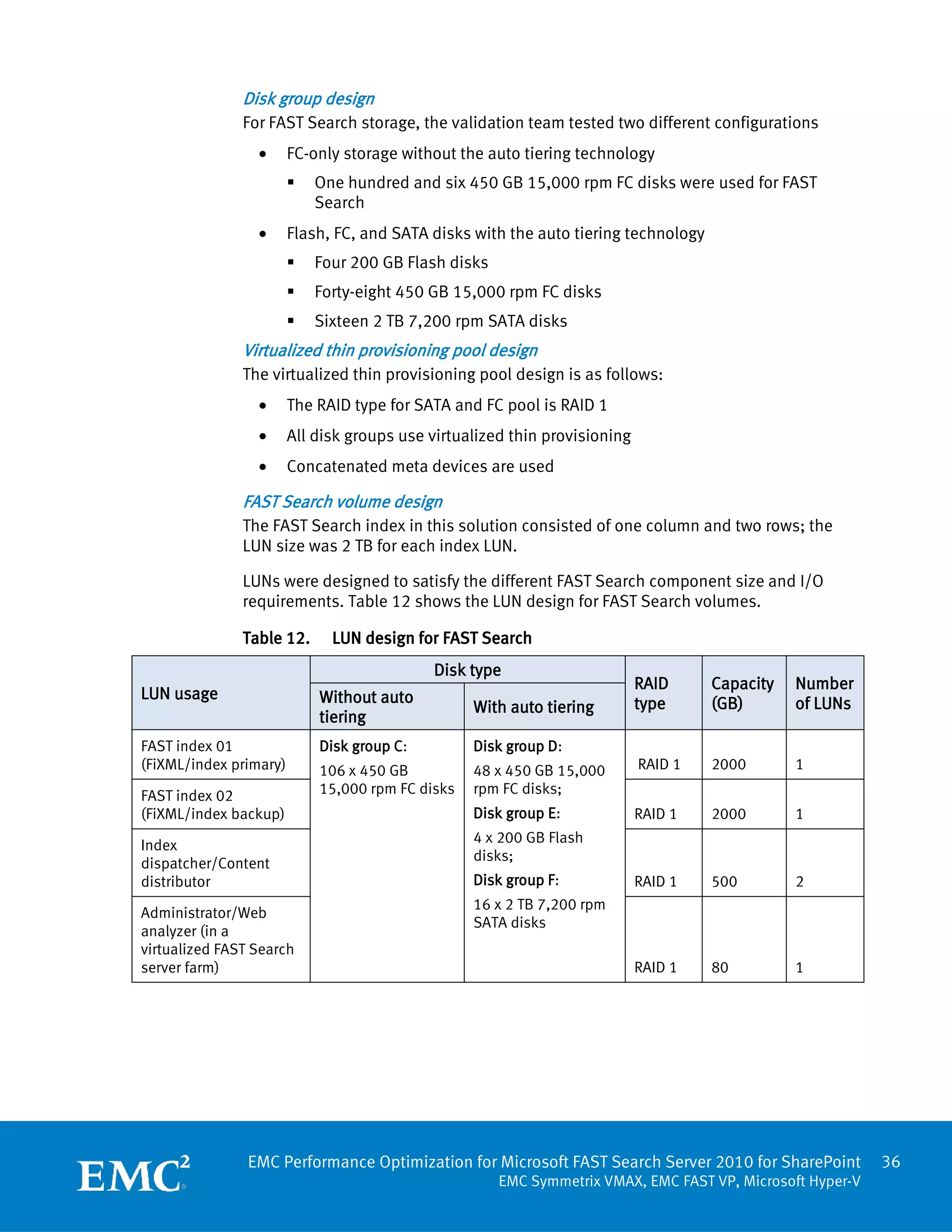
      physical environment.


EMC Performance Optimization for Microsoft FAST Search Server 2010 for SharePoint           45
                                       EMC Symmetrix VMAX, EMC FAST VP, Microsoft Hyper-V
Raw I/O            FAST Search server makes extensive use of the storage subsystem. Testing the raw
performance of     I/O performance of the index/query disks can be an early indication of performance
FAST Search disk   capacity.
subsystem
                   Table 17 shows the IOmeter test results. The index servers had enough performance
                   capacity to support the I/O subsystem of the FAST Search servers.

                   Table 17.     IOmeter test results
                                                                                           100 KB 67%
                                                        32KB 100%        32 KB 67%         read
                    Fast index         1KB 100%         read             read
                    servers            read (IOPS)                                         average
                                                        (IOPS)            (MB/s)           response time
                                                                                           (ms)
                    fastidx01          3,433            2,996            136               9

                    fastidx02          3,590            2,951            39.5              9

                    Total/Average      7,023            5,947            175.5             9


Performance test   The following is a summary of test results for the FAST Search server farm in the
results for the    physical environment:
physical FAST
                     •   From a storage perspective, the disks and thin pools performed well. During the
Search
                         full crawl testing, the disk pool had an average of 60 percent utilization, with an
environment
                         80 percent maximum. Total number of disk IOPS averaged 3,500 on the
                         Symmetrix VMAX back end for full crawls and was approximately 1,900 for the
                         query testing.
                     •   The FAST Search crawl rate was 150 GB/hour with five servers, 60 available
                         CPUs, and 52 document processors.
                     •   The search response time was less than 1 second, supporting more than
                         22,000 users with 10 percent concurrent access.

                   Crawl test overview for the physical environment
                   The validation team performed full crawl tests for both of the 5 TB file share and 4 TB
                   SharePoint content. We reset and cleared the indexes before starting the full crawl
                   tests.

                   The crawl rate for the file share was slightly higher than the crawl rate for the
                   SharePoint content database. The full crawl rate of the SharePoint content database
                   was 1,516 items per minute, while the full crawl rate of the file share was 1,668 items
                   per minute.

                   In both cases, the average number of IOPS for SharePoint was not very high. In the
                   full crawl of the file share, the total number of back-end IOPS for both the SharePoint
                   and FAST Search server farms was only 2,200 (about 10 percent of the number of
                   IOPS for the FAST Search server farm). In the SharePoint content database full crawl,
                   the total number of back-end IOPS was 3,340 (about one sixth of the number of IOPS
                   from the FAST Search server farm).


                   EMC Performance Optimization for Microsoft FAST Search Server 2010 for SharePoint           46
                                                        EMC Symmetrix VMAX, EMC FAST VP, Microsoft Hyper-V
The average CPU usage was approximately 40 to 50 percent for the servers in this
environment during the full crawl testing.

Overall, the physical environment performed well with no connectivity or storage
bottlenecks detected.

Full crawl performance for SharePoint content in the physical environment
The full crawl rate for the SharePoint content was 1,516 items per minute. The whole
farm full crawl completed in about 1 day (24 hours and 15 minutes). Table 18 shows
the results of the full crawl of the SharePoint content.

Table 18.   Full crawl of SharePoint content results
 Duration                          Crawl rate          Crawl rate
                  Items crawled                                      Crawl type
 (hh:mm:ss)                        (items/min)         (MB/min)
 24:15:00         2,190,954        1,516               2,111         Full

Figure 7 shows the full crawl performance for the SharePoint content in the physical
environment. The crawl rate of smaller documents was higher with the peak reaching
8,000 items per minute. The crawl rate of larger documents was lower, which was
1,516 items per minute or 2,111 MB per minute on average.


Figure 7.   Full crawl performance for SharePoint content in a physical environment


EMC Performance Optimization for Microsoft FAST Search Server 2010 for SharePoint       47
                                   EMC Symmetrix VMAX, EMC FAST VP, Microsoft Hyper-V
SharePoint and FAST Search IOPS distribution during a full crawl
The number of IOPS during the full crawl of the SharePoint content was not as high as
expected. The average total number of IOPS for the SharePoint farm (mainly the
SharePoint content database, crawl database, and property databases) was 1,434
with peaks up to 4,749.

Average CPU usage for both the SharePoint farm and the FAST search farm was below
50 percent with the SharePoint farm below 30 percent. There were 60 CPUs and 42
document processors available in the physical FAST Server environment.

Table 19 shows the average and maximum number of IOPS for both the FAST Search
servers and the SharePoint servers.

Table 19.   Average and maximum IOPS for FAST Search and SharePoint servers
 Item                          FAST Search servers          SharePoint servers
 Average total IOPS            485                          1,434

 Maximum total IOPS            1,809                        4,749

 Average CPU usage             41%                          26%

 Available CPUs in the farm    60                           N/A

 Document processors           42                           N/A

Table 20 shows the expected number of IOPS and the actual peak number of IOPS for
the FAST Search servers.

Table 20.   Expected and actual peak IOPS for the FAST Search servers
                                                                        Actual peak
 Item                                           Estimated IOPS
                                                                        IOPS
 FAST primary index volume                      2,000                   1,809

 FAST backup index volume                       2,000                   334

 Admin/document processor                       2,000                   224

 Content distributor/indexing dispatcher/
 web analyzer/document processor                2,000                   373

 Content distributor/indexing dispatcher/
 web analyzer/document processor                2,000                   379

Table 21 shows the FAST Search index volume I/O characteristics and read/write ratio
during the full crawl.

Table 21.   FAST Search index volume I/O characteristics and read/write ratio
                Average        IOPS          Read I/O       Write I/O         Read :
 Server role
                IOPS           (maximum)     size           size              Write
 Primary        345            1,809         275 KB         605 KB            3:1


EMC Performance Optimization for Microsoft FAST Search Server 2010 for SharePoint         48
                                     EMC Symmetrix VMAX, EMC FAST VP, Microsoft Hyper-V
Average       IOPS           Read I/O      Write I/O     Read :
 Server role
                IOPS          (maximum)      size          size          Write
 Secondary      47            334            45 KB         664 KB        1:50

Figure 8 shows the distribution of IOPS between the SharePoint and FAST Search
server farms. The SharePoint farm generated about five-sixths of the number of IOPS
for the whole environment, while the FAST Search server farm generated only one-
sixth of the number of IOPS. The backup index (secondary index) server generated a
very low number of IOPS with a very large I/O size.


Figure 8.    SharePoint and FAST Search IOPS distribution during a full crawl

Back-end storage Symmetrix VMAX performance
During the full crawl of SharePoint content database, both the SharePoint farm and
FAST Search server farm performed well with no visible pressure. The following are
the performance details:
  •   The total number of IOPS on the back end was 2,500 to 4,500. Figure 9 and
      Table 21 have more details.
  •   Disks and thin pools performed well. The disk utilization of SharePoint and
      FAST Search volumes was less than 50 percent as shown in Table 22.

As shown in Figure 9, the total number of IOPS for the content database full crawl in
the physical environment was as high as 4,730 with an average of 3,340. The
throughput was 210 MB per second.


EMC Performance Optimization for Microsoft FAST Search Server 2010 for SharePoint        49
                                    EMC Symmetrix VMAX, EMC FAST VP, Microsoft Hyper-V
Figure 9.   Total back-end IOPS for both SharePoint and FAST Search farms

Table 22 shows the average and maximum number of IOPS and throughput from the
Symmetrix VMAX storage array for the SharePoint content database full crawl in the
physical environment.

Table 22.   IOPS and throughput for the SharePoint content database full crawl
 Item                          Average                      Maximum
 IOPS                          3,340                        4,730

 Throughput (MB)               210                          275

Table 23 shows the disk group utilization in the SharePoint content full crawl.

Table 23.   Disk group utilization for the SharePoint content full crawl
 Disk group utilization                      Percentage
 SharePoint farm                             3%–5%

 FAST index volumes                          10%–47%

As a result of the lower IOPS on the hosts during the full crawl, the disk group
utilization was very low for the content database full crawl.

Full crawl performance for the file share in the physical environment
As shown in Table 24, the full crawl rate for the file share was 1,668 items per minute,
which was slightly higher than the full crawl rate for the content database. The whole
farm full crawl completed in about 1.5 days (35 hours and 15 minutes).


EMC Performance Optimization for Microsoft FAST Search Server 2010 for SharePoint          50
                                     EMC Symmetrix VMAX, EMC FAST VP, Microsoft Hyper-V
Table 24.    Full crawl result for file share
 Duration                               Crawl rate       Crawl rate
                      Items crawled                                      Crawl type
 (hh:mm:ss)                             (items/min)      (MB/min)
 35:15:00             3,124,223         1,668            2602            Full

Figure 10 shows the file share full crawl performance. The crawl rate for the smaller
documents was higher with the peak reaching 27,900 items per minute. The crawl
rate for the larger documents was lower, which averaged 1,668 items (2,602 MB) per
minutes.


Figure 10.   Full crawl performance for the file share

The number of IOPS for both FAST Search servers and SharePoint servers was much
lower than the number of IOPS for the full crawl of SharePoint content database. Most
of the I/O was for the file share LUNs. The average CPU usage was under 50 percent.
Table 25 provides the details.

Table 25.    IOPS and CPU usage of file share full crawl on FAST Search servers and
             SharePoint servers
                                  FAST Search
 Item                                                    SharePoint servers
                                  servers
 Average total IOPS               208                    339

 Maximum total IOPS               1,706                  930

 Average CPU usage                45%                    34%

 Available CPUs in the farm       60                     N/A


EMC Performance Optimization for Microsoft FAST Search Server 2010 for SharePoint           51
                                       EMC Symmetrix VMAX, EMC FAST VP, Microsoft Hyper-V
FAST Search
    Item                                                    SharePoint servers
                                    servers
    Document processors             42                      N/A

Table 26 shows the expected number of IOPS and the actual peak number of IOPS for
the FAST Search servers.

Table 26.       Expected and actual peak IOPS for the FAST Search servers
                                                                              Actual peak
    Item                                            Estimated IOPS
                                                                              IOPS
    FAST primary index volume                       2,000                     1,706

    FAST backup index volume                        2,000                     186 2

    Admin/document processor                        2,000                     350

    Content distributor/indexing dispatcher/
    web analyzer/document processor                 2,000                     153

    Content distributor/indexing dispatcher/
    web analyzer/document processor                 2,000                     167

Table 27 shows the FAST Search index volume I/O characteristics and read/write ratio
during the full crawl.

Table 27.       FAST Search index volume I/O characteristics and read/write ratio
                   Average        IOPS           Read I/O         Write I/O         Read :
    Server role
                   IOPS           (maximum)      size             size              Write
    Primary        284            1,706          313 KB           617 KB            5:2

    Secondary      45             186            18 KB            756 KB            1:25

Figure 11 shows the distribution of IOPS between the file share volume and the FAST
Search server farm. The average number of IOPS was around 430 on the file share
and 550 on the primary index server. The backup index (secondary index) server had
very low number of IOPS with a very large I/O size.


2
 When the primary server failed, the backup index server took over the primary server role and
consumed the same level of IOPS as the primary server.

EMC Performance Optimization for Microsoft FAST Search Server 2010 for SharePoint                52
                                         EMC Symmetrix VMAX, EMC FAST VP, Microsoft Hyper-V
Figure 11.   IOPS between the file share volume and the FAST Search server farm
Back-end storage Symmetrix VMAX performance
During the full crawl of the file share, both the SharePoint farm and the FAST Search
server farm performed well, with no visible pressure. The following are the
performance details:
   •   The total number of IOPS range on the back end was 1,400 to 2,880. The
       average IOPS for the content database full crawl in the physical environment
       was 2,200. The throughput was 234 MB per second on average. Figure 12
       shows more details.
   •   Disks and thin pools performed well. Disk utilization of SharePoint and FAST
       Search volumes was less than 55 percent.


EMC Performance Optimization for Microsoft FAST Search Server 2010 for SharePoint       53
                                   EMC Symmetrix VMAX, EMC FAST VP, Microsoft Hyper-V
Figure 12.    Back-end Symmetrix VMAX performance for a file share full crawl

Table 28 shows the disk group utilization for the SharePoint farm and FAST search
farm.

Table 28.     Disk group utilization during file share full crawl
 Disk group utilization                         Percentage
 SharePoint volumes                             5%–25%

 FAST index volumes                             20%–55%

Table 29 shows the total number of IOPS and throughput on the Symmetrix VMAX
back end for the file share full crawl in the physical environment.

Table 29.     Total IOPS and throughput during file share full crawl

 Item                           Average                       Maximum
 Total IOPS                     2,200                         2,880

 Throughput (MB)                234                           322

VSTS performance test against the physical FAST Search servers
Three different profiles (browse/search/modify) were tested against the indexed
SharePoint content and file share. The search response time was under 1 second for
all profiles, with seven to 17 queries per second for different profiles as shown in
Table 30.


EMC Performance Optimization for Microsoft FAST Search Server 2010 for SharePoint            54
                                        EMC Symmetrix VMAX, EMC FAST VP, Microsoft Hyper-V
Table 30.    VSTS performance test on physical FAST Search servers

 Profile              Requests      Average response time (second)
                                                                         Queries per
 (browse/search/      per
                                                                         second
 modify)              second        Browse      Search       Modify

 80/10/10             35.7          0.94        0.60         2.43        7.1

 70/20/10             36.5          0.93        0.63         2.14        9.5

 50/30/20             38.0          0.90        0.83         2.26        16.7

As shown in Figure 13, the VSTS test (browse/search/modify) started at 6:00 and
completed at 7:00. The one-hour workload generated less than 2,000 IOPS on the
back end.


Figure 13.   Symmetrix total IOPS

As shown in Figure 14, the number of IOPS for the two FAs for the FAST Search server
was about 550 during the one-hour VSTS (browse/search/modify) test.


EMC Performance Optimization for Microsoft FAST Search Server 2010 for SharePoint        55
                                    EMC Symmetrix VMAX, EMC FAST VP, Microsoft Hyper-V
Figure 14.   Symmetrix VMAX FA IOPS of FAST Search servers

                   Table 31 shows the maximum number of IOPS of the Symmetrix VMAX back end
                   during the 80/10/10 (percentages for browse/search/modify) profile. The maximum
                   number of IOPS was under 2,000 during the test period.

                   Table 31.    Maximum IOPS of Symmetrix VMAX back end
                    Symmetrix VMAX back-end IOPS during
                                                                        Maximum IOPS
                    80/10/10 (browse/search/modify) profile
                    Total SharePoint and FAST Search servers            1,900

                    FAST Search servers only                            550


Performance test   The test results for the FAST Search server farm in the virtualized (Hyper-V-enabled)
results for the    environment include the following:
virtualized
                     •   The storage performance of the virtualized environment was similar to the
environment
                         storage performance of the physical environment.
                     •   The FAST Search crawl rate was 80 GB/hour with three Hyper-V servers, five
                         virtual machines, 20 CPUs, and 24 document processors.
                     •   The search response time for the virtualized environment was the same as the
                         search response time for the physical environment (less than 1 second).

                   The shift from a physical FAST Search Server for SharePoint 2010 environment to a
                   virtualized computing infrastructure made it easier to manage and deploy the FAST
                   Search servers while maintaining comparable search performance. With Symmetrix
                   VMAX and the auto tiering technology, virtualized FAST Search Server 2010 for
                   SharePoint produced the expected crawl performance and maintained search
                   performance similar to the physical FAST servers.


                   EMC Performance Optimization for Microsoft FAST Search Server 2010 for SharePoint        56
                                                       EMC Symmetrix VMAX, EMC FAST VP, Microsoft Hyper-V
The number of document processors in the FAST Search server farm can impose a
major impact on the crawl performance. The SharePoint performance test results
were closely related to the number of Web front-end servers in the SharePoint farm.
Compared with the physical FAST Search server environment, in the virtualized FAST
Search environment:
  •   The number of physical servers was reduced by 60 percent, from five to two.
  •   The number of FAST Search servers remained the same as in the physical
      environment.
  •   The number of document processors was reduced by approximately 58 percent,
      from 52 to 24, mainly because of the Hyper-V vCPU constraint (four vCPUs for
      each virtual machine).
  •   The full crawl performance was reduced by about 40 percent.
  •   The browse/search/modify test results were similar to the the results in the
      physical environment.

Crawl test overview for the virtualized environment
The SharePoint content database full crawl in the virtualized environment took about
2 days to finish. The crawl rate was half of what was observed in the physical FAST
Search environment. The CPU usage, however, increased from 40 percent to 80
percent, indicating that the CPU is the bottleneck for the full crawl in this
environment.

The test included 20 CPUs in the virtualized environment and 60 CPUs in the physical
environment. This constraint caused the number of document processors to be
reduced from 42 to 24 This was just over half the number in the physical
environment. The performance impact on the virtualized environment was almost
linear. The crawl rate was reduced by 50 percent compared to the physical
environment.

Full crawl for SharePoint content performance in the virtualized environment
The SharePoint content full crawl rate was 770 items per minute. The full crawl of the
entire farm completed in about 2 days (47 hours and 47 minutes).

Table 32 shows the full crawl performance of the SharePoint content.

Table 32.   Full crawl performance of the SharePoint content
 Duration                           Crawl rate        Crawl rate
                   Items crawled                                       Crawl type
 (hh:mm:ss)                         (items/min)       (MB/min)
 47:47:00          2,190,954        770               1395             Full


EMC Performance Optimization for Microsoft FAST Search Server 2010 for SharePoint        57
                                   EMC Symmetrix VMAX, EMC FAST VP, Microsoft Hyper-V
Figure 15 shows the full crawl performance for the SharePoint content. The crawl rate
for smaller documents was higher, with the peak reaching 12,500 items per minute.
The crawl rate for larger documents was lower, at 770 items per minute or 1,395 MB
per minute on average.


Figure 15.   Full crawl performance of the SharePoint content

Table 33 shows the number of IOPS and the CPU usage of the SharePoint content full
crawl for both the FAST Search and SharePoint servers.

Table 33.    IOPS and CPU usage of the SharePoint content full crawl
 Item                         FAST Search servers          SharePoint servers
 Average total IOPS           675                          900

 Maximum total IOPS           13,346                       4,257

 Average CPU usage            74%                          45%

 Available CPUs in the farm   20                           N/A

 Document processors          24                           N/A


EMC Performance Optimization for Microsoft FAST Search Server 2010 for SharePoint        58
                                    EMC Symmetrix VMAX, EMC FAST VP, Microsoft Hyper-V
Table 34 shows the expected number of IOPS and the actual peak number of IOPS for
the FAST Search servers.

Table 34.    Expected and actual peak IOPS for the FAST Search servers
                                                                        Actual peak
 Item                                            Estimated IOPS
                                                                        IOPS
 FAST primary index volume                       2,000                  6,592

 FAST backup index volume                        2,000                  1,3346

 Admin/document processor                        2,000                  2,334

 Content distributor/indexing dispatcher/
 web analyzer/document processor                 2,000                  959

 Content distributor/indexing dispatcher/
 web analyzer/document processor                 2,000                  1,527

Table 35 shows the FAST Search index volume I/O characteristics and read/write ratio
during the full crawl.

Table 35.    FAST Search index volume I/O characteristics and read/write ratio
                Average        IOPS          Read I/O       Write I/O         Read :
 Server role
                IOPS           (maximum)     size           size              Write
 Primary        483            6,592         184 KB         345 KB            3:1

 Secondary      103            13,346        42 KB          582 KB            1:5


Back-end Symmetrix VMAX storage performance
During the full crawl of the SharePoint content in the virtualized FAST Search
environment, both the SharePoint and the FAST Search server farms performed well,
with no visible pressure. The following are the performance details:
  •   The total number of IOPS on the back end was between 2,500 and 4,300.
  •   The disks and thin pools performed well. Disk utilization for SharePoint and
      FAST Search volumes was less than 50 percent.

Figure 16 shows the storage back-end performance of the SharePoint content full
crawl in the virtualized FAST Search environment. The maximum number of IOPS was
always below 4,300, with an average number of IOPS approximately 3,500, which
was close to what we observed in the physical environment. This indicated that the
storage back-end performance was the same in both physical and virtualized
environments. CPU constraint caused the difference in overall crawl performance.


EMC Performance Optimization for Microsoft FAST Search Server 2010 for SharePoint         59
                                     EMC Symmetrix VMAX, EMC FAST VP, Microsoft Hyper-V
Figure 16.    Storage back-end performance for the SharePoint content full crawl

As shown in Table 36, the average and maximum number of IOPS and throughput on
the storage back end during the SharePoint content full crawl in a virtualized FAST
Search server farm was very close to what was observed for the physical FAST Search
server farm.

Table 36.     IOPS and throughput on the storage back end during the SharePoint
              content full crawl
 Item                           Average                      Maximum
 IOPS                           3,500                        4,300

 Throughput (MB)                217                          300

Disk group utilization during the SharePoint content full crawl in the virtualized FAST
Search server farm was also very close to what we observed for the physical FAST
Search servers, as shown in Table 37.

Table 37.     Disk group utilization during SharePoint content full crawl
 Disk group utilization                   Percentage
 Content DB                               20%–30%

 FAST index volumes                       30%–50%

File share full crawl performance in the virtualized environment
For the file share full crawl, the virtualized environment took about 2.5 days. The
crawl rate was half of what was observed in the physical FAST Search environment.
The CPU usage, however, increased from approximately 40 percent to 80 percent,
indicating that the CPU is the bottleneck for the full crawl in this environment.

There were 20 CPUs available in the virtualized environment, while there were 60 in
the physical environment. This constraint causes the number of document processors
to be reduced from 42 to 24. This is just over half the number of processors in the


EMC Performance Optimization for Microsoft FAST Search Server 2010 for SharePoint          60
                                      EMC Symmetrix VMAX, EMC FAST VP, Microsoft Hyper-V
physical environment. The performance impact from the CPU resource constraint for
the virtualized environment was almost linear. The crawl rate dropped by about 50
percent compared to the physical environment.

Table 38 shows the full crawl performance of the file share in the virtualized FAST
Search environment. The full crawl rate of the file share was 978 items per minute,
which was slightly higher than the rate for the content database. The whole farm full
crawl completed in about 2.5 days (60 hours and 14 minutes).

Table 38.   File share full crawl results
 Duration                            Crawl rate        Crawl rate
                   Items crawled                                         Crawl type
 (hh:mm:ss)                          (items/min)       (MB/min)
 60:14:32          3,124,223         978               1,383             Full

As shown in Figure 17, in the virtualized environment:
  •   The crawl rate for the file share was faster than the rate for the content
      database.
  •   The crawl rate, as in the physical environment, was largely related to the peak
      file size while processing the smaller files. The crawl rate of smaller documents
      was higher with the peak reaching 18,000 items per minute.
  •   The crawl rate averaged 981 items (1,383 MB) per minute.
  •   The full crawl was slower in the virtualized environment than in the physical
      environment, but the performance was still reasonable.


EMC Performance Optimization for Microsoft FAST Search Server 2010 for SharePoint         61
                                    EMC Symmetrix VMAX, EMC FAST VP, Microsoft Hyper-V
Figure 17.   Full crawl performance of the file share content

Table 39 shows the number of IOPS and CPU usage of the file share full crawl on the
FAST Search and SharePoint servers in the virtualized environment.

Table 39.    IOPS and CPU usage of the file share full crawl
 Item                          FAST Search servers          SharePoint servers
 Average Total IOPS            384                          193

 Maximum Total IOPS            7,869                        1,263

 Average CPU usage             83%                          15%

 Available CPUs in Farm        20                           N/A

 Document Processors           24                           N/A


EMC Performance Optimization for Microsoft FAST Search Server 2010 for SharePoint         62
                                     EMC Symmetrix VMAX, EMC FAST VP, Microsoft Hyper-V
Table 40 shows the expected number of IOPS and the actual peak number of IOPS for
the FAST Search servers.

Table 40.    Expected and actual peak IOPS for the FAST Search servers
                                                                        Actual peak
 Item                                            Estimated IOPS
                                                                        IOPS
 FAST primary index volume                       2,000                  7,869

 FAST backup index volume                        2,000                  8,704

 Admin/document processor                        2,000                  2,030

 Content distributor/indexing dispatcher/
 web analyzer/document processor                 2,000                  1,414

 Content distributor/indexing dispatcher/
 web analyzer/document processor                 2,000                  2,014

Table 41 shows the FAST Search index volume I/O characteristics and read/write ratio
during the full crawl.

Table 41.    FAST Search index volume I/O characteristics and read/write ratio
                Average        IOPS          Read I/O       Write I/O      Read :
 Server role
                IOPS           (maximum)     size           size           Write
 Primary        463            7,869         186 KB         373 KB         3:1

 Secondary      29             8,704         36 KB          560 KB         1:2


Back-end Symmetrix VMAX storage performance
The following are the test results of Symmetrix VMAX back-end storage performance:
  •   The total number of IOPS on the back end was between 1,800 and 3,500 (as
      shown in Figure 18).
  •   The average number of IOPS for the content database full crawl in the
      virtualized environment was 2,820. The throughput was 224 MB per second on
      average. Figure 18 and Table 42 have more details.
  •   Disk utilization of SharePoint and FAST Search volumes was less than 43
      percent. Table 43 shows the disk group utilization.


EMC Performance Optimization for Microsoft FAST Search Server 2010 for SharePoint         63
                                     EMC Symmetrix VMAX, EMC FAST VP, Microsoft Hyper-V
Figure 18.    Back-end Symmetrix VMAX performance for the file share full crawl

Table 42.     Total IOPS and throughput on the Symmetrix VMAX back end for the file
              share full crawl in the virtualized environment
 Item                           Average                       Maximum
 Total IOPS                     2,820                         3,460

 Throughput (MB)                224                           278

Disk group utilization for the SharePoint farm and FAST search farm is shown in Table
43.

Table 43.     Disk group utilization during the file share full crawl
 Disk group utilization                        Percentage
 SharePoint volumes                            10%–25%

 FAST index volumes                            20%–43%

VSTS performance test against the virtualized FAST Search servers
The EMC validation team tested three different profiles (browse/search/modify)
against the indexed SharePoint content and the file share. The search response time
was under 1 second with eight to 13 queries per second for the different profiles. As
shown in Table 44, the average search response time was slightly better than in the
physical FAST Search environment (search performance for the two environments was
almost the same).


EMC Performance Optimization for Microsoft FAST Search Server 2010 for SharePoint          64
                                      EMC Symmetrix VMAX, EMC FAST VP, Microsoft Hyper-V
Table 44.    VSTS performance test against the virtualized FAST Search servers
 Profile                           Average response time (second)
                      Requests
 (percentages for                                                       Queries per
                      per
 browse/search/                                                         second
                      second       Browse    Search       Modify
 modify)
 80/10/10             38.2         0.95      0.47         2.83          8.5

 70/20/10             41.6         0.90      0.55         2.50          14.4

 50/30/20             38.5         0.88      0.67         2.08          12.9

The tests depicted in Figure 19 and Figure 20 were based on the 80/10/10 profile
(percentages for browse/search/modify). The VSTS test (browse/search/modify)
started at 7:15 and finished at 8:15, with a one-hour test duration. The total
Symmetrix VMAX back-end number of IOPS was approximately 2,800, with 25 percent
from the FAST Search servers.


Figure 19.   Symmetrix VMAX total IOPS


EMC Performance Optimization for Microsoft FAST Search Server 2010 for SharePoint       65
                                   EMC Symmetrix VMAX, EMC FAST VP, Microsoft Hyper-V
Figure 20.   IOPS of FAST Search servers

Table 45 shows the Symmetrix VMAX back-end number of IOPS with an 80/10/10
(percentages for browse/search/modify) profile.

Table 45.    IOPS of the back-end Symmetrix VMAX storage
 Symmetrix VMAX back-end IOPS with             Maximum IOPS
 80/10/10 (browse/search/modify)
 profile
 Total SharePoint and FAST Search servers      3,400

 FAST Search servers only                      850


Pure (100 percent) search or query test results for the virtualized environment
The validation team conducted two different tests for pure search or query:
  •   The VSTS test: VSTS had three tiers including client, agent, and server. It
      measured the response of the user operations (browse/search/modify).
  •   The sbench test: The sbench tool was installed on the FAST servers. It issued
      queries to the FAST Search server farm directly, and measured the query latency
      without interfering with the SharePoint farm. Refer to the Search Technology
      website for more information about sbench.

Table 46 and Table 47 show the pure search or query test results for the virtualized
FAST Search environment. With only one column in the FAST Search configuration, 25
queries per second (QPS) were supported with a response time of less than 2
seconds.


EMC Performance Optimization for Microsoft FAST Search Server 2010 for SharePoint        66
                                    EMC Symmetrix VMAX, EMC FAST VP, Microsoft Hyper-V
Table 46.    VSTS test results for the virtualized FAST Search environment
                      Number of queries per second               Response time( seconds)
                      25                                         1.67


                     Table 47.    sbench test results for the virtualized FAST Search environment
                      Tested item                                Value
                      Observed query rate (mean)                 5

                      Search latency                             0.05784

                      Maximum latency                            0.4210

                      Observed query rate (mean)                 19.86

                      Search latency                             0.06956

                      Maximum latency                            1.735

Auto tiering         With a profile of 80/10/10 (percentages for browse/search/modify), the search test
performance          ran in three tiered virtual pools with auto tiering enabled. Figure 21 shows the auto
impact               tiering movement results after 16 hours of VSTS testing. After enabling auto tiering,
                     approximately 1.3 percent of data was promoted to the Flash tier; 4.3 percent of data
                     was demoted to the SATA tier, and 94.6 percent of data resided on the FC tier.


                     Figure 21.   virtual pool usage in the virtualized FAST Search environment

                     Performance improved about 20 percent with auto tiering enabled for the profile of
                     80/10/10 (percentages for browse/search/modify) as shown in Table 48.

                     Table 48.    QPS result with profile of 80/10/10 (browse/search/modify)
                      Symmetrix auto tiering used? (Yes /No)     Queries per second (QPS)
                      No                                         7.1

                      Yes                                        8.5


Replication          EMC Replication Manager-engaged snapshot backup
Manager-engaged      An EMC Replication Manager-engaged snapshot for the whole SharePoint farm
backup and restore   (including the content database) took only 11 minutes to complete. The snapshot
for FAST Search      included five servers.
Server 2010 for
SharePoint           Table 49 shows that the file share snapshot completed in less than 2 minutes, which
                     is quite fast. The FAST Search server farm backup took about 8 minutes across three
                     servers.


                     EMC Performance Optimization for Microsoft FAST Search Server 2010 for SharePoint       67
                                                        EMC Symmetrix VMAX, EMC FAST VP, Microsoft Hyper-V
Table 49.       Snapshot backup with EMC Replication Manager
                                                                Backup duration
    Item                          Total size
                                                                (hh:mm:ss)
    SharePoint farm backup        4 TB                          0:11:33

    File share backup             5 TB                          0:01:53

    FAST Search server farm
                                  5 TB                          0:07:50
    backup

EMC Replication Manager-engaged snapshot restore and recovery
Restoring a single SharePoint database took only a few minutes to process. Restoring
all 20 SharePoint databases across two SQL Server database servers took about 1.5
hours, most of which was spent recovering the databases (log replay).

As shown in Table 50, restoring a 5 TB file share took only about 2 minutes, the FAST
Search farm restore took about 13 minutes, and the FAST Search server farm restore
took less than 15 minutes.

Table 50.       Snapshot restore and recovery with EMC Replication Manager
                                                                Restore duration
    Item                          Total size
                                                                (hh:mm:ss)
    SharePoint content            4 TB
                                                                1:24:33 3
    databases restore

    File share restore            5 TB                          0:01:53

    FAST Search server farm       5 TB
                                                                0:12:49
    restore


3
    Database recovery time was included.


EMC Performance Optimization for Microsoft FAST Search Server 2010 for SharePoint             68
                                         EMC Symmetrix VMAX, EMC FAST VP, Microsoft Hyper-V
Conclusion
Summary      EMC Symmetrix VMAX was highly scalable and easily capable of accommodating the
             storage performance and capacity requirements of Microsoft FAST Search Server
             2010 for SharePoint. VMAX can fully support a FAST Search server farm in either a
             physical or virtualized environment.

             Full crawl performance
             Performance for the index full crawl of the SharePoint content and file share source
             was acceptable in both physical and virtualized FAST Search server environments. In
             comparison with a physical FAST Search server farm, the total number of CPUs for the
             virtualized FAST Search server farm was reduced by 67 percent (from 60 to 20); the
             number of document processors was reduced by 43 percent (from 42 to 24).

             The crawl rate of a virtualized FAST Search server farm was acceptable, even
             considering the vCPU constraint imposed by Hyper-V virtualization technology:
               •   Based on crawl bandwidth per hour, EMC’s full crawl test against a 5 TB file
                   share using physical FAST Search servers completed in 35 hours and 15
                   minutes. On virtualized FAST Search servers, the test took 60 hours and 15
                   minutes.
                   In contrast, based on the same unit of measure (crawl bandwidth per hour),
                   Microsoft’s full crawl test against a 5 TB file share using physical FAST Search
                   servers took more than 46 hours. For more information about the full crawl test
                   conducted by Microsoft, refer to Microsoft TechNet.
               •   Based on crawl bandwidth per hour, EMC’s full crawl test against 4 TB of
                   SharePoint content using physical FAST Search servers completed in 24 hours
                   and 15 minutes. On virtualized FAST Search servers, the test took 47 hours and
                   15 minutes.
                   Based on the same unit of measure (crawl bandwidth per hour), Microsoft’s
                   results for a comparable test were similar to EMC’s. For more information about
                   Microsoft’s full crawl test against 4 TB of SharePoint content using physical
                   FAST Search servers, refer to Microsoft TechNet.
             Query performance and EMC auto tiering benefit
             The solution demonstrated a high performing FAST Search query service:
               •   With a 50/20/30 (percentages for browse/search/modify) profile, a mixed
                   workload with 30 percent queries can achieve 16.7 queries per second (QPS) in
                   the physical FAST Search server farm.
               •   14.4 QPS can be processed in the virtualized FAST Search server farm while
                   supporting 22,000 users with 10 percent concurrent access.
               •   A pure search test achieved 20 QPS while keeping the mean query latency less
                   than 0.07 seconds. In Microsoft’s test results on Microsoft TechNet, the latency
                   is more than 0.5 seconds when serving 20 QPS.

             Before enabling Symmetrix auto tiering, 100 percent of the FAST Search volumes
             resided in the FC virtual disk pool. After enabling auto tiering, the automation of
             storage tiering improved search performance by 20 percent.


             EMC Performance Optimization for Microsoft FAST Search Server 2010 for SharePoint        69
                                                 EMC Symmetrix VMAX, EMC FAST VP, Microsoft Hyper-V
Environment protection
           Both the FAST Search server farm and the SharePoint farm can be fully protected by
           Replication Manager:
             •   Completing a local replication of more than 9 TB of SharePoint content and
                 FAST Search index took less than 22 minutes
             •   Recovering a FAST Search server farm with more than 5 TB of data took less
                 than 15 minutes

Findings   The key findings of this proven solution testing are as follows:
             •   EMC Symmetrix VMAX can fully support FAST Search Server 2010 for SharePoint
                 in both physical and virtualized environments.
             •   The migration of FAST Search servers to a virtualized environment reduced the
                 number of physical host servers by 60 percent (from five to two). This also
                 leveraged all of the management advantages of a virtualized environment while
                 achieving query performance comparable to a physical environment and
                 acceptable crawl performance compared to Microsoft’s published test results.
                 (In contrast to a physical environment, the crawl operation in a virtualized
                 environment takes an additional 23 hours and 32 minutes for SharePoint
                 content and an additional 25 hours for the file share.)
             •   Symmetrix auto tiering improved the query performance of FAST Search by 20
                 percent while reducing the total cost of ownership.
             •   EMC Replication Manager ensured environment protection. The SharePoint
                 content and FAST Search server farm can be replicated and recovered with
                 minimal impact on end users.


           EMC Performance Optimization for Microsoft FAST Search Server 2010 for SharePoint        70
                                               EMC Symmetrix VMAX, EMC FAST VP, Microsoft Hyper-V
References
White papers    For additional information, see the white papers listed below (available on emc.com
                and EMC Powerlink):
                  •       Reduce Costs and Optimize Microsoft Server Performance in Virtualized
                          Environments with EMC Symmetrix VMAX
                  •       FAST VP for EMC Symmetrix VMAX–Theory and Best Practices for Planning and
                          Performance
                  •       EMC Symmetrix with Microsoft Hyper-V Virtualization

Reference       For additional information about this white paper, refer to the following reference
architecture    architecture (available on emc.com and EMC Powerlink):

                  •       EMC Performance Optimization for Microsoft FAST Search Server 2010 for
                          SharePoint–EMC Symmetrix VMAX, FAST VP, Microsoft Hyper-V

Product         For additional FAST Search information, refer to:
documentation
                  •       FAST Search Server 2010 for SharePoint Capacity Planning
                          (http://www.microsoft.com/download/en/default.aspx)
                  •       Deployment Guide for FAST Search Server 2010 for SharePoint
                          (http://www.microsoft.com/download/en/default.aspx)
                  •       FAST Search Server 2010 for SharePoint on TechNet
                          (http://technet.microsoft.com/en-us/enterprisesearch/default)

Other           For additional information on SharePoint and EMC Replication Manager, refer to:
documentation
                      •    Capacity Planning and Sizing for Microsoft SharePoint Products and
                           Technologies (http://technet.microsoft.com/en-us/enterprisesearch/default)
                      •    EMC Replication Manager 5.4.0 Product Guide


                EMC Performance Optimization for Microsoft FAST Search Server 2010 for SharePoint          71
                                                      EMC Symmetrix VMAX, EMC FAST VP, Microsoft Hyper-V
Additional information
Deployment file in   The following is the deployment.xml file used to set the server role in the physical
the physical FAST    FAST Search server farm.
Search server farm
                     <host name="fastadm.sps2010.com">
                          <admin />
                          <query />
                          <document-processor processes="12" />
                     </host>
                     <host name="fastidx01.sps2010.com">
                          <content-distributor />
                          <indexing-dispatcher />
                          <document-processor processes="12" />
                          <searchengine row="0" column="0" />
                     </host>
                     <host name="fastidx01.sps2010.com">
                           <content-distributor />
                           <indexing-dispatcher />
                           <document-processor processes="12" />
                           <searchengine row="1" column="0" />
                     </host>
                     <host name="fastdpd01.sps2010.com">
                           <document-processor processes="12" />
                           <webanalyzer server="true" lookup-db="true" link-
                     processing="true" max-targets="2" redundant-lookup="true" />
                           </host>
                     <host name="fastdpd02.sps2010.com">
                                       <document-processor processes="12" />
                                       <webanalyzer server="false" lookup-db="true"
                     link-processing="true" max-targets="2" redundant-lookup="false" />
                           </host>
                     <searchcluster>
                           <row id="0" index="primary" search="true" />
                           <row id="1" index="secondary" search="true" />
                     </searchcluster>


Deployment file in   The following is the deployment.xml file used to set the server role in the virtualized
the virtualized      FAST Search server farm.
FAST Search server
farm                 <host name="vadmin. sps2010.com">
                                 <admin />
                                 <query />
                                 <document-processor processes="6" />
                           </host>
                           <host name="vidx01.sps2010.com">
                                 <content-distributor />
                                 <indexing-dispatcher />
                                 <searchengine row="0" column="0" />
                           </host>
                           <host name="vidx02.sps2010.com">
                                 <content-distributor />
                                 <indexing-dispatcher />
                                <document-processor processes="2" />
                                 <searchengine row="1" column="0" />


                     EMC Performance Optimization for Microsoft FAST Search Server 2010 for SharePoint         72
                                                         EMC Symmetrix VMAX, EMC FAST VP, Microsoft Hyper-V
<webanalyzer server="true" lookup-db="true" link-
                   processing="true" max-targets="4" redundant-lookup="false"/>
                         </host>
                         <host name="vcdp01.sps2010.com">
                               <document-processor processes="8" />
                         </host>
                         <host name="vcdp02.sps2010.com">
                               <document-processor processes="8" />
                         </host>
                         <searchcluster>
                               <row id="0" index="primary" search="true" />
                               <row id="1" index="secondary" search="true" />
                         </searchcluster>


Recommendations The following settings are recommended by Microsoft for better crawl performance.
of FAST Search and
SharePoint farm    1.   Change SharePoint crawler registry in the following registry directory:
settings           HKLMSOFTWAREMicrosoftOffice Server14.0SearchGlobalGathering Manager
                               FilterProcessMemoryQuota (default to 100 MB)
                                −   Change to 200 MB
                               DedicatedFilterProcessMemoryQuota (default to 100 MB)
                                −   Change to 200 MB
                               FolderHighPriority (default to 50)
                                −   Change to 500
                     2.       Turn off TCP/IP Chimney. Refer to Microsoft Support for more information
                     3.       Apply hot fix KB976462
                     4.       Document processors can be adjusted at run time

Disable SCSI       In this solution, EMC Solutions Enabler is installed in the virtual machine hosted by
filtering          Hyper-V with pass-through storage devices. EMC supports the installation of EMC
                   Solutions Enabler with a child virtual machine with pass-through storage devices only
                   when the parent partitions are running Windows Server 2008 R2, and when the
                   appropriate settings for the virtual machine have been made.

                   EMC Solutions Enabler implements the usage of the extended SCSI commands, which
                   are by default filtered by the parent partition. A bypass of the filtering is provided with
                   Windows Server 2008 R2 Hyper-V. To disable the filtering of SCSI commands, the
                   administrator can execute the following PowerShell script on the Hyper-V parent
                   partition on the Hyper-V hosts of SharePoint in the physical FAST Search server
                   environment, and Hyper-V hosts of SharePoint and FAST Search in the virtualized
                   FAST Search environment.
                   // PowerShell Script: Set_SCCI_Passthrough.ps1
                   $Target = $args[0]
                   $VSManagementService=gwmi MSVM_VirtualSystemManagementService -
                   namespace "rootvirtualization"
                   foreach($Child in Get-WmiObject -Namespace rootvirtualization
                   Msvm_ComputerSystem -Filter "ElementName='$Target'")
                   {


                    EMC Performance Optimization for Microsoft FAST Search Server 2010 for SharePoint            73
                                                          EMC Symmetrix VMAX, EMC FAST VP, Microsoft Hyper-V
$VMData=Get-WmiObject -Namespace rootvirtualization -Query
                 "Associators of {$Child} Where
                 ResultClass=Msvm_VirtualSystemGlobalSettingData
                 AssocClass=Msvm_ElementSettingData"
                 $VMData.AllowFullSCSICommandSet=$true
                 $VSManagementService.ModifyVirtualSystem($Child,$VMData.PSBase.Get
                 Text(1))|out-null
                 }

                 The usage of the script under PowerShell execution environment is as follows.
                 .Set_SCCI_Passthrough.ps1 ManagedVirtualMachineName

                 The script below can be used to check the current value of the SCSI filtering. It is
                 necessary to provide the name of the virtual machine target to be reported on.
                 // PowerShell Script: Get_SCCI_Passthrough.ps1
                 $Target=$args[0]
                 foreach ($Child in Get-WmiObject -Namespace rootvirtualization
                 Msvm_ComputerSystem -Filter "ElementName='$Target'")
                 {
                 $VMData=Get-WmiObject -Namespace rootvirtualization -Query
                 "Associators of {$Child}
                 Where ResultClass=Msvm_VirtualSystemGlobalSettingData
                 AssocClass=Msvm_ElementSettingData"
                 Write-host "VirtualMachine:"$VMData.ElementName
                 Write-Host
                 "CurrentlyByPassingSCSIFiltering:"$VMData.AllowFullSCSICommandSet

                 }

Move             The usage of the script under the PowerShell execution environment is as follows:
administrative
component for    .Get_SCCI_Passthrough.ps1 ManagedVirtualMachineName
Search Service
Application      The following example uses Set-SPEnterpriseSearchAdministrationComponent to
                 move the administrative component for FAST Query SSA to the location
                 R:crawladmin on the server SharePointServerName
                 // PowerShell Script: moveAdminComp.ps1
                 PS C:> $searchapp = Get-SPEnterpriseSearchServiceApplication
                 "FAST Query SSA"
                 PS C:> $admin = Get-SPEnterpriseSearchAdministrationComponent -
                 SearchApplication $searchapp
                 PS C:> $admin | Set-SPEnterpriseSearchAdministrationComponent -
                 SearchServiceIntance SharePointServerName -Force -StoragePath
                 R:crawladmin

                 Note    For more information about the PowerShell comlet, refer to Microsoft TechNet.


                 EMC Performance Optimization for Microsoft FAST Search Server 2010 for SharePoint         74
                                                      EMC Symmetrix VMAX, EMC FAST VP, Microsoft Hyper-V

White paper: EMC Performance Optimization for Microsoft FAST Search Server 2010 for SharePoint - EMC Symmetrix VMAX, EMC FAST VP, Microsoft Hyper-V

  • 1.
    White Paper EMC PERFORMANCEOPTIMIZATION FOR MICROSOFT FAST SEARCH SERVER 2010 FOR SHAREPOINT EMC Symmetrix VMAX, EMC FAST VP, Microsoft Hyper-V • Optimize scalability and performance of FAST Search Server 2010 for SharePoint • Validate virtualization of FAST Search infrastructure • Scale-out architecture for enterprise configurations EMC Solutions Group This white paper describes the architecture of an enterprise-scale SharePoint collaboration farm with file share content and rich search capabilities provided by Microsoft FAST Search 2010 on EMC® Symmetrix® VMAX™ storage with EMC FAST VP enabled. Data protection is provided by EMC Replication Manager with replication and recoverability of the SharePoint content, the file share, and the FAST Search index. March 2012
  • 2.
    Copyright © 2011,2012 EMC Corporation. All Rights Reserved. EMC believes the information in this publication is accurate as of its publication date. The information is subject to change without notice. The information in this publication is provided “as is.” EMC Corporation makes no representations or warranties of any kind with respect to the information in this publication, and specifically disclaims implied warranties of merchantability or fitness for a particular purpose. Use, copying, and distribution of any EMC software described in this publication requires an applicable software license. For the most up-to-date listing of EMC product names, see EMC Corporation Trademarks on EMC.com. Microsoft may have substituted components of the original environment in this document with hardware of a similar (or higher) specification to the original equipment used in the EMC Proven Solution. The content contained in this document originated from a validated EMC Proven Solution. The modification introduced by Microsoft may have caused changes in performance, functionality, or scalability of the original solution. Please refer to http://www.EMC.com/solutions for further information on validated EMC Proven Solutions. Brocade is registered trademark in the United States and/or in other countries. All trademarks used herein are the property of their respective owners. Part Number H8802.2 EMC Performance Optimization for Microsoft FAST Search Server 2010 for SharePoint 2 EMC Symmetrix VMAX, EMC FAST VP, Microsoft Hyper-V
  • 3.
    Table of contents Executive summary ............................................................................................................... 7 Business case .................................................................................................................................. 7 Solution overview ............................................................................................................................ 7 Key results ....................................................................................................................................... 8 Introduction .......................................................................................................................... 9 Purpose ........................................................................................................................................... 9 Scope .............................................................................................................................................. 9 Audience ......................................................................................................................................... 9 Terminology ..................................................................................................................................... 9 Technology overview ........................................................................................................... 11 Introduction ................................................................................................................................... 11 Microsoft FAST Search Server 2010 for SharePoint ......................................................................... 11 Microsoft Hyper-V .......................................................................................................................... 11 EMC Symmetrix VMAX .................................................................................................................... 11 EMC Symmetrix FAST VP ................................................................................................................. 11 EMC Replication Manager .............................................................................................................. 12 SharePoint and FAST Search server role overview ................................................................. 13 Introduction ................................................................................................................................... 13 SharePoint server roles .................................................................................................................. 13 SharePoint administration server .............................................................................................. 13 SharePoint Web front-end server ............................................................................................... 13 Database server ........................................................................................................................ 13 FAST Search content SSA server ................................................................................................ 14 FAST Search query SSA server ................................................................................................... 14 FAST Search server roles ................................................................................................................ 14 Item processing component ...................................................................................................... 14 Content distributor .................................................................................................................... 14 Web link analysis (Web analyzer) .............................................................................................. 14 Search cluster ........................................................................................................................... 15 Indexing .................................................................................................................................... 15 Query processing ...................................................................................................................... 15 Content flow in a FAST Search server farm ................................................................................. 15 Solution architectures ......................................................................................................... 17 Solution profile .............................................................................................................................. 17 Server architecture design overview ............................................................................................... 17 Physical FAST Search design ..................................................................................................... 18 EMC Performance Optimization for Microsoft FAST Search Server 2010 for SharePoint 3 EMC Symmetrix VMAX, EMC FAST VP, Microsoft Hyper-V
  • 4.
    Virtualized FAST Searchdesign.................................................................................................. 18 Physical FAST Search server solution architecture .......................................................................... 18 Physical FAST Search server deployment ........................................................................................ 20 Virtualized FAST Search solution architecture ................................................................................ 21 Virtualized FAST Search server deployment .................................................................................... 23 Hardware resources ....................................................................................................................... 24 Software resources ........................................................................................................................ 25 Solution design and considerations..................................................................................... 26 Microsoft SharePoint 2010 farm design ......................................................................................... 26 Overview ................................................................................................................................... 26 Considerations .......................................................................................................................... 26 Database design ....................................................................................................................... 27 Microsoft Hyper-V cluster and virtual machine design for virtualized SharePoint 2010 ................... 27 Physical FAST Search Server 2010 for SharePoint farm design ....................................................... 28 FAST Search admin server role................................................................................................... 28 FAST Search content distributor server role ............................................................................... 29 FAST Search indexing server role ............................................................................................... 29 Virtualized FAST Search Server 2010 for SharePoint farm design.................................................... 29 FAST Search administration server role...................................................................................... 29 FAST Search content distributor server role ............................................................................... 29 FAST Search indexing server role ............................................................................................... 30 Test methodology design and data preparation ............................................................................. 30 Preparing random data .............................................................................................................. 30 Configuring the SharePoint farm for FAST Search ....................................................................... 30 Data distribution ....................................................................................................................... 30 VSTS test client and test mechanism ......................................................................................... 31 User load profile ........................................................................................................................ 33 SharePoint response time requirement ..................................................................................... 33 Storage design ............................................................................................................................... 34 Overview ................................................................................................................................... 34 SharePoint storage design......................................................................................................... 34 FAST Search storage design....................................................................................................... 35 Symmetrix auto tiering technology design ................................................................................. 37 FAST Search virtual machine storage design .............................................................................. 37 Replication Manager snapshot storage design .......................................................................... 37 Replication Manager design considerations .............................................................................. 37 Testing and validation methodology .................................................................................... 40 Overview ........................................................................................................................................ 40 FAST Search raw I/O subsystem performance validation ................................................................ 40 IOmeter test methodology ......................................................................................................... 40 EMC Performance Optimization for Microsoft FAST Search Server 2010 for SharePoint 4 EMC Symmetrix VMAX, EMC FAST VP, Microsoft Hyper-V
  • 5.
    Phase one: Validatingthe FAST Search server farm in the physical environment ............................ 41 Measuring performance during a full crawl ................................................................................ 41 Using VSTS to measure performance ......................................................................................... 41 Phase two: Validating the FAST Search server farm in the virtualized environment ......................... 41 Measuring performance during a full crawl ................................................................................ 41 Using VSTS to measure the performance ................................................................................... 42 Symmetrix auto tiering impact on SharePoint performance........................................................ 42 EMC Replication Manager-engaged test methodology .................................................................... 42 Replication Manager job impact on FAST Search ....................................................................... 42 Using Replication Manager to restore FAST Search Server 2010 for SharePoint.......................... 43 Test results ......................................................................................................................... 44 Overview ........................................................................................................................................ 44 Crawl performance in physical and virtualized FAST Search farms ............................................. 44 Raw I/O performance of FAST Search disk subsystem .................................................................... 46 Performance test results for the physical FAST Search environment ............................................... 46 Crawl test overview for the physical environment ...................................................................... 46 Full crawl performance for SharePoint content in the physical environment ............................... 47 Full crawl performance for the file share in the physical environment ........................................ 50 VSTS performance test against the physical FAST Search servers .............................................. 54 Performance test results for the virtualized environment ................................................................ 56 Crawl test overview for the virtualized environment ................................................................... 57 Full crawl for SharePoint content performance in the virtualized environment ........................... 57 File share full crawl performance in the virtualized environment ................................................ 60 VSTS performance test against the virtualized FAST Search servers ........................................... 64 Pure (100 percent) search or query test results for the virtualized environment ......................... 66 Auto tiering performance impact .................................................................................................... 67 Replication Manager-engaged backup and restore for FAST Search Server 2010 for SharePoint ..... 67 EMC Replication Manager-engaged snapshot backup................................................................ 67 EMC Replication Manager-engaged snapshot restore and recovery ........................................... 68 Conclusion ......................................................................................................................... 69 Summary ....................................................................................................................................... 69 Full crawl performance .............................................................................................................. 69 Query performance and EMC auto tiering benefit ....................................................................... 69 Environment protection ............................................................................................................. 70 Findings ......................................................................................................................................... 70 References .......................................................................................................................... 71 White papers ................................................................................................................................. 71 Reference architecture ................................................................................................................... 71 Product documentation.................................................................................................................. 71 EMC Performance Optimization for Microsoft FAST Search Server 2010 for SharePoint 5 EMC Symmetrix VMAX, EMC FAST VP, Microsoft Hyper-V
  • 6.
    Other documentation .....................................................................................................................71 Additional information ........................................................................................................ 72 Deployment file in the physical FAST Search server farm ................................................................ 72 Deployment file in the virtualized FAST Search server farm ............................................................. 72 Recommendations of FAST Search and SharePoint farm settings ................................................... 73 Disable SCSI filtering ..................................................................................................................... 73 Move administrative component for Search Service Application .................................................... 74 EMC Performance Optimization for Microsoft FAST Search Server 2010 for SharePoint 6 EMC Symmetrix VMAX, EMC FAST VP, Microsoft Hyper-V
  • 7.
    Executive summary Business case Microsoft FAST Search Server 2010 for SharePoint offers a new choice for large-scale companies whose business relies heavily on a high- performance search engine. Combining the power of FAST Search with the simplicity of SharePoint, Microsoft FAST Search Server 2010 for SharePoint delivers an exceptional intranet and people- search experience as well as a platform for building custom search-driven applications. The deployment of FAST Search Server 2010 for SharePoint requires careful planning and an understanding of both SharePoint and FAST Search server workloads with regard to CPU, memory, network, and disk I/O requirements. Implementing this solution normally requires an extensive consulting engagement. This solution offers valuable guidance to the implementation team. Customers often request virtualization of a FAST Search server farm, but because of the nature of search platforms, customers often assume that server virtualization on a SAN is not a good fit for such a high-demand platform as FAST Search. Solution overview This solution demonstrates the use EMC® Symmetrix® VMAX™ with Fully Automated Storage Tiering for Virtualized Pools (EMC FAST VP) technology to deploy an enterprise-class Microsoft FAST Search server farm. The solution demonstrates methods for moving from a physical to virtual FAST Search infrastructure. This solution has two main objectives: • Deploying a FAST Search server farm on physical servers. • Virtualizing the FAST Search server farm with Windows Server 2008 R2 and Hyper-V. This solution differentiates EMC from other storage and infrastructure vendors by providing guidance about enterprise-class storage and server requirements. This solution is designed for both physical and virtualized deployments of the FAST Search server environments. In this solution, the EMC Symmetrix VMAX auto tiering technology provides sufficient support for both the storage I/O demands of a FAST Search server and a SharePoint farm. The virtualization of both the SharePoint farm and FAST Search server provides all the benefits of virtualization without sacrificing the performance of either the SharePoint farm or the FAST Search server. Rapid local protection is achieved with EMC Symmetrix TimeFinder/Snap managed by EMC Replication Manager for FAST Search file systems and databases. We achieved tremendous I/O requirements of this solution through a Brocade 8G Fibre Channel SAN for storage connectivity. Brocade 8G FC Host Bus Adapters (HBAs) and the DCX-4S backbone provided fully provisioned 8G FC connectivity between servers and the high performance EMC Symmetrix VMAX storage array. “We” in this section as well as the remaining sections in this paper includes a team of EMC and partner solutions engineers who designed, built, and validated the solution presented in this document. EMC Performance Optimization for Microsoft FAST Search Server 2010 for SharePoint 7 EMC Symmetrix VMAX, EMC FAST VP, Microsoft Hyper-V
  • 8.
    Key results This solution demonstrates the following results: • Scalability  EMC built an enterprise-scale SharePoint content farm with a unique data set for FAST Search indexing and searching. The farm consisted of 4 TB of SharePoint corpus (content) and a 5 TB file share indexed by a Microsoft Fast Search 2010 for SharePoint farm.  EMC Symmetrix VMAX can scale to accommodate FAST Search with low disk pool utilization while providing sufficient support for a 9 TB FAST Search server farm operation (crawl and mixed work load).  With EMC Symmetrix virtual provisioning, a Symmetrix VMAX storage platform can scale to accommodate Hyper-V for FAST Search server consolidation by providing on-demand storage space. • Performance  All performance testing results for FAST Search were well within the ideal latency time (less than 1 second) as described by Microsoft. The FAST farm can serve 20 QPS with 0.07 seconds latency.  EMC auto tiering technology with Flash drives improved the query performance by 20 percent. • Server virtualization  The virtualized FAST Search server farm provided search results similar to the physical FAST Search server environment while using less physical servers and CPUs.  The full crawl rate is about 50 percent slower than that in the physical FAST Search server environment because of a Hyper-V CPU constraint in the virtual environment. • User experience  The FAST Search user experience in both the physical and virtualized FAST Search server farms was very similar. The search latency time was less than 0.5 seconds in both environments. • Protection  EMC performed replication under a normal user load.  For a 4 TB SharePoint farm, replication completed in less than 15 minutes.  For a 5 TB file share, replication completed in about 2 minutes  For the entire FAST Search server farm, replication took about 8 minutes.  Replication for both the SharePoint and FAST Search server farms finished without any interruption or visible performance degradation.  It took 85 minutes to restore the SharePoint farm content of 5 TB.  It took less than 15 minutes to restore the entire FAST Search index. The search resumed after only a very short period of incremental crawl. EMC Performance Optimization for Microsoft FAST Search Server 2010 for SharePoint 8 EMC Symmetrix VMAX, EMC FAST VP, Microsoft Hyper-V
  • 9.
    Introduction Purpose This white paper describes a large-scale solution that includes a content-centric environment with SharePoint managing its file shares and Microsoft FAST Search indexing and searching its content. EMC built this architecture on an EMC Symmetrix VMAX storage system with the auto tiering technology enabled. With a virtualized SharePoint farm, the FAST Search servers are first deployed on physical servers and are then moved to a virtualized environment. By focusing on scalability testing of Microsoft FAST Search, this white paper provides guidance for sizing and storage profiling of both the SharePoint farm and the FAST Search server farm and assesses the impact of FAST Search on overall SharePoint performance. This white paper also validates EMC Replication Manager-based backup of the entire SharePoint and the FAST Search server farms as well as the restoration of the SharePoint content and the FAST Search server farm. Scope This white paper: • Describes the solution architecture of FAST Search servers deployed on both physical servers and a virtualized SharePoint farm with Microsoft Hyper-V enabled. • Validates the architecture and methodology against the solution objectives and service-level agreement (SLA) goals. • Proves that customers can virtualize FAST Search servers with acceptable crawl performance and comparable query performance while reducing host servers and decreasing maintenance costs and, adding server-level resiliency with a Hyper-V cluster. • Demonstrates the value of the auto tiering technology, which automates the storage tiering and improves search performance. • Profiles the impact of local replication by using Replication Manager and TimeFinder/Snap jobs to provide protection for both SharePoint and FAST Search server farms. Audience This white paper is intended for Microsoft SharePoint 2010 database administrators and storage architects involved in planning, architecting, or administering an environment with EMC Symmetrix VMAX as the storage platform and Brocade as the 8G FC SAN infrastructure. The paper is also intended for individuals planning to implement replication solutions. Terminology Table 1 describes some terminology that appears in this paper. EMC Performance Optimization for Microsoft FAST Search Server 2010 for SharePoint 9 EMC Symmetrix VMAX, EMC FAST VP, Microsoft Hyper-V
  • 10.
    Table 1. Terminology Term Definition Microsoft SharePoint 2010 SharePoint 2010 provides a broad, central application platform for common enterprise Web requirements. SharePoint's multi-purpose design allows you to manage and provision intranet portals, extranets, websites, documents and files, collaboration spaces, social tools, enterprise searches, business intelligence, process integration, system integration, workflow automation, and core infrastructure for third-party solutions. Microsoft FAST Search A new Microsoft product based on the FAST search Server 2010 for SharePoint technology. It combines the FAST high-end search capabilities with the SharePoint. FAST Search can connect to dozens of different systems, parse hundreds of different types of files, and provide airtight security and access control. EMC Symmetrix VMAX EMC Symmetrix VMAX with Enginuity™ version 5875 incorporates a new, highly scalable Virtualized Matrix Architecture™ that enables VMAX arrays to grow seamlessly and cost-effectively from an entry-level configuration into the world’s largest storage system. Microsoft Hyper-V Microsoft Hyper-V in Windows Server 2008 and Windows Server 2008 R2 enables you to create a virtualized server computing environment. Hyper-V provides the software infrastructure and basic management tools that you can use to create and manage a virtualized server computing environment. EMC Symmetrix FAST VP Builds on and extends the capabilities of virtualized provisioning to provide a new form of FAST for Symmetrix at a sub-LUN level. EMC FAST VP can automatically plan and implement non-disruptive changes to storage allocations and optimize the use of a storage configuration composed of different drive technologies. EMC Replication Manager Manages EMC point-in-time replication through a centralized management console. Replication Manager coordinates the entire data replication process—from discovery and configuration to the management of multiple application consistent disk-based replicas. EMC Performance Optimization for Microsoft FAST Search Server 2010 for SharePoint 10 EMC Symmetrix VMAX, EMC FAST VP, Microsoft Hyper-V
  • 11.
    Technology overview Introduction This solution includes the following components: • Microsoft FAST Search Server 2010 for SharePoint Offers a new choice in enterprise search • Microsoft Hyper-V Virtualizes server computing environment • EMC Symmetrix VMAX storage Offers storage with high performance, scalability, and security • EMC Symmetrix FAST VP Enables automatic storage tiering • EMC Replication Manager Backs up and restores entire environment with minimal performance impact Microsoft FAST Microsoft FAST Search Server 2010 for SharePoint provides significant enhancements Search Server for enterprise search capabilities. 2010 for SharePoint You can use FAST Search Server 2010 for SharePoint to resolve several search problems. It provides enhanced general productivity searches and also improves high-value search applications. High-value search applications drive measurable returns on investment (ROI) by helping a specific set of people obtain the most from a specific set of information. Common examples include product support applications, research portals, and customer record locators. Microsoft Hyper-V Microsoft Hyper-V on Windows Server 2008 R2 enables you to create a virtualized server computing environment. Hyper-V provides a software infrastructure and basic management tools that you can use to create and manage a virtualized server computing environment. You can use this virtualized environment to address business goals aimed at improving efficiency and reducing costs. EMC Symmetrix With the strategy of building simple, intelligent, and modular storage, EMC Symmetrix VMAX VMAX with Enginuity™ version 5875 incorporates a new, highly scalable Virtualized Matrix Architecture™ that enables Symmetrix VMAX arrays to grow seamlessly and cost-effectively from an entry-level configuration into the world’s largest storage system. Symmetrix VMAX offers more efficiency, scalability, and security. EMC Symmetrix Fully Automated Storage Tiering for Virtualized Pools (EMC FAST VP) builds on and FAST VP extends the capabilities of virtualized provisioning to provide a new form of FAST for Symmetrix at the sub-LUN level. It automatically implements non-disruptive changes to storage allocations and optimizes the use of a storage configuration composed of different drive technologies. These optimizations take full advantage of the fast response time of Flash drives and provide the most cost-effective use of a mixed drive type configuration while providing the best performance. EMC Performance Optimization for Microsoft FAST Search Server 2010 for SharePoint 11 EMC Symmetrix VMAX, EMC FAST VP, Microsoft Hyper-V
  • 12.
    EMC Replication EMC Replication Manager manages point-in-time replication through a centralized Manager management console. Replication Manager coordinates the entire data replication process—from discovery and configuration to the management of multiple application-consistent, disk-based replicas. With Replication Manager, you can put the right data can in the right place at the right time—on demand or based on schedules and policies that you can easily define. This application-centric product provides simplified replica management with application consistency. Brocade 8G FC SAN Brocade 8G Fibre Channel Host Bus Adapters provide the highest performance Infrastructure storage I/O for Microsoft SharePoint and FAST Search servers. In conjunction with Brocade's full 8G FC line rate performance DCX backbones, we can attained the best FAST Search performance numbers. EMC Performance Optimization for Microsoft FAST Search Server 2010 for SharePoint 12 EMC Symmetrix VMAX, EMC FAST VP, Microsoft Hyper-V
  • 13.
    SharePoint and FASTSearch server role overview Introduction FAST Search Server 2010 for SharePoint builds on SharePoint Server 2010, and significantly enhances the enterprise search capabilities. The server role of the SharePoint 2010 farm contains the traditional SharePoint 2010 server roles as well as the new search service application server roles specifically for FAST Search connectors. The FAST Search server includes many processes and components. This architecture is derived from FAST Enterprise Search Platform (ESP), which provides enterprise-level scalability. SharePoint server The SharePoint 2010 farm configuration contains the following components: roles • SharePoint central and site administration server • SharePoint Web front-end server • SQL Server 2008 R2 database server • FAST Search Content Search Service Application (SSA) server • FAST Search Query SSA server The following are the functions of these servers: SharePoint administration server The solution deployed the SharePoint administration server on a Windows Server 2008 R2 virtual machine using a Windows Server 2008 R2 Hyper-V host. The Internet Information Service (IIS) had its own application pool that was separate from other services. SharePoint Web front-end server The solution deployed Web front-end servers on a Windows Server 2008 R2 virtual machine using a Windows Server 2008 R2 Hyper-V host with the following specifications: • IIS provides Web content to SharePoint clients • IIS Web garden threads use the default value 1 for optional performance and ease of management • IIS logging is disabled to limit the unnecessary growth of log files and to optimize performance Database server The solution deployed the resource-intensive database servers on a Windows Server 2008 R2 virtual machine using a Windows Server 2008 R2 Hyper-V host with the following specifications: • SQL Server 2008 R2 Enterprise application servers • Database and log LUNs attached through pass-through LUNs. EMC Performance Optimization for Microsoft FAST Search Server 2010 for SharePoint 13 EMC Symmetrix VMAX, EMC FAST VP, Microsoft Hyper-V
  • 14.
    FAST Search contentSSA server This solution deployed the FAST Search content SSA server on a Windows Server 2008 R2 virtual machine using a Windows Server 2008 R2 hyper-V host with the following specifications: • The FAST content SSA enables retrieving (crawling) content for indexing from content repositories • The content SSA represents the default indexing connector for the FAST Search Server 2010 for the SharePoint deployment • Secure Sockets Layer (SSL) communication is enabled between the SharePoint server and the FAST Search server farms • A dedicated LUN is attached as the pass-through LUN to store the content index files from the crawling operation FAST Search query SSA server This solution deployed the FAST query SSA on a Windows Server 2008 R2 virtual machine using a Windows Server 2008 R2 Hyper-V host. This server provided the query-side integration between the FAST Search Server 2010 for SharePoint farm and the parent SharePoint farm. It served as a gateway between a local or remote Web front-end server and the FAST Search Server 2010 for SharePoint farm. EMC validation team installed and deployed the FAST Search query SSA on a SharePoint application server within the SharePoint server farm. The FAST Search query SSA contained query and crawl components for the people search function. A dedicated LUN was attached as the pass-through LUN for the query and crawl components. FAST Search server The Microsoft FAST Search Server 2010 for SharePoint farm topology contains various roles components that can be scaled out on multiple servers for performance and fault- tolerance purposes. The section briefly introduces the FAST Search server roles and the content flow. Item processing component The item processing component receives items to be indexed from indexing connectors and processes the items according to the given configuration. The item processing component then sends the processed items to the indexing service. Content distributor The content distributor communicates with the indexing connectors and organizes the feeding of documents from indexing connectors to the indexing service. You can set up a primary and a backup content distributor for fault-tolerance. Web link analysis (Web analyzer) Use the Web analyzer to analyze the search click-through logs and hyperlink structures. Both contribute to better-ranked search results. Items that show many clicks in the search click-through log are popular and therefore receive better ranking scores than less-viewed items. Items to which many other EMC Performance Optimization for Microsoft FAST Search Server 2010 for SharePoint 14 EMC Symmetrix VMAX, EMC FAST VP, Microsoft Hyper-V
  • 15.
    items are linkedare also perceived to be more relevant for the user and therefore receive better rank scores. The Web analyzer improves search relevancy by: • Analyzing the link graph • Adding anchor texts and a query independent rank boost based on link cardinality to the items in the index Anchor texts describe the items they refer to and can improve recall and relevancy when a query term matches the anchor text. Items to which many links point are ranked higher. The Web analyzer may scale out to many nodes to reduce the total time that is needed for the analysis. To do this, add dedicated lookup database components and link the processing components that are used during the link analysis. Search cluster The search cluster provides the main topology for indexing and query matching. These components require their own scaling models by using a matrix of servers in a row and column configuration. Indexing The indexing component creates inverted indexes, based on the items that it receives. The indexing component sends these inverted indexes to the query matching component for later use during query evaluation. The indexing service consists of two components, the indexing dispatcher component and the indexing component. If the indexing service is deployed on multiple nodes, instances of these components are also deployed on multiple nodes. Query processing The query processing component performs pre-processing of the queries and post- processing of the results. Query processing includes query language parsing, linguistic processing, and item-level security processing. Result processing includes merging the results from multiple index columns, formatting the query hit list, formatting the query refinement data, and removing duplicates. Content flow in a FAST Search server farm The content flow in the FAST Search farm is as follows: 1. Item processing extracts searchable content from retrieved documents and processes the items based on the written language. 2. The indexing component converts the searchable content into inverted indexes that are, in turn, used by the query matching. 3. Query processing processes user queries by performing query transformations, such as synonym expansion, before matching the actual query against the index. EMC Performance Optimization for Microsoft FAST Search Server 2010 for SharePoint 15 EMC Symmetrix VMAX, EMC FAST VP, Microsoft Hyper-V
  • 16.
    4. Query matching uses the search indexes to return items that match a user query. The items are returned in a query hit list that is sorted by the relevancy to the specified query. Figure 1 demonstrates the detailed content flow and the internal content flow in FAST Search farm. Figure 1. FAST Search for SharePoint farm topology and work flow EMC Performance Optimization for Microsoft FAST Search Server 2010 for SharePoint 16 EMC Symmetrix VMAX, EMC FAST VP, Microsoft Hyper-V
  • 17.
    Solution architectures Solution profile The validation team tested this solution reflected in the configuration profile shown in Table 2. The searchable content contained 4 TB of the SharePoint content. The SharePoint content was stored in 20 content databases, each of which was up to 200 GB. A 5 TB file share was stored on one of the SharePoint application servers. Table 2. Environment profile Item Value Content type doc, docx, pdf, xls, xlsx, ppt, pptx, txt Average content size 1.65 MB Total data 4 TB (not externalized) Document size range 20 KB - 50 MB Total site count 200 Content database size (each) Up to 200 GB Total site collections 20 Sites for each site collection 10 Total user count 22,000 User concurrency 10 % Total data 9 TB Data size SharePoint content 4 TB File Share 5 TB Number of SharePoint content 2,000,000 documents File share 3,000,000 SharePoint–usage profiles 80/10/10 (percentages for browse/search/modify) 70/5/25 50/20/30 Server architecture The solution contains the following two architectures: design overview • Physical FAST Search servers with virtualized SharePoint 2010 farm • Virtualized FAST Search servers with virtualized SharePoint 2010 farm For purposes of clarity, EMC refers to the configuration with the physical FAST Search server farm as the physical architecture and the configuration with the virtualized FAST Search server farm as the virtualized architecture in this document. EMC Performance Optimization for Microsoft FAST Search Server 2010 for SharePoint 17 EMC Symmetrix VMAX, EMC FAST VP, Microsoft Hyper-V
  • 18.
    Physical FAST Searchdesign The five physical FAST Search servers had the following components: • Two index and search servers • Two document processors and content distributors • One FAST Search administration server Virtualized FAST Search design The virtualized FAST Search design had the following differences in contrast with the physical FAST Search servers: • The virtual design used two physical servers as Hyper-V hosts to replace the five physical servers • The virtual design deployed five virtualized FAST Search servers for the same server performance as the physical FAST Search server farm Physical FAST The physical architecture of a FAST Search server farm demonstrated the typical Search server deployment of a FAST Search server configuration. solution architecture The validated solution was a SharePoint 2010 farm using EMC Symmetrix VMAX with Hyper-V virtualization. The FAST Search servers were deployed on five physical hosts; the content SSA and query SSA were deployed on the SharePoint farm. The SharePoint farm consisted of the following components: • Three physical hosts with Hyper-V enabled • All SharePoint servers are virtualized on the Hyper-V hosts  One Admin server  One Application server  Four Web front-end servers  Two SQL Servers SharePoint native enterprise search was disabled and the content SSA and query SSA were deployed for feeding content and delivering queries to the FAST Search server farm. The content SSA crawled content and fed it into the back end of FAST Search Server 2010 for SharePoint. The FAST Search query SSA provided query results from all content sources, which included the file share content and the SharePoint content in this solution. EMC Performance Optimization for Microsoft FAST Search Server 2010 for SharePoint 18 EMC Symmetrix VMAX, EMC FAST VP, Microsoft Hyper-V
  • 19.
    The five physicalhosts for the FAST Search server farm included: • Two document processing servers, each with 12 document processors. One document processing server (with the primary Web analyzer) serves as content distributor and the other (with the secondary Web analyzer) serves as indexing dispatcher. • Two index and search servers, each with six document processors. • One FAST administration server with 18 document processors. The query SSA and content SSA servers for the FAST Search server farm deployed as virtual machines on the SharePoint farm Hyper-V hosts. Figure 2 depicts the overall architecture of the validated solution environment for the physical FAST Search server farm. Figure 2. Physical FAST Search servers with a virtualized SharePoint farm EMC Performance Optimization for Microsoft FAST Search Server 2010 for SharePoint 19 EMC Symmetrix VMAX, EMC FAST VP, Microsoft Hyper-V
  • 20.
    Physical FAST Figure 3 shows the deployment architecture of a physical FAST Search server farm. For Search server the actual deployment.xml content, refer to the Deployment file in the physical FAST deployment Search farm section. Figure 3. Physical FAST Search server farm configuration EMC Performance Optimization for Microsoft FAST Search Server 2010 for SharePoint 20 EMC Symmetrix VMAX, EMC FAST VP, Microsoft Hyper-V
  • 21.
    Virtualized FAST Before migrating the FAST Search servers into the virtualized environment, the Search solution solution team considered the following factors: architecture • The CPU number limitation of the guest virtual machine The CPU number of the Windows 2008 R2 Hyper-V virtual machine is limited to four. EMC suggests that you set the CPU number for each virtual machine to four to get the best indexing and query performance in the virtualized environment. • FAST Search server license cost The FAST Search license is based on the number of FAST Search servers. Adding more servers means a higher cost. You should consider a similar number of FAST Search servers when moving from a physical to a virtualized environment with a FAST Search server farm. The virtualized architecture of the FAST Search server farm demonstrated a virtualized FAST Search server configuration. The configuration of the FAST Search server farm is as follows: • The two physical hosts with Hyper-V enabled include:  Two document processing virtual machines, each with eight document processors (the Hyper-V virtual machine has a limit of four processors; virtual machines cannot scale to more than four document processors).  Two index and search virtual machines.  One FAST administration virtual machine, with six document processors and a primary Web analyzer. • The solution team deployed the query SSA and content SSA servers for the FAST Search server farm as virtual machines on the SharePoint farm Hyper-V hosts. EMC Performance Optimization for Microsoft FAST Search Server 2010 for SharePoint 21 EMC Symmetrix VMAX, EMC FAST VP, Microsoft Hyper-V
  • 22.
    Figure 4 depictsthe overall architecture of the validated solution environment for the virtualized FAST Search server farm. Figure 4. Virtualized FAST Search servers with a virtualized SharePoint farm EMC Performance Optimization for Microsoft FAST Search Server 2010 for SharePoint 22 EMC Symmetrix VMAX, EMC FAST VP, Microsoft Hyper-V
  • 23.
    Virtualized FAST Figure 5 shows the deployment architecture of the FAST Search server for a virtualized Search server FAST Search server farm. For the actual deployment.xml content, refer to the deployment Deployment file in the virtualized FAST server Search farm section. Figure 5. Virtualized FAST Search server farm configuration EMC Performance Optimization for Microsoft FAST Search Server 2010 for SharePoint 23 EMC Symmetrix VMAX, EMC FAST VP, Microsoft Hyper-V
  • 24.
    Hardware Table 3 shows the hardware resources for both physical and virtualized architectures. resources Table 3. Hardware resources Equipment Quantity Configuration Symmetrix VMAX 1 Four engines 32 front-end directors 32 back-end directors 942 disks of the following types: 200 GB Flash drives, 600 GB 10,000 rpm Fibre Channel (FC), 450 GB 15,000 rpm FC, 1 TB 7,200 rpm SATA Cache: 248 GB SharePoint Hyper-V hosts 3 Four sockets, quad cores, 128 GB memory Servers Virtual machines 12 Two SQL Servers–4 vCPUs/32 GB Four WFEs–4 vCPUs/6 GB Two DCs–2 vCPUs/4 GB One APP/CA–2 vCPUs/4 GB One query SSA–4 vCPUs/8 GB One content SSA–4 vCPUs/8 GB One Replication Manager server virtual machine– 2 vCPUs/4 GB FAST Physical 5 Two sockets, six cores, 48 GB Search Two indexing/search services servers One FAST administrator Two document processors with Web analyzers Two Brocade 825 dual port 8G FC HBAs Virtualized Hyper-V hosts 2 Two sockets, six cores, 48 GB Two Brocade 825 dual port 8G FC HBAs Virtual 5 Two indexing/search services–4 vCPUs/16 GB machines One FAST administrator with Web analyzer and document processor–4 vCPUs/16 GB Two document processors–4 vCPUs/8 GB Fibre Channel (FC) switches 2 Brocade DCX four-slot 8G FC backbones (minimum of 24 ports) Network switches 1 1 GB IP switch (24 ports) Systems center virtual machine 1 Quad core/8 GB manager (SCVMM) EMC Performance Optimization for Microsoft FAST Search Server 2010 for SharePoint 24 EMC Symmetrix VMAX, EMC FAST VP, Microsoft Hyper-V
  • 25.
    Software resources Table4 lists the details of the software resources for both physical and virtualized architectures. Table 4. Software resources Title Quantity Version Microsoft In the SharePoint farm 3 2008 R2 Windows Server (Hyper- In the FAST Search farm 2 V) (for virtualized FAST Search farm only) Microsoft Windows Server 22 2008 R2 Microsoft SQL Server 2 2008 R2 Microsoft FAST Search server 5 2010 SP1 Microsoft SharePoint 8 2010 SP1 EMC Replication Manager 1 5.4 EMC PowerPath® 11 5.5 EMC Solution Enabler 12 7.3 EMC Symmetrix Management Console 1 7.2 KnowledgeLake Virtualized Studio Team 1 1.3 System (VSTS) test code EMC Performance Optimization for Microsoft FAST Search Server 2010 for SharePoint 25 EMC Symmetrix VMAX, EMC FAST VP, Microsoft Hyper-V
  • 26.
    Solution design andconsiderations Microsoft Overview SharePoint 2010 In SharePoint 2010, the crawl servers indexed the content of the SharePoint farm, farm design then populated the crawl and property stored on the SQL database server and added content index files on the query server. The SharePoint server farm hosted the query interfaces and content collection (crawling) interfaces for the search solution. FAST Search provided the back-end indexing and query matching capabilities and the administration of these features. With FAST Search configured, the SharePoint native enterprise search was disabled and the SharePoint native crawl server and query server were replaced with the FAST Search content SSA connector and the FAST Search query SSA. This allowed the FAST Search servers to crawl and index all of the SharePoint content, providing query capabilities for the SharePoint farm. In this test environment, 20 content databases on two SQL Server instances were populated with over 2,200,000 documents, which added up to 4 TB of data. The file share with over 3,000,000 documents occupied another 5 TB of data. Considerations SharePoint farm was designed for optimizing performance, reducing bottlenecks, and easing manageability. The SharePoint 2010 farm consisted of: • A Web application created by using the enterprise portal collaboration template. • Sixteen enterprise document center site collections created on 16 content databases on two SQL Server hosts. • Two SharePoint crawl servers. • Four SharePoint query servers. • Four SharePoint Web front-end servers. When designing servers in a SharePoint farm for FAST Search servers, consider the following: • Two crawlers: Each node pushes content into the FAST Search server. In most cases, a content SSA was hosted in a SharePoint 2010 farm. Two nodes were designed to push as much content as possible. • Content SSA: Only one content SSA can be leveraged. In the current FAST Search edition, you cannot have multiple content SSAs. • Query SSA: Only one query SSA can be leveraged. It is possible to scale out the components of that single query SSA to provide fault tolerance and higher query rates. EMC Performance Optimization for Microsoft FAST Search Server 2010 for SharePoint 26 EMC Symmetrix VMAX, EMC FAST VP, Microsoft Hyper-V
  • 27.
    Database design The sequence of building a SQL Server environment for SharePoint 2010 required three database subsets in the following order: 1. SQL system databases created during installation (master, model, msdb, and tempdb) 2. SharePoint databases systematically created from the deployment of SharePoint farms (SharePoint administration, configdb, crawl store, Windows SharePoint Services (WSS), and the content database) 3. SharePoint content databases populated by adding the user content documents in the SharePoint farm The content database designed met the following requirements: • The solution must support a content database of up to 250 GB capacity or 2,000 document items • The solution must support over 2,000,000 documents, each with 4 TB data. The SharePoint farm is designed to have 20 content databases for 20 sites and 200 sub-sites • One 250 GB pass-through LUN is configured for each content database and one 50 GB LUN is configured for each content database log Microsoft Hyper-V When the solution team completed the SharePoint farm server LUN design and disk cluster and virtual calculations, the team was able to calculate the virtual machine and Hyper-V machine design requirements. Guidelines for SharePoint memory configurations are provided at for virtualized Microsoft TechNet. SharePoint 2010 Based on the requirements, the SharePoint server virtual machines must support CPU utilization of less than 80 percent. Based on Microsoft guidelines and vendor server specifications, the solution team determined the CPU and memory requirements for each virtual machine role. The team provisioned a 120 GB virtual hard disk (VHD) volume for the SharePoint server operating system and used pass-through disks for the database and log volumes. Table 5 details the configuration of the virtual machine CPU and memory. EMC Performance Optimization for Microsoft FAST Search Server 2010 for SharePoint 27 EMC Symmetrix VMAX, EMC FAST VP, Microsoft Hyper-V
  • 28.
    Table 5. Detailed virtual machine design for the SharePoint farm Virtual machine Number of name servers Number of vCPUs Memory (GB) Web front-end server 4 4 4 Admin server 1 2 4 SQL Server 2 4 16 FAST Search content 1 4 8 SSA server FAST Search query 1 4 8 SSA server Table 6 shows the Hyper-V server configuration for the SharePoint farm. Table 6. Hyper-V server configuration for the SharePoint farm Item Description Number of Hyper-V Servers Three CPU Four sockets, six cores Memory 128 GB CPU number per server 24 Number of HBA per server Two dual-port Brocade 825 8G FC HBAs Physical FAST FAST Search Server 2010 for SharePoint provides an enterprise search infrastructure Search Server for the SharePoint server farm. It provides the back-end indexing and query matching 2010 for capabilities and the administration of these features. SharePoint farm design The FAST content SSA is the default indexing connector. It retrieves content from various content sources, such as SharePoint content repositories and the file server. The physical FAST Search environment had five servers with a total of 60 CPUs, which provided the ability to maximize the document processors for indexing. This environment deployed a total of 52 document processors. This environment deployed five FAST Search servers, each with the following server roles: FAST Search admin server role The FAST Search administration server was installed on a Windows Server 2008 R2 physical host. The administration server provided both the administrative function and the document processor function (12 document processors). EMC Performance Optimization for Microsoft FAST Search Server 2010 for SharePoint 28 EMC Symmetrix VMAX, EMC FAST VP, Microsoft Hyper-V
  • 29.
    FAST Search contentdistributor server role Two FAST Search content distributor servers were installed on Windows Server 2008 R2 physical host. These servers provided the following server roles: • Content distributor • Indexing-dispatcher • Web analyzer (one as the primary, the other as the secondary) • Document-processor (12 document processors for each server) FAST Search indexing server role Two FAST Search indexing servers were installed on a Windows Server 2008 R2 physical host. One of the indexing servers acted as the primary server and the other acted as the secondary server, which made a one-column, two-row index. Each server had eight document processors. Virtualized FAST The design for a SharePoint farm in a virtualized environment was the same as in a Search Server physical environment. The validation team consolidated the FAST Search server farm 2010 for into two Hyper-V servers; but the five FAST Search servers (virtual machine) remained SharePoint farm the same. We reduced the number of document processors to 24 because of the CPU design number limitation of Hyper-V virtual machines. To preserve CPU power for document processing in the virtualized environment, the Web analyzer redundancy was not deployed and the server roles were also shifted among servers. This environment deployed five FAST Search server virtual machines, each with the following server roles: FAST Search administration server role The FAST Search administration server was installed on the Windows Server 2008 R2 virtual machine of the Windows Server 2008 R2 Hyper-V host. The administration server had the following server roles: • Administration • Document processor (with a number of six) • Web analyzer FAST Search content distributor server role Two FAST Search content distributor servers were installed on the Windows Server 2008 R2 virtual machine of the Windows Server 2008 R2 Hyper-V host. These servers provided the following server roles: • Content distributor • Indexing dispatcher • Document processor (eight document processors for each server) EMC Performance Optimization for Microsoft FAST Search Server 2010 for SharePoint 29 EMC Symmetrix VMAX, EMC FAST VP, Microsoft Hyper-V
  • 30.
    FAST Search indexingserver role Two FAST Search indexing servers were installed on the Windows Server 2008 R2 virtual machine of the Windows Server 2008 R2 Hyper-V host. One of the indexing servers acted as the primary server and the other acted as the secondary server, which made a one-column, two-row index. A backup indexing server also provided document-processing services (two document processors). Test methodology Preparing random data design and data The data in the content database and the file share were files downloaded from preparation various sources. Each document generated hundreds of unique documents by inserting a keyword and timestamp into the original document. By changing the document name for the generated file to include the timestamp, we ensured that the documents in the test environment were unique. We used the keywords and timestamps in the search test to ensure the uniqueness of the search results. Configuring the SharePoint farm for FAST Search Follow these steps to configure the SharePoint farm to make it suitable for the FAST Search server: 1. Disable SharePoint native enterprise search 2. Remove the existing SharePoint SSAs if already created 3. Configure the FAST Search content SSA in the SharePoint farm 4. Install the FAST Search certificate on FAST Search servers 5. Configure the FAST Search query SSA 6. Change the default application proxy group for the SharePoint portal so that it is associated only with the FAST Search query application that is created 7. Install the certificate on the FAST administration server Data distribution In this environment, two different content sources were created: A 5 TB file share and 4 TB of content managed through SharePoint content databases. • File share: The 5 TB file share was created on the SharePoint application server with a LUN of 5 TB. • SharePoint content: The 4 TB of content for the SharePoint server was distributed across two SQL Servers, each with 10 databases. The file types were typical Microsoft Office files, including .doc, docx, xls, xlsx, ppt, pptx, Adobe Acrobat PDF file, and text file. Table 7 presents the content load profile used during the solution validation. Table 7. Content load profile Item Value Content type doc, docx, pdf, xls, xlsx, ppt, pptx, txt Number of SharePoint items 2,190,954 EMC Performance Optimization for Microsoft FAST Search Server 2010 for SharePoint 30 EMC Symmetrix VMAX, EMC FAST VP, Microsoft Hyper-V
  • 31.
    Item Value Average SharePoint content size 1.82 MB Number of file share items 3,124,223 Average file share content size 1.60 MB Average content size for all content 1.65 MB VSTS test client and test mechanism The validation team used Microsoft Visual Studio Team System (VSTS) to simulate the SharePoint load and a client load emulation tool to ensure that the SharePoint farm operates at the optimal performance level. The validation team built the testing environment with a VSTS team test rig with one controller and four agents. Throughput is the number of operations (browse/search/modify) that a SharePoint farm can perform each second. Ideally, the number of operations that SharePoint requests per second is lower than the number targeted for a given level of performance. If the number of operations that SharePoint requests exceeds the target number, user actions and other operations take longer to complete. Throughput is measured by request per second (RPS). You can convert RPS measurements to the total number of users by using a model of typical end-user behavior. Like many human behaviors, there is a broad range for typical behavior. The user model for the SharePoint environment has the following two variables: • Concurrency: The percentage of users that are actively using the system. • Request rate: The average number of requests per hour that an active user generates. Request per hour (RPH) is the average user requests in an hour to calculate how long it takes to deliver a page back to the client. Use the following calculation to estimate (number of users) × (percentage of active users) the throughput for typical load: Throughput = request rate For example, for 1,000 users, the following values result: Simultaneous users = 1000 × 10% = 100 Estimated requests per user per hour = 36 = 1 request per user per 100 seconds Throughput = simultaneous users/request rate = 100/100 = 1 RPS Therefore, 1 RPS can support up to 1,000 users, each making 36 requests per hour. Table 8 describes throughput targets for four levels of user load. EMC Performance Optimization for Microsoft FAST Search Server 2010 for SharePoint 31 EMC Symmetrix VMAX, EMC FAST VP, Microsoft Hyper-V
  • 32.
    Table 8. Throughput targets for user load User load Request rate Supported users Light 20 requests per hour. An active Each response per second of user generates a request every 180 throughput supports 180 seconds. simultaneous users and 1,800 total users. Typical 36 requests per hour. An active Each response per second of user generates a request every 100 throughput supports 100 seconds. simultaneous users and 1,000 total users. Heavy 60 requests per hour. An active Each response per second of user generates a request every 60 throughput supports 60 seconds. simultaneous users and 600 total users. Extreme 120 requests per hour. An active Each response per second of user generates a request every 30 throughput supports 30 seconds. simultaneous users and 300 total users. In this use case, all users adhered to a Microsoft typical user profile, which specified 36 requests per hour. In a typical user profile, the average user decision-making time for browsing, searching, or modifying data on a SharePoint server was eliminated. Every user request completed from start to finish without a pause, which generated a continuous workload on the system. The VSTS testing includes the following key scenarios: • Browse: The user selected a random URL from a previously viewed page. If a previously viewed page did not include any links, the tool used the default top level URL. • Search: When a user navigated to the Search page and executed a search, a specific URL accepted the query string parameter. This query string parameter was randomly picked from a data set that was in memory on the load agent machine. • Modify: A user randomly selected a URL from a data set randomly sampled from the content database on the load agent machine. The code retrieved the document and its metadata (basically a browser-like operation where properties of a document were viewed). The code updated a property and saved it back to SharePoint (a document update operation). On a SharePoint server, the validation team: • Updated binary and metadata content in the content database on the SQL Server. • Wrote an entry to the change log in the Search database. • Synchronized the SharePoint properties with the property values stored inside the actual document itself. A subsequent content download or upload operation occurred in the content database. EMC Performance Optimization for Microsoft FAST Search Server 2010 for SharePoint 32 EMC Symmetrix VMAX, EMC FAST VP, Microsoft Hyper-V
  • 33.
    A change logentry resulted in the asynchronous crawling of the document led to further action against the search database as well as a download operation from the content database. The test client used VSTS to test FAST Search Server 2010 for SharePoint performance. The test application simulated the operations of the SharePoint farm access. During validation, a Microsoft heavy user load profile determined the maximum user count that the Microsoft SharePoint 2010 server farm could sustain while ensuring that the average response time remained within acceptable limits. Microsoft standards state that a heavy user performs 60 requests per hour. Microsoft recommends that the response time from the Web front-end is categorized in the following way: • Slow (3-5 seconds): User response time is acceptable at this rate. • Recommended (1-2 seconds): This is the average user response time target. • Fast (less than 1 second): This is for organizations whose businesses demand speed. You can find other relevant information on this topic at Microsoft TechNet. User load profile The validation team used a common mix of user profiles to emulate different types of business organizations. For example, some organizations were browse intensive, while others were search-intensive, modify-intensive, or both. Table 9 shows the times for the browse, search, and modify operations of various user profiles. Table 9. Times of browse, search, and modify operations User profile Browse/Search/Modify 1 80/10/10 2 70/20/10 3 50/30/20 The validation team ran all tests from a load controller host that spread the load evenly across each of the four load agent hosts. The load controller host also collected performance metrics for analysis from all of the load agents and hosts in the farm. SharePoint response time requirement The validation team conducted the tests based on the user response time requirement for Microsoft SharePoint 2010 for different user operations. To be considered as a well-performing SharePoint environment, all operations (browse/search/modify) are required to take less than 3 seconds. EMC Performance Optimization for Microsoft FAST Search Server 2010 for SharePoint 33 EMC Symmetrix VMAX, EMC FAST VP, Microsoft Hyper-V
  • 34.
    Table 10 liststhe required response time for Microsoft SharePoint 2010 user operations. Table 10. Required response time Test type Details Required response time Browse User browse Less than 3 seconds Search Unique value search Less than 3 seconds Modify Browse and metadata modify Less than 3 seconds Storage design Overview Storage design contains: • SharePoint storage design • FAST Search storage design • Symmetrix auto tiering (FAST VP) design • Replication Manager snapshot storage design SharePoint storage design The storage for the SharePoint farm typically requires middle to low IOPS on both the content database and the search components. The SharePoint storage design for this solution is as follows: • Disk group design  Sixteen 600 GB 10,000 rpm Fibre Channel (FC) disks were used for the SharePoint boot and the operating system LUN.  Sixteen 450 GB 15,000 rpm FC disks were used for the SQL Server tempdb/log, SharePoint property database, configuration database, and crawl database.  Forty 2 TB 7,200 rpm SATA disks were used for the SharePoint content database (4 TB in total) and file share (5 TB in total). • Virtualized provisioning pool design  The RAID type for the SATA and FC pool was RAID 1.  All disk groups used virtualized thin provisioning.  Concatenated meta devices were used. • Virtual machine disk type design  The virtual machine boot and operating system LUN used the VHD disk type.  The EMC validation team added all other devices to virtual machines by using the pass-through LUN. • LUN design EMC Performance Optimization for Microsoft FAST Search Server 2010 for SharePoint 34 EMC Symmetrix VMAX, EMC FAST VP, Microsoft Hyper-V
  • 35.
    The validation team designed appropriate LUNs to satisfy the various SharePoint component size requirements. Table 11 shows the LUN design for SharePoint. Table 11. LUN design for SharePoint LUN RAID type Number Disk group Disk type Capacity (GB) Description usage of LUNs SQL Disk group 16 x 450 GB RAID 1 100 4 tempdb Server 1 A 15,000 rpm FC disks RAID 1 100 1 tempdb log RAID 1 2 2 Mount point RAID 1 Property database and log Search Admin database 25 1 and log RAID 1 SharePoint configuration databases 40 1 and logs RAID 1 250 1 Crawl database LUN RAID 1 50 1 Crawl database log Disk group 40 x2 TB RAID 1 250 10 Content databases B 7,200 rpm SATA disks RAID 1 30 10 Content databases log SQL Disk group 40 x 2 TB RAID 1 100 4 tempdb Server 2 A 7,200 rpm SATA disks RAID 1 100 1 tempdb log RAID 1 2 2 Mount point Disk group 16 x 450 GB RAID 1 250 10 Content databases B 15,000 rpm FC disks RAID 1 30 10 Content databases log FAST Search storage design According to Microsoft, when using SAN storage instead of local disks for FAST Search servers, you should use the following estimation: • 2,000 to 3,000 I/O operations per second (IOPS) • 50 KB to 100 KB average block size • Less than 10 milliseconds average read latency The actual workload might require much less IOPS. Fewer SAN LUNs can serve a large data set crawl and query under heavy user load. The FAST Search storage design for this solution is as follows. EMC Performance Optimization for Microsoft FAST Search Server 2010 for SharePoint 35 EMC Symmetrix VMAX, EMC FAST VP, Microsoft Hyper-V
  • 36.
    Disk group design For FAST Search storage, the validation team tested two different configurations • FC-only storage without the auto tiering technology  One hundred and six 450 GB 15,000 rpm FC disks were used for FAST Search • Flash, FC, and SATA disks with the auto tiering technology  Four 200 GB Flash disks  Forty-eight 450 GB 15,000 rpm FC disks  Sixteen 2 TB 7,200 rpm SATA disks Virtualized thin provisioning pool design The virtualized thin provisioning pool design is as follows: • The RAID type for SATA and FC pool is RAID 1 • All disk groups use virtualized thin provisioning • Concatenated meta devices are used FAST Search volume design The FAST Search index in this solution consisted of one column and two rows; the LUN size was 2 TB for each index LUN. LUNs were designed to satisfy the different FAST Search component size and I/O requirements. Table 12 shows the LUN design for FAST Search volumes. Table 12. LUN design for FAST Search Disk type RAID Capacity Number LUN usage Without auto With auto tiering type (GB) of LUNs tiering FAST index 01 Disk group C: Disk group D: (FiXML/index primary) 106 x 450 GB 48 x 450 GB 15,000 RAID 1 2000 1 FAST index 02 15,000 rpm FC disks rpm FC disks; (FiXML/index backup) Disk group E: RAID 1 2000 1 Index 4 x 200 GB Flash dispatcher/Content disks; distributor Disk group F: RAID 1 500 2 16 x 2 TB 7,200 rpm Administrator/Web SATA disks analyzer (in a virtualized FAST Search server farm) RAID 1 80 1 EMC Performance Optimization for Microsoft FAST Search Server 2010 for SharePoint 36 EMC Symmetrix VMAX, EMC FAST VP, Microsoft Hyper-V
  • 37.
    Symmetrix auto tieringtechnology design Symmetrix auto tiering technology provides an easy way to utilize the storage service specializations of an array configuration with a mixture of drive types. It offers a simple and cost-effective way to provide optimal performance of a given mixed configuration by automatically tiering storage to the changing application needs. We chose the tiers for this solution for FAST Search volumes and set the policies to allow data movement between the tiers to optimize performance. The solution used the following the auto tiering policy: • Flash: 20 percent • Fibre Channel: 30 percent • SATA: 50 percent Refer to Table 12 for details of the LUN design. FAST Search virtual machine storage design In the virtualized FAST Search environment: • We used Virtual hard disk (VHD) for all virtual machine boot and operating system LUNs. • We added all other devices to virtual machines by using the pass-through LUN. Replication Manager snapshot storage design TimeFinder/Snaps use space-saving pointer-based snapshots called virtualized devices (VDEVs). The Replication Manager-engaged TimeFinder/Snap storage design for this solution is as follows: • Disk group design:  Twelve 450 GB 15,000 rpm FC disks were used for the save pool LUN • Save pool design:  Set the RAID type for the save device pool as RAID 1  Configure TimeFinder/Snap save devices for the default save pool Replication Manager design considerations The following are some considerations for designing Replication Manager-enabled snaps or clones for SharePoint farm and FAST Search volumes. General SharePoint configuration for Replication Manager SharePoint search indexes and search databases must be located on separate LUNs from the content database and logs. At least one SharePoint host must have the Windows SharePoint services VSS writer enabled. The SharePoint farm account must have local administrative rights on the SharePoint writer host. For more information, see the reference document EMC Replication Manager 5.4.0 Product Guide. Allocating the same LUN size for snap/clone LUNs This ensures that the Replication Manager-managed storage pool matches the source production LUNs with the snap or clone LUN. Each snap or clone LUN must match the EMC Performance Optimization for Microsoft FAST Search Server 2010 for SharePoint 37 EMC Symmetrix VMAX, EMC FAST VP, Microsoft Hyper-V
  • 38.
    size of thesource LUN. If the production LUN is a meta LUN, the meta member size of the snap or clone should also be identical to the source LUN. Disabling SCSI filtering for parent partition in Hyper-V To ensure that the SharePoint LUN and FAST volume can be backed up using TimeFinder/Snap, install EMC solutions enabler on the servers as a prerequisite. Exclude the SharePoint component and FAST Search volumes from the Replication Manager installation binary LUN. Also, disable SCSI filtering (See Additional information). Installing FAST Search Server on a separate device To separate I/O from the FAST Search operation and to make replication and restore easier, it is recommended to install FAST Search server on a device separate from the operating system. Moving SharePoint component to a separate device EMC suggests that you install SharePoint on a device separate from the operating system. By default, the crawler component, the administration component, the index component, and the crawler/index database are created in the SQL Server installation directory. Move these databases to a separate, dedicated LUN to ensure good performance and easy replication and restore. You can modify the index location on the SharePoint Search service application topology modification page. You can modify the SSA administration component by using the following PowerShell script: Set-SPEnterpriseSearchAdministrationComponent Refer to Move Admin component for Search service application for more information. You can also find more details at Microsoft TechNet. Restoring Microsoft SharePoint 2010 and FAST Search volumes The following are some considerations for restoring SharePoint 2010: • The SharePoint service VSS writer must be running • Do not schedule a search crawl during the period of the restore • SQL Server instances involved with the restore must be started and operational • The Windows SharePoint services timers on all SharePoint hosts must be stopped and do not restart the service until after the restore is complete Note You should back up the crawl store database, FAST administration database, Web analyzer data should with the FAST index at the same time to ensure consistency. You can back up the databases only when the crawl operation is paused or stopped and the content SSA is paused. You should restore these databases to the same point in time to make sure consistency with restored indexes. EMC Performance Optimization for Microsoft FAST Search Server 2010 for SharePoint 38 EMC Symmetrix VMAX, EMC FAST VP, Microsoft Hyper-V
  • 39.
    The following isthe prerequisite for restoring FAST Search volumes: 1. Stop all FAST Search services on the FAST Search servers. You can use the following command to list FAST Search services: nctrl status 2. Use the following command to stop FAST Search services: nctrl stop servicename (ie nctrl stop indexer) EMC Performance Optimization for Microsoft FAST Search Server 2010 for SharePoint 39 EMC Symmetrix VMAX, EMC FAST VP, Microsoft Hyper-V
  • 40.
    Testing and validationmethodology Overview The testing and validation of this solution contains two phases. • Phase one validated the FAST Search server farm in the physical environment. It confirmed that the storage area network (SAN) storage has enough performance capacity to support 9 TB of content with FAST Search Server 2010 for the SharePoint farm. By tuning the FAST Search server, services can achieve better crawl and search performance. • Phase two virtualized the FAST Search server farm. It validates that the same SAN storage configuration can support virtualized a FAST Search server farm with reasonable crawl and search performance. This phase also tested the local protection of both the SharePoint farm and the virtualized FAST Search server farm. FAST Search raw This test validated that the disk subsystem that serviced I/O-intensive activity on the I/O subsystem FAST Search servers can support the FAST Search requirements for the index/query performance LUN. As recommended by Microsoft, the solution tested different I/O sizes to validate validation that the I/O subsystem can sustain enough IOPS for different I/O patterns. The validation team used IOmeter to test the raw I/O performance with the following settings: • Each server had eight active workers to issue 1 KB, 32 KB, and 100 KB of I/O • 1 TB of data was generated to eliminate the cache effect on each server IOmeter test methodology The I/O subsystem test used IOmeter as the testing tool. IOmeter is an I/O subsystem measurement and characterization tool for single and clustered systems. For detailed information, refer to the IOmeter website. After installing IOmeter, the first step is to generate a suitable test file. Considering that EMC Symmetrix VMAX has 248 GB of mirrored cache, to pass most of the IOPS through to the back-end disks, four test files of 1 TB each are generated on the FAST Search index servers. Table 13 shows the minimum number of IOPS recommended by Microsoft for a FAST Search server I/O subsystem. Refer to the Microsoft TechNet website for more information. Table 13. Microsoft FAST Search servers I/O subsystem recommendation 1 KB read 32 KB read 32 KB write 100 MB 100 MB Disk layout (IOPS) (IOPS) (IOPS) read write Microsoft 2,000 1,800 900 500 250 recommende d minimum EMC Performance Optimization for Microsoft FAST Search Server 2010 for SharePoint 40 EMC Symmetrix VMAX, EMC FAST VP, Microsoft Hyper-V
  • 41.
    Phase one: In the first phase, the EMC validation team built and tested the physical FAST Search Validating the FAST server farm using the following methods: Search server farm Measuring performance during a full crawl in the physical environment This test measured the performance of FAST Search servers, SharePoint servers, and EMC Symmetrix VMAX during a full crawl of a 4 TB SharePoint content database and a 5 TB file share. We gathered the following performance counters to measure the FAST Search full crawl performance: • Full crawl rate: Items crawled per minute and crawl throughput per minute • I/O subsystem: Average IOPS, latency of the front-end hosts/virtual machines of the FAST Search servers and SharePoint servers, and back-end Symmetrix VMAX • CPU utilization: CPU utilization of the front-end hosts/virtual machines of the FAST Search servers and SharePoint servers Using VSTS to measure performance This test measured the performance of FAST Search servers, SharePoint servers, and Symmetrix VMAX after the environment is fully indexed. The performance of three VSTS profiles (percentages for browse/search/modify) is 80/10/10, 70/20/10, and 50/30/20. Besides the performance counters gathered in full crawl, the team gathered FAST Search query server performance to measure query performance. Phase two: In the second phase, the validation team consolidated the physical FAST Search Validating the FAST server farm into a two-node Hyper-V cluster with virtual machines for FAST Search Search server farm servers. in the virtualized environment The shift from a physical FAST Search Server for SharePoint 2010 environment to a virtualized computing infrastructure made the management and deployment of FAST Search servers much easier while maintaining comparable search performance. With Symmetrix VMAX and auto tiering, virtualized FAST Search Server 2010 for SharePoint can have the expected crawl performance and can maintain similar search performance as physical FAST Search servers. In this phase, the validation team built and tested virtualized FAST Search server farm using the following methodologies: Measuring performance during a full crawl This test measured the performance of FAST Search servers, SharePoint servers, and Symmetrix VMAX during a full crawl of a 4 TB SharePoint content database and a 5 TB file share. We gathered the following performance counters to measure the FAST Search full crawl performance: • Full crawl rate: The items crawled per minute and crawl throughput per minute • I/O subsystem: Average IOPS, latency of the front-end hosts/virtual machines of the FAST Search servers and SharePoint servers, and back-end Symmetrix VMAX EMC Performance Optimization for Microsoft FAST Search Server 2010 for SharePoint 41 EMC Symmetrix VMAX, EMC FAST VP, Microsoft Hyper-V
  • 42.
    CPU utilization: Front-end hosts/virtual machines of the FAST Search servers and SharePoint servers Using VSTS to measure the performance After fully indexing the environment, the team measured the performance against three VSTS profiles including 80/10/10, 70/20/10, and 50/30/20 (percentages for browse/search/modify). These performance results are comparable with those from the physical environment. In addition to the full crawl, the team measured the query performance for FAST Search query server performance. Symmetrix auto tiering impact on SharePoint performance You can enable the Symmetrix auto tiering technology to improve the handling of peak system load conditions. After enabling auto tiering, the validation team measured the performance for FAST Search servers, SharePoint servers and Hyper-V hosts, and Symmetrix VMAX storage to see the benefit of automatically tiering the storage workload for the entire environment. EMC Replication Replication Manager job impact on FAST Search Manager-engaged To configure Replication Manager-engaged TimeFinder/Snap for the SharePoint and test methodology FAST Search server farms, you must configure the Replication Manager jobs. In the solution, we configured three Replication Manager application sets. We created Replication Manager jobs to replicate the file share, SharePoint, and FAST Search indexes. We created Replication Manager jobs for the five FAST Search volumes, the 5 TB file share, and the SharePoint 2010 farm components. Figure 6 shows configured application sets and jobs . Figure 6. Application sets and jobs EMC Performance Optimization for Microsoft FAST Search Server 2010 for SharePoint 42 EMC Symmetrix VMAX, EMC FAST VP, Microsoft Hyper-V
  • 43.
    The replication detailsof each Replication Manager job are as follows: • SharePoint job:  4 TB SharePoint content  SharePoint farm configuration databases  SharePoint farm components, including administrator, crawl, and index  FAST Search administration database • Database file share job:  5 TB file share • FAST Search index job  4 TB FAST Search indexing  FAST Search configuration LUNs The TimeFinder snapshot job was configured to run against a normal SharePoint test load in 80/10/10 (percentages for browse/search/modify) and the impact of the replication job was measured. Using Replication Manager to restore FAST Search Server 2010 for SharePoint By leveraging EMC Symmetrix TimeFinder technology, EMC Replication Manager managed the recovery of both the SharePoint content databases and the FAST Search server data with recovery best practices. Because EMC Replication Manager version 5.4 supports only SharePoint content database restore, we restored the following components to test the disaster recovery performance of the SharePoint farm and FAST Search volumes: • 4 TB SharePoint content database • 5 TB file share • 5 TB FAST Search indexes, and configuration LUNs • FAST Search administration database To validate that the SharePoint and FAST Search farms are working normally after being restored, the validation team performed the following tests in the Replication Manager-engaged SharePoint and FAST Search server farms: • Deleted one or multiple items from the SharePoint farm, restored the corresponding database, and then verified that the items are restored. • Performed an incremental crawl after restoring the FAST Search volumes and validate that the incremental crawl works normally. • Measured performance impact, perform a VSTS test with a user load profile of 80/10/10 (percentages for browse/search/modify) after restoring the FAST Search volumes. EMC Performance Optimization for Microsoft FAST Search Server 2010 for SharePoint 43 EMC Symmetrix VMAX, EMC FAST VP, Microsoft Hyper-V
  • 44.
    Test results Overview FAST Search for SharePoint provides several new features and enhancements, such as extreme scale search, thumbnails and previews, and extensive search platform. You can obtain detailed information from the Microsoft SharePoint website. This solution focuses on the crawl and query performance of the FAST Search Server 2010 for SharePoint system. The solution proved that EMC Symmetrix VMAX storage arrays can fully support FAST Search Server 2010 for SharePoint in both physical and virtualized environments. This solution also proved that a FAST Search server farm can be virtualized while keeping search performance comparable with a physical FAST Search server farm. In addition, the solution proved that the Replication Manager-engaged TimeFinder/Snap feature can provide an efficient backup and restore method for the SharePoint and FAST Search server farms. Crawl performance in physical and virtualized FAST Search farms When compared with the physical FAST Search server farm, the crawl rate of a virtualized FAST Search server farm was acceptable with the Hyper-V CPU constraint. Table 14 shows the full crawl rate for both physical and virtualized FAST Search environments. Table 14. Comparison of full crawl rates Full crawl rate Document (items/minute) Physical Configured Environment processor CPUs CPUs SharePoint File share s content Physical FAST 60 1 60 52 1513 1667 Search server farm Virtualized 24 20 24 770 978 FAST Search server farm Both physical and virtualized FAST Search Server environments had acceptable performance for the index full crawl on the SharePoint content and file share. The virtualized environment full crawl rate had the expected drop from the physical FAST Search environment, mostly because the Hyper-V virtual machine had a CPU number limitation of four. Only one-third of the CPU processing power in the physical environment was available in the virtualized environment. As a result, we put only about half of the document processors into the virtualized environment, with the crawl rate dropped to about 50 to 60 percent of the rate in the physical environment. The CPU number limitation for each core is expected to be resolved in a later Hyper-V release. With that, the full crawl rate is expected to improve in a virtualized Microsoft Hyper-V environment. 1 Hyper-threading was turned off. EMC Performance Optimization for Microsoft FAST Search Server 2010 for SharePoint 44 EMC Symmetrix VMAX, EMC FAST VP, Microsoft Hyper-V
  • 45.
    Table 15 showsthe total number of IOPS for various server types. The total IOPS for full crawl was less than 2,000. Table 15. Comparison of total IOPS Average read size Average write size Total number of Server type (KB) (KB) IOPS SQL Server 26 24 1,434 FAST index 275 605 485 FAST servers 13 26 Because the Symmetrix VMAX storage design leveraged virtual provisioning technology, the thin devices (provisioned for the hosts or the virtualized disks of the virtual machines) were evenly spread across the disk adapters and drives. The wide stripe technology spread the workload evenly on the back-end disks, which efficiently handled the massive and random IO in parallel. Table 16 shows the VSTS profile test results for both the physical and virtualized FAST Search environments. Table 16. Comparison of VSTS profile test results Profile Average response time Total (seconds) Queries (browse/ number Environment per search/ of FAST Browse Search modify second modify) IOPS Physical 80/10/10 0.94 0.60 2.43 7.1 550 Virtualized 80/10/10 0.95 0.47 2.83 8.5 550 Key results for the virtualized FAST Search environment include the following: • The FAST Search crawl rate was 80 GB/hour with two Hyper-V servers, five virtual machines, 20 CPUs, and 24 document processors. • The search response time in the virtualized environment was similar to the response time in the physical environment (less than 1 second). • The number of physical servers was reduced by 60 percent, from five to two. • The FAST Search servers remained the same as in the physical environment. • The number of document processors was reduced by approximately 58 percent, from 52 to 22, mainly because of the Hyper-V vCPU constraint (four vCPUs for each virtual machine). • The full crawl performance was reduced by about 40 percent because of the reduced number of document processors. • The search test results for the virtualized FAST farm test were slightly better than the results in the physical environment. The modify operation was slightly longer. The browse operation results were the same as the results in the physical environment. EMC Performance Optimization for Microsoft FAST Search Server 2010 for SharePoint 45 EMC Symmetrix VMAX, EMC FAST VP, Microsoft Hyper-V
  • 46.
    Raw I/O FAST Search server makes extensive use of the storage subsystem. Testing the raw performance of I/O performance of the index/query disks can be an early indication of performance FAST Search disk capacity. subsystem Table 17 shows the IOmeter test results. The index servers had enough performance capacity to support the I/O subsystem of the FAST Search servers. Table 17. IOmeter test results 100 KB 67% 32KB 100% 32 KB 67% read Fast index 1KB 100% read read servers read (IOPS) average (IOPS) (MB/s) response time (ms) fastidx01 3,433 2,996 136 9 fastidx02 3,590 2,951 39.5 9 Total/Average 7,023 5,947 175.5 9 Performance test The following is a summary of test results for the FAST Search server farm in the results for the physical environment: physical FAST • From a storage perspective, the disks and thin pools performed well. During the Search full crawl testing, the disk pool had an average of 60 percent utilization, with an environment 80 percent maximum. Total number of disk IOPS averaged 3,500 on the Symmetrix VMAX back end for full crawls and was approximately 1,900 for the query testing. • The FAST Search crawl rate was 150 GB/hour with five servers, 60 available CPUs, and 52 document processors. • The search response time was less than 1 second, supporting more than 22,000 users with 10 percent concurrent access. Crawl test overview for the physical environment The validation team performed full crawl tests for both of the 5 TB file share and 4 TB SharePoint content. We reset and cleared the indexes before starting the full crawl tests. The crawl rate for the file share was slightly higher than the crawl rate for the SharePoint content database. The full crawl rate of the SharePoint content database was 1,516 items per minute, while the full crawl rate of the file share was 1,668 items per minute. In both cases, the average number of IOPS for SharePoint was not very high. In the full crawl of the file share, the total number of back-end IOPS for both the SharePoint and FAST Search server farms was only 2,200 (about 10 percent of the number of IOPS for the FAST Search server farm). In the SharePoint content database full crawl, the total number of back-end IOPS was 3,340 (about one sixth of the number of IOPS from the FAST Search server farm). EMC Performance Optimization for Microsoft FAST Search Server 2010 for SharePoint 46 EMC Symmetrix VMAX, EMC FAST VP, Microsoft Hyper-V
  • 47.
    The average CPUusage was approximately 40 to 50 percent for the servers in this environment during the full crawl testing. Overall, the physical environment performed well with no connectivity or storage bottlenecks detected. Full crawl performance for SharePoint content in the physical environment The full crawl rate for the SharePoint content was 1,516 items per minute. The whole farm full crawl completed in about 1 day (24 hours and 15 minutes). Table 18 shows the results of the full crawl of the SharePoint content. Table 18. Full crawl of SharePoint content results Duration Crawl rate Crawl rate Items crawled Crawl type (hh:mm:ss) (items/min) (MB/min) 24:15:00 2,190,954 1,516 2,111 Full Figure 7 shows the full crawl performance for the SharePoint content in the physical environment. The crawl rate of smaller documents was higher with the peak reaching 8,000 items per minute. The crawl rate of larger documents was lower, which was 1,516 items per minute or 2,111 MB per minute on average. Figure 7. Full crawl performance for SharePoint content in a physical environment EMC Performance Optimization for Microsoft FAST Search Server 2010 for SharePoint 47 EMC Symmetrix VMAX, EMC FAST VP, Microsoft Hyper-V
  • 48.
    SharePoint and FASTSearch IOPS distribution during a full crawl The number of IOPS during the full crawl of the SharePoint content was not as high as expected. The average total number of IOPS for the SharePoint farm (mainly the SharePoint content database, crawl database, and property databases) was 1,434 with peaks up to 4,749. Average CPU usage for both the SharePoint farm and the FAST search farm was below 50 percent with the SharePoint farm below 30 percent. There were 60 CPUs and 42 document processors available in the physical FAST Server environment. Table 19 shows the average and maximum number of IOPS for both the FAST Search servers and the SharePoint servers. Table 19. Average and maximum IOPS for FAST Search and SharePoint servers Item FAST Search servers SharePoint servers Average total IOPS 485 1,434 Maximum total IOPS 1,809 4,749 Average CPU usage 41% 26% Available CPUs in the farm 60 N/A Document processors 42 N/A Table 20 shows the expected number of IOPS and the actual peak number of IOPS for the FAST Search servers. Table 20. Expected and actual peak IOPS for the FAST Search servers Actual peak Item Estimated IOPS IOPS FAST primary index volume 2,000 1,809 FAST backup index volume 2,000 334 Admin/document processor 2,000 224 Content distributor/indexing dispatcher/ web analyzer/document processor 2,000 373 Content distributor/indexing dispatcher/ web analyzer/document processor 2,000 379 Table 21 shows the FAST Search index volume I/O characteristics and read/write ratio during the full crawl. Table 21. FAST Search index volume I/O characteristics and read/write ratio Average IOPS Read I/O Write I/O Read : Server role IOPS (maximum) size size Write Primary 345 1,809 275 KB 605 KB 3:1 EMC Performance Optimization for Microsoft FAST Search Server 2010 for SharePoint 48 EMC Symmetrix VMAX, EMC FAST VP, Microsoft Hyper-V
  • 49.
    Average IOPS Read I/O Write I/O Read : Server role IOPS (maximum) size size Write Secondary 47 334 45 KB 664 KB 1:50 Figure 8 shows the distribution of IOPS between the SharePoint and FAST Search server farms. The SharePoint farm generated about five-sixths of the number of IOPS for the whole environment, while the FAST Search server farm generated only one- sixth of the number of IOPS. The backup index (secondary index) server generated a very low number of IOPS with a very large I/O size. Figure 8. SharePoint and FAST Search IOPS distribution during a full crawl Back-end storage Symmetrix VMAX performance During the full crawl of SharePoint content database, both the SharePoint farm and FAST Search server farm performed well with no visible pressure. The following are the performance details: • The total number of IOPS on the back end was 2,500 to 4,500. Figure 9 and Table 21 have more details. • Disks and thin pools performed well. The disk utilization of SharePoint and FAST Search volumes was less than 50 percent as shown in Table 22. As shown in Figure 9, the total number of IOPS for the content database full crawl in the physical environment was as high as 4,730 with an average of 3,340. The throughput was 210 MB per second. EMC Performance Optimization for Microsoft FAST Search Server 2010 for SharePoint 49 EMC Symmetrix VMAX, EMC FAST VP, Microsoft Hyper-V
  • 50.
    Figure 9. Total back-end IOPS for both SharePoint and FAST Search farms Table 22 shows the average and maximum number of IOPS and throughput from the Symmetrix VMAX storage array for the SharePoint content database full crawl in the physical environment. Table 22. IOPS and throughput for the SharePoint content database full crawl Item Average Maximum IOPS 3,340 4,730 Throughput (MB) 210 275 Table 23 shows the disk group utilization in the SharePoint content full crawl. Table 23. Disk group utilization for the SharePoint content full crawl Disk group utilization Percentage SharePoint farm 3%–5% FAST index volumes 10%–47% As a result of the lower IOPS on the hosts during the full crawl, the disk group utilization was very low for the content database full crawl. Full crawl performance for the file share in the physical environment As shown in Table 24, the full crawl rate for the file share was 1,668 items per minute, which was slightly higher than the full crawl rate for the content database. The whole farm full crawl completed in about 1.5 days (35 hours and 15 minutes). EMC Performance Optimization for Microsoft FAST Search Server 2010 for SharePoint 50 EMC Symmetrix VMAX, EMC FAST VP, Microsoft Hyper-V
  • 51.
    Table 24. Full crawl result for file share Duration Crawl rate Crawl rate Items crawled Crawl type (hh:mm:ss) (items/min) (MB/min) 35:15:00 3,124,223 1,668 2602 Full Figure 10 shows the file share full crawl performance. The crawl rate for the smaller documents was higher with the peak reaching 27,900 items per minute. The crawl rate for the larger documents was lower, which averaged 1,668 items (2,602 MB) per minutes. Figure 10. Full crawl performance for the file share The number of IOPS for both FAST Search servers and SharePoint servers was much lower than the number of IOPS for the full crawl of SharePoint content database. Most of the I/O was for the file share LUNs. The average CPU usage was under 50 percent. Table 25 provides the details. Table 25. IOPS and CPU usage of file share full crawl on FAST Search servers and SharePoint servers FAST Search Item SharePoint servers servers Average total IOPS 208 339 Maximum total IOPS 1,706 930 Average CPU usage 45% 34% Available CPUs in the farm 60 N/A EMC Performance Optimization for Microsoft FAST Search Server 2010 for SharePoint 51 EMC Symmetrix VMAX, EMC FAST VP, Microsoft Hyper-V
  • 52.
    FAST Search Item SharePoint servers servers Document processors 42 N/A Table 26 shows the expected number of IOPS and the actual peak number of IOPS for the FAST Search servers. Table 26. Expected and actual peak IOPS for the FAST Search servers Actual peak Item Estimated IOPS IOPS FAST primary index volume 2,000 1,706 FAST backup index volume 2,000 186 2 Admin/document processor 2,000 350 Content distributor/indexing dispatcher/ web analyzer/document processor 2,000 153 Content distributor/indexing dispatcher/ web analyzer/document processor 2,000 167 Table 27 shows the FAST Search index volume I/O characteristics and read/write ratio during the full crawl. Table 27. FAST Search index volume I/O characteristics and read/write ratio Average IOPS Read I/O Write I/O Read : Server role IOPS (maximum) size size Write Primary 284 1,706 313 KB 617 KB 5:2 Secondary 45 186 18 KB 756 KB 1:25 Figure 11 shows the distribution of IOPS between the file share volume and the FAST Search server farm. The average number of IOPS was around 430 on the file share and 550 on the primary index server. The backup index (secondary index) server had very low number of IOPS with a very large I/O size. 2 When the primary server failed, the backup index server took over the primary server role and consumed the same level of IOPS as the primary server. EMC Performance Optimization for Microsoft FAST Search Server 2010 for SharePoint 52 EMC Symmetrix VMAX, EMC FAST VP, Microsoft Hyper-V
  • 53.
    Figure 11. IOPS between the file share volume and the FAST Search server farm Back-end storage Symmetrix VMAX performance During the full crawl of the file share, both the SharePoint farm and the FAST Search server farm performed well, with no visible pressure. The following are the performance details: • The total number of IOPS range on the back end was 1,400 to 2,880. The average IOPS for the content database full crawl in the physical environment was 2,200. The throughput was 234 MB per second on average. Figure 12 shows more details. • Disks and thin pools performed well. Disk utilization of SharePoint and FAST Search volumes was less than 55 percent. EMC Performance Optimization for Microsoft FAST Search Server 2010 for SharePoint 53 EMC Symmetrix VMAX, EMC FAST VP, Microsoft Hyper-V
  • 54.
    Figure 12. Back-end Symmetrix VMAX performance for a file share full crawl Table 28 shows the disk group utilization for the SharePoint farm and FAST search farm. Table 28. Disk group utilization during file share full crawl Disk group utilization Percentage SharePoint volumes 5%–25% FAST index volumes 20%–55% Table 29 shows the total number of IOPS and throughput on the Symmetrix VMAX back end for the file share full crawl in the physical environment. Table 29. Total IOPS and throughput during file share full crawl Item Average Maximum Total IOPS 2,200 2,880 Throughput (MB) 234 322 VSTS performance test against the physical FAST Search servers Three different profiles (browse/search/modify) were tested against the indexed SharePoint content and file share. The search response time was under 1 second for all profiles, with seven to 17 queries per second for different profiles as shown in Table 30. EMC Performance Optimization for Microsoft FAST Search Server 2010 for SharePoint 54 EMC Symmetrix VMAX, EMC FAST VP, Microsoft Hyper-V
  • 55.
    Table 30. VSTS performance test on physical FAST Search servers Profile Requests Average response time (second) Queries per (browse/search/ per second modify) second Browse Search Modify 80/10/10 35.7 0.94 0.60 2.43 7.1 70/20/10 36.5 0.93 0.63 2.14 9.5 50/30/20 38.0 0.90 0.83 2.26 16.7 As shown in Figure 13, the VSTS test (browse/search/modify) started at 6:00 and completed at 7:00. The one-hour workload generated less than 2,000 IOPS on the back end. Figure 13. Symmetrix total IOPS As shown in Figure 14, the number of IOPS for the two FAs for the FAST Search server was about 550 during the one-hour VSTS (browse/search/modify) test. EMC Performance Optimization for Microsoft FAST Search Server 2010 for SharePoint 55 EMC Symmetrix VMAX, EMC FAST VP, Microsoft Hyper-V
  • 56.
    Figure 14. Symmetrix VMAX FA IOPS of FAST Search servers Table 31 shows the maximum number of IOPS of the Symmetrix VMAX back end during the 80/10/10 (percentages for browse/search/modify) profile. The maximum number of IOPS was under 2,000 during the test period. Table 31. Maximum IOPS of Symmetrix VMAX back end Symmetrix VMAX back-end IOPS during Maximum IOPS 80/10/10 (browse/search/modify) profile Total SharePoint and FAST Search servers 1,900 FAST Search servers only 550 Performance test The test results for the FAST Search server farm in the virtualized (Hyper-V-enabled) results for the environment include the following: virtualized • The storage performance of the virtualized environment was similar to the environment storage performance of the physical environment. • The FAST Search crawl rate was 80 GB/hour with three Hyper-V servers, five virtual machines, 20 CPUs, and 24 document processors. • The search response time for the virtualized environment was the same as the search response time for the physical environment (less than 1 second). The shift from a physical FAST Search Server for SharePoint 2010 environment to a virtualized computing infrastructure made it easier to manage and deploy the FAST Search servers while maintaining comparable search performance. With Symmetrix VMAX and the auto tiering technology, virtualized FAST Search Server 2010 for SharePoint produced the expected crawl performance and maintained search performance similar to the physical FAST servers. EMC Performance Optimization for Microsoft FAST Search Server 2010 for SharePoint 56 EMC Symmetrix VMAX, EMC FAST VP, Microsoft Hyper-V
  • 57.
    The number ofdocument processors in the FAST Search server farm can impose a major impact on the crawl performance. The SharePoint performance test results were closely related to the number of Web front-end servers in the SharePoint farm. Compared with the physical FAST Search server environment, in the virtualized FAST Search environment: • The number of physical servers was reduced by 60 percent, from five to two. • The number of FAST Search servers remained the same as in the physical environment. • The number of document processors was reduced by approximately 58 percent, from 52 to 24, mainly because of the Hyper-V vCPU constraint (four vCPUs for each virtual machine). • The full crawl performance was reduced by about 40 percent. • The browse/search/modify test results were similar to the the results in the physical environment. Crawl test overview for the virtualized environment The SharePoint content database full crawl in the virtualized environment took about 2 days to finish. The crawl rate was half of what was observed in the physical FAST Search environment. The CPU usage, however, increased from 40 percent to 80 percent, indicating that the CPU is the bottleneck for the full crawl in this environment. The test included 20 CPUs in the virtualized environment and 60 CPUs in the physical environment. This constraint caused the number of document processors to be reduced from 42 to 24 This was just over half the number in the physical environment. The performance impact on the virtualized environment was almost linear. The crawl rate was reduced by 50 percent compared to the physical environment. Full crawl for SharePoint content performance in the virtualized environment The SharePoint content full crawl rate was 770 items per minute. The full crawl of the entire farm completed in about 2 days (47 hours and 47 minutes). Table 32 shows the full crawl performance of the SharePoint content. Table 32. Full crawl performance of the SharePoint content Duration Crawl rate Crawl rate Items crawled Crawl type (hh:mm:ss) (items/min) (MB/min) 47:47:00 2,190,954 770 1395 Full EMC Performance Optimization for Microsoft FAST Search Server 2010 for SharePoint 57 EMC Symmetrix VMAX, EMC FAST VP, Microsoft Hyper-V
  • 58.
    Figure 15 showsthe full crawl performance for the SharePoint content. The crawl rate for smaller documents was higher, with the peak reaching 12,500 items per minute. The crawl rate for larger documents was lower, at 770 items per minute or 1,395 MB per minute on average. Figure 15. Full crawl performance of the SharePoint content Table 33 shows the number of IOPS and the CPU usage of the SharePoint content full crawl for both the FAST Search and SharePoint servers. Table 33. IOPS and CPU usage of the SharePoint content full crawl Item FAST Search servers SharePoint servers Average total IOPS 675 900 Maximum total IOPS 13,346 4,257 Average CPU usage 74% 45% Available CPUs in the farm 20 N/A Document processors 24 N/A EMC Performance Optimization for Microsoft FAST Search Server 2010 for SharePoint 58 EMC Symmetrix VMAX, EMC FAST VP, Microsoft Hyper-V
  • 59.
    Table 34 showsthe expected number of IOPS and the actual peak number of IOPS for the FAST Search servers. Table 34. Expected and actual peak IOPS for the FAST Search servers Actual peak Item Estimated IOPS IOPS FAST primary index volume 2,000 6,592 FAST backup index volume 2,000 1,3346 Admin/document processor 2,000 2,334 Content distributor/indexing dispatcher/ web analyzer/document processor 2,000 959 Content distributor/indexing dispatcher/ web analyzer/document processor 2,000 1,527 Table 35 shows the FAST Search index volume I/O characteristics and read/write ratio during the full crawl. Table 35. FAST Search index volume I/O characteristics and read/write ratio Average IOPS Read I/O Write I/O Read : Server role IOPS (maximum) size size Write Primary 483 6,592 184 KB 345 KB 3:1 Secondary 103 13,346 42 KB 582 KB 1:5 Back-end Symmetrix VMAX storage performance During the full crawl of the SharePoint content in the virtualized FAST Search environment, both the SharePoint and the FAST Search server farms performed well, with no visible pressure. The following are the performance details: • The total number of IOPS on the back end was between 2,500 and 4,300. • The disks and thin pools performed well. Disk utilization for SharePoint and FAST Search volumes was less than 50 percent. Figure 16 shows the storage back-end performance of the SharePoint content full crawl in the virtualized FAST Search environment. The maximum number of IOPS was always below 4,300, with an average number of IOPS approximately 3,500, which was close to what we observed in the physical environment. This indicated that the storage back-end performance was the same in both physical and virtualized environments. CPU constraint caused the difference in overall crawl performance. EMC Performance Optimization for Microsoft FAST Search Server 2010 for SharePoint 59 EMC Symmetrix VMAX, EMC FAST VP, Microsoft Hyper-V
  • 60.
    Figure 16. Storage back-end performance for the SharePoint content full crawl As shown in Table 36, the average and maximum number of IOPS and throughput on the storage back end during the SharePoint content full crawl in a virtualized FAST Search server farm was very close to what was observed for the physical FAST Search server farm. Table 36. IOPS and throughput on the storage back end during the SharePoint content full crawl Item Average Maximum IOPS 3,500 4,300 Throughput (MB) 217 300 Disk group utilization during the SharePoint content full crawl in the virtualized FAST Search server farm was also very close to what we observed for the physical FAST Search servers, as shown in Table 37. Table 37. Disk group utilization during SharePoint content full crawl Disk group utilization Percentage Content DB 20%–30% FAST index volumes 30%–50% File share full crawl performance in the virtualized environment For the file share full crawl, the virtualized environment took about 2.5 days. The crawl rate was half of what was observed in the physical FAST Search environment. The CPU usage, however, increased from approximately 40 percent to 80 percent, indicating that the CPU is the bottleneck for the full crawl in this environment. There were 20 CPUs available in the virtualized environment, while there were 60 in the physical environment. This constraint causes the number of document processors to be reduced from 42 to 24. This is just over half the number of processors in the EMC Performance Optimization for Microsoft FAST Search Server 2010 for SharePoint 60 EMC Symmetrix VMAX, EMC FAST VP, Microsoft Hyper-V
  • 61.
    physical environment. Theperformance impact from the CPU resource constraint for the virtualized environment was almost linear. The crawl rate dropped by about 50 percent compared to the physical environment. Table 38 shows the full crawl performance of the file share in the virtualized FAST Search environment. The full crawl rate of the file share was 978 items per minute, which was slightly higher than the rate for the content database. The whole farm full crawl completed in about 2.5 days (60 hours and 14 minutes). Table 38. File share full crawl results Duration Crawl rate Crawl rate Items crawled Crawl type (hh:mm:ss) (items/min) (MB/min) 60:14:32 3,124,223 978 1,383 Full As shown in Figure 17, in the virtualized environment: • The crawl rate for the file share was faster than the rate for the content database. • The crawl rate, as in the physical environment, was largely related to the peak file size while processing the smaller files. The crawl rate of smaller documents was higher with the peak reaching 18,000 items per minute. • The crawl rate averaged 981 items (1,383 MB) per minute. • The full crawl was slower in the virtualized environment than in the physical environment, but the performance was still reasonable. EMC Performance Optimization for Microsoft FAST Search Server 2010 for SharePoint 61 EMC Symmetrix VMAX, EMC FAST VP, Microsoft Hyper-V
  • 62.
    Figure 17. Full crawl performance of the file share content Table 39 shows the number of IOPS and CPU usage of the file share full crawl on the FAST Search and SharePoint servers in the virtualized environment. Table 39. IOPS and CPU usage of the file share full crawl Item FAST Search servers SharePoint servers Average Total IOPS 384 193 Maximum Total IOPS 7,869 1,263 Average CPU usage 83% 15% Available CPUs in Farm 20 N/A Document Processors 24 N/A EMC Performance Optimization for Microsoft FAST Search Server 2010 for SharePoint 62 EMC Symmetrix VMAX, EMC FAST VP, Microsoft Hyper-V
  • 63.
    Table 40 showsthe expected number of IOPS and the actual peak number of IOPS for the FAST Search servers. Table 40. Expected and actual peak IOPS for the FAST Search servers Actual peak Item Estimated IOPS IOPS FAST primary index volume 2,000 7,869 FAST backup index volume 2,000 8,704 Admin/document processor 2,000 2,030 Content distributor/indexing dispatcher/ web analyzer/document processor 2,000 1,414 Content distributor/indexing dispatcher/ web analyzer/document processor 2,000 2,014 Table 41 shows the FAST Search index volume I/O characteristics and read/write ratio during the full crawl. Table 41. FAST Search index volume I/O characteristics and read/write ratio Average IOPS Read I/O Write I/O Read : Server role IOPS (maximum) size size Write Primary 463 7,869 186 KB 373 KB 3:1 Secondary 29 8,704 36 KB 560 KB 1:2 Back-end Symmetrix VMAX storage performance The following are the test results of Symmetrix VMAX back-end storage performance: • The total number of IOPS on the back end was between 1,800 and 3,500 (as shown in Figure 18). • The average number of IOPS for the content database full crawl in the virtualized environment was 2,820. The throughput was 224 MB per second on average. Figure 18 and Table 42 have more details. • Disk utilization of SharePoint and FAST Search volumes was less than 43 percent. Table 43 shows the disk group utilization. EMC Performance Optimization for Microsoft FAST Search Server 2010 for SharePoint 63 EMC Symmetrix VMAX, EMC FAST VP, Microsoft Hyper-V
  • 64.
    Figure 18. Back-end Symmetrix VMAX performance for the file share full crawl Table 42. Total IOPS and throughput on the Symmetrix VMAX back end for the file share full crawl in the virtualized environment Item Average Maximum Total IOPS 2,820 3,460 Throughput (MB) 224 278 Disk group utilization for the SharePoint farm and FAST search farm is shown in Table 43. Table 43. Disk group utilization during the file share full crawl Disk group utilization Percentage SharePoint volumes 10%–25% FAST index volumes 20%–43% VSTS performance test against the virtualized FAST Search servers The EMC validation team tested three different profiles (browse/search/modify) against the indexed SharePoint content and the file share. The search response time was under 1 second with eight to 13 queries per second for the different profiles. As shown in Table 44, the average search response time was slightly better than in the physical FAST Search environment (search performance for the two environments was almost the same). EMC Performance Optimization for Microsoft FAST Search Server 2010 for SharePoint 64 EMC Symmetrix VMAX, EMC FAST VP, Microsoft Hyper-V
  • 65.
    Table 44. VSTS performance test against the virtualized FAST Search servers Profile Average response time (second) Requests (percentages for Queries per per browse/search/ second second Browse Search Modify modify) 80/10/10 38.2 0.95 0.47 2.83 8.5 70/20/10 41.6 0.90 0.55 2.50 14.4 50/30/20 38.5 0.88 0.67 2.08 12.9 The tests depicted in Figure 19 and Figure 20 were based on the 80/10/10 profile (percentages for browse/search/modify). The VSTS test (browse/search/modify) started at 7:15 and finished at 8:15, with a one-hour test duration. The total Symmetrix VMAX back-end number of IOPS was approximately 2,800, with 25 percent from the FAST Search servers. Figure 19. Symmetrix VMAX total IOPS EMC Performance Optimization for Microsoft FAST Search Server 2010 for SharePoint 65 EMC Symmetrix VMAX, EMC FAST VP, Microsoft Hyper-V
  • 66.
    Figure 20. IOPS of FAST Search servers Table 45 shows the Symmetrix VMAX back-end number of IOPS with an 80/10/10 (percentages for browse/search/modify) profile. Table 45. IOPS of the back-end Symmetrix VMAX storage Symmetrix VMAX back-end IOPS with Maximum IOPS 80/10/10 (browse/search/modify) profile Total SharePoint and FAST Search servers 3,400 FAST Search servers only 850 Pure (100 percent) search or query test results for the virtualized environment The validation team conducted two different tests for pure search or query: • The VSTS test: VSTS had three tiers including client, agent, and server. It measured the response of the user operations (browse/search/modify). • The sbench test: The sbench tool was installed on the FAST servers. It issued queries to the FAST Search server farm directly, and measured the query latency without interfering with the SharePoint farm. Refer to the Search Technology website for more information about sbench. Table 46 and Table 47 show the pure search or query test results for the virtualized FAST Search environment. With only one column in the FAST Search configuration, 25 queries per second (QPS) were supported with a response time of less than 2 seconds. EMC Performance Optimization for Microsoft FAST Search Server 2010 for SharePoint 66 EMC Symmetrix VMAX, EMC FAST VP, Microsoft Hyper-V
  • 67.
    Table 46. VSTS test results for the virtualized FAST Search environment Number of queries per second Response time( seconds) 25 1.67 Table 47. sbench test results for the virtualized FAST Search environment Tested item Value Observed query rate (mean) 5 Search latency 0.05784 Maximum latency 0.4210 Observed query rate (mean) 19.86 Search latency 0.06956 Maximum latency 1.735 Auto tiering With a profile of 80/10/10 (percentages for browse/search/modify), the search test performance ran in three tiered virtual pools with auto tiering enabled. Figure 21 shows the auto impact tiering movement results after 16 hours of VSTS testing. After enabling auto tiering, approximately 1.3 percent of data was promoted to the Flash tier; 4.3 percent of data was demoted to the SATA tier, and 94.6 percent of data resided on the FC tier. Figure 21. virtual pool usage in the virtualized FAST Search environment Performance improved about 20 percent with auto tiering enabled for the profile of 80/10/10 (percentages for browse/search/modify) as shown in Table 48. Table 48. QPS result with profile of 80/10/10 (browse/search/modify) Symmetrix auto tiering used? (Yes /No) Queries per second (QPS) No 7.1 Yes 8.5 Replication EMC Replication Manager-engaged snapshot backup Manager-engaged An EMC Replication Manager-engaged snapshot for the whole SharePoint farm backup and restore (including the content database) took only 11 minutes to complete. The snapshot for FAST Search included five servers. Server 2010 for SharePoint Table 49 shows that the file share snapshot completed in less than 2 minutes, which is quite fast. The FAST Search server farm backup took about 8 minutes across three servers. EMC Performance Optimization for Microsoft FAST Search Server 2010 for SharePoint 67 EMC Symmetrix VMAX, EMC FAST VP, Microsoft Hyper-V
  • 68.
    Table 49. Snapshot backup with EMC Replication Manager Backup duration Item Total size (hh:mm:ss) SharePoint farm backup 4 TB 0:11:33 File share backup 5 TB 0:01:53 FAST Search server farm 5 TB 0:07:50 backup EMC Replication Manager-engaged snapshot restore and recovery Restoring a single SharePoint database took only a few minutes to process. Restoring all 20 SharePoint databases across two SQL Server database servers took about 1.5 hours, most of which was spent recovering the databases (log replay). As shown in Table 50, restoring a 5 TB file share took only about 2 minutes, the FAST Search farm restore took about 13 minutes, and the FAST Search server farm restore took less than 15 minutes. Table 50. Snapshot restore and recovery with EMC Replication Manager Restore duration Item Total size (hh:mm:ss) SharePoint content 4 TB 1:24:33 3 databases restore File share restore 5 TB 0:01:53 FAST Search server farm 5 TB 0:12:49 restore 3 Database recovery time was included. EMC Performance Optimization for Microsoft FAST Search Server 2010 for SharePoint 68 EMC Symmetrix VMAX, EMC FAST VP, Microsoft Hyper-V
  • 69.
    Conclusion Summary EMC Symmetrix VMAX was highly scalable and easily capable of accommodating the storage performance and capacity requirements of Microsoft FAST Search Server 2010 for SharePoint. VMAX can fully support a FAST Search server farm in either a physical or virtualized environment. Full crawl performance Performance for the index full crawl of the SharePoint content and file share source was acceptable in both physical and virtualized FAST Search server environments. In comparison with a physical FAST Search server farm, the total number of CPUs for the virtualized FAST Search server farm was reduced by 67 percent (from 60 to 20); the number of document processors was reduced by 43 percent (from 42 to 24). The crawl rate of a virtualized FAST Search server farm was acceptable, even considering the vCPU constraint imposed by Hyper-V virtualization technology: • Based on crawl bandwidth per hour, EMC’s full crawl test against a 5 TB file share using physical FAST Search servers completed in 35 hours and 15 minutes. On virtualized FAST Search servers, the test took 60 hours and 15 minutes. In contrast, based on the same unit of measure (crawl bandwidth per hour), Microsoft’s full crawl test against a 5 TB file share using physical FAST Search servers took more than 46 hours. For more information about the full crawl test conducted by Microsoft, refer to Microsoft TechNet. • Based on crawl bandwidth per hour, EMC’s full crawl test against 4 TB of SharePoint content using physical FAST Search servers completed in 24 hours and 15 minutes. On virtualized FAST Search servers, the test took 47 hours and 15 minutes. Based on the same unit of measure (crawl bandwidth per hour), Microsoft’s results for a comparable test were similar to EMC’s. For more information about Microsoft’s full crawl test against 4 TB of SharePoint content using physical FAST Search servers, refer to Microsoft TechNet. Query performance and EMC auto tiering benefit The solution demonstrated a high performing FAST Search query service: • With a 50/20/30 (percentages for browse/search/modify) profile, a mixed workload with 30 percent queries can achieve 16.7 queries per second (QPS) in the physical FAST Search server farm. • 14.4 QPS can be processed in the virtualized FAST Search server farm while supporting 22,000 users with 10 percent concurrent access. • A pure search test achieved 20 QPS while keeping the mean query latency less than 0.07 seconds. In Microsoft’s test results on Microsoft TechNet, the latency is more than 0.5 seconds when serving 20 QPS. Before enabling Symmetrix auto tiering, 100 percent of the FAST Search volumes resided in the FC virtual disk pool. After enabling auto tiering, the automation of storage tiering improved search performance by 20 percent. EMC Performance Optimization for Microsoft FAST Search Server 2010 for SharePoint 69 EMC Symmetrix VMAX, EMC FAST VP, Microsoft Hyper-V
  • 70.
    Environment protection Both the FAST Search server farm and the SharePoint farm can be fully protected by Replication Manager: • Completing a local replication of more than 9 TB of SharePoint content and FAST Search index took less than 22 minutes • Recovering a FAST Search server farm with more than 5 TB of data took less than 15 minutes Findings The key findings of this proven solution testing are as follows: • EMC Symmetrix VMAX can fully support FAST Search Server 2010 for SharePoint in both physical and virtualized environments. • The migration of FAST Search servers to a virtualized environment reduced the number of physical host servers by 60 percent (from five to two). This also leveraged all of the management advantages of a virtualized environment while achieving query performance comparable to a physical environment and acceptable crawl performance compared to Microsoft’s published test results. (In contrast to a physical environment, the crawl operation in a virtualized environment takes an additional 23 hours and 32 minutes for SharePoint content and an additional 25 hours for the file share.) • Symmetrix auto tiering improved the query performance of FAST Search by 20 percent while reducing the total cost of ownership. • EMC Replication Manager ensured environment protection. The SharePoint content and FAST Search server farm can be replicated and recovered with minimal impact on end users. EMC Performance Optimization for Microsoft FAST Search Server 2010 for SharePoint 70 EMC Symmetrix VMAX, EMC FAST VP, Microsoft Hyper-V
  • 71.
    References White papers For additional information, see the white papers listed below (available on emc.com and EMC Powerlink): • Reduce Costs and Optimize Microsoft Server Performance in Virtualized Environments with EMC Symmetrix VMAX • FAST VP for EMC Symmetrix VMAX–Theory and Best Practices for Planning and Performance • EMC Symmetrix with Microsoft Hyper-V Virtualization Reference For additional information about this white paper, refer to the following reference architecture architecture (available on emc.com and EMC Powerlink): • EMC Performance Optimization for Microsoft FAST Search Server 2010 for SharePoint–EMC Symmetrix VMAX, FAST VP, Microsoft Hyper-V Product For additional FAST Search information, refer to: documentation • FAST Search Server 2010 for SharePoint Capacity Planning (http://www.microsoft.com/download/en/default.aspx) • Deployment Guide for FAST Search Server 2010 for SharePoint (http://www.microsoft.com/download/en/default.aspx) • FAST Search Server 2010 for SharePoint on TechNet (http://technet.microsoft.com/en-us/enterprisesearch/default) Other For additional information on SharePoint and EMC Replication Manager, refer to: documentation • Capacity Planning and Sizing for Microsoft SharePoint Products and Technologies (http://technet.microsoft.com/en-us/enterprisesearch/default) • EMC Replication Manager 5.4.0 Product Guide EMC Performance Optimization for Microsoft FAST Search Server 2010 for SharePoint 71 EMC Symmetrix VMAX, EMC FAST VP, Microsoft Hyper-V
  • 72.
    Additional information Deployment filein The following is the deployment.xml file used to set the server role in the physical the physical FAST FAST Search server farm. Search server farm <host name="fastadm.sps2010.com"> <admin /> <query /> <document-processor processes="12" /> </host> <host name="fastidx01.sps2010.com"> <content-distributor /> <indexing-dispatcher /> <document-processor processes="12" /> <searchengine row="0" column="0" /> </host> <host name="fastidx01.sps2010.com"> <content-distributor /> <indexing-dispatcher /> <document-processor processes="12" /> <searchengine row="1" column="0" /> </host> <host name="fastdpd01.sps2010.com"> <document-processor processes="12" /> <webanalyzer server="true" lookup-db="true" link- processing="true" max-targets="2" redundant-lookup="true" /> </host> <host name="fastdpd02.sps2010.com"> <document-processor processes="12" /> <webanalyzer server="false" lookup-db="true" link-processing="true" max-targets="2" redundant-lookup="false" /> </host> <searchcluster> <row id="0" index="primary" search="true" /> <row id="1" index="secondary" search="true" /> </searchcluster> Deployment file in The following is the deployment.xml file used to set the server role in the virtualized the virtualized FAST Search server farm. FAST Search server farm <host name="vadmin. sps2010.com"> <admin /> <query /> <document-processor processes="6" /> </host> <host name="vidx01.sps2010.com"> <content-distributor /> <indexing-dispatcher /> <searchengine row="0" column="0" /> </host> <host name="vidx02.sps2010.com"> <content-distributor /> <indexing-dispatcher /> <document-processor processes="2" /> <searchengine row="1" column="0" /> EMC Performance Optimization for Microsoft FAST Search Server 2010 for SharePoint 72 EMC Symmetrix VMAX, EMC FAST VP, Microsoft Hyper-V
  • 73.
    <webanalyzer server="true" lookup-db="true"link- processing="true" max-targets="4" redundant-lookup="false"/> </host> <host name="vcdp01.sps2010.com"> <document-processor processes="8" /> </host> <host name="vcdp02.sps2010.com"> <document-processor processes="8" /> </host> <searchcluster> <row id="0" index="primary" search="true" /> <row id="1" index="secondary" search="true" /> </searchcluster> Recommendations The following settings are recommended by Microsoft for better crawl performance. of FAST Search and SharePoint farm 1. Change SharePoint crawler registry in the following registry directory: settings HKLMSOFTWAREMicrosoftOffice Server14.0SearchGlobalGathering Manager  FilterProcessMemoryQuota (default to 100 MB) − Change to 200 MB  DedicatedFilterProcessMemoryQuota (default to 100 MB) − Change to 200 MB  FolderHighPriority (default to 50) − Change to 500 2. Turn off TCP/IP Chimney. Refer to Microsoft Support for more information 3. Apply hot fix KB976462 4. Document processors can be adjusted at run time Disable SCSI In this solution, EMC Solutions Enabler is installed in the virtual machine hosted by filtering Hyper-V with pass-through storage devices. EMC supports the installation of EMC Solutions Enabler with a child virtual machine with pass-through storage devices only when the parent partitions are running Windows Server 2008 R2, and when the appropriate settings for the virtual machine have been made. EMC Solutions Enabler implements the usage of the extended SCSI commands, which are by default filtered by the parent partition. A bypass of the filtering is provided with Windows Server 2008 R2 Hyper-V. To disable the filtering of SCSI commands, the administrator can execute the following PowerShell script on the Hyper-V parent partition on the Hyper-V hosts of SharePoint in the physical FAST Search server environment, and Hyper-V hosts of SharePoint and FAST Search in the virtualized FAST Search environment. // PowerShell Script: Set_SCCI_Passthrough.ps1 $Target = $args[0] $VSManagementService=gwmi MSVM_VirtualSystemManagementService - namespace "rootvirtualization" foreach($Child in Get-WmiObject -Namespace rootvirtualization Msvm_ComputerSystem -Filter "ElementName='$Target'") { EMC Performance Optimization for Microsoft FAST Search Server 2010 for SharePoint 73 EMC Symmetrix VMAX, EMC FAST VP, Microsoft Hyper-V
  • 74.
    $VMData=Get-WmiObject -Namespace rootvirtualization-Query "Associators of {$Child} Where ResultClass=Msvm_VirtualSystemGlobalSettingData AssocClass=Msvm_ElementSettingData" $VMData.AllowFullSCSICommandSet=$true $VSManagementService.ModifyVirtualSystem($Child,$VMData.PSBase.Get Text(1))|out-null } The usage of the script under PowerShell execution environment is as follows. .Set_SCCI_Passthrough.ps1 ManagedVirtualMachineName The script below can be used to check the current value of the SCSI filtering. It is necessary to provide the name of the virtual machine target to be reported on. // PowerShell Script: Get_SCCI_Passthrough.ps1 $Target=$args[0] foreach ($Child in Get-WmiObject -Namespace rootvirtualization Msvm_ComputerSystem -Filter "ElementName='$Target'") { $VMData=Get-WmiObject -Namespace rootvirtualization -Query "Associators of {$Child} Where ResultClass=Msvm_VirtualSystemGlobalSettingData AssocClass=Msvm_ElementSettingData" Write-host "VirtualMachine:"$VMData.ElementName Write-Host "CurrentlyByPassingSCSIFiltering:"$VMData.AllowFullSCSICommandSet } Move The usage of the script under the PowerShell execution environment is as follows: administrative component for .Get_SCCI_Passthrough.ps1 ManagedVirtualMachineName Search Service Application The following example uses Set-SPEnterpriseSearchAdministrationComponent to move the administrative component for FAST Query SSA to the location R:crawladmin on the server SharePointServerName // PowerShell Script: moveAdminComp.ps1 PS C:> $searchapp = Get-SPEnterpriseSearchServiceApplication "FAST Query SSA" PS C:> $admin = Get-SPEnterpriseSearchAdministrationComponent - SearchApplication $searchapp PS C:> $admin | Set-SPEnterpriseSearchAdministrationComponent - SearchServiceIntance SharePointServerName -Force -StoragePath R:crawladmin Note For more information about the PowerShell comlet, refer to Microsoft TechNet. EMC Performance Optimization for Microsoft FAST Search Server 2010 for SharePoint 74 EMC Symmetrix VMAX, EMC FAST VP, Microsoft Hyper-V