J A S O N W H I T E
SQL Server Integration Services
What is Integration Services?
 Integration Services
Microsoft Integration Services is a platform for
building enterprise-level data integration and data
transformations solutions.
What is Package Structure?
 A package is an organized collection of connections,
control flow elements, data flow elements, event
handlers, variables, parameters, and
configurations, that you assemble using either the
graphical design tools that SQL Server Integration
Services provides, or build programmatically.
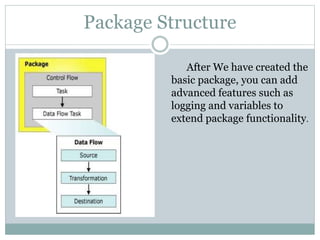
Package Structure
After We have created the
basic package, you can add
advanced features such as
logging and variables to
extend package functionality.
Package Content
 Control Flow
 Data Flow
 Data Flow Task
Control Flow
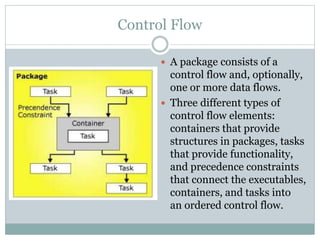
 A package consists of a
control flow and, optionally,
one or more data flows.
 Three different types of
control flow elements:
containers that provide
structures in packages, tasks
that provide functionality,
and precedence constraints
that connect the executables,
containers, and tasks into
an ordered control flow.
Data Flow
 Data flow components: sources, transformations,
and destinations.
 Sources extract data from data stores such as
tables and views in relational databases, files,
and Analysis Services databases.
 Transformations modify, summarize, and clean
data. Destinations load data into data stores or
create in-memory datasets.
Data Flow Task
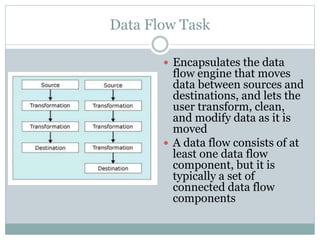
 Encapsulates the data
flow engine that moves
data between sources and
destinations, and lets the
user transform, clean,
and modify data as it is
moved
 A data flow consists of at
least one data flow
component, but it is
typically a set of
connected data flow
components
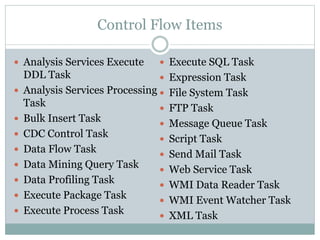
Control Flow Items
 Analysis Services Execute
DDL Task
 Analysis Services Processing
Task
 Bulk Insert Task
 CDC Control Task
 Data Flow Task
 Data Mining Query Task
 Data Profiling Task
 Execute Package Task
 Execute Process Task
 Execute SQL Task
 Expression Task
 File System Task
 FTP Task
 Message Queue Task
 Script Task
 Send Mail Task
 Web Service Task
 WMI Data Reader Task
 WMI Event Watcher Task
 XML Task
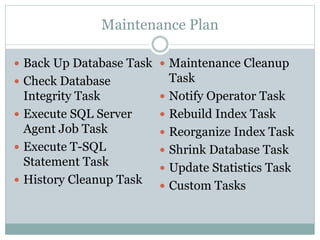
Maintenance Plan
 Back Up Database Task
 Check Database
Integrity Task
 Execute SQL Server
Agent Job Task
 Execute T-SQL
Statement Task
 History Cleanup Task
 Maintenance Cleanup
Task
 Notify Operator Task
 Rebuild Index Task
 Reorganize Index Task
 Shrink Database Task
 Update Statistics Task
 Custom Tasks
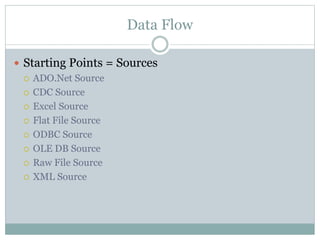
Data Flow
 Starting Points = Sources
 ADO.Net Source
 CDC Source
 Excel Source
 Flat File Source
 ODBC Source
 OLE DB Source
 Raw File Source
 XML Source
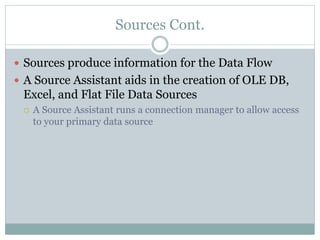
Sources Cont.
 Sources produce information for the Data Flow
 A Source Assistant aids in the creation of OLE DB,
Excel, and Flat File Data Sources
 A Source Assistant runs a connection manager to allow access
to your primary data source
Data Flow Transformations
 Transformations are large scale modifications of the data
in the data source.
 Examples are:
 Aggregate (Sum, Average, etc.)
 Audit (Add columns to determine run info)
 Cache Transform (Populates a cache for a lookup)
 CDC Splitter (Enables CDC processing on the Source)
 Character Map (Modifies character based columns)
 Conditional Split (Splits data into multiple outputs)
 Copy Column (Copies over columns to new ones)
 Data Conversion (Converts columns to another data type)
 Data Mining Query (Executes a DMX query on the Data Flow)
 Derived Column (Creates columns from an expression)
Character Map Transformations
 Character Map transformations enables us to modify the contents of
character-based columns. The modification can be placed in the data flow
in place of the original column, or can be added to the data flow as a new
column.
 Lowercase - changes all characters to lowercase
 Uppercase - changes all characters to lowercase
 Byte Reversal - reverses the order of each character
 Hiragana - maps Katakana characters to Hiragana characters
 Katakana - maps all hiragana characters to Katakana characters
 Half width - changes double byte characters to single byte characters
 Full width - changes single byte characters to double byte characters
 Linguistic casing - applies linguistic casing rules instead of system casing
rules
 Simplified Chinese – maps traditional Chinese to simplified Chinese
 Traditional Chinese – maps simplified Chinese to traditional Chinese
Transformations
Conditional Split -Enables us to split the data flow into multiple
outputs.
Copy Column - enables us to create new columns in the data flow
that are copies of existing columns
Data Conversion - Enables us to convert columns from one data
type to another
Data Mining Query - enables us to execute a DMX query on the
data flow.
Derived Column - enables is to create a value derived from an
expression
DQS Cleaning – Enables us to use a data quality knowledgebase
managed by SQL Server Data Quality Services to evaluate and
cleanse our data
Transformations
 Export Column – allows us to take the content of a text or image
column and write it out to a file
 Fussy Grouping – enables us to find groups of rows in the data flow
based on non-exact matches
 Fuzzy Lookup – enables us to lookup values using fuzzy matching logic
 Import Column – enables us to take the content of a set of files and
insert it into a text or image column in the data flow
 Lookup – works similarly to Fuzzy Lookup, Lookup however requires
exact matches, rather than using simplicity scores
 Merge – merges two data flows together. For this to work properly both
input data flows must be sorted in the same sort order
 Merge Join – enables us to merge two data flows together by executing
an inner join, a left outer join, or a full outer join
Transformations
 Multicast – enables us to take a single data flow and use it as the
input for several dataflow transformations or data flow
destination items
 OLE DQ Command – enables us to execute a SQL statement for
each row in the data flow
 Percentage sampling – enables us to split the data flow into two
separate flows based on a percentage
 Pivot – enables us to take normalized data and change it into a
less normalized structure
 Row Count – lets us determine the number of rows in a data flow
 Row Sampling – lets us split the data flow into two separate data
flows based on the number of rows desired
Transformations
 Script Component – lets us create a .NET code for execution as
part of our data flow
 Slowly Changing Dimension – enables us to use a data flow to
update the information in a slowly changing dimension of a data
mart
 Sort – enables us to sort rows of a data flow
 Term Extraction – enables us to extract a list of words and
phrases from a column containing freeform text
 Union All – enables us to merge several data flows in a single
data flow
 Unpivot – enables us to take a de-normalized data flow and turn
it into normalized data
Data Flow Destinations
 ADO.NET – enables us to use ADO.NET to connect to a data
destination
 Data Mining Model Training Destination – enables us to us a
data flow to train a data mining model
 DataReader Destination – exposes the data in a data flow to
external consumers using the ADO.NET Datareader interface
 Dimension Processing Destination – enables us to send a data
flow to process a dimension
 Excel Destination – enables us to send a data flow to an Excel
spreadsheet file
 Flat File Destination – enables us to send a data flow to a text file
 ODBC Destination – enables us to send a data flow to a ODBC
data source
Data Flow Destinations
 OLE DB Destination – enables us to send data flow to a OLE
DB compliant database
 Partition Processing Destination- enables us to send a data
flow to process a partition
 Raw File Destination – enables us to write a data flow to a raw
data file
 Recordset Destination – enables us to send a data flow to a
record set
 SQL Server Compact Destination – enables us to send a data
flow to a SQL Server Compact Database
 SQL Server Destination – allows us to quickly insert records
from a data flow into a SQL Server table or view
 Destination Assistant – aids you in the creation of OLE DB,
Excel, and flat file data sources

White jason presentation

  • 1.
    J A SO N W H I T E SQL Server Integration Services
  • 2.
    What is IntegrationServices?  Integration Services Microsoft Integration Services is a platform for building enterprise-level data integration and data transformations solutions.
  • 3.
    What is PackageStructure?  A package is an organized collection of connections, control flow elements, data flow elements, event handlers, variables, parameters, and configurations, that you assemble using either the graphical design tools that SQL Server Integration Services provides, or build programmatically.
  • 4.
    Package Structure After Wehave created the basic package, you can add advanced features such as logging and variables to extend package functionality.
  • 5.
    Package Content  ControlFlow  Data Flow  Data Flow Task
  • 6.
    Control Flow  Apackage consists of a control flow and, optionally, one or more data flows.  Three different types of control flow elements: containers that provide structures in packages, tasks that provide functionality, and precedence constraints that connect the executables, containers, and tasks into an ordered control flow.
  • 7.
    Data Flow  Dataflow components: sources, transformations, and destinations.  Sources extract data from data stores such as tables and views in relational databases, files, and Analysis Services databases.  Transformations modify, summarize, and clean data. Destinations load data into data stores or create in-memory datasets.
  • 8.
    Data Flow Task Encapsulates the data flow engine that moves data between sources and destinations, and lets the user transform, clean, and modify data as it is moved  A data flow consists of at least one data flow component, but it is typically a set of connected data flow components
  • 9.
    Control Flow Items Analysis Services Execute DDL Task  Analysis Services Processing Task  Bulk Insert Task  CDC Control Task  Data Flow Task  Data Mining Query Task  Data Profiling Task  Execute Package Task  Execute Process Task  Execute SQL Task  Expression Task  File System Task  FTP Task  Message Queue Task  Script Task  Send Mail Task  Web Service Task  WMI Data Reader Task  WMI Event Watcher Task  XML Task
  • 10.
    Maintenance Plan  BackUp Database Task  Check Database Integrity Task  Execute SQL Server Agent Job Task  Execute T-SQL Statement Task  History Cleanup Task  Maintenance Cleanup Task  Notify Operator Task  Rebuild Index Task  Reorganize Index Task  Shrink Database Task  Update Statistics Task  Custom Tasks
  • 11.
    Data Flow  StartingPoints = Sources  ADO.Net Source  CDC Source  Excel Source  Flat File Source  ODBC Source  OLE DB Source  Raw File Source  XML Source
  • 12.
    Sources Cont.  Sourcesproduce information for the Data Flow  A Source Assistant aids in the creation of OLE DB, Excel, and Flat File Data Sources  A Source Assistant runs a connection manager to allow access to your primary data source
  • 13.
    Data Flow Transformations Transformations are large scale modifications of the data in the data source.  Examples are:  Aggregate (Sum, Average, etc.)  Audit (Add columns to determine run info)  Cache Transform (Populates a cache for a lookup)  CDC Splitter (Enables CDC processing on the Source)  Character Map (Modifies character based columns)  Conditional Split (Splits data into multiple outputs)  Copy Column (Copies over columns to new ones)  Data Conversion (Converts columns to another data type)  Data Mining Query (Executes a DMX query on the Data Flow)  Derived Column (Creates columns from an expression)
  • 14.
    Character Map Transformations Character Map transformations enables us to modify the contents of character-based columns. The modification can be placed in the data flow in place of the original column, or can be added to the data flow as a new column.  Lowercase - changes all characters to lowercase  Uppercase - changes all characters to lowercase  Byte Reversal - reverses the order of each character  Hiragana - maps Katakana characters to Hiragana characters  Katakana - maps all hiragana characters to Katakana characters  Half width - changes double byte characters to single byte characters  Full width - changes single byte characters to double byte characters  Linguistic casing - applies linguistic casing rules instead of system casing rules  Simplified Chinese – maps traditional Chinese to simplified Chinese  Traditional Chinese – maps simplified Chinese to traditional Chinese
  • 15.
    Transformations Conditional Split -Enablesus to split the data flow into multiple outputs. Copy Column - enables us to create new columns in the data flow that are copies of existing columns Data Conversion - Enables us to convert columns from one data type to another Data Mining Query - enables us to execute a DMX query on the data flow. Derived Column - enables is to create a value derived from an expression DQS Cleaning – Enables us to use a data quality knowledgebase managed by SQL Server Data Quality Services to evaluate and cleanse our data
  • 16.
    Transformations  Export Column– allows us to take the content of a text or image column and write it out to a file  Fussy Grouping – enables us to find groups of rows in the data flow based on non-exact matches  Fuzzy Lookup – enables us to lookup values using fuzzy matching logic  Import Column – enables us to take the content of a set of files and insert it into a text or image column in the data flow  Lookup – works similarly to Fuzzy Lookup, Lookup however requires exact matches, rather than using simplicity scores  Merge – merges two data flows together. For this to work properly both input data flows must be sorted in the same sort order  Merge Join – enables us to merge two data flows together by executing an inner join, a left outer join, or a full outer join
  • 17.
    Transformations  Multicast –enables us to take a single data flow and use it as the input for several dataflow transformations or data flow destination items  OLE DQ Command – enables us to execute a SQL statement for each row in the data flow  Percentage sampling – enables us to split the data flow into two separate flows based on a percentage  Pivot – enables us to take normalized data and change it into a less normalized structure  Row Count – lets us determine the number of rows in a data flow  Row Sampling – lets us split the data flow into two separate data flows based on the number of rows desired
  • 18.
    Transformations  Script Component– lets us create a .NET code for execution as part of our data flow  Slowly Changing Dimension – enables us to use a data flow to update the information in a slowly changing dimension of a data mart  Sort – enables us to sort rows of a data flow  Term Extraction – enables us to extract a list of words and phrases from a column containing freeform text  Union All – enables us to merge several data flows in a single data flow  Unpivot – enables us to take a de-normalized data flow and turn it into normalized data
  • 19.
    Data Flow Destinations ADO.NET – enables us to use ADO.NET to connect to a data destination  Data Mining Model Training Destination – enables us to us a data flow to train a data mining model  DataReader Destination – exposes the data in a data flow to external consumers using the ADO.NET Datareader interface  Dimension Processing Destination – enables us to send a data flow to process a dimension  Excel Destination – enables us to send a data flow to an Excel spreadsheet file  Flat File Destination – enables us to send a data flow to a text file  ODBC Destination – enables us to send a data flow to a ODBC data source
  • 20.
    Data Flow Destinations OLE DB Destination – enables us to send data flow to a OLE DB compliant database  Partition Processing Destination- enables us to send a data flow to process a partition  Raw File Destination – enables us to write a data flow to a raw data file  Recordset Destination – enables us to send a data flow to a record set  SQL Server Compact Destination – enables us to send a data flow to a SQL Server Compact Database  SQL Server Destination – allows us to quickly insert records from a data flow into a SQL Server table or view  Destination Assistant – aids you in the creation of OLE DB, Excel, and flat file data sources