1
Implementation of TPT
connection in
Informatica
Author: Yagya Dutt Sharma
Mentor: Deepan Chakravarthy Mahadevan
2
Introduction:
Teradata Parallel Transporter is one example of products working together within an
active data warehouse. This new-generation product simplifies the data loading process by
running the protocols used by each of the Teradata Load and Unload Utilities as modules or
operators: load, update, export and stream.
Unlike conventional utilities and products in which multiple data sources are usually processed
in a serial manner, Teradata Parallel Transporter can access multiple data sources in parallel.
This ability can lead to increased throughput. Teradata Parallel Transporter also allows different
specifications for different data sources and, if their data is UNION-compatible, merges them
together.
Teradata Parallel Transporter was designed for increased functionality and customer ease of use
for faster, easier and deeper integration. The capabilities include:
 Simplified data transfer between one Teradata Database and another; only one script is
required to export from the production-and-load test system.
 Ability to load dozens of files using a single script makes development and maintenance
of the data warehouse easier.
 Distribution of workloads across CPUs on the load server eliminates bottlenecks in the
data load process. Data flows through multiple instances of UPDATE OPERATOR and in-
memory data streams to update tables.
 Option is available to export data to in-memory data stream instead of landing data.
 The open database connectivity (ODBC) operator reads from the ODBC driver, which
could pull data from any database; for example, DB2 or Oracle.
 Multiple operators can scan directories for files to load and can combine the data in the
in-memory data stream with UNION ALL operation and stream operator loads.
 Script-building wizard is available to aid first-time users.
Scenario:
An Informatica mapping with a one to one mapping to load data from file to a stage table
(intermediate table) with fast load (loader) connection was taking six plus hours to load 7 million
records.
3
Reason:
The fast loader creates a BTEQ script in the background. The fast loader is fast but does
a serial processing which would be slower to process 7 million records. As our source is a flat
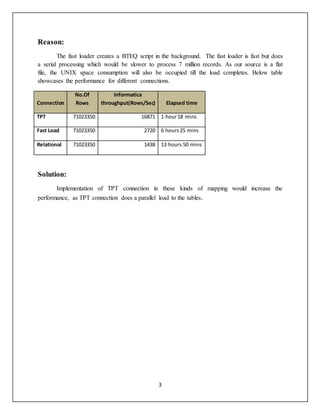
file, the UNIX space consumption will also be occupied till the load completes. Below table
showcases the performance for different connections.
Connection
No.Of
Rows
Informatica
throughput(Rows/Sec) Elapsed time
TPT 71023350 16871 1 hour18 mins
Fast Load 71023350 2720 6 hours25 mins
Relational 71023350 1438 13 hours 50 mins
Solution:
Implementation of TPT connection in these kinds of mapping would increase the
performance, as TPT connection does a parallel load to the tables.
4
Steps to follow:
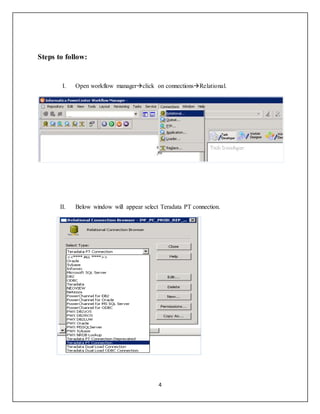
I. Open workflow managerclick on connectionsRelational.
II. Below window will appear select Teradata PT connection.
5
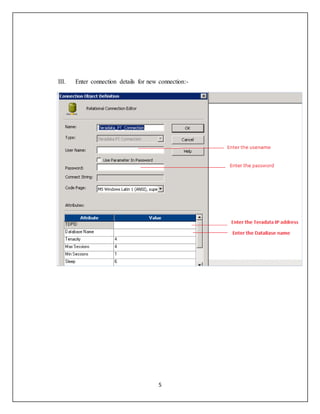
III. Enter connection details for new connection:-
6
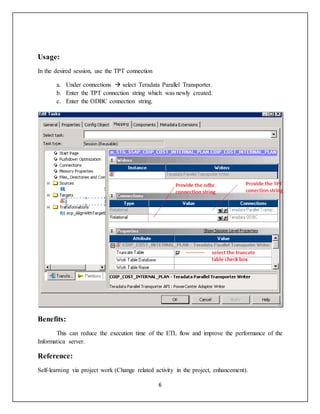
Usage:
In the desired session, use the TPT connection
a. Under connections  select Teradata Parallel Transporter.
b. Enter the TPT connection string which was newly created.
c. Enter the ODBC connection string.
Benefits:
This can reduce the execution time of the ETL flow and improve the performance of the
Informatica server.
Reference:
Self-learning via project work (Change related activity in the project, enhancement).

TPT connection Implementation in Informatica

  • 1.
    1 Implementation of TPT connectionin Informatica Author: Yagya Dutt Sharma Mentor: Deepan Chakravarthy Mahadevan
  • 2.
    2 Introduction: Teradata Parallel Transporteris one example of products working together within an active data warehouse. This new-generation product simplifies the data loading process by running the protocols used by each of the Teradata Load and Unload Utilities as modules or operators: load, update, export and stream. Unlike conventional utilities and products in which multiple data sources are usually processed in a serial manner, Teradata Parallel Transporter can access multiple data sources in parallel. This ability can lead to increased throughput. Teradata Parallel Transporter also allows different specifications for different data sources and, if their data is UNION-compatible, merges them together. Teradata Parallel Transporter was designed for increased functionality and customer ease of use for faster, easier and deeper integration. The capabilities include:  Simplified data transfer between one Teradata Database and another; only one script is required to export from the production-and-load test system.  Ability to load dozens of files using a single script makes development and maintenance of the data warehouse easier.  Distribution of workloads across CPUs on the load server eliminates bottlenecks in the data load process. Data flows through multiple instances of UPDATE OPERATOR and in- memory data streams to update tables.  Option is available to export data to in-memory data stream instead of landing data.  The open database connectivity (ODBC) operator reads from the ODBC driver, which could pull data from any database; for example, DB2 or Oracle.  Multiple operators can scan directories for files to load and can combine the data in the in-memory data stream with UNION ALL operation and stream operator loads.  Script-building wizard is available to aid first-time users. Scenario: An Informatica mapping with a one to one mapping to load data from file to a stage table (intermediate table) with fast load (loader) connection was taking six plus hours to load 7 million records.
  • 3.
    3 Reason: The fast loadercreates a BTEQ script in the background. The fast loader is fast but does a serial processing which would be slower to process 7 million records. As our source is a flat file, the UNIX space consumption will also be occupied till the load completes. Below table showcases the performance for different connections. Connection No.Of Rows Informatica throughput(Rows/Sec) Elapsed time TPT 71023350 16871 1 hour18 mins Fast Load 71023350 2720 6 hours25 mins Relational 71023350 1438 13 hours 50 mins Solution: Implementation of TPT connection in these kinds of mapping would increase the performance, as TPT connection does a parallel load to the tables.
  • 4.
    4 Steps to follow: I.Open workflow managerclick on connectionsRelational. II. Below window will appear select Teradata PT connection.
  • 5.
    5 III. Enter connectiondetails for new connection:-
  • 6.
    6 Usage: In the desiredsession, use the TPT connection a. Under connections  select Teradata Parallel Transporter. b. Enter the TPT connection string which was newly created. c. Enter the ODBC connection string. Benefits: This can reduce the execution time of the ETL flow and improve the performance of the Informatica server. Reference: Self-learning via project work (Change related activity in the project, enhancement).