Informatica :
• TARGET OBJECTS
• TARGET ODBC CONNECTION CREATION
• TARGT IMPORT
• MANUAL TARGET CRETION
• AUTOMATIC TARET CRATION
• TRANSFORMATIONS
• DIFFERENT TYPES OF TRANSFORMATIONS
• FILTER TRANSFORMATION
• SECOND MAPPING
• CREATE RELATIONAL CONNECTION
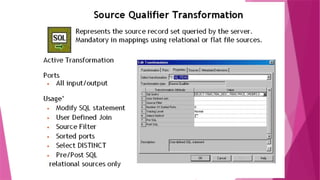
• SOURCE QUALIFIER OVERVIEW
Creating Target Definitions
Methods of creating Target Definitions
 Import from relational database ( Table)
 Import from Flat File
 Import from XML object
 Create automatically from a source definition
 Create manually (flat file or relational database)
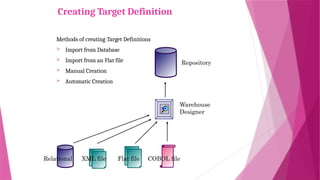
Creating Target Definition
Methods of creating Target Definitions
 Import from Database
 Import from an Flat file
 Manual Creation
 Automatic Creation
Repository
Relational Flat file COBOL file
XML file
Warehouse
Designer
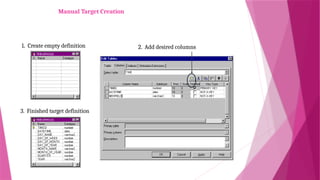
2. Add desired columns
Manual Target Creation
1. Create empty definition
3. Finished target definition
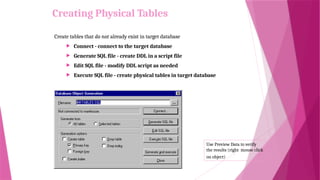
Create tables that do not already exist in target database
 Connect - connect to the target database
 Generate SQL file - create DDL in a script file
 Edit SQL file - modify DDL script as needed
 Execute SQL file - create physical tables in target database
Use Preview Data to verify
the results (right mouse click
on object)
Creating Physical Tables
What is a transformation?
 A transformation is repository object that generates, modifies and/or
passes data to other repository object.
 The Designer provides a set of transformations that perform specific
functions.
 Transformations in a mapping represent the operations the Integration
Service performs on data.
 Data passes into and out of transformations through ports that you
connect in a Mapping or Mapplet.
 Transformations can be active or passive and Connected or
unconnected.
Transformation Types
 Active Transformation
 The number of rows that pass through this transformation change, i.e.
Number of rows in the transformation may or may not be equal to
number of rows out of the transformation
 Example – Number of rows coming in Filter transformation may be 10.
But depending on condition, number of rows out of Filter can be
anywhere between Zero and 10
 Passive Transformation
 The number of rows into the transformation is always equal to
number of rows out of the transformation
 Example – Number of rows into Expression is always equal to number
of rows out of the transformation
Transformation Types
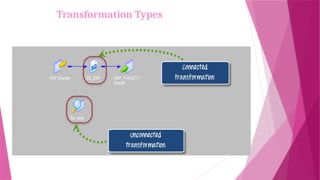
 Connected Transformation
 The transformation is which connected to other Transformation in the
data flow Mapping.
 Example – All The transformations are connected transformations.
 Unconnected Transformation
 An unconnected transformation is not connected to other
transformations in the mapping. An unconnected transformation is
called within another transformation, and returns a value to that
transformation.
 Example – Lookup and Stored Procedure Transformation can be used
as unconnected Transformations.
Transformation Types
Transformation Type Description
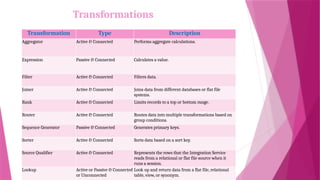
Aggregator Active & Connected Performs aggregate calculations.
Expression Passive & Connected Calculates a value.
Filter Active & Connected Filters data.
Joiner Active & Connected Joins data from different databases or flat file
systems.
Rank Active & Connected Limits records to a top or bottom range.
Router Active & Connected Routes data into multiple transformations based on
group conditions.
Sequence Generator Passive & Connected Generates primary keys.
Sorter Active & Connected Sorts data based on a sort key.
Source Qualifier Active & Connected Represents the rows that the Integration Service
reads from a relational or flat file source when it
runs a session.
Lookup Active or Passive & Connected
or Unconnected
Look up and return data from a flat file, relational
table, view, or synonym.
Transformations
Transformation Type Description
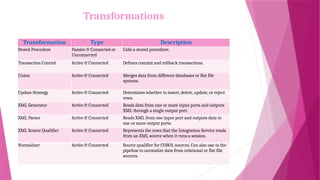
Stored Procedure Passive & Connected or
Unconnected
Calls a stored procedure.
Transaction Control Active & Connected Defines commit and rollback transactions.
Union Active & Connected Merges data from different databases or flat file
systems.
Update Strategy Active & Connected Determines whether to insert, delete, update, or reject
rows.
XML Generator Active & Connected Reads data from one or more input ports and outputs
XML through a single output port.
XML Parser Active & Connected Reads XML from one input port and outputs data to
one or more output ports.
XML Source Qualifier Active & Connected Represents the rows that the Integration Service reads
from an XML source when it runs a session.
Normalizer Active & Connected Source qualifier for COBOL sources. Can also use in the
pipeline to normalize data from relational or flat file
sources.
Transformations
Transformation Views
A transformation has
three views:
 Iconized - shows the
transformation in relation
to the rest of the mapping
 Normal - shows the flow
of data through the
transformation
 Edit - shows
transformation ports and
properties; allows editing
Transformation Normal View
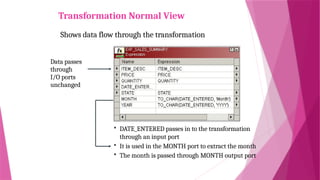
Shows data flow through the transformation
Data passes
through
I/O ports
unchanged
 DATE_ENTERED passes in to the transformation
through an input port
 It is used in the MONTH port to extract the month
 The month is passed through MONTH output port
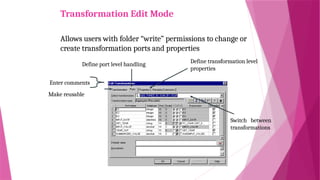
Transformation Edit Mode
Allows users with folder “write” permissions to change or
create transformation ports and properties
Switch between
transformations
Define transformation level
properties
Define port level handling
Enter comments
Make reusable
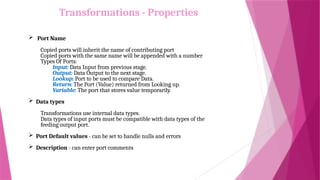
Transformations - Properties
 Port Name
Copied ports will inherit the name of contributing port
Copied ports with the same name will be appended with a number
Types Of Ports:
Input: Data Input from previous stage.
Output: Data Output to the next stage.
Lookup: Port to be used to compare Data.
Return: The Port (Value) returned from Looking up.
Variable: The port that stores value temporarily.
 Data types
Transformations use internal data types.
Data types of input ports must be compatible with data types of the
feeding output port.
 Port Default values - can be set to handle nulls and errors
 Description - can enter port comments
Filter Transformation
 It provides the means for filtering rows in a mapping.
 All ports in a Filter transformation are input/output.
 Only rows that meet the condition pass through it.
 Cannot concatenate ports from more than one transformation into the Filter transformation.
 To maximize session performance, include the Filter transformation as close to the sources
in the mapping as possible.
 Does not allow setting output default values.
!! Filter should always be used as close to the Source, so that the Load of
data carried ahead is decreased at / or near to the Source Itself.
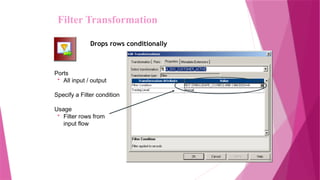
Ports
• All input / output
Specify a Filter condition
Usage
• Filter rows from
input flow
Drops rows conditionally
Filter Transformation
• SALARY > 30000
• SALARY > 30000 AND SALARY < 100000
• IIF(ISNULL(FIRST_NAME),FALSE,TRUE)
• To filter rows containing null values or spaces, use
the ISNULL and IS_SPACES functions to test the
value of the port. For example, if you want to filter
out rows that contain NULL value in the
FIRST_NAME port, use the following condition:
• IIF(ISNULL(FIRST_NAME),FALSE,TRUE)This
condition states that if the FIRST_NAME port is
NULL, the return value is FALSE and the row should
be discarded. Otherwise, the row passes through to
the next transformation
Filter Transformation Examples
SESSION-5 Targets and Filter Transformation.pptx

SESSION-5 Targets and Filter Transformation.pptx

  • 1.
    Informatica : • TARGETOBJECTS • TARGET ODBC CONNECTION CREATION • TARGT IMPORT • MANUAL TARGET CRETION • AUTOMATIC TARET CRATION • TRANSFORMATIONS • DIFFERENT TYPES OF TRANSFORMATIONS • FILTER TRANSFORMATION • SECOND MAPPING • CREATE RELATIONAL CONNECTION • SOURCE QUALIFIER OVERVIEW
  • 3.
    Creating Target Definitions Methodsof creating Target Definitions  Import from relational database ( Table)  Import from Flat File  Import from XML object  Create automatically from a source definition  Create manually (flat file or relational database)
  • 4.
    Creating Target Definition Methodsof creating Target Definitions  Import from Database  Import from an Flat file  Manual Creation  Automatic Creation Repository Relational Flat file COBOL file XML file Warehouse Designer
  • 5.
    2. Add desiredcolumns Manual Target Creation 1. Create empty definition 3. Finished target definition
  • 6.
    Create tables thatdo not already exist in target database  Connect - connect to the target database  Generate SQL file - create DDL in a script file  Edit SQL file - modify DDL script as needed  Execute SQL file - create physical tables in target database Use Preview Data to verify the results (right mouse click on object) Creating Physical Tables
  • 7.
    What is atransformation?  A transformation is repository object that generates, modifies and/or passes data to other repository object.  The Designer provides a set of transformations that perform specific functions.  Transformations in a mapping represent the operations the Integration Service performs on data.  Data passes into and out of transformations through ports that you connect in a Mapping or Mapplet.  Transformations can be active or passive and Connected or unconnected.
  • 8.
    Transformation Types  ActiveTransformation  The number of rows that pass through this transformation change, i.e. Number of rows in the transformation may or may not be equal to number of rows out of the transformation  Example – Number of rows coming in Filter transformation may be 10. But depending on condition, number of rows out of Filter can be anywhere between Zero and 10  Passive Transformation  The number of rows into the transformation is always equal to number of rows out of the transformation  Example – Number of rows into Expression is always equal to number of rows out of the transformation
  • 9.
    Transformation Types  ConnectedTransformation  The transformation is which connected to other Transformation in the data flow Mapping.  Example – All The transformations are connected transformations.  Unconnected Transformation  An unconnected transformation is not connected to other transformations in the mapping. An unconnected transformation is called within another transformation, and returns a value to that transformation.  Example – Lookup and Stored Procedure Transformation can be used as unconnected Transformations.
  • 10.
  • 11.
    Transformation Type Description AggregatorActive & Connected Performs aggregate calculations. Expression Passive & Connected Calculates a value. Filter Active & Connected Filters data. Joiner Active & Connected Joins data from different databases or flat file systems. Rank Active & Connected Limits records to a top or bottom range. Router Active & Connected Routes data into multiple transformations based on group conditions. Sequence Generator Passive & Connected Generates primary keys. Sorter Active & Connected Sorts data based on a sort key. Source Qualifier Active & Connected Represents the rows that the Integration Service reads from a relational or flat file source when it runs a session. Lookup Active or Passive & Connected or Unconnected Look up and return data from a flat file, relational table, view, or synonym. Transformations
  • 12.
    Transformation Type Description StoredProcedure Passive & Connected or Unconnected Calls a stored procedure. Transaction Control Active & Connected Defines commit and rollback transactions. Union Active & Connected Merges data from different databases or flat file systems. Update Strategy Active & Connected Determines whether to insert, delete, update, or reject rows. XML Generator Active & Connected Reads data from one or more input ports and outputs XML through a single output port. XML Parser Active & Connected Reads XML from one input port and outputs data to one or more output ports. XML Source Qualifier Active & Connected Represents the rows that the Integration Service reads from an XML source when it runs a session. Normalizer Active & Connected Source qualifier for COBOL sources. Can also use in the pipeline to normalize data from relational or flat file sources. Transformations
  • 13.
    Transformation Views A transformationhas three views:  Iconized - shows the transformation in relation to the rest of the mapping  Normal - shows the flow of data through the transformation  Edit - shows transformation ports and properties; allows editing
  • 14.
    Transformation Normal View Showsdata flow through the transformation Data passes through I/O ports unchanged  DATE_ENTERED passes in to the transformation through an input port  It is used in the MONTH port to extract the month  The month is passed through MONTH output port
  • 15.
    Transformation Edit Mode Allowsusers with folder “write” permissions to change or create transformation ports and properties Switch between transformations Define transformation level properties Define port level handling Enter comments Make reusable
  • 16.
    Transformations - Properties Port Name Copied ports will inherit the name of contributing port Copied ports with the same name will be appended with a number Types Of Ports: Input: Data Input from previous stage. Output: Data Output to the next stage. Lookup: Port to be used to compare Data. Return: The Port (Value) returned from Looking up. Variable: The port that stores value temporarily.  Data types Transformations use internal data types. Data types of input ports must be compatible with data types of the feeding output port.  Port Default values - can be set to handle nulls and errors  Description - can enter port comments
  • 17.
  • 18.
    Filter Transformation  Itprovides the means for filtering rows in a mapping.  All ports in a Filter transformation are input/output.  Only rows that meet the condition pass through it.  Cannot concatenate ports from more than one transformation into the Filter transformation.  To maximize session performance, include the Filter transformation as close to the sources in the mapping as possible.  Does not allow setting output default values. !! Filter should always be used as close to the Source, so that the Load of data carried ahead is decreased at / or near to the Source Itself.
  • 19.
    Ports • All input/ output Specify a Filter condition Usage • Filter rows from input flow Drops rows conditionally Filter Transformation
  • 20.
    • SALARY >30000 • SALARY > 30000 AND SALARY < 100000 • IIF(ISNULL(FIRST_NAME),FALSE,TRUE) • To filter rows containing null values or spaces, use the ISNULL and IS_SPACES functions to test the value of the port. For example, if you want to filter out rows that contain NULL value in the FIRST_NAME port, use the following condition: • IIF(ISNULL(FIRST_NAME),FALSE,TRUE)This condition states that if the FIRST_NAME port is NULL, the return value is FALSE and the row should be discarded. Otherwise, the row passes through to the next transformation Filter Transformation Examples

Editor's Notes

  • #3 The methods of creating target schema, which will be discussed on the next slides, are: Automatic Creation Import from Database Manual Creation Transfer from data modeling tools via PowerPlugs
  • #6 When the Designer generates the SQL code, it uses generic SQL, not the platform-specific version of the DDL code. The Designer passes these instructions to the ODBC Driver Manager, which converts this "plain brown wrapper" version of SQL into platform-specific commands. Therefore, you should not try to run these .SQL files through a different utility, nor should you use the syntax that the Designer generates as a guide to the native DDL syntax used in a particular database platform. After executing the SQL code through the Warehouse Designer, always check the output screen to ensure the SQL statements were properly processed.
  • #18 As an active transformation, the Filter transformation may change the number of rows passed through it. A filter condition returns TRUE or FALSE for each row that passes through the transformation, depending on whether a row meets the specified condition. Only rows that return TRUE pass through this transformation. Discarded rows do not appear in the session log or reject files. To maximize session performance, include the Filter transformation as close to the sources in the mapping as possible. Rather than passing rows you plan to discard through the mapping, you then filter out unwanted data early in the flow of data from sources to targets. You cannot concatenate ports from more than one transformation into the Filter transformation. The input ports for the filter must come from a single transformation. The Filter transformation does not allow setting output default values.