
A research on iPad:
device & experience design


        wyl2000@gmail.com
        http://www.v2000.info
Content
 • What is iPad?
    – iPad: Data & Facts
 • What make iPad special & why need to develop a
   Native APP?
    – Hardware & Specification
    – How people use iPad
 • A Primary Learning on iPad UI & UX design
    – iPad Device Characteristics
    – New UI Elements and Behaviors
    – A “CARS” Shopping Experience Strategy
 • Appendix
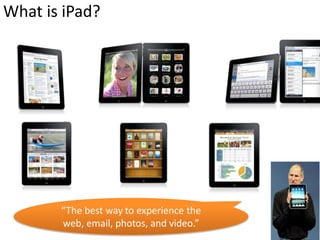
What is iPad?


       “The best way to experience the
       web, email, photos, and video.”
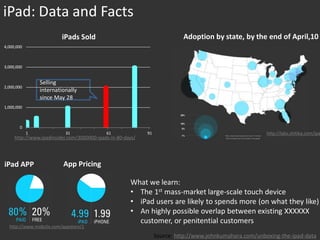
iPad: Data and Facts
                         iPads Sold                                        Adoption by state, by the end of April,10
4,000,000


3,000,000


                Selling
2,000,000
                internationally
                since May 28
1,000,000


       0
            1             31                61              91                                           http://labs.chitika.com/ipa
     http://www.ipadinsider.com/3000000-ipads-in-80-days/


iPad APP                  App Pricing

                                                      What we learn:
                                                      • The 1st mass-market large-scale touch device
                                                      • iPad users are likely to spends more (on what they like)
                                                      • An highly possible overlap between existing XXXXXX
                                                        customer, or penitential customers
  http://www.mobclix.com/appstore/1
                                                                 Source: http://www.johnkumahara.com/unboxing-the-ipad-data
What make iPad special
& why need to develop a Native APP?

• Hardware & Specifications
• How people use iPad

iPad vs. iPhone vs. PC
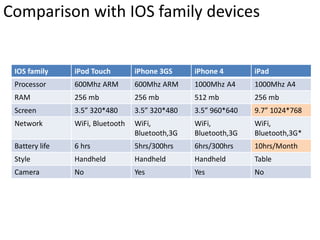
Comparison with IOS family devices


 IOS family     iPod Touch        iPhone 3GS     iPhone 4       iPad
 Processor      600Mhz ARM        600Mhz ARM     1000Mhz A4     1000Mhz A4
 RAM            256 mb            256 mb         512 mb         256 mb
 Screen         3.5” 320*480      3.5” 320*480   3.5” 960*640   9.7” 1024*768
 Network        WiFi, Bluetooth   WiFi,          WiFi,          WiFi,
                                  Bluetooth,3G   Bluetooth,3G   Bluetooth,3G*
 Battery life   6 hrs             5hrs/300hrs    6hrs/300hrs    10hrs/Month
 Style          Handheld          Handheld       Handheld       Table
 Camera         No                Yes            Yes            No
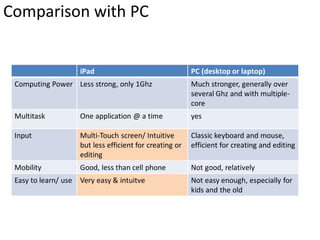
Comparison with PC


                    iPad                                 PC (desktop or laptop)
 Computing Power Less strong, only 1Ghz                  Much stronger, generally over
                                                         several Ghz and with multiple-
                                                         core
 Multitask          One application @ a time             yes

 Input              Multi-Touch screen/ Intuitive        Classic keyboard and mouse,
                    but less efficient for creating or   efficient for creating and editing
                    editing
 Mobility           Good, less than cell phone           Not good, relatively
 Easy to learn/ use Very easy & intuitve                 Not easy enough, especially for
                                                         kids and the old
How people use iPad?


  • Usage Examples
    – Environments
    – Situations
    – Social Interactions
  • A quick summery
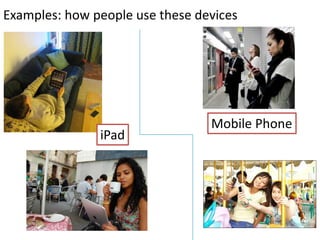
Examples: how people use these devices


                                 Mobile Phone
               iPad
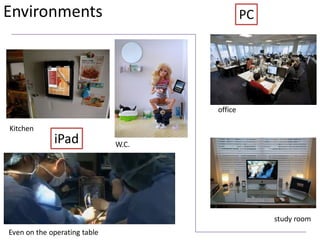
Environments                                  PC


                                     office

Kitchen
             iPad             W.C.


                                                   study room
Even on the operating table
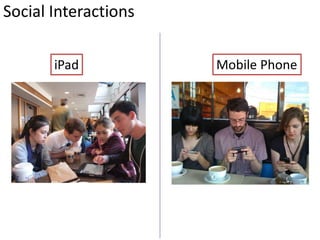
Social Interactions

       iPad           Mobile Phone
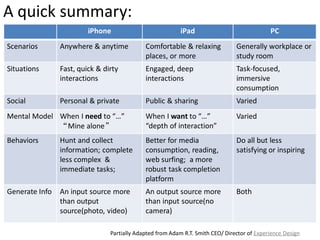
A quick summary:
                         iPhone                            iPad                              PC
Scenarios       Anywhere & anytime           Comfortable & relaxing             Generally workplace or
                                             places, or more                    study room
Situations      Fast, quick & dirty          Engaged, deep                      Task-focused,
                interactions                 interactions                       immersive
                                                                                consumption
Social          Personal & private           Public & sharing                   Varied
Mental Model When I need to “…”              When I want to “…”                 Varied
             “Mine alone”                    “depth of interaction”
Behaviors       Hunt and collect             Better for media                   Do all but less
                information; complete        consumption, reading,              satisfying or inspiring
                less complex &               web surfing; a more
                immediate tasks;             robust task completion
                                             platform
Generate Info   An input source more         An output source more              Both
                than output                  than input source(no
                source(photo, video)         camera)

                                Partially Adapted from Adam R.T. Smith CEO/ Director of Experience Design
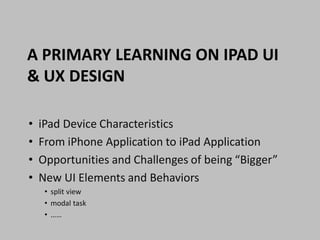
A PRIMARY LEARNING ON IPAD UI
& UX DESIGN

•   iPad Device Characteristics
•   From iPhone Application to iPad Application
•   Opportunities and Challenges of being “Bigger”
•   New UI Elements and Behaviors
     • split view
     • modal task
     • ……
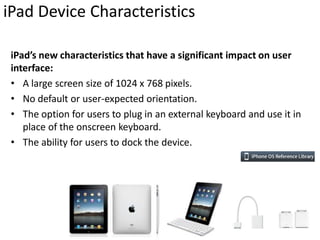
iPad Device Characteristics

 iPad’s new characteristics that have a significant impact on user
 interface:
 • A large screen size of 1024 x 768 pixels.
 • No default or user-expected orientation.
 • The option for users to plug in an external keyboard and use it in
    place of the onscreen keyboard.
 • The ability for users to dock the device.
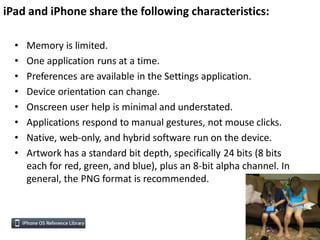
iPad and iPhone share the following characteristics:

  •   Memory is limited.
  •   One application runs at a time.
  •   Preferences are available in the Settings application.
  •   Device orientation can change.
  •   Onscreen user help is minimal and understated.
  •   Applications respond to manual gestures, not mouse clicks.
  •   Native, web-only, and hybrid software run on the device.
  •   Artwork has a standard bit depth, specifically 24 bits (8 bits
      each for red, green, and blue), plus an 8-bit alpha channel. In
      general, the PNG format is recommended.
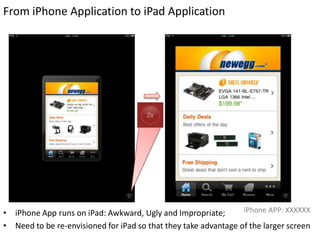
From iPhone Application to iPad Application


• iPhone App runs on iPad: Awkward, Ugly and Impropriate;        iPhone APP: XXXXXX

• Need to be re-envisioned for iPad so that they take advantage of the larger screen
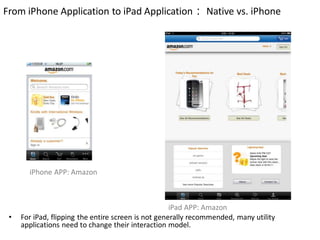
From iPhone Application to iPad Application: Native vs. iPhone


       iPhone APP: Amazon


                                                     iPad APP: Amazon
 •   For iPad, flipping the entire screen is not generally recommended, many utility
     applications need to change their interaction model.
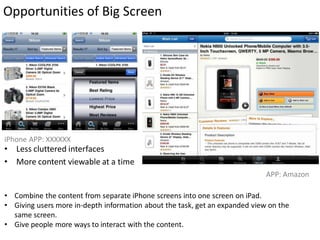
Opportunities of Big Screen


iPhone APP: XXXXXX
• Less cluttered interfaces
• More content viewable at a time
                                                                             APP: Amazon

• Combine the content from separate iPhone screens into one screen on iPad.
• Giving users more in-depth information about the task, get an expanded view on the
  same screen.
• Give people more ways to interact with the content.
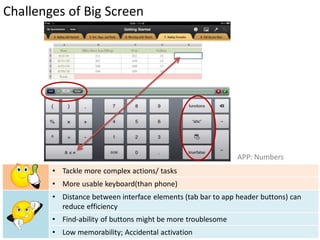
Challenges of Big Screen


                                                              APP: Numbers
        • Tackle more complex actions/ tasks
        • More usable keyboard(than phone)
        • Distance between interface elements (tab bar to app header buttons) can
          reduce efficiency
        • Find-ability of buttons might be more troublesome
        • Low memorability; Accidental activation
New UI Elements and Behaviors

•   Split view.
•   Popover.
•   Results list button.
•   Modal views have new presentation styles.
•   Toolbars can be in additional locations.
•   The edit menu can display custom items.
•   The keyboard view can be customized.
•   The keyboard view can include custom input accessories.
•   Custom text views can support text in multiple styles and offer
    advanced editing features.
Spilt-view Design

   Wish List                                                                                 Product Detail


                                                                                             APP: Amazon
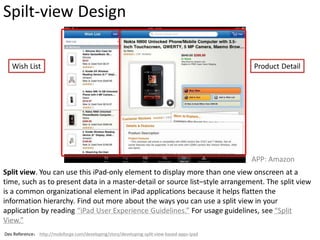
Split view. You can use this iPad-only element to display more than one view onscreen at a
time, such as to present data in a master-detail or source list–style arrangement. The split view
is a common organizational element in iPad applications because it helps flatten the
information hierarchy. Find out more about the ways you can use a split view in your
application by reading “iPad User Experience Guidelines.” For usage guidelines, see “Split
View.”
Dev Reference: http://mobiforge.com/developing/story/developing-split-view-based-apps-ipad
Modal View


                                                       APP: Mail
APP: Amazon


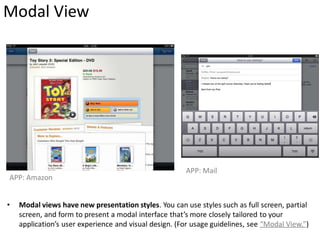
•   Modal views have new presentation styles. You can use styles such as full screen, partial
    screen, and form to present a modal interface that’s more closely tailored to your
    application’s user experience and visual design. (For usage guidelines, see “Modal View.”)
Popover


                               Contextual Popover


                                                                         APP: Amazon

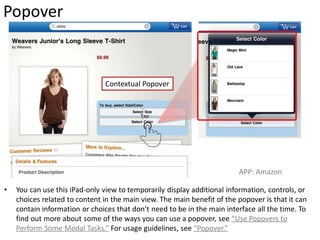
•   You can use this iPad-only view to temporarily display additional information, controls, or
    choices related to content in the main view. The main benefit of the popover is that it can
    contain information or choices that don’t need to be in the main interface all the time. To
    find out more about some of the ways you can use a popover, see “Use Popovers to
    Perform Some Modal Tasks.” For usage guidelines, see “Popover.”
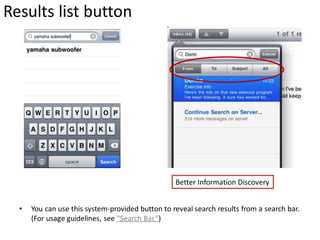
Results list button


                                                  Better Information Discovery


  •   You can use this system-provided button to reveal search results from a search bar.
      (For usage guidelines, see “Search Bar.”)
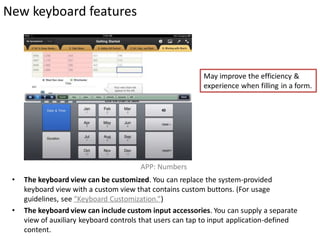
New keyboard features


                                                           May improve the efficiency &
                                                           experience when filling in a form.


                                        APP: Numbers
 •   The keyboard view can be customized. You can replace the system-provided
     keyboard view with a custom view that contains custom buttons. (For usage
     guidelines, see “Keyboard Customization.”)
 •   The keyboard view can include custom input accessories. You can supply a separate
     view of auxiliary keyboard controls that users can tap to input application-defined
     content.
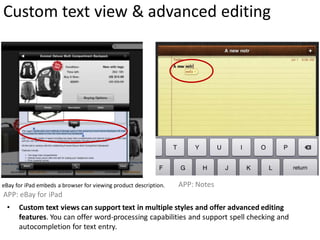
Custom text view & advanced editing


eBay for iPad embeds a browser for viewing product description.   APP: Notes
APP: eBay for iPad
 •    Custom text views can support text in multiple styles and offer advanced editing
      features. You can offer word-processing capabilities and support spell checking and
      autocompletion for text entry.
The iPad user experience guidelines
  •   Support All Orientations
  •   Enhance Interactivity (Don’t Just Add Features)
  •   Flatten Your Information Hierarchy
  •   Reduce Full-Screen Transitions
  •   Enable Collaboration and Connectedness
  •   Add Physicality and Heightened Realism
  •   Delight People with Stunning Graphics
  •   De-emphasize User Interface Controls
  •   Minimize Modality
  •   Rethink Your Lists
  •   Consider Multifinger Gestures
  •   Consider Popovers for Some Modal Tasks
  •   Restrict Complexity in Modal Tasks
  •   Downplay File-Handling Operations
  •   Ask People to Save Only When Necessary
  •   Start Instantly
  •   Always Be Prepared to Stop
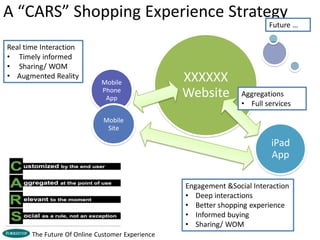
A “CARS” Shopping Experience Strategy
                                                                          Future …

Real time Interaction
• Timely informed
• Sharing/ WOM
• Augmented Reality
                             Mobile               XXXXXX
                             Phone
                              App                 Website         Aggregations
                                                                  • Full services

                              Mobile
                               Site

                                                                           iPad
                                                                           App

                                                  Engagement &Social Interaction
                                                  • Deep interactions
                                                  • Better shopping experience
                                                  • Informed buying
                                                  • Sharing/ WOM
       The Future Of Online Customer Experience
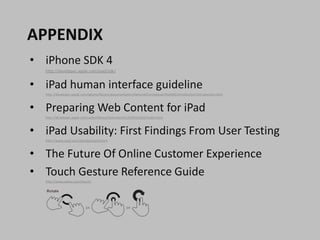
APPENDIX
• iPhone SDK 4
   http://developer.apple.com/ipad/sdk/


• iPad human interface guideline
   http://developer.apple.com/iphone/library/documentation/General/Conceptual/iPadHIG/Introduction/Introduction.html


• Preparing Web Content for iPad
   http://developer.apple.com/safari/library/technotes/tn2010/tn2262/index.html


• iPad Usability: First Findings From User Testing
   http://www.useit.com/alertbox/ipad.html


• The Future Of Online Customer Experience
• Touch Gesture Reference Guide
   http://www.lukew.com/touch/
THANK YOU!

 wyl2000@gmail.com
 http://www.v2000.info

A research on i pad device & experience design

  • 1.
    A research oniPad: device & experience design wyl2000@gmail.com http://www.v2000.info
  • 2.
    Content • Whatis iPad? – iPad: Data & Facts • What make iPad special & why need to develop a Native APP? – Hardware & Specification – How people use iPad • A Primary Learning on iPad UI & UX design – iPad Device Characteristics – New UI Elements and Behaviors – A “CARS” Shopping Experience Strategy • Appendix
  • 3.
    What is iPad? “The best way to experience the web, email, photos, and video.”
  • 4.
    iPad: Data andFacts iPads Sold Adoption by state, by the end of April,10 4,000,000 3,000,000 Selling 2,000,000 internationally since May 28 1,000,000 0 1 31 61 91 http://labs.chitika.com/ipa http://www.ipadinsider.com/3000000-ipads-in-80-days/ iPad APP App Pricing What we learn: • The 1st mass-market large-scale touch device • iPad users are likely to spends more (on what they like) • An highly possible overlap between existing XXXXXX customer, or penitential customers http://www.mobclix.com/appstore/1 Source: http://www.johnkumahara.com/unboxing-the-ipad-data
  • 5.
    What make iPadspecial & why need to develop a Native APP? • Hardware & Specifications • How people use iPad iPad vs. iPhone vs. PC
  • 6.
    Comparison with IOSfamily devices IOS family iPod Touch iPhone 3GS iPhone 4 iPad Processor 600Mhz ARM 600Mhz ARM 1000Mhz A4 1000Mhz A4 RAM 256 mb 256 mb 512 mb 256 mb Screen 3.5” 320*480 3.5” 320*480 3.5” 960*640 9.7” 1024*768 Network WiFi, Bluetooth WiFi, WiFi, WiFi, Bluetooth,3G Bluetooth,3G Bluetooth,3G* Battery life 6 hrs 5hrs/300hrs 6hrs/300hrs 10hrs/Month Style Handheld Handheld Handheld Table Camera No Yes Yes No
  • 7.
    Comparison with PC iPad PC (desktop or laptop) Computing Power Less strong, only 1Ghz Much stronger, generally over several Ghz and with multiple- core Multitask One application @ a time yes Input Multi-Touch screen/ Intuitive Classic keyboard and mouse, but less efficient for creating or efficient for creating and editing editing Mobility Good, less than cell phone Not good, relatively Easy to learn/ use Very easy & intuitve Not easy enough, especially for kids and the old
  • 8.
    How people useiPad? • Usage Examples – Environments – Situations – Social Interactions • A quick summery
  • 9.
    Examples: how peopleuse these devices Mobile Phone iPad
  • 10.
    Environments PC office Kitchen iPad W.C. study room Even on the operating table
  • 11.
    Social Interactions iPad Mobile Phone
  • 12.
    A quick summary: iPhone iPad PC Scenarios Anywhere & anytime Comfortable & relaxing Generally workplace or places, or more study room Situations Fast, quick & dirty Engaged, deep Task-focused, interactions interactions immersive consumption Social Personal & private Public & sharing Varied Mental Model When I need to “…” When I want to “…” Varied “Mine alone” “depth of interaction” Behaviors Hunt and collect Better for media Do all but less information; complete consumption, reading, satisfying or inspiring less complex & web surfing; a more immediate tasks; robust task completion platform Generate Info An input source more An output source more Both than output than input source(no source(photo, video) camera) Partially Adapted from Adam R.T. Smith CEO/ Director of Experience Design
  • 13.
    A PRIMARY LEARNINGON IPAD UI & UX DESIGN • iPad Device Characteristics • From iPhone Application to iPad Application • Opportunities and Challenges of being “Bigger” • New UI Elements and Behaviors • split view • modal task • ……
  • 14.
    iPad Device Characteristics iPad’s new characteristics that have a significant impact on user interface: • A large screen size of 1024 x 768 pixels. • No default or user-expected orientation. • The option for users to plug in an external keyboard and use it in place of the onscreen keyboard. • The ability for users to dock the device.
  • 15.
    iPad and iPhoneshare the following characteristics: • Memory is limited. • One application runs at a time. • Preferences are available in the Settings application. • Device orientation can change. • Onscreen user help is minimal and understated. • Applications respond to manual gestures, not mouse clicks. • Native, web-only, and hybrid software run on the device. • Artwork has a standard bit depth, specifically 24 bits (8 bits each for red, green, and blue), plus an 8-bit alpha channel. In general, the PNG format is recommended.
  • 16.
    From iPhone Applicationto iPad Application • iPhone App runs on iPad: Awkward, Ugly and Impropriate; iPhone APP: XXXXXX • Need to be re-envisioned for iPad so that they take advantage of the larger screen
  • 17.
    From iPhone Applicationto iPad Application: Native vs. iPhone iPhone APP: Amazon iPad APP: Amazon • For iPad, flipping the entire screen is not generally recommended, many utility applications need to change their interaction model.
  • 18.
    Opportunities of BigScreen iPhone APP: XXXXXX • Less cluttered interfaces • More content viewable at a time APP: Amazon • Combine the content from separate iPhone screens into one screen on iPad. • Giving users more in-depth information about the task, get an expanded view on the same screen. • Give people more ways to interact with the content.
  • 19.
    Challenges of BigScreen APP: Numbers • Tackle more complex actions/ tasks • More usable keyboard(than phone) • Distance between interface elements (tab bar to app header buttons) can reduce efficiency • Find-ability of buttons might be more troublesome • Low memorability; Accidental activation
  • 20.
    New UI Elementsand Behaviors • Split view. • Popover. • Results list button. • Modal views have new presentation styles. • Toolbars can be in additional locations. • The edit menu can display custom items. • The keyboard view can be customized. • The keyboard view can include custom input accessories. • Custom text views can support text in multiple styles and offer advanced editing features.
  • 21.
    Spilt-view Design Wish List Product Detail APP: Amazon Split view. You can use this iPad-only element to display more than one view onscreen at a time, such as to present data in a master-detail or source list–style arrangement. The split view is a common organizational element in iPad applications because it helps flatten the information hierarchy. Find out more about the ways you can use a split view in your application by reading “iPad User Experience Guidelines.” For usage guidelines, see “Split View.” Dev Reference: http://mobiforge.com/developing/story/developing-split-view-based-apps-ipad
  • 22.
    Modal View APP: Mail APP: Amazon • Modal views have new presentation styles. You can use styles such as full screen, partial screen, and form to present a modal interface that’s more closely tailored to your application’s user experience and visual design. (For usage guidelines, see “Modal View.”)
  • 23.
    Popover Contextual Popover APP: Amazon • You can use this iPad-only view to temporarily display additional information, controls, or choices related to content in the main view. The main benefit of the popover is that it can contain information or choices that don’t need to be in the main interface all the time. To find out more about some of the ways you can use a popover, see “Use Popovers to Perform Some Modal Tasks.” For usage guidelines, see “Popover.”
  • 24.
    Results list button Better Information Discovery • You can use this system-provided button to reveal search results from a search bar. (For usage guidelines, see “Search Bar.”)
  • 25.
    New keyboard features May improve the efficiency & experience when filling in a form. APP: Numbers • The keyboard view can be customized. You can replace the system-provided keyboard view with a custom view that contains custom buttons. (For usage guidelines, see “Keyboard Customization.”) • The keyboard view can include custom input accessories. You can supply a separate view of auxiliary keyboard controls that users can tap to input application-defined content.
  • 26.
    Custom text view& advanced editing eBay for iPad embeds a browser for viewing product description. APP: Notes APP: eBay for iPad • Custom text views can support text in multiple styles and offer advanced editing features. You can offer word-processing capabilities and support spell checking and autocompletion for text entry.
  • 27.
    The iPad userexperience guidelines • Support All Orientations • Enhance Interactivity (Don’t Just Add Features) • Flatten Your Information Hierarchy • Reduce Full-Screen Transitions • Enable Collaboration and Connectedness • Add Physicality and Heightened Realism • Delight People with Stunning Graphics • De-emphasize User Interface Controls • Minimize Modality • Rethink Your Lists • Consider Multifinger Gestures • Consider Popovers for Some Modal Tasks • Restrict Complexity in Modal Tasks • Downplay File-Handling Operations • Ask People to Save Only When Necessary • Start Instantly • Always Be Prepared to Stop
  • 28.
    A “CARS” ShoppingExperience Strategy Future … Real time Interaction • Timely informed • Sharing/ WOM • Augmented Reality Mobile XXXXXX Phone App Website Aggregations • Full services Mobile Site iPad App Engagement &Social Interaction • Deep interactions • Better shopping experience • Informed buying • Sharing/ WOM The Future Of Online Customer Experience
  • 29.
    APPENDIX • iPhone SDK4 http://developer.apple.com/ipad/sdk/ • iPad human interface guideline http://developer.apple.com/iphone/library/documentation/General/Conceptual/iPadHIG/Introduction/Introduction.html • Preparing Web Content for iPad http://developer.apple.com/safari/library/technotes/tn2010/tn2262/index.html • iPad Usability: First Findings From User Testing http://www.useit.com/alertbox/ipad.html • The Future Of Online Customer Experience • Touch Gesture Reference Guide http://www.lukew.com/touch/
  • 30.
    THANK YOU! wyl2000@gmail.com http://www.v2000.info