What is an eportfolio? 
What is it for?
• Assessment 
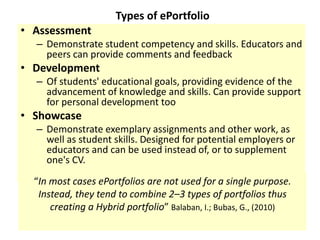
Types of ePortfolio 
– Demonstrate student competency and skills. Educators and 
peers can provide comments and feedback 
• Development 
– Of students' educational goals, providing evidence of the 
advancement of knowledge and skills. Can provide support 
for personal development too 
• Showcase 
– Demonstrate exemplary assignments and other work, as 
well as student skills. Designed for potential employers or 
educators and can be used instead of, or to supplement 
one's CV. 
“In most cases ePortfolios are not used for a single purpose. 
Instead, they tend to combine 2–3 types of portfolios thus 
creating a Hybrid portfolio” Balaban, I.; Bubas, G., (2010)
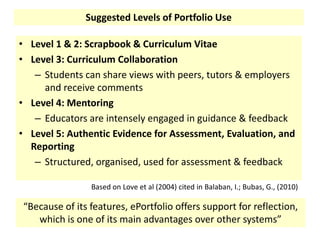
Suggested Levels of Portfolio Use 
• Level 1 & 2: Scrapbook & Curriculum Vitae 
• Level 3: Curriculum Collaboration 
– Students can share views with peers, tutors & employers 
and receive comments 
• Level 4: Mentoring 
– Educators are intensely engaged in guidance & feedback 
• Level 5: Authentic Evidence for Assessment, Evaluation, and 
Reporting 
– Structured, organised, used for assessment & feedback 
Based on Love et al (2004) cited in Balaban, I.; Bubas, G., (2010) 
“Because of its features, ePortfolio offers support for reflection, 
which is one of its main advantages over other systems”
The eportfolio can help: 
• To externalize learners’ ideas and thoughts. 
• To understand other students’ ideas 
• To deepen their knowledge by combining other’s ideas and 
thoughts. 
Sawazaki, T. & Tanaka, Y. (2013).
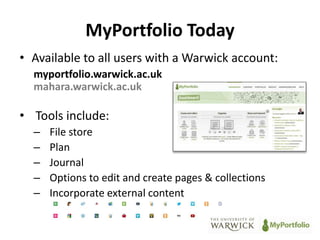
MyPortfolio Today 
• Available to all users with a Warwick account: 
myportfolio.warwick.ac.uk 
mahara.warwick.ac.uk 
• Tools include: 
– File store 
– Plan 
– Journal 
– Options to edit and create pages & collections 
– Incorporate external content
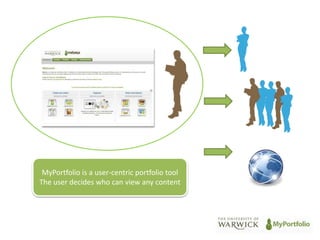
MyPortfolio is a user-centric portfolio tool 
The user decides who can view any content
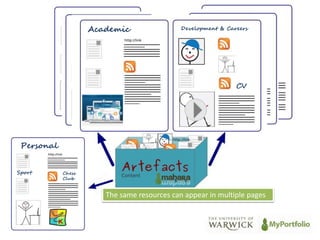
Academic Development & Careers 
Personal 
Sport Chess 
Club 
CV 
The same resources can appear in multiple pages
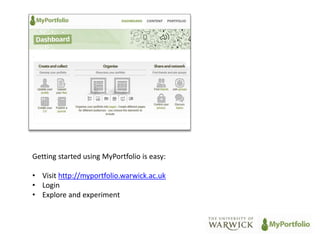
Getting started using MyPortfolio is easy: 
• Visit http://myportfolio.warwick.ac.uk 
• Login 
• Explore and experiment
References 
• Love et al (2004) cited in Balaban, I.; Bubas, G., "Educational potentials of 
ePortfolio systems: Student evaluations of Mahara and Elgg," Information 
Technology Interfaces (ITI), 2010 32nd International Conference on , vol., 
no., pp.329,336, 21-24 June 2010 
• Sawazaki, T. & Tanaka, Y. (2013). Designing Courses based on SECI model 
with Mahara, e-Portfolio. In T. Bastiaens & G. Marks (Eds.), Proceedings of 
World Conference on E-Learning in Corporate, Government, Healthcare, 
and Higher Education 2013 (pp. 1355-1358). Chesapeake, VA: AACE. 
Retrieved March 10, 2014 from http://www.editlib.org/p/115065

What is an ePortfolio

  • 1.
    What is aneportfolio? What is it for?
  • 2.
    • Assessment Typesof ePortfolio – Demonstrate student competency and skills. Educators and peers can provide comments and feedback • Development – Of students' educational goals, providing evidence of the advancement of knowledge and skills. Can provide support for personal development too • Showcase – Demonstrate exemplary assignments and other work, as well as student skills. Designed for potential employers or educators and can be used instead of, or to supplement one's CV. “In most cases ePortfolios are not used for a single purpose. Instead, they tend to combine 2–3 types of portfolios thus creating a Hybrid portfolio” Balaban, I.; Bubas, G., (2010)
  • 3.
    Suggested Levels ofPortfolio Use • Level 1 & 2: Scrapbook & Curriculum Vitae • Level 3: Curriculum Collaboration – Students can share views with peers, tutors & employers and receive comments • Level 4: Mentoring – Educators are intensely engaged in guidance & feedback • Level 5: Authentic Evidence for Assessment, Evaluation, and Reporting – Structured, organised, used for assessment & feedback Based on Love et al (2004) cited in Balaban, I.; Bubas, G., (2010) “Because of its features, ePortfolio offers support for reflection, which is one of its main advantages over other systems”
  • 4.
    The eportfolio canhelp: • To externalize learners’ ideas and thoughts. • To understand other students’ ideas • To deepen their knowledge by combining other’s ideas and thoughts. Sawazaki, T. & Tanaka, Y. (2013).
  • 5.
    MyPortfolio Today •Available to all users with a Warwick account: myportfolio.warwick.ac.uk mahara.warwick.ac.uk • Tools include: – File store – Plan – Journal – Options to edit and create pages & collections – Incorporate external content
  • 6.
    MyPortfolio is auser-centric portfolio tool The user decides who can view any content
  • 7.
    Academic Development &Careers Personal Sport Chess Club CV The same resources can appear in multiple pages
  • 8.
    Getting started usingMyPortfolio is easy: • Visit http://myportfolio.warwick.ac.uk • Login • Explore and experiment
  • 9.
    References • Loveet al (2004) cited in Balaban, I.; Bubas, G., "Educational potentials of ePortfolio systems: Student evaluations of Mahara and Elgg," Information Technology Interfaces (ITI), 2010 32nd International Conference on , vol., no., pp.329,336, 21-24 June 2010 • Sawazaki, T. & Tanaka, Y. (2013). Designing Courses based on SECI model with Mahara, e-Portfolio. In T. Bastiaens & G. Marks (Eds.), Proceedings of World Conference on E-Learning in Corporate, Government, Healthcare, and Higher Education 2013 (pp. 1355-1358). Chesapeake, VA: AACE. Retrieved March 10, 2014 from http://www.editlib.org/p/115065