What is a Virtual Tap?


Intelligent Access and Monitoring
Architecture Solutions
Presenter

David Pham
Senior Solutions Engineer
Net Optics, Inc.

David’s background covers 8 years experience in a Systems
Administrator role for local and remote environments for diverse client
industries (private, government, enterprise and small business). Roles
included managing data centers leveraging VMware hypervisors,
EMC/Xiotech SAN, NetApp NAS, and systems infrastructure for
Microsoft environments.

David holds certifications for: Microsoft Certified Technology Specialist
and Microsoft Certified Information Technology Professional, Xiotech
Certified Storage Engineer
                                                                            2
Agenda

     • Leveraging virtualization in
 1     your environment

     • Identifying network ‘blind spots’
 2     created by virtualization

     • Overcoming blind spots with a
 3     Virtual Tap

     • Increase ROI of your existing
 4     network monitoring tools

     • Decrease the TCO of your
 5     virtualized environment


                                           3
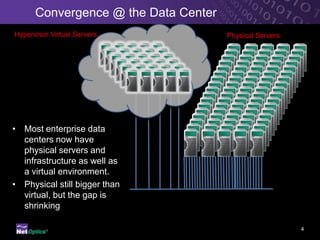
Convergence @ the Data Center
Hypervisor Virtual Servers            Physical Servers


• Most enterprise data
  centers now have
  physical servers and
  infrastructure as well as
  a virtual environment.
• Physical still bigger than
  virtual, but the gap is
  shrinking

                                                         4
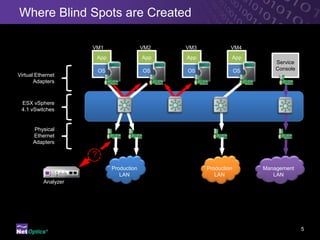
Where Blind Spots are Created

                      VM1                   VM2   VM3            VM4
                       App                  App   App            App
                                                                              Service
                          OS                OS    OS                 OS       Console
Virtual Ethernet
       Adapters


 ESX vSphere
 4.1 vSwitches


      Physical
      Ethernet
      Adapters

                      ?
                               Production               Production        Management
                                  LAN                      LAN               LAN
           Analyzer


                                                                                        5
Hypervisor Monitoring Challenge

                                           ESX Virtual Stack

                                            VM1       VM2      VM3


                                                                                 Physical Network
                                                                                    Security &
 Virtualization Creates                                                             Monitoring
Security, Monitoring and
   Compliance Risks                                         Virtual Switch           Analyzer

•   No visibility into inter-VM traffic,                                             IDS
    vulnerabilities or threats
•   Lacks auditing of data passing
    between virtual servers
                                                                  Physical ESX
•   Inability to pinpoint resource
                                                                     Server
    utilization issues


                                                                                            6
Solutions

            Switch Level Monitoring: enabling monitor/SPAN ports
            • Degrades overall production network


            Configure VM to run in Promiscuous Mode
            •   CPU performance degrades due to traffic volume


            Hypervisor Level Monitoring: enabling Port Mirroring
            •   Network capacity reduced by up to 50%


                                                                   7
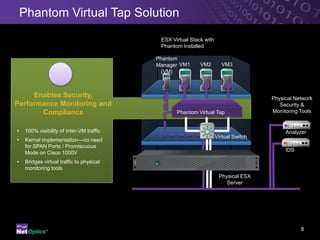
Phantom Virtual Tap Solution
                                            ESX Virtual Stack with
                                            Phantom Installed

                                           Phantom
                                           Manager VM1      VM2        VM3
                                            (VM)


     Enables Security,                                                                Physical Network
Performance Monitoring and                                                               Security &
       Compliance                                 Phantom Virtual Tap                 Monitoring Tools


•    100% visibility of inter-VM traffic                                                   Analyzer
                                                                     Virtual Switch
•    Kernel implementation—no need
     for SPAN Ports / Promiscuous
                                                                                           IDS
     Mode on Cisco 1000V
•    Bridges virtual traffic to physical
     monitoring tools
                                                                      Physical ESX
                                                                         Server


                                                                                                 8
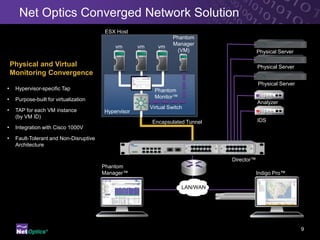
Net Optics Converged Network Solution
                                         ESX Host
                                                                     Phantom
                                                                     Manager
                                             vm       vm      vm
                                                                      (VM)                    Physical Server
                                              1        2       3

    Physical and Virtual                                                                      Physical Server
    Monitoring Convergence
                                                                                              Physical Server
•    Hypervisor-specific Tap                                 Phantom
•    Purpose-built for virtualization                        Monitor™
                                                                                              Analyzer
                                                           Virtual Switch
•    TAP for each VM instance            Hypervisor
     (by VM ID)
                                                            Encapsulated Tunnel               IDS
•    Integration with Cisco 1000V

•    Fault-Tolerant and Non-Disruptive
     Architecture

                                                                                  Director™
                                         Phantom
                                         Manager™                                             Indigo Pro™

                                                                        LAN/WAN


                                                                                                                9
Support for vMotion Migration
           ESX 1                                ESX 2


               vm1       vm2    vm3                 vm4       vm5


                               Phantom                              Phantom
                               Monitor™                             Monitor™


IDS         Hypervisor                           Hypervisor


Analyzer


                                      LAN/WAN


                                                   Phantom
                                                   Manager™
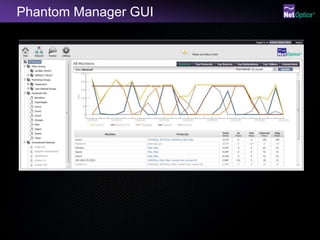
Phantom Manager GUI
Virtual Tap – Key Takeaways

        Key Feature                     Advantage                    Benefit
                                                           Achieve Compliance
End-to-End Inter-VM Traffic     Provides Auditing and
                                                           Standards for PCI-DSS,
Visibility                      Performance Data
                                                           HIPAA, etc

                                Low CPU and Memory
                                Requirements
Kernel Level                                               Low Impact on Virtual
Implementation                                             Server Performance
                                Does Not Run in
                                Promiscuous/SPAN Mode

Delivers Visibility of Inter-
                                No Need to Purchase New    Lower CAPEX,
VM Traffic to Existing
                                Virtual Monitoring Tools   Higher ROI of Existing Tools
Physical Tools

                                Converged Physical and
                                                           Optimize Tool Utilization
                                Virtual Monitoring


                                                                                       12
Conclusion


• Gain end-to-end traffic      • Achieve security,      • Realize the full
  visibility in the virtual      compliance and           potential of your
  environment                    performance monitoring   virtual data center
                                 standards

                         Get your 30-day evaluation copy today!
                          Visit www.netoptics.com to download


                                                                           13
Q&A


• Question & Answer

• To sign up for our newsletter: http://gurl.im/c2681zX

• Thank you


                              Net Optics, Inc.
                              www.netoptics.com
                              408.737.7777


                                                          14

What is a virtual tap?

  • 1.
    What is aVirtual Tap? Intelligent Access and Monitoring Architecture Solutions
  • 2.
    Presenter David Pham Senior SolutionsEngineer Net Optics, Inc. David’s background covers 8 years experience in a Systems Administrator role for local and remote environments for diverse client industries (private, government, enterprise and small business). Roles included managing data centers leveraging VMware hypervisors, EMC/Xiotech SAN, NetApp NAS, and systems infrastructure for Microsoft environments. David holds certifications for: Microsoft Certified Technology Specialist and Microsoft Certified Information Technology Professional, Xiotech Certified Storage Engineer 2
  • 3.
    Agenda • Leveraging virtualization in 1 your environment • Identifying network ‘blind spots’ 2 created by virtualization • Overcoming blind spots with a 3 Virtual Tap • Increase ROI of your existing 4 network monitoring tools • Decrease the TCO of your 5 virtualized environment 3
  • 4.
    Convergence @ theData Center Hypervisor Virtual Servers Physical Servers • Most enterprise data centers now have physical servers and infrastructure as well as a virtual environment. • Physical still bigger than virtual, but the gap is shrinking 4
  • 5.
    Where Blind Spotsare Created VM1 VM2 VM3 VM4 App App App App Service OS OS OS OS Console Virtual Ethernet Adapters ESX vSphere 4.1 vSwitches Physical Ethernet Adapters ? Production Production Management LAN LAN LAN Analyzer 5
  • 6.
    Hypervisor Monitoring Challenge ESX Virtual Stack VM1 VM2 VM3 Physical Network Security & Virtualization Creates Monitoring Security, Monitoring and Compliance Risks Virtual Switch Analyzer • No visibility into inter-VM traffic, IDS vulnerabilities or threats • Lacks auditing of data passing between virtual servers Physical ESX • Inability to pinpoint resource Server utilization issues 6
  • 7.
    Solutions Switch Level Monitoring: enabling monitor/SPAN ports • Degrades overall production network Configure VM to run in Promiscuous Mode • CPU performance degrades due to traffic volume Hypervisor Level Monitoring: enabling Port Mirroring • Network capacity reduced by up to 50% 7
  • 8.
    Phantom Virtual TapSolution ESX Virtual Stack with Phantom Installed Phantom Manager VM1 VM2 VM3 (VM) Enables Security, Physical Network Performance Monitoring and Security & Compliance Phantom Virtual Tap Monitoring Tools • 100% visibility of inter-VM traffic Analyzer Virtual Switch • Kernel implementation—no need for SPAN Ports / Promiscuous IDS Mode on Cisco 1000V • Bridges virtual traffic to physical monitoring tools Physical ESX Server 8
  • 9.
    Net Optics ConvergedNetwork Solution ESX Host Phantom Manager vm vm vm (VM) Physical Server 1 2 3 Physical and Virtual Physical Server Monitoring Convergence Physical Server • Hypervisor-specific Tap Phantom • Purpose-built for virtualization Monitor™ Analyzer Virtual Switch • TAP for each VM instance Hypervisor (by VM ID) Encapsulated Tunnel IDS • Integration with Cisco 1000V • Fault-Tolerant and Non-Disruptive Architecture Director™ Phantom Manager™ Indigo Pro™ LAN/WAN 9
  • 10.
    Support for vMotionMigration ESX 1 ESX 2 vm1 vm2 vm3 vm4 vm5 Phantom Phantom Monitor™ Monitor™ IDS Hypervisor Hypervisor Analyzer LAN/WAN Phantom Manager™
  • 11.
  • 12.
    Virtual Tap –Key Takeaways Key Feature Advantage Benefit Achieve Compliance End-to-End Inter-VM Traffic Provides Auditing and Standards for PCI-DSS, Visibility Performance Data HIPAA, etc Low CPU and Memory Requirements Kernel Level Low Impact on Virtual Implementation Server Performance Does Not Run in Promiscuous/SPAN Mode Delivers Visibility of Inter- No Need to Purchase New Lower CAPEX, VM Traffic to Existing Virtual Monitoring Tools Higher ROI of Existing Tools Physical Tools Converged Physical and Optimize Tool Utilization Virtual Monitoring 12
  • 13.
    Conclusion • Gain end-to-endtraffic • Achieve security, • Realize the full visibility in the virtual compliance and potential of your environment performance monitoring virtual data center standards Get your 30-day evaluation copy today! Visit www.netoptics.com to download 13
  • 14.
    Q&A • Question &Answer • To sign up for our newsletter: http://gurl.im/c2681zX • Thank you Net Optics, Inc. www.netoptics.com 408.737.7777 14