Automated Security Analysis
AWS Clouds
Cloud Security Alliance
Buenos Aires, Argentina
/me
● Application and cloud security expert
● 🐍 developer
● Open source evangelist
● w3af project leader
● Independent security consultant
Agenda
● Cloud security assessment
● Most common vulnerabilities in AWS accounts, and how to
prevent them:
○ Open S3 buckets
○ Secrets in EC2 user-data
○ IAM privilege escalation
○ Security Groups: Least Privilege
● Open source tools
● Closing thoughts
Cloud Security Assessment
Definition and experience
Cloud Security Assessment
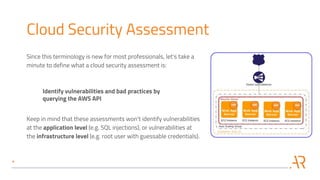
Since this terminology is new for most professionals, let's take a
minute to define what a cloud security assessment is:
Identify vulnerabilities and bad practices by
querying the AWS API
Keep in mind that these assessments won't identify vulnerabilities
at the application level (e.g. SQL injections), or vulnerabilities at
the infrastructure level (e.g. root user with guessable credentials).
Open Source tools
Most cloud security assessments are performed using open
source tools such as:
● https://github.com/nccgroup/Scout2
● https://github.com/duo-labs/cloudmapper
● https://github.com/RhinoSecurityLabs/pacu
● https://github.com/toniblyx/prowler
● https://github.com/cloudsploit/scans
And custom scripts, usually written in Python with the boto library, to
extract information related with AWS services not supported by those
tools.
Commercial tools
Most (all?) commercial tools for identifying
vulnerabilities in AWS clouds are SaaS-based.
This is great for AWS admins, but as an
external consultant I can't trust my
customer's data with a third-party.
Massive.
A few months ago I was hired to perform a cloud security
assessment on a massive AWS account:
● 500k USD / month billing
● 2500 EC2 instances
● 200 RDS instances
● 2000 IAM users and roles
● 250 IAM groups
● 500 security groups
And a really long list of experiments with almost all AWS services.
Automate, automate, automate
● In most assessments I manually review each resource,
configuration, policy and source code line. In this case,
because of the large number or resources and the limited
time, it was impossible to do that.
● Automated the assessment as much as possible.
● But… what was I looking for?
AWS cloud vulnerabilities
Most common and high risk
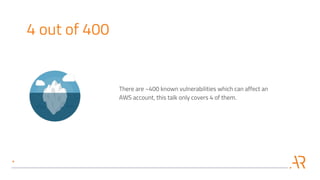
4 out of 400
There are ~400 known vulnerabilities which can affect an
AWS account, this talk only covers 4 of them.
S3 Open Buckets
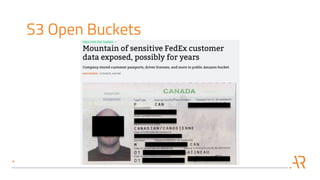
S3 Open Buckets
S3 Open Buckets
S3 Open Buckets
S3 is one of the most commonly used and misconfigured services.
The vulnerability is simple to understand: the developer
configures an S3 bucket to be accessible by any anonymous
user, and then uses it to store sensitive information.
An attacker will eventually find this bucket and access all the
sensitive information.
Note: In some cases, such as storing public JS and CSS files for
your site, it is fine to have open S3 buckets.
Smells like an S3 Open Bucket
In my experience it is a good idea to investigate more when:
● The mobile app dev team says: "Our app uploads the user
data directly to S3, it scales so well!"
● The product management team says: "We share the
customer data and product specifications with them via an
S3 bucket"
● Application developer says: "Our app stores documents in
their S3 bucket, then the partner's app reads and process
them"
Secrets in EC2 user-data
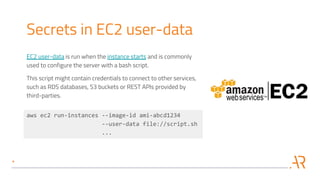
EC2 user-data is run when the instance starts and is commonly
used to configure the server with a bash script.
This script might contain credentials to connect to other services,
such as RDS databases, S3 buckets or REST APIs provided by
third-parties.
aws ec2 run-instances --image-id ami-abcd1234
--user-data file://script.sh
...
Secrets in EC2 user-data
An attacker with access to AWS account credentials with
permissions to run ec2:DescribeInstanceAttribute will be able to
retrieve the user-data scripts.
After downloading all the scripts the attacker extracts the
hard-coded credentials and uses them to pivot and escalate
privileges in the target AWS account.
Preventing secrets in user-data
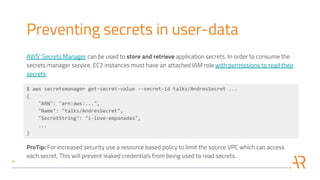
AWS' Secrets Manager can be used to store and retrieve application secrets. In order to consume the
secrets manager service, EC2 instances must have an attached IAM role with permissions to read their
secrets:
$ aws secretsmanager get-secret-value --secret-id talks/AndresSecret ...
{
"ARN": "arn:aws:...",
"Name": "talks/AndresSecret",
"SecretString": "i-love-empanadas",
...
}
ProTip: For increased security use a resource based policy to limit the source VPC which can access
each secret. This will prevent leaked credentials from being used to read secrets.
IAM privilege escalation
AWS users, roles and groups have
associated IAM policies which
describe which AWS APIs can be
consumed.
The example policy allows the
associated principal to start and stop
instances which are tagged with his
username.
{
"Version": "2012-10-17",
"Statement": [
{
"Effect": "Allow",
"Action": [
"ec2:StartInstances",
"ec2:StopInstances"
],
"Resource": "arn:aws:ec2:*:*:instance/*",
"Condition": {
"StringEquals": {
"ec2:ResourceTag/Owner": "${aws:username}"
}
}
}
]
}
IAM privilege escalation
An attacker with access to AWS
account credentials with permissions
to run the iam:PassRole and
ec2:RunInstances actions can create a
new EC2 instance and associate an
arbitrary role with high privileges to it.
The attacker then connects to the new
instance using SSH and requests the
AWS access keys from the EC2
instance metadata.
{
"Version": "2012-10-17",
"Statement": [
{
"Effect": "Allow",
"Action": [
"iam:PassRole",
"ec2:RunInstances"
],
"Resource": "*"
}
]
}
IAM privilege escalation
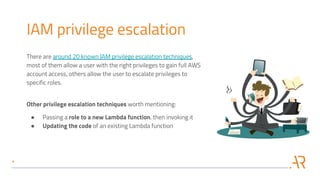
There are around 20 known IAM privilege escalation techniques,
most of them allow a user with the right privileges to gain full AWS
account access, others allow the user to escalate privileges to
specific roles.
Other privilege escalation techniques worth mentioning:
● Passing a role to a new Lambda function, then invoking it
● Updating the code of an existing Lambda function
Preventing IAM privilege escalation
Preventing IAM privilege escalation is simple in theory but complex to
do at scale:
1. Use the least privilege principle for all users, roles and groups
2. Review the policies to make sure no role can escalate privileges
using known techniques (fancy name for a set of IAM privileges)
3. Prevent exploitation by reducing user's permissions. For example,
if a user requires iam:PassRole restrict the action to be allowed
only on specific roles.
Use tools such as Scout2 and CloudMapper to identify potential issues
and manually confirm them.
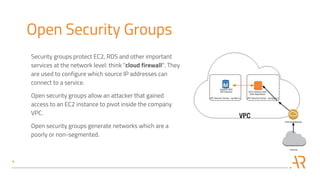
Open Security Groups
Security groups protect EC2, RDS and other important
services at the network level: think "cloud firewall". They
are used to configure which source IP addresses can
connect to a service.
Open security groups allow an attacker that gained
access to an EC2 instance to pivot inside the company
VPC.
Open security groups generate networks which are a
poorly or non-segmented.
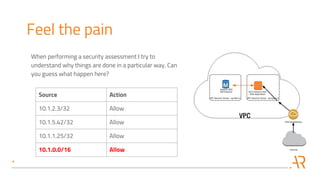
Feel the pain
Source Action
10.1.2.3/32 Allow
10.1.5.42/32 Allow
10.1.1.25/32 Allow
10.1.0.0/16 Allow
When performing a security assessment I try to
understand why things are done in a particular way. Can
you guess what happen here?
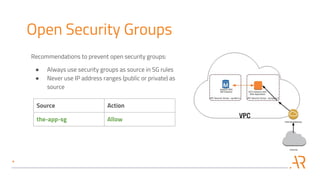
Open Security Groups
Recommendations to prevent open security groups:
● Always use security groups as source in SG rules
● Never use IP address ranges (public or private) as
source
Source Action
the-app-sg Allow
Open Source tools
Features and pain points
Open S3 buckets
Secrets in EC2 user-data
IAM privilege escalation
Open Security Groups
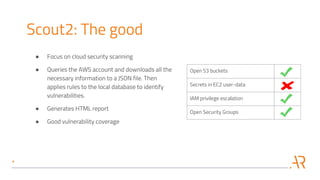
Scout2: The good
● Focus on cloud security scanning
● Queries the AWS account and downloads all the
necessary information to a JSON file. Then
applies rules to the local database to identify
vulnerabilities.
● Generates HTML report
● Good vulnerability coverage
Open S3 buckets
Secrets in EC2 user-data
IAM privilege escalation
Open Security Groups
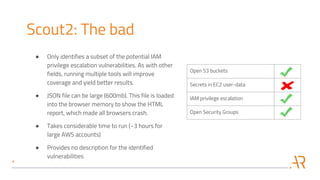
Scout2: The bad
● Only identifies a subset of the potential IAM
privilege escalation vulnerabilities. As with other
fields, running multiple tools will improve
coverage and yield better results.
● JSON file can be large (600mb). This file is loaded
into the browser memory to show the HTML
report, which made all browsers crash.
● Takes considerable time to run (~3 hours for
large AWS accounts)
● Provides no description for the identified
vulnerabilities
Open S3 buckets
Secrets in EC2 user-data
IAM privilege escalation
Open Security Groups
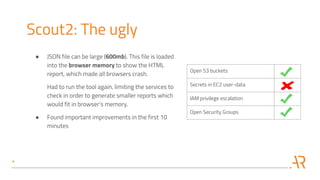
Scout2: The ugly
● JSON file can be large (600mb). This file is loaded
into the browser memory to show the HTML
report, which made all browsers crash.
Had to run the tool again, limiting the services to
check in order to generate smaller reports which
would fit in browser's memory.
● Found important improvements in the first 10
minutes
Open S3 buckets
Secrets in EC2 user-data
IAM privilege escalation
Open Security Groups
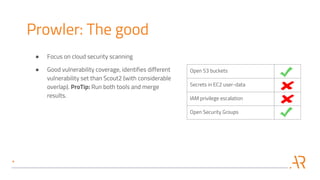
Prowler: The good
● Focus on cloud security scanning
● Good vulnerability coverage, identifies different
vulnerability set than Scout2 (with considerable
overlap). ProTip: Run both tools and merge
results.
Open S3 buckets
Secrets in EC2 user-data
IAM privilege escalation
Open Security Groups
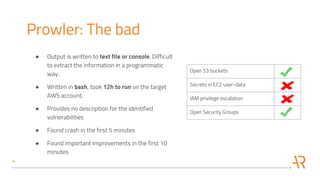
Prowler: The bad
● Output is written to text file or console. Difficult
to extract the information in a programmatic
way.
● Written in bash, took 12h to run on the target
AWS account.
● Provides no description for the identified
vulnerabilities
● Found crash in the first 5 minutes
● Found important improvements in the first 10
minutes
Open S3 buckets
Secrets in EC2 user-data
IAM privilege escalation
Open Security Groups
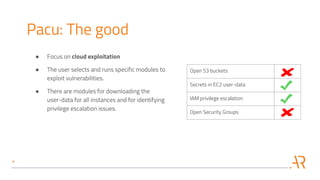
Pacu: The good
● Focus on cloud exploitation
● The user selects and runs specific modules to
exploit vulnerabilities.
● There are modules for downloading the
user-data for all instances and for identifying
privilege escalation issues.
Open S3 buckets
Secrets in EC2 user-data
IAM privilege escalation
Open Security Groups
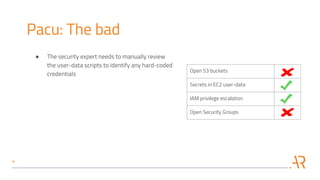
Pacu: The bad
● The security expert needs to manually review
the user-data scripts to identify any hard-coded
credentials
Open S3 buckets
Secrets in EC2 user-data
IAM privilege escalation
Open Security Groups
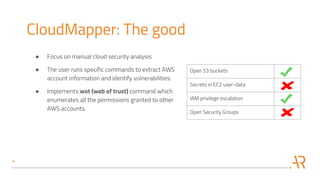
CloudMapper: The good
● Focus on manual cloud security analysis
● The user runs specific commands to extract AWS
account information and identify vulnerabilities.
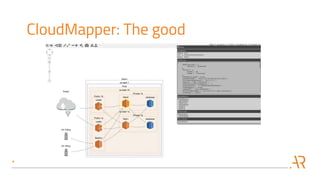
● Implements wot (web of trust) command which
enumerates all the permissions granted to other
AWS accounts.
CloudMapper: The good
Open S3 buckets
Secrets in EC2 user-data
IAM privilege escalation
Open Security Groups
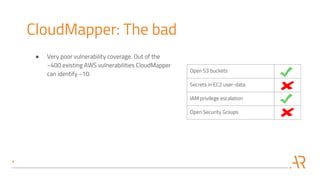
CloudMapper: The bad
● Very poor vulnerability coverage. Out of the
~400 existing AWS vulnerabilities CloudMapper
can identify ~10.
Closing thoughts
Expert required
● Cloud security scanners are giving baby first steps, they don't have
full vulnerability coverage, it is common to crash the scanner, and
require considerable time to run.
● Severity ratings associated with some vulnerabilities are
completely incorrect and might lead to incorrect prioritization by
AWS admins.
● Multiple tools and custom scripts need to be run to extract and
merge all the vulnerability information.
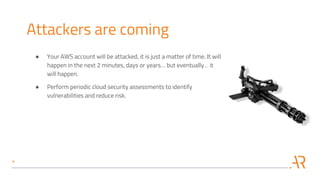
Attackers are coming
● Your AWS account will be attacked, it is just a matter of time. It will
happen in the next 2 minutes, days or years… but eventually… it
will happen.
● Perform periodic cloud security assessments to identify
vulnerabilities and reduce risk.
Call to action
Do these things now.
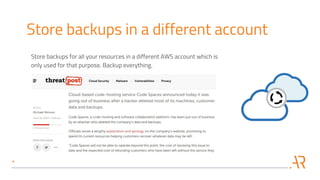
Store backups in a different account
Store backups for all your resources in a different AWS account which is
only used for that purpose. Backup everything.
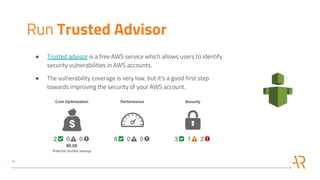
Run Trusted Advisor
● Trusted advisor is a free AWS service which allows users to identify
security vulnerabilities in AWS accounts.
● The vulnerability coverage is very low, but it's a good first step
towards improving the security of your AWS account.
Thanks!
For hire
Does your company or startup need these services?
● Application Penetration Test
● Secure Coding Training for Developers
● Source Code Review
● Cloud Security Assessment
Let me know, I can help you deliver secure web applications.

Automated security analysis of aws clouds v1.0

  • 1.
    Automated Security Analysis AWSClouds Cloud Security Alliance Buenos Aires, Argentina
  • 2.
    /me ● Application andcloud security expert ● 🐍 developer ● Open source evangelist ● w3af project leader ● Independent security consultant
  • 3.
    Agenda ● Cloud securityassessment ● Most common vulnerabilities in AWS accounts, and how to prevent them: ○ Open S3 buckets ○ Secrets in EC2 user-data ○ IAM privilege escalation ○ Security Groups: Least Privilege ● Open source tools ● Closing thoughts
  • 4.
  • 5.
    Cloud Security Assessment Sincethis terminology is new for most professionals, let's take a minute to define what a cloud security assessment is: Identify vulnerabilities and bad practices by querying the AWS API Keep in mind that these assessments won't identify vulnerabilities at the application level (e.g. SQL injections), or vulnerabilities at the infrastructure level (e.g. root user with guessable credentials).
  • 6.
    Open Source tools Mostcloud security assessments are performed using open source tools such as: ● https://github.com/nccgroup/Scout2 ● https://github.com/duo-labs/cloudmapper ● https://github.com/RhinoSecurityLabs/pacu ● https://github.com/toniblyx/prowler ● https://github.com/cloudsploit/scans And custom scripts, usually written in Python with the boto library, to extract information related with AWS services not supported by those tools.
  • 7.
    Commercial tools Most (all?)commercial tools for identifying vulnerabilities in AWS clouds are SaaS-based. This is great for AWS admins, but as an external consultant I can't trust my customer's data with a third-party.
  • 8.
    Massive. A few monthsago I was hired to perform a cloud security assessment on a massive AWS account: ● 500k USD / month billing ● 2500 EC2 instances ● 200 RDS instances ● 2000 IAM users and roles ● 250 IAM groups ● 500 security groups And a really long list of experiments with almost all AWS services.
  • 9.
    Automate, automate, automate ●In most assessments I manually review each resource, configuration, policy and source code line. In this case, because of the large number or resources and the limited time, it was impossible to do that. ● Automated the assessment as much as possible. ● But… what was I looking for?
  • 10.
    AWS cloud vulnerabilities Mostcommon and high risk
  • 11.
    4 out of400 There are ~400 known vulnerabilities which can affect an AWS account, this talk only covers 4 of them.
  • 12.
  • 13.
  • 14.
  • 15.
    S3 Open Buckets S3is one of the most commonly used and misconfigured services. The vulnerability is simple to understand: the developer configures an S3 bucket to be accessible by any anonymous user, and then uses it to store sensitive information. An attacker will eventually find this bucket and access all the sensitive information. Note: In some cases, such as storing public JS and CSS files for your site, it is fine to have open S3 buckets.
  • 16.
    Smells like anS3 Open Bucket In my experience it is a good idea to investigate more when: ● The mobile app dev team says: "Our app uploads the user data directly to S3, it scales so well!" ● The product management team says: "We share the customer data and product specifications with them via an S3 bucket" ● Application developer says: "Our app stores documents in their S3 bucket, then the partner's app reads and process them"
  • 17.
    Secrets in EC2user-data EC2 user-data is run when the instance starts and is commonly used to configure the server with a bash script. This script might contain credentials to connect to other services, such as RDS databases, S3 buckets or REST APIs provided by third-parties. aws ec2 run-instances --image-id ami-abcd1234 --user-data file://script.sh ...
  • 18.
    Secrets in EC2user-data An attacker with access to AWS account credentials with permissions to run ec2:DescribeInstanceAttribute will be able to retrieve the user-data scripts. After downloading all the scripts the attacker extracts the hard-coded credentials and uses them to pivot and escalate privileges in the target AWS account.
  • 19.
    Preventing secrets inuser-data AWS' Secrets Manager can be used to store and retrieve application secrets. In order to consume the secrets manager service, EC2 instances must have an attached IAM role with permissions to read their secrets: $ aws secretsmanager get-secret-value --secret-id talks/AndresSecret ... { "ARN": "arn:aws:...", "Name": "talks/AndresSecret", "SecretString": "i-love-empanadas", ... } ProTip: For increased security use a resource based policy to limit the source VPC which can access each secret. This will prevent leaked credentials from being used to read secrets.
  • 20.
    IAM privilege escalation AWSusers, roles and groups have associated IAM policies which describe which AWS APIs can be consumed. The example policy allows the associated principal to start and stop instances which are tagged with his username. { "Version": "2012-10-17", "Statement": [ { "Effect": "Allow", "Action": [ "ec2:StartInstances", "ec2:StopInstances" ], "Resource": "arn:aws:ec2:*:*:instance/*", "Condition": { "StringEquals": { "ec2:ResourceTag/Owner": "${aws:username}" } } } ] }
  • 21.
    IAM privilege escalation Anattacker with access to AWS account credentials with permissions to run the iam:PassRole and ec2:RunInstances actions can create a new EC2 instance and associate an arbitrary role with high privileges to it. The attacker then connects to the new instance using SSH and requests the AWS access keys from the EC2 instance metadata. { "Version": "2012-10-17", "Statement": [ { "Effect": "Allow", "Action": [ "iam:PassRole", "ec2:RunInstances" ], "Resource": "*" } ] }
  • 22.
    IAM privilege escalation Thereare around 20 known IAM privilege escalation techniques, most of them allow a user with the right privileges to gain full AWS account access, others allow the user to escalate privileges to specific roles. Other privilege escalation techniques worth mentioning: ● Passing a role to a new Lambda function, then invoking it ● Updating the code of an existing Lambda function
  • 23.
    Preventing IAM privilegeescalation Preventing IAM privilege escalation is simple in theory but complex to do at scale: 1. Use the least privilege principle for all users, roles and groups 2. Review the policies to make sure no role can escalate privileges using known techniques (fancy name for a set of IAM privileges) 3. Prevent exploitation by reducing user's permissions. For example, if a user requires iam:PassRole restrict the action to be allowed only on specific roles. Use tools such as Scout2 and CloudMapper to identify potential issues and manually confirm them.
  • 24.
    Open Security Groups Securitygroups protect EC2, RDS and other important services at the network level: think "cloud firewall". They are used to configure which source IP addresses can connect to a service. Open security groups allow an attacker that gained access to an EC2 instance to pivot inside the company VPC. Open security groups generate networks which are a poorly or non-segmented.
  • 25.
    Feel the pain SourceAction 10.1.2.3/32 Allow 10.1.5.42/32 Allow 10.1.1.25/32 Allow 10.1.0.0/16 Allow When performing a security assessment I try to understand why things are done in a particular way. Can you guess what happen here?
  • 26.
    Open Security Groups Recommendationsto prevent open security groups: ● Always use security groups as source in SG rules ● Never use IP address ranges (public or private) as source Source Action the-app-sg Allow
  • 27.
  • 28.
    Open S3 buckets Secretsin EC2 user-data IAM privilege escalation Open Security Groups Scout2: The good ● Focus on cloud security scanning ● Queries the AWS account and downloads all the necessary information to a JSON file. Then applies rules to the local database to identify vulnerabilities. ● Generates HTML report ● Good vulnerability coverage
  • 29.
    Open S3 buckets Secretsin EC2 user-data IAM privilege escalation Open Security Groups Scout2: The bad ● Only identifies a subset of the potential IAM privilege escalation vulnerabilities. As with other fields, running multiple tools will improve coverage and yield better results. ● JSON file can be large (600mb). This file is loaded into the browser memory to show the HTML report, which made all browsers crash. ● Takes considerable time to run (~3 hours for large AWS accounts) ● Provides no description for the identified vulnerabilities
  • 30.
    Open S3 buckets Secretsin EC2 user-data IAM privilege escalation Open Security Groups Scout2: The ugly ● JSON file can be large (600mb). This file is loaded into the browser memory to show the HTML report, which made all browsers crash. Had to run the tool again, limiting the services to check in order to generate smaller reports which would fit in browser's memory. ● Found important improvements in the first 10 minutes
  • 31.
    Open S3 buckets Secretsin EC2 user-data IAM privilege escalation Open Security Groups Prowler: The good ● Focus on cloud security scanning ● Good vulnerability coverage, identifies different vulnerability set than Scout2 (with considerable overlap). ProTip: Run both tools and merge results.
  • 32.
    Open S3 buckets Secretsin EC2 user-data IAM privilege escalation Open Security Groups Prowler: The bad ● Output is written to text file or console. Difficult to extract the information in a programmatic way. ● Written in bash, took 12h to run on the target AWS account. ● Provides no description for the identified vulnerabilities ● Found crash in the first 5 minutes ● Found important improvements in the first 10 minutes
  • 33.
    Open S3 buckets Secretsin EC2 user-data IAM privilege escalation Open Security Groups Pacu: The good ● Focus on cloud exploitation ● The user selects and runs specific modules to exploit vulnerabilities. ● There are modules for downloading the user-data for all instances and for identifying privilege escalation issues.
  • 34.
    Open S3 buckets Secretsin EC2 user-data IAM privilege escalation Open Security Groups Pacu: The bad ● The security expert needs to manually review the user-data scripts to identify any hard-coded credentials
  • 35.
    Open S3 buckets Secretsin EC2 user-data IAM privilege escalation Open Security Groups CloudMapper: The good ● Focus on manual cloud security analysis ● The user runs specific commands to extract AWS account information and identify vulnerabilities. ● Implements wot (web of trust) command which enumerates all the permissions granted to other AWS accounts.
  • 36.
  • 37.
    Open S3 buckets Secretsin EC2 user-data IAM privilege escalation Open Security Groups CloudMapper: The bad ● Very poor vulnerability coverage. Out of the ~400 existing AWS vulnerabilities CloudMapper can identify ~10.
  • 38.
  • 39.
    Expert required ● Cloudsecurity scanners are giving baby first steps, they don't have full vulnerability coverage, it is common to crash the scanner, and require considerable time to run. ● Severity ratings associated with some vulnerabilities are completely incorrect and might lead to incorrect prioritization by AWS admins. ● Multiple tools and custom scripts need to be run to extract and merge all the vulnerability information.
  • 40.
    Attackers are coming ●Your AWS account will be attacked, it is just a matter of time. It will happen in the next 2 minutes, days or years… but eventually… it will happen. ● Perform periodic cloud security assessments to identify vulnerabilities and reduce risk.
  • 41.
    Call to action Dothese things now.
  • 42.
    Store backups ina different account Store backups for all your resources in a different AWS account which is only used for that purpose. Backup everything.
  • 43.
    Run Trusted Advisor ●Trusted advisor is a free AWS service which allows users to identify security vulnerabilities in AWS accounts. ● The vulnerability coverage is very low, but it's a good first step towards improving the security of your AWS account.
  • 44.
  • 45.
    For hire Does yourcompany or startup need these services? ● Application Penetration Test ● Secure Coding Training for Developers ● Source Code Review ● Cloud Security Assessment Let me know, I can help you deliver secure web applications.