A G u i d e t o A W S P e n e t r a t i o n Te s t i n g
November 2022
By Saurabh Kr Pandey
About me !
Senior Product Security Engineer at MIQ
Certification – OSCP, CRTP, CRTE, AZ-500, AWS
Security Specialist
Find me on :
https://www.linkedin.com/in/saurabh-kumar-
pandey-1303b4126/
Requirement
Basic Knowledge of
Linux operating system
Knowledge of
Networking
AWS Account
Objective:
• Introduction of AWS Penetration Testing
• Introduction of IAM
• Enumeration of User, Account, Groups
• Cross Account Enumeration
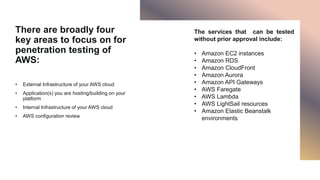
There are broadly four
key areas to focus on for
penetration testing of
AWS:
• External Infrastructure of your AWS cloud
• Application(s) you are hosting/building on your
platform
• Internal Infrastructure of your AWS cloud
• AWS configuration review
The services that can be tested
without prior approval include:
• Amazon EC2 instances
• Amazon RDS
• Amazon CloudFront
• Amazon Aurora
• Amazon API Gateways
• AWS Faregate
• AWS Lambda
• AWS LightSail resources
• Amazon Elastic Beanstalk
environments
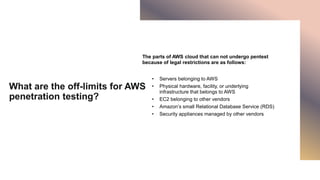
What are the off-limits for AWS
penetration testing?
The parts of AWS cloud that can not undergo pentest
because of legal restrictions are as follows:
• Servers belonging to AWS
• Physical hardware, facility, or underlying
infrastructure that belongs to AWS
• EC2 belonging to other vendors
• Amazon’s small Relational Database Service (RDS)
• Security appliances managed by other vendors
Type AWS Penetration Testing
• Security of Cloud: Responsibility of the AWS
• Security in Cloud: Responsibility of the user/Organization
AWS ATTACK VECTOR
Start With
Penetration
Testing Activity
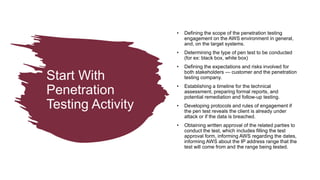
• Defining the scope of the penetration testing
engagement on the AWS environment in general,
and, on the target systems.
• Determining the type of pen test to be conducted
(for ex: black box, white box)
• Defining the expectations and risks involved for
both stakeholders — customer and the penetration
testing company.
• Establishing a timeline for the technical
assessment, preparing formal reports, and
potential remediation and follow-up testing.
• Developing protocols and rules of engagement if
the pen test reveals the client is already under
attack or if the data is breached.
• Obtaining written approval of the related parties to
conduct the test, which includes filling the test
approval form, informing AWS regarding the dates,
informing AWS about the IP address range that the
test will come from and the range being tested.
ROAD
hit the
Lorem ipsum dolor sit amet. Et quis nulla vel
facere aliquam aut animi culpa quo quia
dolorem.
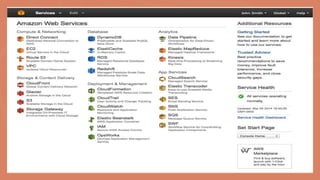
AWS ACCESS
Console Based Access
• Email address or username along with account id
• Password
CLI based access
• Access Key ID
• Secret Key
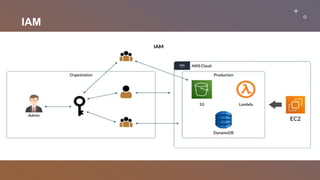
IAM
ENTRYPOINTS Attack Surface
IAM ELEMENT
14
Request
Authentication
Authorization
Action or Operation
Resources
Principle
IAM ENUMERATION
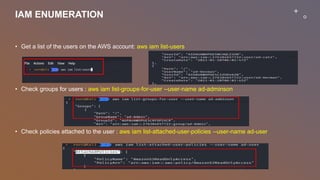
• Get a list of the users on the AWS account: aws iam list-users
• Check groups for users : aws iam list-groups-for-user --user-name ad-adminson
• Check policies attached to the user : aws iam list-attached-user-policies --user-name ad-user
IAM ENUMERATION
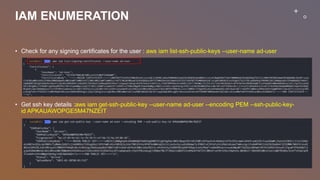
• Check for any signing certificates for the user : aws iam list-ssh-public-keys --user-name ad-user
• Get ssh key details :aws iam get-ssh-public-key --user-name ad-user --encoding PEM --ssh-public-key-
id APKAUAWOPGE5M47NZEIT
IAM ENUMERATION
• Check for MFA devices for users. : aws iam list-virtual-mfa-devices
• Check for user login profile : aws iam get-login-profile --user-name ad-user
• Check which policies are attached to the group to enumerate permissions
• aws iam list-group-policies --group-name ad-admin
• aws iam list-attached-group-policies --group-name ad-admin
• Enumerate policies for the AWS account: aws iam list-policies
CROSS ACCOUNT ENUMERATION
Old AWS Role Enumeration Method
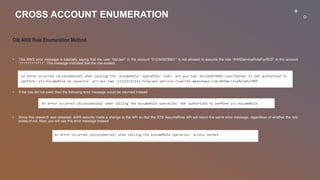
• This AWS error message is basically saying that the user “MyUser” in the account “012345678901” is not allowed to assume the role “AWSServiceRoleForRDS” in the account
“111111111111”. This message indicated that the role existed.
• If the role did not exist, then the following error message would be returned instead:
• Since this research was released, AWS security made a change to the API so that the STS AssumeRole API will return the same error message, regardless of whether the role
exists of not. Now, you will see this error message instead
CROSS ACCOUNT ENUMERATION
New AWS Role Enumeration Method
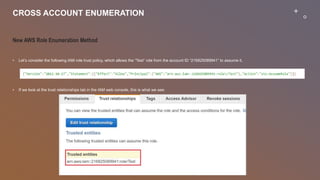
• Let’s consider the following IAM role trust policy, which allows the “Test” role from the account ID “216825089941” to assume it.
• If we look at the trust relationships tab in the IAM web console, this is what we see:
CROSS ACCOUNT ENUMERATION
New AWS Role Enumeration Method
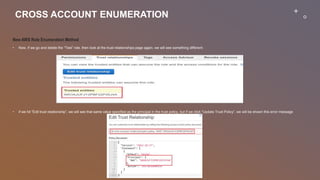
• Now, if we go and delete the “Test” role, then look at the trust relationships page again, we will see something different:
• if we hit “Edit trust relationship”, we will see that same value specified as the principal in the trust policy, but if we click “Update Trust Policy”, we will be shown this error message
A Guide to AWS Penetration Testing.pptx

A Guide to AWS Penetration Testing.pptx

  • 1.
    A G ui d e t o A W S P e n e t r a t i o n Te s t i n g November 2022 By Saurabh Kr Pandey
  • 2.
    About me ! SeniorProduct Security Engineer at MIQ Certification – OSCP, CRTP, CRTE, AZ-500, AWS Security Specialist Find me on : https://www.linkedin.com/in/saurabh-kumar- pandey-1303b4126/
  • 3.
    Requirement Basic Knowledge of Linuxoperating system Knowledge of Networking AWS Account
  • 4.
    Objective: • Introduction ofAWS Penetration Testing • Introduction of IAM • Enumeration of User, Account, Groups • Cross Account Enumeration
  • 5.
    There are broadlyfour key areas to focus on for penetration testing of AWS: • External Infrastructure of your AWS cloud • Application(s) you are hosting/building on your platform • Internal Infrastructure of your AWS cloud • AWS configuration review The services that can be tested without prior approval include: • Amazon EC2 instances • Amazon RDS • Amazon CloudFront • Amazon Aurora • Amazon API Gateways • AWS Faregate • AWS Lambda • AWS LightSail resources • Amazon Elastic Beanstalk environments
  • 6.
    What are theoff-limits for AWS penetration testing? The parts of AWS cloud that can not undergo pentest because of legal restrictions are as follows: • Servers belonging to AWS • Physical hardware, facility, or underlying infrastructure that belongs to AWS • EC2 belonging to other vendors • Amazon’s small Relational Database Service (RDS) • Security appliances managed by other vendors
  • 7.
    Type AWS PenetrationTesting • Security of Cloud: Responsibility of the AWS • Security in Cloud: Responsibility of the user/Organization
  • 8.
  • 9.
    Start With Penetration Testing Activity •Defining the scope of the penetration testing engagement on the AWS environment in general, and, on the target systems. • Determining the type of pen test to be conducted (for ex: black box, white box) • Defining the expectations and risks involved for both stakeholders — customer and the penetration testing company. • Establishing a timeline for the technical assessment, preparing formal reports, and potential remediation and follow-up testing. • Developing protocols and rules of engagement if the pen test reveals the client is already under attack or if the data is breached. • Obtaining written approval of the related parties to conduct the test, which includes filling the test approval form, informing AWS regarding the dates, informing AWS about the IP address range that the test will come from and the range being tested.
  • 10.
    ROAD hit the Lorem ipsumdolor sit amet. Et quis nulla vel facere aliquam aut animi culpa quo quia dolorem.
  • 11.
    AWS ACCESS Console BasedAccess • Email address or username along with account id • Password CLI based access • Access Key ID • Secret Key
  • 12.
  • 13.
  • 14.
  • 15.
    IAM ENUMERATION • Geta list of the users on the AWS account: aws iam list-users • Check groups for users : aws iam list-groups-for-user --user-name ad-adminson • Check policies attached to the user : aws iam list-attached-user-policies --user-name ad-user
  • 16.
    IAM ENUMERATION • Checkfor any signing certificates for the user : aws iam list-ssh-public-keys --user-name ad-user • Get ssh key details :aws iam get-ssh-public-key --user-name ad-user --encoding PEM --ssh-public-key- id APKAUAWOPGE5M47NZEIT
  • 17.
    IAM ENUMERATION • Checkfor MFA devices for users. : aws iam list-virtual-mfa-devices • Check for user login profile : aws iam get-login-profile --user-name ad-user • Check which policies are attached to the group to enumerate permissions • aws iam list-group-policies --group-name ad-admin • aws iam list-attached-group-policies --group-name ad-admin • Enumerate policies for the AWS account: aws iam list-policies
  • 18.
    CROSS ACCOUNT ENUMERATION OldAWS Role Enumeration Method • This AWS error message is basically saying that the user “MyUser” in the account “012345678901” is not allowed to assume the role “AWSServiceRoleForRDS” in the account “111111111111”. This message indicated that the role existed. • If the role did not exist, then the following error message would be returned instead: • Since this research was released, AWS security made a change to the API so that the STS AssumeRole API will return the same error message, regardless of whether the role exists of not. Now, you will see this error message instead
  • 19.
    CROSS ACCOUNT ENUMERATION NewAWS Role Enumeration Method • Let’s consider the following IAM role trust policy, which allows the “Test” role from the account ID “216825089941” to assume it. • If we look at the trust relationships tab in the IAM web console, this is what we see:
  • 20.
    CROSS ACCOUNT ENUMERATION NewAWS Role Enumeration Method • Now, if we go and delete the “Test” role, then look at the trust relationships page again, we will see something different: • if we hit “Edit trust relationship”, we will see that same value specified as the principal in the trust policy, but if we click “Update Trust Policy”, we will be shown this error message