Deep-Dive into AWS Pentesting
Cloud Security Workshop
@NS Conclave
@jaimin_gohel
@VEERSAA1
# Who am I ?
• Manager - Professional
Services @ Net Square
• Chapter Lead @ null
Ahmedabad
• Speaker
• CTF Player
jaimin_gohel
# Who am I ?
• Security Analyst @ Net
Square
• Speaker
• Bug Hunter
• Infosec Trainer
VEERSAA1
Agenda ● Intro to AWS services
● Intro to AWS CLI
● Attack Vectors for AWS
● Tools to pentest the AWS services
● Pentesting Most Used Services
● DEMO
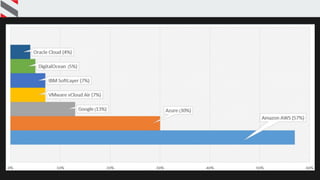
Amazon AWS
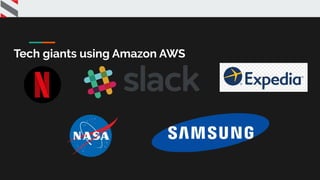
Tech giants using Amazon AWS
AWS Services
AWS Compute
Services
● EC2
● Lambda
● Elastic Load Balancer
● Autoscaling
EC2
Amazon EC2 (Elastic Compute Cloud) is a web
service interface that provides resizable
compute capacity in the AWS cloud. It is
designed for developers to have complete
control over web-scaling and computing
resources. AWS EC2 (Elastic Compute Cloud)
Lambda
AWS Lambda is an event-driven, serverless
computing platform. It is a computing service
that runs code in response to events and
automatically manages the computing resources
required by that code.
● Advanced version of EC2
● It cannot be used to host an application
● Execution is by tasks
● Triggers are setup and Lambda executes
the code
● Eg: File processing after file upload.
AWS Lambda
Elastic Load Balancer
Amazon ELB allows you to make your
applications highly available by using health
checks and distributing traffic across a
number of instances.
AWS Elastic Load Balancer
AutoScaling
Amazon EC2 Auto Scaling helps you ensure
that you have the correct number of
Amazon EC2 instances available to handle
the load for your application.
AWS AutoScaling
AutoScaling
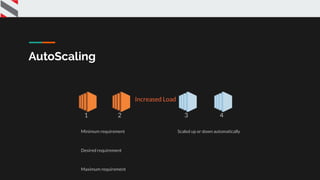
Minimum requirement
Desired requirement
Maximum requirement
Scaled up or down automatically
1 2 43
Increased Load
AWS Storage
Services
● S3
● Cloudfront
● Elastic Block Storage
● Glacier
● Snowball
S3
Amazon Simple Storage Service (Amazon
S3) is a scalable, high-speed, web-based
cloud storage service designed for online
backup and archiving of data and
applications on Amazon Web Services.
● It is an object oriented File system.
● All the files are uploaded on S3 are
treated as objects.
● These objects are stored in buckets.
● Buckets are the first folders in the
root directory.
AWS S3
Cloudfront
It is a Content Delivery Network (CDN).
● Basically it is a caching service.
● It delivers the data through a
network of data centers called edge
locations.
● The main purpose of Cloudfront is
providing good user experience AWS Cloudfront
Elastic Block
Storage
Amazon Elastic Block Store (EBS) provides
raw block-level storage that can be
attached to Amazon EC2 instances and is
used in Amazon Relational Database
Service (RDS)
● It is basically a hard drive of EC2
● It cannot be used independently
AWS Elastic Block Store
Amazon Glacier
Amazon Glacier is an online file storage
web service that provides storage for data
archiving and backup.
● Low price storage
● It uses Magnetic tapes, hence it is a
cheap storage
AWS Glacier
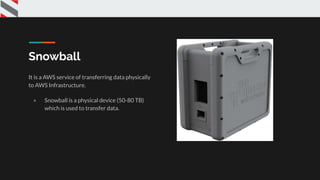
Snowball
It is a AWS service of transferring data physically
to AWS Infrastructure.
● Snowball is a physical device (50-80 TB)
which is used to transfer data.
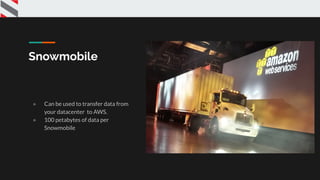
Snowmobile
● Can be used to transfer data from
your datacenter to AWS.
● 100 petabytes of data per
Snowmobile
AWS Database
Service
● RDS
● Aurora
● DynamoDB
● ElastiCache
Relational Database
Management Service
Relational Database Service (Amazon RDS)
is a managed SQL database service
provided by Amazon Web Services (AWS).
● Updates to the DB engine
● Patching automation
AWS RDS
Aurora
Amazon Aurora is a fully managed
relational database engine that's
compatible with MySQL and PostgreSQL
● Basically it is a custom built by
Amazon
● It is based on MySQL
● 5x Faster than Traditional MySQL
DB
DynamoDB
Amazon DynamoDB is a fully managed NoSQL database
service that allows to create database tables that can
store and retrieve any amount of data. It automatically
manages the data traffic of tables over multiple servers
and maintains performance.
● Only NoSQL DB are managed by DynamoDB
● Updating and patching is done automatically
● Auto-scaling
Note: DynamoDB is a fully managed proprietary
NoSQL database service
ElastiCache
Amazon ElastiCache is a fully managed
caching service.
● It is protocol-compliant with
Memcached
● It is used to set up, manage and scale
a distributed cache environment in
the cloud.
AWS ElastiCache
AWS Networking
Service
● VPC
● Direct Connect
● Route 53
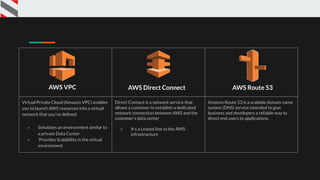
Virtual Private Cloud (Amazon VPC) enables
you to launch AWS resources into a virtual
network that you've defined.
● Simulates an environment similar to
a private Data Center
● Provides Scalability in the virtual
environment
Direct Connect is a network service that
allows a customer to establish a dedicated
network connection between AWS and the
customer's data center
● It’s a Leased line to the AWS
infrastructure
Amazon Route 53 is a scalable domain name
system (DNS) service intended to give
business and developers a reliable way to
direct end users to applications.
AWS VPC AWS Direct Connect AWS Route 53
AWS Management
Services
● CloudWatch
● CloudFormation
● CloudTrail
● CLI
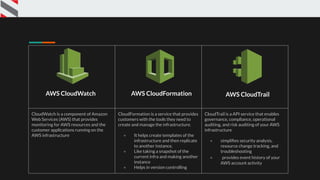
CloudWatch is a component of Amazon
Web Services (AWS) that provides
monitoring for AWS resources and the
customer applications running on the
AWS infrastructure
CloudFormation is a service that provides
customers with the tools they need to
create and manage the infrastructure.
● It helps create templates of the
infrastructure and then replicate
to another instance.
● Like taking a snapshot of the
current infra and making another
instance
● Helps in version controlling
CloudTrail is a API service that enables
governance, compliance, operational
auditing, and risk auditing of your AWS
infrastructure
● simplifies security analysis,
resource change tracking, and
troubleshooting
● provides event history of your
AWS account activity
AWS CloudWatch AWS CloudFormation AWS CloudTrail
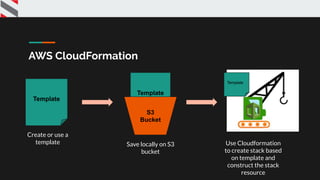
Cloudformation
Template
Create or use a
template
Template
S3
Bucket
Save locally on S3
bucket
Template
Use Cloudformation
to create stack based
on template and
construct the stack
resource
AWS CloudFormation
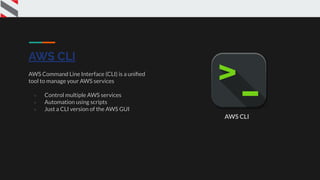
AWS CLI
AWS Command Line Interface (CLI) is a unified
tool to manage your AWS services
● Control multiple AWS services
● Automation using scripts
● Just a CLI version of the AWS GUI
AWS CLI
IAM - Identity and
Access
Management
IAM enables you to securely control access to AWS
services and resources for your users.
Create and manage AWS users and groups and use
permissions to allow and deny their permissions to
AWS resources. AWS IAM
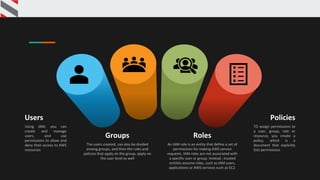
Policies
TO assign permissions to
a user, group, role or
resource, you create a
policy, which is a
document that explicitly
lists permissions
Users
Using IAM, you can
create and manage
users, and use
permissions to allow and
deny their access to AWS
resources
Groups
The users created, can also be divided
among groups, and then the rules and
policies that apply on the group, apply on
the suer level as well
Roles
An IAM role is an entity that define a set of
permissions for making AWS service
requests. IAM roles are not associated with
a specific user or group. Instead , trusted
entities assume roles, such as IAM users,
applications or AWS services such as EC2.
IAM - Components
Walkthrough of AWS console
MOST Used Services ● AWS EC2
● AWS S3
● AWS RDS
● Lambda
● IAM
Incidents that happen
● Uber - committed their AWS access key to their GITHUB
page
● Accenture and lot of others misconfigured s3 buckets
● Tesla - Unsecure IT admin console panel
Test cases
● What if we only need to pentest the cloud environment
● What if we find AWS keys
○ Github commits
○ Social engineering/phishing
○ Password reuse
○ Web application vulnerabilities
■ SSRF
■ Local file read
S3 Agenda
● S3 bucket policies and ACLs
● S3 common misconfigurations
● S3 bucket pentesting
○ Demo
Find S3 buckets
● Google the domain and see if any history of it exposes the bucket
name.
● Look at the web interface of the target comments etc.
● Brute-force to $bucket.s3.amazonaws.com
Keep in mind anyone can create a bucket with “Company Name”
Ways to give permissions to users
● ID / emailAddress
● AuthenticatedUsers
● Anyone with a valid set of AWS credentials
● AllUsers
● Any one can make PUT object, GET object depending upon the
policy
S3 Bucket policies
● S3 Bucket Policies are similar to IAM policies in that they allow
access to resources via a JSON script.
● However, Bucket policies are applied to Buckets in S3, where as IAM
policies are assigned to user/groups/roles and are used to govern
access to any AWS resource through the IAM service.
● When a bucket policy is applied the permissions assigned apply to all
objects within the Bucket. The policy will specify which ‘principles’
(users) are allowed to access which resources.
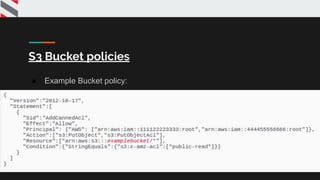
S3 Bucket policies
● Example Bucket policy:
●
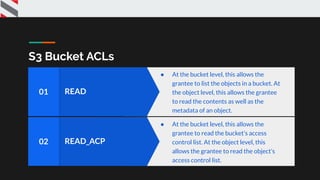
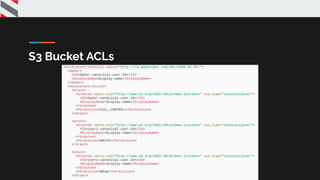
S3 Bucket ACLs
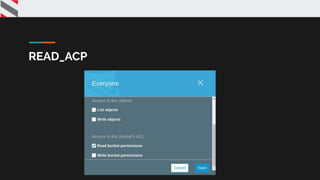
READ_ACP02
● At the bucket level, this allows the
grantee to read the bucket’s access
control list. At the object level, this
allows the grantee to read the object’s
access control list.
READ01
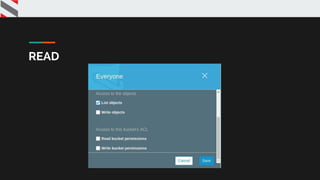
● At the bucket level, this allows the
grantee to list the objects in a bucket. At
the object level, this allows the grantee
to read the contents as well as the
metadata of an object.
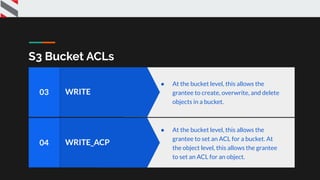
S3 Bucket ACLs
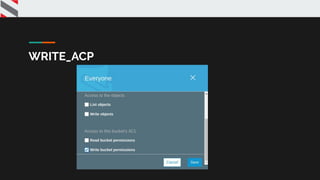
WRITE_ACP04
● At the bucket level, this allows the
grantee to set an ACL for a bucket. At
the object level, this allows the grantee
to set an ACL for an object.
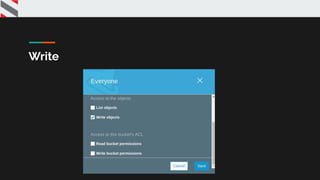
WRITE03
● At the bucket level, this allows the
grantee to create, overwrite, and delete
objects in a bucket.
S3 Bucket ACLs
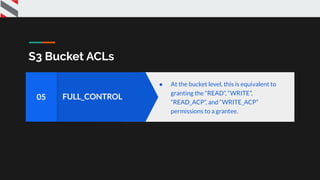
FULL_CONTROL05
● At the bucket level, this is equivalent to
granting the “READ”, “WRITE”,
“READ_ACP”, and “WRITE_ACP”
permissions to a grantee.
Scenario
● You have access to AWS credentials of LOW priv user with S3
permissions (User for analytics > Hard coded creds in JS)
● Public access is set for any of the below
● List Objects
● Write objects
● Read bucket permissions
● Write bucket permissions
Amazon S3 REST API
● Requests to Amazon S3 can be authenticated or anonymous.
● Authenticated access requires credentials that AWS can use to
authenticate your requests.
S3 Bucket ACLs
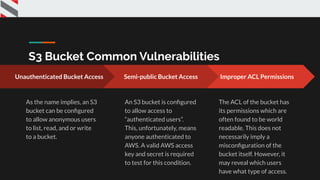
S3 Bucket Common Vulnerabilities
Improper ACL Permissions
The ACL of the bucket has
its permissions which are
often found to be world
readable. This does not
necessarily imply a
misconfiguration of the
bucket itself. However, it
may reveal which users
have what type of access.
Unauthenticated Bucket Access
As the name implies, an S3
bucket can be configured
to allow anonymous users
to list, read, and or write
to a bucket.
Semi-public Bucket Access
An S3 bucket is configured
to allow access to
“authenticated users”.
This, unfortunately, means
anyone authenticated to
AWS. A valid AWS access
key and secret is required
to test for this condition.
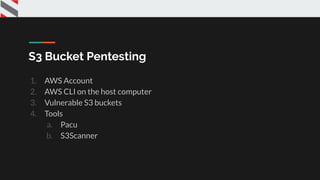
S3 Bucket Pentesting
1. AWS Account
2. AWS CLI on the host computer
3. Vulnerable S3 buckets
4. Tools
a. Pacu
b. S3Scanner
READ
Write
READ_ACP
WRITE_ACP
Tools
● bucket_finder
● S3Scanner
● S3-inspector
● AWSBucketDump
S3 scanner
Demo
Possible Vulnerabilities
● Stored & reflected cross site scripting
● Causing availability issue
● Sensitive information disclosure
● Remote code execution (Hosting Malware)
Pentesting EC2 ● Why everyone needs to pentest their
cloud
● Intro to AWS EC2
● Tools to pentest the ec2
● Attack Vectors
● Demo SSRF to RCE
Cloudgoat
CloudGoat is Rhino Security Labs' "Vulnerable by
Design" AWS deployment tool. It allows you to hone
your cloud cybersecurity skills by creating and
completing several "capture-the-flag" style scenarios.
● Focused, Curated, High-Quality Learning
Experiences
● Created and maintained by Rhino Security
● Provides Modularity and Expandability
AWS attack vectors for EC2
● Enumerating Instances, Security Groups, and AMIs to stage EC2
attacks
● Abusing Simple Systems Manager for remote access to instances
● Analyzing EC2 User Data for secrets or system credentials
● Identifying routes between VPCs for lateral movement and escalation
Tools you'll need to pentest EC2
1. Vulnerable EC2 instance
2. Tools
2.1 AWS CLI
2.2 PACU
PACU
Pacu is an open source AWS exploitation framework,
designed for offensive security testing against cloud
environments.
● Pacu is an open source AWS exploitation
framework.
● Created and maintained by Rhino Security Labs
● Pacu allows penetration testers to exploit
configuration flaws within an AWS account
● Can perform permissions enumeration, privilege
escalation, enumerating EC2 instances,
establishing backdoor persistence in an account,
and remotely executing code as root/SYSTEM on
EC2
Let’s PWN
EC2
Pentesting IAM ● Features if IAM
● Terminology for IAM
● Tools to pentest the IAM
● Attack Vectors
● Demo
Features of IAM
● Centralized control of your AWS account
● Shared access to your AWS account
● Granular Permissions
● Identity Federation (including Active Directory, Facebook, LinkedIn etc)
● Multi-factor Authentication.
● Provides temporary access for users/devices and services when necessary
● Allows you to set up your own password rotation policy
● Integrates with many different AWS services
● Supports PCI DSS compliance
Terminology for IAM
● Users
○ End Users such as people, employees of an organization etc
● Groups
○ A collection of users, each user in the group will inherit the permissions
from the group.
● Policies
○ Policies are made up of documents, called Policy documents. These
documents are in a format called JSON and they give permissions as to
what User/Group/Role is able to do.
● Roles
○ You create roles and then assign them to AWS Resources.
Attack Vector
● There are 21 different methods to Escalate IAM Privilege
○ Create Access key for other user
○ Creating a new policy version
○ Attaching policy to a user/group/role
○ Creating/updating an inline policy for a user/group.role
○ Adding user to a group
IAM
Demo
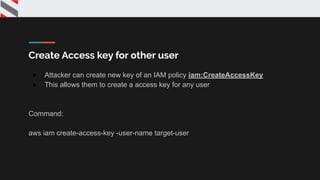
Create Access key for other user
● Attacker can create new key of an IAM policy iam:CreateAccessKey
● This allows them to create a access key for any user
Command:
aws iam create-access-key -user-name target-user
Attaching policy to a user
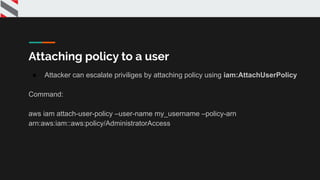
● Attacker can escalate priviliges by attaching policy using iam:AttachUserPolicy
Command:
aws iam attach-user-policy –user-name my_username –policy-arn
arn:aws:iam::aws:policy/AdministratorAccess
{
"Version": "2012-10-17",
"Statement": [
{
"Effect": "Allow",
"Action": [
"s3:Get*",
"s3:List*"
],
"Resource": "*"
}
]
}
Normal user policy
{
"Version": "2012-10-17",
"Statement": [
{
"Effect": "Allow",
"Action": "*",
"Resource": "*"
}
]
}
Admin Policy
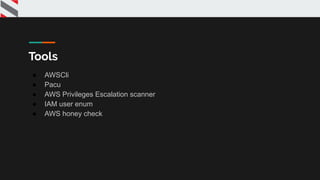
Tools
● AWSCli
● Pacu
● AWS Privileges Escalation scanner
● IAM user enum
● AWS honey check
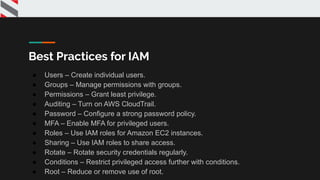
Best Practices for IAM
● Users – Create individual users.
● Groups – Manage permissions with groups.
● Permissions – Grant least privilege.
● Auditing – Turn on AWS CloudTrail.
● Password – Configure a strong password policy.
● MFA – Enable MFA for privileged users.
● Roles – Use IAM roles for Amazon EC2 instances.
● Sharing – Use IAM roles to share access.
● Rotate – Rotate security credentials regularly.
● Conditions – Restrict privileged access further with conditions.
● Root – Reduce or remove use of root.
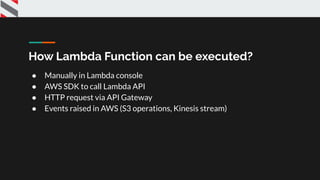
How Lambda Function can be executed?
● Manually in Lambda console
● AWS SDK to call Lambda API
● HTTP request via API Gateway
● Events raised in AWS (S3 operations, Kinesis stream)
Use cases
● Data processing
○ Real-time File Processing
○ Real-time Stream Processing
○ Extract, Transform, Load
● Backends
○ IoT Backends
○ Mobile Backends
○ Web Applications
Example 1
● An image is uploaded to the s3 bucket
● AWS lambda is triggered
● Images are processed and converted into the
thumbnails based on the devices
Example 2
● AWS Kinesis Gathers # tag trending data
● AWS lambda is triggered
● Data stored in database and later can be used for
analysis
Attack Vectors
● Attacking Lambda function with Read access
● Attacking Lambda functions with read and write
access
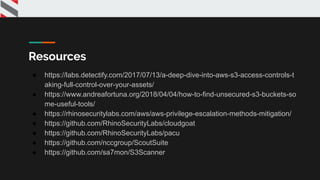
Resources
● https://labs.detectify.com/2017/07/13/a-deep-dive-into-aws-s3-access-controls-t
aking-full-control-over-your-assets/
● https://www.andreafortuna.org/2018/04/04/how-to-find-unsecured-s3-buckets-so
me-useful-tools/
● https://rhinosecuritylabs.com/aws/aws-privilege-escalation-methods-mitigation/
● https://github.com/RhinoSecurityLabs/cloudgoat
● https://github.com/RhinoSecurityLabs/pacu
● https://github.com/nccgroup/ScoutSuite
● https://github.com/sa7mon/S3Scanner
Thank You!

Deep dive into cloud security - Jaimin Gohel & Virendra Rathore

  • 1.
    Deep-Dive into AWSPentesting Cloud Security Workshop @NS Conclave @jaimin_gohel @VEERSAA1
  • 2.
    # Who amI ? • Manager - Professional Services @ Net Square • Chapter Lead @ null Ahmedabad • Speaker • CTF Player jaimin_gohel
  • 3.
    # Who amI ? • Security Analyst @ Net Square • Speaker • Bug Hunter • Infosec Trainer VEERSAA1
  • 7.
    Agenda ● Introto AWS services ● Intro to AWS CLI ● Attack Vectors for AWS ● Tools to pentest the AWS services ● Pentesting Most Used Services ● DEMO
  • 8.
  • 9.
  • 10.
  • 11.
    AWS Compute Services ● EC2 ●Lambda ● Elastic Load Balancer ● Autoscaling
  • 12.
    EC2 Amazon EC2 (ElasticCompute Cloud) is a web service interface that provides resizable compute capacity in the AWS cloud. It is designed for developers to have complete control over web-scaling and computing resources. AWS EC2 (Elastic Compute Cloud)
  • 13.
    Lambda AWS Lambda isan event-driven, serverless computing platform. It is a computing service that runs code in response to events and automatically manages the computing resources required by that code. ● Advanced version of EC2 ● It cannot be used to host an application ● Execution is by tasks ● Triggers are setup and Lambda executes the code ● Eg: File processing after file upload. AWS Lambda
  • 14.
    Elastic Load Balancer AmazonELB allows you to make your applications highly available by using health checks and distributing traffic across a number of instances. AWS Elastic Load Balancer
  • 15.
    AutoScaling Amazon EC2 AutoScaling helps you ensure that you have the correct number of Amazon EC2 instances available to handle the load for your application. AWS AutoScaling
  • 16.
    AutoScaling Minimum requirement Desired requirement Maximumrequirement Scaled up or down automatically 1 2 43 Increased Load
  • 17.
    AWS Storage Services ● S3 ●Cloudfront ● Elastic Block Storage ● Glacier ● Snowball
  • 18.
    S3 Amazon Simple StorageService (Amazon S3) is a scalable, high-speed, web-based cloud storage service designed for online backup and archiving of data and applications on Amazon Web Services. ● It is an object oriented File system. ● All the files are uploaded on S3 are treated as objects. ● These objects are stored in buckets. ● Buckets are the first folders in the root directory. AWS S3
  • 19.
    Cloudfront It is aContent Delivery Network (CDN). ● Basically it is a caching service. ● It delivers the data through a network of data centers called edge locations. ● The main purpose of Cloudfront is providing good user experience AWS Cloudfront
  • 20.
    Elastic Block Storage Amazon ElasticBlock Store (EBS) provides raw block-level storage that can be attached to Amazon EC2 instances and is used in Amazon Relational Database Service (RDS) ● It is basically a hard drive of EC2 ● It cannot be used independently AWS Elastic Block Store
  • 21.
    Amazon Glacier Amazon Glacieris an online file storage web service that provides storage for data archiving and backup. ● Low price storage ● It uses Magnetic tapes, hence it is a cheap storage AWS Glacier
  • 22.
    Snowball It is aAWS service of transferring data physically to AWS Infrastructure. ● Snowball is a physical device (50-80 TB) which is used to transfer data.
  • 23.
    Snowmobile ● Can beused to transfer data from your datacenter to AWS. ● 100 petabytes of data per Snowmobile
  • 24.
    AWS Database Service ● RDS ●Aurora ● DynamoDB ● ElastiCache
  • 25.
    Relational Database Management Service RelationalDatabase Service (Amazon RDS) is a managed SQL database service provided by Amazon Web Services (AWS). ● Updates to the DB engine ● Patching automation AWS RDS
  • 26.
    Aurora Amazon Aurora isa fully managed relational database engine that's compatible with MySQL and PostgreSQL ● Basically it is a custom built by Amazon ● It is based on MySQL ● 5x Faster than Traditional MySQL DB
  • 27.
    DynamoDB Amazon DynamoDB isa fully managed NoSQL database service that allows to create database tables that can store and retrieve any amount of data. It automatically manages the data traffic of tables over multiple servers and maintains performance. ● Only NoSQL DB are managed by DynamoDB ● Updating and patching is done automatically ● Auto-scaling Note: DynamoDB is a fully managed proprietary NoSQL database service
  • 28.
    ElastiCache Amazon ElastiCache isa fully managed caching service. ● It is protocol-compliant with Memcached ● It is used to set up, manage and scale a distributed cache environment in the cloud. AWS ElastiCache
  • 29.
    AWS Networking Service ● VPC ●Direct Connect ● Route 53
  • 30.
    Virtual Private Cloud(Amazon VPC) enables you to launch AWS resources into a virtual network that you've defined. ● Simulates an environment similar to a private Data Center ● Provides Scalability in the virtual environment Direct Connect is a network service that allows a customer to establish a dedicated network connection between AWS and the customer's data center ● It’s a Leased line to the AWS infrastructure Amazon Route 53 is a scalable domain name system (DNS) service intended to give business and developers a reliable way to direct end users to applications. AWS VPC AWS Direct Connect AWS Route 53
  • 31.
    AWS Management Services ● CloudWatch ●CloudFormation ● CloudTrail ● CLI
  • 32.
    CloudWatch is acomponent of Amazon Web Services (AWS) that provides monitoring for AWS resources and the customer applications running on the AWS infrastructure CloudFormation is a service that provides customers with the tools they need to create and manage the infrastructure. ● It helps create templates of the infrastructure and then replicate to another instance. ● Like taking a snapshot of the current infra and making another instance ● Helps in version controlling CloudTrail is a API service that enables governance, compliance, operational auditing, and risk auditing of your AWS infrastructure ● simplifies security analysis, resource change tracking, and troubleshooting ● provides event history of your AWS account activity AWS CloudWatch AWS CloudFormation AWS CloudTrail
  • 33.
    Cloudformation Template Create or usea template Template S3 Bucket Save locally on S3 bucket Template Use Cloudformation to create stack based on template and construct the stack resource AWS CloudFormation
  • 34.
    AWS CLI AWS CommandLine Interface (CLI) is a unified tool to manage your AWS services ● Control multiple AWS services ● Automation using scripts ● Just a CLI version of the AWS GUI AWS CLI
  • 35.
    IAM - Identityand Access Management IAM enables you to securely control access to AWS services and resources for your users. Create and manage AWS users and groups and use permissions to allow and deny their permissions to AWS resources. AWS IAM
  • 36.
    Policies TO assign permissionsto a user, group, role or resource, you create a policy, which is a document that explicitly lists permissions Users Using IAM, you can create and manage users, and use permissions to allow and deny their access to AWS resources Groups The users created, can also be divided among groups, and then the rules and policies that apply on the group, apply on the suer level as well Roles An IAM role is an entity that define a set of permissions for making AWS service requests. IAM roles are not associated with a specific user or group. Instead , trusted entities assume roles, such as IAM users, applications or AWS services such as EC2. IAM - Components
  • 37.
  • 38.
    MOST Used Services● AWS EC2 ● AWS S3 ● AWS RDS ● Lambda ● IAM
  • 39.
    Incidents that happen ●Uber - committed their AWS access key to their GITHUB page ● Accenture and lot of others misconfigured s3 buckets ● Tesla - Unsecure IT admin console panel
  • 40.
    Test cases ● Whatif we only need to pentest the cloud environment ● What if we find AWS keys ○ Github commits ○ Social engineering/phishing ○ Password reuse ○ Web application vulnerabilities ■ SSRF ■ Local file read
  • 41.
    S3 Agenda ● S3bucket policies and ACLs ● S3 common misconfigurations ● S3 bucket pentesting ○ Demo
  • 42.
    Find S3 buckets ●Google the domain and see if any history of it exposes the bucket name. ● Look at the web interface of the target comments etc. ● Brute-force to $bucket.s3.amazonaws.com Keep in mind anyone can create a bucket with “Company Name”
  • 43.
    Ways to givepermissions to users ● ID / emailAddress ● AuthenticatedUsers ● Anyone with a valid set of AWS credentials ● AllUsers ● Any one can make PUT object, GET object depending upon the policy
  • 44.
    S3 Bucket policies ●S3 Bucket Policies are similar to IAM policies in that they allow access to resources via a JSON script. ● However, Bucket policies are applied to Buckets in S3, where as IAM policies are assigned to user/groups/roles and are used to govern access to any AWS resource through the IAM service. ● When a bucket policy is applied the permissions assigned apply to all objects within the Bucket. The policy will specify which ‘principles’ (users) are allowed to access which resources.
  • 45.
    S3 Bucket policies ●Example Bucket policy: ●
  • 46.
    S3 Bucket ACLs READ_ACP02 ●At the bucket level, this allows the grantee to read the bucket’s access control list. At the object level, this allows the grantee to read the object’s access control list. READ01 ● At the bucket level, this allows the grantee to list the objects in a bucket. At the object level, this allows the grantee to read the contents as well as the metadata of an object.
  • 47.
    S3 Bucket ACLs WRITE_ACP04 ●At the bucket level, this allows the grantee to set an ACL for a bucket. At the object level, this allows the grantee to set an ACL for an object. WRITE03 ● At the bucket level, this allows the grantee to create, overwrite, and delete objects in a bucket.
  • 48.
    S3 Bucket ACLs FULL_CONTROL05 ●At the bucket level, this is equivalent to granting the “READ”, “WRITE”, “READ_ACP”, and “WRITE_ACP” permissions to a grantee.
  • 49.
    Scenario ● You haveaccess to AWS credentials of LOW priv user with S3 permissions (User for analytics > Hard coded creds in JS) ● Public access is set for any of the below ● List Objects ● Write objects ● Read bucket permissions ● Write bucket permissions
  • 50.
    Amazon S3 RESTAPI ● Requests to Amazon S3 can be authenticated or anonymous. ● Authenticated access requires credentials that AWS can use to authenticate your requests.
  • 51.
  • 52.
    S3 Bucket CommonVulnerabilities Improper ACL Permissions The ACL of the bucket has its permissions which are often found to be world readable. This does not necessarily imply a misconfiguration of the bucket itself. However, it may reveal which users have what type of access. Unauthenticated Bucket Access As the name implies, an S3 bucket can be configured to allow anonymous users to list, read, and or write to a bucket. Semi-public Bucket Access An S3 bucket is configured to allow access to “authenticated users”. This, unfortunately, means anyone authenticated to AWS. A valid AWS access key and secret is required to test for this condition.
  • 53.
    S3 Bucket Pentesting 1.AWS Account 2. AWS CLI on the host computer 3. Vulnerable S3 buckets 4. Tools a. Pacu b. S3Scanner
  • 54.
  • 55.
  • 56.
  • 57.
  • 58.
    Tools ● bucket_finder ● S3Scanner ●S3-inspector ● AWSBucketDump
  • 59.
  • 60.
    Possible Vulnerabilities ● Stored& reflected cross site scripting ● Causing availability issue ● Sensitive information disclosure ● Remote code execution (Hosting Malware)
  • 61.
    Pentesting EC2 ●Why everyone needs to pentest their cloud ● Intro to AWS EC2 ● Tools to pentest the ec2 ● Attack Vectors ● Demo SSRF to RCE
  • 62.
    Cloudgoat CloudGoat is RhinoSecurity Labs' "Vulnerable by Design" AWS deployment tool. It allows you to hone your cloud cybersecurity skills by creating and completing several "capture-the-flag" style scenarios. ● Focused, Curated, High-Quality Learning Experiences ● Created and maintained by Rhino Security ● Provides Modularity and Expandability
  • 63.
    AWS attack vectorsfor EC2 ● Enumerating Instances, Security Groups, and AMIs to stage EC2 attacks ● Abusing Simple Systems Manager for remote access to instances ● Analyzing EC2 User Data for secrets or system credentials ● Identifying routes between VPCs for lateral movement and escalation
  • 64.
    Tools you'll needto pentest EC2 1. Vulnerable EC2 instance 2. Tools 2.1 AWS CLI 2.2 PACU
  • 65.
    PACU Pacu is anopen source AWS exploitation framework, designed for offensive security testing against cloud environments. ● Pacu is an open source AWS exploitation framework. ● Created and maintained by Rhino Security Labs ● Pacu allows penetration testers to exploit configuration flaws within an AWS account ● Can perform permissions enumeration, privilege escalation, enumerating EC2 instances, establishing backdoor persistence in an account, and remotely executing code as root/SYSTEM on EC2
  • 66.
  • 67.
    Pentesting IAM ●Features if IAM ● Terminology for IAM ● Tools to pentest the IAM ● Attack Vectors ● Demo
  • 68.
    Features of IAM ●Centralized control of your AWS account ● Shared access to your AWS account ● Granular Permissions ● Identity Federation (including Active Directory, Facebook, LinkedIn etc) ● Multi-factor Authentication. ● Provides temporary access for users/devices and services when necessary ● Allows you to set up your own password rotation policy ● Integrates with many different AWS services ● Supports PCI DSS compliance
  • 69.
    Terminology for IAM ●Users ○ End Users such as people, employees of an organization etc ● Groups ○ A collection of users, each user in the group will inherit the permissions from the group. ● Policies ○ Policies are made up of documents, called Policy documents. These documents are in a format called JSON and they give permissions as to what User/Group/Role is able to do. ● Roles ○ You create roles and then assign them to AWS Resources.
  • 70.
    Attack Vector ● Thereare 21 different methods to Escalate IAM Privilege ○ Create Access key for other user ○ Creating a new policy version ○ Attaching policy to a user/group/role ○ Creating/updating an inline policy for a user/group.role ○ Adding user to a group
  • 71.
  • 72.
    Create Access keyfor other user ● Attacker can create new key of an IAM policy iam:CreateAccessKey ● This allows them to create a access key for any user Command: aws iam create-access-key -user-name target-user
  • 73.
    Attaching policy toa user ● Attacker can escalate priviliges by attaching policy using iam:AttachUserPolicy Command: aws iam attach-user-policy –user-name my_username –policy-arn arn:aws:iam::aws:policy/AdministratorAccess
  • 74.
    { "Version": "2012-10-17", "Statement": [ { "Effect":"Allow", "Action": [ "s3:Get*", "s3:List*" ], "Resource": "*" } ] } Normal user policy
  • 75.
    { "Version": "2012-10-17", "Statement": [ { "Effect":"Allow", "Action": "*", "Resource": "*" } ] } Admin Policy
  • 76.
    Tools ● AWSCli ● Pacu ●AWS Privileges Escalation scanner ● IAM user enum ● AWS honey check
  • 77.
    Best Practices forIAM ● Users – Create individual users. ● Groups – Manage permissions with groups. ● Permissions – Grant least privilege. ● Auditing – Turn on AWS CloudTrail. ● Password – Configure a strong password policy. ● MFA – Enable MFA for privileged users. ● Roles – Use IAM roles for Amazon EC2 instances. ● Sharing – Use IAM roles to share access. ● Rotate – Rotate security credentials regularly. ● Conditions – Restrict privileged access further with conditions. ● Root – Reduce or remove use of root.
  • 78.
    How Lambda Functioncan be executed? ● Manually in Lambda console ● AWS SDK to call Lambda API ● HTTP request via API Gateway ● Events raised in AWS (S3 operations, Kinesis stream)
  • 79.
    Use cases ● Dataprocessing ○ Real-time File Processing ○ Real-time Stream Processing ○ Extract, Transform, Load ● Backends ○ IoT Backends ○ Mobile Backends ○ Web Applications
  • 80.
    Example 1 ● Animage is uploaded to the s3 bucket ● AWS lambda is triggered ● Images are processed and converted into the thumbnails based on the devices
  • 81.
    Example 2 ● AWSKinesis Gathers # tag trending data ● AWS lambda is triggered ● Data stored in database and later can be used for analysis
  • 82.
    Attack Vectors ● AttackingLambda function with Read access ● Attacking Lambda functions with read and write access
  • 83.
    Resources ● https://labs.detectify.com/2017/07/13/a-deep-dive-into-aws-s3-access-controls-t aking-full-control-over-your-assets/ ● https://www.andreafortuna.org/2018/04/04/how-to-find-unsecured-s3-buckets-so me-useful-tools/ ●https://rhinosecuritylabs.com/aws/aws-privilege-escalation-methods-mitigation/ ● https://github.com/RhinoSecurityLabs/cloudgoat ● https://github.com/RhinoSecurityLabs/pacu ● https://github.com/nccgroup/ScoutSuite ● https://github.com/sa7mon/S3Scanner
  • 84.