
Welcome to Python
2015 Summer Data Mining Workshop
August 20, 2015
Kyunghoon Kim
kyunghoon@unist.ac.kr
Department of Mathematical Sciences
Ulsan National Institute of Science and Technology
Republic of Korea
1
Contents
Python
왜 프로그래밍을 배워야 하나?
왜 파이썬을 사용하나?
어떻게 파이썬을 배우나?
파이썬2냐 파이썬3냐
파이썬 배우기
파이썬 코드와 실행
객체 Object
help(), dir()
변수의 자료형
주석 comment
리스트 list
사전 dictionary
함수 Function
반복문 Loop statement
조건문 Conditional statement
클래스 Class
2
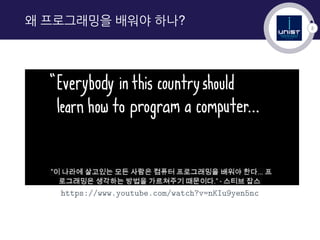
왜 프로그래밍을 배워야 하나?
https://www.youtube.com/watch?v=nKIu9yen5nc
3
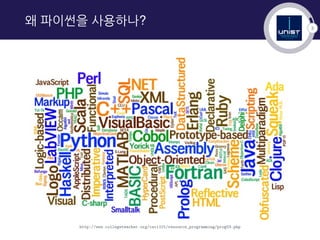
왜 파이썬을 사용하나?
http://www.collegeteacher.org/csci101/resource_programming/prog03.php
4
왜 파이썬을 사용하나?
5
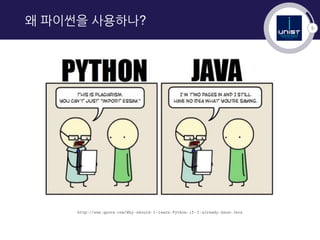
왜 파이썬을 사용하나?
http://www.quora.com/Why-should-I-learn-Python-if-I-already-know-Java
6
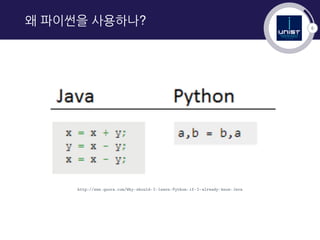
왜 파이썬을 사용하나?
http://www.quora.com/Why-should-I-learn-Python-if-I-already-know-Java
7
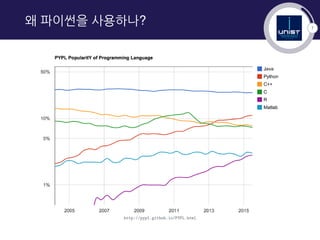
왜 파이썬을 사용하나?
http://pypl.github.io/PYPL.html
8
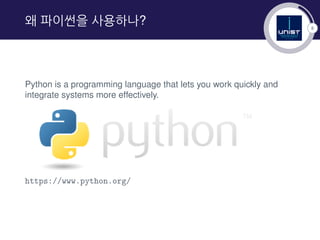
왜 파이썬을 사용하나?
Python is a programming language that lets you work quickly and
integrate systems more effectively.
https://www.python.org/
9
어떻게 파이썬을 배우나?
▶ English : http://code.tutsplus.com/articles/
the-best-way-to-learn-python--net-26288
▶ Korean : https://nolboo.github.io/blog/2014/08/10/
the-best-way-to-learn-python/
10
어떻게 파이썬을 배우나?
Web Tutorial(links)
▶ Codecademy python-ko
▶ Python Visualization
▶ ipython Tutorial
▶ Learn Python Online
11
어떻게 파이썬을 배우나?
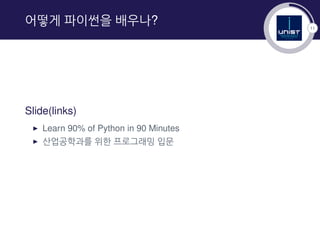
Slide(links)
▶ Learn 90% of Python in 90 Minutes
▶ 산업공학과를 위한 프로그래밍 입문
12
어떻게 파이썬을 배우나?
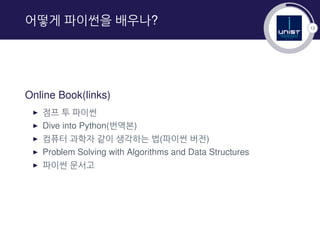
Online Book(links)
▶ 점프 투 파이썬
▶ Dive into Python(번역본)
▶ 컴퓨터 과학자 같이 생각하는 법(파이썬 버전)
▶ Problem Solving with Algorithms and Data Structures
▶ 파이썬 문서고
13
어떻게 파이썬을 배우나?
14
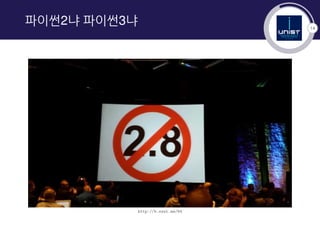
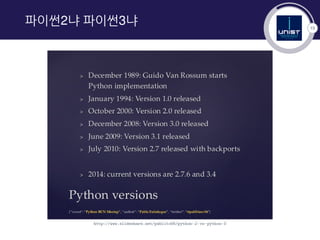
파이썬2냐 파이썬3냐
http://b.ssut.me/64
15
파이썬2냐 파이썬3냐
http://www.slideshare.net/pablito56/python-2-vs-python-3
16
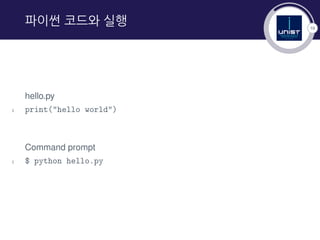
파이썬 코드와 실행
hello.py
1 print("hello world")
Command prompt
1 $ python hello.py
17
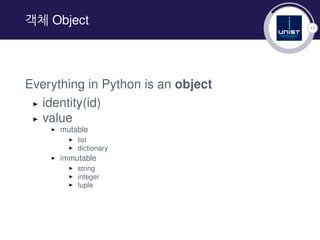
객체 Object
Everything in Python is an object
▶ identity(id)
▶ value
▶ mutable
▶ list
▶ dictionary
▶ immutable
▶ string
▶ integer
▶ tuple
18
help(), dir()
정의된 객체에 관한 문서를 얻을 때 사용하는 명령어.
1. help()
객체에 대해 뭔가 알고 싶다
1 >>> help(dir)
2 Help on built-in function dir in module __builtin__:
3
4 dir(...)
5 dir([object]) -> list of strings
2. dir()
객체의 속성에 관한 목록을 얻고 싶다
1 >>> dir(help)
2 [‘__call__’, ‘__class__’, ‘__delattr__’, ‘__dict__’, ...]
19
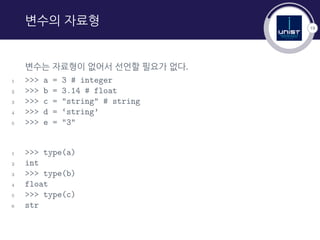
변수의 자료형
변수는 자료형이 없어서 선언할 필요가 없다.
1 >>> a = 3 # integer
2 >>> b = 3.14 # float
3 >>> c = "string" # string
4 >>> d = ‘string’
5 >>> e = "3"
1 >>> type(a)
2 int
3 >>> type(b)
4 float
5 >>> type(c)
6 str
20
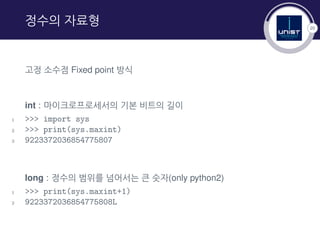
정수의 자료형
고정 소수점 Fixed point 방식
int : 마이크로프로세서의 기본 비트의 길이
1 >>> import sys
2 >>> print(sys.maxint)
3 9223372036854775807
long : 정수의 범위를 넘어서는 큰 숫자(only python2)
1 >>> print(sys.maxint+1)
2 9223372036854775808L
21
실수의 자료형
부동 소수점 Floating point 방식
: 소수점의 위치를 고정하지 않고 그 위치를 나타내는 수(exponent)를 따로 적음
[mantissa] ∗ [base][exponent]
정밀도 precision 문제 발생
1 >>> (1234.567+0.001)+0.0004
2 1234.5683999999999
1 >>> 1234.567+(0.001+0.0004)
2 1234.5684
22
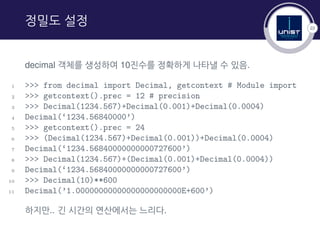
정밀도 설정
decimal 객체를 생성하여 10진수를 정확하게 나타낼 수 있음.
1 >>> from decimal import Decimal, getcontext # Module import
2 >>> getcontext().prec = 12 # precision
3 >>> Decimal(1234.567)+Decimal(0.001)+Decimal(0.0004)
4 Decimal(‘1234.56840000’)
5 >>> getcontext().prec = 24
6 >>> (Decimal(1234.567)+Decimal(0.001))+Decimal(0.0004)
7 Decimal(‘1234.56840000000000727600’)
8 >>> Decimal(1234.567)+(Decimal(0.001)+Decimal(0.0004))
9 Decimal(‘1234.56840000000000727600’)
10 >>> Decimal(10)**600
11 Decimal(’1.00000000000000000000000E+600’)
하지만.. 긴 시간의 연산에서는 느리다.
23
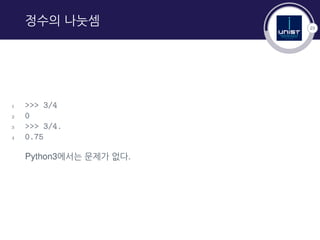
정수의 나눗셈
1 >>> 3/4
2 0
3 >>> 3/4.
4 0.75
Python3에서는 문제가 없다.
24
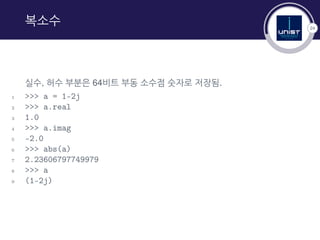
복소수
실수, 허수 부분은 64비트 부동 소수점 숫자로 저장됨.
1 >>> a = 1-2j
2 >>> a.real
3 1.0
4 >>> a.imag
5 -2.0
6 >>> abs(a)
7 2.23606797749979
8 >>> a
9 (1-2j)
25
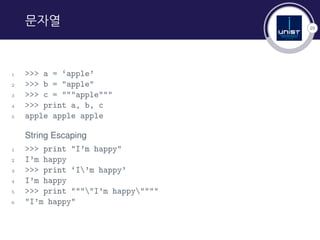
문자열
1 >>> a = ‘apple’
2 >>> b = "apple"
3 >>> c = """apple"""
4 >>> print a, b, c
5 apple apple apple
String Escaping
1 >>> print "I’m happy"
2 I’m happy
3 >>> print ‘I’m happy’
4 I’m happy
5 >>> print """"I’m happy""""
6 "I’m happy"
26
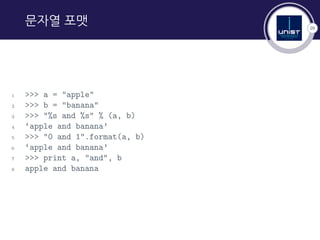
문자열 포맷
1 >>> a = "apple"
2 >>> b = "banana"
3 >>> "%s and %s" % (a, b)
4 ‘apple and banana’
5 >>> "0 and 1".format(a, b)
6 ‘apple and banana’
7 >>> print a, "and", b
8 apple and banana
27
문자열 방법
Dunder(Double under) Methods and String Methods
1 >>> dir("apple")
2 [’__add__’, ’__class__’, ’__contains__’, ’__delattr__’,
3 ’__doc__’, ’__eq__’, ’__format__’, ’__ge__’, ’__getattribute__’,
4 ...
5 ’capitalize’, ’center’, ’count’, ’decode’, ’encode’,
6 ’endswith’, ’expandtabs’, ’find’, ’format’, ’index’,
7 ’isalnum’, ’isalpha’, ’isdigit’, ’islower’, ’isspace’,
8 ’istitle’, ’isupper’, ’join’, ’ljust’, ’lower’, ’lstrip’,
9 ’partition’, ’replace’, ’rfind’, ’rindex’, ’rjust’,
10 ’rpartition’, ’rsplit’, ’rstrip’, ’split’, ’splitlines’,
11 ’startswith’, ’strip’, ’swapcase’, ’title’, ’translate’,
12 ’upper’, ’zfill’]
28
주석 comment
1 # 한 줄 주석
2
3 """
4 여러 줄 주석
5 """
29
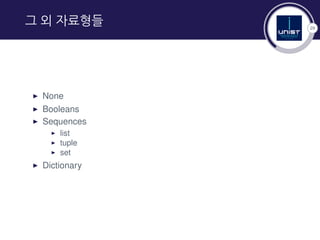
그 외 자료형들
▶ None
▶ Booleans
▶ Sequences
▶ list
▶ tuple
▶ set
▶ Dictionary
30
리스트 list
1 >>> a = [’apple’, ’banana’, ’kiwi’]
2 >>> a[0]
3 ’apple’
4 >>> a[2]
5 ’kiwi’
6 >>> a[-1] # a[len(a)-1]
7 ’kiwi’
8 >>> len(a)
9 3
31
리스트 list
1 >>> dir([])
2 [..., ’append’, ’count’, ’extend’, ’index’,
3 ’insert’, ’pop’, ’remove’, ’reverse’, ’sort’]
4
5 >>> a.append(’melon’)
6 >>> a
7 [’apple’, ’banana’, ’kiwi’, ’melon’]
8 >>> a.index(’kiwi’)
9 2
10 >>> a.remove(’banana’)
11 >>> a
12 [’apple’, ’kiwi’, ’melon’]
13 >>> a.pop(2)
14 ’melon’
15 >>> a
16 [’apple’, ’kiwi’]
32
리스트 list
1 >>> range(10) # half-open interval
2 [0, 1, 2, 3, 4, 5, 6, 7, 8, 9]
3 >>> range(3, 10) # length = end - start
4 [3, 4, 5, 6, 7, 8, 9]
5 >>> range(1, 10, 2)
6 [1, 3, 5, 7, 9]
7 >>> a = range(10)
8 >>> a
9 [0, 1, 2, 3, 4, 5, 6, 7, 8, 9]
10 >>> a[3:5]
11 [3, 4]
12 >>> a[::-1]
13 [9, 8, 7, 6, 5, 4, 3, 2, 1, 0]
33
사전 dictionary
Hashmap, Associative array
1 >>> a = {} # a = dict()
2 >>> a[’apple’] = 500
3 >>> a[’banana’] = 200
4 >>> a
5 {’apple’: 500, ’banana’: 200}
1 >>> dir({})
2 [...,’clear’, ’copy’, ’fromkeys’, ’get’, ’has_key’, ’items’,
3 ’iteritems’, ’iterkeys’, ’itervalues’, ’keys’, ’pop’,
4 ’popitem’, ’setdefault’, ’update’, ’values’, ’viewitems’,
5 ’viewkeys’, ’viewvalues’]
34
사전 dictionary
1 >>> apple = dict()
2 >>> apple = {"price": 500, "type": ["fruit", "red"],
3 "property": {"a": 1}}
4 >>> apple[’price’]
5 500
6 >>> apple[’type’]
7 [’fruit’, ’red’]
8 >>> apple[’type’][0]
9 ’fruit’
10 >>> apple[’property’]
11 {’a’: 1}
12 >>> apple[’property’][’a’]
13 1
14 >>> apple.get("price", None)
15 500
16 >>> apple.get("where", None)
17 >>>
35
그 외 유용한 자료형들
1 >>> values = [1,1,1,2,3,3,4,5,6,7,7]
2 >>> set(values) # 집합 set
3 set([1, 2, 3, 4, 5, 6, 7])
4 >>> list(set(values))
5 [1, 2, 3, 4, 5, 6, 7]
1 >>> a = (11, 23, "Monday") # 튜플 tuple
2 >>> (mon, day, text) = a
3 >>> print mon, day, text
4 11 23 Monday
36
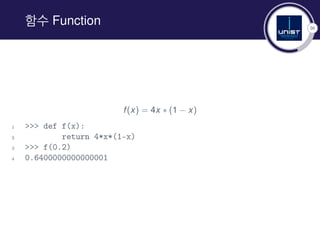
함수 Function
f(x) = 4x ∗ (1 − x)
1 >>> def f(x):
2 return 4*x*(1-x)
3 >>> f(0.2)
4 0.6400000000000001
37
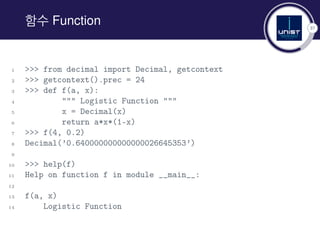
함수 Function
1 >>> from decimal import Decimal, getcontext
2 >>> getcontext().prec = 24
3 >>> def f(a, x):
4 """ Logistic Function """
5 x = Decimal(x)
6 return a*x*(1-x)
7 >>> f(4, 0.2)
8 Decimal(’0.640000000000000026645353’)
9
10 >>> help(f)
11 Help on function f in module __main__:
12
13 f(a, x)
14 Logistic Function
38
반복문 Loop
1 >>> for i in [’apple’, ’banana’, ’kiwi’]:
2 ... print i
3 ...
4 apple
5 banana
6 kiwi
7
8 >>> for i in range(0, 10, 2):
9 ... print i
10 ...
11 0
12 2
13 4
14 6
15 8
39
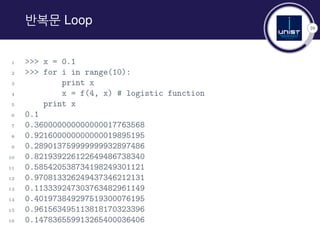
반복문 Loop
1 >>> x = 0.1
2 >>> for i in range(10):
3 print x
4 x = f(4, x) # logistic function
5 print x
6 0.1
7 0.360000000000000017763568
8 0.921600000000000019895195
9 0.289013759999999932897486
10 0.821939226122649486738340
11 0.585420538734198249301121
12 0.970813326249437346212131
13 0.113339247303763482961149
14 0.401973849297519300076195
15 0.961563495113818170323396
16 0.147836559913265400036406
40
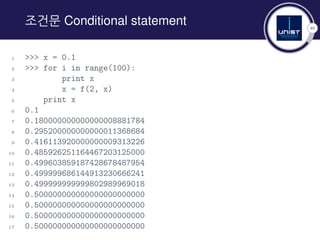
조건문 Conditional statement
1 >>> x = 0.1
2 >>> for i in range(100):
3 print x
4 x = f(2, x)
5 print x
6 0.1
7 0.180000000000000008881784
8 0.295200000000000011368684
9 0.416113920000000009313226
10 0.485926251164467203125000
11 0.499603859187428678487954
12 0.499999686144913230666241
13 0.499999999999802989969018
14 0.500000000000000000000000
15 0.500000000000000000000000
16 0.500000000000000000000000
17 0.500000000000000000000000
41
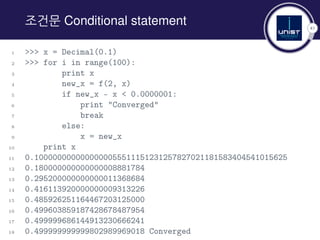
조건문 Conditional statement
1 >>> x = Decimal(0.1)
2 >>> for i in range(100):
3 print x
4 new_x = f(2, x)
5 if new_x - x < 0.0000001:
6 print "Converged"
7 break
8 else:
9 x = new_x
10 print x
11 0.1000000000000000055511151231257827021181583404541015625
12 0.180000000000000008881784
13 0.295200000000000011368684
14 0.416113920000000009313226
15 0.485926251164467203125000
16 0.499603859187428678487954
17 0.499999686144913230666241
18 0.499999999999802989969018 Converged
42
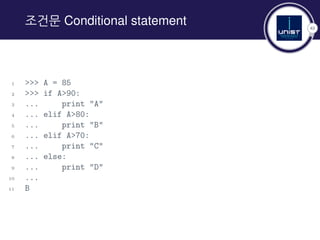
조건문 Conditional statement
1 >>> A = 85
2 >>> if A>90:
3 ... print "A"
4 ... elif A>80:
5 ... print "B"
6 ... elif A>70:
7 ... print "C"
8 ... else:
9 ... print "D"
10 ...
11 B
43
반복문과 조건문 예
1 >>> animals = [’cat’, ’dog’, ’cock’, ’rabbit’]
2 >>> for index, value in enumerate(animals):
3 ... print index, value
4 ...
5 0 cat
6 1 dog
7 2 cock
8 3 rabbit
9
10 >>> for index, value in enumerate(animals):
11 ... if value[0] == ’c’:
12 ... print index, value
13 ...
14 0 cat
15 2 cock
44
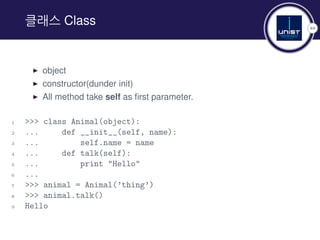
클래스 Class
▶ object
▶ constructor(dunder init)
▶ All method take self as first parameter.
1 >>> class Animal(object):
2 ... def __init__(self, name):
3 ... self.name = name
4 ... def talk(self):
5 ... print "Hello"
6 ...
7 >>> animal = Animal(’thing’)
8 >>> animal.talk()
9 Hello
45
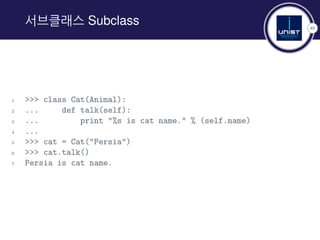
서브클래스 Subclass
1 >>> class Cat(Animal):
2 ... def talk(self):
3 ... print "%s is cat name." % (self.name)
4 ...
5 >>> cat = Cat("Persia")
6 >>> cat.talk()
7 Persia is cat name.
Thank you for attention!
In case you have any comments, suggestions or have found a
bug, please do not hesitate to contact me.
Kyunghoon Kim
kyunghoon@unist.ac.kr
Graduate Student in
Computational Mathematical Sciences Laboratory
http://amath.unist.ac.kr

Welcome to python

  • 1.
    Welcome to Python 2015Summer Data Mining Workshop August 20, 2015 Kyunghoon Kim kyunghoon@unist.ac.kr Department of Mathematical Sciences Ulsan National Institute of Science and Technology Republic of Korea
  • 2.
    1 Contents Python 왜 프로그래밍을 배워야하나? 왜 파이썬을 사용하나? 어떻게 파이썬을 배우나? 파이썬2냐 파이썬3냐 파이썬 배우기 파이썬 코드와 실행 객체 Object help(), dir() 변수의 자료형 주석 comment 리스트 list 사전 dictionary 함수 Function 반복문 Loop statement 조건문 Conditional statement 클래스 Class
  • 3.
    2 왜 프로그래밍을 배워야하나? https://www.youtube.com/watch?v=nKIu9yen5nc
  • 4.
  • 5.
  • 6.
  • 7.
  • 8.
  • 9.
    8 왜 파이썬을 사용하나? Pythonis a programming language that lets you work quickly and integrate systems more effectively. https://www.python.org/
  • 10.
    9 어떻게 파이썬을 배우나? ▶English : http://code.tutsplus.com/articles/ the-best-way-to-learn-python--net-26288 ▶ Korean : https://nolboo.github.io/blog/2014/08/10/ the-best-way-to-learn-python/
  • 11.
    10 어떻게 파이썬을 배우나? WebTutorial(links) ▶ Codecademy python-ko ▶ Python Visualization ▶ ipython Tutorial ▶ Learn Python Online
  • 12.
    11 어떻게 파이썬을 배우나? Slide(links) ▶Learn 90% of Python in 90 Minutes ▶ 산업공학과를 위한 프로그래밍 입문
  • 13.
    12 어떻게 파이썬을 배우나? OnlineBook(links) ▶ 점프 투 파이썬 ▶ Dive into Python(번역본) ▶ 컴퓨터 과학자 같이 생각하는 법(파이썬 버전) ▶ Problem Solving with Algorithms and Data Structures ▶ 파이썬 문서고
  • 14.
  • 15.
  • 16.
  • 17.
    16 파이썬 코드와 실행 hello.py 1print("hello world") Command prompt 1 $ python hello.py
  • 18.
    17 객체 Object Everything inPython is an object ▶ identity(id) ▶ value ▶ mutable ▶ list ▶ dictionary ▶ immutable ▶ string ▶ integer ▶ tuple
  • 19.
    18 help(), dir() 정의된 객체에관한 문서를 얻을 때 사용하는 명령어. 1. help() 객체에 대해 뭔가 알고 싶다 1 >>> help(dir) 2 Help on built-in function dir in module __builtin__: 3 4 dir(...) 5 dir([object]) -> list of strings 2. dir() 객체의 속성에 관한 목록을 얻고 싶다 1 >>> dir(help) 2 [‘__call__’, ‘__class__’, ‘__delattr__’, ‘__dict__’, ...]
  • 20.
    19 변수의 자료형 변수는 자료형이없어서 선언할 필요가 없다. 1 >>> a = 3 # integer 2 >>> b = 3.14 # float 3 >>> c = "string" # string 4 >>> d = ‘string’ 5 >>> e = "3" 1 >>> type(a) 2 int 3 >>> type(b) 4 float 5 >>> type(c) 6 str
  • 21.
    20 정수의 자료형 고정 소수점Fixed point 방식 int : 마이크로프로세서의 기본 비트의 길이 1 >>> import sys 2 >>> print(sys.maxint) 3 9223372036854775807 long : 정수의 범위를 넘어서는 큰 숫자(only python2) 1 >>> print(sys.maxint+1) 2 9223372036854775808L
  • 22.
    21 실수의 자료형 부동 소수점Floating point 방식 : 소수점의 위치를 고정하지 않고 그 위치를 나타내는 수(exponent)를 따로 적음 [mantissa] ∗ [base][exponent] 정밀도 precision 문제 발생 1 >>> (1234.567+0.001)+0.0004 2 1234.5683999999999 1 >>> 1234.567+(0.001+0.0004) 2 1234.5684
  • 23.
    22 정밀도 설정 decimal 객체를생성하여 10진수를 정확하게 나타낼 수 있음. 1 >>> from decimal import Decimal, getcontext # Module import 2 >>> getcontext().prec = 12 # precision 3 >>> Decimal(1234.567)+Decimal(0.001)+Decimal(0.0004) 4 Decimal(‘1234.56840000’) 5 >>> getcontext().prec = 24 6 >>> (Decimal(1234.567)+Decimal(0.001))+Decimal(0.0004) 7 Decimal(‘1234.56840000000000727600’) 8 >>> Decimal(1234.567)+(Decimal(0.001)+Decimal(0.0004)) 9 Decimal(‘1234.56840000000000727600’) 10 >>> Decimal(10)**600 11 Decimal(’1.00000000000000000000000E+600’) 하지만.. 긴 시간의 연산에서는 느리다.
  • 24.
    23 정수의 나눗셈 1 >>>3/4 2 0 3 >>> 3/4. 4 0.75 Python3에서는 문제가 없다.
  • 25.
    24 복소수 실수, 허수 부분은64비트 부동 소수점 숫자로 저장됨. 1 >>> a = 1-2j 2 >>> a.real 3 1.0 4 >>> a.imag 5 -2.0 6 >>> abs(a) 7 2.23606797749979 8 >>> a 9 (1-2j)
  • 26.
    25 문자열 1 >>> a= ‘apple’ 2 >>> b = "apple" 3 >>> c = """apple""" 4 >>> print a, b, c 5 apple apple apple String Escaping 1 >>> print "I’m happy" 2 I’m happy 3 >>> print ‘I’m happy’ 4 I’m happy 5 >>> print """"I’m happy"""" 6 "I’m happy"
  • 27.
    26 문자열 포맷 1 >>>a = "apple" 2 >>> b = "banana" 3 >>> "%s and %s" % (a, b) 4 ‘apple and banana’ 5 >>> "0 and 1".format(a, b) 6 ‘apple and banana’ 7 >>> print a, "and", b 8 apple and banana
  • 28.
    27 문자열 방법 Dunder(Double under)Methods and String Methods 1 >>> dir("apple") 2 [’__add__’, ’__class__’, ’__contains__’, ’__delattr__’, 3 ’__doc__’, ’__eq__’, ’__format__’, ’__ge__’, ’__getattribute__’, 4 ... 5 ’capitalize’, ’center’, ’count’, ’decode’, ’encode’, 6 ’endswith’, ’expandtabs’, ’find’, ’format’, ’index’, 7 ’isalnum’, ’isalpha’, ’isdigit’, ’islower’, ’isspace’, 8 ’istitle’, ’isupper’, ’join’, ’ljust’, ’lower’, ’lstrip’, 9 ’partition’, ’replace’, ’rfind’, ’rindex’, ’rjust’, 10 ’rpartition’, ’rsplit’, ’rstrip’, ’split’, ’splitlines’, 11 ’startswith’, ’strip’, ’swapcase’, ’title’, ’translate’, 12 ’upper’, ’zfill’]
  • 29.
    28 주석 comment 1 #한 줄 주석 2 3 """ 4 여러 줄 주석 5 """
  • 30.
    29 그 외 자료형들 ▶None ▶ Booleans ▶ Sequences ▶ list ▶ tuple ▶ set ▶ Dictionary
  • 31.
    30 리스트 list 1 >>>a = [’apple’, ’banana’, ’kiwi’] 2 >>> a[0] 3 ’apple’ 4 >>> a[2] 5 ’kiwi’ 6 >>> a[-1] # a[len(a)-1] 7 ’kiwi’ 8 >>> len(a) 9 3
  • 32.
    31 리스트 list 1 >>>dir([]) 2 [..., ’append’, ’count’, ’extend’, ’index’, 3 ’insert’, ’pop’, ’remove’, ’reverse’, ’sort’] 4 5 >>> a.append(’melon’) 6 >>> a 7 [’apple’, ’banana’, ’kiwi’, ’melon’] 8 >>> a.index(’kiwi’) 9 2 10 >>> a.remove(’banana’) 11 >>> a 12 [’apple’, ’kiwi’, ’melon’] 13 >>> a.pop(2) 14 ’melon’ 15 >>> a 16 [’apple’, ’kiwi’]
  • 33.
    32 리스트 list 1 >>>range(10) # half-open interval 2 [0, 1, 2, 3, 4, 5, 6, 7, 8, 9] 3 >>> range(3, 10) # length = end - start 4 [3, 4, 5, 6, 7, 8, 9] 5 >>> range(1, 10, 2) 6 [1, 3, 5, 7, 9] 7 >>> a = range(10) 8 >>> a 9 [0, 1, 2, 3, 4, 5, 6, 7, 8, 9] 10 >>> a[3:5] 11 [3, 4] 12 >>> a[::-1] 13 [9, 8, 7, 6, 5, 4, 3, 2, 1, 0]
  • 34.
    33 사전 dictionary Hashmap, Associativearray 1 >>> a = {} # a = dict() 2 >>> a[’apple’] = 500 3 >>> a[’banana’] = 200 4 >>> a 5 {’apple’: 500, ’banana’: 200} 1 >>> dir({}) 2 [...,’clear’, ’copy’, ’fromkeys’, ’get’, ’has_key’, ’items’, 3 ’iteritems’, ’iterkeys’, ’itervalues’, ’keys’, ’pop’, 4 ’popitem’, ’setdefault’, ’update’, ’values’, ’viewitems’, 5 ’viewkeys’, ’viewvalues’]
  • 35.
    34 사전 dictionary 1 >>>apple = dict() 2 >>> apple = {"price": 500, "type": ["fruit", "red"], 3 "property": {"a": 1}} 4 >>> apple[’price’] 5 500 6 >>> apple[’type’] 7 [’fruit’, ’red’] 8 >>> apple[’type’][0] 9 ’fruit’ 10 >>> apple[’property’] 11 {’a’: 1} 12 >>> apple[’property’][’a’] 13 1 14 >>> apple.get("price", None) 15 500 16 >>> apple.get("where", None) 17 >>>
  • 36.
    35 그 외 유용한자료형들 1 >>> values = [1,1,1,2,3,3,4,5,6,7,7] 2 >>> set(values) # 집합 set 3 set([1, 2, 3, 4, 5, 6, 7]) 4 >>> list(set(values)) 5 [1, 2, 3, 4, 5, 6, 7] 1 >>> a = (11, 23, "Monday") # 튜플 tuple 2 >>> (mon, day, text) = a 3 >>> print mon, day, text 4 11 23 Monday
  • 37.
    36 함수 Function f(x) =4x ∗ (1 − x) 1 >>> def f(x): 2 return 4*x*(1-x) 3 >>> f(0.2) 4 0.6400000000000001
  • 38.
    37 함수 Function 1 >>>from decimal import Decimal, getcontext 2 >>> getcontext().prec = 24 3 >>> def f(a, x): 4 """ Logistic Function """ 5 x = Decimal(x) 6 return a*x*(1-x) 7 >>> f(4, 0.2) 8 Decimal(’0.640000000000000026645353’) 9 10 >>> help(f) 11 Help on function f in module __main__: 12 13 f(a, x) 14 Logistic Function
  • 39.
    38 반복문 Loop 1 >>>for i in [’apple’, ’banana’, ’kiwi’]: 2 ... print i 3 ... 4 apple 5 banana 6 kiwi 7 8 >>> for i in range(0, 10, 2): 9 ... print i 10 ... 11 0 12 2 13 4 14 6 15 8
  • 40.
    39 반복문 Loop 1 >>>x = 0.1 2 >>> for i in range(10): 3 print x 4 x = f(4, x) # logistic function 5 print x 6 0.1 7 0.360000000000000017763568 8 0.921600000000000019895195 9 0.289013759999999932897486 10 0.821939226122649486738340 11 0.585420538734198249301121 12 0.970813326249437346212131 13 0.113339247303763482961149 14 0.401973849297519300076195 15 0.961563495113818170323396 16 0.147836559913265400036406
  • 41.
    40 조건문 Conditional statement 1>>> x = 0.1 2 >>> for i in range(100): 3 print x 4 x = f(2, x) 5 print x 6 0.1 7 0.180000000000000008881784 8 0.295200000000000011368684 9 0.416113920000000009313226 10 0.485926251164467203125000 11 0.499603859187428678487954 12 0.499999686144913230666241 13 0.499999999999802989969018 14 0.500000000000000000000000 15 0.500000000000000000000000 16 0.500000000000000000000000 17 0.500000000000000000000000
  • 42.
    41 조건문 Conditional statement 1>>> x = Decimal(0.1) 2 >>> for i in range(100): 3 print x 4 new_x = f(2, x) 5 if new_x - x < 0.0000001: 6 print "Converged" 7 break 8 else: 9 x = new_x 10 print x 11 0.1000000000000000055511151231257827021181583404541015625 12 0.180000000000000008881784 13 0.295200000000000011368684 14 0.416113920000000009313226 15 0.485926251164467203125000 16 0.499603859187428678487954 17 0.499999686144913230666241 18 0.499999999999802989969018 Converged
  • 43.
    42 조건문 Conditional statement 1>>> A = 85 2 >>> if A>90: 3 ... print "A" 4 ... elif A>80: 5 ... print "B" 6 ... elif A>70: 7 ... print "C" 8 ... else: 9 ... print "D" 10 ... 11 B
  • 44.
    43 반복문과 조건문 예 1>>> animals = [’cat’, ’dog’, ’cock’, ’rabbit’] 2 >>> for index, value in enumerate(animals): 3 ... print index, value 4 ... 5 0 cat 6 1 dog 7 2 cock 8 3 rabbit 9 10 >>> for index, value in enumerate(animals): 11 ... if value[0] == ’c’: 12 ... print index, value 13 ... 14 0 cat 15 2 cock
  • 45.
    44 클래스 Class ▶ object ▶constructor(dunder init) ▶ All method take self as first parameter. 1 >>> class Animal(object): 2 ... def __init__(self, name): 3 ... self.name = name 4 ... def talk(self): 5 ... print "Hello" 6 ... 7 >>> animal = Animal(’thing’) 8 >>> animal.talk() 9 Hello
  • 46.
    45 서브클래스 Subclass 1 >>>class Cat(Animal): 2 ... def talk(self): 3 ... print "%s is cat name." % (self.name) 4 ... 5 >>> cat = Cat("Persia") 6 >>> cat.talk() 7 Persia is cat name.
  • 47.
    Thank you forattention! In case you have any comments, suggestions or have found a bug, please do not hesitate to contact me. Kyunghoon Kim kyunghoon@unist.ac.kr Graduate Student in Computational Mathematical Sciences Laboratory http://amath.unist.ac.kr