Data Structures
Tree
Binary Tree
Binary Search Tree
Operations
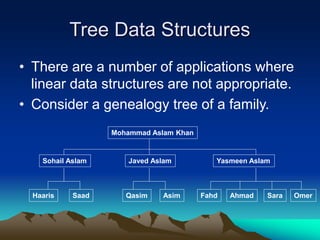
Tree Data Structures
• There are a number of applications where
linear data structures are not appropriate.
• Consider a genealogy tree of a family.
Mohammad Aslam Khan
Sohail Aslam Javed Aslam Yasmeen Aslam
SaadHaaris Qasim Asim Fahd Ahmad Sara Omer
Tree Data Structure
• A linear linked list will not be able to
capture the tree-like relationship with
ease.
• Shortly, we will see that for applications
that require searching, linear data
structures are not suitable.
• We will focus our attention on binary trees.
Binary Tree
• A binary tree is a finite set of elements that is
either empty or is partitioned into three disjoint
subsets.
• The first subset contains a single element called
the root of the tree.
• The other two subsets are themselves binary
trees called the left and right subtrees.
• Each element of a binary tree is called a node of
the tree.
Binary Tree
• Binary tree with 9 nodes.
A
B
D
H
C
E F
G I
Binary Tree
A
B
D
H
C
E F
G I
Left subtree
root
Right subtree
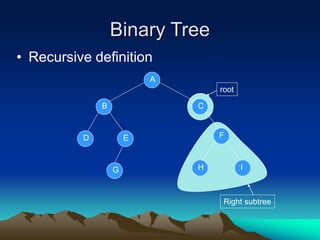
Binary Tree
• Recursive definition
A
B
D
H
C
E F
G ILeft subtree
root
Right subtree
Binary Tree
• Recursive definition
A
B
D
H
C
E F
G I
Left subtree
root
Binary Tree
• Recursive definition
A
B
D
H
C
E F
G I
root
Binary Tree
• Recursive definition
A
B
D
H
C
E F
G I
root
Right subtree
Binary Tree
• Recursive definition
A
B
D
H
C
E F
G I
root
Right subtreeLeft subtree
Not a Tree
• Structures that are not trees.
A
B
D
H
C
E F
G I
Not a Tree
• Structures that are not trees.
A
B
D
H
C
E F
G I
Not a Tree
• Structures that are not trees.
A
B
D
H
C
E F
G I
Binary Tree: Terminology
A
B
D
H
C
E F
G I
parent
Left descendant Right descendant
Leaf nodes Leaf nodes
Binary Tree
• If every non-leaf node in a binary tree has non-empty left
and right subtrees, the tree is termed a strictly binary
tree.
A
B
D
H
C
E F
G I
J
K
Level of a Binary Tree Node
• The level of a node in a binary tree is
defined as follows:
 Root has level 0,
 Level of any other node is one more than the
level its parent (father).
• The depth of a binary tree is the maximum
level of any leaf in the tree.
Level of a Binary Tree Node
A
B
D
H
C
E F
G I
1
0
1
2 2 2
3 3 3
Level 0
Level 1
Level 2
Level 3
Complete Binary Tree
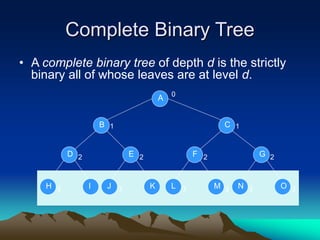
• A complete binary tree of depth d is the strictly
binary all of whose leaves are at level d.
A
B
N
C
G
O
1
0
1
2
3 3L
F
M
2
3 3H
D
I
2
3 J
E
K
2
3
Complete Binary Tree
A
B
Level 0: 20 nodes
H
D
I
E
J K
C
L
F
M
G
N O
Level 1: 21 nodes
Level 2: 22 nodes
Level 3: 23 nodes
Complete Binary Tree
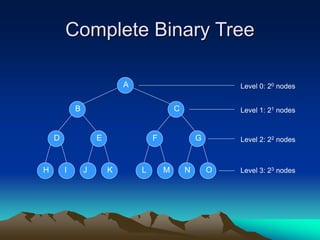
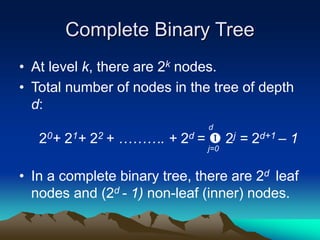
• At level k, there are 2k nodes.
• Total number of nodes in the tree of depth
d:
20+ 21+ 22 + ………. + 2d =  2j = 2d+1 – 1
• In a complete binary tree, there are 2d leaf
nodes and (2d - 1) non-leaf (inner) nodes.
j=0
d
Operations on Binary Tree
• There are a number of operations that can
be defined for a binary tree.
• If p is pointing to a node in an existing tree
then
 left(p) returns pointer to the left subtree
 right(p) returns pointer to right subtree
 parent(p) returns the father of p
 brother(p) returns brother of p.
 info(p) returns content of the node.
Operations on Binary Tree
• In order to construct a binary tree, the
following can be useful:
• setLeft(p,x) creates the left child node of p.
The child node contains the info ‘x’.
• setRight(p,x) creates the right child node
of p. The child node contains the info ‘x’.
Applications of Binary Trees
• A binary tree is a useful data structure
when two-way decisions must be made at
each point in a process.
• For example, suppose we wanted to find
all duplicates in a list of numbers:
14, 15, 4, 9, 7, 18, 3, 5, 16, 4, 20, 17, 9, 14, 5
Applications of Binary Trees
• One way of finding duplicates is to
compare each number with all those that
precede it.
14, 15, 4, 9, 7, 18, 3, 5, 16, 4, 20, 17, 9, 14, 5
14, 15, 4, 9, 7, 18, 3, 5, 16, 4, 20, 17, 9, 14, 5
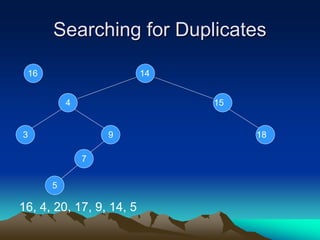
Searching for Duplicates
• If the list of numbers is large and is
growing, this procedure involves a large
number of comparisons.
• A linked list could handle the growth but
the comparisons would still be large.
• The number of comparisons can be
drastically reduced by using a binary tree.
• The tree grows dynamically like the linked
list.
Searching for Duplicates
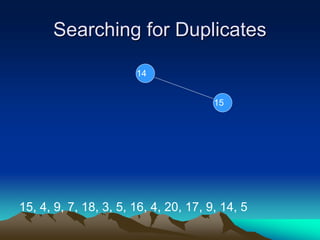
• The binary tree is built in a special way.
• The first number in the list is placed in a
node that is designated as the root of a
binary tree.
• Initially, both left and right subtrees of the
root are empty.
• We take the next number and compare it
with the number placed in the root.
• If it is the same then we have a duplicate.
Searching for Duplicates
• Otherwise, we create a new tree node and
put the new number in it.
• The new node is made the left child of the
root node if the second number is less
than the one in the root.
• The new node is made the right child if the
number is greater than the one in the root.
Searching for Duplicates
14, 15, 4, 9, 7, 18, 3, 5, 16, 4, 20, 17, 9, 14, 5
14
Searching for Duplicates
15, 4, 9, 7, 18, 3, 5, 16, 4, 20, 17, 9, 14, 5
1415
Searching for Duplicates
15, 4, 9, 7, 18, 3, 5, 16, 4, 20, 17, 9, 14, 5
14
15
Searching for Duplicates
4, 9, 7, 18, 3, 5, 16, 4, 20, 17, 9, 14, 5
14
15
4
Searching for Duplicates
4, 9, 7, 18, 3, 5, 16, 4, 20, 17, 9, 14, 5
14
154
Searching for Duplicates
9, 7, 18, 3, 5, 16, 4, 20, 17, 9, 14, 5
14
154
9
Searching for Duplicates
9, 7, 18, 3, 5, 16, 4, 20, 17, 9, 14, 5
14
154
9
Searching for Duplicates
7, 18, 3, 5, 16, 4, 20, 17, 9, 14, 5
14
154
9
7
Searching for Duplicates
7, 18, 3, 5, 16, 4, 20, 17, 9, 14, 5
14
154
9
7
Searching for Duplicates
18, 3, 5, 16, 4, 20, 17, 9, 14, 5
14
154
9
7
18
Searching for Duplicates
18, 3, 5, 16, 4, 20, 17, 9, 14, 5
14
154
9
7
18
Searching for Duplicates
3, 5, 16, 4, 20, 17, 9, 14, 5
14
154
9
7
18
3
Searching for Duplicates
3, 5, 16, 4, 20, 17, 9, 14, 5
14
154
9
7
183
Searching for Duplicates
5, 16, 4, 20, 17, 9, 14, 5
14
154
9
7
183
5
Searching for Duplicates
5, 16, 4, 20, 17, 9, 14, 5
14
154
9
7
183
5
Searching for Duplicates
16, 4, 20, 17, 9, 14, 5
14
154
9
7
183
5
16
Searching for Duplicates
16, 4, 20, 17, 9, 14, 5
14
154
9
7
183
5
16
Searching for Duplicates
4, 20, 17, 9, 14, 5
14
154
9
7
183
5
16
4
Searching for Duplicates
20, 17, 9, 14, 5
14
154
9
7
183
5
16
20
Searching for Duplicates
20, 17, 9, 14, 5
14
154
9
7
183
5
16 20
Searching for Duplicates
17, 9, 14, 5
14
154
9
7
183
5
16 20
17
Searching for Duplicates
17, 9, 14, 5
14
154
9
7
183
5
16 20
17
Searching for Duplicates
9, 14, 5
14
154
9
7
183
5
16 20
17
Binary Search Tree
• A binary tree with the property that items in
the left subtree are smaller than the root
and items are larger or equal in the right
subtree is called a binary search tree
(BST).
• The tree we built for searching for
duplicate numbers was a binary search
tree.
• BST and its variations play an important
role in searching algorithms.
Binary Search Tree
• A binary tree with the property that items in
the left subtree are smaller than the root
and items are larger or equal in the right
subtree is called a binary search tree
(BST).
• The tree we built for searching for
duplicate numbers was a binary search
tree.
• BST and its variations play an important
role in searching algorithms.
Traversing a Binary Tree
• Suppose we have a binary tree, ordered
(BST) or unordered.
• We want to print all the values stored in
the nodes of the tree.
• In what order should we print them?
Traversing a Binary Tree
• Ways to print a 3 node tree:
14
154
(4, 14, 15), (4,15,14)
(14,4,15), (14,15,4)
(15,4,14), (15,14,4)
Traversing a Binary Tree
• In case of the general binary tree:
node
(L,N,R), (L,R,N)
(N,L,R), (N,R,L)
(R,L,N), (R,N,L)
left
subtree
right
subtr
ee
L
N
R
Traversing a Binary Tree
• Three common ways
node
Preorder: (N,L,R)
Inorder: (L,N,R)
Postorder: (L,R,N)
left
subtree
right
subtre
e
L
N
R
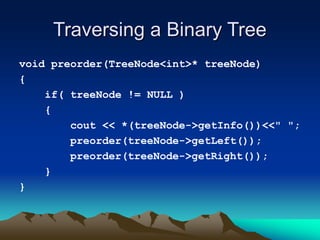
Traversing a Binary Tree
void preorder(TreeNode<int>* treeNode)
{
if( treeNode != NULL )
{
cout << *(treeNode->getInfo())<<" ";
preorder(treeNode->getLeft());
preorder(treeNode->getRight());
}
}
Traversing a Binary Tree
void inorder(TreeNode<int>* treeNode)
{
if( treeNode != NULL )
{
inorder(treeNode->getLeft());
cout << *(treeNode->getInfo())<<" ";
inorder(treeNode->getRight());
}
}
Traversing a Binary Tree
void postorder(TreeNode<int>* treeNode)
{
if( treeNode != NULL )
{
postorder(treeNode->getLeft());
postorder(treeNode->getRight());
cout << *(treeNode->getInfo())<<" ";
}
}
Traversing a Binary Tree
cout << "inorder: "; preorder( root);
cout << "inorder: "; inorder( root );
cout << "postorder: "; postorder( root );
Traversing a Binary Tree
Preorder: 14 4 3 9 7 5 15 18 16 17 20
14
154
9
7
183
5
16 20
17
Traversing a Binary Tree
Inorder: 3 4 5 7 9 14 15 16 17 18 20
14
154
9
7
183
5
16 20
17
Traversing a Binary Tree
• Suppose we have a binary tree, ordered
(BST) or unordered.
• We want to print all the values stored in
the nodes of the tree.
• In what order should we print them?
Traversing a Binary Tree
Preorder: 14 4 3 9 7 5 15 18 16 17 20
14
154
9
7
183
5
16 20
17
Traversing a Binary Tree
Inorder: 3 4 5 7 9 14 15 16 17 18 20
14
154
9
7
183
5
16 20
17
Deleting a node in BST
• As is common with many data structures,
the hardest operation is deletion.
• Once we have found the node to be
deleted, we need to consider several
possibilities.
• If the node is a leaf, it can be deleted
immediately.
Deleting a node in BST
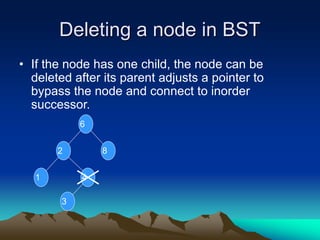
• If the node has one child, the node can be
deleted after its parent adjusts a pointer to
bypass the node and connect to inorder
successor.
6
2
4
3
1
8
Deleting a node in BST
• The inorder traversal order has to be
maintained after the delete.
6
2
4
3
1
8
6
2
4
3
1
8

Deleting a node in BST
• The inorder traversal order has to be
maintained after the delete.
6
2
4
3
1
8
6
2
4
3
1
8
6
2
31
8
 
Deleting a node in BST
• The complicated case is when the node to
be deleted has both left and right subtrees.
• The strategy is to replace the data of this
node with the smallest data of the right
subtree and recursively delete that node.
Deleting a node in BST
Delete(2): locate inorder successor
6
2
5
3
1
8
4
Inorder
successor
Deleting a node in BST
Delete(2): locate inorder successor
6
2
5
3
1
8
4
Inorder
successor
 Inorder successor will be the left-most
node in the right subtree of 2.
 The inorder successor will not have a left
child because if it did, that child would be
the left-most node.
Deleting a node in BST
Delete(2): copy data from inorder successor
6
2
5
3
1
8
4
 6
3
5
3
1
8
4
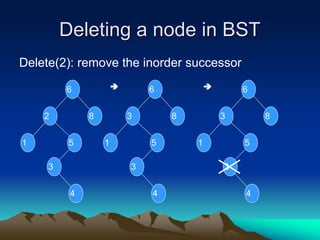
Deleting a node in BST
Delete(2): remove the inorder successor
6
2
5
3
1
8
4
 6
3
5
3
1
8
4
 6
3
5
3
1
8
4
Deleting a node in BST
Delete(2)
 6
3
5
4
1
8
 6
3
5
3
1
8
4

Week 8 (trees)

  • 1.
  • 2.
    Tree Data Structures •There are a number of applications where linear data structures are not appropriate. • Consider a genealogy tree of a family. Mohammad Aslam Khan Sohail Aslam Javed Aslam Yasmeen Aslam SaadHaaris Qasim Asim Fahd Ahmad Sara Omer
  • 3.
    Tree Data Structure •A linear linked list will not be able to capture the tree-like relationship with ease. • Shortly, we will see that for applications that require searching, linear data structures are not suitable. • We will focus our attention on binary trees.
  • 4.
    Binary Tree • Abinary tree is a finite set of elements that is either empty or is partitioned into three disjoint subsets. • The first subset contains a single element called the root of the tree. • The other two subsets are themselves binary trees called the left and right subtrees. • Each element of a binary tree is called a node of the tree.
  • 5.
    Binary Tree • Binarytree with 9 nodes. A B D H C E F G I
  • 6.
    Binary Tree A B D H C E F GI Left subtree root Right subtree
  • 7.
    Binary Tree • Recursivedefinition A B D H C E F G ILeft subtree root Right subtree
  • 8.
    Binary Tree • Recursivedefinition A B D H C E F G I Left subtree root
  • 9.
    Binary Tree • Recursivedefinition A B D H C E F G I root
  • 10.
    Binary Tree • Recursivedefinition A B D H C E F G I root Right subtree
  • 11.
    Binary Tree • Recursivedefinition A B D H C E F G I root Right subtreeLeft subtree
  • 12.
    Not a Tree •Structures that are not trees. A B D H C E F G I
  • 13.
    Not a Tree •Structures that are not trees. A B D H C E F G I
  • 14.
    Not a Tree •Structures that are not trees. A B D H C E F G I
  • 15.
    Binary Tree: Terminology A B D H C EF G I parent Left descendant Right descendant Leaf nodes Leaf nodes
  • 16.
    Binary Tree • Ifevery non-leaf node in a binary tree has non-empty left and right subtrees, the tree is termed a strictly binary tree. A B D H C E F G I J K
  • 17.
    Level of aBinary Tree Node • The level of a node in a binary tree is defined as follows:  Root has level 0,  Level of any other node is one more than the level its parent (father). • The depth of a binary tree is the maximum level of any leaf in the tree.
  • 18.
    Level of aBinary Tree Node A B D H C E F G I 1 0 1 2 2 2 3 3 3 Level 0 Level 1 Level 2 Level 3
  • 19.
    Complete Binary Tree •A complete binary tree of depth d is the strictly binary all of whose leaves are at level d. A B N C G O 1 0 1 2 3 3L F M 2 3 3H D I 2 3 J E K 2 3
  • 20.
    Complete Binary Tree A B Level0: 20 nodes H D I E J K C L F M G N O Level 1: 21 nodes Level 2: 22 nodes Level 3: 23 nodes
  • 21.
    Complete Binary Tree •At level k, there are 2k nodes. • Total number of nodes in the tree of depth d: 20+ 21+ 22 + ………. + 2d =  2j = 2d+1 – 1 • In a complete binary tree, there are 2d leaf nodes and (2d - 1) non-leaf (inner) nodes. j=0 d
  • 22.
    Operations on BinaryTree • There are a number of operations that can be defined for a binary tree. • If p is pointing to a node in an existing tree then  left(p) returns pointer to the left subtree  right(p) returns pointer to right subtree  parent(p) returns the father of p  brother(p) returns brother of p.  info(p) returns content of the node.
  • 23.
    Operations on BinaryTree • In order to construct a binary tree, the following can be useful: • setLeft(p,x) creates the left child node of p. The child node contains the info ‘x’. • setRight(p,x) creates the right child node of p. The child node contains the info ‘x’.
  • 24.
    Applications of BinaryTrees • A binary tree is a useful data structure when two-way decisions must be made at each point in a process. • For example, suppose we wanted to find all duplicates in a list of numbers: 14, 15, 4, 9, 7, 18, 3, 5, 16, 4, 20, 17, 9, 14, 5
  • 25.
    Applications of BinaryTrees • One way of finding duplicates is to compare each number with all those that precede it. 14, 15, 4, 9, 7, 18, 3, 5, 16, 4, 20, 17, 9, 14, 5 14, 15, 4, 9, 7, 18, 3, 5, 16, 4, 20, 17, 9, 14, 5
  • 26.
    Searching for Duplicates •If the list of numbers is large and is growing, this procedure involves a large number of comparisons. • A linked list could handle the growth but the comparisons would still be large. • The number of comparisons can be drastically reduced by using a binary tree. • The tree grows dynamically like the linked list.
  • 27.
    Searching for Duplicates •The binary tree is built in a special way. • The first number in the list is placed in a node that is designated as the root of a binary tree. • Initially, both left and right subtrees of the root are empty. • We take the next number and compare it with the number placed in the root. • If it is the same then we have a duplicate.
  • 28.
    Searching for Duplicates •Otherwise, we create a new tree node and put the new number in it. • The new node is made the left child of the root node if the second number is less than the one in the root. • The new node is made the right child if the number is greater than the one in the root.
  • 29.
    Searching for Duplicates 14,15, 4, 9, 7, 18, 3, 5, 16, 4, 20, 17, 9, 14, 5 14
  • 30.
    Searching for Duplicates 15,4, 9, 7, 18, 3, 5, 16, 4, 20, 17, 9, 14, 5 1415
  • 31.
    Searching for Duplicates 15,4, 9, 7, 18, 3, 5, 16, 4, 20, 17, 9, 14, 5 14 15
  • 32.
    Searching for Duplicates 4,9, 7, 18, 3, 5, 16, 4, 20, 17, 9, 14, 5 14 15 4
  • 33.
    Searching for Duplicates 4,9, 7, 18, 3, 5, 16, 4, 20, 17, 9, 14, 5 14 154
  • 34.
    Searching for Duplicates 9,7, 18, 3, 5, 16, 4, 20, 17, 9, 14, 5 14 154 9
  • 35.
    Searching for Duplicates 9,7, 18, 3, 5, 16, 4, 20, 17, 9, 14, 5 14 154 9
  • 36.
    Searching for Duplicates 7,18, 3, 5, 16, 4, 20, 17, 9, 14, 5 14 154 9 7
  • 37.
    Searching for Duplicates 7,18, 3, 5, 16, 4, 20, 17, 9, 14, 5 14 154 9 7
  • 38.
    Searching for Duplicates 18,3, 5, 16, 4, 20, 17, 9, 14, 5 14 154 9 7 18
  • 39.
    Searching for Duplicates 18,3, 5, 16, 4, 20, 17, 9, 14, 5 14 154 9 7 18
  • 40.
    Searching for Duplicates 3,5, 16, 4, 20, 17, 9, 14, 5 14 154 9 7 18 3
  • 41.
    Searching for Duplicates 3,5, 16, 4, 20, 17, 9, 14, 5 14 154 9 7 183
  • 42.
    Searching for Duplicates 5,16, 4, 20, 17, 9, 14, 5 14 154 9 7 183 5
  • 43.
    Searching for Duplicates 5,16, 4, 20, 17, 9, 14, 5 14 154 9 7 183 5
  • 44.
    Searching for Duplicates 16,4, 20, 17, 9, 14, 5 14 154 9 7 183 5 16
  • 45.
    Searching for Duplicates 16,4, 20, 17, 9, 14, 5 14 154 9 7 183 5 16
  • 46.
    Searching for Duplicates 4,20, 17, 9, 14, 5 14 154 9 7 183 5 16 4
  • 47.
    Searching for Duplicates 20,17, 9, 14, 5 14 154 9 7 183 5 16 20
  • 48.
    Searching for Duplicates 20,17, 9, 14, 5 14 154 9 7 183 5 16 20
  • 49.
    Searching for Duplicates 17,9, 14, 5 14 154 9 7 183 5 16 20 17
  • 50.
    Searching for Duplicates 17,9, 14, 5 14 154 9 7 183 5 16 20 17
  • 51.
    Searching for Duplicates 9,14, 5 14 154 9 7 183 5 16 20 17
  • 52.
    Binary Search Tree •A binary tree with the property that items in the left subtree are smaller than the root and items are larger or equal in the right subtree is called a binary search tree (BST). • The tree we built for searching for duplicate numbers was a binary search tree. • BST and its variations play an important role in searching algorithms.
  • 53.
    Binary Search Tree •A binary tree with the property that items in the left subtree are smaller than the root and items are larger or equal in the right subtree is called a binary search tree (BST). • The tree we built for searching for duplicate numbers was a binary search tree. • BST and its variations play an important role in searching algorithms.
  • 54.
    Traversing a BinaryTree • Suppose we have a binary tree, ordered (BST) or unordered. • We want to print all the values stored in the nodes of the tree. • In what order should we print them?
  • 55.
    Traversing a BinaryTree • Ways to print a 3 node tree: 14 154 (4, 14, 15), (4,15,14) (14,4,15), (14,15,4) (15,4,14), (15,14,4)
  • 56.
    Traversing a BinaryTree • In case of the general binary tree: node (L,N,R), (L,R,N) (N,L,R), (N,R,L) (R,L,N), (R,N,L) left subtree right subtr ee L N R
  • 57.
    Traversing a BinaryTree • Three common ways node Preorder: (N,L,R) Inorder: (L,N,R) Postorder: (L,R,N) left subtree right subtre e L N R
  • 58.
    Traversing a BinaryTree void preorder(TreeNode<int>* treeNode) { if( treeNode != NULL ) { cout << *(treeNode->getInfo())<<" "; preorder(treeNode->getLeft()); preorder(treeNode->getRight()); } }
  • 59.
    Traversing a BinaryTree void inorder(TreeNode<int>* treeNode) { if( treeNode != NULL ) { inorder(treeNode->getLeft()); cout << *(treeNode->getInfo())<<" "; inorder(treeNode->getRight()); } }
  • 60.
    Traversing a BinaryTree void postorder(TreeNode<int>* treeNode) { if( treeNode != NULL ) { postorder(treeNode->getLeft()); postorder(treeNode->getRight()); cout << *(treeNode->getInfo())<<" "; } }
  • 61.
    Traversing a BinaryTree cout << "inorder: "; preorder( root); cout << "inorder: "; inorder( root ); cout << "postorder: "; postorder( root );
  • 62.
    Traversing a BinaryTree Preorder: 14 4 3 9 7 5 15 18 16 17 20 14 154 9 7 183 5 16 20 17
  • 63.
    Traversing a BinaryTree Inorder: 3 4 5 7 9 14 15 16 17 18 20 14 154 9 7 183 5 16 20 17
  • 64.
    Traversing a BinaryTree • Suppose we have a binary tree, ordered (BST) or unordered. • We want to print all the values stored in the nodes of the tree. • In what order should we print them?
  • 65.
    Traversing a BinaryTree Preorder: 14 4 3 9 7 5 15 18 16 17 20 14 154 9 7 183 5 16 20 17
  • 66.
    Traversing a BinaryTree Inorder: 3 4 5 7 9 14 15 16 17 18 20 14 154 9 7 183 5 16 20 17
  • 67.
    Deleting a nodein BST • As is common with many data structures, the hardest operation is deletion. • Once we have found the node to be deleted, we need to consider several possibilities. • If the node is a leaf, it can be deleted immediately.
  • 68.
    Deleting a nodein BST • If the node has one child, the node can be deleted after its parent adjusts a pointer to bypass the node and connect to inorder successor. 6 2 4 3 1 8
  • 69.
    Deleting a nodein BST • The inorder traversal order has to be maintained after the delete. 6 2 4 3 1 8 6 2 4 3 1 8 
  • 70.
    Deleting a nodein BST • The inorder traversal order has to be maintained after the delete. 6 2 4 3 1 8 6 2 4 3 1 8 6 2 31 8  
  • 71.
    Deleting a nodein BST • The complicated case is when the node to be deleted has both left and right subtrees. • The strategy is to replace the data of this node with the smallest data of the right subtree and recursively delete that node.
  • 72.
    Deleting a nodein BST Delete(2): locate inorder successor 6 2 5 3 1 8 4 Inorder successor
  • 73.
    Deleting a nodein BST Delete(2): locate inorder successor 6 2 5 3 1 8 4 Inorder successor  Inorder successor will be the left-most node in the right subtree of 2.  The inorder successor will not have a left child because if it did, that child would be the left-most node.
  • 74.
    Deleting a nodein BST Delete(2): copy data from inorder successor 6 2 5 3 1 8 4  6 3 5 3 1 8 4
  • 75.
    Deleting a nodein BST Delete(2): remove the inorder successor 6 2 5 3 1 8 4  6 3 5 3 1 8 4  6 3 5 3 1 8 4
  • 76.
    Deleting a nodein BST Delete(2)  6 3 5 4 1 8  6 3 5 3 1 8 4